

Page 1
X8
— 2 —— 1 —
WWW. LTECH.C N
LT@LTE CH.CN
Tel: +8 6 756 620 8 811
Fax : +86 756 6 20 8833
44m m
30m m
175 mm
86m m
3
6
m
m
86m m
170 mm
DX8 RGBW Touch Panel Manual DX8 RGBW Touch Panel Manual
LTE CH LTE CH
warranty
5 years
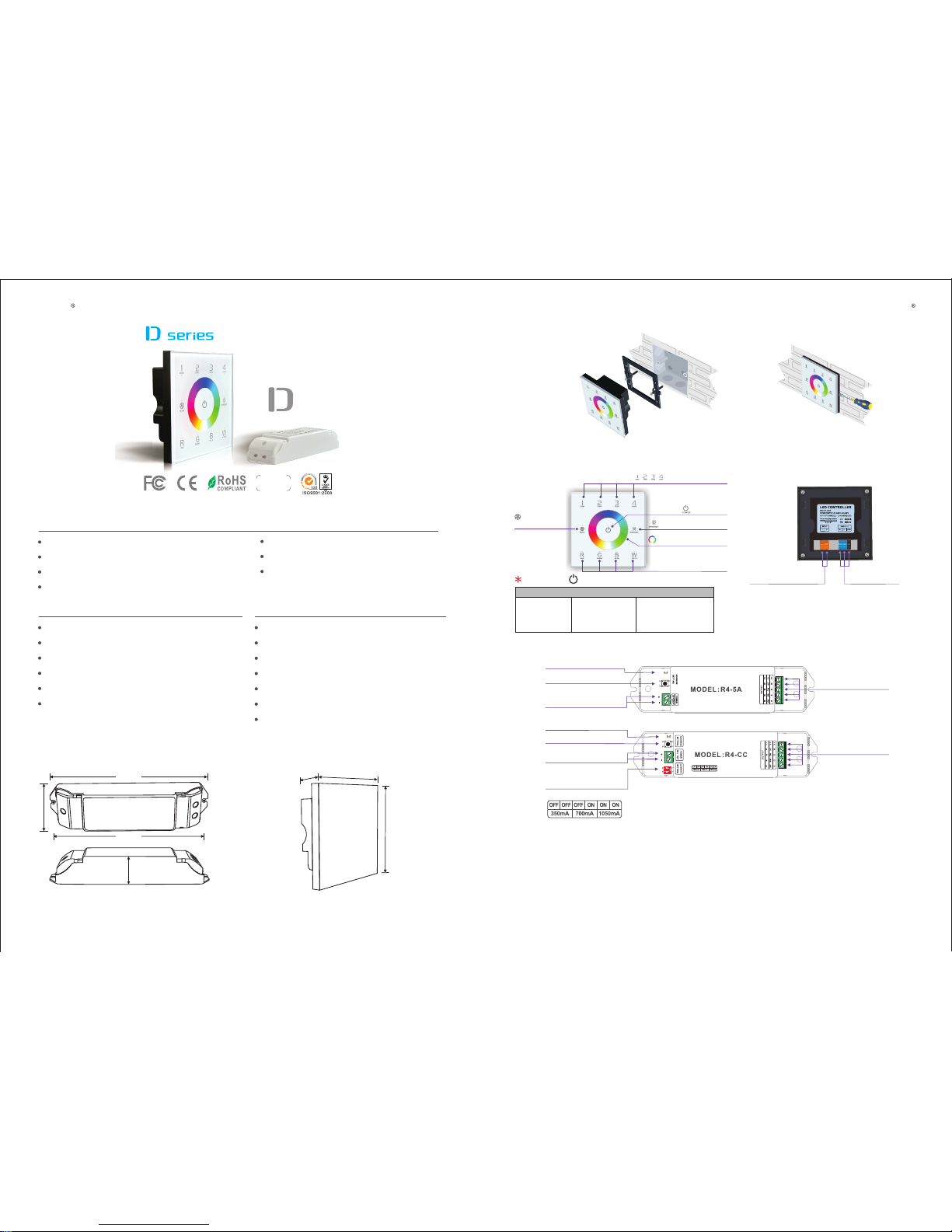
RGBW Touch Panel
R4-5A CV Receiver R4-CC CC Receiver
Input Voltage: AC100~240V
Output Signal: RF 2.4G + DMX512
RF Remote Distance: 30m
Control Mode: 4 Zones Control
Input Voltage: DC5V~DC24V
Max Current Load: 5A × 4CH Max. 20A
Max Output Power: 100W/240W/480W(5V/12V/24V)
Working Temperature: -30℃~55℃
Package Size: L178×W48×H33(mm)
Weight(G.W.): 150g
Input Voltage: DC12V~DC48V
Output Voltage: DC3V~DC46V
Output Current: CC 350/700/1050mA×4CH
Output Power: 1.05W~48.3W×4CH Max 193.2W
Working Temperature: -30℃~55℃
Package Size: L178×W48×H33(mm)
Weight(G.W.): 165g
1. Technical Specs:
Working Temperature: -20℃~60℃
Package Size: L113×W112×H50(mm)
Weight(N.W.): 225g
DX8
2. Product Size:
R4-5A/R4-CC Receiver
Touch Panel
3. Installation Instruction:
Install
Uninstall
4. Key Functions:
5. Terminals:
ON/OFF
Brightness/Speed
Touch Color Circle
Brightness Adjust
Key of RGBW
4 Zones
Selection Keys
Mode Key
Long press to turn on/off the buzzer.
AC100-240V
Power Input Socket
DMX Signal
Output Socket
Tables of Changing Mode:
5. Static Purple
6. Static Cyan
7. Static White
8. RGB Skipping
9. 7 Colors Skipping
10. RGB Color Smooth
11. Full-color Smooth
1. Static Red
2. Static Green
3. Static Blue
4. Static Yellow
6. Operating Instruction for Receiver:
RUN
RUN
Current Selection
Switch
7. :The Learning ID Method
Canceling ID:
Short press “ID learning button” on the R4-5A/R4-CC receiver, the running light keeps
on. Then press any zone No. on the DX8 touch panel, the running light flickers
several times, activated. the receiver accept zone control.
Learn ing ID:
Att: Multiple receivers could be synced to each zone.
LED Lamp
Connection Socket
LED Lamp
Connection Socket
The Running Light
The Running Light
ID learning Button
ID learning Button
DC5V~24V
Power Input Socket
DC12V~48V
Power Input Socket
(Operation Table)
Long press “ID learning but ton” on th e R4-5A/R4-C C receiver for 5s, the running
light flickers sev eral times, canceled.
t ouch p a n e l
Page 2
M
>
>
M
>
>
M
>
>
M
>
>
DC1 2V-24V
DC1 2V-24V
DC1 2V-24V
DC1 2V-24V
001
005
009
013
AC10 0V-240 V
CV
LTE CH LTE CH
— 4 —— 3 —
WWW. LTECH.C N
LT@LTE CH.CN
Tel: +8 6 756 620 8 811
Fax : +86 756 6 20 8833
DC5 V-24V DC5 V-24V DC5 V-24V
CV re ceive r
R4-5 A
CV re ceive r
R4-5 A
CV re ceive r
R4-5 A
+
B
R
G
W
+
B
R
G
W
+
B
R
G
W
+
B
R
G
W
+
B
R
G
W
+
B
R
G
W
DC1 2V-48V
DC1 2V-48V
700mA
1050mA
……
CC
CC
R4- CC
CC rec eiver
R4- CC
CC rec eiver
350mA
DC1 2V-48V
350mA 350mA
CC
R4- CC
CC rec eiver
Upd ate Tim e: 2014 -05-2 0
DX8 RGBW Touch Panel Manual DX8 RGBW Touch Panel Manual
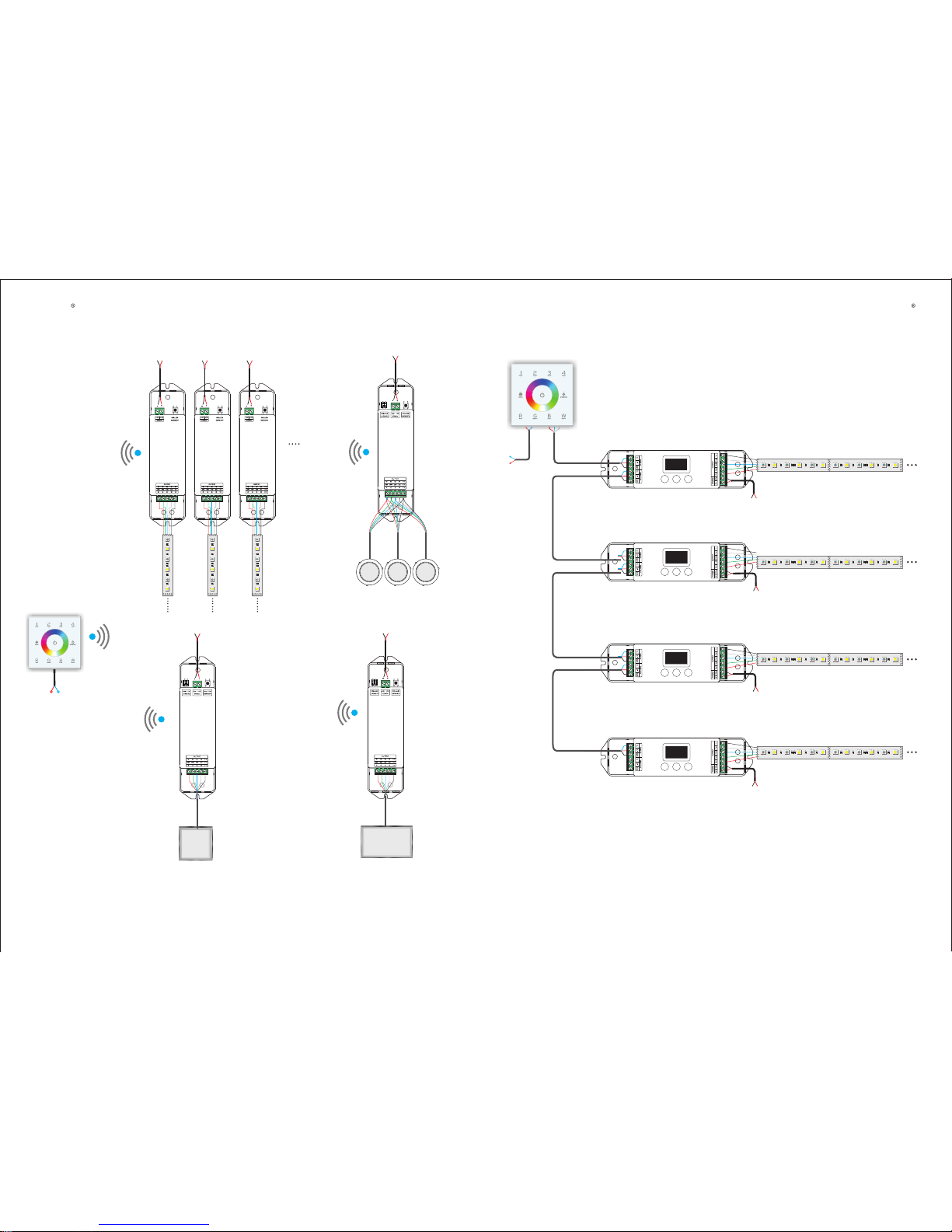
8. Wiring Diagram 1 ( Wireless Control ):
Could connect RGB/RGBW LEDs.
Could connect RGB/RGBW LEDs.
◆
◆
RGBW LED Panel Light
RGBW LED Panel Light
RGBW LED Panel Light
RGB W Strip
RGB W Strip
RGB W Strip
9. Connect to DMX Decoder ):Wiring Diagram 2 (
AC100V-240V
+
B
R
G
W
+
B
R
G
W
+
B
R
G
W
+
B
R
G
W
+
B
R
G
W
+
B
R
G
W
+
B
R
G
W
+
B
R
G
W
+
B
R
G
W
+
B
R
G
W
+
B
R
G
W
+
B
R
G
W
+
B
R
G
W
+
B
R
G
W
+
B
R
G
W
+
B
R
G
W
DMX Output
DMX Output
DMX Output
DMX Input
DMX Input
DMX Input
DMX Input
RGBW Strip
RGBW Strip
RGBW Strip
RGBW Strip
Zone 1
DMX Original Address:1
Zone 2
DMX Original Address:5
Zone 3
DMX Original Address:9
Zone 4
DMX Original Address:13
DMX Decoder
DMX Decoder
DMX Decoder
DMX Decoder
 Loading...