

Page 1
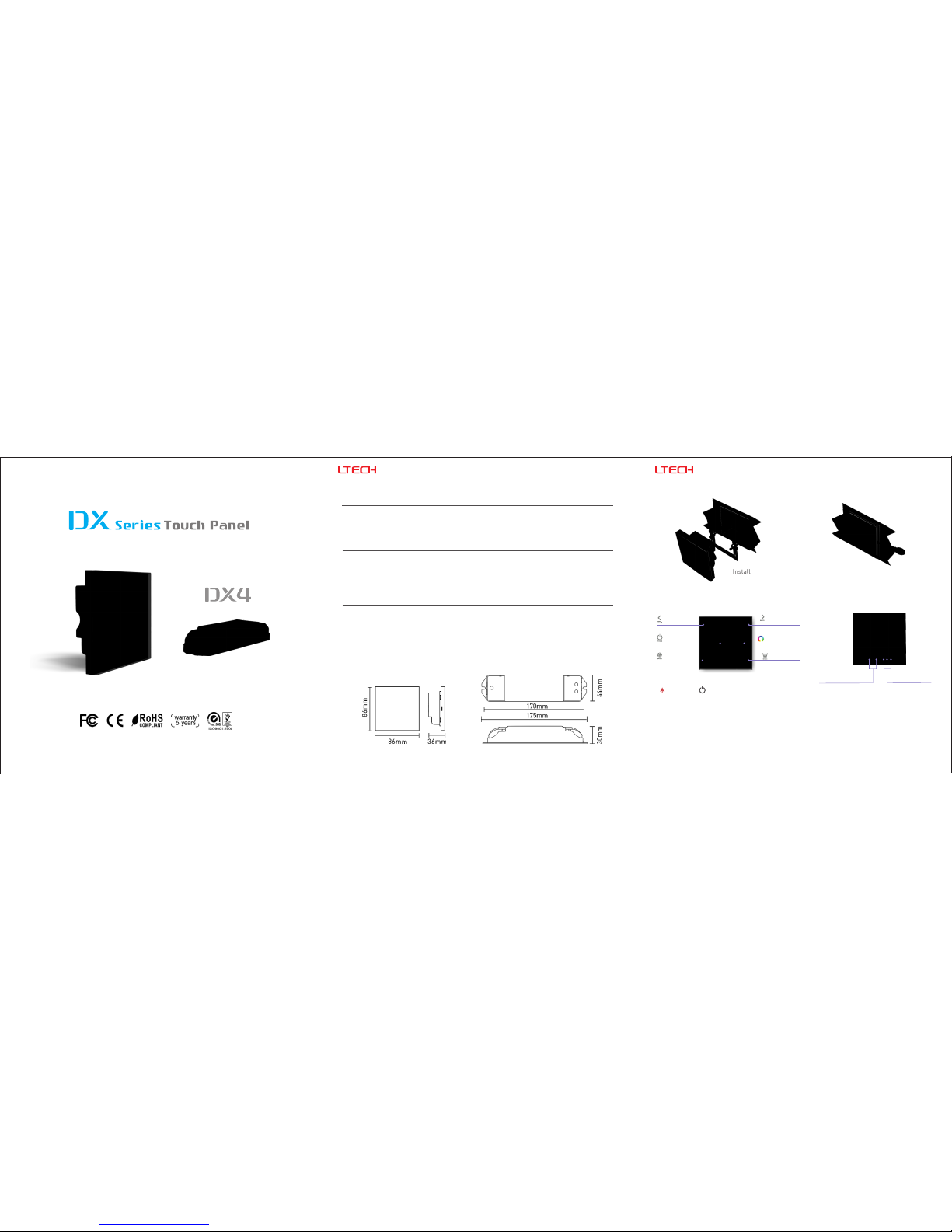
1. Technical Specs:
2. Product Size:
DX4 RGBW Touch Panel DX4 RGBW Touch Panel
3. Installation Instruction:
Install Uninstall
4. Key Functions:
5. Terminals:
100-240Vac
Power Input Socket
DMX Signal
Output Socket
On/Off
Touch Circle
Speed/
Brightness-
Speed/
Brightness+
Mode Key
White Key
Press to turn on/off
the white LEDs.
Long press to change
the brightness.
1
2
Long press to turn on/off the tone.
The Changing Mode
1. Static Red 2. Static Green 3. Static Blue 4. Static Yellow 5. Static Purple
6. Static Cyan 7. Static White 8. RGB Jumping 9. 7 Colors Jumping 10 . RGB Smooth
11. 7 Colors Smooth 12. Static Black (only turn off RGB)
www.l tech- led.co m
RGBW Touch Panel
DX4
Input Voltage:
Output Signal:
Working Temp.:
Dimensions:
Package Size:
Weight(G.W.):
100~240Vac
RF 2.4GHz, DMX512
-30℃~55℃
L86×W86×H36(mm)
L113×W112×H50(mm)
225g
R4-CC
Input Voltage:
Output Voltage:
Output Current:
Output Power:
Wireless Signal:
Working Temp.:
Dimensions:
Package Size:
Weight(G.W.):
12~48Vdc
3~46Vdc
CC 350/700/1050mA×4CH
1.05W~48.3W×4CH Max 193.2W
2.4GHz
-30℃~55℃
L175×W44×H30(mm)
L178×W48×H33(mm)
165g
R4-5A CV Receiver
Input Voltage:
Current Load:
Output Power:
Wireless Signal:
Working Temp.:
Dimensions:
Package Size:
Weight(G.W.):
5~24Vdc
5A × 4CH Max. 20A
Max.100W/240W/480W(5V/12V/24V)
2.4GHz
-30℃~55℃
L175×W44×H30(mm)
L178×W48×H33(mm)
150g
Note: Receiver is sold separately.
CC Receiver
Touch Panel
R4-5A/R4-CC Receiver
Page 2
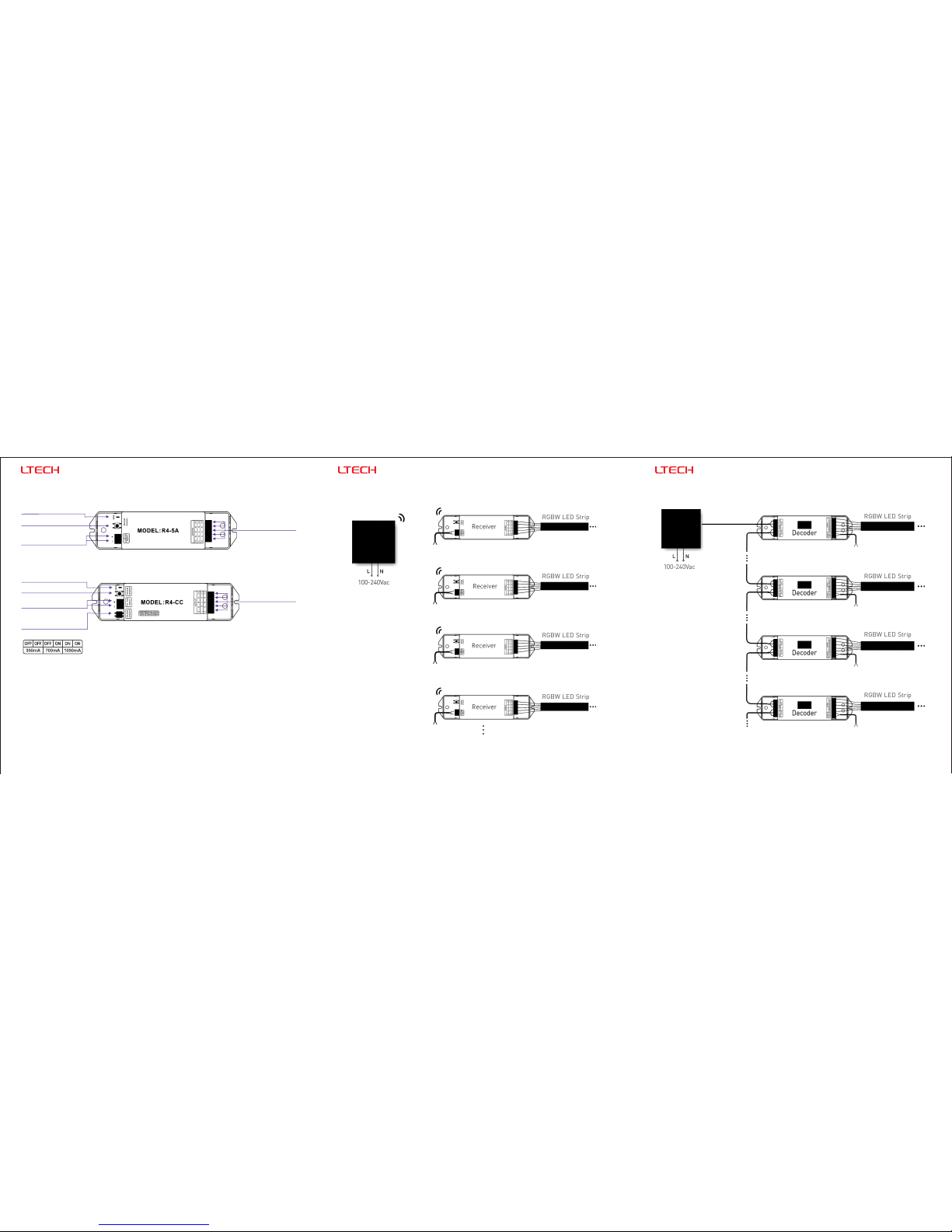
9. Connect to DMX Decoder ):Wiring Diagram 2 ( 8. Wiring Diagram 1 ( Wireless Control ):
RGBW LED Strip
RGBW LED Strip
RGBW LED Strip
RGBW LED Strip
RGBW LED Strip
RGBW LED Strip
RGBW LED Strip
RGBW LED Strip
Could connect RGB/RGBW LEDs.
Could connect RGB/RGBW LEDs.
◆
◆
4 3
100-240Vac
100-240Vac
5
Update Time: 2016.09.21
DMX
5~24Vdc
CV power supply
5~24Vdc
CV power supply
5~24Vdc
CV power supply
5~24Vdc
CV power supply
12~24Vdc
CV power supply
12~24Vdc
CV power supply
12~24Vdc
CV power supply
12~24Vdc
CV power supply
DMX Address=1
DMX Address=1
DMX Address=1
DMX Address=1
6. Operating Instruction for Receiver:
7. :The Learning ID Method
www.l tech- led.co m
DX4 RGBW Touch PanelDX4 RGBW Touch Panel DX4 RGBW Touch Panel
Canceling ID:
Short press “ID learning button” on the R4-5A/R4-CC receiver, the running light
keeps on. Then press any key or touch circle on the DX4 touch panel, the
running light flicker several times, the buzzer long beep, activated.
Learning ID:
Long press “ID learning button” on the R4-5A/R4-CC receiver for 5s, the running
light flicker several times, the buzzer long beep, canceled.
Current Selection
Switch
LED Lamp
Connection
LED Lamp
Connection
The Running Light
The Running Light
ID Learning Button
ID Learning Button
5~24Vdc
Power Input
12~48Vdc
Power Input
(Operation Table)
 Loading...