

Page 1
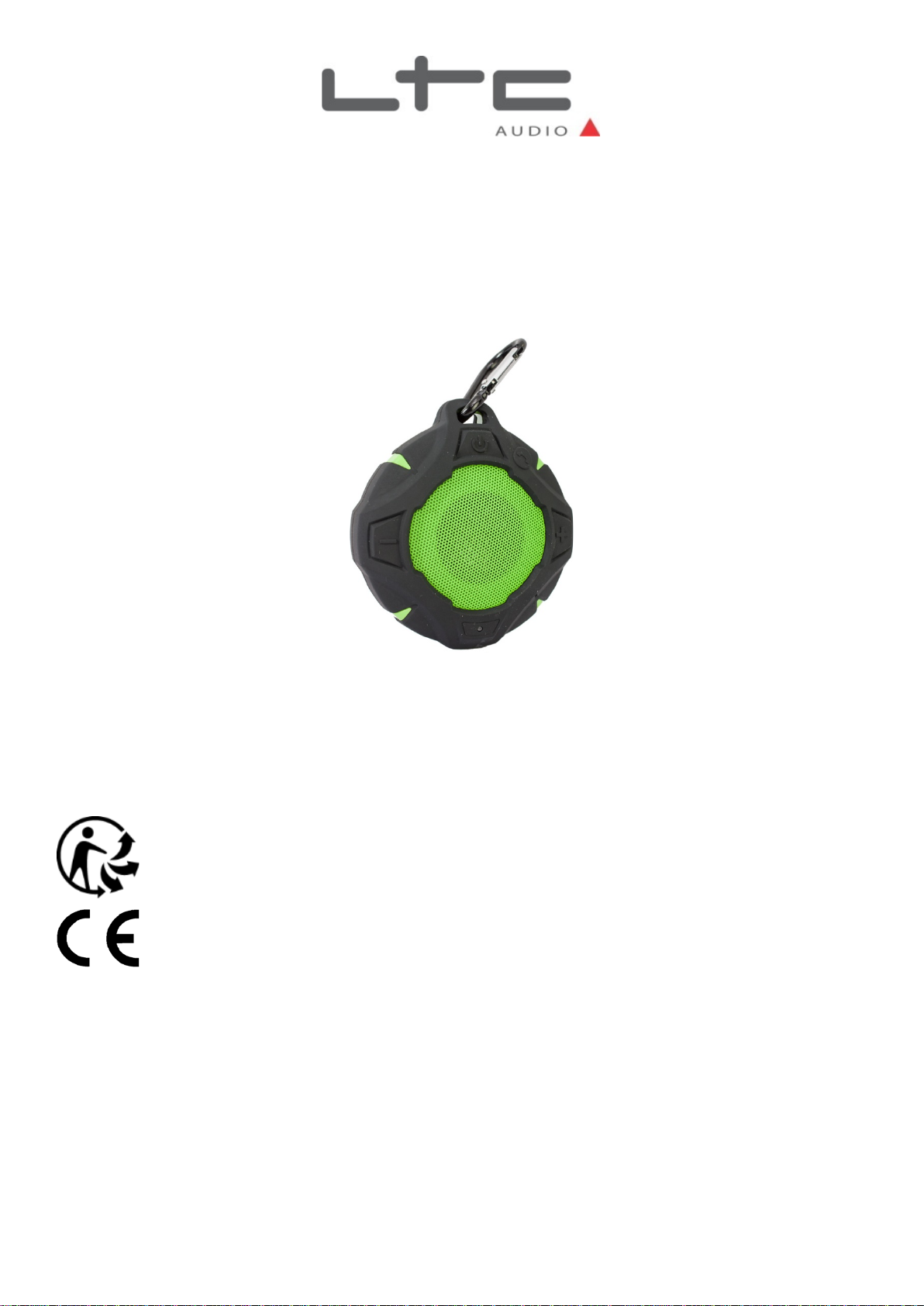
BLUETOOTH WATERPROOF SPEAKERPHONE
ENCEINTE BLUETOOTH ETANCHE AVEC FONCTION TELEPHONE MAINS LIBRES
WASSERFESTER BLUETOOTH LAUTSPRECHER MIT TELEFONFUNKTION
WATERVASTE BLUETOOTH LUIDSPREKER MET TELEFOONFUNCTIE
ALTAVOZ BLUETOOTH ESTANCO RECARGABLE CON FUNCION MANOS LIBRES
BLUETOOTH VODOTESNI ZVOČNIK
Imported from China by
FREESOUND14 (10-7096)
GB – User Manual
F – Manuel d’Utilisation
D – Bedienungsanleitung
NL - Handleiding
ES – Manual de usuario
SL – Navodila za uporabo
PT – Manual de Instruções
RO – Manual de utilizare
LOTRONIC SA
Avenue Zénobe Gramme 9
B-1480 Saintes
©Copyright LOTRONIC 2017 FREESOUND14 1
Page 2
GB
Charging your Speaker
Insert the USB lead into a PC or standard USB power adaptor. Insert the charger plug into the speaker charge port.
During the charge an indicator LED lights up in red. When the battery is fully charged, the LED turns off. Charging
time takes about 2 hours if the battery is completely drained.
Description of the functions
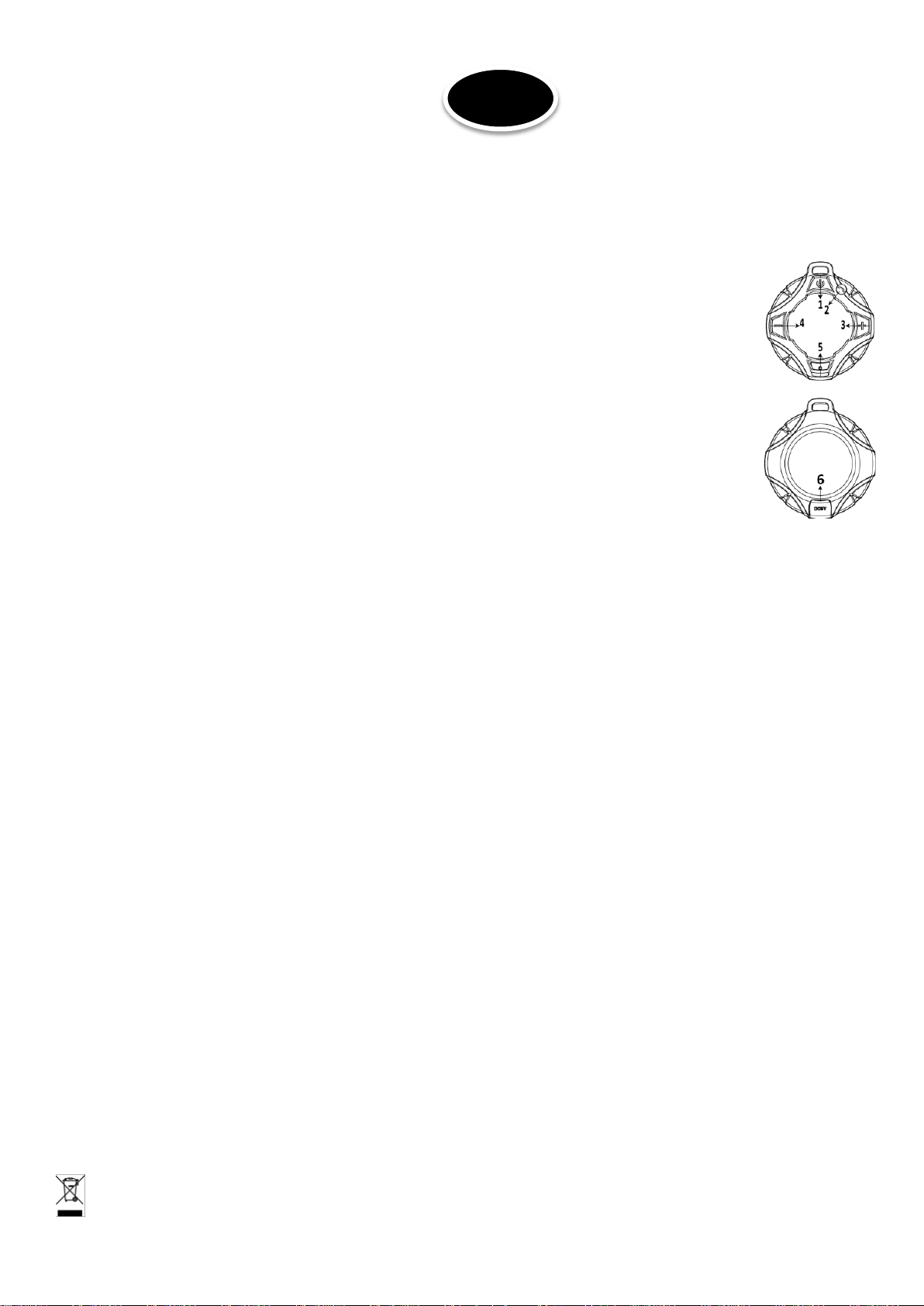
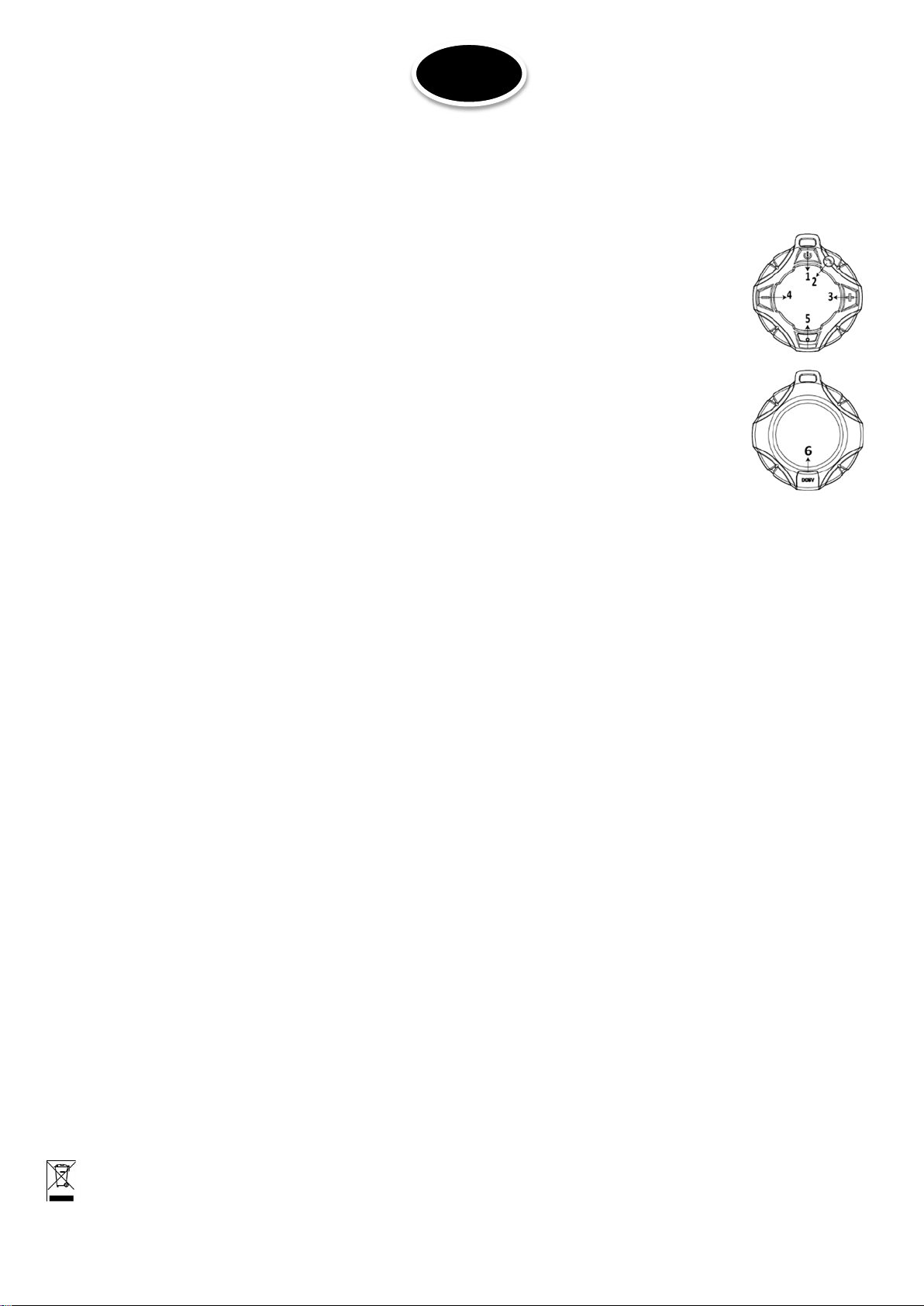
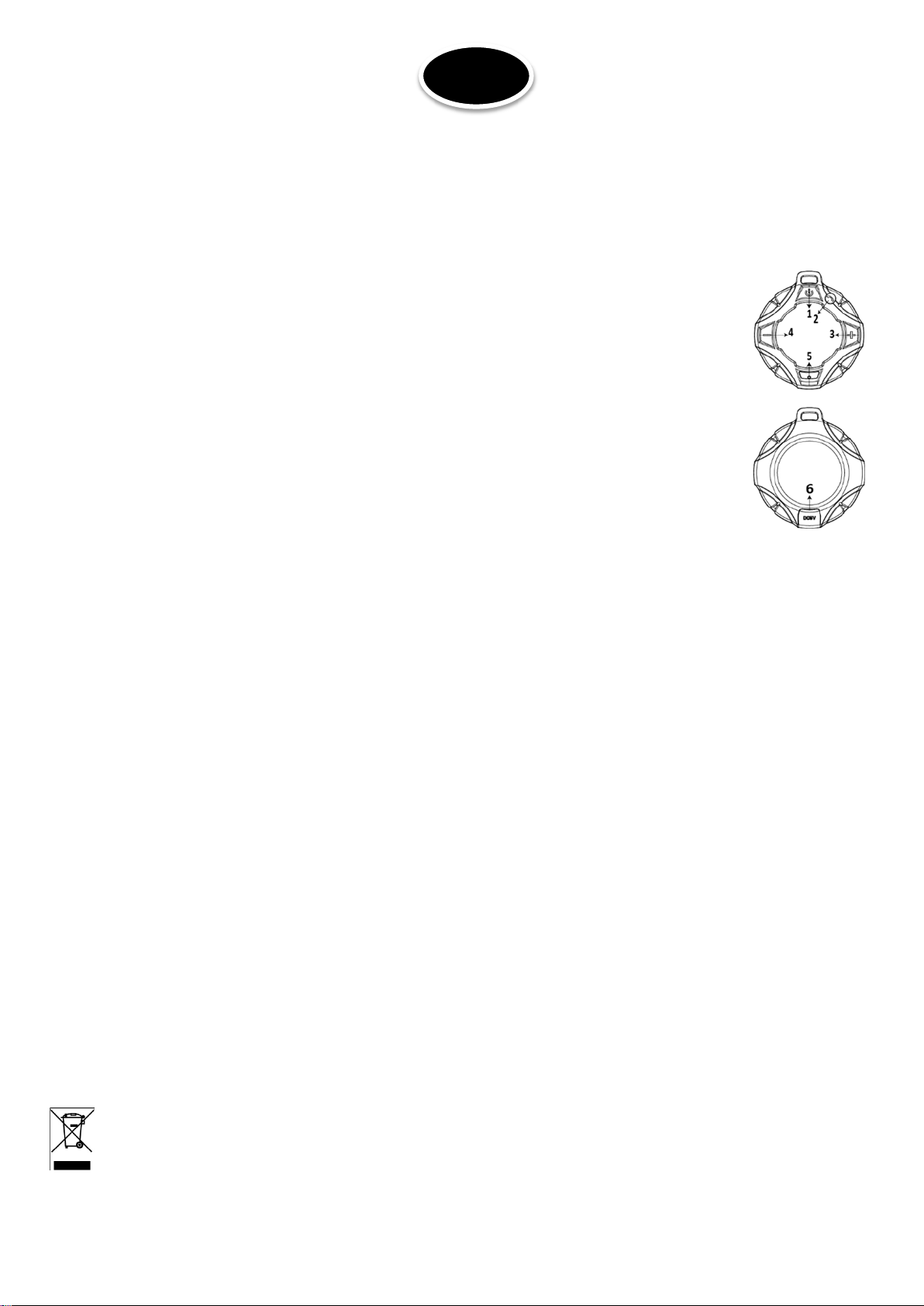
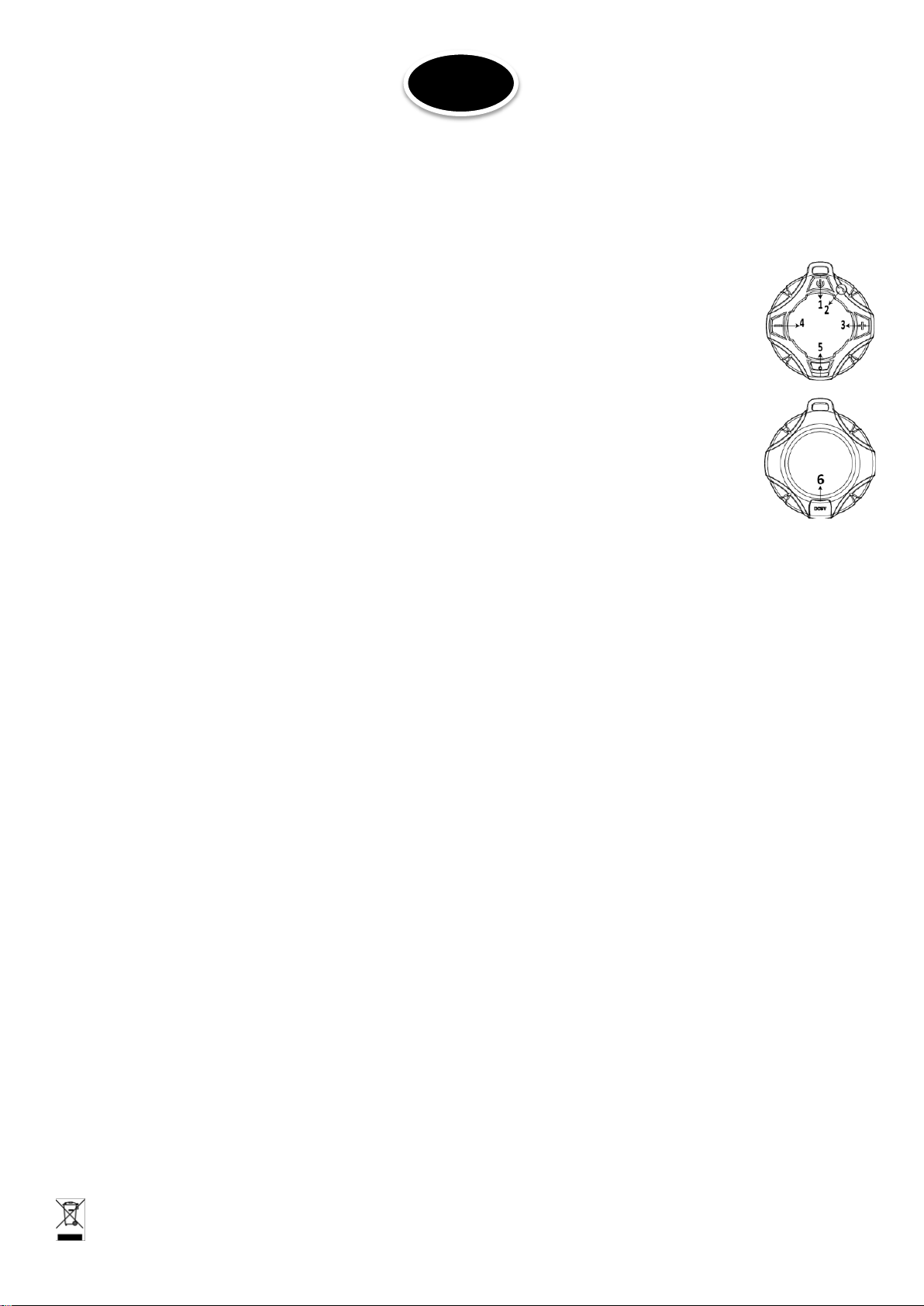
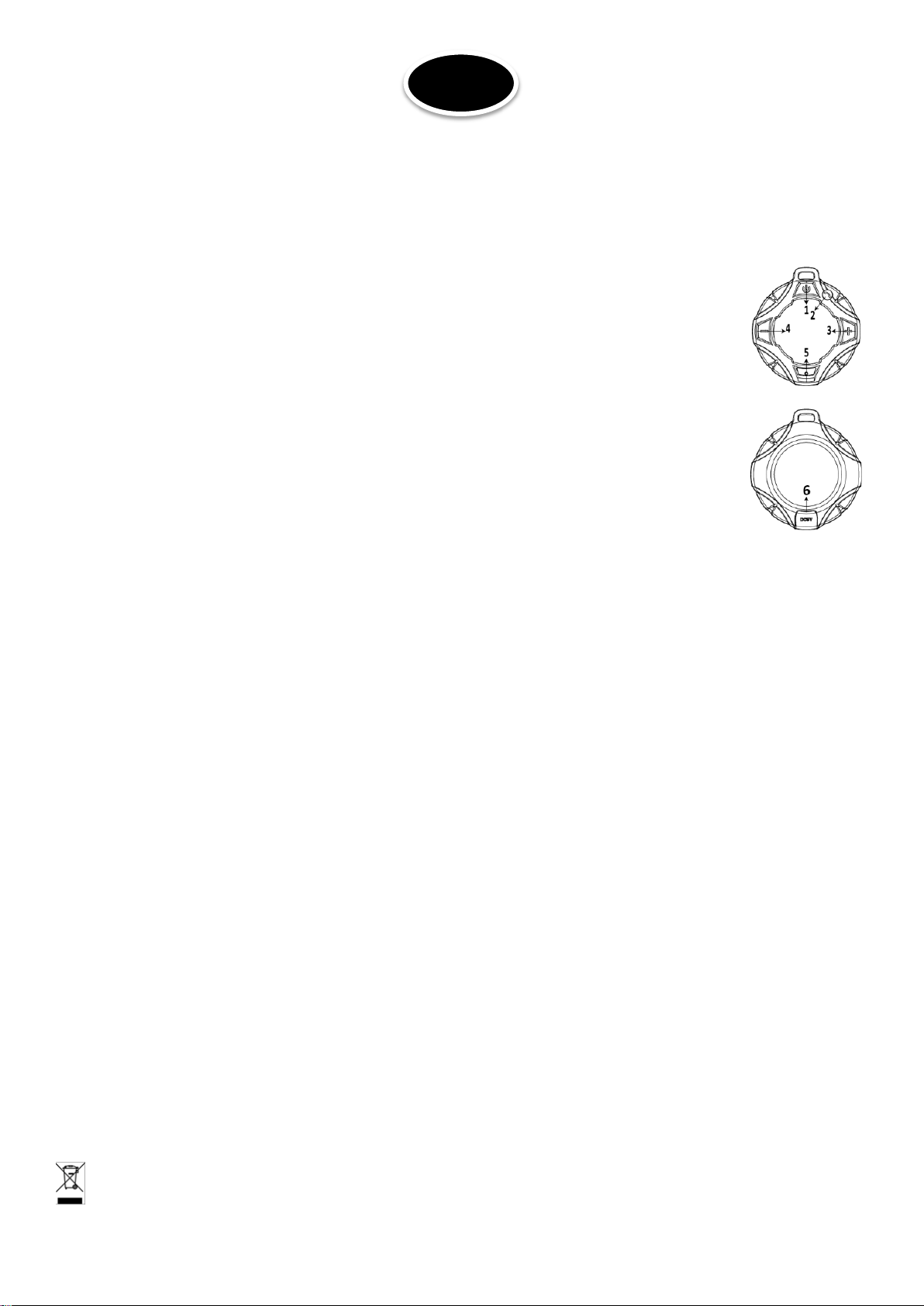
1. Power ON/OFF switch
2. Phone: Press to activate the phone function. When music is playing, press to play or pause a
track.
3. NEXT: Press and hold to access the next track in a playlist. Press to increase the volume
4. PREVIOUS: Press and hold to access the last track in a playlist. Press to lower the volume
5. Indicator LED: Lights up in red during charge or in blue during pairing process.
6. USB charging port
Bluetooth Pairing Procedure
1. Make sure your Bluetooth audio source is held within 3m from the speaker.
2. Press and hold the ON/OFF switch (1) to power on the speaker. The indicator LED will blink blue to indicate that
you have entered pairing status.
3. Turn on your Bluetooth device and connect it to FREESOUND14. Once the speaker has been successfully paired,
the LED lights steadily blue.
Using the hands-free function
When your smartphone is connected to the speaker, follow the steps below to take calls hands-free.
1. Press button (2) to pick up the call.
2. Press and hold button (2) for 2 seconds to reject the call.
3. During a call: Press button (2) to hand up the call.
Specifications
Speaker ........................................................................................................... 1.7"/4.3cm
Output power .............................................................................................................. 5W
Input power ...............................................................................................DC5V / 500mA
Battery ................................................................................................................. 600mAh
S/N ratio .............................................................................................................. 80 ±3dB
Wireless frequency ................................................................................ 2.402-2.480GHz
Transmission distance ............................................................................................... 10m
Charging time .................................................................................................... 1-2 hours
Weight ...................................................................................................................... 165g
Dimensions .............................................................................................. 92 x 92 x 40mm
Waterproof rating ..................................................................................................... IPX7
Electric products must not be put into household waste. Please bring them to a recycling centre. Ask
your local authorities or your dealer about the way to proceed.
©Copyright LOTRONIC 2017 FREESOUND14 2
Page 3
F
Charger la Batterie
Branchez le cordon USB sur un port USB d’un PC ou d’un adaptateur secteur USB. Branchez la fiche mini-USB sur le
port de charge. Le voyant s’allume en rouge ce qui signifie que la batterie se charge. Lorsque la batterie est chargée,
le voyant d’éteint. La charge dure env. 1-2 heures.
Description des fonctions
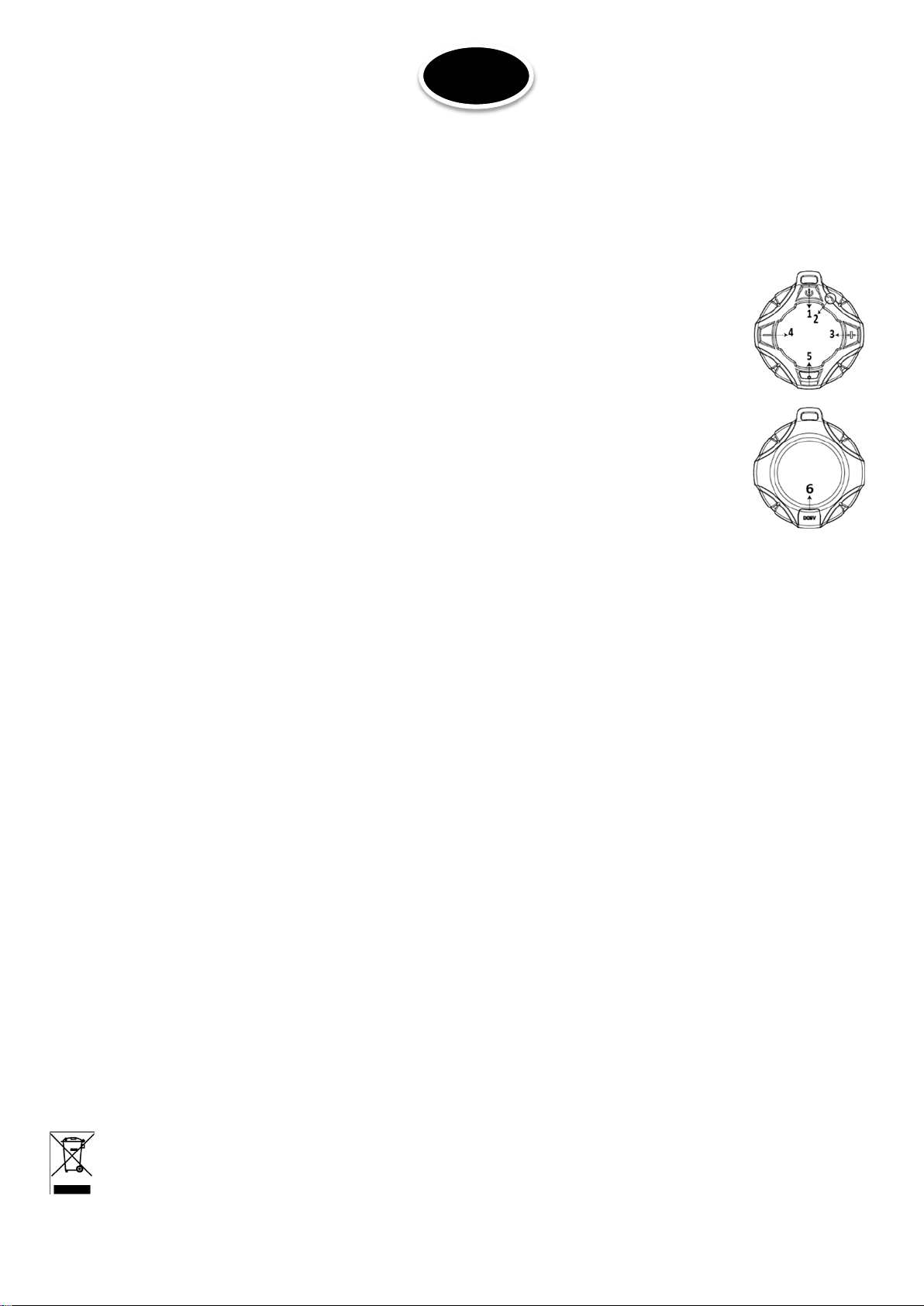
1. Interrupteur M/A
2. Appuyez pour active la function telephone. Pendant la lecture d’une musique, appuyez pour
mettre en pause.
3. SUIVANT: Maintenir appuyé pour aller au titre suivant. Appuyez pour augmenter le volume.
4. PRECEDENT: Maintenir appuyé pour revenir au titre précédent. Appuyez pour baisser le
volume.
5. Voyant: S’allume en rouge pendant la charge ou clignote en bleu pendant l’appairage.
6. Port de charge USB
Procédure d’appairage Bluetooth
1. Assurez-vous que votre source Bluetooth se trouve dans un rayon de 3m de l’enceinte.
2. Maintenez la touche ON/OFF (1) appuyée pour mettre l’appareil sous tension. Le voyant clignote bleu pour
indiquer que vous êtes en mode d’appairage.
3. Activez la recherche Bluetooth sur votre source et connectez-la sur FREESOUND14. Lorsque l’appairage a réussi,
le voyant reste bleu.
Fonction mains libres
Lorsque votre smartphone est appairé avec l’appareil, procédez de la manière suivante pour répondre à un appel:
Appuyez sur la touche (2) pour répondre à un appel.
Maintenez la touche (2) appuyée pour refuser l’appel.
Pendant un appel : Appuyez sur la touche (2) pour raccrocher.
Caractéristiques techniques
Haut-parleur ................................................................................................... 1,7"/4,3cm
Puissance de sortie ..................................................................................................... 5W
Tension d’alimentation ..............................................................................DC5V / 500mA
Batterie incorporée ................................................................................... Li-ion 600mAh
Rapport signal/bruit ............................................................................................ 80 ±3dB
Fréquence de transmission .................................................................... 2.402-2.480GHz
Distance de Transmission ......................................................................................... 10m
Durée de charge .............................................................................................. 1-2 heures
Poids ......................................................................................................................... 165g
Dimensions .............................................................................................. 92 x 92 x 40mm
NOTE IMPORTANTE : Les produits électriques ne doivent pas être mis au rebut avec les ordures ménagères. Veuillez les
faire recycler à un point de collecte spécialisé. Consultez les autorités locales ou votre revendeur sur la façon de les
recycler.
©Copyright LOTRONIC 2017 FREESOUND14 3
Page 4
D
Batterie aufladen
Das USB Kabel an den USB Port eines PCs oder einen USB Netzadapter anschließen und den Mini-USB Stecker in die
Ladebuchse des Geräts stecken. Während des Ladevorgangs leuchtet die Anzeigeleuchte rot und erlischt, wenn die
Batterie aufgeladen ist. Das Aufladen dauert ca. 1-2 Stunden.
Description of the functions
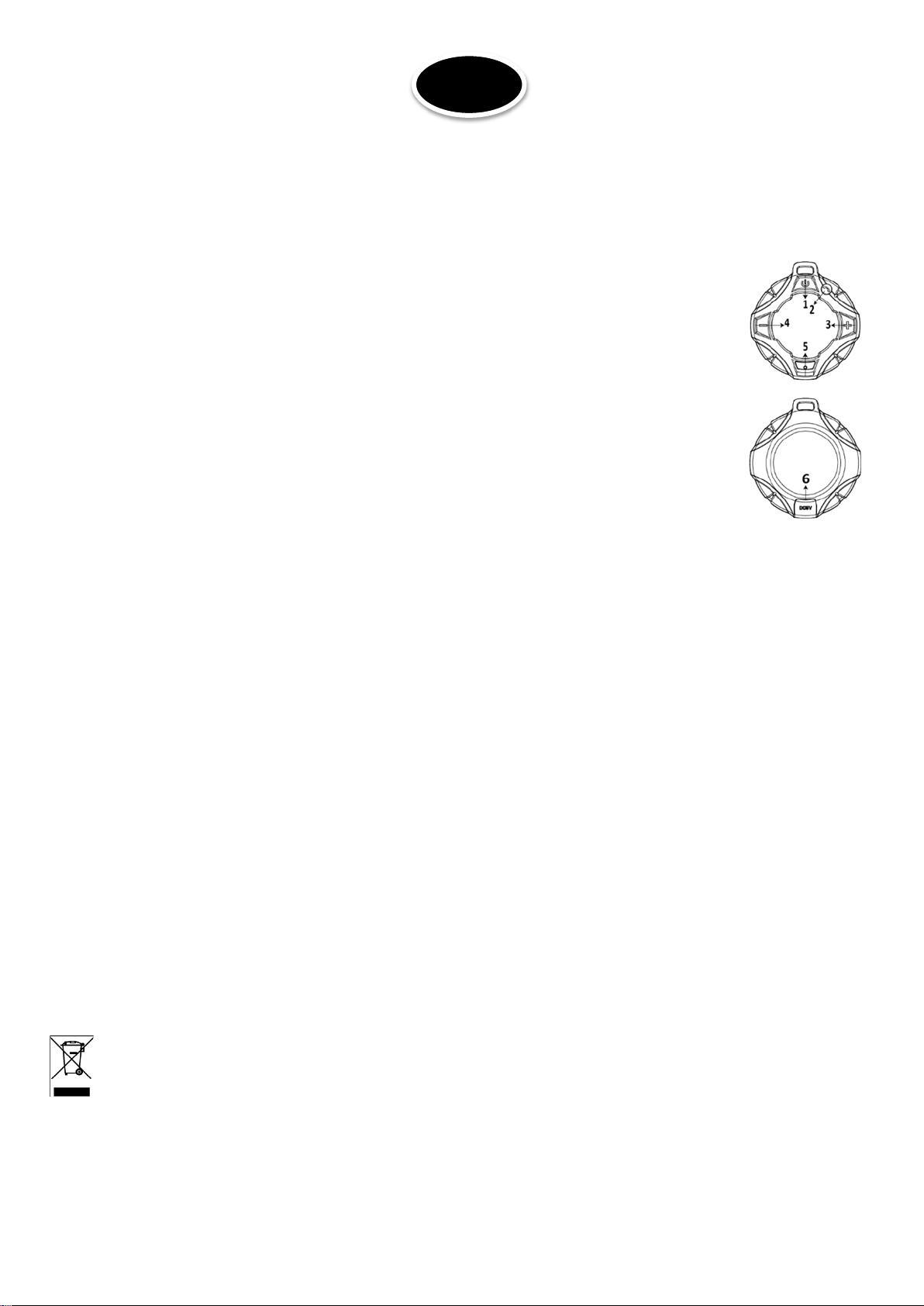
1. Power ON/OFF switch
2. Phone: Press to activate the phone function. When music is playing, press to play or pause a
track.
3. NEXT: Press and hold to access the next track in a playlist. Press to increase the volume
4. PREVIOUS: Press and hold to access the last track in a playlist. Press to lower the volume
5. Indicator LED: Lights up in red during charge or in blue during pairing process.
6. USB charging port
Bluetooth Pairing Procedure
1. Make sure your Bluetooth audio source is held within 3m from the speaker.
2. Press and hold the ON/OFF switch (1) to power on the speaker. The indicator LED will blink blue to indicate that
you have entered pairing status.
3. Turn on your Bluetooth device and connect it to FREESOUND14. Once the speaker has been successfully paired,
the LED lights steadily blue.
Using the hands-free function
When your smartphone is connected to the speaker, follow the steps below to take calls hands-free.
1. Press button (2) to pick up the call.
2. Press and hold button (2) for 2 seconds to reject the call.
3. During a call: Press button (2) to hand up the call.
Technische Daten
Lautsprecher .................................................................................................. 1,7"/4,3cm
Ausgangsleistung ......................................................................................................... 5W
Eingangsspannung ....................................................................................DC5V / 500mA
Batterie ................................................................................................................ 600mAh
Gewicht .................................................................................................................... 165g
Abmessungen .......................................................................................... 92 x 92 x 40mm
WICHTIGER HINWEIS: Elektrogeräte gehören nicht in den Hausmüll. Sie müssen in speziellen Betrieben recycelt
werden. Wenden Sie sich hierzu an die örtlichen Behörden oder Ihren Fachhändler!
©Copyright LOTRONIC 2017 FREESOUND14 4
Page 5
NL
Batterij opladen
Steek de USB-led in een pc of standaard USB-adapter. Steek de mini-USB stekker in de oplaadpoort van de
luidspreker. Tijdens de lading licht de indicator LED in rood. De batterij is vol als de led uitgaat. De laadtijd duurt
ongeveer 1 – 2 uren.
Omschrijving van de functies
1. Aan/uit schakelaar
2. Phone: Druk om de telefoon functie te activeren. Tijdens het afspelen van muziek drukken om
te pauzeren.
3. VERDER: Ingedrukt houden om naar de volgende track van de playlist te gaan. Drukken om
het volume te verhogen.
4. TERUG: Ingedrukt houden om naar de laatste track van de playlist te gaan. Drukken om het
volume te minderen.
5. Indicatie LED: Licht op in rood tijdens het opladen of flitst blauw tijden de Bluetooth
synchronisatie.
6. USB oplaad port
Bluetooth Pairing Procedure
1. De Bluetooth audio bron moet binnen 3m afstand van de luidspreker zijn.
2. Houd de ON/OFF toets (1) ingedrukt om het toestel aan te schakelen. De indicatie led flitst blauw tijdens de
synchronisatie.
3. Activeer de Bluetooth zoekfunctie op uw Bluetooth device en kies FREESOUND14. Als de luidspreker met de
Bluetooth bron verbonden is, licht de led blauw.
Vrijhandig bellen
Als u smartphone op de luidspreker aangesloten is volg deze stappen om een oproep te beantwoorden.
1. Druk toets (2) om de oproep te beantwoorden.
2. Houd de toets (2) tijdens 2 seconden ingedrukt om de oproep te weigeren.
3. Tijdens een oproep: Druk toets (2) om de oproep te beëindigen.
Specificaties
Luidspreker ..................................................................................................... 1,7"/4,3cm
Uitgangsvermogen ...................................................................................................... 5W
Ingangsspanning........................................................................................DC5V / 500mA
Ingebouwde batterij ................................................................................. Li-ion 600mAh
S/R verhouding .................................................................................................... 80 ±3dB
Transmissie frequentie .......................................................................... 2.402-2.480GHz
Transmissie reikwijdte .............................................................................................. 10m
Oplaadtijd ............................................................................................................1-2 uren
Gewicht .................................................................................................................... 165g
Afmetingen .............................................................................................. 92 x 92 x 40mm
BELANGRIJK: De elektrische producten mogen niet bij het huisvuil gegooid worden. Gelieve deze te laten recycleren daar waar er
centra’s hiervoor voorzien is. Raadpleeg de plaatselijke autoriteiten of uw verkoper ivm de manier van recycleren
©Copyright LOTRONIC 2017 FREESOUND14 5
Page 6
ES
Cargar la batería
Conecte el cable USB en el puerto USB de un PC o un adaptador de corriente USB. Conecte la clavija mini-USB en el
puerto de carga. El indicador se ilumina en Rojo lo que significa que la batería se está cargando. Cuándo la batería
está cargada, el indicador se apaga. La carga dura entre 1 a 2 Horas aproximadamente.
Descripción de las funciones
1. Interruptor ON/OFF
2. Apriete para activar la función teléfono. Durante la lectura de música, apriete para poner en
Pausa.
3. SIGUIENTE: Mantener apretado para ir al título siguiente. Apriete para aumentar el volumen.
4. ANTERIOR: Mantenga apretado para volver al título anterior. Apriete para bajar el volumen.
5. Indicador: Se ilumina en Rojo durante la carga o parpadea en Azul durante el emparejamiento.
6. Puerto de carga USB
Procedimiento de emparejamiento Bluetooth
1. Asegúrese que su fuente Bluetooth se encuentra a menos de tres metros del altavoz.
2. Mantenga la tecla ON/OFF (1) apretada para encender el equipo. El indicador parpadea en Azul para indicar que
está en modo emparejamiento.
3. Active la búsqueda Bluetooth de su fuente y conéctela a FREESOUND14. Cuando se haya realizado el
emparejamiento, el indicador permanecerá en Azul.
Función manos libres
Cuándo su Smartphone esté emparejado con el equipo, proceda de la siguiente manera para responder a una
llamada: Apriete la tecla (2) para responder a una llamada.
Mantenga la tecla (2) apretada para rechazar una llamada.
Durante una llamada: Apriete la tecla (2) para colgar.
Características técnicas
Altavoz ............................................................................................................ 1,7"/4,3cm
Potencia de salida ....................................................................................................... 5W
Tensión de alimentación ...........................................................................DC5V / 500mA
Batería incorporada .................................................................................. Li-ion 600mAh
Relación señal/ruido ........................................................................................... 80 ±3dB
Frecuencia de transmisión ..................................................................... 2.402-2.480GHz
Distancia de transmisión ........................................................................................... 10m
Duración de la carga ......................................................................................... 1-2 Horas
Peso .......................................................................................................................... 165g
Dimensiones ............................................................................................ 92 x 92 x 40mm
NOTA IMPORTANTE: Los productos eléctricos no deben ser tirados a la basura doméstica. Hágalos reciclar en un lugar
destinado a ello. Pregunte a las autoridades locales para la manera de proceder para ello.
©Copyright LOTRONIC 2017 FREESOUND14 6
Page 7
SL
Polnjenje zvočnika
Vtikač USB kabla vstavite v osebni računalnik ali standardni USB napajalnik. Vtikač polnilnika vstavite v vrata za
polnjenje zvočnika. Med polnjenjem indikator LED sveti rdeče. Ko je baterija popolnoma napolnjena, se LED ugasne.
Čas polnjenja traja približno 2 uri, če je baterija popolnoma prazna.
Opis funkcij
1. Stikalo za VKLOP/IZKLOP
2. Phone: Pritisnite, da vključite funkcijo telefona. Ko se predvaja glasba, pritisnite, če želite
predvajati ali zaustaviti skladbo.
3. NEXT: Pritisnite in držite za naslednjo skladbo na seznamu predvajanja. Pritisnite, da povečate
glasnost.
4. PREVIOUS: Pritisnite in držite za dostop do zadnje skladbe na seznamu predvajanja. Pritisnite,
da znižate glasnost.
5. LED Indikator: Sveti rdeče med polnjenjem ali modro med seznanjanjem.
6. USB vrata za polnjenje
Bluetooth postopek seznanjanja
1. Prepričajte se, da je vaš Bluetooth zvočni vir v dosegu 3m od zvočnika.
2. Za vklop zvočnika pritisnite in držite stikalo ON / OFF (1). LED indikator utripa modro, kar označuje da ste vnesli
status seznanjanja.
3. Vklopite Bluetooth napravo in jo ppvežite na FREESOUND14. Ko je zvočnik uspešno seznanjen, LED sveti stalno
modro.
Uporaba funkcije prostoročnega telefoniranja
Ko je vaš pametni telefon priključen na zvočnik, sledite naslednjim korakom, da sprejemate klice prostoročno.
1. Pritisnite tipko (2), da prevzamete klic.
2. Pritisnite in držite tipko (2) 2 sekundi, da zavrnete klic.
3. Med klicem: Pritisnite tipko (2), da pokličete.
Tehnični podatki
Zvočnik ........................................................................................................... 1.7"/4.3cm
Izhodna moč ................................................................................................................ 5W
Vhodna moč ..............................................................................................DC5V / 500mA
Baterija ................................................................................................................ 600mAh
Razmerje Signal / Šum ........................................................................................ 80 ±3dB
Brezžična frekvenca ............................................................................... 2.402-2.480GHz
Razdalja oddajanja .................................................................................................... 10m
Čas polnjenja ......................................................................................................... 1-2 ure
Teža ........................................................................................................................... 165g
Dimenzije ................................................................................................ 92 x 92 x 40mm
Vodotesnost .............................................................................................................. IPX7
Električni izdelki ne smejo biti dana v gospodinjske odpadke. Prosimo, da jih pripeljete do reciklažnega
centra. Vprašajte svoje lokalne oblasti ali svojega prodajalca o nadaljevanju.
©Copyright LOTRONIC 2017 FREESOUND14 7
Page 8
RO
Încărcarea difuzorului
Introduceți cablul USB într-un adaptor standard de alimentare USB de la retea sau intr-un port USB standard de la
PC. Introduceți conectorul încărcătorului în portul de încărcare a difuzorului. În timpul încărcării, indicatorul LED se
aprinde roșu. Când bateria este încărcata complet, indicatorul LED se stinge. Încărcarea completă durează
aproximativ 2 ore, dacă bateria este descărcată complet.
Descrierea funcțiilor
1. Buton pornire/oprire
2. Telefon: Apăsați pentru a activa funcția de telefon. Când se redă muzică, apăsați pentru a
reda sau pentru a întrerupe melodia.
3. Următoarea: Apăsați și mențineți apăsat pentru a reda următoarea melodie din listă.
Apăsați pentru a crește volumul.
4. Anterioara: Apăsați și mențineși apăsat pentru a reda melodia anterioară din listă. Apăsați
pentru a micșora volumul.
5. Indicator LED: Se aprinde în roșu în timpul încărcării sau în albastru în timpul procesului de
asociere Bluetooth.
6. Port USB pentru încărcare
Procedura de asociere prin Bluetooth
1. Asigurați-vă că sursa Bluetooth audio se află la o distanță de 3m față de difuzor.
2. Apăsați și mențineți apăsat butonul de pornire/oprire (1) de pe difuzor. Indicatorul LED clipește în albastru
pentru a indica faptul că ați intrat în modul de asociere.
3. Porniți funcția Bluetooth de pe dispozitivul dumneavoastră si conectați-l cu FREESOUND14. Odată ce
asocierea s-a realizat cu succes, LED-ul luminează constant albastru.
Utilizarea funcției hands-free
Când smartphone-ul este conectat la difuzor, urmați pașii de mai jos pentru a efectua apeluri hands-free.
1. Apăsați butonul (2) pentru a răspunde apelului.
2. Apăsați si mențineți apăsat butonul (2) timp de 2 secunde pentru a respinge apelul.
3. În timpul unui apel: Apăsați butonul (2) pentru a prelua apelul.
Specificații
Difuzor ............................................................................................................ 1.7"/4.3cm
Putere de ieșire ........................................................................................................... 5W
Alimentare .................................................................................................DC5V / 500mA
Baterie ................................................................................................................. 600mAh
Raportul S/N ....................................................................................................... 80 ±3dB
Frecvența wireless .................................................................................. 2.402-2.480GHz
Distanța de transmisie............................................................................................... 10m
Timp de încărcare .................................................................................................. 1-2 ore
Greutate ................................................................................................................... 165g
Dimensiuni .............................................................................................. 92 x 92 x 40mm
Impermeabilitate ...................................................................................................... IPX7
Produsele electrice nu trebuie aruncate la deșeuri menajere. Vă rugăm să le duceți la un centru de
reciclare. Contactați autoritățile locale sau distribuitorul local despre modalitatea de reciclare.
©Copyright LOTRONIC 2017 FREESOUND14 8
Page 9
EU Declaration of Conformity
Hereby we, LOTRONIC SA
Avenue Zénobe Gramme, 9
1480 SAINTES
Belgique
+32.2.390.91.91
Certify and declare under our sole responsibility that the following product:
Trade name:
Product name: WATERPROOF BLUETOOTH SPEAKER
Type or model: FREESOUND14
Conforms to the essential requirements of the:
RED directive 2014/53/EU and EMC directive 2014/30/EU
Based on the following specifications applied:
EN60950-1: 2006 + A11 :2009 + A1 :2010 + A12 :2011 + A2:2013
EN62479 :2010
ETSI EN301 489-1 V2.1.1
ETSI EN301 489-17 V3.1.1
ETSI EN300 328 V2.1.1
EN55032 :2015
EN55024 :2010 + A1 :2015
Place and date of issue: Saintes (Belgium), on 07/07/2017
Guive Akbar
Technical manager
Page 10
Déclaration UE de Conformité
Nous, LOTRONIC SA
Avenue Zénobe Gramme, 9
1480 SAINTES
Belgique
+32.2.390.91.91
Certifions et déclarons sous notre seule responsabilité que les produits suivants:
Marque:
Désignation commerciale: ENCEINTE BLUETOOTH RESISTANTE A L’EAU
Type ou modèle: FREESOUND14
Auxquels se réfère cette déclaration sont conformes aux exigences essentielles et aux autres
dispositions pertinentes de :
Directive RED 2014/53/EU – Directive CEM 2014/30/EU
Les produits sont en conformité avec les normes et/ou autres documents normatifs suivants :
EN60950-1: 2006 + A11 :2009 + A1 :2010 + A12 :2011 + A2:2013
EN62479 :2010
ETSI EN301 489-1 V2.1.1
ETSI EN301 489-17 V3.1.1
ETSI EN300 328 V2.1.1
EN55032 :2015
EN55024 :2010 + A1 :2015
Fait à Saintes (Belgique), le 07/07/2017
Guive Akbar
Responsable technique
 Loading...