

Page 1

SC-8 SYSTEM
SC-8 System™ Introduction
Unpacking: Thank you for purchasing the SC-8™ by LSC®. Every
SC-8™ has been thoroughly tested and has been shipped in perfect
operating condition. Carefully check the shipping carton for damage
that may have occurred during shipping. If the carton appears to be
damaged, carefully inspect your unit for any damage and be sure all
accessories necessary to operate the unit have arrived intact. In the
event damage has been found or parts are missing, please contact
our toll free customer support number for further instructions. Please
do not return this unit to your dealer without rst contacting customer
support.
Introduction: The SC-8™ is a 8 channel lighting control system. The
SC-8 controller can control the SRP8 power pack via the 9-pin com
cable. The SRP8 has 8 channels for output, and 1 uninterrupted power
plug. The controller features the Pattern and Stand By buttons for use
with the LSC® T16F.
Customer Support: LSC® provides a toll free customer support line,
to provide set up help and to answer any question should you encounter problems during your set up or initial operation. You may also visit
us on the web at www.lightstreamcontrols.com for any comments or
suggestions. Service Hours are Monday through Friday 9:00 a.m. to
5:00 p.m. Pacic Standard Time.
Voice: (800) 322-6337
Fax: (323) 582-2610
E-mail: [email protected]
01/04
User Instructions
4295 Charter Street
Los Angeles Ca. 90058
www.lightstreamcontrols.com
©LSC®
Warning! To prevent or reduce the risk of electrical shock or re, do
not expose this unit to rain or moisture.
Caution! There are no user serviceable parts inside this unit. Do not
attempt any repairs yourself, doing so will void your manufactures warranty. In the unlikely event your unit may require service please contact
LSC at the toll free number.
At LSC® we are concerned about the environment, and package all
our units in recyclable material. Please do not dispose of the shipping
carton in the trash, recycle whenever possible.
©LSC® www.lightstreamcontrols.com SC-8 System™ Instruction Manual Page 2
Page 2

SC-8 System™ Safety Precautions
SC-8 System™ Features
• To reduce the risk of electrical shock or re, do not expose this unit
rain or moisture
• Do not spill water or other liquids into or on to your unit.
• Be sure that the local power outlet match that of the required volt age for your unit.
• Do not attempt to operate this unit if the power cord has been
frayed or broken.
• Do not attempt to remove or break off the ground prong from
the electrical cord. This prong is used to reduce the risk of electrical
shock and re in case of an internal short.
• Disconnect from main power before making any type of connection.
• Do not remove the cover under any conditions. There are no user
serviceable parts inside.
• Never operate this unit when it’s cover is removed.
• Never plug this unit in to a dimmer pack
• Always be sure to mount this unit in an area that will allow proper
ventilation. Allow about 6” (15cm) between this device and a wall.
• Do not attempt to operate this unit, if it becomes damaged.
• This unit is intended for indoor use only, use of this product out doors voids all warranties.
• During long periods of non-use, disconnect the unit’s main power.
• Always mount this unit in safe and stable matter.
• Power-supply cords should be routed so that they are not likely to
be walked on or pinched by items placed upon or against them,
paying particular attention to cords at plugs, convenience recep tacles, and the point where they exit from the appliance.
• Cleaning -The xture should be cleaned only as recommended by
the manufacturer.
• Heat -The appliance should be situated away from heat sources
such as radiators, heat registers, stoves, or other appliances
(including ampliers) that produce heat.
• The xture should be serviced by qualied service personnel when:
A. The power-supply cord or the plug has been damaged.
B. Objects have fallen, or liquid has been spilled into the appliance.
C. The appliance has been exposed to rain or water.
D. The appliance does not appear to operate normally or exhibits a
marked change in performance.
• Easy Set-Up
• Eight 3-Prong Latch Plugs
• 1 Uninterrupted Power Plug
• Works with Existing Hardware
• Compatiable with the T16F Foot Controller
SC-8 System™ Product Registration
The SC-8 System™ carries a one year limited warranty. Please fill out
the enclosed warranty card to validate your purchase. All returned
service items whether under warranty or not, must be freight pre-paid
and accompany a return authorization (R.A.) number. The R.A. number must be clearly written on the outside of the return package. A
brief description of the problem as well as the R.A. number must also
be written down on a piece of paper included in the shipping carton.
If the unit is under warranty, you must provide a copy of your proof of
purchase invoice. You may obtain a R.A. number by contacting our
customer support team on our toll free customer support number. All
packages returned to the service department not displaying a R.A.
number on the outside of the package will be returned to the shipper.
SC-8 System™ General Instructions
To optimize the performance of this product, please read these
operating instructions carefully to familiarize yourself with the basic
operations of this unit. These instructions contain important safety
information regarding the use and maintenance of this unit. Please
keep this manual with the unit, for future reference.
©LSC® www.lightstreamcontrols.com SC-8 System™ Instruction Manual Page 3
©LSC® www.lightstreamcontrols.com SC-8 System™ Instruction Manual Page 4
Page 3
SC-8 System™ Set Up & Operation
SC-8 System™ Functions and Controls
Set Up:
The SC-8 controller is linked to the SRP8 via the included 9-pin com
cable.
1. Connect the supplied 9-pin com cable from the output of the SC 8 to the input of the SRP8.
Operation:
After setting up the SC-8 system, basic operation is very simple.
2. Be sure the main power is off on both units, and connect your
desired lighting effects to the power relay pack.
Notice: There are eight sockets corresponding to the 8 chan-
nels on the controller. The SRP8 also has a uniteruppted 120v AC
socket.
3. Once you have connected your desired effects to the power pack
you can use the Latch buttons to turn the xtures on or off. Or, use
the Flash buttons to momentarily turn the xtures on and off.
4. You can also use the Pattern and Stand By buttons to select
chase patterns or scenes. The SC-8 controller must be connected
with T16F for this function. Pressing the Stand By button for three
seconds cand activate 17 chase patterns or 7 xed scenes. When
chase patterns are activated, each tap of the Pattern button will
select a chase.
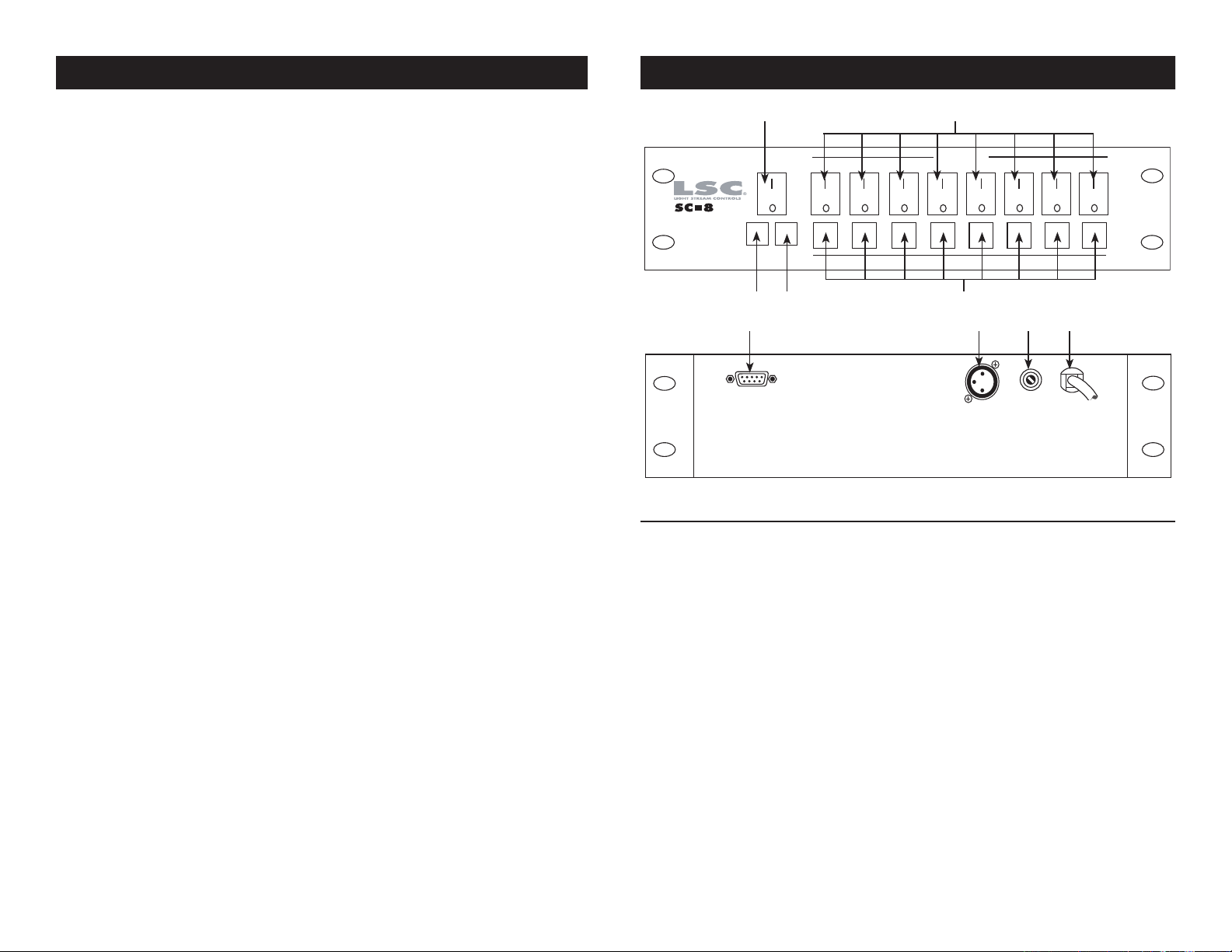
1
43
6 9
2
5
87
1. Power Switch - This switch turns the power on/off. When
the power switch is lit, the power is on.
2. Latch Buttons - Pressing the desired button allows you turn the
corresponding channel on. This will be indicated by the Latch
button lighting up. Pressing the button again will turn that channel
off.
3. Pattern Button - This button is used with the T16F. In master
mode of the T16F, pressing this button can select the chase pat tern or scene. To utilize these functions, please connect the T16F
correctly via the 3-pin female DMX connector. For more details,
refer to the T16F user instructions.
4. Stand By Button - This button is used with the T16F. In master
mode of the T16F, pressing this button can activate 17 chase pat tern or 7 xed scenes. To utilize these functions, please connect
the T16F correctly via the 3-pin female DMX connector. For more
©LSC® - www.lightstreamcontrols.com - SC-8 System™ Instruction Manual Page 5 ©LSC® - www.lightstreamcontrols.com - SC-8 System™ Instruction Manual Page 6
Page 4
SC-8 System™ Functions and Controls
SC-8 System™ Rear Connections and Functions
details, refer to the T16F user instructions.
5. Flash Button - Pressing and holding the desired buttons will
allow you to turn on the corresponding channels temporarily.
Releasing the desired buttons will turn off the channels.
6. Control Output - Using the included 9-pin com cable, connect the
SC-8 controller to the SRP8 power pack. When using the cable for
connection, up to two power packs can be controlled by this unit.
7. Foot Control Connector - Connection for the use of the T16F.
8. Fuse Holder - This housing stores the protective 3 amp fuse.
Always replace with the same exact fuse.
9. AC Input - Connects to a standard AC outlet.
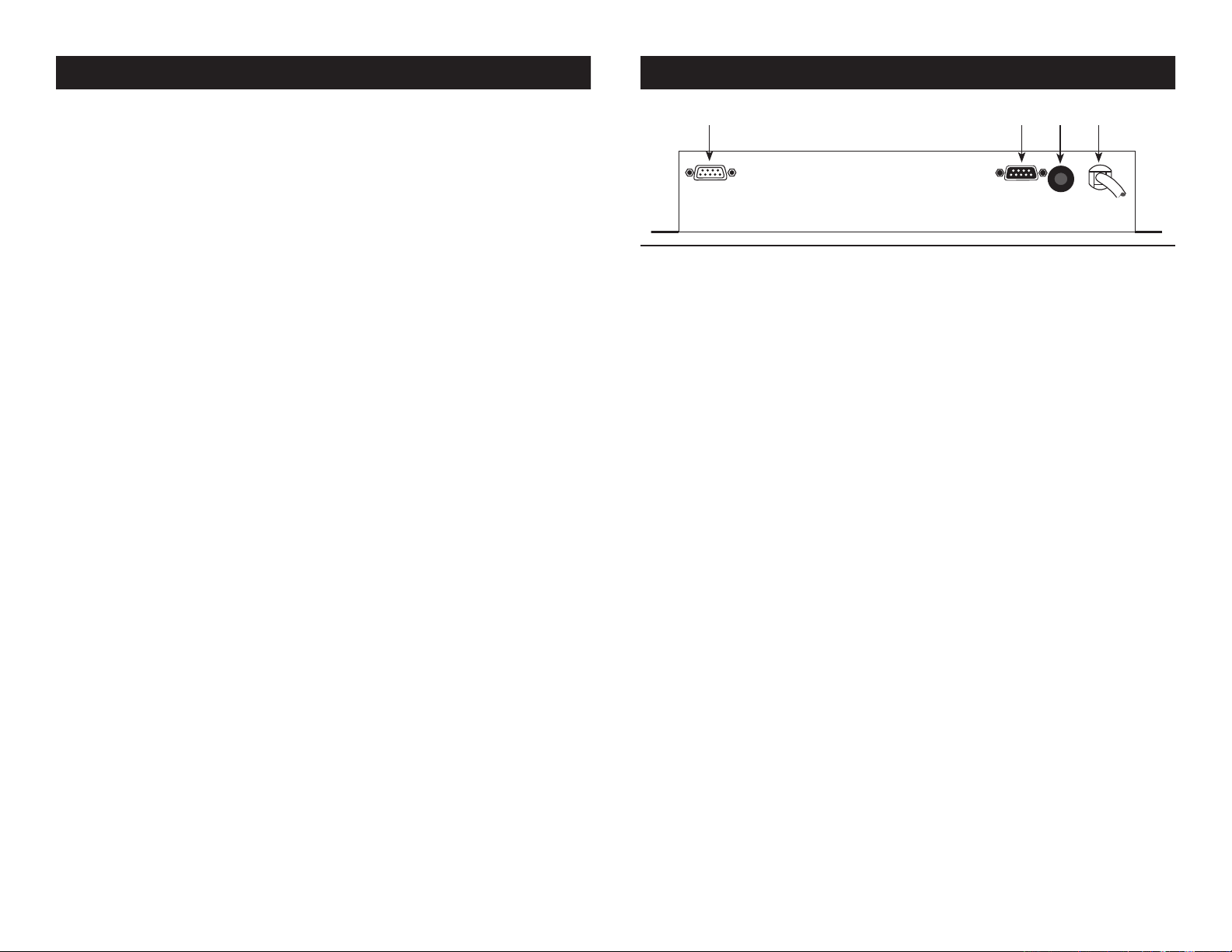
10 131211
10. 9-Pin Output Connection - This connection is used to link up
other power packs. Up to two power packs can be controlled
by this unit.
11. 9-Pin Input Connection - Using the included 9-pin com cable,
connect the SC-8 controller to the SRP8 power pack.
12. Circuit Breaker - This 15A circuit breaker protects against the
risk of electrical shock or re and protect the circuitry. In the case
of an internal short or power surge.
13. AC Input - Connects to a standard AC outlet.
©LSC® - www.lightstreamcontrols.com - SC-8 System™ Instruction Manual Page 8©LSC® - www.lightstreamcontrols.com - SC-8 System™ Instruction Manual Page 7
Page 5

SC-8 System™ Warranty
SC-8 System™ Specifications
ONE YEAR LIMITED WARRANTY
A. LSC® hereby warrants, to the original purchaser, LSC® products to be free of manufacturing defects in material and workmanship for a period of 1 Year (365 days) from the date
of purchase. This warranty shall be valid only if the product is purchased within the United
States of America, including possessions and territories. It is the ownerʼs responsibility to
establish the date and place of purchase by acceptable evidence, at the time service is
sought.
B. For warranty service, send the product only to the LSC® factory. All shipping charges
must be pre-paid. If the requested repairs or service (including parts replacement) are
within the terms of this warranty, LSC® will pay return shipping charges only to a designated point within the United States. If the entire instrument is sent, it must be shipped in its
original package. No accessories should be shipped with the product. If any accessories are
shipped with the product, LSC® shall have no liability whatsoever for loss of or damage to
any such accessories, nor for the safe return thereof.
C. This warranty is void if the serial number has been altered or removed; if the product is
modied in any manner which LSC® concludes, after inspection, affects the reliability of the
product; if the product has been repaired or serviced by anyone other than the LSC® factory
unless prior written authorization was issued to purchaser by LSC®; if the product is damaged because not properly maintained as set forth in the instruction manual.
D. This is not a service contract, and this warranty does not include maintenance, cleaning
or periodic check-up. During the period specied above, LSC® will replace defective parts
at its expense, and will absorb all expenses for warranty service and repair labor by reason
of defects in material or workmanship. The sole responsibility of LSC® under this warranty
shall be limited to the repair of the product, or replacement thereof, including parts, at the
sole discretion of LSC®. All products covered by this warranty were manufactured after
January 1, 1990, and bear identifying marks to that effect.
E. LSC® reserves the right to make changes in design and/or improvements upon its products without any obligation to include these changes in any products theretofore manufactured.
Model: SC-8™
(Controller)
Voltage: AC 120v ~ 60Hz
Input: 3-pin female XLR
9-pin female sub “D” connector
Fuse: 3A
Dimensions: 3.4” (L) x 18” (W) x 2.5” (H)
Weight: 4.5 Lbs. / 2.04 Kgs.
Warranty: 1 Year (365 days)
Model: SRP8™
(Power Pack)
Voltage: AC 120V ~ 60Hz
Circuit Breaker: 15A 250v
Input: 9-pin male sub “D” connector
9-pin female sub “D” connector
Output: 5A/Channel, Total 15A
Dimension: 3.6” (L) x 14.7” (W) x 1.6” (H)
Weight: 2.5 Lbs. / 1.13 Kgs.
Please Note: Specications and improvements in the design
of this unit and this manual are subject to change without any
prior written notice.
F. No warranty, whether expressed or implied, is given or made with respect to any accessory supplied with products described above. Except to the extent prohibited by applicable
law, all implied warranties made by LSC® in connection with this product, including warranties of merchantability or tness, are limited in duration to the warranty period set forth
above. And no warranties, whether expressed or implied, including warranties of merchantability or tness, shall apply to this product after said period has expired. The consumerʼs
and or Dealerʼs sole remedy shall be such repair or replacement as is expressly provided
above; and under no circumstances shall LSC® be liable for any loss or damage, direct or
consequential, arising out of the use of, or inability to use, this product.
G. This warranty is the only written warranty applicable to LSC® Products and supersedes
all prior warranties and written descriptions of warranty terms and conditions heretofore
published.
©LSC Supply® - www.lightstreamcontrols.com - SC-8 System™ Instruction Manual Page 9 ©LSC Supply® - www.lightstreamcontrols.com - SC-8 System™ Instruction Manual Page 10
Page 6

SC-8 System™ Notes
©LSC Supply® - www.lightstreamcontrols.com - SC-8 System™ Instruction Manual Page 11
©LSC®
A Division of the American DJ Group of Companies
4295 Charter Street Los Angeles, CA 90058 USA
Tel: 323-582-2650 Fax: 323-582-2610
Web: www.lightstreamcontrols.com
E-mail: [email protected]
 Loading...