

Page 1
Rel. 20140812
Operang Manual
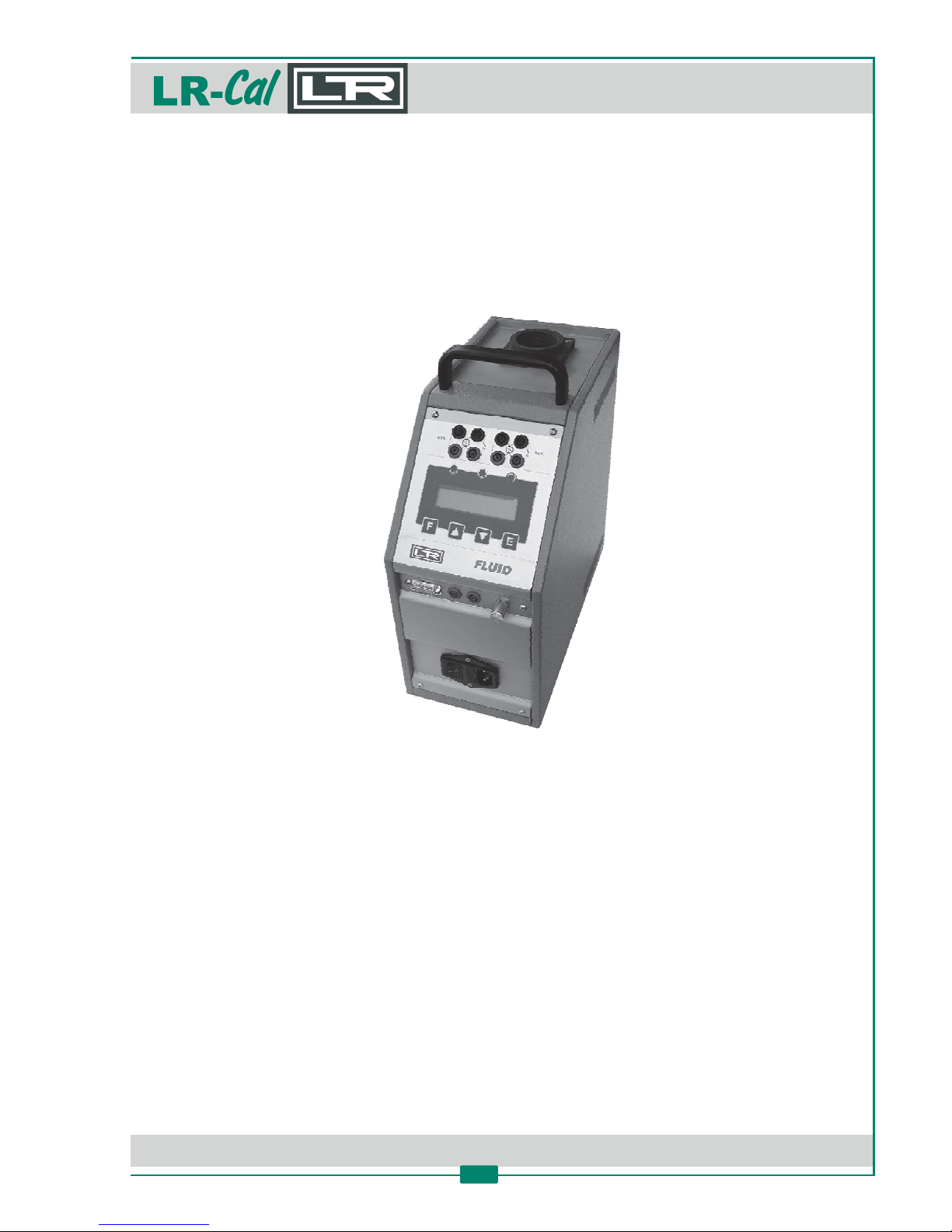
LR-Cal FLUID 100
FLUID 100-NLR-Cal
Portable temperature calibraon bath
DRU CK & TEM PERATUR Leitenberger GmbH • Bahnhofstr. 33 • D-72138 Kirchentellinsfurt • GERMANY
Tel. +49 (0) 7121-90920-0 • Fax +49 (0) 7121-90920-99 • [email protected] • • www.druck-temperatur.dewww.LR-Cal.net
MANUAL
Portable Temperature Calibraon Bath
FLUID 100 and FLUID 100-N
1
Page 2

DRU CK & TEM PERATUR Leitenberger GmbH • Bahnhofstr. 33 • D-72138 Kirchentellinsfurt • GERMANY
Tel. +49 (0) 7121-90920-0 • Fax +49 (0) 7121-90920-99 • [email protected] • • www.druck-temperatur.dewww.LR-Cal.net
MANUAL
Portable Temperature Calibraon Bath
FLUID 100 and FLUID 100-N
2
Page
1. Safety instrucons 3
1.1 Used symbols 3
1.2 Warning 3
2. Technical data 6
2.1 Purpose and summary of instrucons 6
2.2 Name of the product 7
2.3 Technical data 7
2.4 Intended use 8
2.5 Quanty 8
2.6 Manufacturer 8
2.7 Correspontent data sheet 8
2.8 Drawing 9
2.9 Scope of standard delivery 11
2.10 Oponal Accessories 12
3. Calibraon media 13
3.1 Liquids 13
3.1.1 Recommended temperature field 13
3.1.2 Viscosity 14
3.1.3 Thermal expansion 14
3.1.4 Life span 14
3.1.5 Bath filling 14
3.1.6 Srrer adjustment 15
3.1.7 Posioning of the probes 15
3.1.8 Recommendaons 16
4. Installaon and Operaon 17
4.1 Installaon 17
4.1.1 Removal of packaging 17
4.1.2 Posioning the temperature calibrator 17
4.1.3 Power supply 17
5. Operang the calibrator 18
5.1 Elements of the front panel 18
5.2 Descripon of the instrument 19
5.2.1 Thermoregulator 19
5.2.2 Main switch 19
5.2.3 Carrying handle 19
5.2.4 Liquid container 19
5.2.5 Internal reference probe 19
5.3 Operaon 19
5.4 Use of the funcons 22
5.4.1 Reading external probes - only -2I versions
22
5.4.2 Switch test 23
5.4.3 Serial communicaon RS232 23
6. Maintenance 24
6.1 Periodical Maintenance 24
6.2 Connous Maintenance 24
7. Typical faults 26
8. Descripon of the front panel 27
9. Descripon of the Funcon Menu Levels 28
9.1 Funcons of the 1. Funcon Menu Level 29
9.2 Funcons of the 2. Funcon Menu Level 31
9.3 Funcons of the 3. Funcon Menu Level 32
10. Recalibraon of the LR-Cal temperature calibrator
35
10.1 Calibraon of the internal probe 35
10.2 Calibraon of the "EXT" and "REF" inputs with a signal calibrator - only-2I versions
36
10.3 Calibraon of the "REF" input with a reference probe connected - only -2I versions
36
11. Communicaon protocol RS232/C 38
12. Instrucons for oponal Accessories 41
12.1 Instrucons for Metal Dry Block Insert Kit 41
12.2 Instrucons for the Extension Tube for increasing the inseron depth 42
13. Declaraon of Conformity 43
Page 3
1. Safety instrucons
1.1 Used symbols
WARNING!
Hot surface or part.
CAUTION!
Indicates a potenally dangerous situaon, that can result in injuries or damage
to equipment, personnel or environment, if not avoided.
DANGER!
Idenfies hazards caused by electric power. Should the safety instrucons not be
observed, there is a risk of serious or fatal injury.
This instrument must not be disposed of in domesc waste. The disposal is carried
out by return to the manufacturer of by the corresponding municipal authories
(see direcve 2002/96/EC).
1.2 Warning
CAUTION!
Hazardous voltage are present in this electrical equipment during operaon.
Non-observance of the safety instrucons can result in severe personal injury
or property damage.
Only qualified personnel should work on or around this equipment aer
becomming familar with all warnings, safety noces and maintenance procedures
contained herein. Only qualified personnel or our personnel should work on this
equipment for maintenance operaon.
The successful and safe operaon of this equipment is dependent on proper
handling, operaon and maintenance.
Do not use the instrument for any applicaon other than calibraon of temperature
any other use of the instrument may cause hazards to the user.
Use the instrument only in normal environmental condions.
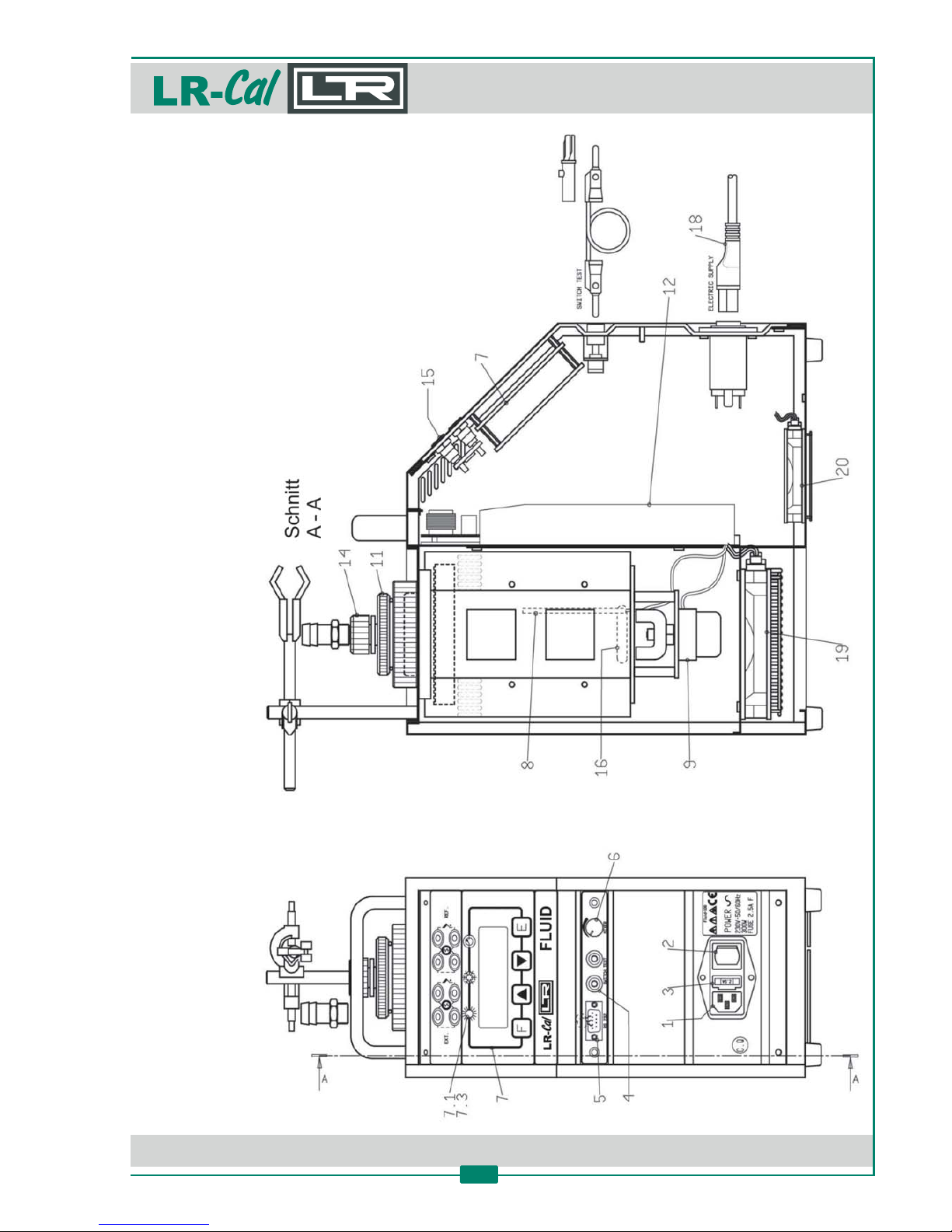
Where not specified, the numbers in parentheses in this manual refer to the drawings on page 9
and 18.
DRU CK & TEM PERATUR Leitenberger GmbH • Bahnhofstr. 33 • D-72138 Kirchentellinsfurt • GERMANY
Tel. +49 (0) 7121-90920-0 • Fax +49 (0) 7121-90920-99 • [email protected] • • www.druck-temperatur.dewww.LR-Cal.net
MANUAL
Portable Temperature Calibraon Bath
FLUID 100 and FLUID 100-N
3
Page 4
DRU CK & TEM PERATUR Leitenberger GmbH • Bahnhofstr. 33 • D-72138 Kirchentellinsfurt • GERMANY
Tel. +49 (0) 7121-90920-0 • Fax +49 (0) 7121-90920-99 • [email protected] • • www.druck-temperatur.dewww.LR-Cal.net
MANUAL
Portable Temperature Calibraon Bath
FLUID 100 and FLUID 100-N
4
WARNING!
Due to the fact that the temperature calibrator is a portable instrument, it is very
important to ensure that the socket has been earthen correctly when connecng
it to the electricity supply.
Carry out the mainentance and any repair operaon only with the equipment at
ambient temperature and disconnected from the electric power.
During the use of the temperature calibrator, the upper protecon grid may
overheat.
Do not touch the probe to calibrate when it is in the fluid reservoir.
Never change the configuraon parameters (3. Funcon Menu Level).
Do not operate the instrument in an excessively wet, oily, dusty or dirty
environment.
Do not connect any voltage to the input bushes (4), (5), (15).
Remove the cover before switching on and do not put it back unl the liquid has
reached ambient temperature and the temperature calibrator is turned off.
With the with silicon oil 47V5 verwenden absolutely do neverFLUID 100-NLR-Cal
exceed the maximum temperature of +130°!
This equipment adopt the following devices to protect operaon from hazard:
• Protecon fuse (3).
• Thermal fuse to protect the container in case of over-temperature.
• Ground conductor.
Follow this instrucons:
• Never put anything on the top of the temperature calibrator.
• Never put fuel objects (liquids) near the calibrator.
• If the temeprature calibraon bath is operang at high pressure, a fume hood should be used
to remove any vapours given off by the hot bath fluid.
• Never put any type of liquids unless water-glycol (50%) or silicon oil inside the reservoir.
• Use common sense any me.
Aer any use at high temperature, bring the Set Point to room temperature le ng the
temperature calibrator go ll it‘s cold.
Page 5

DRU CK & TEM PERATUR Leitenberger GmbH • Bahnhofstr. 33 • D-72138 Kirchentellinsfurt • GERMANY
Tel. +49 (0) 7121-90920-0 • Fax +49 (0) 7121-90920-99 • [email protected] • • www.druck-temperatur.dewww.LR-Cal.net
MANUAL
Portable Temperature Calibraon Bath
FLUID 100 and FLUID 100-N
5
Aer any extended use at a temperature below zero:
• Bring the Set Point to about 95...100°C le ng the temperature calibrator work
ll the water inside the oil has completely evaporated.
Using the temperature calibrator at a temperature below zero for a long me
with high environmental humidity needs it takes a long me to evaporate the
whole water inside the oil (mor than one hour could be necessary).
Air humidity when the oil has a low temperature condenses on oil surface in the
shape of ice crystals.
At 95...100°C the formaon of foam means that the water inside the oil has
evaporated.
Page 6

DRU CK & TEM PERATUR Leitenberger GmbH • Bahnhofstr. 33 • D-72138 Kirchentellinsfurt • GERMANY
Tel. +49 (0) 7121-90920-0 • Fax +49 (0) 7121-90920-99 • [email protected] • • www.druck-temperatur.dewww.LR-Cal.net
MANUAL
Portable Temperature Calibraon Bath
FLUID 100 and FLUID 100-N
6
2. Technical data
2.1 Purpose and summary of instrucons
This manual contains the use and maintenance instrucons valid for the following equipment:
Portable Temperature Calibraon Bath and .FLUID 100 FLUID 100-NLR- LR-Cal Cal
The instrucons reported in this manual, for the above menoned equipment, are those relevant
to:
• Start-up preparaon
• Operaon descripon
• Using the equipment
• Re-calibraon procedure
• Prevenve maintenance
• Typcial faults and their remedies
Users must observe all the usual safety rules out in this manual for own security and to avoid
equipment failure.
Order-Code model : FLUID100 (without measuring inputs)FLUID 100LR-Cal
Order-Code model : FLUID100-2I (with 2 measuring inputs)FLUID 100-2ILR-Cal
Order-Code model : FLUID100-N (without measuring inputs)FLUID 100-NLR-Cal
Order-Code model : FLUID100-N-2I (with 2 measuring inputs)FLUID 100-N-2ILR-Cal
Page 7

DRU CK & TEM PERATUR Leitenberger GmbH • Bahnhofstr. 33 • D-72138 Kirchentellinsfurt • GERMANY
Tel. +49 (0) 7121-90920-0 • Fax +49 (0) 7121-90920-99 • [email protected] • • www.druck-temperatur.dewww.LR-Cal.net
MANUAL
Portable Temperature Calibraon Bath
FLUID 100 and FLUID 100-N
7
2.2 Name of the product
Portable temperature calibraon bath resp. , includingFLUID 100 FLUID 100-NLR- LR-Cal Cal
standard accessories as per chapter 2.9.
2.3 Technical data
• Structure in flanged iron plate with handle
• Microprocessor operated temperature regulator
• Switch test
• Internal oven in stainless steel
• Electronic control components thermally insulated
• Forced air cooling system
• Socket with main cable and protecon fuses
• Electromagenc compability: Emission EN50081-2
and Immunity EN50082-2
Environmental temperature range: +5°C…+45°C
Environmental humidity range: 10… 0% r. .8h
Operave temperature range:
model FLUID 100LR-Cal -12°C…+125°C
model FLUID 100-NLR-Cal -12°C…+140°C
Stability:
at -10°C ±0 03°C.
at +121°C ±0 02°C.
Display resoluon: 0 01° / 0 1°. . switcheable
Me 100°C):asuring accuracy (at ±0 15°C.
Intern :al reference sensor Pt 100 lass A DIN 43760c
Version :-2I with 2 measuring inputs Pt 100 nd hermo K, J, T, N, E, S Ra t couples type and
Temperature :unit °C, °F, K, switcheable
Interface: RS232
Calibraon bath: 60 x 170 mm, 55 mmaccess opening diameter
Ccyapa it 50 cl
Usable liquids: Silikon , y ol-oil g c water mixtures
Ramp :funcon Min. 0 1°C / min..
Max. :ascent rate 4°C / min. (-10°C…+100°C)
Max. rate:descent 6°C / min. (+125°C…+30°C)
1,5°C / min. (+30°C…-12°C)
Thermostat :switch test 12 Vcc
Supply: 230 VAC ±10% 50/60 Hzat
(oponal: 115 VAC ±10%)
Power: 300 VA
Fuse: 2 5 A yp F (3 0 A 115 VAC). t e . for supply version
Dimension: 160 x 330 x 370 mmheight
Weight: 10 kg ( . 17 kg in l. )approx c packing
NOTE:
All stated values are based on:
• Ambient temperature +20°C
• Supply 230 VAC ±10%
• Silicon oil type 47V5
• Pt 100 with 6 mm diameter
Valid for one year, then
recerficaon recommended.
Page 8

DRU CK & TEM PERATUR Leitenberger GmbH • Bahnhofstr. 33 • D-72138 Kirchentellinsfurt • GERMANY
Tel. +49 (0) 7121-90920-0 • Fax +49 (0) 7121-90920-99 • [email protected] • • www.druck-temperatur.dewww.LR-Cal.net
MANUAL
Portable Temperature Calibraon Bath
FLUID 100 and FLUID 100-N
8
Controller Data:
Display 2 lines (3.2 x 5.5), with back light
Microprocessor: 80C522 (80C51 family, CMOS)
Memory: 8K SRAM (ultra-low-power SRAM, crystal, power-fail control and baery
A/D converter: 24 bit
E2PROM-memory, serial communicaon RS232 insulated.
2.4 Intended use
The portable temperature calibrator and is usable forFLUID 100 FLUID 100-NLR- LR-Cal Cal
following applicaons:
• Check and calibrate temperature sensors, in the laboratory or in the field, in conformity to
ISO 9000 standards.
• Check and calibrate thermostats with LED indicaon when electric contact closes.
• Thermal tests on materials
The temperature calibrator has been designed to reduce the EMC effect in accordance with the
harmonised regulaon for residenal, commercial, light industry and heavy industry.
NOTE: With oponal PC soware AQ2sp the temperature calibrator can carry out:
• Complete control of the calibrator from PC
• Manual or automac calibraon of one or more probes (test items)
• Cyclic life or stress test on temperature sensors
• Test of thermostats to check the opening and closing of the switch
• Filling and prinng of the results optained, guaranteeing that the ISO 9000 standars are
observed.
2.5 Quanty
1 piece
2.6 Manufacturer
DRUCK & TEMPERATUR Leitenberger GmbH, Bahnhofstr. 33, D-72138 Kirchentellinsfurt,
Germany. www.LR-Cal.net
2.7 Correspondent data sheet:
„FLUID“
Page 9
DRU CK & TEM PERATUR Leitenberger GmbH • Bahnhofstr. 33 • D-72138 Kirchentellinsfurt • GERMANY
Tel. +49 (0) 7121-90920-0 • Fax +49 (0) 7121-90920-99 • [email protected] • • www.druck-temperatur.dewww.LR-Cal.net
MANUAL
Portable Temperature Calibraon Bath
FLUID 100 and FLUID 100-N
9
2.8 Drawing
Page 10
DRU CK & TEM PERATUR Leitenberger GmbH • Bahnhofstr. 33 • D-72138 Kirchentellinsfurt • GERMANY
Tel. +49 (0) 7121-90920-0 • Fax +49 (0) 7121-90920-99 • [email protected] • • www.druck-temperatur.dewww.LR-Cal.net
MANUAL
Portable Temperature Calibraon Bath
FLUID 100 and FLUID 100-N
10
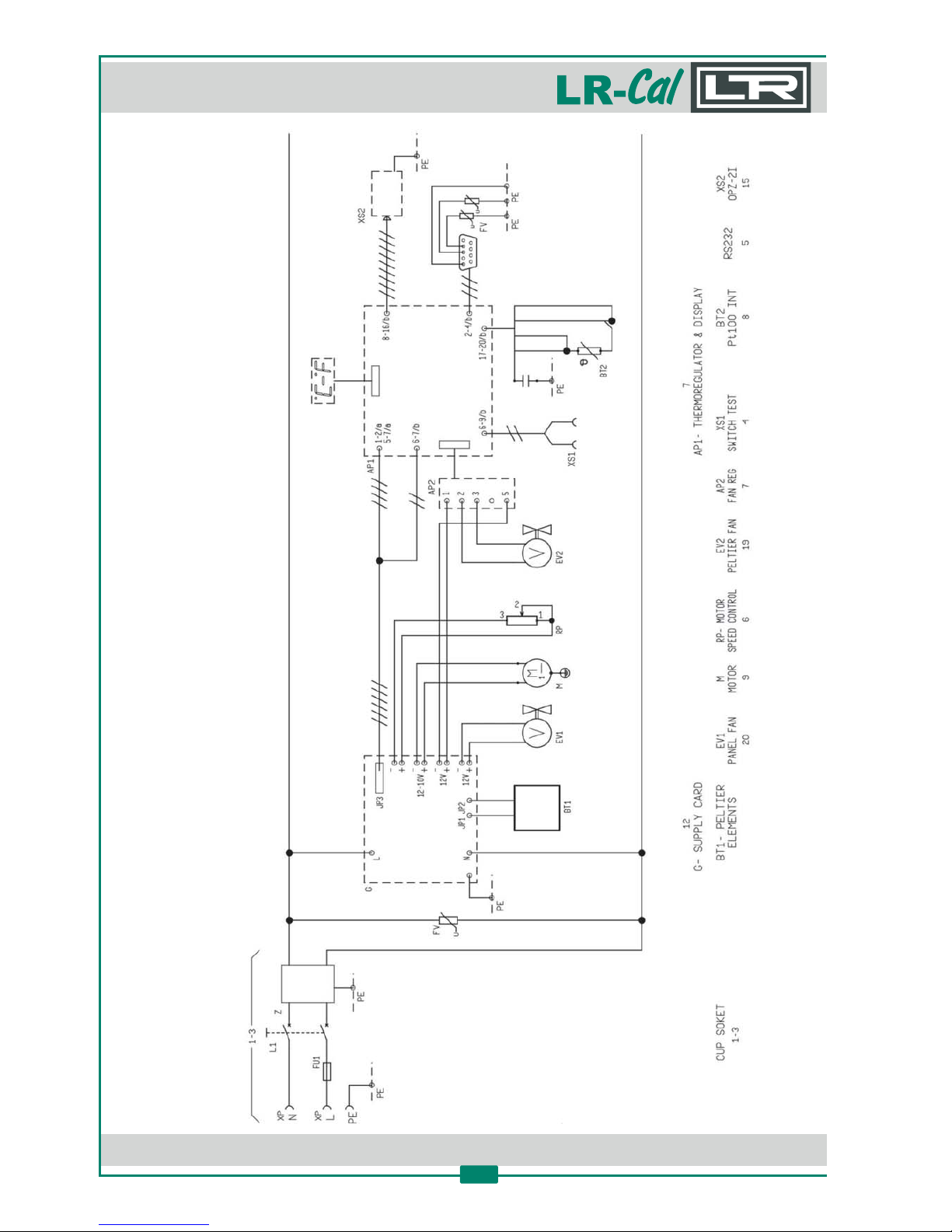
Electrical drawing
Page 11
DRU CK & TEM PERATUR Leitenberger GmbH • Bahnhofstr. 33 • D-72138 Kirchentellinsfurt • GERMANY
Tel. +49 (0) 7121-90920-0 • Fax +49 (0) 7121-90920-99 • [email protected] • • www.druck-temperatur.dewww.LR-Cal.net
MANUAL
Portable Temperature Calibraon Bath
FLUID 100 and FLUID 100-N
11
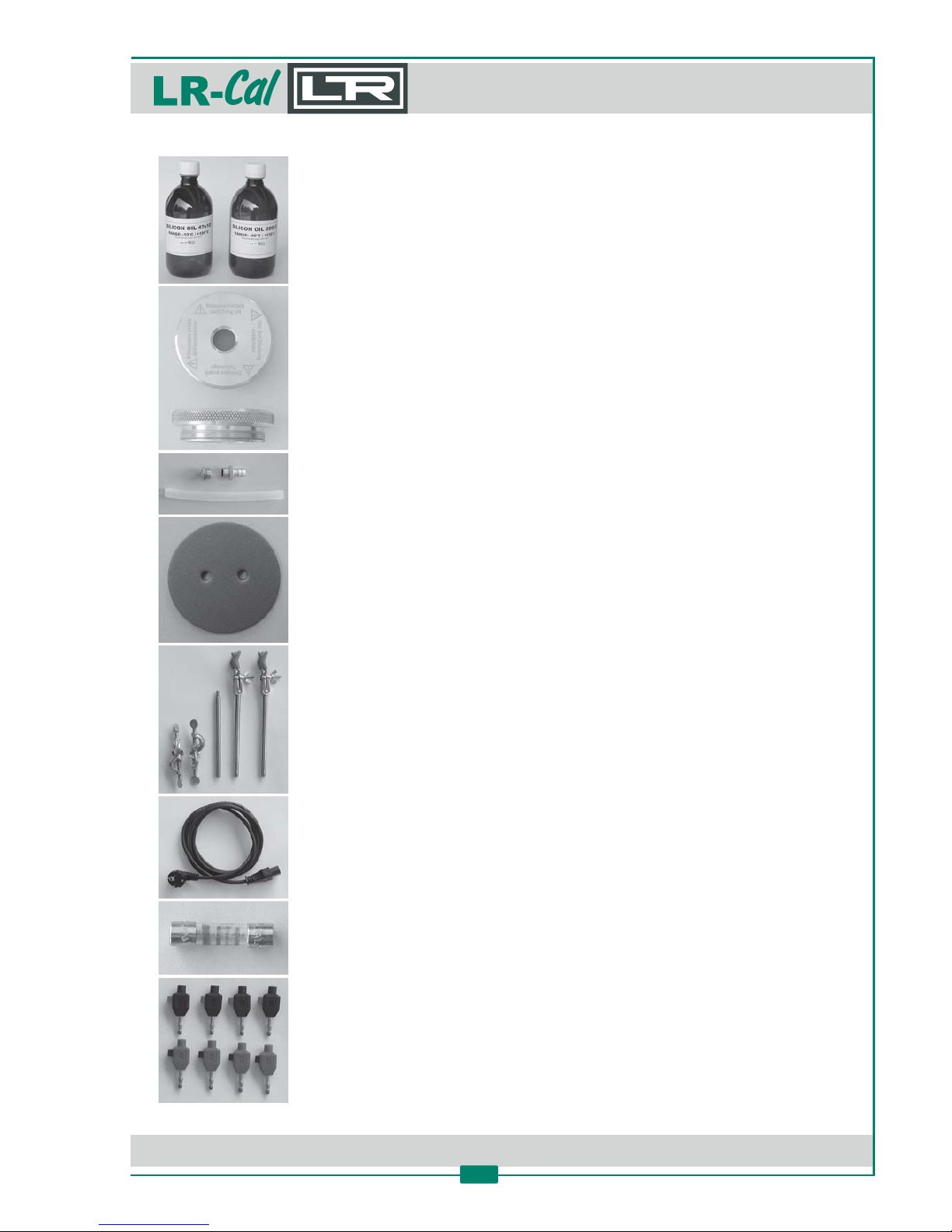
2.9 Scope of standard delivery
1 bo le silikon oil 47V5 at model FLUID 100LR-Cal
1 bo el silikon oil 47V10 at modell FLUID 100-NLR-Cal
Cover for transport and emptying
Accessories for transport and emptying
Cover with holes for two probes
Holders for probes (opmized for glass thermometer)
Electrical power cable
Spare fuse
only version: Clamps for probes-2I
Page 12
DRU CK & TEM PERATUR Leitenberger GmbH • Bahnhofstr. 33 • D-72138 Kirchentellinsfurt • GERMANY
Tel. +49 (0) 7121-90920-0 • Fax +49 (0) 7121-90920-99 • [email protected] • • www.druck-temperatur.dewww.LR-Cal.net
MANUAL
Portable Temperature Calibraon Bath
FLUID 100 and FLUID 100-N
12
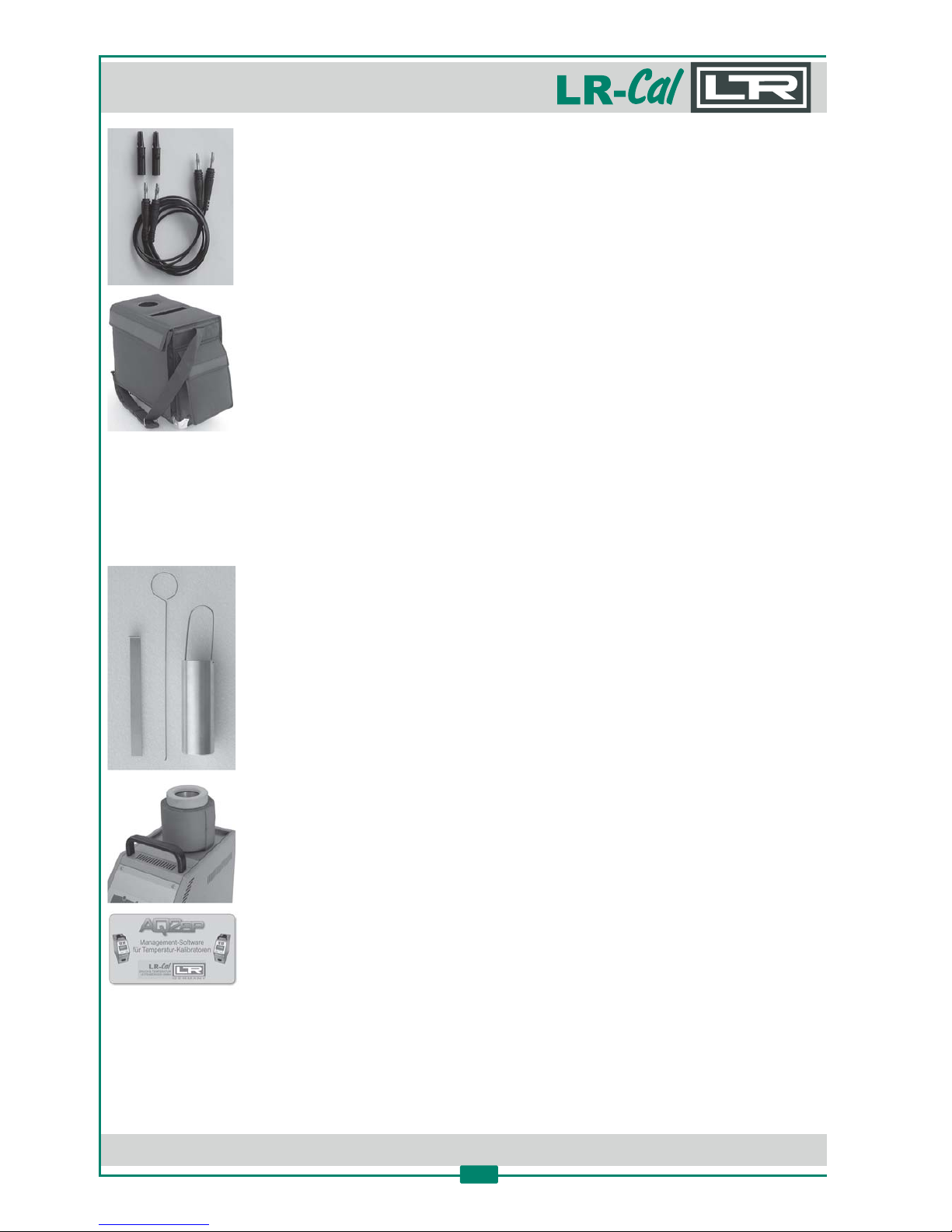
Cables for thermostat- / switch-test
So bag
Operang manual
Test cerficate (accuracy, stability, final check)
2.10 Oponal Accessories
Order-Code: FLUID-INS-9 or FLUID-INS-0
Kit to convert to metal dry block calibrator
Order-Code: FLUID100-ER
Extension tube to increase inseron depth of the reservoir to 230 mm
Order-Code: 599.0.000.0003.0
PC soware AQ2sp incl. RS232 interface cable
Page 13

DRU CK & TEM PERATUR Leitenberger GmbH • Bahnhofstr. 33 • D-72138 Kirchentellinsfurt • GERMANY
Tel. +49 (0) 7121-90920-0 • Fax +49 (0) 7121-90920-99 • [email protected] • • www.druck-temperatur.dewww.LR-Cal.net
MANUAL
Portable Temperature Calibraon Bath
FLUID 100 and FLUID 100-N
13
3. Calibraon media
CAUTION
The temperature calibrator has been configured in the factory with the
parameters that opmize the performance of the equipment. Modificaon of
these parameters (3. Menu Funcon Level) can cause malfunconing or
breakage of the equipment with consequent risk of damage to objects or
injury to persons.
Before filling the reservoir, be aware of fundamental facts regarding the liquids that can be used!
3.1 Liquids
The and temperature calibrator is suitable in a field fromFLUID 100 FLUID 100-NLR- LR-Cal Cal
temperature from -12 up to 125° resp. to 140°C; different liquids can be put into the bath but not
many can work on the enre calibrator field.
Before using the temperature calibrator check the temperature field of the liquid to be used and
always remain under the safety limits. The upper temperature limit is condioned by vaporisaon,
smokiness, flammability and chemical deterioraon of the liquid. The inferior temperature limit is
condioned by freezing of the liquid.
The principal features of a liquid for constant-temperature baths are: the temperature field,
viscosity, specific heat, thermal conducvity, the thermal expansion, the dielectric resisvity, life
span, safety, etc.
3.1.1 Recommended temperature field
The recommended temperature field of the principal liquids which can be used with the
temperature calibrator are shown below. It depends principally on the equipment in which it is
used. Normally the temperature field of a liquid is greater than the one shown below, but out of
these values fome features of the liquid can jeopardise funconing inside the calibrator.
• Wasser-Glycol-Mixture (50%): recommended for operaon range -30...+60°C
Smokiness increases considerably above 70°C!
• Silikon oil type 47V5: recommended for operaon range -20...+125°C
Steam triggers combuson in the presence of a naked flame
above 136°C!
• Silikon oil type 47V10: recommended for operaon range -15...+140°C
Smokiness increases considerable above +130°C!
• Silikon oil type 47V20: recommended for operaon range +20...+140°C
Smokiness increases considerable above +130°C!
Straight water is not recommended because of the presence of limestone causes blockage of the
agitaon.
Page 14

DRU CK & TEM PERATUR Leitenberger GmbH • Bahnhofstr. 33 • D-72138 Kirchentellinsfurt • GERMANY
Tel. +49 (0) 7121-90920-0 • Fax +49 (0) 7121-90920-99 • [email protected] • • www.druck-temperatur.dewww.LR-Cal.net
MANUAL
Portable Temperature Calibraon Bath
FLUID 100 and FLUID 100-N
14
3.1.2 Viscosity
Viscosity is the property of fluids that indicates it‘s resistance to mixing and it depends on the type
of fluid and temperature.
The more viscous the fluid, the more difficult the mixing of the fluid and consequently the
distribuon of a uniform temperature inside the bath.
Liquids with a viscosity higher than 20 censtokes (cts) do not allow a good performance of the
bath, therefore they should be avoided in the and . OilFLUID 100 FLUID 100-NLR- LR-Cal Cal
viscosity is established at room temperature.
The value for water (at 20°C) is 1 cst.
Viscosity at room temperature silicone oil 47V5 5 cst
silicone oil 47V10 10 cst
water-glycol-mix 50% 5 cst
Remember that viscosity, especially in oils, varies considerably when the temperature changes:
this is the reason that characterises the use of oil in a well-defined field: normally the oil becomes
more viscous when the temperature drops, creang problems in mixing and uniform distribuon
of the temperature.
3.1.3 Thermal expansion
Thermal expansion indicates how liquid volume changes with variaon of the temperature. It is an
important factor especially regarding oils, which increase in volume with increase of temperature.
Read the filling instrucons and do not fill over the values indicated because thermal expansion
could cause the liquid to escape from the bath.
Silicone oils increase by about 10% with respect to their inial volume with a temperature increase
of 100°C.
3.1.4 Life span
The life span that you can expect depends on many condions: evaporaon, chemical
deterioraon, gelling, etc.
The life span of an oil becomes shorter becauer the higher the temperature the greater oxidaon
of the oil in contact with air.
To increase the life span:
• Use the most suitable oil at high temperature for the shortest me possible
• Place the appropriate cover with holes on the bath to allow passage of the probes, in order to
limit contact between the hot oil and air.
For example: connous use at 125°C, in open bath condions, of 47V5 silicone oil cause
deterioraon in a few tens of hours; with the deterioraon of its condions the viscosity increases
considerably; at temperature below zero the 47V5 silicone oil becomes doughy and mixing in the
bath is impossible.
3.1.5 Bath filling
Fill the temperature calibrator with the suitable fluid depending on the field of calibraon. The
liquid we recommend is 47V5 silicone oil (resp. 47V10). Fill the bath with about 43-43 cl of oil. Do
not exceed the recommended quanty, as the thermal expansion at high temperatures could
cause the liquid to escape from the upper opening.
Page 15
DRU CK & TEM PERATUR Leitenberger GmbH • Bahnhofstr. 33 • D-72138 Kirchentellinsfurt • GERMANY
Tel. +49 (0) 7121-90920-0 • Fax +49 (0) 7121-90920-99 • [email protected] • • www.druck-temperatur.dewww.LR-Cal.net
MANUAL
Portable Temperature Calibraon Bath
FLUID 100 and FLUID 100-N
15
Using 47V5, bath performances are opmal in the field from -20° to 120°C, but with a fumes
sucon device it can be used up to 125°C, liming the running me to the highest values in order
to increase the life span, while at a low temperature the viscosity, even if high, allows good
funconing of the temperature calibrator, adjusng the magnec srrer to maximum speed.
If the liquid is oen used at high temperatures, we suggest to use the appropriate cover with holes
that allow passage of the probes and place it on the bath.
Before replacing the liquid in the calibrator with a different one, it is recommended to clean the
container with absorbent paper in order to prevent mixtures of different liquids that worsen the
operang condions and, most of all, cause the liquid to leak due to incompability of the
maximum temperature.
3.1.6 Srrer adjustment
The rotaonal speed of the magnec srrer can be adjusted using knob (6). The speed increases
with a clockwise movement. Adjustment is based on the vortex produced in the liquid: an ideal
vortext should be about 2 cm high. The rotaonal speed should be raised, at low temperatures,
when high viscosity silicone oil is used. At high temperatures reduce the rotaonal speed in order
to prevent having vortexes that are too high causing the liquid to escape.
Switch the temperature calibrator off, if the rotaon is blocked, adjust the speed controller (6) to
maximum and switch on the calibrator again. If it sll does not work, perform the maintenance
indicated in chapter 6.
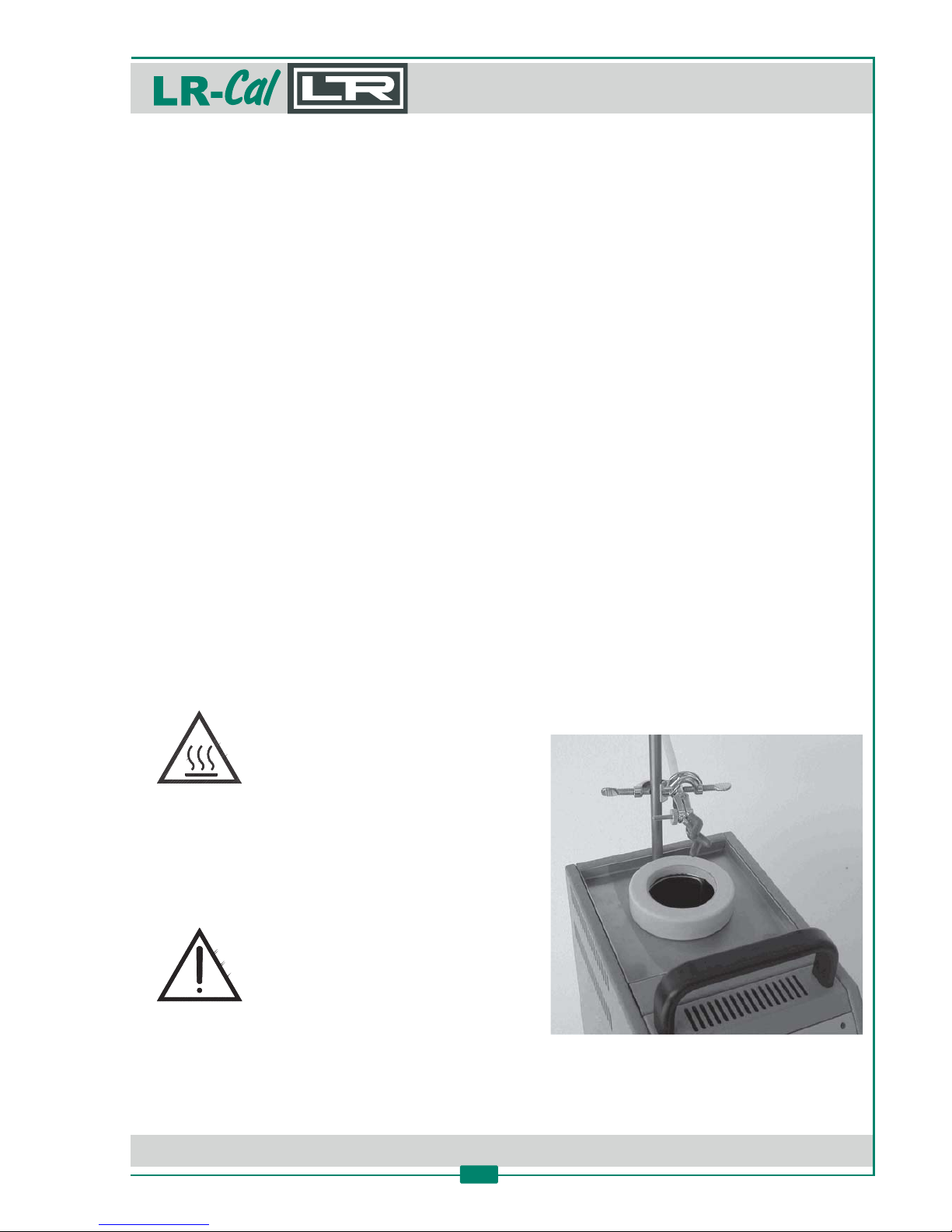
3.1.7 Posioning of the probes
In order to get the best performances in the calibraon, observe the following recommendaons:
• Verify that the probe is inserted for about 140 mm, avoiding touchng the bo om.
• As for the calibraon by means of comparison with a reference sample, it is necessary to
posion the two probes, respecvely the sample one and the probe to be calibrated, at the
same lavel and as close as possible.
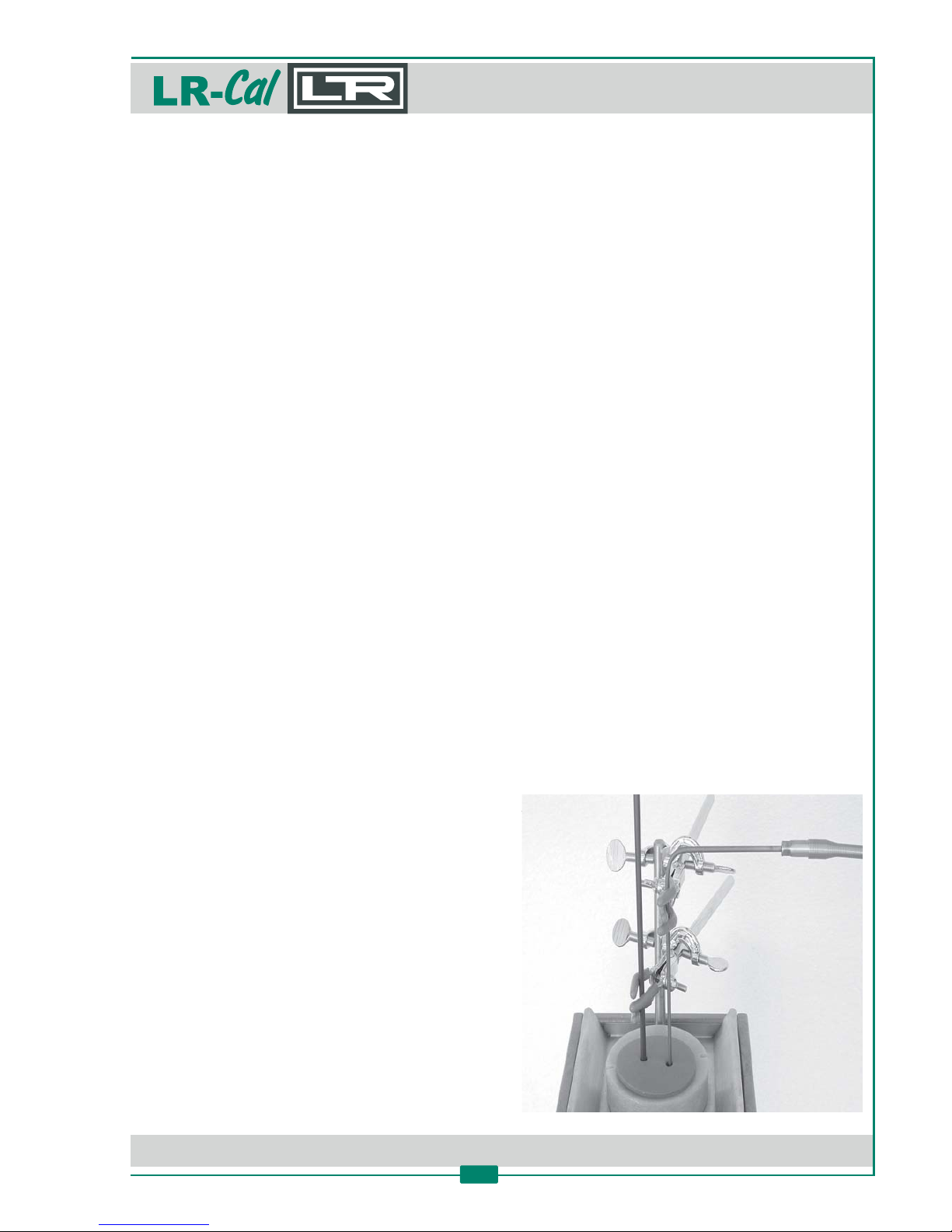
• To get the best accuracy and stability, put over the bath the protecons disc with holes to allow
the passage of the probes (see image below).
• The protecon disc reduces the formaon of moisture condensaon in the silicone oil at low
temperatures.
• Do not insert the probes in the center of the tank, as they
interfere with srring.
• Always verify the operang range of the probes and
thermostats before calibraon: only insert them into the
liquid if the calibraon range is compable with the
temperatures set on the temperature calibrator.
For example: inserng a probe with a range 0...50°C into
a liquid at a temperature higher than 120°C could
determine the breakage of the probe‘s sensive element.
• Avoid placing too many probes at the same me,
because the agitaon of the liquid is disturbed
resulng in large calibraon errors.
Page 16

DRU CK & TEM PERATUR Leitenberger GmbH • Bahnhofstr. 33 • D-72138 Kirchentellinsfurt • GERMANY
Tel. +49 (0) 7121-90920-0 • Fax +49 (0) 7121-90920-99 • [email protected] • • www.druck-temperatur.dewww.LR-Cal.net
MANUAL
Portable Temperature Calibraon Bath
FLUID 100 and FLUID 100-N
16
3.1.8 Recommendaons
• Do not close the container when the temperature is very high. Wait for the temperature of the
liquid to reach room temperature and then turn off and close using appropriate cap and
cover.
• Avoid transporng the and temperature calibratorFLUID 100 FLUID 100-NLR- LR-Cal Cal
without having emptyed and closed it beforehand, following the previous instrucons.
Page 17
DRU CK & TEM PERATUR Leitenberger GmbH • Bahnhofstr. 33 • D-72138 Kirchentellinsfurt • GERMANY
Tel. +49 (0) 7121-90920-0 • Fax +49 (0) 7121-90920-99 • [email protected] • • www.druck-temperatur.dewww.LR-Cal.net
MANUAL
Portable Temperature Calibraon Bath
FLUID 100 and FLUID 100-N
17
4. Installaon and Operaon
4.1 Installaon
4.1.1 Removal of packaging
The temperature calibrator is equipped with suitable packaging for transport and tradional
shipping systems. Any damage caused during transport must be nofied immediately to the
transporters and claim must be made.
4.1.2 Posioning the temperature calibrator
Posion the temperature calibrator on a safe and clean place.
The temperature calibrator is suitable for operang at high temperatures with the
consequent danger of fire. Keep it away from any type of inflammable materials
and never put any type of liquid inside (except the liquid reservoir).
To avoid any smell in the room it is be er to switch on the temperature calibrator
outside the room or to use a fume hood to remove any vapours given off by hot
bath fluid.
4.1.3 Power supply
The temperature calibrator runs on a voltage of 230 VAC (115 VAC on request), single-phase,
50/60 Hz. A 2.5 meter long cable 3 x 1 mm² is supplied with the instrument.
Make sure that the plant is earthen correctly before switching on the temperature calibrator.
Page 18
DRU CK & TEM PERATUR Leitenberger GmbH • Bahnhofstr. 33 • D-72138 Kirchentellinsfurt • GERMANY
Tel. +49 (0) 7121-90920-0 • Fax +49 (0) 7121-90920-99 • [email protected] • • www.druck-temperatur.dewww.LR-Cal.net
MANUAL
Portable Temperature Calibraon Bath
FLUID 100 and FLUID 100-N
18
5. Operang the calibrator
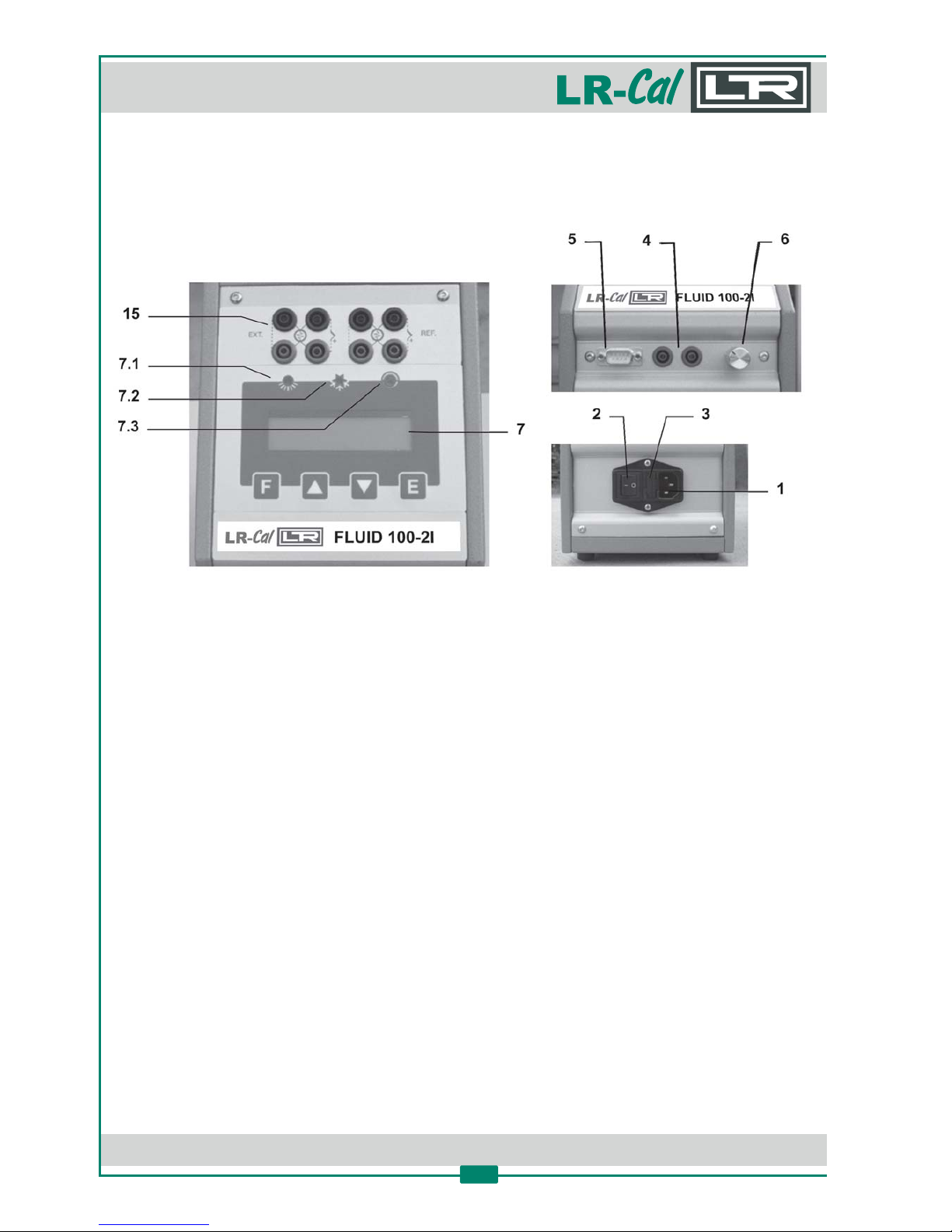
5.1 Elements of the front panel
(1) Supply socket
(2) Main switch
(3) Protecon fuses
(4) Switch test plugs
(5) RS232 interface
(6) Mixer speed control
(7) Display
(7.1) LED „heang“
(7.2) LED „cooling“
(7.3) LED „switch test“
(15) Sockets for external probes (version only, with two measuring inputs)-2I
Page 19

DRU CK & TEM PERATUR Leitenberger GmbH • Bahnhofstr. 33 • D-72138 Kirchentellinsfurt • GERMANY
Tel. +49 (0) 7121-90920-0 • Fax +49 (0) 7121-90920-99 • [email protected] • • www.druck-temperatur.dewww.LR-Cal.net
MANUAL
Portable Temperature Calibraon Bath
FLUID 100 and FLUID 100-N
19
5.2 Descripon of the instrument
The and temperature calibrator consists of an aluminiumFLUID 100 FLUID 100-NLR- LR-Cal Cal
block with one hole into which the sensors to be calibrated are inserted. The capacity of the fluid
tank is 500 cm³.
The Peler defices and an electronic microcontroller checks and regulates the temperature. Liquid
srring is ensured by a magnec system. A grid, to prevent the inserted probes from stopping its
operaon protects the srrer. A speed adjustment system is supplied, to ensure the best
homogeneous condion, according to the type of used fluid.
A fan, mounted in the bo om side, generates a constant air flow that reduces the temperature of
the case.
5.2.1 Thermoregulator
The thermo regulator (7) is a PID microprocessor which can be set from -12 to +125°C (resp.
+140°C). The first display line shows the measured value while the second display line displays the
input Set Point value.
Fur further specificaons and methods of use, see chapter 9 concerning the thermoregulator.
5.2.2 Main switch
The main switch (2) is found on the front of the instrument. It is fi ed with a socket for the voltage
calble, a main switch and one fuse (2.5 A for model at 230 VAC).
Note: use only fuses F. 5 x 20 mm. All the electrical part is found below the main switch.
5.2.3 Carrying handle
The temperature calibrator is fi ed with a carrying handle.
5.2.4 Liquid container
The capacity of the container is about 500 cm³.
Follow the instrucons of chapter 3.1.5 to fill the container with the suitable calibraon liquid. The
magnec srrer inside the container makes the temperature of the liquid homogeneous in order
to have the best performance. A metallic grid protects the magnec srrer.
5.2.5 Internal reference probe
The temperature sensor used for the reading and thermoregulaon is a Pt 100 resistance
thermometer. The probe is inserted directly into the aluminium container.
5.3 Operaon
The temperature calibrator can only be used correctly if the user has a good
knowledge of its basics.
Before starng with the calibraon, follow the installaon procedures.
Page 20
DRU CK & TEM PERATUR Leitenberger GmbH • Bahnhofstr. 33 • D-72138 Kirchentellinsfurt • GERMANY
Tel. +49 (0) 7121-90920-0 • Fax +49 (0) 7121-90920-99 • [email protected] • • www.druck-temperatur.dewww.LR-Cal.net
MANUAL
Portable Temperature Calibraon Bath
FLUID 100 and FLUID 100-N
20
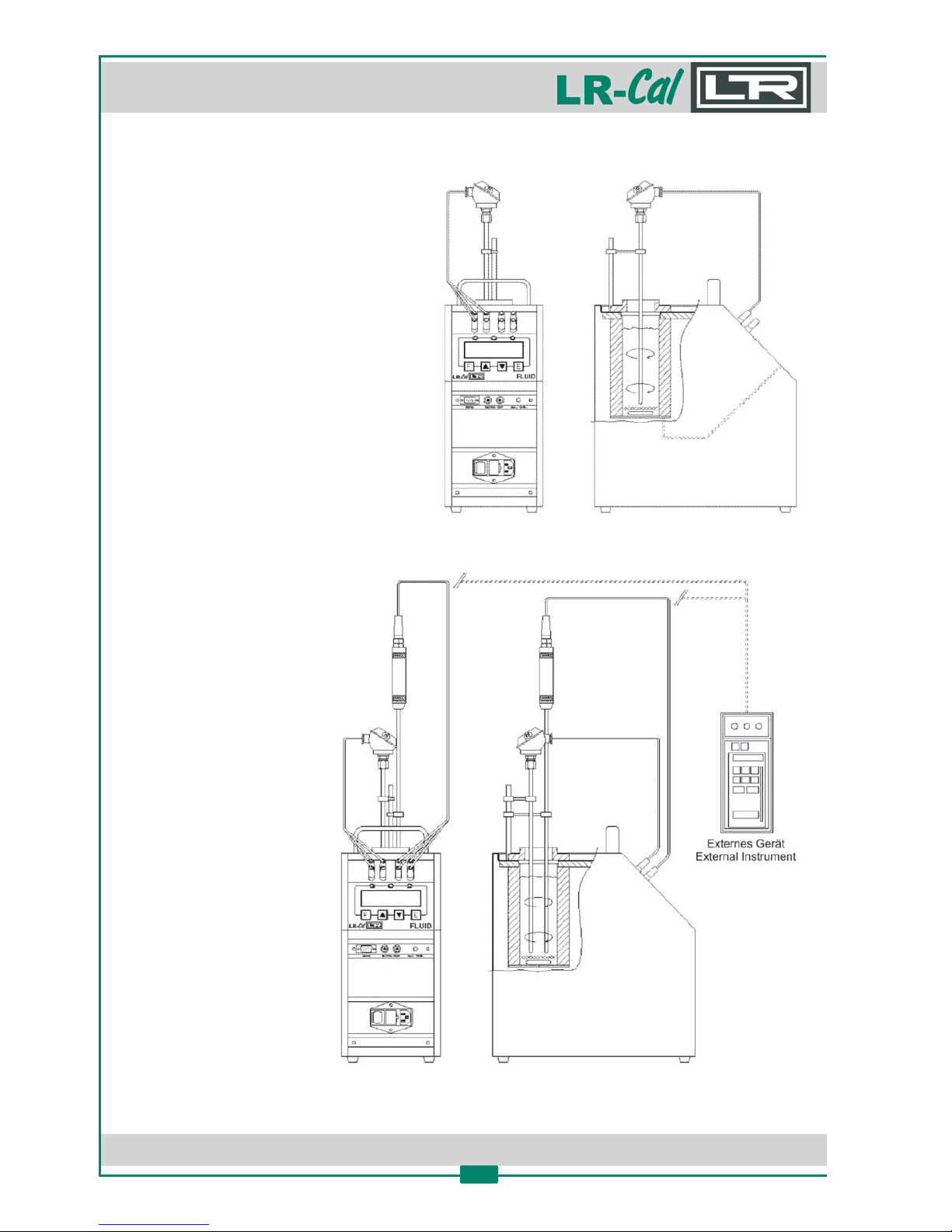
You have three opons to calibrate test items in the means of comparison of values:
Calibraon with comparison with internal
reference sensor
Make reference to the temperature value
of the display (7).
It is opportune to refer the value to the
supplied test report, to compensate the
error of the display.
Calibraon with comparison with external reference sensor, reading on calibrator‘s display
( versions only)-2I
Make reference to the temperature
value of the external standard
instrument inserted to the container
and connected directly to the
temperature calibrator. Temperature
is read on the 2. line of the display.
When possible, put the sensive
elements of the probes near
and at the same dept.
Calibraon with comparison
with external reference
sensor, reading on display
of an external instrument
Make reference to the
temperature value of the
external standard instrument
inserted in the container and
connected to an external
instrument.
When possible, put the
sensive elements of the
probes near and at the same dept.
Page 21
DRU CK & TEM PERATUR Leitenberger GmbH • Bahnhofstr. 33 • D-72138 Kirchentellinsfurt • GERMANY
Tel. +49 (0) 7121-90920-0 • Fax +49 (0) 7121-90920-99 • [email protected] • • www.druck-temperatur.dewww.LR-Cal.net
MANUAL
Portable Temperature Calibraon Bath
FLUID 100 and FLUID 100-N
21
Before any calibraons, follow the instrucons in chapter 3, and:
• Start the calibraon only at ambient temperature. Thermal shock can break the sensive
element of the probe and cause harm to operator.
• Put the probe to check into the bath. Refer to chapter 3.1.7.
• Switch on the temperature calibrator with the main switch (2) and wait for the end of the
auto-test (self-test) procedure.
• Set the required temperature value on the display:
- Press the „arrow-up“-key to increment the Set Point value
- Press the „arrow-down“-key to decrement the Set Point value
- Press the „E“-key to confirm the input value.
• It is advisable to wait for the stabilisaon of the oven before starng any calibraon.
• Adjust the srrer with the knob (6) for the best performance. The fluid must be mixed well for
good temperature uniformity and fast controller response. Set the knob (6) in middle posion
to start.
• The display shows the temperature of the calibrator and the Set Point. When the temperature
is reached and it is stable, the display shows the symbol „÷“.
• For different calibraon point, regulate the Set Point to the new temperature and wait for the
stabilisaon (“÷“).
• The temperature indicated on the display must not be considered as a reference temperature,
but only as a general indicaon of the temperature inside the bath. We suggest to insert a
precision reference thermometer (e.g. ) or, at versiones, without own displayLRT 750 -2ILR-Cal
(e.g. ).LRT FLR-Cal
At versions, the complete measuring chain (calibrators display plus reference thermometer-2I
can be cerfied.LRT FLR-Cal
To modify the regulaon parameter or to set the ramp, see the instrucons in chapter 9.
Cooling: To reduce the oven‘s temperature, change the Set Point and wait for the natural cooling.
CAUTION!
At the end of the calibraon, do not
remove the probe if it is sll at high
temperature.
Always allow the temperature
calibrator to cool down with the probe
sll inserted in order to avoid a
thermal shock to the probe itself and
harm to operator or things.
Before transporng the calibrator
make sure, that the temperature of
the liquid is close to the ambient
temperature and the closing-cap is
well ghtened.
Page 22
DRU CK & TEM PERATUR Leitenberger GmbH • Bahnhofstr. 33 • D-72138 Kirchentellinsfurt • GERMANY
Tel. +49 (0) 7121-90920-0 • Fax +49 (0) 7121-90920-99 • [email protected] • • www.druck-temperatur.dewww.LR-Cal.net
MANUAL
Portable Temperature Calibraon Bath
FLUID 100 and FLUID 100-N
22
5.4 Use of the funcons
5.4.1 Reading external probes -2I- only versions
You can connect up to two external temperature
probes to the temperature calibrator (only -2I
versions) and show their values on the temperature
calibrator‘s display (2nd. line):
• Thermocouples types J, K, R, S, N or E
(with automac compensaon of the terminal
clamp temperature)
• Resistance thermometers (2-, 3- or 4-wire)
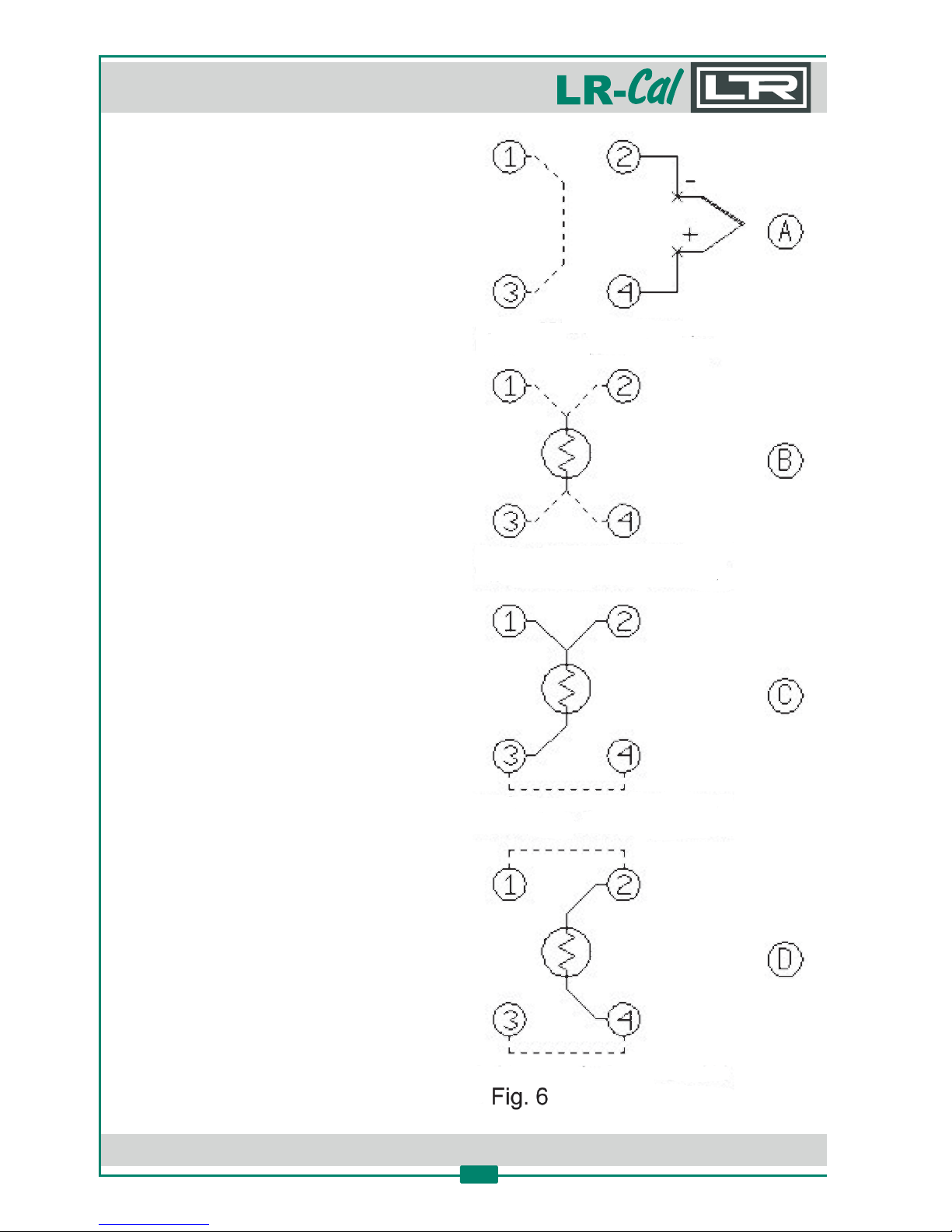
For connecng, follow this instrucons:
• Connect the wires of the external temperature
probe(s) to the bushes (15) as shown on
images (Fig. 6):
(A) Thermocouples: make a bridge between
bushes „1" and „3". Connect sensor to bushes
„2" and „4" and pay a enon for right
polarisaon (plus to 4, minus to 2).
(B) Pt 100 (4-wire): connect the 4 wires of the
sensor to the bushes as shown in image „(B)“.
(C) Pt 100 (3-wire): make a bridge between bushes
„3" and „4" and connect the 3 wires of the
sensor to bushes „1", „2" and „3", see picture
„(C)“.
(D) Pt 100 (2-wire): make bridges between bushes
„1" and „2" as well as „3" and „4" and connect
the 2 wires of the sensor to bushes „2" and 4",
see picture „(D)“.
• Press the „F“-key ans select menu item
„SENSOR“. Then select the used input „EXT“ or
„REF“ or „EXT+REF“ (both inputs together).
Confirm with „E“-key.
• Press „arrow-up“-key and „F“-key together, to
reach the 2nd. menu level. Press „F“-key unl
menu item „EXT SENSOR TYPE“ and „REF
SENSOR TYPE“ is indicated. Select used sensor
type with arrow keys. Confirm with „E“-key.
Page 23
DRU CK & TEM PERATUR Leitenberger GmbH • Bahnhofstr. 33 • D-72138 Kirchentellinsfurt • GERMANY
Tel. +49 (0) 7121-90920-0 • Fax +49 (0) 7121-90920-99 • [email protected] • • www.druck-temperatur.dewww.LR-Cal.net
MANUAL
Portable Temperature Calibraon Bath
FLUID 100 and FLUID 100-N
23
NOTE:
The temperature calibrator always uses the internal reference sensor to regulate it‘s temperature.
Possible Error Messages:
• EXT SENSOR FAIL Wrong connecon or configuraon of the probe connected to „EXT“.
• REF SENSOR FAIL Wrong connecon or configuraon of the probe connected to „REF“.
• SENSORS FAIL Wrong connecon or configuraon of both probes.
CAUTION: Never connect voltage >5 V to the measuring inputs (15)!
5.4.2 Switch test
You can test the operang point of thermostats using the „SWITCH TEST“ funcon:
• Put the sensor of the thermostat into the calibrator (dry block or fluid bath) avoiding touching
the bu on. Follow the instrucons in chapter 3.1.7.
• Connect the terminals of the thermostat to the socket (4).
• Switch on the temperature calibrator.
• Set the test temperature upper to the operang temperature of the thermostat.
The LED (7.3) will light on when the thermostat electric contact works.
• The instrument stores the switch test value. Follow the instrucons and the flow chart in
chapter 10.1, up to „SW ON“ - „SW OFF“ to display the stored values.
• Press both arrow-keays together at the same me to reset the values of „SW ON“ and „SW OFF“
• See chapter 10.1 for generaon of a ramp.
CAUTION: Never connect voltage >5V to the switch-test input (4)!
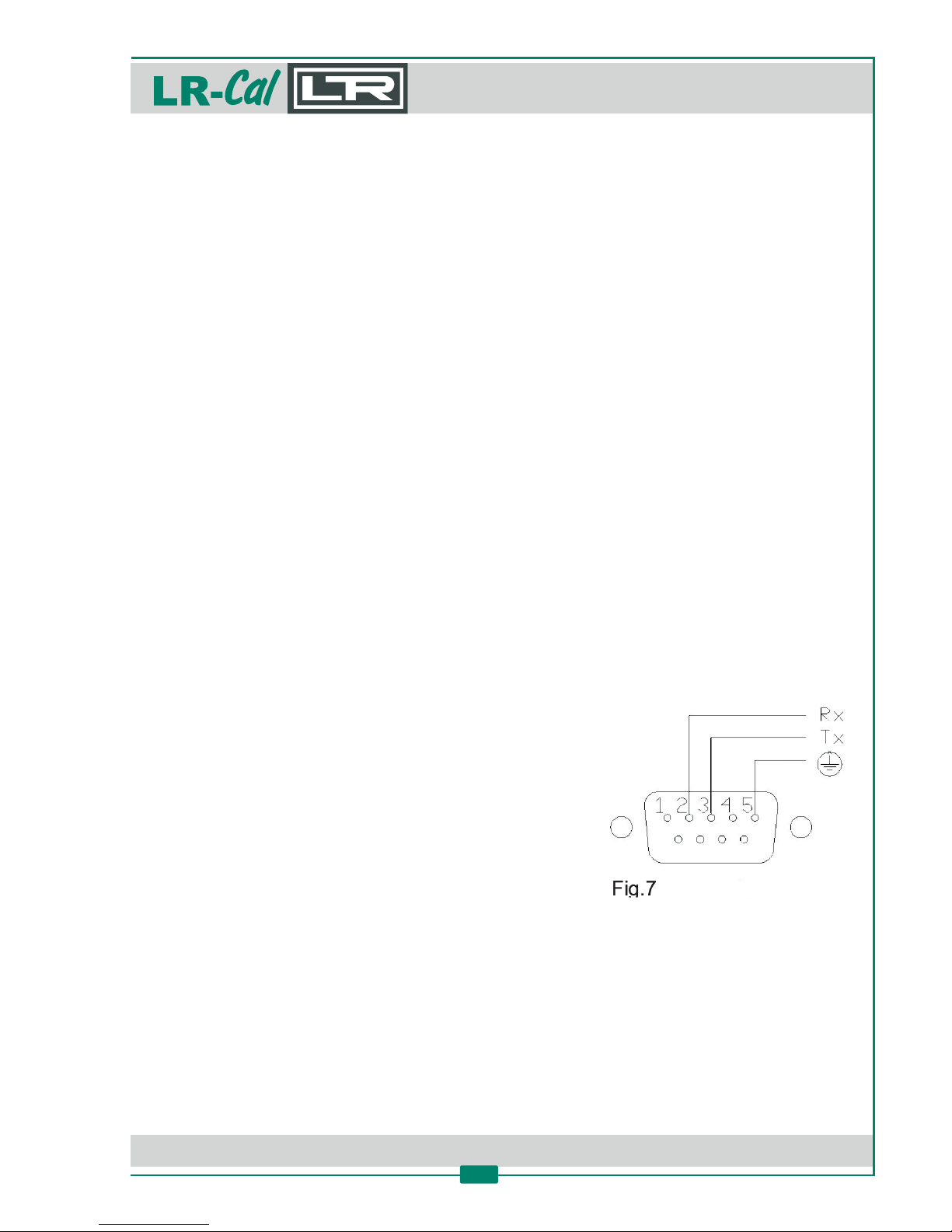
5.4.3 Serial communicaon RS232
For PC control, use the serial communicaon RS232 (5)
interface, see Fig. 7.
With the RS232 interface, you can read and/or change the
operave parameters, for example: set point, external probe,
slope rate, etc.
Refer to the communicaon protocol instrucons in
chapter 10.2.
CAUTION: The external PC must be conform to the IEC950 standard.
NOTE: The used RS232 cable must have pin 2 and pin 3 crossed.
RS232 front view
Page 24
DRU CK & TEM PERATUR Leitenberger GmbH • Bahnhofstr. 33 • D-72138 Kirchentellinsfurt • GERMANY
Tel. +49 (0) 7121-90920-0 • Fax +49 (0) 7121-90920-99 • [email protected] • • www.druck-temperatur.dewww.LR-Cal.net
MANUAL
Portable Temperature Calibraon Bath
FLUID 100 and FLUID 100-N
24
6. Maintenance
6.1 Periodical Maintenance
• Check once a month the level of the liquid inside the fluid container.
• Check once a month the liquid and change if it is exhausted.
• To have the instrument always efficient, it is opportune to recalibrate it periodically. The
frequency of recalibraon depends on the use of the instrument, however we suggest to
recalibrate the temperature calibrator once a year.
To recalibrate the temperature calibrator it is necessary to have a high precision standard
reference thermometer and simulator and follow the instrucons of chapter 10.
• Check once a year the calibraon date.
6.2 Connous Maintenance
• At 20...30°C the fluid level should be about 30 mm under the top edge of the container.
If the liquid level is too low, fill up the level with the same liquid (ref. chapter 3).
• If the liquid is dirty, thick or exhausted at ambient temperature, it is advisable to change it.
To change the liquid, proceed with the emptying, cleaning and filling again.
Emptying of the liquid from the container of the temperature calibrator:
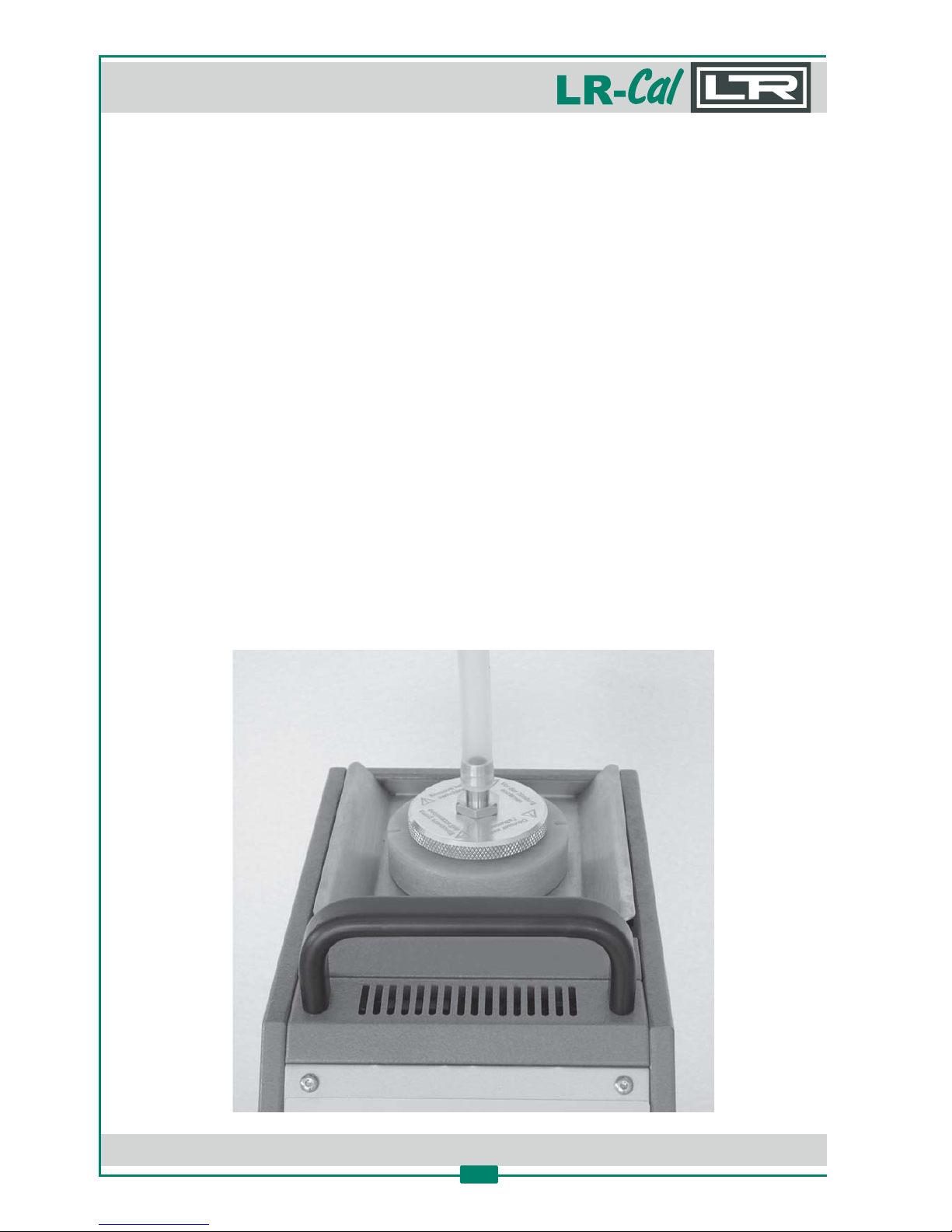
To remove completely the liquid from the temperature calibrator, reduce the temperature to a
value which is close to the ambient temperature. Remove the transport cap (see picture below)
from the transport cover, replace it with the emptying cover and then empty the tube. Overturn
the temperature calibrator by making the liquid leak. Collect it inside a container having adequate
dimensions resp. volume.
Page 25
DRU CK & TEM PERATUR Leitenberger GmbH • Bahnhofstr. 33 • D-72138 Kirchentellinsfurt • GERMANY
Tel. +49 (0) 7121-90920-0 • Fax +49 (0) 7121-90920-99 • [email protected] • • www.druck-temperatur.dewww.LR-Cal.net
MANUAL
Portable Temperature Calibraon Bath
FLUID 100 and FLUID 100-N
25
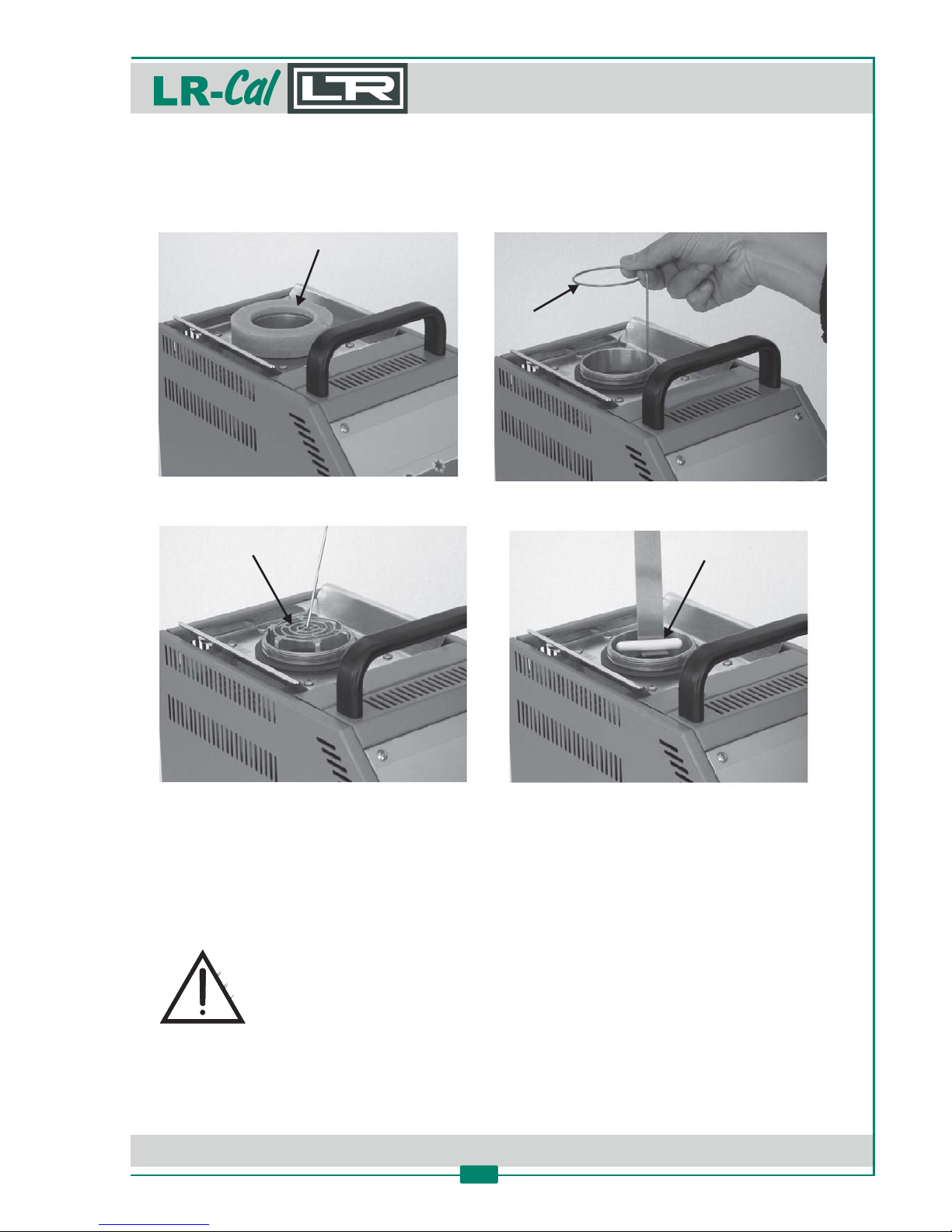
Cleaning of the tank (container):
To take off the protecon grid, it is necessary to unscrew the insulang ring nut (A). Remove the
spring (B) and then hook the grid with a wire (C). Under the grid, there is the sr bar for mixing the
fluid (D). Clean the well with a paper towels before mounng and filling again.
Filling of the container / tank:
Follow the instrucons in chapter 3.1.5.
IMPORTANT!
For retrieval of the exhausted liquid, use petrol tank in plascs.
Do not disperse in the surrounding.
The excesses, the refusals and the containers must be wasted according to the
disposion laws of your country.
A
B
C
D
Page 26

DRU CK & TEM PERATUR Leitenberger GmbH • Bahnhofstr. 33 • D-72138 Kirchentellinsfurt • GERMANY
Tel. +49 (0) 7121-90920-0 • Fax +49 (0) 7121-90920-99 • [email protected] • • www.druck-temperatur.dewww.LR-Cal.net
MANUAL
Portable Temperature Calibraon Bath
FLUID 100 and FLUID 100-N
26
7. Typical faults
Fault: The calibrator does not work when the power cable is connected and the main switch is turned on.
Cause: • The fuse (3) is cut off. Replace the fuse.
• The power cable is cut off. Replace the power cable with a similar one.
• The main switch is faulty. Contact the manufacturer for a repair.
Fault: The fuse (3) is triggered when the power cable is connected and the main switch is turned on.
Cause: • There is a short circuit on the supply card. Contact the manufacturer for a repair.
• The main switch is faulty. Contact the manufacuturer for a repair.
Fault: The control panel is working properly, but the temperature does not increase.
Cause: • The thermo regulator is not generang a signal. Contact the manufacturer for a repair.
• The supply card is faulty. Contact the manufacturer for a repair.
Fault: The first line of the display shows a different temperature from the one measured in the well.
Cause: • The thermal element is faulty. Contact the manufacturer for a repair.
• The thermal regulator is faulty. Contact the manufacturer for a repair.
Fault: The liquid is not mixed. Differences of temperature inside the bath.
Cause: • Magnec srring off. Turn off the calibrator, then turn on again and adjust the speed control (6).
• The liquid is exhaust because of too long use at high temperature. Clean the well and the srr
bar if dirty, change the liquid.
Fault: The display shows MEMORY FAIL
Cause: • RAM error caused by electrical noise. Thermo regulator needs replacement. Contact the
manufacturer for a repair.
Fault: The display shows „internal sensor fail“.
Cause: • The internal reference probe is faulty. Contact the manufacturer for a repair.
Fault: The temperature does not stop at the value of the Set Point.
• The supply card is faulty (TRIAC cut off). Contact the manufacturer for a repair.
Fault: The temperature dos not decrease to the Set Point as quickly as it should.
Cause: • The supply card is faulty. Contact the manufacturer for a repair.
• The cooling fan is faulty. Contact the manufacturer for a repair.
Page 27
DRU CK & TEM PERATUR Leitenberger GmbH • Bahnhofstr. 33 • D-72138 Kirchentellinsfurt • GERMANY
Tel. +49 (0) 7121-90920-0 • Fax +49 (0) 7121-90920-99 • [email protected] • • www.druck-temperatur.dewww.LR-Cal.net
MANUAL
Portable Temperature Calibraon Bath
FLUID 100 and FLUID 100-N
27
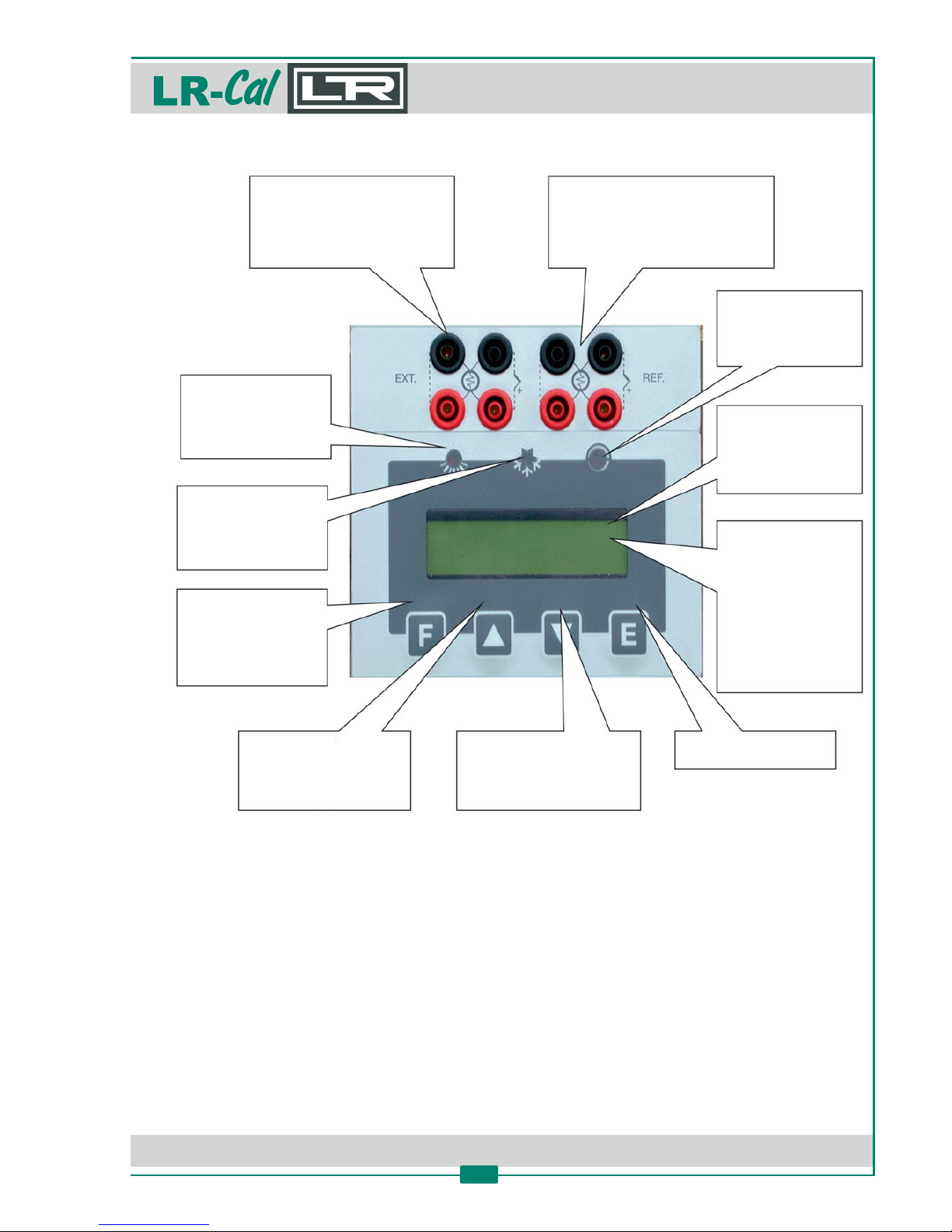
EXT.: external probe input
Selectable between
Pt 100 (4 or 3 wires),
Thermocouples K, S, N, J, E
or R, according to the probe
you calibrate.
REF.: external reference probe
, selectable between:input
Pt 100 (4 or 3 wire),
Thermocouple K, S, N, J, E or R
according to the probe you use as
external reference probe.
LED: Switch-Test
Whe the LED is on, the
thermostat‘s contact is
closed.
Display: Line 1
It shows the value of
the variable
temperature or the
temperature unit.
Display: Line 2
• Indication of the value
of the set point.
• Indication of the EXT.
probe if selected.
• During the program
operation it shows
the parameter,
selected by the
„F“-key.
E (ENTER-key)
Confirmation of the values
q reduce the value shown on
the display line 2. If you keep
pressed this key, „DOWN“ the
speed of reduces rises.
p increase the value shown
on the display line 2. If you
keep pressed this key, „UP“
the speed of increase rises.
F (FUNCTION-key)
Acess to function menu.
Pressed with the -keyp
it let you enter to the
„Set Up“ menu.
LED: Cooling
When this LED is on,
the calibrator decrease
the temperature.
LED: Heating
When this LED is on,
the calibrator increase
the temperature.
NOTE:
The picture shows the version of the temperature calibrator, with 2 configurable-2I LR-Cal
measuring inputs.
8. Descripon of the front panel
Page 28
DRU CK & TEM PERATUR Leitenberger GmbH • Bahnhofstr. 33 • D-72138 Kirchentellinsfurt • GERMANY
Tel. +49 (0) 7121-90920-0 • Fax +49 (0) 7121-90920-99 • [email protected] • • www.druck-temperatur.dewww.LR-Cal.net
MANUAL
Portable Temperature Calibraon Bath
FLUID 100 and FLUID 100-N
28
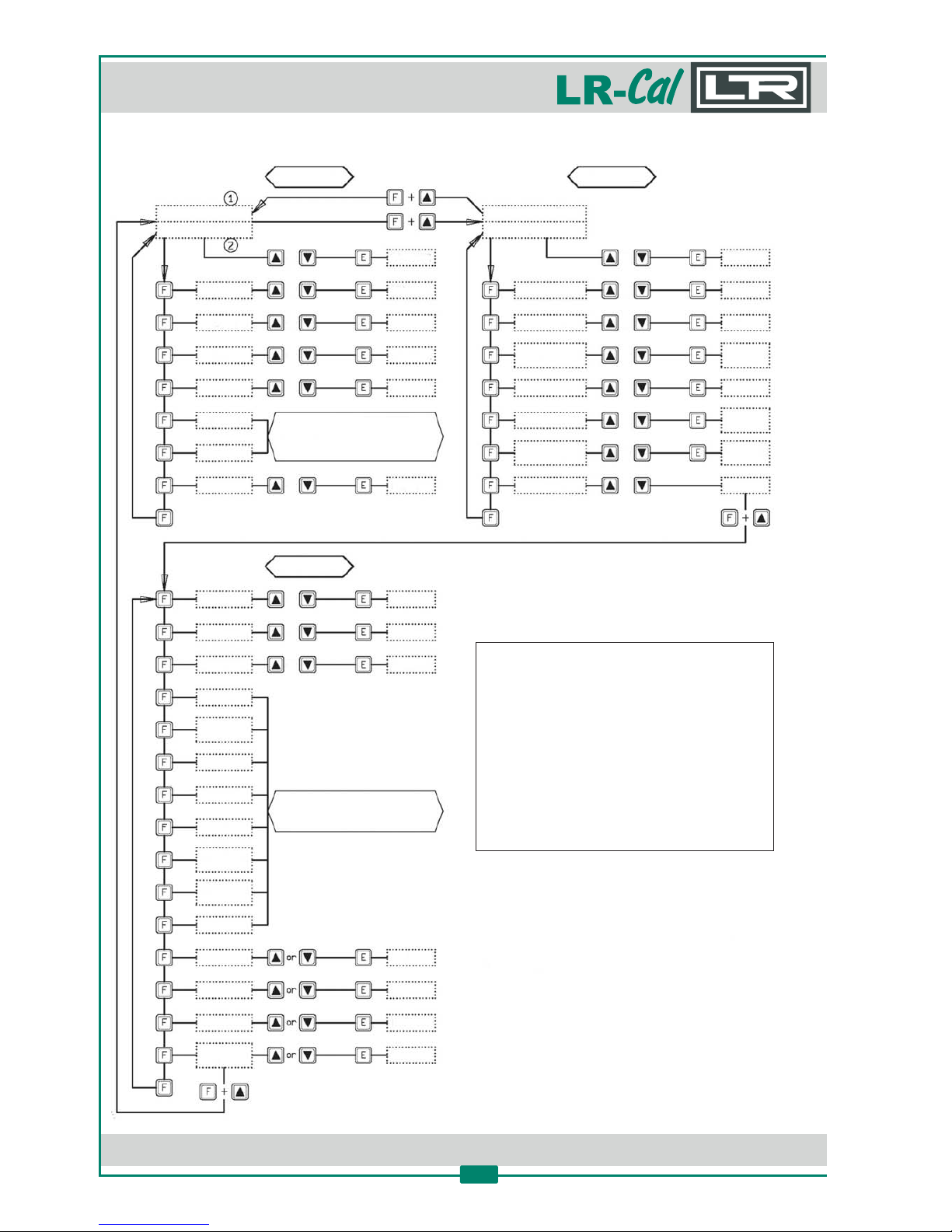
9. Descripon of the Funcon Menu Levels
Level 1 Level 2
Level 3
Temp. Value
Set Point
Temp. Value
P. B.
SENSOR
SW/OFF
SW/ON
RES.
RAMP
GRAD
SP.2
new value
new value
new value
new value
new value
new value
new value
new value
new value
new value
new value
new value
new value
new value
new value
new value
closing thermostat
temperature
(if connected)
/
/
/
/
/
/
/
/
/
/
/
/
/
/
/
/
/
(*) = Factory Set Values
ACCESS KEY
BAUD RATE
ADRESS
S/N (*)
Board
S/N (*)
MAX.SET (*)
MIN.SET (*)
WAIT (*)
G2K-xx-xx
(*)
SENSOR
TYPE (*)
STAB (*)
Cal_chnld
P1
P2
Cal.: INT
Y/N
T. i.
T. d.
EXT SENSOR
TYPE
UNIT °C
DEF.
REF SENSOR
TYPE
KEY:
J/R/S/
Pt100/N/K
J/R/S/
Pt100/N/K
°F / K
DEFAULT
PAR AM. ON
Set Key = 2
NOTES:
The first line of the display isj
always the internal temperature.
The second line of the display is onek
of the funcons of the menu.
Aer 20 seconds the set point valuel
is shown at the bo om line of the
display.
Page 29

DRU CK & TEM PERATUR Leitenberger GmbH • Bahnhofstr. 33 • D-72138 Kirchentellinsfurt • GERMANY
Tel. +49 (0) 7121-90920-0 • Fax +49 (0) 7121-90920-99 • [email protected] • • www.druck-temperatur.dewww.LR-Cal.net
MANUAL
Portable Temperature Calibraon Bath
FLUID 100 and FLUID 100-N
29
The temperature calibrator has three funcon menu levels (see previous page):LR-Cal
• Level 1: Funcons for the connuous usage
• Level 2: More specific funcons and for the regulaon of the calibrator
• Level 3: Typical funcons for each calibrator instrument
9.1 Funcons of the 1. Funcon Menu Level
This funcons are to be selected by pressing the „F“-key and to be confirmed by the „E“-key.
• SP
Set Point: temperature set which the temperature calibrator has to reach following the technical
specificaons.
• SP2
Set Point 2: temperature set which the temperature calibrator reaches with the set gradient and
the ongoing launched ramp procedure.
• GRAD
Gradient (from 0.1 °C/1 min): set point variaon speed during the changes from one temperature
value to the SP2 temperature value. The set gradient must be negave for descent ramps.
NOTE: gradient values to be set must be lower than the ones stated in the technical data (max.
cooling me, max. heang me) for this temperature calibrator model.
• RAMP
Ramp procedure enabling (ON) or disabling (OFF): Select „ON“ by the arrow-keys and confirm the
choice by pressing the „E“-key. The temperature calibrator will reach the set SP2 temperature with
the set gradient, starng from the same temperature as the one with which the ramp has been
confirmed. The starng temperature does not depend on the SP Set Point temperature.
If a negave ramp is set and the gradient is le posive and/or the SP2 temperature value is
higher than the current temperature, the start of the ramp will not be accepted, an alarm will
begin to run.
When the ramp is „ON“, the display shows „Ramp:...“ followed by the Set Point value on the
second line of the display. The Set Point value will reach the speed related to the set gradient.
When the calibrator temperature reaches the SP2 set temperature, the calibrator will produce an
alarm and the ramp procedure will be automacally set „OFF“; the SP2 value will be considered as
the new Set Point and the calibrator will be steadily set at that temperature.
During the ramp process, the derivave parameter will not be considered.
Page 30

DRU CK & TEM PERATUR Leitenberger GmbH • Bahnhofstr. 33 • D-72138 Kirchentellinsfurt • GERMANY
Tel. +49 (0) 7121-90920-0 • Fax +49 (0) 7121-90920-99 • [email protected] • • www.druck-temperatur.dewww.LR-Cal.net
MANUAL
Portable Temperature Calibraon Bath
FLUID 100 and FLUID 100-N
30
Ramp procedure effecve example:
Let‘s say, that the set temperature is the ambient one and that it is necessary to reach 400°C with a
gradient of 2°C/min.
• Press „F“-key, set „SP2" to „400°C“ using the arrow-keys. Press „E“-key to confirm the choice.
• Press „F“-key, set „GRAD“ to „2°C/min“ using the arrow-keys. Press „E“-key to confirm.
• Press „F“-key, set „RAMP“ to „ON“ using the arrow-keys. Press „E“-key to confirm.
Aer pressing the „E“-key for confirming the ramp start, the calibrator will acsend with the set
slope. Of course, there will be some oscillaons at the beginning since the ramp slope will not be
suitable but they will stop in a short me and then the calibrator temperature will follow the
ramp‘s set point one.
• RES
Display reading resoluon (0.1/0.01): the values admi ed are „0.1" and „0.01" and they can be
selected by the arrow-keys.
• SW/ON
Thermostat Switch ON: it displays the temperature at which the thermostat‘s contact, connected
to the „SWITCH TEST“ bushes, is closed.
• SW/OFF
Thermostat Switch OFF: it displays the temperature at which the thermostat‘s contact, connected
to the „SWITCH TEST“ bushes, is open.
The value is reset each me the power supply fails or by pressing both arrow-keys at the same
me. The value is updated every me that the thermostat‘s contact closing is detected.
• - only for versions with measuring inputsSENSOR -2I
This parameter allows at versions of the temperature calibrators (with 2 measuring-2I LR-Cal
inputs for external reference and one test item or for two test items) the reading of connected
sensors.
OFF: no input is enabled to read the sensor‘s value.
EXT: the 4 bushes of the input „EXT“ are enabled to read the sensor connected to them,
whose value is indicated at the 2nd. line of the display
REF: the 4 bushes of the input „REF“ are enabled to read the sensor connected to them,
whose value is indicated at the 2nd. line of the display. (except model )BK40-M-2ILR-Cal
EXT+REF: the 8 bushes of the 2 inputs „EXT“ and „REF“ are enabled to read the sensors
connected to them, whos values are indicated at the 2nd. line of the display.
(except model ).BK40-M-2ILR-Cal
Page 31

DRU CK & TEM PERATUR Leitenberger GmbH • Bahnhofstr. 33 • D-72138 Kirchentellinsfurt • GERMANY
Tel. +49 (0) 7121-90920-0 • Fax +49 (0) 7121-90920-99 • [email protected] • • www.druck-temperatur.dewww.LR-Cal.net
MANUAL
Portable Temperature Calibraon Bath
FLUID 100 and FLUID 100-N
31
9.2 Funcons of the 2. Funcon Menu Level
This funcons can be selected by pressing the „F“-key together with the „arrow-up“-key at the
same me. Once the 2. Funcon Menu Level is intered, these funcons can be selected only by
pressing the „F“-key. In order to go back to the first level, press the „F“-key and the „arrow-up“-key
at the same me or wait for about 20 seconds.
• P.B.
Value of the Proporonal Band expessed in percentage of the value of the end temperature of this
temperature calibrator. Proporonal band means per cent of range within which there is the
variaon of the modulaon of the heang element power.
• T.I.
Integral me value expressed in seconds. The integrang acon cancels the error between the
chosen set point and the temperature reached only ba the proporonal acon. Integral me
means the length of me necessary to the integrave acon to double up the proporonal acon.
• T.D.
Derivave me expressed in seconds. When there is a step variaon of temperatures, the
derivave acon induces a greater inial adjustment, so that the calibrator will have a greater
power than it usual has due to the proporonal and integral acon only. Since the error keeps
exisng, the derivave acon reduces the impact giving the integrave acon the task of reducing
the error.
• - only for versions with 2 inputsEXT SENSOR TYPE -2I
This parameter allows selecng the kind of sensor read by the dipslay and connected to the four
„EXT“ terminals:
N, K, J, R, S = thermocouples types N, K, J, R resp. S
Pt3W = resistance thermometer Pt 100 3-wire
Pt = resistance thermometer Pt 100 4-wire
• UNIT
Temperature measuring unit:
°C = degrees Celsius
°F = degrees Fahrenheit
K = Kelvin
Page 32

DRU CK & TEM PERATUR Leitenberger GmbH • Bahnhofstr. 33 • D-72138 Kirchentellinsfurt • GERMANY
Tel. +49 (0) 7121-90920-0 • Fax +49 (0) 7121-90920-99 • [email protected] • • www.druck-temperatur.dewww.LR-Cal.net
MANUAL
Portable Temperature Calibraon Bath
FLUID 100 and FLUID 100-N
32
• DEF.
Default Parameters: this funcon allows choosing to set the thermoregulator with the P.B., T.i., T.d.
parameters either as a default or as a customisable adjustment. By selecng the „OFF“ parameter
and confirming by the „E“-key, it is possible to modify the adjustment parameters, which will keep
operaonal even if the calibrator is turned off. By selecng the „ON“ parameter (followed by the
confirmaon by pressing the „E“-key) the default parameters will be turned on again.
• - only for versions with 2 measuring inputsREF SENSOR TYPE -2I
This parameter allows selecng the kind of sensor read by the dipslay and connected to the four
„REF“ terminals:
N, K, J, R, S = thermocouples types N, K, J, R resp. S
Pt3W = resistance thermometer Pt 100 3-wire
Pt = resistance thermometer Pt 100 4-wire
• KEY:
This the key (password) for accessing the 3. Funcon Menu Level. Using the arrow-keys it is
possible to set the number, recorded in the „ACCESS KEY“ parameter at the third level, and by
pressing the „F“-key and the „arrow-up“-key at the same me (it is not necessary to confirm the
choice by pressing the „E“-key), it is possible to enter the 3. Funcon Menu Level. The acceptable
values are from 1 to 99, the default value set by the manufacturer is „2".
9.3 Funcons of the 3. Funcon Menu Level
Funcons, that can be selected by pressing the „F“-key and the „arrow-up“-key at the same me
when the „KEY“ parameter is reached at the 2. Funcon Menu Level and when the set value
corresponds to the recorded one. Once the 3. Funcon Menu Level is entered, these funcons can
be selected only by pressing the „F“-key. In order to come back to the first level, press the „F“-key
and the „arrow-up“-key at the same me or wait for about 20 seconds.
• ACCESS KEY
Password for entering the 3. Funcon Menu Level: numerical value from 1 to 99 that enables
passing to the 3. Funcon Menu Level. The default value is „2".
• BAUD RATE
Data transmission speed to PC. Values are from 300 to 19200, default value is „9600".
Page 33

DRU CK & TEM PERATUR Leitenberger GmbH • Bahnhofstr. 33 • D-72138 Kirchentellinsfurt • GERMANY
Tel. +49 (0) 7121-90920-0 • Fax +49 (0) 7121-90920-99 • [email protected] • • www.druck-temperatur.dewww.LR-Cal.net
MANUAL
Portable Temperature Calibraon Bath
FLUID 100 and FLUID 100-N
33
• ADRESS
Communicaon adress: the value of this parameter is necessary to communicate from the PC to
many temperature calibrators. The admied values are from 1 to 32 and once the value isLR-Cal
set by using the arrow-keys, it is necessary to confirm the choice by pressing the „E“-key.
• S/N
Equipment serial number. It is set by the manufacturer and cannot be changed by the user.
• Board S/N
Mainboard serial number. It is set by the manufacturer and cannot be changed by the user.
• MAX. SET.
Maximum value to be set as the Set Point. It is set by the manufacturer and cannot be changed.
• MIN.SET.
Minimum value to be set as the Set Point. It is set by the manufacturer and cannot be changed.
• WAIT
Inial waing procedure (0/1):
0 = Aer switching on and aer inial self-test procedure, the calibrator immediately run to
last set point value chosen before turning off.
1 = Aer switching on and aer inial self-test procedure, the calibrator waits for input.
During waing, the 2nd. display line flashes. It is necessary to press any key in order to
move the calibrator from the waing posion and to choose the desired parameter
or value.
• G2K-xx-xx
Internal firmware release number.
• SENSOR TYPE
It indicates the type of the main (internal) sensor designed to adjust the temperature.
• STAB
It indicates the swinging value of the temperature, which has been set to see on the display the
symbol of the calibrator steadiness „ “. The symbol light on when the temperature is stable for¸
over 6 minutes.
• Cal_chnl
Recalibraon of the temperature calibrator: chooses the channel to be calibrated. It can assume
three values: INT, EXT, REF. Press the arrow-keays to select and press „E“-key to confirm.
NOTE: values „EXT“ and „REF“ are valid only for versions of temperature calibrators.-2I
Page 34

DRU CK & TEM PERATUR Leitenberger GmbH • Bahnhofstr. 33 • D-72138 Kirchentellinsfurt • GERMANY
Tel. +49 (0) 7121-90920-0 • Fax +49 (0) 7121-90920-99 • [email protected] • • www.druck-temperatur.dewww.LR-Cal.net
MANUAL
Portable Temperature Calibraon Bath
FLUID 100 and FLUID 100-N
34
• P1
First calibraon point. Press arrow-keys to set the value read with a precision reference
thermoemter and press „E“-key to accept.
• P2
Second calibraon point. Press arrow-keys to set the value read with a precision reference
thermometer and press „E“-key to accept.
• CAL: INT (Y/N)
This wring can have three different configuraons:
CAL: INT (Y/N) if Cal_chnl is set to INT (see above)
CAL: EXT (Y/N) if Cal_chnl is set to EXT (see above)
CAL: REF (Y/N) if Cal_chnl is set to REF (see above)
Choose Y (yes) or N (no) with the arrow-keys and confirm by pressing the „E“-key.
Of course, a calibraon of measuring inputs „EXT“ and „REF“ is only possible at versions.-2I
Page 35

DRU CK & TEM PERATUR Leitenberger GmbH • Bahnhofstr. 33 • D-72138 Kirchentellinsfurt • GERMANY
Tel. +49 (0) 7121-90920-0 • Fax +49 (0) 7121-90920-99 • [email protected] • • www.druck-temperatur.dewww.LR-Cal.net
MANUAL
Portable Temperature Calibraon Bath
FLUID 100 and FLUID 100-N
35
10. Recalibraon of the temperature calibratorLR-Cal
CAUTION: This secon is applicable for authorised personnel only. Personnel must be able to
operate the calibrator and must be familiar with the menu item selecon etc. Deep knowledge
about calibraon of temperature instruments is necessary.
The temperature calibrator can have a complete or paral re-calibraon yearly or when chosen by
the user. Calibraon can be carried out using the oponal CALIBRA ED200 soware or directly on
the keyboard of the temperature calibrator.
The calibraon of the internal probe is done by adjusng the internal probe at two points of the
range, using a precision reference thermometer, such as model .LRT 750LR-Cal
Only for versions of the temperature calibrators with 2 measuring inputs:-2I LR-Cal
The calibraon of the „EXT“ and „REF“ inputs is done by adjusng the inputs of the controller at
two points of the range using a mV/ohm generator, such as models orLTC 100LR-Cal
LR-Cal LEC 200.
A calibraon of the calibrator is only possible if the calibrator is set to °C as temperature unit.
10.1 Calibraon of the internal probe:
The purpose of recalibraon is to correct the error between the temperature indicated and the
value of a precision reference thermometer.
To calibrate the interal probe of the temperature calibrator, it is necessary to have a standard
thermometer with precision greater than that of the temperature calibrator, and then to follow the
instrucons:
• Insert the probe of the precision reference thermometer in the temperature bath or in the most
suitable hole of the dry block.
• Choose two calibraon points depending on the calibrator‘s range or the field where you wish
to carry out calibraons.
• Set the first calibraon point and wait for the calibrator to be stable (see symbol ).¸
• Enter the 3. Funcon Menu Level and select „Cal_chnl=INT“. Press „E“-key to confirm.
• Press „F“-key to select „P1", press the arrow-keys to set the value read with the precision
reference thermometer and press „E“-key to confirm. Confirmaon is indicated by the symbol
„*“ which appears on the display aer about 5 seconds.
• Return to the 1. Funcon Menu Level and set the second set point. Then wait for the calibrator
to be stable (indicated by „ “ on the display).¸
• Enter the 3. Funcon Menu level and select „P2", press the arrow-keys to set the value read
with the precision reference thermometer and press „E“-key to confirm. Confirmaon is
indicated by the symbol „*“ which appears on the display aer about 5 seconds.
• Select „CAL: INT“, set „Y“ (yes) and confirm by pressing the „E“-key. The calibraon begins.
The procedure takes a few seconds, at the end of which there is a audible signal „beep“.
Page 36

DRU CK & TEM PERATUR Leitenberger GmbH • Bahnhofstr. 33 • D-72138 Kirchentellinsfurt • GERMANY
Tel. +49 (0) 7121-90920-0 • Fax +49 (0) 7121-90920-99 • [email protected] • • www.druck-temperatur.dewww.LR-Cal.net
MANUAL
Portable Temperature Calibraon Bath
FLUID 100 and FLUID 100-N
36
• Enter the 3. Funcon Menu Level and select „P2". Use the arrow-keys to enter the temperature
value, indicated by the pecision reference thermometer and press „E“-key to confirm. Your
input is confirmed by symbol „*“ on the display, appearing aer about 5 seconds.
• Select „CAL: INT“, set the parameter to „Y“ (yes) and confirm with „E“-key.
The internal calibraon procedure is now running for a couple of seconds. When this procedure
is finished, the temperature calibrator gives an audible „beep“.
10.2 Calibraon of the „EXT“ and „REF“ inputs with a signal calibrator -2I- only for versions
The purpose of the re-calibraon is to correct the EXT and REF inputs error together.„“ „“
To calibrate the two inputs, it is necessary to have a Pt100 calibrator and/or a thermocouples
calibrator depending on what is to be calibrated, e.g. or .LTC 100 LEC 200LR- LR-Cal Cal
C„“ „“alibraon of the EXT input automacally reproduces the same calibraon on the REF input:
• 2. Funcon Menu Level „ “On the , select the type of EXT input to calibrate (Pt100, Tc K, Tc J, Tc N,
„“-TcR, Tc S) following the instrucons in the manual. Press E key to confirm.
• 3. Funcon Menu Level arrow-keys „ “ „ “-keyEnter the and press the to set Cal_chnl = EXT. Press E
to accept.
• Choose two calibraon points depending on the appliance range or the field where one wishes
;to carry out calibraon. (For example 0 and 450°C for PT100 200 and 800°C for thermocouples).
•„“Connect the signal generator to the EXT input, generang the first calibraon value. See the
instrucons for the connecon.
• „ " arrow-keys „ “-Select P1 and press to set the first value (for example 0°C). Press E Key to
„“confirm. Confirmaon is indicated by the symbol * which appears on the display aer about 5
seconds.
• Generate the second calibraon value with the signal generator. See the instrucons for the
connecons.
• „ " arrow-keys „ “-kSelect P2 and press to set the second value (for example 450°C). Press E ey to
„“confirm. Confirmaon is indicated by the symbol * which appears on the display aer about 5
seconds.
•„ “, sto„y“ „“-Select CAL: EXT et es and confirm pressing E Key. The procedure takes a few seconds.
At the end there is a Beep.
10.3 Calibraon of the „REF“ input with a reference probe connected - only for -2I versions
This operaon adapts the value indicated by the REF input to the value indicated by the„“
reference probe connected to it, compensang its errors.
T„“o carry out the calibraon it is necessary to connect the probe to the REF terminals and to have
a precision reference thermometer, e.g. model .LRT 750LR-Cal
•„“Connect the probe to the REF input following the instrucons in the manual.
• a or in the bath of temperature calibratorInsert the probe in suitable hole the .
• precision reference a suitable hole or in the bath of the temperatureInsert the thermometer in
calibrator.
• wait for „ “ .Set the first calibraon point and wait for the appliance to be stable ( symbol ÷ )
Page 37

DRU CK & TEM PERATUR Leitenberger GmbH • Bahnhofstr. 33 • D-72138 Kirchentellinsfurt • GERMANY
Tel. +49 (0) 7121-90920-0 • Fax +49 (0) 7121-90920-99 • [email protected] • • www.druck-temperatur.dewww.LR-Cal.net
MANUAL
Portable Temperature Calibraon Bath
FLUID 100 and FLUID 100-N
37
• 3. Funcon Menu Level „ “ „ “-Enter the (see instrucons) and select Cal_chnl = REF. Press E key to
confirm.
• „ " arrow-keys precision referenceSelect P1 and press to set the value read with the
„ “- confirm „ “thermometer. Press E key to . Confirmaon is indicated by the symbol * which
appears on the display aer about 5 seconds.
• 1. Funcon Menu Level a calibratorReturn to the nd set the second set point. Then wait for the
wait for „ “to be stable ( symbol ÷ ).
• 3. Funcon Menu Level „ " arrow-keysEnter the , select P2 and press the to set the value read with
precision reference „ “-k confirmthe thermometer. Press E ey to . Confirmaon is indicated by the
„“symbol * which appears on the display aer about 5 seconds.
• „ “, s „Y“ (yes) the „ “-k The cSelect CAL: REF et and confirm pressing E ey. alibraon begins. The
procedure takes a few seconds. At the end there is a Beep.
Page 38

DRU CK & TEM PERATUR Leitenberger GmbH • Bahnhofstr. 33 • D-72138 Kirchentellinsfurt • GERMANY
Tel. +49 (0) 7121-90920-0 • Fax +49 (0) 7121-90920-99 • [email protected] • • www.druck-temperatur.dewww.LR-Cal.net
MANUAL
Portable Temperature Calibraon Bath
FLUID 100 and FLUID 100-N
38
11. Communicaon protocol RS232/C
This chapter is needed only, if you like to communicate with the temperature calibrator with your
OWN soware. This instrucons are intended to be used by soware engineers only.
General characteriscs: Baud Rate: 9600 Parity: No
Data bits: 8 Stop bits: 1
The communicaon runs in half duplex way which means that the transmission and recepon of data cannot be
contemporeneously present. The regulator of the calibrator replies only aer receibing a command, it never replies
itself. The command and reply are ASCII character strings, as detailed forward. The communicaon program will be
able to convert ASCII to decimal to extract numeric values. The default adress is 1. Baud rate: 2400, 4800, 9600 and
1200 baud, the default value is 9600; the other parameters are standard and cannot be changed.
Variables Read / Write Type
0 Set point read / write float
1 Ramp ON/OFF read / write integer
2 Set point 2 read / write float
3 Gradient read / write float
4 Resoluon read / write integer
5 Prop. Band read / write float
6 Integral me read / write float
7 Derivave me read / write float
8 Sensor input selecon 1 = internal probe read / write integer
2 = internal probe + EXTernal probe
3 = internal probe + REFerence probe
4 = internal probe + EXT + REF probe
9 Title read / write float
10 Units 0 = °C read / write integer
1 = °F
2 = K
13 Access key read / write float
14 Baud rate read float
15 Adress read / write float
16 Serial number read float
18 Max. set point read float
19 Min. set point read float
21 Wait ON/OFF read float
22 Switch on temperature read float
23 Switch off temperature read float
24 Version read float
25 EXTernal sensor type read / write integer
26 REFerence sensor type read / write integer
28 Stability range read float
29 Symbol of steadiness read float
100 Temperature (internal sensor) read float
105 Temperature (EXTernal sensor) read float
106 Temperature (REFerence sensor) read float
0 = Pt 100 (4-wire)
1 = thermocouple type N
2 = thermocouple type K
3 = thermocouple type J
4 = thermocouple type R
5 = thermocouple type S
6 = Pt 100 (3-wire)
7 = thermocouple type E
Page 39

DRU CK & TEM PERATUR Leitenberger GmbH • Bahnhofstr. 33 • D-72138 Kirchentellinsfurt • GERMANY
Tel. +49 (0) 7121-90920-0 • Fax +49 (0) 7121-90920-99 • [email protected] • • www.druck-temperatur.dewww.LR-Cal.net
MANUAL
Portable Temperature Calibraon Bath
FLUID 100 and FLUID 100-N
39
Each command string is an ASCII character succession. First is $ character, the next must indicate
the instrument adress (default = 1) and than follows the commanc (4 characters):
Possibility: RVAR (data reading)
WVAR (data wring)
The ulmate part of the string depends on type of command. The character CR (carriage return)
concludes the sequence.
Data reading
Example no. 1 (Reading of the set point / variable no. 0):
The command string is: = beginning of message$1RVAR0_<cr> $
= instrument adress1
= read variableRVAR
= number of variable to read0
= space_
= end of message (carriage return)<cr>
The responding string is: (if 110,0 is the temperature in this example).*1_110,0
The character <cr> concludes the message.
Example no. 2 (reading of the EXTernal sensor / variable no. 105):
(Note: the type of sensor must be specified first, in variable no. 25).
The command string is: $1RVAR105_<cr>
The responding string is: (if 123,4 is the temperature in this example).*1_123,4
The character <cr> concludes the message.
The response does not include the temperature unit. To read the temperature unit, use the
variable 10. Command string is .$1RVAR10_<cr>
The response string is if the temperature unit is °C,*1_0
the response string is if the temperature unit is °F.*1_1
Data wring (FLOAT variables)
For wring, the command WVAR is to be used.
Example no. 1 (wring of the set point to 132,5°C); if the temperature unit is already °C, it is
enouph to write the SET POINT.
The command string ist: = beginning of message$1WVAR0_132,4<cr> $
= instrument adress1
= write variableWVAR
= number of variable to write0
= space_
= end of message (carriage return)<cr>
At receipt of the command, the answer of the instrument is *1<cr>
This string confirms the command.
Page 40

DRU CK & TEM PERATUR Leitenberger GmbH • Bahnhofstr. 33 • D-72138 Kirchentellinsfurt • GERMANY
Tel. +49 (0) 7121-90920-0 • Fax +49 (0) 7121-90920-99 • [email protected] • • www.druck-temperatur.dewww.LR-Cal.net
MANUAL
Portable Temperature Calibraon Bath
FLUID 100 and FLUID 100-N
40
If the temperature unit is not °C, but e.g. °F, you first should write the variable no. 10 (units) to the
required value, see table of variables.
Data wring (INTEGER variables)
Above is shown how to write into variables of type „float“. The variables number 1, 4, 8, 10, 25 and
26 have two or more states (for example, the resoluon by tenth or hundredth of °C) and to
acvate them, it is necessary to assign to the variable number the number corresponding to that
one which should be set according to the table indicated below:
Variable No.: Ramp = OFF = ON101
Variable No.: Resoluon = 0.1°C = 0.01°C401
Variable No.: Sensor input selecon = INT = INT+EXT812
= INT+REF = INT+EXT+REF34
Variable No.: Unit (of temperature) = °C = °F = K10 0 1 2
Variable No. and Variable No. :25 26
Ext. / Ref. Sensor type = Pt 100 (4) = Tc N = Tc K01 2
= Tc J = Tc R = Tc S34 5
= Pt 100 (3) = Tc E67
Example no. 1: the variable no. 1 corresponds to the acvaon of the ramp funcon. If you want to
set it ON in order to acvate the ramp funcon, you should assign the value 0, otherwise the value
1 to the variable no. 1.
The command string is: (acvates the ramp funcon)$1WVAR1_0<cr>
Example no. 2: the variable no. 8 corresponds to the acvaon of the sensor reading which can be
connected to the bushes of the external inputs. If you want to read a thermocouple type K,
connected to the „Ref.Input“, you should set the variable no. 26 to the number, corresponding to
the sensor type which you want to read (in this example: 2 - for Tc type K) and then set the variable
no. 8 to 3 (INT+REF).
The command strings are: and$1WVAR26_0<cr> $1WVAR8_3<cr>
Do likewise for other variables.
Page 41
DRU CK & TEM PERATUR Leitenberger GmbH • Bahnhofstr. 33 • D-72138 Kirchentellinsfurt • GERMANY
Tel. +49 (0) 7121-90920-0 • Fax +49 (0) 7121-90920-99 • [email protected] • • www.druck-temperatur.dewww.LR-Cal.net
MANUAL
Portable Temperature Calibraon Bath
FLUID 100 and FLUID 100-N
41
12. Instrucons for oponal Accessories
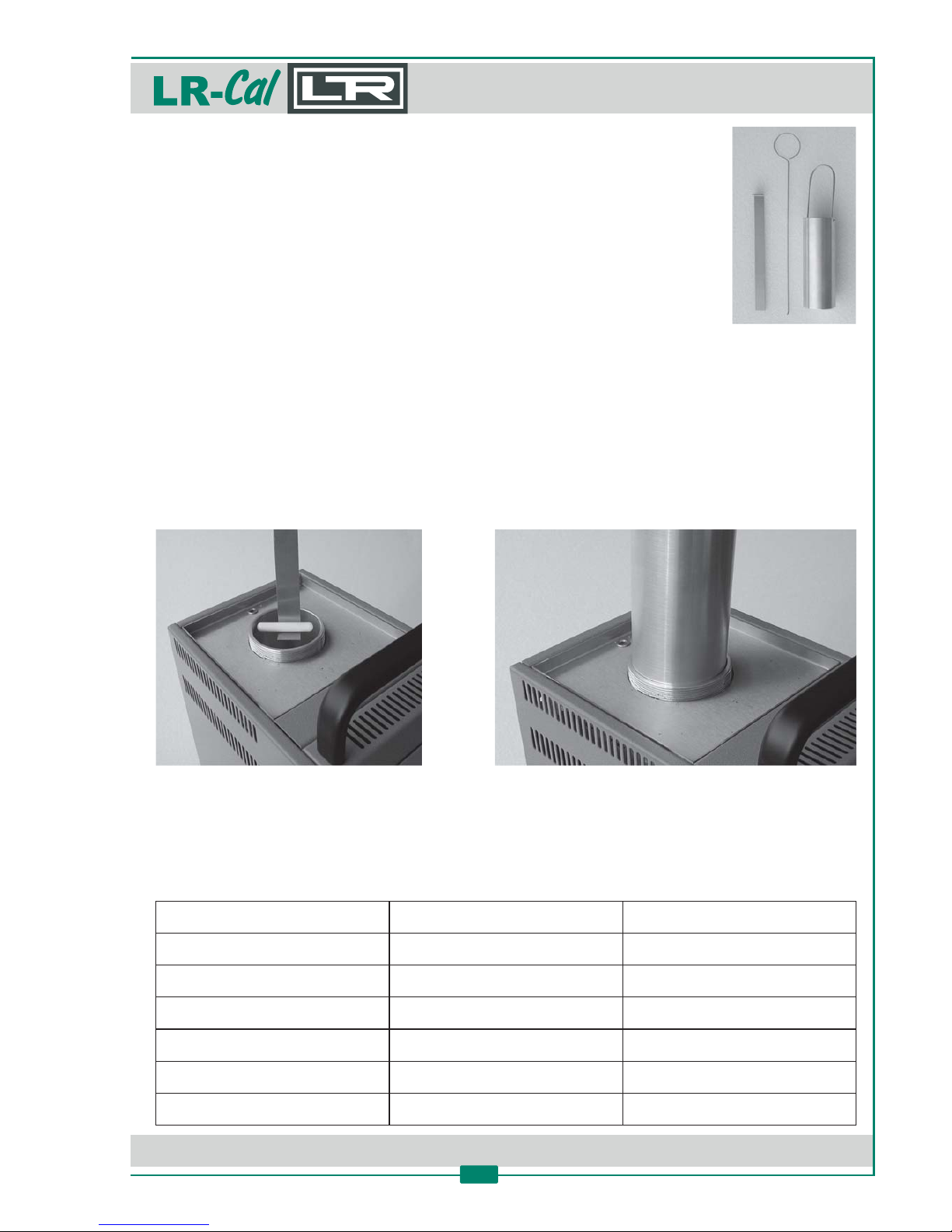
12.1 Instrucons for Metal Dry Block Insert Kit
Order-Code for kit with metal block blank, without drilling(s): FLUID-INS-0
Order-Code for kit with metal block with 9 holes: FLUID-INS-9
(Drillings with 4 / 4 / 4.5 / 5.5 / 6.5 / 6.5 / 8.5 / 10.5 / 12.5 mm diameter)
Diameter of the insert: 64.5 mm
Height of the insert: 170 mm
Material: Aluminium
For the replacement of the liquid with the metal insert, proceed as provided for in chapter 8,
following the dismantling instrucons unl the extracon of the Teflon sha that shakes the
liquid. Extract the sha using the specific tool (supplied) and thus accurately clean the tank with
blo ng paper prior to inserng the insert.
Subsequently follow the standard instrucons for use, reducing the agitar‘s rotary speed to the
minimum (knob 6).
To recover the use with liquid, proceed in a reverse manner.
The span of me needed to reach the reserved Set Point considerably increase whereas the metal
insert is used. The following table shows some sample values. The mes are detected when the
temperature calibrator has acvated the stability symbol „÷“ on the display.
TEST
with Liquid
with Metal insert
Minimum temperature
-12°C
-12°C
Descent me +20 to -10°C
30 min.
47 min.
Ascent me -12 to +110°C
34 min.
45 min.
Ascent me +20 to +121°C
38 min.
44 min.
Ascent me 110 to 125°C
30 min.
42 min.
Descent me 121 to +20°C
30 min.
37 min.
Page 42
DRU CK & TEM PERATUR Leitenberger GmbH • Bahnhofstr. 33 • D-72138 Kirchentellinsfurt • GERMANY
Tel. +49 (0) 7121-90920-0 • Fax +49 (0) 7121-90920-99 • [email protected] • • www.druck-temperatur.dewww.LR-Cal.net
MANUAL
Portable Temperature Calibraon Bath
FLUID 100 and FLUID 100-N
42
12.2 Instrucons for the Extension Tube for increasing the inseron depth
Order-Code: FLUID100-ER
With this oponal accessory the useable inseron depth of the
reservoir is increased.
Usefull diameter: 60 mm
Usefull depth: 230 mm
Max. temperature: +180°C
Min. temperature: -9°C (at 20°C ambient temp.)
Temperature uniformity with liquid „Silicone Oil 47V5":
Range at 20°C ambient temperature: -9...+130°C
Horizontal uniformity (at 50 mm from the bo om): ±0,10°C
Vercal uniformity: ±0,10°C (over the depth of 150 mm from the bo om) resp. ±0,15°C at <0°C.
Opmal place for probes: about 1.5 cm from edges, about 3 cm from boom.
Mounng Instrucons:
• Unscrew the green ring nut and screw strongly the aluminium tube. Be sure that the O-ring
should be compressed.
• Set on the foam insulaon tube.
• Screw in the green ring nut again.
• Fill the liquid up to 5 cm from the edge of the green ring nut in order to reach the max. of
180°C, verify the leakages of liquid from the bute. In case of leakage screw on again the tube.
• At the end of the calibraon, set up the ambient temperature at the temperature calibrator
and wait for cooling down nearly to ambient temperature before emng the liquid.
Further supplied: spare O-ring.
Page 43

DRU CK & TEM PERATUR Leitenberger GmbH • Bahnhofstr. 33 • D-72138 Kirchentellinsfurt • GERMANY
Tel. +49 (0) 7121-90920-0 • Fax +49 (0) 7121-90920-99 • [email protected] • • www.druck-temperatur.dewww.LR-Cal.net
MANUAL
Portable Temperature Calibraon Bath
FLUID 100 and FLUID 100-N
43
13. Declaraon of Conformity
DRUCK & TEMPERATUR Leitenberger GmbH, Bahnhofstr. 33, D-72138 Kirchentellinsfurt,
GERMANY, declares that the
• Portable temperature calibrator - temperature calibraon bath
FLUID 100 FLUID 100-NLR- LR-Cal Cal
FLUID 100-2I FLUID 100-N-2ILR- LR-Cal Cal
is conform with the requirements of the following European direcve:
• Low voltage direcve 2006/95/CE ammended by 93/68/EEC
• EMC direcve 2004/108/CE89/336/EEC
and that it has been designed in accordance with the following harmonised regulaons:
• EN 61000-6-350081-1 Emission
• EN 61000-6-250082-1 Immunity
• EN 61010-1/6 1010-2-0106101-1 Safety requirements for electrical equipment
The conformity with the above menoned requirements is cerfied by affixing the CE mark on the
product.
DRUCK & TEMPERATUR Leitenberger GmbH
Kirchentellinsfurt (Germany), März 2010
i.V.
(Gerd Broglie)
Sales and Markeng Director
Page 44
DRU CK & TEM PERATUR Leitenberger GmbH • Bahnhofstr. 33 • D-72138 Kirchentellinsfurt • GERMANY
Tel. +49 (0) 7121-90920-0 • Fax +49 (0) 7121-90920-99 • [email protected] • • www.druck-temperatur.dewww.LR-Cal.net
MANUAL
Portable Temperature Calibraon Bath
FLUID 100 and FLUID 100-N
44
DRUCK & TEMPERATUR Leitenberger GmbH
Bahnhofstr. 33, D-72138 Kirchentellinsfurt, Germany
Tel.: +49 7121-90920-0
Fax: +49 7121-90920-99
E-Mail: [email protected]
www.LR-Cal.net
 Loading...