

Page 1
®
6955 VALJEAN AVE, VAN NUYS, CA 91406
PH: (818)994-6498 / FAX: (818)994-6458
/ www.louroe.com[email protected]
SA-1A
SOUND ACTIVATED SWITCH
INSTALLATION AND OPERATING INSTRUCTIONS
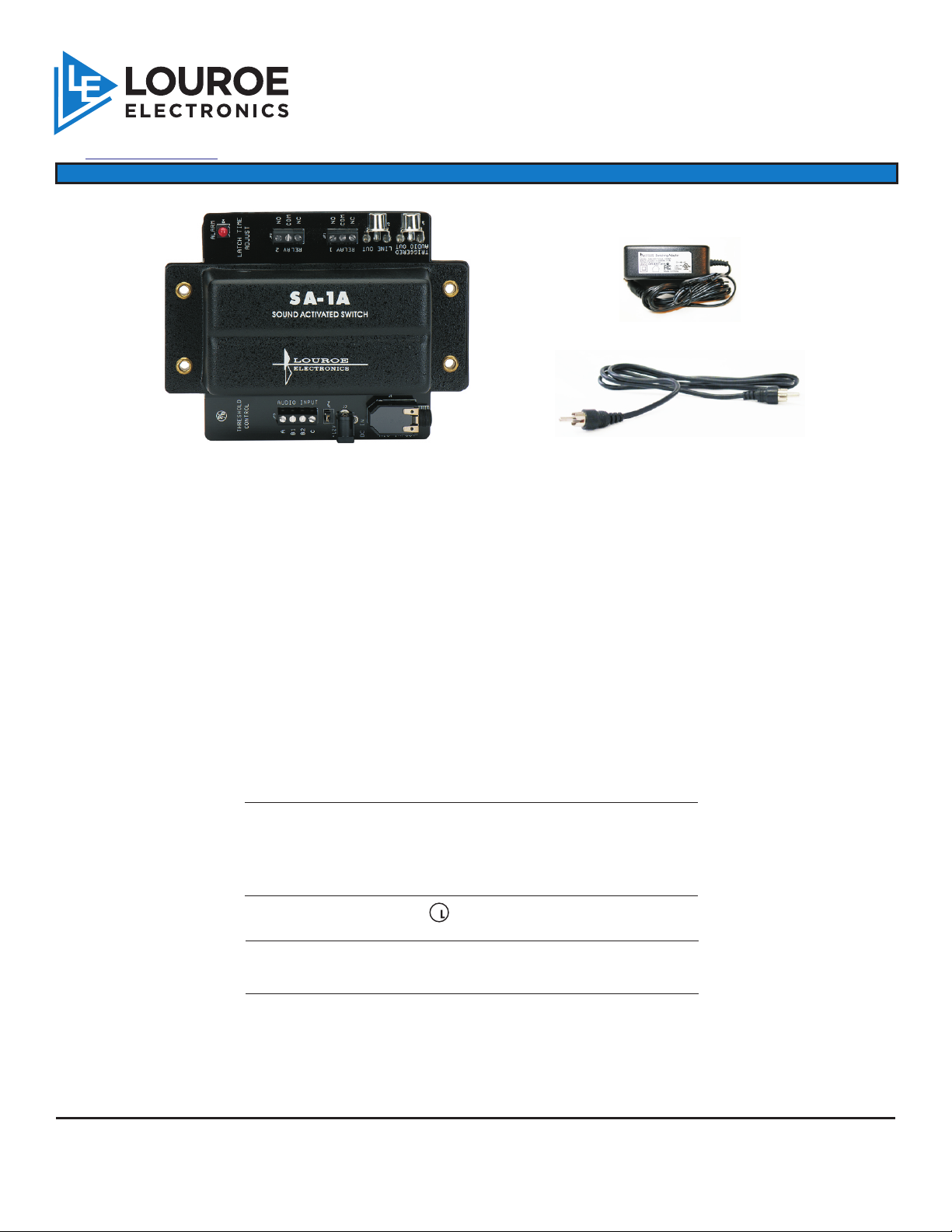
SA-1A
AD-1 POWER SUPPLY
(2) RCA SINGLE CABLES
DESCRIPTION
The SA-1A is a sound activated switch, based on sound pressure level, that can be used with the Louroe
ASK-4 #101, any Louroe base station or as a stand alone with any Louroe Microphone. The SA-1A
provides an adjustable threshold that activates when the microphone is subjected to a noise or sound
that exceeds the set threshold level.
The unit has two sets of NO/NC relay contacts for activating a camera, light, machinery, etc. A Louroe
base station is used if sound (audio) is to be monitored or recorded. The SA-1A can accommodate a
10K balanced or 10K unbalanced input. All Louroe microphones produce an unbalanced 600 line level
output.
The length of release latching time can be set from 0.5 to 60 seconds. A built-in LED illuminates when
the threshold setting has been exceeded and the unit is triggered.
®
W
Contents Description
SA-1A Sound Activated Switch. Activates the
audio and relay when a sound above the
set threshold is detected. Usually
connected between a base station and
microphone.
AD-1 listed AC ADAPTER.
2 Single RCA Cables For connecting RCA outputs to a base
LOUROE ELECTRONICS 6 9 5 5 VALJEAN AVENUE, VAN NUYS, CA 91406 TEL (818) 994-6498 FAX 994-6458
®
website: www.louroe.com e-mail: [email protected]
U
®
Supplies 12 Vdc to DA-1
station and other audio receiving devices.
(818)
Page 1 of 8
sa1a-inst_3/15
Page 2
INSTALLATION AND OPERATING INSTRUCTIONS
SENSITIVITY
1
SETTING
A
2
B1
B2
C
3
4
12 Vdc
SA-1A
MIC IN
SOUND ACTIVATED SWITCH
JP4
OUROE
L
LECTRONIC S
E
LATCH RELEASE
TIME
RELAY 2
RELAY 1
LINE OUT
NO
COM
NC
NO
COM
NC
5
MIC OUT
TRIGGERED
11
10
9
8
7
6
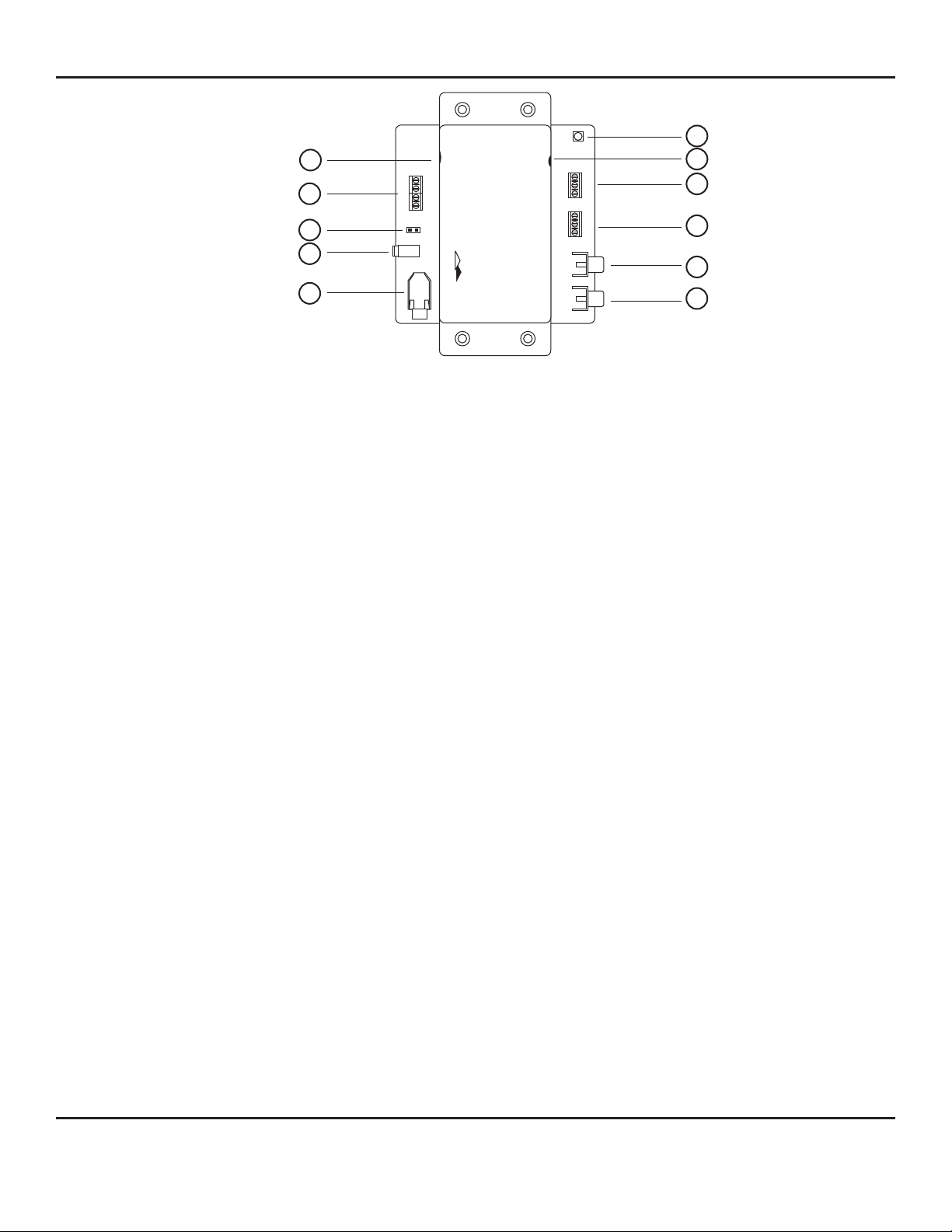
Fig. 1 SA-1A Panel Description
[1] Sensitivity Setting Potentiometer Sets the level of sound for activating the switch. Rotating the
potentiometer clockwise increases the sensitivity of the VOX switch. The
more sensitive the setting, the less sound level is needed to trigger the
unit.
[2] MIC-IN Terminal Block Connects to remote microphone or other audio devices. May be
connected to balanced or unbalanced audio source. Mic input is factory
set for unbalanced connections. When using balanced audio source,
remove jumper marked “JP4”. Louroe microphones are unbalanced
and utilize terminals A, B1 and C.
[3] Jumper JP4 jumper is removed when using a balanced audio source.
(microphone with a 600W balanced output)
[4] Power Jack + 12Vdc AC Adapter (supplied).
[5] MIC IN/OUT Jack Unswitched audio output from remote microphone or other audio device
(seldom used)
can be monitored using audio jack. May also be used to accept audio
from external sources without using the Mic Input Terminal Block[2].
[6] Triggered MIC Out Jack Switched audio output from remote microphone or other audio device
can be monitored using RCA jack. No audio is produced until the unit is
triggered.
[7] Line OUT Jack Unswitched audio output level from RCA jack can be adjusted by
rotating the Sensitivity Setting Potentiometer[1]. Rotating clockwise
increases the threshold sensitivity as well as the audio output. Rotating
counterclockwise decreases audio output.
[8] Relay Output 1 3-Pin terminal block marked NO(normally open), COM (common), NC
(normally closed). Provides relay closure when the unit is triggered.
Maximum contact rating is 5A @ 30 Vdc or 5A @ 277 Vac.
[9] Relay Output 2 3-Pin terminal block marked NO(normally open), COM (common), NC
(normally closed). Provides a second relay closure when unit is
triggered.
[10] Latch Release Potentiometer Sets relay latching time. Rotate the potentiometer shaft slowly clockwise
for more time release or counterclockwise for less. Time can be set from
0.5 to 60 seconds.
[11] Alarm LED Illuminates when unit is triggered or is in alarm. Turns OFF when the
latching time for the relay expires.
LOUROE ELECTRONICS 6 9 5 5 VALJEAN AVENUE, VAN NUYS, CA 91406 TEL (818) 994-6498 FAX 994-6458
®
(818)
website: www.louroe.com e-mail: [email protected]
Page 2 of 8
sa1a-inst_3/15
Page 3

INSTALLATION AND OPERATING INSTRUCTIONS
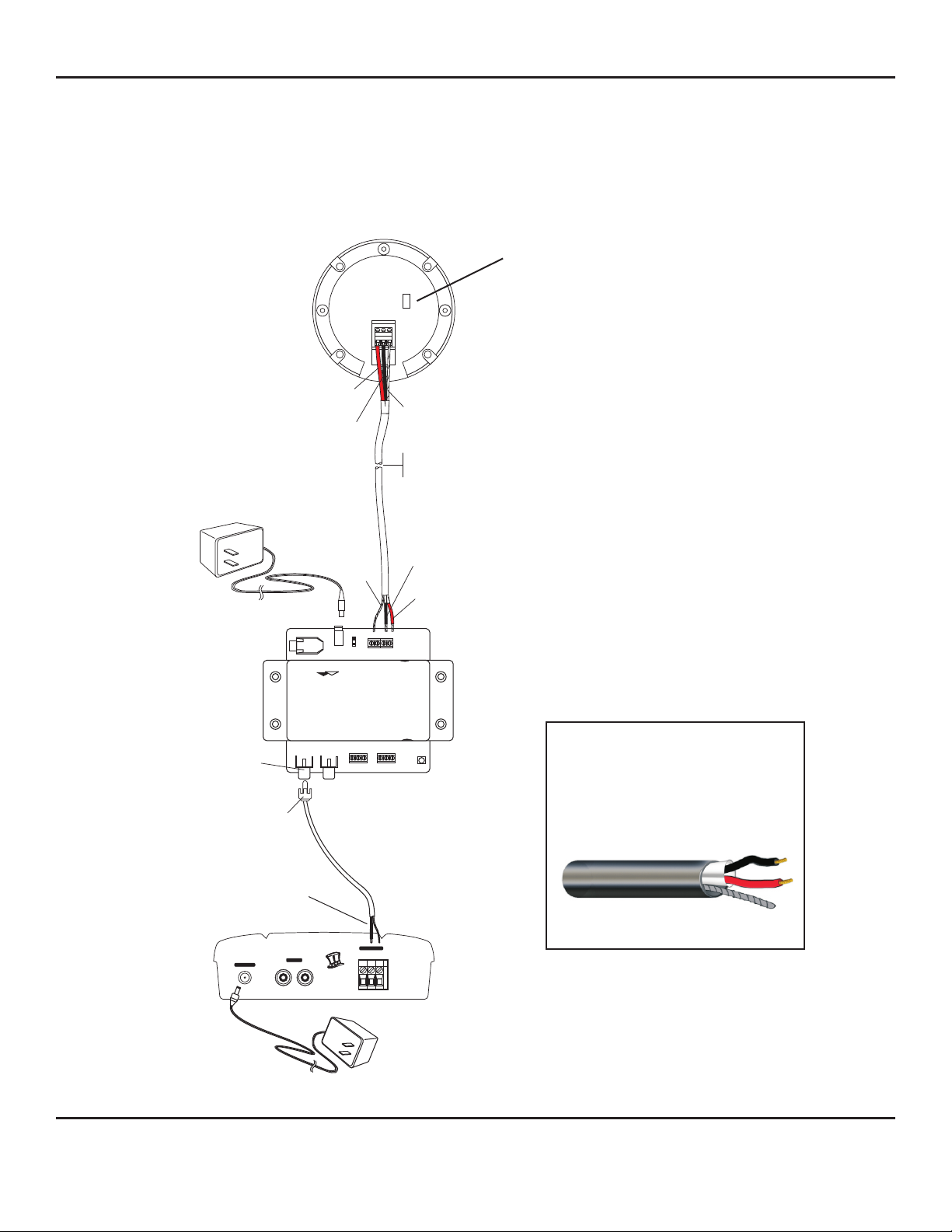
CONNECTIONS AND TEST (See sample interconnection diagram on page 4)
The following connections and test procedures below use Louroe’s Microphone and Base Station. If using
microphone or audio receiving device from another manufacturer, refer to its installation and operating instructions.
West Penn 452 is used as sample cable for this procedure. Red wire is 12Vdc
Black wire is Audio Output
Bare wire is Ground
CONNECTING LOUROE MICROPHONE TO SA-1A
1) CONNECT ONE END OF 2 CONDUCTOR SHIELDED CABLE TO 3-PIN BARRIER BLOCK OF REMOTE
MICROPHONE AS FOLLOWS:
a) Connect RED wire to terminal marked “A” of microphone.
b) Connect BLACK wire to terminal marked “B” of microphone.
c) Connect BARE wire (drain) to terminal marked “C” of microphone.
2) CONNECT THE OTHER END OF 2 CONDUCTOR CABLE TO THE MIC INPUT TERMINAL BLOCK [2] OF
SA-1A AS FOLLOWS:
IF USING A LOUROE MICROPHONE (3 WIRE CONFIGURATION)
a) Connect RED wire to terminal marked “A” of SA-1A.
b) Connect BLACK wire to terminal marked “B1” of SA-1A.
c) Connect BARE (drain) wire to terminal marked “C” of SA-1A.
IF USING A MICROPHONE FROM OTHER MANUFACTURERS WITH 600W BALANCED OUTPUT (2-WIRE
CONFIGURATION)
a) Connect one wire to terminal B1
b) Connect one wire to terminal B2
c) Remove JP4 jumper from socket [3]
CONNECTING SA-1A TO A LOUROE BASE STATION (If applicable)
1) Using an RCA connector cable, cut the RCA plug off of one end. Connect the end with the RCA plug to the RCA
jack marked Triggered MIC OUT[6] on the SA-1A.
2) Connect the other end (stripped wire) of RCA cable to terminal block of base station marked A, B, C as follows
1 The larger wire of stripped end (with jacket) connects to terminal B of base station.
2 The copper wire (bare) goes to terminal C of base station. Terminal A of base station is
not used with this application.
TEST AND OPERATION
1) Plug 12Vdc power supply to Power Jack[4].
2) Plug AC Adapter to a standard 115Vac wall outlet or power strip.
3) Rotate the Latch Release Potentiometer [10] clockwise to desired length of time. Latch time is from 0.5 to 60
seconds.
4) Turn “ON” power to the Louroe Base Station. A 12Vdc AC Adapter is included with base station.
5) Rotate the Volume Control Knob of the Base Station clockwise to increase the volume of audio.
6) Generate some noise at the area where the remote microphone is located. Rotate the Sensitivity Setting
Potentiometer[1] clockwise to increase the level of audio sensitivity until the SA-1A goes into alarm, as
indicated by the illuminated Alarm LED[11]. The two relay outputs should all be closed. (COM - Common; NO
- Normally Open; NC - Normally Closed)
7) If Triggered MIC Output Jack[6] is connected to the Base Station, audio from the microphone at the remote
location will be present at the speaker as soon as the SA-1A goes into alarm. Audio remains on until the time
set for the latch release expires.
8) If the sound that initiated the alarm continues, the SA-1A will re-activate for the time set and again shut off. This
procedure will continue until the sound falls below the threshold level or ceases.
LOUROE ELECTRONICS 6 9 5 5 VALJEAN AVENUE, VAN NUYS, CA 91406 TEL (818) 994-6498 FAX 994-6458
®
website: www.louroe.com e-mail: [email protected]
Page 3 of 8
(818)
sa1a-inst_3/15
Page 4
INSTALLATION AND OPERATING INSTRUCTIONS
INTERCONNECTION DIAGRAM
FOR
VERIFACT A MICROPHONE
SA-1A SOUND ACTIVATED SWITCH
APR-1 AUDIO BASE STATION
®
TERMINAL BLOCK IDENTIFIER FOR
MICROPHONE
(A) - 12Vdc Red wire
(B) - Audio Output Black wire
(C) - Ground Bare wire
12 VDC
Power supply
Model SA-1A
RED (A)
BLACK (B1)
BARE (C)
12 Vdc
L
E
OUROE
LECTRONICS
MO DEL
VE RIF ACT A
A B C
B2
C
B1
A
MIC IN
SOUND ACTIVATED SWITCH
SA-1A
Microphone gain adjust: N is normal, L is low
N
L
All Louroe Verifact Microphones are compatible
with SA-1A and are 600W unbalanced
Verifact A Microphone shown as an example
BARE (C)
WEST PENN 452 OR EQUIVALENT
2 COND. SHIELDED 22 GAUGE
MAXIMUM DISTANCE BETWEEN MICROPHONE
AND SA-1A IS 1,000 FT (305m)
BLACK (B1)
®
TERMINAL BLOCK IDENTIFIER FOR SA-1A
RED (A)
SENSITIVITY
SETTING
(A) - 12Vdc
(B1) - Unbalanced Audio (Louroe Microphone)
(B2) - Balanced Audio (microphone from other
manufacturers)
(C) - Ground
®
TRIGGERED
MIC OUT
TRIGGERED
MIC OUT
LINE OUT
RELAY 1
NC
LATCH RELEASE
TIME
RELAY 2
COM
NO
NC
COM
NO
WIRING REQUIREMENTS
2 Conductor shielded cable, 22
gauge with a 24 gauge drain wire
NOTE: Unshielded cable is not
satisfactory for audio systems
RCA PLUG
West Penn 452 or equivalent
Stripped end of
RCA cable
D
A
E
M
I
N
U
S
A
MIC INPUT
+12 Vdc INPUT OUTPUT
AUDIO
BA C
VAN NUYS, CA
Rear panel of APR-1 Audio Base Station
12Vdc
Power supply
(included)
LOUROE ELECTRONICS 6 9 5 5 VALJEAN AVENUE, VAN NUYS, CA 91406 TEL (818) 994-6498 FAX 994-6458
®
(818)
website: www.louroe.com e-mail: [email protected]
Page 4 of 8
sa1a-inst_3/15
Page 5

INSTALLATION AND OPERATING INSTRUCTIONS
SPECIFICATIONS
Current drain
Audio input impedance
Relay contact
DC input
Relay latch time
Dimensions
Weight
Shipping Weight
70 mA
10KW
5A @ 277 Vac or 5A @ 30Vdc
12Vdc, 500mA
0.5 to 60 seconds
6 1/8”L x 4 5/8”W x 1 7/8”H
7 oz
1lb
LOUROE ELECTRONICS 6 9 5 5 VALJEAN AVENUE, VAN NUYS, CA 91406 TEL (818) 994-6498 FAX 994-6458
®
website: www.louroe.com e-mail: [email protected]
Page 5 of 8
(818)
sa1a-inst_3/15
Page 6

INSTALLATION AND OPERATING INSTRUCTIONS
IMPORTANT NOTICE
When this equipment is used as part of an
audio monitoring system, the law requires
that the public be given notice of AUDIO
MONITORING ON THE PREMISES. A
deca l noti ce is includ ed with each
microphone shipped.
Federal Law References:
Federal Regulations, US Code, Title 18.
Crime and Criminal Procedure, Sec 2510.
LOUROE ELECTRONICS warrants that at the time of shipment products manufactured by LOUROE ELECTRONICS to be free of defects in material and workmanship.
Should a defect appear within one year (12 months) from date of shipment, LOUROE ELECTRONICS will, at its sole discretion, repair or replace the defective equipment.
This equipment shall not be accepted for repair or return without prior notification by LOUROE ELECTRONICS .
This warranty does not extend to any Louroe product that has been subjected to improper or incorrect installation, misuse, accident, or in violation of installation
instructions provided by LOUROE ELECTRONICS.
Returned shipments to LOUROE ELECTRONICS shall be at customer’s expense. LOUROE ELECTRONICS will return the equipment prepaid via best way.
®
®
®
WARRANTY
AUDIO
MONITORING
On
These Premises
®
®
®
®
LOUROE ELECTRONICS 6 9 5 5 VALJEAN AVENUE, VAN NUYS, CA 91406 TEL (818) 994-6498 FAX 994-6458
®
(818)
website: www.louroe.com e-mail: [email protected]
Page 6 of 8
sa1a-inst_3/15
Page 7

NOTES
Page 7 of 8
Page 8

INSTALLATION AND OPERATING INSTRUCTIONS
MANUFACTURED
IN THE
LOUROE ELECTRONICS 6 9 5 5 VA L J E A N AVENUE, VAN NUYS, CA 91406 TEL (818) 994-6498 FAX 994-6458
®
website: www.louroe.com e-mail: [email protected]
Page 8 of 8
(818)
sa1a-inst_3/15
 Loading...