

Page 1
TM
®
6955 VALJEAN AVE, VAN NUYS, CA 91406
PH: (818)994-6498 / FAX: (818)994-6458
/ www.louroe.com[email protected]
AUDIO STREAMING AND ANALYTIC SYSTEM
DATASHEET AND QUICK START GUIDE
DIGIFACT E
DESCRIPTION
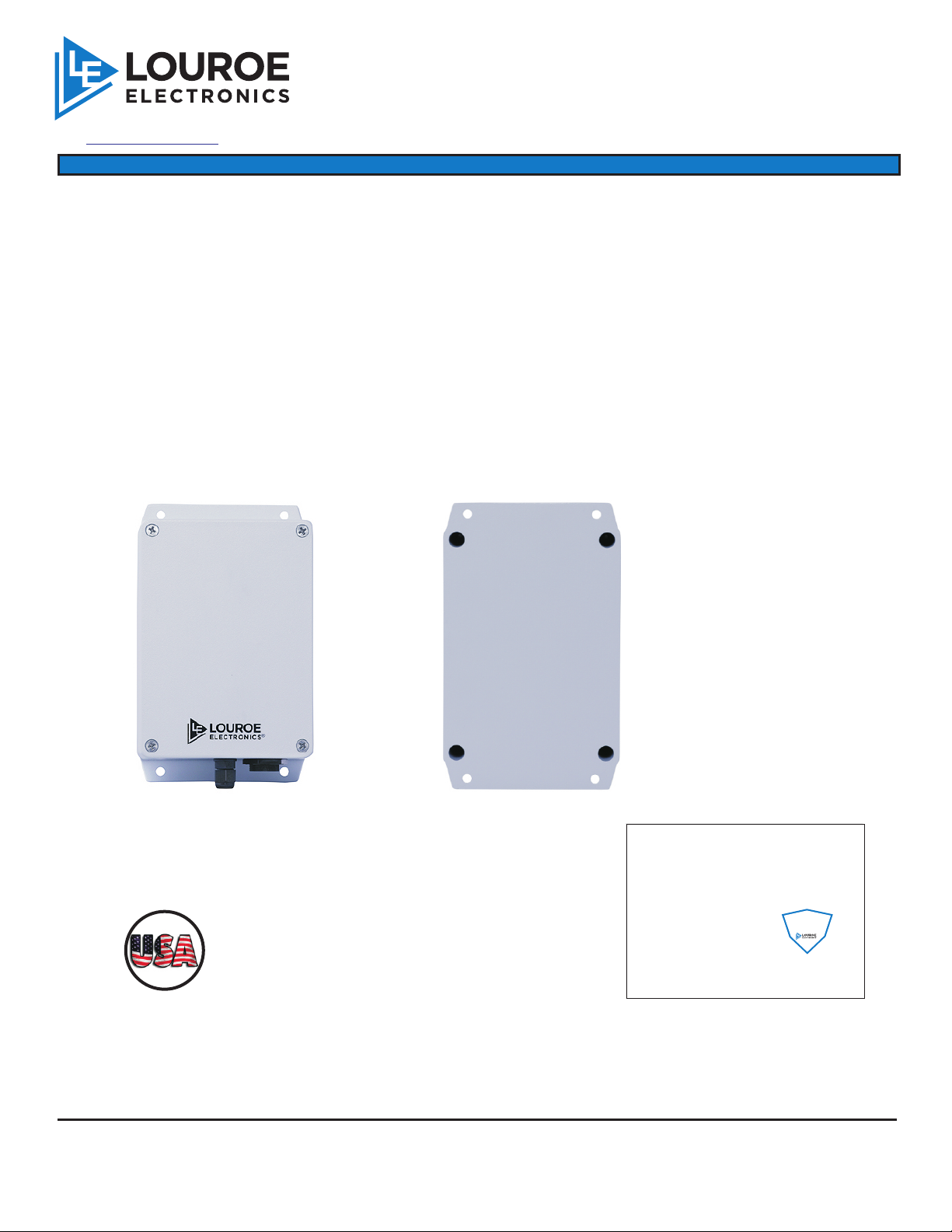
The Digifact™ E is a networked audio monitoring and streaming device which streams audio over
several industry standard RTP protocols. The Digifact E is enclosed in a NEMA rated housing that
™
is suitable for outdoor use. The wide dynamic range microphone supports a wide frequency
response capable of picking up low and high frequency sounds. The device features a robust quadcore microprocessor that has the capability of integrating signal processing applications, audio
enhancements and analytic applications. Analytic applications can be added to the device to detect
and report events such as:
- Aggression/Duress
- Gunshots/Explosions
- Breaking Glass
- Car/Panic Alarms
Front
R
U
T
E
D
C
A
I
F
U
N
A
M
LOUROE ELECTRONICS warrants that at the time of shipment products manufactured by LOUROE ELECTRONICS to be free of defects in material and workmanship.
Should a defect appear within one year (12 months) from date of shipment, LOUROE ELECTRONICS will, at its sole discretion, repair or replace the defective equipment.
This equipment shall not be accepted for repair or return without prior notification by LOUROE ELECTRONICS .
This warranty does not extend to any Louroe product that has been subjected to improper or incorrect installation, misuse, accident, or in violation of installation
instructions provided by LOUROE ELECTRONICS.
Returned shipments to LOUROE ELECTRONICS shall be at customer’s expense. LOUROE ELECTRONICS will return the equipment prepaid via best way.
LOUROE ELECTRONICS 6 9 5 5 VA LJ E A N AVENUE, VAN NUYS, CA 91406 TEL (818) 994-6498 FAX 994-6458
N
T
H
E
NOTE:
Digifact™ E
Microphone is recommended for
outdoor use
®
®
®
®
Rear
WARRANTY
When this equipment is used as part of an
audio monitoring system, the law requires
that the public be given notice of AUDIO
MONITORING ON THE PREMISES. A
de cal n otice i s in clu ded wit h ea ch
microphone shipped.
Federal Law References:
Federal Regulations, US Code, Title 18.
Crime and Criminal Procedure, Sec 2510.
®
®
®
IMPORTANT NOTICE
(818)
AUDIO
MONITORING
On
These Premises
®
website: www.louroe.com e-mail: [email protected]
PAGE 1 OF 6
Digifact _E_mic-inst_01/19™
Page 2

TECHNICAL SPECIFICATIONS
AUDIO
Audio Streaming: One-way
Audio Compression: PCM,16 bits linear
G.711 a-Law
G.711 mu-Law
G.726-40
AAC
Sensitivity: -45 dBV/Pa, 1 Pa = 94 dB SPL
Frequency Response: 50 Hz to 15 kHz
NETWORK
Security: Password protection, user level access (admin and operator)
Supported protocols: IPv4, HTTP, RTSP, RTP, TCP, SSH
SYSTEM INTEGRATION
Application programming: Open API for software integration, specifications at www.louroe.com
interface
Analytics: Louroe/SI audio analytics, audio level (dB) alarm
Event triggers: Analytics, audio level
Event actions: TCP notification, external output activation, pre and post-alarm audio recording
to Network Attached Storage (NAS)
GENERAL
Enclosure:
Power: Power over Ethernet IEEE802.3af
Memory: 512 MB RAM
Event triggers: Audio analytics, decibel threshold
Event actions: TCP notification, external output activation, pre and post-alarm audio recording
Connectors: Female RJ45 for 10BASE-T/100BASE-TX PoE; Quick connect header for four
alarm outputs (5V DC), max load 100mA; 2-pin header for 5V DC 2A input
Operating Conditions: -20 C to 50 C Humidity 10-85% RH
Storage Conditions:
Dimensions: 4.7 in (119mm) diameter x 2.0 in (50.8mm) height
Weight: 9.0 oz
Packaged weight: 1.0 lb
Included accessories: User manual, 5-pin and 2-pin headers
Aluminum Alloy NEMA Enclosure
optional external 5V DC 2A (2-pin header)
to Network Attached Storage (NAS)
o o
o o
-30 C to 60 C
LOUROE ELECTRONICS 6 9 5 5 VA LJ E A N AVENUE, VAN NUYS, CA 91406 TEL (818) 994-6498 FAX 994-6458
®
website: www.louroe.com e-mail: [email protected]
Page 2 of 6
(818)
Digifact _E_mic-inst_01/19™
Page 3
INSTALLATION AND CONNECTIONS
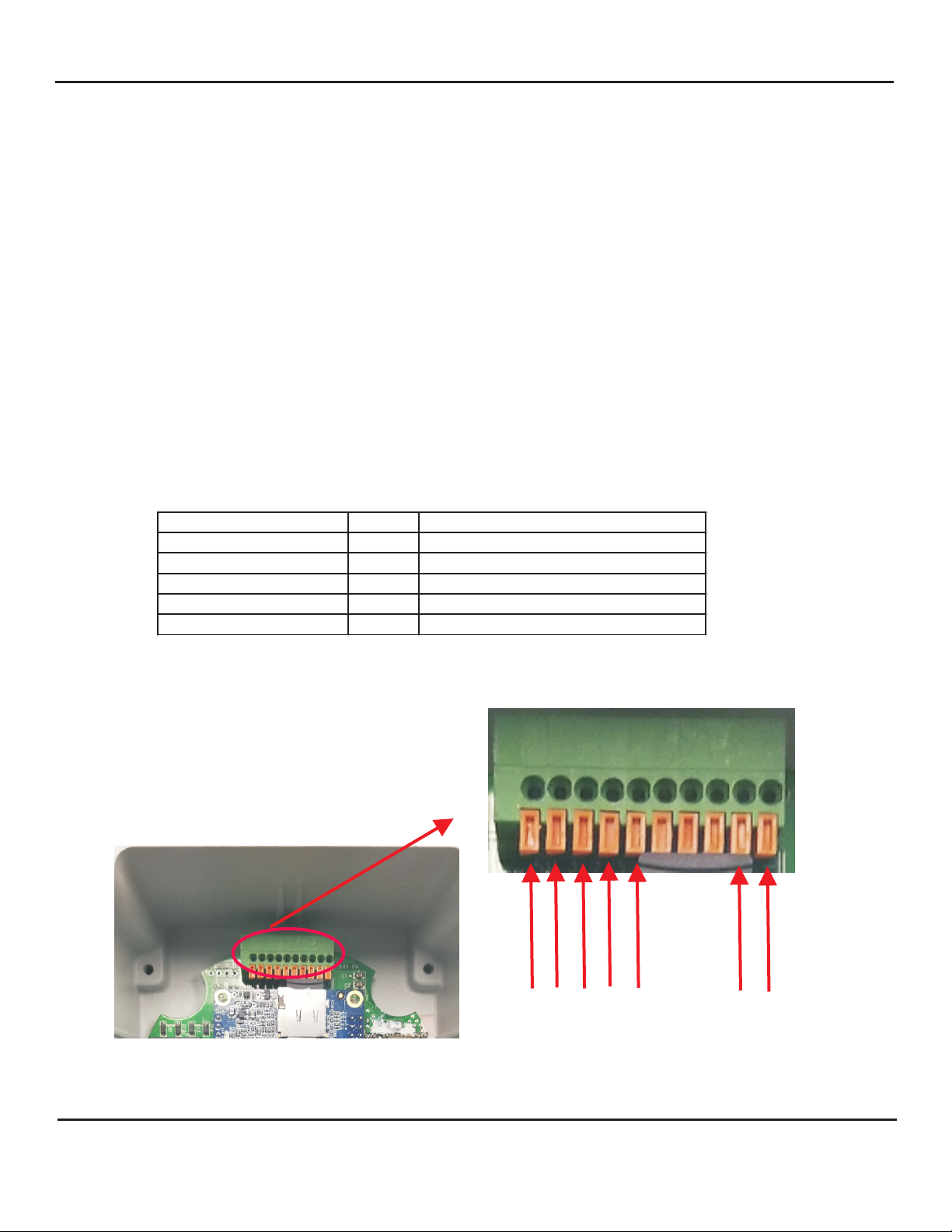
FUNCTION PIN NOTES
5V DC 1 Max load 100mA
Output 1 2
Output 2 3
Output 3 4
Output 4 5
MOUNTING
The Digifact Model E can either be surface mounted or strapped to a pole using the optional Louroe pole
mount accessory kit (not included).
NETWORK, POWER AND OUTPUT CONNECTION
A moisture resistant Female Rj45 jack is located on the bottom of the unit for 10BASE-T/100BASE-TX
PoE connection using CAT5/6 cable. If no PoE connection is available (network only) the device can be
powered off 5V DC 2A external power supply (not included). Four alarm outputs are also available,
details of the pin-outs of the power and alarm outputs terminal block are depicted below. The external
power and alarm output cable assembly should be wired through the provided moisture resistant cable
gland to preserve the moisture resistance of the unit.
ALARM OUTPUT CONNECTIONS
Four digital alarm output ports are available for connection to external devices, the alarm
outputs can be set to trigger from analytic and volume threshold events. The output ports are
“open drain” type outputs. If used with an inductive load, e.g. a relay, a diode must be
connected in parallel with the load, for protection against voltage transients.
™
Note: Output 1,2,3,4 connect to pin 1 (5V)
when active, floating (unconnected) when
deactivated. If connecting to a “dry
contact” input, a 5V relay should be
connected between the output and input
ports of the two devices.
1 2 3 4 5
ALARM OUTPUT
LOUROE ELECTRONICS 6 9 5 5 VA LJ E A N AVENUE, VAN NUYS, CA 91406 TEL (818) 994-6498 FAX 994-6458
®
website: www.louroe.com e-mail: [email protected]
Page 3 of 6
(818)
+5VDC GND
EXT POWER
Digifact _E_mic-inst_01/19™
Page 4
DEVICE DISCOVERY AND DEFAULT PASSWORD CHANGE
DEVICE DISCOVERY
The Digifact E is by default set to obtain an IP address from the network it is connected to (DHCP), hence it
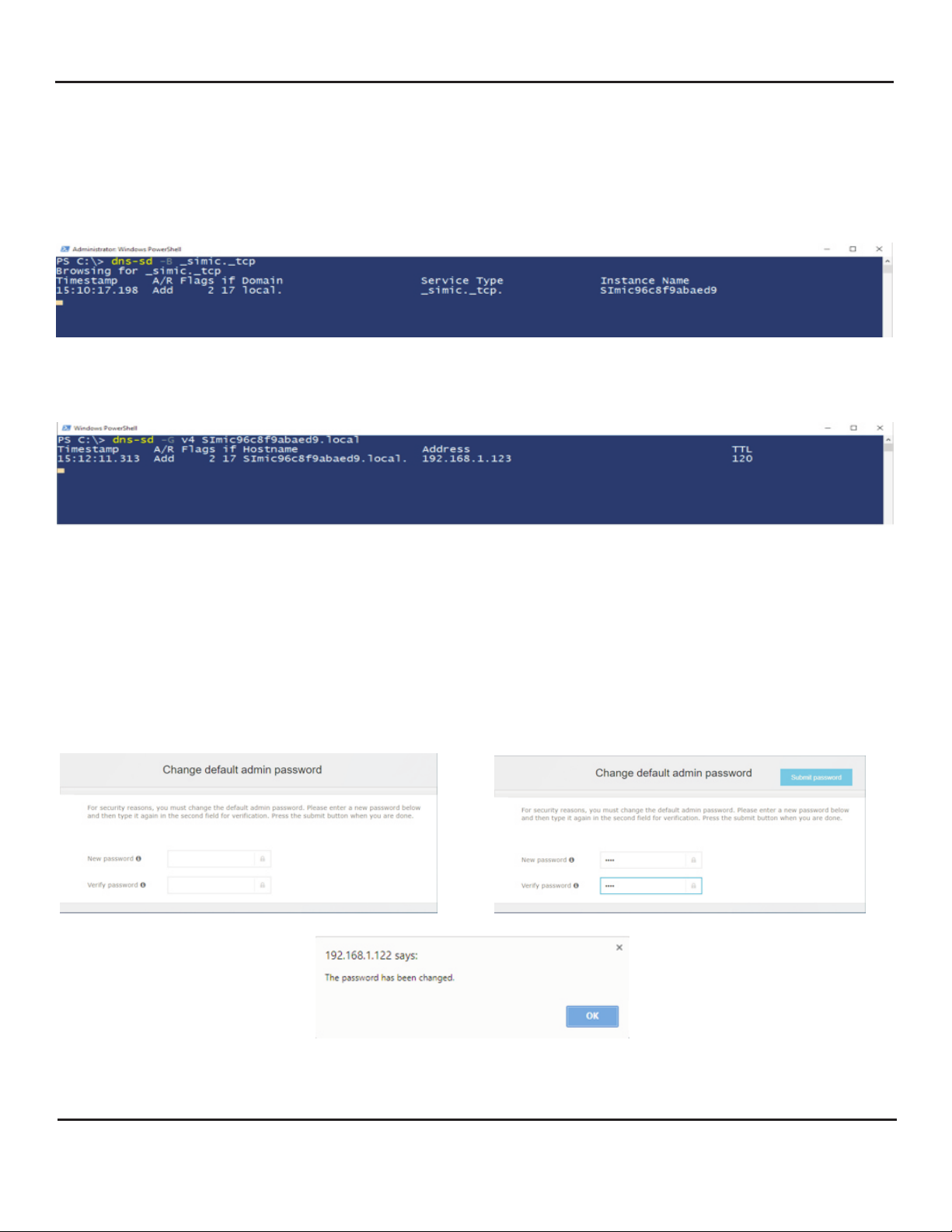
must be connected to a suitable DHCP server. To discover the device on a network, the following commands
need to be run through windows powershell to locate the device name;
dns-sd -B _simic._tcp
NOTE: Apple bonjour needs to be pre-installed on the PC where the powershell commands are being
executed.
Once the device name has been located, the following script must be run:
dns-sd -G v4 <devicename>.local
to locate the device IP address:
The device IP address can them be typed into an internet browser to
(Google Chrome is recommended)
access the device user interface page.
DEFAULT PASSWORD CHANGE
On first use the default password for the device is;
username: admin
password: admin
After entering the above information, the device will request the user to change the default password
Once the default password has been changed the device prompts to re-enter the new password to login
to the device.
LOUROE ELECTRONICS 6 9 5 5 VA LJ E A N AVENUE, VAN NUYS, CA 91406 TEL (818) 994-6498 FAX 994-6458
®
website: www.louroe.com e-mail: [email protected]
Page 4 of 6
(818)
Digifact _E_mic-inst_01/19™
Page 5
LIVE VIEW PAGE
LIVE VIEW
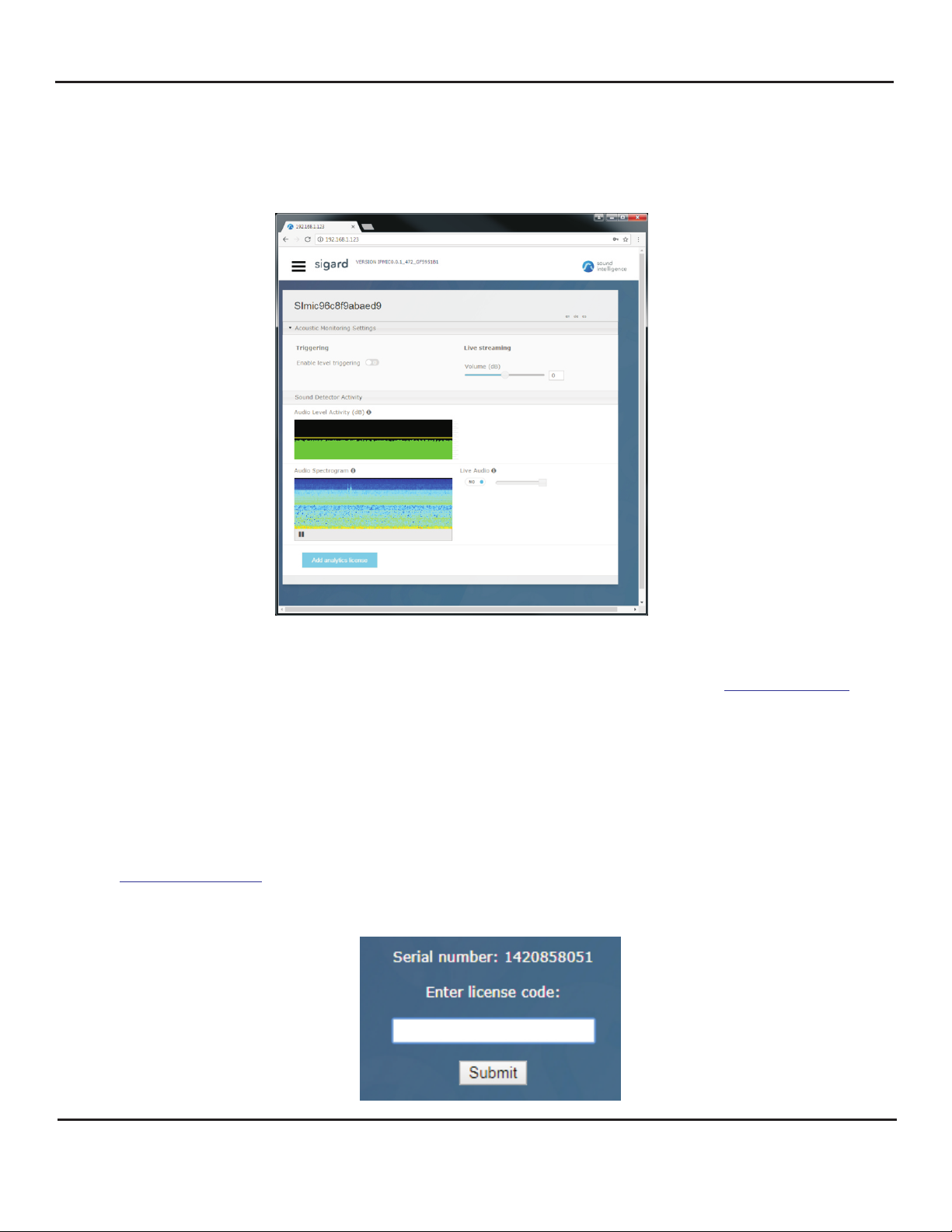
The live view screen of the device contains information and controls such as;
Device firmware version, device name, acoustic monitoring settings, sound detector settings, audio activity
spectrogram, listen live control, ability to add analytic licenses as well as access to the other device parameter
pages.
Device firmware: System and firmware updates can be periodically updated from
www.louroe.com
Acoustic Monitoring settings: Allows for enabling level triggering, setting level threshold, adjustment of
streaming volume level (dB), adjustment of time and volume over ambient threshold (for analytic applications).
Sound Detector activity: Graphic representation of sound activity level and classification (for analytic
applications) of audio signals detected by the device.
Live audio: Allows for enabling/disabling of live audio stream played from the speakers of the device from
where the device user interface is being accessed.
Add Analytics License: Used to add audio analytic detector application licenses to the device, note clicking
on the button displays a dialog page with the serial number of the device, using the serial number licenses can
be requested by either calling Louroe customer service at: 1-818-994-6498 and/or emailing the serial number
to with information regarding the type of application/s desired.
LOUROE ELECTRONICS 6 9 5 5 VA LJ E A N AVENUE, VAN NUYS, CA 91406 TEL (818) 994-6498 FAX 994-6458
®
website: www.louroe.com e-mail: [email protected]
Page 5 of 6
(818)
Digifact _E_mic-inst_01/19™
Page 6
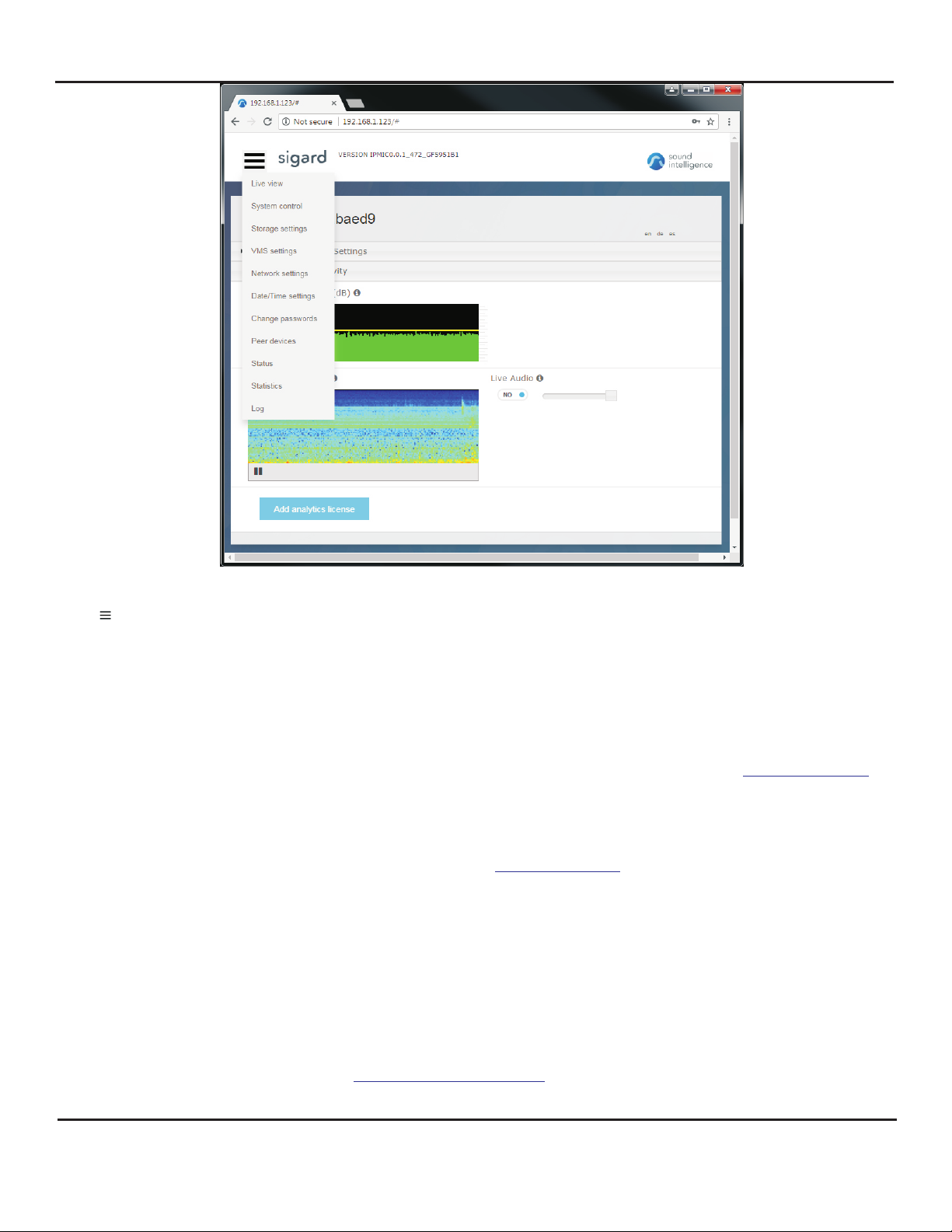
MISCELLANEOUS DEVICE PARAMETERS
DEVICE PARAMETERS
The icon on the top left hand side of the live view page, grants access to miscellaneous device parameters
such as;
System Control:
Revert to default settings - sets device setting to factory default
Reboot - reboot’s the device
Device Name - character text box to rename the device (numeric and alpha-numeric only, no spaces)
Enable Live audio streaming - turns the audio stream on/off
Start/Stop/Change Analytics - starts/stops and modifies the type of analytic applications running on the device
Update to new firmware - updates device firmware; source file can be downloadeded from www.louroe.com
Storage configuration:
Used to configure parameters for network attached storage device (NAS)
VMS configuration:
Used to configure meta-data transmission to Video Management Systems (VMS), detailed application notes of
adding and configuring devices to VMS’s can be found at
Network Settings:
Set the device to a static IP address and configure device IP settings.
Date and Time configuration:
Configure devices date/time settings
Peer devices:
Used to detect and configure other Louroe devices on the same subnet.
Status:
Displays device status/health parameters such as; CPU usage and temperature, memory and network status.
Log:
Provides day/time stamped entries of system events, please note in the event of reported issues with the
device please send a detailed email to and attach the latest downloaded copy of the
log data for analysis and troubleshooting
www.louroe.com
LOUROE ELECTRONICS 6 9 5 5 VA LJ E A N AVENUE, VAN NUYS, CA 91406 TEL (818) 994-6498 FAX 994-6458
®
website: www.louroe.com e-mail: [email protected]
Page 6 of 6
(818)
Digifact _E_mic-inst_01/19™
 Loading...