

Page 1

User Guide
Weighlog 3030
On-Board Weighing System
Operation
Issued January 12, 2012
Page 2

Page 3

Electro-Magnetic Compatibility (EMC)
This product complies with Council Directive 2004/108/EC when installed and used in accordance
with the relevant instructions.
Service and Technical Support
PLEASE CONTACT YOUR NEAREST DISTRIBUTOR. If unknown then fax: 44 (0) 1453 733322
Our policy is one of continuous improvement and the information in this document is subject to
change without notice.
Check that the software reference matches that displayed by the instrument.
This manual refers to Software Issue: GC100:Iss01Rev01Lib01
© Copyright Loup Electronics Inc.
Phone: 402-464-7131
Toll Free: 1-877-489-LOUP (5687)
Page 4

WEIGHLOG 3030 - OPERATION
1
Contents
1. Overview ______________________________________________________________________________________________________ 3
1.1 Main Operating Screen and Controls .................................................................................................................................. 5
1.2 Menu Navigation .................................................................................................................................................................. 6
1.2.1 Keys ........................................................................................................................................................................ 6
1.2.2 Touchscreen .......................................................................................................................................................... 6
2. Operator Settings ______________________________________________________________________________________________ 7
2.1 Attachments ......................................................................................................................................................................... 7
2.2 Product and Customer Stores .............................................................................................................................................. 8
2.2.1 Select a Product Store ........................................................................................................................................... 8
2.2.2 Select a Customer Store ........................................................................................................................................ 8
2.2.3 View / Edit / Delete Product Store information / Set Product Density .................................................................... 9
2.2.4 View / Edit / Delete Customer Store information / Set Truck Tare Weight ............................................................ 10
2.2.5 View / Clear Grand Total ...................................................................................................................................... 11
2.3 Blend (Mix) Stores .............................................................................................................................................................. 12
2.3.1 Enable / Disable Blend ("Mix") Mode ................................................................................................................... 12
2.3.2 Select / Rename a Blend (Mix) Store / View Mix ingredients ............................................................................... 13
2.3.3 Delete / Programme the Mix ingredients ............................................................................................................. 13
2.4 Automatic / Manual Weight Entry ....................................................................................................................................... 14
2.5 Select Units / Weight Resolution ('e') ................................................................................................................................. 15
2.6 Other Operator Settings ..................................................................................................................................................... 16
Page 5

WEIGHLOG 3030 - OPERATION
2
3. Weighing _____________________________________________________________________________________________________ 17
3.1 Weighing Modes ................................................................................................................................................................ 17
3.2 Machine Requirements ...................................................................................................................................................... 17
3.3 Lifting Procedure ................................................................................................................................................................ 18
3.4 Set Zero .............................................................................................................................................................................. 18
3.5 Dynamic Weighing ............................................................................................................................................................. 19
3.6 Static Weighing .................................................................................................................................................................. 20
3.7 Weighing without an "R/D" Sensor ..................................................................................................................................... 21
3.8 Weighing in Blend ("Mix") Mode ........................................................................................................................................ 22
3.8.1 Batch Mixing ......................................................................................................................................................... 23
3.9 Clear Last Weight Entry ("CE-1") ......................................................................................................................................... 24
3.10 Reset Load Total ................................................................................................................................................................ 24
3.11 Adjustment for Incorrect Weight Readings ("Nudge") ........................................................................................................ 25
4. Printing and Data Transfer _____________________________________________________________________________________ 27
4.1 Printing ............................................................................................................................................................................... 27
4.1.1 Print Modes .......................................................................................................................................................... 27
4.1.2 Print ALL Product Memory Stores ........................................................................................................................ 28
4.1.3 Print a single Product Memory Store ................................................................................................................... 28
4.1.4 Print ALL Customer Memory Stores ..................................................................................................................... 29
4.1.5 Print a single Customer Memory Store ................................................................................................................ 29
4.1.6 Types of Printout .................................................................................................................................................. 30
Page 6

WEIGHLOG 3030 - OPERATION
3
1. Overview
The Weighlog Alpha 10 is intended for use on industrial and agricultural loading shovels, fore-end loaders, back-hoe
loaders, (loader side only), tipping trailers and tipping trucks.
It measures, displays and records the net weight lifted, normally based on sensing the lift system hydraulic pressure, at a
set point using a Reference and Direction ("R/D") Sensor.
Pressure sensing is problematic on certain types of equipment due to the design of the hydraulic system. Up to four
pressure sensors may be installed, or strain-sensing technology may be used instead.
The system enables,
..- ..Automatic Dynamic Weighing Mode with "R/D" Sensor
- Compensation for variable lift speed (dynamic weighing only)
- Static Weighing Mode with "R/D" Sensor
- .Static Weighing Mode without "R/D" Sensor (applications include weighing with forklift trucks and tipping trailers)
- Automatic or Manual Load Entry
- Weight Calibration adjustment ("Nudge" function)
With careful operation, system accuracy can be as good as ±1% of lift capacity although ± 2% is more common in
practice.
Weighlog readings are not suitable as a legal basis for the sale of goods.
Page 7

WEIGHLOG 3030 - OPERATION
4
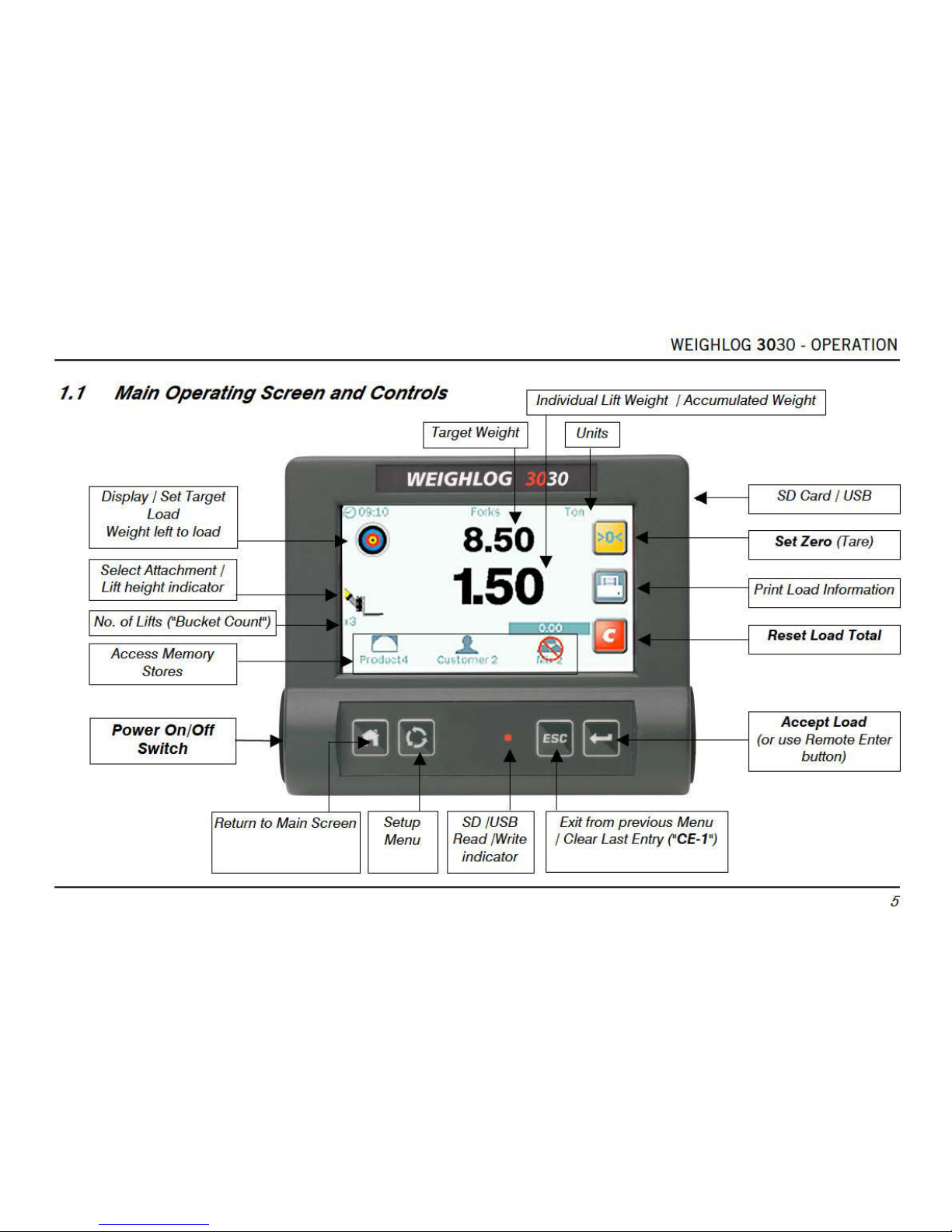
The head unit has a 4.3" Colour Touch Screen plus 4 basic menu keys, and includes the following functions,
- 10 programmable "attachments". Independent configuration (of weighing mode) and weight calibration for each
"attachment".
- Set Zero (Tare) Weight
- Target Weight and "Accumulated Weight" displays
- Clear Last Weight Entry ("CE-1")
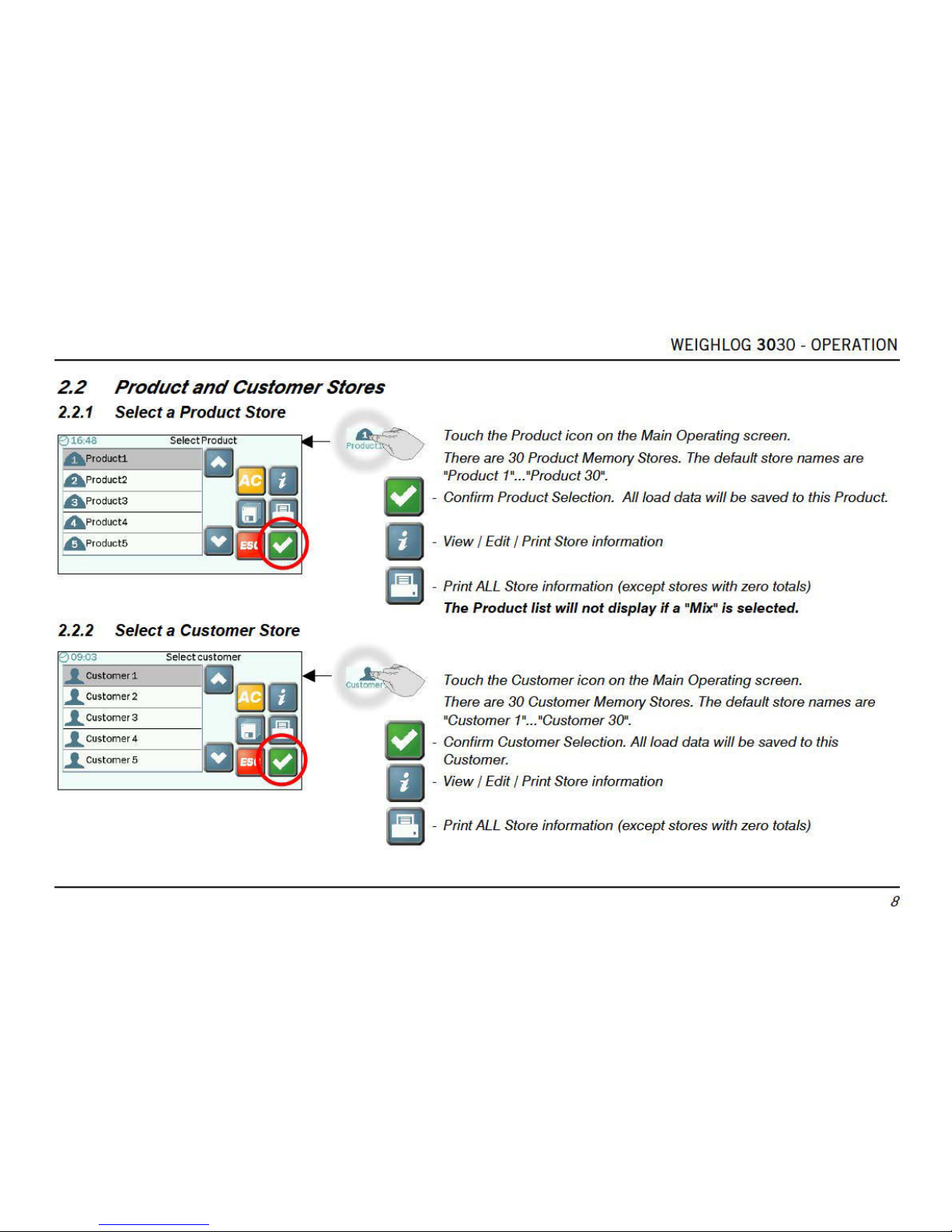
- 30 Product Memory Stores
- 30 Customer Memory Stores
- Grand Total
- Blend (Mix) Mode (with 5 "Mix" stores).
- Customizable Store Names and Screen Icons
- Automatically print a load summary ("Job Record") when resetting for next Load
- Printing load data including Product, Customer and Batch Mix Tickets
- Saving load data to USB Flash Drive / SD Memory Card
- Data Logging (RS232 serial ASCII output to suitable logging device)
- Overload Alarm
- Diagnostic mode and Error Log
Weighlog readings are not suitable as a legal basis for the sale of goods.
..
Page 8
Page 9
Page 10
Page 11
Page 12
Page 13
Page 14
Page 15
Page 16
Page 17
Page 18
Page 19
Page 20

WEIGHLOG 3030 - OPERATION
17
3. Weighing
3.1 Weighing Modes
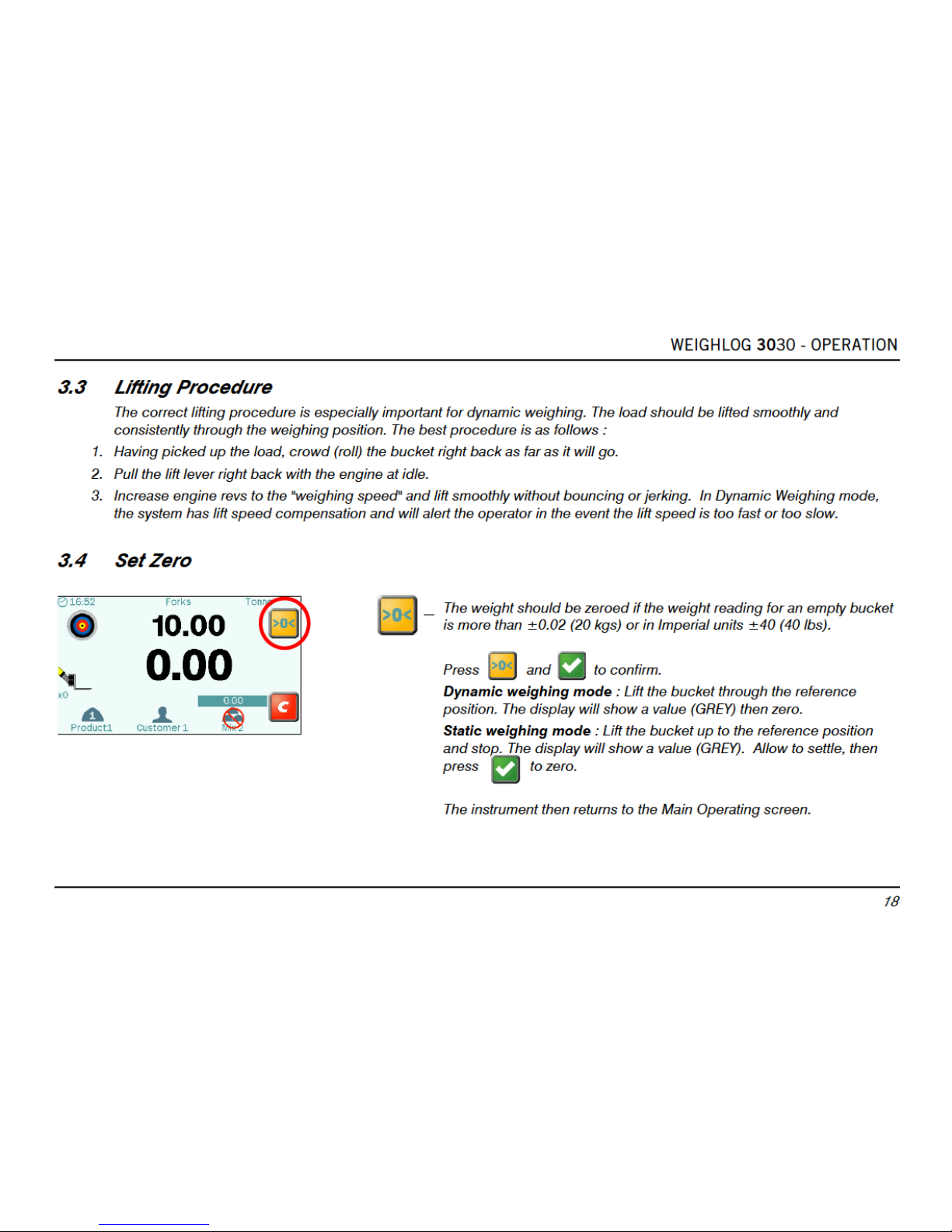
Dynamic weighing: The weight is measured without interrupting the lift. The load is lifted straight through the reference
position. Dynamic weighing can give consistent results without significantly slowing down the loading job, but it does rely
on a certain degree of care on the part of the operator.
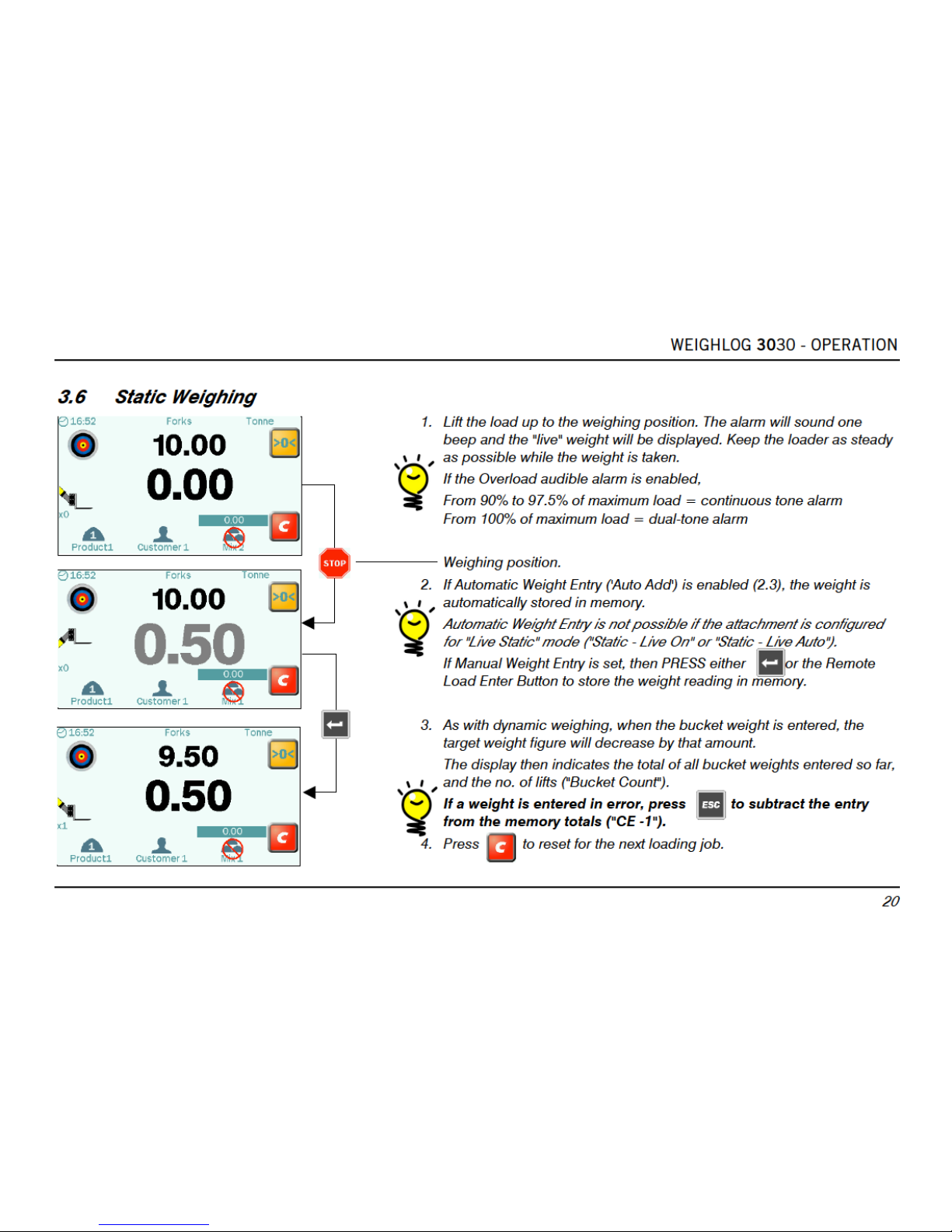
Static weighing: The load is lifted or lowered to the reference position and held there. The display may show a "live
reading" that will fluctuate as the machine settles. You can tip off excess material as required, therefore static weighing is
ideal for the last bucket load if you are aiming to reach a target load.
Weighing without "R/D" Sensor: For applications where no "R/D" sensor is fitted (e.g. trailers, forklift trucks), a "live" reading
is constantly displayed, that will fluctuate as the trailer is loaded / the machine settles down. PRESS either or the
Remote Load Enter Button to store the weight reading in memory.
3.2 Machine Requirements
The accuracy of the system depends to some extent on the following :
1. Operating Temperature : Always allow the machine and the hydraulics to warm up to the normal operating temperature
before commencing weighing.
2. Weighing on level ground : Avoid weighing when on a slope or a side slope. Wherever possible weigh on a level area.
3. Vehicle movement : Best results are obtained when weighing while the vehicle is stationary. It is important that the load
does not bounce or jerk as it is lifted.
4. Maintenance : Keep your machine maintained in good condition. Things like excessively worn bushings, pivot pins and
slideways, as well as lack of lubrication to these areas can have an adverse effect on weighing accuracy. After any major
servicing particularly if you have replaced worn components or carried out welding repairs, you should re-calibrate the
weighing system. If the hydraulic system has been drained and re-filled you should also check for any air that may have
become trapped at the pressure sensor(s).
Page 21
Page 22

Page 23
Page 24

WEIGHLOG 3030 - OPERATION
21
3.7 Weighing without an "R/D" Sensor
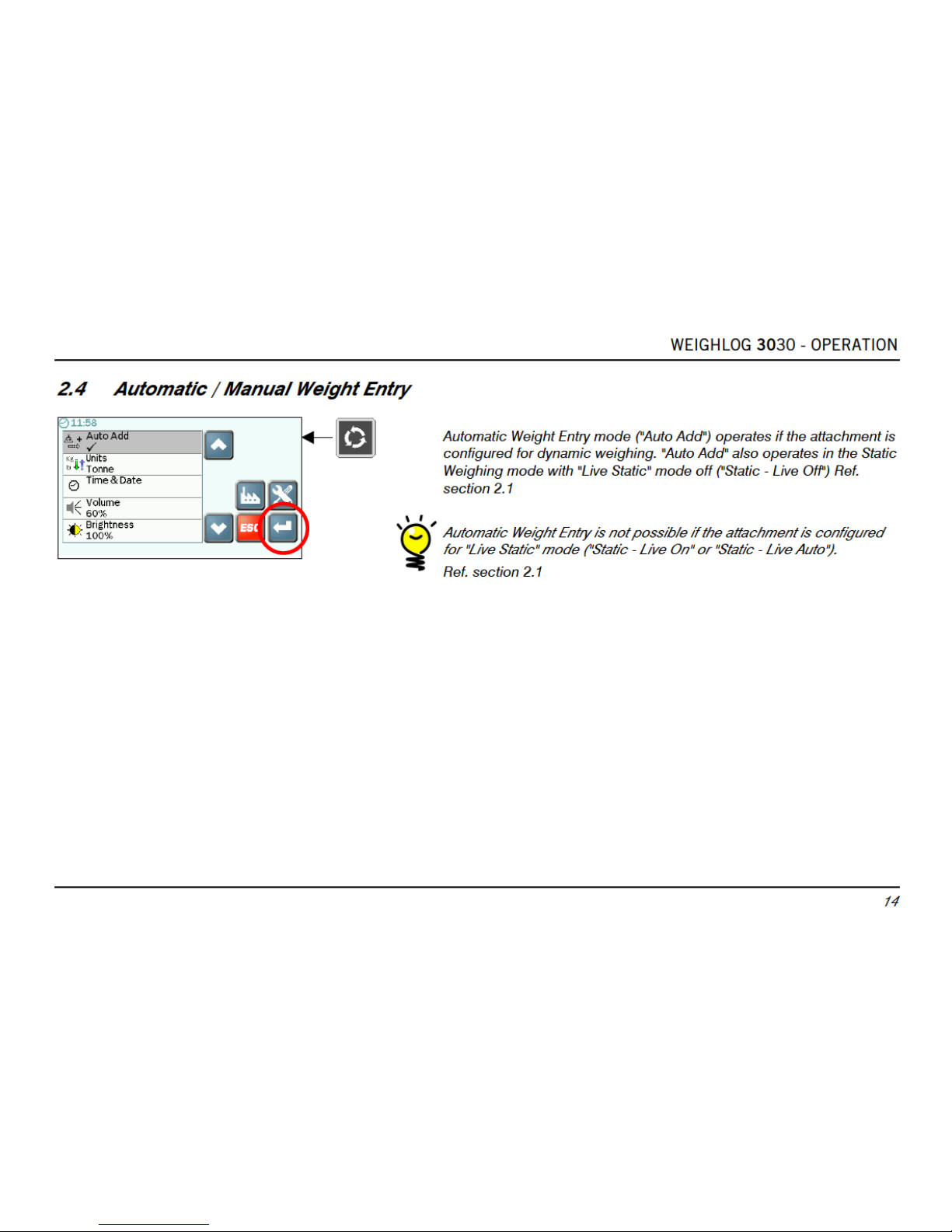
For applications where no Reference/Direction Sensor ("R/D") sensor is fitted (e.g. trailers, forklift trucks), a "live" reading is
constantly displayed. The display will fluctuate as the trailer is loaded / the loader settles down.
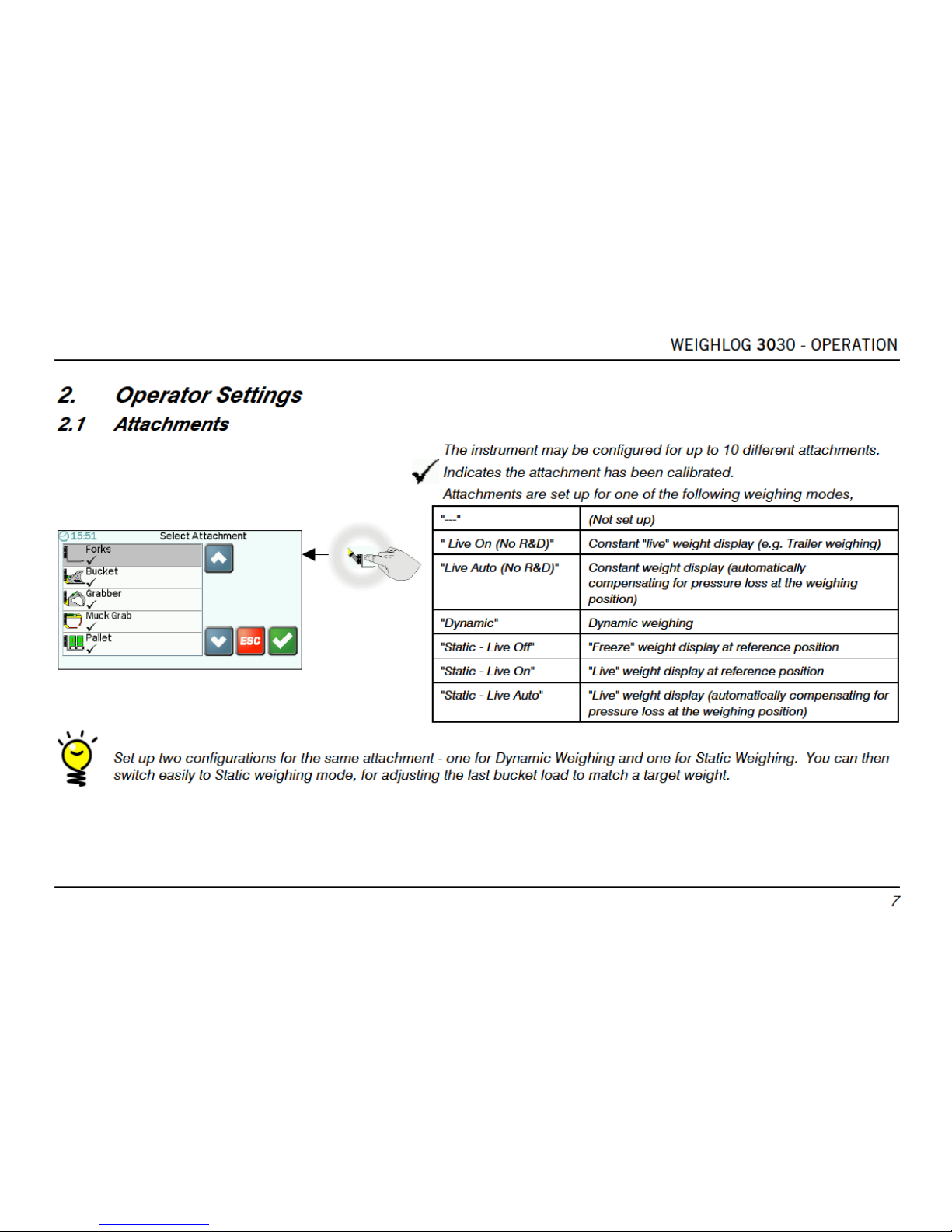
This weighing method is enabled if the attachment is configured for the weighing modes "Live On (No R & D)" or "Live Auto
(No R & D)". Ref. section 2.1.
1. Lift the trailer body / attachment slightly so that the hydraulic system is pressurised. Always sample the weight with the
trailer body / attachment raised to the same position at which weight calibration was performed. Sampling at a different
position may adversely affect weighing accuracy.
2. The Automatic Weight Entry ("Auto Add") function is not applicable. PRESS either or the Remote Load Enter Button to
store the weight reading in memory.
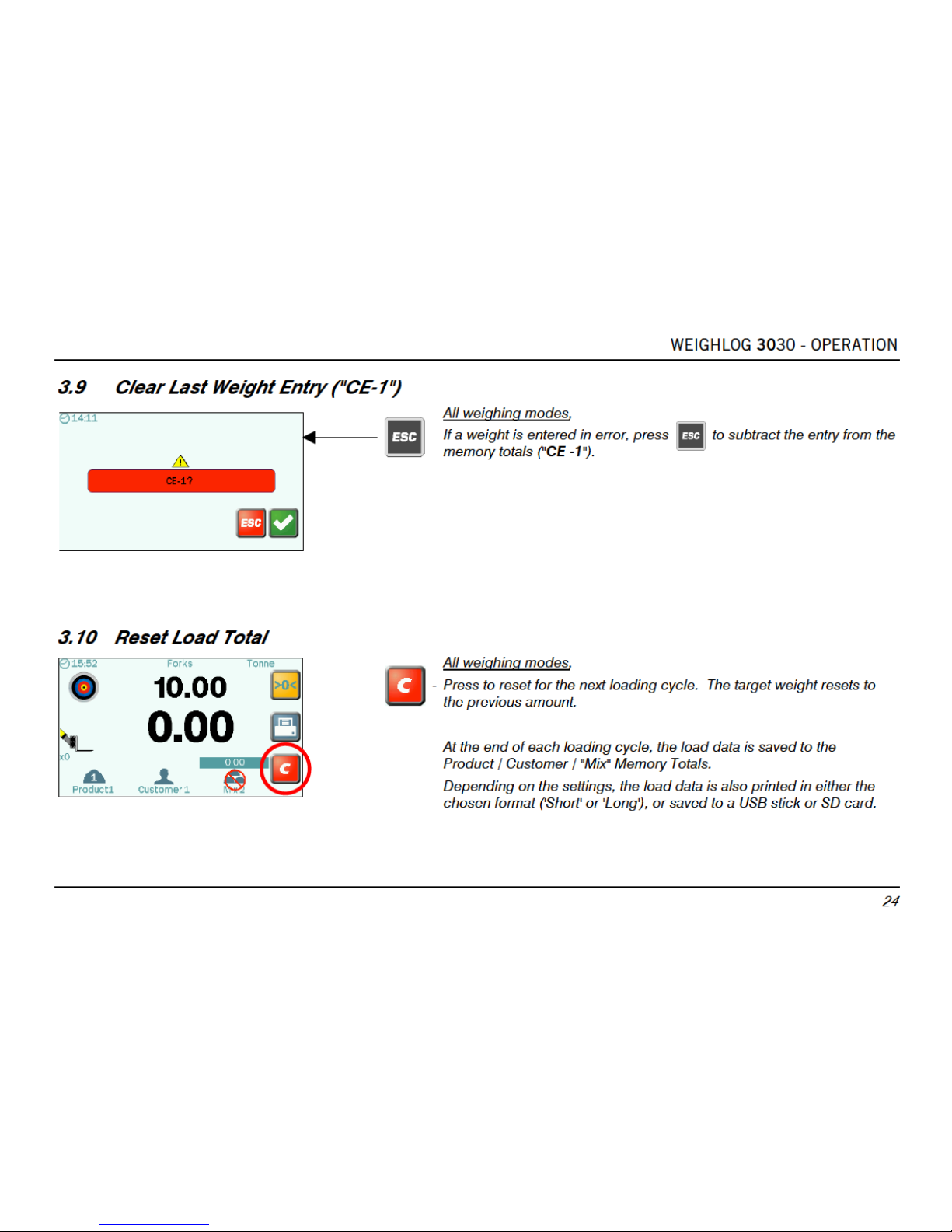
If a weight is entered in error, press to subtract the entry from the memory totals ("CE -1").
3. If the Overload Alarm is enabled, once a weight is entered, you cannot enter another weight reading until the trailer has
been emptied / the load is removed from the attachment. The icon indicates that you must empty / remove the load.
4. Press to reset for the next loading job.
If the Overload audible alarm is enabled,
From 90% to 97.5% of maximum load = continuous tone alarm
From 100% of maximum load = dual-tone alarm
Page 25

WEIGHLOG 3030 - OPERATION
22
3.8 Weighing in Blend ("Mix") Mode
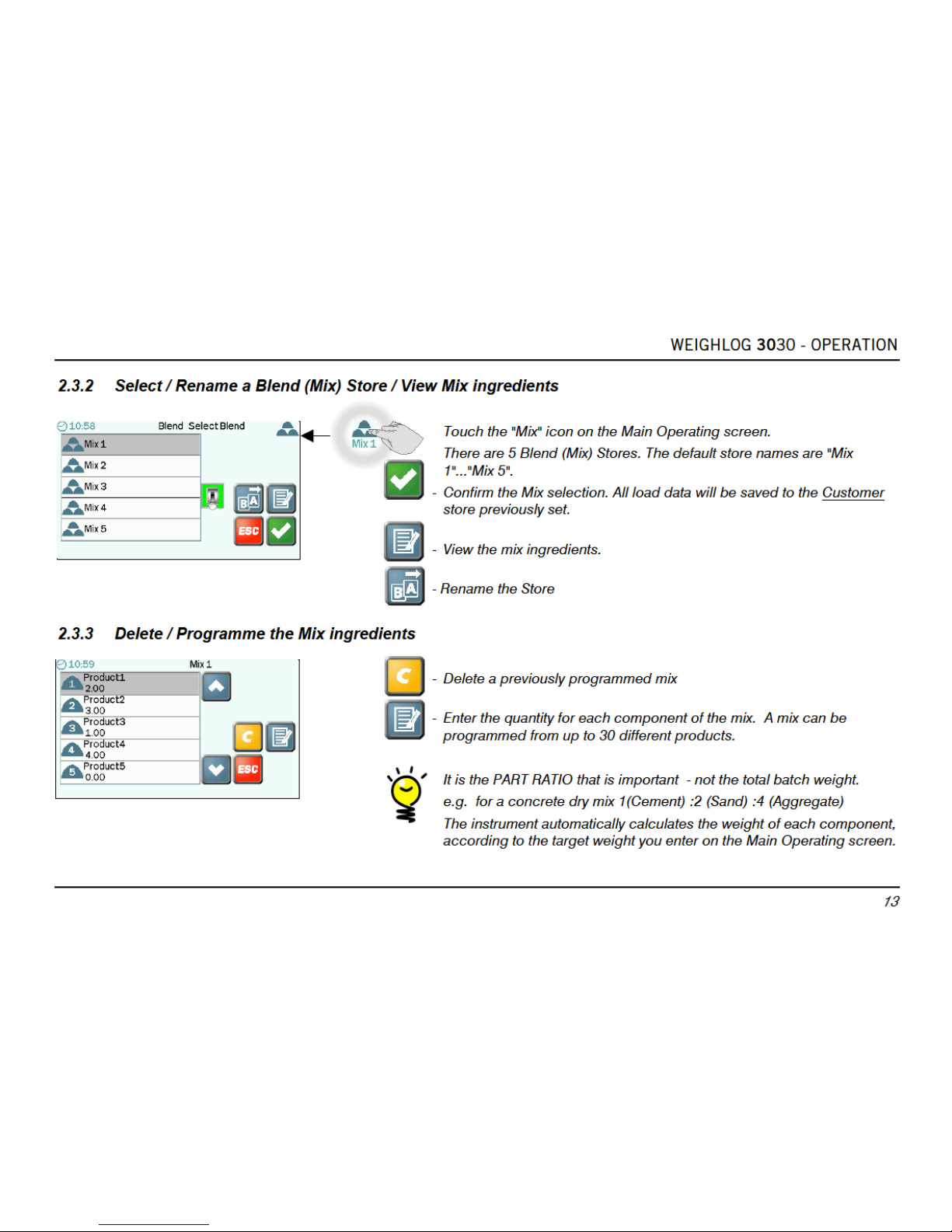
Batch mixing
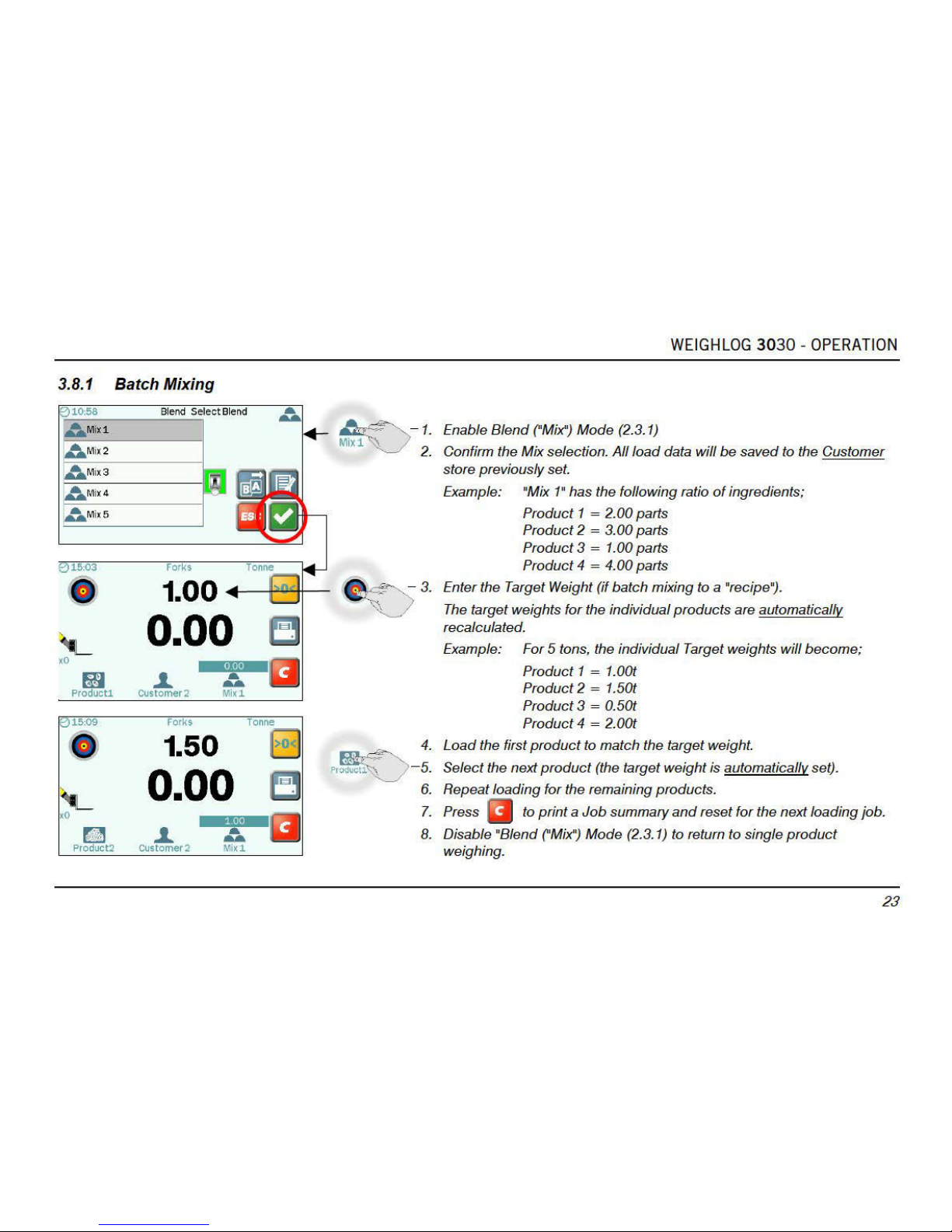
Select a "Mix", and enter a target weight for batch mixing. The instrument automatically calculates the target weight for
each ingredient of the "recipe". Then simply weigh following the target weight ("Left to Load") display for each product in
turn.
The accumulated weight total for the batch is indicated above the Mix icon.
Blending
Blending is similar to batch mixing except you do not follow a preset recipe.
Select a "Mix" but do not enter a target weight. As you load each product in turn, the total for that product is displayed
where the target weight display would normally be.
The accumulated weight total for the blend is indicated above the Mix icon.
Products can be mixed in any order, either completing each product amount in turn, or varying the mix in smaller
quantities.
Page 26
Page 27
Page 28
Page 29
Page 30

WEIGHLOG 3030 - OPERATION
27
4. Printing and Data Transfer
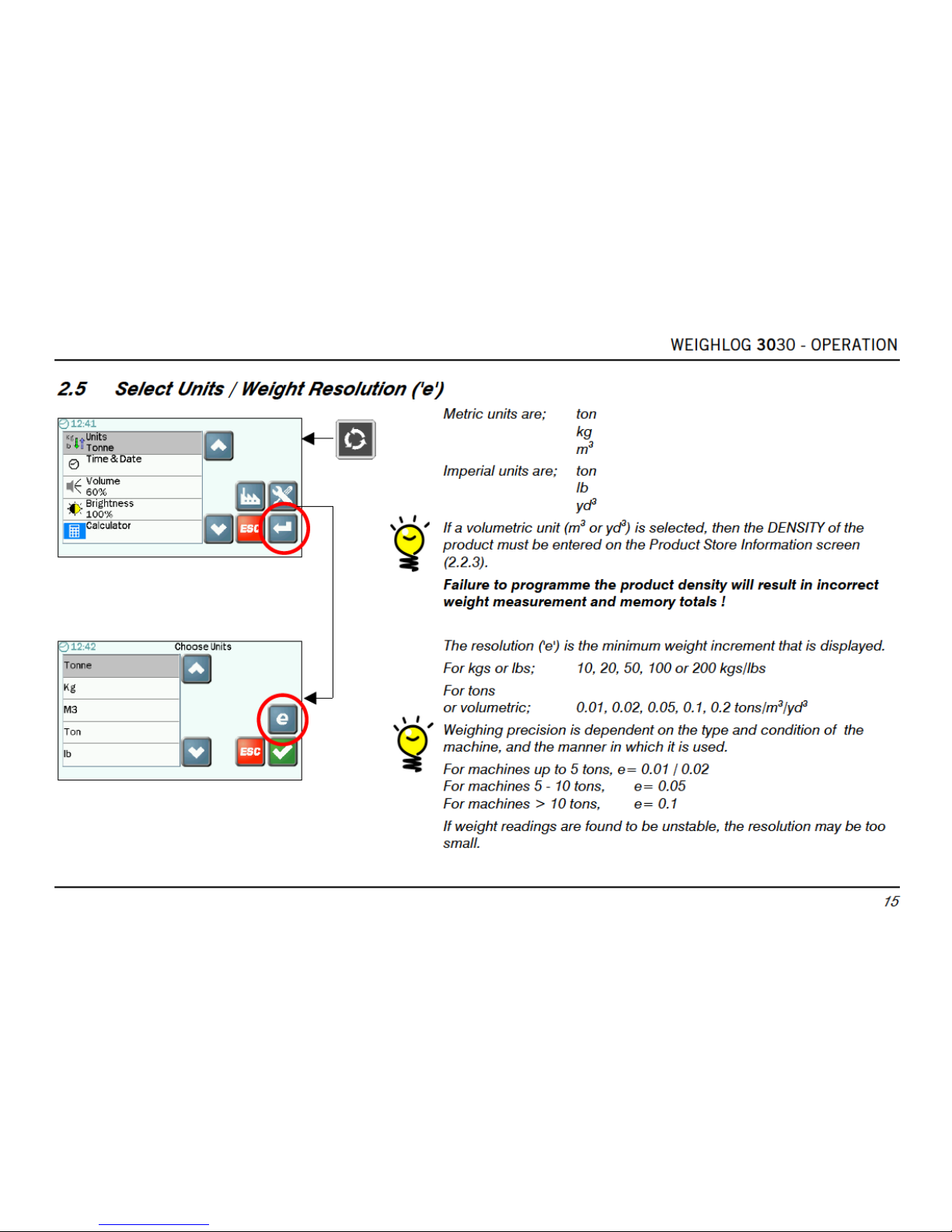
Weighlog data output options. Configuration is via "Logging" options in the "Setup" menu.
'Printer' Loup ICP300 printer.
Data' RS232 serial data transfer - via cable.
'USB' Flash Memory Stick.
'SD' SD Card.
4.1 Printing
4.1.1 Print Modes
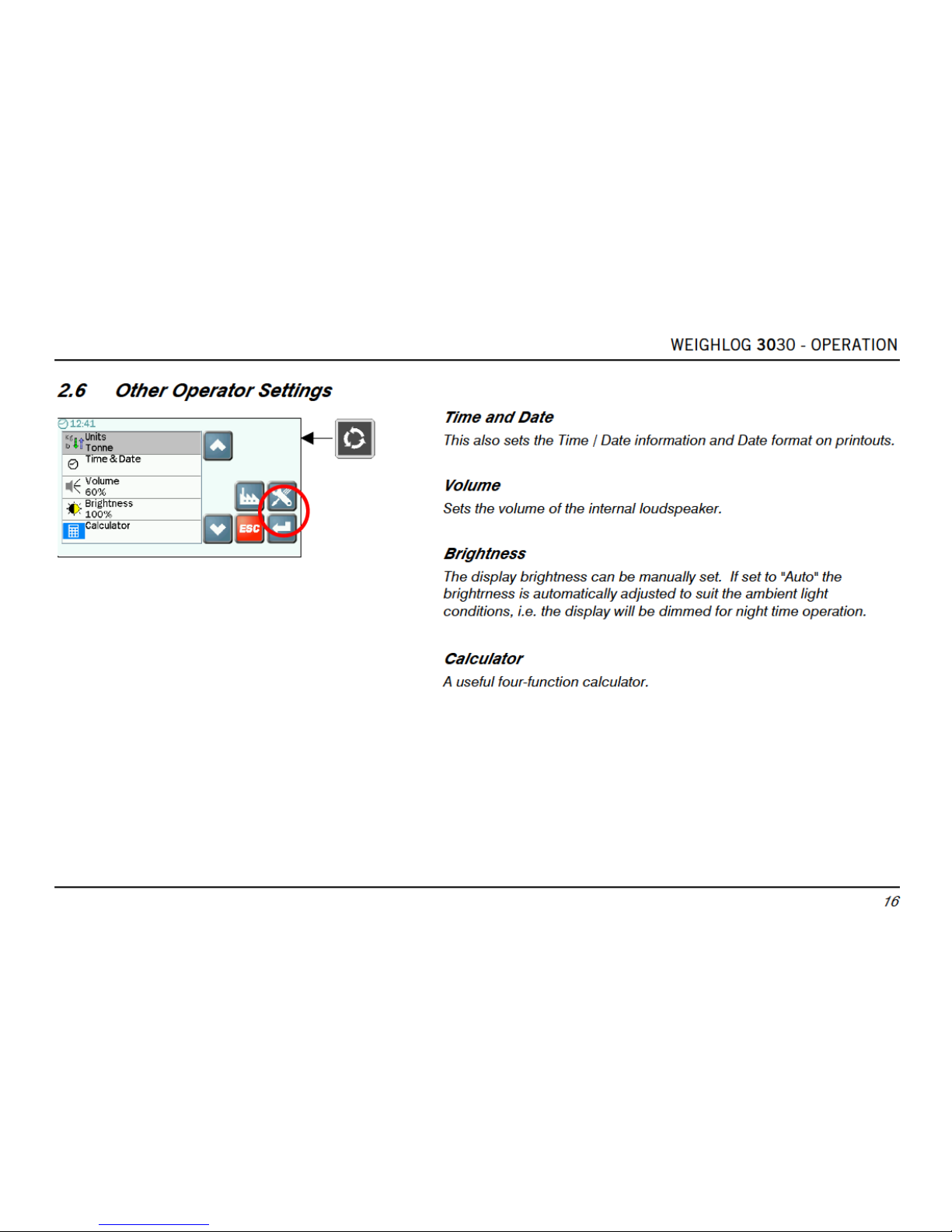
The instrument is configured for 1 of 3 print modes. Configuration is via "Logging" options in the "Setup" menu.
'Short' Automatically prints a "Job Record" when resetting for next load ( ). The "Job Number." increments by
one.
Also manually print with from, Main Operating screen
Product Memory Stores
Customer Memory Stores
"Mix" Memory Stores
'Long' As for 'Short' mode except the print includes space for a name and address.
'Lift' Prints the bucket weight each time it is entered using the button or Remote Enter Button. When resetting
for the next load ( ), the total is printed.
If you clear the last weight entry ("CE-1"), then a "Job Cancel" ticket is automatically printed.
Page 31
Page 32
Page 33

WEIGHLOG 3030 - OPERATION
30
4.1.6 Types of Printout
Single Product Store All Product Stores Single Customer Store All Customer Stores
_________________
Instrument ID
----------------Date
Time
Product 1 <Total>
Lifts <Total>
Loads <Total>
Product 2 <Total>
Lifts <Total>
Loads <Total>
Product 3 <Total>
Lifts <Total>
Loads <Total>
etc.
TOTAL
Weight <Total>
Lifts <Total>
Loads <Total>
_________________
Ticket Number
-----------------
_________________
Instrument ID
----------------Date
Time
Customer 1
Product 1 <Total>
Product 2 <Total>
etc.
Customer 2
Product 1 <Total>
Product 2 <Total>
etc.
Customer 3
Product 1 <Total>
Product 2 <Total>
etc.
TOTAL
Weight <Total>
Lifts <Total>
Loads <Total>
Truck Tare
From <Date/Time>
To <Date/Time>
_________________
Ticket Number
-----------------
_________________
Instrument ID
----------------Date
Time
Product Name
TOTAL
Weight <Total>
Lifts <Total>
Loads <Total>
_________________
Ticket Number
-----------------
_________________
Instrument ID
----------------Date
Time
Customer Name
Product 1 <Total>
Product 2 <Total>
Product 3 <Total>
Product 4 <Total>
etc.
TOTAL
Weight <Total>
Lifts <Total>
Loads <Total>
Truck Tare
From <Date/Time>
To <Date/Time>
_________________
Ticket Number
-----------------
Page 34

WEIGHLOG 3030 - OPERATION
31
Job Record (Short - Mix Mode OFF) Job Record (Long - Mix Mode OFF) Job Record (Short - Mix Mode ON)
_________________
Instrument ID
----------------Job Number
Date
Time
Product Name
TOTAL
Weight <Total>
Customer Name
Name:
Address:
Sign:
_________________
Ticket Number
-----------------
_________________
Instrument ID
----------------Job Number
Date
Time
Product Name
TOTAL
Weight <Total>
Customer Name
_________________
Ticket Number
-----------------
_________________
Instrument ID
----------------Job Number
Date
Time
Mix Name
Product 1 <Total>
Product 2 <Total>
Product 3 <Total>
Product 4 <Total>
etc.
TOTAL
Weight <Total>
Customer Name
_________________
Ticket Number
-----------------
 Loading...