

Page 1
1
Looq Bluetooth Watch
USER GUIDE
Thank you for choosing Looq Bluetooth Watch. This device is a well-designed wearable device for IOS and Android smart
phones, which can provide timely communication and intelligent lifesty le. Everything you do with your Looq Watch is intelligent,
easier and more efficient.
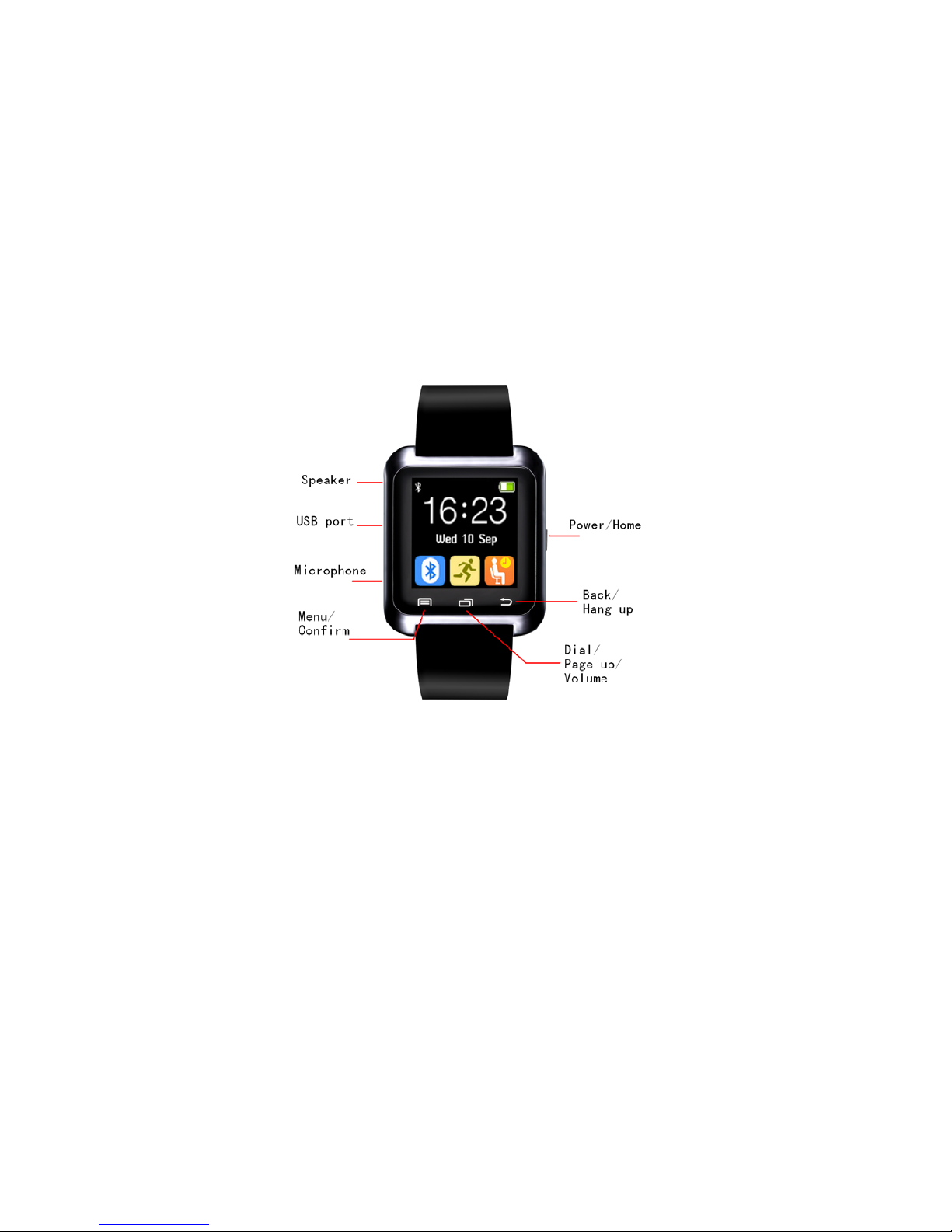
1 A quick look at Looq Watch
Power/Home key
Long press for ON/OFF and short press for EXIT from menu to Home screen.
Menu/Confirm touch key
Enter the menu from Ho me sc r ee n, or “con fi r m” i n me n u ope r a ti on .
Dial/Page up/Volume touch key
Enter dial screen from Home screen, page up in menu operation, or turn the volume up/down in music play and telephone
calls.
Back/Hang up touch key
Return to menu operation or hang up in telephone calls.
Other Features:
Slide left or right
Move Menu page up/down
Tap on the screen
Enter the menu
Slide down
Exit the menu
Page 2

2
2 Set up and pair with your smart phone
There are two ways to set up Bluetooth co nnection:
1) Looq Watch initiates a Bluetooth connection pairing to find your smart phone.
2) Smart phone initiates a Bluetooth connection pairing to find your Looq watch.
After paring is complete, your device may r eceive a reques t for r eading your phon ebook and call hist ory, please accept to allow
your Watch to sync with your smartphone.
The Bluetooth paring will be disconnected automat ically if the distance between the smar tphone and t he Watch is more than 10
meters. If both devices come in range again within 5 minutes, they will be reconnected automatically. Otherwise, manual
reconnection is required.
3 Functions
Bluetooth Communication
Stay in touch like never before. Support hands-free calls. Just tap on the Watch to send and receive calls more easily and
efficiently.
Bluetooth Music
Control and enjoy music on your phones easily.
Anti-lost
Alert you when your smartphone is more than 10 meters away from your Looq Watch.
Powerful Tools
Have a handy assistant on your wrist, comprising calendar, calculator, alarm, and stopwatch.
Drink Alarm
Time to refresh yourself with a glass of water! This is to remind you to drink water regularly.
You can set 8 alarms (4 show on the current display, and other 4 will appear when sliding upward)
Rest Alarm
Sit less. Move more. Get some exercise. This is to remind you to take a break from sitting. Total 4 rest alarms.
Pedometer
Specially designed to provide a snapshot of your daily activity, such as no. of steps achieved, walk distance and calories
burned.
Please note that the first several steps will not be shown on the screen to avoid false counting, and the arms should be swung to
improve accuracy. The count of your steps, distances, and calories will be reset to 0 everyday.
Sleep Monito r
Keep track of your sleep quality by recording the time of your deep sleep and light sleep.
4 Android Device App Download
For Android phones, please download the APP by scanning the QR code below, or searching Keyword “SmileN otification ” in
Google Play.
Google link: https://play.google.com/store/apps/details?id=com.weforpay.btnotification
This App supports: Bluetooth Notification/ Bluetooth Camera/ Messages functions. IOS devices do not support these three
functions.
Page 3

3
Please note that: when using Bluetooth Camera function, the image storage path may be different according to the phone model.
(For Other Countries Except China)
5 Battery Charge
Looq watch can be charged by a standard USB interface plug (included) to computer or charger.
*The company reserves the rights to modify this document without notice.
FCC Warning
This device complies with Part 15 of the F CC Rules. Operation is subject to the followin g t w o conditions:
(1) This device may not cause harmful interference, and (2) this device must accept any interference received, including
interference that may cause undes ir ed ope rati on.
NOTE: Any changes or modifications to this unit not expressly approved by the party responsible f or compliance could void
the user's authority to operate the equipment.
 Loading...