

Page 1

TigWeld 200EX 200amp AC/DC TIG Welder
Operating Manual
For
TigWeld 200EX
200 AMP AC/DC Pulse TIG Welder and
AC/DC Stick Welder
~ 1 ~
Page 2

TigWeld 200EX 200amp AC/DC TIG Welder
Table of Contents:
PG. 3: Thank you From LONGEVITY
PG. 4-6: Warranty/Shipping Damage/Order Information
PG. 7-9: Warning and Safety Information
PG. 10: Specifications and Ratings
PG. 11: Specifications and Ratings
PG. 12: Connecting your Welder
PG. 13-16: Front Panel Overview
PG. 17: Enjoy your new welding machine from LONGEVITY!
PG. 18: Electronic Schematics
~ 2 ~
Page 3

TigWeld 200EX 200amp AC/DC TIG Welder
THANK YOU!
We, at LONGEVITY, want to thank you for purchasing our product. You are almost
ready to experience Longevity Welding first hand. Longevity definitely appreciates
your business and understand that this equipment may be overwhelming to setup and
operate so we have prepared a manual that will assist you in understand your new
plasma cutter/welder. If you have any questions during or after reading this manual,
please feel to contact us! Please take a moment to register your product on our
website at www.longevity-inc.com or www.lweld.com
Once again, thank you for choosing Longevity as your main welding supplier!
~ 3 ~
Page 4

TigWeld 200EX 200amp AC/DC TIG Welder
Longevity Global, Inc.
23591 Foley St
Hayward, CA 94545
Toll-Free Customer Support: 1-877-LONG-INC / 1-877-566-4462
Website: www.longevity-inc.com
Sales: [email protected]
Customer Service: [email protected]
Dealers: [email protected]
Complaints: [email protected]
Please join our welding forums to share welding tips and tricks, to receive useful
information from customers who also use our products, and to be a part of the
Longevity™ welding community at www.freeweldingforum.com
Check out LONGEVITY Racing at www.longevity-racing.com
~ 4 ~
Page 5

TigWeld 200EX 200amp AC/DC TIG Welder
W
arranty
LONGEVITY Plasma Cutters, Welders, and Multi-Purpose Welders are covered for
specific Parts and Labor warranty at our facility. For detailed information regarding
your specific LONGEVITY welder or cutter, please view our Terms and Policies
page on our website at the following website link:
http://www.longevity-inc.com/terms/.
Shipping Damage
Your machine is insured against damage during shipping. Keep all packing materials
and containers in case machine must be returned. We will initiate a claim with the
shipping company to cover damage or loss. If there is shipping damage upon opening
your package, our customer service team will work with you to get the matter
resolved.
~ 5 ~
Page 6

TigWeld 200EX 200amp AC/DC TIG Welder
In Warranty Service
Customers, who own machines that are in warranty and require service, should
contact our Warranty Department by email at [email protected] to obtain a
return authorization code. In addition to the warranty we offer, we would like for you
to register your product on our website at www.longevity-inc.com/resources.
Remember, warranty starts from the date of purchase. For your convenience, write
your order information below so you can track your order in case you need warranty
work.
Order No.: _________________________________
Date of Purchase: _____________________________
Warranty Period: ______________________________
Out-of-Warranty Service
Customers, who own machines that are out of warranty and require service, should
contact us for an estimate. Longevity offers an exchange program on out of warranty
units. We also help non LONGEVITY customers with repairs, replacement, and
service.
If your unit is not manufactured by Longevity and you cannot receive service from
your manufacturer or seller, Longevity will lend out hand. Our warranty policy is also
available for all plasma cutters and welders. For more information, please email us at
~ 6 ~
Page 7
TigWeld 200EX 200amp AC/DC TIG Welder
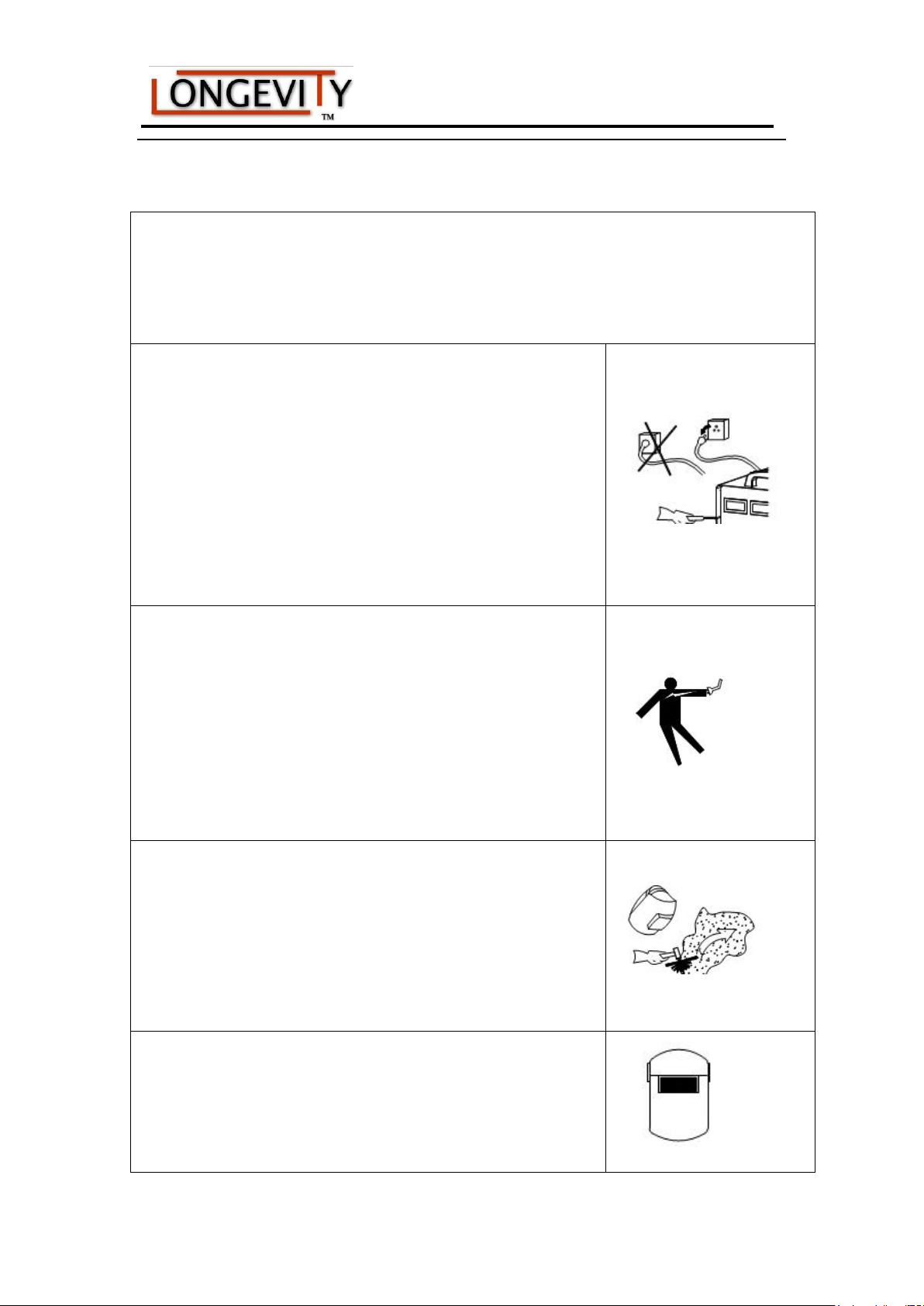
Welding and plasma cutting may be dangerous to the operator and to bystanders, if the
equipment is not operated properly. Welding or cutting must be performed in accordance with
all relevant safety regulations. Carefully read and understand this instruction manual before
installing and operating this equipment.
Changing function modes during welding may damage
equipment.
Before welding, disconnect the electrode-holder cable from the
equipment.
A circuit breaker is required to prevent electrical overload of the
equipment.
Only high quality welding tools should be used.
Electric Shock can be fatal.
Ensure that ground cable is connected in accordance with
applicable safety codes.
Never touch electrodes, wires, or circuit components with bare
hands. Wear dry welding gloves when welding.
The operator must be insulated from the work piece.
Smoke and gas can be harmful to health.
Ensure that the working area is well ventilated.
Avoid breathing smoke and gas generated during the welding
process. Cutting and welding can cause cancer because of the
smoke that comes from the welds and cuts.
Arc-light emission can be harmful to eyes and skin.
Always wear a welding helmet, anti-radiation glass, and work
clothes while welding.
Warnings and Safety
~ 7 ~
Page 8
TigWeld 200EX 200amp AC/DC TIG Welder
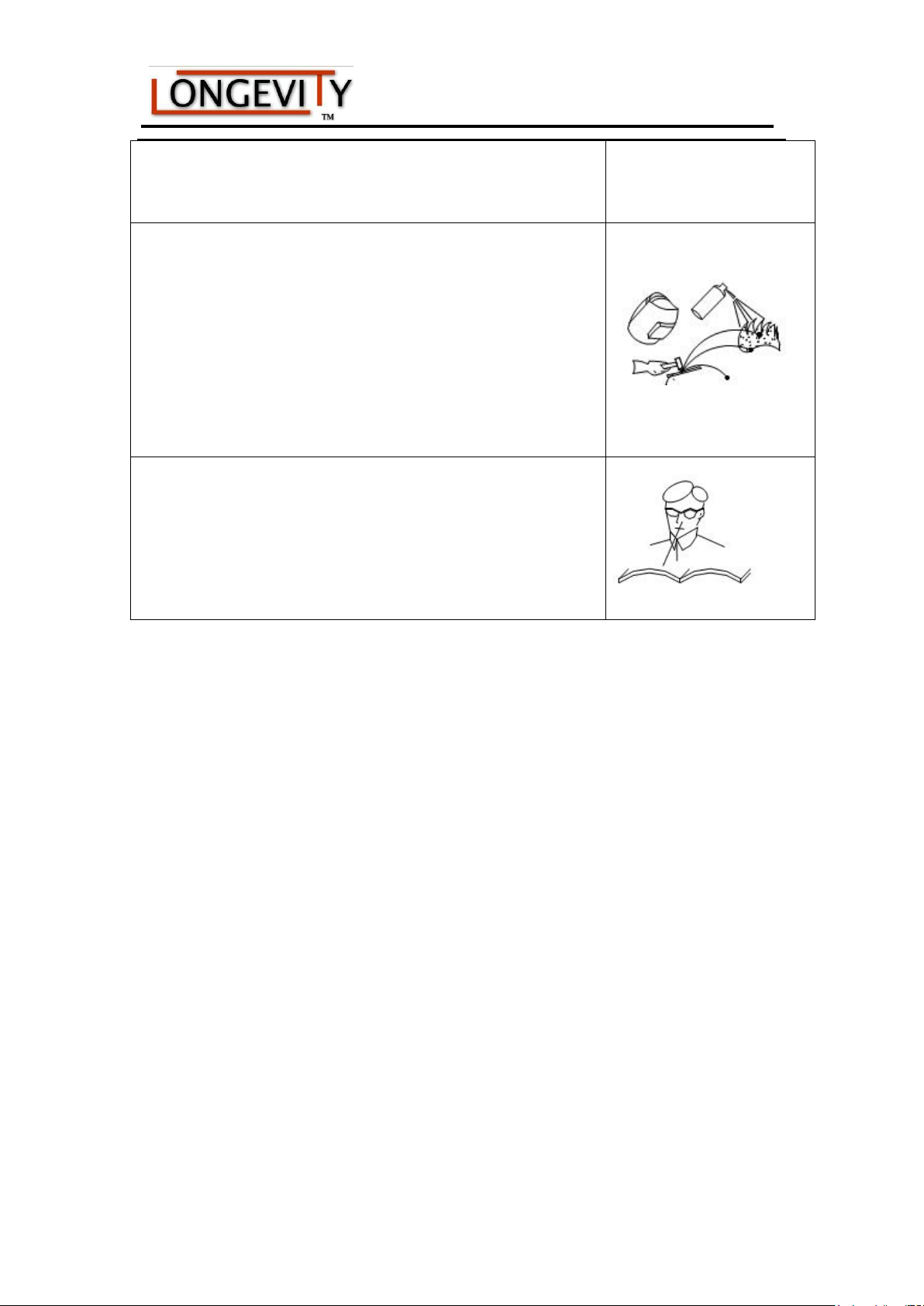
Ensure that people in or near the working area are protected.
Welding splash is a fire hazard.
Keep flammable material away from the work place.
Keep a fire extinguisher nearby, and have all personnel trained in
its use.
Surface noise generated while welding or cutting can be harmful
to hearing.
In the event of a machine fault.
Refer to this instruction manual.
If the fault cannot be determined, contact your local dealer or
supplier for assistance.
~ 8 ~
Page 9

TigWeld 200EX 200amp AC/DC TIG Welder
Safety Tips
Consider the following tips to ensure safe operation of your welding/cutting
equipment:
Ensure that this welding equipment is installed in an area free of corrosive
chemical gases, flammable gases or materials, and explosive chemicals.
The area should contain little dust, and have a humidity of no more than 80%.
Operate the welding equipment in an area sheltered from direct sunlight and
precipitation. Work area temperature should be maintained at - to
If, because of an overload, the machine suddenly stops, and it is necessary to
restart it, leave the internal fan operating to lower the inside temperature.
Always wear protective clothing and a welding mask to protect your skin.
Wear safety goggles designed to darken the arc generated by your machine.
Wear suitable noise protection to protect your hearing.
Ensure that machine is grounded through the power cord or on the machine case.
Never operate the machine in bare feet or on a wet floor.
Never switch the machine off while it’s in use. Doing so will damage the internal
circuitry.
Ensure that your circuit breaker is rated to handle the current requirements of your
machine.
Use a UL approved receptacles and plugs with your machine. Never hard wire the
machine to main power.
Work in a well-ventilated area to avoid smoke. Keep your head out of the smoke.
Ensure that air is flowing away from you to avoid inhaling smoke.
Ensure proper ventilation through the machine’s louvers. Maintain a distance
least 12 inches between this cutting equipment and any other objects in the
of at
work area.
Use a screen or curtain designed to keep passer byes from viewing the arc.
The arc spray and metal spray from machine use may cause nearby fires. Use
caution.
~ 9 ~
Page 10

TigWeld 200EX 200amp AC/DC TIG Welder
If, after reviewing this manual, you have any problems in setting up or operating
your machine, contact us at [email protected].
~ 10 ~
Page 11
TigWeld 200EX 200amp AC/DC TIG Welder
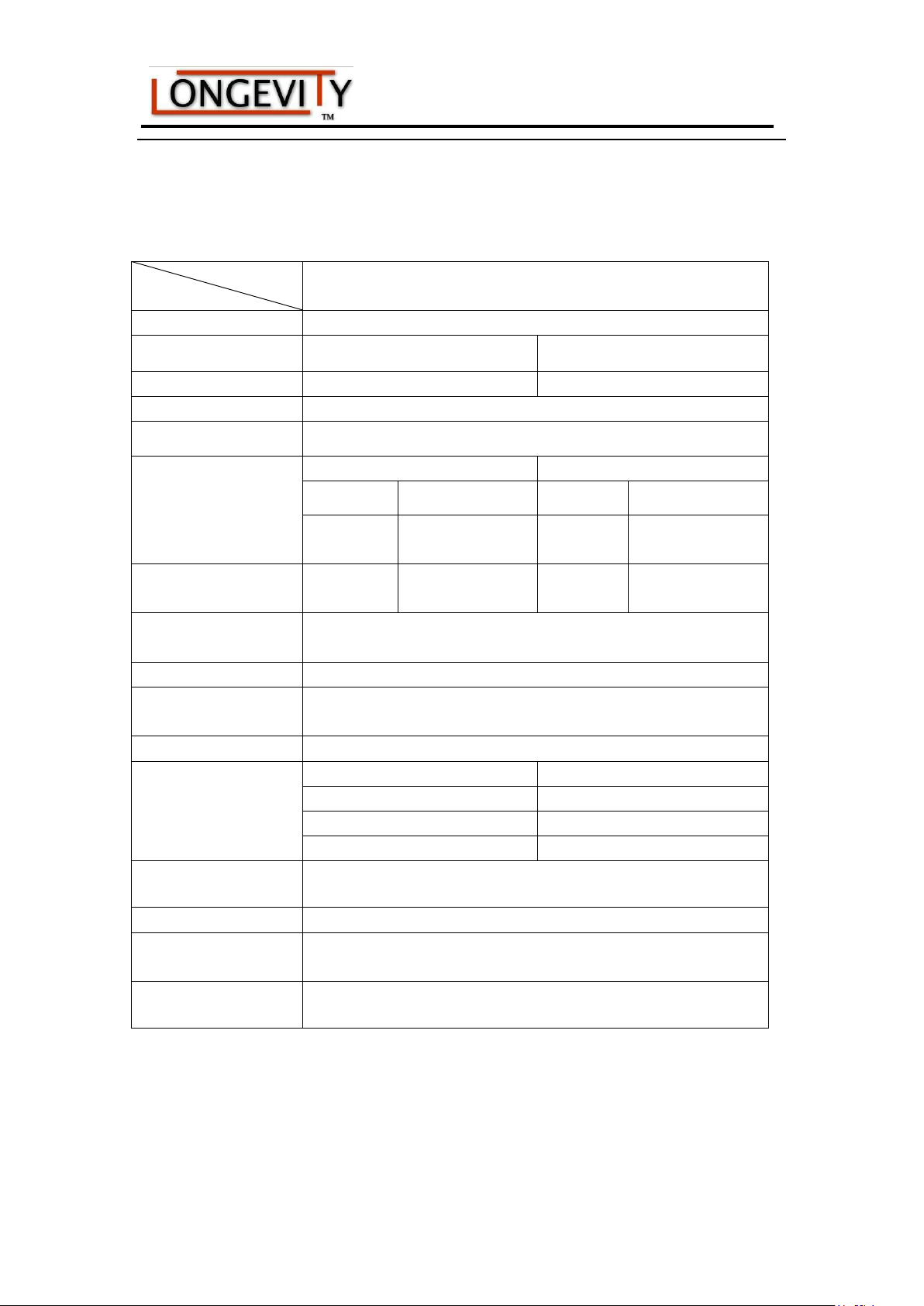
Models
Parameters
TigWeld 200EX
Input power
1~220±10%,50Hz
Rated input current(A)
35.4(TIG)
39.5(STICK)
Rated input power(KW)
5.2(TIG)
6.4(STICK)
Power factor
0.68
Max no-load voltage(V)
66
Adjustment range of start
current(A)
TIG
STICK
AC
DC
AC
DC
10~welding
current
5~welding current
——
——
Adjustment range of
welding current(A)
10~200
5~200
10~170
5~170
Adjustment range of
downslope time(S)
0~10
Pre-gas time(S)
0.1~1
Adjustment range of
post-gas time(S)
0.1~10
Clearance effect(%)
15~50
Efficiency
Duty cycle(40℃,10
minutes)
AC
DC
25% 200A
25% 200A
60% 90A
60% 110A
100% 70A
100% 90A
Protection class
IP23S
Insulation class
F
Dimensions of Machine
(L×W×H)(mm)
470×250×400
Weight(Kg)
20
Specifications
~ 11 ~
Page 12
TigWeld 200EX 200amp AC/DC TIG Welder
Operation
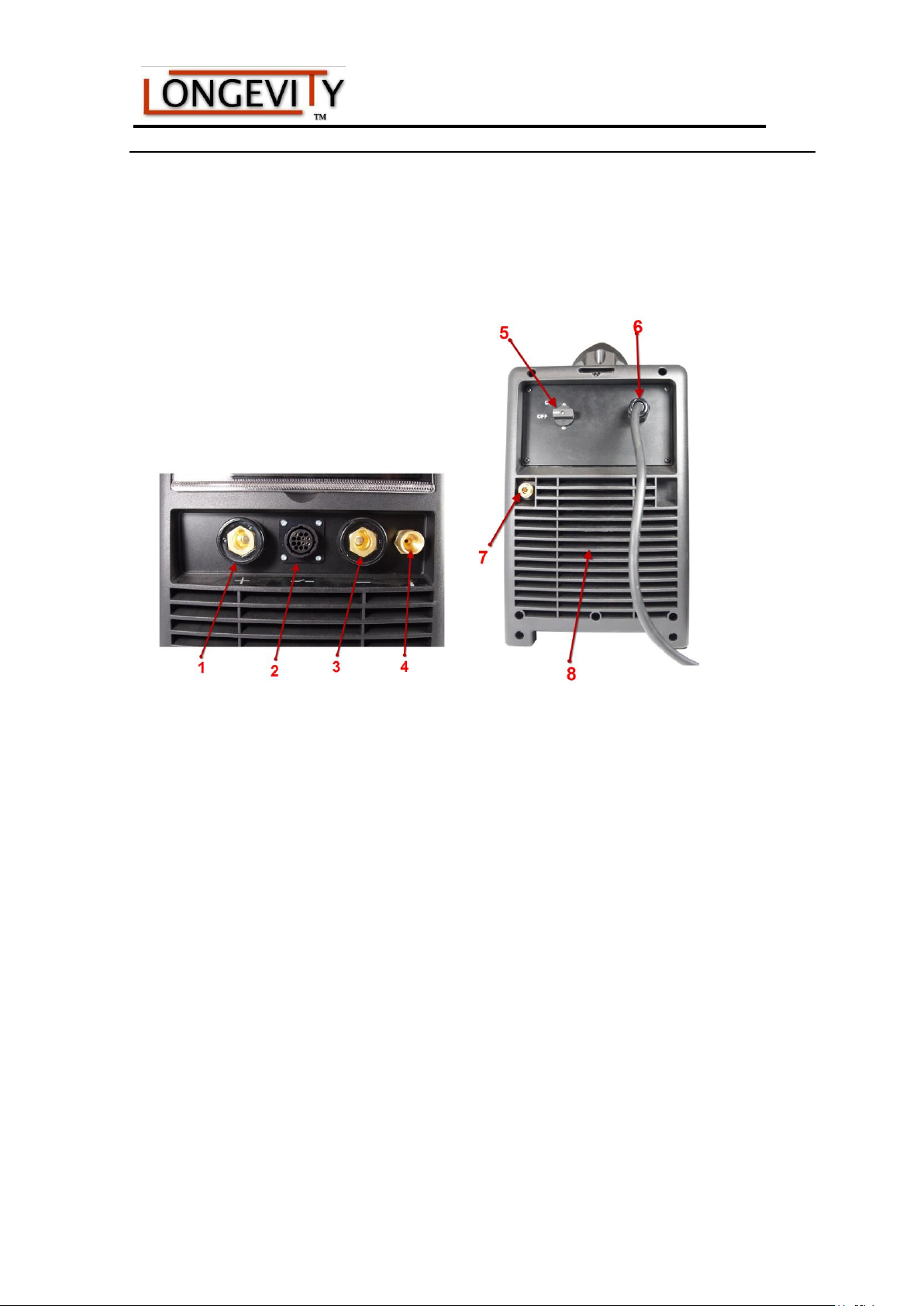
Layout for the panel
1 Positive Welding Terminal: Positive polarity output. It is important that the plug be inserted and
secured.
2 8 pin Control Socket: Is used to connect either to the trigger switch on the TIG torch, or to the
foot pedal
3 Negative Welding Terminal: Negative polarity output. It is important that the plug be inserted
and secured.
4 Shielding gas connector: Is connected to the gas input pipe of torch.
5 Power source switch: Switch to “ON”, the welder is turned on, while switch to “OFF”, the
welder is turned off.
6 Power source input: To connect to a 220v power source.
7 Shield gas input joint: Gas inlet for shielding gas
8 Fan: Is used for cooling the components and parts inside the welder.
~ 12 ~
Page 13
TigWeld 200EX 200amp AC/DC TIG Welder
Overview
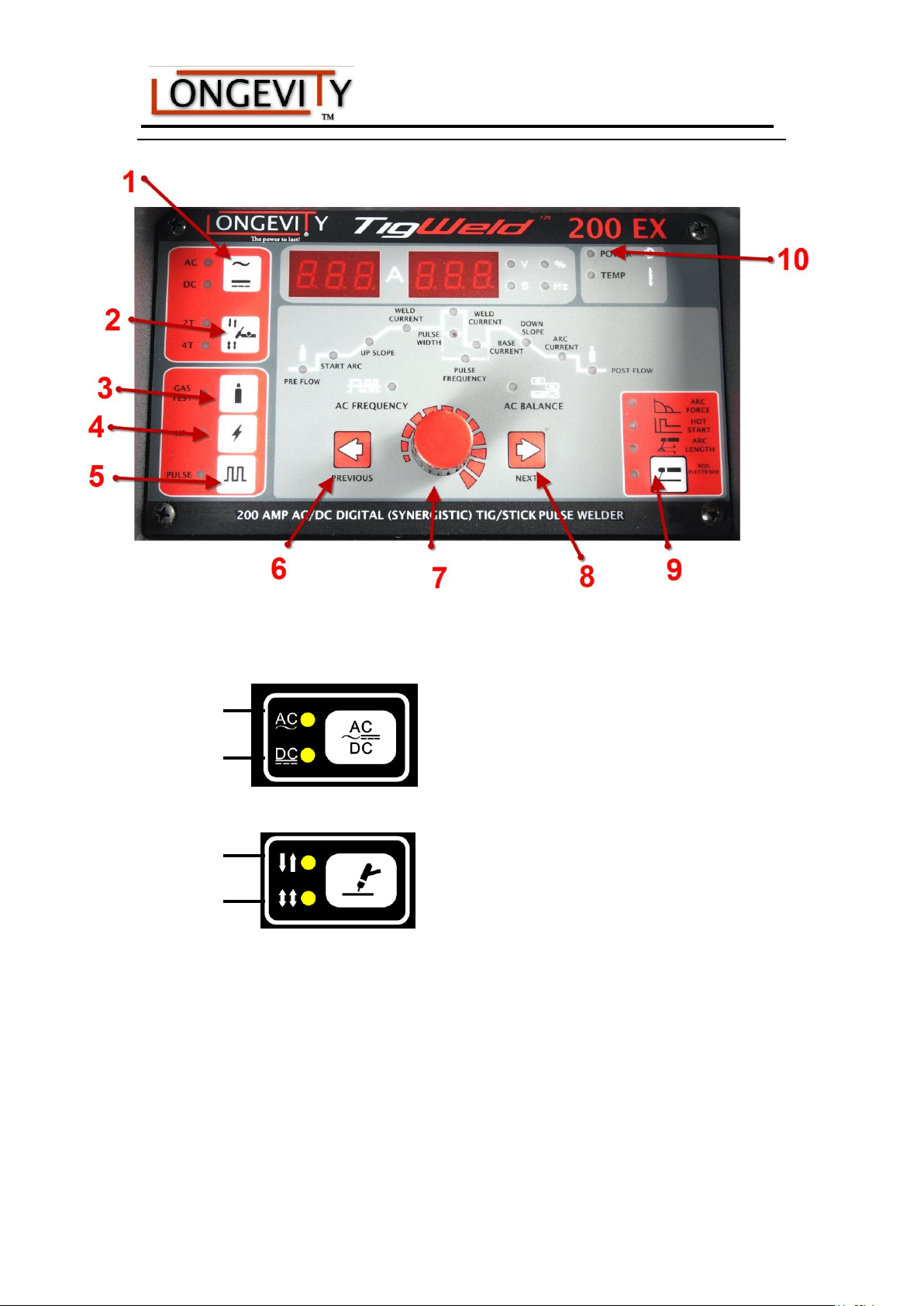
.(1) AC/DC Selection Button
AC welding
DC welding
(2) 2T/4T Selection Button
2T Mode
4T Mode
(3) Gas-test Button
Lights up when Gas-test key is selected, after that gas will flow out for 15 seconds. Press the
button again to stop the gas flow before the 15 seconds are up.
(4) HF (high-frequency) ignition Button
Lights up when High frequency key is pressed, HF (high-frequency) ignition has been selected.
(5) Pulse Button
Lights up when Pulse key is pressed, Pulse has been selected.
(6) and (7) Parameter selection keys
If “2T/4T mode” has been selected, it is possible to change welding parameters by means of the
parameter selection keys (6) and (7) while the welding operation is in progress.
~ 13 ~
Page 14
TigWeld 200EX 200amp AC/DC TIG Welder
PF
SA
UPS
WC
AC
PF
DS
PF
PW
BC
WC
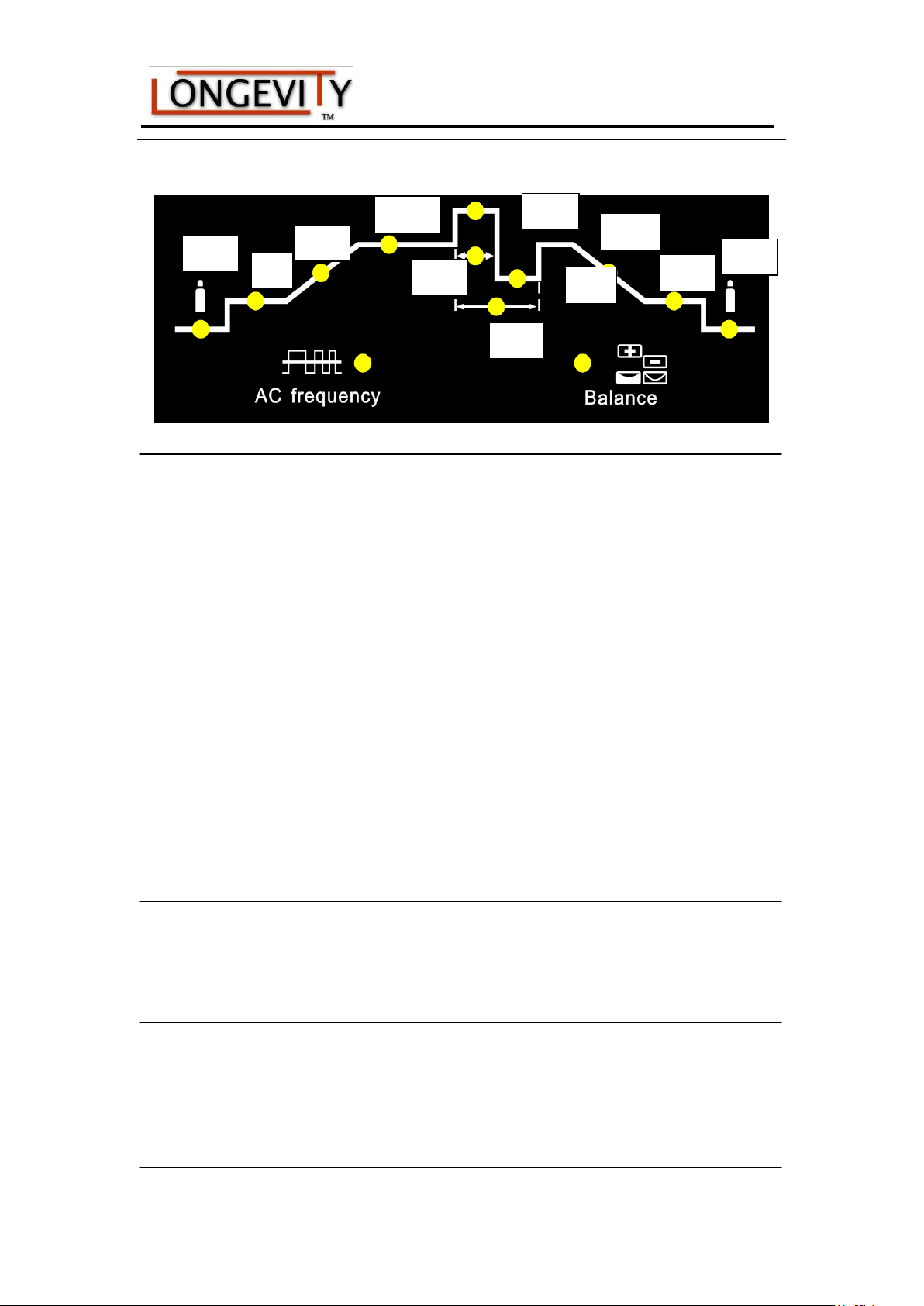
(8) Adjusting dial
If the parameter indicator lights up, then the selected parameter can be altered on adjusting dial.
Available parameters where 2T and 4T mode have been selected:
PF Gas pre-flow time
Unit Seconds
Setting range 0.1—1
Factory setting 0.3
SA Starting current (only with 4T)
Unit Amps
Setting range 5—100% of main current WC (DC);10—100%of main current WC (A/C)
Factory setting 5
UPS Upslope time
Unit Seconds
Setting range 0—10
Factory setting 0
WC Welding current
Unit Amps
5—200 (TIG-DC);10—200 (TIG-AC); 5—170 (Stick-DC);10—170 (Stick-AC)
BC Base current
Unit Amps
5—200 (DC);10—200 (AC)
Important! Only selectable when “pulse key” has been pressed.
PW Pulse Width
Unit %
Setting range 5—100
Factory setting 5
Important! Only selectable when “pulse key” has been pressed.
~ 14 ~
Page 15
TigWeld 200EX 200amp AC/DC TIG Welder
PF Pulse frequency
Unit Hz
Setting range 0.5—200
Factory setting 0.5
Important! Only selectable when “pulse key” has been pressed.
DS Downslope time
Unit Seconds
Setting range 0—10
Factory setting 0
AC Arc current (only with 4T)
Unit Seconds
Setting range 5—100% of main current WC (DC);10—100% of main current WC (AC)
Factory setting 5
PF Gas post-flow time
Unit Seconds
Setting range 0.1—10
Factory setting 3
AC frequency (only with TIG-AC)
Unit Hz
Setting range 50—250 (WC<50A)
50—200 (50A≤WC<100A)
50—150 (100A≤WC<150A)
50—100 (150A≤WC<200A)
Balance (only with TIG-AC)
Balance adjustment is mainly used to set the adjustment of eliminating metal-oxide (such as
Aluminium, Magnesium and its alloy) while in AC output mode.
Unit %
Setting range 15—50
Factory setting 15
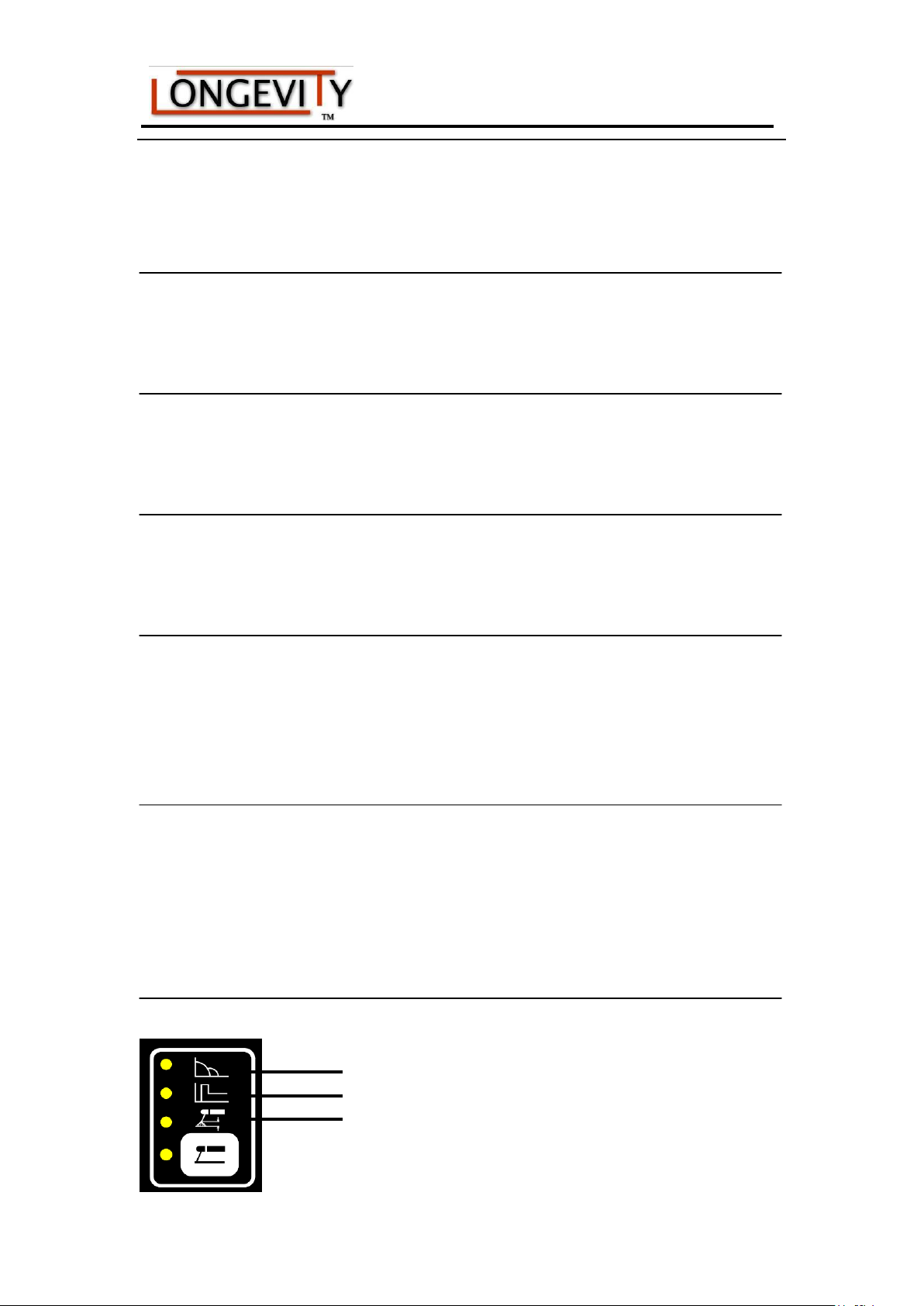
(9) Rod electrode (Stick) welding key
Parameter Setting range
Arc force 0-10
Hot start 0-10
Arc length 0-10
~ 15 ~
Page 16

TigWeld 200EX 200amp AC/DC TIG Welder
(10) Power/Alarm indicator
Power Indicator Light
Indicates if the welder reaches its duty cycle, or if the machine senses
over-voltage or over-current. At the same time “Err 001.” will display on the LCD
Display
~ 16 ~
Page 17

TigWeld 200EX 200amp AC/DC TIG Welder
LONGEVITY® Global, Inc. thanks you for your purchase and the opportunity to be
able to serve you. If, after reviewing this manual, you have any problems in setting up
or operating your machine, contact us at [email protected].
LONGEVITY® Global, Inc.
Toll-Free 1-877-LONG-INC / 1-877-566-4462
Website: www.longevity-inc.com
Sales: [email protected]
Customer Service: [email protected]
Dealers: [email protected]
Please join our welding forums to share welding tips and tricks, to receive useful
information from customers who also use our products, and to be a part of the
LONGEVITY® welding community at www.freeweldingforum.com
For the coolest LONGEVITY sponsored race teams plus a complete racing forum that
covers everything from Drag Racing to RC Car Racing, please check out
www.longevity-racing.com!
Enjoy your new welding machine from LONGEVITY! Thanks again!
~ 17 ~
Page 18
TigWeld 200EX 200amp AC/DC TIG Welder
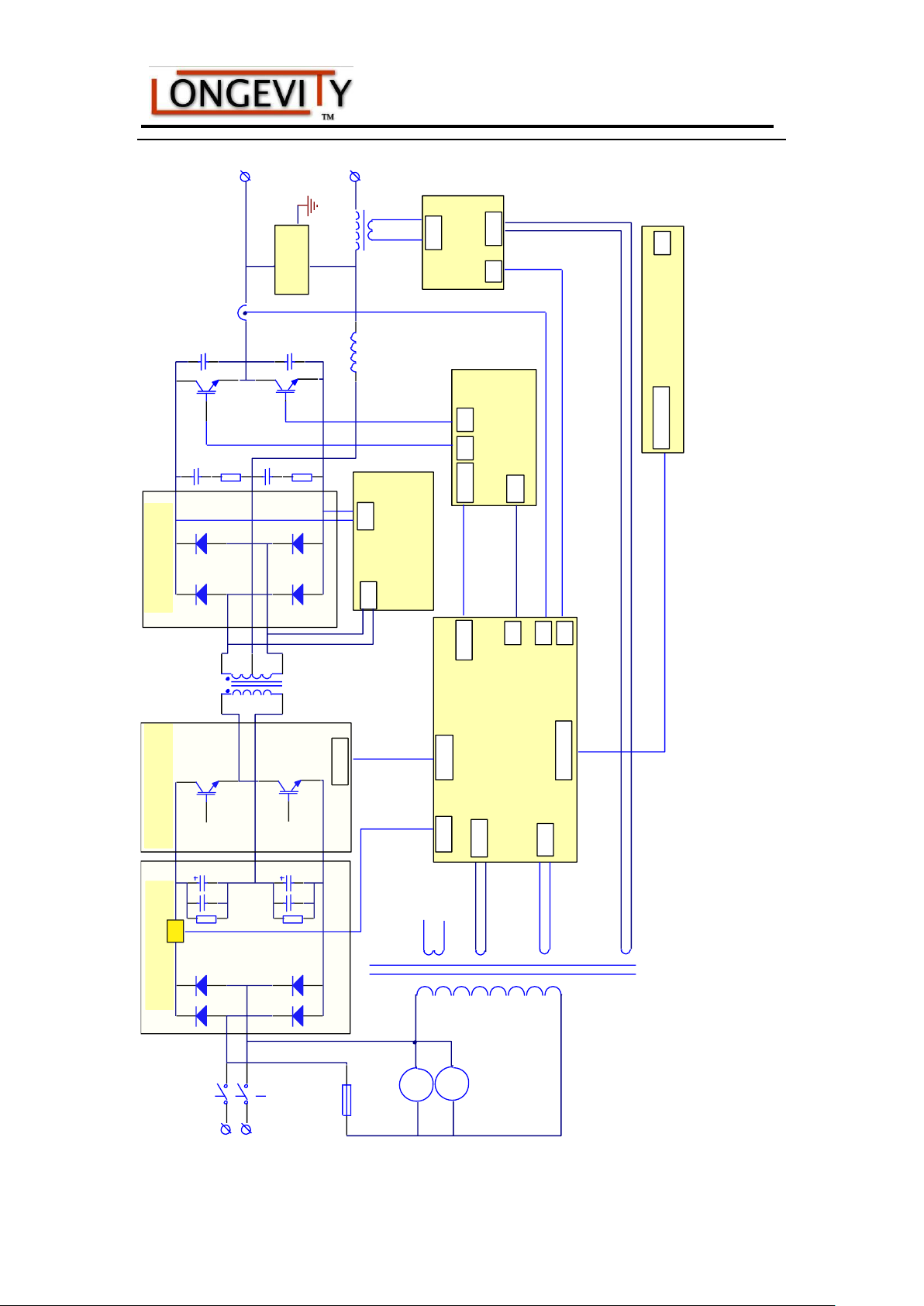
1~220V
C1
C2
HF ABSORB
PCB9
CONTROL PCB4
AC DRIVE PCB6
DISPLAY PCB7
HIGH
FREQUENCY
PCB8
VOLTAGE TEST PCB5
POWER
SOU
ACOUT
WA
20-lead socket
VC
20-lead socket
GD1
GD2
SOU1
HF
ACOUT
VC
SOUIN
HFOUT
KG
AC
DRIVER
F1
P
N
DRIVE
RECTIFIER PCB1
INVERTER PCB2
MUR PCB3
F2
ST
SS
K
power
switch
T1
rectifier
ST
soft start
box
C1、 C2
electrolytical
capacitor
T2
IGBT
B1
main transformer
T3
fast recovery diode
T2
IGBT model
H
Hall
L
inductance
B2
high frequency transformer
P
positive output
N
negative output
F
fuse
B3
switch power supply transformer
F1、 F2
fan
T2
T3
H
L
B1
B2
B3
K
F
DC
DR
~ 18 ~
 Loading...