

Page 1

Logicform
NV1 USB Audio DAC
24-bit 48kHz / 96kHz
User’s Manual
1
Page 2

Logicform
Table of Contents
Introduction ............................................................................................... 3
Limited Warranty ....................................................................................... 3
Operating the NV1 ..................................................................................... 4
Technical Specifications ............................................................................ 5
2
Page 3
Logicform
Introduction
Introduction
IntroductionIntroduction
Thank you for purchasing the Logicform NV1 USB Audio DAC. We are confident you will enjoy many
years of listening pleasure from it. The NV1 adheres to our core principles of designing and manufactur-
ing products with stunning performance, incredible value, and passionate design.
The NV1 DAC connects to any PC or Mac with any available full speed USB port and supports up to 24-
bit 96kHz sample rate to produce crisp, clean, amazing audio. It achieves reference-quality audio by
utilizing a 32-bit microprocessor, high quality components, and careful circuit design and layout.
Limited Warranty
Limited Warranty
Limited WarrantyLimited Warranty
Logicform, LLC warrants this product to be free from defects in materials and workmanship under nor-
mal use for a period of 2 years from date of receipt. Should service be required under warranty due to
manufacturing defect or malfunction, Logicform, LLC, at its sole discretion, will repair or replace the de-
fective merchandise with an equivalent merchandise at no charge. Parts supplied under this warranty
may be new or refurbished.
This warranty does not cover any damages to the product caused by physical or water damage. A valid
proof of purchase is required for any warranty claims. You are responsible for any shipping expenses
incurred to ship the product back to Logicform, LLC for warranty. Logicform, LLC will cover shipping
expenses back to you. This warranty is valid for the original owner and any subsequent owner(s). No
warranty, whether expressed or implied, shall apply to this product after the warranty period.
ranty gives you specific legal rights; however, you may other rights that vary from state to state.
This war-
3
Page 4
Logicform
Operating the NV1
Operating the NV1
Operating the NV1Operating the NV1
The NV1 USB Audio DAC is designed to be plug and play for PCs and Macs. Connect the included
USB cable to your computer and the NV1. Your computer will detect the NV1 as an audio device and
automatically install the proper drivers. Within seconds, your new DAC will be ready to stream audio.
Connect the RCA line level output to your audio system.
On Windows based computers, the NV1 DAC will automatically be selected as the current audio output
device. If it is not selected, you can select the NV1 by going to your taskbar icons, right clicking on the
speaker icon, and select Playback Devices. Find the Logicform NV1 DAC on the list and right click to
set as default device.
On Macs, the output device can be selected by going to Launchpad -> System Preferences -> Au-
dio. Select the Output tab at the top of the window and make sure Logicform NV1 DAC is selected.
Digital Volume and Mute Control
Digital Volume and Mute Control
Digital Volume and Mute ControlDigital Volume and Mute Control
The NV1 DAC features a rotary pushbutton knob to provide static and pop free digital volume and mute
control. Rotating the knob increases or decreases the volume while pushing the knob mutes and un-
mutes the audio.
LED Status
LED Status
LED StatusLED Status
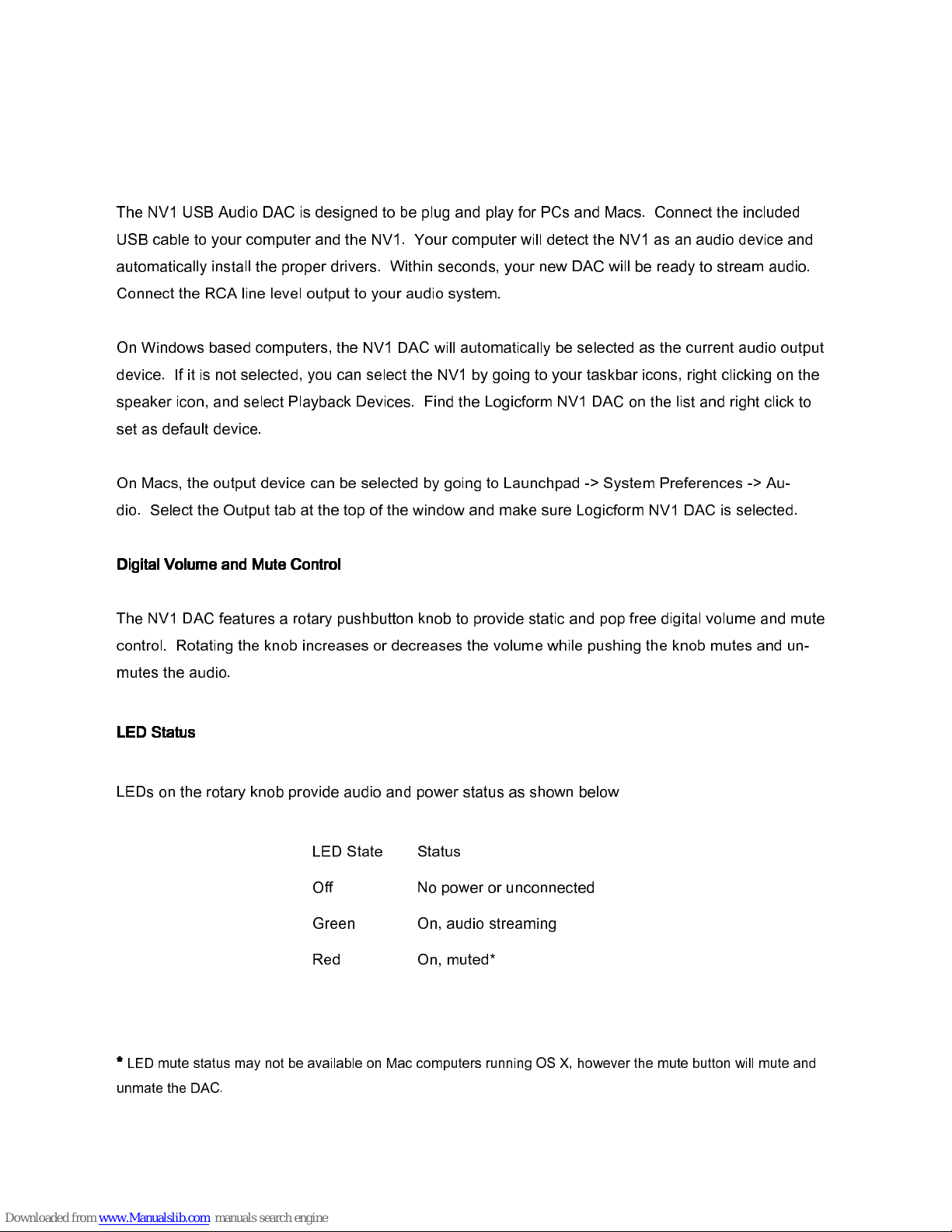
LEDs on the rotary knob provide audio and power status as shown below
*
*
LED mute status may not be available on Mac computers running OS X, however the mute button will mute and
* *
unmate the DAC.
LED State Status
Off No power or unconnected
Green On, audio streaming
Red On, muted*
4
Page 5
Logicform
Specifications
Specifications
SpecificationsSpecifications
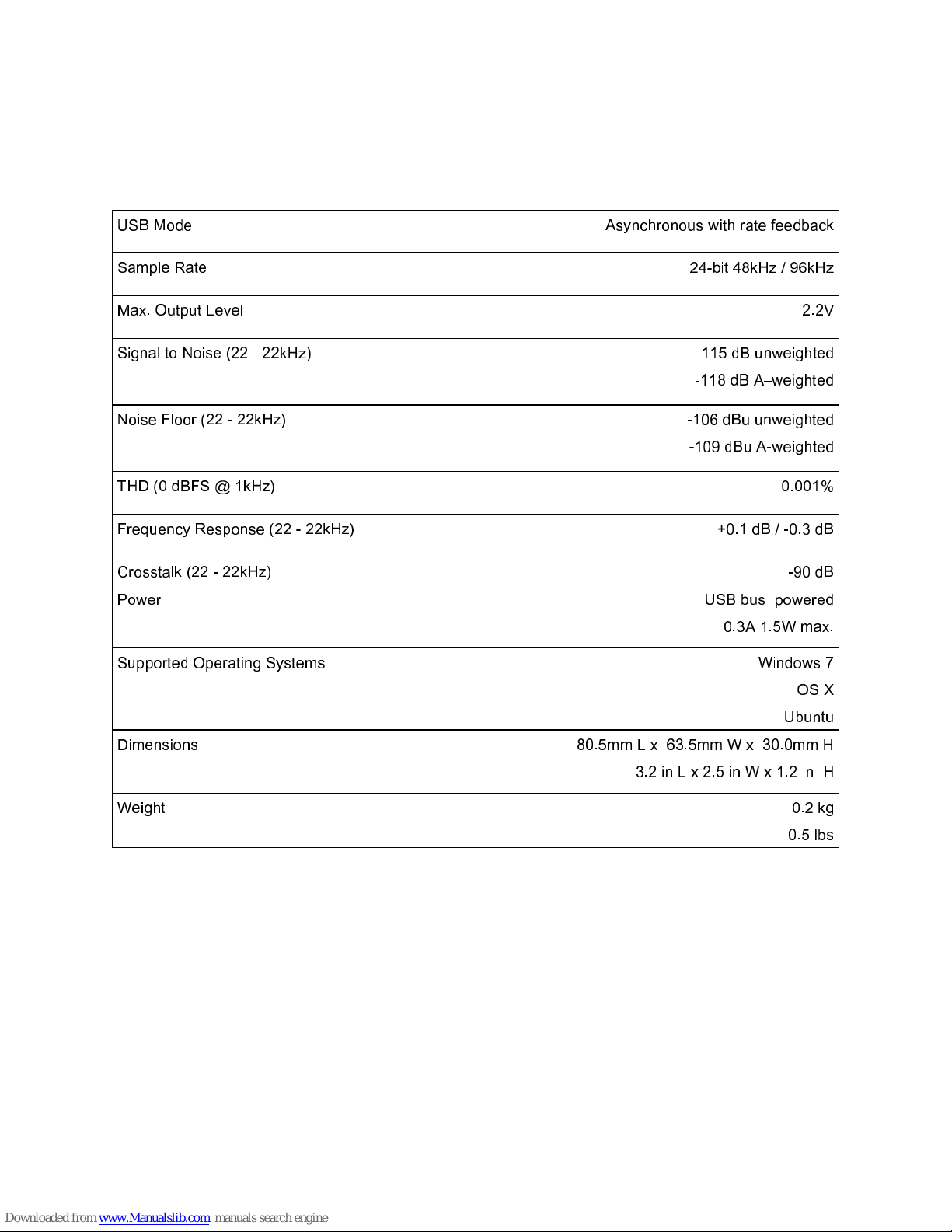
USB Mode Asynchronous with rate feedback
Sample Rate 24-bit 48kHz / 96kHz
Max. Output Level 2.2V
Signal to Noise (22 - 22kHz) -115 dB unweighted
-118 dB A–weighted
Noise Floor (22 - 22kHz) -106 dBu unweighted
-109 dBu A-weighted
THD (0 dBFS @ 1kHz) 0.001%
Frequency Response (22 - 22kHz) +0.1 dB / -0.3 dB
Crosstalk (22 - 22kHz) -90 dB
Power USB bus powered
0.3A 1.5W max.
Supported Operating Systems Windows 7
OS X
Ubuntu
Dimensions 80.5mm L x 63.5mm W x 30.0mm H
3.2 in L x 2.5 in W x 1.2 in H
Weight 0.2 kg
0.5 lbs
5
 Loading...