

Page 1
The SILVER Series by LOGICDATA
SILVERstandard
adjustables.logicdata.net
OWNER’S MANUAL
Page 2

02
// SILVER SERIES OWNER’S MANUAL
CONTENTS
. SAFETY........................................................................................................................
. INTRODUCTION ...........................................................................................................
. BOX CONTENTS ...........................................................................................................
. ASSEMBLY ...................................................................................................................
. DISASSEMBLY AND TRANSPORTATION ......................................................................
. OPERATION ..................................................................................................................
. CLEANING AND MAINTENANCE .................................................................................
. POSSIBLE MALFUNCTIONS AND SOLUTIONS .............................................................
. TECHNICAL DATA ........................................................................................................
. FINAL DISPOSAL ..........................................................................................................
COPYRIGHT®
This original documentation is protected by copyright. All rights, especially the rights to translate or reproduce the document, are reserved. No part of this manual may be reproduced mechanically, electronically, or by other means, in any form, without prior written permission of
LOGICDATA Electronic & Software Entwicklungs GmbH. Violations involving copyright may
result in legal action.
2018 LOGICDATA Electronic & Software Entwicklungs GmbH
Page 3
03
SILVER SERIES OWNER’S MANUAL //
SAFETY
01
IMPORTANT SAFETY INSTRUCTIONS
This Owner’s Manual was designed according to the UL 962 Standard for Household and Commercial Furnishing. It contains safety instructions. The user of the product is obligated to read
the Owner’s Manual. All individuals have a responsibility to observe the safety instructions.
Important notes about accident prevention can be found in this chapter.
NOTICE
This Class B digital apparatus complies with Canadian ICES-003.
Cet appareil numerique de la classe B est conforme a la norme NMB-003 du Canada.
GENERAL SAFETY INFORMATION
The following safety regulations and obligations are valid when handling the system:
▪ Do not operate the product unless it is in full working order
▪ Do not remove, change, bridge, or bypass any protection or safety features
▪
Do not convert or modify the LOGICDATA SILVERstandard without written approval from
the supplier
▪ Do not use unauthorized spare parts for repair
▪ Only physically able adults are allowed to assemble the product
▪ All protection and safety features must be checked regularly by the user.
▪ Do not attempt to change or replace parts unless the product is in a de-energized state
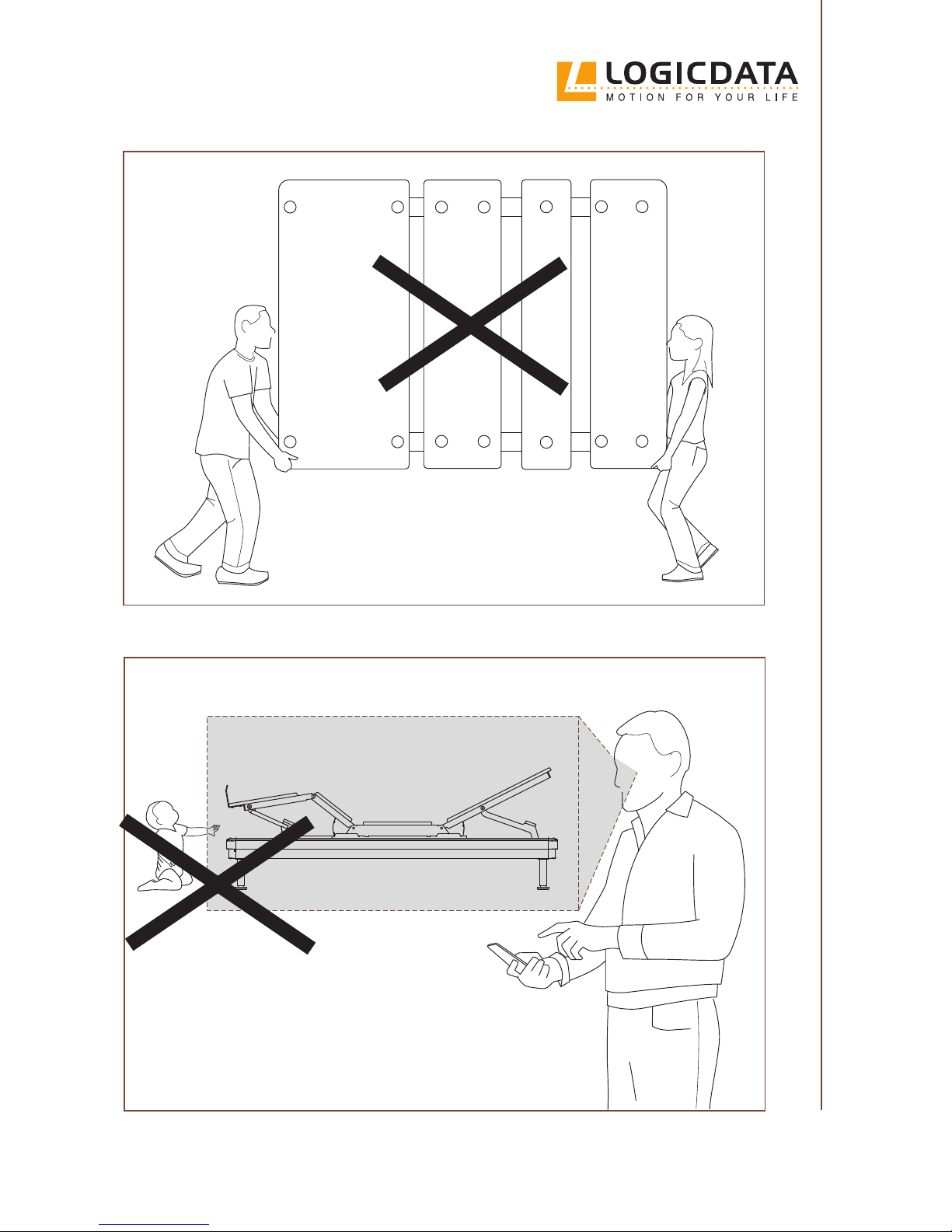
▪ Ensure that no children or animals are in the proximity of the Bed Frame when operating it
▪ Ensure no persons or objects are in the Bed Frame’s range of movement (e.g. a night stand or
an open window)
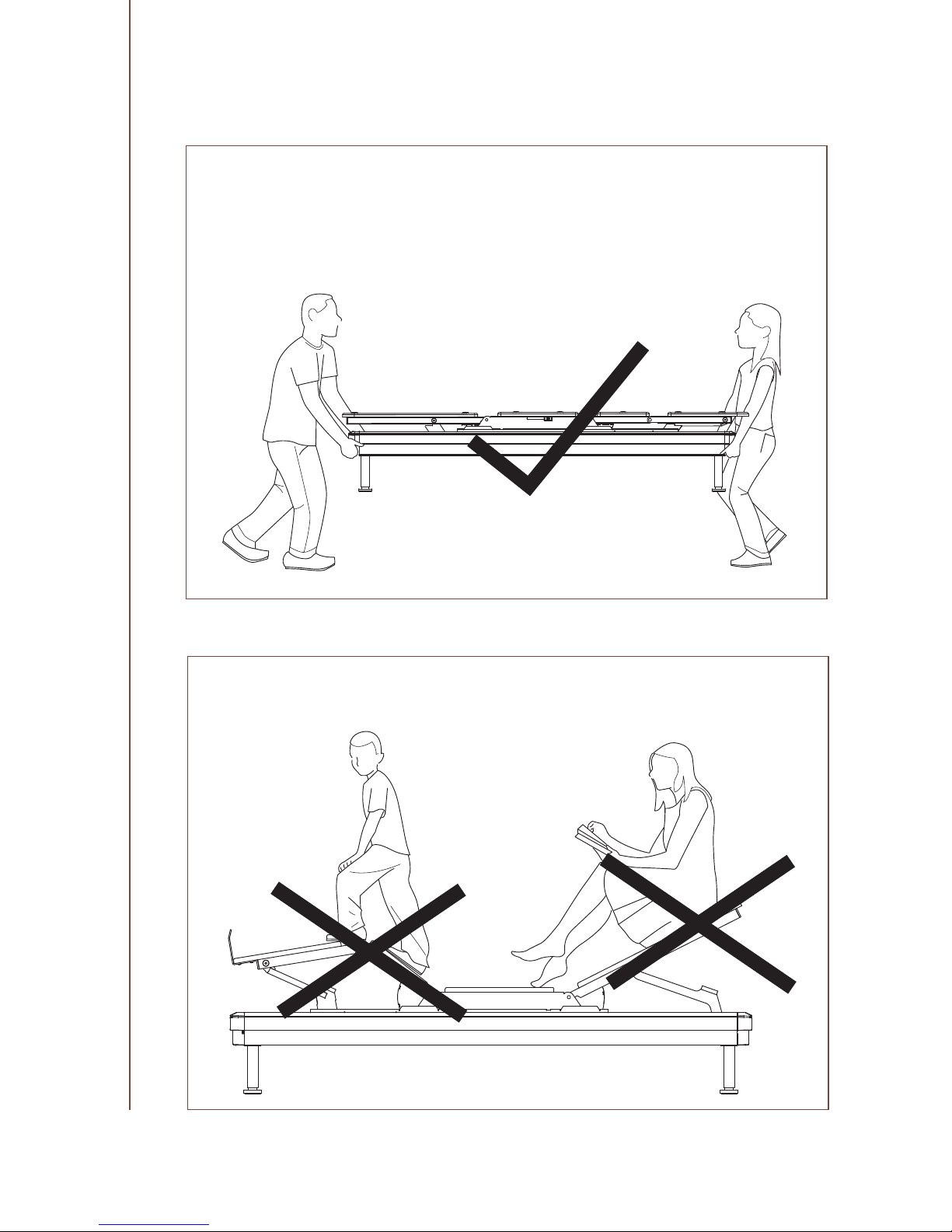
▪ Do not sit directly on one individual Platform when operating the Bed Frame. Distribute your
weight evenly
Page 4
04
// SILVER SERIES OWNER’S MANUAL
Page 5
05
SILVER SERIES OWNER’S MANUAL //
Page 6

06
// SILVER SERIES OWNER’S MANUAL
INTENDED USE
The LOGICDATA SILVERstandard is an electrically controlled Bed Frame. It may be used solely
for its intended use according to this documentation.
The LOGICDATA SILVERstandard is designed for indoor use and household use only. Outdoor
use is forbidden. The Bed Frame is operated by a Remote Control. It features a USB Module on
each side, which can be used to charge mobile devices such as smart phones or tablet PCs. The
product features an Underbed Light, which can be used to illuminate the bed area. Certain models also have a Massage Function, which can be used to provide a Vibration Massage to the user.
The Bed Frame is not suitable for use in potentially explosive atmospheres.
HOSPITAL / MEDICAL DISCLAIMER:
The LOGICDATA SILVERstandard is not designed to comply with medical or hospital standards. It is therefore not suitable for domestic or commercial medical use.
• Do not use the Bed Frame near to tent type oxygen or therapy equipment
• Do not use the Bed Frame near to other potentially explosive gases
The LOGICDATA SILVERstandard may only be used with suitable mattresses. Suitable mattresses
must comply with Federal Register 16 CFR Part 1633. Consult your mattress provider to ascertain
if your mattress is compatible with electrically adjustable Bed Frames. The Bed Frame is not suitable for use without a mattress, or with water-based mattresses. This system may only be assembled and used by adults. It is not designed for children or animals.
The recommended maximum load on the Bed Frame is 700 lbs (including the mattress). Weight
must be evenly distributed. No individual Platform is designed to support or lift this weight. For
optimal performance, consumers should get in and out of bed only when the Bed Frame is in a at
(horizontal) position. Do not place your entire weight on the head or foot section, especially when
the Bed Frame is in an elevated position. Do not stand on the Bed Frame or Platforms at any time.
Exceeding the recommended maximum load could damage the product and void the warranty.
Usage outside of the intended use described in this Owner’s Manual is only allowed after written consent by LOGICDATA. Improper operation or usage outside of the intended use can result in personal injury and damage to the system. Liability and warranty claims are void in
cases of usage outside of the intended use.
REASONABLY FORESEEABLE MISUSE
For your own safety and that of others, the following instructions to avoid reasonably foreseeable misuse with the LOGICDATA SILVERstandard apply:
▪ Do not use the Bed Frame as a climbing aid
▪ Do not jump on the Bed Frame
Page 7
07
SILVER SERIES OWNER’S MANUAL //
TARGET AUDIENCE AND PREVIOUS KNOWLEDGE
This manual is addressed to adults who are responsible for assembling the Bed Frame. The following is assumed of the target audience:
▪ The reader has (at least) basic technical knowledge
▪ The reader is physically able to lift the components
▪ The reader has fully read and understood this Owner’s Manual
EXPLANATION OF SYMBOLS AND SIGNAL WORDS
DANGER
The signal word DANGER indicates a hazardous situation which, if not avoided, will result in
death or serious injury.
WARNING
The signal word WARNING indicates a hazardous situation which, if not avoided, could result
in death or serious injury.
NOTICE
The signal word NOTICE indicates a situation that will not lead to personal injury, but could lead
to damage to the product or the environment.
CAUTION
The signal word CAUTION indicates a hazardous situation which, if not avoided, could result in
minor or moderate injury.
▪ Do not let children or animals climb on or under the Bed Frame
▪ Do not use the Bed Frame without a mattress
▪ Do not overload the Bed Frame (max. load is 700 lbs evenly distributed)
▪ Do not operate the Bed Frame continuously
NOTICE
The Bed Frame is not designed for continuous operation. If the motors are overworked, the Bed
Frame will time-out automatically for several minutes. During this time, you will not be able to
operate the Bed Frame. Continued excessive use of the Bed Frame can damage the product.
• Do not operate the Bed Frame continuously
• If the time-out is reached, do not operate the Bed Frame for at least 6 minutes. This will reset the time-out
Page 8
08
// SILVER SERIES OWNER’S MANUAL
RESIDUAL RISKS
Residual risks are the risks that remain after all relevant safety standards have been complied
with. These have been evaluated through a thorough risk assessment. Read all instructions before operating the Bed Frame.
WARNING
Moderate risk of death or serious injury through electric shocks
Leaving the Bed Frame plugged in while cleaning it with damp materials, or allowing Cables
or Components to become otherwise immersed in liquid may lead to death or serious injury
through electric shocks.
• Always unplug the Bed Frame from the mains before cleaning
• Do not immerse any Cables or Components in liquid
WARNING
Moderate risk of death or serious injury through burns, electric shocks, and other hazards
The LOGICDATA SILVERstandard is an electrical device. Failure to observe basic safety precautions related to electrical devices may lead to death or serious injury through burns, electric
shocks, and other hazards.
• Unplug the Bed Frame from the mains before mounting or demounting parts
•
Ensure that children and disabled persons are supervised when they are near to the Bed Frame
• Operate the Bed Frame only as described in the section “Intended use” on page 6
• Only use accessory parts that are authorized by the manufacturer
•
Never operate the Bed Frame if its Cables or plugs are damaged, or if it displays obvious defects
• Consult LOGICDATA for further instructions if the Bed Frame is damaged in any way, in accordance with the product’s Limited Warranty
• Keep all Cables away from heated surfaces
• Do not insert obstructions into openings in the Bed Frame
• Do not use the Bed Frame outdoors
• Do not operate the Bed Frame in environments where aerosol (spray) products are being used
or where oxygen is being administered
• To disconnect the Bed Frame, remove the plug from the outlet
• Keep children away from the Foot Platform (when extended) and other similar parts
• Ensure the Bed Frame is connected to a properly grounded outlet. See the section “Grounding Instructions” on page 11
Page 9
09
SILVER SERIES OWNER’S MANUAL //
WARNING
Moderate risk of death or serious injury through crushing
Crawling, laying, or reaching underneath the Bed Frame may lead to death or serious injury
through crushing.
• Do not crawl, lay, or reach underneath the Bed Frame
WARNING
Moderate risk of death or serious injury
Opening electrical components, or attempting improper conversions or modications to electrical or mechanical components on the LOGICDATA SILVERstandard may lead to death or serious
injury.
• Do not convert or modify the LOGICDATA SILVERstandard
• Never open electrical components
WARNING
Moderate risk of death or serious injury in explosive atmospheres
Operating the LOGICDATA SILVERstandard in potentially explosive atmospheres may lead to
death or serious injury through explosions.
• Read the relevant directives to determine whether an atmosphere is potentially explosive
• Do not operate the LOGICDATA SILVERstandard in potentially explosive atmospheres
WARNING
Moderate risk of death or serious injury
The LOGICDATA SILVERstandard can withstand a maximum load of 700 lbs (evenly distributed,
including the mattress). Overloading the Bed Frame, or applying too much weight to an individual Platform, may lead to death or serious injury.
• Do not overload the Bed Frame under any circumstances
• Do not apply the maximum load to the Foot or Head Platforms
• Do not sit on the mattress while the Bed Frame is in motion. Distribute your weight evenly
WARNING
Moderate risk of death or serious injury through crushing
When the Bed Frame moves to a new position, it is possible that persons will be crushed between the Bed Frame and foreign objects. This may lead to death or serious injury.
• Ensure that no foreign objects (windows, nightstands, etc.) can block the Bed Frame’s
range of movement.
Page 10
10
// SILVER SERIES OWNER’S MANUAL
SAVE THESE INSTRUCTIONS FOR FUTURE REFERENCE
WARNING
Moderate risk of death or serious injury through electric shocks
Plugging the Bed Frame into a non-grounded power outlet may lead to death or serious injury
through electric shocks.
• Ensure the Bed Frame is connected to a properly grounded outlet. See Chapter “Grounding
Instructions” on page 11
WARNING
Moderate risk of death or serious injury to children
Operating the Bed Frame when children are close by may lead to death or serious injury to
children.
• Activate the Child Lock when children are present
• Keep children away from moving parts
• Do not allow children to play with the Bed Frame
CAUTION
Risk of minor or moderate injury through crushing
Incorrectly lifting or moving the Bed Frame may lead to minor or moderate injury through crushing.
• Keep the Bed Frame level while lifting or moving it
• Do not attempt to lift or move the Bed Frame alone
• Do not touch moving parts when lifting or moving the Bed Frame
• Do not lift the Bed Frame by the its moving parts. Only grip the xed part of the Side Rails.
WARNING
Moderate risk of death or serious injury through electric shocks
Leaving the Bed Frame plugged in while mounting or demounting components may lead to
death or serious injury through electric shocks.
•
Always unplug the Bed Frame from the mains before mounting or demounting components
Page 11
11
SILVER SERIES OWNER’S MANUAL //
ELECTRICAL GROUNDING
GROUNDING INSTRUCTIONS
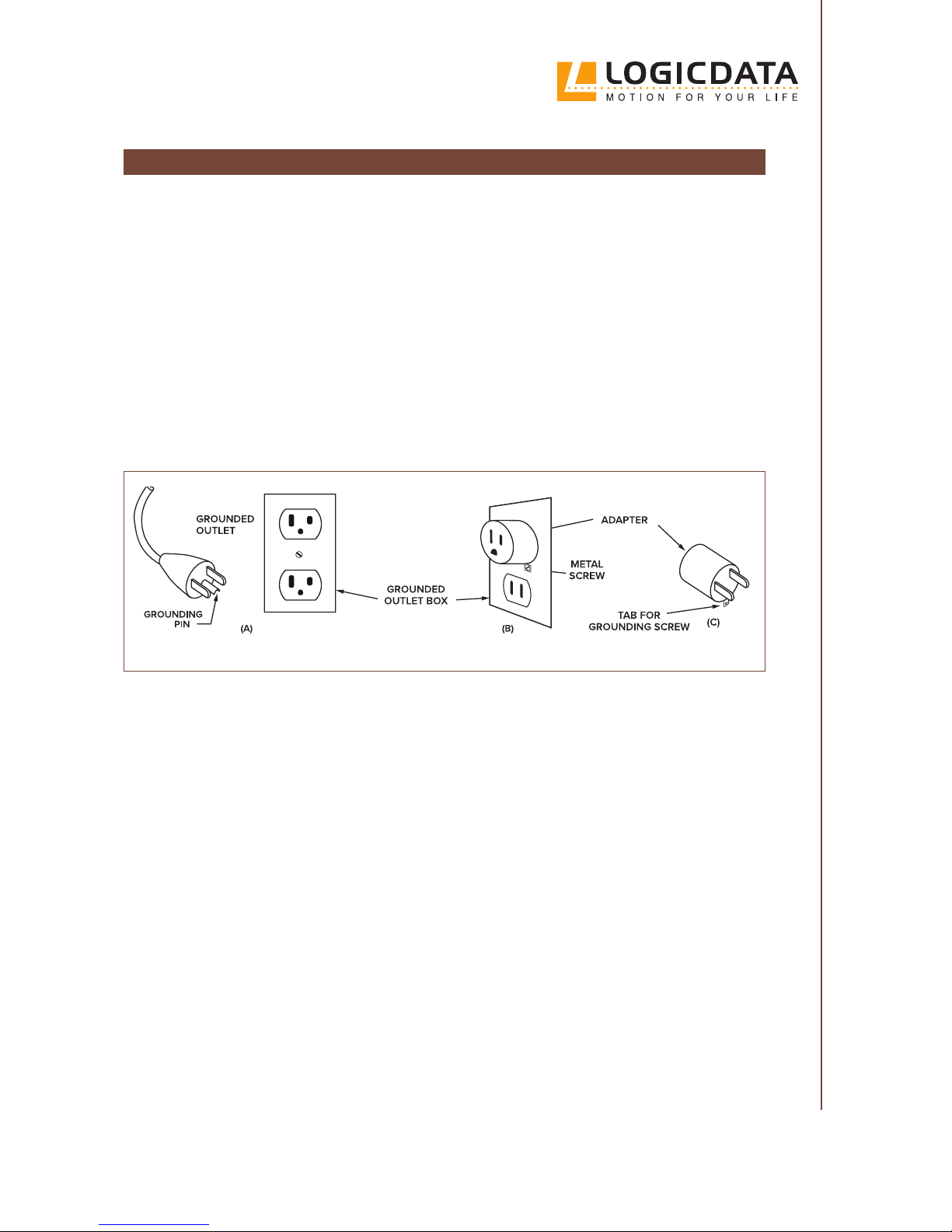
The LOGICDATA SILVERstandard is intended for use on a nominal 120-volt circuit (standard
U.S. household wiring design). The Bed Frame is connected to the mains using a grounding plug
(sketch A). The grounding plug ts a standard 3-prong grounded power outlet.
If the outlet that you wish to connect the Bed Frame to is a 2-prong outlet, you must use a temporary adapter in order to plug the Bed Frame in. This is shown in sketch B and C. The temporary adapter must be used only until a properly grounded outlet (sketch A) can be installed by a
qualied electrician. The adapter must be connected to a permanent ground (e.g. the cover of a
properly grounded outlet). To connect the adapter to ground, screw the adapter into the outlet
using a metal screw. There is a plastic tab attached to the adapter to help you do this (sketch C).
Servicing a double-insulated product requires extreme care and knowledge of electrical systems.
Therefore, this work may only be performed by qualied service personnel. Replacement parts for
double-insulated products must be identical to the parts they replace. Double-insulated products
are marked with the words “DOUBLE INSULATION” or “DOUBLE INSULATED”. The double-insulated symbol (a square within a square) may also be on the product.
FCC statement
The wireless working frequency for this product is 2.4 GHz
FCC Compliance
The LOGICDATA SILVERstandard complies with FCC CFR 47 Part 15 Subpart B/C. Operation is
subject to the following conditions:
1. The product may not cause harmful interference
2.
The product must accept any interference received, including interference that may
cause undesired operation
To comply with the FCC RF exposure compliance requirements, you are not permitted to make any
changes to the product or the antenna. Changes to the antenna or the product could result in the
product exceeding the RF exposure requirements. This may void your authority to use the product.
Page 12

12
// SILVER SERIES OWNER’S MANUAL
PREFACE
Dear Customer,
Thank you for choosing a product from LOGICDATA.
With the LOGICDATA SILVERstandard, you can be sure that every eort has been made to ensure your comfort and safety. The Bed Frame has been rigorously tested and complies with all
relevant safety standards and their requirements.
However, incorrect installation of the product, or usage outside of the intended use described in
this Owner’s Manual may lead to hazardous situations. In Chapter 1, “Safety”, and throughout
this Owner’s Manual, potential risks, their consequences, and steps to avoid harm are explained.
These are clearly labelled as “DANGER”, “WARNING”, or “CAUTION”, depending on their severity. Read the section “Explanation of symbols and signal words” on page 7 for more details.
This Owner’s Manual is intended to enable persons to assemble and operate the Bed Frame safely.
Observing the safety instructions in this Owner’s Manual will help you to avoid hazards and minimize damage to the system. All persons involved in the assembly of the system must have the
full product documentation available to them at all times. Product documentation consists of
this Owner’s Manual and any other relevant documents supplied by the manufacturer. Documentation must always be kept complete and legible.
LOGICDATA Electronic & Software Entwicklungs GmbH assumes no liability for technical or
printing errors, for deciencies in this documentation, or for damages caused directly or indirectly by the delivery, performance, or usage of this documentation.
CONTACT INFORMATION
LOGICDATA Electronic & Software Entwicklungs GmbH
Wirtschaftspark 18
8530 Deutschlandsberg
Austria
INTRODUCTION
02
LOGICDATA North America Inc.
1525 Gezon Parkway SW, Suite C
Grand Rapids, MI 49509
USA
Page 13
13
SILVER SERIES OWNER’S MANUAL //
LIABILITY
The descriptions of product characteristics in this Owner’s Manual are not a guarantee of the
presence of these characteristics.
LOGICDATA is not liable for damage or injury caused by:
▪ Improper product use
▪ Disregard of the documentation
▪ Unauthorized product alterations
▪ Improper work on and with the LOGICDATA SILVERstandard
▪ Operation of damaged products
▪ Improperly performed repairs
▪ Unauthorized changes to the operating parameters
▪ Disasters, external inuence, and force majeure
Watch the assembly video at
adjustables.logicdata.net
TECHNICAL PROBLEMS?
NOTICE
If you are experiencing technical problems, please contact our support team:
Phone: 800-305-1925
E-Mail: [email protected]
Always mention the product name and revision status when requesting support.
Page 14
14
// SILVER SERIES OWNER’S MANUAL
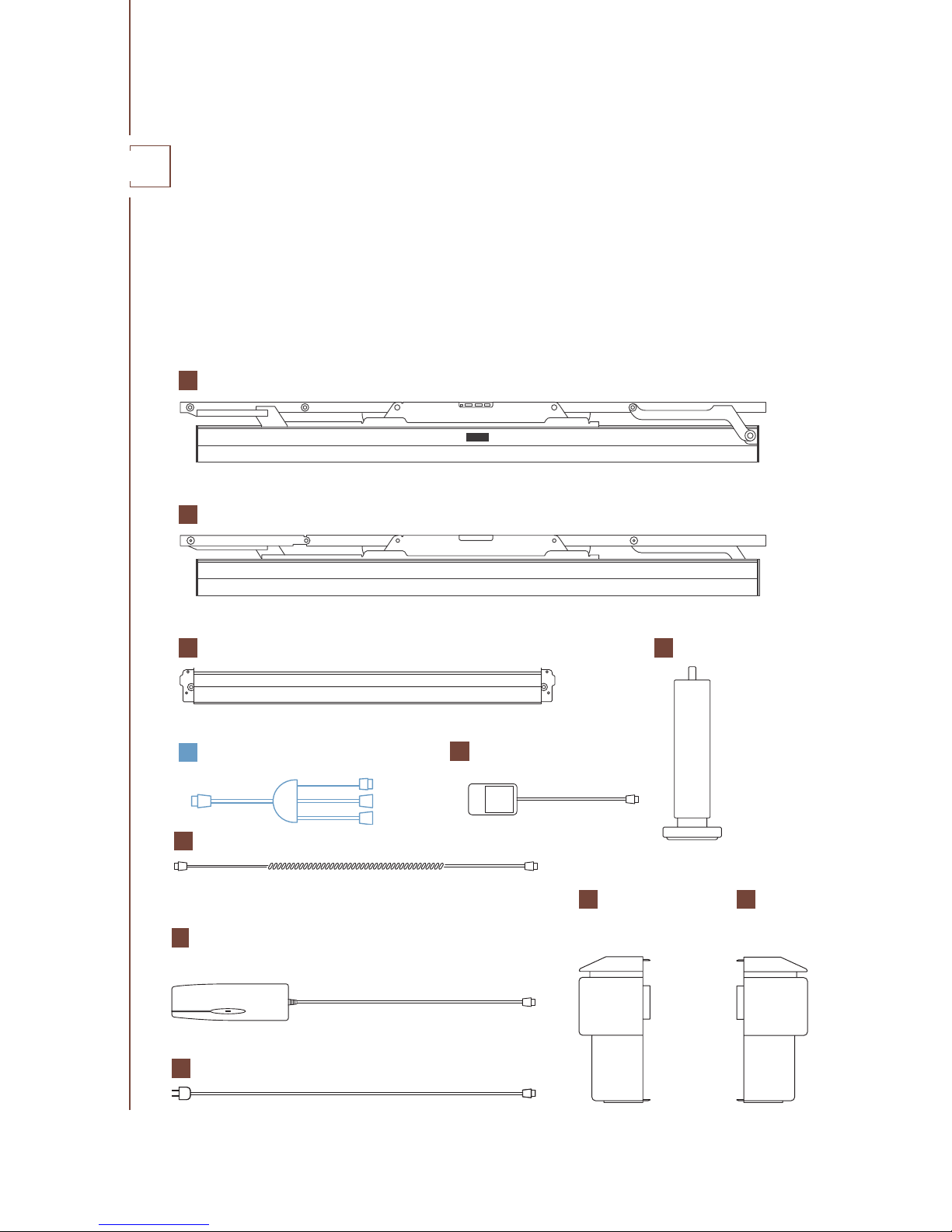
The LOGICDATA SILVERstandard is delivered in two boxes. The boxes contain all the parts and
tools necessary to fully assemble and operate the system. Upon opening the packaging, use this
checklist to ensure all the parts are included and in perfect condition. If you notice that any part is
damaged or missing, contact LOGICDATA. You can nd the relevant contact details in Chapter 2,
“Introduction”. Ensure that the boxes are stored horizontally in a dry place at room temperature.
BOX CONTENTS
03
A
SIDE RAIL LEFT
B
SIDE RAIL RIGHT
SIDETOSIDE CABLE
2x CROSSBAR
C
4x LEG
D
2x CORNER
CONNECTOR
COVER TYPE A
E
2x CORNER
CONNECTOR
COVER TYPE B
F
POWER CONVERTER
G
POWER CABLE
H
I
MASSAGE ADAPTER CABLE *
J
2X USB MODULE
K
(Side-to-Side Cable may also be a at cable)
Page 15
15
SILVER SERIES OWNER’S MANUAL //
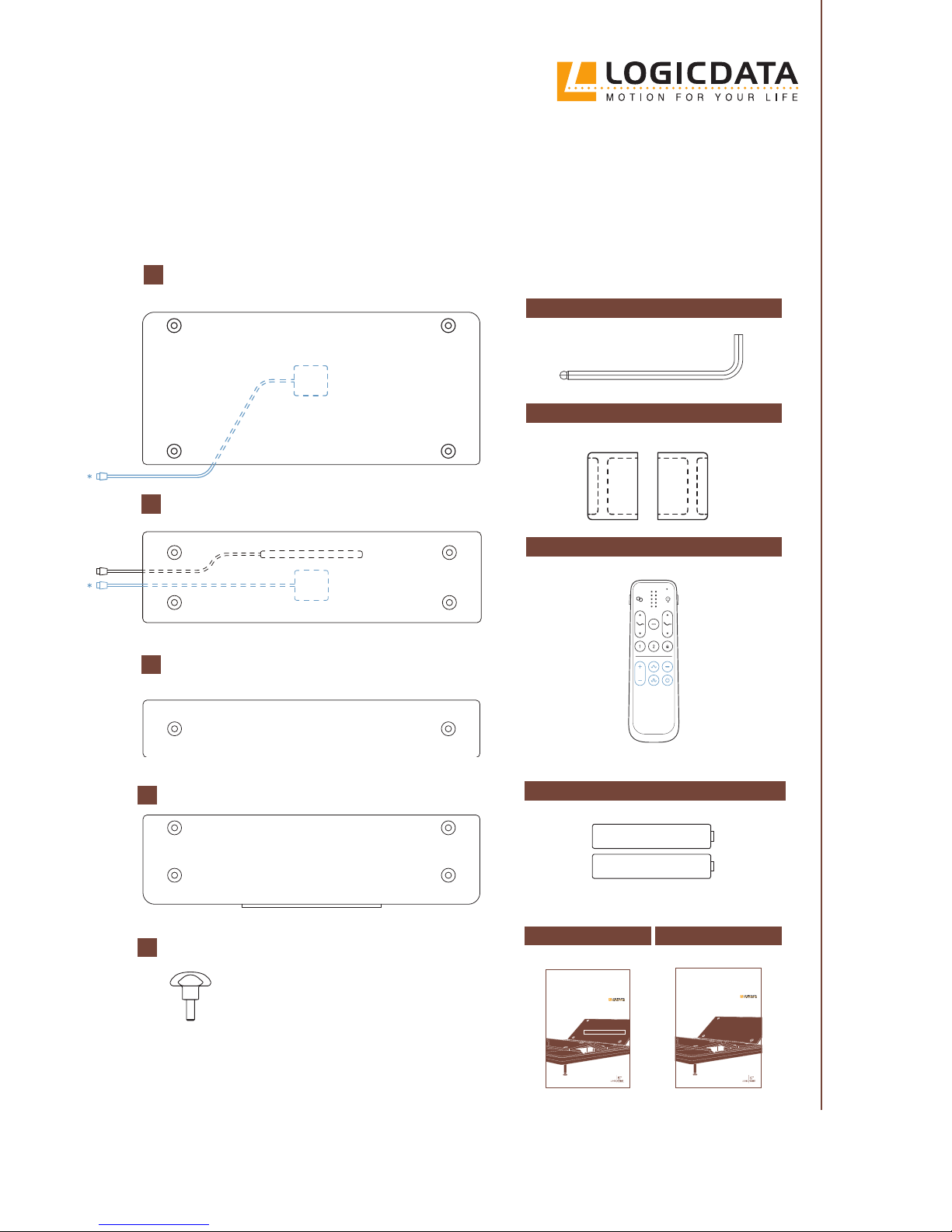
QUICK START GUIDE
SILVERstandard
The Silver Series by
QUICK START GUIDE
OWNER'S MANUAL
REMOTE CONTROL
ASSEMBLY SUPPORTS
2x AAA BATTERIES
HEAD PLATFORM
BASE PLATFORM
L
LEG PLATFORM
M
FOOT PLATFORM
N
ASSEMBLY TOOL
SILVERstandard
The Silver Series by
OWNER‘S MANUAL
14X MOUNTING SCREW PLATFORMS
O
HEAD
BASE
P
LEG
FOOT
*Only with SILVERstandard+
Page 16
16
// SILVER SERIES OWNER’S MANUAL
TOOLS AND EQUIPMENT
The LOGICDATA SILVERstandard should be assembled by two adults. If you assemble the Bed
Frame alone, be careful when lifting heavy parts. No extra tools are needed. Ensure the assembly
area is larger than the Bed Frame. Follow the steps carefully to assemble the Bed Frame correctly.
UNPACKAGING
Lay both boxes at on the ground, ensuring they are the right way up (see notices on the packaging). Carefully open both boxes and check their contents, as described in Chapter 3, “Box Contents”.
NOTICE
Do not use a knife or a sharp object to unpackage the Bed Frame. This may damage the product.
NOTICE
Ensure all parts are at room temperature. Parts that are too cold or hot may cause problems
during assembly.
CAUTION
Risk of minor or moderate injury through cutting
Contact with sharp edges may lead to minor or moderate injury through cutting.
• Avoid contact with sharp edges
ASSEMBLY
04
WARNING
Moderate risk of death or serious injury to children and animals
The plastic packaging of the Bed Frame is a potential suocation hazard. Leaving children or
animals unsupervised with the empty packaging may lead to death through suocation.
• Do not leave children or animals unsupervised
• Dispose of unnecessary packaging immediately. Do not dispose of the Assembly Supports
CAUTION
Risk of minor or moderate injury through crushing
Gripping the Side Rails by their moving parts when lifting or moving the Bed Frame may lead
to minor or moderate injury through crushing.
• Do not touch moving parts when lifting or moving the Bed Frame
• Only grip the xed part of the Bed Frame
Page 17
17
SILVER SERIES OWNER’S MANUAL //
TOOL
WALL
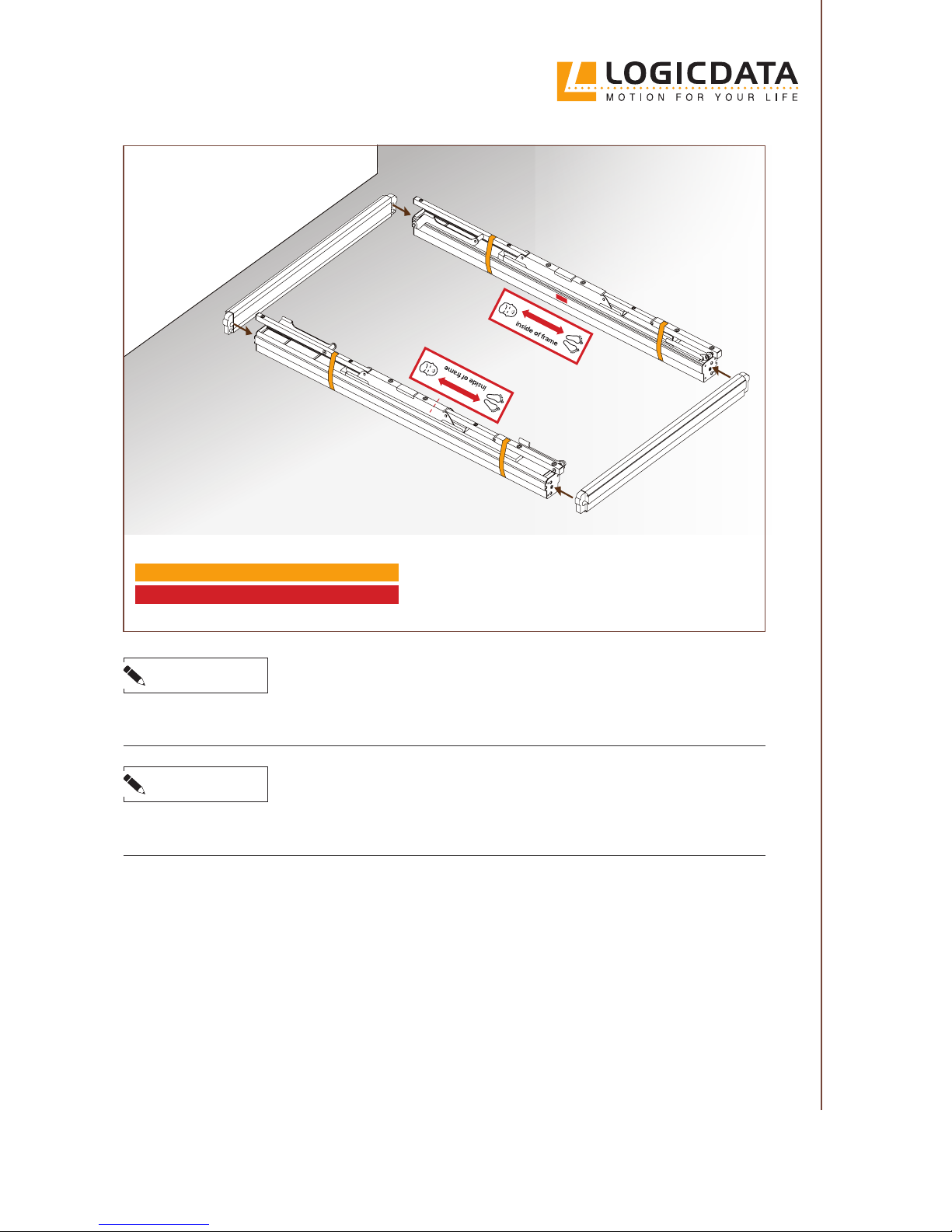
1. Open the internal boxes
2. Take out the Side Rails (A, B) and Crossbars (C) and lay them on the oor (see
picture)
3. Use the labels on the Side Rails to ensure
they are oriented correctly.
NOTICE
Placing the parts directly onto a hard oor may cause damage to the oor or the parts themselves.
• Use the cardboard packaging material to cushion the impact and avoid damage.
DO NOT REMOVE STRAPPING TAPE
USE THE LABELS ON THE SIDE RAILS
NOTICE
Be careful not to throw away the Assembly Supports while disposing of the packaging. Consult
the “Box Contents” diagram on page 14 to determine which parts are necessary.
Page 18
18
// SILVER SERIES OWNER’S MANUAL
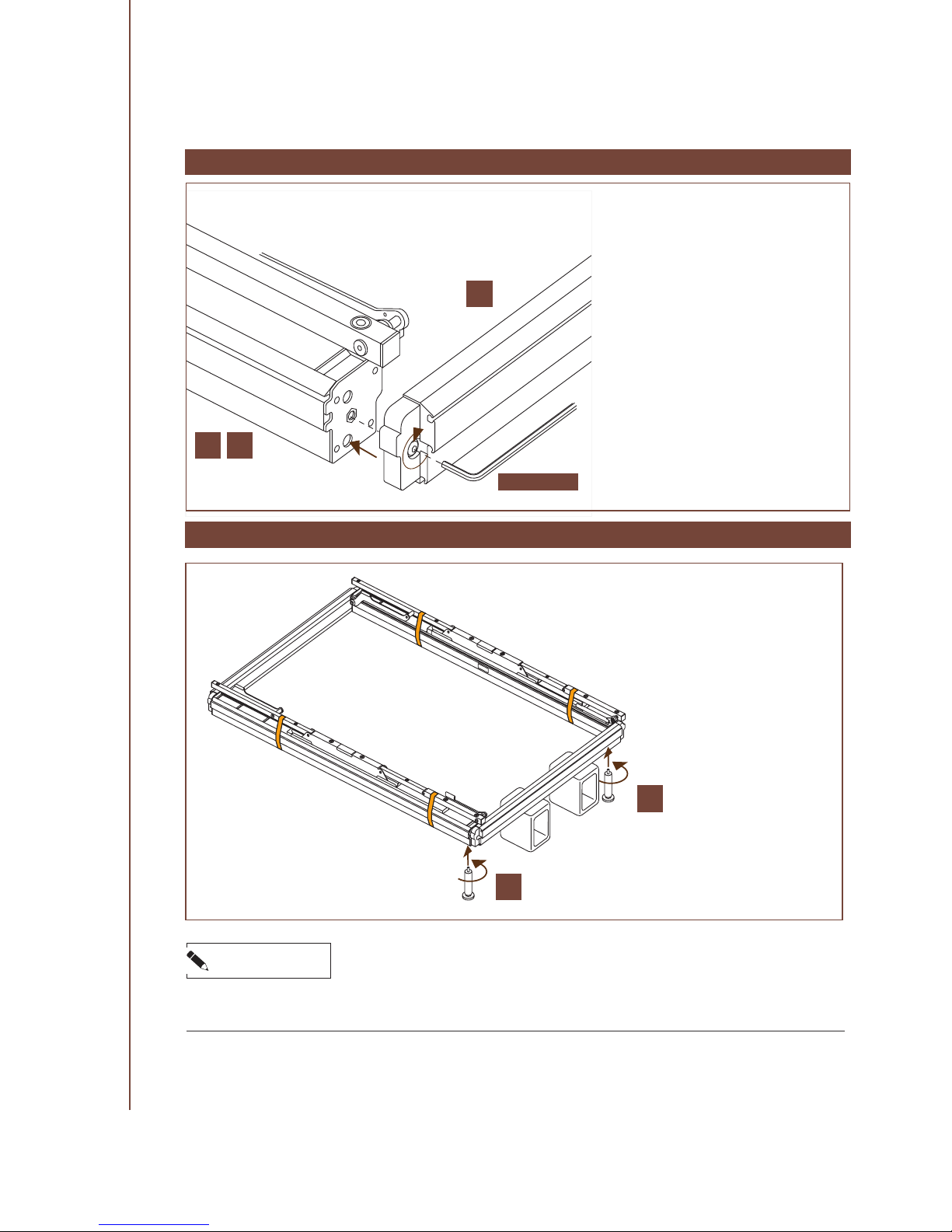
1. Lift up the frame by the center of
one Crossbar.
2. Place the frame on the Assembly
Supports.
3. Screw in the rst two legs (D) by
hand.
ATTACHING THE LEGS
NOTICE
Ensure that the Assembly Supports are placed correctly. The long sides should be vertical and the
hollow sides should face outwards. Do not place the Crossbar directly onto the hollow parts.
CONNECTING THE BARS
1.
Move the Crossbars (C) and the Side
Rails (A, B) together
2.
Ensure that the protruding parts on
the Crossbar side of the Corner Connector are placed into the holes on
the Side Rail sides.
3.
Insert the Assembly Tool (TOOL)
and turn the Mounting Screw
clockwise.
4. Continue turning until the Mounting Screw is hand-tight.
5.
Repeat the entire process for each
Corner Connector.
D
D
C
A B
TOOL
Page 19
19
SILVER SERIES OWNER’S MANUAL //
CAUTION
Risk of minor or moderate injury
Lifting the Bed Frame incorrectly could cause you to lose balance or drop the Bed Frame. This
may lead to minor or moderate injury.
• Lift the Bed Frame by gripping the center of the Crossbar
•
Do not lift the Bed Frame higher than required to place the Supports under the Crossbar
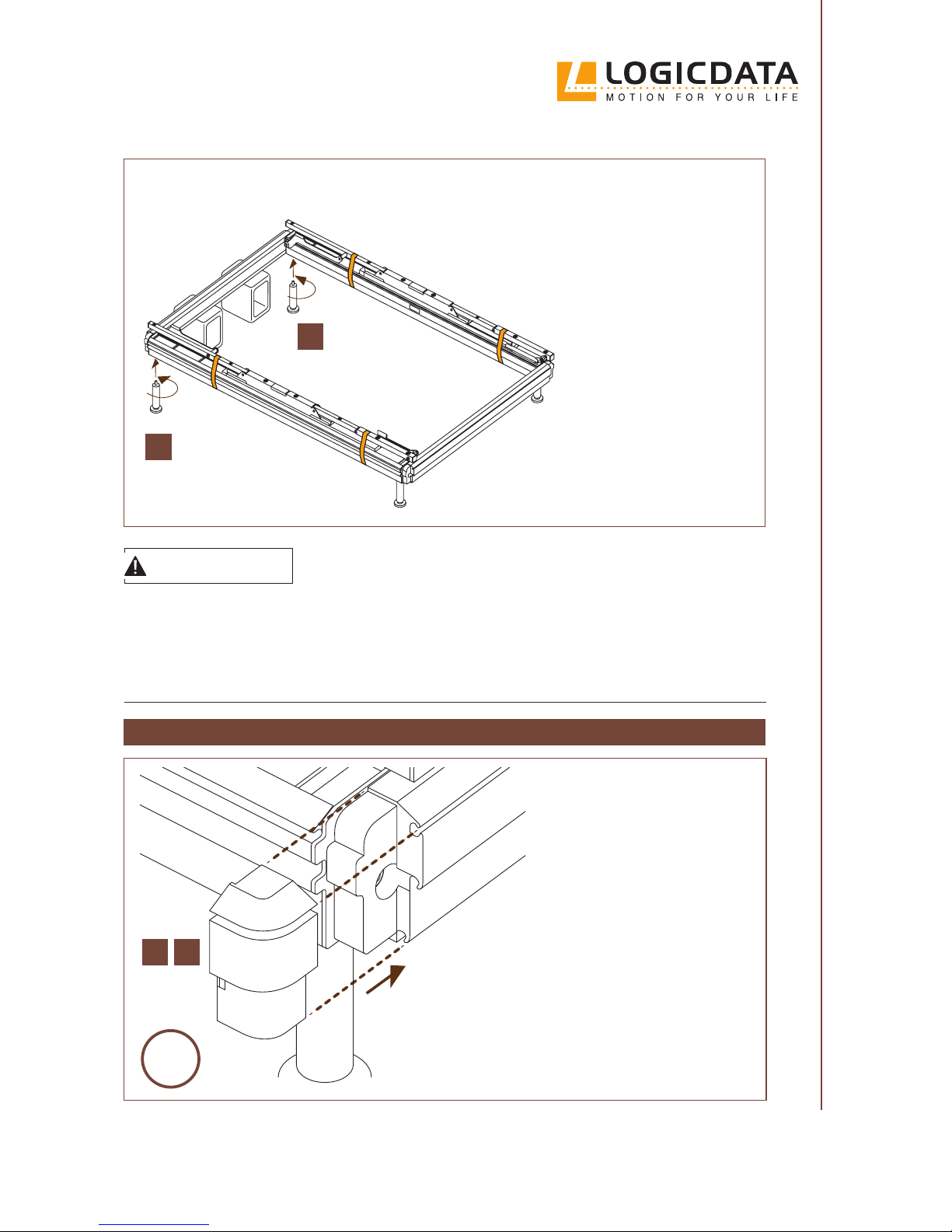
1.
Remove the assembly supports
and place the end of the Bed Frame
with legs attached on the oor.
2.
Lift up the other end and place the
Assembly Supports underneath
the Crossbar.
3. Screw in the remaining legs (D).
4. Remove the assembly supports.
D
D
MOUNTING THE CORNER COVERS
1. Place the Corner Covers (E, F) in
their position over each corner.
2.
Press rmly towards the frame
to click them into place.
4x
E F
Page 20
20
// SILVER SERIES OWNER’S MANUAL
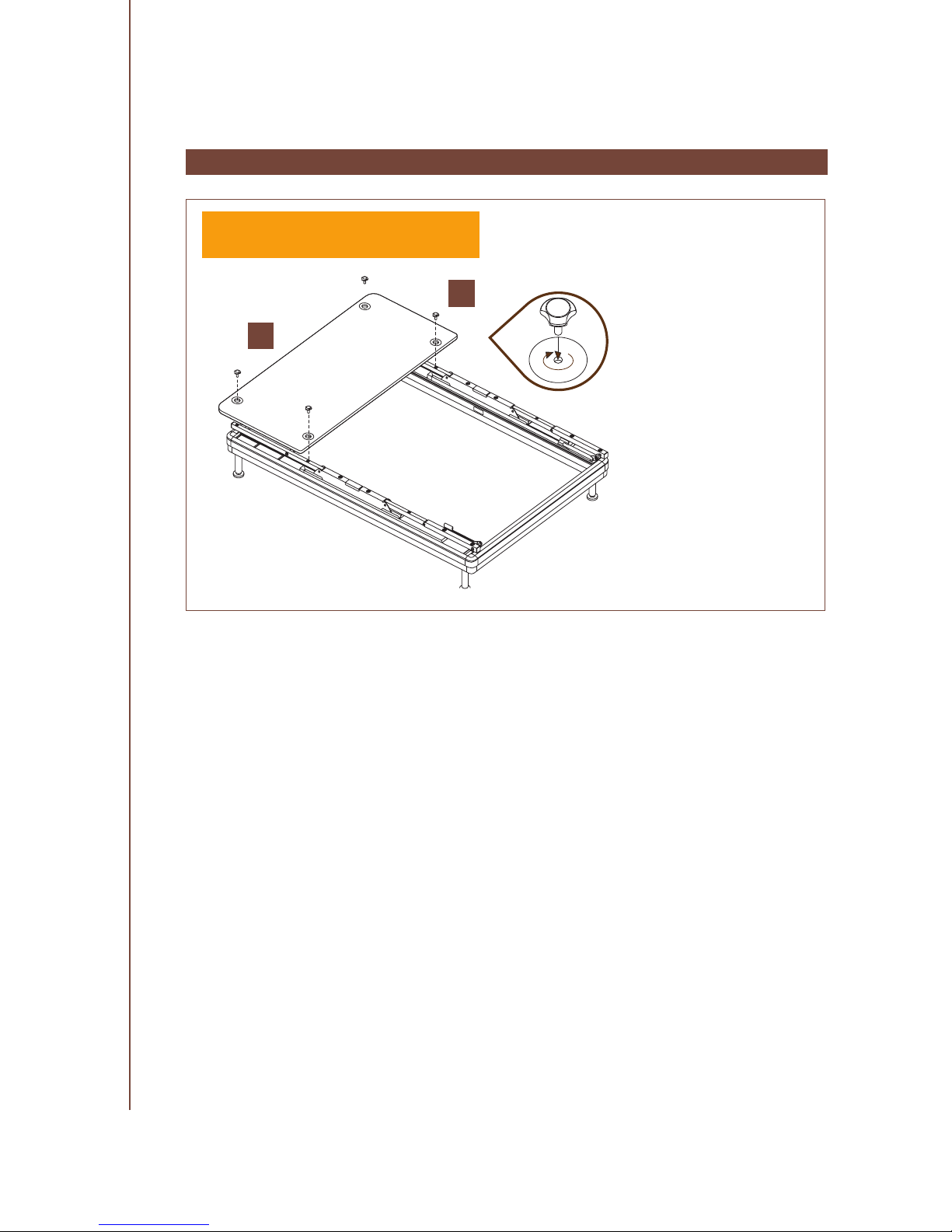
MOUNTING THE HEAD PLATFORM
1.
Lay the Head Platform
(L) across the frame so
that its holes are aligned
with the holes on the
Side Rails (A, B).
2.
Insert and tighten the
Mounting Screws (P)
to x the Head Platform
(L) by hand. Turn each
Screw until it is handtight.
REMOVE ALL STRAPPING TAPE BEFORE
MOUNTING THE PLATFORMS
L
P
Page 21
21
SILVER SERIES OWNER’S MANUAL //
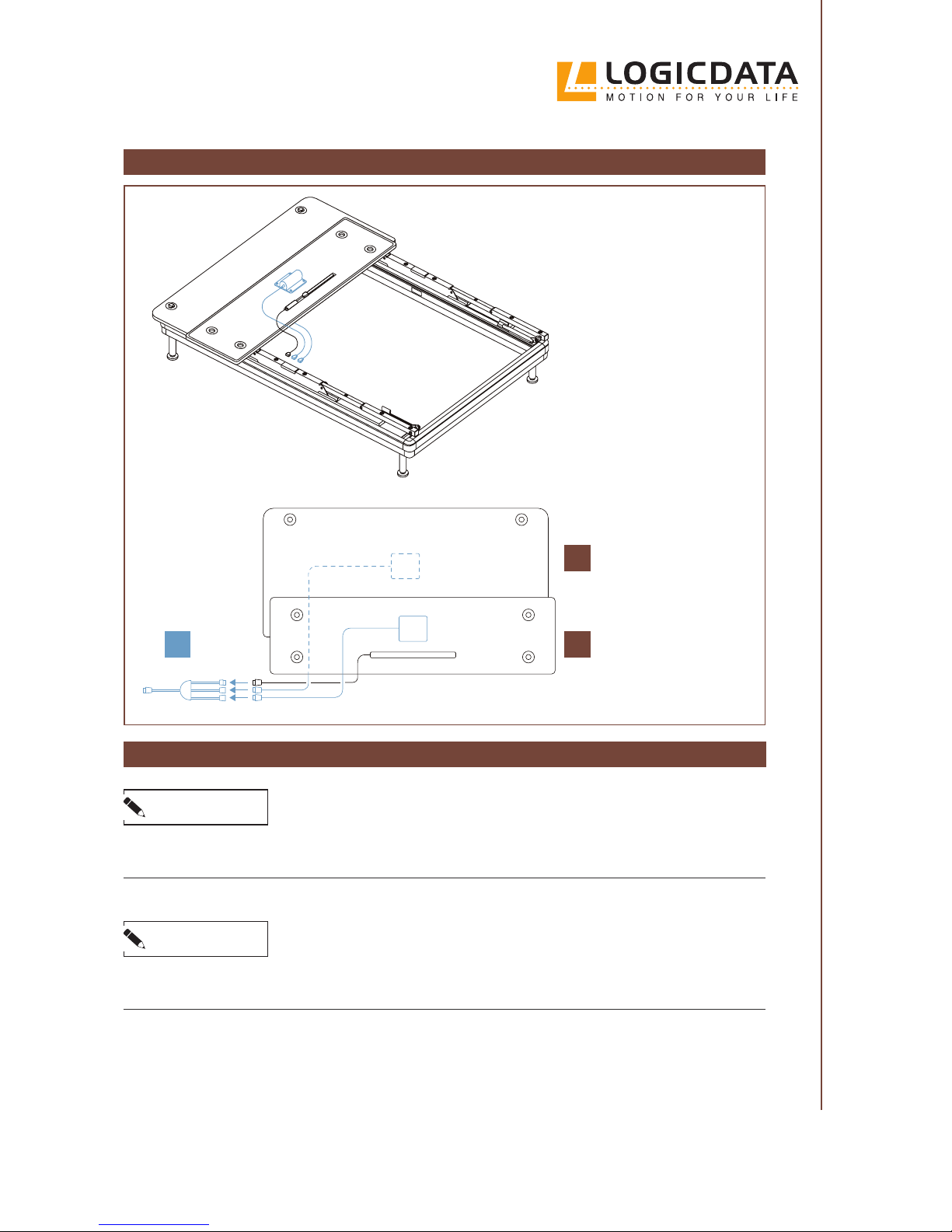
PREPARING THE BASE PLATFORM
1.
Turn the Base Platform
(M) upside down. Lay
this Platform on top of
the Head Platform (L).
2.
Plug the Underbed
Light Cable and the
Massage Motor Cables (if supplied) into
the Massage Adapter
Cable (G).
NOTE: If your version of
the SILVERstandard is not
supplied with Massage Motors, plug the Underbed
Light Cable directly into the
Plug Port on the Side Rail.
L
G M
CONNECTING THE CABLES
NOTICE
If you have been supplied with a spiral Side-to-Side Cable (I), ensure it is stretched to the appropriate length before connecting to avoid excessive tension on the Connectors.
HEAD
BASE
NOTICE
Ensure that the Power Converter Cable is connected to the white, 10-Pin Plug Port on the Side Rail.
Connecting the Power Cable to a dierent Plug Port may cause irreparable damage to the system.
Page 22
22
// SILVER SERIES OWNER’S MANUAL
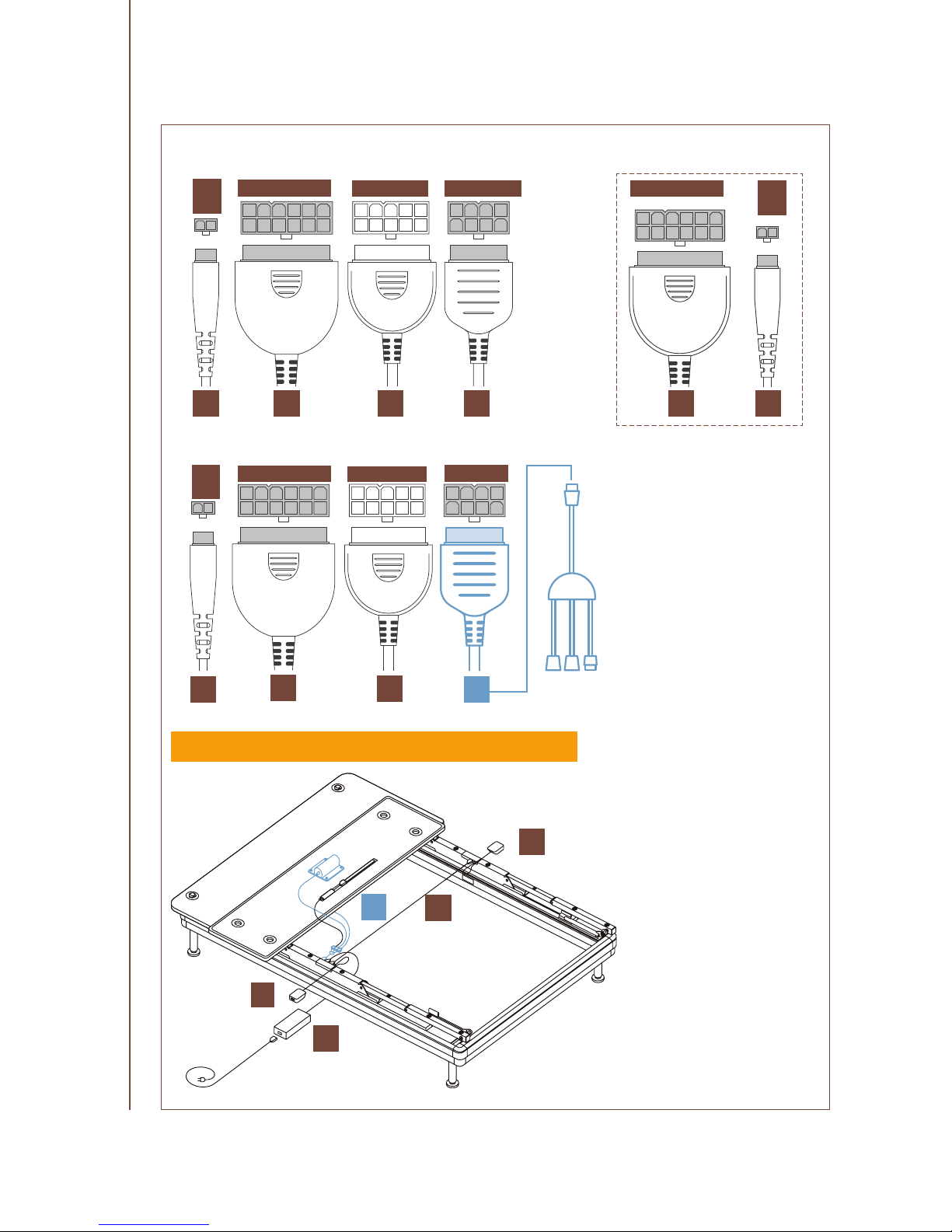
12 pin
12 pin
2
pin
2
pin
10 pin
1. Connect the two Side Rails
with the Side-to-Side Cable
(I) by plugging each end
into the appropriate Plug
Port.
2. Connect one USB Module
(H) on each Side Rail (see
below).
8 pin
HIMJI
IG
J
H
H
3. Connect the Power Con-
verter (J) to the appropriate
Plug Port.
H
4.
Plug the Massage
Adapter Cable (G) or
Underbed Light cable
into the Plug Ports on the
Side Rail.
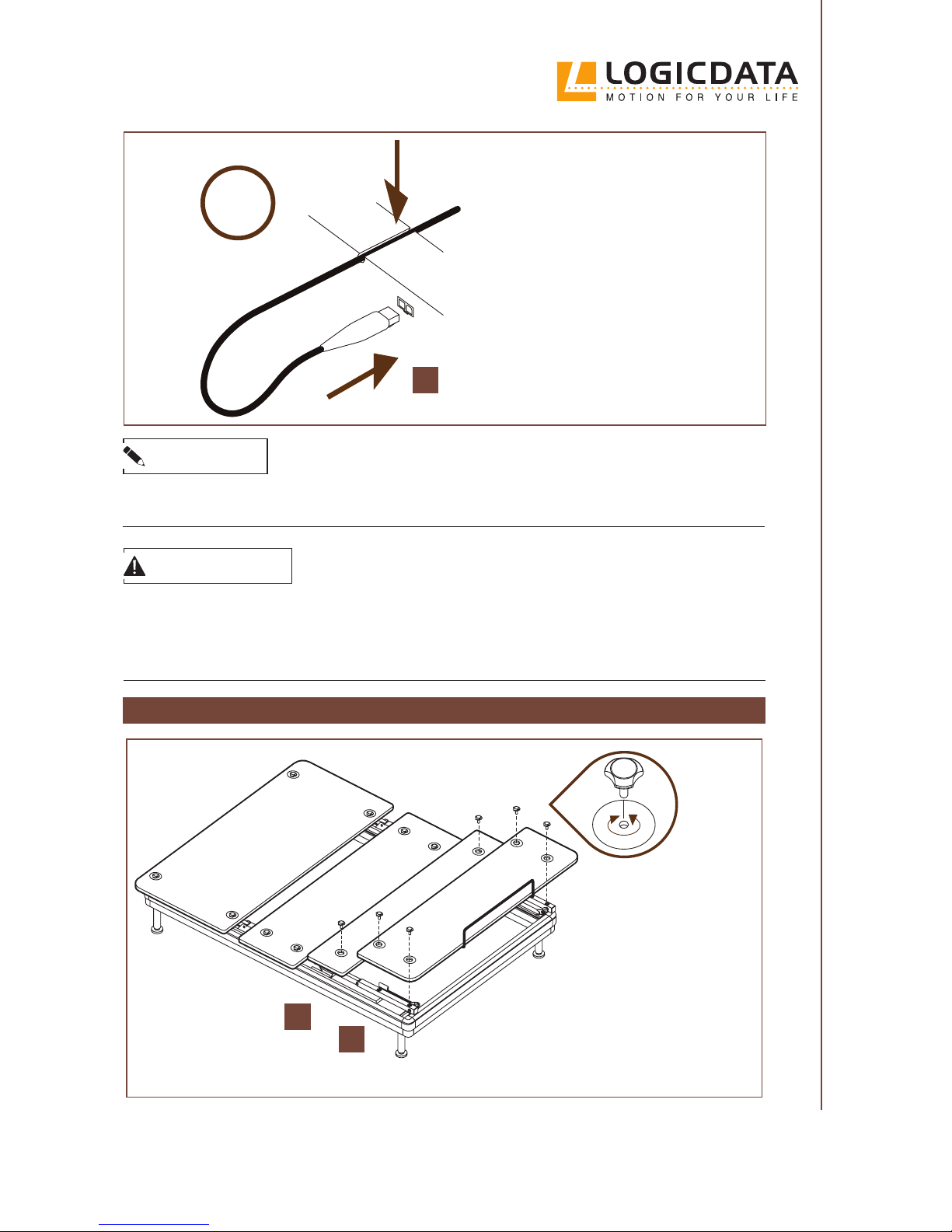
5.
Turn the Base Platform
over so that it is face
down across the Side
Rails. Ensure its holes are
aligned with the holes on
the Side Rails (A, B).
6. Use 4 Mounting Screws (P)
to x the Base platform (M)
by hand. Turn each screw
until it is hand-tight.
ENSURE ALL PLUGS ARE ORIENTED CORRECTLY
H
12 pin
2
pin
10 pin
8 pin
I J G
SILVERstandard+ (with Massage Function)
SILVERstandard
Page 23
23
SILVER SERIES OWNER’S MANUAL //
CAUTION
Risk of minor or moderate injury through tripping
While mounting the Leg and Foot Platforms (N, O), you may have to step over the Side-to-Side
Cable (I) or the Power Cable (K). Tripping over a Cable may lead to injury.
• Be careful not to trip over the Cables
MOUNTING THE LEG AND FOOT PLATFORMS
1.
Lay the Foot and Leg platforms (N, O) across the
frame so that their holes
are aligned with the
holes on the side rails
(A, B).
2.
Use the remaining 6
mounting screws (P) to
x the Foot and Leg Platforms (N, O) by hand.
Turn each screw until it
is hand-tight.
N
O
FOOT
LEG
2x
To connect the USB modules:
1. Create a loose loop with
the USB Cable (H) and run
the Cable through the designated channel.
2. Plug the USB Cables into
the 2-Pin Plugports on either side of the Bed Frame
H
NOTICE
Ensure that the Power Converter Cable is connected to the white, 10-Pin Plug Port on the Side Rail.
Connecting the Power Cable to a dierent Plug Port may cause irreparable damage to the system.
Page 24
24
// SILVER SERIES OWNER’S MANUAL
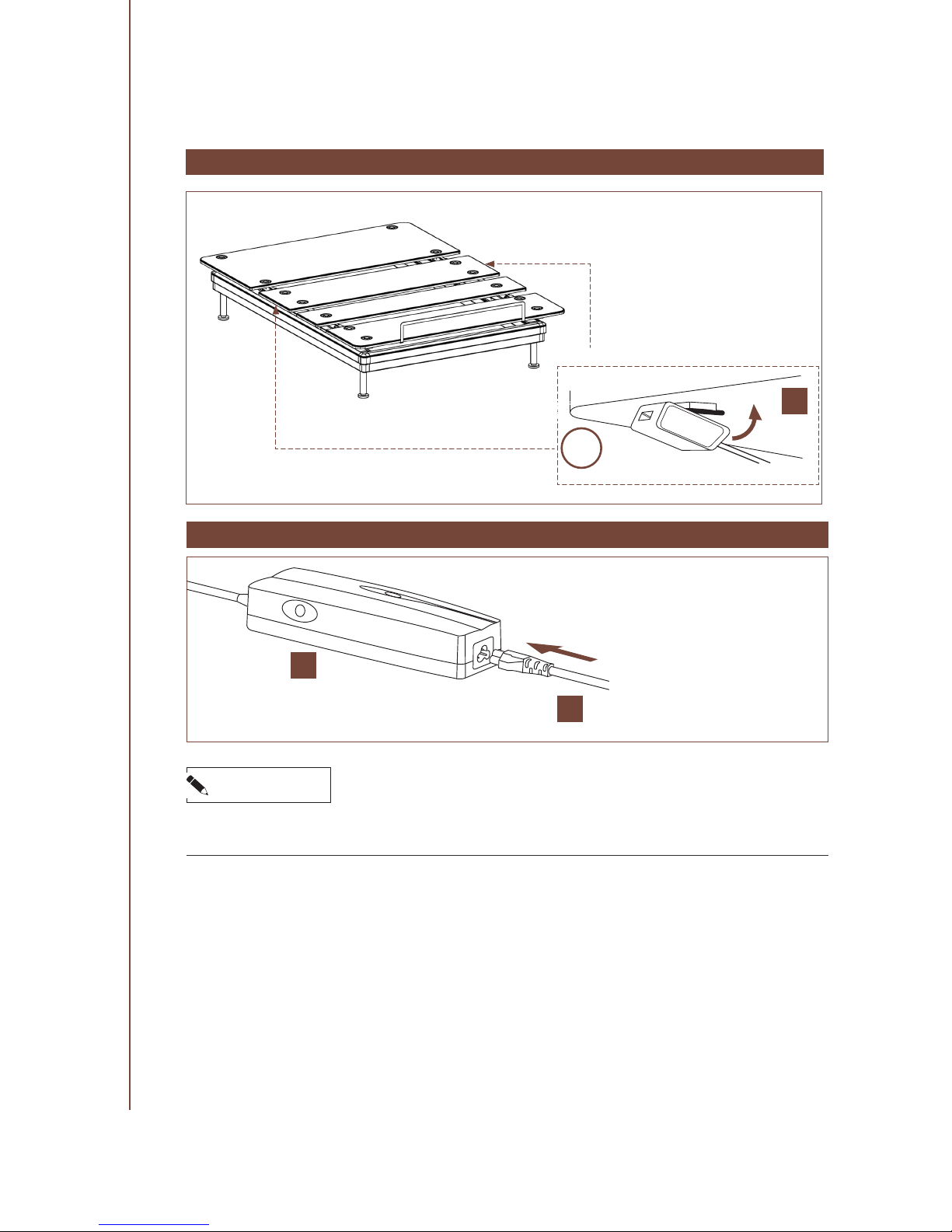
CONNECTING THE POWER CABLE
1. Connect the Power Cable (K)
to the Power Converter (J).
2.
Connect the Power Cable to
the nearest power outlet. Do
not strain the Cable. Ensure
the power outlet is properly
grounded (see page 11).
3.
Lay the Power Cable along the
wall behind the Bed Frame to
minimize the risk of tripping.
NOTICE
Stretching or otherwise straining the Power Cable may damage it. This may lead to malfunctions
with the Bed Frame.
J
K
2x
ATTACHING THE USB MODULES
Attach the two USB Modules (H) by
clicking them onto the Mounting
Plates underneath the Base Platform.
H
Page 25
25
SILVER SERIES OWNER’S MANUAL //
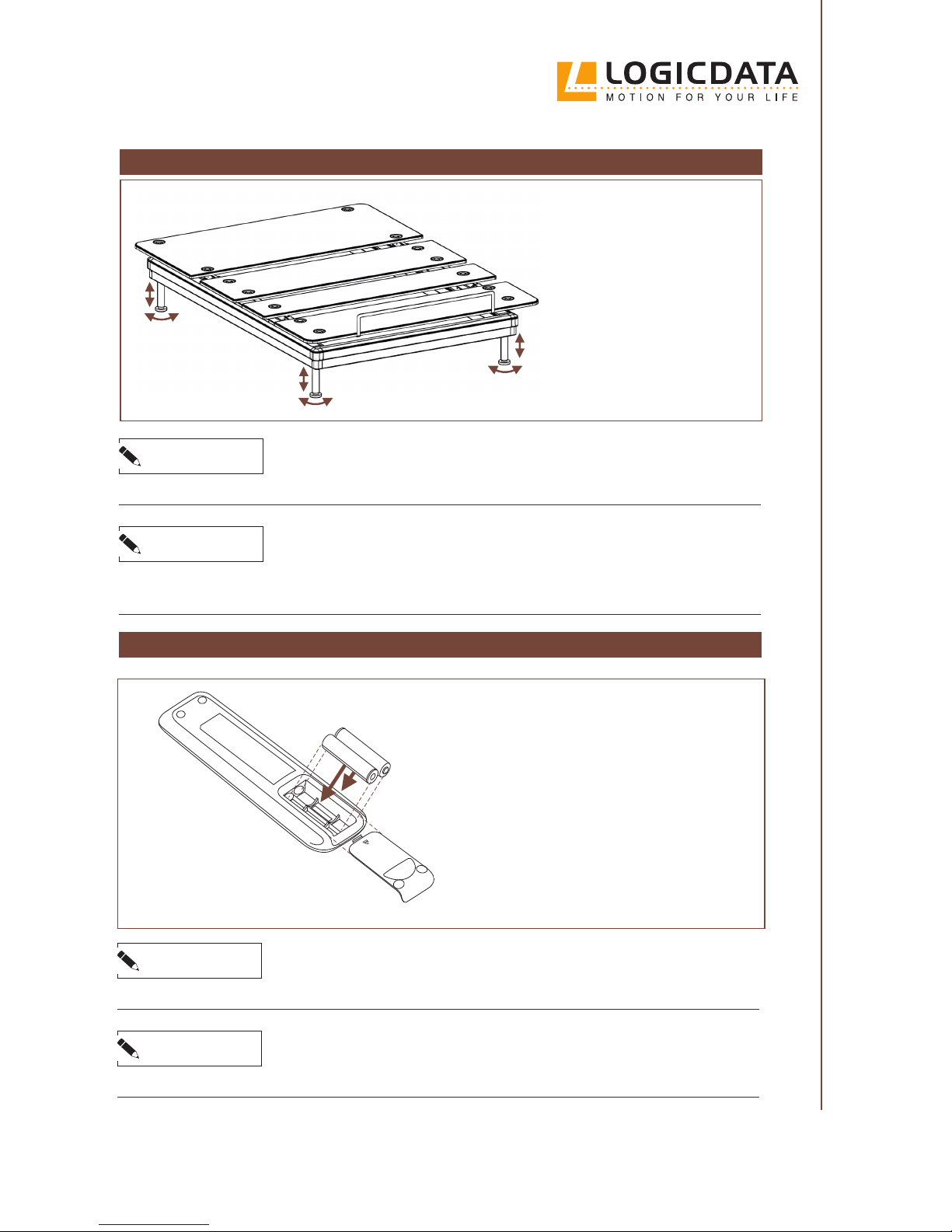
LEVELING THE BED FRAME
NOTICE
Use a spirit level to check whether your Bed Frame is horizontal.
If the Bed Frame is on an uneven surface, you can level it
by adjusting the legs individually.
To adjust the height of a leg,
turn the lowest part of the
leg until the desired height is
reached.
NOTICE
If the Bed Frame is too close to the wall (or touching it), it may collide during movement. To avoid
damage to the Bed Frame and the wall, ensure a small distance is kept.
INSERTING THE BATTERIES
NOTICE
Do not use rechargeable batteries.
NOTICE
Remember to replace the batteries in the Remote Control once a year.
Insert two 1,5V AAA batteries into the Remote Control and slide the cover in position.
The batteries are provided for you.
Page 26
26
// SILVER SERIES OWNER’S MANUAL
PAIRING THE REMOTE CONTROL
In order to operate the Bed Frame, you must pair it to a Remote Control. First, ensure the Bed
Frame has been unplugged for at least 10 seconds, then proceed as follows:
1. Plug the Bed Frame into the mains. This will automatically switch it to Pairing Mode for 30
seconds. In this time, the Bed Frame will search for Remote Controls to be paired with.
2. While the Bed Frame is in Pairing Mode, press any Button on the Remote Control. This will
automatically pair the Remote Control to the Bed Frame.
UNPAIRING THE REMOTE CONTROL
If you wish to unpair the Remote Control, proceed as follows:
1. Press and hold the Head Platform UP and Foot Platform UP Buttons simultaneously for
at least 15 seconds.
2. Test the Remote Control to check that it has been safely unpaired.
CAUTION
Risk of minor or moderate injury
It is possible that more than one Bed Frame will be within range of your Remote Control. Operating the wrong Bed Frame may lead to minor or moderate injury through crushing.
• Ensure the Remote Control is paired to the correct Bed Frame
• Ensure the Remote Control has been safely unpaired before using it on another Bed Frame
USING THE APP
The SILVERmotion App is an alternative to the Remote Control. With the App, you can:
▪ Operate the Bed Frame using your smart device
▪ Access to additional pre-set Memory Positions
▪
Control the Massage Function and set the Massage Timer
(on selected models)
▪
Directly access Customer Support and the Assembly Video
SILVERmotion is available from the App Store (iOS) and the Google Play store (Android). Scan
the QR Code to go there now.
Page 27
27
SILVER SERIES OWNER’S MANUAL //
DISASSEMBLY
To disassemble the LOGICDATA SILVERstandard, you must rst disconnect the Bed Frame from
the power source. Then, follow the assembly instructions in reverse order.
NOTICE
If the Side-to-Side Cable is unplugged, you must perform a Flat Position Reset when it is reconnected. To do this, press the Sleeping Position Button for at least 15 seconds.
1. The Remote Control displays “F” to conrm the input.
2. Press and hold the Sleeping Position Button again to move the bed to the at position
3. The Reset is complete
DISASSEMBLY AND
TRANSPORTATION
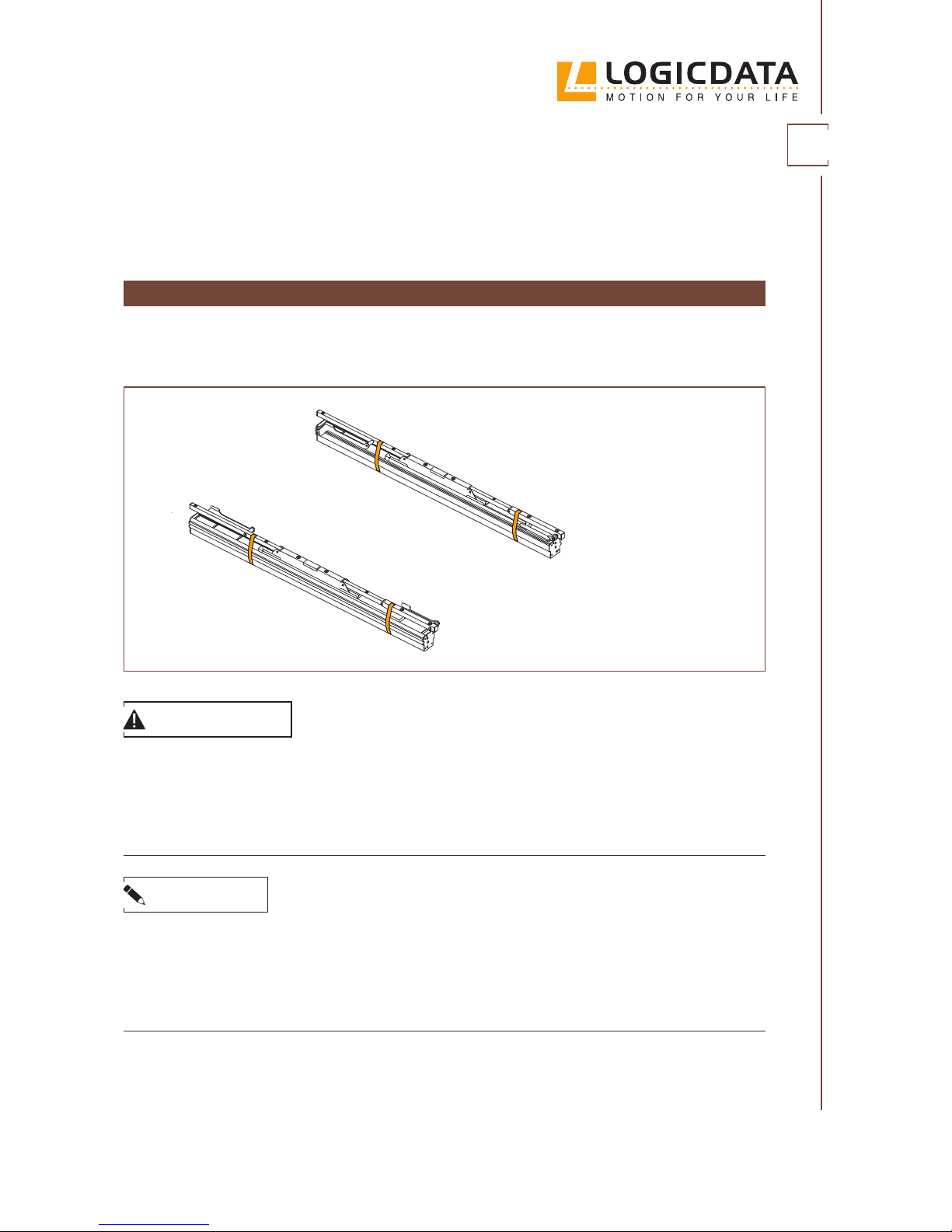
To minimize the risk of pinching when transporting the Side
Rails, secure all moving parts
by wrapping packaging tape
around the shown areas.
CAUTION
Risk of minor or moderate injury through crushing
Gripping the Side Rails by their moving parts when lifting or moving the Bed Frame may lead
to minor or moderate injury through crushing.
• Do not touch moving parts when lifting or moving the Bed Frame
• Only grip the xed part of the Bed Frame
05
Page 28
28
// SILVER SERIES OWNER’S MANUAL
TRANSPORTATION
After it has been fully assembled, the Bed Frame should only be moved short distances within
the same room.
Lifting the Bed Frame requires two people. To lift the Bed Frame, each person must stand at opposite ends of the Bed Frame and grip either the Side Rails or the Crossbar (if reachable). If you
cannot reach the Bed Frame, hold the Base Platform. If you intend to lift the bed by the Platforms,
ensure that the Bed Frame has rst been moved to the Sleeping Position.
NOTICE
Moving the Bed Frame on its side or upside down may lead to damage to the product.
• Only move the Bed Frame while it is in horizontal position (facing upwards)
• Disassemble the Bed Frame before moving it to a dierent location
CAUTION
Risk of minor or moderate injury through crushing
Gripping the Side Rails by their moving parts when lifting or moving the Bed Frame may lead
to minor or moderate injury through crushing.
• Do not touch moving parts when lifting or moving the Bed Frame
• Only grip the xed part of the Bed Frame
CAUTION
Risk of minor or moderate injury through crushing
Tilting the Bed Frame when lifting or moving the LOGICDATA SILVERstandard may lead to minor or moderate injury through crushing.
• Keep the Bed Frame level while lifting or moving it
• Do not attempt to lift or move the Bed Frame alone
Page 29
29
SILVER SERIES OWNER’S MANUAL //
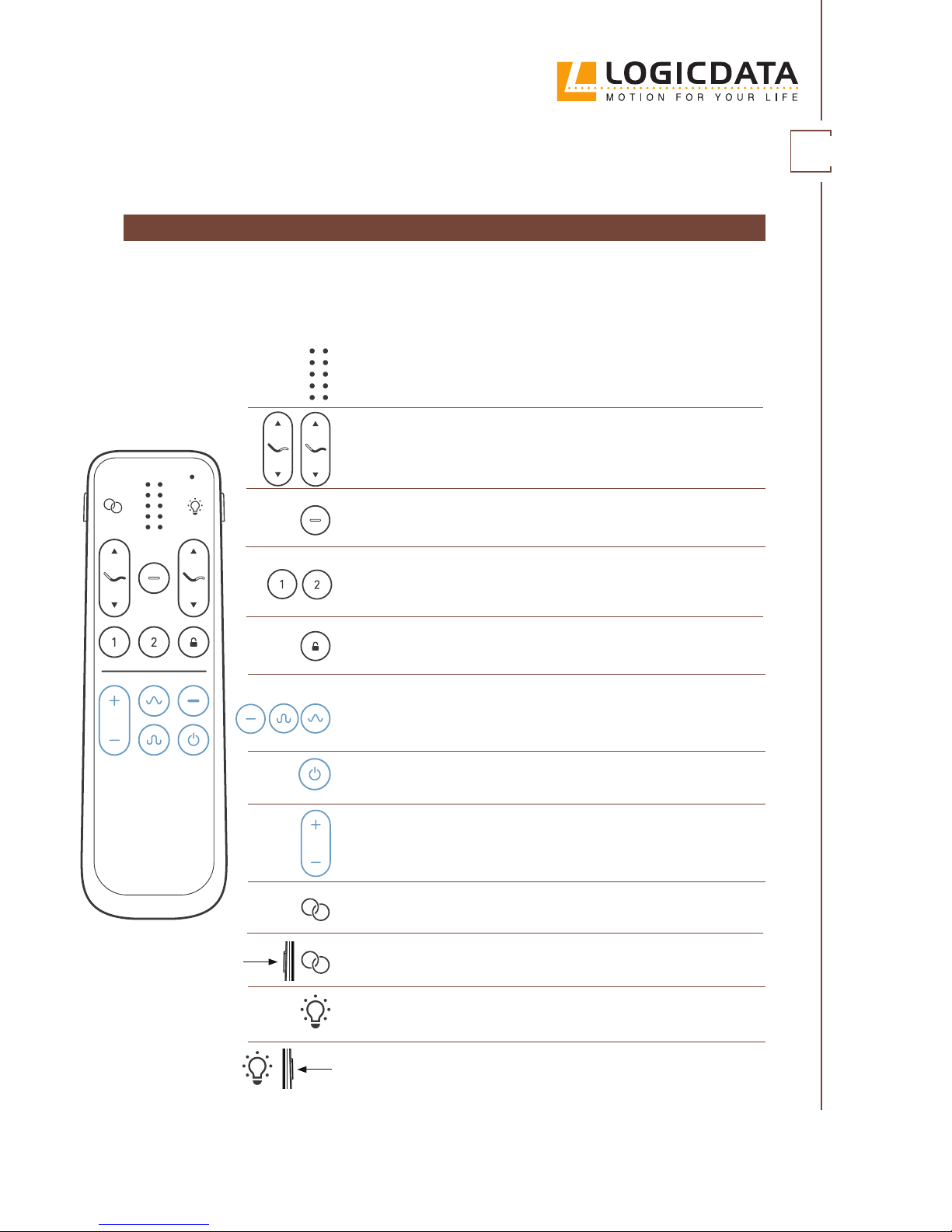
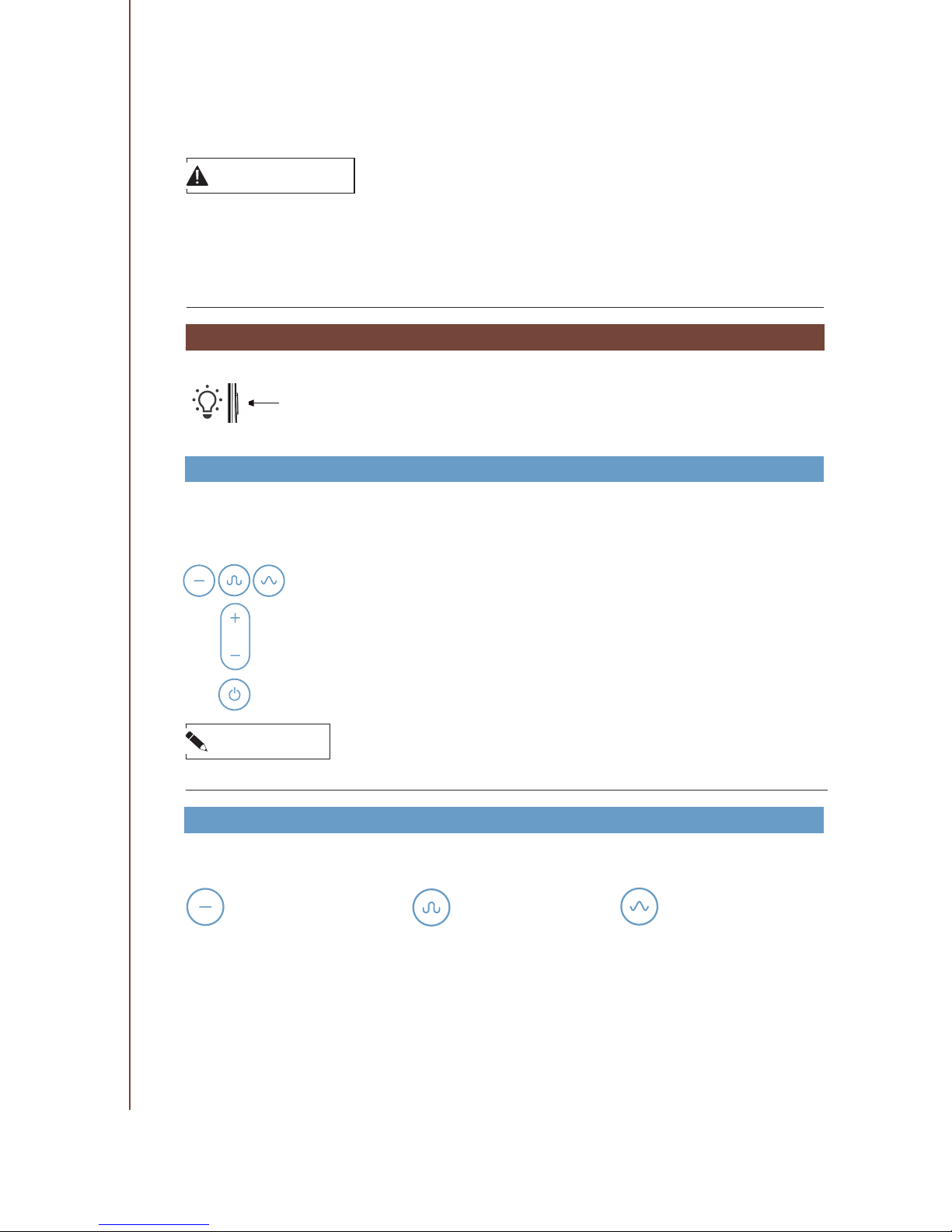
LED Array
Shows the function that the Bed Frame is currently performing.
Head Platform and Foot Platform UP/DOWN Buttons
Move the Head and Foot Platforms up and down.
Sleeping Position Button
Moves the Bed Frame to a at position.
Memory Position Buttons
Move the Bed Frame to a saved Memory Position.
Child Lock Button
Enables or disables the Child Lock (when held for 3 seconds).
Massage Buttons*
Activate Massage Mode. There are 3 settings: Constant, Wave
and Pulse
Wireless Sync Indicator
Blinks when Wireless Sync Mode is starting or ending.
Wireless Sync Button
Activates or deactivates Wireless Sync Mode.
OPERATION
Massage Intensity Button*
Increases or decreases the intensity of Massage Mode.
Underbed Light Indicator
Lights up when the Underbed Light Button is pressed
Underbed Light Button
Turns the Underbed Light on and o.
REMOTE CONTROL
The LOGICDATA SILVERstandard comes with a range of dierent Remote Controls. The Remote
Control supplied with your product depends on the model you have ordered. Your Remote Control may include the following Buttons and Indicators:
Massage O Button*
Switches o Massage Mode.
The Remote Control
shown is representative. The Remote Control supplied with your
product may vary.
*Only SILVERstandard+
06
Page 30
30
// SILVER SERIES OWNER’S MANUAL
FUNCTIONS
Your Remote Control allows you to move all parts of the Bed Frame from a distance of 23 feet
(7 m). All Remote Controls can perform standard functions, while advanced functions are
only available using certain Remote Controls.
Two Remote Controls can be connected to a Bed
Frame at one time.
MOVING THE BED FRAME UP AND DOWN
You can use the UP and DOWN Buttons to move the Head and Foot Platforms up and down:
1. Press and hold the UP or DOWN Button for the Platform you wish to adjust
2. Wait until the Bed Frame has reached the desired position
3. Release the UP or DOWN Button
NOTICE
The Bed Frame will continue to move until the Button is released or the highest / lowest possible position has been reached.
SAVING A MEMORY POSITION
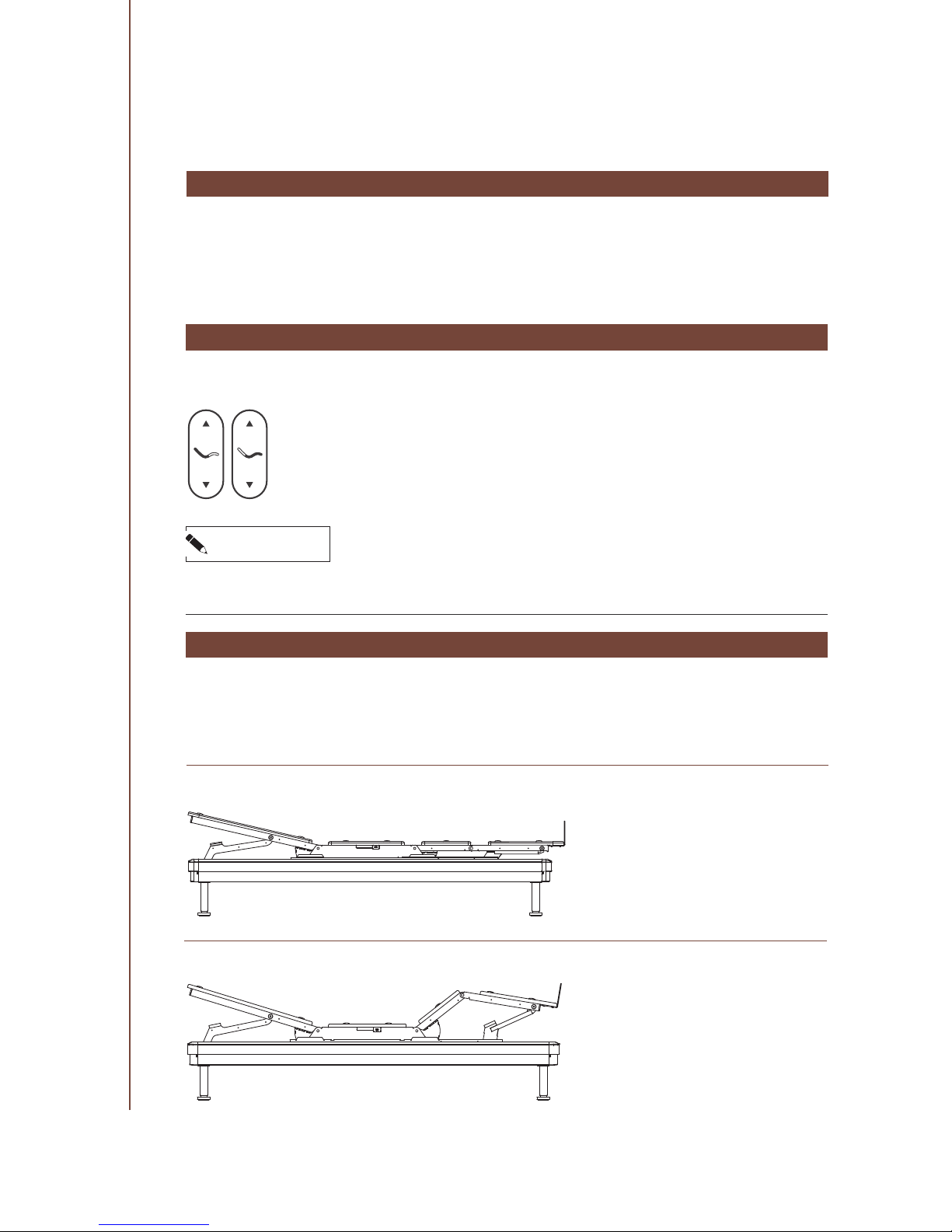
The LOGICDATA SILVERstandard comes with two saved Memory Positions: Anti-Snore (Position
1) and Zero Gravity (Position 2). You can move to these positions by pressing the Memory Position Buttons on your Remote Control.
1. Anti-Snore Position
2. Zero Gravity Position
Page 31
31
SILVER SERIES OWNER’S MANUAL //
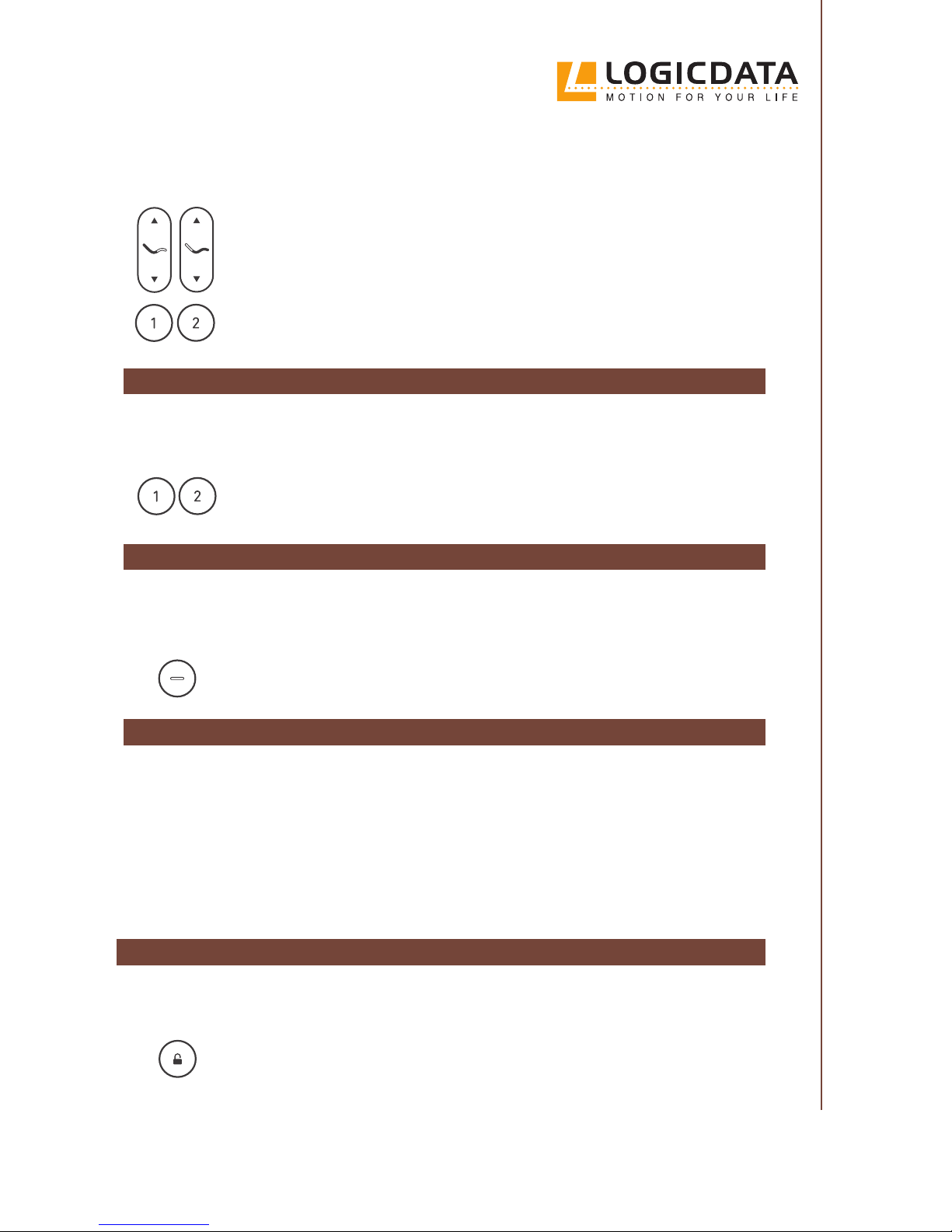
You can change the saved Memory Positions to new Memory Positions that you nd more comfortable. To do this, proceed as follows:
1. Press and hold the UP or DOWN Button for the Platform you wish to adjust
2. Wait until the Bed Frame has reached the desired position
3. Release the UP or DOWN Button
4. Press and hold the Memory Position Button that you wish to save the new
position to for at least three seconds
5. Release the Memory Position Button
6.
MOVING THE BED FRAME TO A SAVED MEMORY POSITION
Proceed as follows to move the Bed Frame to a saved Memory Position:
1. Press the Memory Position Button for the Memory Position you wish to
move to (for less than three seconds)
2. Wait for the Bed Frame to move to the saved Memory Position
3.
MOVING THE BED FRAME TO THE SLEEPING POSITION
4.
The Sleeping Position is the Bed Frame’s lowest position. While in the Sleeping Position, all Platforms are horizontal. Proceed as follows to move the Bed Frame to the Sleeping Position:
1. Press the Sleeping Position Button (do not hold the Button)
2. Wait for the Bed Frame to move to the Sleeping Position
3.
PERFORMING A FLAT POSITION RESET
To perform a Flat Position Reset, press the Sleeping Position Button for at least 15 seconds, then:
1. The Remote Control displays “F” to conrm the input.
2. Press and hold the Sleeping Button again to move the bed to the at position
3. The Reset is complete
If two beds are in Wireless Sync Mode, turn o Wireless Sync and reset each bed separately
ACTIVATING THE CHILD LOCK
Always activate the Child Lock when children are near the Bed Frame. Proceed as follows:
1. Press and hold Child Lock Button for at least three seconds
2. Ensure that the LED Array shows “L”. This means the Child Lock is active
3. To de-activate the Child Lock, press and hold the Child Lock Button for at
least three seconds
Page 32
32
// SILVER SERIES OWNER’S MANUAL
CAUTION
Risk of minor or moderate injury to children
Misuse of the Bed Frame by children could lead to minor or moderate injury.
• Activate the Child Lock when children are present
• Do not allow children to play with the Bed Frame
OPERATING THE MASSAGE FUNCTION*
Certain versions of the Bed Frame (SILVERstandard+) are equipped with a Massage Function. To
begin using this function, proceed as follows:
1. Press any of the Massage Buttons on your Remote Control
2.
Use the Massage Intensity Button to set the desired Massage Intensity. There
are ve levels of Intensity. The Massage Function always begins at level three
3. To stop the Massage, press the Massage O Button on the Remote Control
NOTICE
The Massage Motor has a Duty Cycle of 45 minutes. After this, it will shut down for 15 minutes.
MASSAGE SETTINGS*
There are three dierent Massage Settings to choose from. These are as follows:
OPERATING THE UNDERBED LIGHT
The LOGICDATA SILVERstandard is equipped with an Underbed Light. To turn
the Light on or o, press the Underbed Light Button on the right-hand edge of
the Remote Control.
▪ Constant ▪ Wave ▪ Pulse
*Only with SILVERstandard+
Page 33
33
SILVER SERIES OWNER’S MANUAL //
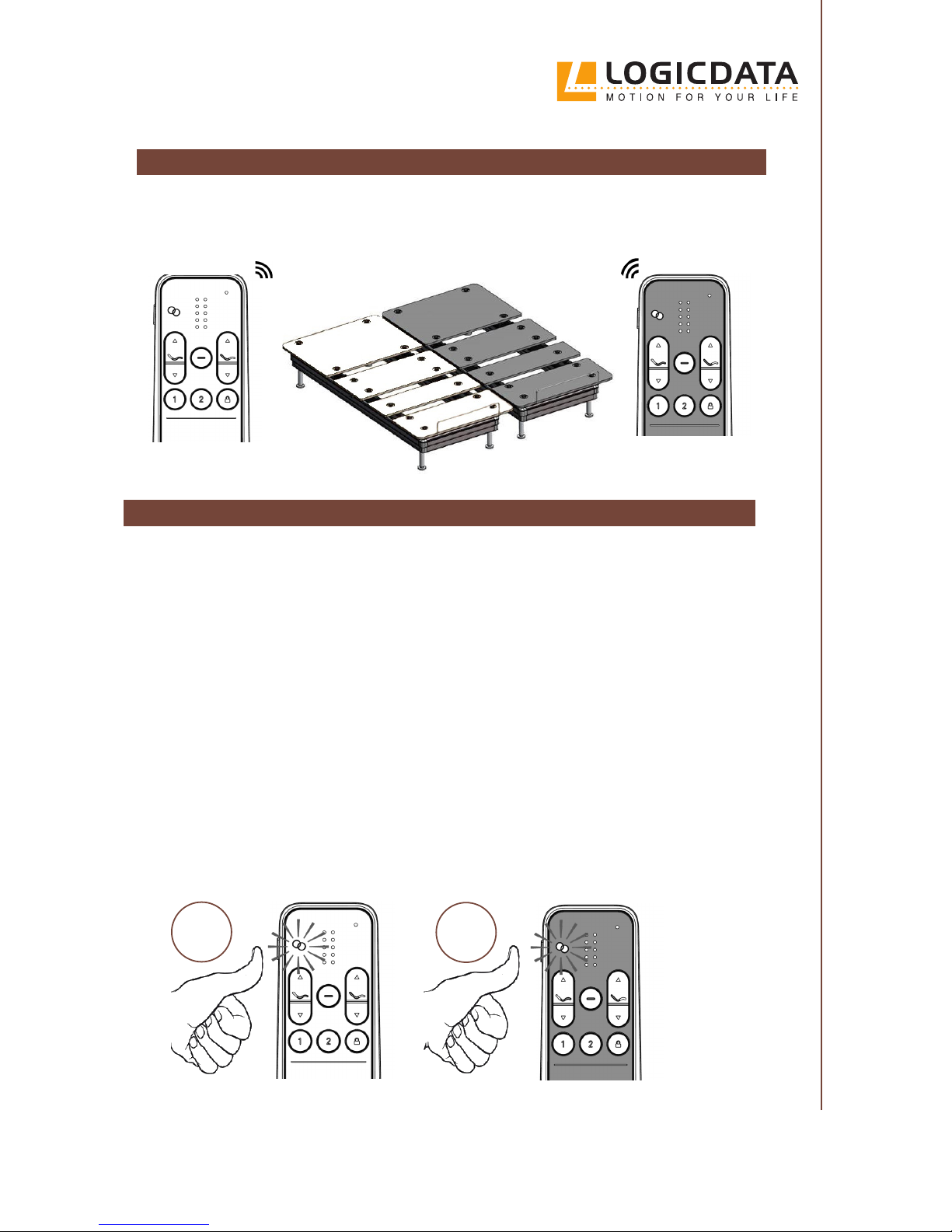
The LOGICDATA SILVERstandard’s Wireless Sync Mode allows you to control two Twin XL Bed
Frames with one Remote Control.
ACTIVATING WIRELESS SYNC MODE
Before you activate Wireless Sync Mode, please ensure:
▪ Both Twin XL Bed Frames are standing next to each other
▪ The Bed Frames will not collide with each other when moving
▪ Each Bed Frame can be controlled using its own Remote Control
To activate Wireless Sync:
1. Press the Wireless Sync Button on both Remote Controls (on the left side of the Remote Control) simultaneously for 3 seconds
2.
Ensure that the Wireless Sync Indicator on both Remote Controls blinks for 5 seconds. When
the blinking stops, the two Bed Frames have been paired
▪ If the Bed Frames still do not move together, repeat the procedure and make sure that the
Sync Indicator on both Remote Controls is blinking.
▪
If only one Remote Control can operate both Bed Frames, deactivate Wireless Sync Mode (see
“Deactivating Wireless Sync Mode”). Then repeat steps 1 and 2.
WIRELESS SYNC MODE
Remote Control 1
Remote Control 2
Bed 2
Bed 1
3
sec.
3
sec.
Remote Control 1
Remote Control 2
Page 34
34
// SILVER SERIES OWNER’S MANUAL
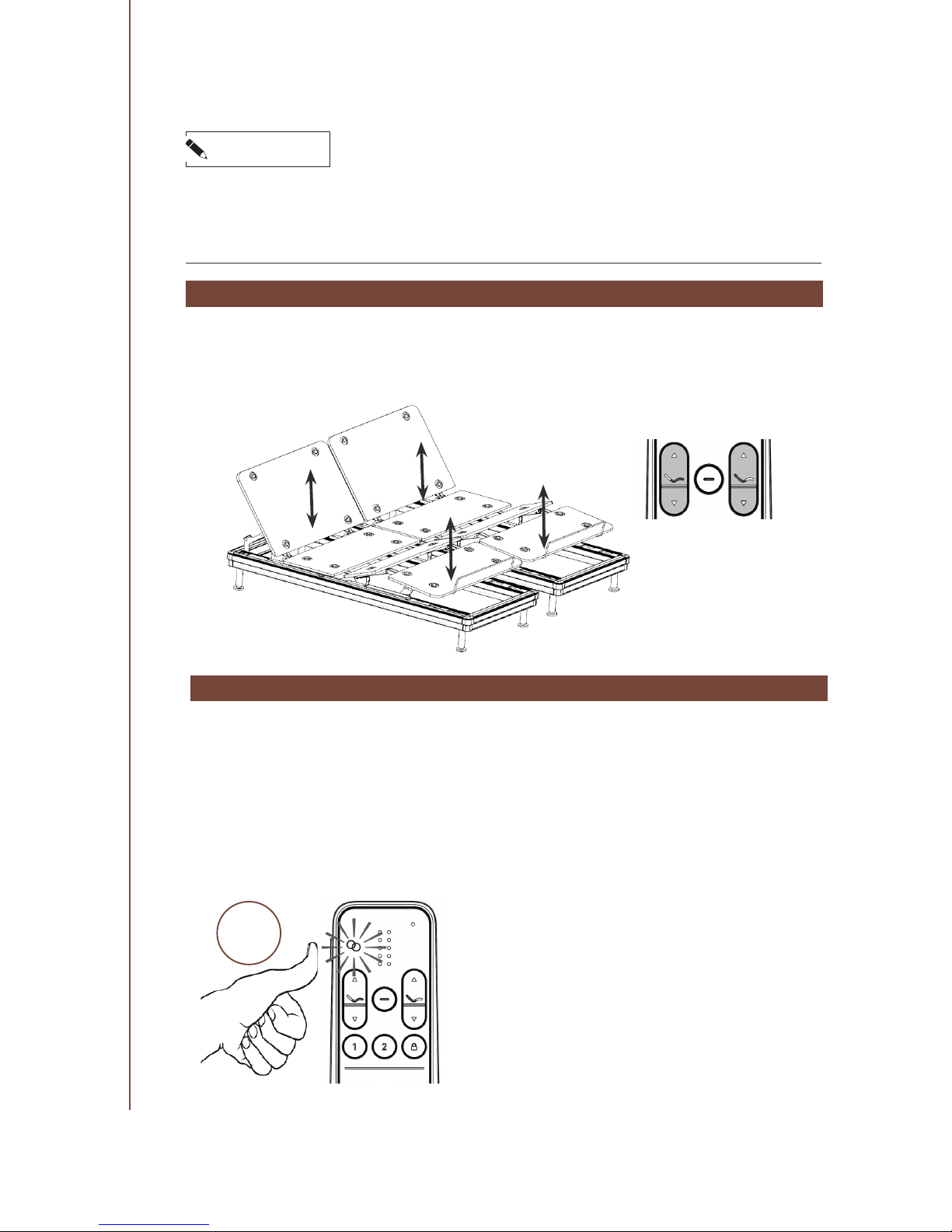
MOVING THE BED FRAME UP AND DOWN IN WIRELESS SNYC MODE
When Wireless Sync Mode is activated, pressing the UP and DOWN Buttons on either of the
Remote Controls will move both Bed Frames simultaneously. The Massage and Underbed Light
functions can also be controlled from a single Remote Control.
DEACTIVATING WIRELESS SYNC MODE
You only require one Remote Control to deactivate Wireless Sync Mode:
1. Press and hold the Wireless Sync Button on one of the Remote Controls for 3 seconds
2. The Sync Indicator will blink for ve seconds
3. When the blinking stops, the Bed Frames will be in Single Mode. If either Remote Control
still operates both Bed Frames, repeat the procedure.
3
sec.
Remote Control 1 or 2
NOTICE
If both Remote Controls are paired to the same Bed Frame, unplug the Power Converter of the
unpaired Bed Frame until the LED on the Power Converter goes out. Then, plug the Power Converter back in. Press any Button on the Remote Control you want to pair to the unpaired Bed
Frame to complete the pairing (see the section “Pairing the Remote Control” on page 26.
Page 35
35
SILVER SERIES OWNER’S MANUAL //
CAUTION
Risk of minor or moderate injury to children
In Wireless Sync Mode, use of the Bed Frame by children may lead to minor or moderate injury.
• Ensure that the Child Lock feature is activated properly on both Remote Controls. Activating
the Child Lock on one Remote Control only locks that Remote Control’s Button pad
NOTICE
If the two connected Bed Frames have dierent saved Memory Positions, pressing a Memory Position Button will cause each Bed Frame to move to a dierent position. This is called Misalignment.
• Follow the instructions in the “Fixing Misalignment” section to realign the Bed Frames
NOTICE
Wireless Sync Mode will remain active if the Bed Frame is unplugged and then plugged back in.
FIXING MISALIGNMENT
If the two Bed Frames become misaligned (i.e. they are at dierent heights or positions), you
must move both Bed Frames to their lowest position.
1. Press the Sleeping Position Button on one Remote Control.
2. Wait for both Bed Frames to reach their lowest position
3. The Bed Frames are realigned. You can continue adjusting the position of
the Bed Frames as normal
If the Underbed Light on one Bed Frame is switched on while the other is o, press and hold
the Underbed Light Button for 3 seconds to turn o both Underbed Lights.
SAFETY ADVICE
NOTICE
Ensure each Bed Frame is connected to the mains properly. Bad connections can damage the system.
NOTICE
Pressing too many Buttons in a short space of time can cause damage to the system.
• Wait one second between pressing dierent Buttons
NOTICE
Wireless Sync Mode is only designed to work with two Bed Frames. Attempting to connect more
than two Bed Frames can cause damage to the system.
Page 36
36
// SILVER SERIES OWNER’S MANUAL
CLEANING
NOTICE
Cleaning agents, such as non-alcohol based cleaners, sanitizers, and others can destroy the anodized layer of the LOGICDATA SILVERstandard. Use only a dry or slightly damp lint-free cloth
to clean the Bed Frame
MAINTENANCE
The LOGICDATA SILVERstandard does not require maintenance. If the Bed Frame becomes damaged, or if you are experiencing technical diculties, please contact LOGICDATA using the details below:
CLEANING AND
MAINTENANCE
adjustables.logicdata.net
Phone: 800-305-1925
E-Mail: [email protected]
WARNING
Moderate risk of death or serious injury through electric shocks
Leaving the Bed Frame plugged in while cleaning it may lead to death or serious injury
through electric shocks.
• Use only a dry or slightly damp lint-free cloth to clean the Bed Frame
• Do not allow any of the Bed Frame’s components to become wet during cleaning
• Always unplug the Bed Frame from the mains before cleaning
07
Page 37
37
SILVER SERIES OWNER’S MANUAL //
08
3. Insert two 9V batteries into the Power Converter. Do not use
rechargeable batteries.
4. Make sure no heavy objects or any person is on the bed or in
the range of moving parts.
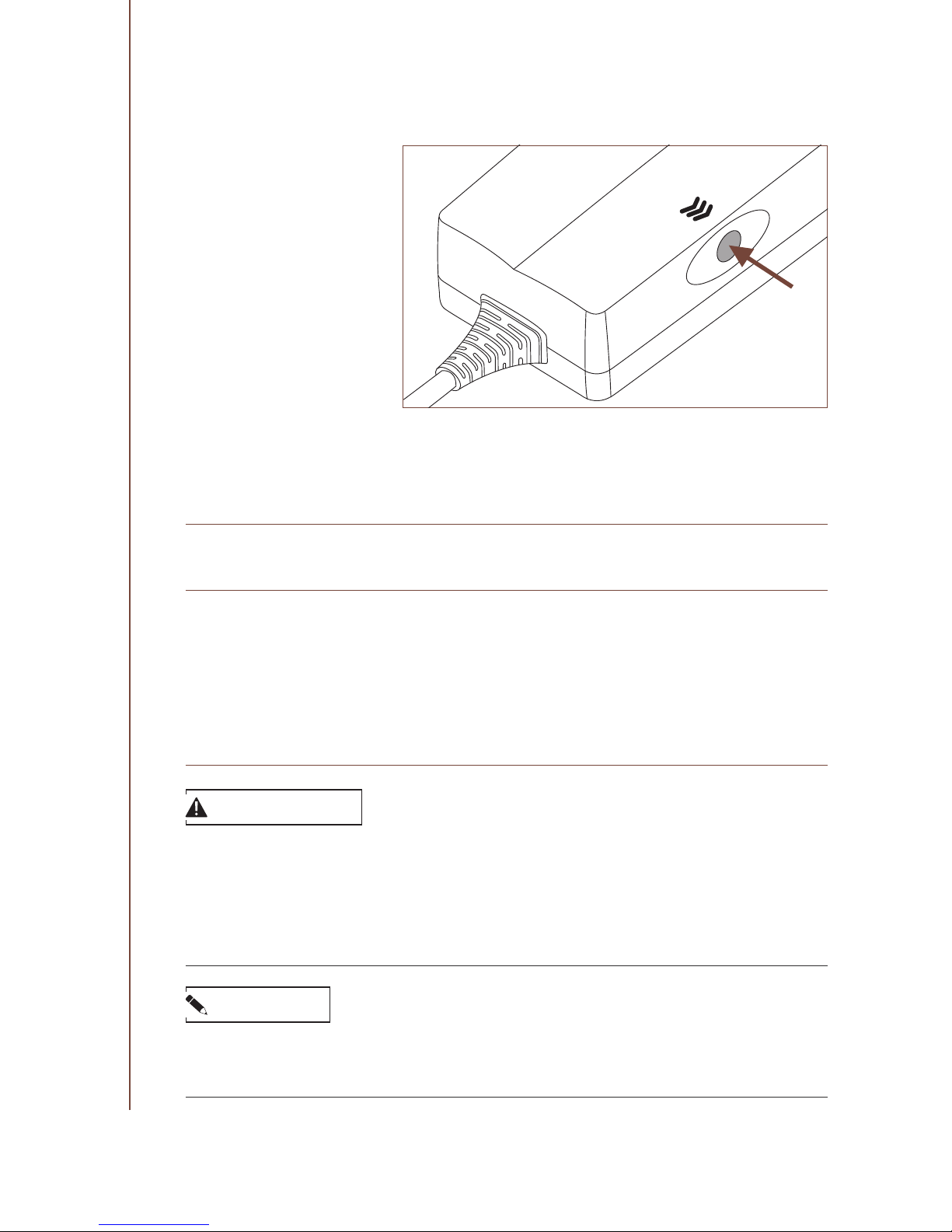
5. Press the Button on the Power Converter until the Bed Frame
reaches the at position:
POSSIBLE MALFUNCTIONS
AND THEIR SOLUTIONS
BEHAVIOR
Remote lights up but the
Bed Frame does not respond when Buttons are
pressed.
Remote does not light up.
The Bed Frame does not
respond when Buttons are
pressed.
Parts of the Bed Frame remain in an elevated position after a power failure.
POSSIBLE CAUSE / SOLUTION
1.
The Bed Frame is not connected properly. Check the power
connection
2. Overheating after continuous use. Ensure that the Duty Cycle has not been exceeded. Wait for at least 6 minutes for the
Duty Cycle time-out to reset itself.
3.
Unplug the Power Converter. Wait until the LED goes out, then
plug it back in.
Replace the batteries in the Remote Control.
An Emergency Lowering is required. Proceed as follows:
1. Unplug the Power Converter from the mains
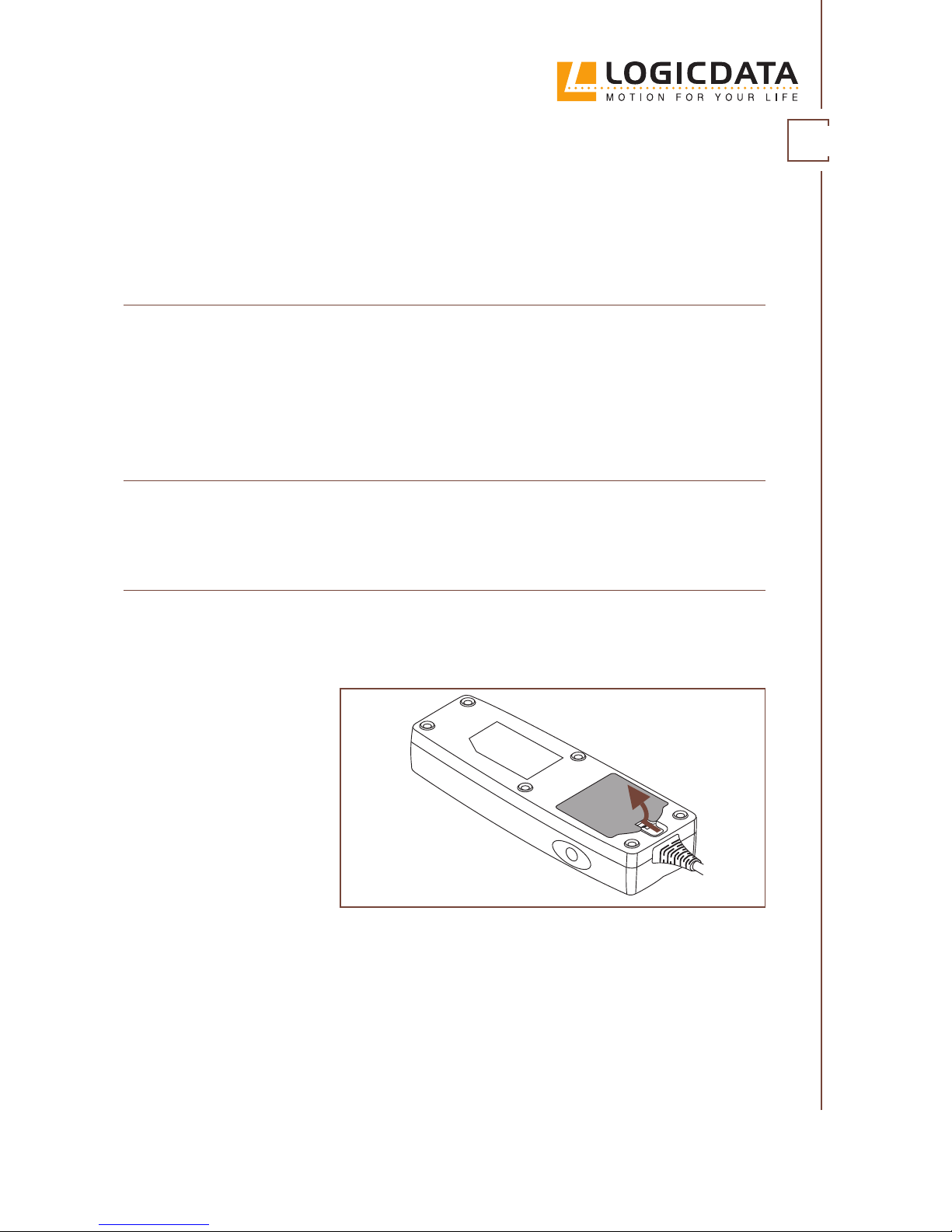
2. Remove the cover of the Power Converter (see below):
Page 38
38
// SILVER SERIES OWNER’S MANUAL
After this action, the batteries must be replaced.
If you store batteries in the power supply as a backup, they must
be replaced annually.
Press the Button on the Power Converter until the Bed Frame is
in the Sleeping Position.
Remote Control defective
or lost.
Parts of the Bed Frame do not
move evenly.
The Bed Frame may be on an uneven surface. Make sure the
Bed Frame is leveled properly (see the section “Leveling the Bed
Frame”. Make sure no persons or heavy objects are on the Bed
Frame or in the range of moving parts.
The Bed Frames may be misaligned. Follow the instructions in
the section “Fixing Misalignment” to realign the Bed Frames.
WARNING
Moderate risk of death or serious injury to children
Operating the Power Converter or performing an Emergency Lowering using the Button on the
Power Converter will override the Child Lock feature. This may lead to death or serious injury
to children.
• Keep children away from moving parts
• Do not let children play with the Bed Frame
NOTICE
When an Emergency Lowering is performed, only the Bed Frame connected to the Power Converter will be operated. You will need to perform separate Emergency Lowerings for Bed Frames
connected by Wireless Sync. Wireless Sync Mode will be activated again afterwards.
Page 39
39
SILVER SERIES OWNER’S MANUAL //
TECHNICAL DATA
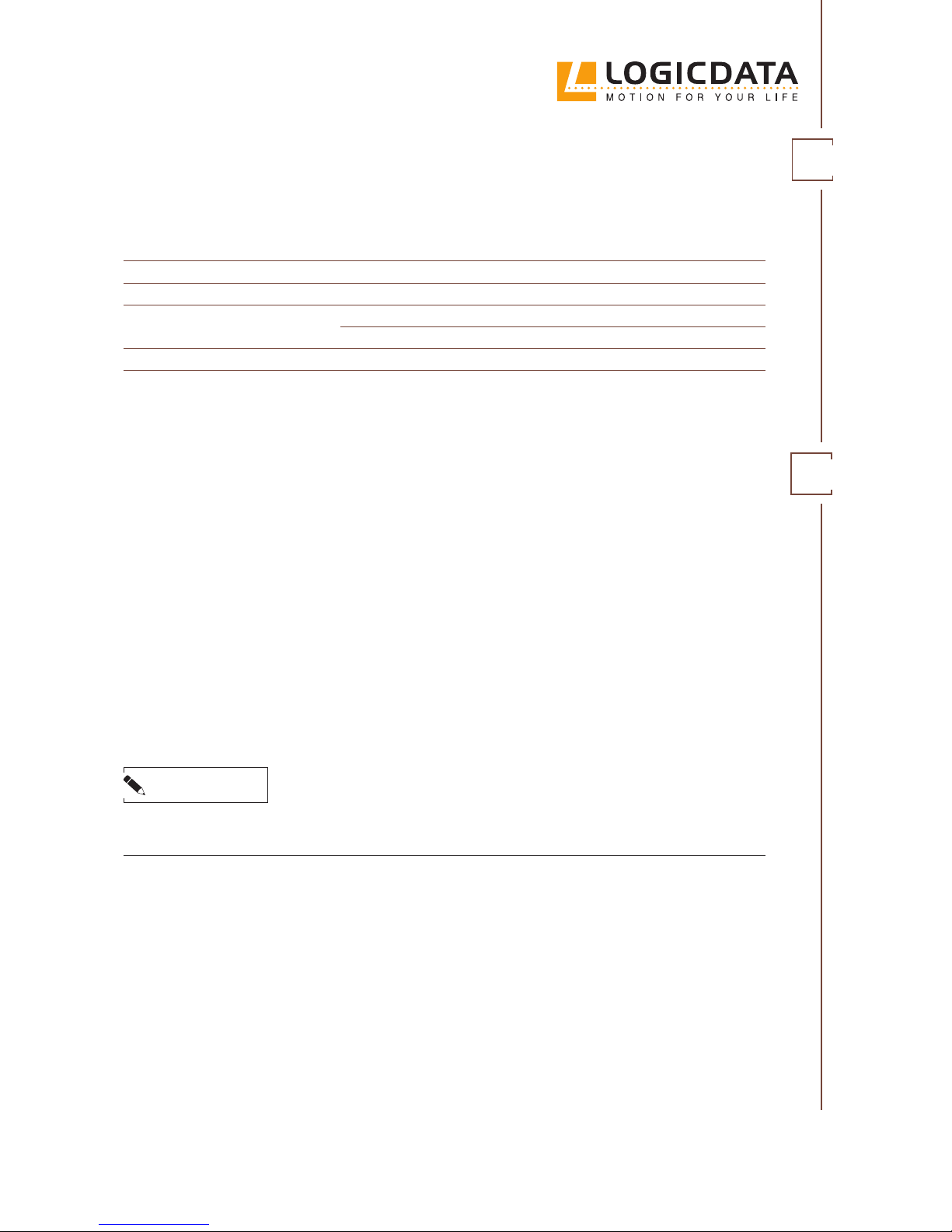
PROPERTY
Input Voltage
Rated Input current
Suitable mattress
dimensions
Ambient conditions
Maximum load
SPECIFICATION
100-240 V
2,2 A
Indoor use only
700 lbs evenly distributed
FINAL DISPOSAL
NOTICE
Dispose of all materials and parts according to local guidelines and regulations. Ensure that the
disposal is lastingly compatible for humans and nature.
Before disposing of the product, check the types of raw materials used in the Bed Frame and make
plans to dispose of them accordingly.
This product should not be disposed of with regular household waste. Adhere to the disposal procedures for the raw materials and components used. Recycle as many parts as possible.
Careless or incorrect disposal may cause irreversible environmental harm. Ensure that measures
are taken to protect nature, the environment, and the economy.
King
76 in × 80 in
Queen
60 in × 80 in
Twin XL
39 in × 80 in
09
10
Page 40
LOGICDATA Headquarters
Electronic & Software Entwicklungs GmbH
Wirtschaftspark 18
8530 Deutschlandsberg
AUSTRIA
LOGICDATA North America Inc.
1525 Gezon Parkway SW, Suite C
Grand Rapids, MI 49509
USA
Watch the assembly video at
adjustables.logicdata.net
adjustables.logicdata.net
Do you need support?
Phone: 800-305-1925
E-Mail: [email protected]
 Loading...