

Page 1
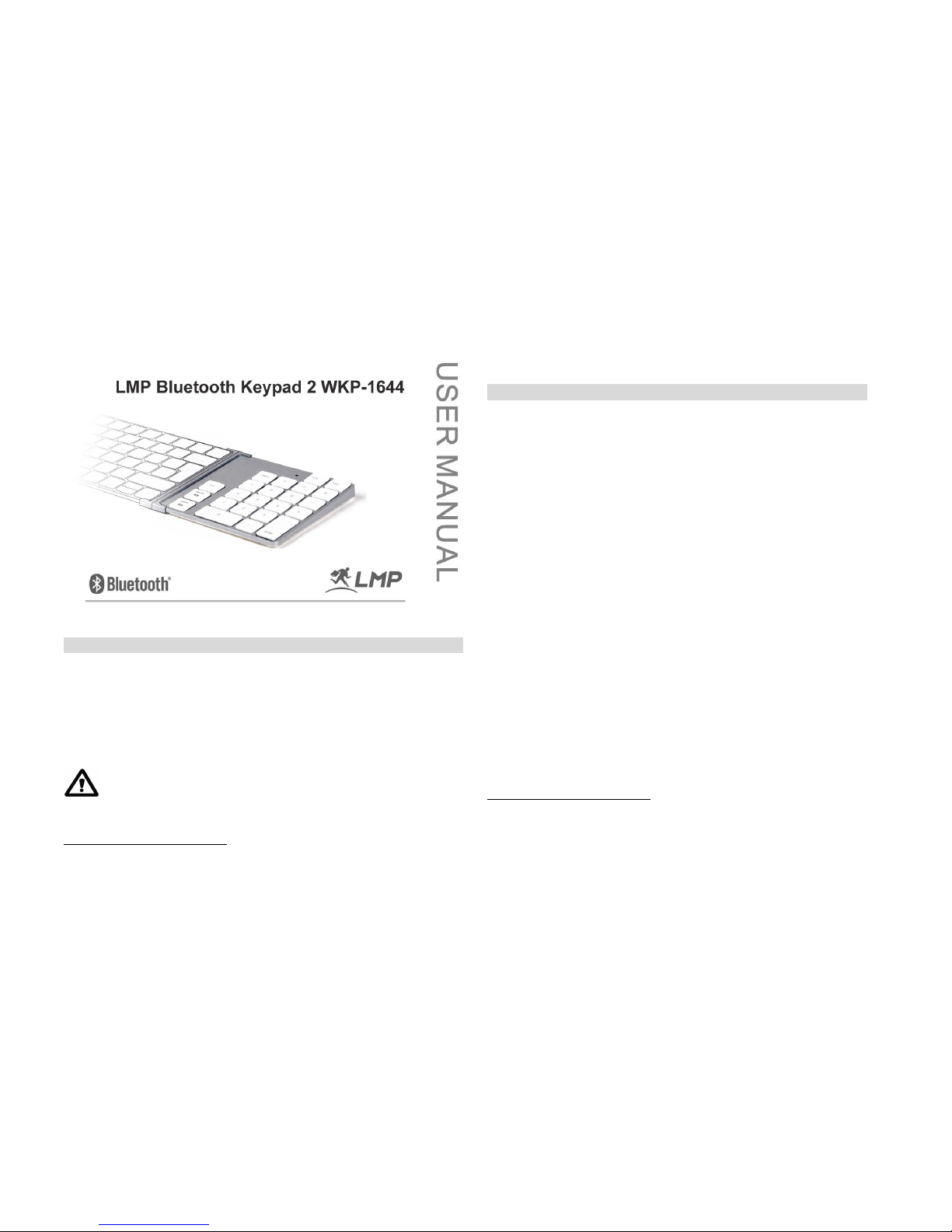
Keypad 2 Manual 1.0
Preface
Thank you for purchasing the LMP Bluetooth™ Keypad 2 WKP-1644! The LMP
Keypad is specifically designed for the use w ith the Apple™ Magic keyboard (P/N
A1644). You can also use it as a stand-alone numeric wireless keypad with MacBook
series or any Bluetooth™-enabled Macintosh™ computer*.
All ™ are the property of their respective holders.
Before using the keypad, read this manual and the FAQs carefully.
Keep the User Manua l for future referenc e.
*
See package contents on system requirements. Bl uetooth keypad does not work with iPad!
Windows OS is not officially supported! Not all Bluetooth dongles may support the LMP Keypad
2 in all its functions! WKP-1644 does not work wi th iPad!
Key Features
23-key numeric wireless keypad for easy and fast w orking with figures,
tables, calculations, spread sheets, etc.
Bluetooth wireless technology for convenient w ireless access to any
Bluetooth-enabled MacBook™ series. No dongle or driver installat ion
required!
Connecting bar connects the WKP-1644 seamlessly with the Apple™ Magic
keyboard (A1644) to form a full-size wireless keybo ard – a perfect alter-
native solution to the full-size USB keyboard!
Can be used as a stand-a lone numeric wireless keypad with MacBook
series or any Macintosh™ Bluetooth-enabled computer*
Keys include 0 ~ 9, operation keys, decimal key “.” (or “,”)1, hot-keys F13
~ F14, tab, delete backward, delete forward, enter key.
Broadcom Bluetooth chipset
Power on/off, pairing button, LED statu s indicator
Power by built-in rechargeable battery
Scissor-type membrane keys w ith non-curved square ke ycaps for high
comfort typing and redu ced typing tiredness
1
Works with built-in Bluetooth as well with most USB Bluetooth dongles. WKP-803 does not work with
iPad! Windows OS is officially supported.
2
Whether a “,” or a “,” is displayed is determined by the OS (country setting) in use, not on the LMP
keypad 2 (WKP-1644)
Page 2
Keypad 2 Manual 1.0
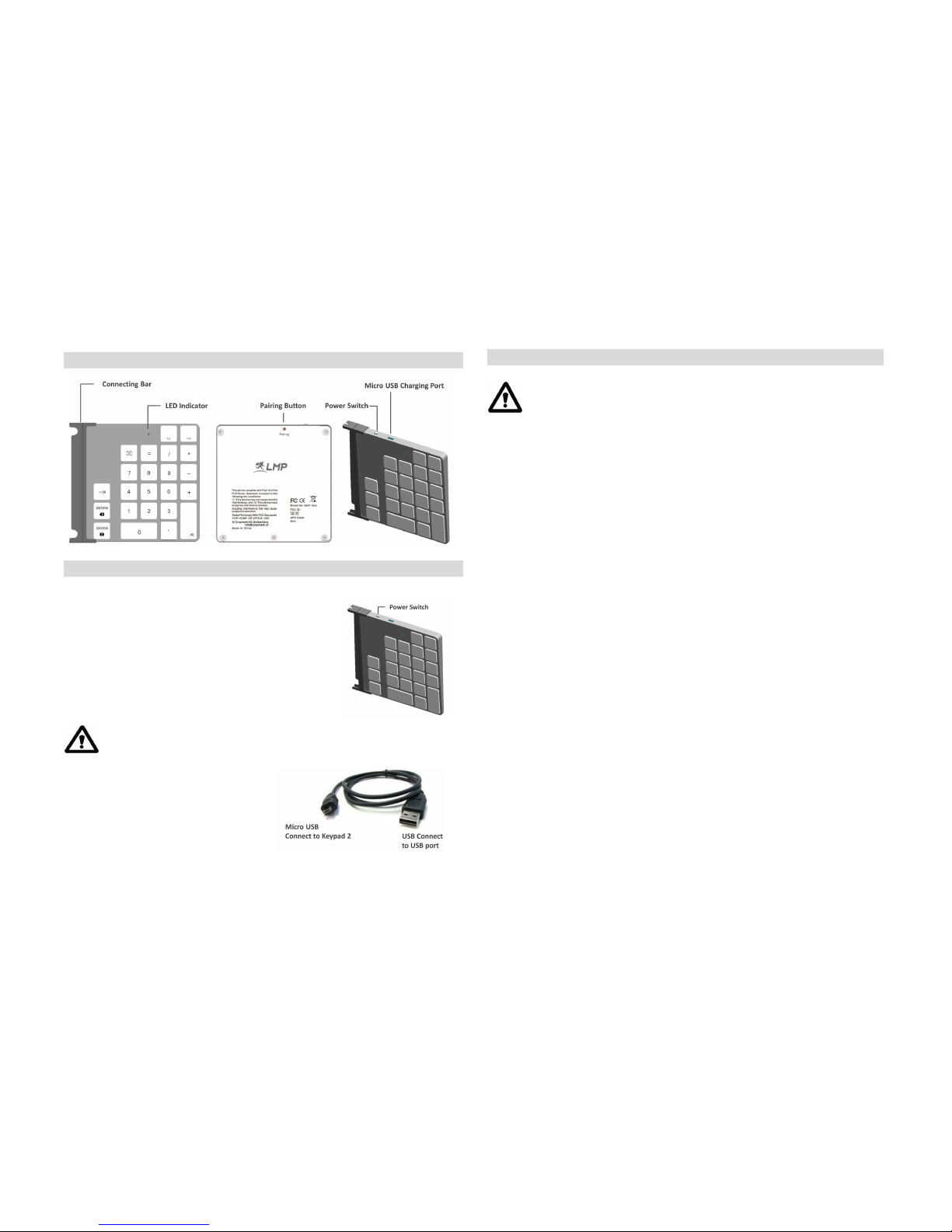
Overview
Getting Started
1) Turn on LMP keypad by swit ching t he lever to the “On” po sition. The LED
indicator will be light up 3 times in green.
Make sure the built-in rechargeable battery is enough power to support
keypad. If not, please use charging cable to charge Keypad.
1 ) Using charging cable (micro USB to
USB); co nnect m icro USB to micro USB
port on Keypad, USB jack to USB port. LED
indicates blue color and will turn off when
battery is fully charged.
Bluetooth Pairing in Mac OS X
Make sure that you have Bluetooth su pport on your Macintosh™
and Mac OS X 10.5.x or higher installed. Th e keypad may work
with older Mac OS X but it is not officially su pported.
1) Choose the Apple™ menu and open the "System Preferences." Under “Internet &
wireless communication” (OS X 10.6.x and higher)/ “Hardware” (OS X 10.5.x) you
should see a Bluetooth icon. If you do not, your Mac does not have Bluetoot h.
2) Enable Bluetooth™. Under "System Preferences" click the Bluetooth™ icon and
make sure you see "Bluetooth: O n" under the "Settings" tab. If it's not turned on,
click "Turn Bluetooth On."
3) Click the "+" tab (set up new device) in the left window to pair a new Bluetooth™
device. The Bluetooth™ assistant opens. (With Mac OS X 10.5.x, the Bluet ooth
assistant may ask what kind of device you are going to pair. Choose “keypad” and
click “continue”). Your comp uter searches automatically for new Bluetooth™
devices.
4) Press the Pairing Butt on on the backside of the keypad with a pen to set up a
connection to your MacB ook. The pairing LED starts to flash in green.
5) In the dialog box the device “LMP WKP-1644” will appear. If it is not listed, make
sure that LMP keypad is turned on and in pairing mode. Then click "Search Again"
in the "Bluetooth Device" dialog box.
6) Click on “LMP WKP-1644” and click “OK”. The LMP keypad should be listed in the
"Devices" tab under "Bluetooth Preferences." (with a green dot and as “connected”)
7) The LMP Keypad is ready for work!
Page 3
Keypad 2 Manual 1.0
Using the Pairing Button
1) If you have used the keypad with another Macintosh™ computer or MacBook, you
have to set up the keypad aga in. Follow steps 1 ~ 7 above.
Power Management
To save power, it is highly recommended to power off the keypad
while the keypad won’t be used for a long time or carrying with
Macbook; The LMP Keypad h as a power safe mo de. Once you turn
off your Macintosh™ the LMP Keypad will go to sleep in order to save
battery power. To w ake it up, press any key on the LMP Keypad.
1) To power off the LMP keypad, move the power lever to the “Off” p osition. You
should see the message “lost connection” on you screen.
2) To power on the keypad again, move the power lever to the “On” position and LED
indicator will flash 3 times in green. You may see the message “connected” on your
screen or in the Bluetooth assistant. You can use the key pad again.
3) The LMP keypad greatly reduces the power consumption automatically when it is
in idle mode (connected, but no key ing). In fact, the power consumption in idle
mode is only about 1/30 (about 0.1mA) of the consumption of the keying m ode
(typing on the LMP keypad; about 3mA). This feature greatly extends the battery
life.
4) The LMP keypad displays a low-battery warning by flashing LED in the interval of
1 second on (green) and 1.5 seconds off (no LED). You should charge your keypad
now to avoid any sudden loss of connection.
5) To charge your built-in rechargeable battery, turn off the LMP keypad, connect
micro USB jack of charging cable to micro USB port on LMP keypad and USB jack to
Macintosh™ computer or MacBook. The LED indicator will On in blue. If you do not
get a new connection you may have to re-pair the LMP keypad. Follow steps 1 ~ 7
above.
The pairing time of LMP Keypad with your Macintosh™ computer
normally just takes a few seconds. However, it may take up to 40
seconds with some B luetooth™ dongles.
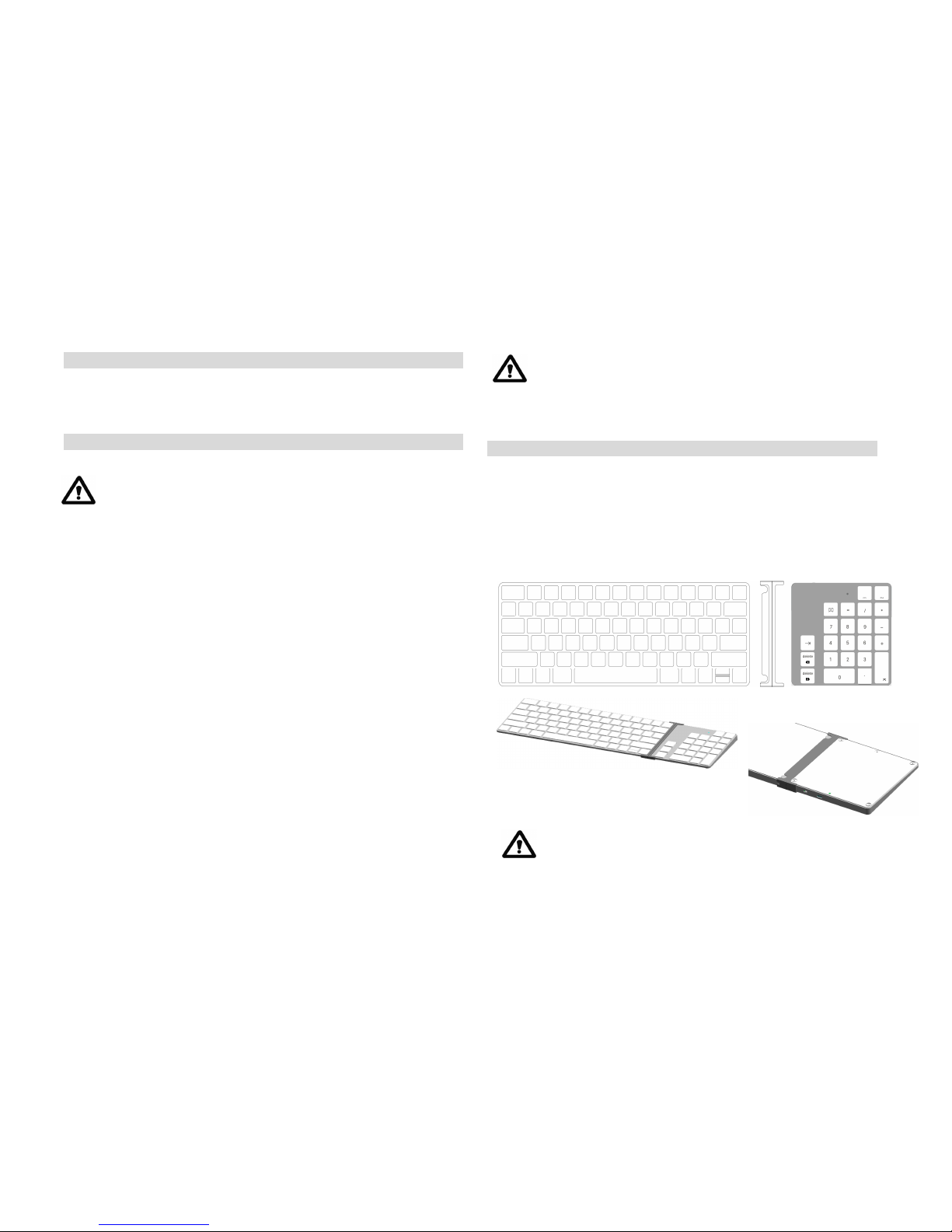
Connecting with the Apple™ Magic keyboard (A1644)
1) Connect the connection bar to the LMP Keypad on its left side by simply
sliding it into the opening. It will nicely form a Keypad unit ready to be
linked to the Apple™ Mag ic keyboard.
2) Connect the Keypad unit to your Apple™ Magic keyboard (A1 644) by
sliding the right side into the LMP Keypad unit as shown in figure below.
You now have a full-size Bluetooth™ wireless keyboard ready for use!
Make sure the Apple™ Magic key board is firmly plugged into
the LMP Keypad unit.
Page 4

Keypad 2 Manual 1.0
FAQs
1) The keypad shows an erratic beh avior such as a sudden loss of
connection, slee p mode afte r a short time (i.e. only a few seconds), no
connection possible when trying to pair, etc.
Erratic behavior of t he keypad can be a result of (too) low battery power. You should
charge the battery now.
2) Short cuts with the cm d-key (i.e. “cmd+” (to enlarge) or “cmd-” (to
downsize) in Pages) do not work when usi ng the Apple™ Magic keyboard
together with the keypad.
Keyboard and keypad are recognized by the Mac OS as two separate input devices.
This means that a combination of the two input devices to form a single command is
not possible.
The shortcut command m ust be e xactly in line with the Mac OS X
shortcut terminology!
3) On the screen, the message “lost connection” appears.
In order to save battery energy, the keypad goes automatically into sleep mode.
Just press any key on the keyp ad and the connection is resumed within 1 ~ 3
seconds.
4) Can the keypad be con nected with various Macintosh™ computers, i.e.
an iMac and a MacBoo k, and switch bac k and forth?
No, the keypad can only be connected with one Macintosh™ computer at a time.
5) Can the battery power status be read in the Apple™ System Preferences
like with the Apple™ wireless keyboard?
No, there is no reading for the current battery power status.
6) Can the sleep mo de be altered or turn ed off?
No, the sleep mode cannot be changed or turned off. The sleep mode reduces the
power consumption to about 1/30 of the stand-by mode. Consequently, the battery
life is greatly extended.
7) When using the LMP Keypad with my iPad it does not work properly.
The LMP Keypad is specifically designed to work w ith desktop or portable Macin-
tosh™ computers. It doe s not support iPad which is clearly stated on the
packaging.
8) On the LMP Keypad, there is a “.” (decimal) key. In my language, the
“,” is used as the decimal sign. Will the LMP Keypad display a “.” or a
“,”?
Whether the LMP Keypad displays a (decimal) “.” or a (decimal) “,” depends on the
Mac OS installed (keyb oard layout/language), i.e. in Fre nch OS/keyboard layout,
the decimal key displays a “,” while in Swiss OS/keyboard layout, a “.” is displayed.
9) During the pairing process with the Macintosh™, there is a window
displayed called “Keyboard i dentification”. I am supposed to press
the key next t o the shift key. But th ere is no shift key on the LMP
Keypad. What do I ne ed to do?
The message can be ignored. Simply press the red button in the upper left corner
to close this window. Your Macintosh™ will recognize the LMP Keypad.
10) The connection to my Mac is lost from time to time or lost completely.
The Bluetooth Keypad does not seem to be connected anymore to my
Mac. This happened after I updated the O S.
An update of the OS can lead to a damaged Bluetooth thread as well as other
reasons such interferences from other electronic devices or system crashes. Follow
these steps to renew the Bluetooth connection:
Page 5

Keypad 2 Manual 1.0
1) Remove all entries of "LMP WKP-1644 or Bluetooth Keypad" in the
Bluetooth Assistant's menu by selecting them and pressing the "-" button in
the lower left corner.
2) Turn off the Mac and Bluetooth Keypad.
3) Start your Mac and turn it off aga in (after the OS has booted without any
entries of the Bluetooth Keypad in its Bluetooth directory).
4) Start your Mac again and install the B luetooth Keypad from scratch. The
connection should be re-established.
This device complies with Part 15 of the FCC Rules. Operation is
subject to the following two conditions:
(1) This device may not cause harmful interference, and (2) This devic e
must accept any interference received, including interference that may
cause undesired operation.
Federal Communicati on Commission Interference Statement
This equipment has been tested and found t o comply w ith the limits for a Class B
digital device, pursuant to Part 15 of the FCC Rules. These limits are designed to
provide reasonable protection against harmful interference in a residential
installation.
This equipment generates, uses and can radiate radio frequency energy and, if not
installed a nd used in accordance with the instructions, may cause harmf ul
interference t o radio communications. However, ther e is no g uarantee th at
interference will not occur in a particular installation. If t his equipment does cause
harmful interference to radio or television reception, which can be determined by
turning the equipment o ff and on, the u ser is en couraged to try to correct the
interference by one of the following measures:
. Reorient or relocate the receiving antenna.
. Increase the separation between the equipment and receiver.
. Connect the equipment into an outlet on a circuit different from that to which the
receiver is connected.
. Consult the dealer or an experienced radio/TV technician for help.
FCC Caution: To assure continued compliance, any changes or modifications not
expressly approved by the party responsible for compliance could void the user 's
authority to operate this equipment. (Examp le - use only shielded interface cables
when connecting to computer or peripheral dev ices).
FCC Radiation Exposu re Statement
This equipment complies with FCC RF radiation exposure limits set forth for an
uncontrolled environment. This equipment complies with FCC RF radiation
exposure limits set forth for an uncontrolled environment. This equipment
should be installed and operated with a minimum distance of 0.5 centimeters
between the radiator and your body.
This transmitter must not be co-located or operating in conjunction with any
other antenna or transmitter.
The antennas used for this transmitter must be installed to provide a
separation distance of at least 0.5 cm from all persons and must not be co-
located or operating in conjunction with any other antenna or transmitter.
Page 6
April 6th 2016 Type Approval Doc.
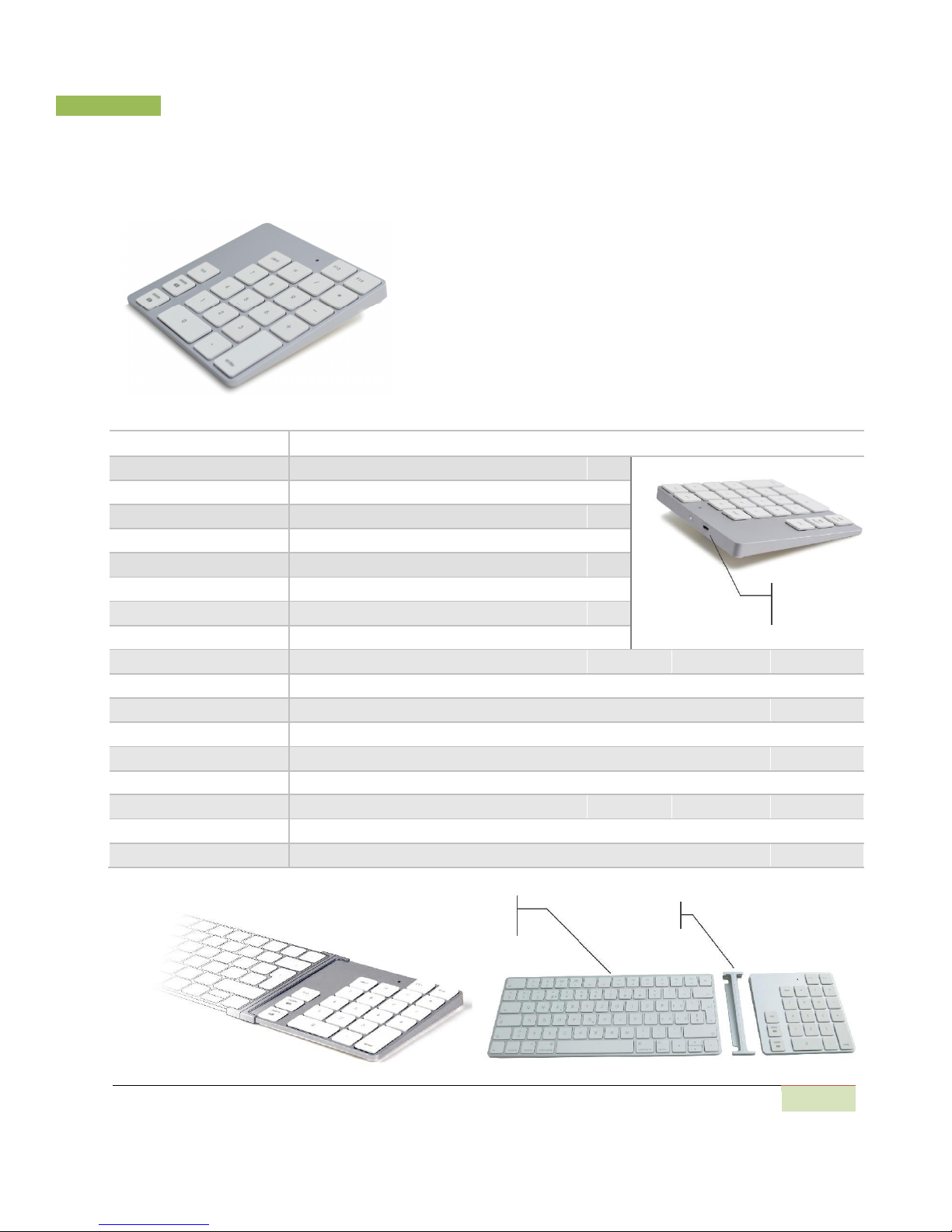
LMP Bluetooth Keypad 2, WKP-1644
WKP-1644, ultra-slim Bluetooth 23-keys numeric keypad is
specially designed for Magic Bluetooth keyboard, A1644.
Thanks its smart design, it can connect with Apple Magic
Keyboard, A1644. Furthermore, it also equip Tab, backward
delete and forward delete keys which are very user’s
friendly for using excel application software.
Key Number 23 keys including F13, F14, Tab, Back & Forward delete keys
Tx Technology
Bluetooth® wireless technology, V3.0
Antenna/ Antenna Gain PCB antenna / -0.99dBi
Frequency/ Channels 2.402Ghz ~ 2.480Ghz/ 79 channels
Modulation GFSK (Differential phase shift keying)
Output Power Normal mode (GFSK): -0.61 dBm
Data Rate / Sensitivity Up to 2.1Mbps / <0.1% BER at -70dBm
Micro USB
Operating Range Up to 8 M (Free space)
Charging Port
Key Switch Scissor-type Membrane with 5 million life cycle time
Key Force/ Traveling 60 +/- 7 gm; 1.3 +/- 0.2 mm
LED Indicator Pairing (blinking in green), Charging (solid blue) and Low battery (blinking slowly in green)
Buttons / Charging Port 1 x power slide switch, 1 x pairing button / Micro USB port (for charging)
Input Power
3.7VDC, 350mAh (built-in rechargeable Battery)
Operating Temperature 0 to 50 degrees Celsius (10% to 95% RH, 25 degree Celsius)
Storage Temperature -10 to 65 degrees Celsius (5% to 90% RH, 25 degree Celsius)
Dimension (mm)/ Weight 126.4 (L) x 114.5 (W) x 12.4 ~ 6.6 (H)/ TBD
Compatibility Compatible with Mac OS 10.5.8 or higher
Accessories 1 x Linkage Bar, 1 x Micro USB to USB charging cable , 1 x User’s manual
Apple Magic
Linkage Bar
Keyboard
Cropmark AG |
1
 Loading...