

Page 1

User Manual
Firmware: a20-RX-ATC
LM746 / LM747
Page 2
a20-RX-ATC
SEP 2013
1. Introduction:
a20-RX-ATC is an embedded firmware running on LM Bluetooth modules which are based on
BlueCore® 5-MM processor or CSR8670 from CSR®. It implements the Bluetooth profiles stack
include the A2DP, AVRCP, HFP and HSP.
The host interface to a20-RX-ATC firmware is
an control a20-RX-ATC by using ASCII commands via UART interface. With these ASCII
c
commands, the host can access the Bluetooth functionalities without involving the Bluetooth protocol
s
tack. The ASCII commands are rather like a application interface of a20-RX-ATC.
2. General Protocol:
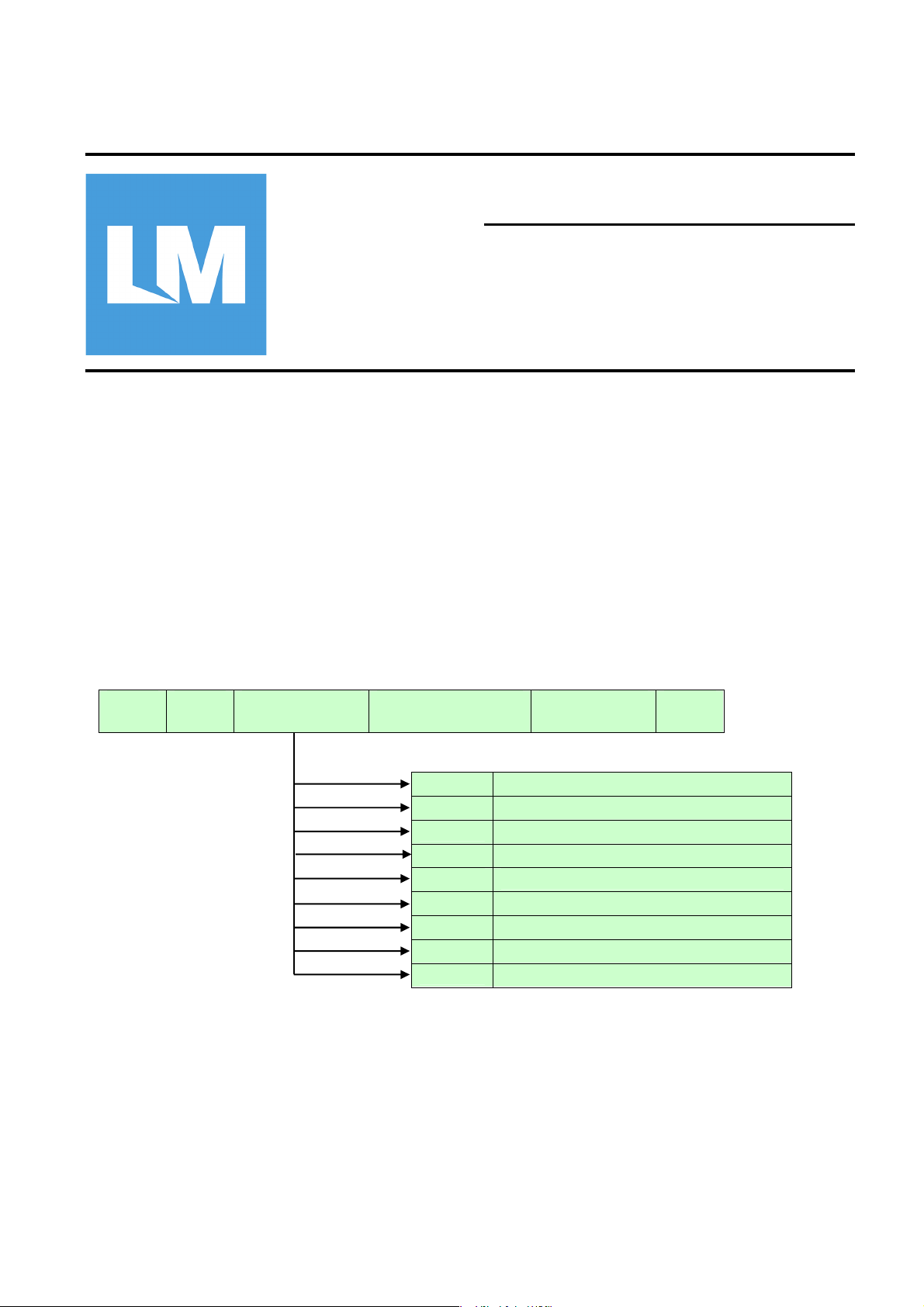
The AT Commands with their response are in ASCII text format and case-insensitive. The AT
Command syntax begins with the text “AT” followed by the Profile Identifier, the Command Character
and the Parameters. The command line shall be ended with a carriage return (\r).
The syntax is shown below:
done through the UART interfaces. The host processor
A T
A ty
pical AT Command example is “atp1234\r”, which is used to set the Bluetooth PIN-CODE.
The AT command transaction is shown in below. It can include three phases, the Command phase,
the Response phase and the Report phase. The Command phase usually is initiated by host
processor who will send the AT command to a20-RX-ATC. In the Response phase, when a20-RXATC accept the AT command, it will reply the response immediately. The host can, then, send next
command once it get the response of last command. a20-RX-ATC will introduce Report phase if the
command require a report. The latency time of the report phase depends on the type of command.
Profile Identifier
(optional)
Command Character
(optional)
*
-
+
#
(
)
.
/
,
System Control
A2DP/AVRCP profile command
HFP profile
PBAP profile
Reserve
Reserve
Reserve
Reserve
Reserve
Parameter
(optional)
\r
(0x0D)
Page 3
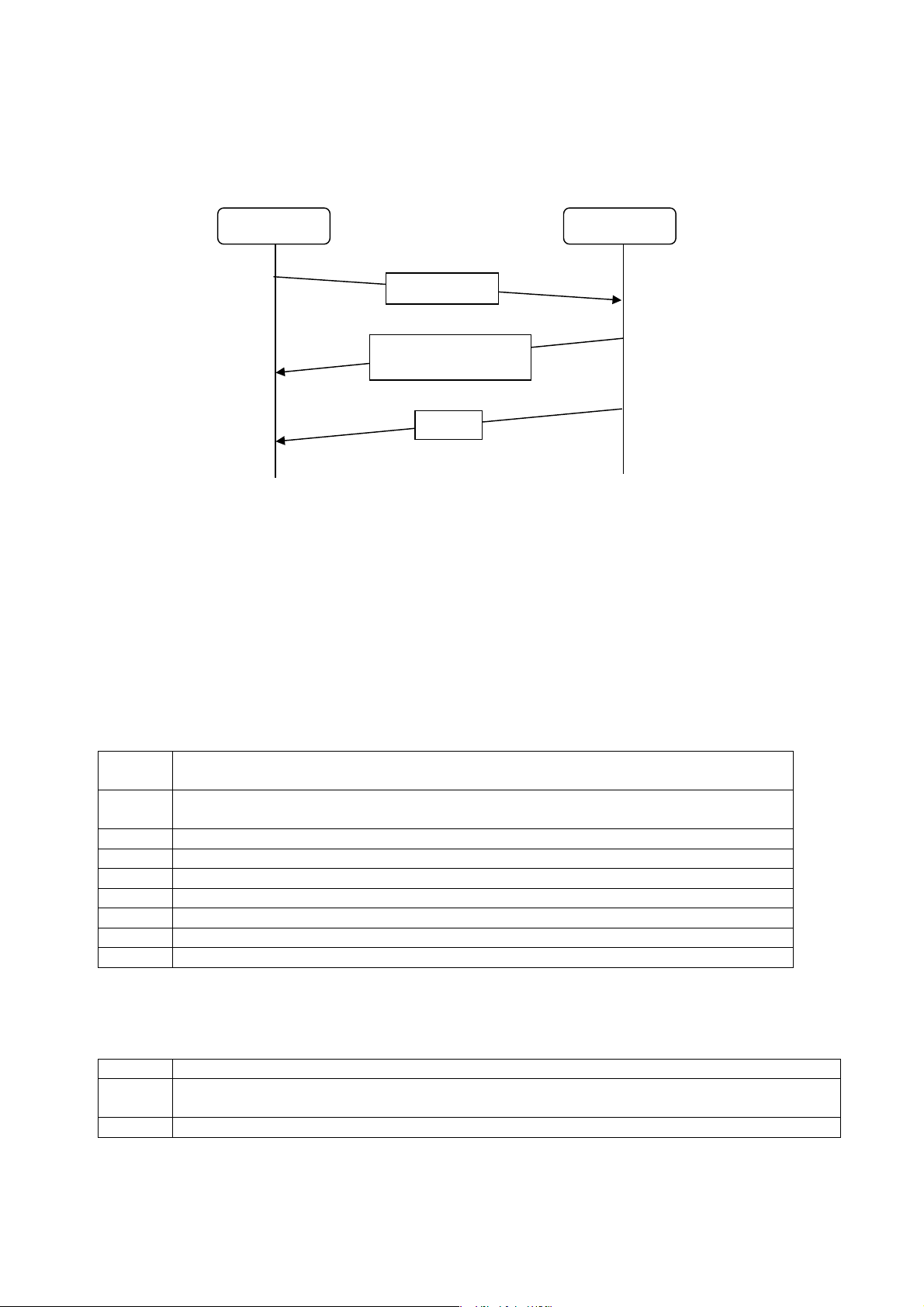
Most of the report are reply in very short latency time while some of others, such as Discovery, may
(OK,
)
need longer time to complete.
Host Processor a20-RX-ATC
AT command
Response
BUSY, ERR
Report
Some events occurred during the communications will be indicated as the Event. The Event is
usually asynchronous to the AT command. The typical examples of the Event are Paired, Connect,
and Disconnect. The Event can be presented by a20-RX-ATC to the host at any timing. Sometime,
the Event is the consequence of previous AT command. The host may expect the Event as part of
the control flow.
All the Response, Report and Event include carriage return (\r) and line feed (\n).
Note: A simple ‘AT’ command without any argument to a20-RX-ATC is treated as health check. The
a20-RX-ATC will simply response ‘OK’ to the host.
2.1 Classes of AT Command
In order to support profiles of different applications, the AT Commands are classified of different
Classes by Profile Identifiers. The are:
*
System Control command, the generic commands to configure the BC5-MM
based Bluetooth module.
- A2DP/AVRCP profile command for stereo audio transporting and playback control
application.
+ HFP profile command for mono headset (mobile phone) application.
# PBAP profile command for phone book access application.
( Reserved
) Reserved
. R eserved
/ Reserved
,
Reserved
2.2 Types of Response
There are three types of Response defined to indicate the processing status of AT Command by
a20-RX-ATC. They are:
OK a20-RX-ATC accept the incoming AT Command and will perform the requested function.
BUSY a20-RX-ATC is busy and reject the incoming AT Command. The host need to re-send
the AT Command.
ERR The ERR indicates that the AT Command can not be carried out*.
Page 4

Note: The causes of ERR can be introduced by syntax error of AT Command or non-applicable
operating state for the incoming command.
2.3 Report
If the incoming AT command requests certain information from a20-RX-ATC. It will provide the
requested results in the Report that sent to host.
The syntax of Report begins with the key word ‘REP:’ and then followed by the processing results
that correspond to the AT command. The contents of each type of Report will be described with
corresponding AT Command in the following sections.
REP: Profile Identifier Command Character
Parameter
(optional)
\r
(0x0D)
\n
(0x0A)
2.4 Event
Event occurred at any timing during the communication such as Pairing successfully, connected,
disconnected,…..and so on. These are usually asynchronous to the transaction of AT Commands.
Therefore, it is usually initiated by a20-RX-ATC to notify the host about situation of existing Bluetooth
link.
The syntax of Event begins with the key word ‘IND:’ and then followed by the related messages from
a20-RX-ATC.
IND: Profile Identifier Attribute Character
Parameter
(optional)
\r
(0x0D)
\n
(0x0A)
Contents:
3. System Control Command Set:............................................................................................................. 5
3.1 Enter Pairing mode....................................................................................................................................5
3.3 Reply The Pin Code................................................... .... .... .... .... ... .... .... ....... .... .... .... .... ... ...........................6
3.4 Connect to Remote Device....................................................... .................................................................6
3.5 To Drop Bluetooth Connection ............................................................. .... ... .... .... .... ... .... .... .......................7
3.6 Set PIO for Output ..................................................... .... .... .... .... ... ........ .... ... .... .... .... .... ..............................7
3.7 Read Input Value from PIO........................................................................................................................8
3.8 Baud Rate Control .....................................................................................................................................8
3.9 Set Stop bit ............................................................. ... .... ..... ...... .... .... .... .... .... ... .... .... ..................................8
3.10 Set Parity bit.............................................................................................................................................9
3.11 Deep Sleep Mode....................................................................................................................................9
3.12 Get Current Bluetooth State.................................. ............................................. ......................................9
3.13 Bluetooth Link Dropped Indication........................................................................................................ 10
3.14 Get the local BD address...................................................................................................................... 10
3.15 To Enable/Disable Local Echo.................................................................................................. ............ 10
3.16 To Set The Local Name........................................................... ............................................................. 11
3.17 Inquiring Firmware Version Number..................................................................................................... 11
3.18 DFU operation.......................................................................................................................................11
3.19 Reset and Factory Settings................................................................................................................... 12
4. A2DP Command Set:..................................................... ................................... .................................. 13
4.1 Volume Control........................................................... ... .... .... .... ... .... .... .... ... .... ........ ... ............................13
4.2 Get Current Audio Volume...................................................................................................................... 13
4.3 Get Current A2DP State ......................................................................................................................... 13
4.4 Playback Control................................................. .... ... .... .... .... .... ... .... .... ........ ... .... .... .... ...........................14
4.5 Mute Indication............................................................... .... .... .... ... .... .... .... ... ........ .... ............................... 14
4.6 Media Attribution Indication............................. ............................................................................ ............ 14
4.7 Media Codec Indication .......................................................................................................................... 15
4.8 A2DP Sampling Rate Indication .............................................................................................................15
5. HFP/HSP Command Set:............................................................................. ....................................... 16
5.1 Answer Incoming Call..................................... ........................................................................................ 16
5.2 Reject Incoming Call............................................................................................................................... 16
5.3 Hang Up Call...........................................................................................................................................17
Page 5

5.4 Last Number Dialing ........................................... .... .... ... ..... ....... ... .... .... .... ... .... .... .... ... ............................ 17
5.5 Specified Number Dailing ....................................... .... ... .... .... .... ... .... .... .... ....... .... .... .... ... ........................ 17
5.6 Toggle Call Transfer ............................................................................................................................... 18
5.7 Volume Control........................................................... ... .... .... .... ... .... .... .... ... .... ........ ... ............................18
5.8 Get Current Audio Volume...................................................................................................................... 19
5.9 Get Current HFP/HSP State................................... ............................................. ................................... 19
5.10 Volume Changed.................................................................................................................................. 19
5.11 Call Set Up............................................................................................................................................ 19
5.12 Call Connected ..................................................................................................................................... 20
5.13 Caller number ....................................................................................................................................... 20
5.14 Call Idle................................................................................................................................................. 20
5.15 Outgoing Call........................................................................................................................................20
5.16 Get The Telephone Operator’s Name or the GSM signal strength...................................................... 20
6. PBAP Command Set:.......................................................................................................................... 22
6.1 Pull Phone Book ................................................................ .... .... ... ........ .... .... ... .... .... .... ........................... 22
6.2 Pull Call History.................................................................. .... .... ... .... .... .... ... .... .... .... ...............................22
Page 6

3. System Control Command Set:
The System Control command set include the AT commands that are common to the Bluetooth
module. The control settings are effective to all profiles.
3.1 Enter Pairing mode
This command set module to enter pairing mode. That is, the Discoverable state.
Syntax
AT*P{conn}\r
Descriptions
{conn} =None, To enter Pairing mode
= ?, To inquire the number of paired devices.
= 0, To exit pairing mode
Response
OK\r\n The command is accepted and counting the number of paired devices.
Report
REP:*P{number}\r\n {number} = The number of paired devices.
The pairing activity can induce one of the following Events:
Event Descriptions
IND:*P{result}\r\n {result} =1, Pairiing successfully
{result} =0, Pairing failed
IND:*C{link}\r\n {link} = 0, HFP link has been connected.
= 1, A2DP link has been connected.
= 4, PBAP link has been connected.
IND:*N\r\n Pin code required.
3.2 Get the list of paired device names
To use this command to get the list of all paired device names.
Syntax
AT*F\r
Descriptions
No parameter is required.
Response
OK\r\n The command is accepted and starting to get the all paired device names in record.
ERR\r\n There is no paired device in the record. The AT*P comman d should be used first to
force the a20-RX-ATC enter Pairing mode.
Page 7

Report
REP:*F={name}\r\n {name} = Hex string originated from remote Bluetooth device. The paired device
names, the Max size of each name is 16 characters
Please be aware the Hex bytes string can be ASCII or UTF-8 code.
3.3 Reply The Pin Code
This command is used to reply Event IND:*N for the PIN co de requeste d by remo te Bluetoo th device.
Syntax
AT*N {PIN code}\r
Descriptions
{PIN code} = Bluetooth PIN code in ASCII format
Response
OK\r\n
The pairing activity can induce one of the following Events:
Event Descriptions
IND:*P{result}\r\n {result} =1, Pairiing successfully
=0, Pairing failed
IND:*C{link}\r\n {link} = 0, HFP link has been connected.
= 1, A2DP link has been connected.
= 4, PBAP link has been connected.
3.4 Connect to Remote Device
This command ask a20-RX-ATC to initiate the connection to remote device. It will try to connect to
the last connected device or the specified remote device in the paired devices list for both A2DP
and HFP profiles.
Syntax
AT*C{conn}\r
Descriptions
{conn} =None,Connect to the last connected device
=Number, This can be a ASCII character of 1~8, which is an index to the list of paired device names.
Response
OK\r\n The command is accepted and starting to connect to the last connected remo te device
or the specified remote device in the paired devices list.
ERR\r\n There is no paired device in the record. The AT*P com mand should be used first to
force the a20-RX-ATC enter Pairing mode.
Page 8

The connecting activity can induce one of the following Events:
Event Descriptions
IND:*B\r\n Connecting to the last connected remote device for both A2DP and HFP profiles.
IND:*C{link}\r\n {link} = 0, HFP link has been connected.
= 1, A2DP link has been connected.
= 4, PBAP link has been connected.
IND:*U{link}\r\n {link} = 0, HFP connecting failed.
= 1, A2DP connecting failed.
= 4, PBAP connecting failed.
3.5 To Drop Bluetooth Connection
This command will force a20-RX-ATC to drop Bluetooth connection.
Syntax
AT*D {conn}\r
Descriptions
{conn} = 1, Disconnect the Bluetooth link.
= 2, Disconnect the Bluetooth link and clear all the authorized devices.
Response
OK\r\n
The consequence of drop link activity can induce the following Event:
Event Descriptions
IND:*Z{link}\r\n {link} = 0, HFP link has been disconnected.
= 1, A2DP link has been disconnected.
= 4, PBAP link has been disconnected.
3.6 Set PIO for Output
This command set the specified PIO for output.
Syntax
AT*O{PIO number}{value}\r
Descriptions
{PIO number} = This can be a ASCII character of 0,1,2,3,4,B or C. where B means PIO11 and C means
PIO12.
{value} = The desired output value for PIO. It can be 1 or 0.
Response
OK\r\n
Page 9

3.7 Read Input Value from PIO
This command read the input value from the specified PIO.
Syntax
AT*I{PIO number}\r
Descriptions
{PIO number} = This can be a ASCII character of 0,1,2,3,4,B or C. where B means PIO11 and C means
PIO12.
Response
OK\r\n
Report
REP:*I {value}\r\n {value} = The input value of the specified PIO. It can be ASCII ‘0’ or ‘1’
3.8 Baud Rate Control
This command is used for changing the baud rate of UART interface.
Syntax
AT*L{baud rate}\r
Descriptions
{baud rate} = * set to 1,200bps; # set to 2,400bps; 0 set to 4,800bps
1 set to 9,600bps; 2 set to 19,200bps (Default); 3 set to 38,400bps
4 set to 57,600bps; 5 set to 115,200bps; 6 set to 230.4Kbps
7 set to 460.8Kbps; 8 set to 921.6Kbps;
? To inquire the current setting
Response
OK\r\n
Report
REP:*L{baud rate}\r\n {baud rate} = The current baud rate setting.
3.9 Set Stop bit
This command is used for changing the Stop bit setting of UART interface
Syntax
AT*K{stop bit}\r
Descriptions
{stop bit} = 0 set to one Stop bit (Default); 1 set to two Stop bits;
? To inquire the current setting
Response
OK\r\n
Report
Page 10

REP:*K{stop bit}\r\n {stop bit} = The current stop bit setting.
3.10 Set Parity bit
This command is used for changing the Parity bit setting of UART interface
Syntax
AT*M{parity bit}\r
Descriptions
{parity bit} = 0 set to none Parity bit (Default); 1 set to Odd Parity bits; 2 set to Even Parity bits;
? To inquire the current setting
Response
OK\r\n
Report
REP:*M{parity bit}\r\n {parity bit} = The current parity bit setting.
3.11 Deep Sleep Mode
This command is only valid when Bluetooth link is disconnected. It will set the deep sleep timer and
start down counting. The Bluetooth module will fall into deep sleep mode when the timer is expired.
The timer can be restarted by any activity at UART or PIO4. The Deep Sleep mode can be
terminated by any activity at UART or PIO4.
Syntax
AT*G{timer}\r
Descriptions
{timer} = the value between 60 – 65536 (seconds). The tolerance is +/- 2 seconds.
= 0, disable the Deep Sleep timer.(default)
If < 60, Not supported, set to zero.
? To inquire the current setting
Response
OK\r\n
Report
REP:*G{timer}\r\n {timer} = The current sleep timer setting.
3.12 Get Current Bluetooth State
This command get the current Bluetooth link state.
Syntax
AT*S\r
Descriptions
Page 11

No parameter is required.
Response
OK\r\n
Report
REP:*S{value}\r\n {value}= 0, The Bluetooth is ready to accept command.
= 1, The Bluetooth is in Pairing state.
= 2, The Bluetooth is in Connecting state.
= 3, The Bluetooth is in Connected state
3.13 Bluetooth Link Dropped Indication
The Bluetooth link can be dropped due to unexpected events such as out of range, disconnected
requested from remote device. The Event ‘No Carrier’ will be indicated to host.
The unexpected link dropped can induce the following Event ‘No Carrier’:
Event Descriptions
IND:*Z{link}\r\n {link} = 0, HFP link was dropped.
= 1, A2DP link was dropped.
= 2, SPP link has been disconnected.
= 4, PBAP link has been disconnected.
3.14 Get the local BD address
This command will display the local BD address.
Syntax
AT*B?\r
Descriptions
No parameter required
Report
REP:*B {addr}\r\n {addr} = The local BD address
3.15 To Enable/Disable Local Echo
To use this command to enable/disable the echo characters to host.
Syntax
AT*E{control}\r
Descriptions
{control} = 0, To disable the local echo.
= 1, To enable the local echo (Default)..
= ?, To inquire the current setting.
Response
Page 12

OK\r\n
Report
REP:*E{control}\r\n {control} = The current local echo setting.
3.16 To Set The Local Name
To use this command to set the local Bluetooth Friendly name.
Syntax
AT*A{control}\r
Descriptions
{control} = XXXX…..X, characters in ASCII code. Maximum 16 characters are allowed.
= ?, To inquire the current local name.
Response
OK\r\n
Report
REP:*A{name}\r\n {name}=Current local name
This report is response to AT*A?\r command.
3.17 Inquiring Firmware Version Number
This command retrieves the information of current firmware version.
Syntax
AT*V\r
Descriptions
No parameter required
Response
VERSION: v{X.XX}
{the name of firmware version}
3.18 DFU operation
To initiate the firmware upgrade procedure via UART interface.
Syntax
ATU=Upgrade
Descriptions
No parameter required
Response
Are you sure(y/n)? ‘Y’ to kick off the DFU operation
Page 13

3.19 Reset and Factory Settings
Reset to default setting and reboot the A2D-ATC.
Syntax
AT*R{option}\r
Descriptions
{option} = 1, Restart the module.
2, Restore the default settings, clear pairing records and then restart the module.
The default settings are:
Default local name: a20-RX-ATC-[model name]
Baudrate: 19200
Stop Bit: 1
Set Parity Bit: 0
Deep Sleep Mode: 0
Local Echo: Enable
Flow Control: 0
SPP Enable: 0
“+++” check:
Response
OK\r\n
1
Page 14

4. A2DP Command Set:
The A2DP command set include the AT commands that control the music transportation (A2DP) as
well as the playback operations (AVRCP).
4.1 Volume Control
This command set the music volume up/down. The volume step from 1 to 15.
Syntax
AT-V{control}\r
Descriptions
{control} = ‘+’, volume up one step.
= ‘-’, volume down one step.
= [number], set volume level, [number] shall be between 0 and 15
Response
OK\r\n
Report
REP:-V{volume}\r\n {volume} = The current local volume setting, whose value is between 0 to 15.
4.2 Get Current Audio Volume
This command read the current audio volume.
Syntax
AT-X\r
Descriptions
No parameter is required.
Report
REP:-X{volume}\r\n {volume} = The current local volume setting, whose value is between 0 to 15.
4.3 Get Current A2DP State
This command get the current A2DP State. This command is useful when the host needs to know if
the audio streaming is running on.
Syntax
AT-S\r
Descriptions
No parameter is required.
Report
REP:-S{value}\r\n {value}= 0, The A2DP/AVRCP is not ready because the Bluetooth link is not
established.
= 1, The A2DP/AVRCP is ready to accept playback control command.
= 2, The A2DP streaming is running on (playing music) and ready to accept
playback control command.
Page 15

4.4 Playback Control
This command set the music playback controls.
Syntax
AT-B{control}\r
Descriptions
{control} = 0, To end the Forward/Backward repeat.
, Stop
= 1, Play/Pause.
= 2, Backward.
= 3, Forward.
= 4, To start Backward Repeat.
= 5, To start Forward Repeat.
= 6, To end Backward Repea t.
= 7, To end Forward Repeat.
Response
OK\r\n
4.5 Mute Indication
When a20-RX-ATC carry out the Playback Control command, the A2DP streaming will be stopped
accordingly. That will induce the Event ‘Mute’ and the Event ‘Unmute’.
The playback control activity can induce the following Event:
Event Descriptions
IND:-M{stream}\r\n {stream} = 1, Mute due to Forward/Backward operation. The A2DP streaming was
stopped.
= 0, Un-mute due to Forward/Backward operation was ended, The A2DP
streaming was resumed.
4.6 Media Attribution Indication
If AVRCP support version 1.3 or later, media playing might induce the Events ‘Attribution1’,
‘Attribution2’ and ‘Attribution3’
Event Descriptions
IND:A{attribution}\r\n
{attribution} = 1, information string of media tag ‘Title’, its format is UTF8.
= 2, information string of media tag ‘Artist’, its format is UTF8.
= 3, information string of media tag ‘Album’, its format is UTF8.
= 4, information string of media tag ‘Number’, its format is UTF8.
= 5, information string of media tag ‘Total Number’, its format is UTF8.
= 6, information string of media tag ‘Genre’, its format is UTF8.
= 7, information string of media tag ‘Playing Time’, its format is UTF8.
Page 16

4.7 Media Codec Indication
During A2DP streaming, it might induce the Events ‘Codec1’, ‘Codec2’ or ‘Codec3’ to indicate the
current A2DP codec
Event Descriptions
IND:-C{codec}\r\n {codec} = 1, current a2dp codec is SBC.
= 2, current a2dp codec is AAC.
= 3, current a2dp codec is aptX.
4.8 A2DP Sampling Rate Indication
When the A2DP connection is established, it will report the sampling rate that for the A2DP
streaming.
Event Descriptions
IND:-S[sampling rate]\r\n [sampling rate] = The sampling rate in ASCII string format.
example: IND:-S44100Hz
Page 17
5. HFP/HSP Command Set:
e
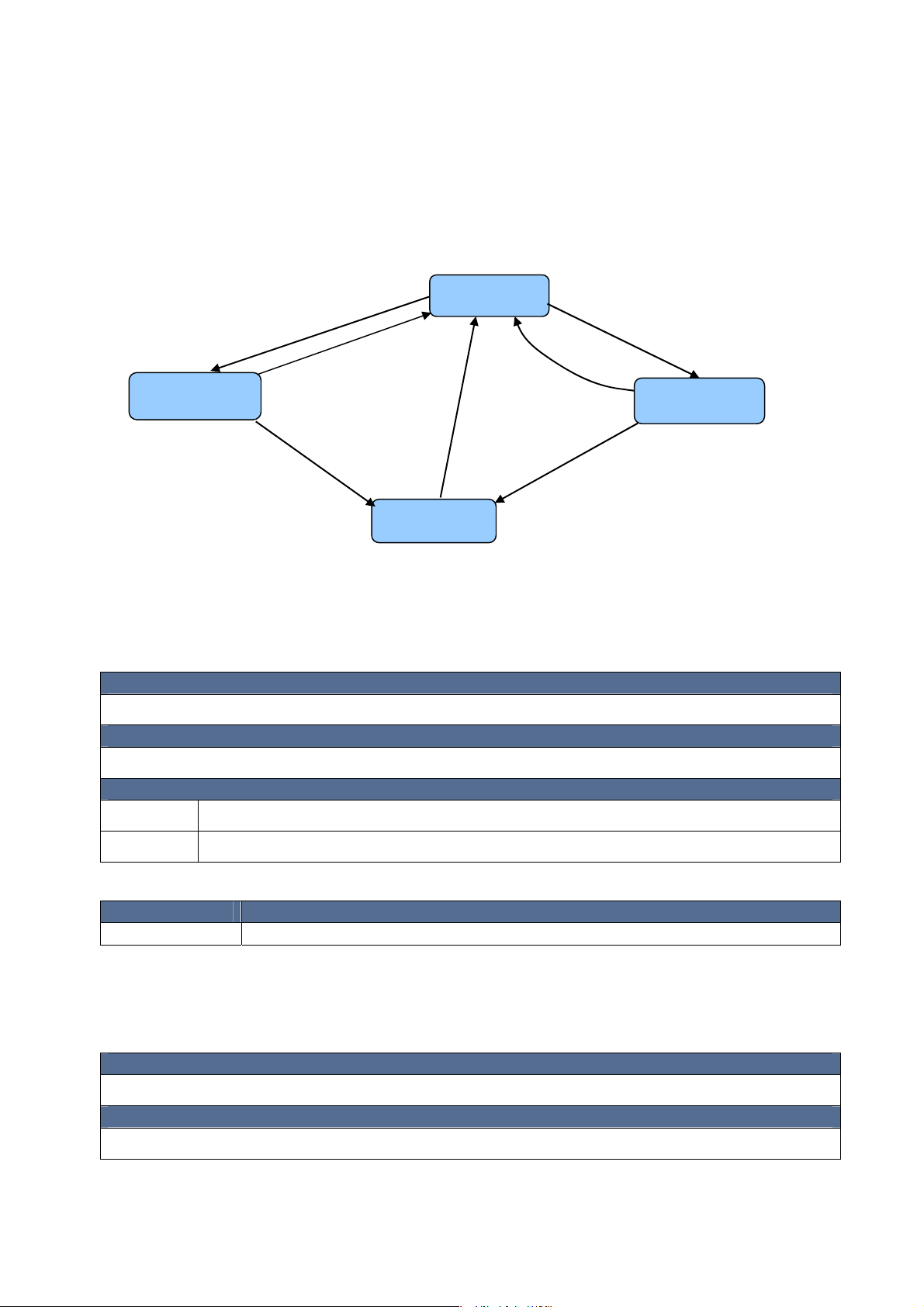
The HFP/HSP command set include the AT commands that control the hand free/headset function.
The following diagram shows the state transitions of HFP/HSP operations and the associated Event
and Commands. Please note that Command should be sent at proper state otherwise will cause
response of error.
IND:
Call Set Up
Incoming Call
Answering
Incoming Call
Reject
Incoming call
IND:
Call Idle
or
Hang Up
Call
Active Call
5.1 Answer Incoming Call
This command is used for answering the incoming call.
Syntax
AT+A\r
Idl
IND:
Call Idle
or
Last Number
Dialing
Hang Up
Call
IND:
Call Connected
Outgoing Call
Descriptions
No Parameter required
Response
OK\r\n Command accepted and will perform the answering.
ERR\r\n The HFP/HSP is not in Incoming Call state.
The answering activity can induce the following Event ‘Call Connected’:
Event Descriptions
IND:+C\r\n Call Connected that indicates the call is built up.
5.2 Reject Incoming Call
This command will reject the incoming call.
Syntax
AT+R\r
Descriptions
No Parameter required
Page 18

Response
OK\r\n Command accepted and will reject the incoming call.
ERR\r\n The HFP/HSP is not in Incoming Call state.
5.3 Hang Up Ca l l
This command will hang up the active call (or outgoing call).
Syntax
AT+H\r
Descriptions
No Parameter required
Response
OK\r\n Command accepted and will hang up the call.
ERR\r\n The HFP/HSP is not in proper state (none of Incoming Call, Outgoing Call, Active Call)
The hanging up activity can induce the following Event ‘Call Idle’:
Event Descriptions
IND:+I\r\n Call Idle that indicate the call is ended and the line is back to idle.
5.4 Last Number Dialing
This command will issue the Last Number Dialing request to mobile phone.
Syntax
AT+L\r
Descriptions
No Parameter required
Response
OK\r\n Command accepted and will issue the Last Number Dialing request to remote device.
ERR\r\n The HFP/HSP is not in idle state.
5.5 Specified Number Dailing
This command will issue the dialing request to mobile phone with specified telephone number.
Syntax
AT+D{number}\r
Descriptions
{number} = Specified dialing number in ASCII code, the Max size of the dialing number is 20 digits.
Page 19

Example: AT+D13800138000\r, the dialing number is 13800138000.
If HFP is at ‘Outgoing Call’ state, this command will cause the HFP to transmit DTMF tone signals to mobile
phone. The DTMF tone signals can be correspond to the ASCII code of 0-9, #,*.
Response
OK\r\n Command accepted and will issue the Number Dialing request to remote device.
ERR\r\n The HFP/HSP is not in idle state.
5.6 Toggle Call Transfer
This command will toggle the transfer of the call between a20-RX-ATC and remote device.
Syntax
AT+T\r
Descriptions
No Parameter required
Response
OK\r\n Command accepted and will send the Call Transfer request to remote device.
ERR\r\n The HFP/HSP is not in proper state (none of Incoming Call, Outgoing Call, Active Call)
The toggle Call transferring activity can induce the following Event ‘Audio Stream’:
Event Descriptions
IND:+B{stream}\r\n {stream} = 0, The audio streaming was stopped because the call was transferred to
remote device.
= 1, The audio streaming is resumed because the call was transferred back to
a20-RX-ATC.
5.7 Volume Control
This command set the audio volume up/down. The volume step from 1 to 15.
Syntax
AT+V{control}\r
Descriptions
{control} = ‘+’, volume up one step.
= ‘-’, volume down one step.
= [number], set volume level, [number] shall be between 0 and 15
Response
OK\r\n
Report
REP:+V{volume}\r\n {volume} = The current local volume setting, whose value is between 0 to 15.
Page 20

5.8 Get Current Audio Volume
This command read the current audio volume.
Syntax
AT+X\r
Descriptions
No parameter is required.
Response
OK\r\n
Report
REP:+X{volume}\r\n {volume} = The current local volume setting, whose value is between 1 to 15.
5.9 Get Current HFP/HSP State
This command get the current HFP/HSP State. The information of current state is useful for the
host’s reference when issuing the AT Command to a20-RX-ATC.
Syntax
AT+S\r
Descriptions
No parameter is required.
Report
REP:+S{value}\r\n {value}= 0, The HSP/HFP is not ready because the Bluetooth link is not established.
= 1, The HSP/HFP is in Idle state and ready
= 2, The HSP/HFP is in Incoming Call state.
= 3, The HSP/HFP is in Outgoing Call state.
= 4, The HSP/HFP is in Active Call state.
5.10 Volume Changed
This Event would be initiated if the remote device changes the audio volume.
Event Descriptions
IND:+V{volume}\r\n {volume} = = The current volume after the change. Its value is between 0 to 15.
5.11 Call Set Up
This Event would be initiated if there is a incoming call.
Event Descriptions
IND:+S\r\n This Event indicates that there is a incoming call.
Page 21

5.12 Call Connected
This Event indicated that the call was built up.
Event Descriptions
IND:+C\r\n This Event indicates that the Call is connected and audio streaming is started.
5.13 Caller number
This Event indicated that the call was displayed caller number if there is a incoming call .
Event Descriptions
IND:+N{number}\r\n {number} = Caller number.
5.14 Call Idle
This Event would be indicated that the call was disconnected by remote device.
Event Descriptions
IND:+I\r\n This Event indicates that the call was hang up and back to idle state.
5.15 Outgoing Call
This Event would be indicated that there is an outgoing made by the remote device.
Event Descriptions
IND:+O\r\n This Event would be indicated that there is an outgoing made by the remote
device.
5.16 Get The Telephone Operator’s Name or the GSM signal strength
Using this command to get the current Telephone Operator’s name.
Syntax
AT+Y{inquiry}\r
Descriptions
{inquiry} = 1, Get the Telephone Operator’s Name.
= 2, Get the GSM signal strength.
Response
OK\r\n
Report
REP:+Y{inquiry}(value)\r\n {inquiry} = 1, Get the Telephone Operator’s Name.
= 2, Get the GSM signal strength.
{value} = ASCII characters string of Telephone operator’s name
= Integer word of GSM signal strength
Note: The GSM signal strength is only available when there was a call
Page 22

had been made while the Bluetooth connection is established.
Page 23

6. PBAP Command Set:
The PBAP is dedicated to client side function which read the phone book from server side (mobile
phone).
6.1 Pull Phone Book
To pull phone book from the mobile phone. The download data will be in VCard2.1 format.
Syntax
AT#B{control}\r
Descriptions
{control} = ‘1’, To pull phone book from the phone’s SIM card
= ‘2’, To pull phone book from the phone’s internal memory.
Response
OK\r\n
6.2 Pull Call History
To pull call history from the mobile phone. The download data will be in VCard2.1 format.
Syntax
AT#H\r
Descriptions
{control} = ‘1’, To pull phone book from the phone’s Received calls
= ‘2’, To pull phone book from the phone’s Missed calls.
= ‘3’, To pull phone book from the phone’s Dialed calls.
Response
OK\r\n
 Loading...