

Page 1
Instruction Manual
REFRIGERATOR
Model: LFR500SS
Page 2

Dear Customer
Congratulations on being the proud owner of Lloyd
Refrigerator. Your Refrigerator comes with a Lloyd
Guarantee of Quality.
Lloyd takes great pride in providing its customers with
perfect products that adheres to international quality
standards.
Lloyd is committed to international quality standards.
Lloyd is committed to provide the ultimate customer
satisfied customers of Lloyd.
At Lloyd, feedback and suggestions based on your product
usage experience are greatly appreciated.
Please feel free to contact us at
[email protected]
NIPUN SINGHAL
DIRECTOR
Page 3

Contents
1. SAFETY WARNINGS ............................................................................................................ 1
2. INSTALLTION ...................................................................................................................... 2
2.1 Location ...................................................................................................................... 2
2.2 Door Handle Install Illumination ................................................................................ 2
2.3 Door Space Requirements .......................................................................................... 3
2.4 Levelling the Unit ....................................................................................................... 3
2.5 Cleaning Before Use ................................................................................................... 3
2.6 Before Using Your Unit ............................................................................................... 3
2.7 Interior Accessories .................................................................................................... 4
3. PRODUCT OVERVIEW ........................................................................................................ 5
4. OPERATION ........................................................................................................................ 5
4.1 Switching On Your Unit .............................................................................................. 5
4.2 Noise Inside the Unit! ................................................................................................. 6
4.3 Tips for Keeping Food in the Unit ............................................................................... 6
4.4 Change the Light Bulb ................................................................................................ 7
5. CLEANING .......................................................................................................................... 7
5.1 Defrosting ................................................................................................................... 7
5.2 Cleaning the Interior and the Exterior of the Unit ..................................................... 7
5.3 Cleaning Tips .............................................................................................................. 7
6. MAINTENANCE .................................................................................................................. 7
6.1 Changing the Internal Light ........................................................................................ 7
6.2 Care When Handling / Moving Your Unit ................................................................... 7
6.3 Servicing ..................................................................................................................... 8
6.4 Switching Of for Long Periods of Time ....................................................................... 8
7. Trouble shooting ............................................................................................................... 8
7.1 Warm tips: .................................................................................................................. 8
8. TIPS FOR ENERGY SAVING ................................................................................................. 9
9. DISPOSAL ........................................................................................................................... 9
Page 4
1. SAFETY WARNINGS
1) WARNING―Keep ventilation openings, in the appliance enclosure or in the built-in
structure, clear of obstruction.
2) WARNING―Do not use mechanical devices or other means to accelerate the defrosting
process, other than those recommended by the manufacturer.
3) WARNING―Do not damage the refrigerant circuit.
4) WARNING―Do not use electrical appliances inside the food storage compartments of the
appliance, unless they are of the type recommended by the manufacturer.
5) The appliance has to be unplugged after use and before carrying out user maintenance on the
appliance.
6) This appliance is not intended for use by persons (including children) with reduced physical,
sensory or mental capabilities, or lack of experience and knowledge, unless they have been given
supervision or instruction concerning use of the appliance by a person responsible for their
safety.
7) Children should be supervised to ensure that they do not play with the appliance.
8) If the supply cord is damaged, it must be replaced by the manufacturer, its service agent or
similarly qualified persons in order to avoid a hazard.
9) Please abandon the refrigerator according to local regulators for it use flammable blowing gas
and refrigerant.
10) Please according to local regulations regarding disposal of the appliance for its flammable
refrigerant and blowing gas. Before you scrap the appliance, please take off the doors to prevent
children trapped.
11) This appliance is intended to be used in household and similar applications such as
– staff kitchen areas in shops, offices and other working environments;
– farm houses and by clients in hotels, motels and other residential type environments;
– bed and breakfast type environments;
– catering and similar non-retail applications.
12) Do not store explosive substances such as aerosol cans with a flammable propellant in this
appliance.
IT IS HAZARDOUS FOR ANYONE OTHER THAN AUTHORISED SERVICE PERSONNEL TO
CARRY OUT SERVICING OF REPAIRS WHICH INVOLVE THE REMOVAL OF COVERS.
TO AVOID THE RISK OF AN ELECTRICAL SHOCK DO NOT ATTEMPT REPAIRS YOURSELF.
1
Page 5
2. INSTALLTION
2.1 Locaon
When selecng a posion for your unit you should make sure the floor is flat and firm, and the
room is well venlated. Avoid locang your unit near a heat source, e.g. cooker, boiler or radiator.
Also avoid direct sunlight as it may increase the electrical consumpon. Extreme cold ambient
temperatures may also cause the unit not to perform properly. This unit is not designed for use in
a garage or outdoor installao
When installing the unit, ensure that 10 cm of free space is le at both sides, 15 cm at the rear
and 20 cm at the top of the unit. This will allow cold air to circulate around the wine cooler and
improve the efficiency of the cooling process.
2.2 Door Handle Install Illuminaon
Note: Figures in the user manual are only for reference. The actual product may differ slightly.
The refrigerator must be disconnected from the source of electrical supply
installaon of accessory.
n. Do not drape the unit with any covering.
before aempng the
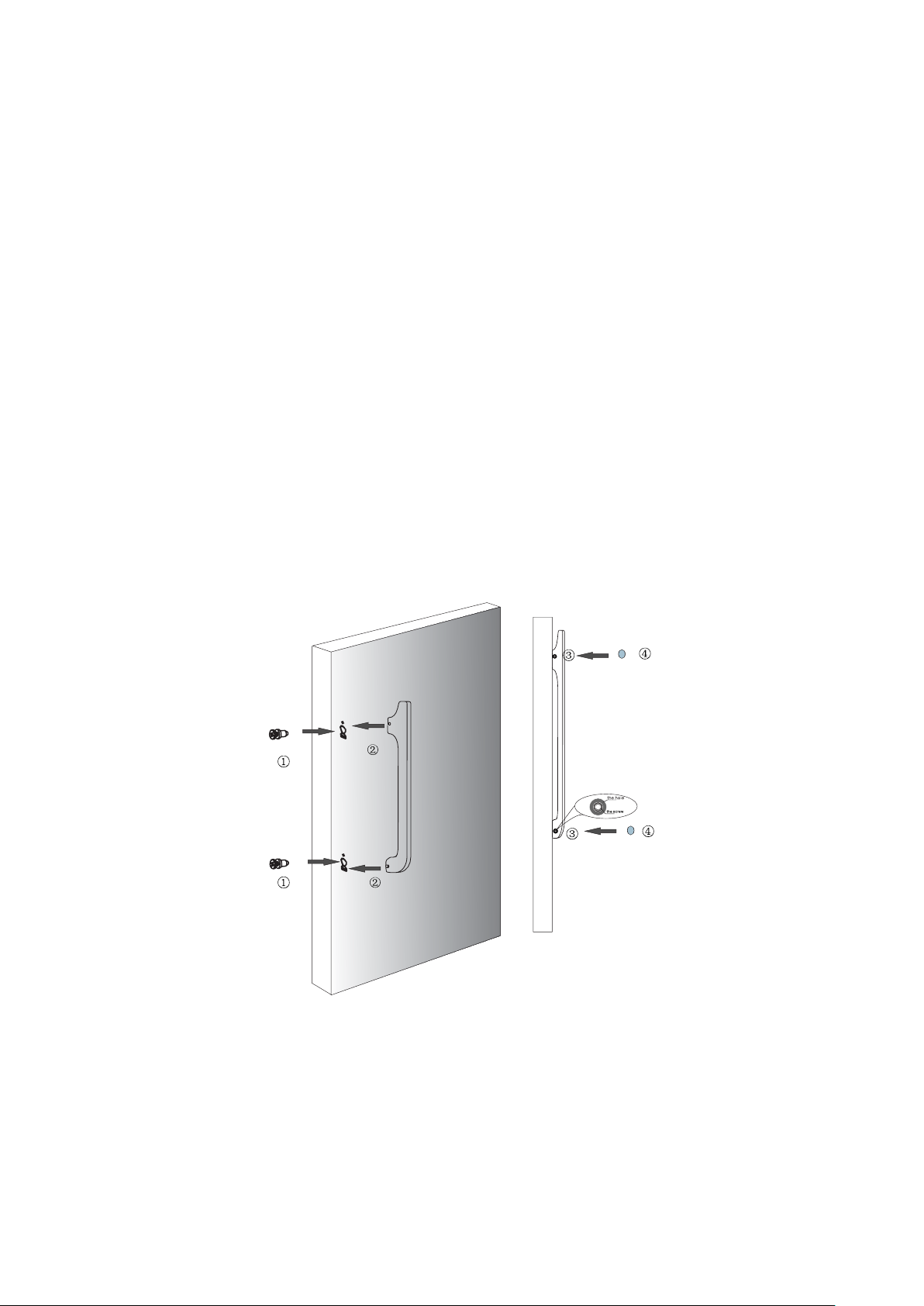
① Take out the two crisscross-screw;and install them into the door holes;turn the screws ll to
the bottom;
② Aim at screws to install the handle;
③ The screws in the hole at the side of the handle and turn the screws ll them very ght;
④ Screw cap should be put on the screw.
2
Page 6
2.3 Door Space Requirements
W
D
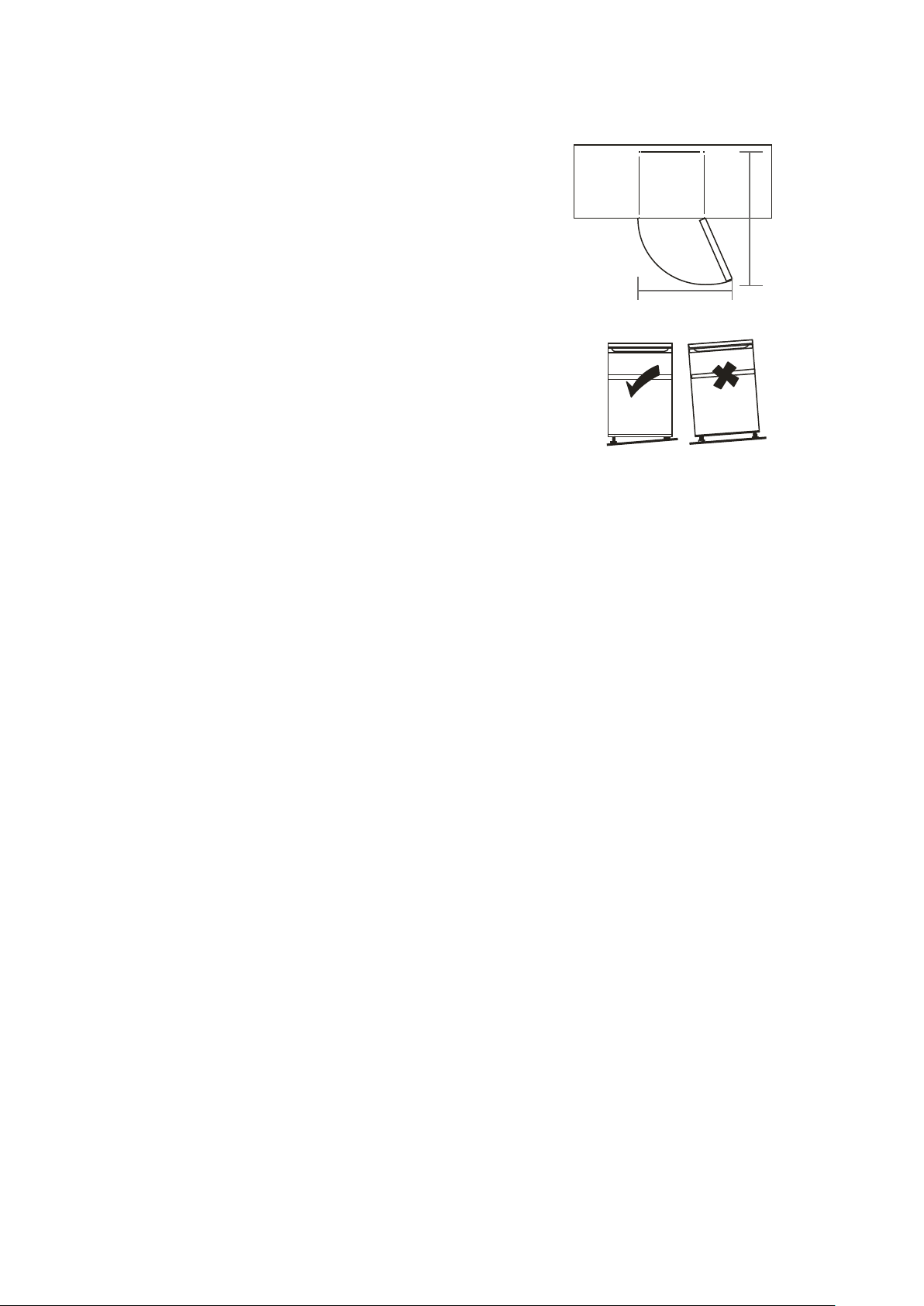
The unit's door must be able to open fully as shown.
W×D≥1270×1240mm
2.4 Levelling the Unit
To do this adjust the two levelling feet at the front of the unit.
If the unit is not level, the door and magnetic seal alignments
will not be covered properly.
Make sure that the foot touches the ground before use.
Look down from the top, clockwise and counterclockwise loosening, tightening.
2.5 Cleaning Before Use
Wipe the inside of the unit with a weak solution of bicarbonate soda. Then rinse with warm
water using a 'Wrung-out' sponge or cloth. Wash the shelves and salad bin in warm soapy water
and dry completely before replacing in the unit. Clean the exterior of the unit with a damp cloth.
If you require more information refer to the Cleaning section.
2.6 Before Using Your Unit
The refrigerator adopts 220-240V/50Hz AC power, voltage fluctuations over the range of 198 ~
264V will cause malfunction or even damage,so a 750 W automatic voltage regulator must be
installed in concert with the AC power.
Do not damage the power cord under any condition so as to ensure safety use, do not use when
the power cord is damaged or the plug is worn.
Do not put flammable, explosive, volatile and highly corrosive items in the refrigerator to prevent
damages to the product or fire accidents.
Do not place flammable items near the refrigerator to avoid fires.
This product is household refrigerators and shall be only suitable for the storage of foods.
According to national standards, household refrigerators shall not be used for other purposes,
such as storage of blood, drugs or biological products.
Do not place items such as bottled or sealed container of fluid such as bottled beers and
beverages in the freezer to prevent bursts and other losses.
Before placing any food in your unit, turn it on and wait for 24 hours, to make sure it is working
properly and to allow it time to fall to the correct temperature. Your unit should not be overfilled.
3
Page 7
◆ Before Plugging in
You must check that you have a socket which is compatible with the plug supplied
with the unit.
◆ Before Turning On!
Do not turn on until two hours after moving the unit. The coolant fluid needs time to
settle.
2.7 Interior Accessories
Various glass or plastic storage shelves are included with your appliance - different
models have different combinations.
You should always slide one of the full size glass storage shelves into the lowest set of
guides, above the fruit and vegetable containers, and keep it in this position. To do
this, pull the storage shelf forward until it can be swivelled upwards or downwards
and removed.
Please do the same in reverse to insert the shelf at a different height.
In order to make the most of the volume of the fresh food storage compartment and
frozen-food storage compartment, the user can remove one or more shelves, drawers, out
of the appliance, according to your daily use.
4
Page 8
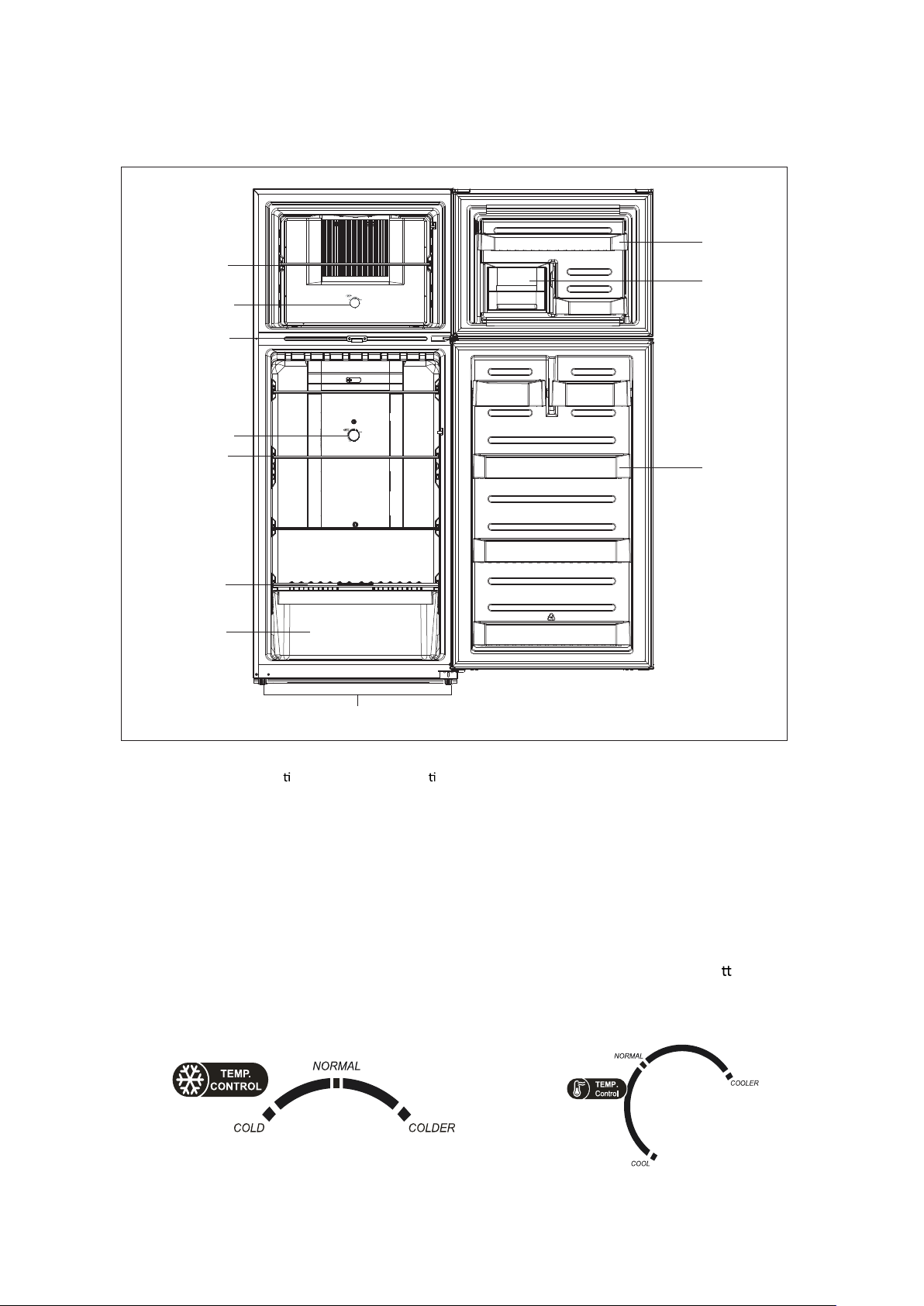
3. PRODUCT OVERVIEW
Adjustable
Glass Shelves
Thermostat
Co
ntrol Dial
Lock
Thermostat
Control Dial
Adjustable
Glass Shelves
Salad Bin
Cover
Door Shelf
Ice maker
Door Shelf
Salad Bin
Levelling Feet
*All images in this instruc on manual are for indica on only; please refer to your individual unit for
details.
4. OPERATION
4.1 Switching On Your Unit
� By turning the knob inside the cabinet, you can adjust the refrigerator and the freezer’s
temperature you want.
� According to the sketch, the upper knob control the freezer’s temperature, the bo
control the refrigerator’s temperature. Turn the knob clockwise, the cabin
et temperature will
be lower, counter-clockwise, the temperature will be raised.
om one
5
Page 9
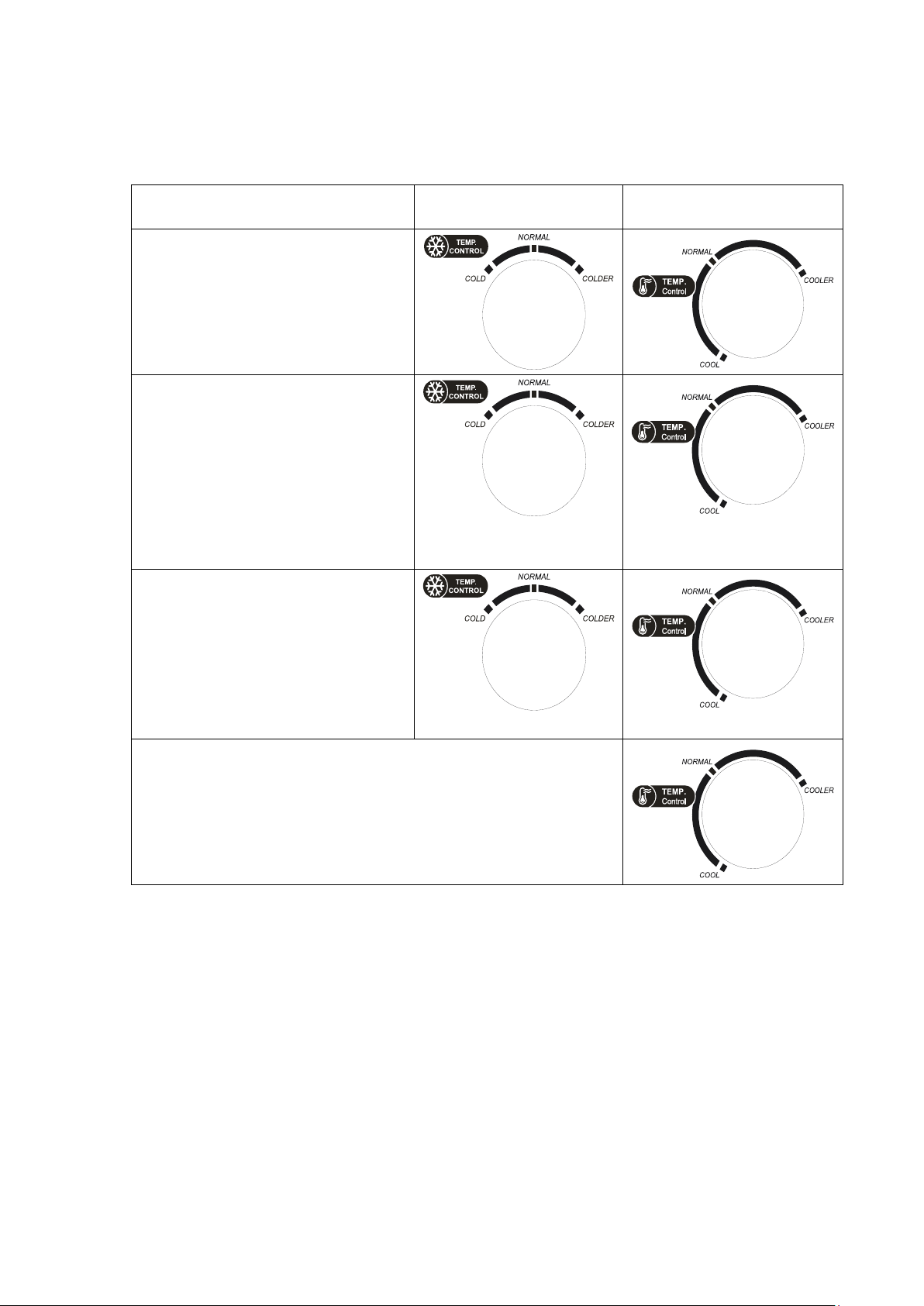
� When you use fast-freezing feature or do freezing capacity test, please turn the freezer knob
▲
▲
▲
▲
▲
▲
to the posion of COLDER, i.e. the value at the rightmost side. Then adjust the refrigerator
control knob as needed. The suggeson of turning the control knob as follows:
Thermostat Freezer Refrigerang
Under normal use, we recommend
the food freezer and fresh-food
▲
storage knob is used to adjust the
temperature in the “intermediate
zone”.
When ambient temperature
around the refrigerator is below
10℃ for a long me or fast freeze
is needed, we recommend food
freezer knob is adjusted to the
“right zone” posion, and the
fresh-food storage knob is adjusted
to the “right of the middle zone”.
When ambient temperature above
43℃ cooling is needed, it is
recommended the food freezer
knob is adjusted to the “le zone”,
and the fresh-food storage knob is
adjusted to the “right of the
middle zone”.
Warning: When fresh-food storage knob is adjusted to the
right zone (as shown in figure on the right), fast cooling is
realized, but adjusng to this posion for a long me, the
fresh-food storage temperatures may be lower than 0℃.
4.2 Noise Inside the Unit!
You may noce that your unit makes some unusual noises. Most of these are perfectly normal,
but you should be aware of them!
These noises are caused by the circulaon of the refrigerant liquid in the cooling system. It has
become more pronounced since the introducon of CFC free gases. This is not a fault and will not
affect the performance of your unit. This is the compressor motor working, as it pumps the
refrigerant around the system.
4.3 Tips for Keeping Food in the Unit
◆ Cooked meats/fishes should always be stored on a shelf above raw meats/fishes to avoid
bacterial transfer. Keep raw meats/fishes in a container which is large enough to collect juices
and cover it properly. Place the container on the lowest shelf.
◆ Leave space around your food, to allow air to circulate inside the unit. Ensure all parts of the
unit are kept cool.
6
Page 10

◆ To prevent transfer of favours and drying out, pack or cover the food separately. Fruit and
vegetables do not need to be wrapped.
◆ Always let pre-cooked food cool down before you put in the unit. This will help to maintain
the internal temperature of the unit.
◆ To prevent cold air escaping from the unit, try to limit the number of mes you open the
door. We recommend that you only open the door when you need to put food in or take food
out.
Change the Light Bulb
4.4
Lamp replacement by professionals
5. CLEANING
5.1 Defrosng
Auto-defrost for Frost-free Refrigerator
5.2 Cleaning the Interior and the Exterior of the Unit
◆ Remove all the shelves and the salad bin. To remove the salad bin first remove the lower
door shelf.
◆ Wipe the inside of the unit with a weak soluon of bicarbonate soda and then rinse with
warm water using a“wrung-out” sponge or cloth. Wipe completely dry before replacing the
es and salad bin.
shelv
◆ Use a damp cloth to clean the exterior, and then wipe with a standard furniture polish. Make
sure that the door is closed to avoid the polish geng on the magnec door seal or inside
the unit.
◆ The grille of the condenser at the back of the unit and the adjacent components can be
vacuumed using a so brush aachment.
5.3 Cleaning Tips
Condensaon may appear on the outside of the unit. This may be due to a change in room
tempera
technician for assistance.
ture. Wipe of any moisture residue. If the problem connues, please contact a qualified
6. MAINTENANCE
6.1 Changing the Internal Light
Lamp replacement by professionals.
Illuminang lamp parameter: MAX 4W
6.2 Care When Handling / Moving Your Unit
Hold the unit around its sides or base when moving it. Under no circumstances should it be lied
by holding the edges of the top surface.
Do not turn upside, horizontally place or vibra
greater than 45°.
te the refrigerator, the carrying angle can not be
7
Page 11
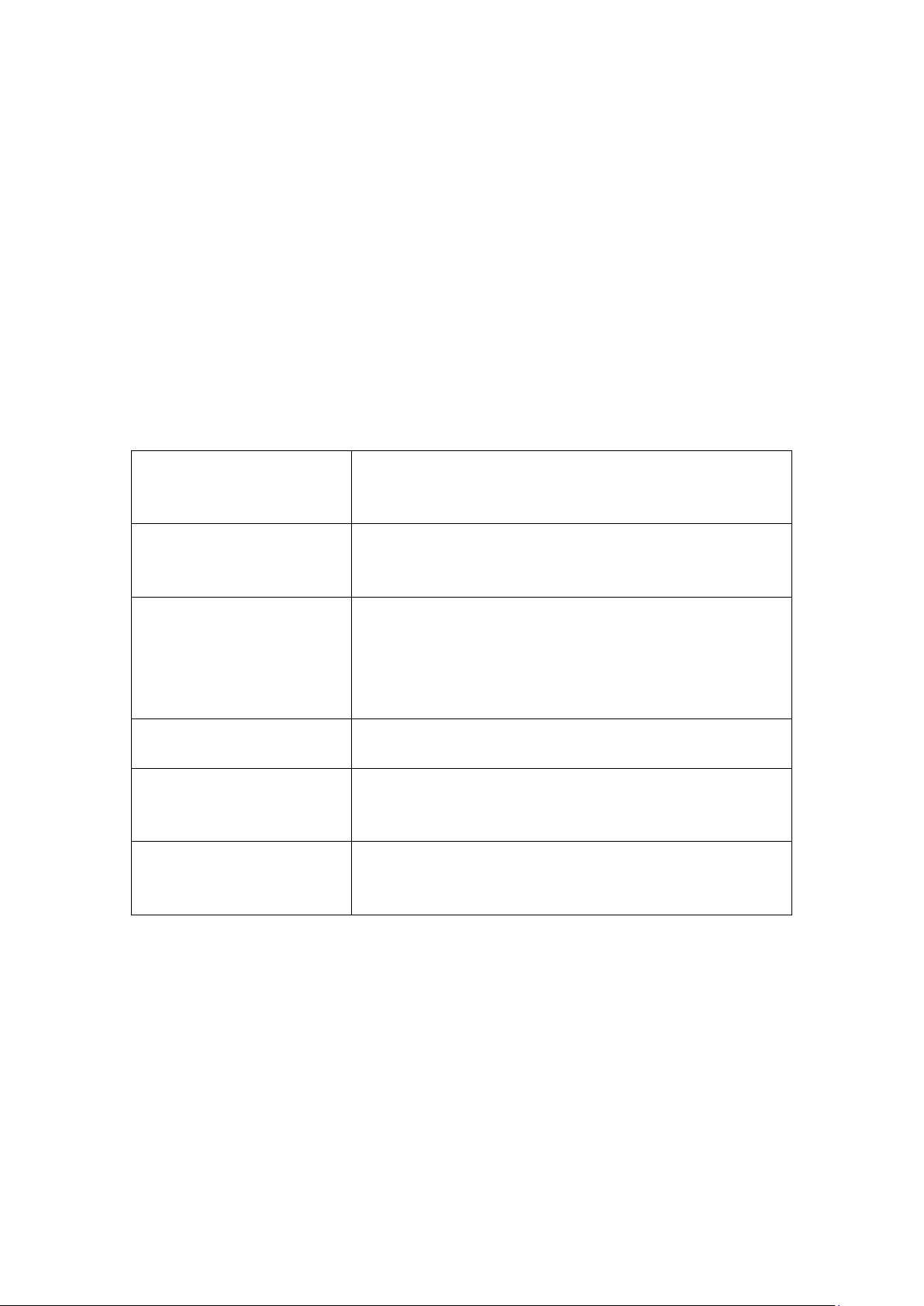
6.3 Servicing
Inoperation
Whether the freezer is plugged and connected to power;
Low voltage;
Failure power or tripping circuit
Odor
Odorous foods should closely wrapped;
Whether foods are rotten;
Whether the interior shall be cleaned.
Long-term operation of
compressor
It is normal that refrigerator operates for longer time in
summer when the ambient temperature is higher;
Do not put too much food in the freezer at one time;
Do not put foods until they are cooled;
Frequent opening of refrigerator door.
Illuminating light does not
shine
Whether the refrigerator is connected to power,
whether the illuminating light is damaged.
The refrigerator door can not
be properly closed.
The freezer door is stuck by food packages;
Too much food;
Tilt refrigerator.
Loud noises
Whether the food is leveled, whether the refrigerator is
balanced;
Whether the refrigerator parts are properly placed.
The unit should be serviced by an authorized engineer and only genuine spare parts should be
used. Under no circumstances should you attempt to repair the unit yourself. Repairs carried out
by inexperienced persons may cause injury or serious malfunction. Contact a qualitatively
technician.
6.4 Switching Of for Long Periods of Time
When the unit is not in use for a long period of time, disconnect it from the mains supply, empty
all food and clean the appliance, leaving the door ajar to prevent unpleasant smells.
7. Trouble shooting
The following simple issues can be handled by the user. Please call the after-sale service
department if the issues are not settled.
7.1 Warm tips:
◆The refrigerator enclosure may emit heat during operation specially in summer, this is caused
by the radiation of the condenser, and it is a normal phenomenon.
◆Condensation: condensation phenomenon will be detected on the exterior surface and door
seals of the freezer when the ambient humidity is large, this is a normal phenomenon, and the
condensation can be wiped away with a dry towel.
◆Buzz: Buzz will be generated by running compressor specially when starting up or shutting
down.
8
Page 12

8. TIPS FOR ENERGY SAVING
Correct Disposal of this product
Correct Disposal of this product
This marking indicates that this product should not be disposed with other household
wastes throughout the EU. To prevent possible harm to the environment or human
health from uncontrolled waste disposal, recycle it responsibly to promote the
sustainable reuse of material resources. To return your used device, please use the
return and collection systems or contact the retailer where the product was purchased.
They can take this product for environmental safe recycling.
Try not to open the door too often, especially when the weather is wet and hot. Once you open
the door, close it as soon as possible.
Every now and then check if the appliance is sufficiently ventilated (adequate air circulation
behind the appliance).
In normal temperature conditions, please arrange the thermostat at the middle setting.
Before loading the appliance with packages of fresh food, make sure they are cooled to ambient
temperature.
Ice and frost layer increase energy consumption, so clean the appliance as soon as the layer is 3-5
mm thick.
◆ The appliance should be located in the coolest area of the room, away from heat producing
appliances or heating ducts, and out of the direct sunlight.
◆ Let hot foods cool to room temperature before placing in the appliance. Overloading the
appliance forces the compressor to run longer. Foods that freeze too slowly may lose quality, or
spoil.
◆ Be sure to wrap foods properly, and wipe containers dry before placing them in the appliance.
This cuts down on frost build-up inside the appliance.
◆ Appliance storage bin should not be lined with aluminum foil, wax paper, or paper toweling.
Liners interfere with cold air circulation, making the appliance less efficient.
◆ Organize and label food to reduce door openings and extended searches. Remove as many
items as needed at one time, and close the door as soon as possible.
9. DISPOSAL
Old units still have some residual value. An environmentally friendly method of disposal will
ensure that valuable raw materials can be recovered and used again. The refrigerant used in your
unit and insulation materials require special disposal procedures. Ensure that none of the pipes
on the back of the unit are damaged prior to disposal. Up to date information concerning options
of disposing of your old unit and packaging from the new one can be obtained from your local
council office.
When disposing of an old unit break of any old locks or latches and remove the door as a
safeguard.
For more information, please contact the local authority or your retailer where you purchased
the product.
9
Page 13
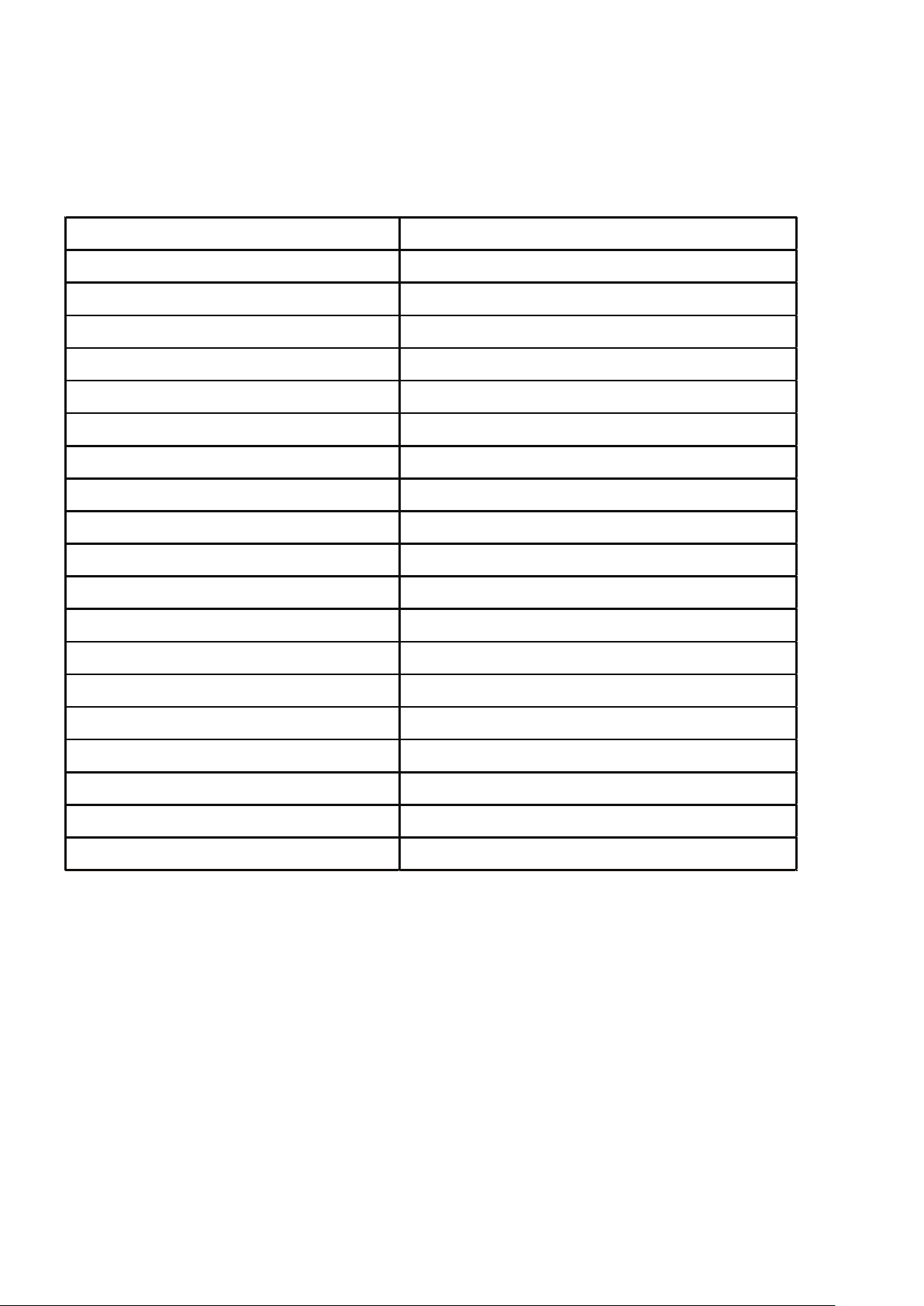
SPECIFICATION
Model LFR500SS
Climate Class N/ST/T
Pretecon Against Electric Shock I
Rated Voltage/Frequency 220-240V~/50Hz
Rated Power(W) 160
Rated Defrost Power(W) 180
Lamp Rated Power(W) MAX 4
Rated Current(A) 1.0
Foaming Agent Cyclopentane
Energy Comsumpon(kwh/24h) 1.77
Total Gros s Volume(L) 486
Gross Freezer Volume(L) /
Total Storage Volume(L) 460
Freezer Storage Volume(L) 97
Refrigerator Storage Volume(L) 363
Refrigerant,Amount R134a,11
5g
Freezing Capaci ty(kg/24h) 4.5
Net Weight(kg) 85
Gross Weight(kg) 94
Product Dimensi ons(mm)(wxdxh) 750x735x1825
10
Page 14
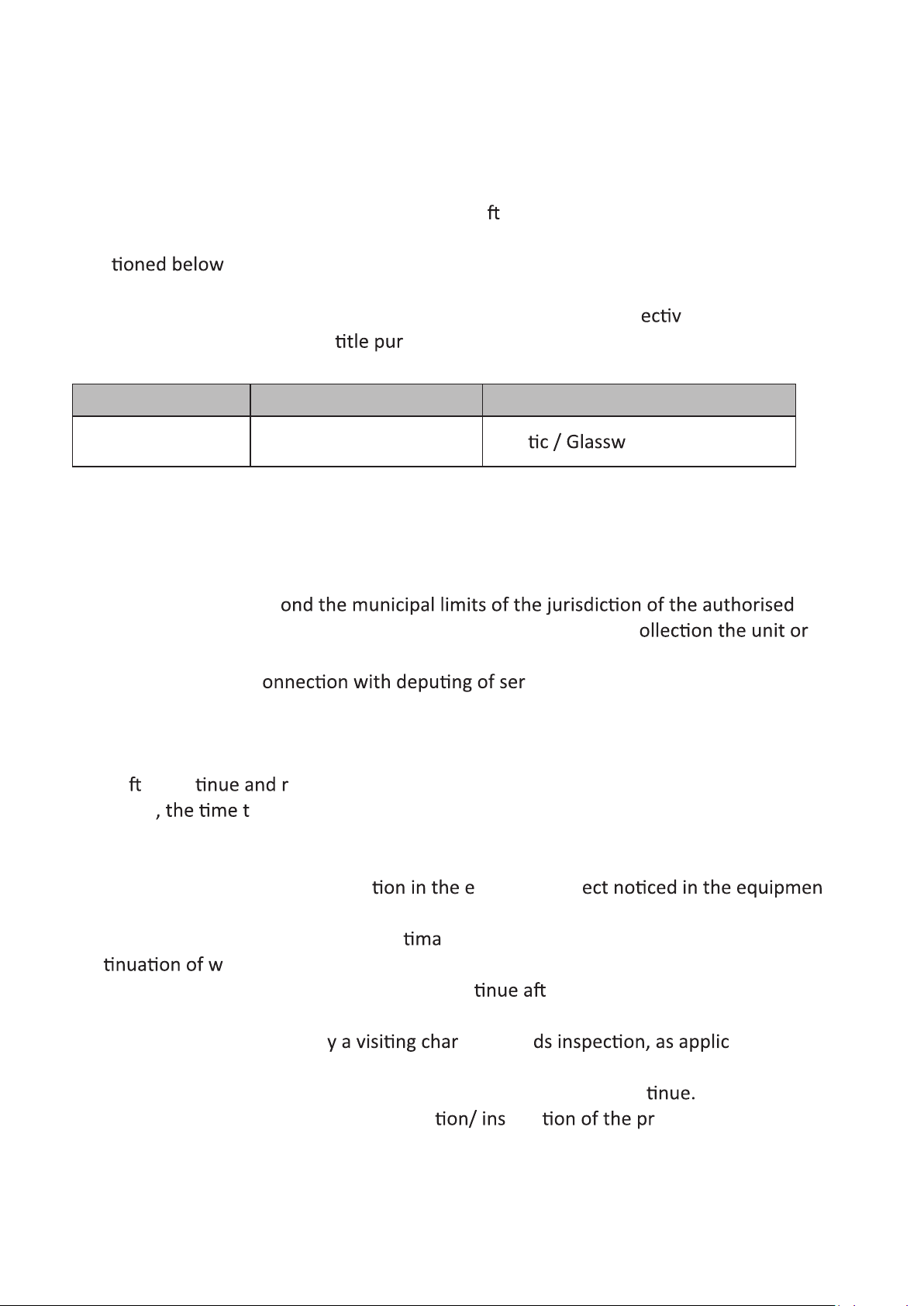
WARRANTY TERMS AND CONDITIONS
LLOYD ELECTRIC ENGINEERING LIMITED (hereina er referred to as 'the company')
guarantees to the purchaser that this product carries a warranty for the period
men
or replace free of charge any part or parts of the product , if the defect is due to the
faulty material or workmanship. Warranty involves repairing of def
product/parts and does not en
product.
Product Warranty Period Part Not Covered
, commencing from the date of purchase. The company will repair
e
chaser for the replacement of complete
Refrigerator
Compressor - 5 years
Plas are / Bulb / Tube
1. This warranty is confined to the first purchaser of the product only.
2. Repair or replacement will be carried out through the Company's Service Centres or
it's Authorised Service Centres.
3. For units installed bey
service centre/company's service centre, all expenses incurred in c
part/s thereof from the company's service centre/authorised service centre, as well as
Comprehensive - 1 year
expenses incurred in c
vice personnel/ technicians
towards to and fro travel, conveyance and other incidentals etc. will be borne by the
customer.
4. In the event of repairs/replacement of any part/s of the unit, this warranty will
therea
Moreover
er con emain in force only for the unexpired period of the warranty.
aken for repair/replacement and in transit whether under the
warranty or otherwise shall not be excluded from the warranty period.
5. The company or it's authorised service centre, reserves the right to retain any part/s or
component/s replaced at it's discre
vent of a def t
during the warranty period.
6. (a) Any change of address shall be in
con
arranty.
(b) Warranty for the unexpired period shall con
ted to concerned service centre for
er the product is inspected by
the concerned service centre and the product is found free from transit damage.
The customer shall have to pa
ge towar able.
(c) In case of any transit damage, the product shall be repaired by the concerned
service centre on charges and warranty for unexpired period to con
7. The warranty does not cover demonstra talla oduct purchased.
11
Page 15
8. The company's obliga arranty shall be limited to repair or providing
replacement of part/s only. The maximum claim /s if entertained by the company will be
subject to the maximum retail price of the product purchased or the purchase price,
whichever is lower.
9. In the event of any unforeseen circumstance, and spares not being available, the
company's prevailing deprecia
commer
epairs.
chaser to accept as a
10. The warranty is issued at New Delhi , and Courts at New Delhi shall have exclusive
er matters covered or flowing from this warranty.
11. The company's obliga
providing replacement of part/s, which are found to be det
arranty shall be limited to repairing or
e.
12. Repairs during warranty period shall be carried on "Carry In" basis. Wherein for
service the purchaser shall bring the product to the Service Centre with whom the set is
registered for warranty service. The warranty does not cover cost of transporta
system from place of installa o the Service Centre.
13. The concerned Service Centre will advise the customer whether to effect the repair
at site or its Service Centre.
14. Any part/s of the system replaced by the company at it's discre
a e part.
THIS WARRANTY IS NOT APPLICABLE IN ANY OF THE FOLLOWING CASES:
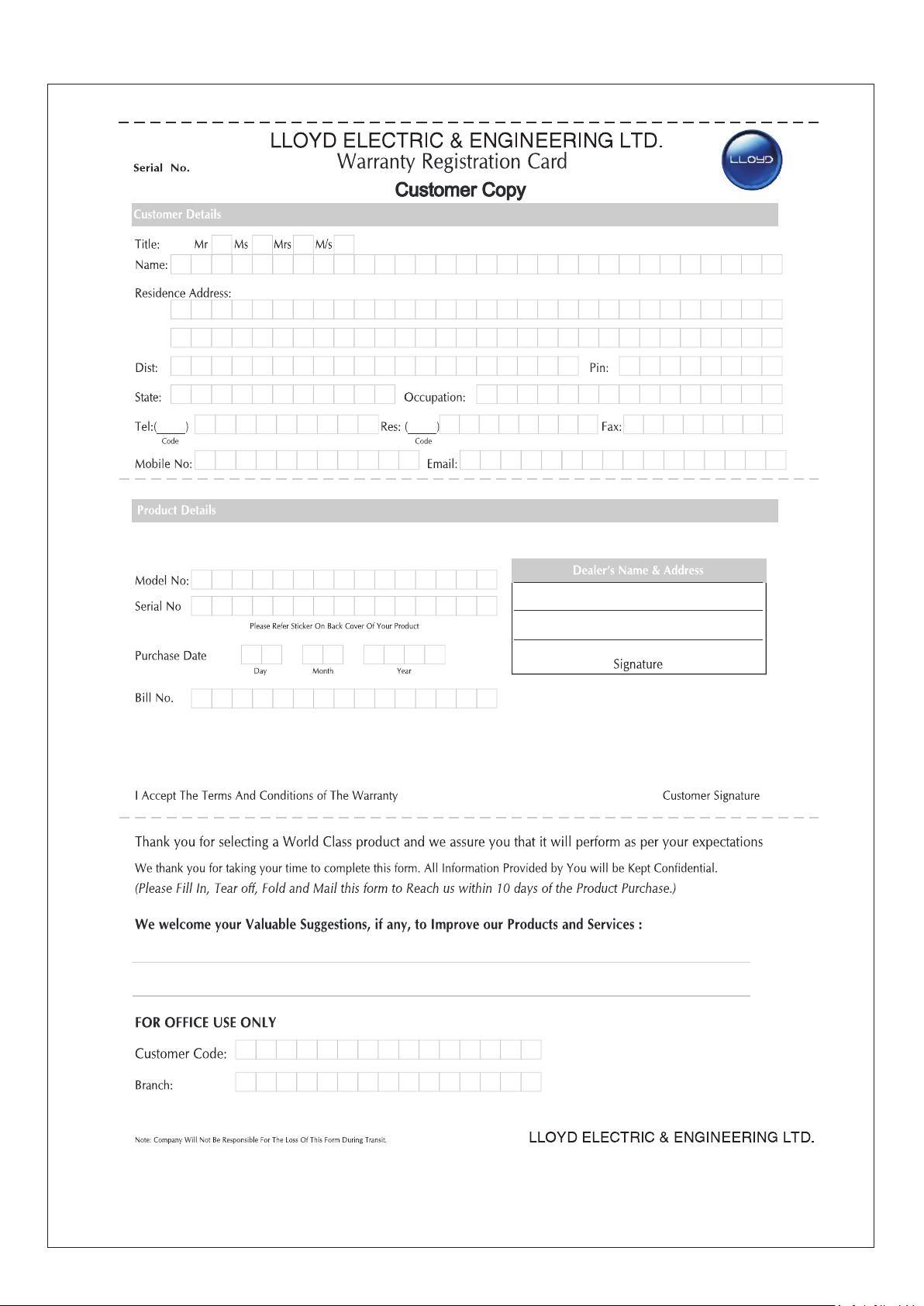
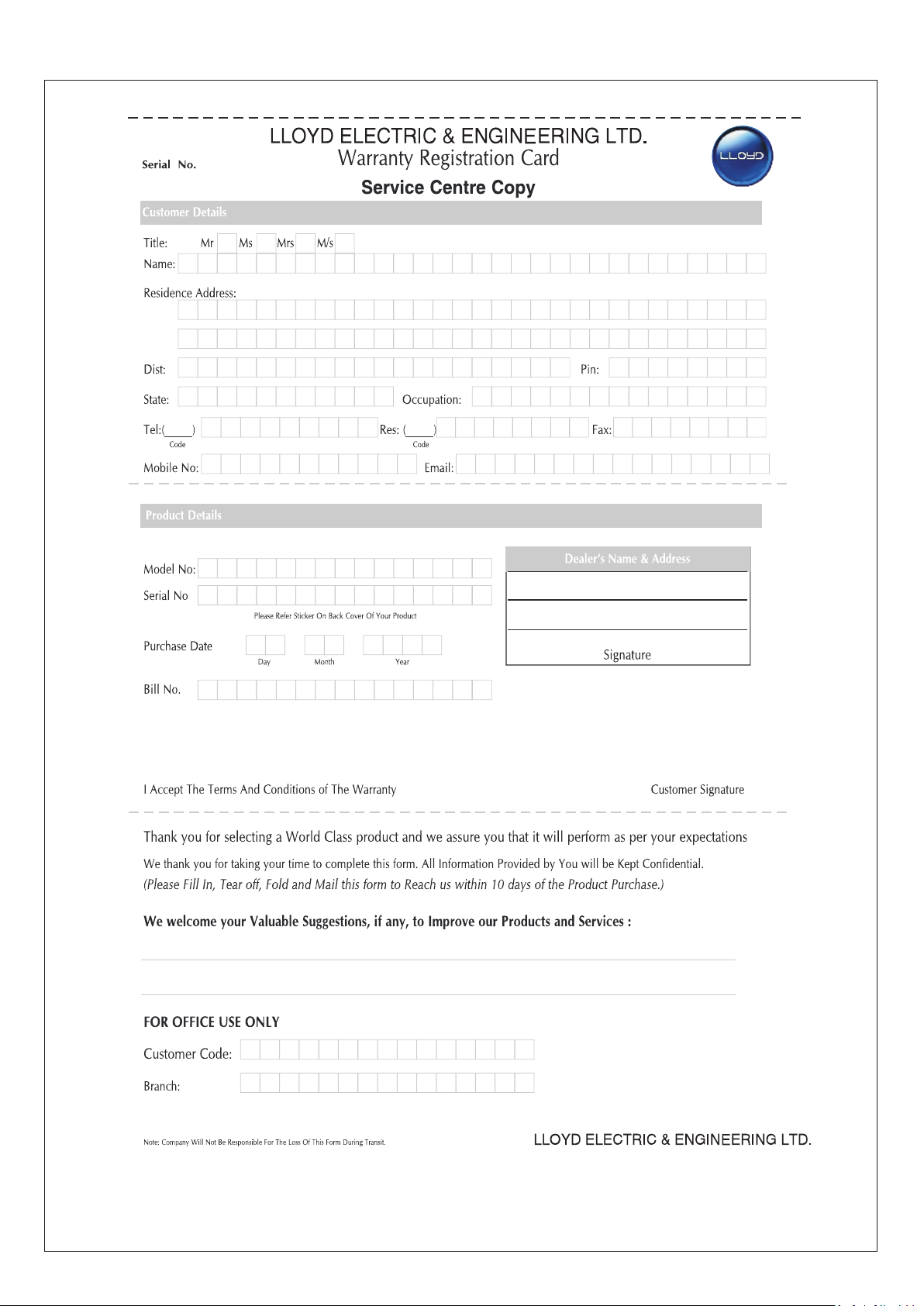
1. The warranty card is not duly filled and mailed back to the service centre for
registra
chaser.
2. The completed warranty card and invoice is not presented to authorised personnel at
epair.
3. The product is not purchased from an Authorised LLOYD dealer.
4. The product is not used according to ins
en in the ins
5. Defects caused by improper use as determined by the company personnel.
6. Modifica
cons
7. Installa
era y nature is made in the electrical circuitry/ or physical
t.
epair work is carried out by persons/agency other than authorised by
the company.
8. Site (premises where the product is kept) c
t do not confirm to the
recommended opera
9. The original serial number is removed, obliterated or altered from the machine or
cabinet.
10.Defects due to cause beyond control like lightning, abnormal voltage, acts of God or
while in transit to service centre or purchaser's residence
12
Page 16
Page 17

Page 18
Page 19

Page 20
 Loading...