

Page 1
Global LCD Panel Exchange Center
LITEMAX SSF2822
www.panelook.com
Spanpixel
28” LED B/L Ultra-Wide LCD
(1st Edition 2011/8/12)
All information is subject to change without notice.
Approved by Checked by Prepared by
LITEMAX Electronics Inc.
8F, No.137, Lane 235, Bau-Chiau Rd.,
Xindian Disty, New Taipei City, Taiwan R.O.C.
Tel : 886-2-8919-1858
Fax: 886-2-8919-1300
Homepage: http://www.litemax.com/
Page 1
One step solution for LCD / PDP / OLED panel application: Datasheet, inventory and accessory!
www.panelook.com
Page 2
Global LCD Panel Exchange Center
RECORD OF REVISION
Version and Date Page Old Description New Description Remark
Aug,12,2011 all Preliminary Release
www.panelook.com
Page 2
One step solution for LCD / PDP / OLED panel application: Datasheet, inventory and accessory!
www.panelook.com
Page 3

Global LCD Panel Exchange Center
Contents
RECORD OF REVISION...................................................................................................2
Contents...........................................................................................................................3
1.0 GENERAL DESCRIPTION .........................................................................................4
1.1 FEATURES ..........................................................................................................4
1.2 GENERAL SPECIFICATIONS..............................................................................4
1.3 ABSOLUTE MAXIMUM RATINGS .......................................................................5
2.0 Electrical characteristics .......................................................................................... 6
3.0 INPUT TERMINAL PIN ASSIGNMENT ......................................................................8
4.0 OPTICAL SPECIFICATION......................................................................................18
5.0 MECHANICAL DRAWING........................................................................................ 19
6.0 PRECAUTIONS ........................................................................................................20
www.panelook.com
Page 3
One step solution for LCD / PDP / OLED panel application: Datasheet, inventory and accessory!
www.panelook.com
Page 4
Global LCD Panel Exchange Center
1.0 GENERAL DESCRIPTION
SSF2822 is 28” ultra wide TFT Liquid Crystal Display module with LED Backlight unit. It has been
designed to apply the 8-bit 1 channel LVDS interface method. This module supports 1366 x 254 and can
display 16.7M colors. It provides LCD panel with specific ratios for digital signage, public transportation,
exhibition hall, department store, vending machine and industrial applications.
1.1 FEATURES
Brightness: Higher than 500nits
LED Backlight
Ultra wide aspect ratio
High Definition
Low Power Consumption
Low EMI Noise
Built in LED driving converter
www.panelook.com
1.2 GENERAL SPECIFICATIONS
Model No.
Description 28”ResizingLCD,500nits,LEDbacklight,1366x254
DisplayArea 697.7x129.7mm
Brightness Higherthan500nits
Resolution 1366x254
AspectRatio 16:3
ContrastRatio 3000:1
PixelPitch(mm) 0.51x0.51
ViewingAngle 178°(H),178°(V)
DisplayColors 16.7M
ResponseTime(Typical) 6.5ms
Operationtemperature 0~50°C
PowerConsumption 50W
Dimensions(mm) 735.4x170.5x17.8mm
Weight(Net) 3.5Kg
SSF2822
Page 4
One step solution for LCD / PDP / OLED panel application: Datasheet, inventory and accessory!
www.panelook.com
Page 5
Global LCD Panel Exchange Center
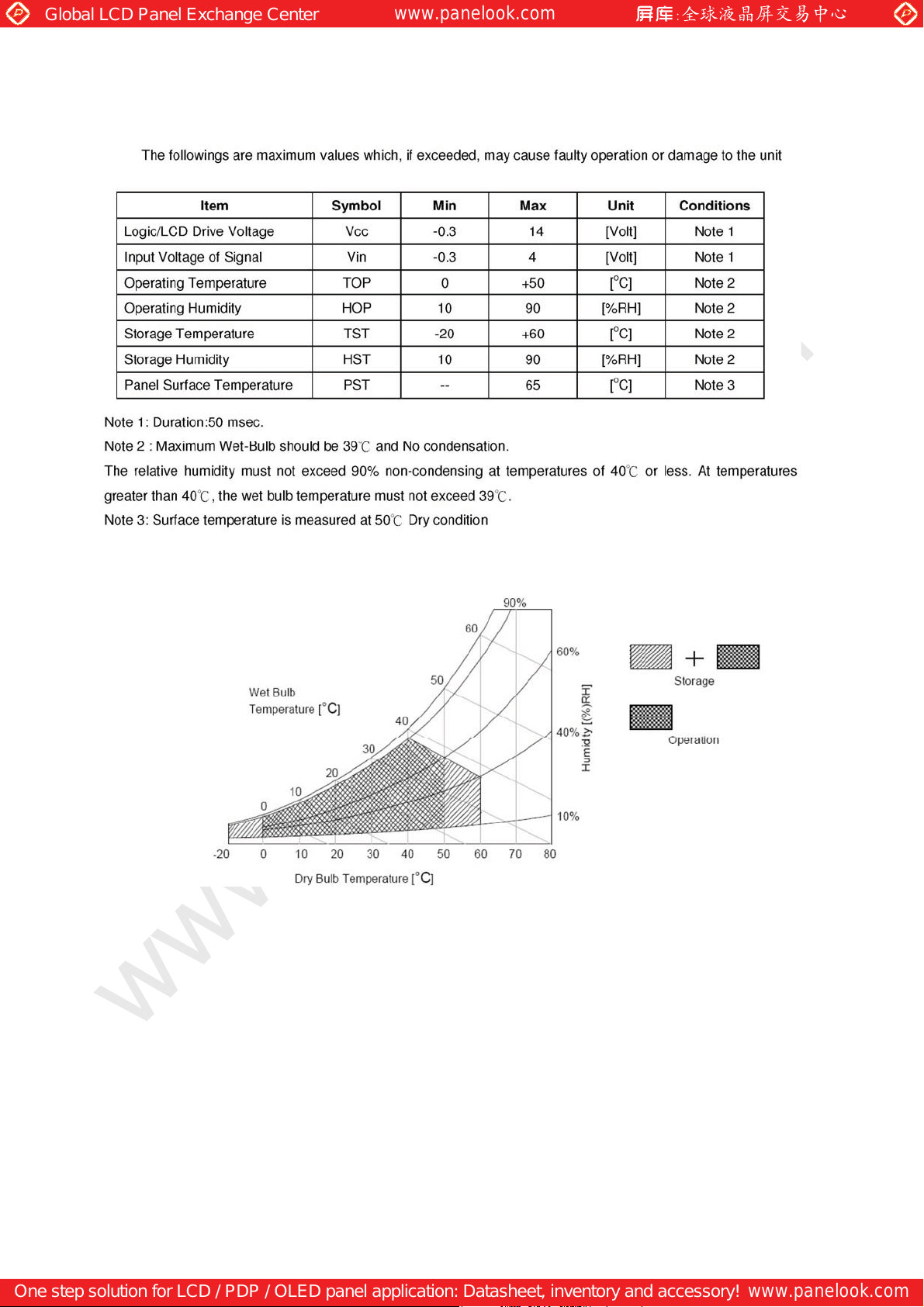
1.3 ABSOLUTE MAXIMUM RATINGS
www.panelook.com
Page 5
One step solution for LCD / PDP / OLED panel application: Datasheet, inventory and accessory!
www.panelook.com
Page 6
Global LCD Panel Exchange Center
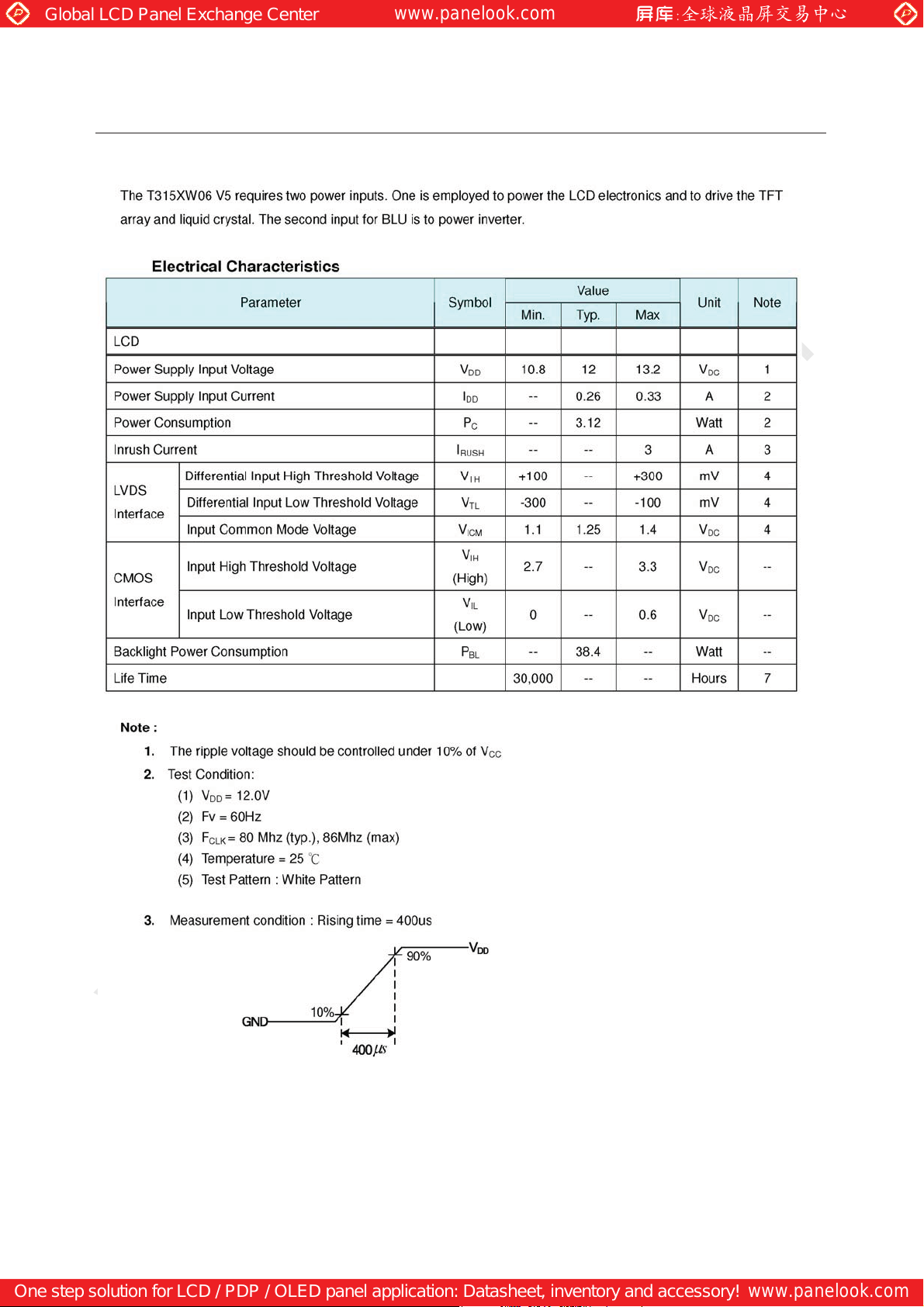
2.0 Electrical characteristics
2.1 TFT LCD Module Power Specification
www.panelook.com
Page 6
One step solution for LCD / PDP / OLED panel application: Datasheet, inventory and accessory!
www.panelook.com
Page 7
Global LCD Panel Exchange Center
www.panelook.com
Page 7
One step solution for LCD / PDP / OLED panel application: Datasheet, inventory and accessory!
www.panelook.com
Page 8
Global LCD Panel Exchange Center
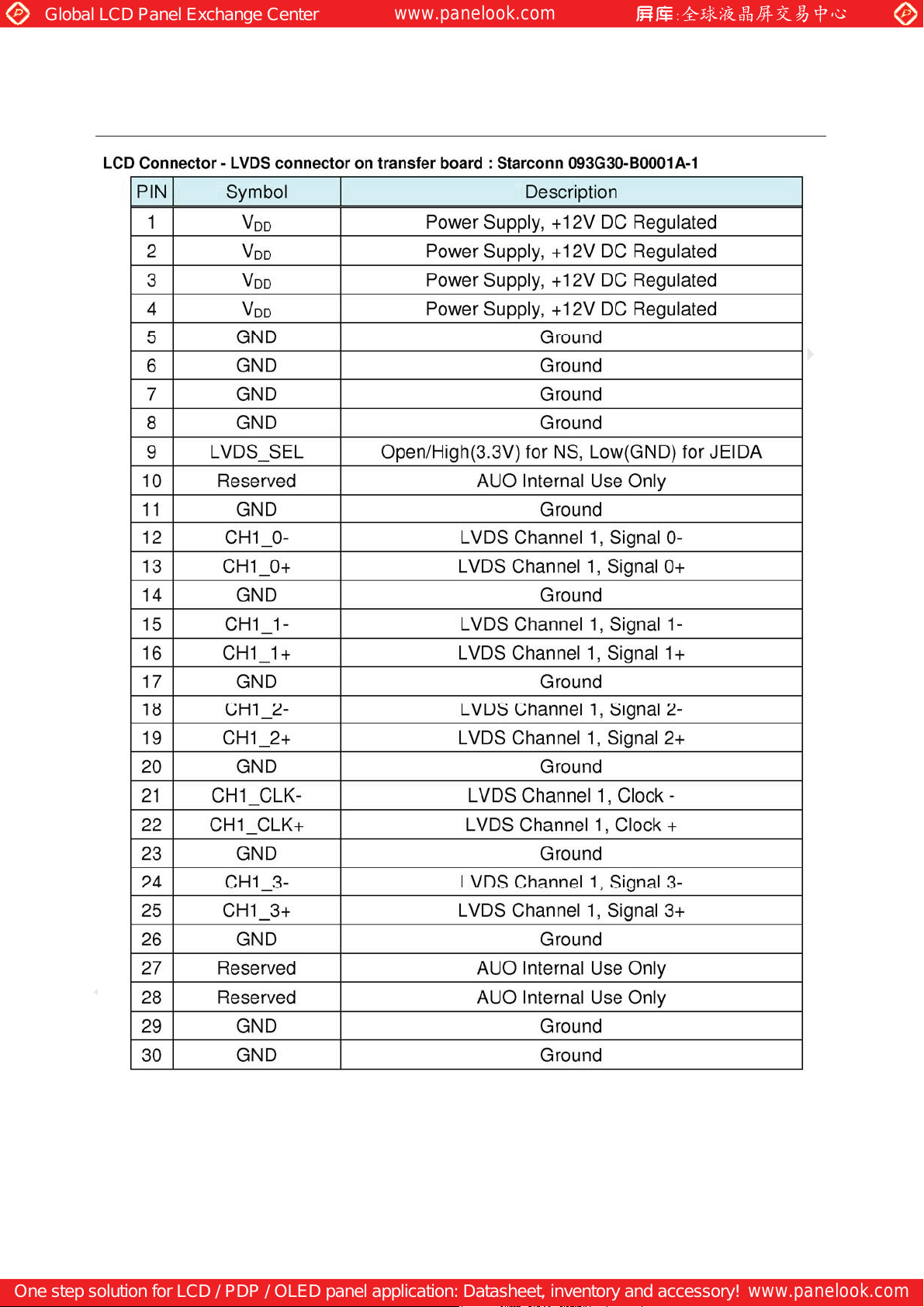
3.0 INPUTTERMINALPINASSIGNMENT
www.panelook.com
Page 8
One step solution for LCD / PDP / OLED panel application: Datasheet, inventory and accessory!
www.panelook.com
Page 9
Global LCD Panel Exchange Center
www.panelook.com
Page 9
One step solution for LCD / PDP / OLED panel application: Datasheet, inventory and accessory!
www.panelook.com
Page 10
Global LCD Panel Exchange Center
www.panelook.com
Page 10
One step solution for LCD / PDP / OLED panel application: Datasheet, inventory and accessory!
www.panelook.com
Page 11
Global LCD Panel Exchange Center
www.panelook.com
Page 11
One step solution for LCD / PDP / OLED panel application: Datasheet, inventory and accessory!
www.panelook.com
Page 12
Global LCD Panel Exchange Center
www.panelook.com
Page 12
One step solution for LCD / PDP / OLED panel application: Datasheet, inventory and accessory!
www.panelook.com
Page 13
Global LCD Panel Exchange Center
www.panelook.com
Page 13
One step solution for LCD / PDP / OLED panel application: Datasheet, inventory and accessory!
www.panelook.com
Page 14
Global LCD Panel Exchange Center
www.panelook.com
Page 14
One step solution for LCD / PDP / OLED panel application: Datasheet, inventory and accessory!
www.panelook.com
Page 15
Global LCD Panel Exchange Center
www.panelook.com
Page 15
One step solution for LCD / PDP / OLED panel application: Datasheet, inventory and accessory!
www.panelook.com
Page 16
Global LCD Panel Exchange Center
www.panelook.com
Page 16
One step solution for LCD / PDP / OLED panel application: Datasheet, inventory and accessory!
www.panelook.com
Page 17
Global LCD Panel Exchange Center
www.panelook.com
Page 17
One step solution for LCD / PDP / OLED panel application: Datasheet, inventory and accessory!
www.panelook.com
Page 18
Global LCD Panel Exchange Center
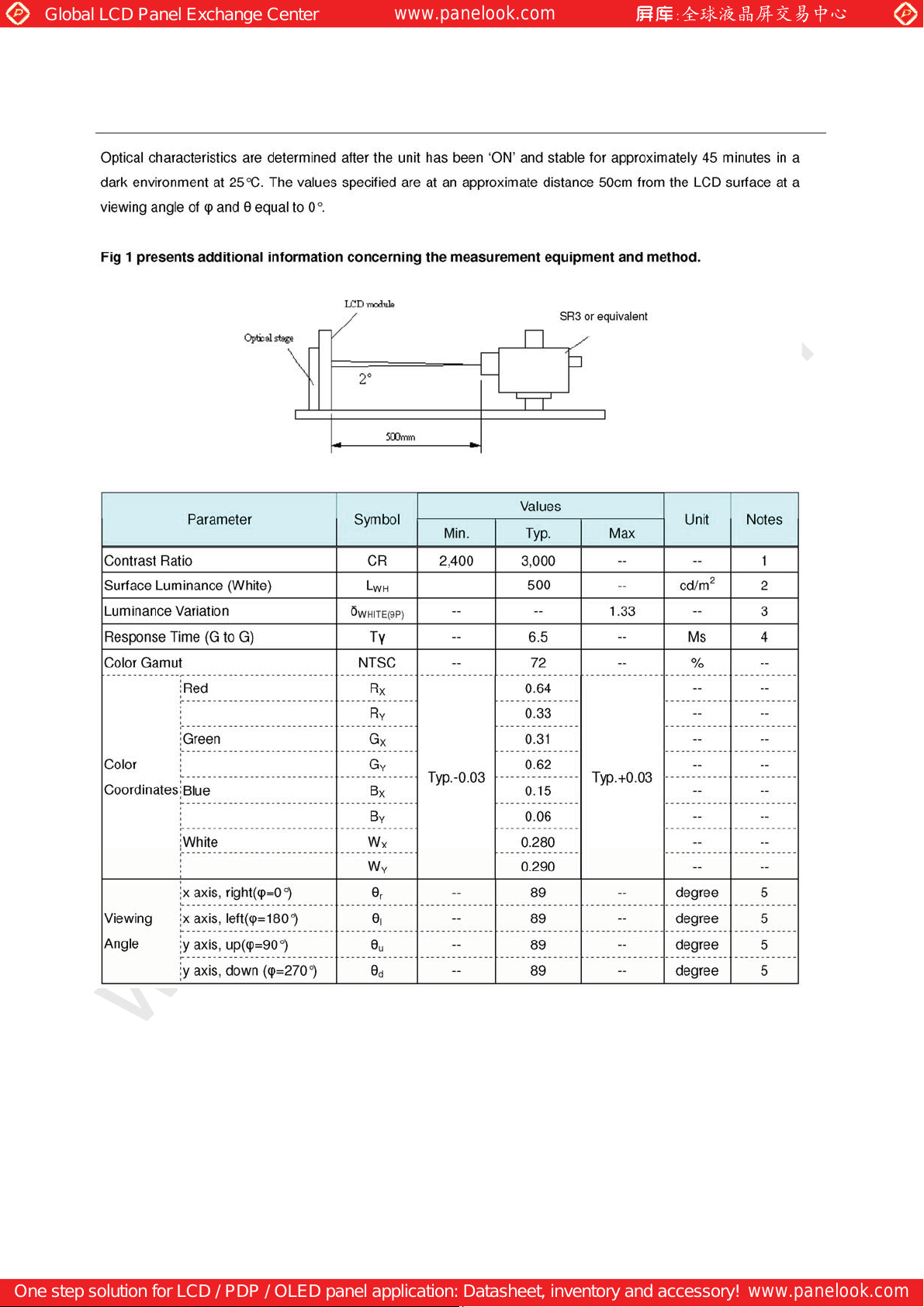
4.0 OPTICAL SPECIFICATION
www.panelook.com
Page 18
One step solution for LCD / PDP / OLED panel application: Datasheet, inventory and accessory!
www.panelook.com
Page 19
Global LCD Panel Exchange Center
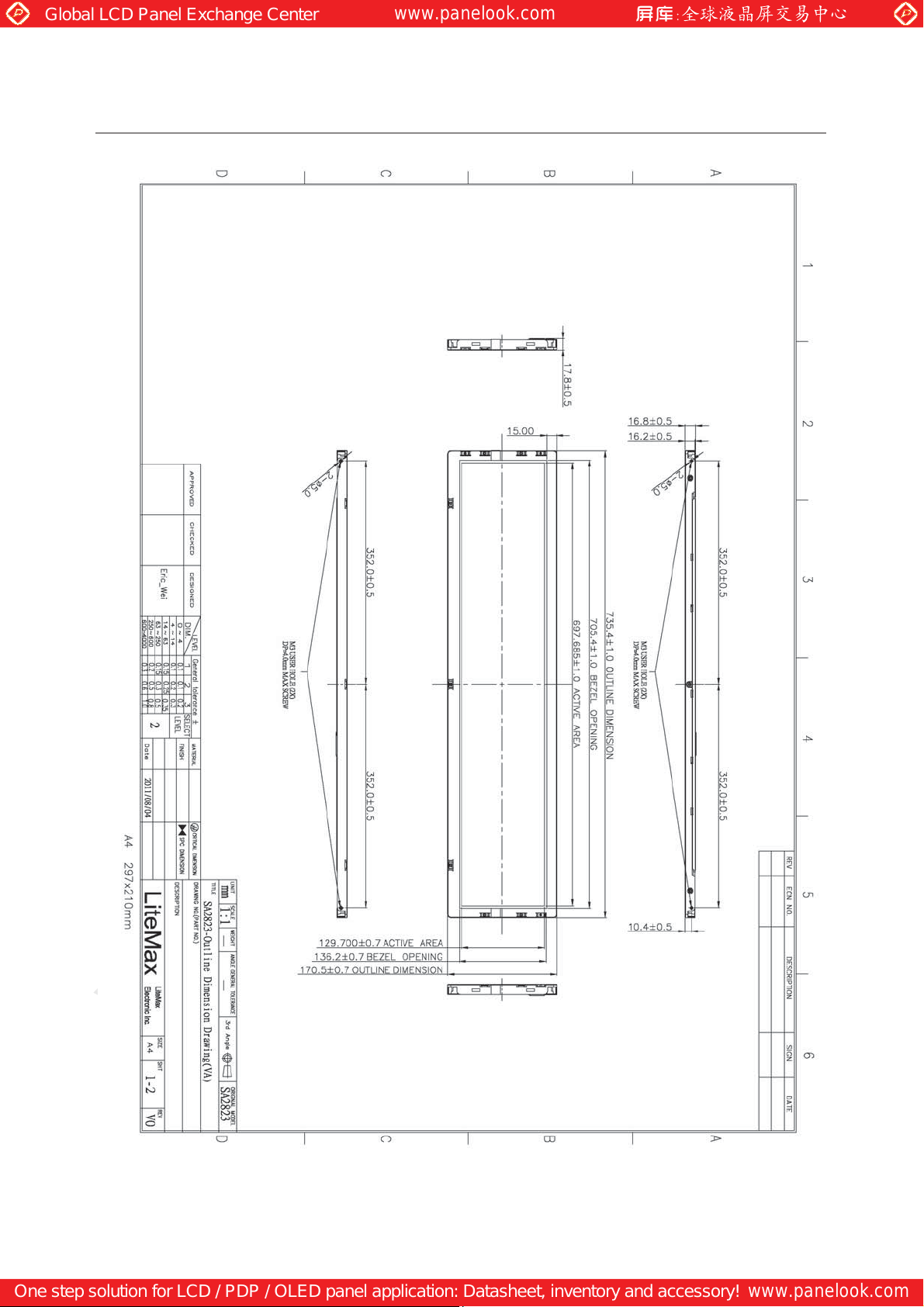
5.0 MECHANICAL DRAWING
www.panelook.com
Page 19
One step solution for LCD / PDP / OLED panel application: Datasheet, inventory and accessory!
www.panelook.com
Page 20

Global LCD Panel Exchange Center
7.0 PRECAUTIONS
HANDLING PRECAUTIONS
(1) The module should be assembled into the system firmly by using every mounting hole. Be careful
not to twist or bend the module.
(2) While assembling or installing modules, it can only be in the clean area. The dust and oil may cause
electrical short or damage the polarizer.
(3) Use fingerstalls or soft gloves in order to keep display clean during the incoming inspection and
assembly process.
(4) Do not press or scratch the surface harder than a HB pencil lead on the panel
because the polarizer is very soft and easily scratched.
(5) If the surface of the polarizer is dirty, please clean it by some absorbent cotton or soft cloth. Do not
use Ketone type materials (ex. Acetone), Ethyl alcohol, Toluene, Ethyl acid or Methyl chloride. It
might permanently damage the polarizer due to chemical reaction.
(6) Wipe off water droplets or oil immediately. Staining and discoloration may occur if
they left on panel for a long time.
(7) If the liquid crystal material leaks from the panel, it should be kept away from the eyes or mouth. In
case of contacting with hands, legs or clothes, it must be washed away thoroughly with soap.
(8) Protect the module from static electricity, it may cause damage to the C-MOS Gate Array IC.
(9) Do not disassemble the module.
(10) Do not pull or fold the lamp wire.
(11) Pins of I/F connector should not be touched directly with bare hands.
www.panelook.com
STORAGE PRECAUTIONS
(1) High temperature or humidity may reduce the performance of module. Please store
LCD module within the specified storage conditions.
(2) It is dangerous that moisture come into or contacted the LCD module, because the
moisture may damage LCD module when it is operating.
(3) It may reduce the display quality if the ambient temperature is lower than 10 ºC. For
example, the response time will become slowly, and the starting voltage of lamp will be higher than
the room temperature.
OPERATION PRECAUTIONS
(1) Do not pull the I/F connector in or out while the module is operating.
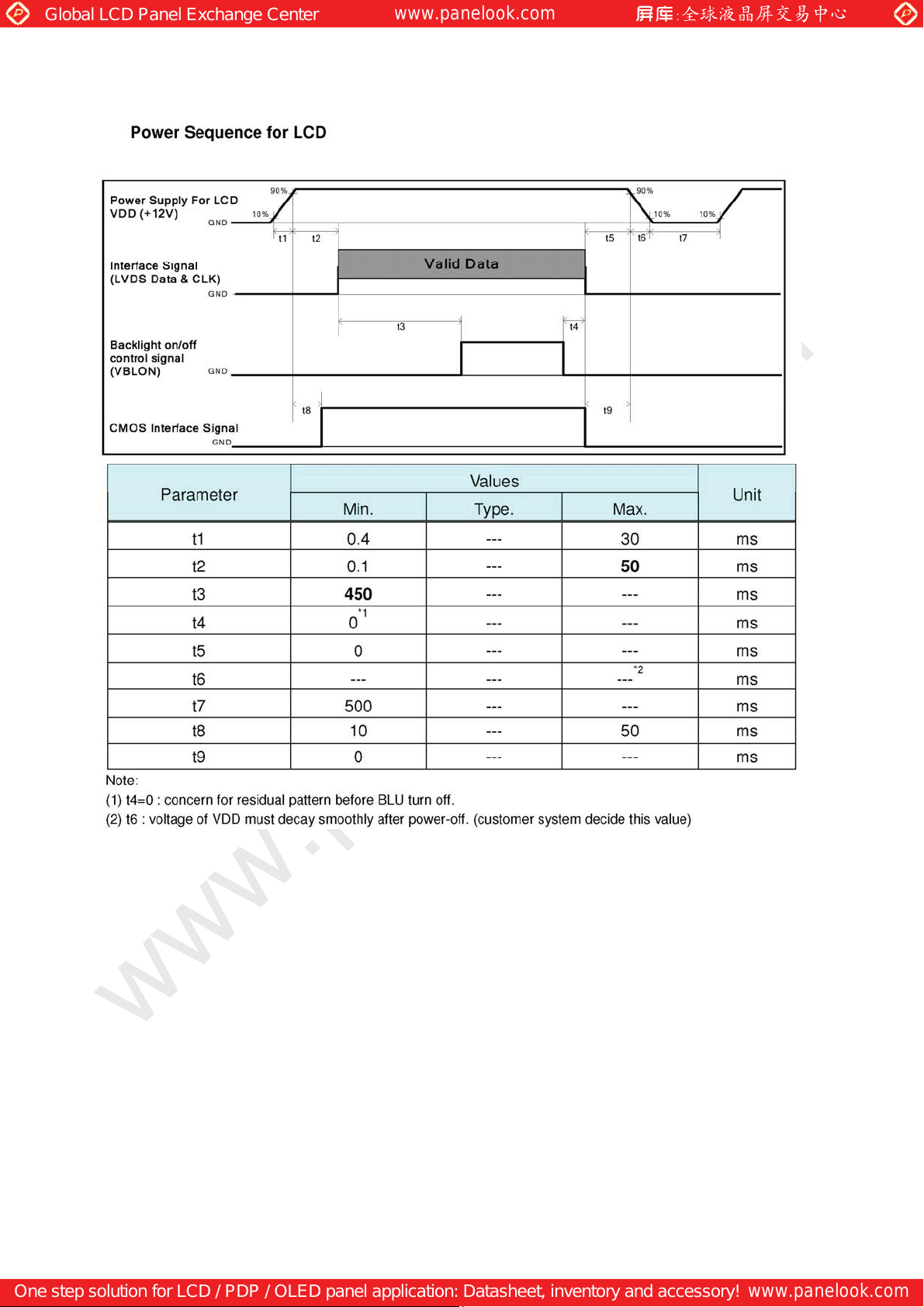
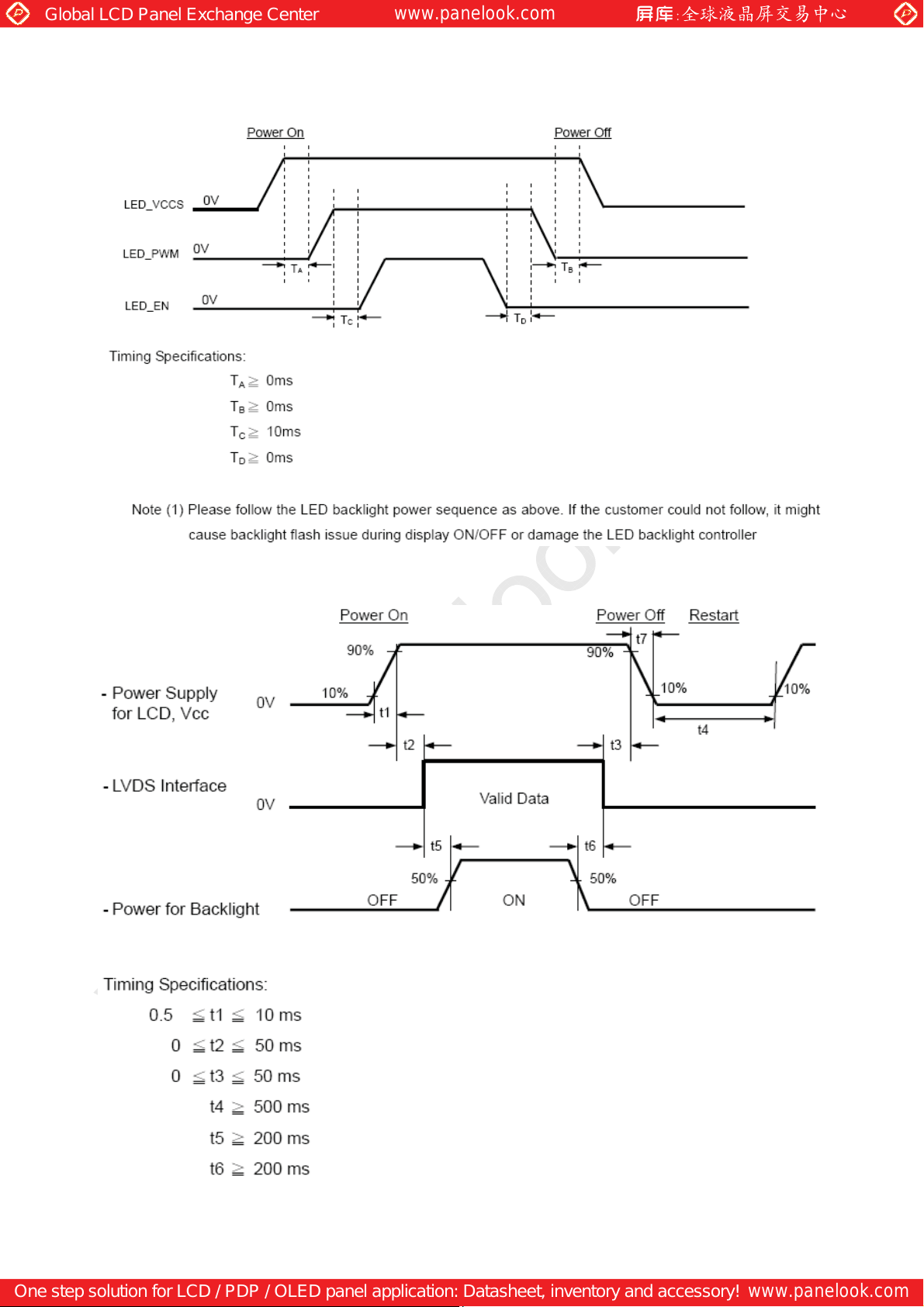
(2) Always follow the correct power on/off sequence when LCD module is connecting and
operating. This can prevent the CMOS LSI chips from damage during latch-up.
Page 20
One step solution for LCD / PDP / OLED panel application: Datasheet, inventory and accessory!
www.panelook.com
 Loading...