

Page 1
Global LCD Panel Exchange Center
www.panelook.com
LITEMAX
SSD1505
Spanpixel
Sunlight Readable 15" LCD Display
(2nd Edition 10/21/2010 )
All information is subject to change without notice.
Approved by Checked by Prepared by
Ming Hank Jacky
LITEMAX Electronics Inc.
8F, No.137, Lane 235, Bau-Chiau Rd.,
Shin-Dian City, Taipei County, Taiwan R.O.C.
Tel : 886-2-8919-1858
Fax: 886-2-8919-1300
Homepage: http://www.litemax.com/
Page 1
One step solution for LCD / PDP / OLED panel application: Datasheet, inventory and accessory!
www.panelook.com
Page 2
Global LCD Panel Exchange Center
RECORD OF REVISION
Version Date Description Remark
V1.0 1/21/2010 Initial Release
www.panelook.com
Page 2
One step solution for LCD / PDP / OLED panel application: Datasheet, inventory and accessory!
www.panelook.com
Page 3

Global LCD Panel Exchange Center
CONTENTS
RECORD OF REVISION .................................................................................................. 2
1.0 GENERAL DESCRIPTION.......................................................................................... 4
1.1 OVERVIEW.......................................................................................................... 4
1.2 FEATURES .......................................................................................................... 4
1.3 APPLICATION...................................................................................................... 4
1.4 GENERAL SPECIFICATI0NS .............................................................................. 4
2.0 ELECTRICAL CHARACTERISTICS ........................................................................... 5
2.1 ELECTRICAL CHARACTERISTICS .................................................................... 5
2.2 LCD PANEL SIGNAL PROCESSING BOARD ..................................................... 6
2.3 BACKLIGHT CONNECTOR PIN CONFIGURATION ........................................... 7
2.4 SIGNAL TIMING SPECIFICATIONS .................................................................... 7
2.5 SIGNAL TIMING WAVEFORMS .......................................................................... 8
3.0 OPTICAL CHARACTERISTICS .................................................................................. 9
3.1 TEST CONDITIONS ............................................................................................ 9
3.2 OPTICAL SPECIFICATIONS ............................................................................... 9
4.0 MECHANICAL CHARACTERISTICS........................................................................ 12
SSD1505 MECHANICAL SPECIFICATION ............................................................. 12
5.0 PRECAUTIONS ........................................................................................................ 13
5.1 HANDLING PRECAUTIONS.............................................................................. 13
5.2 STORAGE PRECAUTIONS............................................................................... 13
5.3 OPERATION PRECAUTIONS ........................................................................... 13
6.0 AD Board & OSD Functions...................................................................................... 14
6.1 AD BOARD GENERAL SPECIFICATIONS........................................................ 14
6.2 SUPPORTED TIMING (*by your panel resolution)............................................. 14
6.3 MEMBRANE CONTROL BUTTOM.................................................................... 15
6.4 OSD FUNCTIONS ............................................................................................. 15
www.panelook.com
Page 3
One step solution for LCD / PDP / OLED panel application: Datasheet, inventory and accessory!
www.panelook.com
Page 4
Global LCD Panel Exchange Center
1.0 GENERAL DESCRIPTION
1.1 OVERVIEW
The SSD1505 is a 15 inch color TFT-LCD display with special aspect ratio 16:3 and XGA wide
resolution 1280 x 242 (1280 horizontal by 242 vertical pixel array). It is Litemax’s Spanpixel
series product which designed for high brightness 1000 nits sunlight readable display, power
efficiency LED backlight system and fanless display. The SSD1505 build in AD board supports
input port VGA.
Each pixel is divided into Red, Green and Blue sub-pixels or dots which are arranged in
vertical stripes. Gray scale or the brightness of the sub-pixel color is determined with a 8-bit
gray scale signal for each dot. It is intended to support display where wide viewing angle, high
color saturation, and high color depth.
1.2 FEATURES
www.panelook.com
- 15” SXGA TFT LCD
- LED backlight
- 1000 nits Sunlight Readable
- Long Life Time
- Thin and Light
- DC 12V input
1.3 APPLICATION
- Out/Indoor Display
- Out/Indoor Digital Signage
- Quick Service Restaurant Display Product
- Transportation
1.4 GENERAL SPECIFICATI0NS
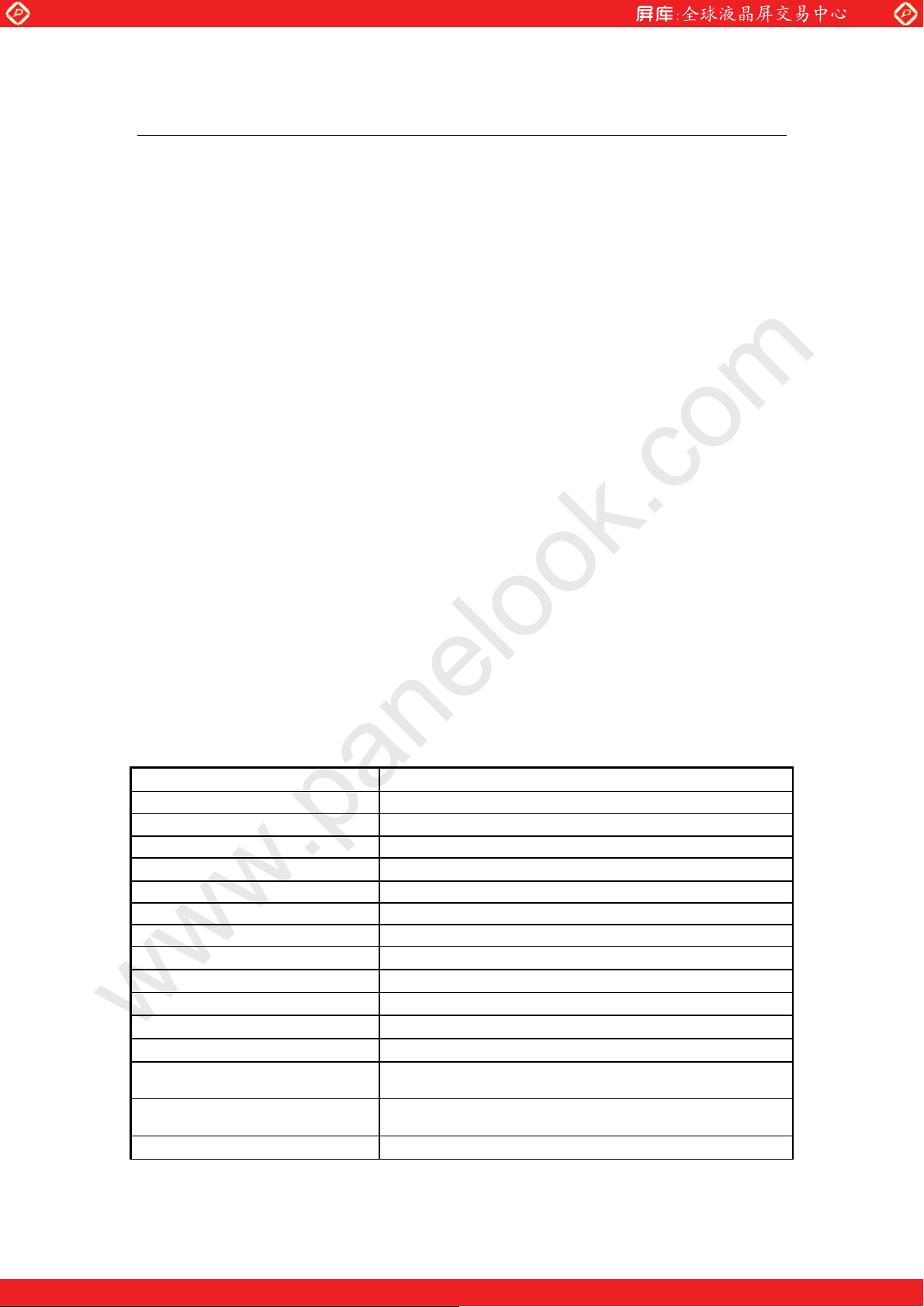
Model No. SSD1505
LCD Display 15" Wide LED Backlight LCD
Display Area (mm) 376.3 (H) x 71.2 (V)
Display Surface Non-glare hard coated
Luminance 1000 cd/m2
Resolution 1280 x 242
Contrast Ratio 1000 : 1 (Typ)
Display Colors 16.7M colors
Pixel Arrangement RGB (Red, Green, Blue) vertical stripe
Pixel Pitch (mm) 0.294mm
Response Time 5ms (Typ.)
Signal Connector 15 Pin D-sub
F/R Control Button Power Switch, Menu, Select (+,-)
OSD Menu Brightness, Contrast, H/V Position, Color, Phase, Clock,
Language, Management
Power Consumption At maximum luminance and checkered flag pattern
15W (Max)
Option Touch for customize (Resistive/ Capacitive)
ϡ Specifications subject to change without notice.
Page 4
One step solution for LCD / PDP / OLED panel application: Datasheet, inventory and accessory!
www.panelook.com
Page 5
Global LCD Panel Exchange Center
2.0 ELECTRICAL CHARACTERISTICS
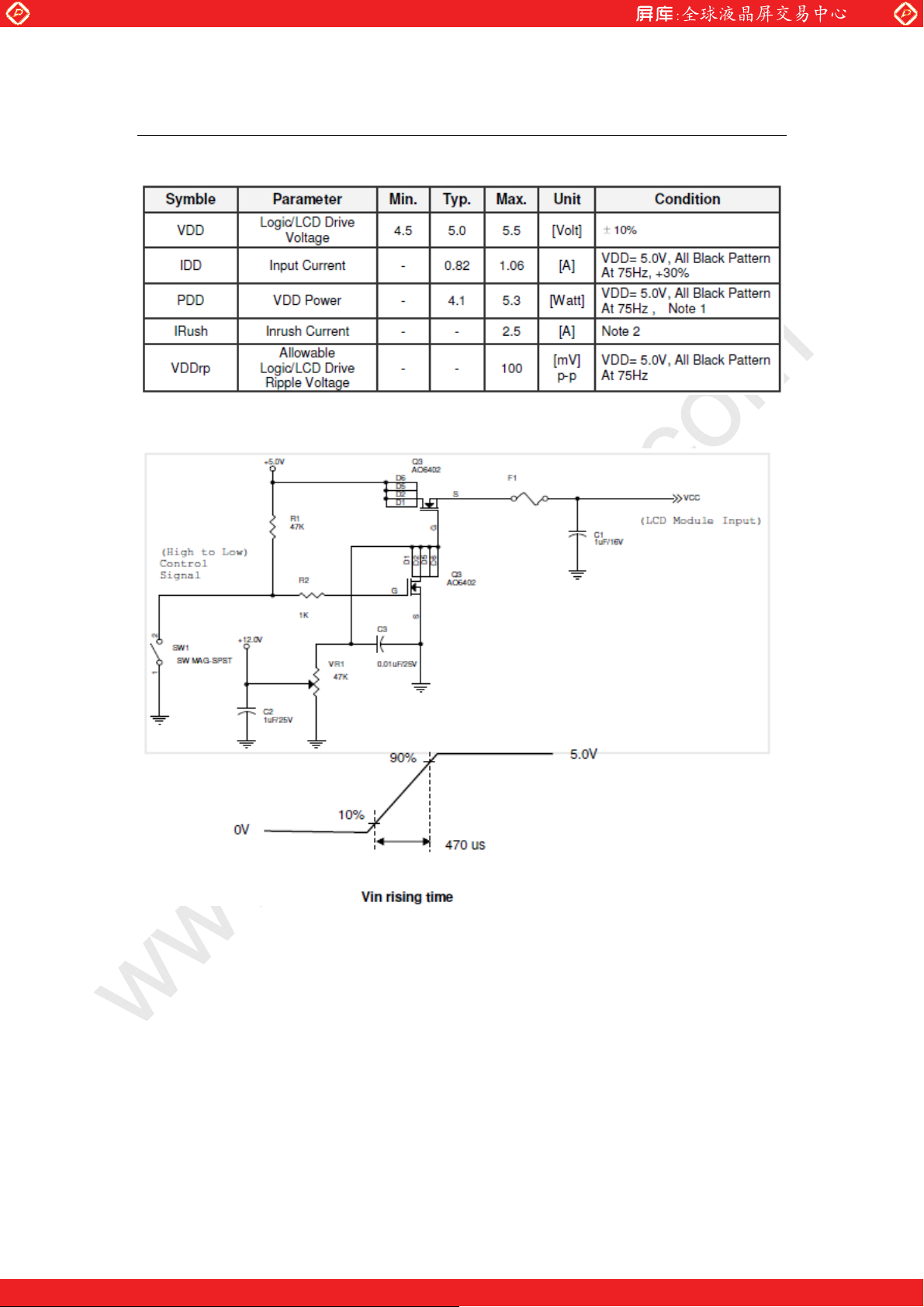
2.1 ELECTRICAL CHARACTERISTICS
www.panelook.com
Note 1: The variance of VDD power consumption is ±30%.
Note 2: Measurement conditions:
Page 5
One step solution for LCD / PDP / OLED panel application: Datasheet, inventory and accessory!
www.panelook.com
Page 6
Global LCD Panel Exchange Center
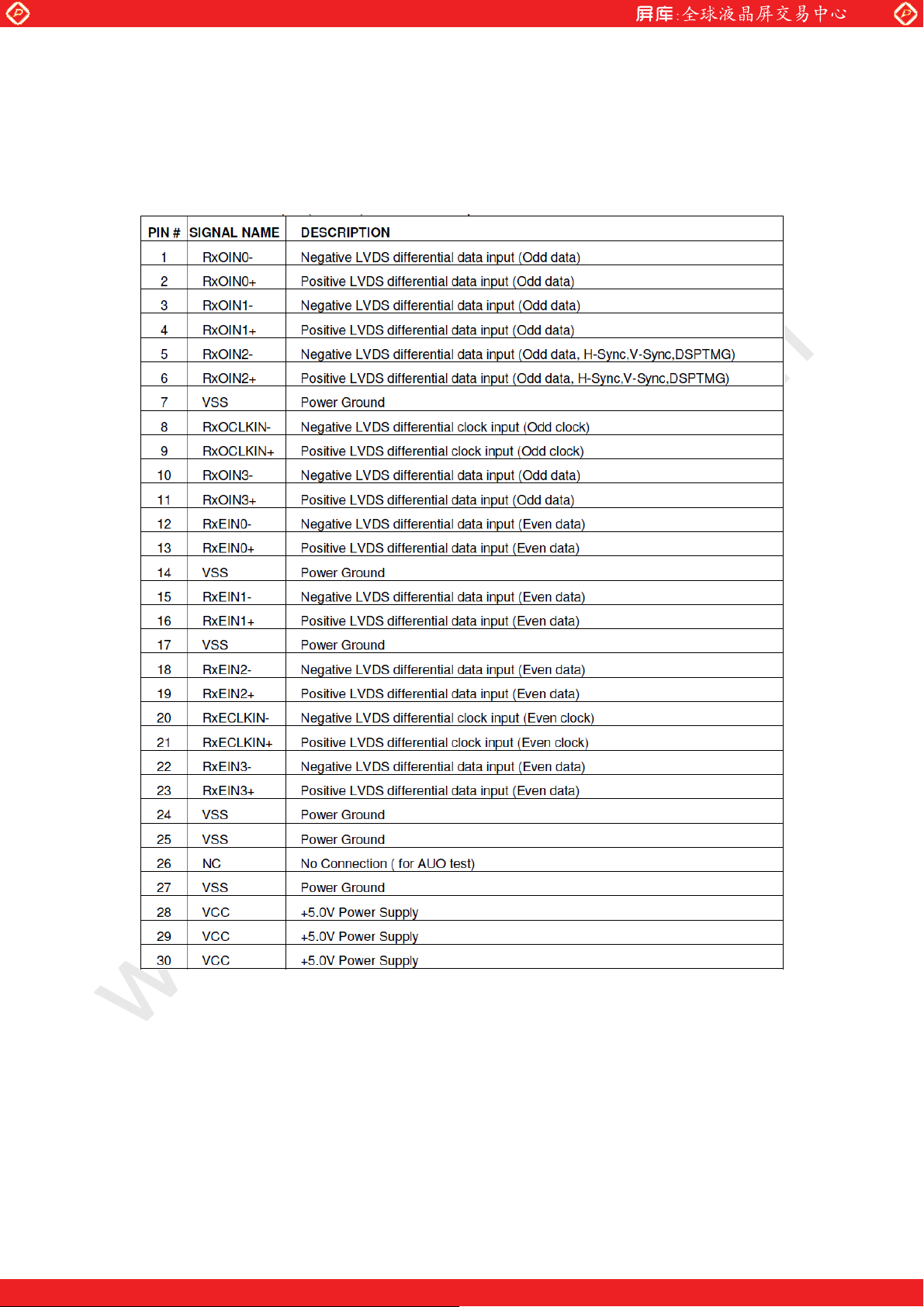
2.2 LCD PANEL SIGNAL PROCESSING BOARD
The module using a pair of LVDS receiver SN75LVDS82(Texas Instruments) or compatible.
LVDS is a differential signal technology for LCD interface and high speed data transfer device.
Transmitter shall be SN75LVDS83(negative edge sampling) or compatible. The first LVDS
port(RxOxxx) transmits odd pixels while the second LVDS port(RxExxx) transmits even pixels.
www.panelook.com
Page 6
One step solution for LCD / PDP / OLED panel application: Datasheet, inventory and accessory!
www.panelook.com
Page 7
Global LCD Panel Exchange Center
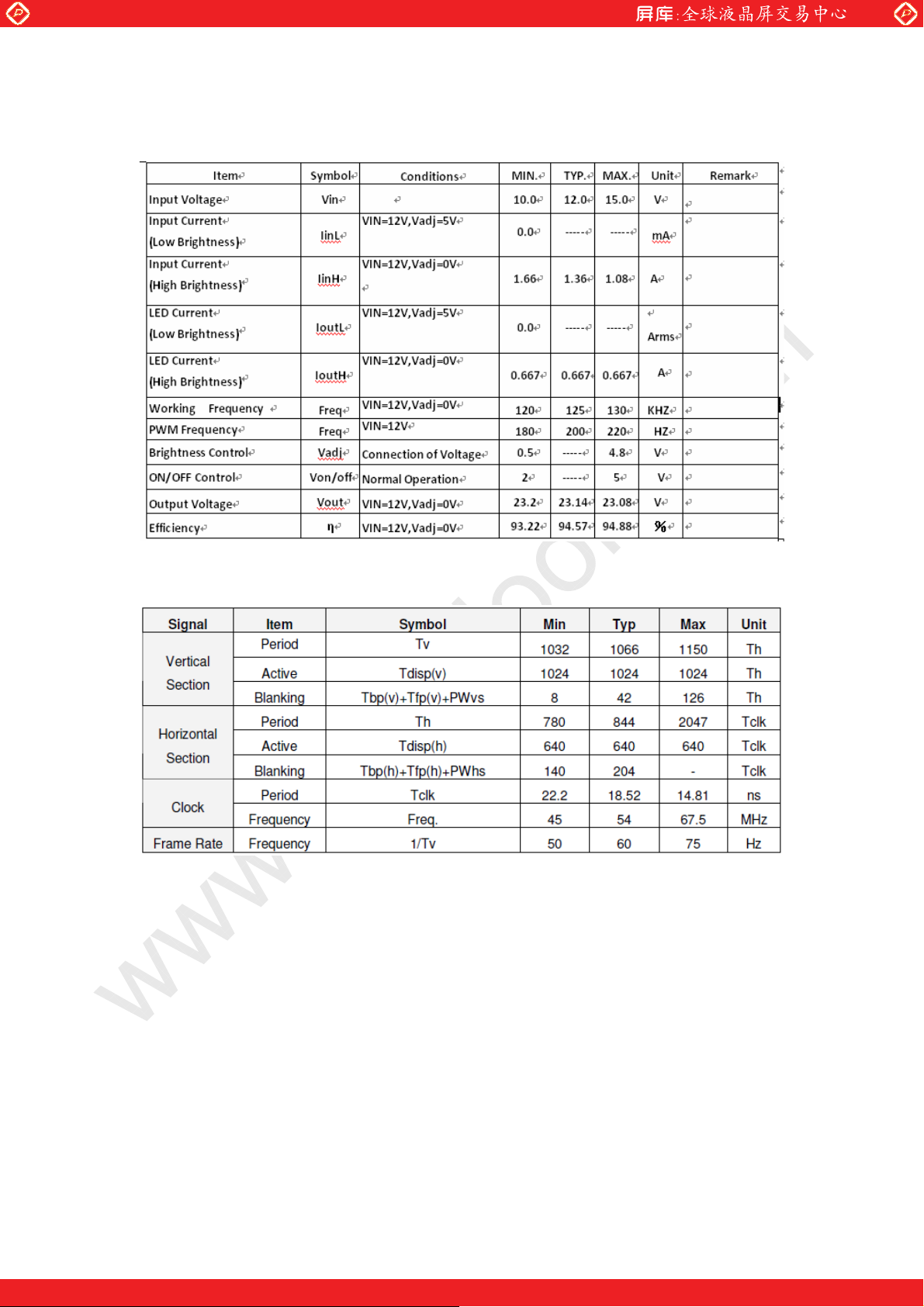
2.3 BACKLIGHT CONNECTOR PIN CONFIGURATION
LED Driving Electrical specification
www.panelook.com
2.4 SIGNAL TIMING SPECIFICATIONS
DE only Mode
Page 7
One step solution for LCD / PDP / OLED panel application: Datasheet, inventory and accessory!
www.panelook.com
Page 8
Global LCD Panel Exchange Center
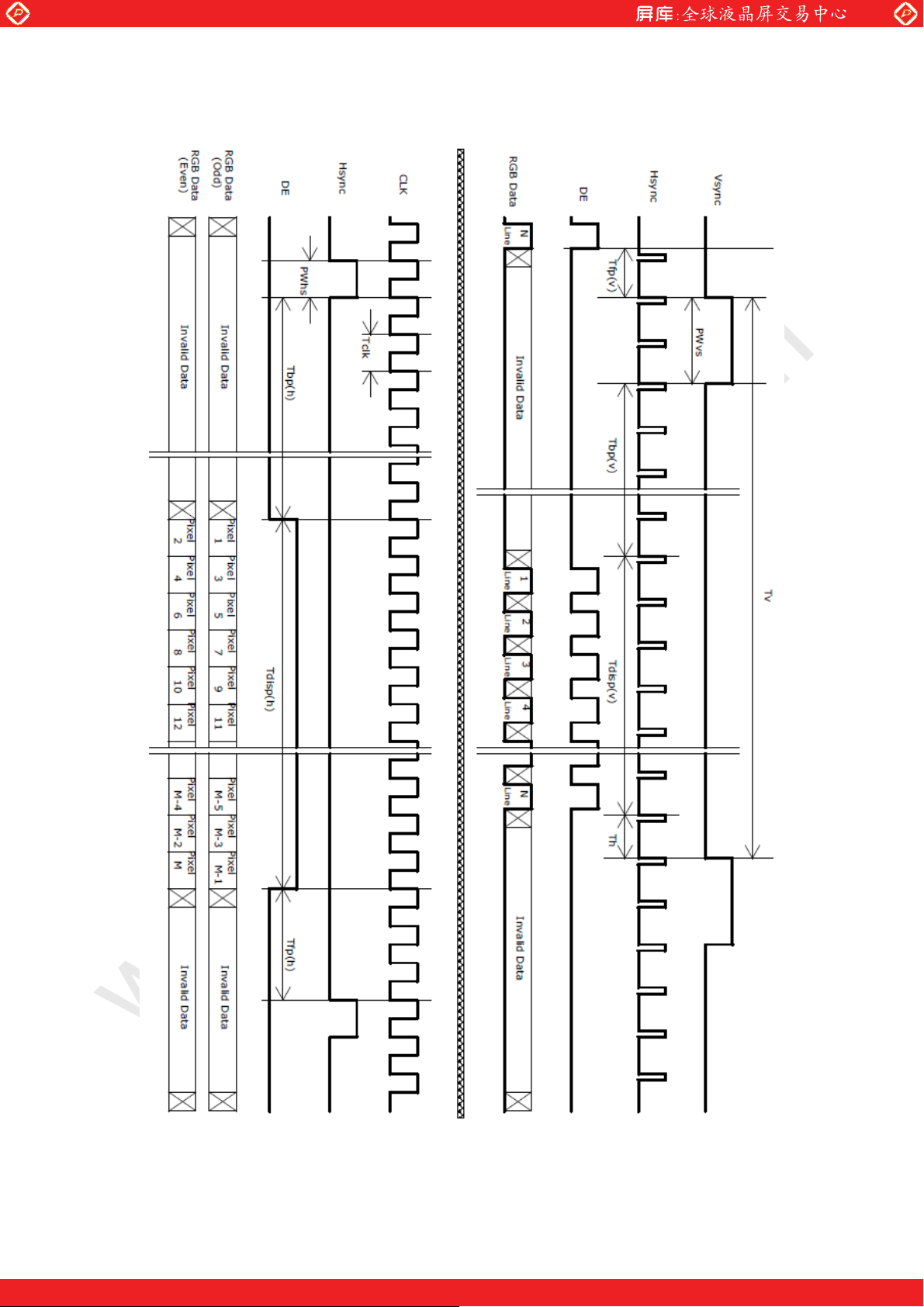
2.5 SIGNAL TIMING WAVEFORMS
www.panelook.com
Page 8
One step solution for LCD / PDP / OLED panel application: Datasheet, inventory and accessory!
www.panelook.com
Page 9
Global LCD Panel Exchange Center
3.0 OPTICAL CHARACTERISTICS
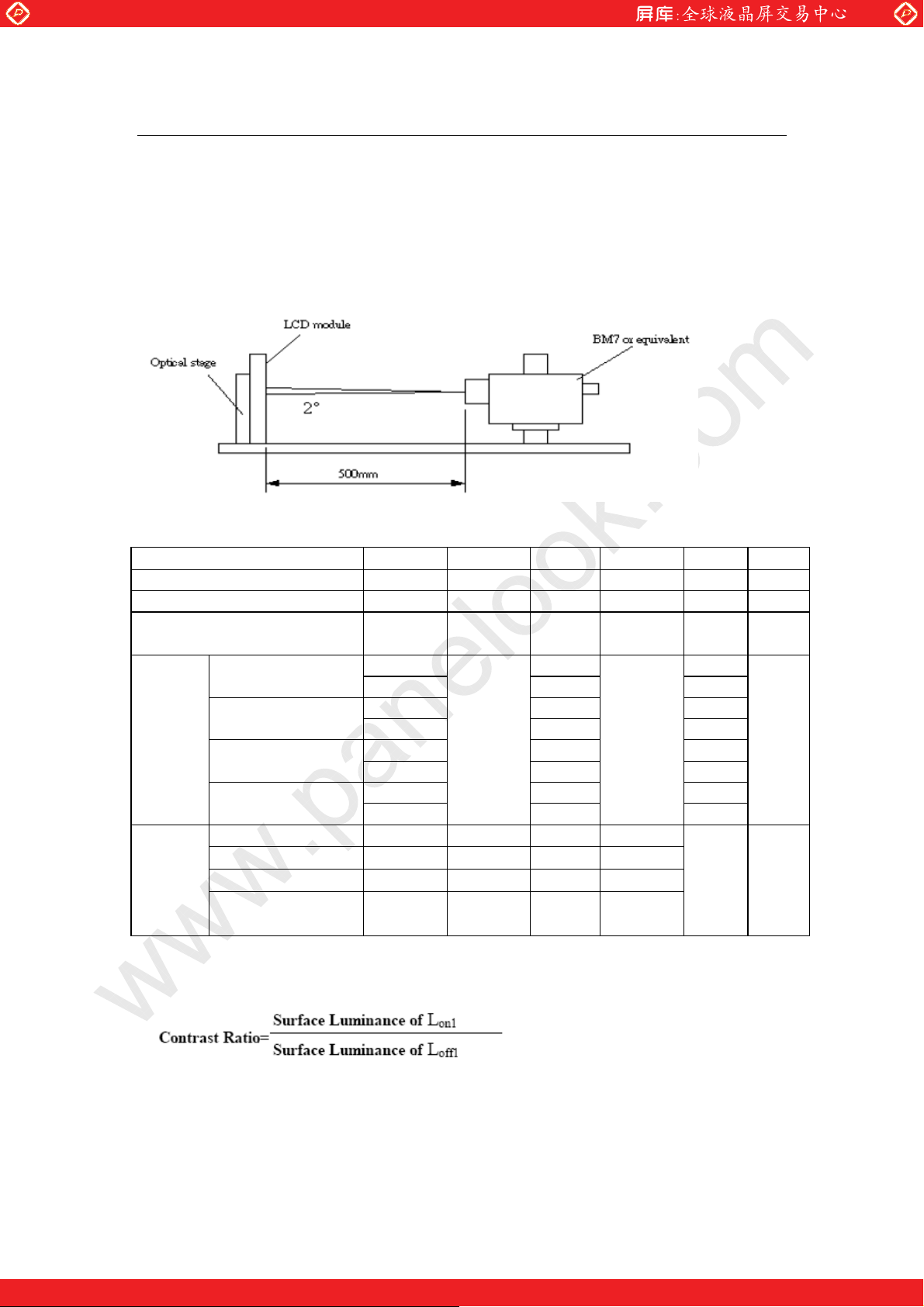
3.1 TEST CONDITIONS
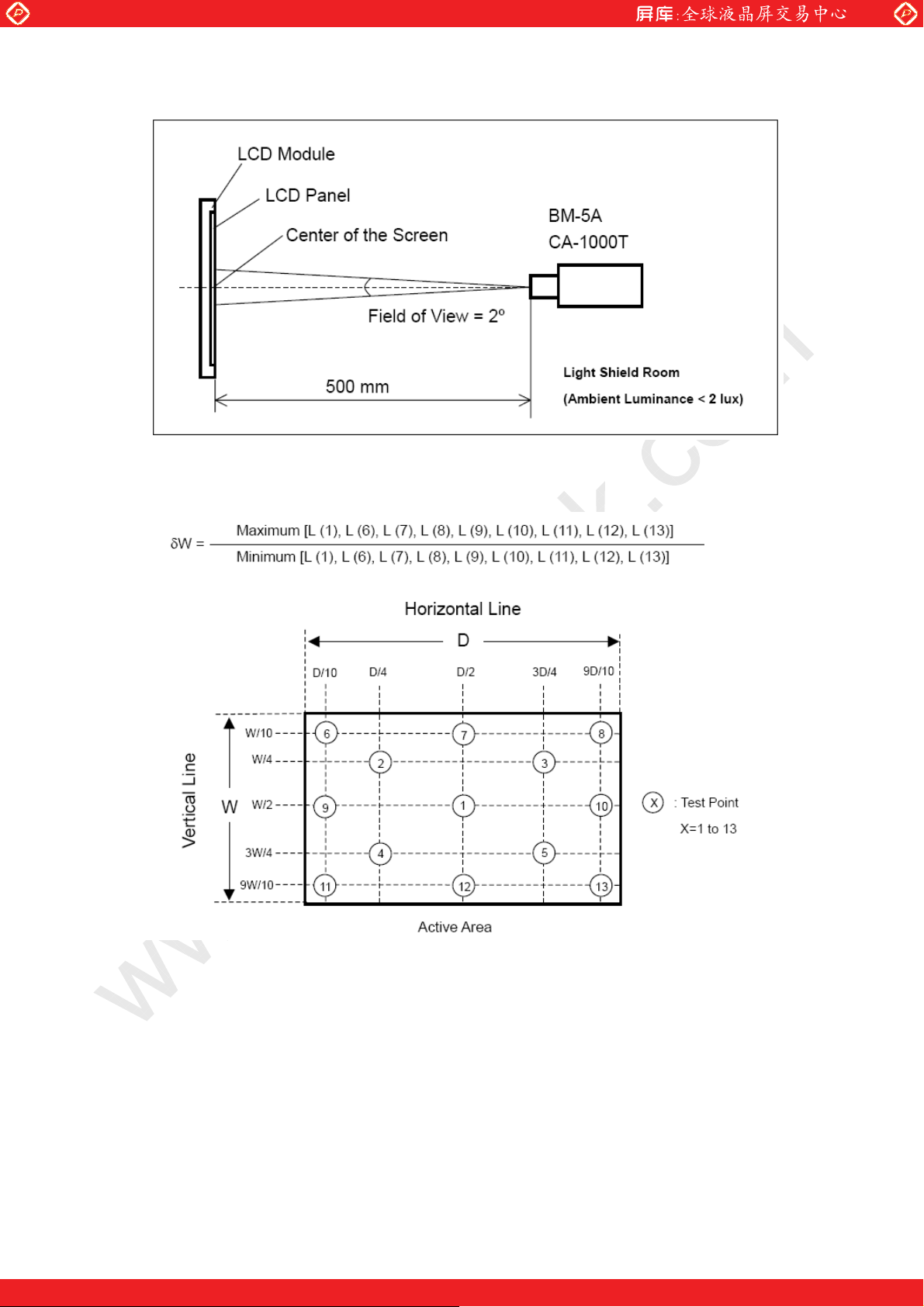
Optical characteristics are determined after the unit has been ‘ON’ and stable for
approximately 45 minutes in a dark environment at 25 . The values specified are at an
approximate distance 50cm к from the LCD surface at a viewing angle of and equal to 0°.
Fig.1 1 presents additional information concerning the measurement equipment and
method.
www.panelook.com
3.2 OPTICAL SPECIFICATIONS
Item Symbol Min. Typ. Max. Unit Note
Contrast Ratio CR - 1000 - - (1)
Luminance of White LAVE - 1000 - cd/m2 (2)
Response Time T - 5 - ms (3)
Rx 0.64 -
Ry 0.34 Gx 0.28 Gy 0.60 -
Bx 0.14 -
By 0.07 Wx 0.31 Wy
d - 85 -
Typ.-0.03
0.32
Typ.+0.0
3
-
Degre
e
Chromat
icity
Viewing
Angle
Red
Green
Blue
White
x axis, right(=0°) r - 80 -
x axis, left(=180°) l - 80 -
y axis, up(=90°) u - 85 -
y axis, down (=0°)
Note:
1. Contrast Ratio (CR) is defined mathematically as:
2. Measurement Setup: The LCD module should be stabilized at given temperature for 20
minutes to avoid abrupt temperature change during measuring. In order to Stabilize the
luminance, the measurement should be executed after lighting Backlight for 20 minutes in
a windless room.
Page 9
One step solution for LCD / PDP / OLED panel application: Datasheet, inventory and accessory!
www.panelook.com
Page 10
Global LCD Panel Exchange Center
www.panelook.com
Definition of luminance measured points: Measure the luminance of gray
level 255 at point L(1) Definition of White Variation (W): Measure the luminance of
gray level 255 at 9 points
Page 10
One step solution for LCD / PDP / OLED panel application: Datasheet, inventory and accessory!
www.panelook.com
Page 11
Global LCD Panel Exchange Center
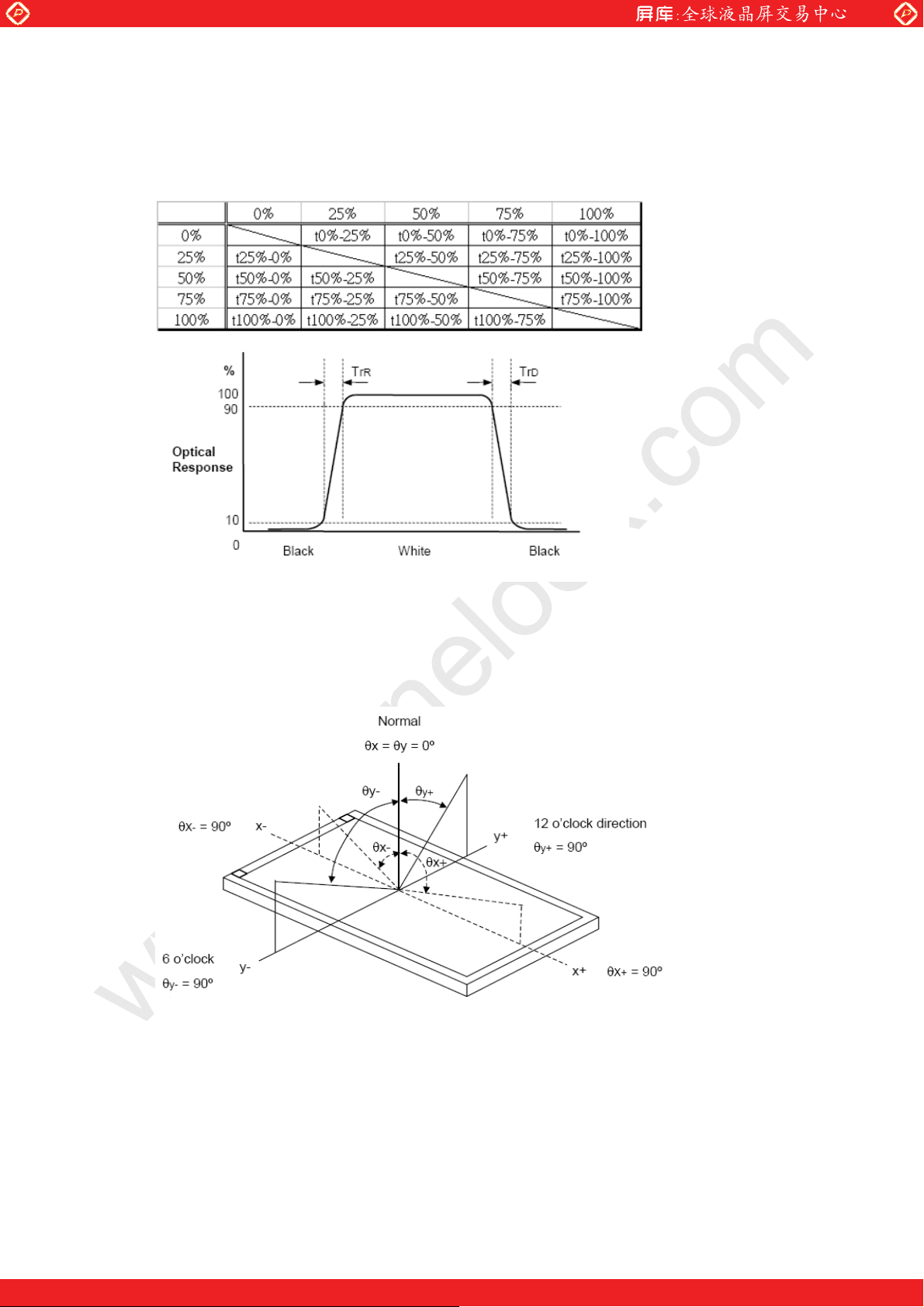
3. Response time T is the average time required for display transition by switching the input
signal for five luminance ratio (0%,25%,50%,75%,100% brightness matrix) and is based on
fv=60Hz to optimize.
www.panelook.com
4. Viewing angle is the angle at which the contrast ratio is greater than 10. The angles
are determined for the horizontal or x axis and the vertical or y axis with respect to
the z axis which is normal to the LCD surface.
Definition of Viewing Angle (x, y):
Page 11
One step solution for LCD / PDP / OLED panel application: Datasheet, inventory and accessory!
www.panelook.com
Page 12
Global LCD Panel Exchange Center
4.0 MECHANICAL CHARACTERISTICS
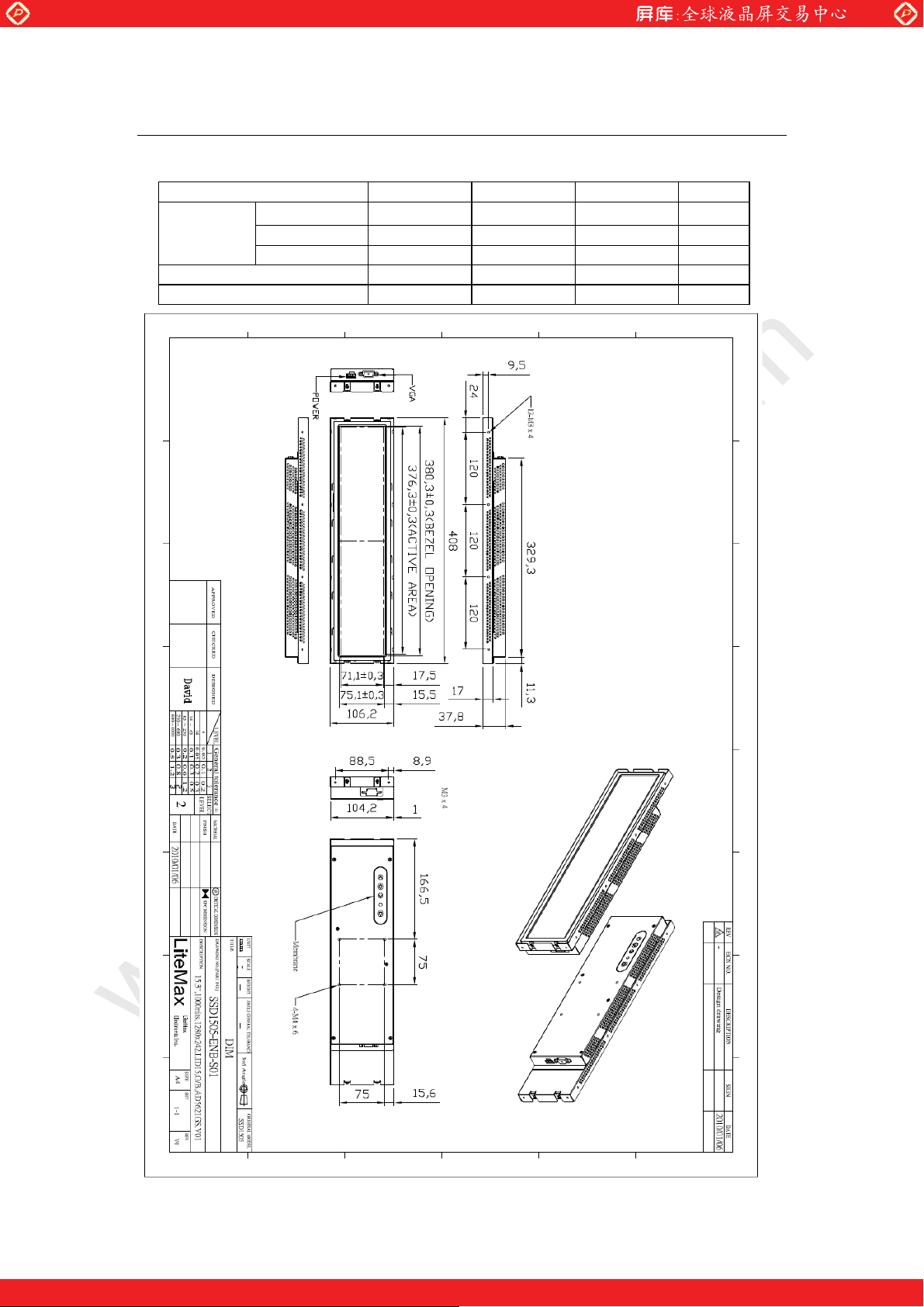
SSD1505 MECHANICAL SPECIFICATION
Item Min. Typ. Max. Unit
Module
Size
Weight (Module only) - 1.7 - kg
Weight (1 module per box) - TBA - kg
Horizontal(H) - 408 - mm
Vertical(V) - 106.2 - mm
Depth(D) - 37.8 - mm
www.panelook.com
Page 12
One step solution for LCD / PDP / OLED panel application: Datasheet, inventory and accessory!
www.panelook.com
Page 13

Global LCD Panel Exchange Center
5.0 PRECAUTIONS
5.1 HANDLING PRECAUTIONS
(1) The module should be assembled into the system firmly by using every mounting hole.
Be careful not to twist or bend the module.
(2) While assembling or installing modules, it can only be in the clean area. The dust and oil
may cause electrical short or damage the polarizer.
(3) Use fingerstalls or soft gloves in order to keep display clean during the incoming
inspection and assembly process.
(4) Do not press or scratch the surface harder than a HB pencil lead on the panel
because the polarizer is very soft and easily scratched.
(5) If the surface of the polarizer is dirty, please clean it by some absorbent cotton or soft
cloth. Do not use Ketone type materials (ex. Acetone), Ethyl alcohol, Toluene, Ethyl acid
or Methyl chloride. It might permanently damage the polarizer due to chemical reaction.
(6) Wipe off water droplets or oil immediately. Staining and discoloration may occur if
they left on panel for a long time.
(7) If the liquid crystal material leaks from the panel, it should be kept away from the eyes or
mouth. In case of contacting with hands, legs or clothes, it must be washed away
thoroughly with soap.
(8) Protect the module from static electricity, it may cause damage to the C-MOS Gate Array
IC.
(9) Do not disassemble the module.
(10) Do not pull or fold the lamp wire.
(11) Pins of I/F connector should not be touched directly with bare hands.
www.panelook.com
5.2 STORAGE PRECAUTIONS
(1) High temperature or humidity may reduce the performance of module. Please store
LCD module within the specified storage conditions.
(2) It is dangerous that moisture come into or contacted the LCD module, because the
moisture may damage LCD module when it is operating.
(3) It may reduce the display quality if the ambient temperature is lower than 10 ºC. For
example, the response time will become slowly, and the starting voltage of lamp will be
higher than the room temperature.
5.3 OPERATION PRECAUTIONS
(1) Do not pull the I/F connector in or out while the module is operating.
(2) Always follow the correct power on/off sequence when LCD module is connecting and
operating. This can prevent the CMOS LSI chips from damage during latch-up.
Page 13
One step solution for LCD / PDP / OLED panel application: Datasheet, inventory and accessory!
www.panelook.com
Page 14
Global LCD Panel Exchange Center
6.0 AD Board & OSD Functions
6.1 AD BOARD GENERAL SPECIFICATIONS
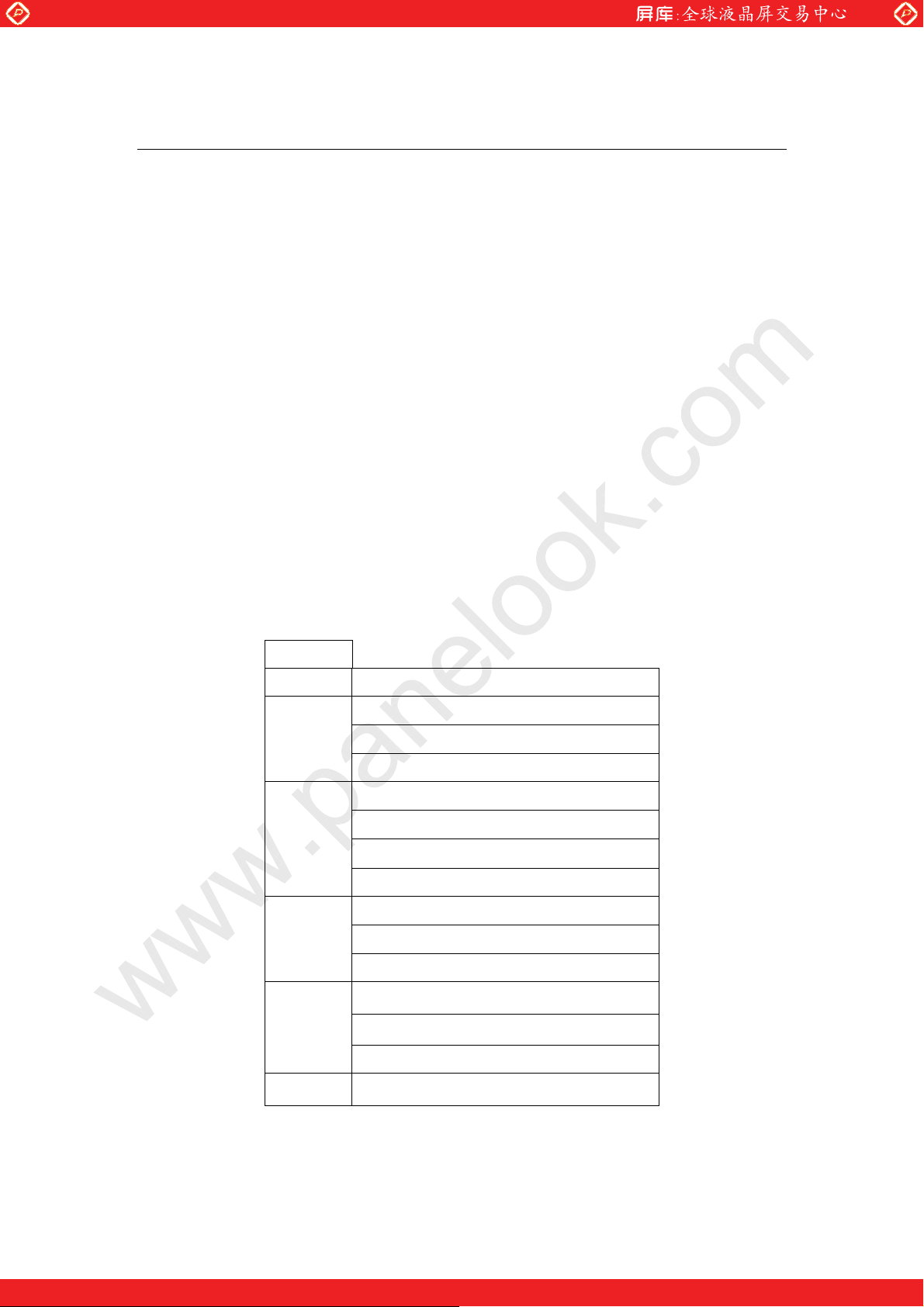
Max Resolution Up To WXGA 60Hz
Analog RGB Input
1.5Wx2 Audio Out
LVDS Output
Support Panel DC5V or 3.3V, 12V Output
Automatic External Fan Control
OSD Control
Inverter 0~5V Dimming Control
*External V.R. brightness control (optional)
*External light sensor brightness control (optional)
Input Power 12Vdc
www.panelook.com
6.2 SUPPORTED TIMING (*by your panel resolution)
The following table displays optimum quality modes that the LCD monitor provides. If the other
video modes are used, the monitor will stop working or display a poor quality picture.
TIMMING
MODE RESOLUTION
VGA
SVGA
XGA
640x480@60Hz
640x480@72Hz
640x480@75Hz
800x600@56Hz
800x600@60Hz
800x600@72Hz
800x600@75Hz
1024x768@60Hz
1024x768@70Hz
1024x768@75Hz
SXGA
WXGA 1366x768@60Hz
1280x1024@60Hz
1280x1024@70Hz
1280x1024@75Hz
Page 14
One step solution for LCD / PDP / OLED panel application: Datasheet, inventory and accessory!
www.panelook.com
Page 15
Global LCD Panel Exchange Center
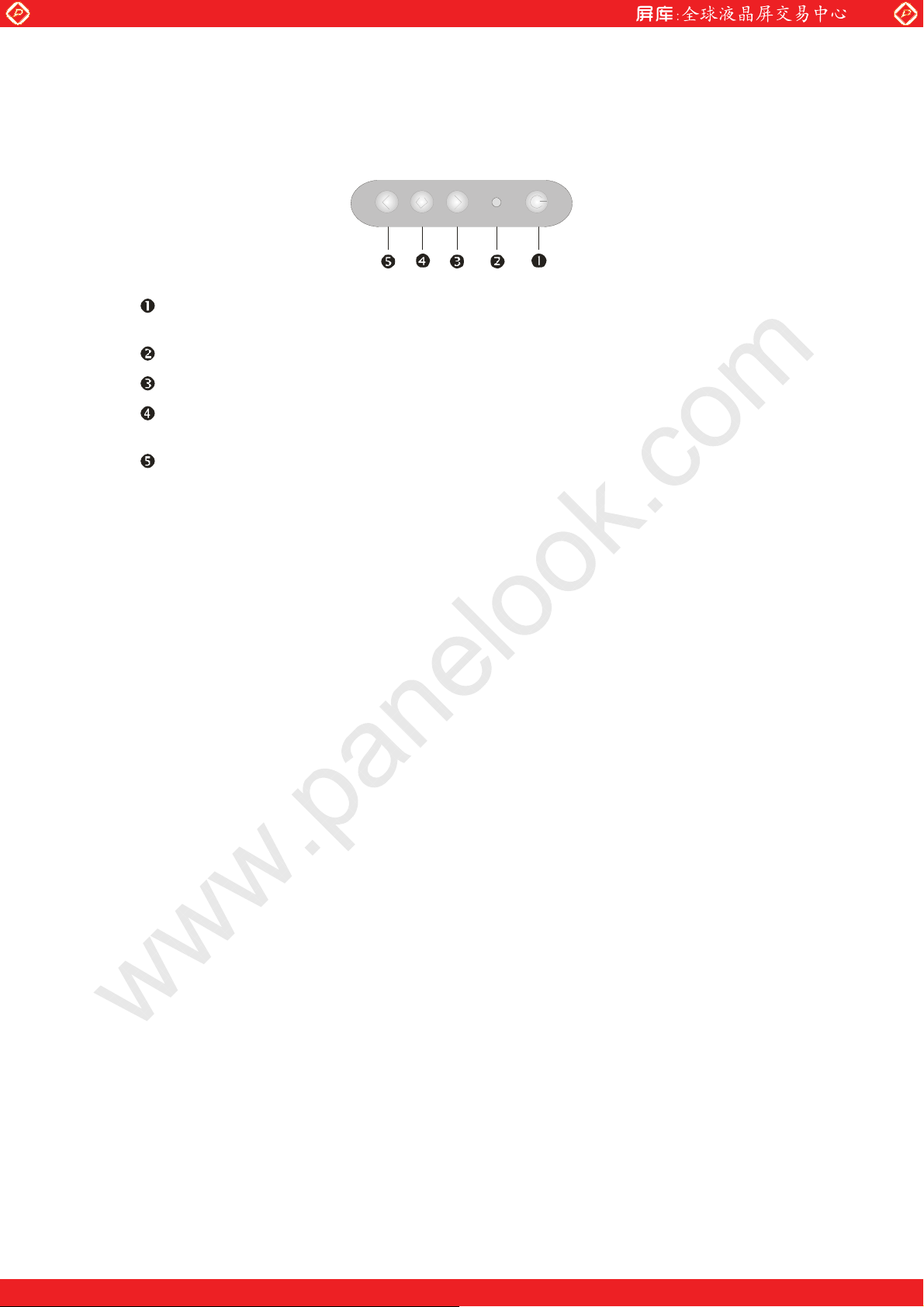
6.3 MEMBRANE CONTROL BUTTOM
POWER SWITCH: Pushing the power switch will turn the monitor on. Pushing it again to
turn the monitor off.
Power LED: Power ON-Green / Power off-No.
Up Key >: Increase item number or value of the selected item.
Menu Key: Enter to the OSD adjustment menu. It also used for go back to previous menu
for sub-menu, and the change data don’t save to memory.
www.panelook.com
Down Key <: Decrease item number or item value when OSD is on.
When OSD is off, it is hot key for input switch between VGA, AV,
and S-video.
Screen Adjustment Operation Procedure
1. Entering the screen adjustment
The setting switches are normally at stand-by. Push the Menu Key once to display the
main menu of the screen adjustment. The adjustable items will be displayed in the main
menu.
2. Entering the settings
Use the Down Key < and Up Key > buttons to select the desired setting icon and push
the SELECT button to enter sub-menu.
3. Change the settings
After the sub-menu appears, use the Down Key < and Up Key > buttons to change the
setting values.
4. Save
After finishing the adjustment, push the SELECT button to memorize the setting.
5. Return & Exit the main menu
Exit the screen adjustment; push the “MENU” button. When no operation is done
around 30 sec (default OSD timeout), it goes back to the stand-by mode and no more
switching is accepted except MENU to restart the setting.
6.4 OSD FUNCTIONS
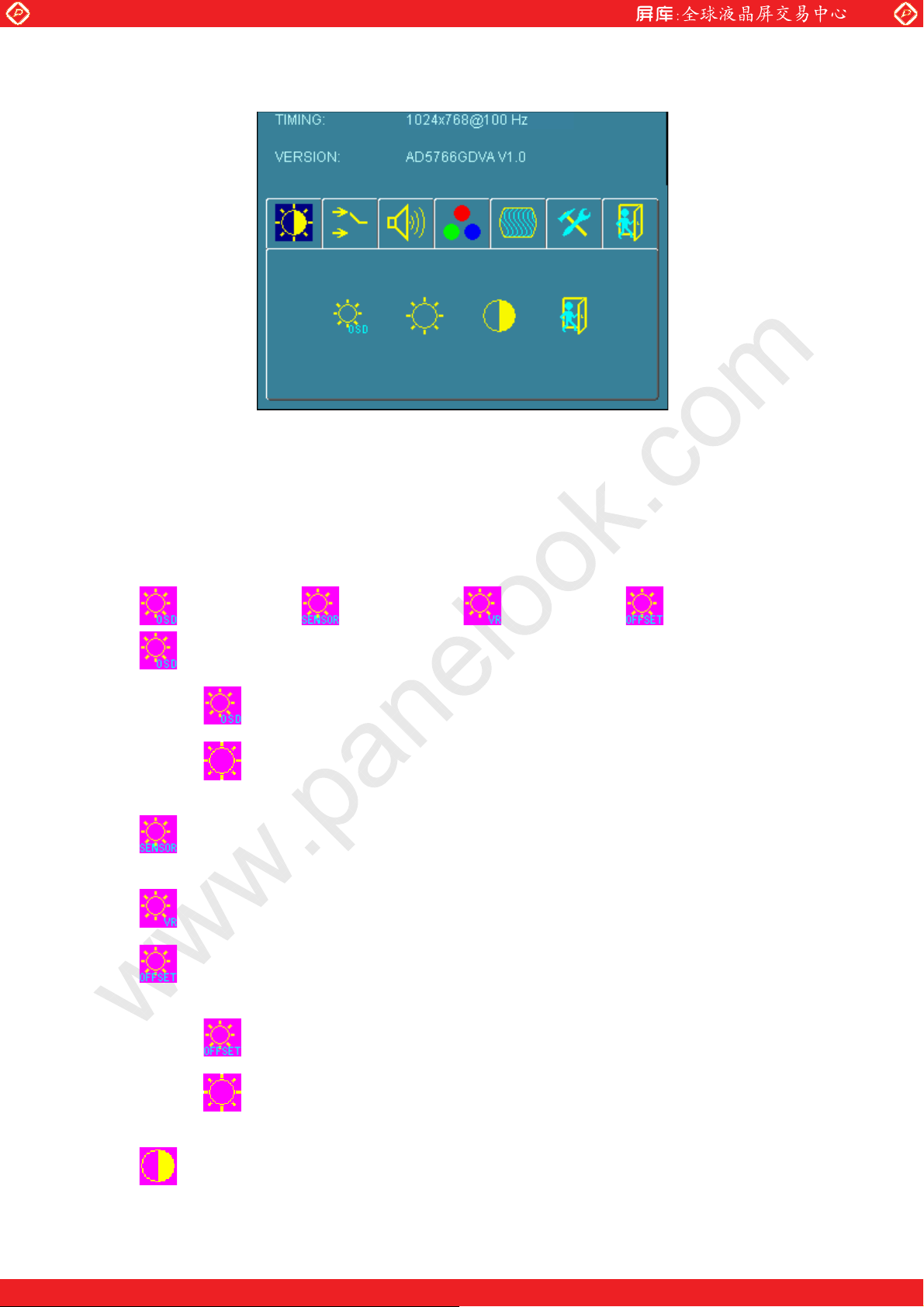
By pressing the “menu” button, you will see the below picture. Across from timing you will see
resolution, frequency, and V-frequency of the panel. Version shows the firmware control
version. These cannot be altered by the user.
Page 15
One step solution for LCD / PDP / OLED panel application: Datasheet, inventory and accessory!
www.panelook.com
Page 16
Global LCD Panel Exchange Center
There are 7 sub menus within the OSD user interface: Brightness, Signal Select, Sound, Color,
www.panelook.com
Image, Tools, and Exit.
When you press the “menu” button, you enter the “Brightness” sub directory. In this directory,
you will see 4 selections:
press ’’menu’’ press ’’menu press ’’menu’’ press ’’menu’’
OSD Brightness:
press ’’right’’ key
Press the “menu” once, to adjust the brightness. Press “left” to dim down
the brightness to “0”, press “right” to increase the brightness to “100”
Ambient light sensor: Press this Icon for auto dimming. (OPTION) To use this
option, the Litemax ambient light sensor needs to have been installed
Potentiometer: Navigate to this icon to adjust the VR function. (OPTION)
Ambient light sensor with OSD offset: To set minimum brightness level based on
ambient light.
Press ’’right’’ key
Press ’menu’’ once, to adjust minimum luminance to fit your application
(OPTION)
Contrast: Press “menu” and “right” buttons to adjust the contrast from “0” to “100”.
Page 16
One step solution for LCD / PDP / OLED panel application: Datasheet, inventory and accessory!
www.panelook.com
Page 17
Global LCD Panel Exchange Center
www.panelook.com
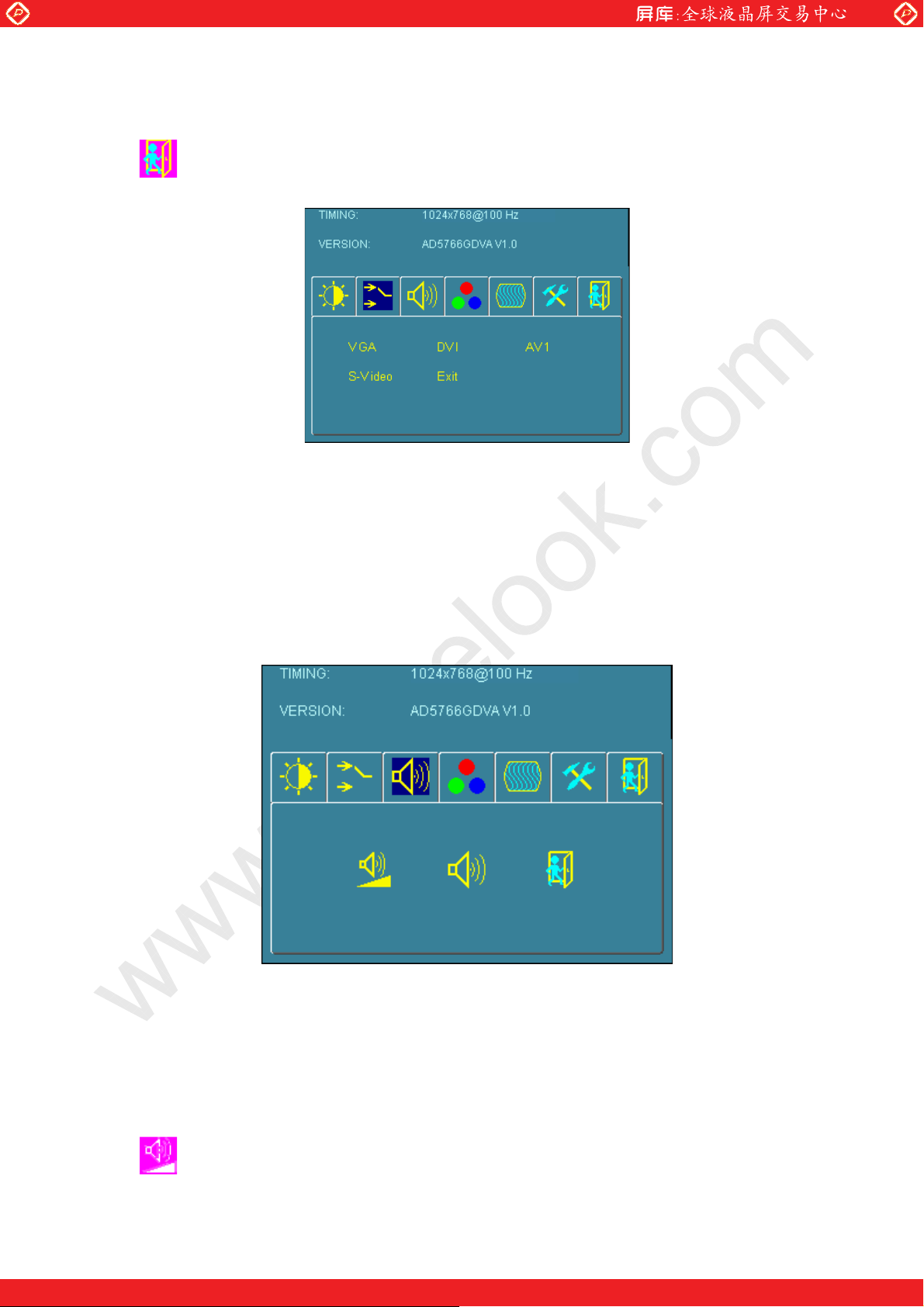
VGA
DVI
AV1
S-Video
Exit
To adjust from “100” to “0”, press “menu” and the “left” buttons.
Exit: You can exit this sub menu back to normal screen.
Analog: RGB/VGA input
Digital: DVI input
AV1: Composite input
S-Video: S-Video input
Exit: You can exit this sub menu back to the beginning
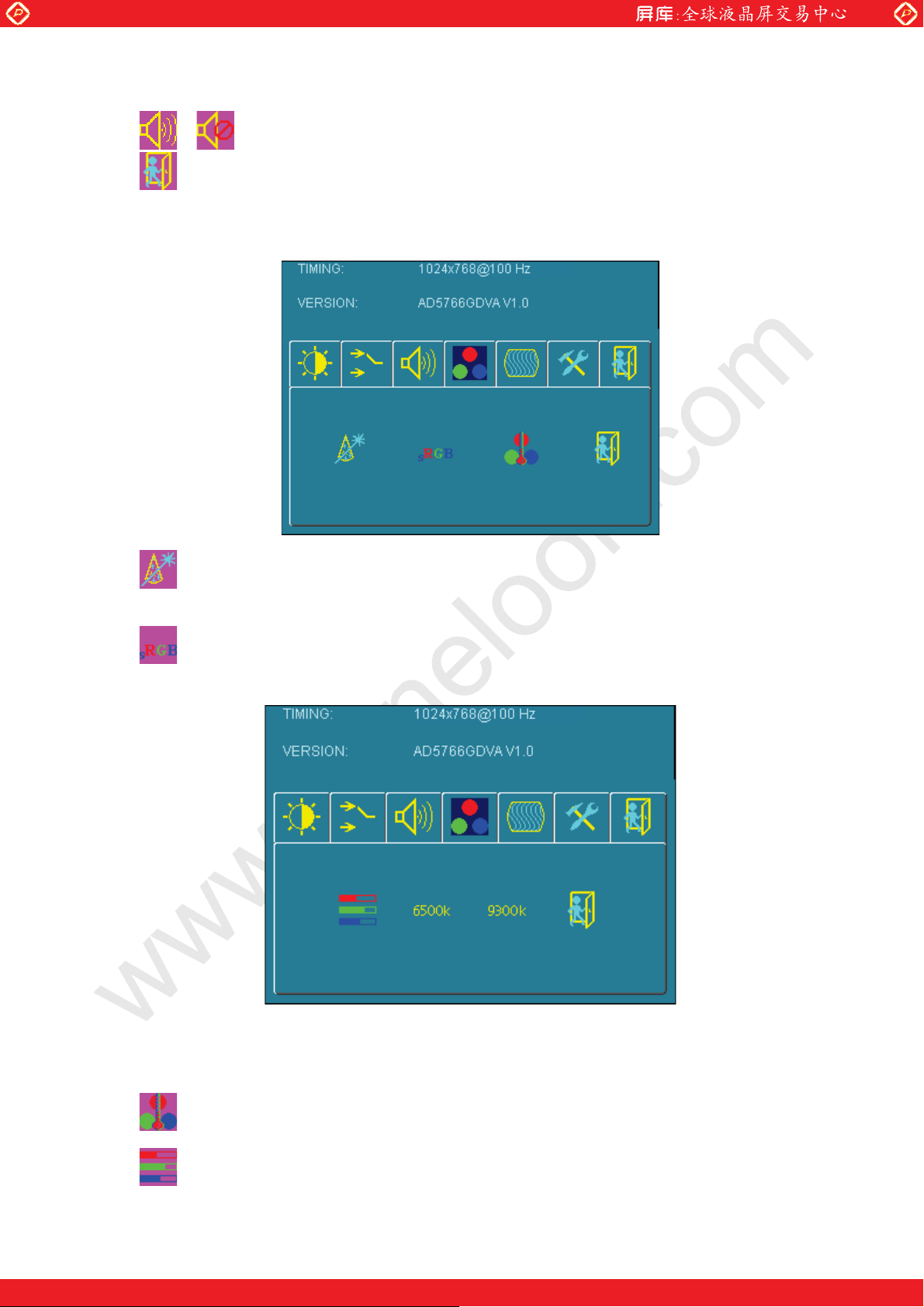
There are 3 options for “Sound” sub page.
Audio Volume: Audio volume adjustment.
Page 17
One step solution for LCD / PDP / OLED panel application: Datasheet, inventory and accessory!
www.panelook.com
Page 18
Global LCD Panel Exchange Center
UnMute/Mute: You can mute the speaker by pressing this option.
/
Exit: back to the beginning menu.
www.panelook.com
Auto Color: By navigating over to the “Auto Color” option, optimal color
performance is invoked.
SRGB: Windows standard color setting
Color Temperature: You have 3 options in this selection
.
Color Temperature User Define: Default is 100 for “R”, “G”, and “B”.
Page 18
One step solution for LCD / PDP / OLED panel application: Datasheet, inventory and accessory!
www.panelook.com
Page 19
Global LCD Panel Exchange Center
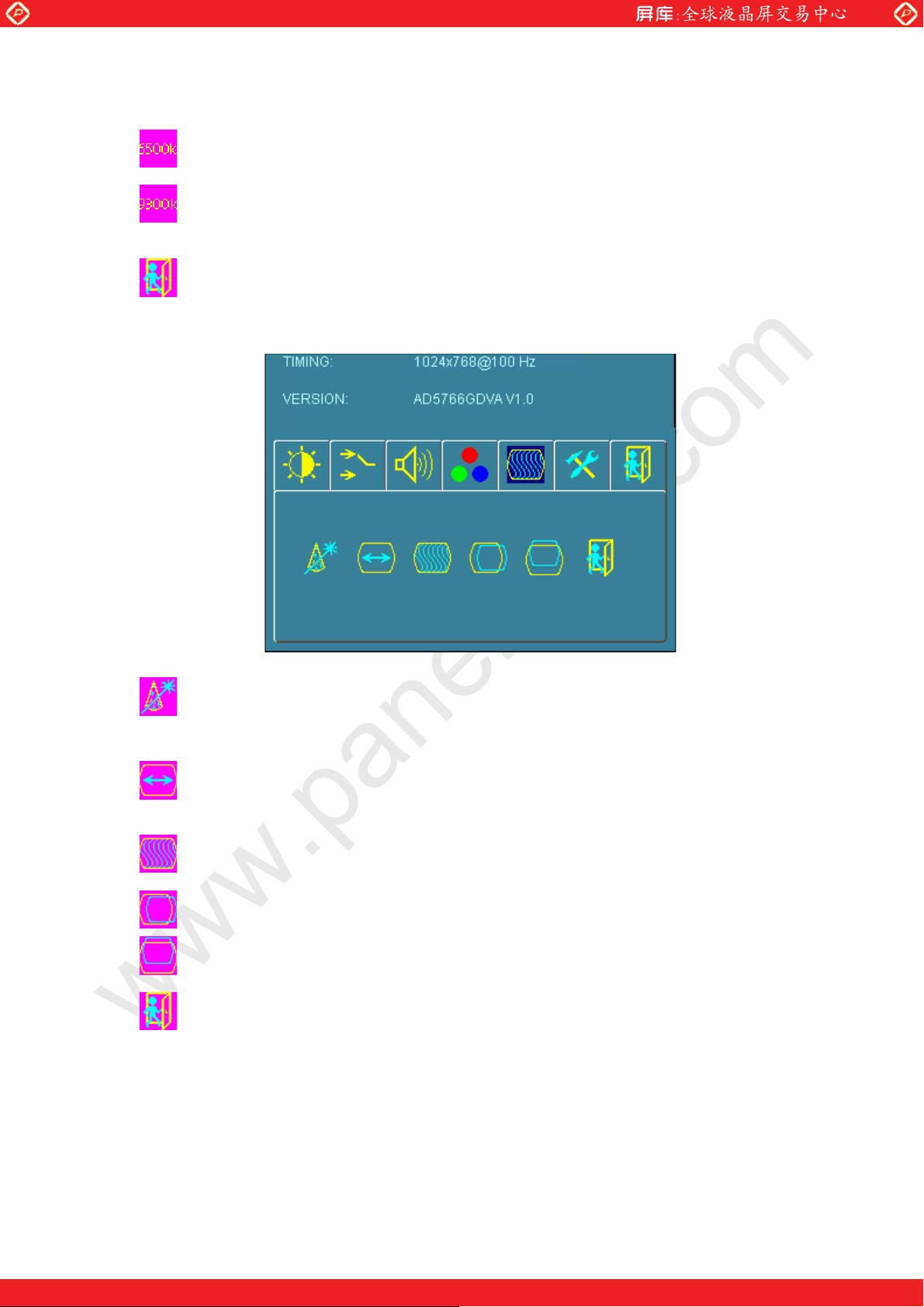
Color Tempture_6500K: Warm color scheme
Color Tempture_93OOK: Cold color scheme
Exit: back to the normal screen.
Go to the “Image” page, and you will see the below picture
www.panelook.com
Auto Adjust: Choose this option and the AD5766 will adjust to the optimal
On the “Tools” sub menu, you will see 5 icons.
horizontal and vertical frequency. You will see “Auto tune….” on the screen for
around 3 seconds.
Clock: If you are not satisfied with the Auto tune result, you can adjust manually
by pressing “Clock”. Using this will make the image wider.
Phase: If “double images” appear around the characters, choose “Phase” to
remove them..
H Pos: You can shift the screen horizontally using this function.
Vpos: You can shift the screen vertically using this function.
Exit: Back to normal screen.
Page 19
One step solution for LCD / PDP / OLED panel application: Datasheet, inventory and accessory!
www.panelook.com
Page 20
Global LCD Panel Exchange Center
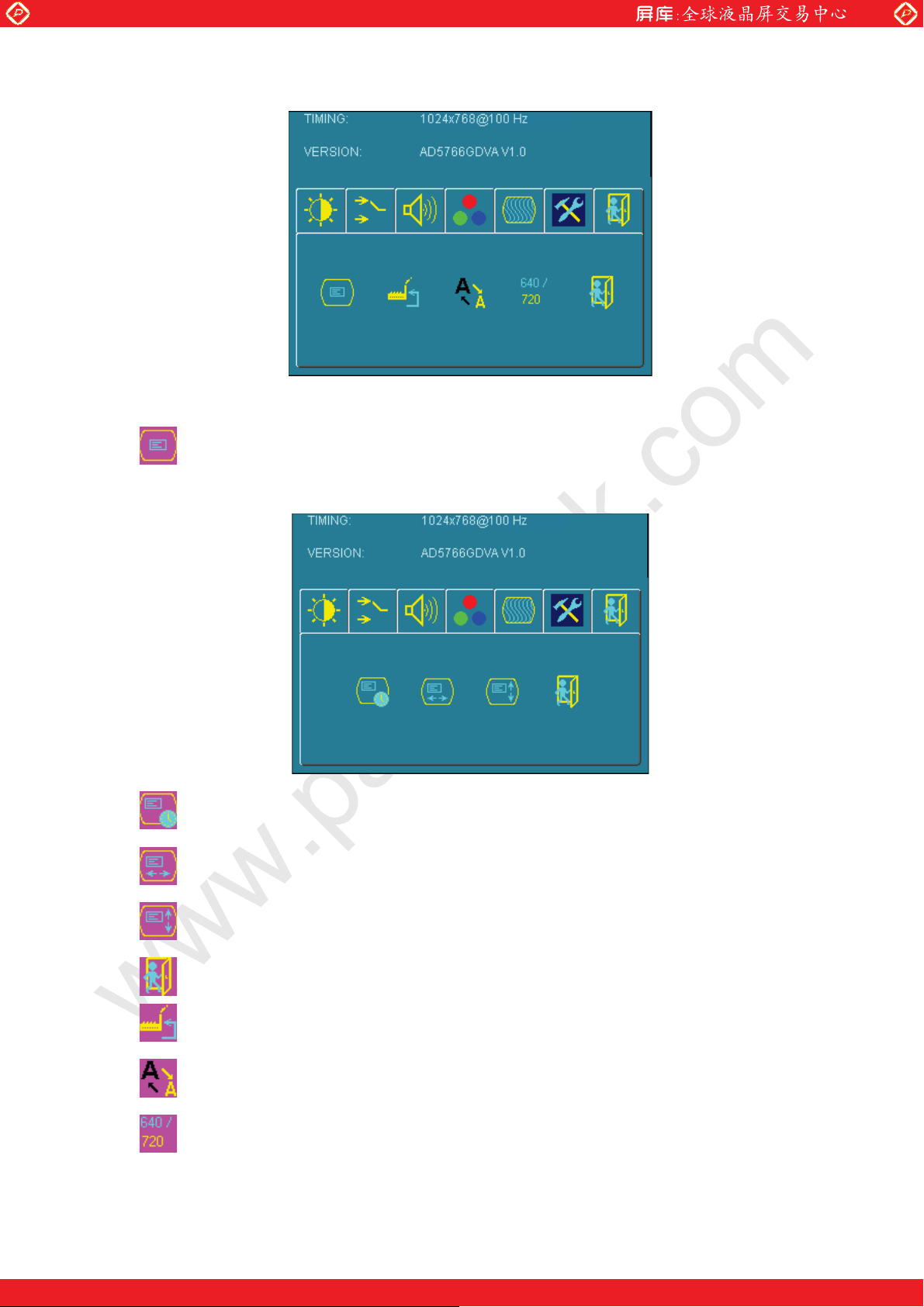
OSD Control: Selecting this option, brings you to 4 more options:
www.panelook.com
OSD _time: Select time for the OSD user interface to stay on screen, for 2 sec. to
16 sec. Default is 6 sec.
OSD _HPos: Moves the OSD user interface horizontally on screen.
OSD _VPos: Moves the OSD user interface vertically on screen.
Exit: back to main menu.
Factory_Reset: By pressing this, the screen will revert to factory settings, and the
previous settings will be deleted.
Sharpness: Sharpen characters.
Dos_mode/Gxf_mode: For some old programs which use 640x400 and 720x400
(DOS Mode and graphics mode), This option needs to be selected manually.
Page 20
One step solution for LCD / PDP / OLED panel application: Datasheet, inventory and accessory!
www.panelook.com
Page 21
Global LCD Panel Exchange Center
Exit
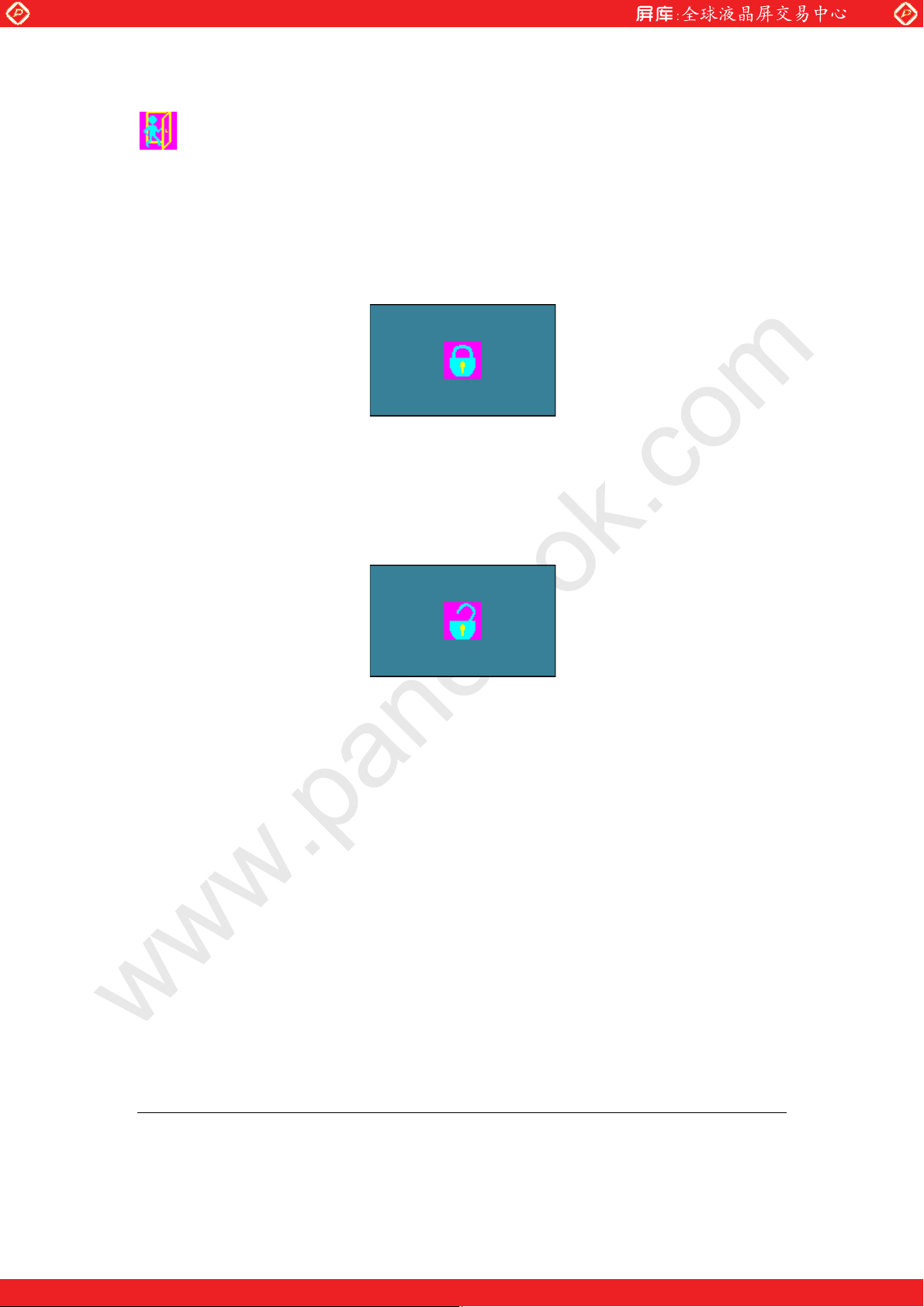
OSD Lock Function: It is possible to lock all the OSD buttons to prevent unauthorized changes
to occur by pressing “Menu” and “right >” buttons simultaneously. You will see the “lock” icon
below on the center of the screen for 3 seconds. If any button is pushed after the lock
function is initiated, the below icon will appear on the screen.'
www.panelook.com
To release the OSD lock, press “Menu” and “Right >”. The below icon will appear on the
center of the screen for 3 seconds. Now all OSD keys are active again.
Page 21
One step solution for LCD / PDP / OLED panel application: Datasheet, inventory and accessory!
www.panelook.com
 Loading...