

Page 1
LT-8 03 FM Transmitter
LT-803-072 Quick Reference Card
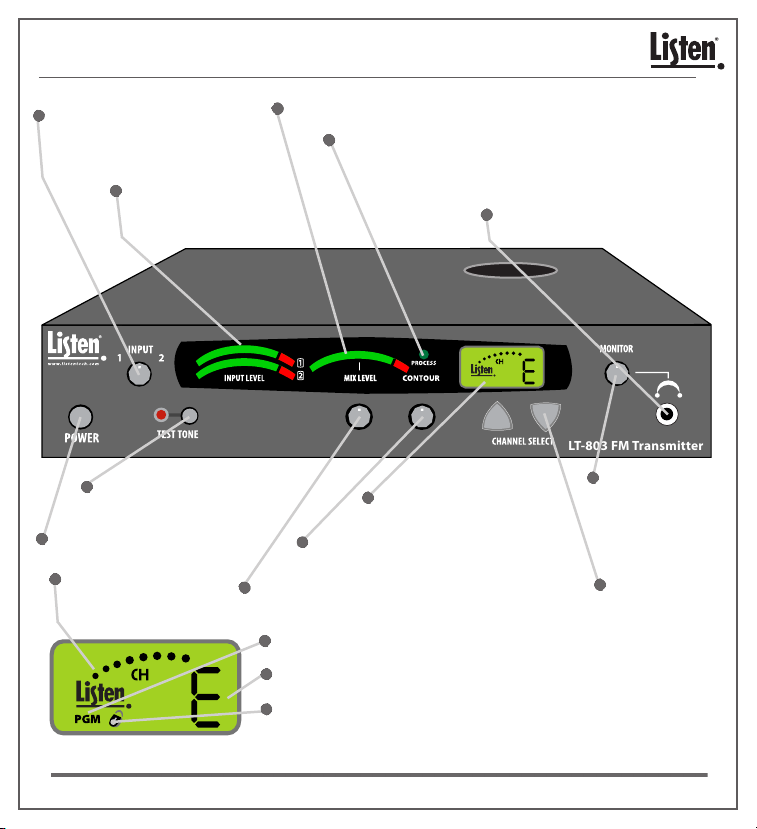
Input 1 and 2:
Adjust audio input levels of
Input 1 and Input 2 here.
Input Level Indicators:
Shows audio Input 1
and Input 2 levels.
Test Tone: Activates a tone
to aid system setup.
Power Button: Turns unit On/Off.
RF Output Indicator:
Indicates transmitted
RF power level.
Mix Level: Shows mixed audio output level.
Process LED: Indicates audio processing mode is active.
Press and hold the down button for 10
seconds to activate program mode. Press
up button to toggle process On/Off.
Monitor Jack: Plug in earphone(s)
to monitor audio.
LCD Display: See LCD
display quick reference.
Contour: Equalization adjustment;
boosts or cuts high frequencies.
Mix Transmit Levels: Adjusts the amount of
mixed audio being transmitted.
PGM: Indicates the unit is in program mode.
Channel Display: Displays the current channel.
Lock Icon: Indicates the unit is locked on current
channel. Hold Channel up button for 3
seconds to lock On/Off channel.
Monitor Level:
Adjust the Monitor
output volume.
Channel Select
UP/DOWN: Use to
select channel
(A,E,H). Buttons
also used for
programming
functions.
© 2008 Listen Technologies Corporation® All Rights Reserved 200859
Page 2
LT-803-072 Quick Reference Card
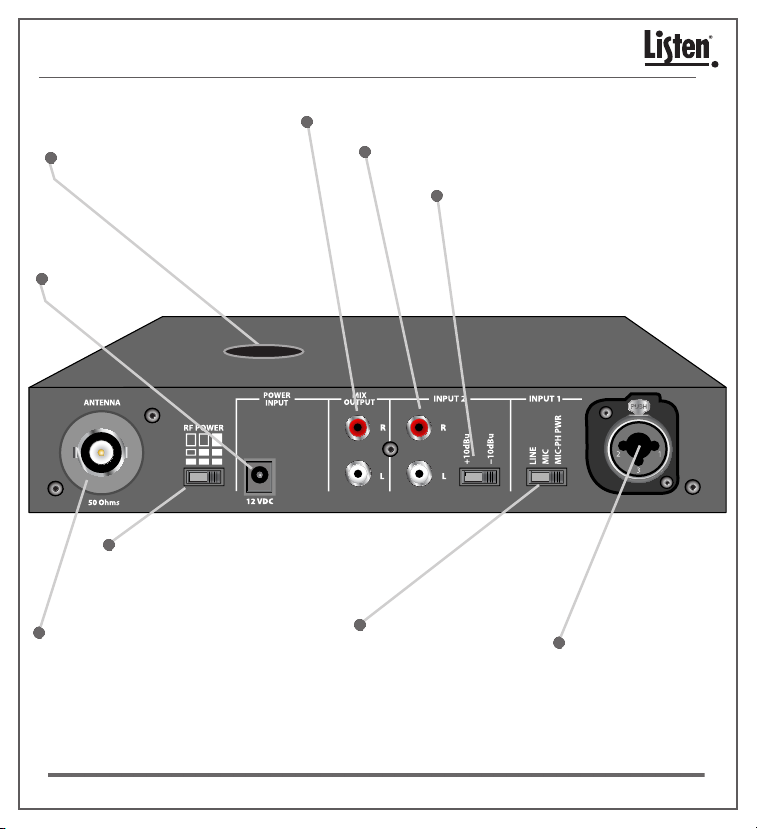
Audio Outputs: Input 1 and input 2 mixed for a line output.
Top Mounted Antenna Output :
Screw terminal for topmounted
antenna.
Power Input:
Connect power supply here.
RF Power Level:
Low, med or high RF power.
Input 2: Unbalanced audio inputs (stereo or mono).
Input 2 Level Switch: Set switch to
match the level of your Input 2 source.
RF Antenna Output:
BNC connector for
antenna (50 Ohm).
please visit our website at www.listentech.com Resources/Support/Manuals
Input 1 Level Switch: Set
switch for line or mic
level. Phantom power
available in Mic-PH
power position.
For further details regarding advanced options for your Listen products
or contact Listen at +1.801.233.8992 • +1.800.330.0891
© 2008 Listen Technologies Corporation® All Rights Reserved 200859
North America
Input 1: Balanced input
for connection of a line
level or microphone;
accepts either a XLR or
¼” phono plug.
 Loading...