

Listen Technologies LS-49-216, LS-49-072, LS-48-216, LS-48-072, LS-47-216 Quick Start Guide
Page 1

LR-400-072/216 Quick Reference Card
SQ™ (Super Quiet)
– SQ™ minimizes RF noise allowing clear reception.
– To work properly SQ™ must be enabled for both the transmitter and the receivers.
Channel Lock/Unlock
– To lock/unlock on a channel, hold the SEEK button for 4 seconds.
– The LED will blink momentarily when the channel lock is activated/deactivated.
– If the receiver is locked on a channel and the SEEK button is pushed, the LED will blink.
Squelch
– Squelch will mute the audio output of your receiver when the signal from the transmitter is turned off or is
1. Turn unit off.
2. Press and hold the SEEK button; while holding SEEK, turn the unit on. Release the SEEK button.
3. Use the Channel UP/DOWN buttons to adjust the squelch sensitivity settings.
4. Squelch setting 00 is no squelch; this effectively disables the squelching capabilities of the
5. Press SEEK to exit the squelch programming mode.
IMPORTANT: DO NOT ATTEMPT TO CHARGE ANY TYPE OF BATTERY OTHER THAN NiMH (NICKEL METAL HYDRIDE) with your
WARNING: When using a Listen charging case, the case lid MUST be open or removed while the units are charging.
too weak to be received. To adjust squelch, follow these steps:
receiver. Squelch setting 20 is maximum squelch sensitivity; you must have a very strong and
stable RF signal for the unit to not engage the squelch feature.
Listen equipment. In order to charge NiMH batteries, the BATTERY SELECT switch in your Listen product
must be set to the NiMH setting.
For further details regarding advanced options for your Listen products please visit our website at
www.listentech.com Resources/Support/Manuals
or contact Listen at +1.801.233.8992 • +1.800.330.0891
© 2008 Listen Technologies Corporation® All Rights Reserved 200859
North America
Page 2
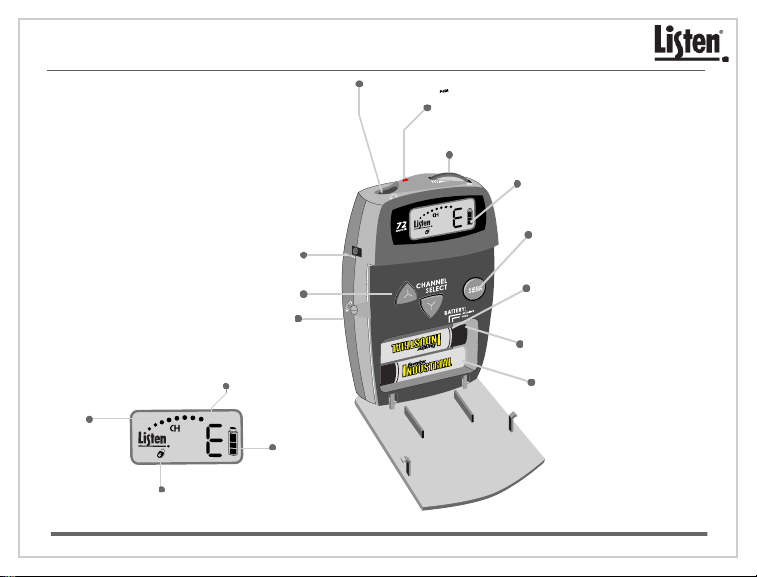
LR-400-072/216 Quick Reference Card
3.5 mm Output Jack: Connect a Listen earphone(s) here.
LED: When lit, indicates unit has power. When
batteries are low or charging the LED flashes.
Power/Charging Port
Channel Select Buttons
Front Door Lock
Channel Display: Displays the
channel the LR-400 is currently on.
RF Receive
Indicator:
Indicates the RF
receive level.
Lock Icon: Indicates the unit is
locked on current channel.
© 2008 Listen Technologies Corporation® All Rights Reserved 200859
Battery Level
Indicator
On/Off and Volume Control Dial
Look&Listen™ Display:
Shows receive level, channel,
battery status, and lock status.
SEEK Button: Allows the user
to search for or lock onto an
active channel.
Battery Select Switch: Choose
the type of batteries being
used - Alkaline or NiMH.
SQ™ Switch: Turns SQ™ On/Off.
Battery Compartment:
Place two (2) AA batteries
in compartment. Be sure to
follow polarity pattern.
 Loading...