

Page 1
Benutzerhandbuch
Manuel de l’utilisateur
Manuale per l’utente
Manual de uso
User handbook
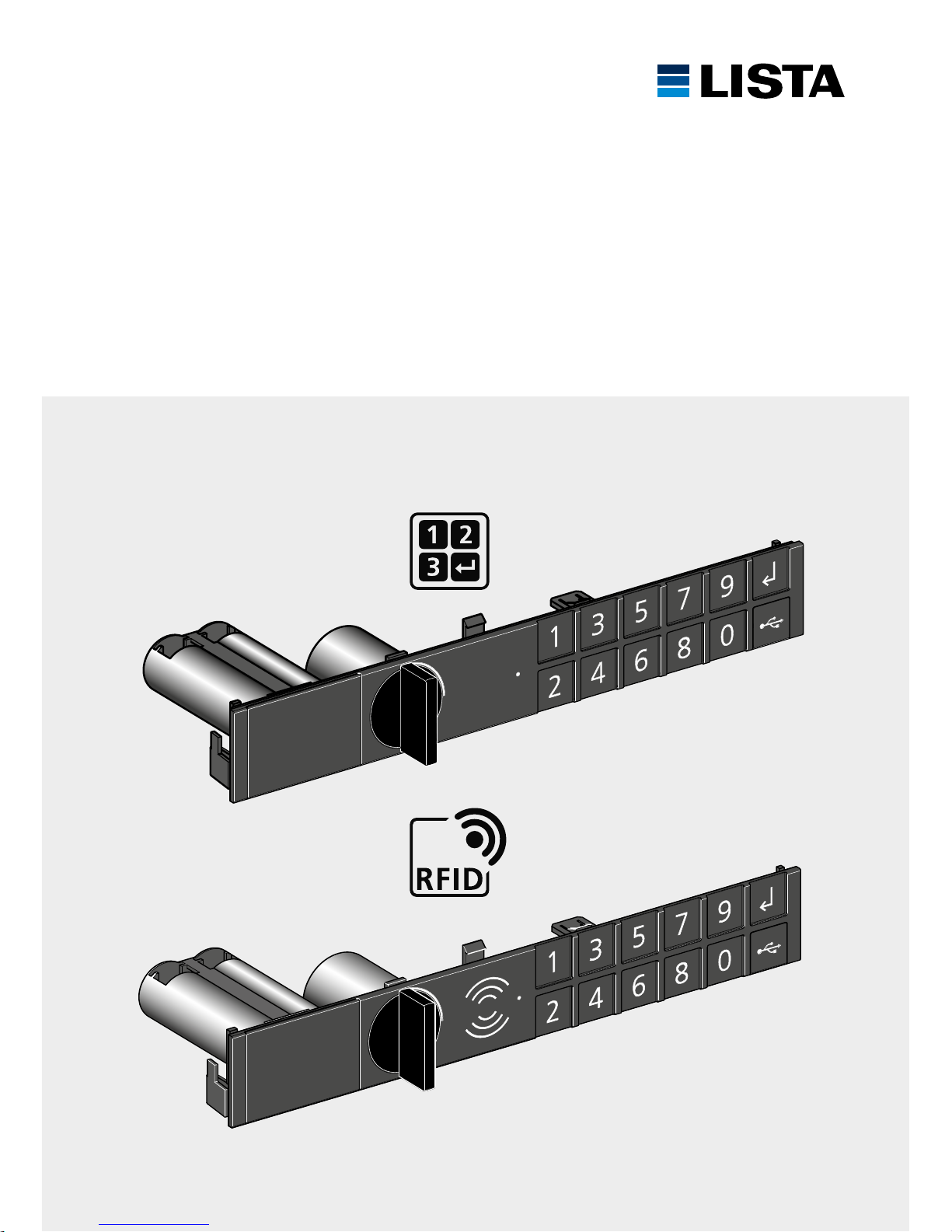
CODE LOCK, RFID LOCK
Code Lock
RFID Lock
Page 2
www.lista.com
2
INHALTSVERZEICHNIS
SOMMAIRE
SOMMARIO
ÍNDICE
TABLE OF CONTENTS
Informationen 3
Informations
Informazioni
Información
Information
Produktübersicht Code Lock, RFID Lock 4
Aperçu du produit Code Lock, RFID Lock
Panoramica del prodotto Code Lock, RFID Lock
Vista general del producto Code Lock, RFID Lock
Product overview Code Lock, RFID Lock
Initialisierung Code Lock 6
Initialisation Code Lock
Inizializzazione Code Lock
Inicialización Code Lock
Initialization Code Lock
Programmierung Code Lock 8
Programmation Code Lock
Programmazione Code Lock
Programación Code Lock
Programming Code Lock
Initialisierung RFID Lock 10
Initialisation RFID Lock
Inizializzazione RFID Lock
Inicialización RFID Lock
Initialization RFID Lock
Programmierung RFID Lock 11
Programmation RFID Lock
Programmazione RFID Lock
Programación RFID Lock
Programming RFID Lock
Programmierung Funktionen 14
Programmation fonctions
Programmazione funzioni
Programación funciones
Programming functions
Modulaustausch 16
Remplacement des modules
Sostituzione moduli
Sustitución módulo
Module replacement
Batteriewechsel 18
Remplacement de batterie
Sostituzione della batteria
Cambio de batería
Changing battery
Fehlersuche 19
Détection d’erreurs
Ricerca guasti
Búsqueda de errores
Troubleshooting
Page 3
www.lista.com
3
INFORMATIONEN
INFORMATIONS
INFORMAZIONI
INFORMACIÓN
INFORMATION
Die nachfolgende Montage- und Bedienungsanleitung ist als Sicherheitsmassnahme zwingend
zu befolgen. Sie ist sämtlichen Beschäftigten zur Kenntnis zu bringen und von diesen zu beachten!
Benutzerhandbuch bitte nicht im Schrank aufbewahren!
Les instructions suivantes de montage et d`utilisation doivent impérativement être appliquées
comme mesures de sécurité. Elles doivent être portées à la connaissance de tous les collaborateurs
et respectées de ceux-ci! Ne pas conserver le manuel d’utilisation dans l’armoire!
Le seguenti istruzioni per il montaggio e l’utilizzazione devono imperativamente essere rispettate
per poter garantire le misure di sicurezza. L’intero personale ne deve essere a conoscenza e le deve
rispettare! Non conservare le istruzioni per l’uso nell’armadio!
Como medida de seguridad, es imprescindible seguir las instrucciones del presente manual
de instalación y uso. ¡Todos los operarios deberán conocerlas y respetarlas! No conservar el
Manual de Instrucciones dentro del armario.
The following mounting and operating instructions must be observed for safety. All employees
should be informed about them and observe them! Please do not place the user manual
in the cabinet!
Informationen
Informations
Informazioni
Información
Information
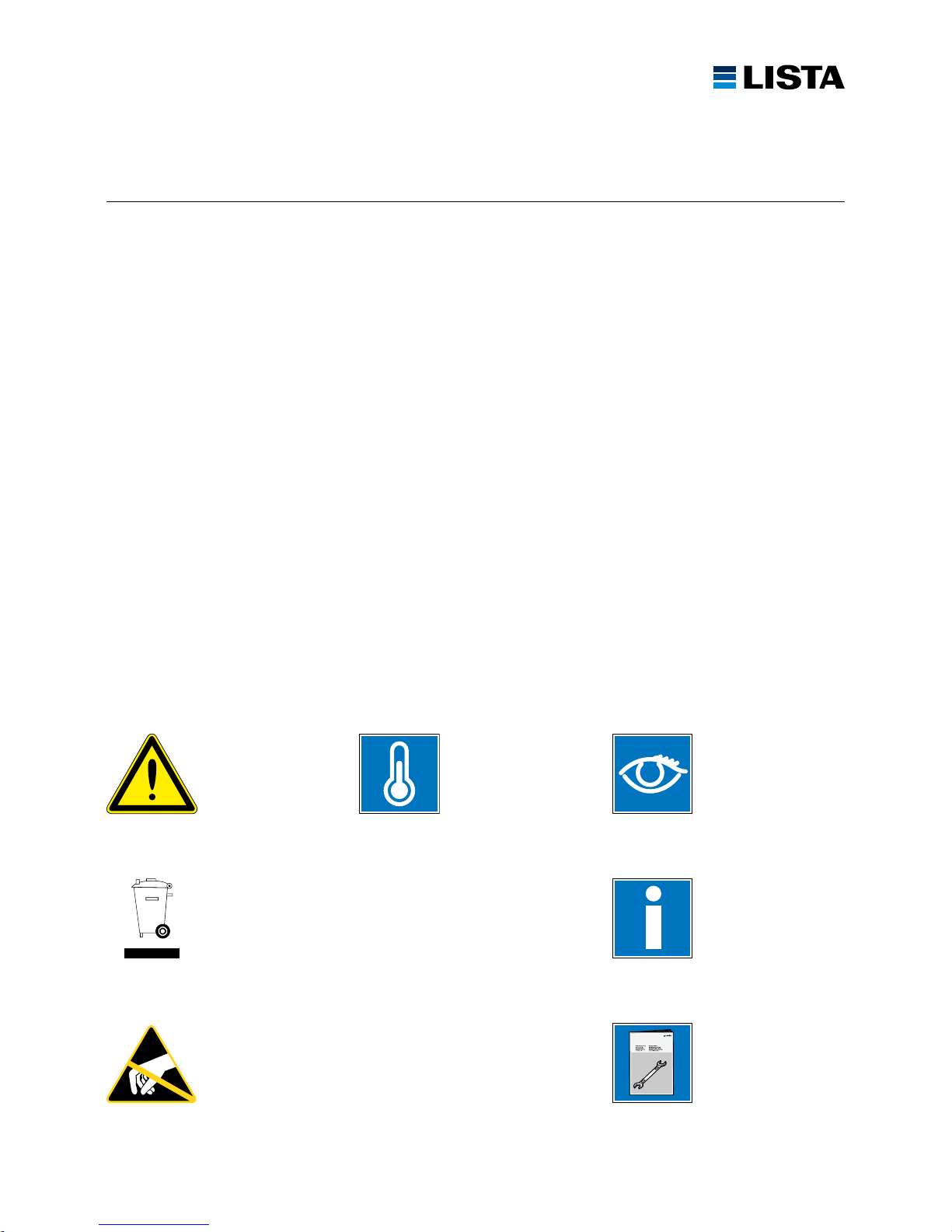
Beachten / Befolgen
Respe cter / Suiv re
Considerare / Seguire
Observar / Para seguir
To observ e / To follow
+ 10 bis + 40 ˚C
+ 10 à + 40 ˚C
+ 10 a + 40 ˚C
+ 10 a + 40 ˚C
+ 10 to + 40 ˚C
Montageanleitung
Instruction de montage
Istruzioni per il montaggio
Instrucción de montaje
Assembly instructions
Warnhinweise
Attention
Attenzione
Precaución
Warning notices
Entsorgung
Elimination
Smaltimento
Eliminación
Disposal
Vorsicht, ESD-Schutzmassnahmen einhalten!
Attention, nous vous prions de respecter les mesures de sécurité ESD!
Attenzione, vi preghiamo di rispettare le misure di sicurezza ESD!
Atención, mantenga las medidas de protección ESD.
Caution, please observe ESD protective measures!
Page 4
PRODUKTÜBERSICHT CODE LOCK, RFID LOCK
APERÇU DU PRODUIT CODE LOCK, RFID LOCK
PANORAMICA DEL PRODOTTO CODE LOCK, RFID LOCK
VISTA GENERAL DEL PRODUCTO CODE LOCK, RFID LOCK
PRODUCT OVERVIEW CODE LOCK, RFID LOCK
www.lista.com
4
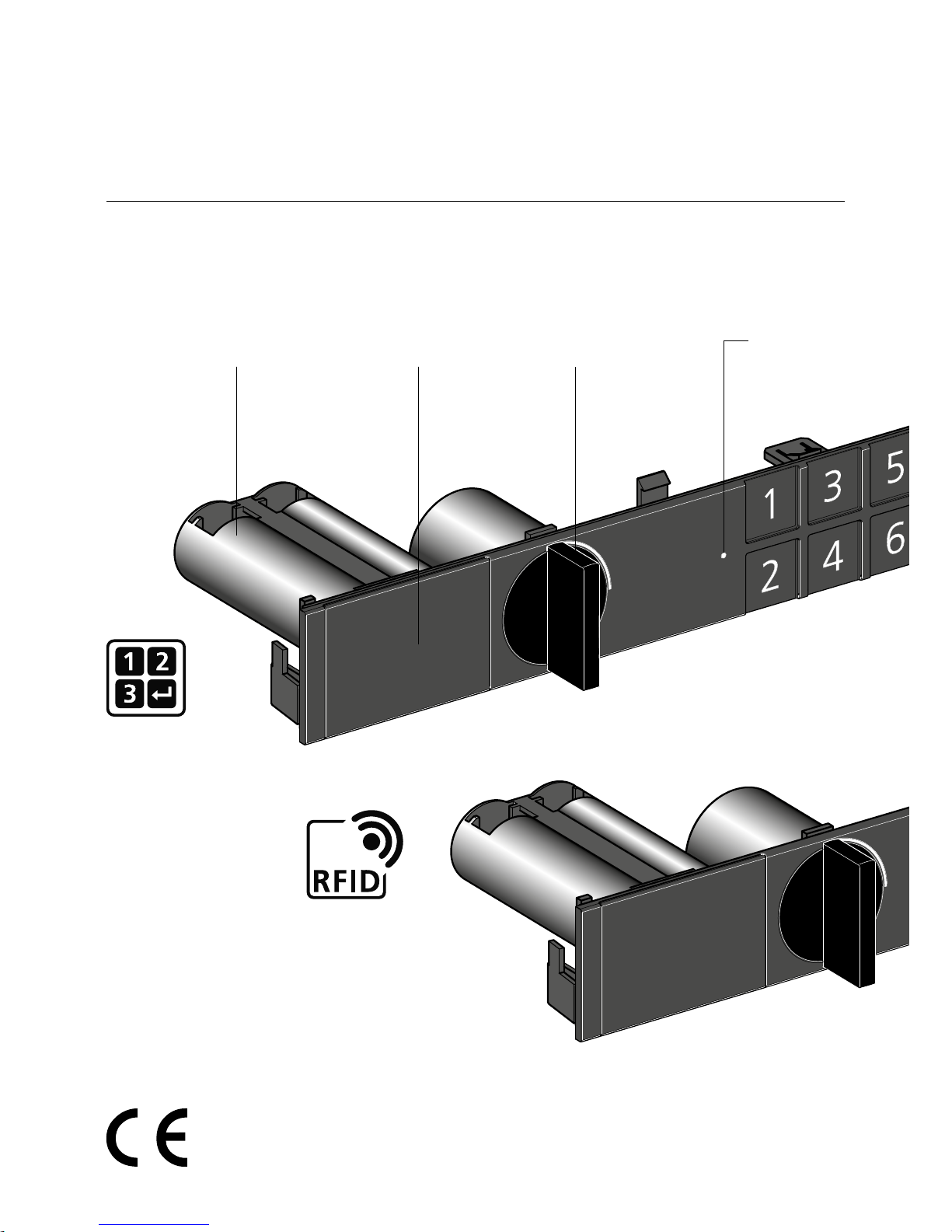
Drehknopf
Bouton tournant
Manopola di chiusura
Cierre giratorio
Turning knob
Batterien 1,5 V, Typ AA (FR6)
Batteries 1,5 V, type AA (FR6)
Batterie 1,5 V, tipo AA (FR6)
Pilas 1,5 V, tipo AA (FR6)
Batteries 1,5 V, type AA (FR6)
Batteriefach
Compartiment pour batterie
Compartimento per batteria
Compartimento pilas
Battery compartment
Code Lock
siehe S . 6
voir p. 6
vedi p. 6
véase p. 6
see p. 6
RFID Lock
siehe S. 10
voir p. 10
vedi p. 10
véase p. 10
see p. 10
LED
Page 5
www.lista.com
5
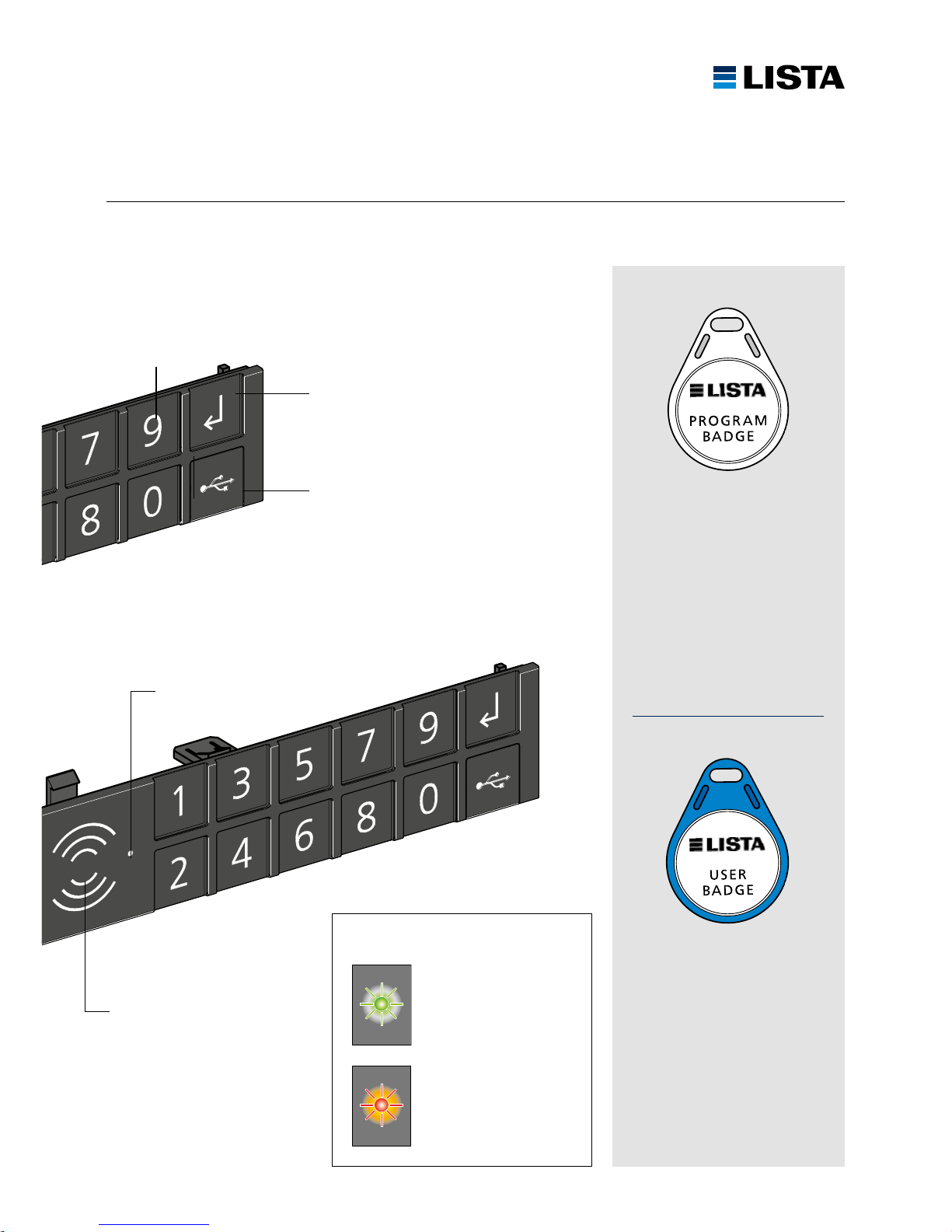
ENTER-Taste
Touche ENTER
Tasto ENTER
Botón INTRO
ENTER button
Zahle ntasten 0 – 9
Touches num ériques 0 – 9
Tasti numeri ci 0 – 9
Teclas numér icas 0 – 9
Numer ic ke ys 0 – 9
Abbruch/Fehler
Interruption/erreurs
Interruzione/errore
Cancelar/error
Cancel/error
Freigabe Entriegelung
Validation déblocage
Conferma sblocco
Confirmación desbloqueo
Unlocking enabled
USB-Anschluss
Raccordement USB
Connettore USB
Conexión USB
USB-port
LED:
LED
NFC Antenne
NFC antenne
NFC antenna
NFC antena
NFC antenna
Programmier-Badge:
Benutzer anlernen / löschen
Badge programmable:
Créer et supprimer un utilisateur
Badge programmable:
Imparare / cancellare l’utente
Badge programable:
Crear y eliminar un usuario
Programmable badge:
Create / d elete a user
Benutzer-Badge
Schrank öffnen
Badge de l’utilisateur
Ouvrez l’armoire
Badge utente
Aprire l’armadio
Badge utante
Abrir el armario
User badge
Open the cabinet
Page 6
www.lista.com
6
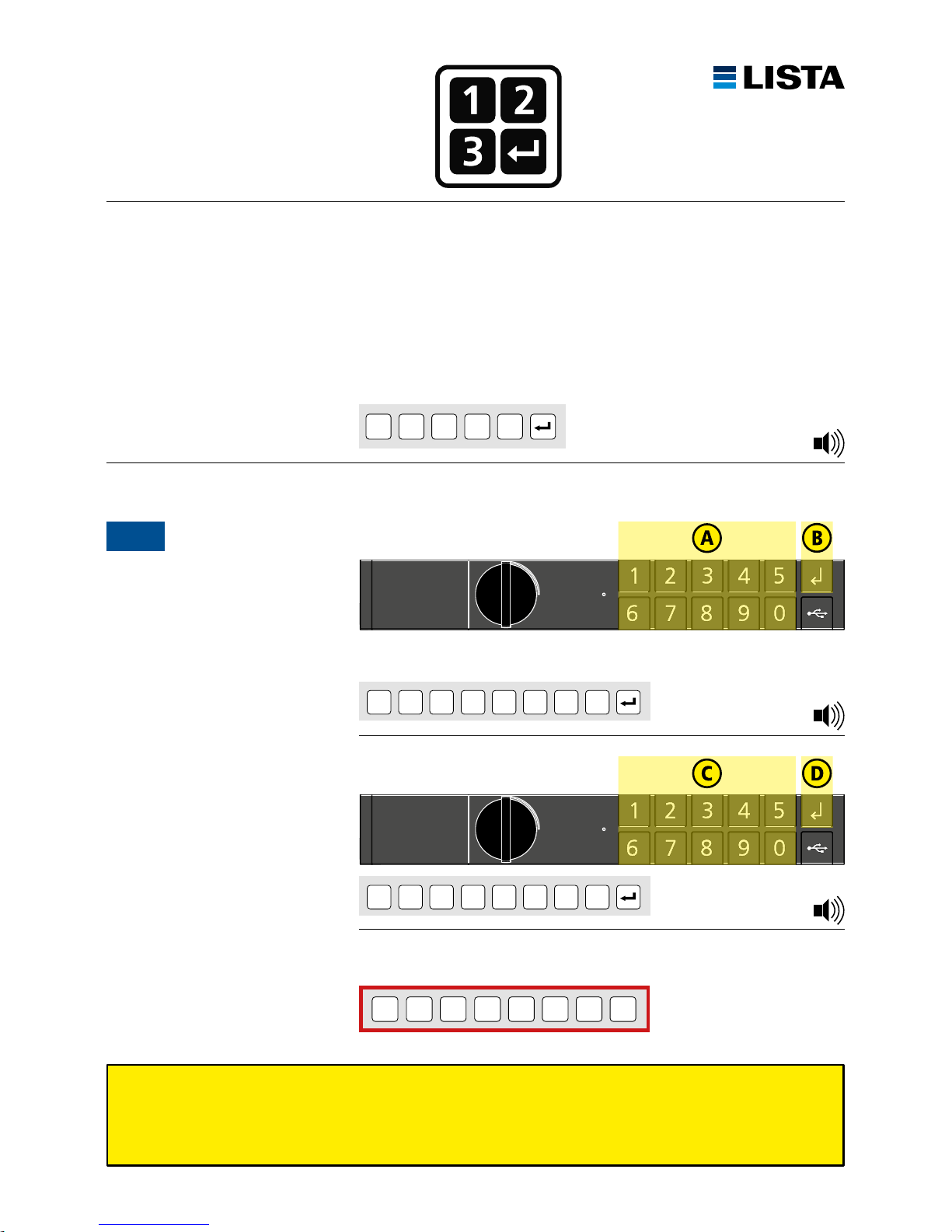
INITIALISIERUNG CODE LOCK
INITIALISATION CODE LOCK
INIZIALIZZAZIONE CODE LOCK
INICIALIZACIÓN CODE LOCK
INITIALIZATION CODE LOCK
Lock-ID unbedingt in die freien Felder eintragen. Lock-ID kann nur mit LISTA Access Software geändert werden.
Entrez Lock-ID absolument dans les champs libres. Le Lock-ID ne peut être modifiée avec le LISTA Access Software.
Introducir Lock-ID a los campos libres. Il codice maestro può essere modificato solo con il LISTA Access Software.
Inserisci Lock-ID assolutamente nei campi liberi. El código maestro sólo puede cambiarse con el LISTA Access Software.
Insert Lock-ID necessarily into the free fields. The Lock-ID can only be changed with LISTA Access Software.
Ihre Lock-ID notieren:
Noter votre Lock-ID:
Nota il tuo Lock-ID:
Tomar nota del Lock-ID:
Note your Lock-ID:
Lock-ID
Auslieferungszustand: LISTA Werkscode 1 2 3 4 5 ist werkseitig vorinstalliert.
Etat de livraison, code LISTA 1 2 3 4 5 est préinstallé en usine.
Stato alla fornitura, codice di fabbrica LISTA 1 2 3 4 5 è preinstallato.
Código de apertura preinstalado de fábrica 1 2 3 4 5 está preinstalada de fábrica.
LISTA factory code 1 2 3 4 5 and was preset at the factory.
1 2 3 4 5
Zum ersten Mal öffnen
Premier déverrouillage
Aperto per la prima volta
Abrir por primera vez
Unlocking for the first time
1
zum Beispiel / par exemple / per esempio / por ejemplo / for example:
1 2 3 4 5 6 7 8 (8 digits)
8-stellige Lock-ID eingeben
Introduire 8 caractères de Lock-ID
Inserire 8 cifre Lock-ID
Introducir 8 dígitos Lock-ID
Enter 8 digits of Lock-ID
* * * * * *
*
*
(8 digits)
* * * * * *
*
*
(8 digits)
Lock-ID wiederholen
Répéter Lock-ID
Ripetere Lock-ID
Repetir Lock-ID
Repeat Lock-ID
1 × Beep
3 × Beep
1 × B ee p
Page 7
www.lista.com
7
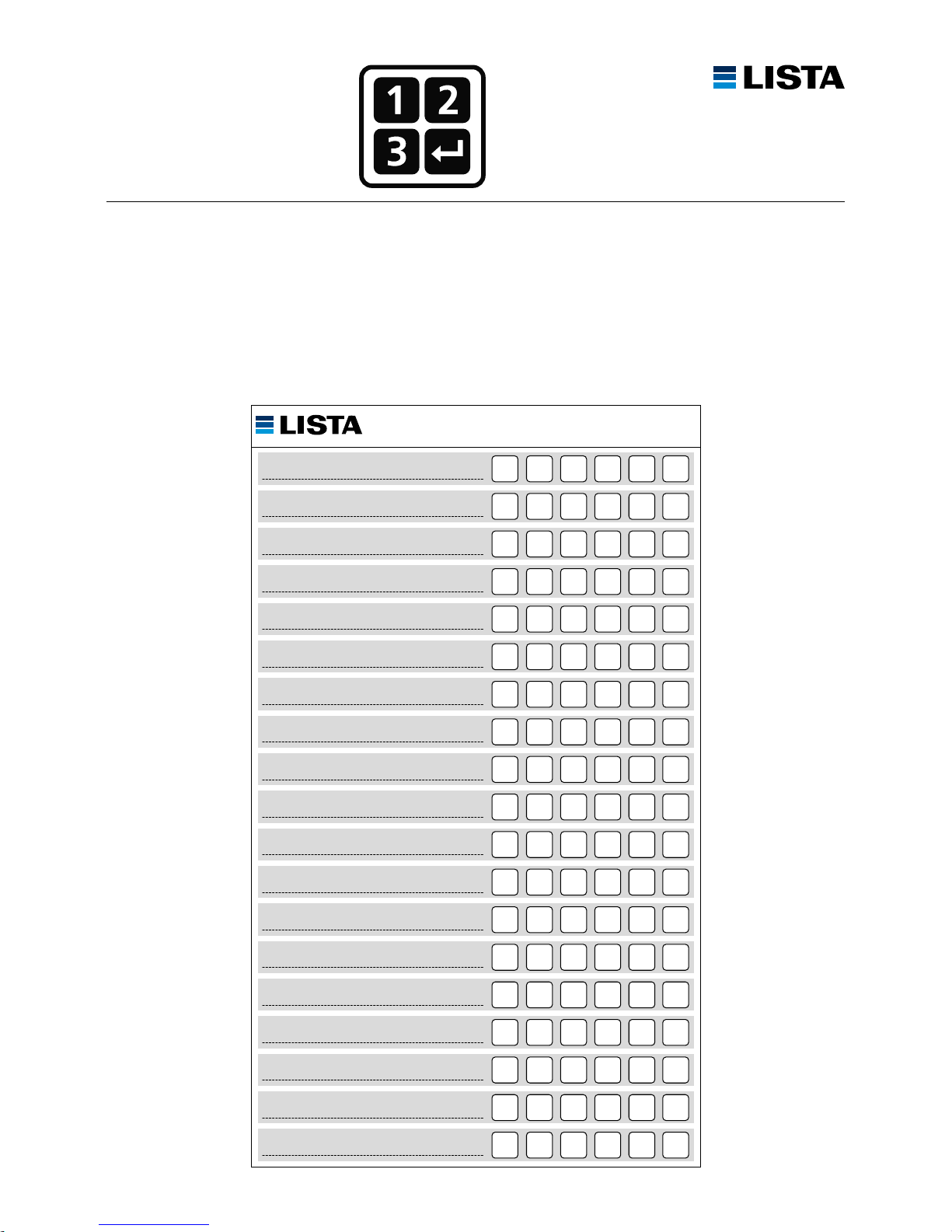
BENUTZERCODES
CODES UTILISATEURS
CODICI UTENTE
CÓDIGO USUARIOS
USER CODES
Benutzercodes in Tabelle eintragen
Entrez le code d’utilisateur dans le tableau
Introducir código de usuario en el cuadro
Inserisci il codice utente nella tabella
Insert user code in table
Page 8
www.lista.com
8
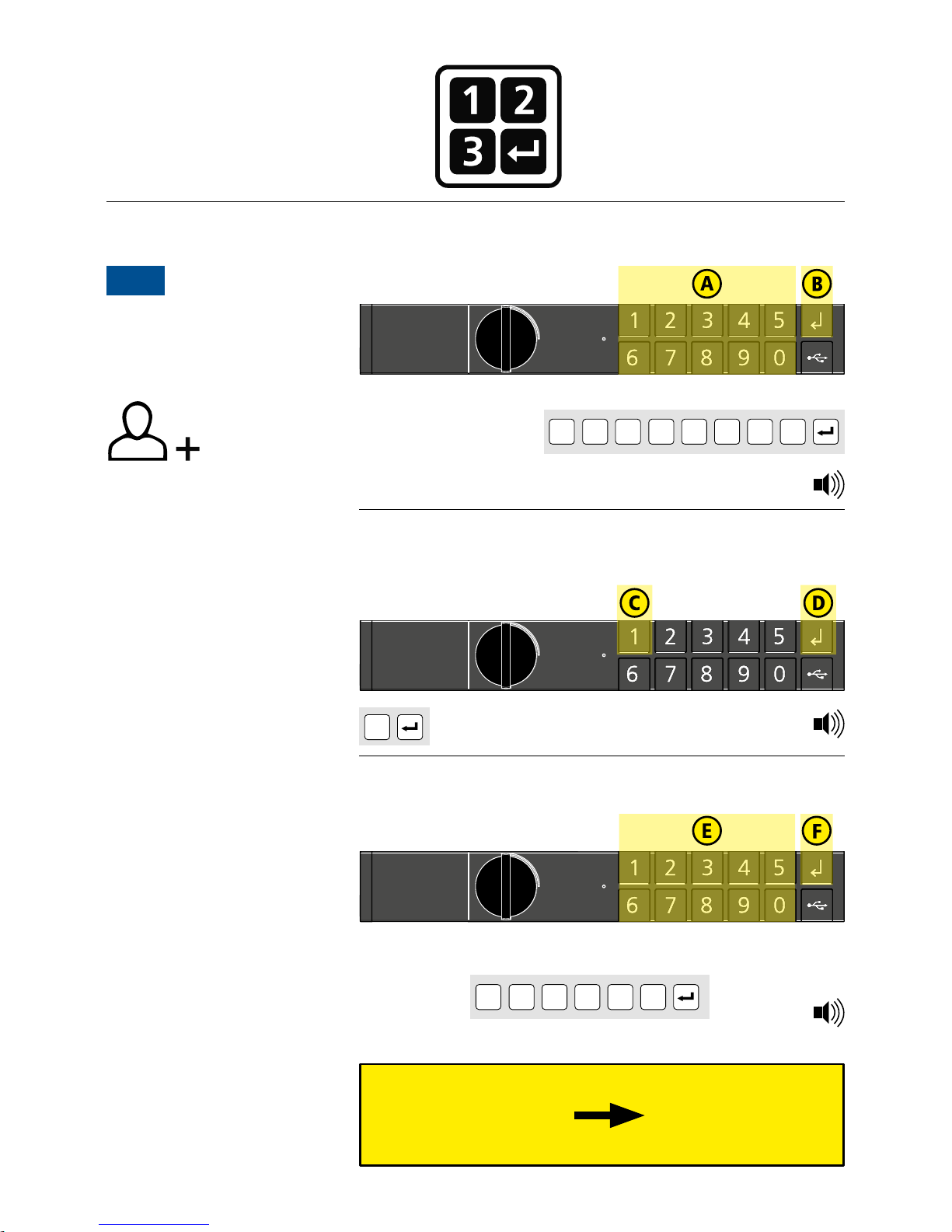
PROGRAMMIERUNG CODE LOCK
PROGRAMMATION CODE LOCK
PROGRAMMAZIONE CODE LOCK
PROGRAMACIÓN CODE LOCK
PROGRAMMING CODE LOCK
Ben utzer code 2 – 100
Cod e utili sateu r 2 – 100
Cod ici ute nte 2 – 100
Cód igos us uario s 2 – 100
Use r codes 2 – 100
Schr itte A – F wieder holen
Répéter les opérations A – F
Ripetere i passi A – F
Repet ir p asos A – F
Repea t s teps A – F
Benutzer anlernen
Enseigner aux utilisateurs
Enseñar a los usuarios
Insegnare usario
Teach users
2A
Lock-ID eingeben, (S. 6)
Introduire le Lock-ID, (S. 6)
Inserire il Lock-ID, (S. 6)
Introducir Lock-ID, (S. 6)
Enter Lock-ID, (S. 6)
Lock-I D
* * * * * *
*
*
(8 digits)
Benutzercode eingeben
Introduire code utilisateur
Inserire codice utente
Introducir código usuario
Enter user code
4 – 6 stellig
4 – 6 carac tères
4 – 6 carat teri
4 – 6 dígitos
4 – 6 digits
* * * * *
zum Beispiel / par exemple / per esempio / por ejemplo / for example:
1 2 3 4 5 6 (4 – 6 digits)
Taste 1 drücken
Appuyer sur la touche 1
Premere il tasto 1
Pulse el botón 1
Press the button 1
1
1 × B ee p
1 × B ee p
3 × Beep
Page 9
www.lista.com
9
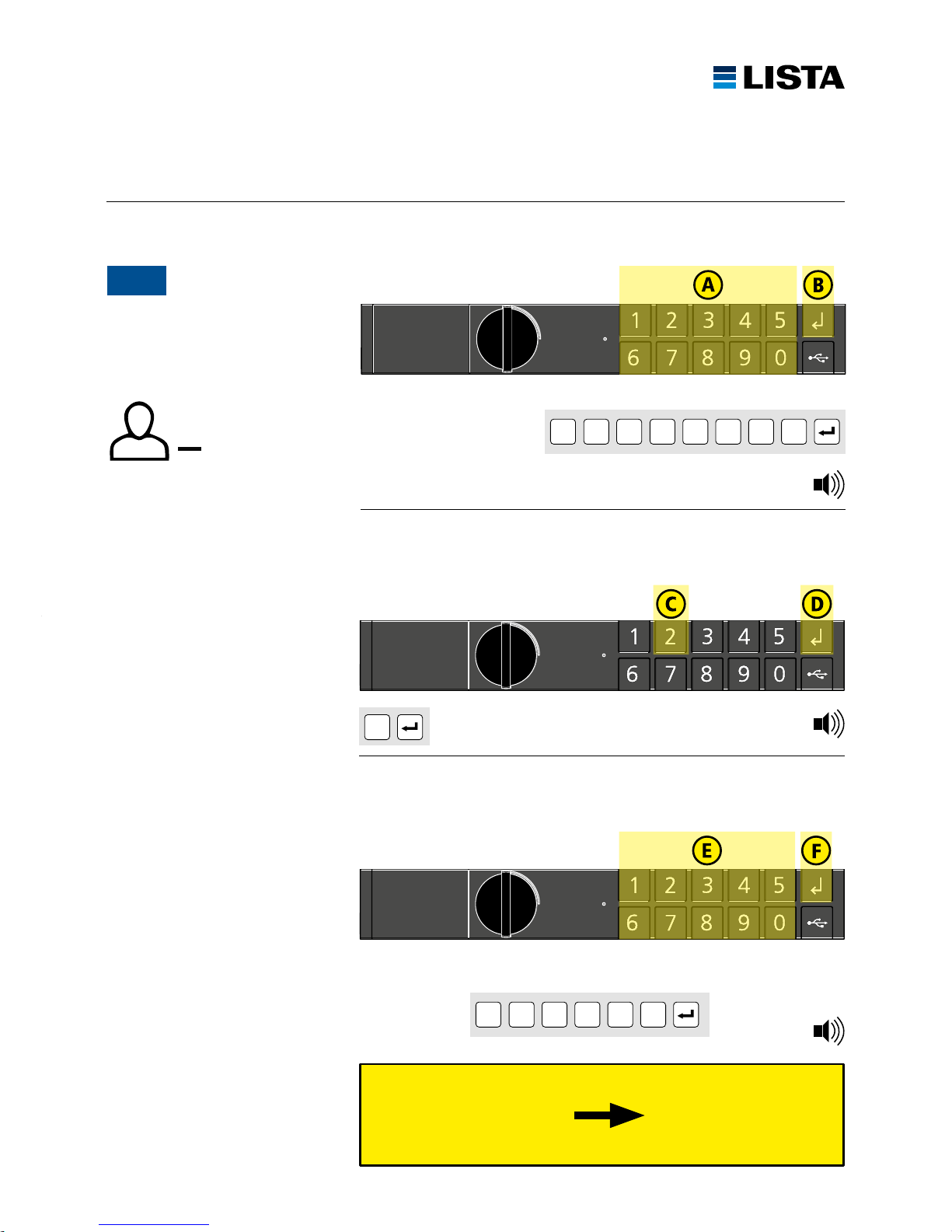
Benutzercodes entfernen
Annuler codes utilisateurs
Cancellare codice utente
Anular códigos usuarios
Delete user codes
2B
Lock-ID eingeben, (S. 6)
Introduire le Lock-ID, (S. 6)
Inserire il Lock-ID, (S. 6)
Introducir Lock-ID, (S. 6)
Enter Lock-ID, (S. 6)
Lock-I D
* * * * * *
*
*
(8 digits)
Ben utzer code 2 – 100
Cod e utili sateu r 2 – 10 0
Cod ici ute nte 2 – 100
Cód igos us uario s 2 – 10 0
Use r codes 2 – 100
Schr itte A – F wieder holen
Répéter les opérations A – F
Ripetere i passi A – F
Repet ir p asos A – F
Repea t s teps A – F
Zu löschenden Benutzercode eingeben
Introduire code utilisateur par supprimer
Inserire codice utente per elimina
Introducir código usuario por borrar
Enter user code for delete
4 – 6 stellig
4 – 6 carac tères
4 – 6 carat teri
4 – 6 dígitos
4 – 6 digits
* * * * *
zum Beispiel / par exemple / per esempio / por ejemplo / for example:
1 2 3 4 5 6 (4 – 6 digits)
Taste 2 drücken
Appuyer sur la touche 2
Premere il tasto 2
Pulse el botón 2
Press the button 2
2
2 × Beep
1 × B ee p
1 × B ee p
Page 10
www.lista.com
10
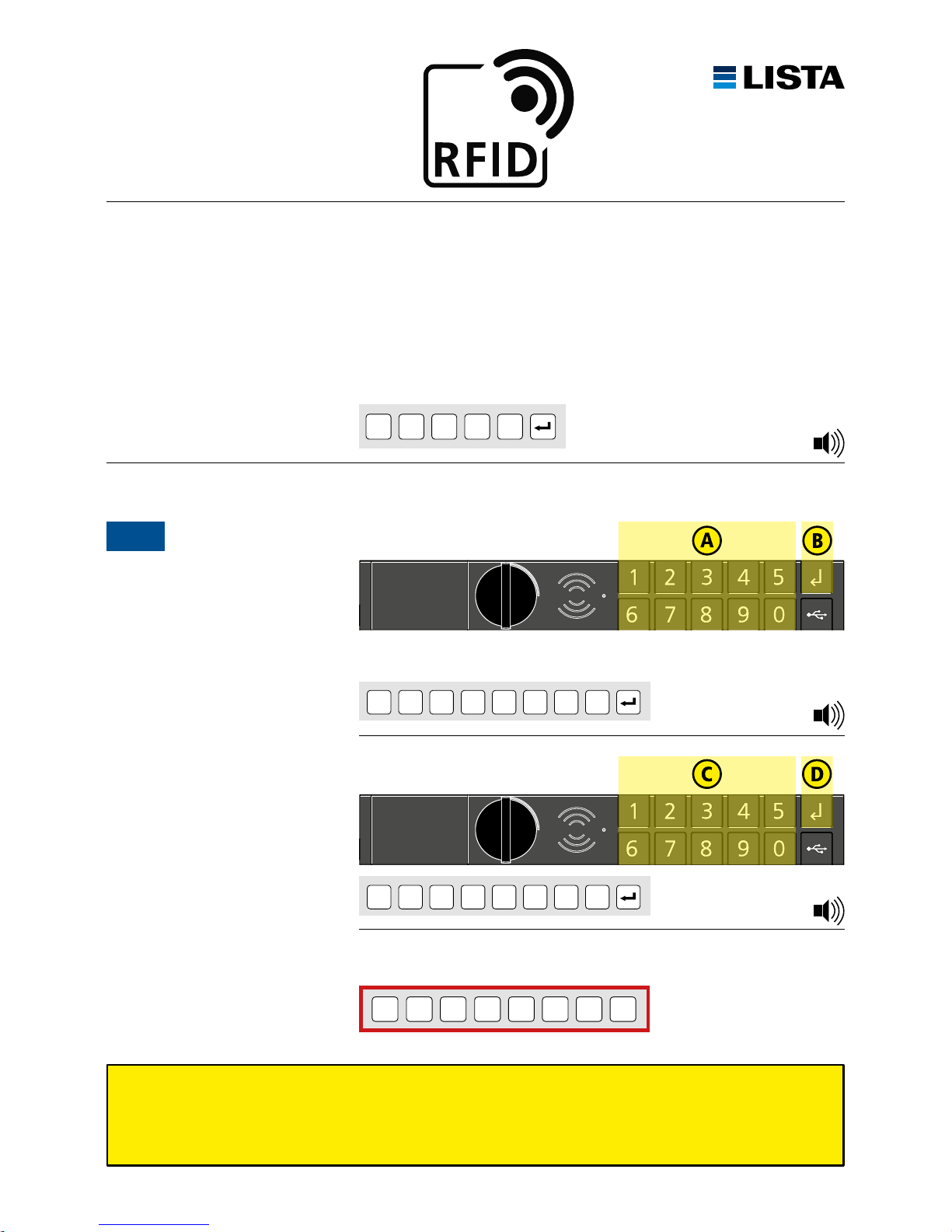
INITIALISIERUNG RFID LOCK
INITIALISATION RFID LOCK
INIZIALIZZAZIONE RFID LOCK
INICIALIZACIÓN RFID LOCK
INITIALIZATION RFID LOCK
Lock-ID unbedingt in die freien Felder eintragen. Lock-ID kann nur mit LISTA Access Software geändert werden.
Entrez Lock-ID absolument dans les champs libres. Le Lock-ID ne peut être modifiée avec le LISTA Access Software.
Introducir Lock-ID a los campos libres. Il codice maestro può essere modificato solo con il LISTA Access Software.
Inserisci Lock-ID assolutamente nei campi liberi. El código maestro sólo puede cambiarse con el LISTA Access Software.
Insert Lock-ID necessarily into the free fields. The Lock-ID can only be changed with LISTA Access Software.
Ihre Lock-ID notieren:
Noter votre Lock-ID:
Nota il tuo Lock-ID:
Tomar nota del Lock-ID:
Note your Lock-ID:
Lock-ID
Auslieferungszustand: LISTA Werkscode 1 2 3 4 5 ist werkseitig vorinstalliert.
Etat de livraison, code LISTA 1 2 3 4 5 est préinstallé en usine.
Stato alla fornitura, codice di fabbrica LISTA 1 2 3 4 5 è preinstallato.
Código de apertura preinstalado de fábrica 1 2 3 4 5 está preinstalada de fábrica.
LISTA factory code 1 2 3 4 5 was preset at the factory.
1 2 3 4 5
Zum ersten Mal öffnen
Premier déverrouillage
Aperto per la prima volta
Abrir por primera vez
Unlocking for the first time
1
zum Beispiel / par exemple / per esempio / por ejemplo / for example:
1 2 3 4 5 6 7 8 (8 digits)
8-stellige Lock-ID eingeben
Introduire 8 caractères de Lock-ID
Inserire 8 cifre Lock-ID
Introducir 8 dígitos Lock-ID
Enter 8 digits of Lock-ID
* * * * * *
*
*
(8 digits)
* * * * * *
*
*
(8 digits)
Lock-ID wiederholen
Répéter Lock-ID
Ripetere Lock-ID
Repetir Lock-ID
Repeat Lock-ID
1 × B ee p
1 × Beep
3 × Beep
Page 11
www.lista.com
11
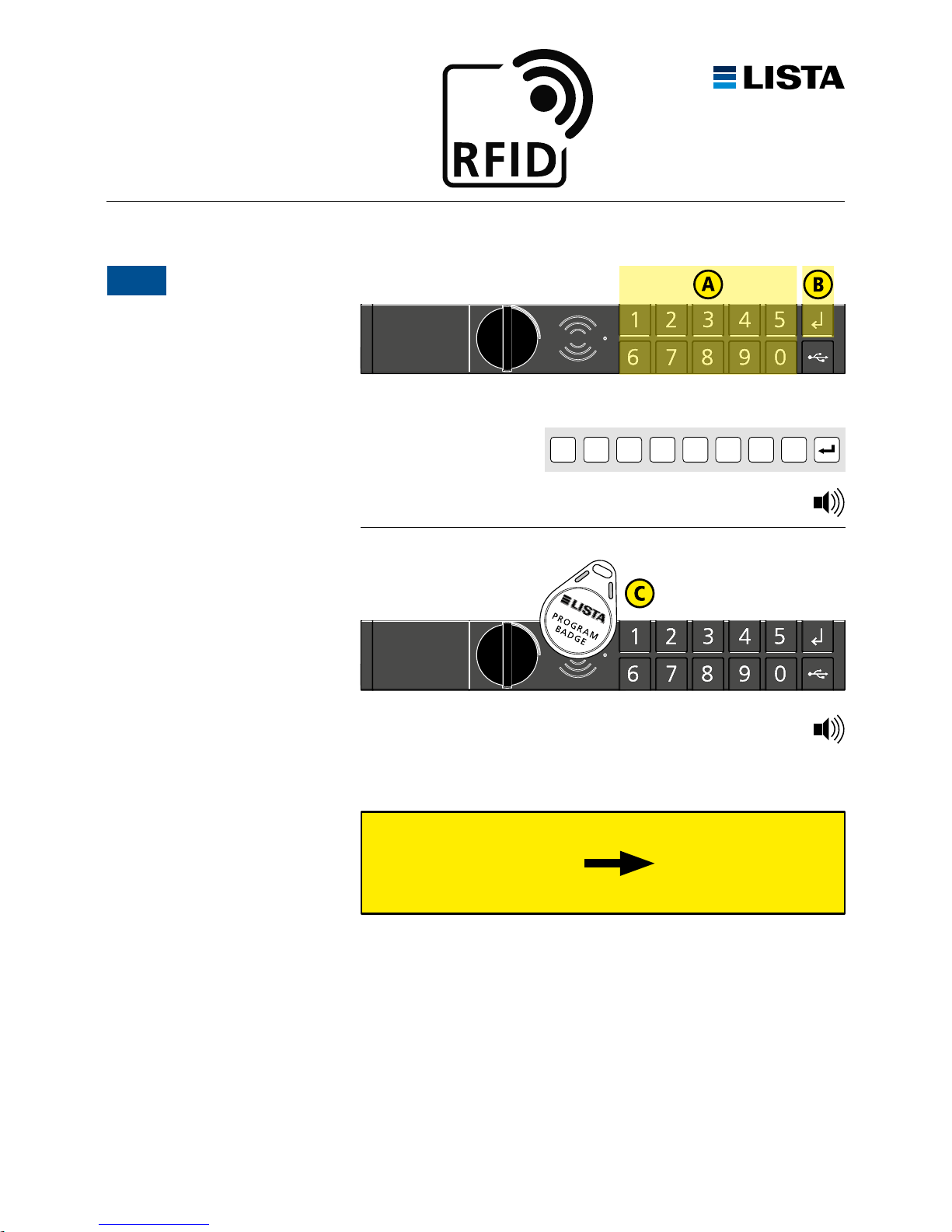
PROGRAMMIERUNG RFID LOCK
PROGRAMMATION RFID LOCK
PROGRAMMAZIONE RFID LOCK
PROGRAMACIÓN RFID LOCK
PROGRAMMING RFID LOCK
Pro gramm ier-B adge 2 – 5
Badge programmable 2 – 5
Badge programmable 2 – 5
Badge programmabile 2 – 5
Pro gramma ble bad ge 2 – 5
Schr itte A – C wieder holen
Répéter les opérations A – C
Ripetere i passi A – C
Repet ir p asos A – C
Repea t s teps A – C
Programmier-Badge erstellen
Réalisez badge programmable
Realizar badge programmable
Realizzare badge programmabile
Create programmable badge
2
Programmier-Badge an Antenne halten
Tenez la badge à l’antenne
Tieni la badge l’antenna
Colocar la badge sobre el sensor
Hold the badge to the antenna
max. 5 Programmier-Badges möglich
max. 5 badges programmable possible
max. 5 badges programmable possibile
max. 5 badges programmabile posible
max. 5 programmable badges possible
8-stelligen Lock-ID erneut eingeben
Introduire 8 caractères Lock-ID à nuoveau
Inserire 8 cifre Lock-ID nuovamente
Introducir 8 dígitos código maestro de nuevo
Enter 8 digits of Lock-ID again
3 × Beep
siehe S. 10
voir p. 10
vedi p. 10
véase p. 10
see p. 10
Lock-I D
* * * * * *
*
*
(8 digits)
1 × Beep
Page 12
www.lista.com
12
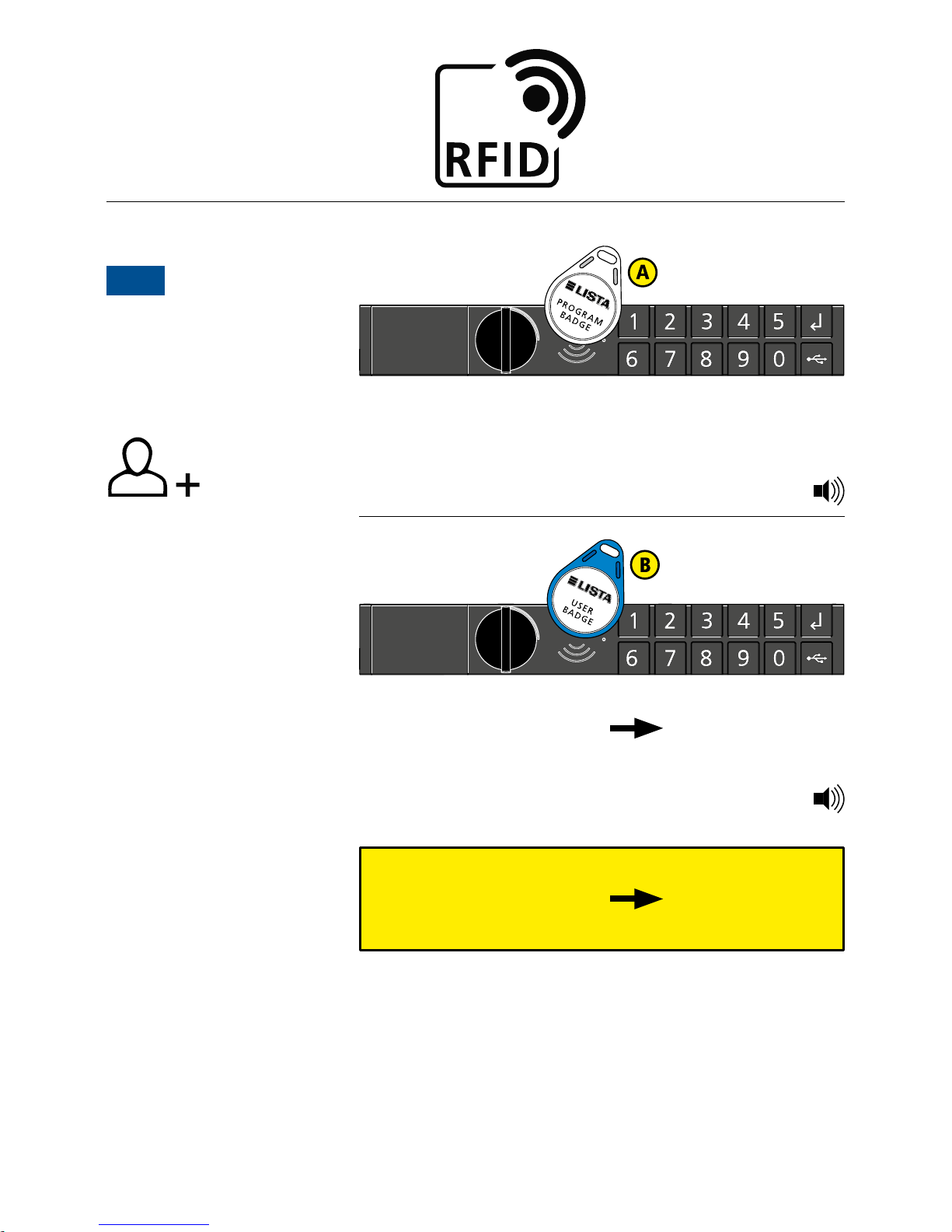
PROGRAMMIERUNG RFID LOCK
PROGRAMMATION RFID LOCK
PROGRAMMAZIONE RFID LOCK
PROGRAMACIÓN RFID LOCK
PROGRAMMING RFID LOCK
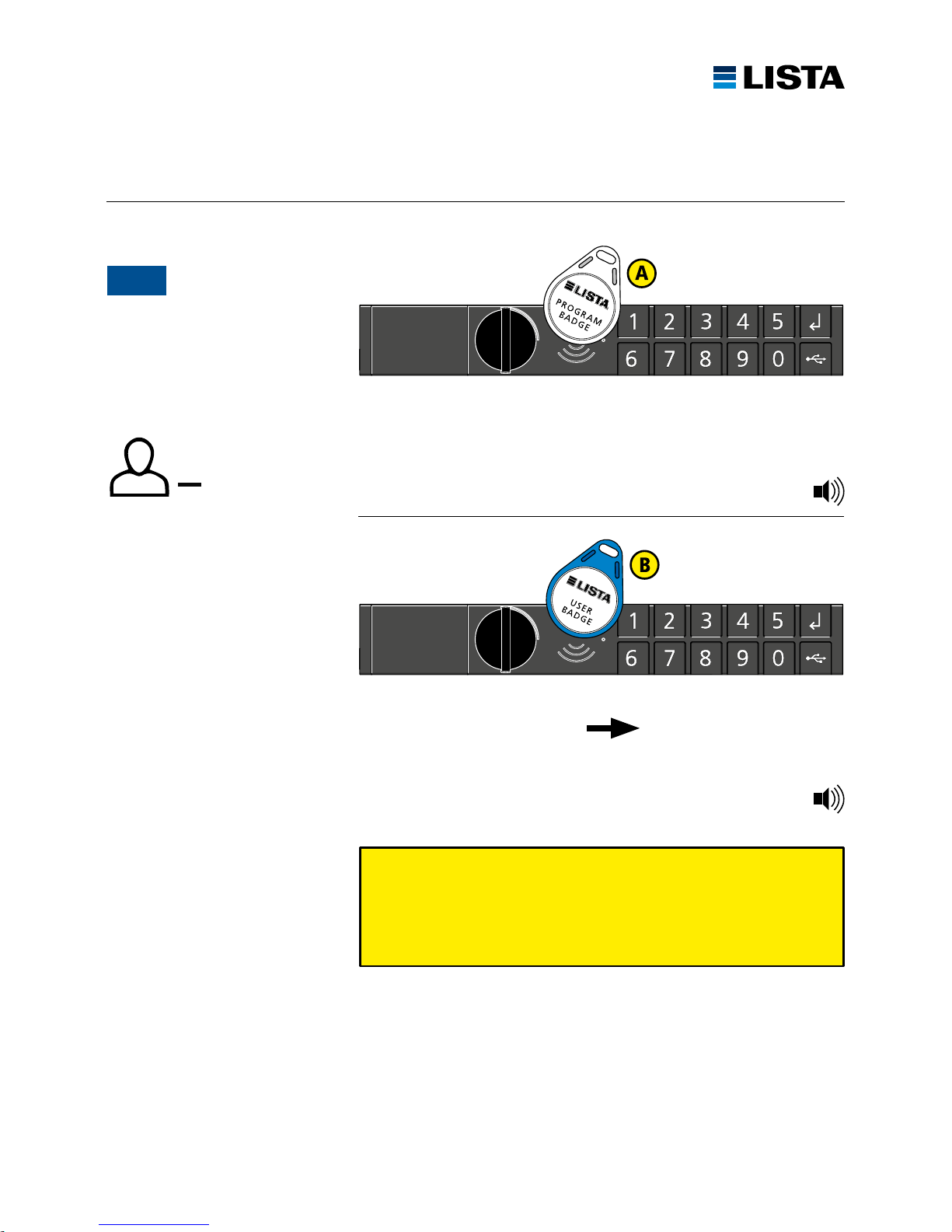
Benutzer-Badge an Antenne halten.
Tenez la badge de l’utilisateur à l’antenne.
Tieni la badge utante per l’antenna.
Colocar la badge usario sobre el sensor.
Hold user badge to the antenna.
Programmier-Badge an Antenne halten.
Tenez la badge principale à l’antenne.
Tieni la badge progammabile per l’antenna.
Colocar la badge maestra sobre el sensor.
Hold the master badge to the antenna.
Badge ist angelernt
Le badge est supprimé
Badge é imparato
La badge queda programada
The badge is recognised
Schr itte A – B wieder holen
Répéter les opérations A – B
Ripetere i passi A – B
Repet ir p asos A – B
Repea t s teps A – B
max. Benutzer-Badge: 100
max. Badge utilisateur: 100
max. Badge utente: 100
max. Badge usuarios: 100
max. User Badge: 100
Benutzer-Badge hinzufügen
Programmation des badge de
l’utilisateur
Programmazione del badge utente
Programación badge usario
Programming user badge
3A
3 × Beep
1 × B ee p
Page 13
www.lista.com
13
Beim RFID Lock kann auch mit den Funktionen des Code Locks gearbeitet werden.
Siehe Sei ten 8 – 9.
Vous pouvez utiliser le RFID Lock avec les fonctions du Code Lock. Voir pages 8 – 9.
È possibele lavorare con RFID Lock anche con le funzioni di Code Lock. Vedi pagina 8 – 9.
Con las funciones del Code Lock es también posible utilizar el RFID Lock. Véanse pág. 8 y 9.
You can use the RFID Lock with the functions of the Code Lock. See pages 8 – 9.
Benutzer-Badge an Antenne halten.
Tenez badge de l’utilisateur à l’antenne.
Tieni badge utante per l’antenna.
Colocar badge usario sobre el sensor.
Hold user badge to the antenna.
Programmier-Badge an Antenne halten.
Tenez la badge principale à l’antenne.
Tieni la badge maestra per l’antenna.
Colocar la badge maestra sobre el sensor.
Hold the master badge to the antenna.
Badge ist gelöscht
Le badge est supprimé
Badge é cancellato
La información de la badge se borra
The badge is deleted
Benutzer löschen
Supprimer l’utilisateur
Elimina utente
Borrar usuario
Delete user
3B
1 × B ee p
2 × Beep
Page 14
www.lista.com
14
PROGRAMMIERUNG FUNKTIONEN
PROGRAMMATION FONCTIONS
PROGRAMMAZIONE FUNZIONI
PROGRAMACIÓN FUNCIONES
PROGRAMMING FUNCTIONS
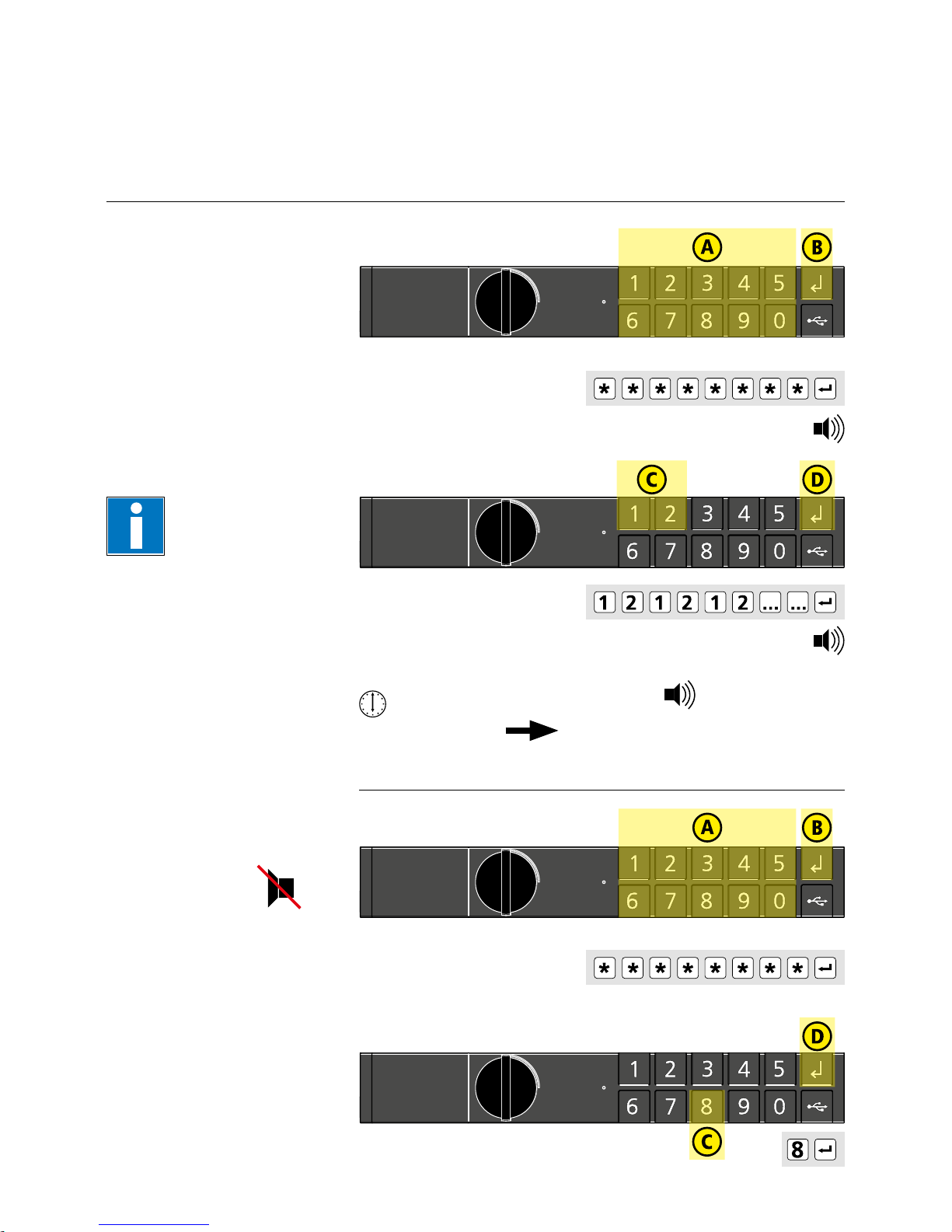
Auslieferungszustand
wiederherstellen
Réinitialiser l’état de Livraison
Ricreare stato di consegna
Regenerar estado en el
momento de la entrega
Restore delivery status
Zahl eingeben: 121212121212
Introduire le nombre: 121212121212
Inserire il numero: 121212121212
Introducir número: 121212121212
Enter number: 121212121212
30 s wart en
Atte ndre 30 s
Atte ndere 30 s
Espe re 3 0 s
Wait 30 s
= gelöscht
annulé
cancelato
borrado
deleted
Ton ausschalten
Désactiver le son
Disattivare il suono
Desactiva el sonido
Turn off sound
Taste 8 drücken
Appuyer sur la touche 8
Premere il tasto 8
Pulse el botón 8
Press the button 8
Lock-I D
Lock-I D
Achtung! Alle Einstellungen
werden gelöscht!
Attention! Tous les paramètres
seront effacés!
Attenzione! Tutte le inpostazioni
vengono cancellate!
Atención, ¡se eliminarán
todos los ajustes!
Warning! All parameters
will be deleted!
Lock-I D e ingeben, (S. 6 /10)
Introduire le Lock-ID, (P. 6 /10)
Inserire il Lock-ID, (P. 6 /10)
Intro ducir Lock-I D, (P. 6 /10)
Enter Loc k-ID, (P. 6 /10)
Lock-I D e ingeben, (S. 6 /10)
Introduire le Lock-ID, (P. 6 /10)
Inserire il Lock-ID, (P. 6 /10)
Intro ducir Lock-I D, (P. 6 /10)
Enter Loc k-ID, (P. 6 /10)
(8 digits)
(8 digits)
1 × B ee p
1 × B ee p
3 × Beep
Page 15
www.lista.com
15
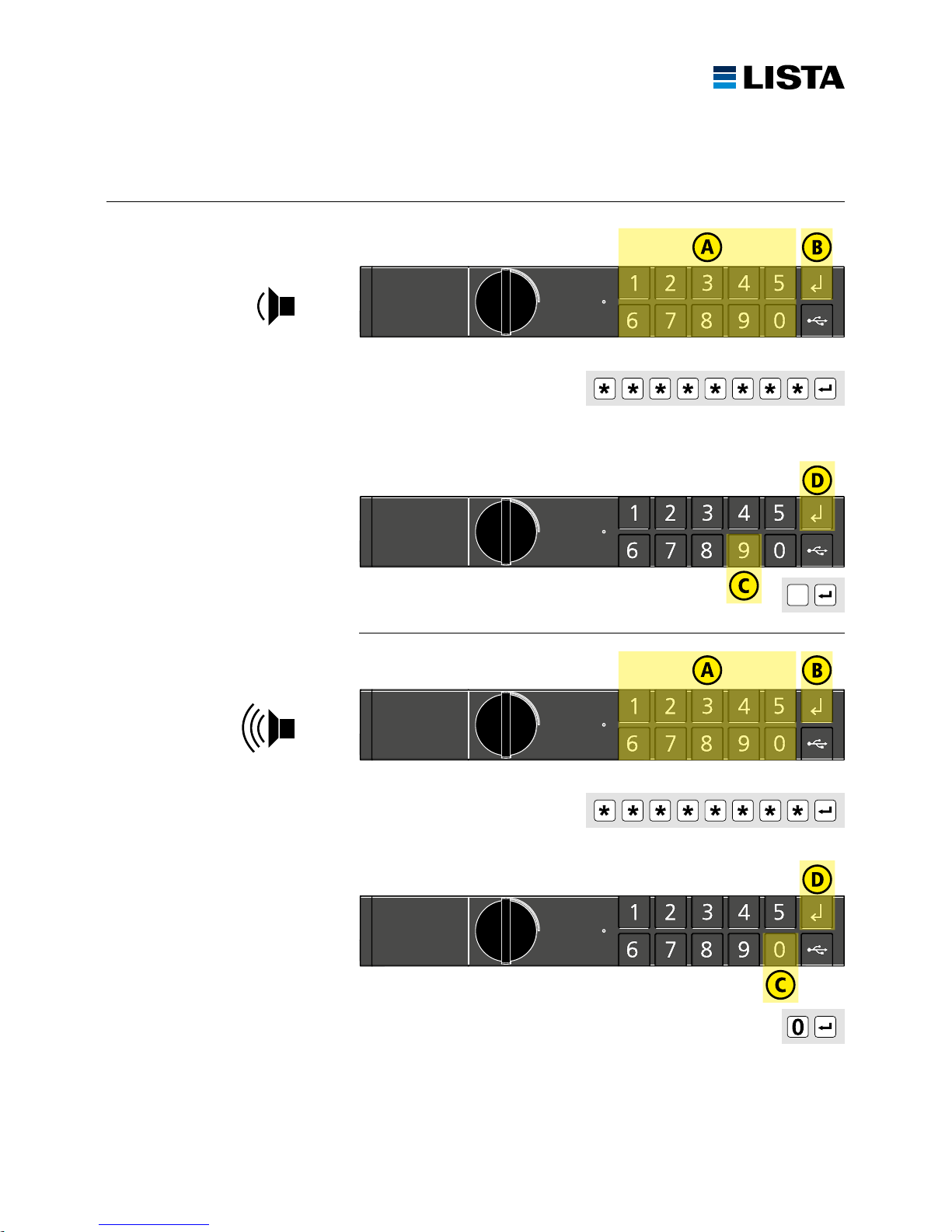
Ton leise
Son bas
Suono basso
Sonido bajo
Sound low
Ton laut
Son fort
Suono forte
Sonido fuerte
Sound loud
Taste 0 drücken
Appuyer sur la touche 0
Premere il tasto 0
Pulse el botón 0
Press the button 0
Lock-I D
Lock-I D
Taste 9 drücken
Appuyer sur la touche 9
Premere il tasto 9
Pulse el botón 9
Press the button 9
Lock-I D e ingeben, (S. 6 /10)
Introduire le Lock-ID, (P. 6 /10)
Inserire il Lock-ID, (P. 6 /10)
Intro ducir Lock-I D, (P. 6 /10)
Enter Loc k-ID, (P. 6 /10)
Lock-I D e ingeben, (S. 6 /10)
Introduire le Lock-ID, (P. 6 /10)
Inserire il Lock-ID, (P. 6 /10)
Intro ducir Lock-I D, (P. 6 /10)
Enter Loc k-ID, (P. 6 /10)
(8 digits)
(8 digits)
9
Page 16
www.lista.com
16
MODULAUSTAUSCH
REMPLACEMENT DES MODULES
SOSTITUZIONE MODULI
SUSTITUCIÓN MÓDULO
MODULE REPLACEMENT
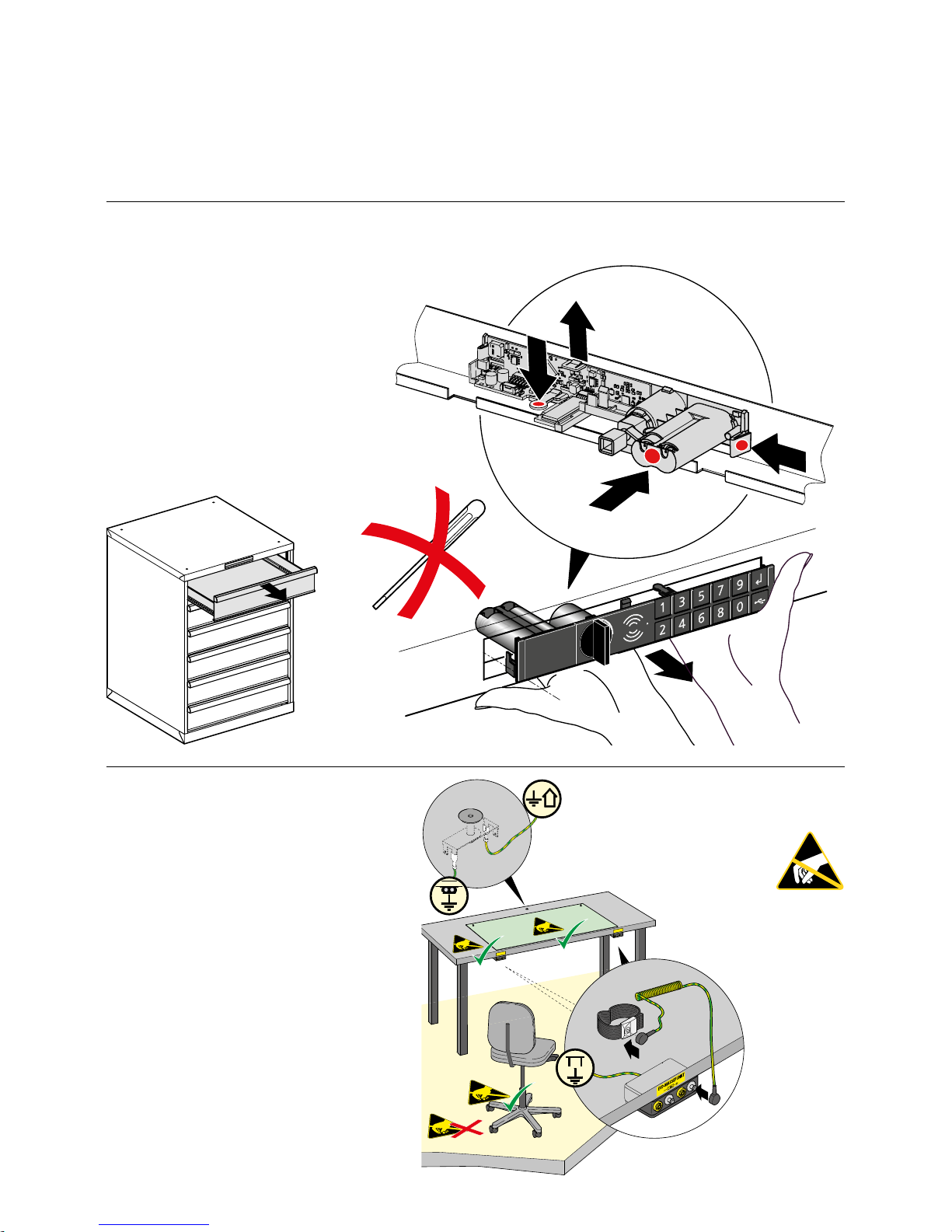
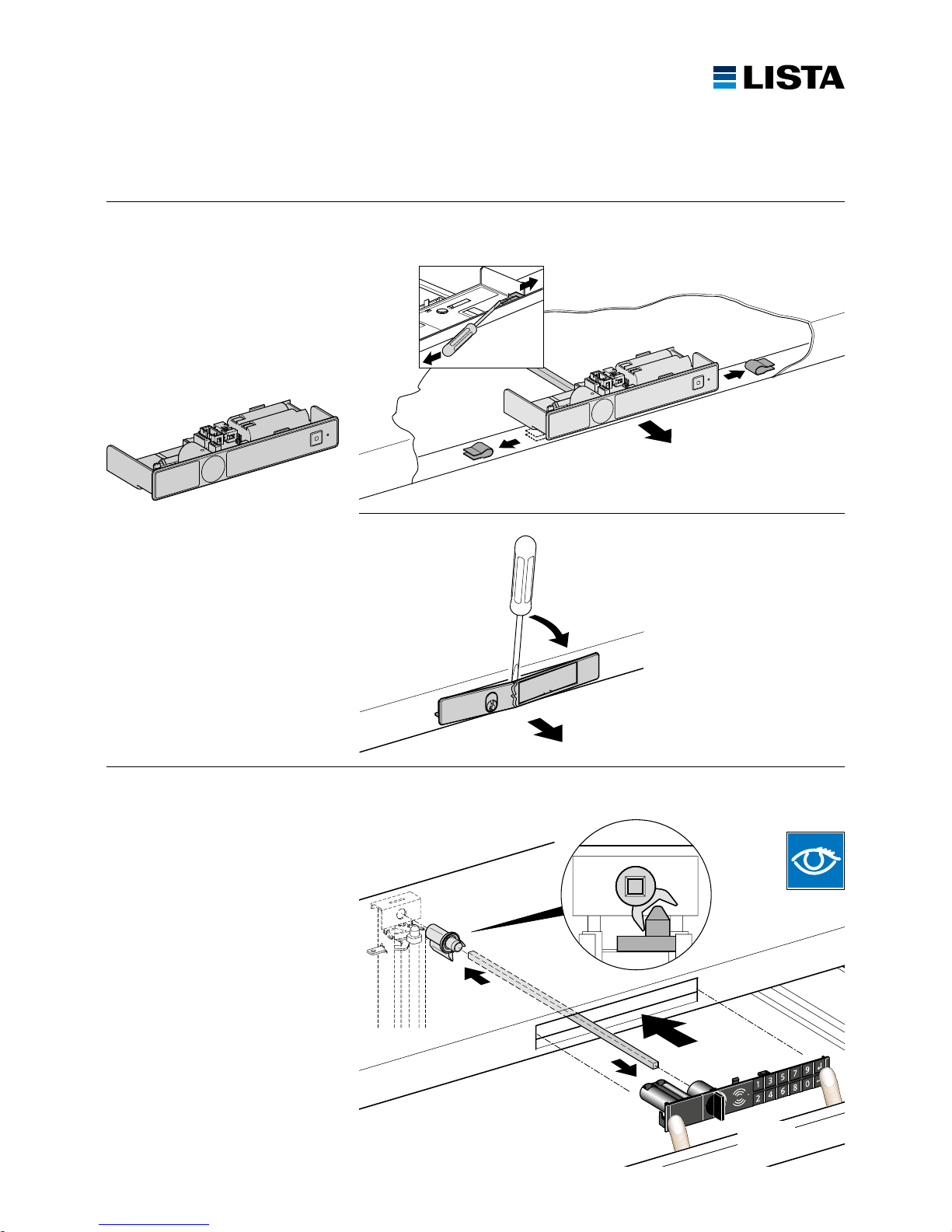
Eine oder mehrere Schubladen herausnehmen
Sortir un ou plusieurs tiroirs
Togliere uno o più cassetti
Quitar uno o más cajones
Remove one or more drawers
1
3
2
4
Code Lock ab 2016
Code Lock à partir de 2016
Code Lock a partir de 2016
Code Lock a partire dal 2016
Code Lock valid from 2016
Standard ESD Schutz
Protection ESD standard
Protezione standard ESD
Protección ESD estándar
Standard ESD protection
Page 17
www.lista.com
17
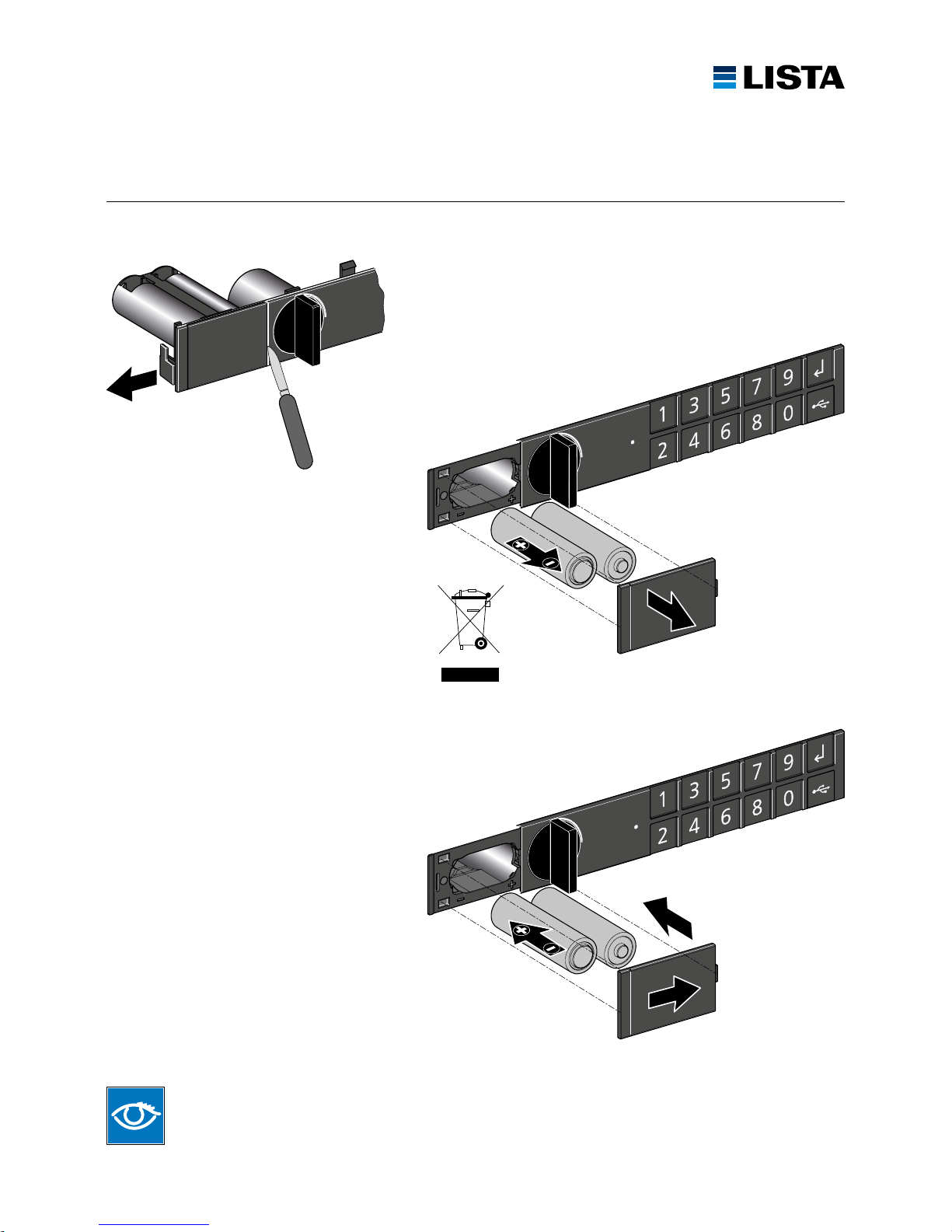
Neues Modul einsetzen
Insérer le nouveau module
Inserire il nuovo modulo
Insertar módulo nuevo
Insert new module
1
2
4
3
Klick
4
1
2
1
2
3
2
Code Lock bis 2015
Code Lock valide jusqu’en 2015
Code Lock válido hasta 2015
Code Lock valido fino al 2015
Code Lock valid until 2015
Key-Lock
Page 18
www.lista.com
18
BATTERIEWECHSEL
REMPLACEMENT DE BATTERIE
SOSTITUZIONE DELLA BATTERIA
CAMBIO DE BATERÍA
CHANGING BATTERY
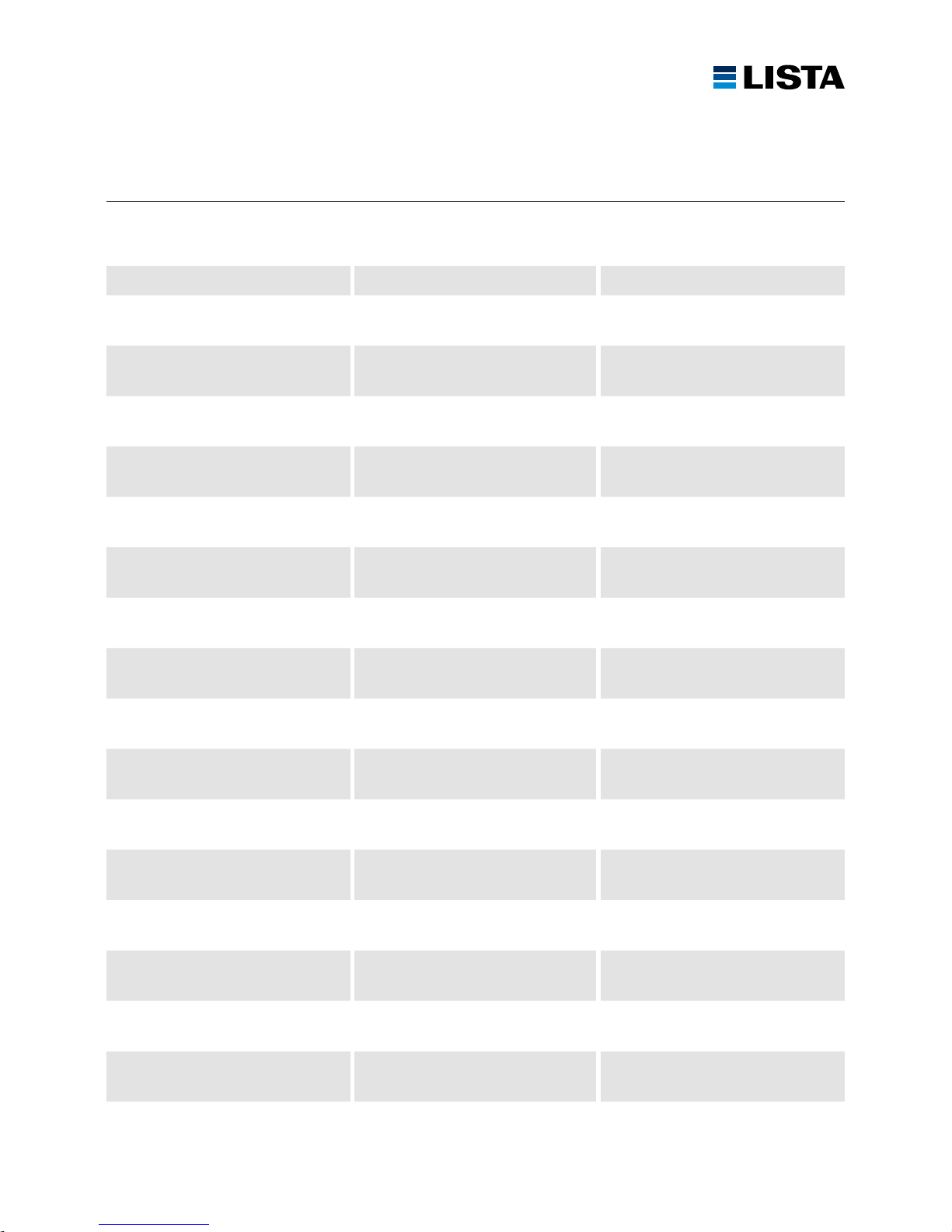
Auf Polarität achten
Prendre garde à la polarité
Tenere conto della polarità
Respetar las polaridades
Observe polarity
Codes bleiben gespeichert
Les codes restent mémorisés
I codici rimangono memorizzati
Los códigos permanecen memorizados
Codes remain saved
Batterielebensdauer: mindestens 1 – 2 Jahre.
Durabilité des batteries: 1 – 2 ans au minimum.
Durata di vita delle batterie: almeno 1 – 2 anni.
Duración de las pilas 1 – 2 años mínimo.
The service life of the batteries is at least 1 – 2 years.
1
2
4
3
5
6
Page 19
www.lista.com
19
FEHLERSUCHE
DÉTECTION D’ERREURS
RICERCA GUASTI
BÚSQUEDA DE ERRORES
TROUBLESHOOTING
Fehler mögliche Ursache Behebung
Schloss reagiert nicht Keine Batterien vorhanden Batterien einsetzen
Batterien falsch eingesetzt Batterien korrekt einsetzen
Batterien leer Neue Batterien einsetzen
Systemfehler Batterien ausbauen und wieder einbauen
Schloss defekt Schloss austauschen
Lock-ID kann nicht
eingegeben werden
Die zwei Codes sind nicht identisch Siehe Lock-ID hinzufügen
Code hat nicht 8 Ziffern Code mit 8 Ziffern eingeben
Benutzercode kann nicht
eingegeben werden
Code hat nicht 4 – 6 Ziffern Code mit 4 – 6 Ziffern eingeben
Die Taste 1 für Benutzer hinzufügen
wurde nicht gedrückt
Siehe Benutzer hinzufügen
Drehknopf kann nicht
gedreht werden
Drehknopf wurde zu früh gedreht und
blockiert den Magnetanker
Drehknopf erst drehen, wenn die grüne
LED leuchtet
Batterie leer und Magnet zieht
nicht mehr an
Neue Batterien einsetzen
Beeper arbeitet nicht Funktion Beeper ist ausgeschaltet Siehe Lautstärke des Beepers einstellen
LED arbeitet nicht LED defekt Schloss austauschen
LED blitzt rot auf und kurzes
akustisches Signal
Batterien leer Neue Batterien einsetzen
User Badge öffnet das
Schloss nicht
Badge ist noch nicht gespeichert Siehe Benutzer hinzufügen, mit Master
Badge
Badge ist schon als Master Badge
angelernt
User Badge verwenden
User Badge kann nicht
angelernt werden
User Badge ist nicht kompatibel RPID Standard vom User Badge prüfen
Page 20
www.lista.com
20
FEHLERSUCHE
DÉTECTION D’ERREURS
RICERCA GUASTI
BÚSQUEDA DE ERRORES
TROUBLESHOOTING
Erreurs Causes possibles Remèdes
La serrure ne réagit pas Aucune pile n’a été insérée Insérer les piles
Insertion incorrecte des piles Insérer correctement les piles
Piles épuisées Insérer de nouvelles piles
Erreur système Retirer et remettre en place les piles
Serrure défectueuse Remplacer la serrure
Lock-ID ne peut pas être saisi Les deux codes ne sont pas
identiques
Voir ajouter Lock-ID
Code n’a pas 8 chiffres Saisir le code à 8 chiffres
Le code d’utilisateur ne peut pas
être saisi
Code n’a pas 4 – 6 chiffres Saisir le code à 4 – 6 chiffres
La touche 1 pour Ajouter utilisateur n’a
pas été enfoncée
Voir ajouter utilisateur
Le bouton rotatif ne peut pas être
tourné
Le bouton rotatif a été tourné trop tôt et
bloque l’induit magnétique
Tourner le bouton rotatif seulement une
fois que la LED verte s’est allumée
Pile épuisée et l’aimant ne réagit plus Insérer de nouvelles piles
Le beeper ne fonctionne pas La fonction beeper est désactivée Voir régler le volume sonore du beeper
LED ne fonctionne pas LED défectueuse Remplacer la serrure
Voyant LED clignote en rouge
et bref signal sonore
Piles épuisées Insérer de nouvelles piles
User badge ne peut pas ouvrir
la serrure
Le badge n’a pas encore été
enregistré
Voir ajouter utilisateur avec
master badge
Le badge a déjà été initié comme master
badge
Utiliser user badge
User badge ne peut pas
être initié
User badge n’est pas compatible Vérifier RFID Standard du user badge
Page 21
www.lista.com
21
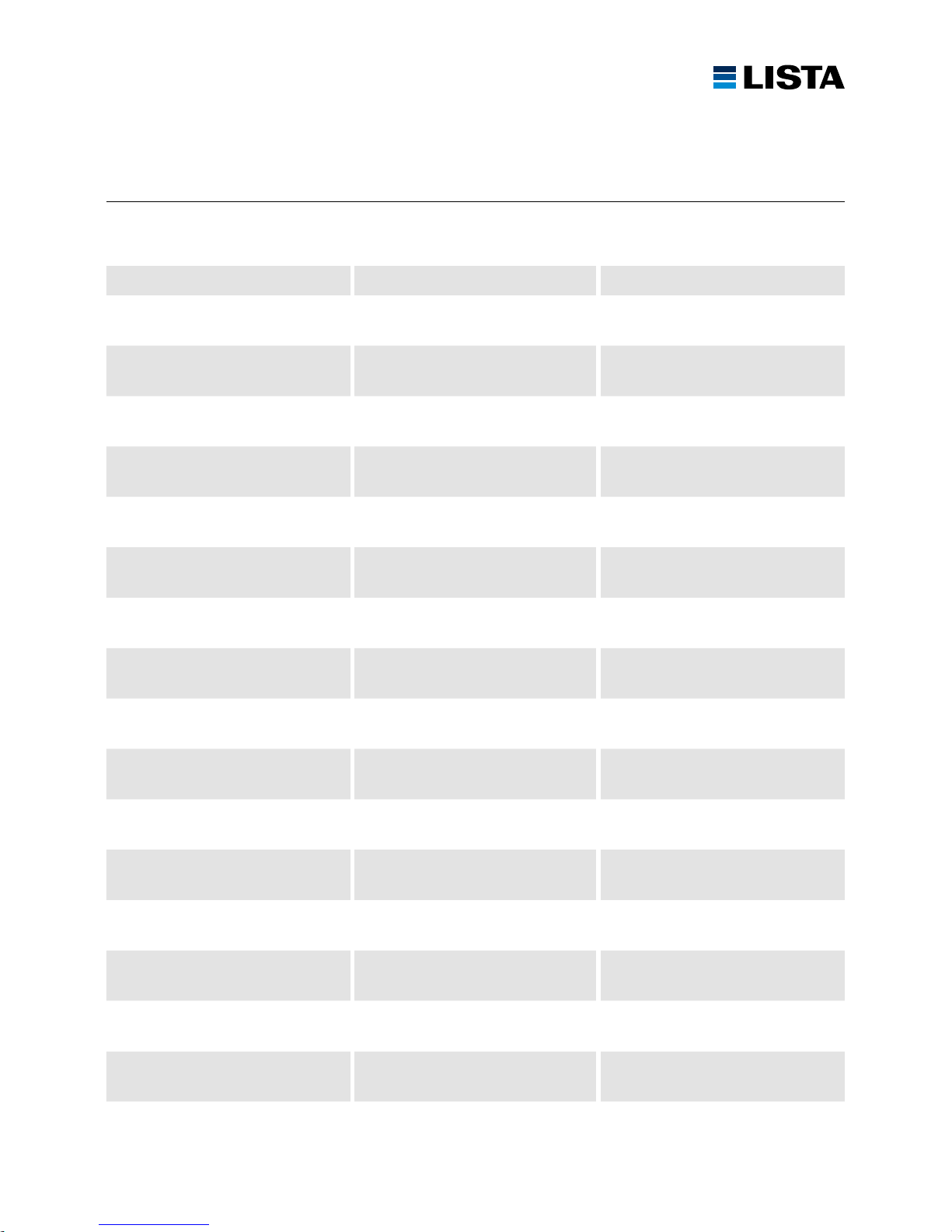
Guasto Possibile causa Rimedio
La serratura non risponde Nessuna batteria presente Inserire le batterie
Batterie inserite in modo errato Inserire correttamente le batterie
Batterie scariche Inserire le batterie nuove
Errore di sistema Rimuovere e rimontare le batterie
Serratura difettosa Sostituire la serratura
Il Lock-ID non può essere inserito I due codici non sono identici Vedi aggiungere il Lock-ID
Il codice ha non 8 cifre Inserire il codice di 8 cifre
Il codice utente può essere inserito Il codice ha non 4 – 6 cifre Inserire il codice di 4 – 6 cifre
Il tasto 1 per Aggiungi utente non è stato
premuto
Vedi aggiungere utente
La manopola non può essere girata La manopola è stata girata troppo presto
e blocca l’ancoraggio magnetico
Girare la manopola quando il LED
si accende in verde
La batteria è vuota e il magnete non attira più
Inserire le batterie nuove
Il segnalatore acustico non funziona La funzione del segnalatore acustico è
spento
Vedi impostare il volume del
segnalatore acustico
Il LED non funziona LED difettoso Sostituire la serratura
Il LED lampeggia in rosso ed emette
un breve segnale acustico
Batterie scariche Inserire le batterie nuove
Lo user badge non apre
la serratura
Badge non è ancora memorizzato Vedi aggiungere utente con master badge
Il badge è imparato come master badge Utilizzare lo user badge
Lo user badge non può essere
programmato
Lo user badge non è compatibile Controllare RPID Standard dallo
user badge
Page 22
www.lista.com
22
FEHLERSUCHE
DÉTECTION D’ERREURS
RICERCA GUASTI
BÚSQUEDA DE ERRORES
TROUBLESHOOTING
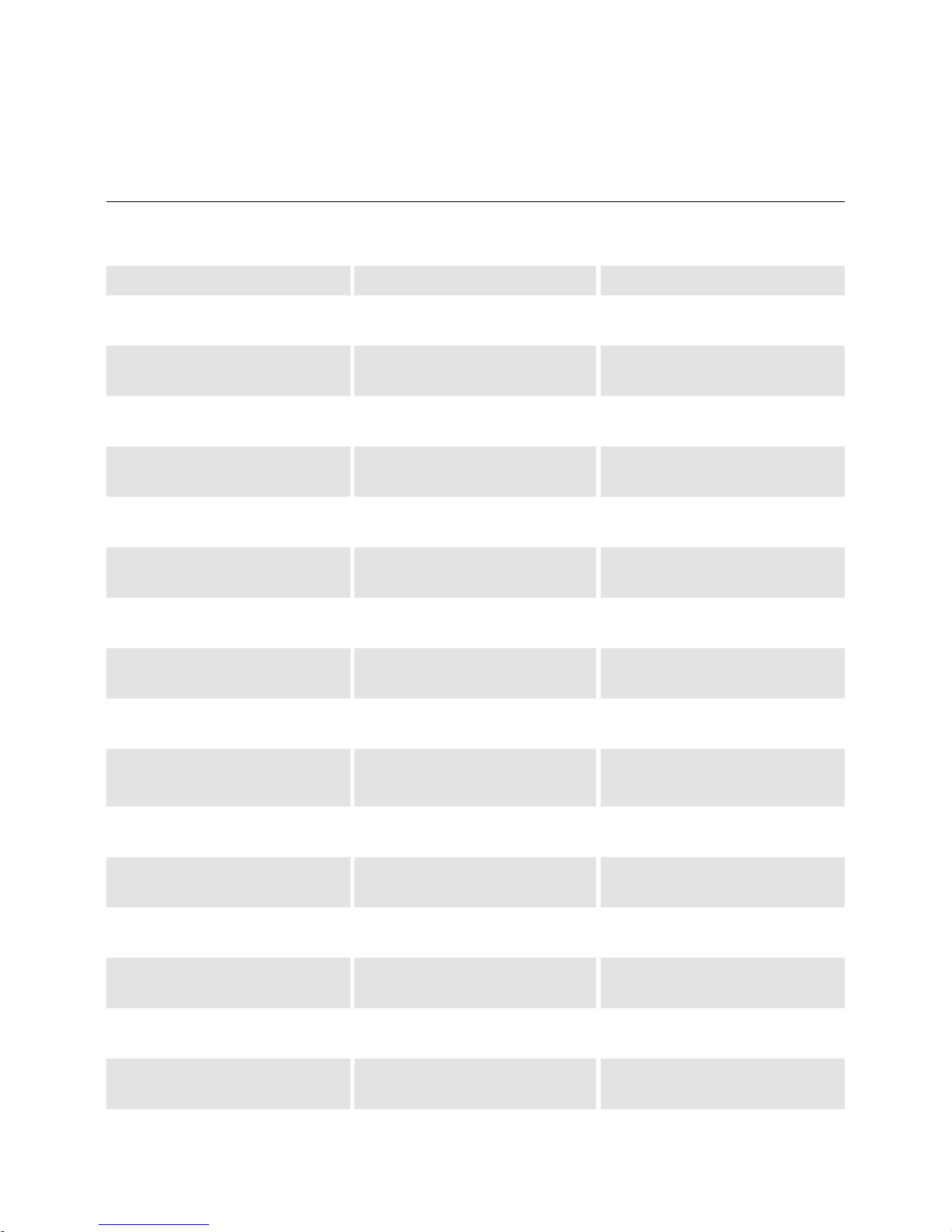
Error Causa posible Eliminación
La cerradura no reacciona No existe ninguna pila Insertar pilas
No existe ninguna pila Insertar las pilas correctamente
Pilas descargadas Insertar pilas nuevas
Error de sistema Sacar y volver a instalar las pilas
Cerradura defectuosa Sustituir la cerradura
No se puede entrar el código maestro Los dos códigos no son idénticos Véase agregar código maestro
El código no tiene 8 cifras Entrar código de 8 cifras
No se puede entrar el código
de usuario
El código no tiene 4 a 6 cifras Entrar código de 4 a 6 cifras
No se ha pulsado la tecla 1 para usuario Véase agregar usuario
El botón giratorio no se puede girar El botón giratorio se ha girado demasiado
temprano y está bloqueando el inductor
magnético
Apenas girar el botón giratorio
cuando el LED verde esté iluminado
Pila descargada e imán ya no atrae Insertar pilas nuevas
El bíper no funciona Funcionamiento de bíper está apagado Véase ajustar el volumen del bíper
El LED no funciona LED defectuoso Sustituir la cerradura
El LED parpadea en rojo y se emite
una breve señal acústica
Pilas descargadas Insertar pilas nuevas
User badge no abre la cerradura Badge todavía no está almacenado Véase agregar usuario con
master badge
Badge ya está entrenado como master
badge
Usar user badge
User badge no se puede entrenar User badge no es compatible Controlar RPID Standard del
user badge
Page 23
www.lista.com
23
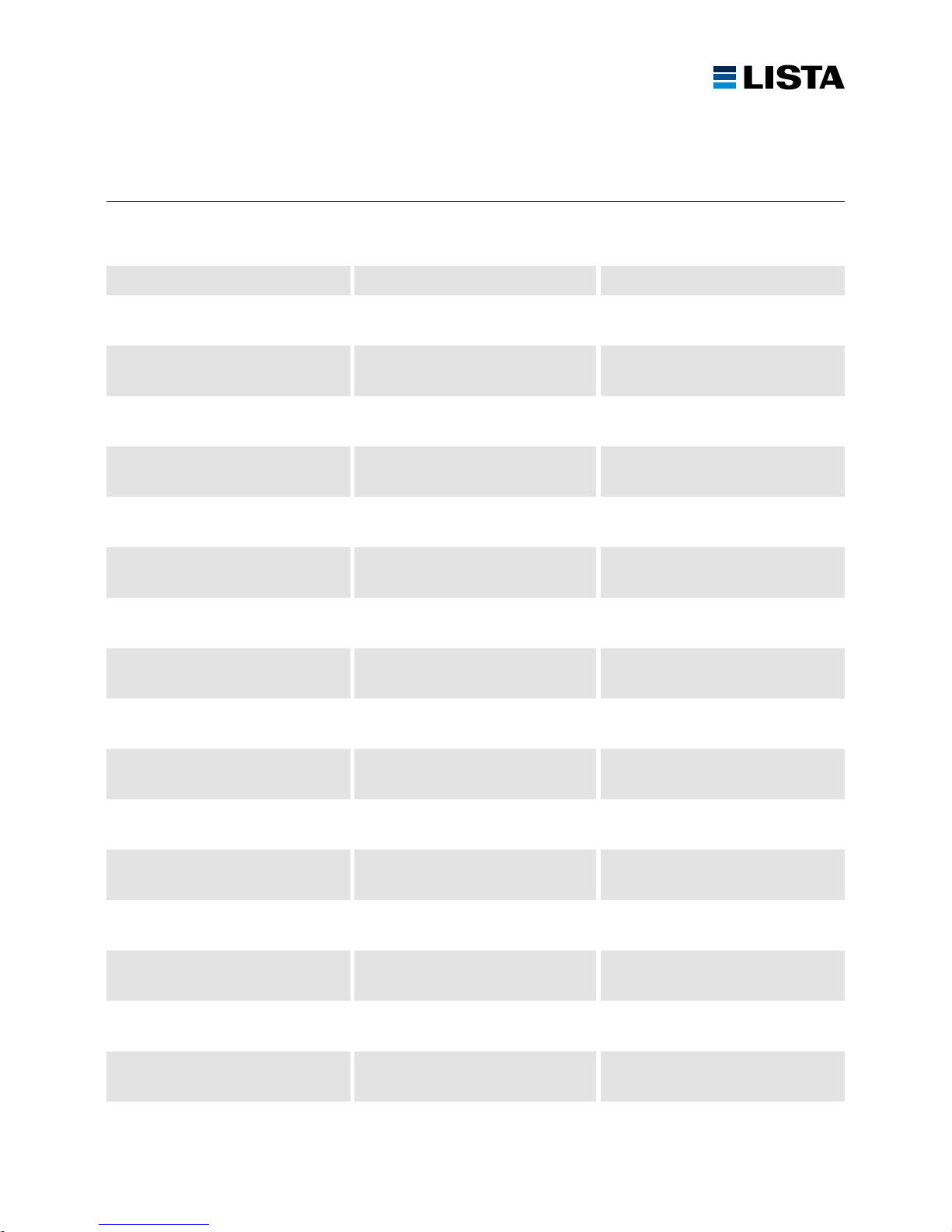
Error Possible cause Rectification
Lock does not react No batteries installed Install batteries
Batteries installed incorrectly Install batteries correctly
Batteries discharged Install new batteries
System error Remove batteries and re-fit
Lock faulty Replace lock
It is not possible to enter Lock-ID The two codes are not identical See adding Lock-ID
Code does not have 8 digits Enter code with 8 digits
It is not possible to enter user code Code does not have 4 – 6 digits Enter code with 4 – 6 digits
Button 1 for adding user has not been
pressed
See adding user
Rotary knob cannot be rotated Rotary knob was rotated too early and is
blocking the solenoid armature
Only rotate rotary knob once the green
LED is illuminated
Battery discharged and solenoid no longer energises
Install new batteries
Beeper does not work Beeper function is switched off See adjusting volume of the beeper
LED does not work LED faulty Replace lock
The LED will blink red and a short
acoustic signal will sound
Batteries discharged Install new batteries
User badge does not open the lock Badge has not yet been saved See adding user with master badge
Badge has already been taught-in as master badge
Use user badge
User badge cannot be taught-in User badge is not compatible Check RPID standard of the user badge
Page 24

01.2018 – 695.906 – V3
LISTA AG
Fabrikstrasse 1
CH-8586 Erlen
Telefon +41 71 649 21 11
Telefax +41 71 649 22 03
[email protected]
www.lista.com
 Loading...