

Page 1
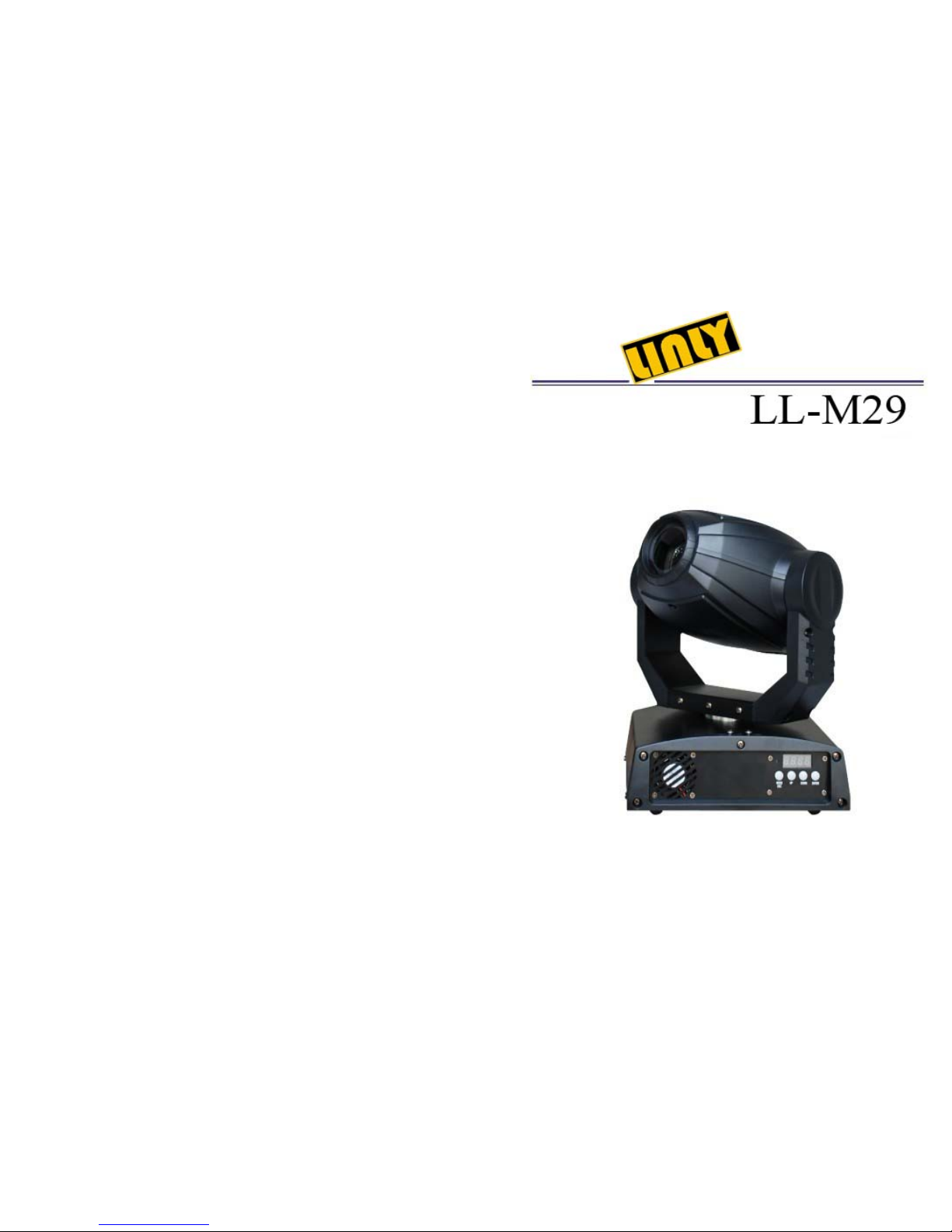
USER MANUAL
Page 2
. 1 . . 10 .
Maintenance
1. Please keep the light in dryness and avoiding use in wet place.
2. Using intermittently can be extended the life.
3. Attention to clean the fan and lens usually in order to get the ventilating effects and
lighting effects better.
4. Please do not wipe the crust using organic menstruum for avoid to damage the product.
Statement
The product has well capability and intact packing when leave factory. All of the user
should comply with above warning item and manual, any misuse cause of the damages are
not included in our guarantee, and also can not be responsible for any malfunction &
problem owing to ignore the manual.
Please forgive that we will not be notice for technical change.
TABLE OF CONTENTS
Maintenance----------------------------------------------------1
Statement-------------------------------------------------------1
Attention Item -------------------------------------------------2
Product introduction ------------------------------------------2
12 Control Channel -------------------------------------------3
6 Control Channel ---------------------------------------------6
Control Board--------------------------------------------------8
System reset
Lode default
Page 3
. 9 .
. 2 .
Attention Item
1. For guarantee the life of product, please don't put it on the wet place and also not use it
in the place over 40 degree.
2. Please don't lay the product on the unfixable or shakable place.
3. Ask for the professional to maintain the product in order to avoid the danger of get an
electric shock.
4. Power supply should not be changed over 10% while the light is using, it will be
decreased the life of lamp if the power is too high, but it will be influenced the
luminosity if the power is too low.
5. After power off, if it is need used again, please cool down over 20 minutes.
6. Please look round the manual for ensure the product can be used normally.
Product introduction
Power supply: AC220V, 50Hz
Power consumption: 102W
Fiting lamp: LED 30W LED
DMX-control-channels: 6 or 12, select from control board
Color: 8 + open + rainbow
Gobo-wheel: 7 gobo + open + rainbow
Shuttle: Flash rate: 0-10Hz
Dimmer: 0~100% mechanic dimmer
Maximum PAN-movement: 540
Maximum TILT-movement: 270
Master/Slave ativated by sound at pre-programmed function.
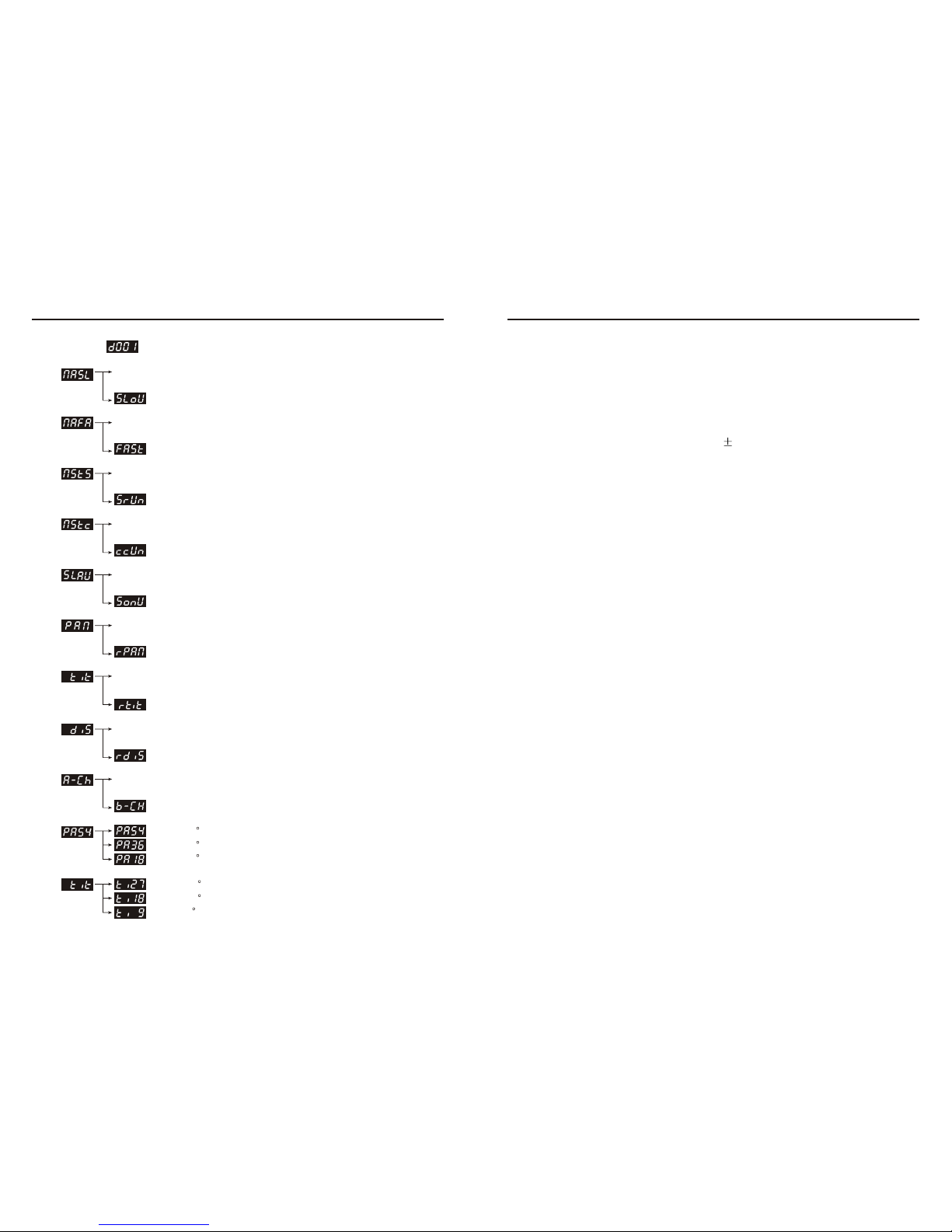
colour
TILT 270
TILT 180
TILT 90
PAN 540
PAN 360
PAN 180
DMX:
Slow show
Fast show
Sound control show
East controller show
Pan inverted
Pan inverted function
Tilt inverted
Tilt inverted function
Switch channel mode
Basic mode
Display inverted function
Display inverted
Slave function Select
Slave
Page 4
. 3 . . 8 .
1 PAN
0~255
2 TILT
3 PIN 16bit
4 TILT 16bit
0~255
0~255
0~255
270
540
16bit spinner
16bit spinner
5 Speed
Colour
wheel
7 Shutter
8 Dimmer
0~255
0~4
5~9
10~14
15~19
20~24
25~29
30~34
35~39
40~44
45~56
57~65
66~74
75~83
84~92
93~101
102~110
111~119
120~127
128~191
192~255
0~3
4~7
8~215
216~255
0~255
Controllable speed with decreasing
White
Positive rainbow effect with increasing speed
Negative rainbow effect with increasing speed
Close
Open
Open
Strobe effect with increasing speed
0~100% mechanic dimmer
Channel
DMX-value
Feature
12 Control Channel
Accept DMX512 control channel, detail as follow:
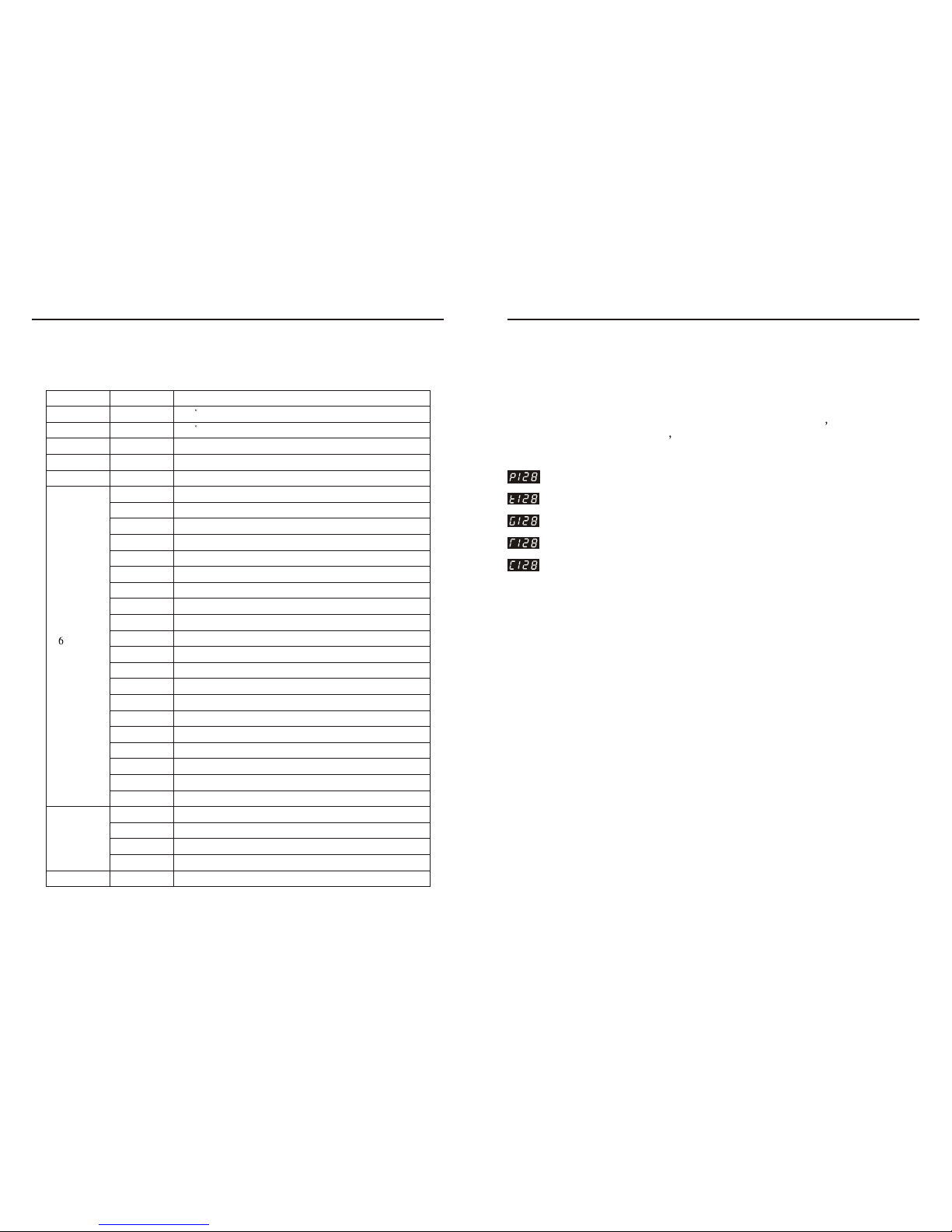
Control Board
Password channel
Service Function. Prees <MODE / ESE> at least 10 Second
press <up> <DOWN> bottons enter the password 2323 and
goes into the item.
Adjustment for Pan
Adjustment for Tilt
Adjustment for Gobo wheel
Adjustment for Gobo Rotation
Adjustment for Color wheel
Press the <up> <DOWN> button repeatedly until you reach the desired adjustment,
Press the <ENTER> button to confirmed. Confirmed. It will auto exit after 10 seconds.
White orYellow
Yellow or Pink
Pink Green or
Green or Peachblow
Peachblow or Blue
Blue or Kelly
Kelly or Red
Red or Dark blue
Dark blue or White
Dark blue
Red
Kelly
Blue
Peachblow
Green
Pink
Y ellow
Page 5
. 7 . . 4 .
Channel
DMX-value
Feature
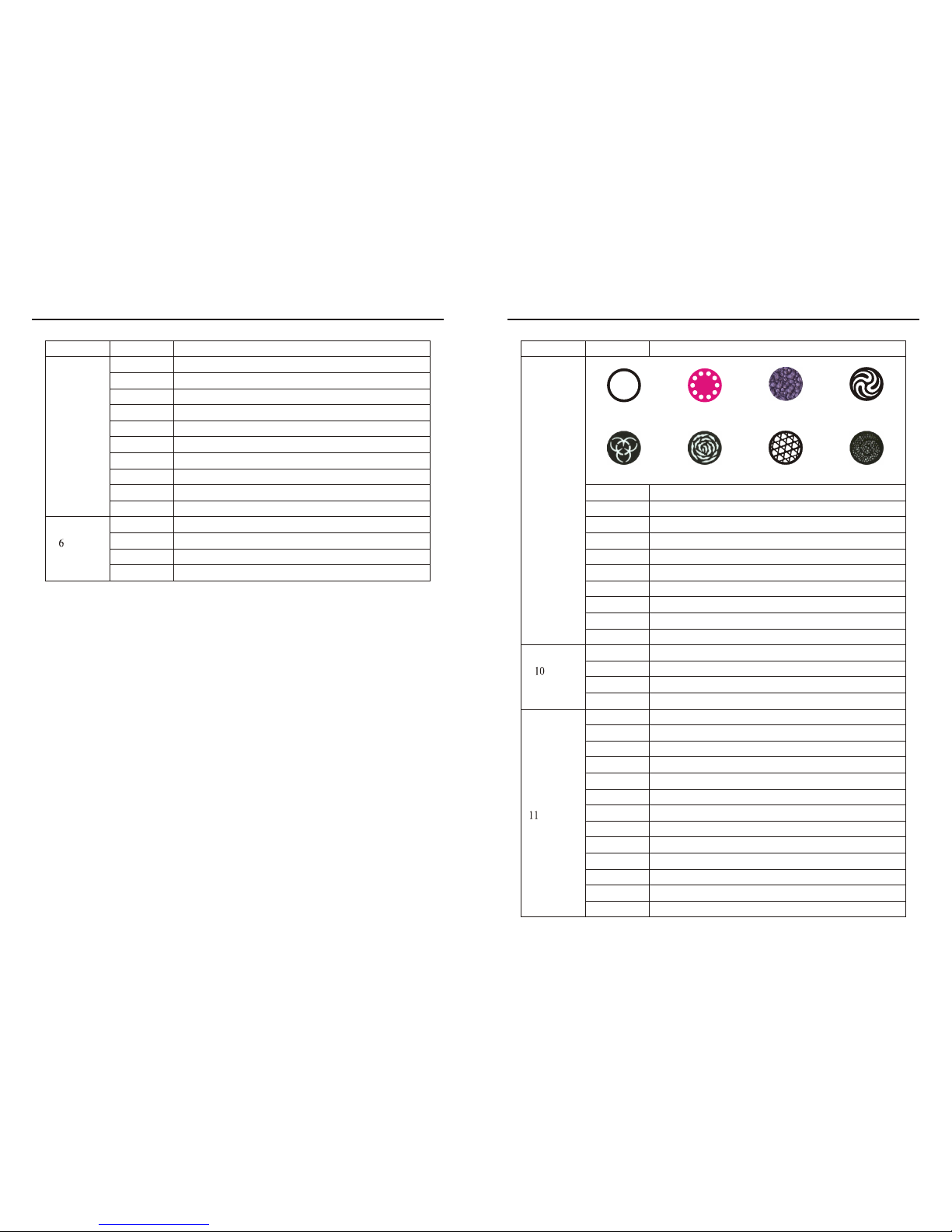
9 Gobo wheel
64~71
72~79
80~87
88~95
96~103
104~111
112~119
120~127
128~191
192~255
Open
Gobo 7 shake, from slow to fast
Gobo 6 shake, from slow to fast
Gobo 5 shake, from slow to fast
Gobo 4 shake, from slow to fast
Gobo 3 shake, from slow to fast
Gobo 2 shake, from slow to fast
Gobo 1 shake, from slow to fast
Positive rainbow effect with increasing speed
Negative rainbow effect with increasing speed
Channel
DMX-value
Feature
5 Gobo wheel
64~71
72~79
80~87
88~95
96~103
104~111
112~119
120~127
128~191
192~255
Open
Gobo 7 shake, from slow to fast
Gobo 6 shake, from slow to fast
Gobo 5 shake, from slow to fast
Gobo 4 shake, from slow to fast
Gobo 3 shake, from slow to fast
Gobo 2 shake, from slow to fast
Gobo 1 shake, from slow to fast
Positive rainbow effect with increasing speed
Negative rainbow effect with increasing speed
Gobo
Rotation
0~63
64~147
148~231
232~255
Gobo bouncing
Positive rotation with increasing speed
Negative rotation with increasing speed
Gobo rotation fixing
Gobo
Rotation
0~63
64~147
148~231
232~255
Gobo bouncing
Positive rotation with increasing speed
Negative rotation with increasing speed
Gobo rotation fixing
104~111
Reset tilt
112~119
120~127
Reset Colour wheel
Reset Gobo wheel
Channel
function
0~7
8~15
16~23
24~31
32~39
40~47
48~55
56~87
Reserved
Reserved
Blackout while pan/tilt moving
Disabled blackout while pan/tilt moving
Blackout while color wheel moving
Disabled black while colour wheel moving
Blackout while gobo wheel moving
Disabled black while gobo wheel moving
88~95
96~103
Blackout all moving
Reset pan
0~7
8~15
16~23
24~31
32~39 40~47 48~55 56~63
Page 6
. 5 . . 6 .
Channel
DMX-value
Feature
6 Control Channel
Accept DMX512 control channel, detail as follow:
1 PAN
0~255
2 TILT
0~255
270
540
Channel
DMX-value
Feature
Colour
wheel
4 Shutter
0~4
5~9
10~14
15~19
20~24
25~29
30~34
35~39
40~44
45~56
57~65
66~74
75~83
84~92
93~101
102~110
111~119
120~127
128~191
192~255
0~3
4~7
8~215
210~255
White
Positive rainbow effect with increasing speed
Negative rainbow effect with increasing speed
Close
Open
Open
Strobe effect with increasing speed
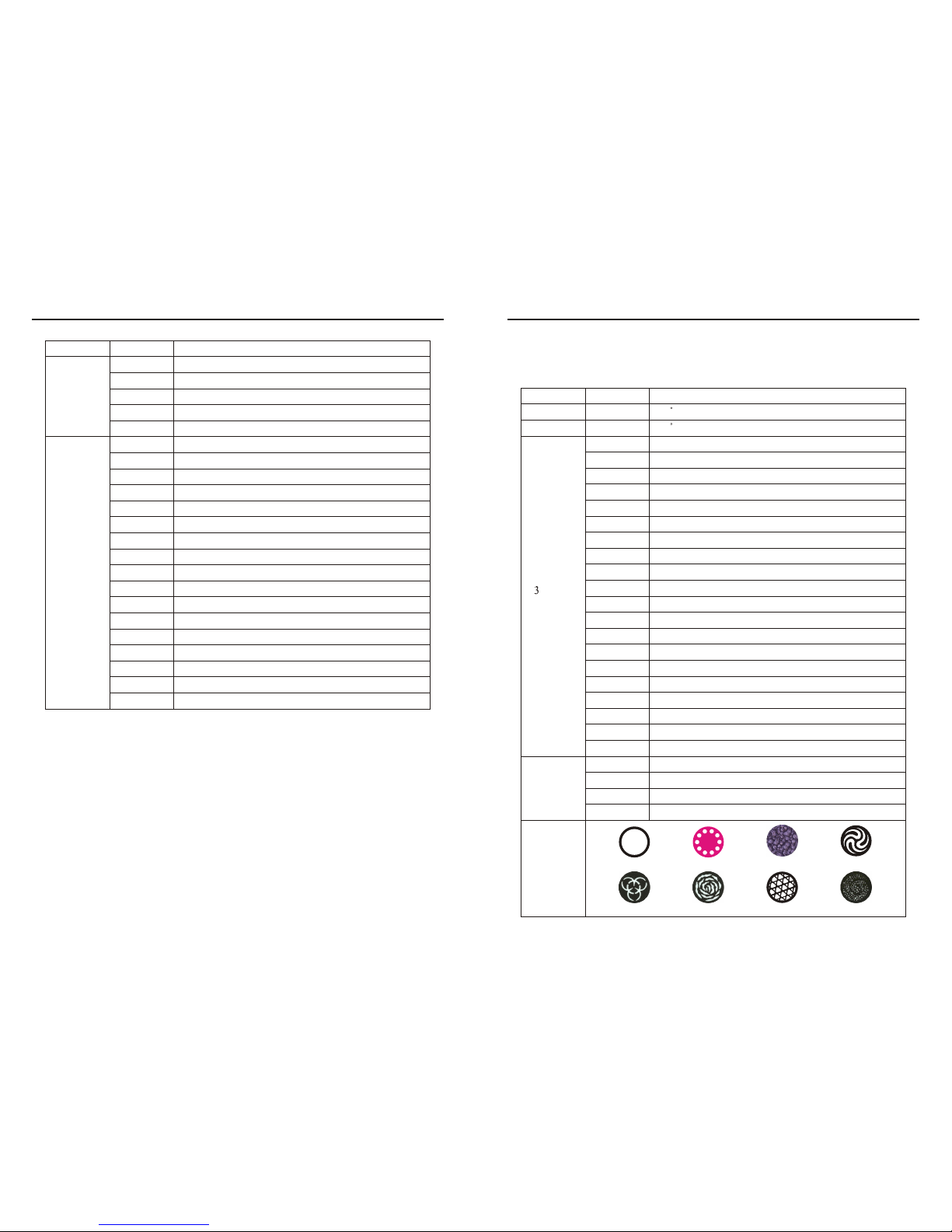
5 Gobo wheel
White orYellow
Yellow or Pink
Pink Green or
Green or Peachblow
Peachblow or Blue
Blue or Kelly
Kelly or Red
Red or Dark blue
Dark blue or White
Dark blue
Red
Kelly
Blue
Peachblow
Green
Pink
Y ellow
128~135
Gobo rotation reset
11 Channel
function
136~143
144~151
152~159
160~255
All channel reset
Prism reset
Focus reset
Reserved
12 Program
built-in
0~7
8~23
24~39
40~55
56~71
72~87
88~103
104~119
120~135
136~151
152~167
168~183
184~199
200~215
216~231
232~247
248~255
Program built-in 1
Program built-in 2
Program built-in 3
Program built-in 4
Program built-in 5
Program built-in 6
Program built-in 7
Program built-in 8
Sound control 1
Sound control 2
Sound control 3
Sound control 4
Sound control 5
Sound control 6
Sound control 7
Sound control 8
Reserved
0~7
8~15
16~23
24~31
32~39 40~47 48~55 56~63
 Loading...