

Page 1

HD Video Synthesizer
LM-SH21
User
manual
Page 2

- 0 -
Catalog
1st.Introduction „„„„„„„„„„„„„ 1
2nd.Parameter „„„„„„„„„„„„„„„ 2
3rd.Topology „„„„„„„„„„„„„„„ 3
4th.Remote control „„„„„„„„„„„„„ 4
5th.Control Software „„„„„„„„„„„„ 5
6
h
.Front panle control „„„„„„„„„„ 7
Page 3

- 1 -
1st Introduction
HD Video synthesizer and use high performance processor, the main function is input 2
numbers Digital HD Video or analog video and converted into one number HDMI and one number
VGA signal output to display unit, like HD projector, LCD display, DLP, PDP, and full-color LED
display. This machine is easy to realization of switching, fenestration, superposition the video,
roaming function.
It is a classic products on the market applications , the products are mainly used in the video
conference, teaching, exhibition display with a single display project equipment simultaneously
monitor a plurality of HD signal.
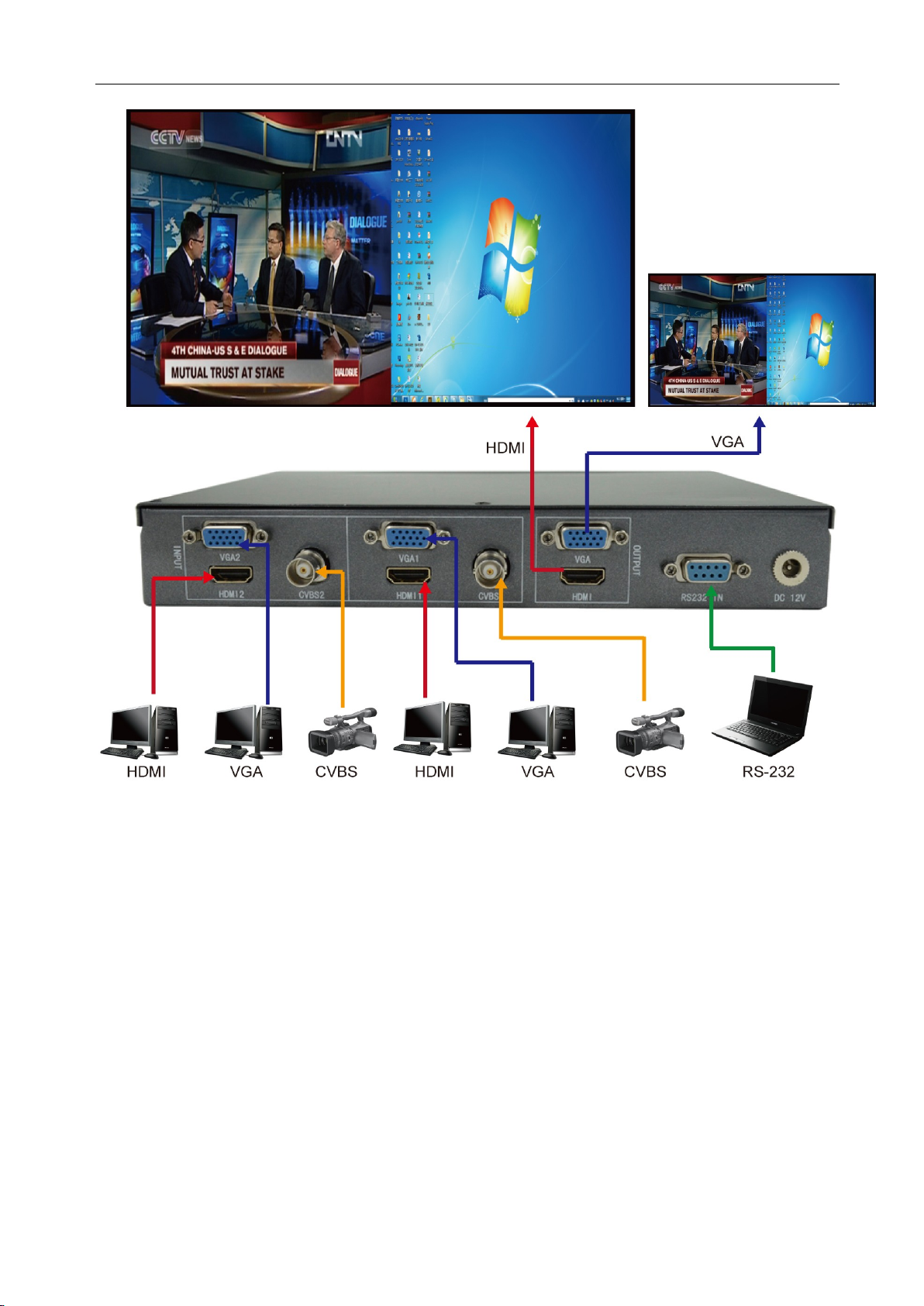
It support 2 numbers CVBS composite video signal, 2 numbers VGA, 2 numbers HDMI
signal input, support 1 number HDMI and 1 number VGA signal output. the display unit can
display the 2 HD or analog signal, and the analog signal can also be mixed at the same time
display. The control software can be freely switched to the input signal, the signal window,
superposition, roaming, through mouse arbitrarily widening pull small screen and drag to change
the position of image and other functions, and can realize the fast mode is invoked by the infrared
remote control.
Main features:
1. the pure hardware architecture
Using pure hardware architecture, no CPU, no memory, the boot only need less than 3
seconds , the system is stability , no risk of crash, virus infection and the collapse, it can be
uninterrupted work 24 hour,365 days a year.
2. the Faroudja image processing technology
Using one of the most powerful image processing chip Faroudja. Faroudja support DCDI
edge smoothing, ACM color adaptive management, support CCS color crosstalk suppression,
support sharpness enhancement, support dynamic contrast enhancement, six axis color real control
overlap, eliminate the noise amplification and other world leading technology of image processing
and function. And has the 3D comb filter video decoding, 3D adaptive noise reduction and motion
compensated de interlacing technique, color correction, color enhancement, GAMMA correction
and frame rate conversion and other advanced features. The output image without jagged and
smearing, fine quality sharp, clear and smooth, bright colors. Even if the input signal is a
composite video CVBS effect is poor, also can have the effect of the output image of excellence.
3. high precision sampling of The analog input signal
CVBS, VGA analog input signal using a 10 bit sampling rate of 165MHZ/S, ADC sampling,
automatic identification signal of different formats and resolution, automatic DC restoration,
automatic color correction, automatic geometric correction, the input signal changes the output
signal intensity, consistency maintenance of contrast and geometry.
4. the data processing ability strong
Data parallel processing, output port occupies one channel, each channel data bandwidth
reached 4.95G/S, fully able to meet the single output 1900X1080/60HZ (165MHZ) and high
resolution display. High speed motion picture no tear, no frame loss, no image catch-up
phenomenon.
Page 4
- 2 -
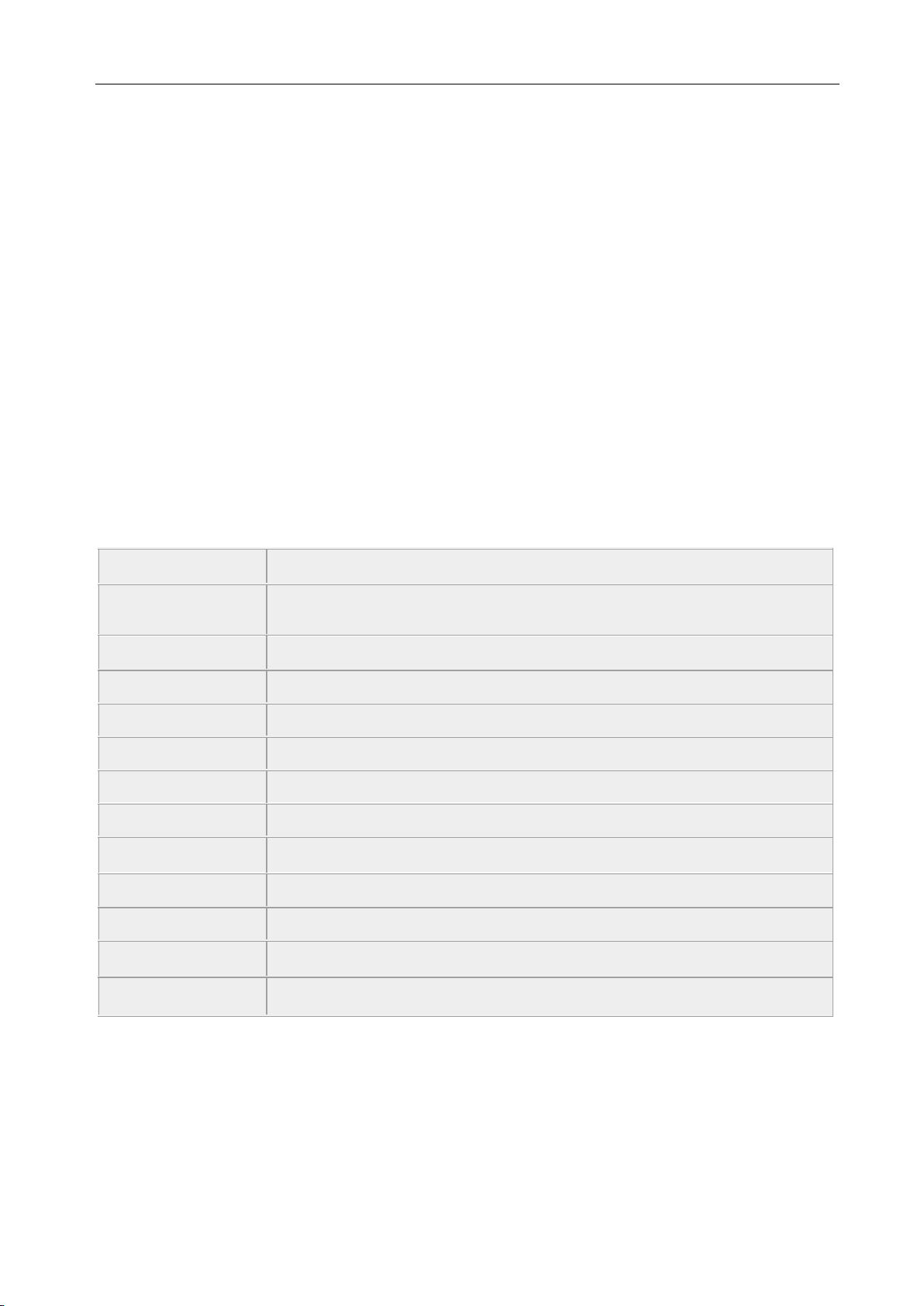
Input interface
2 numbers CVBS/VGA/HDMI ,
Input resolution
Support 480I~1080P,HDMI and VGA signal support 640x480 to
1920x1080
Deep Color
24bit,16.7M
Zoom
Anywhere, Any size
HDMI
HDMI1.0/ HDCP1.3/ DVI1.0
CVBS
NTSC, PAL or SECAM
Distinguish
Auto
Output interface
HDMI and VGA
Output
1024x768 ,1280*720,1280*1024, 1920x1080 @60HZ
Control
RS232,Remote,front panel button
Control software
Quarsystem
Input voltage
DC12V
power
15W
5. control function
You can use the PC through the RS232 serial port in full function control, multi screen display,
signal switching, screen window, superposition, roaming, through the mouse directly drag the
picture position and adjust the picture size; through the fast mode of remote controller to the pre
stored IR control transfer; control protocol to control, the control of concentration control.
6. support a variety of formats and input and output ultra-high resolution
The HD video synthesizer support 2 numbers composite video CVBS, 2 numbers VGA, 2
numbers HDMI signal input. The composite video support NTSC, PAL, SECAM adaptive
processing; high definition video support interlaced and progressive input, support 480I resolution
to 1080P; computer signal resolution supports 640X480 to 1920X1080. All input signals through
video processing chip professional level, the output resolution supports 1024X768 to 1920X1080
@ 60Hz.
2nd Parameter
3rd Topology
Page 5
- 3 -
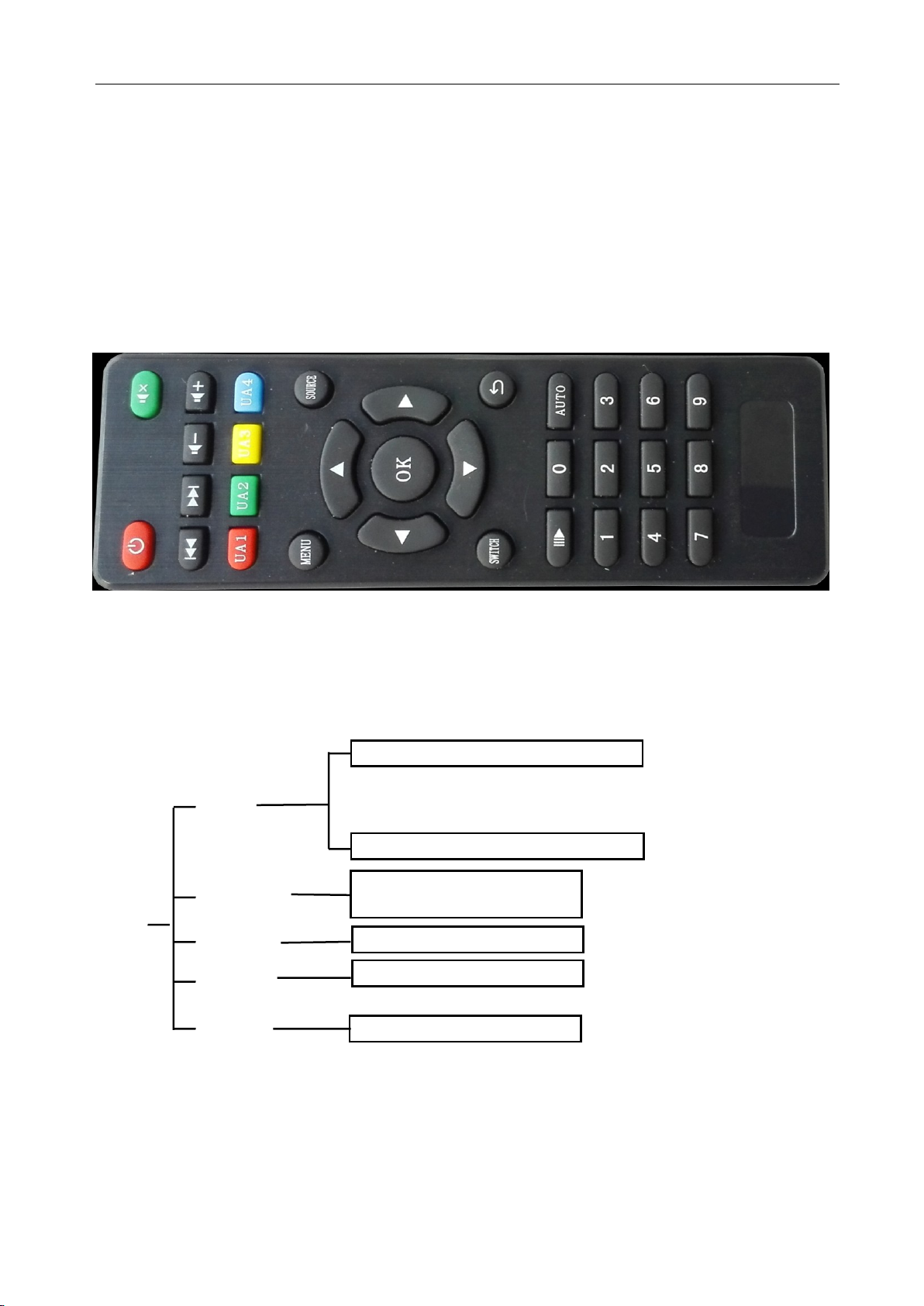
4th Remote control
Page 6
- 4 -
Input source2 HDMI/VGA/VIDEO
MENU
Input
source
Output
reslution
System ID
language
Display
mode
1920*1080/1280*1024/
1280*720/1024*76
0
English/Chinese
HDMI/DVI
Input source1 HDMI/VGA/VIDEO
Function:
1: input video1 full display on one screen
2: input video2 full display on one screen
3: 2 videos display left and right on screen
4: 2 videos display upper and lower 0n one screen
5-9:operator set different display mode
Auto: all VGA video adjust
SWITCH: left and right cutting diagram/upper and lower cutting diagram/full video
switch
Menu:
Up/down/left/right ok: sure つ: reback
Software Name:Quarsystem.exe
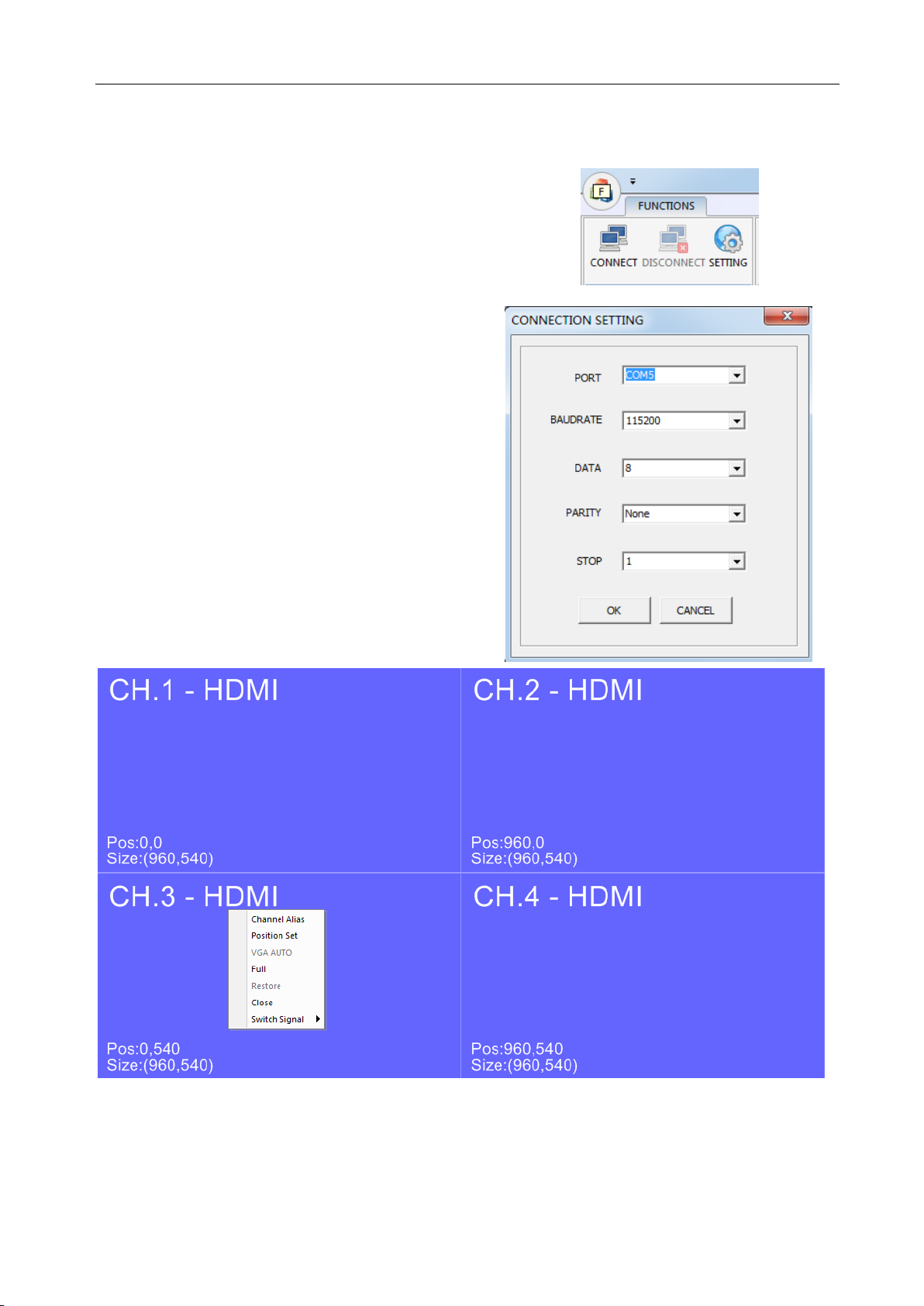
5th Control Software
Page 7
- 5 -
Then, chose the port, it
is According to your
computer, Bandrade is
115200,Data Bit is
8,Check Bit is None, Stop
Bit is 1.and press
“ OK ” ,then press
“connect”
Operation system: Windows 2000/XP,WIN7
Operation:
1.Open quarsystem.exe,press setting-->Connect
Press mouse right, Close CH3 and CH4 ,only need Operate CH1 and CH2;
Press mouse right, operator can choose video input source, closer video or open video, size adjust, rename
channel, and VGA auto, operator can use mouse left change the video size and Position。
Page 8
- 6 -
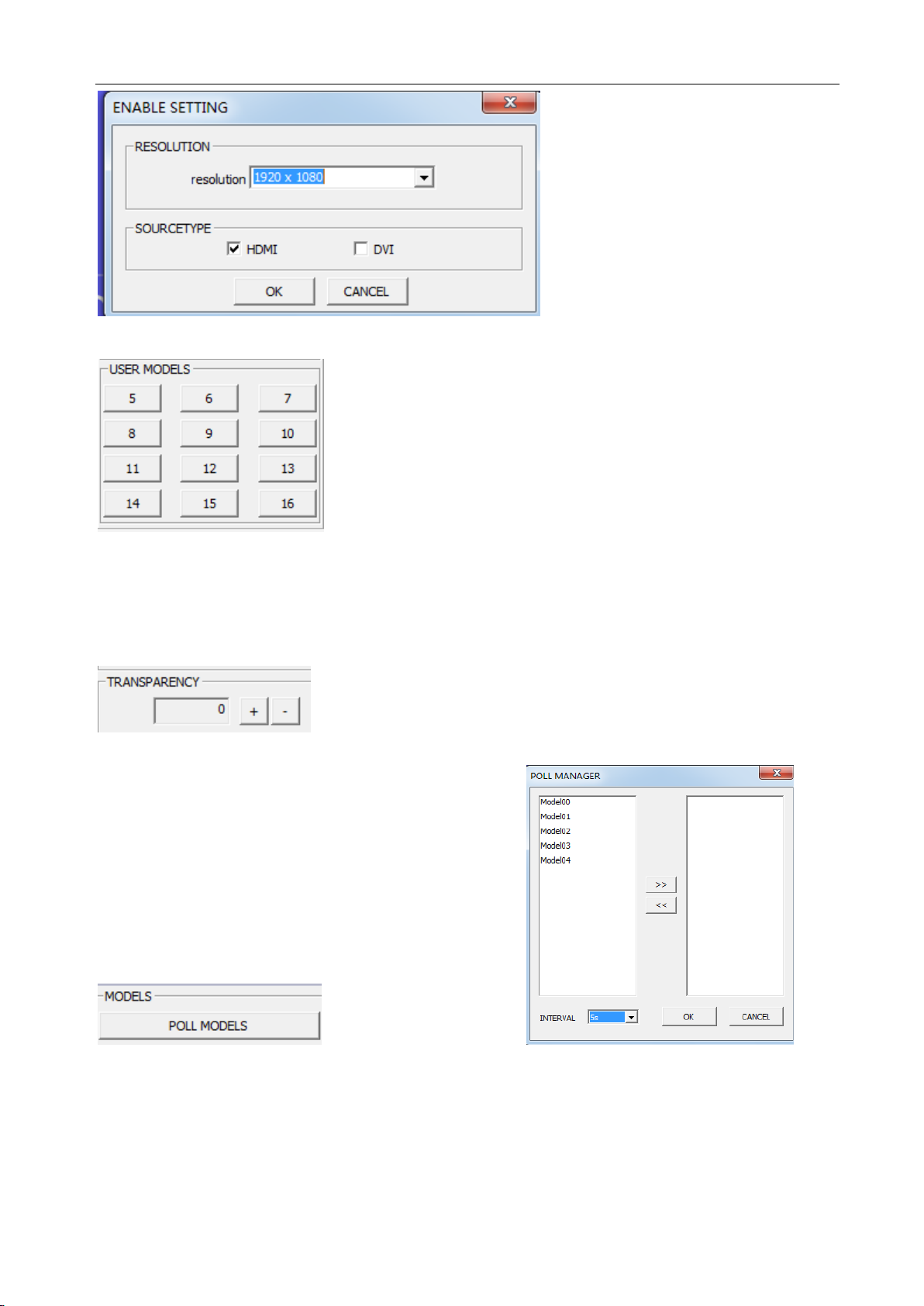
enable setting output resolution and display
mode.
user modes, operator setting display mode, then press “Ctrl”+number 5-16 to
save this mode, if operator need 6 mode, press 6,or remote 6 ,or front panel button 6,then mode 6 is display on
screen.
USB changed, audio soft will be update infuter.
transparency adjust
different display mode polling
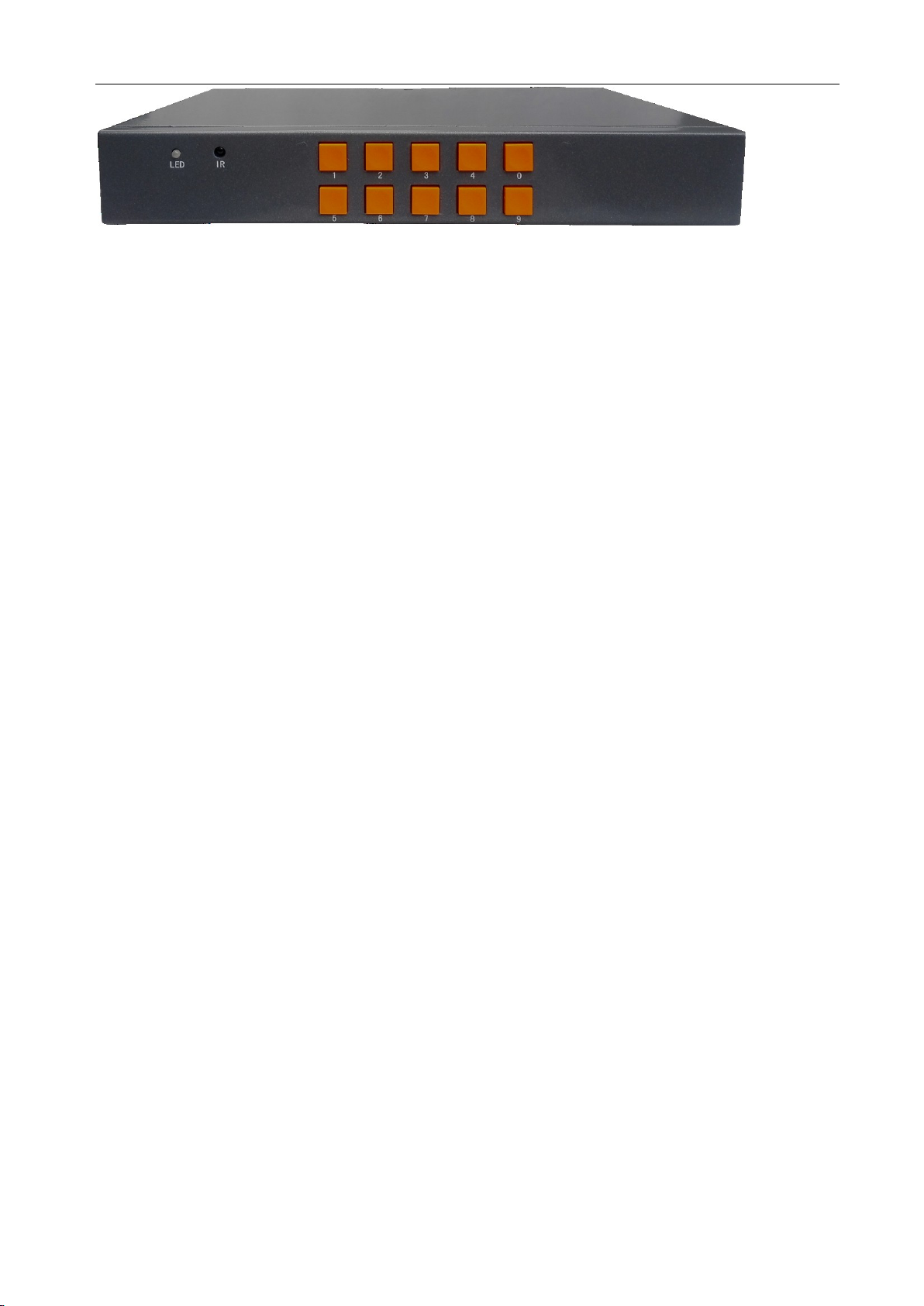
6th Front panel control
Page 9
- 7 -
0: same as switch on remote, left and right cutting diagram/upper and lower cutting
diagram/full video switch
1: input video1 full display on one screen
2: input video2 full display on one screen
3: 2 videos display left and right on screen
4: 2 videos display upper and lower 0n one screen
5-9:operator set different display mode
 Loading...