

Page 1

User Manual
(LF-F200)
Rev.1.01
Page 2

Page 3

Safety Information
Please read this important safety information carefully before
you use the FITT360. Follow the instruction below to prevent
injury to yourself or others and prevent damage to your device.
Precautions for product overheating
If you use a function that requires a lot of power for a long time,
the product may heat up temporarily. If the product comes into
contact with the skin for a long time, it may cause low temperature burn such as red spots or pigmentation.
For your safety, please read the following description carefully
and observe precautions when you use and keep the product.
This product is following minimum burn stimulus-quantity
standards based on European temperature safety standard,
EN563(regulation temperature of the contact surface of the device).
If product surface temperature exceeds 42 degrees, there may
be a risk of burns, and the product is designed to warn the user.
After alarm, the product will shut down automatically.
When the product get hot, some functions may be limited or
the product may be turned off automatically. Please stop using
the product until it cools down
1
Page 4

Be sure to wear the product on clothing. If the product is used in
direct contact with the skin, use it only in an environment
between 0°C and 30°C to prevent low temperature burns.
If you feel hot while using it, turn it off and immediately.
Take off the device when the product get hot. Prolonged exposure
of your skin to an overheated device may cause low temperature
burn symptoms, such as red spots and pigmentation.
Children is sensitive and weaker than adults, so please be careful
not to use children
Make sure that your skin is covered when wearing the product
to prevent low temperature burn symptoms. Particularly, please
be careful when this product is used in high temperature
environments, or used by those who has poor blood circulation,
or person with sensory impairment.
Turn off the Bluetooth / Wi-Fi function when you don’t use it to
prevent overheating.
Do not use the product while charging. It may occur overheating.
Do not place the product in a place where it may overheat,
such as near a hot air balloon or fire. Doing so may cause
the product to heat up or cause a fire.
Do not cover the product with a cloth when it is in use or charging.
It may cause overheating.
Do not place the product where there is a possibility of overheating
such as electric plate.
Do not expose the unit to direct sunlight for a long time.
2
Page 5

Notice for waterproof function
This product is protected from splashing water such as sweat
or drizzle. Do not immerse the product in water.
If the product is dropped or shocked, the waterproof function may be
damaged. Be careful when you use the product.
The product is not protected from water when the cover is open.
Make sure that the cover is closed while using it.
Battery Handling Precautions
This product contains a lithium ion battery. Do not store or use
the product at too high or low temperatures. The battery life
may shorten temporarily or the product may malfunction.
If the product is dropped or shocked, the waterproof function may be
damaged. Be careful when you use the product.
Do not disassemble or damage the battery pack. The battery
may explode or ignite.
When disposing of the battery, please do not throw it into
the general garbage cans and observe disposal regulations
in your area.
3
Page 6

Precautions for Use and Storage
Please wear the product according to the correct method of
wearing to minimize electromagnetic interference to human body.
If you feel stiffness while wearing the product, stop using it immediately.
Do not use in thunderstorms or rain.
Do not use or store in direct sunlight, high humidity or dusty places.
It may cause the product to malfunction.
Do not use the product near an automobile, hospital or medical
device affected by high frequency.
Keep out of the reach of children or pets.
If the product gets wet, leave it turned off and contact a service center.
Turn off the product when not in use.
Do not use a damaged charger, power cord or plug, or loose outlet.
If the connection is unstable, there is a risk of fire due to heat
generation and normal charging may not be possible.
Use the enclosed adapter. If not, it may shorten the battery life
or cause malfunction, overheating, fire, explosion or injury.
Do not touch the product, power cord, plug, or outlet with wet
hands or other body parts. It may cause electric shock.
Do not allow foreign objects to enter the terminals and holes.
It may cause malfunction or failure.
Do not modify, disassemble or repair the product.
Do not drill or disassemble the product with sharp point.
It may cause electric shock, explosion or fire.
4
Page 7

Be careful not to drop the product or avoid external shocks.
It may cause a malfunction or deterioration of the product.
If the product is bent or twisted by excessive force, the appearance
may be changed or internal parts may fail. This may cause
product degradation.
If any unusual odor, noise, or smoke appears on the product,
discontinue use and contact the service center.
When cleaning the product, gently wipe it with a soft cloth.
Do not use the product with the cover open. It may cause
the product to malfunction.
When using for important events, first make a test shot
and check if the camera works properly.
If you use the headset or earphone for a long time at a high volume,
be careful not to damage your hearing.
Notice for waterproof function
Do not use the product for unauthorized surveillance or secret use.
Illegal shots are strictly prohibited in many countries and it may
result in liability for the user.
Do not take pictures or record videos of other people without their
permission.
Do not take pictures or videos in places where legally prohibited.
Do not take pictures or videos in places where you may violate
other people’s privacy.
5
Page 8
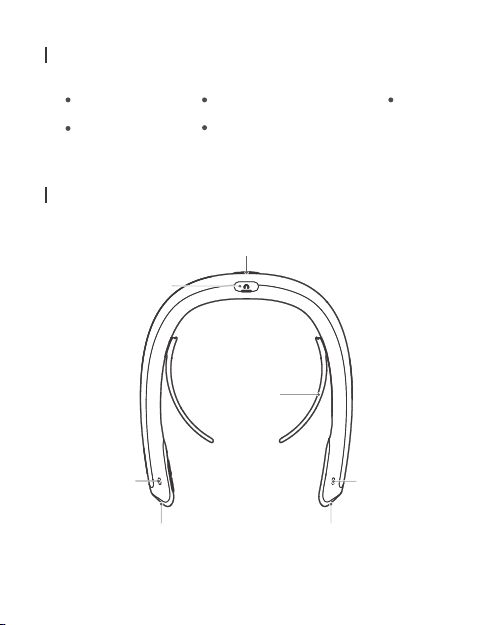
Package contents
FITT360
Quick start guide
Device layout
Earset jack
Camera status
indicator
Front camera Front camera
6
USB Cable
Neck guide (Size: Small, Medium, Large)
Rear camera
(USB Type-C) Adapter
Neck
guide
Camera status
indicator
Page 9

Speaker
Mic 2
Mic 1
Connection indicator
Connection button
Recording button
Power status indicator
7
Page 10

Device layout
8
Recording
button
Connecting
Button
Memory
card slot
Cover Lock
Power
button
USB jack
TYPE C
Page 11

Attaching the neck guide to FITT360
Check the left (L) and right (R) sides of the neck guide.
[Note] Select the appropriate neck guide for your neck size.
1
Insert the neck guide in the direction of the arrow until
you hear ‘click’ sounds
2
To remove the neck guide, slide it in the direction of the arrow
while pulling the middle part of the neck guide
1
2
9
Page 12
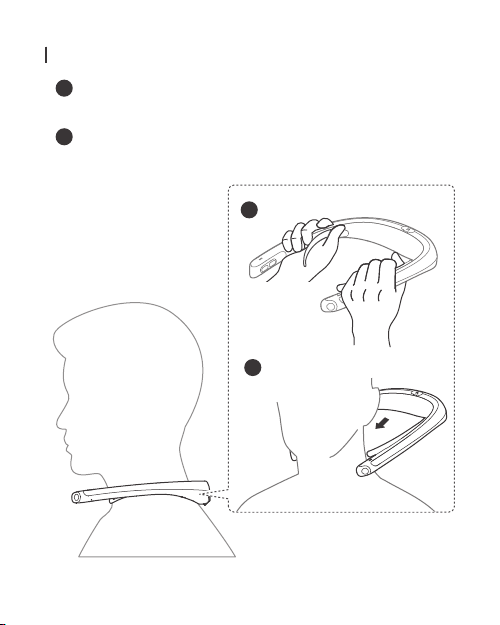
Wearing FITT360
Hold the FITT360 with two hands with placing the button on
1
the right side.
Wear the product behind your neck.
2
To shot the best quality keep FITT360 horizontal.
1
2
10
Page 13
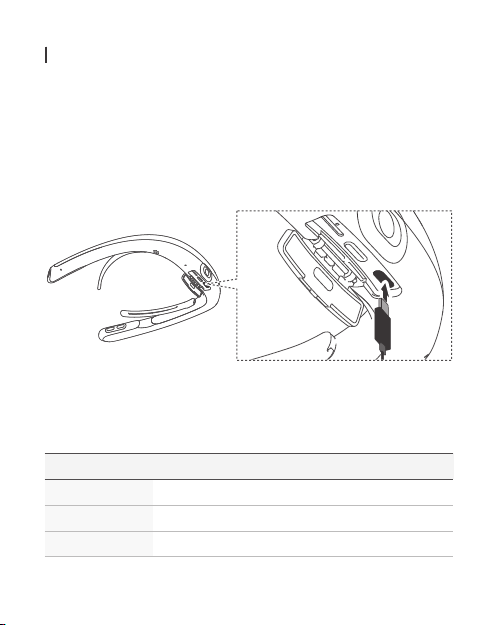
Using FITT360
Charging the battery
Charge the battery before using FITT360 for the first time.
Connect the charger to the USB cable and plug the charger
into the outlet.
[Note] Use the enclosed adapter.
Checking the battery level
Press the power button shortly to check the battery power.
Color
Blue
Yellow
Red
Battery level
80~100%
15~80%
0~15%
11
Page 14
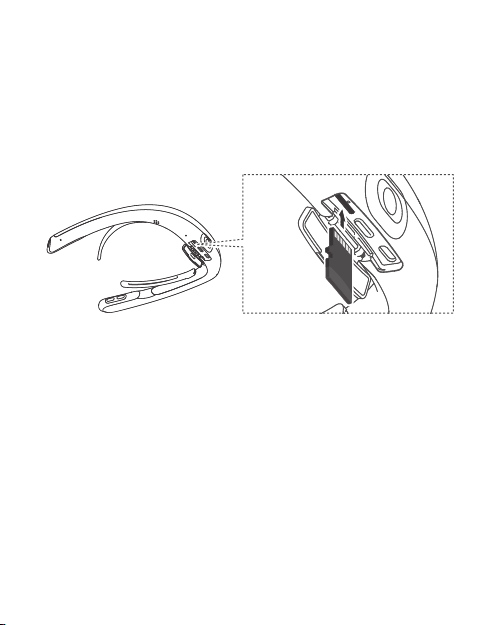
Installing a memory card
The FITT360 includes 64GB of internal memory. Also, you can
expand storage by installing a memory card up to 128G.
Insert a memory card into the memory card slot properly until
you hear ‘click’ sounds, and then close the cover.
Turning the FITT360 On/Off
1 Press and hold the power button until the vibration starts.
2 To turn off, press and hold the power.
[Note] If you do not use the FITT360 for 10 minutes while the power is on,
it will automatically switch to sleep mode to save the battery power.
12
Page 15

Taking photos with the FITT360 solely
You can take photos without connecting to smartphone.
Check if you wear the FITT360 properly before taking photos.
1 Press the Recording button shortly, and then the photos
will be taken after 2 seconds.
[Note] This function also can be used in sleep mode.
If you want to take vivid picture, wipe it with soft cloth.
Recording videos with the FITT360 solely
You can take photos without connecting to smartphone.
Check if you wear the FITT360 properly before recording.
1 Long press the Recording button, and then recording will start
after 1.5 seconds with sound.
2 To stop recording long press the Recording button
[Note] This function also can be used in sleep mode.
Exporting files to your computer
You can transfer files from the product to your computer.
1 When you connect the product and computer with a USB cable,
the computer recognizes the product as a removable disk.
2 Transfer the pictures and video files of the product to your
computer.
[Caution ] Be careful not to disconnect the product from the USB cable
while transferring files. It may cause damage to data or product.
13
Page 16

Connecting FITT360 to a smartphone
FITT360
1 Turn on the FITT360
2 Press and hold the Connecting button until the LED blinks blue.
[Note] If once you connect the FITT360 to the smartphone, smartphone
pairing mode will be activated automatically from next time without
having to press the Connecting button.
14
Page 17
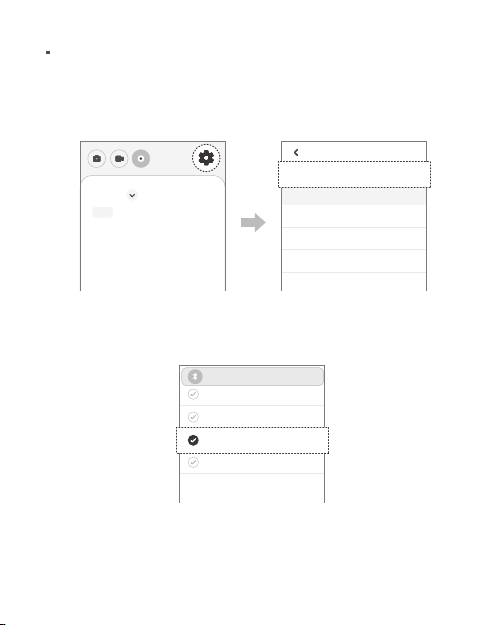
Smartphone
1 Turn on the smartphone’s Bluetooth, Wi-Fi direct, and GPS.
2 Tap the FITT360 app on the smartphone.
3 Tap the ‘SETTING’ icon and ‘Connect’
Setting
Phone
All Photo Video
Connect
Device info
Spec
Storage Management
How to use
4 Find and tap FITT360 #### on the list.
(#### is 4-digit combination of numbers or characters.)
Blutooth
connecting
STONE
EST
FITT360 56FE
0000
5 If it is connected successfully, the LED turns solid blue
15
Page 18

The contents of this manual are subject to change without prior notice
The contents of this manual may differ from the actual versio depending
on the software version of the product.
Page 19

Page 20

www.linkflow.co.kr
Copyright 2019 LINKFLOW Corporation
c
 Loading...