

Page 1
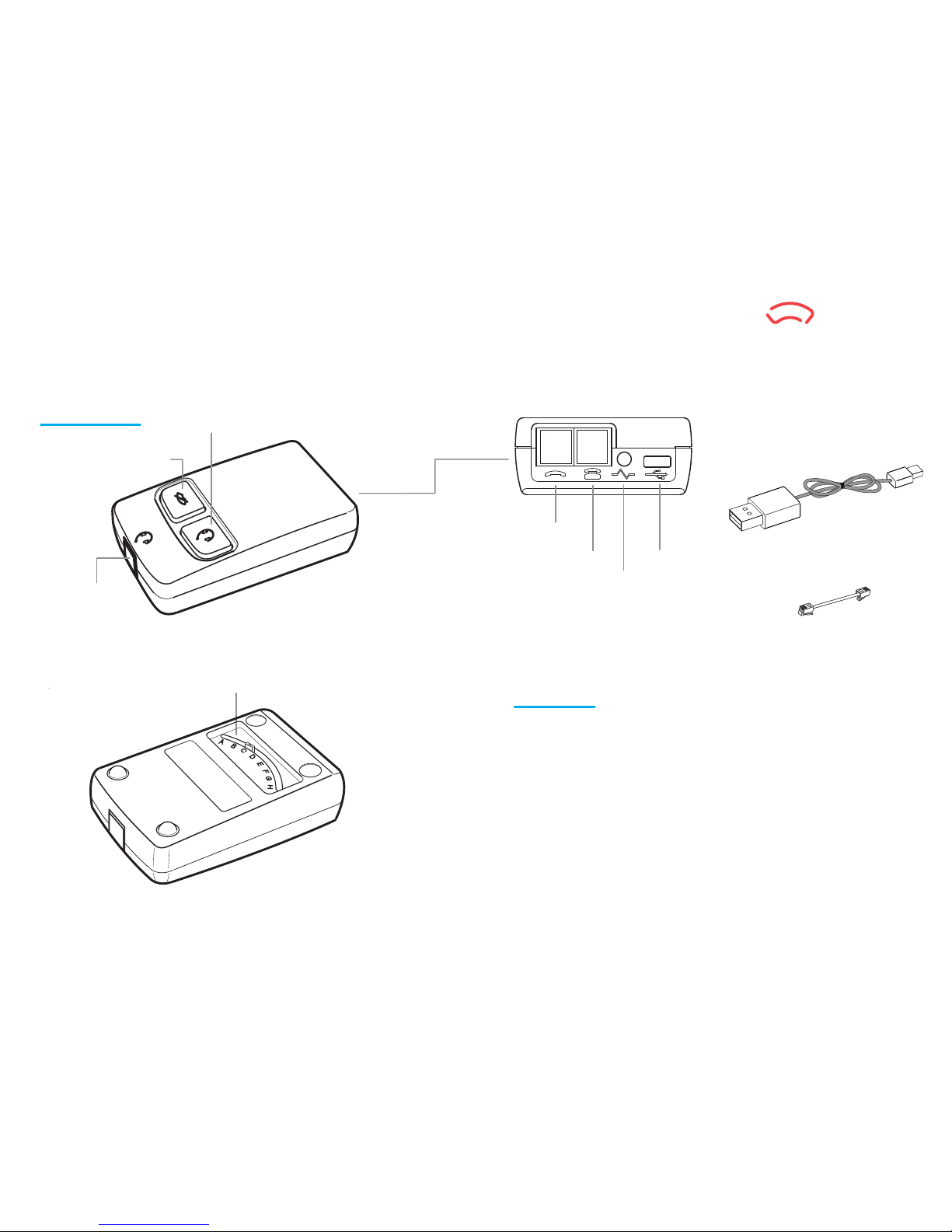
2 Features
1 Components
(1) Headset Button : When this button is lighted Green, the coversation is through
the headset. When it isn't lighted Red, the conversation is routed to your telephone handset.
(2) Mute Button : When this button is Lighted Red the Mute feature is active and your voice will not be
heard at the other end of the call. The Mute function is active when Red light.
(3) Headset Port : Plug the curly cord of your headset in here.
(4) Configuration Switch : Allows the Switch Box to operate with different telephone types.
(5) USB port : A USB cable with micro 5pins for power
(6) Lifter port : Connects the Lifter for which used the Lifter's data cord.
(7) Handset Port : Connects to your telephone handset via your telephone handset curly cord.
(8) Telephone Port : Connects to your telephone via the short cord provided.
(9) USB cable with micro 5pins : It connects Computer's USB port or Power supplier.
(10) Short Cord : Switch Box to Telephone
(10) Short Cord
(8) Telephone Port
(1) Headset
(4) Configuration Switch
(2) Mute
(3) Headset Port
(7) Handset Port
(9) USB cable
(6) Lifter Port
(5) USB port(Micro 5pins)
[ Top View ]
[ Bottom View ]
User Guide LS700
LINETECH
Page 2
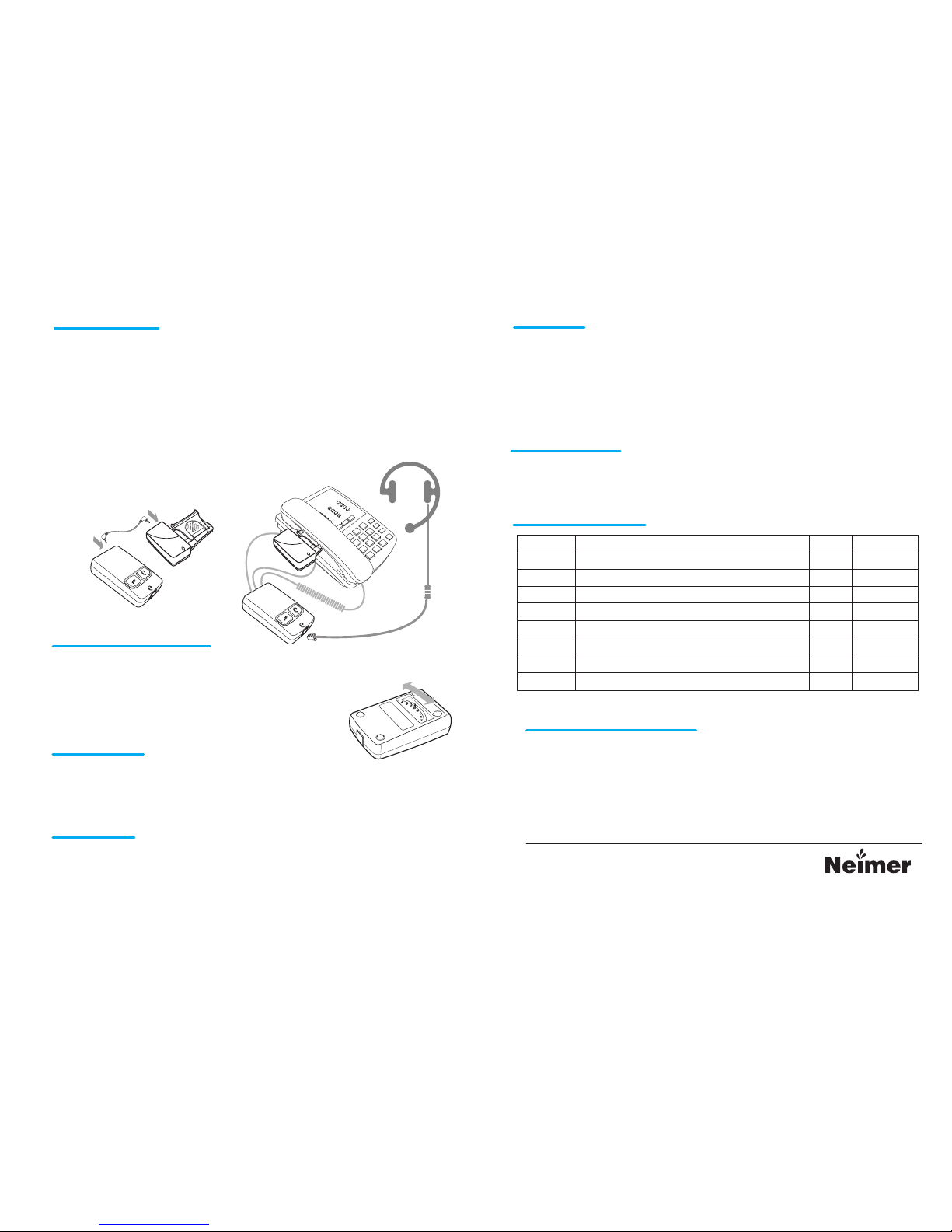
* Refer LTL10 User Guide about Lifter Connection.
1. Connect the Switch Box's (6)Lifter Port to the Lifter's Power port with 2.5mm plug
data cable.
2. Connect (9)Micro 5pins of USB cable at the (5)USB port, and connect (9)USB cable
to PC's USB port or power supplier.
3. Unplug the handset cord from the base of your telephone and insert it into the (7)Handset Port
on the Switch Box.
4. Connect the (10)short cord from the telephone base to the (8)Telephone Port on the Switch Box.
5. Connect the curly cord of your headset to the (3)Headset Port on the Switch Box.
1. Press the (1)Headset in Red Lighting.
2. Listen to dial tone.
3.
If you do't hear clear dialtone with the default (4)Configuration Switch setting,
move the (4)Configuration Switch through the Eight available positions until you do.
1. Press the (1)Headset to activate the LTL10.
2.
If your friend cannot hear your voice, or if you hear buzzing, try changing the (4)Configuration Switch
setting.
1. When your telephone rings, wear your headset and press the (1)Headset on Switch Box
to activate the Lifter.
If you are using the headset then handset is lifted by Lifter. (1)Headset is lighted Red.
Active Indicator is blink on the Lifter.
If you are using the telephone handset Active Indicator is just lighting on the Lifter
2. To end call simply press the (1)Headset to be not lighted Red and replace the handset.
1. To mute the call, simply press the (3)Mute. Then (3)Mute is lighted Red.
When you wish mute to finish, simply press the (3)Mute once more.
1. To make a call using the headset, wear your headset and press the (1)Headset
on Switch Box to activate the Lifter.
2. When you hear dialtone, dial the number of the party you wish to call.
If you are using the headset then handset is lifted by Lifter.
(1)Headset is lighted Red on Switch Box. Active Indicator is blink on the Lifter.
3. To end call simply press the (1)Headset to be not lighted Red and replace the handset.
* Read all instructions before using.
-. It should not be used for any other purpose.
-. Modification of the product will void the warranty.
Making Connection
3
Set the Configuration Switch
4
Make a Test Call
5
Receiving Calls
6
Making Calls
7
Warning and Safty Information
10
Muting during a call
8
9
Switch Configuration
SW position Matching Telephone Mic Amp Wiring
A Standard No M- R+ R- M+
B Cisco IP phones 79xx series No R+ M- M+ R-
C Ascom office and Philips phones No R- M+ M- R+
D Japanese phones, NEC, Nitsuko No M+ R+ R- M-
E Plantronics Vista Base No R- R+ M+ M-
F Panasonic phones and modular plug Yes M+ R- R+ M-
G Nortel digital phones and Avaya IP phones Yes M- R+ R- M+
H Avaya Callmaster V and VI, Cisco IP phones 79xx series Yes R+ M- M+ R-
Line Tech Co., Ltd.
Suite 902, IT 301, 397 Seokcheon-ro (Ssangyong 3rd, Bucheon Techno Park)
Bucheon City, Gyeonggi Do, 14449 Republic of KOREA
TEL : +82-32-624-4581~2 FAX : +82-32-624-4580
Web Site : www.line-tech.net www.neimer.com
e-mail : [email protected]
TM
 Loading...