

Page 1
Quick Start Setup Guide
For part numbers: 2001-00362-000
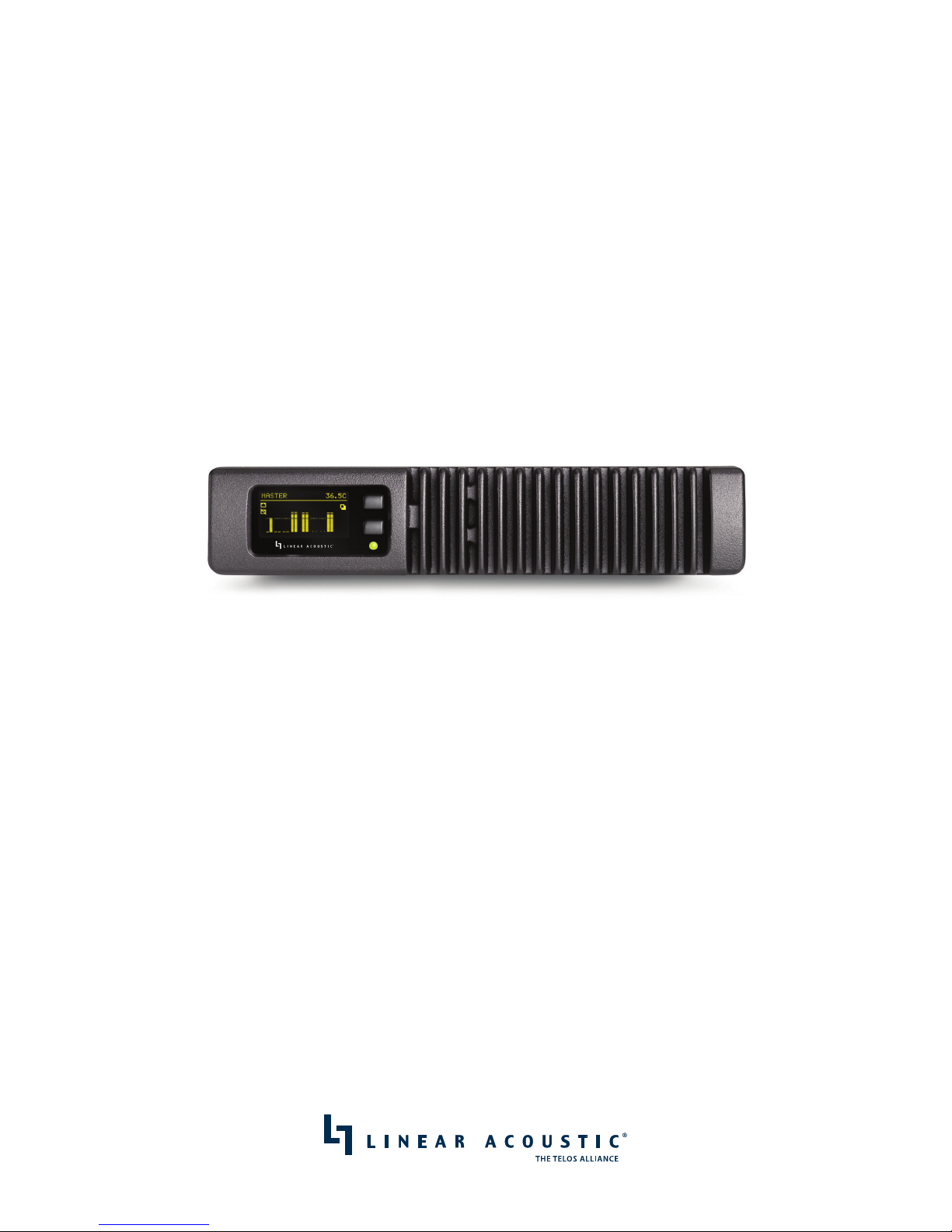
SDI xNode
Livewire+/AES67 Audio over IP Interface with Dual HD/SD-SDI Ports.
ATTENTION!
This quick start guide is intended to aid with basic deployment of the SDI xNode.
For further support and/or questions please contact [email protected]
1490-00122-001 QUICK START GUIDE
Page 2

We know you’re eager to get your new gear up and running. But rst, The Telos Alliance strongly
suggests you use an Uninterruptible Power Supply (UPS), with power line ltering, to prevent damage
in case of electrical storms or power surges. Your Product Warranty (found in the User Manual) does
not cover lightning damage!
Information about lightning protection can be found at:
http://blogs.telosalliance.com/tech/surge-suppression-pointers
IMPORTANT SAFETY INFORMATION
ABOUT YOUR NEW PRODUCT
Page 3

This Warranty covers “the Products,” which are defined as the various audio equipment, parts, software and
accessories manufactured, sold and/or distributed by or on behalf of TLS Corp. and its affiliated companies,
collectively doing business as The Telos Alliance (hereinafter “Telos”).
With the exception of software-only items, the Products are warranted to be free from defects in material and
workmanship for a period of five (5) years from the date of receipt of such Product by the end-user (such date
of receipt the “Receipt Date”). Software-only items are warranted to be free from defects in material and workmanship for a period of 90 days from the Receipt Date. Telos will repair or replace (in its discretion) defective
Products returned to Telos within the warranty period, subject to the provisions and limitations set forth herein.
This warranty will be void if the Product: (i) has been subjected, directly or indirectly, to Acts of God, including
(without limitation) lightning strikes or resultant power surges; (ii) has been improperly installed or misused,
including (without limitation) the failure to use telephone and power line surge protection devices; (iii) has
been damaged by accident or neglect. As with all sensitive electronic equipment, to help prevent damage
and or loss of data, we strongly recommend the use of an uninterruptible power supply (UPS) with all of our
Products. Telos products are to be used with registered protective interface devices which satisfy regulatory
requirements in their country of use.
This Warranty is void if the associated equipment was purchased or otherwise obtained through sales channels
not authorized by Telos.
EXCEPT FOR THE ABOVE-STATED EXPRESS WARRANTY, TELOS MAKES NO WARRANTIES, EXPRESS OR IMPLIED
(INCLUDING IMPLIED WARRANTIES OF MERCHANTABILITY AND FITNESS FOR A PARTICULAR PURPOSE).
In no event will Telos, its directors, officers, employees, agents, owners, consultants or advisors (its “Affiliates”),
or authorized dealers or their respective Affiliates, be liable for incidental or consequential damages, or for loss,
damage, or expense directly or indirectly arising from the use of any Product or the inability to use any Product
either separately or in combination with other equipment or materials, or from any other cause.
In order to invoke this Warranty, the Product must be registered via Telos’ website (found at: http://telosalliance.
com/legal/warranty) at time of receipt by end-user and notice of a warranty claim must be received by Telos
within the above stated warranty period and warranty coverage must be authorized by Telos. Contact may be
made via email: [email protected] or via telephone: (+1) 216-241-7225. If Telos authorizes the performance of warranty service, the defective Product must be delivered to: Telos, 1241 Superior Avenue, Cleveland,
Ohio 44114 or other company repair center as may be specified by Telos at the time of claim.
Shipping Costs and Warranty Service:
If the date the customer’s notice of warranty claim is received by Telos (such date the “Warranty Claim Notice
Date”) is within the first 90 days following the Receipt Date, Telos will pay the costs of shipping such warranted
Product to and from the end user’s location, and the cost of repair or replacement of such warranted Product.
If the Warranty Claim Notice Date occurs after the first 90 days following the Receipt Date and before the
end of the second (2nd) year, the customer will pay the freight to return the warranted Product to Telos. Telos
will then, at its sole discretion, repair or replace the warranted Product and return it to the end user at Telos’
expense.
If the Warranty Claim Notice Date occurs between the end of the second (2nd) year following the Receipt Date
and the completion of the fifth (5th) year, the customer will pay the costs of shipping such warranted Product
to and from the end user’s location. Telos will then, in its sole discretion, repair or replace the warranted Product
at Telos’ expense. Telos also reserves the right, if it is not economically justifiable to repair the warranted
Product, to offer a replacement product of comparable performance and condition direct to the customer at a
discounted price, accepting the failed warranted Product as a trade-in.
The end user will in all cases be responsible for all duties and taxes associated with the shipment, return and
servicing of the warranted Product.
No distributor, dealer, or reseller of Telos products is authorized under any circumstances to extend, expand
or otherwise modify in any way the warranty provided by Telos, and any attempt to do so is null and void and
shall not be effective as against Telos or its Affiliates.
Out of warranty units returned to the factory for repair may be subject to a $500 evaluation fee, which fee must
be prepaid prior to shipping the unit to Telos. If no repairs are required, the $500 fee will be retained by Telos as
an evaluation charge. If repairs are required, the $500 fee will be applied to the total cost of the repair.
Telos Alliance Limited Warranty
Page 4
| 1
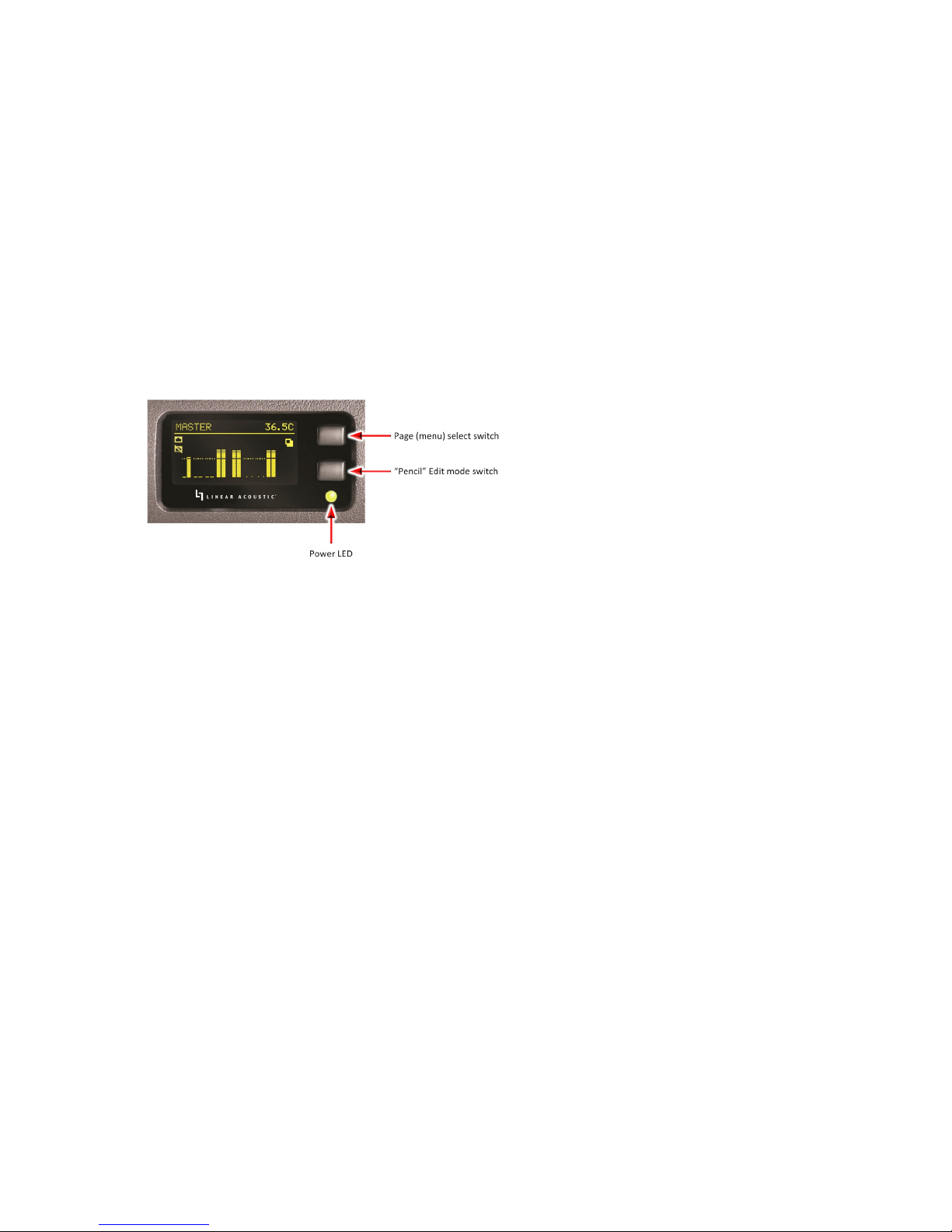
Front Panel Display and Controls
Power LED Status
nn Green–Powered by AC Mains
nn Yellow–Powered by AC Mains and Redundant Supply
nn Red–Powered by Redundant Supply
Initial Setup
Quick Method
1. Apply power to the xNode and wait for the unit to fully boot up.
2. Press the top button (Page select switch) four times to reach the ID page which shows you a
Node ID with no value, Channel numbers 1-8 and no IP address
3. Press and hold the bottom button (Pencil switch) for 10 seconds to enter edit mode
4. With the cursor shown, you can use the top button ( I+ ) to increment value and the bottom
button ( ►| ) to move the cursor to the next position.
5. Press bottom (“next”) button twice. Press the top (“increment”) button once to give the ID
value of 1 to the xNode. (Each xNode requires a unique number)
6. Press the move button one additional time to exit the edit mode and automatically configure
the xNode with IP address 10.216.0.101 and channel numbers of 101 – 108.
1
Quick Start Setup Guide
Page 5
2 | SDI XNODE QUICK START SETUP GUIDE
Web Access
The SDI xNode includes an internal HTTP server. Full configuration, control, and monitoring are
available via a standard web browser.
To log in to the SDI xNode once an ID and/or IP address have been configured:
nn Default username: user
nn Default password: (none – there is no password)
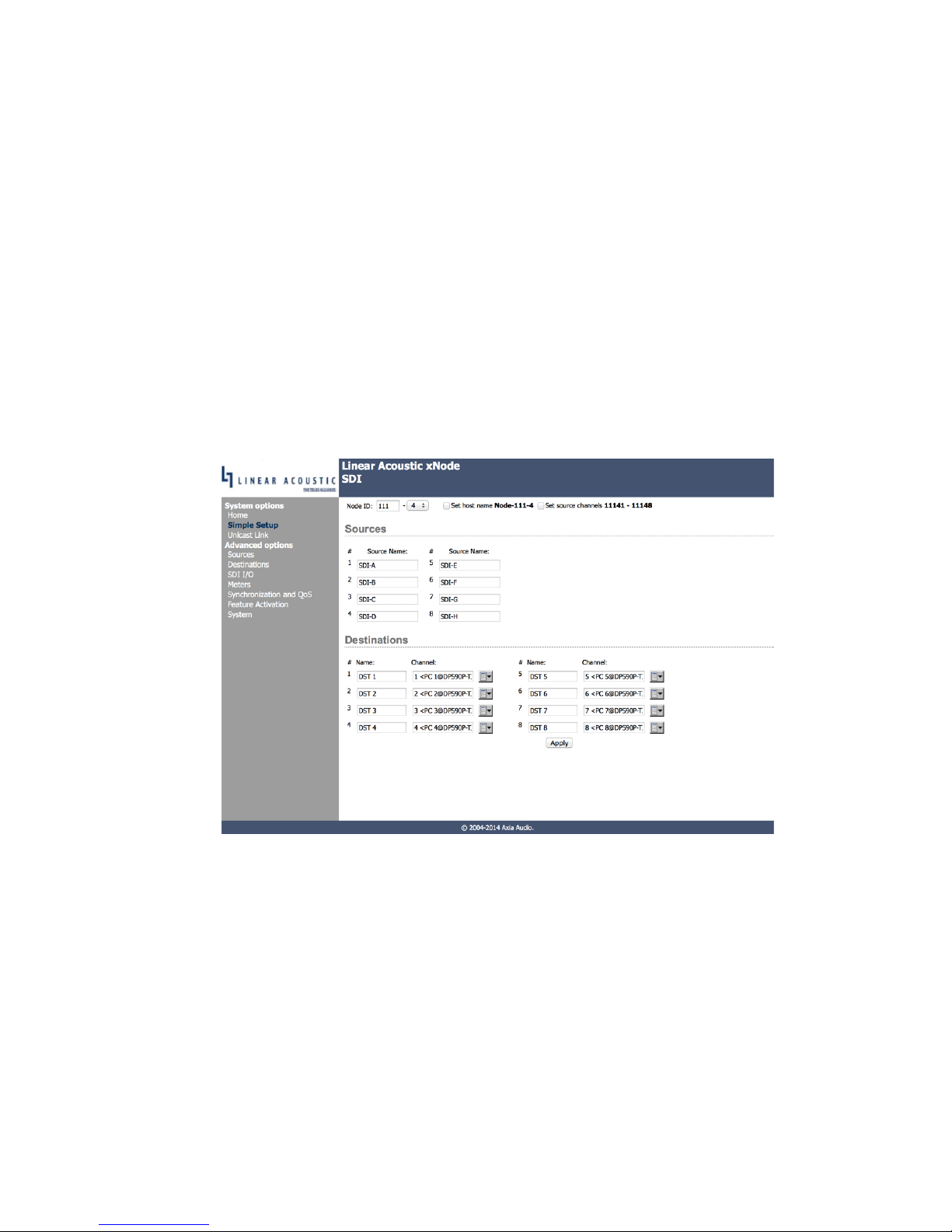
Simple Setup Page
The Simple Setup page allows for quick and easy configuration of:
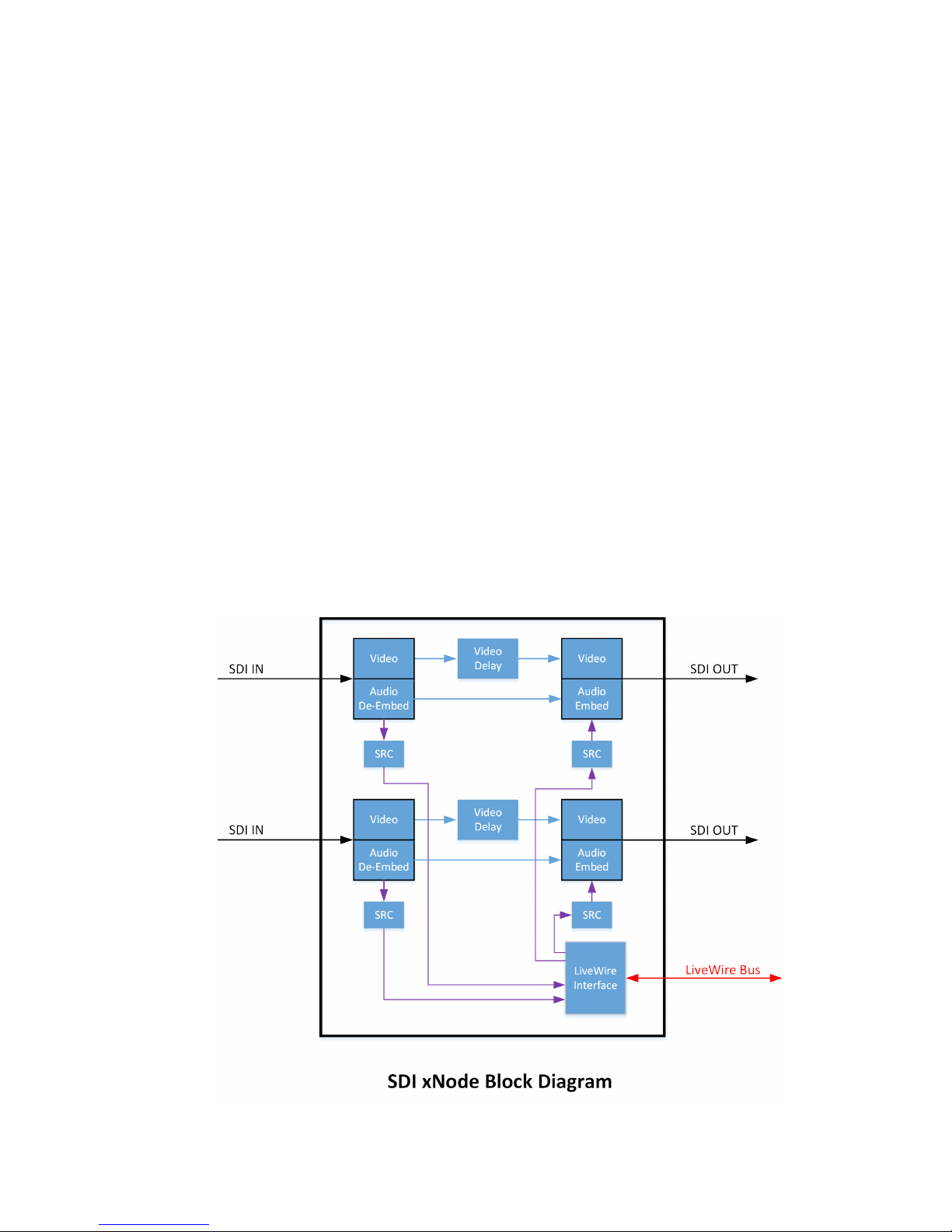
nn Sources: Input audio going to the Livewire+ network, which is taken from the SDI Inputs
nn Destinations: Return audio from the Livewire+ network to be embedded in an SDI output
SDI I/O Page
The construction of the output SDI stream (Livewire+ Destinations, input SDI audio passthrough,
embedding, and pair shuffling), along with adjusting the video compensating delay are handled on
the SDI I/O page.
Page 6
SDI XNODE QUICK START SETUP GUIDE | 3
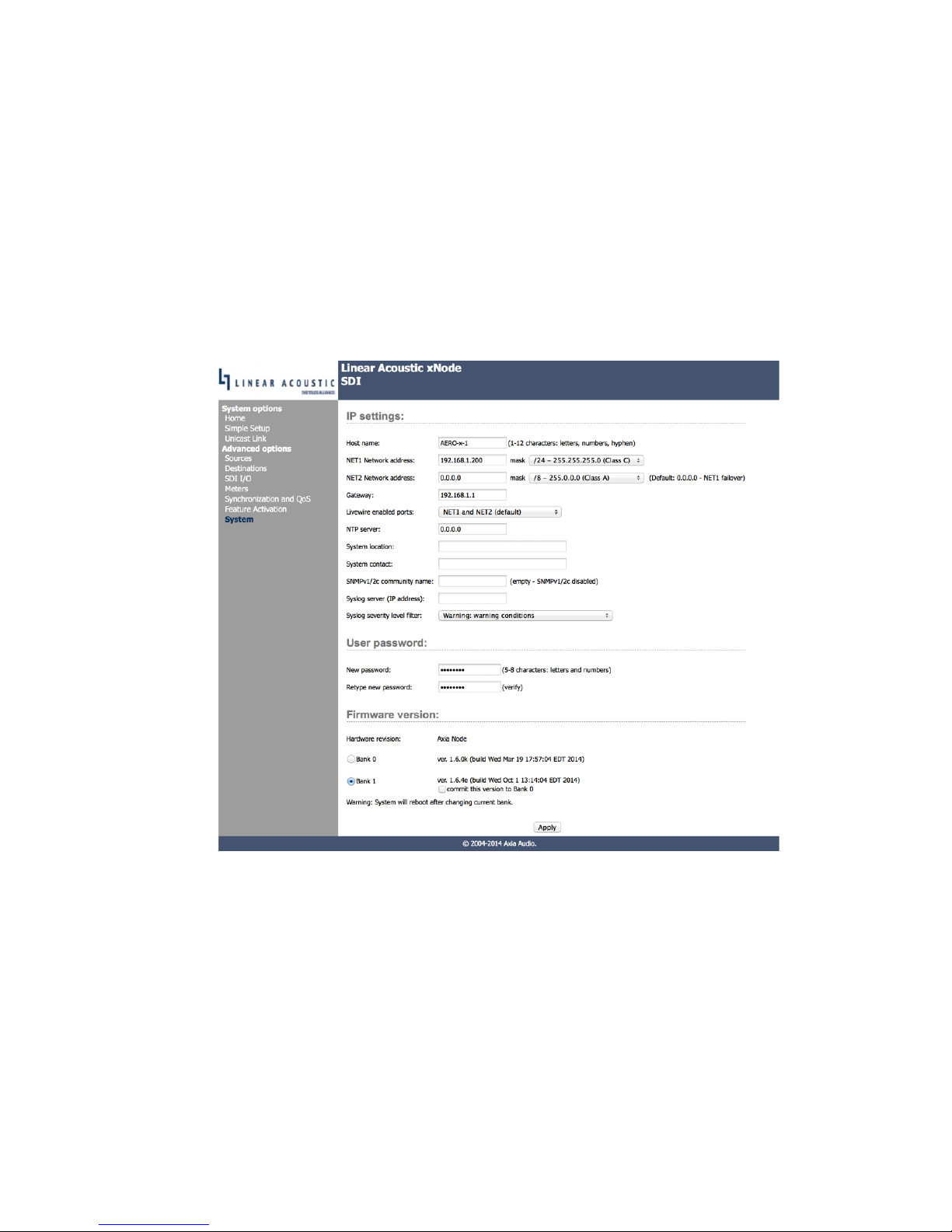
System Settings Page
The System page allows for configuration of:
nn IP Addresses
nn Network Ports
nn Unit Password
nn Firmware Version
and other useful settings.
The SDI xNode includes two 100BT Ethernet ports. They are configurable as either fail-over
redundant ports or as a single Livewire port and separate management port. The default setting is
for both ports to be redundant Livewire enabled ports. If a separate management port removed from
the high bandwidth audio traffic is desired, apply a separate IP address to the NET2 port and select
which port is the Livewire port and which is the management port.
Page 7
4 | SDI XNODE QUICK START SETUP GUIDE
Livewire+ Stream Types
There are several stream types available for use in Livewire+ Systems. If changes from the default are
required, they may be configured on the Sources and Destinations web pages
Live stereo (or Live mono) streams are intended for microphone or other live audio content that
require a very short latency. Live Streams provide a round trip delay of 2ms. Each packet contains
12 audio samples (250 us of audio), takes 154 bytes on the wire with 4000 packets per second being
sent. Each Live stream requires 4.9MBits/s bandwidth
Low Latency Stereo (or mono) is the default option for support of Ravenna and AES67 standards.
The packet contains 1ms of audio (48 samples) and requires 3 MBits/s bandwidth.
Standard Stereo (or mono) streams provide higher network utilization efficiency. Typical audio
delay with Standard Streams is 100ms (determined by a buffer size). Each packet takes 1522 bytes on
the wire (maximum allowed Ethernet frame size), at 200 packets/s. Each stream requires 2.5MBits/s
bandwidth.
Surround This setting creates an 8-channel multichannel group which includes the next 3 sources,
and requires 10 Mbits/s bandwidth. The standard channel routing used is:
Pair 1 = Front Left / Right
Pair 2 = Center / LFE
Pair 3 = Left Surround / Right Surround
Pair 4 = Stereo Downmix (or Left Back / Right Back)
Page 8

SDI XNODE QUICK START SETUP GUIDE | 5
Factory Reset: (Restoring Defaults)
•n Disconnect all power from the xNode
•n Press and hold the two front panel buttons.
•n Apply power to the xNode while continuing to press the buttons.
•n xNode will show a countdown timer for factory reset.
•n When the timer reaches 0, release the two buttons.
Page 9

Linear Acoustic • 1241 Superior Ave. • Cleveland, Ohio 44114 USA • +1.216.241.7225 • TelosAlliance.com
© 2015 TLS Corp., All Rights Reserved. R15/1/18104
 Loading...