

Page 1

USB Type C & A Hybrid Laptop
Docking Station
User Manual English
Benutzerhandbuch Deutsch
Manuel Utilisateur Français
Manuale Italiano
Manual de Usuario Español
No. 43366
lindy.com
© LINDY Group - FIFTH EDITION
(March 2023)
Page 2

User Manual English
Safety Instructions
! WARNING !
Please read the following safety information carefully and always keep this document with
the product.
Failure to follow these precautions can result in serious injuries or death from electric
shock, fire or damage to the product.
Touching the internal components or a damaged cable may cause electric shock, which
may result in death.
This device is a switching type power supply and can work with supply voltages in the range 100 - 240
VAC For worldwide usability four different AC adapters are enclosed: Euro (Schuko) type, UK type,
US/Japan type and Australia/New Zealand type. Use the appropriate AC adapter as shown in the picture
and ensure it is firmly secured in place and does not detach by pulling before installing into a power
socket.
To reduce risk of fire, electric shocks or damage:
Do not open the product nor its power supply. There are no user serviceable parts inside.
Only qualified servicing personnel may carry out any repairs or maintenance.
Never use damaged cables.
Do not expose the product to water or places of moisture.
Do not use this product outdoors it is intended for indoor use only.
Do not place the product near direct heat sources. Always place it in a well-ventilated place.
Do not place heavy items on the product or the cables.
Please ensure any adapters are firmly secured and locked in place before inserting into a wall socket
Page 3

User Manual English
Introduction
Thank you for purchasing the Lindy USB Type C & A Hybrid Laptop Docking Station. This product has
been designed to provide trouble free, reliable operation. It benefits from both a LINDY 2 year warranty
and free lifetime technical support. To ensure correct use, please read this manual carefully and retain it
for future reference.
The Lindy USB 3.2 Type C and Type A Hybrid Laptop Docking Station is a professional, multifunctional
solution for connecting literally any host computer (laptop, MacBook, tablet, smartphone) with USB Type
C and USB Type A port to a range of interfaces including three displays, using a single cable. It
simultaneously provides triple monitor capabilities, power, Gigabit Ethernet, Audio and a USB 3.2
SuperSpeed hub with data transfer rates up to 10Gbps.
Package Contents
• USB 3.2 Type C Laptop Docking Station
• 1m USB Type C to C cable with C/A adapter
• 24V 5.41A IEC C14 Power Supply with DC connector (5.5mm/2.5mm)
• 4 Mains Cables IEC C13 (Schuko, UK, US, AUS)
• This Manual
Specification
• Host Interface: USB 3.2 / 3.1 Gen 2 (Type C)
• Connects up to three 4K displays (DisplayPort and HDMI)* and many peripherals over a single cable
• Max. resolutions:
o Single Display: 3840x2160@60Hz
o Dual Display: 3840x2160@60Hz; HDMI 3: 4K30Hz (DP Alt Mode)
o Triple display: 2x 4K 60Hz, 1x 4K 30Hz (on HDMI 3)
• 2 Port USB 3.2/3.1 Gen 2 10Gbps Hub: 1x Type C, 1x Type A
• 3 Port USB 3.2/3.1 Gen 1 / USB 3.0 5Gbps Hub: 1x Type C, 2x Type A
• Supports Battery Charging 1.2 (1x USB Type C port, 1x USB Type A port)
• Supports Gigabit Ethernet 10/100/1000Mbps
• 1x 3.5mm Audio combo port
• Compatible with computers with USB Type C/A port or Thunderbolt 3/4 Type C interface
• Supported operating systems: Windows, MacOS, Linux, Android, Chrome OS
• Special features: Supports DisplayLink (Dual Display via USB Type A or C host, Apple incl. M1),
DisplayPort Alternate mode, Kensington lock, Power button, 2 ports support Battery Charging 1.2
Page 4
User Manual English
Overview & Installation
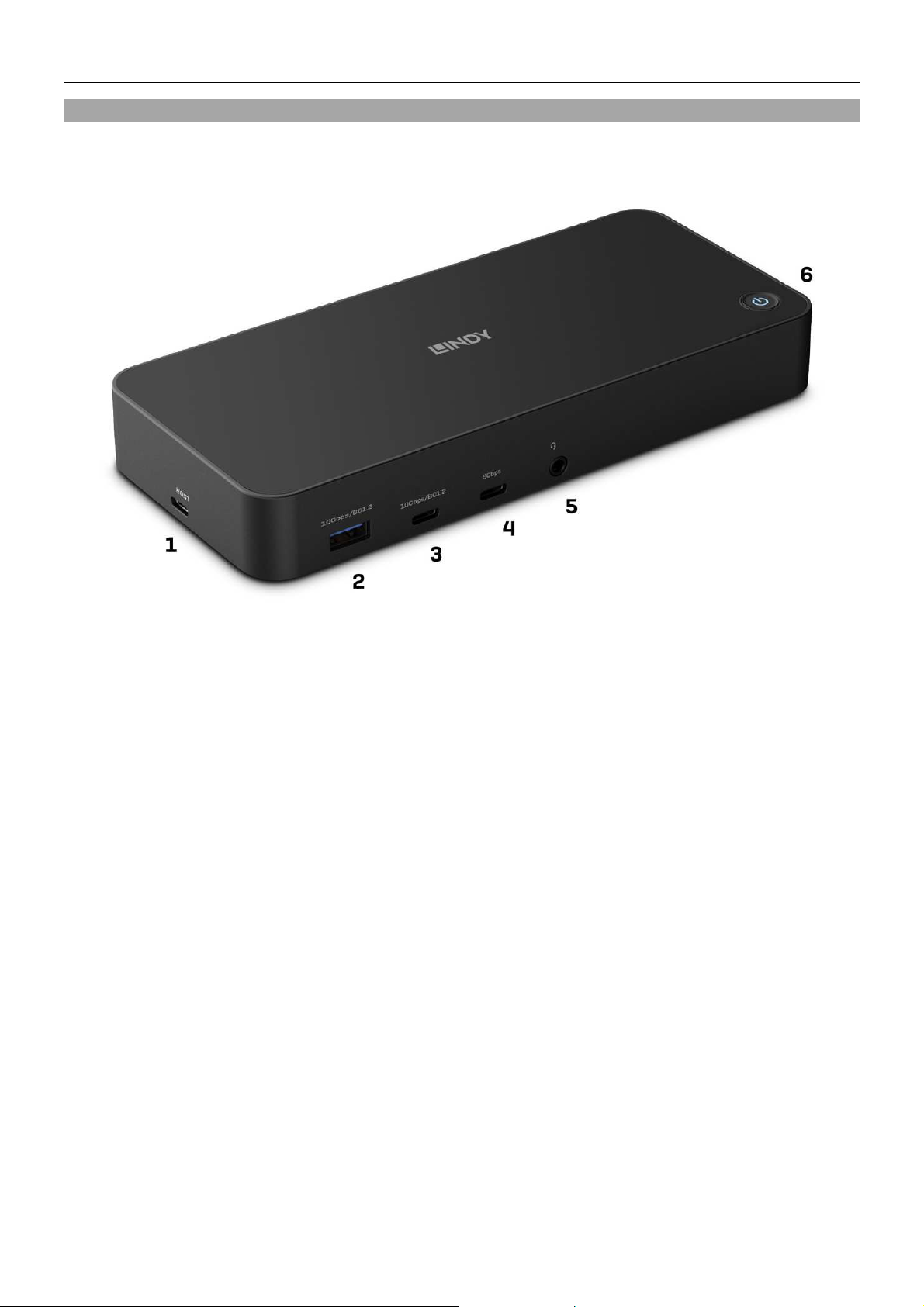
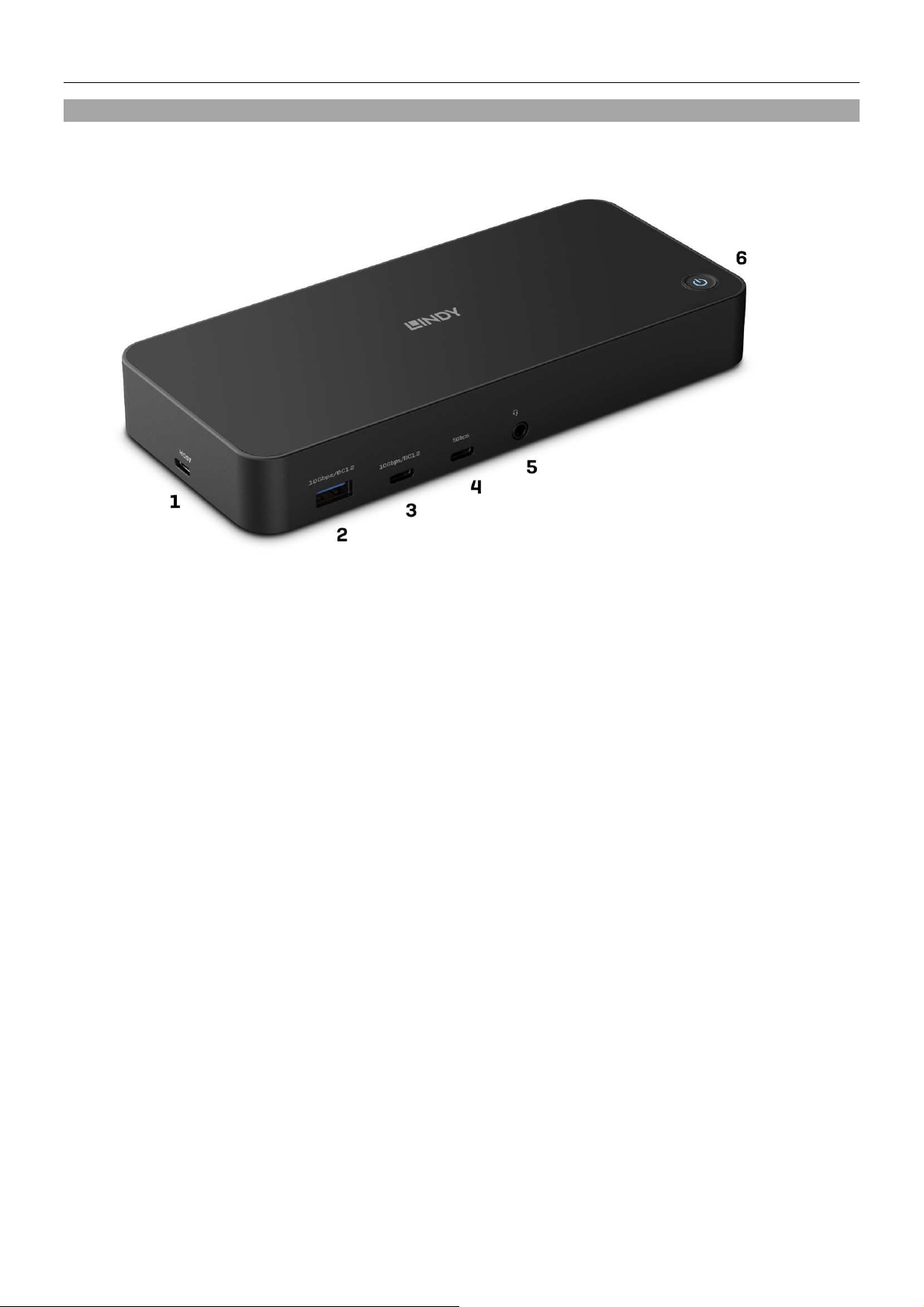
Front panel:
1. USB Type C host port: Connect the Docking Station to a laptop with USB Type C or Type A
interface. USB Type C/TB3/4 computer also support Power Delivery (up to 100W) to charge the
laptop.
2. USB 3.2/3.1 Gen 2 port Type A (max. 10Gbps): Connect a USB device; also supports BC 1.2 for
fast charging
3. USB 3.2/3.1 Gen 2 port Type C (max. 10Gbps): Connect a USB device; also supports BC 1.2 for
fast charging
4. USB 3.2/3.1 Gen 1 / USB 3.0 port Type C (max. 5Gbps): Connect a USB device
5. 3.5mm Audio combo port: Connect a headset or microphone
6. Power button
Page 5
User Manual English
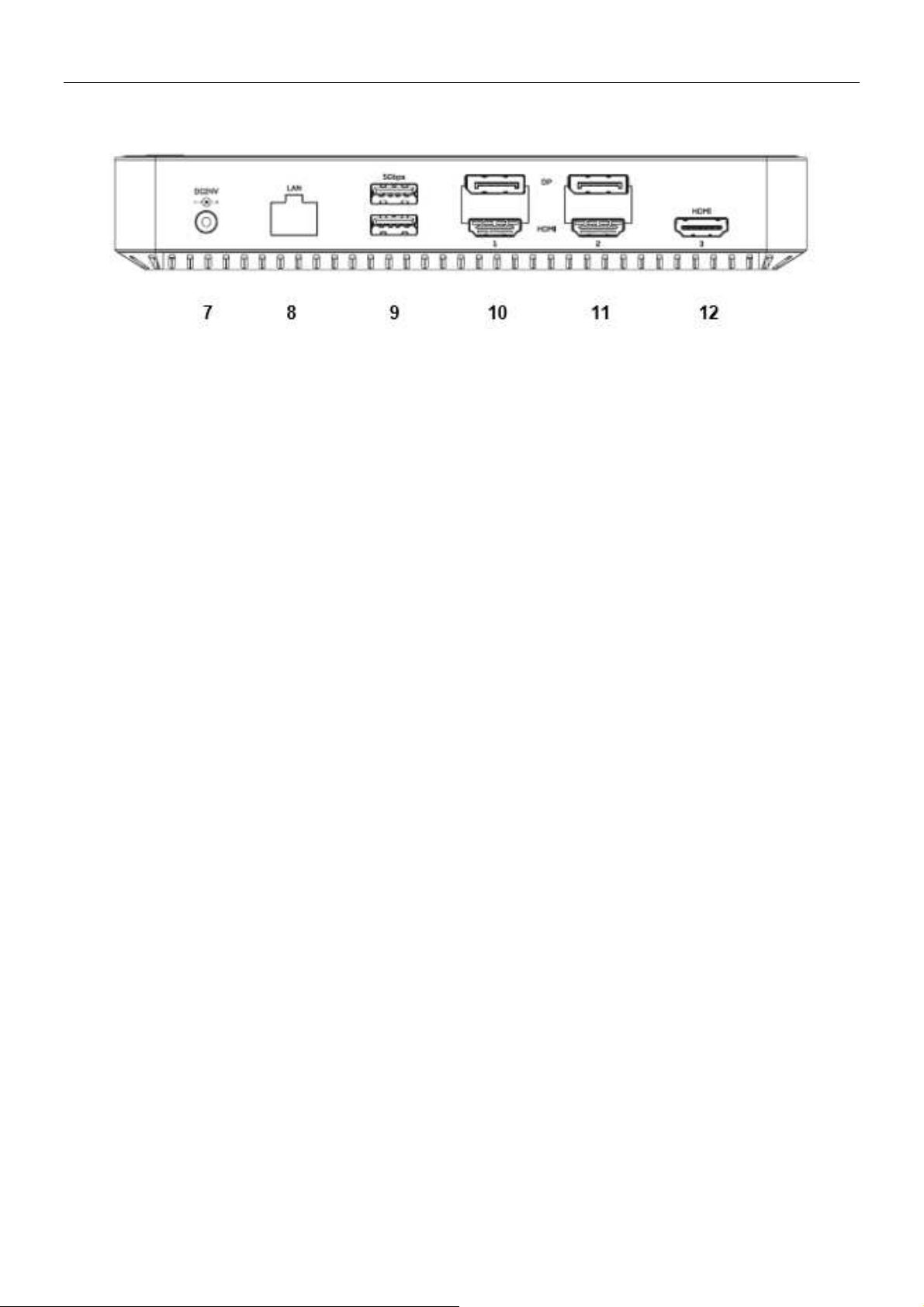
Back panel:
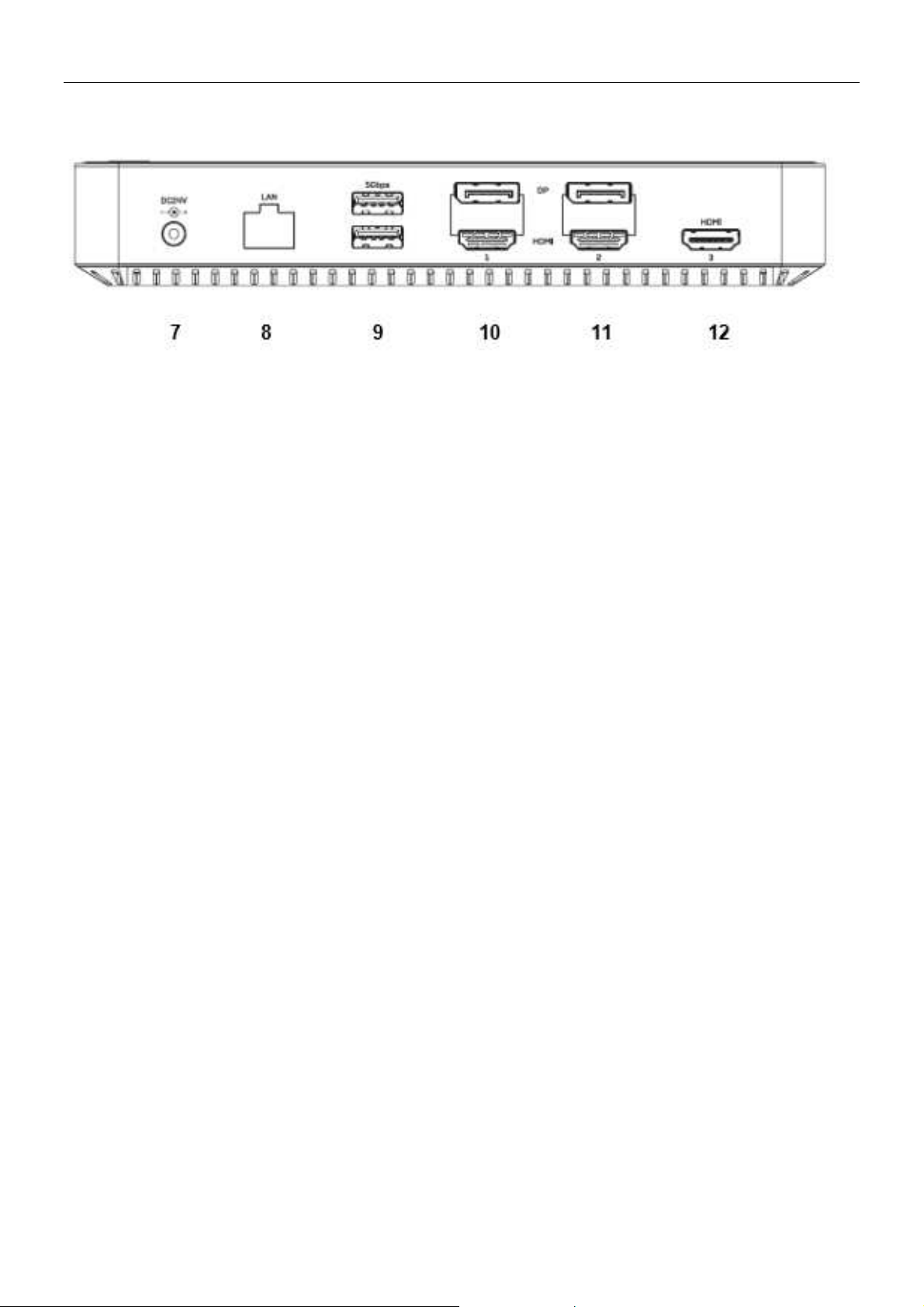
7. DC Power Port: Connect the included power supply (DC 24V 5.41A)
8. Gigabit Ethernet port: Connection to high-speed network
9. 2x USB 3.2 / 3.1 Gen 1 / USB 3.0 port Type A (max. 5 Gbps): Connect USB devices
10. DisplayPort and HDMI port (Nr. 1): Connect either a DisplayPort or an HDMI display*
11. DisplayPort and HDMI port (Nr. 2): Connect either a DisplayPort or an HDMI display*
12. HDMI port Nr. 3: Connect an HDMI display (DisplayPort Alternate Mode support required)**
Please note:
*Only one display per group (Nr. 1 and Nr. 2) can be connected, either HDMI or DisplayPort.
**HDMI port Nr. 3 requires connection to a host computer with DisplayPort Alternate Mode support (USB
Type C or Thunderbolt 3 / 4).
Please note:
Do not connect the Docking Station to your laptop or Macbook before you have installed the drivers.
Only computers with Windows 10 (and higher) operating system install the drivers automatically when
connected to the internet, therefore the Docking Station can be directly connected to Windows 10/11
laptops.
Driver Installation in Windows 7/8/8.1 and macOS:
Download the drivers from www.displaylink.com. Run the installation and restart the laptop/MacBook after
the installation is completed.
Now connect the included power supply to the Hybrid Laptop Docking Station and to a wall socket. Press
the On/Off switch. Then connect the Docking Station with the included USB cable to your laptop or
MacBook. When the automatic port installation is complete, please restart the laptop/MacBook.
For Linux, Android and Chrome OS please also download the drivers from www.displaylink.com.
Page 6

Benutzerhandbuch Deutsch
Sicherheitshinweise
! GEFAHR !
Bitte lesen Sie die folgenden Sicherheitshinweise sorgfältig durch und bewahren Sie
dieses Dokument immer zusammen mit dem Produkt auf.
Die Nichtbeachtung dieser Vorsichtsmaßnahmen kann zu schweren Verletzungen oder
zum Tod durch Stromschlag, Feuer oder Schäden am Produkt führen.
Das Berühren der internen Komponenten oder eines beschädigten Kabels kann einen
elektrischen Schlag verursachen, der zum Tod führen kann.
Dieses Schaltnetzteil arbeitet mit Anschlussspannungen im Bereich von 100…240 VAC. Für weltweiten
Einsatz sind vier verschiedene AC-Adapter für Europa (Schuko), Großbritannien, USA/Japan und
Australien/Neuseeland enthalten. Verwenden Sie den geeigneten Adapter wie es die Abbildung zeigt.
Stellen Sie bitte sicher, dass der Adapter fest eingerastet ist und sich nicht abziehen lässt, bevor Sie ihn
in die Steckdose stecken.
Um die Gefahr von Bränden, Stromschlägen oder Schäden zu verringern:
Öffnen Sie weder das Produkt noch sein Netzteil. Es befinden sich keine vom Benutzer zu
wartenden Teile im Inneren.
Ausschließlich qualifiziertes Personal darf Reparaturen oder Wartungen durchführen.
Verwenden Sie niemals beschädigte Kabel.
Setzen Sie das Produkt nicht Wasser oder Feuchtigkeit aus.
Dieses Produkt ist nur für den Gebrauch in geschlossenen Räumen bestimmt.
Stellen Sie das Produkt nicht in der Nähe von direkten Wärmequellen auf. Stellen Sie es immer an
einem gut belüfteten Ort auf.
Stellen Sie keine schweren Gegenstände auf das Produkt oder die Kabel.
Bitte stellen Sie vor der Verwendung sicher, dass alle Adapter sicher und fest eingerastet sind
Page 7

Benutzerhandbuch Deutsch
Einführung
Wir freuen uns, dass Ihre Wahl auf ein LINDY-Produkt gefallen ist und danken Ihnen für Ihr Vertrauen.
Sie können sich jederzeit auf unsere Produkte und einen guten Service verlassenDiese LINDY USB 3.2
Typ C Laptop Docking Station unterliegt einer 2-Jahres LINDY Herstellergarantie und lebenslangem
kostenlosen, technischen Support. Bitte lesen Sie diese Anleitung sorgfältig und bewahren Sie sie auf.
Die Lindy USB Typ C und Typ A Laptop Docking Station ist eine professionelle und multifunktionale
Lösung für den Anschluss buchstäblich jedes Computers (Laptop, MacBook, Tablet oder Smartphone) mit
USB-Anschluss Typ C oder Typ A an eine Reihe von Schnittstellen, einschließlich dreier Displays, über
ein einziges Kabel. Es unterstützt gleichzeitig drei Monitore, Gigabit-Netzwerk-Anbindung, Audio und
bietet einen USB SuperSpeed Hub mit Datenraten bis 10Gbit/s.
Lieferumfang
• USB Typ C & Typ A Hybride Laptop Docking Station
• 1m USB-Kabel Typ C / C mit C/A Adapter
• IEC C14 Netzteil 24V 5.41A mit DC-Kabel (5,5/2,5mm)
• 4 Netzkabel IEC C13 (Schuko, UK, US, AUS)
•
Dieses Handbuch
Spezifikationen
• Host-Schnittstelle: USB 3.2 / 3.1 Gen 2 (Typ C)
• Zum Anschluss von bis zu drei Displays (DisplayPort und HDMI)* und mehrerer Peripheriegeräte
über ein einziges Kabel
• Max. Auflösung:
o Ein Display: 3840x2160 60Hz
o Zwei Displays: 3840x2160 60Hz; HDMI 3: 4K 30Hz (DP Alt Mode)
o Drei Displays: 2x 4K 60Hz, 1x 4K 30Hz (bei HDMI Port Nr. 3)
• 2 Port USB 3.2/3.1 Gen 2 10 Gbit/s Hub: 1x USB Typ A und 1x USB Typ C
• 3 Port USB 3.2/3.1 Gen 1 / USB 3.0 5Gbit/s Hub: 1x USB Typ C, 2x USB Typ A
• Unterstützt Battery Charging 1.2 (1x USB Typ C Port, 1x USB Typ A Port)
• 10/100/1000Mbit/s RJ45 Gigabit Ethernet Anschluss
• 1x 3.5mm Audio Kombi-Port (1x in, 1x out)
• Kompatibel mit Computern mit USB-Anschluss Typ C / A oder Thunderbolt 3 / 4
• Untersützte Betriebssysteme: Windows, MacOS, Linux, Android, Chrome OS
• Spezielle Eigenschaften: Unterstützt DisplayLink (Anzeige auf 2 Displays über USB-Computer mit
Anschluss Typ A oder C und auf Apple-Computern inklusive incl. M1), DisplayPort Alternate Mode,
Kensington-Schloss, Ein-/Ausschalter, 2 Ports unterstützen Battery Charging 1.2
Page 8
Benutzerhandbuch Deutsch
Übersicht & Installation
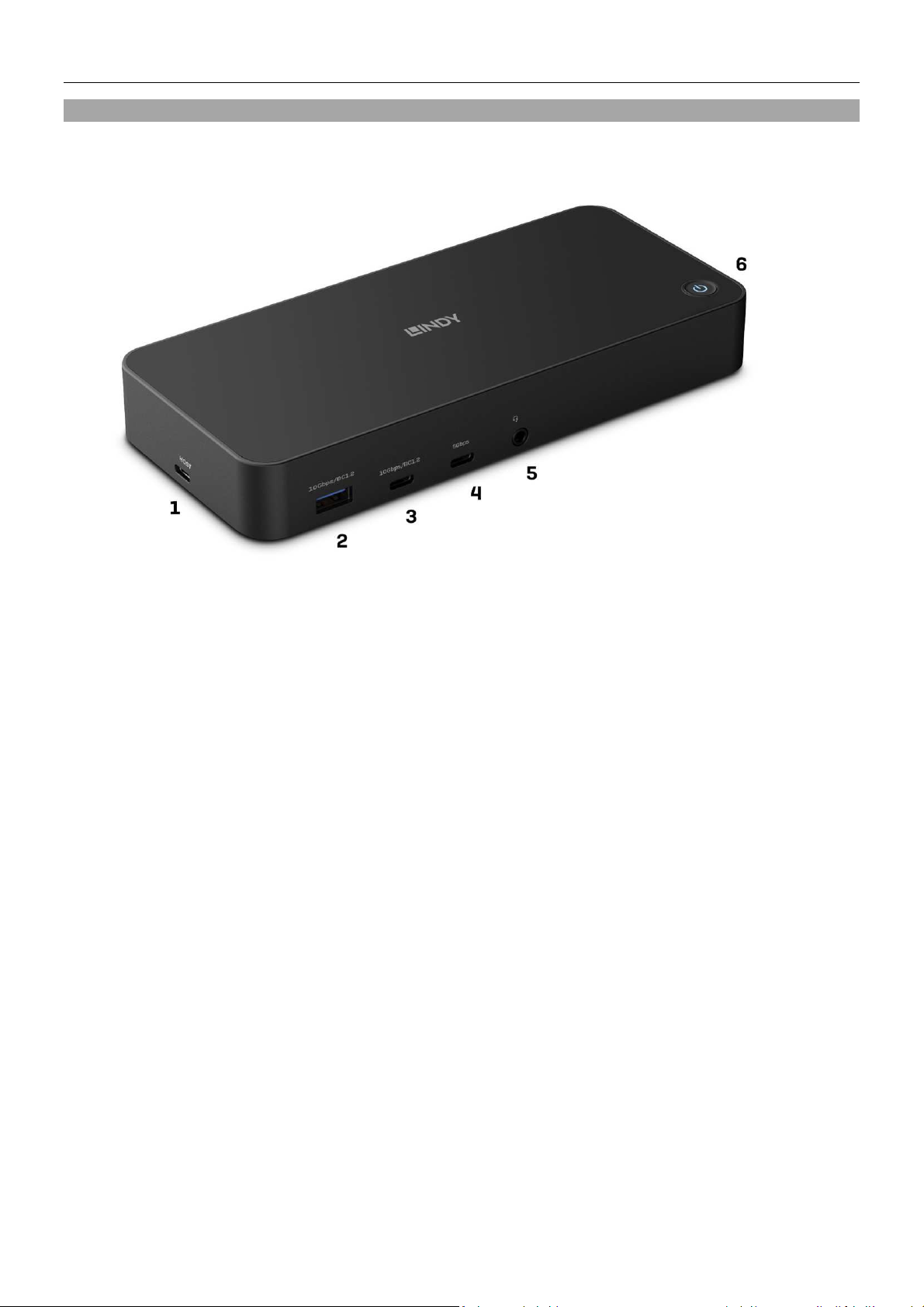
Vorderseite:
1. USB Typ C Host-Anschluss: Schließen Sie die Dockingstation an einen Laptop mit USB-Typ-C- oder
Typ-A-Schnittstelle an. USB-Typ-C/TB3/4-Computer unterstützen auch Power Delivery (max. 100
W) zum Aufladen des Laptops.
2. USB 3.2/3.1 Gen 2 Anschluss Typ A (max. 10Gbps): Zum Anschluss eines USB-Geräts; unterstützt
auch BC 1.2 für schnelles Aufladen
3. USB 3.2/3.1 Gen 2 Anschluss Typ C (max. 10Gbps): Zum Anschluss eines USB-Geräts; unterstützt
auch BC 1.2 für schnelles Aufladen
4. USB 3.2/3.1 Gen 1 / USB 3.0 Anschluss Typ C (max. 5Gbps): Zum Anschluss eines USB-Geräts
5. 3,5mm Audio-Kombianschluss: Zum Anschluss eines Headsets oder Mikrofons
6. Einschalttaste
Page 9
Benutzerhandbuch Deutsch
Rückseite:
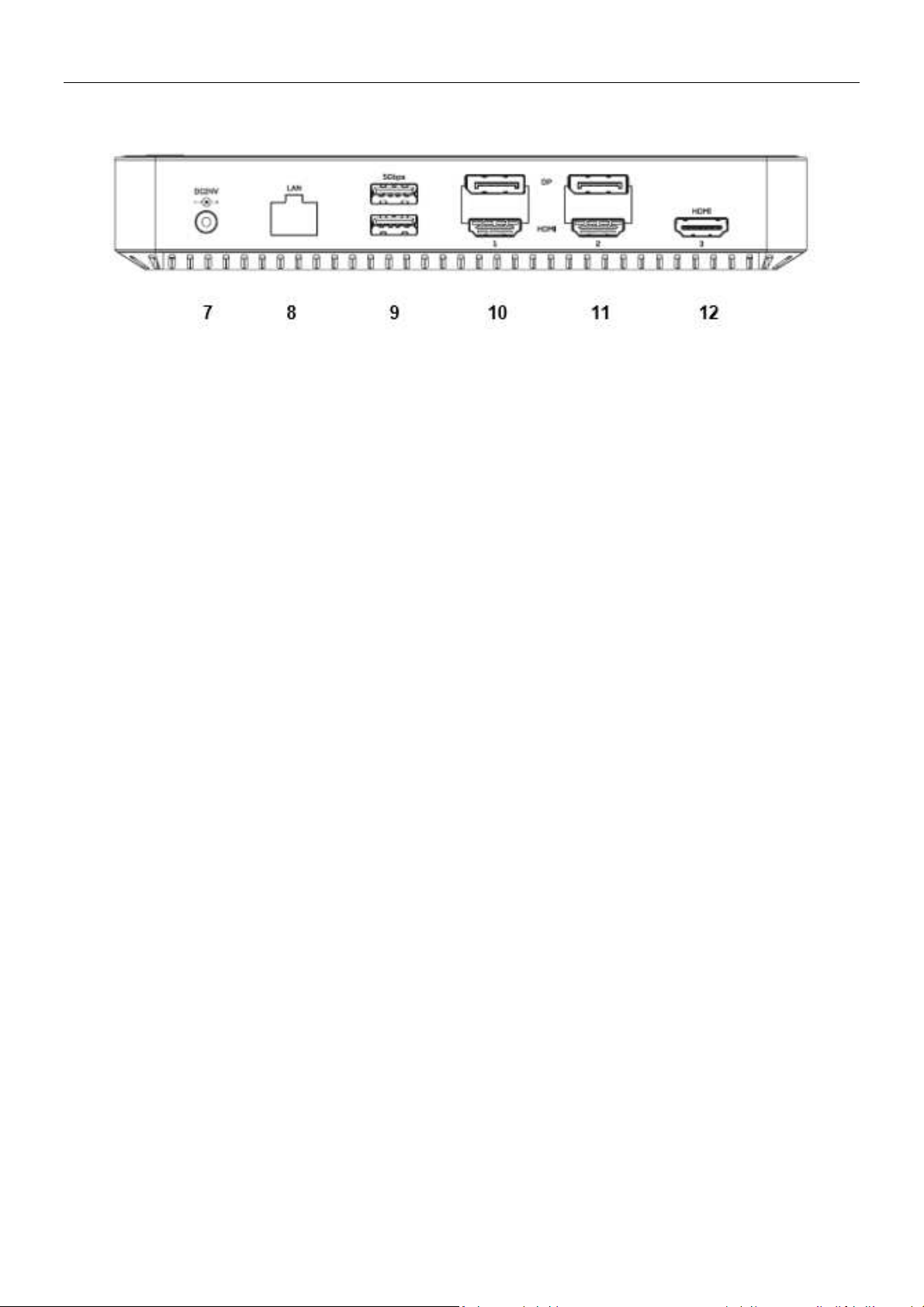
7. DC-Stromanschluss: Schließen Sie das mitgelieferte Netzteil an (DC 24V 5.41A)
8. Gigabit-Ethernet-Anschluss: Zum Anschluss an ein High-Speed-Netzwerk
9. 2x USB 3.2 / 3.1 Gen 1 / USB 3.0 Ports Typ A (max. 5 Gbps): Zum Anschluss von USB-Geräten
10. DisplayPort- und HDMI-Anschluss (Nr. 1): Schließen Sie entweder einen DisplayPort- oder einen
HDMI-Bildschirm an*
11. DisplayPort- und HDMI-Anschluss (Nr. 2): Schließen Sie entweder einen DisplayPort oder einen
HDMI-Bildschirm an*
12. HDMI-Anschluss Nr. 3: Anschluss eines HDMI-Displays (Unterstützung des DisplayPort Alternate
Mode erforderlich)**
Bitte beachten Sie:
*Pro Gruppe (Nr. 1 und Nr. 2) kann nur ein Display angeschlossen werden, entweder HDMI oder
DisplayPort.
**HDMI-Anschluss Nr. 3 erfordert den Anschluss an einen Host-Computer mit DisplayPort Alternate
Mode Unterstützung (USB Typ C oder Thunderbolt 3 / 4).
Bitte beachten Sie:
Schließen Sie die Docking Station nicht an Ihren Laptop oder Ihr MacBook an, bevor Sie die Treiber
installiert haben.
Nur Computer mit dem Betriebssystem Windows 10 (und höher) installieren die Treiber automatisch,
wenn sie mit dem Internet verbunden sind, daher kann die Docking Station direkt an Windows 10/11
Laptops angeschlossen werden.
Treiberinstallation bei Windows 7/8/8.1 und macOS:
Laden Sie die Treiber von www.displaylink.com herunter. Führen Sie die Installation aus und starten Sie
den Laptop bzw. das MacBook nach Abschluss der Installation neu.
Schließen Sie das mitgelieferte Netzteil an die Laptop Docking Station und an eine Steckdose an. Schalten
Sie diese nun ein. Verbinden Sie dann die Docking Station mit dem mitgelieferten USB-Kabel mit Ihrem
Laptop oder MacBook. Wenn die automatische Installation abgeschlossen ist, führen Sie bitte einen
Neustart durch.
Für Linux, Android und Chrome OS fidnen Sie die Treiber ebenfalls unter www.displaylink.com.
Page 10

Manuel Utilisateur Français
Consignes de sécurité
! ATTENTION !
Merci de lire attentivement ces instructions de sécurité et de les conserver avec le
produit.
Le non-respect de ces précautions peut causer un choc électrique entrainant des
blessures graves, voire mortelles, un incendie ou des dommages au produit.
Toucher les composants internes ou un câble endommagé peut provoquer un choc
électrique pouvant entraîner la mort.
Cet appareil est une alimentation à découpage et peut fonctionner avec des tensions d'alimentation de
100...240 VAC Pour une utilisation dans le monde entier, quatre adaptateurs secteur différents sont
inclus : Type Euro (Schuko), type UK, type US/Japon et type Australie/Nouvelle-Zélande. Utilisez
l'adaptateur secteur approprié comme indiqué sur la photo et assurez-vous qu'il est solidement fixé en
place et qu'il ne se détache pas en tirant avant de l'installer dans une prise électrique.
Pour éviter les risques d'incendie, de choc électrique ou de dommages:
N'ouvrez pas l'appareil ni son alimentation électrique. Il n'y a pas de pièces réparables par
l'utilisateur à l'intérieur.
Seul un personnel d'entretien qualifié est autorisé à effectuer toute réparation ou entretien.
Ne jamais utiliser de câble endommagé.
Ne pas mouiller le produit et ne pas l'exposer à l'humidité.
N'utilisez pas ce produit à l'extérieur, il est destiné à un usage intérieur uniquement.
Ne pas placer le produit à proximité de sources de chaleur. Toujours le placer dans un endroit
suffisamment ventilé.
Ne pas déposer de charge lourde sur le produit ou sur les câbles.
Veuillez vous assurer que l'adaptateur utilisé est fermement fixé et verrouillé en place avant de
l'insérer dans une prise murale.
Page 11

Manuel Utilisateur Français
Introduction
Nous sommes heureux que votre choix se soit porté sur un produit LINDY et vous remercions de votre
confiance. Vous pouvez compter à tout moment sur la qualité de nos produits et de notre service. Cette
Docking Station Hybride USB Type C et Type A pour Laptop est soumise à une durée de garantie
LINDY de 2 ans et d’une assistance technique gratuite à vie. Merci de lire attentivement ces instructions
et de les conserver pour future référence.
La station d'accueil hybride pour ordinateur portable USB 3.2 Type C et Type A de Lindy est une solution
professionnelle et multifonctionnelle pour connecter littéralement n'importe quel ordinateur hôte
(ordinateur portable, MacBook, tablette, smartphone) avec un port USB Type C et USB Type A à une
gamme d'interfaces, y compris trois écrans, à l'aide d'un seul câble. Elle offre simultanément des fonctions
de triple écran, d'alimentation, d’Ethernet Gigabit, d'audio et de hub USB 3.2 SuperSpeed avec des taux
de transfert de données allant jusqu'à 10 Gbit/s.
Contenu de l‘emballage
• Docking station pour Laptop USB 3.2 Type C
• Câble USB Type C vers C avec adaptateur C/A, 1m
• Alimentation externe 24V 5.41A avec connecteur DC (5.5mm/2.5mm)
• 4 câbles secteur IEC C13 (Schuko, UK, US & AUS)
• Ce manuel
Spécifications
• Interface hôte : USB 3.2 / 3.1 Gen 2 (Type C)
• Connecte jusqu’à trois écrans 4K (DisplayPort et HDMI)*et d’autres périphériques via un seul câble
connecté à l’ordinateur
• Résolutions max. :
o Un écran : 3840x2160@60Hz
o Deux écrans : 3840x2160@60Hz ; HDMI 3 : 4K30Hz (DP Alt Mode)
o Trois écrans : 2x 4K 60Hz, 1x 4K 30Hz (sur HDMI 3)
• Hub 2 ports USB 3.2/3.1 Gen 2 10 Gbit/s : 1x Type C, 1x Type A
• Hub 3 ports USB 3.2/3.1 Gen 1 / USB 3.0 5 Gbit/s : 1x Type C, 2x Type A
• Prise en charge Battery Charging 1.2 (1x port USB Type C, 1x port USB Type A)
• Prise en charge Ethernet Gigabit 10/100/1000Mbit/s
• 1x port audio combo 3.5mm
• Compatible avec les ordinateurs avec ports USB Type C/A ou interface Type C Thunderbolt 3/4
• Systèmes d’exploitation pris en charge : Windows, MacOs, Linux, Android, Chrome OS
• Caractéristiques spécifiques : pris en charge DisplayLink (Dual Display via hôte USB Type A ou C,
Apple M1 inclus), DisplayPort Alternate mode, Kensington lock, bouton power, 2 ports Battery
Charging 1.2
Page 12
Manuel Utilisateur Français
Vue d’ensemble & Installation
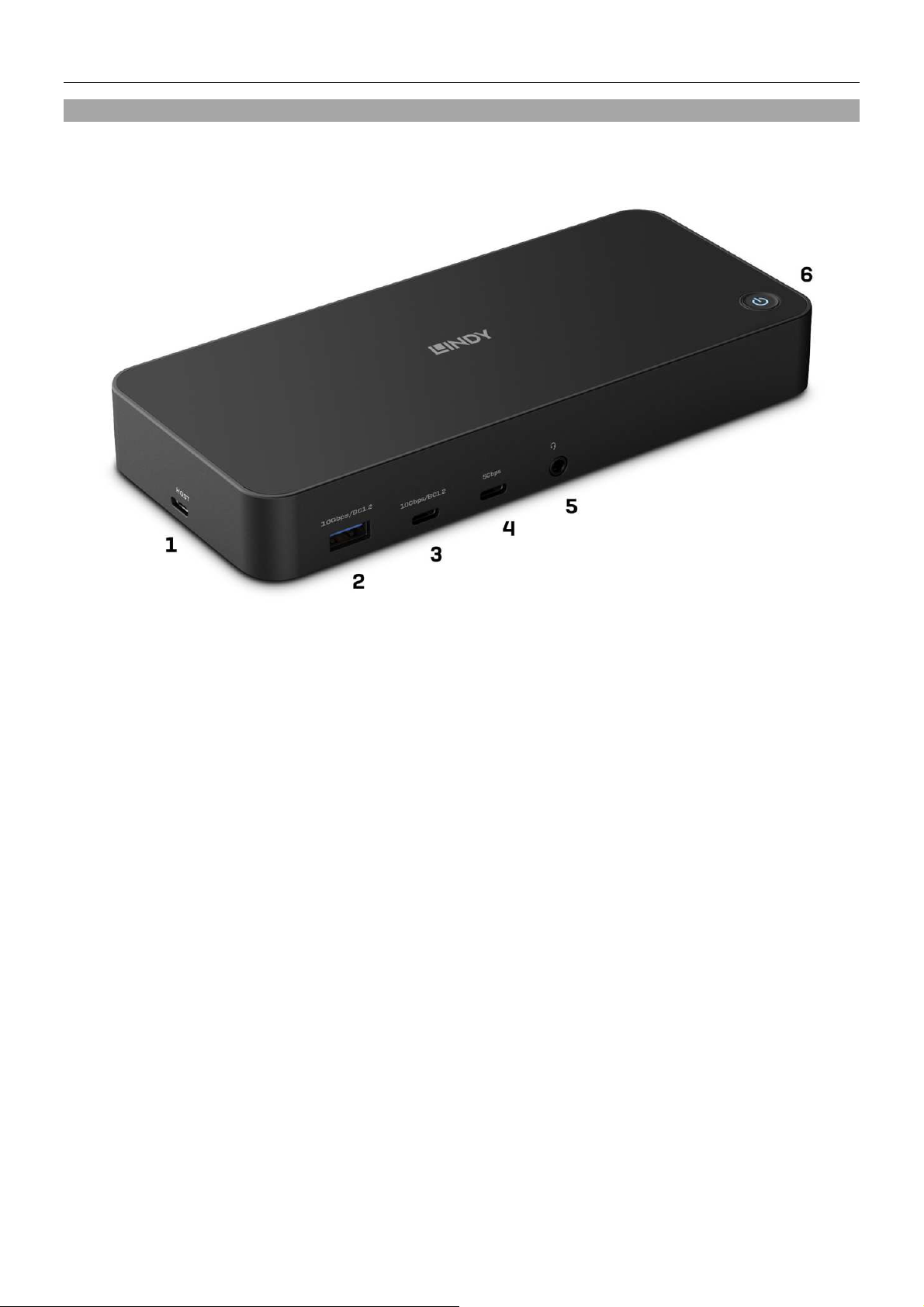
Panneau avant :
1. Port hôte USB Type C : Connecte la Docking Station à un laptop avec interface USB Type C ou
Type A. Les ordinateurs USB Type C/TB3/4 prennent aussi en charge Power Delivery (jusqu’à
100W) pour charger le laptop.
2. Port USB 3.2/3.1 Gen 2 Type A (max. 10Gbit/s) : Connecte un périphérique USB ; prend également
en charge BC 1.2 pour la charge rapide
3. Port USB 3.2/3.1 Gen 2 Type C (max. 10Gbit/s) : Connecte un périphérique USB ; prend également
en charge BC 1.2 pour la charge rapide
4. Port USB 3.2/3.1 Gen 1 / USB 3.0 Type C (max. 5Gbit/s) : Connecte un périphérique USB
5. Port audio combo 3.5mm : Connecte un headset ou un microphone
6. Bouton power
Page 13
Manuel Utilisateur Français
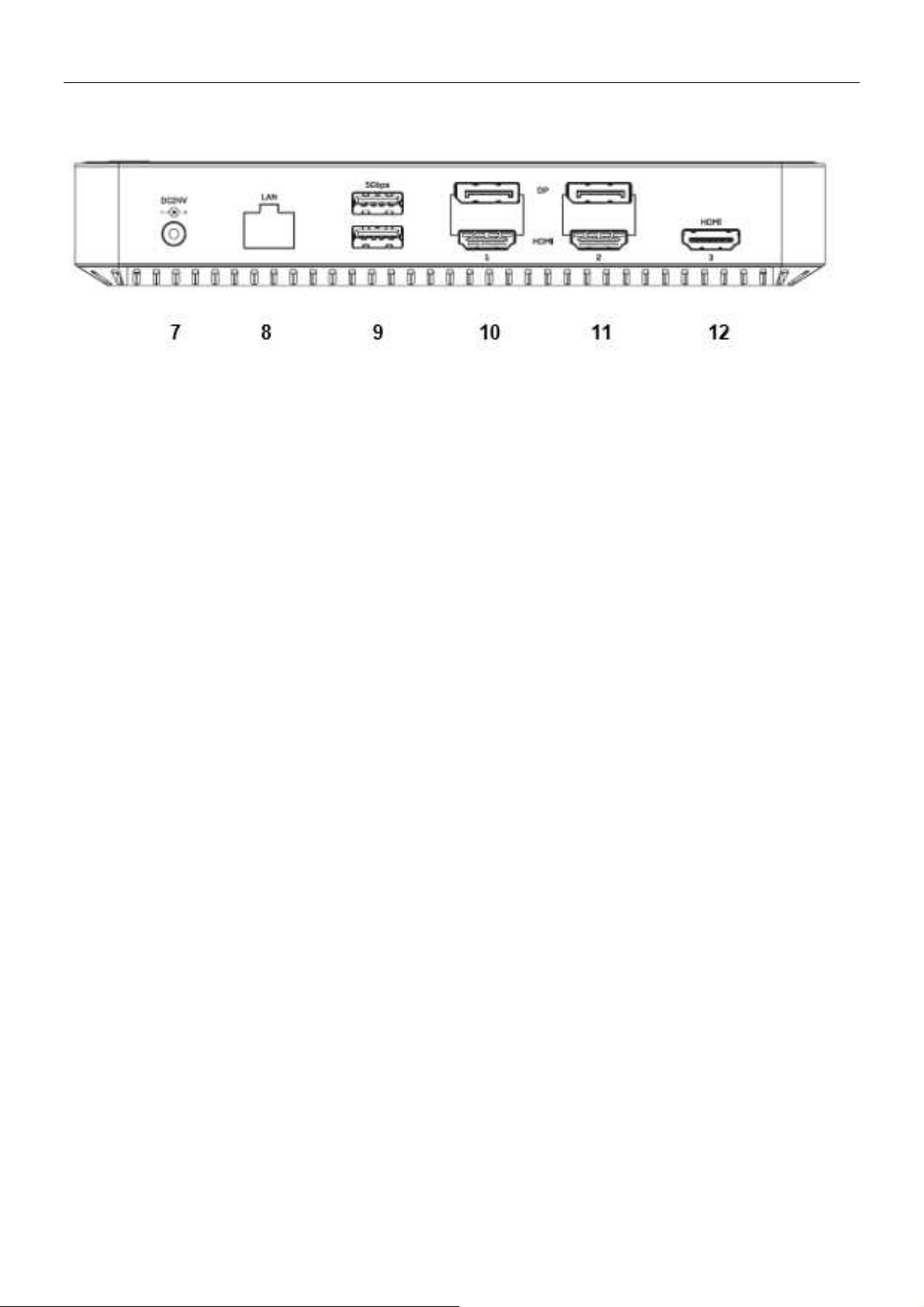
Panneau arrière :
7. Port DC d’alimentation : Connecte l’alimentation fournie (DC 24V 5.41A)
8. Port Ethernet Gigabit : Connexion au réseau Ethernet
9. 2x ports USB 3.2 / 3.1 Gen 1 / USB 3.0 Type A (max. 5 Gbit/s) : Connecte des périphériques
USB
10. Ports DisplayPort et HDMI (Nr. 1) : Connecte un écran* DisplayPort ou HDMI
11. DisplayPort and HDMI port (Nr. 2) : Connecte un écran* DisplayPort ou HDMI
12. Port HDMI Nr. 3 : Connecte un écran HDMI (prise en charge DisplayPort Alternate Mode
requise)**
Remarque :
*Un seul écran peut être connecté par groupe (Nr. 1 et Nr. 2), en HDMI ou DisplayPort.
**Le port HDMI Nr. 3 requiert une connexion à un ordinateur prenant en charge la fonction DisplayPort
Alternate Mode (USB Type C ou Thunderbolt 3 / 4).
Remarque :
Ne pas connecter la Docking Station à votre laptop ou MacBook avant d’avoir installé les pilotes.
Seuls les ordinateurs dotés du système d'exploitation Windows 10 (et supérieur) installent
automatiquement les pilotes lorsqu'ils sont connectés à l'Internet. Par conséquent, la station d'accueil
peut être directement connectée aux ordinateurs portables Windows 10/11.
Installation des pilotes sous Windows 7/8/8.1 et MacOs :
Téléchargez les pilotes à partir de www.displaylink.com. Exécutez l'installation et redémarrez l'ordinateur
portable/MacBook une fois l'installation terminée.
Branchez maintenant le bloc d'alimentation fourni à la station d'accueil pour ordinateur portable hybride et
à une prise murale. Appuyez sur l'interrupteur marche/arrêt. Connectez ensuite la station d'accueil à votre
ordinateur portable ou MacBook à l'aide du câble USB fourni. Lorsque l'installation automatique des ports
est terminée, redémarrez votre ordinateur portable/MacBook.
Pour Linux, Android et Chrome OS, veuillez également télécharger les pilotes à partir de
www.displaylink.com.
Page 14

Manuale Italiano
Istruzioni di sicurezza
! ATTENZIONE !
Per favore leggete la seguente informativa e conservate sempre questo documento con
il prodotto.
La mancata osservanza di queste precauzione può causare seri infortuni o la morte per
folgorazione, incendi o danneggiare il prodotto.
Toccare i componenti interni o un cavo danneggiato può causare uno shock elettrico che può condurre
alla morte.
Questo dispositivo ha un alimentatore a commutazione che può funzionare con tensioni di alimentazione
all’interno del range 100…240 VAC. La fornitura comprende quattro adattatori AC per prese di tutto il
mondo: Euro (Schuko), UK, US/Giappone e Australia/Nuova Zelanda. Utilizzate l’adattatore AC
appropriato e montatelo come mostrato nell’immagine, assicurandovi che sia fissato correttamente e che
non si stacchi estraendolo dalla presa.
Per ridurre il rischio di incendi, folgorazione o danni:
Non aprite il prodotto o l’alimentatore. Non esistono componenti utilizzabili all'interno.
La riparazione o manutenzione del prodotto può essere effettuata solo da personale qualificato.
Non utilizzare mai cavi danneggiati.
Non fate entrare il prodotto in contatto con acqua e non utilizzatelo in luoghi umidi.
Questo prodotto è pensato esclusivamente per l’uso in ambienti interni.
Non posizionate il prodotto nelle vicinanze di sorgenti di calore. Installatelo sempre in luoghi ben
ventilati.
Non appoggiate oggetti pesanti sul prodotto o sui cavi.
Vi preghiamo di assicurarvi che ogni adattatore sia fermamente inserito e bloccato in sede prima di
collegarlo a una presa di corrente.
Page 15

Manuale Italiano
Introduzione
Vi ringraziamo per aver acquistato la Docking Station Hybrid USB Tipo C e Tipo A per laptop. Questo
prodotto è stato progettato per garantirvi la massima affidabilità e semplicità di utilizzo ed è coperto da 2
anni di garanzia LINDY oltre che da un servizio di supporto tecnico a vita. Per assicurarvi di farne un uso
corretto vi invitiamo a leggere attentamente questo manuale e a conservarlo per future consultazioni.
La docking station USB 3.2 Tipo C e Tipo A ibrida per laptop di Lindy è una soluzione professionale e
multifunzione per collegare con un unico cavo qualsiasi computer host (laptop, MacBook, tablet,
smartphone) dotato di porta USB Tipo C e USB Tipo A a una serie di interfacce, tra cui tre display.
Garantisce contemporaneamente capacità video a tre monitor, alimentazione, Gigabit Ethernet, audio e
un hub USB 3.2 SuperSpeed con velocità di trasferimento dati fino a 10Gbps.
Contenuto della confezione
• Docking station USB 3.2 Tipo C e Tipo A per laptop
• Cavo USB di tipo C a C con adattatore C/A da 1 m
• Alimentatore esterno da 24V 5.41A con connettore DC (5.5mm/2.5mm)
• 4 cavi di alimentazione IEC C13 (Schuko, UK, US, AUS)
• Questo manuale
Specifiche
• Interfaccia host: USB 3.2 / 3.1 Gen 2 (Tipo C)
• Collega fino a tre display 4K (DisplayPort e HDMI)* e una vasta gamma di periferiche con un unico
cavo
• Risoluzioni massime:
o Singolo display: 3840x2160@60Hz
o Doppio display: 3840x2160@60Hz; HDMI 3: 4K30Hz (DP Alt Mode)
o Triplo display: 2x 4K 60Hz, 1x 4K 30Hz (su HDMI 3)
• Hub a 2 porte USB 3.2/3.1 Gen 2 10Gbps: 1 tipo C, 1 tipo A
• Hub a 3 porte USB 3.2/3.1 Gen 1 / USB 3.0 5Gbps: 1 tipo C, 2 tipo A
• Supporto Battery Charging 1.2 (1 porta USB di tipo C, 1 porta USB di tipo A)
• Supporto Gigabit Ethernet 10/100/1000Mbps
• 1 porta 3.5mm Audio combo
• Compatibile con computer con porta USB di tipo C/A o interfaccia Thunderbolt 3/4 di tipo C
• Sistemi operativi supportati: Windows, MacOS, Linux, Android, Chrome OS
Caratteristiche speciali: Supporto DisplayLink (doppio display tramite host USB di tipo A o C, Apple incl.
M1), DisplayPort Alternate Mode, Kensington lock, pulsante di accensione, 2 porte per il supporto
Battery Charging 1.2
Page 16
Manuale Italiano
Panoramica prodotto & Installazione
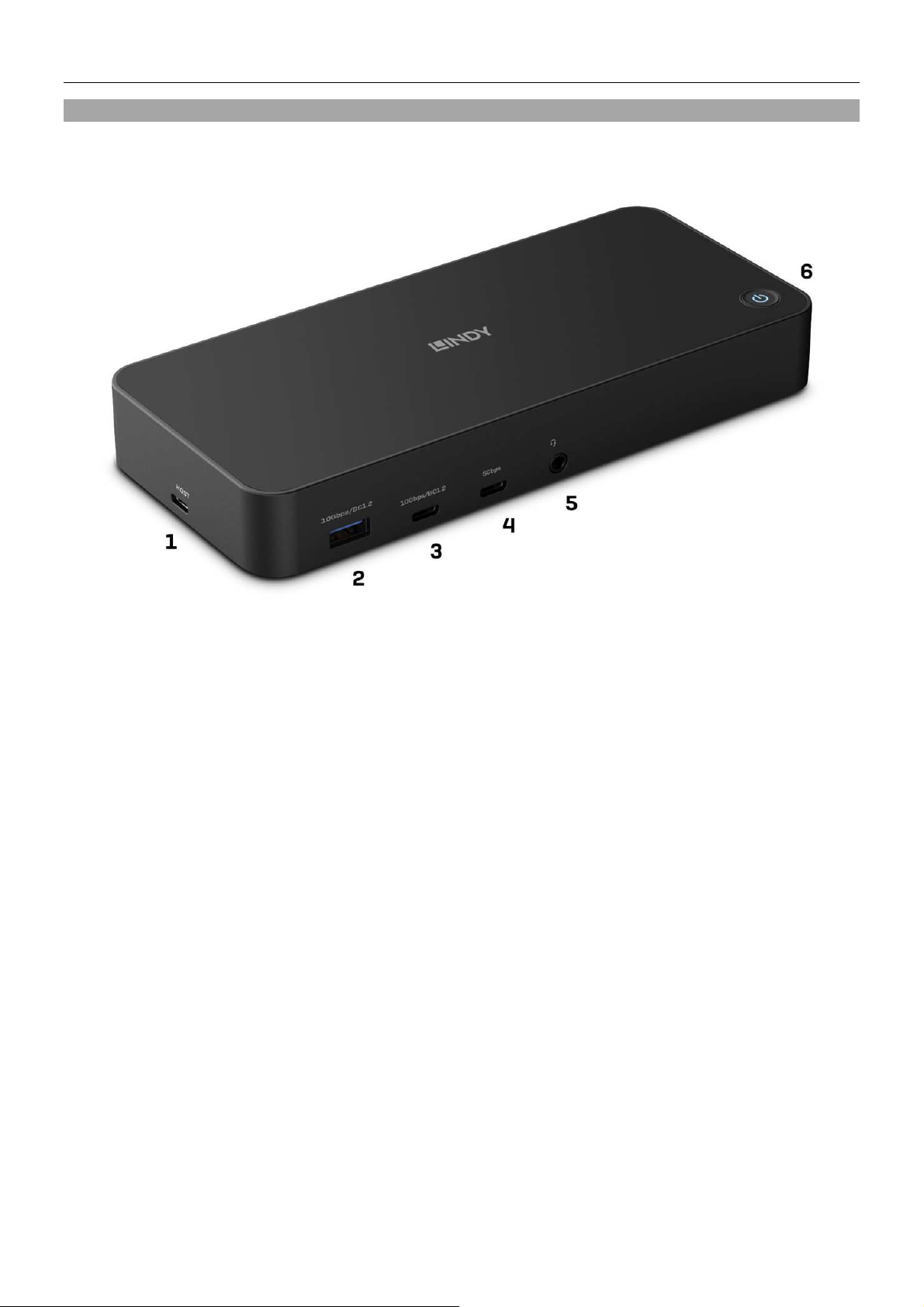
Pannello frontale:
1. Porta host USB di tipo C: Collegare la docking station a un computer portatile con interfaccia USB
di tipo C o di tipo A. I computer USB di tipo C/TB3/4 supportano il Power Delivery (fino a 100W)
per caricare il portatile.
2. Porta USB 3.2/3.1 Gen 2 di tipo A (max. 10Gbps): Collega un dispositivo USB; supporta anche BC
1.2 per la ricarica rapida.
3. Porta USB 3.2/3.1 Gen 2 Tipo C (max. 10Gbps): Collega un dispositivo USB; supporta anche BC
1.2 per la ricarica rapida.
4. Porta USB 3.2/3.1 Gen 1 / USB 3.0 Tipo C (max. 5Gbps): Collega un dispositivo USB
5. Porta audio combo da 3.5 mm: Collega una cuffia o un microfono
6. Pulsante di alimentazione
Page 17
Manuale Italiano
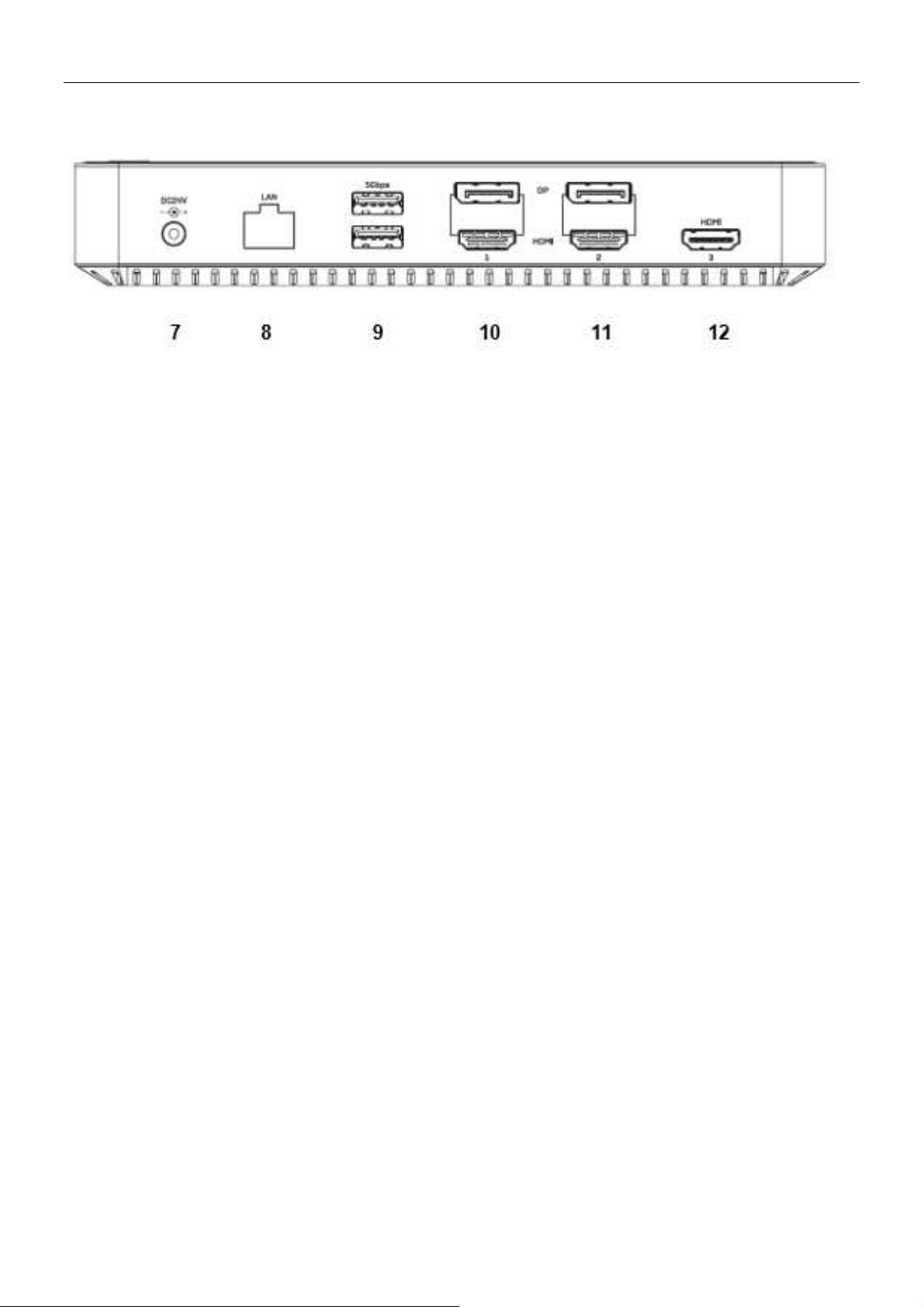
Pannello posteriore:
13. Porta di alimentazione DC: Collegare l'alimentatore in dotazione (24 V CC 5.41 A).
14. Porta Gigabit Ethernet
15. 2 porte USB 3.2 / 3.1 Gen 1 / USB 3.0 Tipo A (max. 5 Gbps)
16. Porta DisplayPort e HDMI (n. 1): Consente di collegare un display DisplayPort o HDMI*.
17. Porta DisplayPort e HDMI (n. 2): Per collegare uno schermo DisplayPort o HDMI*.
18. Porta HDMI n. 3: Per collegare uno schermo HDMI (è richiesto il supporto di DisplayPort Alternate
Mode)**.
Nota bene:
*È possibile collegare solo uno schermo per gruppo (n. 1 e n. 2), sia HDMI che DisplayPort.
**La porta HDMI n. 3 deve essere collegata a un computer host con supporto DisplayPort Alternate
Mode (USB Tipo C o Thunderbolt 3 / 4).
Nota bene:
Non collegare la Docking Station al laptop o al Macbook prima di aver installato i driver.
Solo i computer con sistema operativo Windows 10 (o superiore) installano automaticamente i driver
quando si collegano a Internet, di conseguenza la docking station può essere collegata direttamente ai
computer portatili Windows 10/11.
Installazione dei driver in Windows 7/8/8.1 e macOS:
Scaricare i driver da www.displaylink.com. Eseguire l'installazione e riavviare il portatile/MacBook al
termine dell'installazione.
Collegare l'alimentatore in dotazione alla docking station e a una presa di corrente. Premere l'interruttore
On/Off. Collegare quindi la Docking Station con il cavo USB in dotazione al portatile o al MacBook. Al
termine dell'installazione automatica della porta, riavviare il laptop/MacBook.
Per Linux, Android e Chrome OS, scaricare i driver da www.displaylink.com
Page 18

Manual de Usuario España
Información de seguridad
! ADVERTENCIA !
Lea atentamente la siguiente información de seguridad y guarde siempre este
documento junto con el producto.
El incumplimiento de estas precauciones puede provocar lesiones graves o la muerte
por descarga eléctrica, incendio o daños al producto.
Este dispositivo es una fuente de alimentación de tipo de conmutación y puede funcionar
con voltajes de suministro en el rango de 100 a 240 VCA. Para su uso en todo el mundo, se incluyen
cuatro adaptadores de CA diferentes: tipo Euro (Schuko), tipo Británico, tipo Estadounidense / Japonés y
tipo Australiano / Neozelandés. Utilice el adaptador de CA apropiado como se muestra en la imagen y
cerciórese de que esté firmemente asegurado en su lugar y que no se separe tirando levemente antes de
instalarlo en una toma de corriente.
Para reducir el riesgo de incendio, descargas eléctricas o daños:
No abra el producto. No hay partes internas que puedan ser reparables por el usuario.
Solo personal de servicio cualificado puede realizar reparaciones o mantenimiento.
No utilice nunca cables dañados.
No exponga el producto al agua ni a lugares húmedos.
No utilice este producto al aire libre, esta únicamente diseñado para su uso en interiores.
No coloque el producto cerca de fuentes de calor directas. Colóquelo siempre en un lugar bien
ventilado.
No coloque objetos pesados sobre el producto o los cables.
Asegúrese de que los cables estén firmemente asegurados y bloqueados en su lugar antes de
insertarlos en una toma de corriente.
Page 19

Manual de Usuario España
Introducción
Gracias por la compra de nuestro producto Docking Station híbrida USB tipo C y tipo A para portátiles de
Lindy. Este producto ha sido diseñado para proporcionar un funcionamiento confiable y sin problemas.
Se beneficia tanto de una garantía LINDY 3 años, así como de nuestro soporte técnico gratuito de por
vida. Para garantizar su uso correcto, lea este manual detenidamente y consérvelo para consultarlo en el
futuro.
La Docking Station híbrida USB tipo C y tipo A para portátiles de Lindy es una solución profesional y
multifuncional para conectar literalmente cualquier ordenador anfitrión (portátil, Macbook, tableta, teléfono
inteligente) con puerto USB Tipo C y USB Tipo A a una gama de interfaces que incluyen tres pantallas,
utilizando un solo cable. Proporciona simultáneamente capacidades de triple monitor, alimentación,
Gigabit Ethernet, audio y un concentrador USB 3.2 SuperSpeed con velocidades de transferencia de
datos de hasta 10 Gbps.
Contenido del paquete
• Docking Station híbrida USB tipo C y tipo A para portátiles
• Cable USB Tipo C a C con adaptador de C/A, 1m
• Fuente de alimentación 24V 5.41A con conector DC (5,5/2,5mm)
• 4 x cable de alimentación IEC C13 (Schuko, UK, US, AUS)
• Este manual
Especificaciones
• Interfaz de host: USB 3.2 / 3.1 Gen 2 (Tipo C)
• Conecta hasta tres pantallas 4K (DisplayPort y HDMI) * y muchos periféricos a través de un solo
cable
• Resoluciones máximas.:
o Pantalla única: 3840x2160@60Hz
o Pantalla dual: 3840x2160@60Hz; HDMI 3: 4K30Hz (modo alternativo DP)
o Pantalla triple: 2x 4K 60Hz, 1x 4K 30Hz (en HDMI 3)
• 2 puertos USB 3.2/3.1 Gen 2 10Gbps Hub: 1x Tipo C, 1x Tipo A
• 3 puertos USB 3. 2/3.1 Gen 1 / USB 3.0 5Gbps Hub: 1x Tipo C, 2x Tipo A
• Soporta carga de batería 1.2 (1x puerto USB Tipo C, 1x puerto USB Tipo A)
• Soporta Gigabit Ethernet 10/100/1000Mbps
• 1 puerto combinado de audio de 3,5 mm
• Compatible con ordenadores con puerto USB Tipo C/A o interfaz Thunderbolt 3/4 Tipo C
• Sistemas operativos compatibles: Windows, MacOS, Linux, Android, Chrome OS
• Características especiales: Soporta DisplayLink (Dual Display a través de USB Tipo A o C
anfitrión, Apple incl. M1), modo alternativo DisplayPort, Kensington lock, botón de encendido, 2
puertos con soporte Battery Charging 1.2
Page 20
Manual de Usuario España
Visión general y Instalación
Frente:
1. Puerto anfitrión USB tipo C: conecte la docking station a un portátil con interfaz USB tipo C o tipo
A. La toma para ordenador USB tipo C/TB3-4 también admite la entrega de energía (hasta 100W)
para cargar el ordenador portátil.
2. Puerto USB 3.2/3.1 Gen 2 Tipo A (máx. 10Gbps): Conecte un dispositivo USB; también es
compatible con BC 1.2 para carga rápida
3. Puerto USB 3.2/3.1 Gen 2 tipo C (máx. 10 Gbps): Conecte un dispositivo USB; también es
compatible con BC 1.2 para carga rápida
4. Puerto USB 3.2/3.1 Gen 1 / USB 3.0 Tipo C (máx. 5Gbps): Conecte un dispositivo USB
5. Puerto combinado de audio de 3,5 mm: Conecte un auricular o micrófono
6. Botón de encendido
Page 21
Manual de Usuario España
Panel posterior:
7. Puerto de alimentación de CC: Conecte la fuente de alimentación incluida (DC 24V 5.41A)
8. Puerto Gigabit Ethernet: Conexión a red de alta velocidad
9. Puertos USB 3.0 tipo A ,2x puerto USB 3.2/3.1 Gen 1/(máx. 5 Gbps): Conecte dispositivos USB
10. Puerto DisplayPort y HDMI (Nr. 1): Conecte una pantalla DisplayPort o una pantalla HDMI*
11. Puerto DisplayPort y HDMI (Nr. 2): Conecte una pantalla DisplayPort o una pantalla HDMI*
12. Puerto HDMI Nº. 3: Conecte una pantalla HDMI (se requiere compatibilidad con el modo
alternativo DisplayPort)**
Tenga en cuenta:
*Se puede conectar una pantalla por grupo (Nº. 1 y Nº. 2), ya sea HDMI o DisplayPort.
**El puerto HDMI Nº. 3 requiere conexión a un ordenador anfitrión con soporte para el modo alternativo
DisplayPort (USB Tipo C o Thunderbolt 3 / 4.
Tenga en cuenta:
No conecte la docking station a su ordenador portátil o Macbook antes de haber instalado los
controladores.
Solo ordenadores con sistema operativo Windows 10 (y superior) instalan los controladores
automáticamente cuando se conectan a Internet, por lo tanto, la docking station se puede conectar
directamente a los ordenadores portátiles con Windows 10 /11.
Instalación de controladores en Windows 7/8/8.1 y macOS:
Descargue los controladores de www.displaylink.com. Ejecute la instalación y reinicie el ordenador portátil
/ MacBook después de que se complete la instalación.
Ahora conecte la fuente de alimentación incluida a la docking station para portátiles híbridos y a un
enchufe de pared. Pulse el interruptor de encendido/apagado. Luego, conecte la docking station con el
cable USB incluido a su ordenador portátil o MacBook. Cuando se complete la instalación automática del
puerto, reinicie el ordenador portátil/MacBook.
Para Linux, Android y Chrome OS, descargue también los controladores de www.displaylink.com
Page 22

Recycling Information
WEEE (Waste of Electrical and Electronic Equipment), Recycling of Electronic Products
Europe, United Kingdom
In 2006 the European Union introduced regulations (WEEE) for the collection and recycling of all
waste electrical and electronic equipment. It is no longer allowable to simply throw away electrical and
electronic equipment. Instead, these products must enter the recycling process. Each individual EU
member state, as well as the UK, has implemented the WEEE regulations into national law in slightly
different ways. Please follow your national law when you want to dispose of any electrical or electronic
products. More details can be obtained from your national WEEE recycling agency.
Germany / Deutschland Elektro- und Elektronikgeräte
Informationen für private Haushalte sowie gewerbliche Endverbraucher
Hersteller-Informationen gemäß § 18 Abs. 4 ElektroG (Deutschland)
Das Elektro- und Elektronikgerätegesetz (ElektroG) enthält eine Vielzahl von Anforderungen an den
Umgang mit Elektro- und Elektronikgeräten. Die wichtigsten sind hier zusammengestellt.
1. Bedeutung des Symbols „durchgestrichene Mülltonne“
Das auf Elektro- und Elektronikgeräten regelmäßig abgebildete Symbol einer durchgestrichenen
Mülltonne weist darauf hin, dass das jeweilige Gerät am Ende seiner Lebensdauer getrennt vom
unsortierten Siedlungsabfall zu erfassen ist.
2. Getrennte Erfassung von Altgeräten
Elektro- und Elektronikgeräte, die zu Abfall geworden sind, werden als Altgeräte bezeichnet. Besitzer von
Altgeräten haben diese einer vom unsortierten Siedlungsabfall getrennten Erfassung zuzuführen.
Altgeräte gehören insbesondere nicht in den Hausmüll, sondern in spezielle Sammel- und
Rückgabesysteme.
3. Batterien und Akkus sowie Lampen
Besitzer von Altgeräten haben Altbatterien und Altakkumulatoren, die nicht vom Altgerät umschlossen
sind, sowie Lampen, die zerstörungsfrei aus dem Altgerät entnommen werden können, im Regelfall vor
der Abgabe an einer Erfassungsstelle vom Altgerät zu trennen. Dies gilt nicht, soweit Altgeräte einer
Vorbereitung zur Wiederverwendung unter Beteiligung eines öffentlich-rechtlichen Entsorgungsträgers
zugeführt werden.
4. Möglichkeiten der Rückgabe von Altgeräten
Besitzer von Altgeräten aus privaten Haushalten können diese bei den Sammelstellen der öffentlichrechtlichen Entsorgungsträger oder bei den von Herstellern oder Vertreibern im Sinne des ElektroG
eingerichteten Rücknahmestellen unentgeltlich abgeben.
Rücknahmepflichtig sind Geschäfte mit einer Verkaufsfläche von mindestens 400 m² für Elektro- und
Elektronikgeräte sowie diejenigen Lebensmittelgeschäfte mit einer Gesamtverkaufsfläche von mindestens
800 m², die mehrmals pro Jahr oder dauerhaft Elektro- und Elektronikgeräte anbieten und auf dem Markt
bereitstellen. Dies gilt auch bei Vertrieb unter Verwendung von Fernkommunikationsmitteln, wenn die
Lager- und Versandflächen für Elektro- und Elektronikgeräte mindestens 400 m² betragen oder die
gesamten Lager- und Versandflächen mindestens 800m² betragen. Vertreiber haben die Rücknahme
grundsätzlich durch geeignete Rückgabemöglichkeiten in zumutbarer Entfernung zum jeweiligen
Endnutzer zu gewährleisten.
Die Möglichkeit der unentgeltlichen Rückgabe eines Altgerätes besteht bei rücknahmepflichtigen
Vertreibern unter anderem dann, wenn ein neues gleichartiges Gerät, das im Wesentlichen die gleichen
Funktionen erfüllt, an einen Endnutzer abgegeben wird. Wenn ein neues Gerät an einen privaten Haushalt
ausgeliefert wird, kann das gleichartige Altgerät auch dort zur unentgeltlichen Abholung übergeben
werden; dies gilt bei einem Vertrieb unter Verwendung von Fernkommunikationsmitteln für Geräte der
Kategorien 1, 2 oder 4 gemäß § 2 Abs. 1 ElektroG, nämlich „Wärmeüberträger“, „Bildschirmgeräte“ oder
„Großgeräte“ (letztere mit mindestens einer äußeren Abmessung über 50 Zentimeter). Zu einer
entsprechenden Rückgabe-Absicht werden Endnutzer beim Abschluss eines Kaufvertrages befragt.
Außerdem besteht die Möglichkeit der unentgeltlichen Rückgabe bei Sammelstellen der Vertreiber
unabhängig vom Kauf eines neuen Gerätes für solche Altgeräte, die in keiner äußeren Abmessung größer
als 25 Zentimeter sind, und zwar beschränkt auf drei Altgeräte pro Geräteart.
Page 23

Recycling Information
5. Datenschutz-Hinweis
Altgeräte enthalten häufig sensible personenbezogene Daten. Dies gilt insbesondere für Geräte der
Informations- und Telekommunikationstechnik wie Computer und Smartphones. Bitte beachten Sie in
Ihrem eigenen Interesse, dass für die Löschung der Daten auf den zu entsorgenden Altgeräten jeder
Endnutzer selbst verantwortlich ist.
France
En 2006, l'union Européenne a introduit la nouvelle réglementation (DEEE) pour le recyclage de tout
équipement électrique et électronique. Chaque Etat membre de l’Union Européenne a mis en application
la nouvelle réglementation DEEE de manières légèrement différentes. Veuillez suivre le décret
d’application correspondant à l’élimination des déchets électriques ou électroniques de votre pays.
Italy
Nel 2006 l’unione europea ha introdotto regolamentazioni (WEEE) per la raccolta e il riciclo di apparecchi
elettrici ed elettronici. Non è più consentito semplicemente gettare queste apparecchiature, devono essere
riciclate. Ogni stato membro dell’EU ha tramutato le direttive WEEE in leggi statali in varie misure. Fare
riferimento alle leggi del proprio Stato quando si dispone di un apparecchio elettrico o elettronico. Per
ulteriori dettagli fare riferimento alla direttiva WEEE sul riciclaggio del proprio Stato.
España
En 2006, la Unión Europea introdujo regulaciones (WEEE) para la recolección y reciclaje de todos los
residuos de aparatos eléctricos y electrónicos. Ya no está permitido simplemente tirar los equipos
eléctricos y electrónicos. En cambio, estos productos deben entrar en el proceso de reciclaje. Cada estado
miembro de la UE ha implementado las regulaciones de WEEE en la legislación nacional de manera
ligeramente diferente. Por favor, siga su legislación nacional cuando desee deshacerse de cualquier
producto eléctrico o electrónico. Se pueden obtener más detalles en su agencia nacional de reciclaje de
WEEE.
Page 24

CE/FCC Statement
CE Certification
LINDY declares that this equipment complies with relevant European CE requirements.
CE Konformitätserklärung
LINDY erklärt, dass dieses Equipment den europäischen CE-Anforderungen entspricht
UKCA Certification
LINDY declares that this equipment complies with relevant UKCA requirements.
FCC Certification
This equipment has been tested and found to comply with the limits for a Class B digital device, pursuant
to part 15 of the FCC Rules. These limits are designed to provide reasonable protection against harmful
interference in a residential installation.
You are cautioned that changes or modification not expressly approved by the party responsible for
compliance could void your authority to operate the equipment.
This device complies with part 15 of the FCC Rules.
Operation is subject to the following two conditions:
1. This device may not cause harmful interference, and
2. This device must accept any interference received, including interference that may cause undesired
operation.
The enclosed power supply has passed Safety test requirements, conforming to the US American versions
of the international Standard IEC 60950-1 or 60065 or 62368-1.
LINDY Herstellergarantie – Hinweis für Kunden in Deutschland
LINDY gewährt für dieses Produkt über die gesetzliche Regelung in Deutschland hinaus eine zweijährige
Herstellergarantie ab Kaufdatum. Die detaillierten Bedingungen dieser Garantie finden Sie auf der LINDY
Website aufgelistet bei den AGBs.
Hersteller / Manufacturer (EU): Manufacturer (UK):
LINDY-Elektronik GmbH LINDY Electronics Ltd
Markircher Str. 20 Sadler Forster Way
68229 Mannheim Stockton-on-Tees, TS17 9JY
Germany England
Email: [email protected], T: +49 (0)621 470050 [email protected], T: +44 (0)1642 754000
5
Tested to comply with
FCC standards.
For home and office use.
th
Edition, March 2023
No. 43366
lindy.com
 Loading...