

Page 1
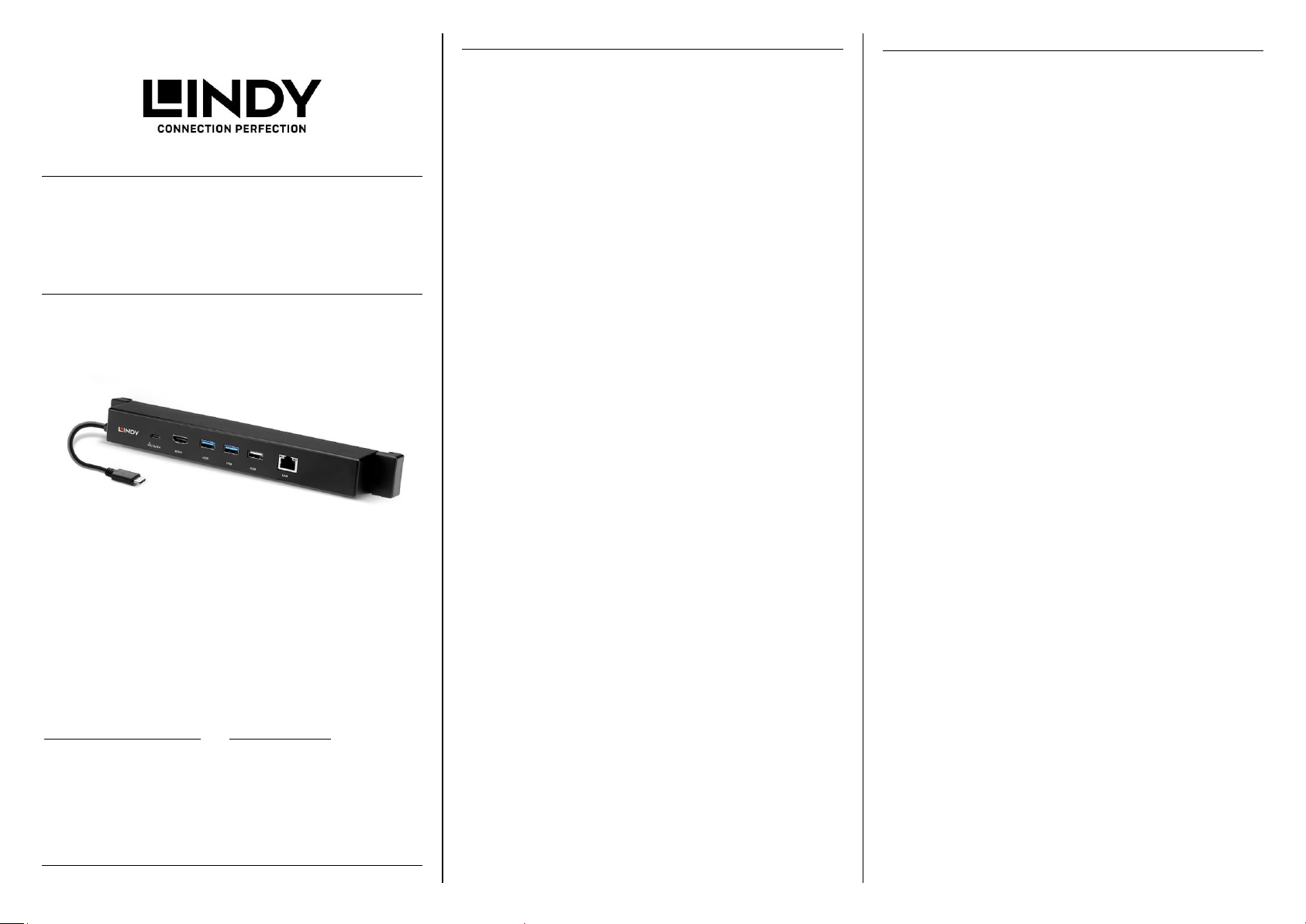
USB 3.2 Gen 2 Type C
Docking Station
User Manual English
Benutzerhandbuch Deutsch
Manuel Utilisateur Français
Manuale Italiano
No. 43319
Hersteller / Manufacturer (EU): Manufacturer (UK):
LINDY-Elektronik GmbH LINDY Electronics Ltd.
Markircher Str. 20 Sadler Forster Way
68229 Mannheim Stockton-on-Tees, TS17 9JY
Germany England
Email: [email protected] [email protected]
T: +49 (0)621 470050 T: +44 (0) 1642 754000
lindy.com
© LINDY Group - SECOND EDITION (August 2021)
User Manual English
Benutzerhandbuch Deutsch
Introduction
Thank you for purchasing the USB 3.2 Gen 2 Type C Docking
Station. This product has been designed to provide trouble free,
reliable operation. It benefits from both a Lindy 2 year warranty
and free lifetime technical support. To ensure correct use,
please read this manual carefully and retain it for future
reference.
This USB 3.2 Type C Docking Station is attached to your MS
Surface*, tablet stand or ultrabook display with a stretching
bracket which holds it in place and allows convenient connection
of several USB peripherals, an HDMI display and Gigabit
Ethernet.
Package Contents
• USB 3.2 Gen 2 Type C Docking Station
• This manual
Features
• Host Interface: USB 3.2 Gen 2 Type C cable
• HDMI 4K Ultra HD output supports resolutions up to
3840x2160@30Hz
• 2x USB 3.2 Gen 2 (10 Gbps) Type A ports (in blue colour),
which support the USB Battery Charging Specification 1.2
• 1x USB 2.0 (480Mbps) Type A port
• USB 3.2 Gen 2 Type C port for data and PD (up to 100W)
combined
• RJ-45 Gigabit Ethernet port 10/100/1000Mbps
• Includes stretching bracket (24.5 to 32cm) to fix on tablet
stands (i.e. MS Surface) or ultrabooks of max. 2.7mm
thickness
Installation & Operation
Connect the Docking Station to the USB Type C port of your MS
Surface, tablet or ultrabook. The required drivers will be
automatically downloaded from the internet.
Connect your display to the HDMI port of the docking station
using an appropriate HDMI cable. Use a standard RJ45 Ethernet
cable to connect the docking station to your network. Two USB
3.2 Type A and one USB 2.0 Type A devices can be connected
to the Docking Station using standard USB cables. In addition,
you can charge your tablet/ultrabook via the USB Type C Power
Delivery port at up to 100W (20V 5A) or alternatively connect a
USB 3.2 Gen 2 Type C device.
* compatible with Microsoft Surface Go, MS Go 2, MS Pro 7,
MS Pro 7+, MS Pro X
Einführung
Wir freuen uns, dass Ihre Wahl auf ein Lindy Produkt gefallen
ist und danken Ihnen für Ihr Vertrauen. Sie können sich
jederzeit auf unsere Produkte und einen guten Service
verlassen. Diese USB 3.2 Gen 2 Typ C Docking Station
unterliegt einer Lindy Herstellergarantie von 2 Jahren und
lebenslangem kostenlosen, technischen Support. Bitte lesen
Sie diese Anleitung sorgfältig und bewahren Sie sie auf.
Diese USB 3.2 Typ C Docking Station wird mit einer
ausziehbaren Klammer an Ihrem MS Surface*, Tablethalter
oder Ultrabookdisplay befestigt und ermöglicht so den
Anschluss von mehreren externen Peripheriegeräten.
Lieferumfang
• USB 3.2 Gen 2 Typ C Docking Station
• Dieses Handbuch
Eigenschaften
• Host-Interface: USB 3.2 Gen 2 Typ C Kabel
• HDMI Ausgang bis 4K UHD 3840x2160@30Hz
• 2x USB 3.2 Gen 2 Typ A (10 Gbit/s) Ports (in blau), die
die USB Battery Charging Spezifikation 1.2 unterstützen
• 1x USB 2.0 (480Mbit/s) Port Typ A
• USB 3.2 Gen 2 Typ C Port für Datentransfer und Power
Delivery (bis 100W)
• RJ45 Gigabit Ethernet-Anschluss 10/100/1000Mbit/s
• Mit ausziehbarer Klammer (von 24,5 bis 32cm), die am
Tablethalter (z.B. Surface Pro) oder Ultrabook-Display
(max. Dicke 2,7mm) befestigt wird
Installation & Betrieb
Schließen Sie die Docking Station am USB Typ C Port Ihres
MS Surface/Tablets oder Ultrabooks an. Die aktuellen Treiber
werden automatisch heruntergeladen.
Schließen Sie dann Ihren Monitor mit einem geeigneten HDMIKabel am HDMI-Port der Docking Station an und verbinden Sie
mit einem Netzwerkkabel Ihre Docking Station mit dem
Ethernet. Darüber hinaus können Sie an die drei USB Typ A
Ports weitere USB-Geräte anschließen (2x USB 3.2 Gen 2 bis
10Gbit/s, 1x USB 2.0 bis 480Mbit/s). Der USB Port Typ C
unterstützt sowohl Datenübertragung bis 10 Gbit/s als auch
Power Delivery bis 100W.
* kompatibel mit Microsoft Surface Go, MS Go 2, MS Pro 7,
MS Pro 7+, MS Pro X
Page 2
Radio Frequency Energy, Certifications
CE Certification
LINDY declares that this equipment complies with relevant European CE requirements.
CE Konformitätserklärung
LINDY erklärt, dass dieses Equipment den europäischen CE-Anforderungen entspricht
UKCA Certification
LINDY declares that this equipment complies with relevant UKCA requirements.
FCC Warning
This equipment has been tested and found to comply with the limits for a Class B digital
device, pursuant to part 15 of the FCC Rules. Operation is subject to the following two
conditions:
1. This device may not cause harmful interference, and
2. This device must accept any interference received, including interference that may
cause undesired
WEEE (Waste of Electrical and Electronic Equipment),
Recycling of Electronic Products
Europe, United Kingdom
In 2006 the European Union introduced regulations (WEEE) for the collection and
recycling of all waste electrical and electronic equipment. It is no longer allowable to simply
throw away electrical and electronic equipment. Instead, these products must enter the
recycling process.
Each individual EU member state, as well as the UK, has implemented the WEEE regulations
into national law in slightly different ways. Please follow your national law when you want to
dispose of any electrical or electronic products. More details can be obtained from your
national WEEE recycling agency.
Germany / Deutschland Rücknahme Elektroschrott und Batterie-Entsorgung
Die EU WEEE Direktive wurde im ElektroG in deutsches Recht umgesetzt. Das Entsorgen
von Elektro- und Elektronikgeräten über die Hausmülltonne ist verboten! Diese Geräte
müssen den Sammel- und Rückgabesystemen zugeführt werden! Dort werden sie kostenlos
entgegen genommen. Die Kosten für den weiteren Recyclingprozess übernehmen die
Gerätehersteller. LINDY bietet deutschen Endverbrauchern ein kostenloses
Rücknahmesystem an, beachten Sie bitte, dass Batterien und Akkus vor der Rückgabe an
das Rücknahmesystem entnommen werden müssen und über die Sammel- und
Rückgabesysteme für Batterien separat entsorgt werden müssen. Ausführliche
Informationen finden Sie stets aktuell auf der LINDY Webseite.
France
En 2006, l'union Européenne a introduit la nouvelle réglementation (DEEE) pour le
recyclage de tout équipement électrique et électronique.
Chaque Etat membre de l’ Union Européenne a mis en application la nouvelle réglementation
DEEE de manières légèrement différentes. Veuillez suivre le décret d’application
correspondant à l’élimination des déchets électriques ou électroniques de votre pays.
Italy
Nel 2006 l’unione europea ha introdotto regolamentazioni (WEEE) per la raccolta e il riciclo
di apparecchi elettrici ed elettronici. Non è più consentito semplicemente gettare queste
apparecchiature, devono essere riciclate. Ogni stato membro dell’ EU ha tramutato le
direttive WEEE in leggi statali in varie misure. Fare riferimento alle leggi del proprio Stato
quando si dispone di un apparecchio elettrico o elettronico.
Per ulteriori dettagli fare riferimento alla direttiva WEEE sul riciclaggio del proprio Stato.
LINDY Herstellergarantie – Hinweis für Kunden in Deutschland
LINDY gewährt für dieses Produkt über die gesetzliche Regelung in Deutschland hinaus
eine zweijährige Herstellergarantie ab Kaufdatum. Die detaillierten Bedingungen dieser
Garantie finden Sie auf der LINDY Website aufgelistet bei den AGBs.
© LINDY Group - SECOND EDITION (August 2021)
Manuel Utilisateur Français
Manuale Italiano
Introduction
Nous sommes heureux que votre choix se soit porté sur un
produit LINDY et vous remercions de votre confiance. Vous
pouvez compter à tout moment sur la qualité de nos produits
et de notre service. Cette Docking Station USB 3.2 Type C est
soumise à une durée de garantie LINDY de 2 ans et d’une
assistance technique gratuite à vie. Merci de lire attentivement
ces instructions et de les conserver pour future référence.
Cette Docking Station USB 3.2 Type C se raccorde à votre MS
Surface*, tablette ou ultrabook avec un support extensible qui
la maintient en place et permet de connecter facilement
plusieurs périphériques USB, un écran HDMI et le réseau
Gigabit Ethernet.
Contenu de l’emballage
• Docking Station USB 3.2 Gen 2 Type C
• Ce manuel
Caractéristiques
• Interface hôte: câble USB 3.2 Gen 2 Type C
• Sortie HDMI 4K Ultra HD jusqu’à 3840x2160@30Hz
• 2x port USB 3.2 Gen 2 (10 Gbit/s) Type A (couleur
bleue), avec prise en charge spécifications USB Battery
Charging 1.2
• 1x port USB 2.0 (480Mbit/s) Type A
• Port USB 3.2 Gen 2 Type C pour données et PD (jusqu’à
100W)
• Port RJ-45 Gigabit Ethernet 10/100/1000Mbit/s
• Dispose d’un support extensible (24.5 to 32cm) pour fixer
la tablette (par ex.MS Surface) ou pour les ultrabooks
d’une épaisseur max. de 2.7mm
Installation & Utilisation
Connectez la Docking Station au port USB Type C de votre MS
Surface, tablette ou ultrabook. Les pilotes requis seront
automatiquement installés via internet, si requis.
Connectez votre écran au port HDMI de la docking station en
utilisant un câble HDMI. Utilisez un câble RJ45 Ethernet pour
connecter la docking station à votre réseau. Deux périphériques
USB 3.2 Type A et un USB 2.0 Type A peuvent être connectés
à la Docking Station en utilisant des câbles USB. En outre, vous
pouvez charger votre tablette/ultrabook via le port USB Type C
Power Delivery jusqu’à 100W (20V 5A) ou y connecter un
périphérique USB 3.2 Gen 2 Type C.
* compatible avec Microsoft Surface Go, MS Go 2, MS Pro 7,
MS Pro 7+, MS Pro X
Introduzione
Vi ringraziamo per aver acquistato la Docking Station USB
3.2 Gen 2 Tipo C. Questo prodotto è stato progettato per
garantirvi la massima affidabilità e semplicità di utilizzo ed è
coperto da da 2 anni di garanzia LINDY oltre che da un
servizio di supporto tecnico a vita. Per assicurarvi di farne un
uso corretto vi invitiamo a leggere attentamente questo
manuale e a conservarlo per future consultazioni.
Questa Docking Station USB 3.2 Tipo C è collegata al vostro
MS Surface*, al supporto per tablet o all'Ultrabook display
tramite una staffa che lo blocca in posizione e consente di
collegare comodamente diverse periferiche USB, un display
HDMI e Gigabit Ethernet.
Contenuto della confezione
• Docking Station USB 3.2 Tipo C
• Questo manuale
Caratteristiche
• Interfaccia Host: Cavo USB 3.2 Gen 2 Tipo C
• L'uscita HDMI 4K Ultra HD supporta risoluzioni fino
a 3840x2160@30Hz
• 2 porte USB 3.2 Gen 2 (10 Gbps) Tipo A (di colore
blu), che supportano la specifica BC USB 1.2
• 1 porta USB 2.0 (480Mbit/s) Tipo A
• P Porta USB 3.2 Gen 2 Tipo C per dati e PD (fino a
100W) combinati
• Porta RJ-45 Gigabit Ethernet 10/100/1000Mbit/s
• Include una staffa di stiramento (da 24,5 a 32 cm)
da fissare su supporti per tablet (es. MS Surface) o
ultrabook di max. 2,7 mm di spessore
Installazione e funzionamento
Collegare la Docking Station alla porta USB tipo C di MS
Surface, tablet o ultrabook. I driver necessari saranno
scaricati automaticamente da internet.
Collegate il vostro display alla porta HDMI della docking
station utilizzando un cavo HDMI appropriato. Utilizzare un
cavo Ethernet RJ45 standard per collegare la docking station
alla rete. Due dispositivi USB 3.2 Tipo A e uno USB 2.0 Tipo
A possono essere collegati alla Docking Station utilizzando
cavi USB standard. Inoltre, è possibile caricare il
tablet/ultrabook tramite la porta USB Tipo C Power Delivery
fino a 100W (20V 5A) o in alternativa collegare un dispositivo
USB 3.2 Gen 2 Tipo C.
* compatibile con Microsoft Surface Go, MS Go 2, MS Pro 7,
MS Pro 7+, MS Pro X
Tested to comply with FCC
standards.
For home and office use.
 Loading...