

Page 1

© LINDY Group - THIRD EDITION (November 2018)
USB to Serial RS485 Converter
User Manual English
Benutzerhandbuch Deutsch
Manuel Utilisateur Français
Manuale Italiano
No. 42845
lindy.com
Tested to comply with
FCC Standards
For Home and Office Use!
Page 2

Page 3

User Manual English
Introduction
Thank you for purchasing the Lindy USB to Serial RS485 Converter. This product has been designed to
provide trouble free, reliable operation. It benefits from both a LINDY 2 year warranty and free lifetime
technical support. To ensure correct use, please read this manual carefully and retain it for future
reference.
The Lindy USB to Serial Converter allows simple connection of peripheral devices featuring 9 Way Serial
RS485 to a USB Type A port. With both USB Type A and serial connectors, this device is a perfect solution
for connecting legacy RS485 equipment such as barcode scanners and industrial devices to notebooks
and Macbooks, in retail, IT and digital signage scenarios.
Package Contents
Lindy USB to Serial RS485 Converter
This manual
Features
Connects to any serial RS485 device via USB Type A
9 Way D Male to USB A Male connectors
FT232BL chipset
USB bus powered with no external power supply required
Compatible with Windows, Mac and Linux operating systems
Installation
Plug the USB connector of this converter into the USB socket of your computer. Then download the
driver for your operating system from www.lindy.com and unzip it for installation. If the USB to Serial
device driver is installed for the first time, it has to be installed twice: one for the device and the other for
the COM port.
Follow the dialogs, which will be prompted on the screen, until the installation is completed. First the
driver software for the USB Serial Converter will be installed, then continue to install the software for the
USB Serial Port.
If difficulties with the included drivers occur, please visit
https://www.ftdichip.com/Products/ICs/FT232B.html.
Operation
LED indication:
Link: When 42845 is ready for use
TX: When data are sent form the USB port to the RS485 device
RX: When data are sent from the RS485 device to the USB port
Page 4
User Manual English
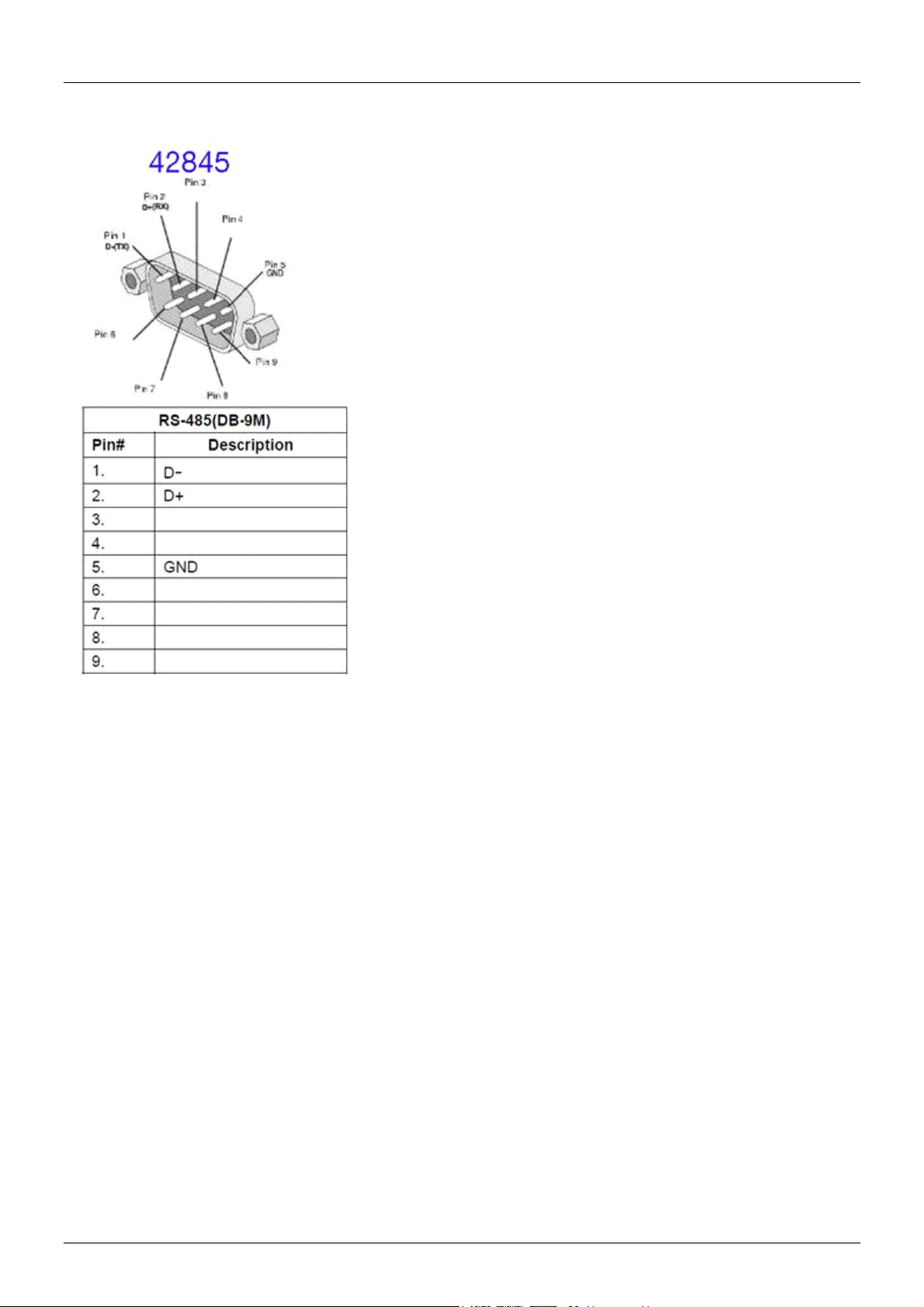
Pin Assignments:
Page 5

Benutzerhandbuch Deutsch
Einführung
Wir freuen uns, dass Ihre Wahl auf ein LINDY-Produkt gefallen ist und danken Ihnen für Ihr Vertrauen.
Sie können sich jederzeit auf unsere Produkte und einen guten Service verlassen. Dieser Lindy USB auf
RS422 Seriell Konverter unterliegt einer 2-Jahres LINDY Herstellergarantie und lebenslangem
kostenlosen, technischen Support. Bitte lesen Sie diese Anleitung sorgfältig und bewahren Sie sie auf.
Der Lindy USB Typ C Seriell Konverter ermöglicht den Anschluss von seriellen Geräten mit 9-poligem
RS485-Port an den USB Typ A-Port. Er ist die perfekte Lösung zum Anschluss von Barcodescannern,
Industriegeräten etc. mit RS485-Schnittstelle am Notebook oder Macbook und einsetzbar in Handel und
Industrie, im IT- und Digital Signage-Umfeld.
Lieferumfang
Lindy USB auf RS485 Seriell Konverter
Dieses Handbuch
Eigenschaften
Ermöglicht den Betrieb serieller RS485-Geräte am USB Typ A-Port
9-poliger Sub-D-Stecker an USB Typ A-Stecker
FT232BL-Chipsatz
Stromversorgung über den USB-Bus
Kompatibel mit Windows-, Mac- und Linux-Betriebssystemen
Installation
Stecken Sie den USB-Anschluss des Konverters in die USB-Buchse des Computers. Laden Sie den
passenden Treiber für Ihr Betriebnssystem von www.lindy.com herunter und entpacken Sie ihn. Wenn
zum ersten Mal ein Treiber für ein USB auf Seriell Gerät installiert wird, muss zweimal installiert werden:
einmal für das Gerät und ein zweites Mal für den COM-Port.
Folgen Sie den Dialogen, die auf dem Bildschirm angezeigt werden, bis die Installation abgeschlossen
ist. Zuerst werden die Treiber für den USB Seriell Konverter installiert, direkt im Anschluss die Treiber für
den USB Seriell Port.
Bei Problemen mit dem Treiber auf der CD besuchen Sie bitte
https://www.ftdichip.com/Products/ICs/FT232B.html.
Betrieb
LED Anzeige:
Link: 42845 ist einsatzbereit
TX: Daten werden vom USB Port zum RS485 Gerät geschickt
RX: Daten werden vom RS485 Gerät zum USB Port geschickt
Page 6
Benutzerhandbuch Deutsch
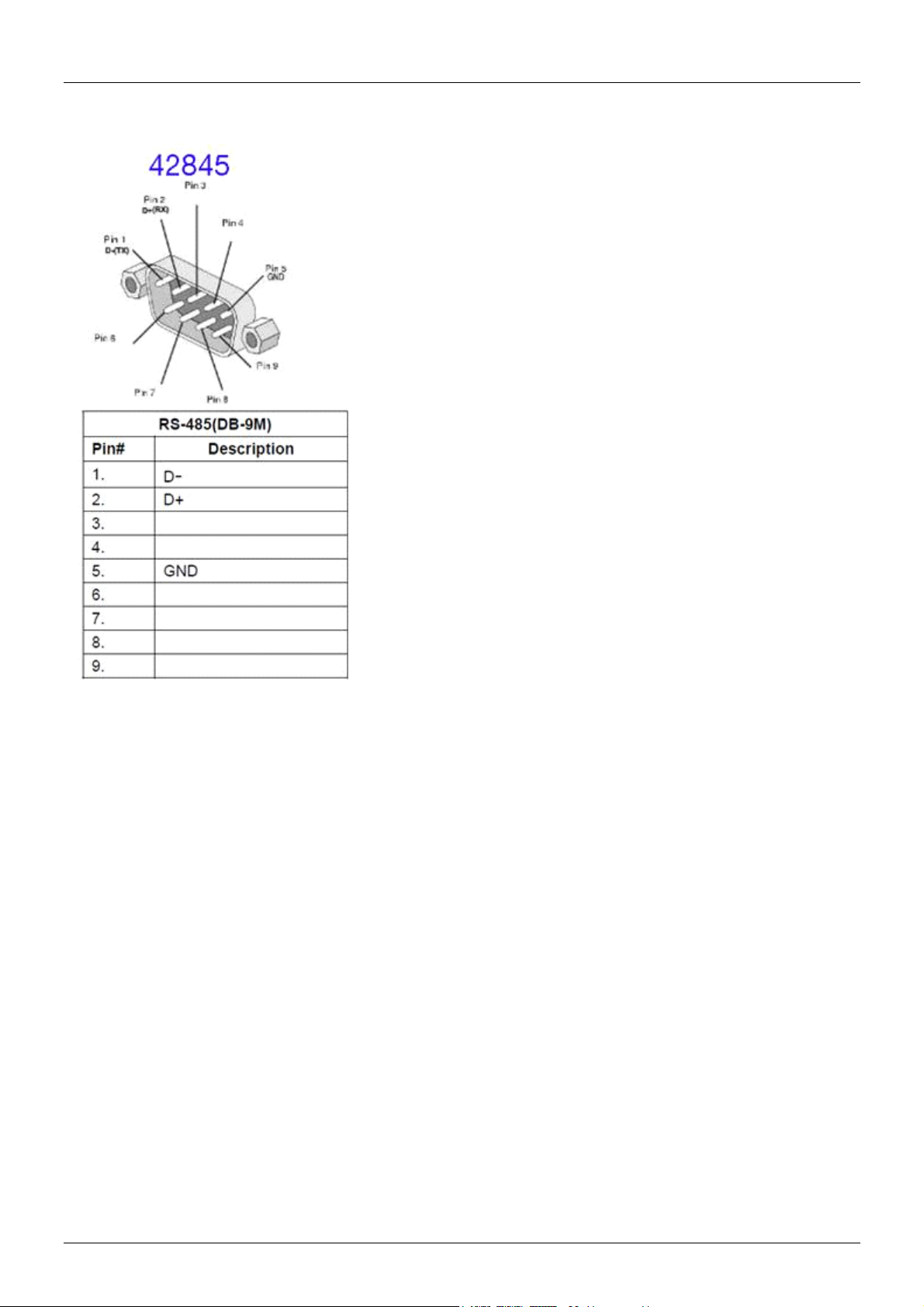
Pinbelegung:
Page 7

Manuel Utilisateur Français
Introduction
Nous sommes heureux que votre choix se soit porté sur un produit LINDY et vous remercions de votre
confiance. Vous pouvez compter à tout moment sur la qualité de nos produits et de notre service. Ce
Convertisseur USB vers Série RS485 est soumis à une durée de garantie LINDY de 2 ans et d’une
assistance technique gratuite à vie. Merci de lire attentivement ces instructions et de les conserver pour
future référence.
Le Convertisseur USB vers Série de LINDY permet de connecter simplement un périphérique Série RS485
à 9 broches sur un port USB Type A. Avec ses connectiques USB Type A et série, cet appareil est la
solution parfaite pour connecter des équipements natifs en RS485 tel que des lecteurs de code à barres
et des appareils industriels à un ordinateur portable ou à un MacBook, dans les environnements
commerciaux, IT et Digital Signage.
Contenu de l’emballage
Convertisseur USB vers Série RS485 de LINDY
Ce manuel
Caractéristiques
Connecte tout périphérique série RS485 via un port USB Type A
Connectiques série 9 broches D mâle vers USB A mâle
Chipset FT232BL
Alimenté par le bus USB, aucune alimentation externe requise
Compatible avec Windows, Mac et Linux
Installation
Branchez le connecteur USB de ce convertisseur dans une prise USB de votre ordinateur. Téléchargez
ensuite le pilote pour votre système d’exploitation à partir de www.lindy.com et décompressez-le afin de
pouvoir l’installer. Si le pilote USB vers Série est installé pour la première fois, il doit être installé deux
fois : une première fois pour l’appareil et une seconde fois pour le port COM.
Suivez les instructions qui s’affiche à l’écran, jusqu’à la fin de l’installation. Le pilote pour le convertisseur
USB Série est tout d’abord installé, l’installation continue avec le logiciel pour le port USB Série.
Si vous rencontrez des difficultés avec le pilote, veuillez s’il vous plait visiter le site
https://www.ftdichip.com/Products/ICs/FT232B.html.
Utilisation
Indicateurs LED:
Link: indique que le 42485 est prêt pour l’utilisation
TX: lorsque des données sont transmises entre du port USB au périphérique RS485
RX: lorsque des données sont transmises du périphérique RS485 au port USB
Page 8
Manuel Utilisateur Français
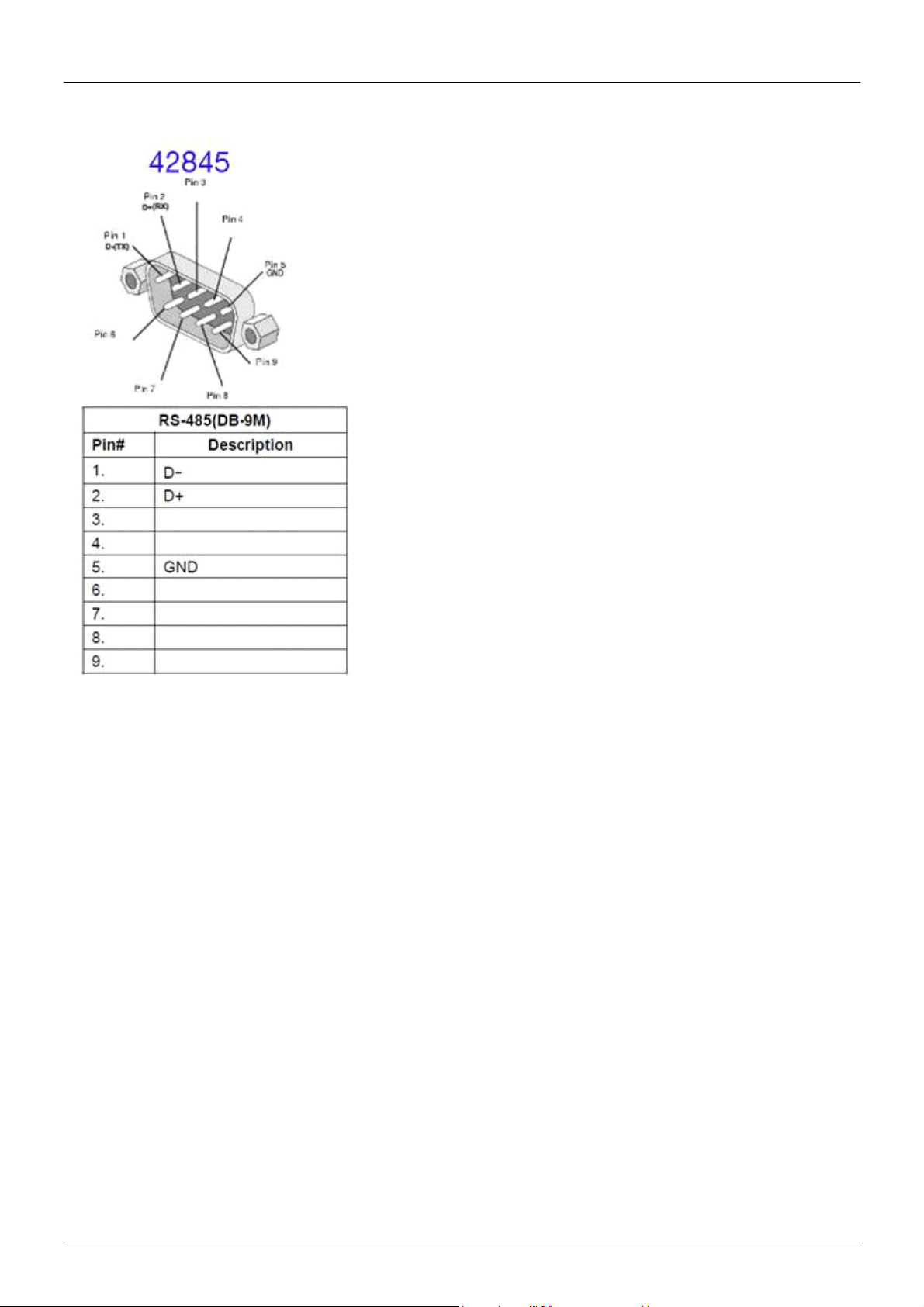
Assignement des broches (pin):
Page 9

Manuale Italiano
Introduzione
Vi ringraziamo per aver acquistato il Converter USB a Seriale RS485. Questo prodotto è stato progettato
per garantirvi la massima affidabilità e semplicità di utilizzo ed è coperto da 2 anni di garanzia LINDY oltre
che da un servizio di supporto tecnico a vita. Per assicurarvi di farne un uso corretto vi invitiamo a leggere
attentamente questo manuale e a conservarlo per future consultazioni.
Questo convertitore consente di collegare periferiche con interfaccia seriale 9 pin RS485 ad una porta
USB Tipo A. La soluzione ideale per collegare apparecchiature che lavorano con protocollo RS485
come barcode scanner e dispositivi industriali, a notebook e Macbooks in ambito retail, IT e digital
signage.
Contenuto della confezione
Converter USB a Seriale RS485
Questo manuale
Caratteristiche
Connessione di una periferica seriale RS422 ad una porta USB Tipo A
Connettori 9 pin D Maschio a USB A Maschio
Chipset FT232BL
Alimentato dal bus USB, nessun alimentatore esterno richiesto
Compatibile con Windows, Mac e Linux
Installazione
Collegate il connettore USB in una porta USB del computer. Scaricate i driver del Vostro sistema
operativo dal sito www.lindy.com e unzippatelo per installarlo. Se installate i driver per la prima volta,
occorre farlo due volte: una per il dispositivo e una per la porta COM.
Seguite le indicazioni che compaiono sullo schermo fino a completare l’installazione. Viene installato
prima il driver del Converter USB Seriale, quindi proseguite con l’installazione del software della porta
USB seriale.
In caso di difficoltà nell’installazione dei driver, visitate il sito
https://www.ftdichip.com/Products/ICs/FT232B.html.
Utilizzo
LED:
Link: quando il 42845 è pronto per l’uso
TX: quando vengono inviati dati dalla porta USB al dispositivo RS485
RX: quando vengono inviati dati dal dispositivo RS485 alla porta USB
Page 10

Manuale Italiano
Assegnazione pin:
Page 11

CE/FCC Statement
CE Certification
This equipment complies with the requirements relating to Electromagnetic Compatibility Standards.
It has been manufactured under the scope of RoHS compliance.
CE Konformitätserklärung
Dieses Produkt entspricht den einschlägigen EMV Richtlinien der EU für IT-Equipment und darf nur
zusammen mit abgeschirmten Kabeln verwendet werden.
Diese Geräte wurden unter Berücksichtigung der RoHS Vorgaben hergestellt.
Die formelle Konformitätserklärung können wir Ihnen auf Anforderung zur Verfügung stellen
FCC Certification
This equipment has been tested and found to comply with the limits for a Class B digital device, pursuant
to part 15 of the FCC Rules. These limits are designed to provide reasonable protection against harmful
interference in a residential installation.
You are cautioned that changes or modification not expressly approved by the party responsible for
compliance could void your authority to operate the equipment.
This device complies with part 15 of the FCC Rules.
Operation is subject to the following two conditions:
1. This device may not cause harmful interference, and
2. This device must accept any interference received, including interference that may cause undesired
operation.
LINDY Herstellergarantie – Hinweis für Kunden in Deutschland
LINDY gewährt für dieses Produkt über die gesetzliche Regelung in Deutschland hinaus eine zweijährige Herstellergarantie ab Kaufdatum. Die detaillierten Bedingungen dieser Garantie finden Sie auf der LINDY Website aufgelistet
bei den AGBs.
Hersteller / Manufacturer (EU):.
LINDY-Elektronik GmbH LINDY Electronics Ltd
Markircher Str. 20 Sadler Forster Way
68229 Mannheim Stockton-on-Tees, TS17 9JY
Germany England
Email: [email protected] , T: +49 (0)621 470050 [email protected] , T: +44 (0)1642 754000
Page 12
Recycling Information
WEEE (Waste of Electrical and Electronic Equipment),
Recycling of Electronic Products
Europe, United Kingdom
In 2006 the European Union introduced regulations (WEEE) for the collection and recycling of all waste electrical
and electronic equipment. It is no longer allowable to simply throw away electrical and electronic equipment. Instead,
these products must enter the recycling process.
Each individual EU member state has implemented the WEEE regulations into national law in slightly different ways.
Please follow your national law when you want to dispose of any electrical or electronic products. More details can
be obtained from your national WEEE recycling agency.
Germany / Deutschland Rücknahme Elektroschrott und Batterie-Entsorgung
Die Europäische Union hat mit der WEEE Direktive Regelungen für die Verschrottung und das Recycling von Elektround Elektronikprodukten geschaffen. Diese wurden im Elektro- und Elektronikgerätegesetz – ElektroG in deutsches
Recht umgesetzt. Das Entsorgen von Elektro- und Elektronikgeräten über die Hausmülltonne ist verboten! Diese
Geräte müssen den Sammel- und Rückgabesystemen zugeführt werden! Dort werden sie kostenlos entgegen
genommen. Die Kosten für den weiteren Recyclingprozess übernehmen die Gerätehersteller.
LINDY bietet deutschen Endverbrauchern ein kostenloses Rücknahmesystem an, beachten Sie bitte, dass Batterien
und Akkus den Produkten vor der Rückgabe an das Rücknahmesystem entnommen werden müssen und über die
Sammel- und Rückgabesysteme für Batterien separat entsorgt werden müssen. Ausführliche Informationen zu
diesen Themen finden Sie stets aktuell auf der LINDY Webseite im Fußbereich.
France
En 2006, l'union Européenne a introduit la nouvelle réglementation (DEEE) pour le recyclage de tout équipement
électrique et électronique.
Chaque Etat membre de l’ Union Européenne a mis en application la nouvelle réglementation DEEE de manières
légèrement différentes. Veuillez suivre le décret d’application correspondant à l’élimination des déchets électriques
ou électroniques de votre pays.
Italy
Nel 2006 l’unione europea ha introdotto regolamentazioni (WEEE) per la raccolta e il riciclo di apparecchi elettrici ed
elettronici. Non è più consentito semplicemente gettare queste apparecchiature, devono essere riciclate. Ogni stato
membro dell’ EU ha tramutato le direttive WEEE in leggi statali in varie misure. Fare riferimento alle leggi del proprio
Stato quando si dispone di un apparecchio elettrico o elettronico.
Per ulteriori dettagli fare riferimento alla direttiva WEEE sul riciclaggio del proprio Stato.
No. 42845
3rd Edition, November 2018
lindy.com
Tested to comply with
FCC Standards
For Home and Office Use!
 Loading...