

Page 1
© LINDY ELECTRONICS LIMITED & LINDY-ELEKTRONIK GMBH - FIRST EDITION (October 2008)
USB 2.0 Link Cable
User Manual English
LINDY No. 42815
www.lindy.com
Page 2

User Manual English
2
Introduction
Thank you for purchasing the LINDY USB 2.0 Link Cable! The USB 2.0 Link Cable allows you to
easily connect two computers directly via their USB ports and transfer files at great speed.
The USB 2.0 Link Cable can be used in two different ways:
• With Windows Easy Transfer utility to easily transfer data and settings from Windows XP
to Windows Vista PCs and between Windows Vista PCs
• With PC Linq software to transfer data between Windows ME/2000/XP and Vista PCs
Package Contents
• LINDY USB 2.0 Link Cable
• Driver CD
• This manual
Features
• Allows you to quickly and easily backup, copy and transfer data between two PCs
• High speed USB 2.0 connection supports transfer speeds of up to 480Mbps, can also be
connected to USB 1.1 ports
• Simple single cable solution - connects to a USB port on each PC
• Supports Windows Vista Easy Transfer
• Connectors: USB Type A Male to USB Type A Male
• Cable length: 2m
• Compatible with Windows ME/2000/XP and Vista
Page 3
User Manual English
3
Windows Easy Transfer
Installation
Please follow the following instructions to install the USB 2.0 Link Cable for use with Microsoft’s
Windows Easy Transfer utility, which is used for transferring data from XP to Vista PCs and
between Vista PCs.
Windows Vista
Simply connect the USB 2.0 Link Cable to the USB ports of your computers and it is ready to
use. No further installation is required.
Windows XP
Please install the Windows Easy Transfer Software before you connect the USB 2.0 Link Cable
to your computers USB port. Follow the steps below to proceed.
Installing Windows Easy Transfer Utility
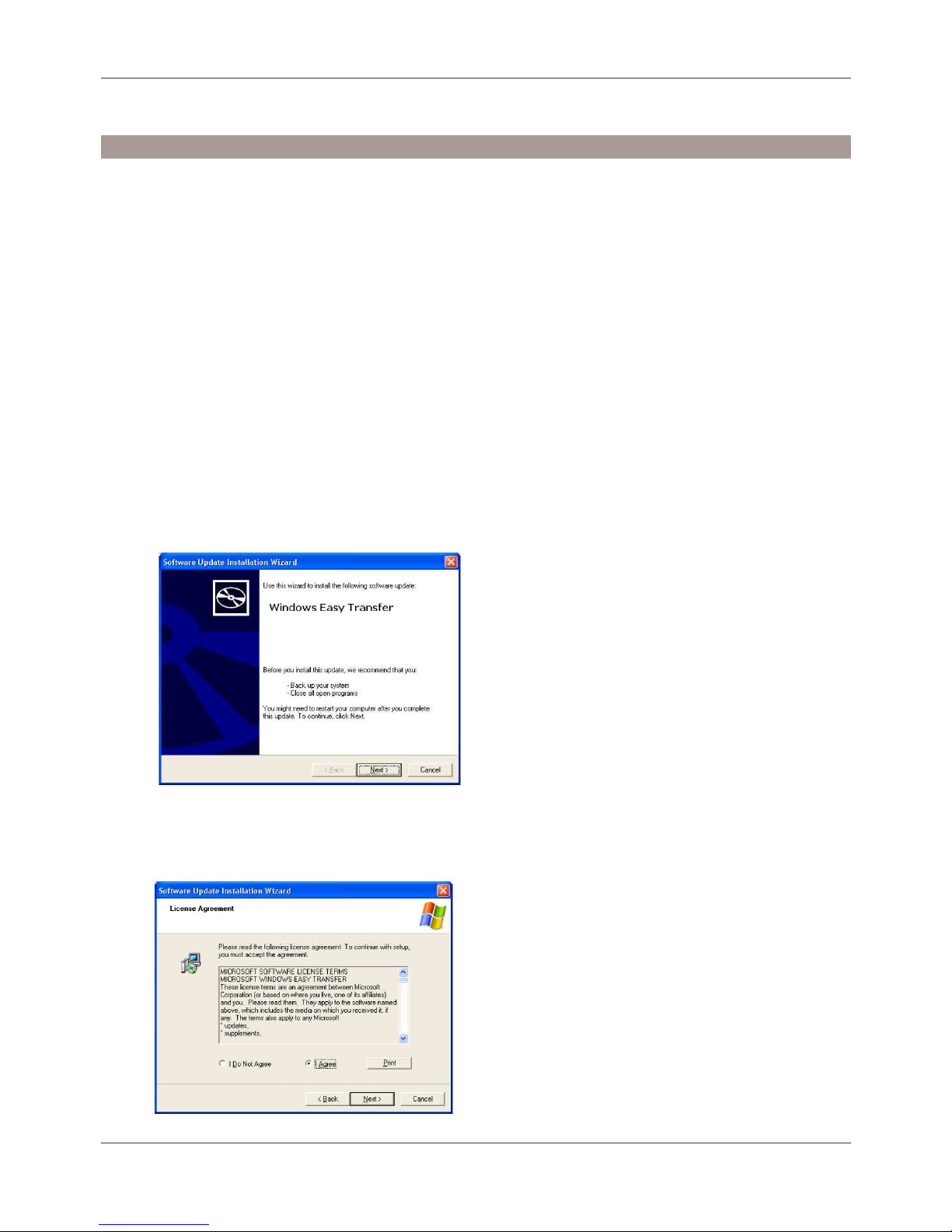
1. Insert the provided CD into your CD-ROM drive. An autorun screen will automatically pop
up and guide you to install Windows Easy Transfer. Click Next to proceed.
2. After reading the license agreement, select I Agree and click Next to begin the
installation.
Page 4
User Manual English
4
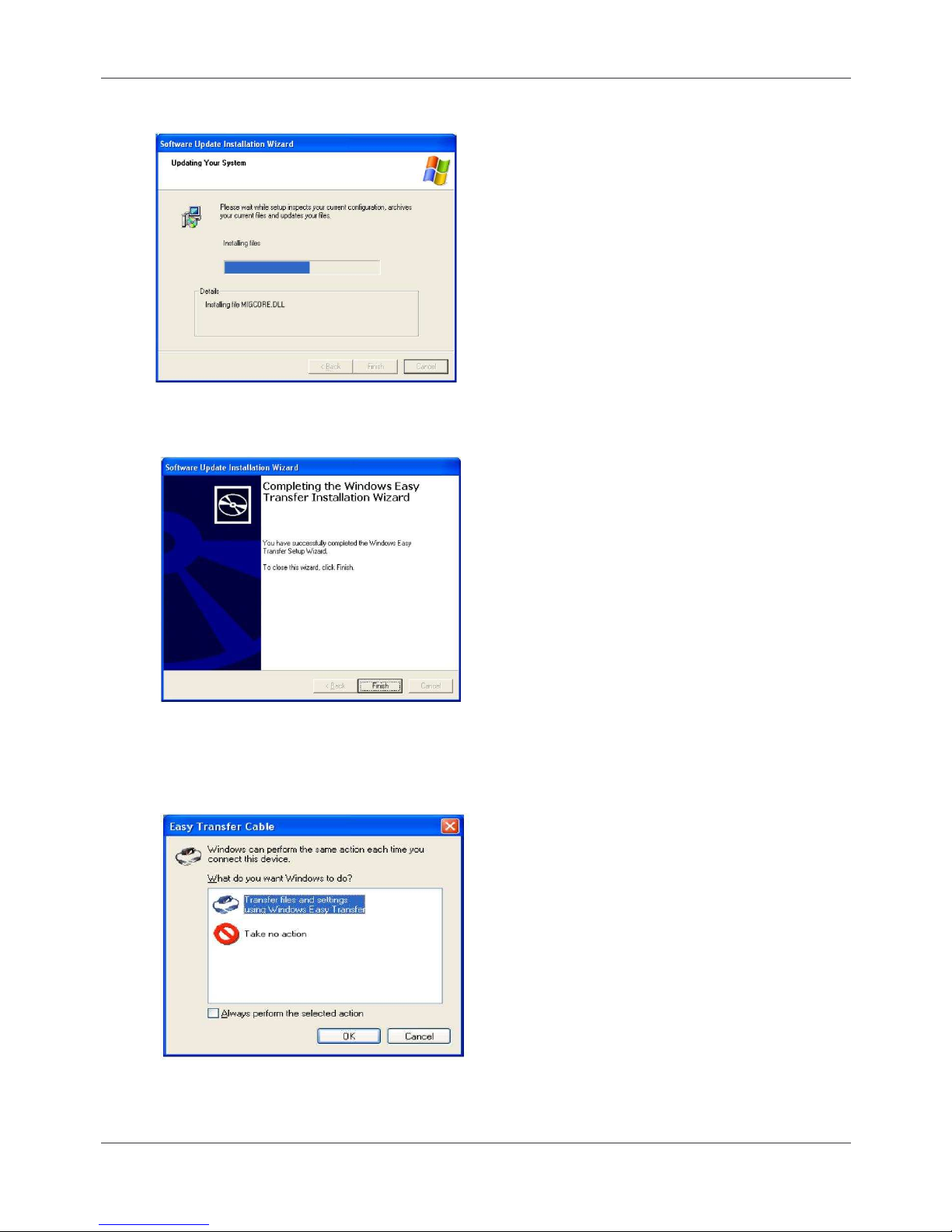
3. Wait while the installation takes place.
4. Click Finish to complete the installation.
Now connect the USB Link to the USB port of your computer. When Easy Transfer Cable
screen appears, you may select Transfer files and settings to launch Windows Easy
Transfer or select Take no action as required.
Page 5
User Manual English
5
Operation
Windows Easy Transfer is a Windows-based utility that allows two computers to transfer files
and settings from a computer running Windows XP or Windows Vista to another computer
running Windows Vista.
To start the utility:
• Windows Vista: Select Start > Programs > Accessories > System Tools > Windows
Easy Transfer.
• Windows XP: Select Start > Programs > Windows Easy Transfer.
After launching Windows Easy Transfer, simply follow the on-screen instructions. Pay attention
to the following notices when you are using the utility:
• You must launch Windows Easy Transfer on both computers on which you want to
transfer files and settings so that they can detect each other.
• Transfer can only be made from Windows XP/Vista to Windows Vista. You cannot
transfer files/settings from Vista to XP.
• When prompted to choose a transferring media, select USB cable.
• You can only transfer files/settings between two operationing systems using the same
language. Please check www.microsoft.com/downloads to select your language.
Transfer Example:
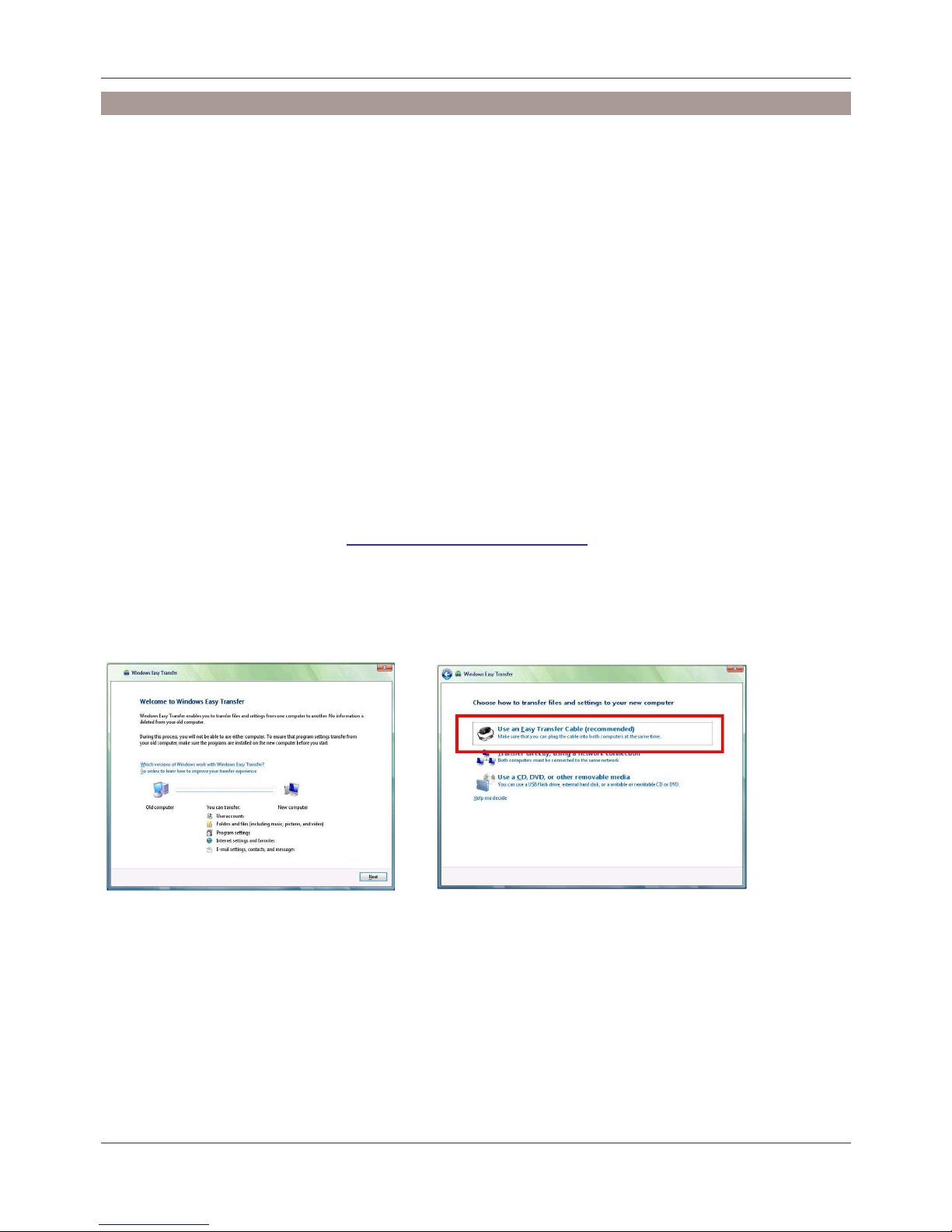
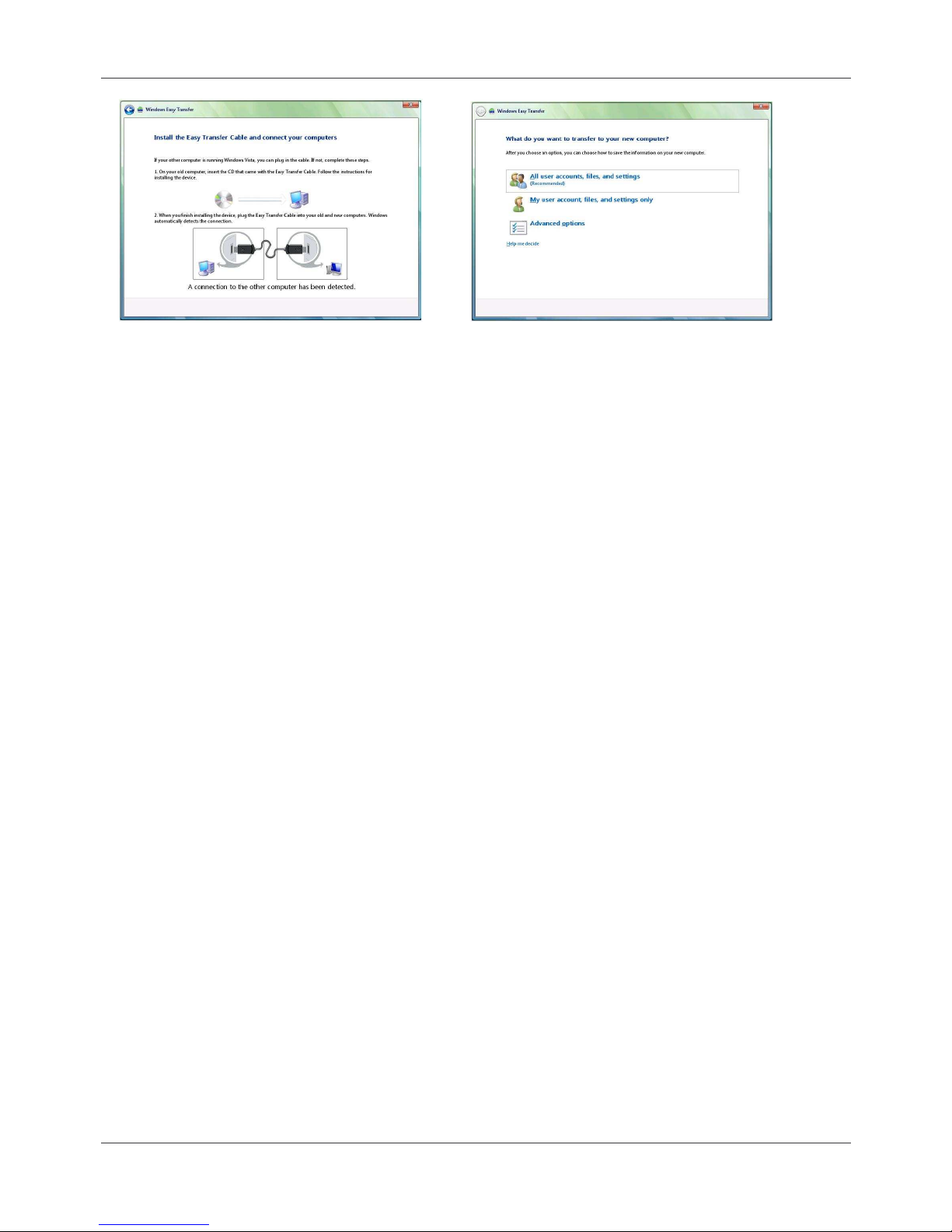
The following example demonstrates how to transfer files from Windows XP to Vista
1. Select Next 2. Select Use an Easy Transfer Cable
Page 6
User Manual English
6
4. Select the required transfer item.
5. After the data has been transferred, click Close to exit the utliity.
3. Wait until the message:
A connection to the other
computer has been detected
appears at the bottom.
Page 7
User Manual English
7
PC Linq
With PC Linq software you can transfer data between Windows ME/2000/XP and Vista PCs by
simply dragging and dropping!
Installation
Please install the PC Linq Tool before you connect the USB 2.0 Link Cable to your computers
USB port. Follow the steps below to proceed.
1. Insert the provided CD into your CD-ROM drive.
2. Please install the application program PCLinq3_Generic_3003 on to both of your two
computers.
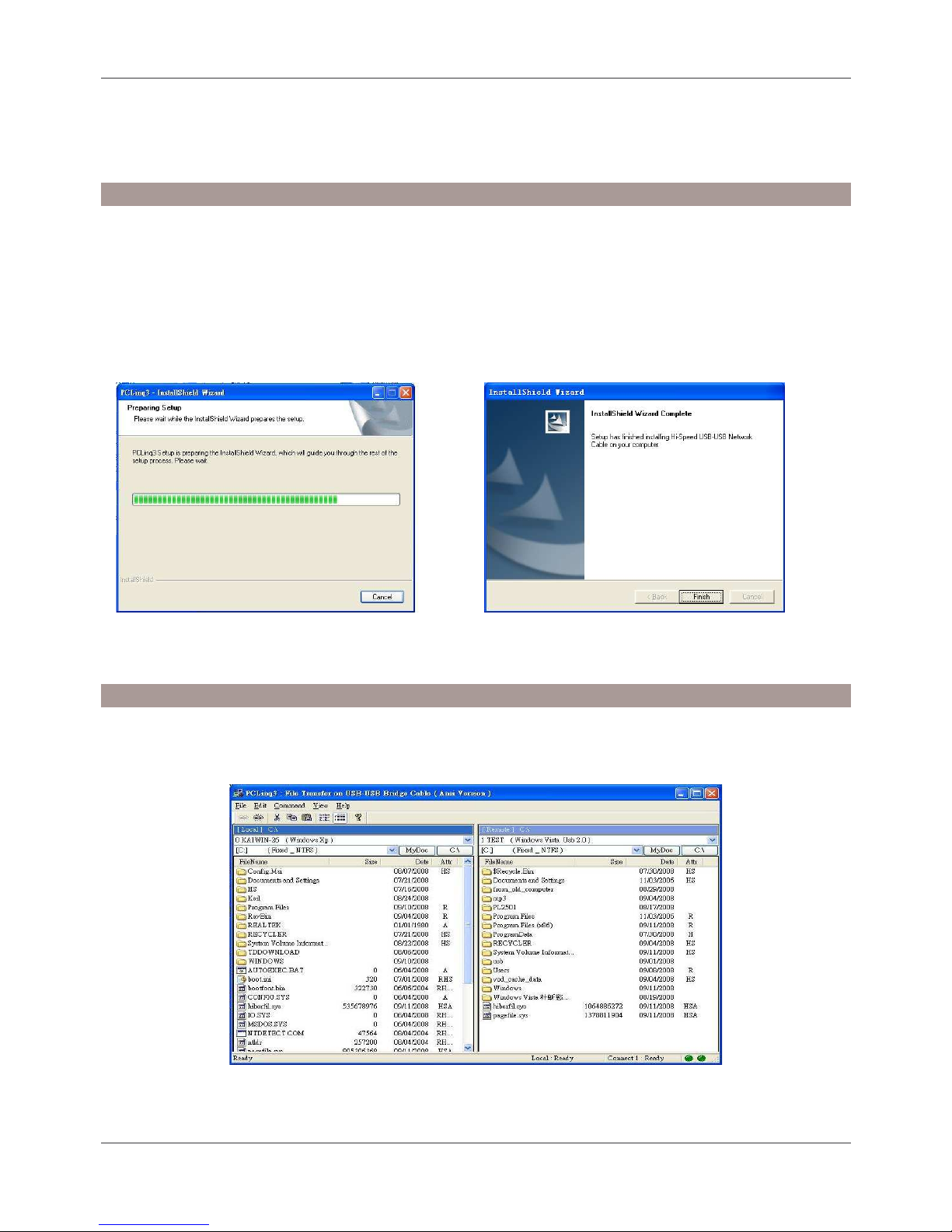
3. Run the install shield Wizard- PCLinq3_Generic_3003 in CD until the setup is finished.
4. Now plug the USB 2.0 Link into the USB ports of your two computers and the installation is
complete.
Operation
1. Open the PCLinq software by selecting Start > Programs > PCLinq3, you will see the
screen below
2. Documents can now be transferred between two computers by dragging and dropping from
one computer to the other.
Page 8

User Manual English
8
Page 9

Radio Frequency Energy, Certifications
CE Certification
This equipment complies with the requirements relating to electromagnetic compatibility, EN
55024 and EN55022 class A for ITE, EN61000-3-2/-3 the essential protection requirement of
Council Directive 89/336/EEC on the approximation of the laws of the Member States relating to
electromagnetic compatibility.
Shielded cables must be used with this equipment to maintain compliance with radio frequency
energy emission regulations and ensure a suitably high level of immunity to electromagnetic
disturbances.
FCC Warning
This equipment has been tested and found to comply with the limits for a Class B digital device,
pursuant to part 15 of the FCC Rules. These limits are designed to provide reasonable
protection against harmful interference in a residential installation.
This equipment generates, uses, and can radiate radio frequency energy and, if not installed
and used in accordance with the instructions, may cause harmful interference to radio
communications. However, there is no guarantee that interference will not occur in a particular
installation. If this equipment does cause harmful interference to radio or television reception,
which can be determined by turning the equipment off and on, the user is encouraged to try to
correct the interference by one or more of the following measures:
Reorient or relocate the receiving antenna
Increase the separation between the equipment and receiver
Connect the equipment into an outlet on a circuit different from that to which the receiver is
connected
Consult the dealer or an experienced technician for help
You are cautioned that changes or modification not expressly approved by the party responsible
for compliance could void your authority to operate the equipment.
This device complies with part 15 of the FCC Rules.
Operation is subject to the following two conditions:
1. This device may not cause harmful interference, and
2. This device must accept any interference received, including interference that may cause
undesired operation.
Page 10
Recycling Information
WEEE (Waste of Electrical and Electronic Equipment), Recycling of Electronic
Products
United Kingdom
In 2006 the European Union introduced regulations (WEEE) for the collection and recycling of
all waste electrical and electronic equipment. It is no longer allowable to simply throw away
electrical and electronic equipment. Instead, these products must enter the recycling process.
Each individual EU member state has implemented the WEEE regulations into national law in
slightly different ways. Please follow your national law when you want to dispose of any
electrical or electronic products. More details can be obtained from your national WEEE
recycling agency.
Germany / Deutschland
Die Europäische Union hat mit der WEEE Direktive umfassende Regelungen für die
Verschrottung und das Recycling von Elektro- und Elektronikprodukten geschaffen. Diese
wurden von der Bundesregierung im Elektro- und Elektronikgerätegesetz – ElektroG in
deutsches Recht umgesetzt. Dieses Gesetz verbietet vom 24.März 2006 an das Entsorgen von
entsprechenden, auch alten, Elektro- und Elektronikgeräten über die Hausmülltonne! Diese
Geräte müssen den lokalen Sammelsystemen bzw. örtlichen Sammelstellen zugeführt werden!
Dort werden sie kostenlos entgegen genommen. Die Kosten für den weiteren Recyclingprozess
übernimmt die Gesamtheit der Gerätehersteller.
France
En 2006, l'union Européenne a introduit la nouvelle réglementation (DEEE) pour le recyclage
de tout équipement électrique et électronique.
Chaque Etat membre de l’ Union Européenne a mis en application la nouvelle réglementation
DEEE de manières légèrement différentes. Veuillez suivre le décret d’application
correspondant à l’élimination des déchets électriques ou électroniques de votre pays.
Italy
Nel 2006 l’unione europea ha introdotto regolamentazioni (WEEE) per la raccolta e il riciclo di
apparecchi elettrici ed elettronici. Non è più consentito semplicemente gettare queste
apparecchiature, devono essere riciclate. Ogni stato membro dell’ EU ha tramutato le direttive
WEEE in leggi statali in varie misure. Fare riferimento alle leggi del proprio Stato quando si
dispone di un apparecchio elettrico o elettronico.
Per ulteriori dettagli fare riferimento alla direttiva WEEE sul riciclaggio del proprio Stato.
LINDY No. 42815
1st Edition, October 2008
www.lindy.com
 Loading...