

Page 1
Installation, Operating and Servicing
Instructions
Seal Refrigerated Food Display and
Preparation Bars
FDB4, FDB5, FDB6, FDB8. FDB10,
FPB5, FPB7
Please make a note of your product details for
future use:
Date Purchased:_________________________
Model Number:__________________________
Serial Number:__________________________
Dealer:_________________________________
_______________________________________
IS804 ECN4919
Page 2
CONTENTS
Important Information…………………………………………………….. 2
Safety Instructions………………………………………………………... 3 - 4
Checklist of Enclosures………………………………………………….. 4
Spare Parts List…………………………………………………………... 4
Accessories……………………………………………………………….. 4
Technical Specification………………………………………………….. 5
Installation ……………………………………………………………….. 5
Connecting to the electricity supply…………………………..
Operating Instructions…………………………………………………… 6
Defrosting……………………………………………………….. 6
Cleaning and Maintenance……………………………………………… 7
End Of Life Disposal……………………………………………………... 7
Service Information and Guarantee……………………………………. 8
IMPORTANT INFORMATION
Read these instructions carefully before using this product, paying
particular attention to all sections that carry warning symbols, caution
symbols and notices. Ensure that these are understood at all times
WARNING!
This symbol is used whenever there is a risk of personal injury.
CAUTION!
This symbol is used whenever there is a risk of damaging your Lincat
product.
NOTE:
This symbol is used to provide additional information, hints and tips.
.
IS804 ECN4755
Page 2 of 8
Page 3
SAFETY INSTRUCTIONS
WARNING!
Basic safety precautions, including the following, should be followed to
reduce the risk of personal injury. Make sure you have read all of these
instructions before switching on the unit. Keep this User Guide in a
safe place for future reference for you and your staff.
Do not clean the unit with a water jet.
REMOVAL OF PACKAGING
In the interest of hygiene, you should clean the product after unpacking and
ensure all plastic coatings are removed before use.
This unit is heavy. Take care when moving it.
GENERAL
Do not try to modify this product.
Do not store explosive substances such as aerosol cans with a flammable
propellant in this appliance.
Ensure that the electrical supply cable is not damaged.
If the supply cable is damaged, it should be replaced by Lincat Ltd or suitably
qualified persons, in order to avoid a hazard.
WARNING: System contains refrigerant under high pressure. Do not tamper
with the system. It must be serviced by qualified persons only.
Keep all ventilation openings clear of obstruction. This unit should not be built
in without adequate ventilation.
Do not use mechanical devices or other means to accelerate the defrosting
process, other than those recommended by the manufacturer.
Do not use electrical appliances inside the food storage compartments of the
appliance, unless they are the type recommended by the manufacturer.
EQUIPOTENTIALITY
This equipment is provided with an equipotential bonding terminal to
allow earth cross-bonding with other equipment.
IS804 ECN4755
Page 3 of 8
Page 4
KEEP THIS MANUAL FOR FUTURE REFERENCE
Part Number
Description
USE OF THE FOOD DISPLAY BARS AND PREPARATION BARS
The Food Display Bars and Preparation Bars are intended to be used on
counter tops to display chilled food products placed in Gastronorm (GN)
containers.
This unit is rated Climate Class 3 and as such can operate in maximum
temperatures of 25°C with 60% RH
CHECKLIST OF ENCLOSURES
• Refrigerated Food Display Bar or Preparation Bar (with cable and 13
Amp plug).
• Glass section or stainless steel lid (if ordered with unit)
• User Guide and Guarantee Card
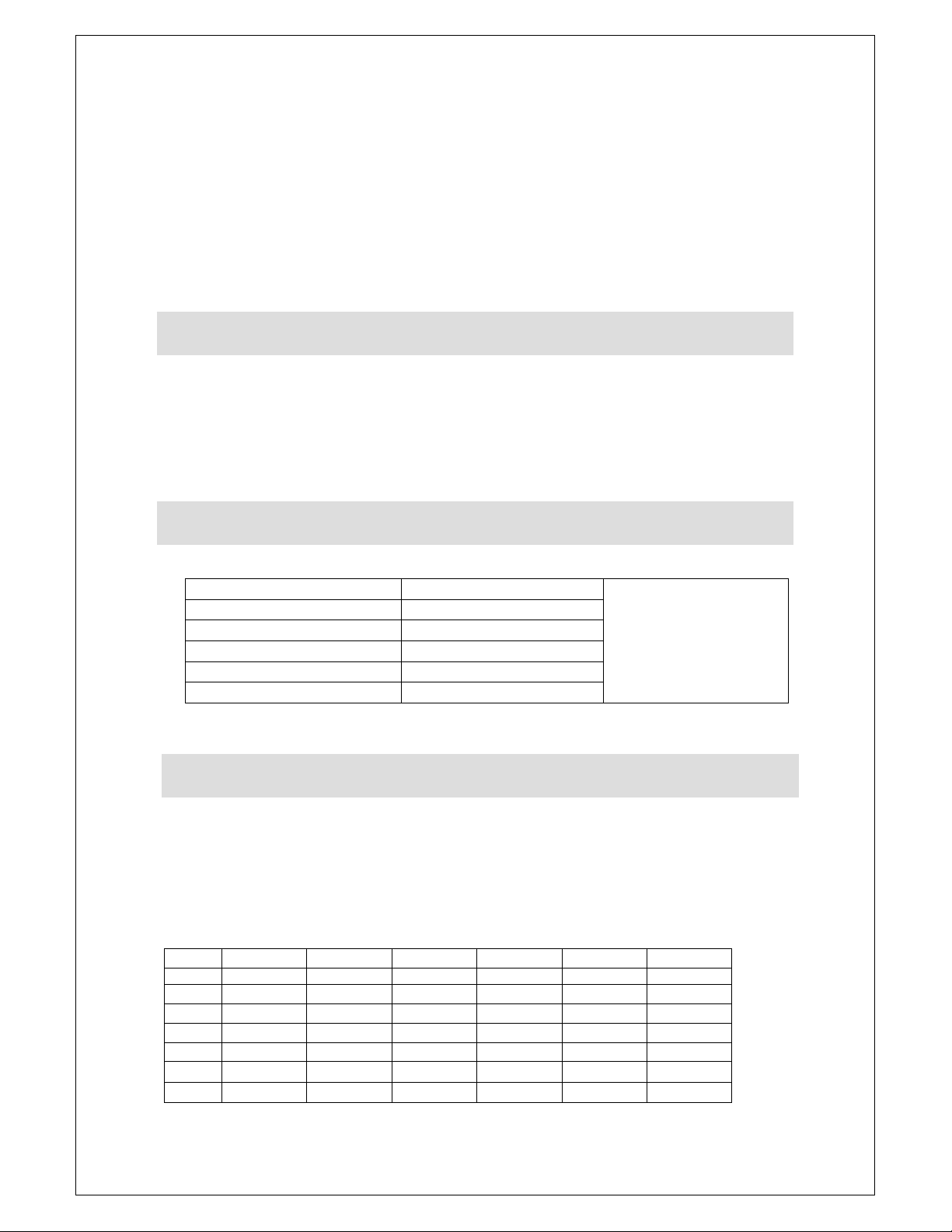
SPARE PARTS LIST
FA51
G/CD01
G42/073
G/FI25
EC42
ACCESSORIES
A - Stainless Steel Lids
B - Back Serve Curved Glass Covers
C - Self-Serve Curved Glass Covers
D - Wall Brackets
E - Stainless Steel Packs of 100mm Deep 1/3 Gastronorms and lids
F - Acrylic Packs of 100mm Deep 1/3 Gastronorms and lids
Model A B C D E F
FDB4 DBL4 BSG4 SSG4 DBWB SGP1004 SGP1004A
FDB5 DBL5 BSG5 SSG4 DBWB SGP1005 SGP1005A
FDB6 DBL6 BSG6 SSG4 DBWB SGP1006 SGP1006A
FDB8 DBL8 BSG8 SSG4 DBWB SGP1008 SGP1008A
FDB10 DBL10 BSG10 SSG4 DBWB SGP10010 SGP10010A
FPB5 PBL5 PBG5 DBWB SGP1505 SGP1505A
FPB7 PBL7 PBG7 DBWB SGP1507 SGP1507A
Tangential fan
Condenser
Compressor
Removable filter
Digital Controller
ALL FDB & FPB
MODELS
IS804 ECN4755
Page 4 of 8
Page 5
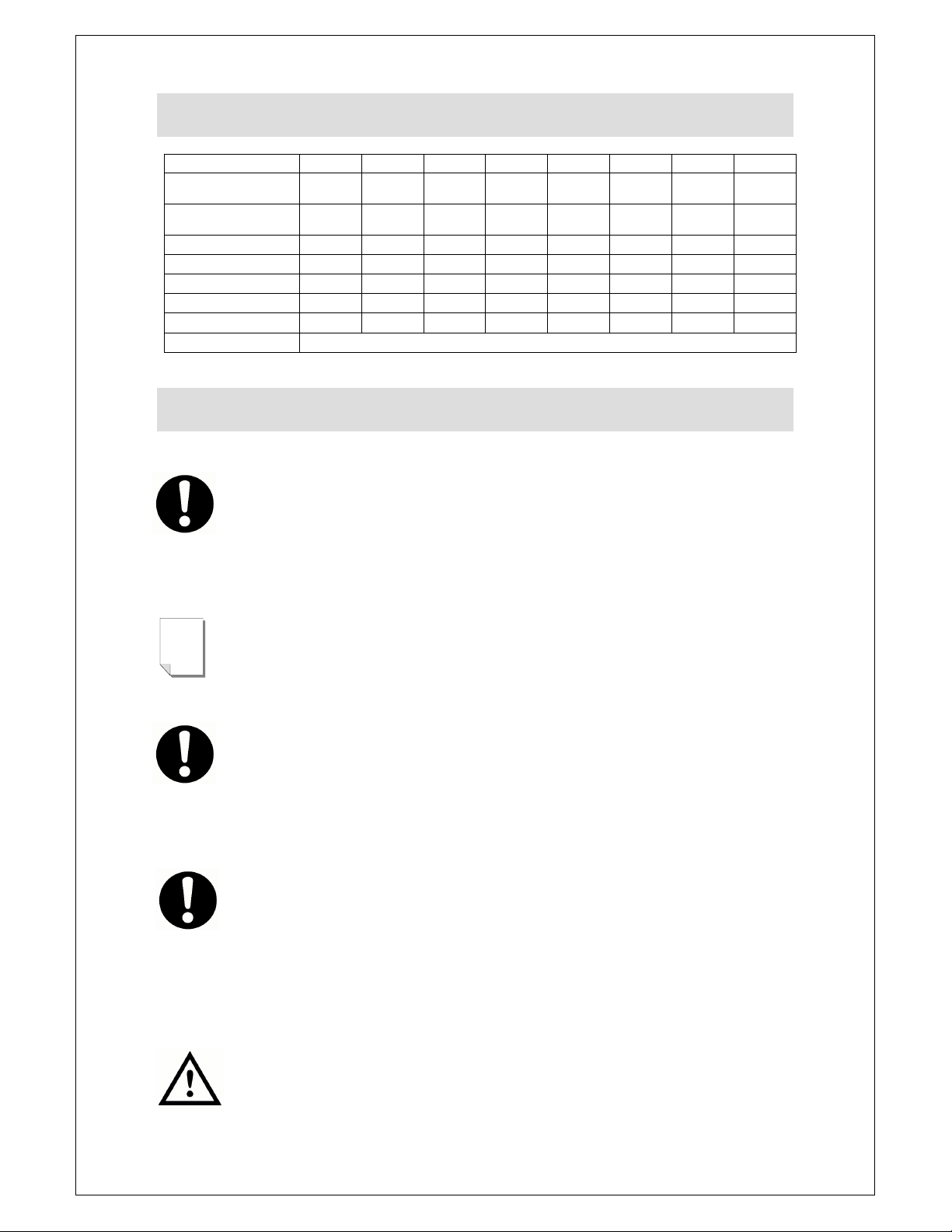
Width
mm
1045 1222 1399 1753
1580
TECHNICAL SPECIFICATION
MODEL FDB4 FDB5 FDB6 FDB8 FDB10 FPB5 FPB7
GN (100mm deep
maximum) 1/3 GN 4 5 6 8
Max. Operating
Temperature
Power rating Watt 170 170 170 170
Depth mm 375 375 375 375 375 375 375
Height mm 245 245 245 245 245 262 262
Weight (net) kg 22 24 25 29
Refrigerant R600a
O
C 25 25 25 25
10
25
170 170
2107 1225
32 25
5 5
25 25
170
29
INSTALLATION
Ensure the unit is installed on a sound level surface and not in direct
sunlight, damp or extreme temperature conditions. If the ambient
(operating) air temperature exceeds the one shown in the Technical
Specification (P.5), damage to the refrigeration system could occur.
The feet must not be removed, as this will damage the supply cable and
eventually the internal components.
NOTE
For safety regulations, the plug must always be accessible
.
Leave the product to stand for three hours before connecting to the
power supply and switching on.
CONNECTING TO THE ELECTRICITY SUPPLY
Ensure that the voltage of your electricity supply corresponds to the
serial plate details. The product is supplied with a 13 Amp plug. To
replace the plug, follow these instructions:
• green and yellow wire to 'E' or (Earth)
• blue wire to 'N' (Neutral)
• brown wire to 'L' (Live)
THIS APPLIANCE MUST BE EARTHED.
IS804 ECN4755
Page 5 of 8
Page 6
OPERATING INSTRUCTIONS
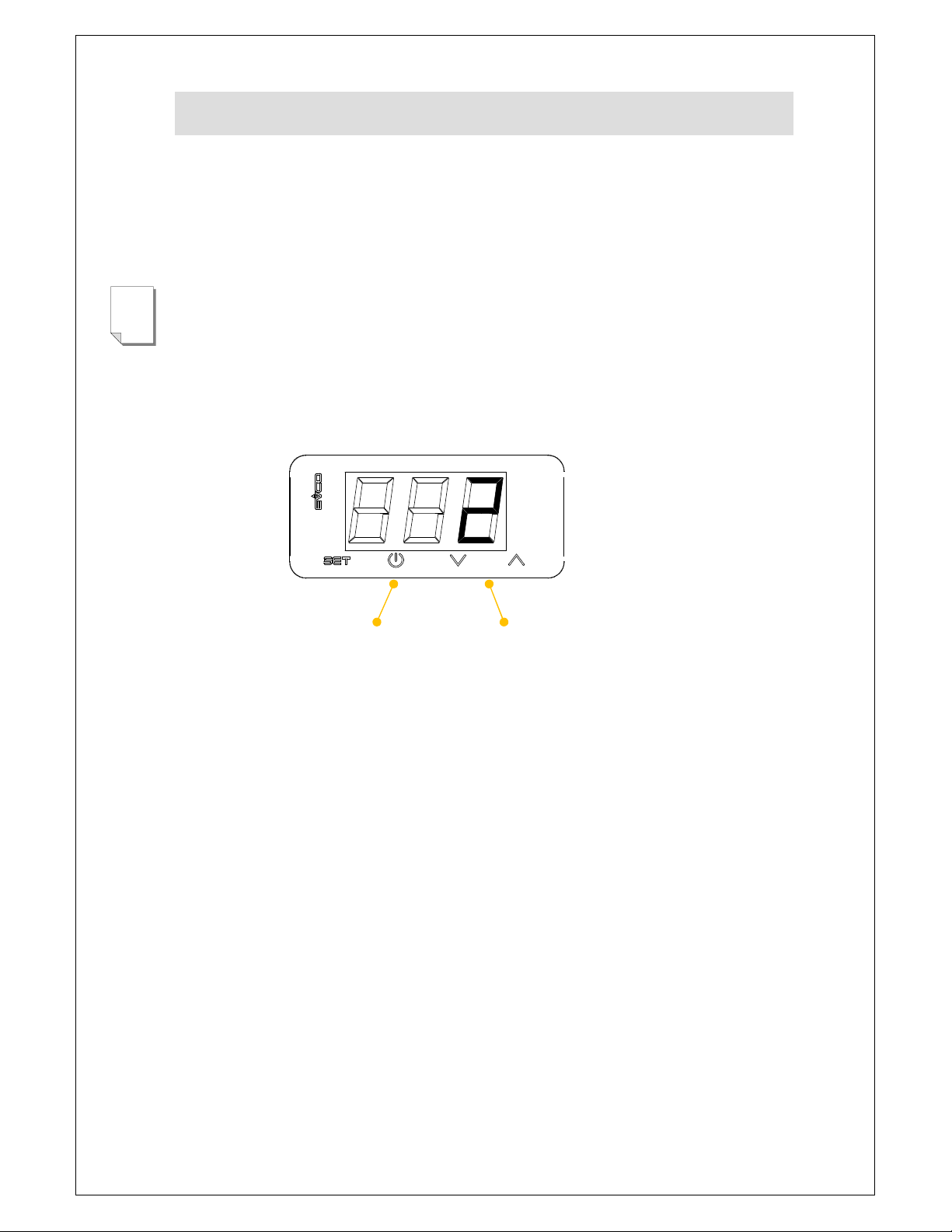
Connect the unit to the electricity supply. Switch the unit on (ON/OFF BUTTON),
insert empty Gastronorm containers (100mm deep maximum) with lids and wait
until the temperature display shows 2O C. At this point introduce your chilled food
product. It is good working practice to periodically monitor the food temperature
and to use lids on GN containers. The unit is not designed for long-term storage.
NOTE
The temperature display relates to the temperature measured in the well of the
unit, not the temperature of the food product.
CHANGING THE CONTROLLER SET POINT
Press SET the current SET point will be displayed, if LOC is displayed then
the controller is locked, to unlock press and hold SET button for 3 seconds,
UnL will then be displayed.
Press SET button and the current set point temperature will be displayed.
Use the UP and DOWN button to scroll to the desired temperature
(Min -0.0°C, Max 4.0°C).
ON/OFF
BUTTON
TEMPERATURE
ADJUST
DEFROSTING
The unit is not designed to defrost automatically. For best performance you
should carry out the following defrosting instructions daily. Switch the unit off,
disconnect from the electricity supply and remove the containers. After 30
minutes some water may form in the well. Dry with a cloth.
IS804 ECN4755
Page 6 of 8
Page 7
NOTE
CLEANING AND MAINTENANCE
Your product has a manufacturer’s warranty. This requires you maintain
and care for your product and follow maintenance instructions. If you fail to
maintain your unit or damage components Lincat may charge you for a
warranty repair. Please check the website for terms and conditions.
Do not use a water jet or steam cleaner, and do not immerse this appliance.
Clean all panels with warm water and mild detergent, do not use abrasive
materials. Dry with a soft cloth.
MAINTENANCE
It is recommended that a qualified refrigeration service engineer checks this
unit annually. It should not be necessary to alter the digital controller, as it
has been factory set.
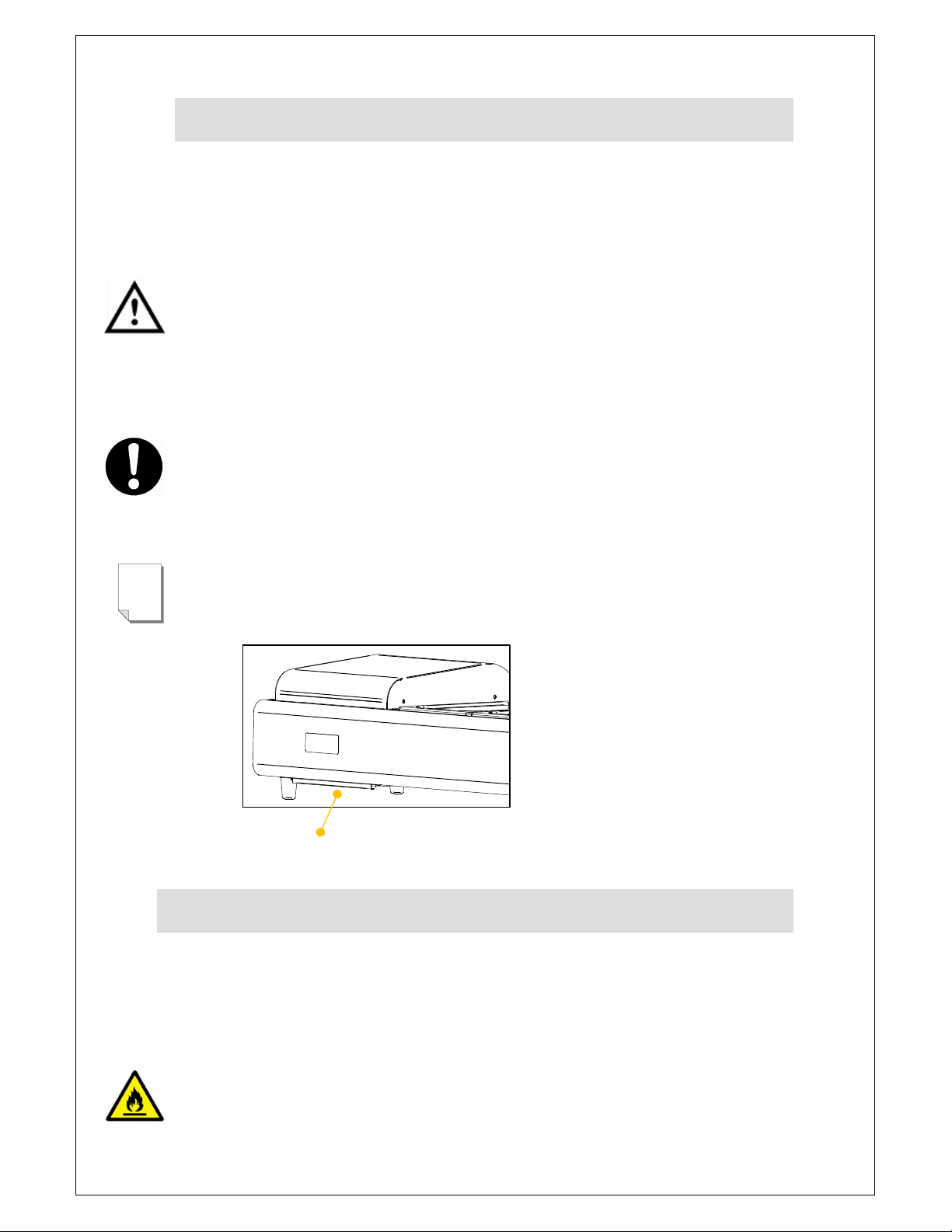
For best performance you should clean the filter weekly (see Picture 1). Slide
out; use a soft brush to remove particles and replace. Do not place the filter in
water.
FILTER
END OF LIFE DISPOSAL
At the end of its useful life the unit must be disposed of correctly and safely,
to meet the requirements of EU legislation regarding the recovery of ozone
depleting substances. The unit must be sent to a specialist recovery,
recycling and disposal site that is licenced for the disposal of refrigerated
equipment.
Warning
The refrigerant used in this unit is R600a and is flammable.
IS804 ECN4755
Page 7 of 8
Page 8
SERVICE INFORMATION
For help with the installation, maintenance and use of your Lincat equipment,
please contact our service department:
UK: 01522 875520
For non-UK customers, please contact your local Lincat dealer
All service work, other than routine cleaning should be carried out by one of our
authorised service agents. We cannot accept responsibility for work carried out
by other persons.
To ensure your service enquiry is handled as efficiently as possible, please tell
us:
• Brief details of the problem
Product code
Type number
Serial number
Lincat reserve the right to carry out any work under warranty, given reasonable
access to the appliance, during normal working hours, Monday to Friday, 08:30
to 17:00.
GUARANTEE
This unit carries a comprehensive UK mainland 2 year warranty. The guarantee
is in addition to, and does not diminish your statutory or legal rights.
The guarantee does not cover:
• Accidental damage, misuse or use not in accordance with the
manufacturer’s instructions
• Consumable items (such as filters, glass, bulbs, slot toaster elements and
door seals.)
• Damage due to incorrect installation, modification, unauthorised service
work or damage due to scale, food debris build-up, etc.
The manufacturer disclaims any liability for incidental, or consequential damages.
Attendance is based on reasonable access to the appliance to allow the
authorised technician to carry out the warranty work.
Service calls to equipment under warranty will be carried out in accordance with
the conditions of sale. Unless otherwise specified, a maximum of 15 minutes of
administrative time, not spent directly carrying out servicing work, is provided for
within the warranty. Any requirement for staff attending the call to spend greater
time than 15 minutes due to administrative requirements, such as on health and
safety risk assessments, will be chargeable at the prevailing rate.
IS804 ECN4755
Page 8 of 8
 Loading...