

Page 1
Page 1 of 28
LINAK.COM/DESKLINE
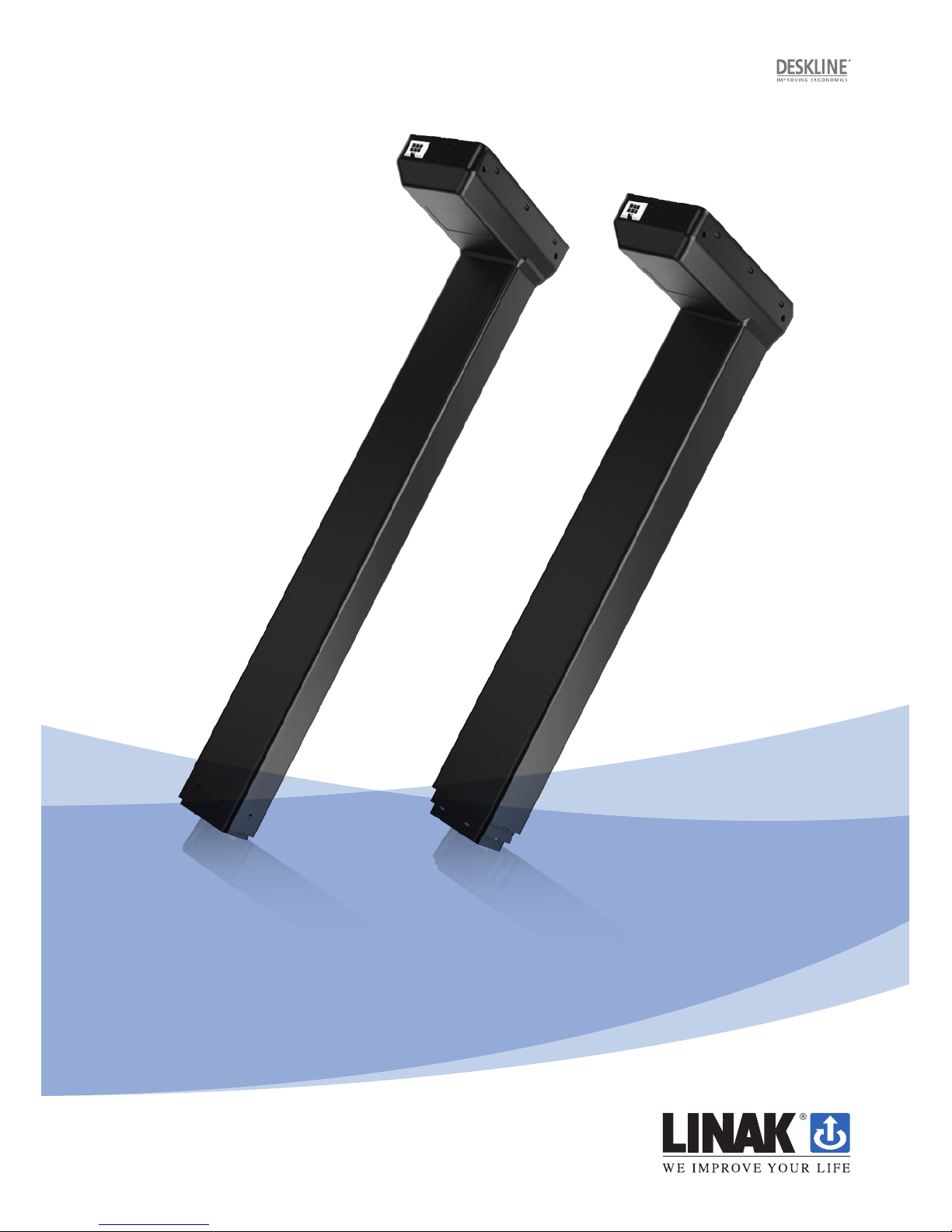
DL15/DL16 system
User manual
Page 2

Page 2 of 28
Contents
Preface ........................................................................................................................................... 4
Valid for ........................................................................................................................................... 5
Important information .................................................................................................................. 6
Safety instructions ......................................................................................................................... 5
General ...................................................................................................................................... 5
Before installation, reinstallation or troubleshooting .................................................................... 6
Before start-up ........................................................................................................................... 6
During operation ......................................................................................................................... 6
Misc. .......................................................................................................................................... 6
Only for EU markets ....................................................................................................................... 7
Only for Non EU markets .............................................................................................................. 7
Misuse ........................................................................................................................................... 7
Repairs ........................................................................................................................................... 8
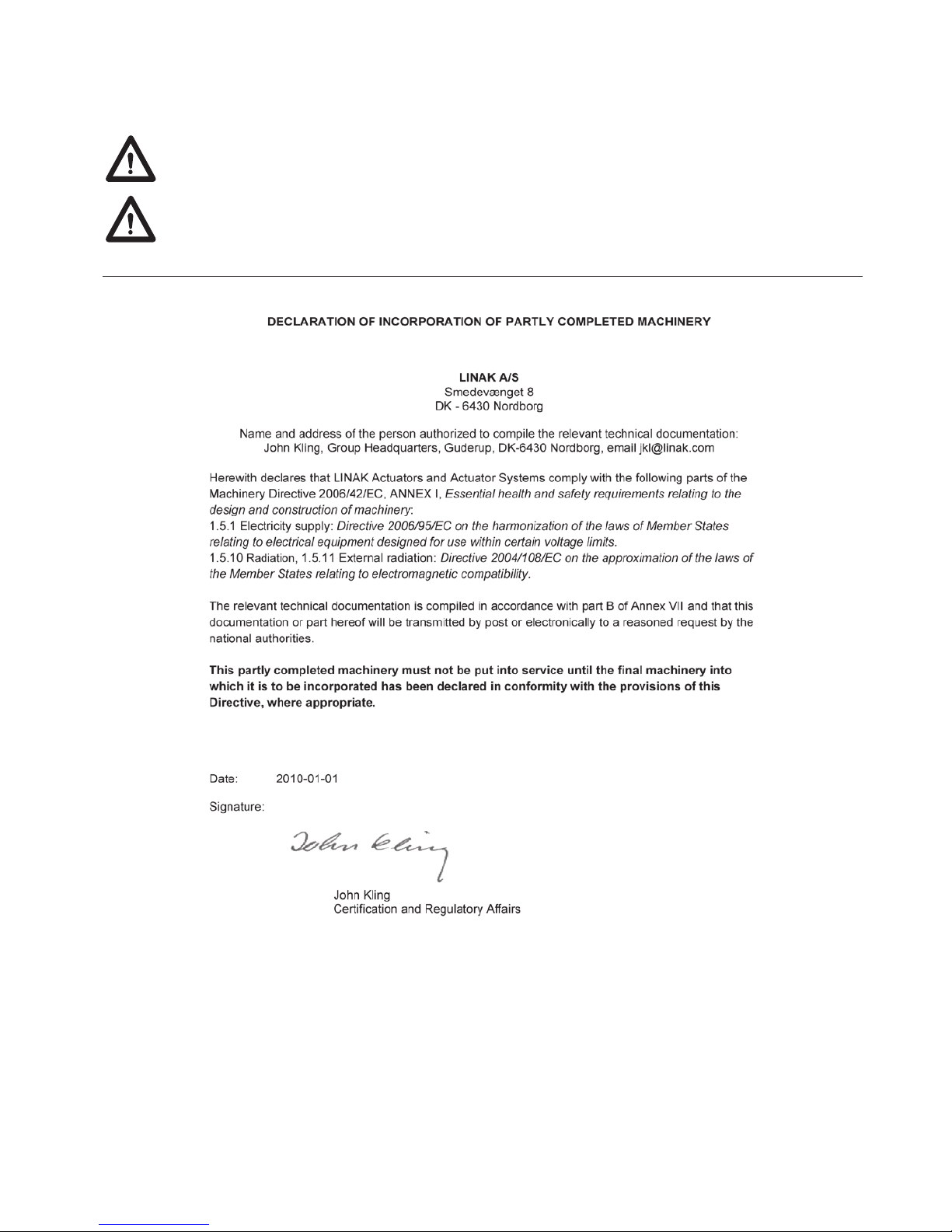
Manufacturer’s declaration........................................................................................................... 8
Misc. on the DESKLINE
®
DL15/DL16 system ............................................................................... 9
Warranty..................................................................................................................................... 9
Maintenance............................................................................................................................... 9
Description of the DESKLINE
®
DL15/DL16 system ................................................................... 10
Mounting guidelines for the DESKLINE
®
DL15/DL16 system ....................................................11
Mounting guidelines for the DL15 (foot part) .............................................................................. 12
Mounting guidelines for the DL16 (foot part) .............................................................................. 12
Mounting of the desk (misc.) ...................................................................................................... 13
Mounting guidelines CBD4/CBD5/CBD6 ................................................................................... 15
Electrical connection of the DL15/DL16 system ....................................................................... 16
Initialisation of the DESKLINE
®
DL15/DL16 parallel system ..................................................... 17
Accessories and repair ................................................................................................................. 18
Disposal of LINAK products ......................................................................................................... 19
Labels ........................................................................................................................................... 20
Drawing appendix ......................................................................................................................... 21
Declaration of confirmity .............................................................................................................. 26
Addresses ........................................................................................................................................ 28
Page 3

Page 3 of 28
Preface
Dear User,
We are delighted that you have chosen a product from LINAK®.
LINAK systems are high-tech products based on many years of experience in the manufacture and development
of actuators, electric control boxes, controls and chargers.
This User Manual does not address the end-user. It is intended as a source of information for the manufacturer
of the equipment or system only, and it will tell you how to install, use and maintain your LINAK electronics. It
is the responsibility of the manufacturer of the end-use product to provide a User Manual where relevant safety
information from this manual is passed on to the end-user.
We are sure that your LINAK product/system will give you many years of problem-free operation.
Before our products leave the factory they undergo full function and quality testing. Should you nevertheless
experience problems with your LINAK product/system, you are always welcome to contact your local dealer.
LINAK subsidiaries and some distributors situated all over the world have authorised service centres, which are
always ready to help you.
LINAK provides a warranty on all its products. This warranty, however, is subject to correct use in accordance
with the specifications, maintenance being done correctly and any repairs being carried out at a service centre,
which is authorised to repair LINAK products.
Changes in installation and use of LINAK products/systems can affect their operation and durability. The
products are not to be opened by unauthorised personnel.
The User Manual has been written based on our present technical knowledge. We are constantly working on
updating the information and we therefore reserve the right to carry out technical modifications.
LINAK A/S
Page 4

Page 4 of 28
Valid for:
This User Manual is valid for the following products:
(See the first 3 - 5 characters on the label)
Columns: DL15 / DL16
Control boxes: CBD4 / CBD5 / CBD6
Controls: DP1U / DPF1M (if memory function is required)
DP1C / DPT / DPF1C / DP1CS (if memory function and display are required) or
DPA / DPB / DPH / DP1K / DP1V / DPF1K (if only up/down is required)
DPF1D (if display is required)
Page 5
Page 5 of 28
Safety instruction
General
Important information
Important information on LINAK
®
products can be found under the following
headings:
Warning!
Failure to comply with these instructions may result in accidents involving
serious personal injury.
Failing to follow these instructions can result in the product being damaged
or being destroyed.
Safe use of the system is possible only when the operating instructions are read
completely and the instructions contained are strictly observed.
Failure to comply with instructions marked with the ”NOTE” symbol may result in
serious damage to the system or one of its components.
It is important for everyone who is to connect, install, or use the systems to
have the necessary information and access to this User Manual. Follow the
instructions for mounting – risk of injury if these instructions are not followed.
The appliance is not intended for use by young children or infirm persons
without supervision.
If there is visible damage on the product it must not be installed.
Note that during construction of applications, in which the actuator is to
be fitted, there must be no possibility of personal injury, for example the
squeezing of fingers or arms.
Assure free space for movement of application in both directions to avoid
blockade.
Page 6

Page 6 of 28
Before installation, re-installation, or troubleshooting:
• Stop the DL15/DL16
• Switch off the power supply and pull out the mains plug.
• Relieve the DL15/DL16 of any loads, which may be released during the work.
Before start-up:
• Make sure that the system has been installed as instructed in this User Manual.
• Make sure that the voltage of the control box is correct before the system is
connected to the mains.
• System connection. The individual parts must be connected before the control box
is connected to the mains. See the User Manual for LINAK actuators, if necessary.
During operation
• If the control box makes unusual noise or smells, switch off the mains voltage
immediately.
• Take care that the cables are not damaged.
• Unplug the mains cable on mobile equipment before it is moved.
• The products must only be used in an environment, that corresponds to their IP
protection.
Misc.
The actuator system has a sound level below 55dB(A) in typical applications.
Updated manuals and declarations can always be found here:
www.linak.com/deskline
Page 7
Page 7 of 28
Only for EU markets
This appliance can be used by children aged from 8 years and above and
persons with reduced physical, sensory or mental capabilities or lack of
experience and knowledge if they have given supervision or instruction
concerning use of the appliance in a safe way and understand the hazards
involved.
Children shall not play with the appliance. Cleaning and user maintenance
shall not be made by children without supervision.
Only for Non EU markets
Persons who do not have the necessary experience or knowledge of the
product/products must not use the product/products. Besides, persons with
reduced physical, sensory or mental abilities must not use the product/products,
unless they are under surveillance or they have been thoroughly instructed in
the use of the apparatus by a person who is responsible for the safety of these
persons.
Moreover, children must be under surveillance to ensure that they do not play
with the product.
It is the operator’s responsibility to ensure that there is free space for the
application to move without risk for the operator or bystanders before
operating the application.
Misuse
Do not overload the actuators – this can cause danger of personal injury and
damage to the system.
Do not use the actuator system for lifting persons. Do not sit or stand on a
table while operating – risk of personal injury.
Do not use the system in environments other than the intended indoor use
Page 8
Page 8 of 28
Repairs
In order to avoid the risk of malfunction, all DESKLINE® repairs must only be carried out by authorised LINAK workshops or
repairers, as special tools must be used and special gaskets must be fitted. Lifting units under warranty must also be returned
to authorised LINAK workshops.
Warning!
If any of the DESKLINE
®
products are opened, there will be a risk of subsequent malfunction.
Warning!
The DESKLINE
®
systems do not withstand cutting oil.
Page 9

Page 9 of 28
Misc. on the DESKLINE® DL15/DL16 system
This system is a DESKLINE system developed for desks and for indoor use in offices. Do not use it in industrial kitchens or in
other environments that have to be cleaned with aggressive detergents.
Do not bolt the legs to the floor so that free movement is prevented. This could cause serious damage to the legs in error
situations.
Warranty - 60 months on DESKLINE
®
(NEW)
This will be valid for all DESKLINE® products produced after the 1st of May 2015.
Products produced before 1
st
of May 2015 will still be covered by 36 months.
Products used in DESKLINE application: If these products are used in another application, they will be covered by 18 months
warranty.
If there is any doubt that returned products are within the warranty period it is to be treated as if they are covered by the
warranty. We recommend that you use the date of the Control box or actuator as reference if possible. We will have our
purchase no. printed on the label.
Maintenance
Clean dust and dirt on the outside of the system at appropriate intervals and inspect them for damage and breaks.
Inspect the connections, cables, and plugs and check for correct functioning as well as fixing points.
Service of double-insulated products:
Class II
A Class II or double insulated electrical appliance is one which has been designed in such a way that it does not require a
safety connection to electrical earth (US: ground).
The basic requirement is that no single failure can result in dangerous voltage becoming exposed so that it might cause an
electric shock and that this is achieved without relying on an earthed metal casing. This is usually achieved at least in part by
having two layers of insulating material surrounding live parts or by using reinforced insulation.
There is no earthing/grounding means provided on the product, and no earthing/grounding means is to be added to the
product.
In Europe, a double insulated appliance must be labelled “Class II”, “double insulated” or bear the double insulation symbol (a
square inside another square).
Servicing a double-insulated product requires extreme care and knowledge of the system, and is to be done only by qualified
service personnel. Replacement parts for a double-insulated product must be identical to the parts they replace.
The cleaners and disinfectants must not be highly alkaline or acidic (pH value 6-8).
Page 10

Page 10 of 28
Description of the DESKLINE® DL15/DL16 system
Each DESKLINE® DL15/DL16 lifting unit is equipped with a motor and parallel/memory drive is ensured by means of software
in the CBD4/CBD5/CBD6 that also takes account of oblique load on the desk. Soft start and stop are also part of this software,
which ensures a soft start and stop when adjusting the desk.
Application of the DESKLINE
®
DL15/DL16 system:
Irrespective of the load the duty cycle 10% ~ 6 min./ hour or max. 2 min. at continuous use stated in the data sheets,
must NOT be exceeded as this will result in a superheating of the motor, the brake and the spindle nut. Exceeding the duty
cycle will result in a dramatic reduction of the life of the system.
The DESKLINE
®
DL15/DL16 system range contains the following products:
• 1 control box CBD4/CBD5/CBD6
• 1 single DL15/DL16 or 2, 3, or 4 parallel
• 1 exchangeable mains cable
• 1, 2, 3, or 4 motor cables
• 1 DP1U/DPF1M (if memory function is required) DP1C/WDPL/DPT/DPF1C/DP1CS (if memory function and display is
required) or 1 DPA/DPB/DP1K/DP1V/DPF1K (if only up/down is required) DPF1D (if display is required).
Page 11
Page 11 of 28
Mounting guidelines for the DESKLINE DL15/DL16 system
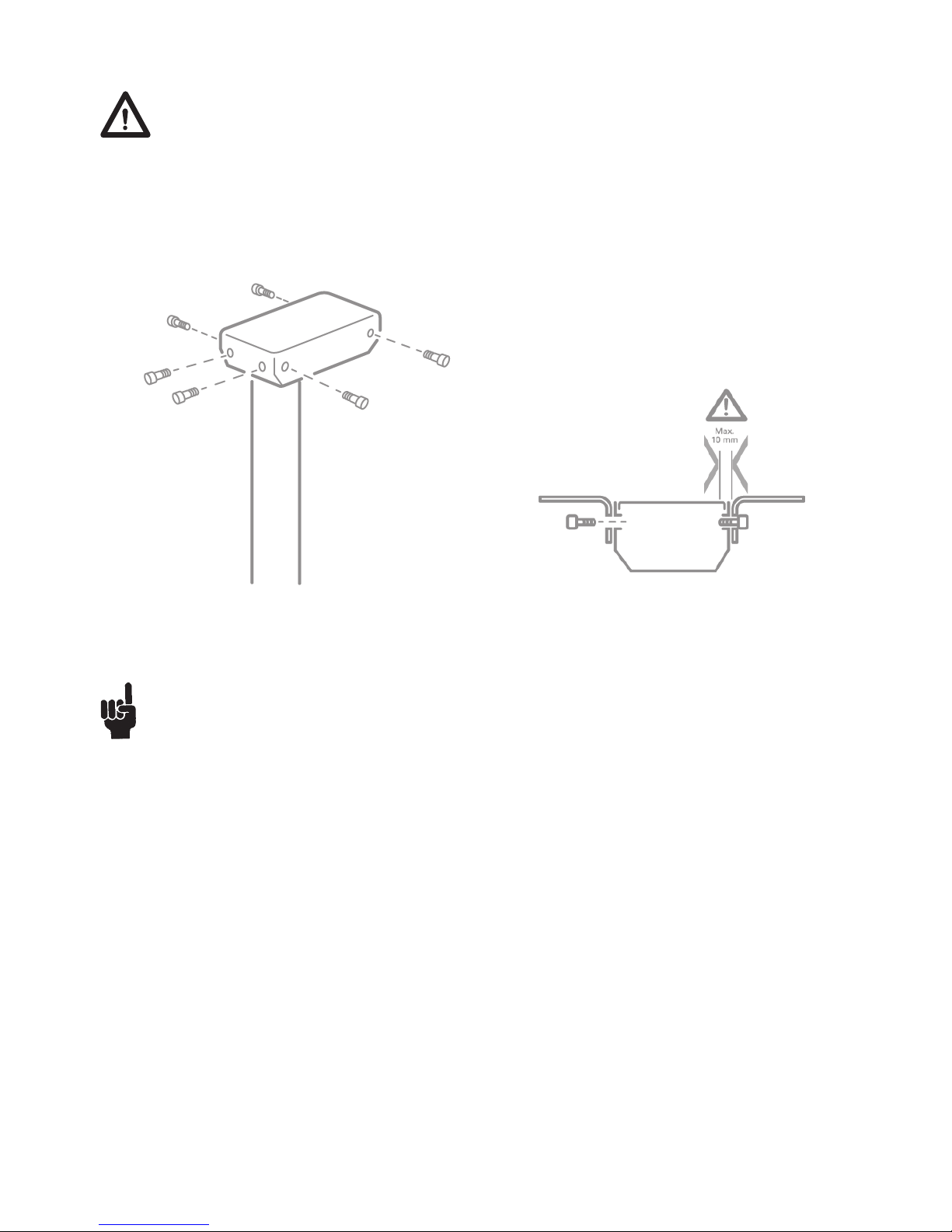
The lifting units are normally mounted with the motor housings upwards and pointing towards each other.
The steel motor housing is supplied with 6 pcs. of M6 threaded holes meant for mounting on the desk frame.
It is recommended to use all 6 pcs of M6 threaded holes. As the table top amplifies the sound we advise you to place
a vibration/shock-absorbing material between the table top and the table frame.
The motor housing is supplied with 6 pcs. of M6 threaded holes meant for mounting on the desk frame. We advise you to
fasten the desk frame by means of 6 pcs. of M6 screws of a good quality and a suitable length, which must not go further into
the motor housing than max.10 mm. The thrust moment must not exceed max. 7.5 Nm.
Use all 6 threaded mounting holes M6 for screws.
Thrust moment is 7.5Nm
DL motor housing: be aware of the screw length.
Page 12
Page 12 of 28
Mounting guidelines for the DL15 (foot part)
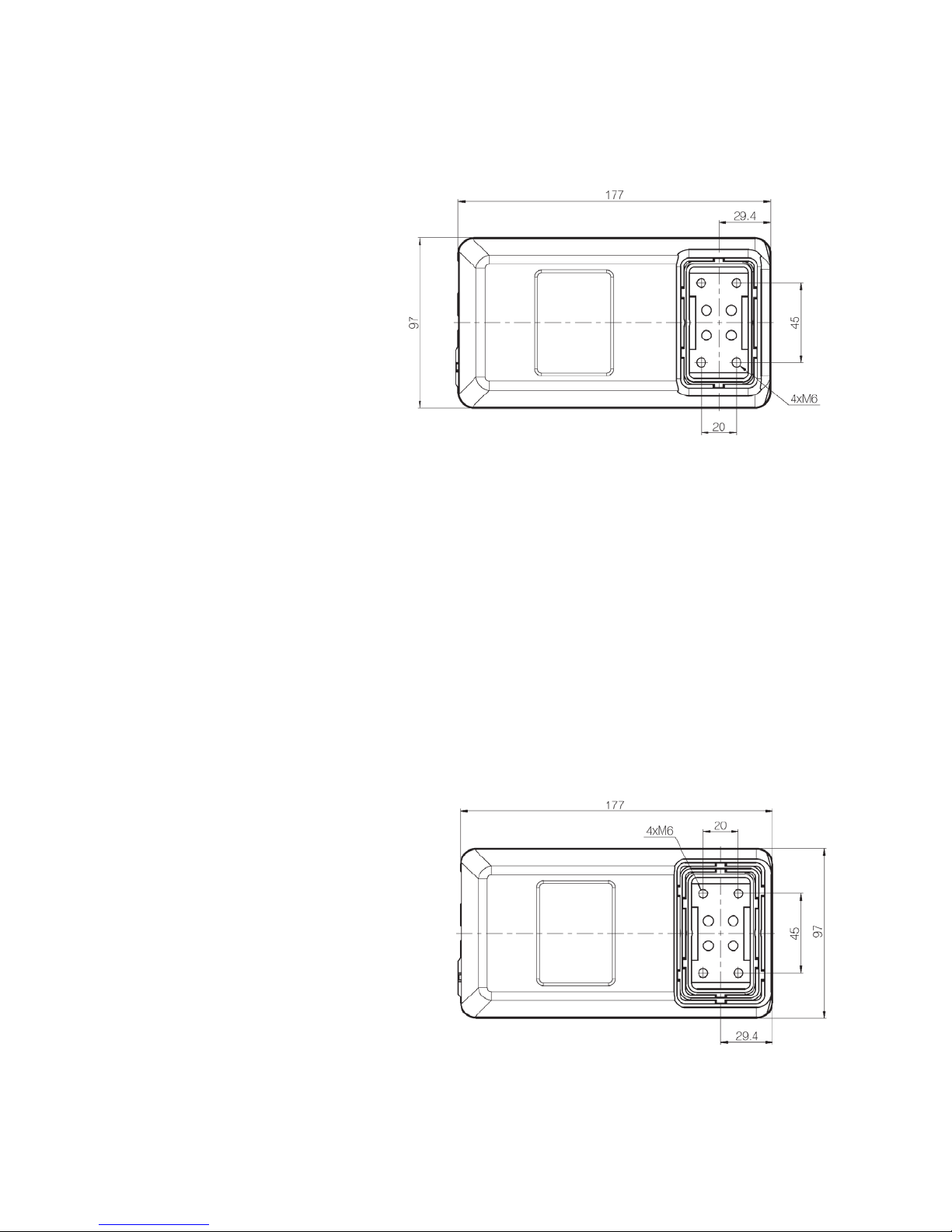
The DL15 is supplied with 4 threaded holes M6 for mounting of the foot. We advise you to fasten the foot by means of 4
screws M6 of a good quality (min. 8.8) and of a suitable length. M6 screws must not go further than 20 mm into the DL15
column. The thrust moment must not exceed 10 Nm in the bottom plate thread.
Mounting guidelines for the DL16 (foot part)
The DL16 bottom is supplied with 4 M6 threaded holes meant for mounting of the foot. We advise you to fasten the desk foot
by means of 4 pcs. M6 screws of a good quality (min. 8.8) and a suitable length. M6 screws must not go further than 20 mm
into the DL16 column. The thrust moment must not exceed 10 Nm in the bottom plate thread.
The 4 holes in the bottom of the column are
placed from each other 45/20 mm respectively.
The 4 holes in the bottom of the column are
placed from each other 45/20 mm respectively.
Page 13
Page 13 of 28
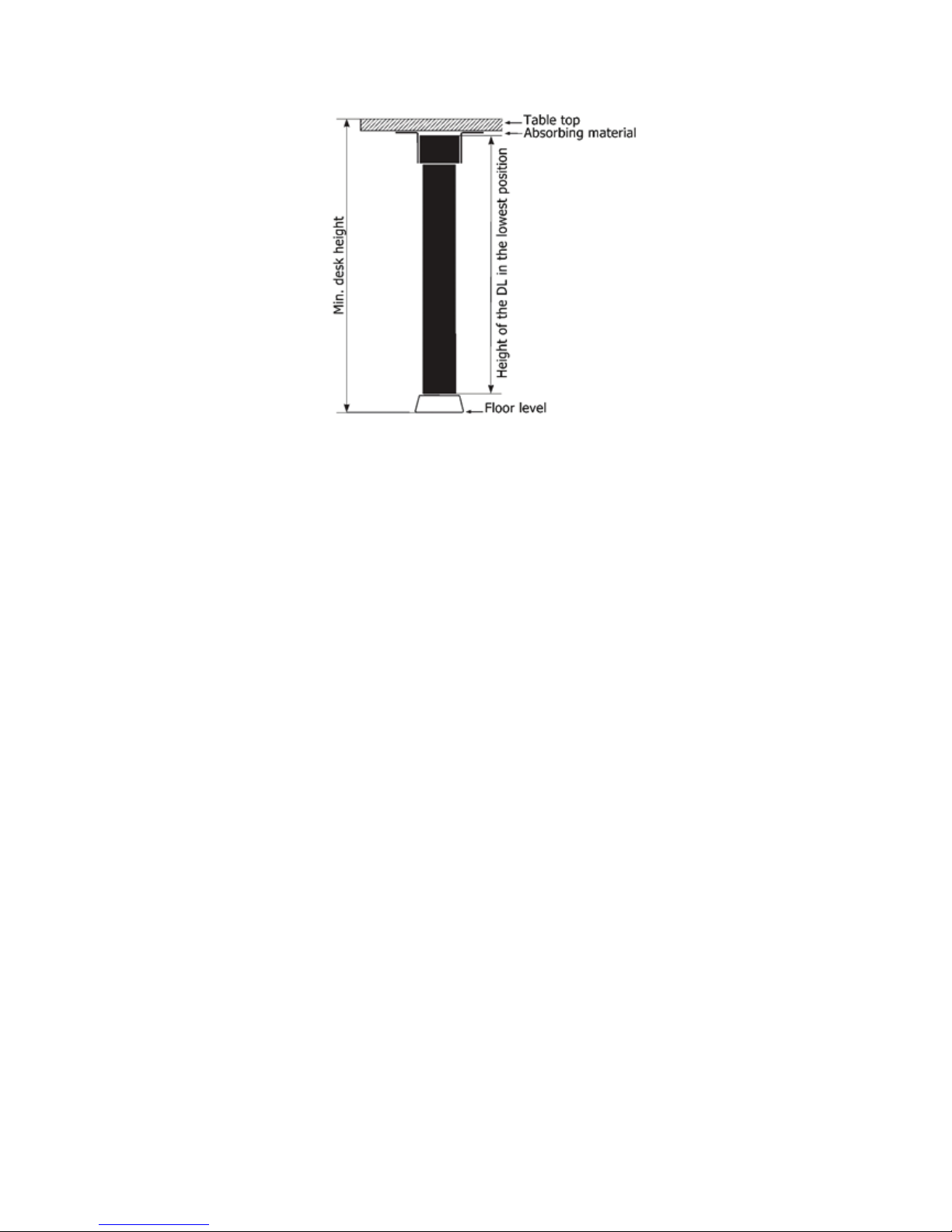
A suitable desk height in the lowest position can be obtained by mounting the lifting unit on a 6-8 mm bottom plate by means
of 4 pcs. of M6 countersinked screws. We recommend you to use screws of min. quality 8.8. The thrust moment must not
exceed 10 Nm in the bottom plate thread.
Mounting of the desk (misc.)
Page 14
Page 14 of 28
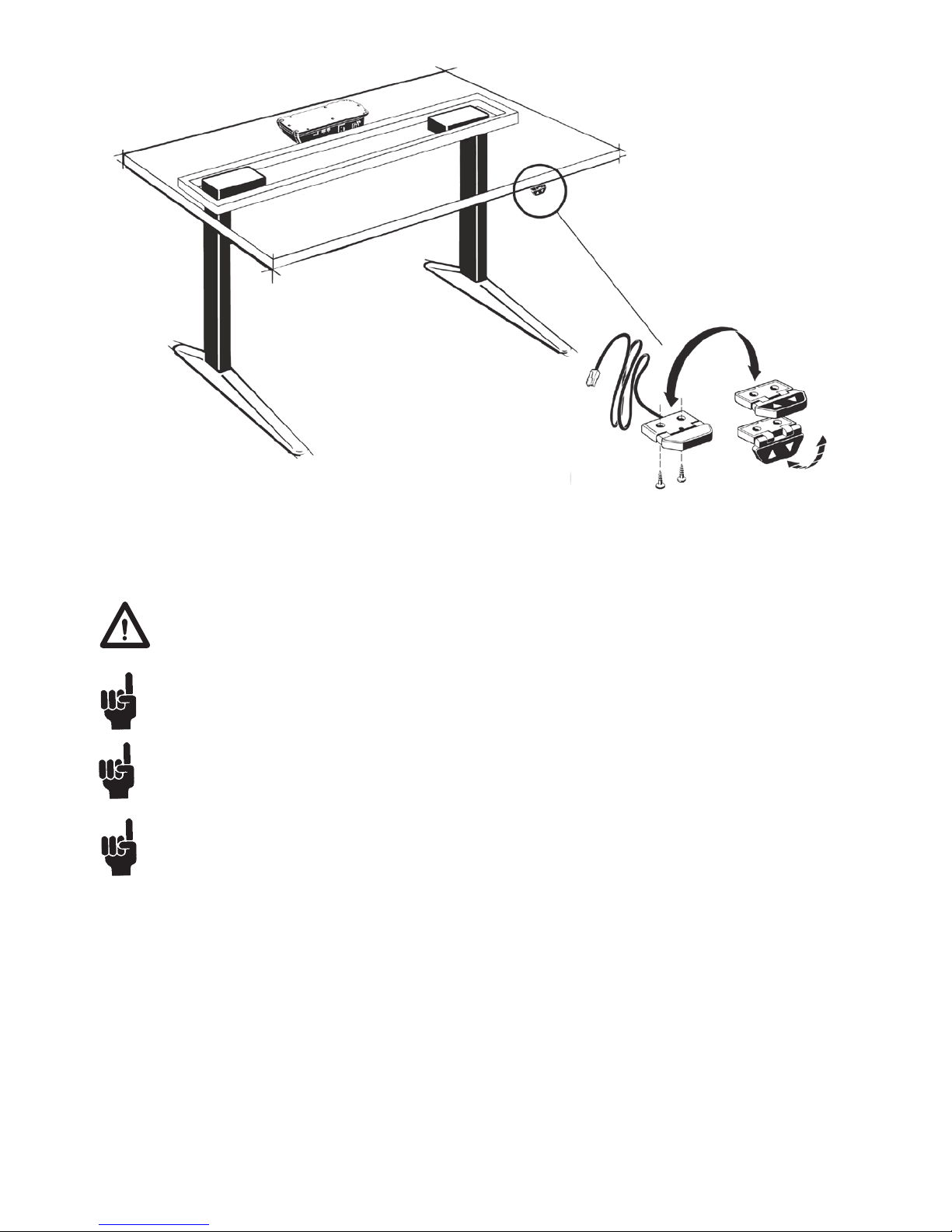
Example of how to mount a 2 parallel DESKLINE
®
DL15/DL16 system
To avoid damage of the lifting unit there must be min. 1 mm space between the end of the screw for the mounting
bracket and the surface of the lifting unit (see figure 1). The use of any longer screws will come into contact with the
inner parts. This will result in an irregular operation or even damage the lifting unit.
The DESKLINE
®
DL15/DL16 system can only be used in push applications with the motor housing mounted upwards.
Placement of a monitor directly above the motor housing may cause malfunction of the monitor. Magnets inside the
motor may interrupt the picture on the monitor depending on the distance and type of monitor. If this is the case the
problem may be solved by placing an iron plate/tube or another magnetic material, somewhat larger than the motor
housing, between the motor, and the table top.
The end stop system in the DL is based on a buffer system meaning that you must be aware of the lengths when
initialising. The products must be able to drive:
Inwards direction: built-in dimension - tolerances – 5 mm
Outwards direction: built-in dimension + stroke length + tolerances + 5 mm
Page 15
Page 15 of 28
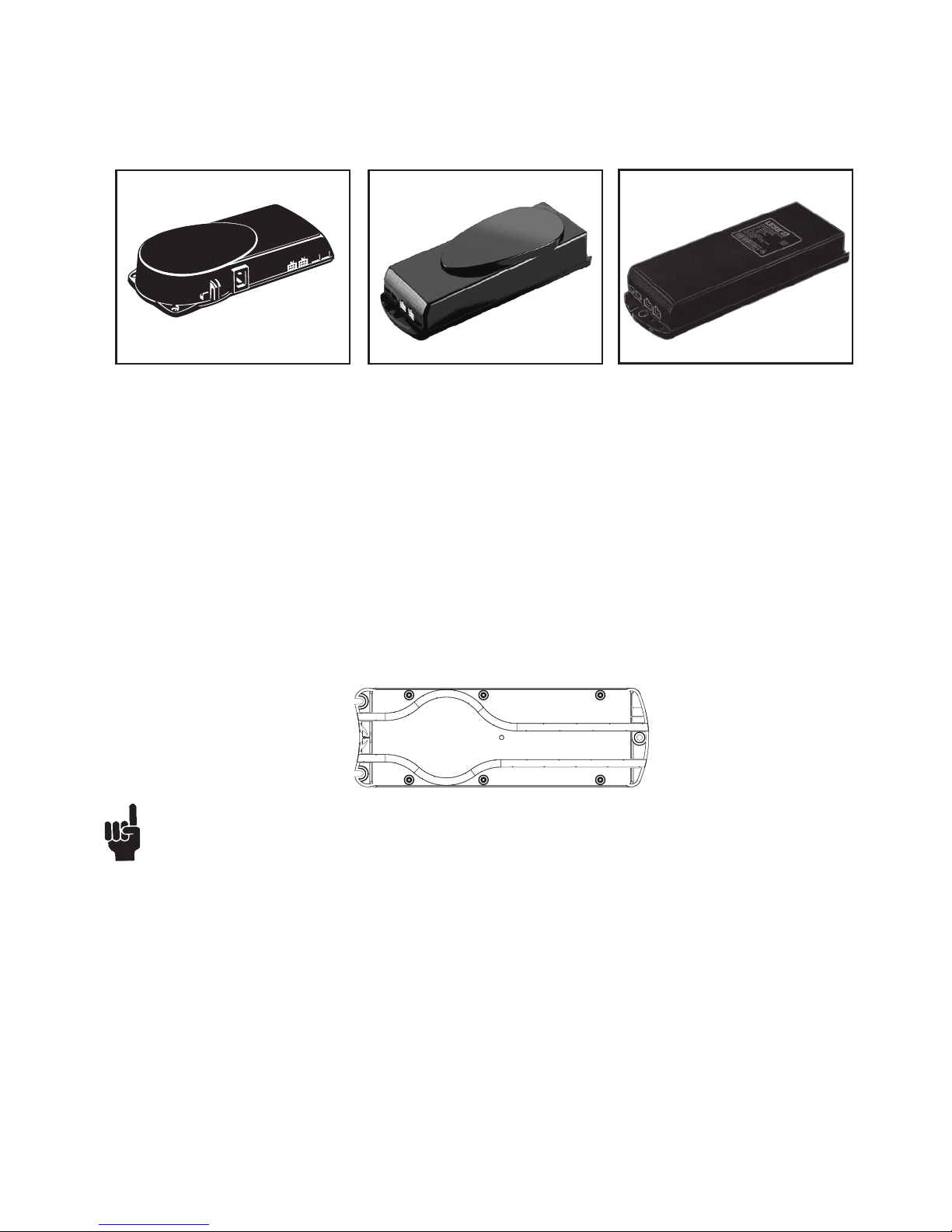
The CBD must not be packed in heat insulating material, but must be placed so that it can emit waste heat into the
surroundings. There are no ventilation holes to consider, the CBD emits heat through the surface.
The plug must be visible when the CBD is mounted so that the supply to the CBD can be disconnected at replacement, if any.
The mounting screws on the control box must be fastened with a max. torque of 1 Nm.
The mounting surface to which the control box is attached should have a surface evenness of better than ± 0.5 mm.
CBD6 - bottom with cable grooves
The bottom of CBD6 is equipped with two cable grooves improving the cable management when mounting. The grooves can
be used to bypass the CBD for both motorcables and the mains cable (EU version only) from one side to the other, giving a
cleaner design.
.
Remember to lead the cables through the grooves before mounting the control box.
For mounting and operation of the desk panel, please see the separate user manual for desk panels.
Mounting guidelines CBD4/CBD5/CBD6
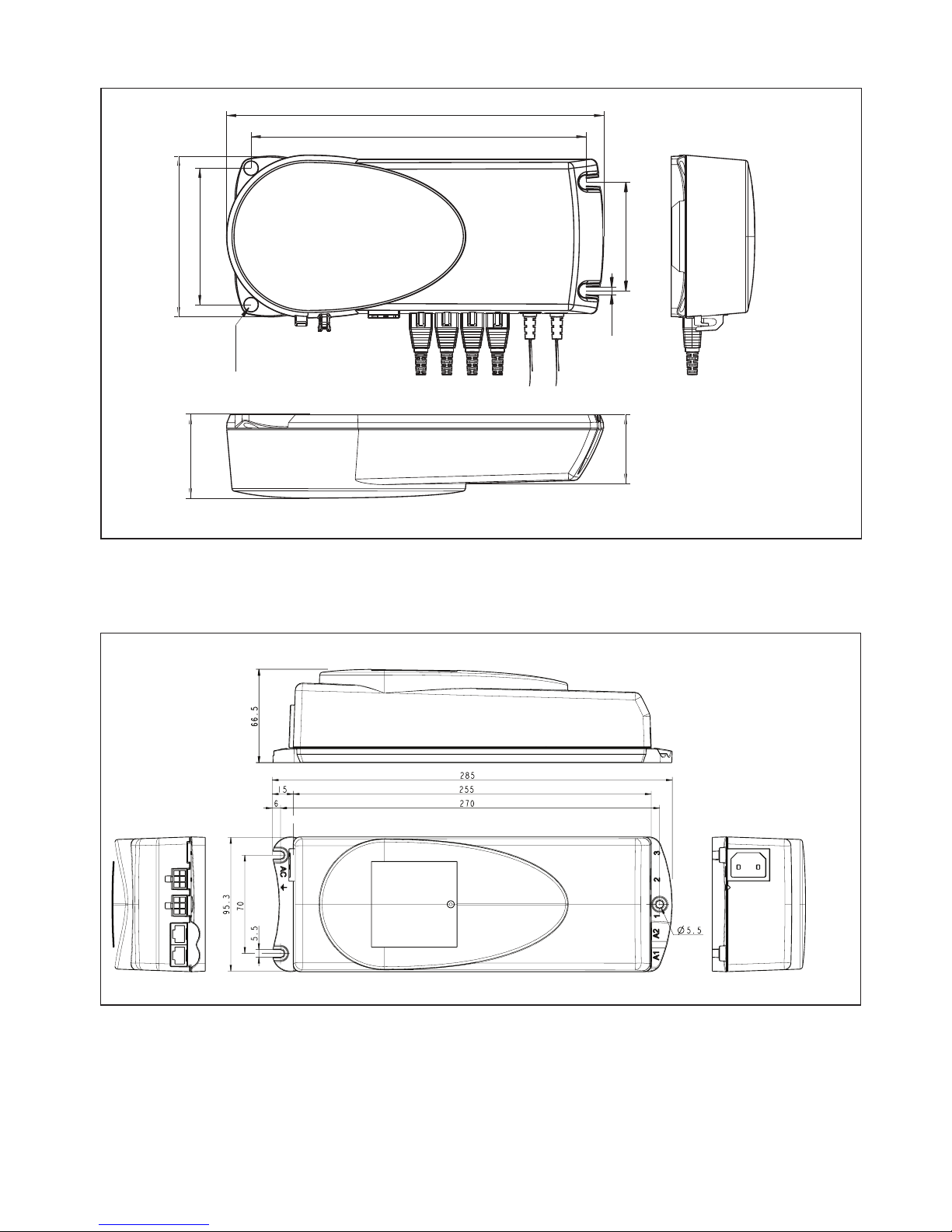
The control box is to be fastened with 4 screws (3 screws for CBD5 and CBD6) with a head diameter between ø 8 and ø
10 mm. Out of regard for the tension surface ø 10 mm is preferable due to lower surface tension. See drawing appendix for
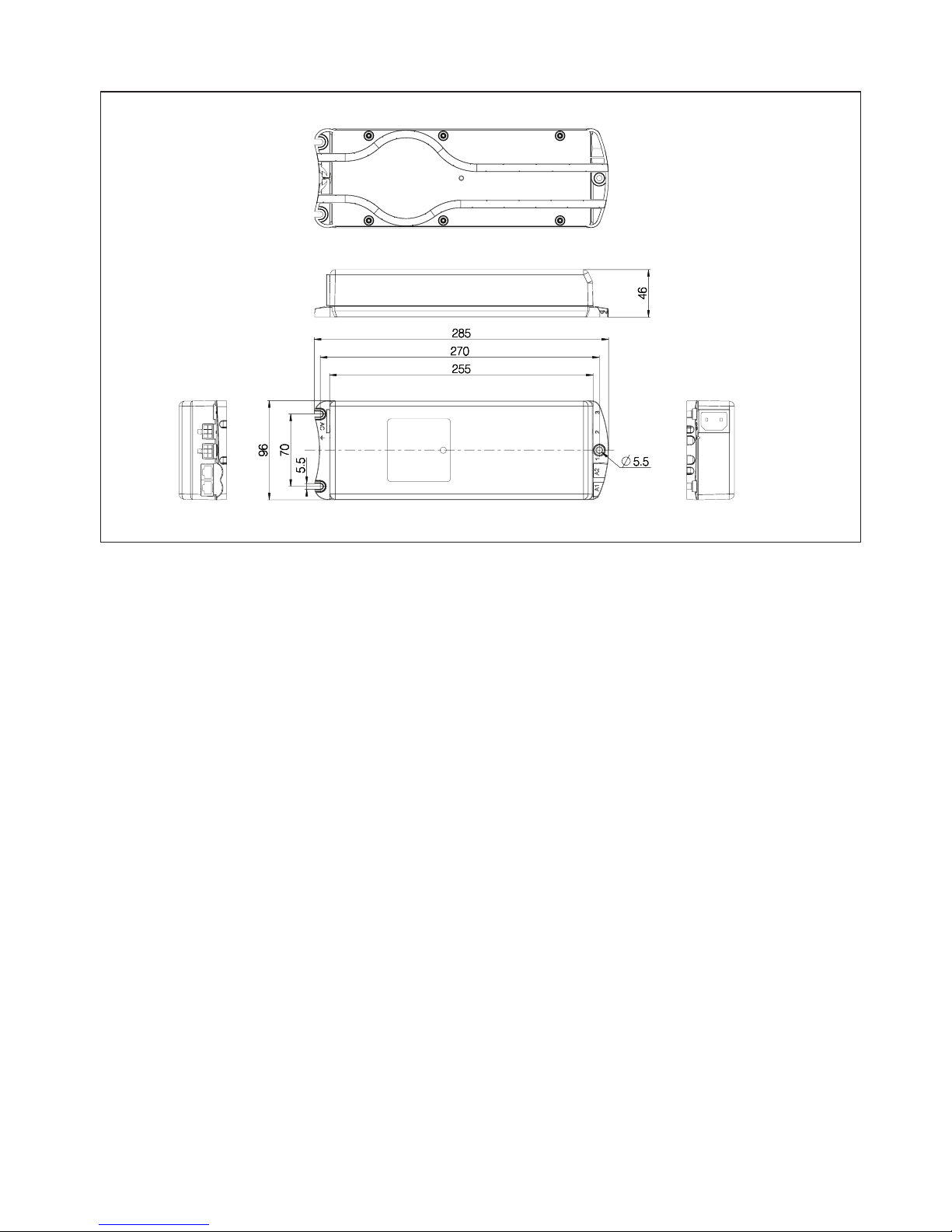
placing of mounting holes and the space the CBD takes up.
CBD4 - Control box
CBD5 - Control box
CBD6 - Control box
Page 16
Page 16 of 28
Electrical connection of the DL15/DL16 system:
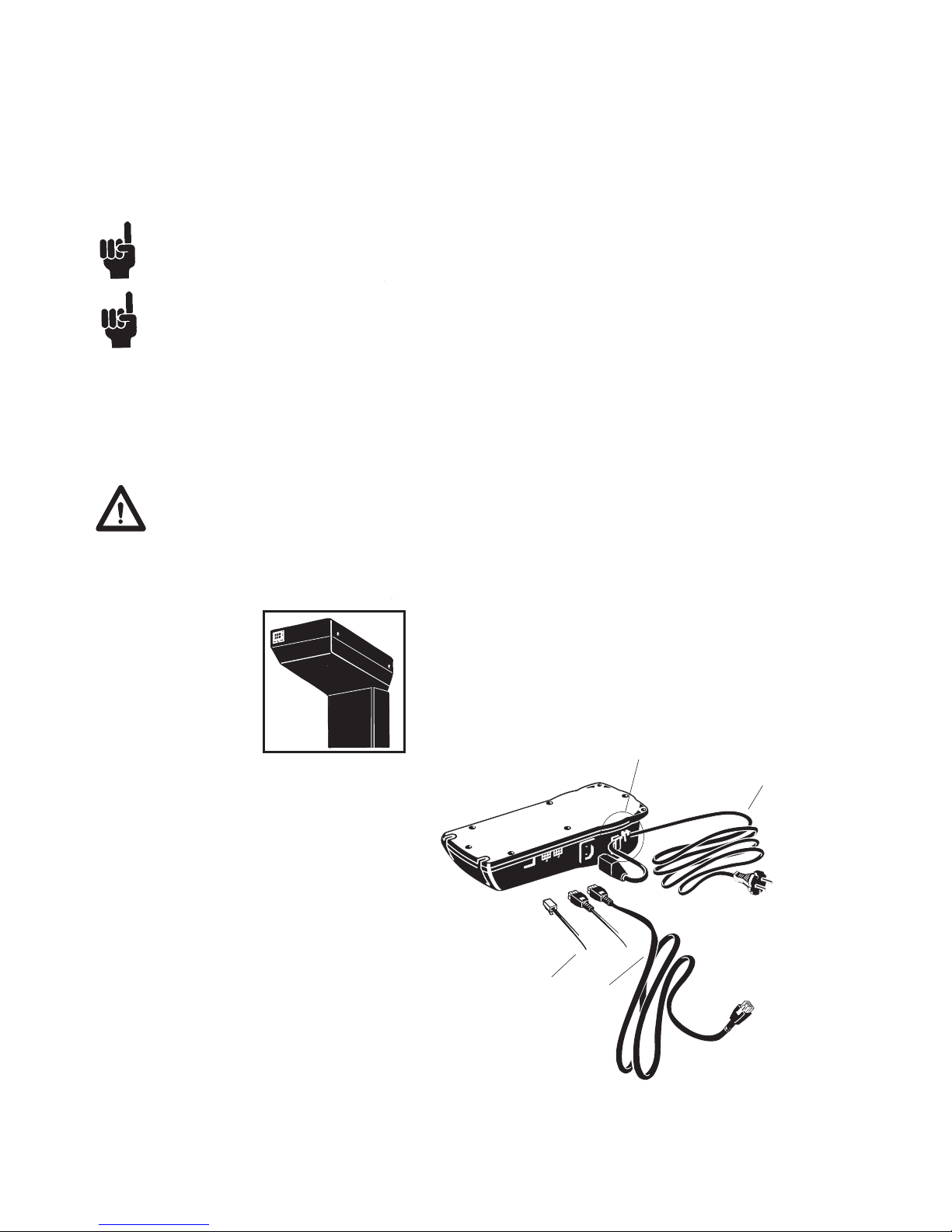
The DESKLINE® DL15/DL16 system is to be connected as shown on figure 4.
Each DL15/DL16 is to be connected to the sockets on the control box by means of the motor cables, which have an 6-pin plug
in each end.
Please note that the control box must only be connected to the voltage stated on the label.
Voltage must not be connected to the CBD4/CBD5/CBD6 until all actuators/legs have been connected. This must be
observed to ensure that the CBD4/CBD5/CBD6 can detect, which actuators/legs have been connected.
Finally, the mains cable is to be mounted and power switched on.
CBD4/CBD5/CBD6 with earth
The CBD4/CBD5/CBD6 earth cable to be mounted on the desk construction (typically the top frame)in a way that ensures good
electrical contact. The function of the earth cable is to earth the desk and ground static electricity. The earth connection does not
protect other electrical products.
CBD4/CBD5 with mains cut-off (non ZERO models)
If the power cable is damaged it has to be replaced by an authorized LINAK service centre to avoid any danger.
DP
Mains cable
DL15/DL16
Hook for cable relief
Figure 5
Figure 4
DL15/DL16
Page 17
Page 17 of 28
Initialisation of the DESKLINE DL15/DL16 parallel systems
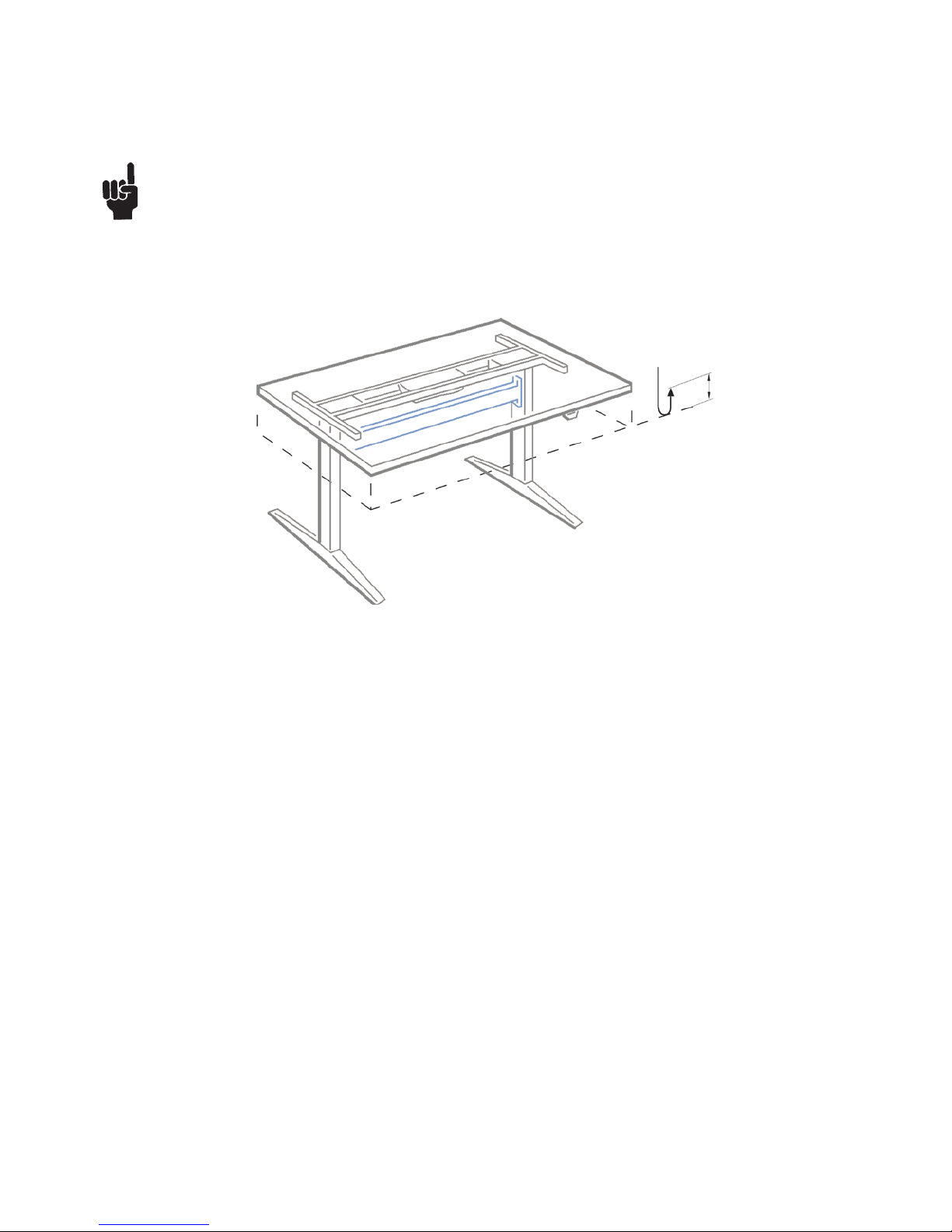
The DESKLINE system is intialised by pressing the down button once or twice and holding it down until the DL15/DL16 runs
into end stop. It will then automatically run approx. 3 mm out again and hereafter slowly run in again. Only release the down
button when the movement has completely stopped.
If the button is released before the sequence is completed then the initialisation is interrupted and must be started
again from the beginning.
It is sometimes necessary to press the down button twice to start the initialisation, this is because the system can be in
different modes when the initialisation starts.
The CBD5 and CBD6 can control DL15 and DL16 in 2 parallel while the CBD4 can control DL15 and DL16 in 2, 3, and 4
parallel so that the desk is always kept horisontal.
NEW PICTURE
Approx. 5 mm
Page 18

Page 18 of 28
Accessories and repair
Ordering accessories
Order from your nearest LINAK® dealer or subsidiary.
Accessories
Please contact your nearest LINAK dealer for information.
Repairs
Systems should only be repaired by an authorised LINAK service centre or engineer. Systems to be repaired under warranty
must be sent to an authorised LINAK service centre.
Warning!
By unauthorised opening of the system there is a risk that it may malfunction at a later date.
Spare parts
Please contact your nearest LINAK dealer for information on spare parts.
Page 19

Page 19 of 28
Main groups of disposal
Product main groups Metal scrap Cable scrap Electronics scrap Plastic recycling or
combustion
Comments
DL15/DL16 X X X X
CBD4/CBD5/CBD6 X X X X
DPXX X X X
WDPL X X X
Disposal of LINAK’s products
As LINAK’s customers often ask us how our products can be disposed or scrapped we have prepared this guidance that
enables a classification to different waste fractions for recycling or combustion.
Guidance
We recommend our products to be disassembled as much as possible and divided into different waste groups for recycling or
combustion.
For example, waste can be sorted into metals, plastics, cable scrap, combustible material, and recoverable resources.
Some of these main groups can be further divided into subgroups; e.g. metal can be divided into steel/aluminium/copper and
plastic can be divided into ABS/PA/PE/PP.
As an example, the table below breaks down the different components in LINAK products to various recycling groups:
Product Components Recycling group
Columns/ Actuator : Spindle and motor
Plastic housing
Cable
PCB boards
Scrap
Plastic recycling or combustion
Cable scrap or combustion
Electronics scrap
Control Box : PCB boards
Plastic housing
Cable
Transformer
Electronics scrap
Plastic recycling or combustion
Cable scrap or combustion
Metal scrap
Handset/Control : Plastic housing
Cable
PCB board
Plastic recycling or combustion
Cable scrap or combustion
Electronics scrap
By now almost all our casted plastic parts are supplied with an interior code for plastic type and fibre contents, if any.
Disposal of batteries
Details regarding safe disposal of used and leaking batteries:
Batteries should be disposed in accordance with appropriate federal, state and local regulations. LINAK recommends that
used or leaking batteries are disposed through local recycling system. Please do not throw used or leaking batteries in normal
household waste or in nature. This will cause damage to the enviroment.
How to deal with leaking batteries.
Leaking batteries should be disposed as described above.
If leaking batteries are discovered in the product the batteries must be removed at once to minimise damage to the product. If
leaking batteries are left in the product it might become defect.
It is recommended to use plastic gloves when handeling leaking batteries. The contents of a leaking batteries can cause
chemical burns and respiratory irritation.
If exposed to the contents of a leaking battery, please wash with soap and water. If irritation persists, please seek medical
attention. In case of eye contact, please flush eyes thoroughly with water for 15 minutes and seek medical attention."
Page 20
Page 20 of 28
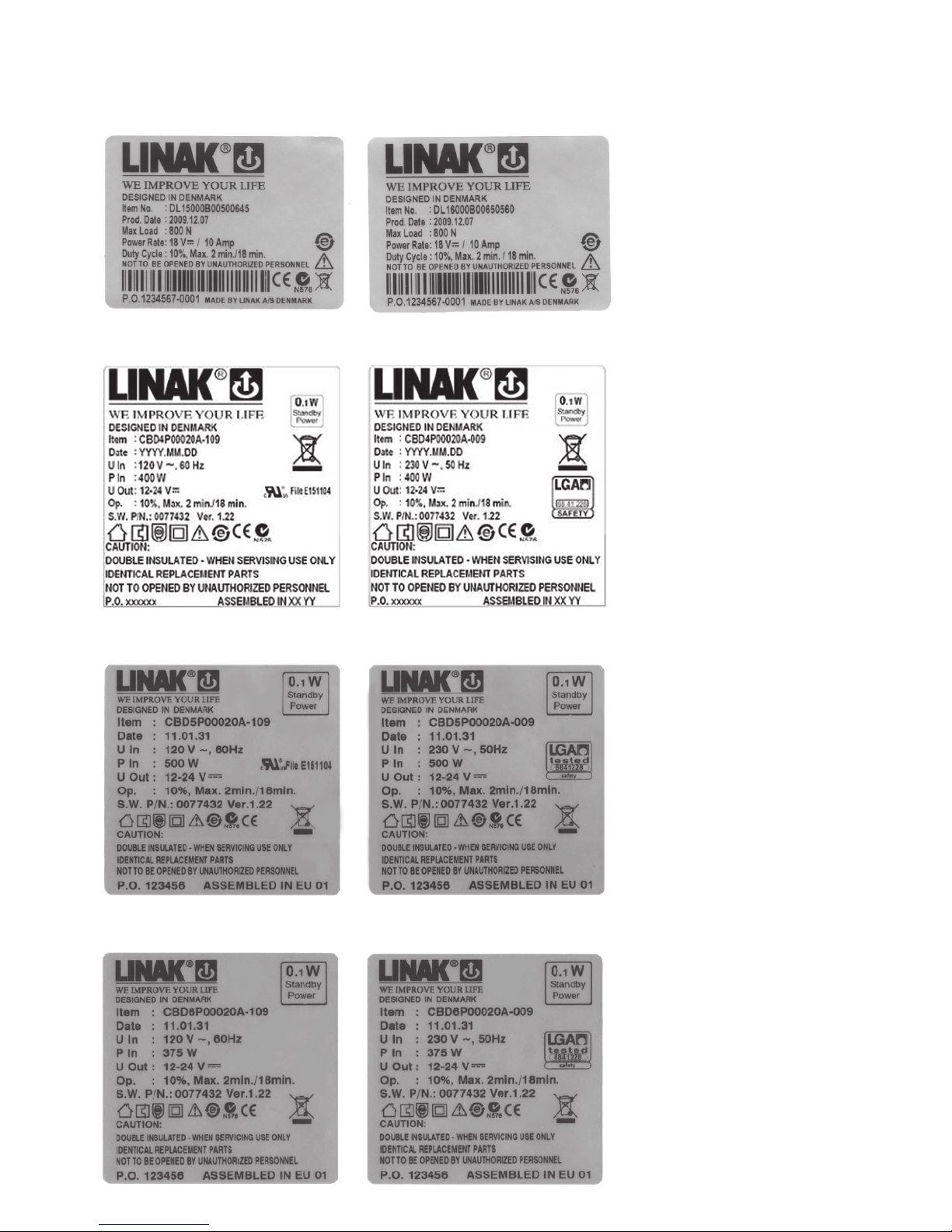
Label for DL15
Label for DL16
Label for CBD6
Label for CBD5
Label for CBD4
Labels
Page 21
Page 21 of 28
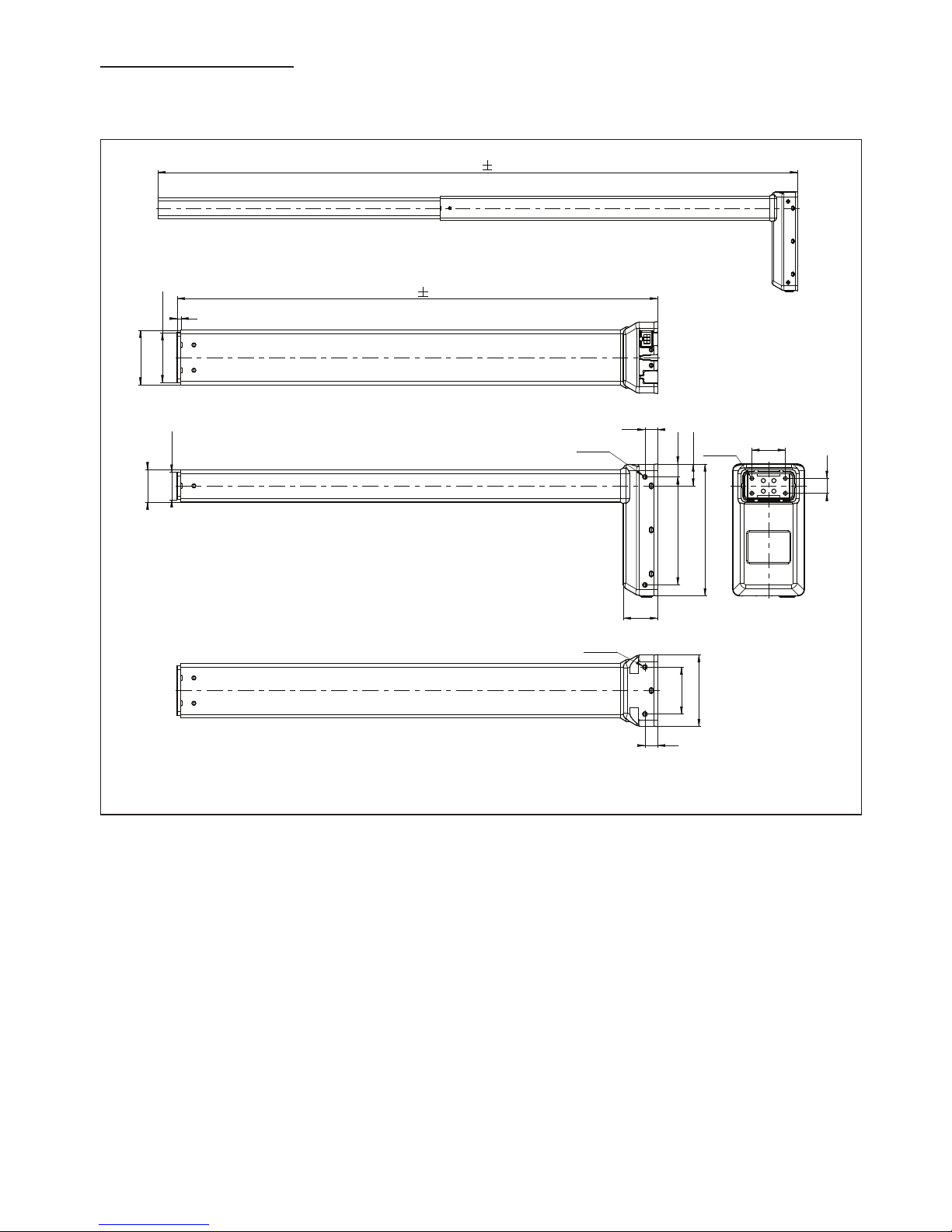
DL15 lifting unit
DRAWING APPENDIX
1145 3
645 2
67
+1
0
5
73.5
17.4
29.4
17
145
177
46
4xM6
45
20
4xM6
63
97
17
2xM6
37
+1
0
43.5
Page 22
Page 22 of 28
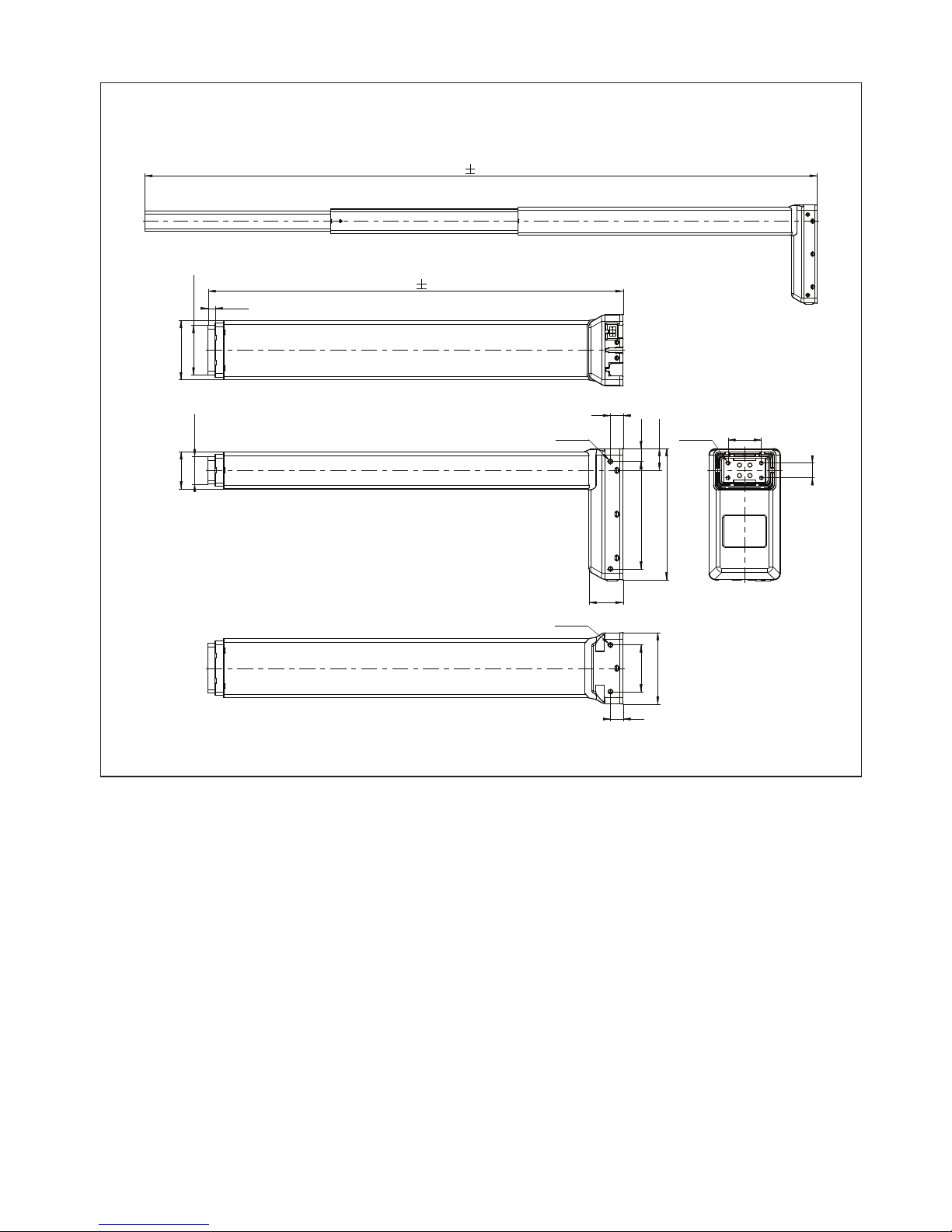
DL16 lifting unit
1210 3
560 2
29.4
17.4
17
4xM6
46
145
63
97
17
2xM6
20
45
4xM6
177
9.5
67
+1
0
80
37
+1
0
50
Page 23
Page 23 of 28
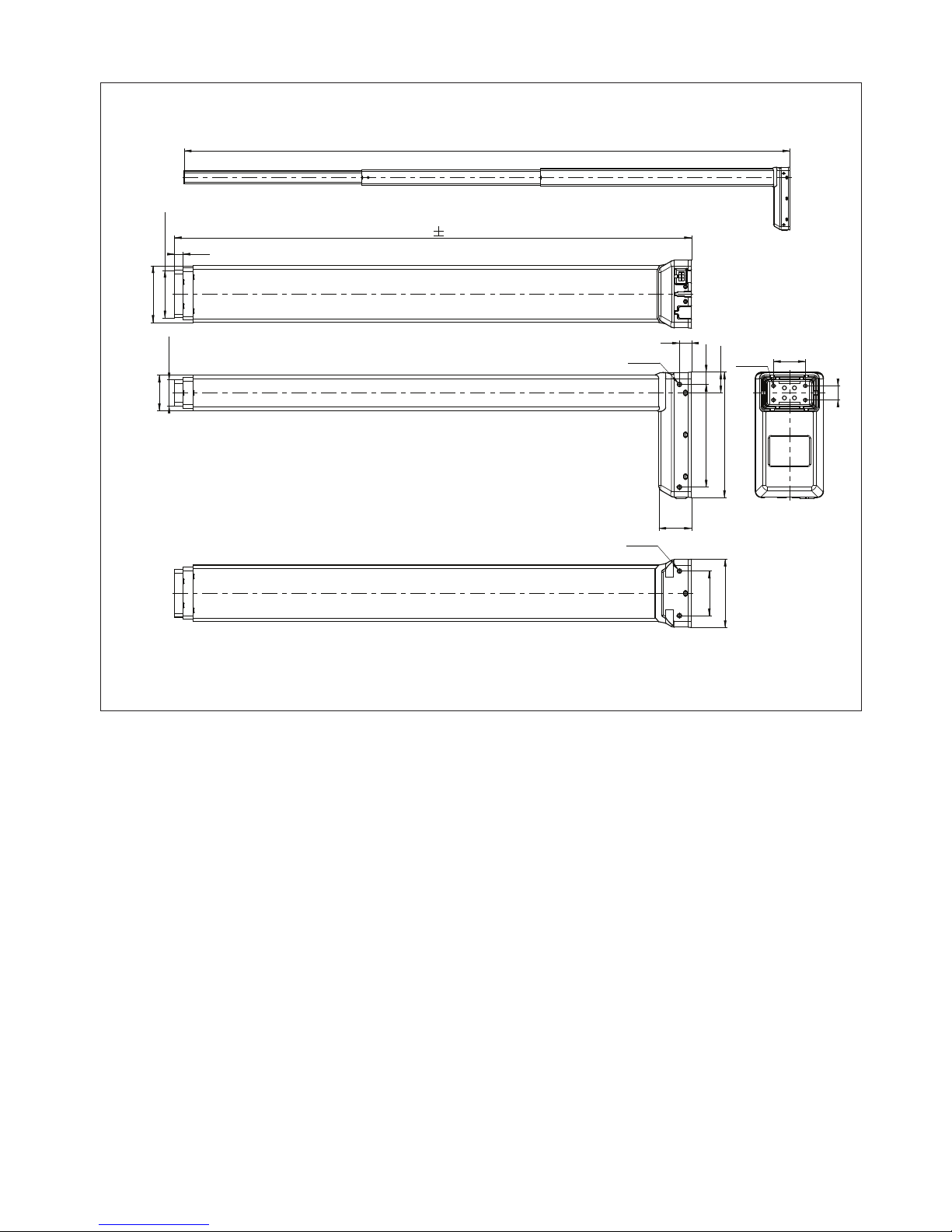
DL16 XL
Drawing No.: DL16XL_STANDARD
1710
+2
-8
730 5
46
17.4
29.4
50
37
+1
0
80
67
+1.0
-0.3
12
177
17
145
45
20
63
97
4xM6
4xM6
2xM6
Drawing No.: DL16XL_STANDARD
Page 24
Page 24 of 28
21
CBD4
3
2
1
B
A
C
B
4
278
80
100.6
119
62
51
247
5.5
5.5
CBD5
Page 25
Page 25 of 28
CBD6
Page 26
Page 26 of 28
Page 27

Page 27 of 28
LINAK APPLICATION POLICY
The purpose of the application policy is to define areas of responsibilities in relation to applying a LINAK product defined as
hardware, software, technical advice, etc. related to an existing or new customer application.
LINAK products as defined above are applicable for a wide range of applications within the Medical, Furniture, Desk and
Industry areas. Yet, LINAK cannot know all the conditions under which LINAK products will be installed, used, and operated, as
each individual application is unique.
The suitability and functionality of the LINAK product and its performance under varying conditions (application, vibration,
load, humidity, temperature, frequency, etc.) can only be verified by testing, and shall ultimately be the responsibility of the
LINAK customer using any LINAK product.
LINAK shall be responsible solely that the LINAK products comply with the specifications set out by LINAK and it shall be the
responsibility of the LINAK customer to ensure that the specific LINAK product can be used for the application in question.
Page 28

Page 28 of 28
Copyright
©
LINAK 2018.01 MA-M9-02-349-G LINAK A/S reserve the right to make technical alterations
Terms of use
The user is responsible for determining the suitability of LINAK products for specific application. LINAK takes great care in providing accurate and
up-to-date information on its products.
However, due to continuous development in order to improve its products, LINAK products are subject to frequent modifications and changes
without prior notice. Therefore, LINAK cannot guarantee the correct and actual status of said information on its products.
While LINAK uses its best efforts to fulfil orders, LINAK cannot, for the same reasons as mentioned above, guarantee the availability of any
particular product. Therefore, LINAK reserves the right to discontinue the sale of any product displayed on its website or listed in its catalogues or
other written material drawn up by LINAK.
All sales are subject to the Standard Terms of Sale and Delivery for LINAK. For a copy hereof, please contact LINAK.
FACTORIES
China
LINAK (Shenzhen) Actuator Systems, Ltd.
Tel: +86 755 8610 6656
Tel: +86 755 8610 6990
E-mail: [email protected]
www.linak.cn
Denmark - Headquarters
LINAK A/S - Group Headquarters
Tel: +45 73 15 15 15
Fax: +45 74 45 80 48
Fax (Sales): +45 73 15 16 13
E-mail: [email protected]
www.linak.com
USA
LINAK U.S. Inc.
North and South American Headquarters
User support: +1 800 392 7638
Tel: +1 502 253 5595
Fax: +1 502 253 5596
E-mail: [email protected]
www.linak-us.com
SUBSIDIARIES
Australia
LINAK Australia Pty. Ltd
Tel: +61 3 8796 9777
Fax: +61 3 8796 9778
E-mail: [email protected]
www.linak.com.au
Austria
LINAK Repräsentanz - Österreich (Wien)
Tel: +43 (1) 890 7446
Fax: +43 (1) 890 744615
E-mail: [email protected]
www.linak.at
Belgium
LINAK Actuator-Systems NV/SA
(Belgium & Luxembourg)
Tel: +32 (0)9 230 01 09
Fax: +32 (0)9 230 88 80
E-mail: [email protected]
www.linak.be - www.fr.linak.be
Brazil
LINAK DO BRASIL COMÉRCIO DE
ATUADORES LTDA.
Tel: +55 (11) 2832 – 7070
Fax: +55 (11) 2832 – 7060
E-mail: [email protected]
www.linak.com.br
C
anada
LINAK Canada Inc.
Tel: +1 502 253 5595
Fax: +1 416-255-7720
E-mail: [email protected]
www.linak-us.com
Czech Republic
Denmark - International
LINAK International
Tel: +45 73 15 15 15
Fax: +45 74 45 90 10
Fax (Sales): +45 73 15 16 13
E-mail: [email protected]
www.linak.com
Denmark - Sales
Finland
LINAK OY
Tel: +358 10 841 8700
E-mail: linak@linak.fi
www.linak.fi
France
LINAK FRANCE E.U.R.L
Tel: +33 (0) 2 41 36 34 34
Fax: +33 (0) 2 41 36 35 00
E-mail: [email protected]
www.linak.fr
Germany
India
LINAK A/S India Liaison Office
Tel: +91 120 4531797
Fax: +91 120 4786428
E-mail: [email protected]
www.linak.in
Italy
LINAK ITALIA S.r.l.
Tel: +39 02 48 46 33 66
Fax: +39 02 48 46 82 52
E-mail: [email protected]
www.linak.it
Japan
Malaysia
LINAK Actuators Sdn. Bhd.
Tel: +60 4 210 6500
Fax: +60 4 226 8901
E-mail: [email protected]
www.linak.my - www.linak.co.id
www.linak.pk - www.linak.ph
Netherlands
LINAK Actuator-Systems B.V.
Tel: +31 76 5 42 44 40
Fax: +31 76 5 42 61 10
E-mail: [email protected]
www.linak.nl
New Zealand
LINAK New Zealand Ltd
Tel: +64 9580 2071
Fax: +64 9580 2072
E-mail: [email protected]
www.linak.com.au
Norway
DISTRIBUTORS
Argentina
NOVOTEC ARGENTINA SRL
Tel: 011-4303-8989/8900
Fax: 011-4032-0184
E-mail: [email protected]
www.novotecargentina.com
Colombia
India
Mechatronics Control Equipments India Pvt Ltd
Tel: +91-44-28558484, 85
E-mail: [email protected]
www.mechatronicscontrol.com
Indonesia
PT. HIMALAYA EVEREST JAYA
Tel: +6 221 544 8956, +6 221 544 8965
Fax: +6 221 619 1925
Fax (Sales): +6 221 619 1925
E-mail: [email protected]
www.hej.co.id
Iran
Israel
Russia
Singapore
Servo Dynamics Pte Ltd
Tel: +65 6844 0288
Fax: +65 6844 0070
E-mail: [email protected]
www.servo.com.sg
South Africa
Industrial Specialised Applications CC
Tel: +27 011 466 0346
E-mail: [email protected]
www.isaza.co.za
United Arab Emirates
Poland
LINAK Polska
Tel: +48 22 295 09 70
E-mail: [email protected]
www.linak.pl
Republic of Korea
LINAK Korea Ltd.
Tel: +82-(0)2-6231-1515
Fax: +82-(0)2-6231-1516
E-mail: [email protected]
www.linak.kr
Russia
Spain
LINAK Actuadores, S.L.u
Tel: +34 93 588 27 77
Fax: +34 93 588 27 85
E-mail: [email protected]
www.linak.es
Sweden
LINAK Scandinavia AB
Tel: +46 8 732 20 00
Fax: +46 8 732 20 50
E-mail: [email protected]
www.linak.se
Switzerland
LINAK AG
Tel: +41 43 388 31 88
Fax: +41 43 388 31 87
E-mail: [email protected]
www.de.linak.ch - www.fr.linak.ch
www.it.linak.ch
Taiwan
LINAK (Shenzhen) Actuator systems Ltd.
Taiwan Representative office
Tel: +886 2 27290068
Fax: +886 2 27290096
E-mail: [email protected]
www.linak.tw
Turkey
LINAK İth. İhr. San. ve Tic. A.Ş.
Tel: + 90 312 4726338
Fax: + 90 312 4726635
E-mail: [email protected]
www.linak.com.tr
United Kingdom
LINAK UK Limited
Tel: +44 (0)121 544 2211
Fax: +44 (0)121 544 2552
E-mail: [email protected]
www.linak.co.uk
 Loading...