

Page 1
User Manual
Page 2

IMPORTANT SAFETY INSTRUCTIONS:
1. Please do not place the display screen towards the ground to avoid
scratching the LCD surface.
2. Please avoid heavy impact.
3. Please do not use chemical solutions to clean the device. Simply wipe
with a clean soft cloth to maintain the brightness of the surface.
4. Please do not block any vent hole.
5. Please unplug the power and remove the battery if long-term no-use, or
thunder weather.
6. Internal adjustments or repairs must be performed by a qualified
technician.
7. Do not place equipment or accessories with other flammable liquids, gases,
or other explosives to avoid danger.
Page 3

CONTENTS
1. PRODUCTION DESCRIPTION ................................................................................. 1
1.1. FRONT PANEL FEATURES .......................................................................................... 1
1.2. TOP PANEL FEATURES ............................................................................................... 2
2. OPERATION .............................................................................................................. 2
2.1. GETTING START ............................................................................................................ 2
2.2. MENU OPERATIONS ..................................................................................................... 2
2.3. MOUSE OPERATION ..................................................................................................... 3
3. FUNCTIONS SUMMARY .......................................................................................... 3
3.1. PATTERN .......................................................................................................................... 3
3.2. MODE ................................................................................................................................ 5
3.3. AUDIO ................................................................................................................................ 6
3.4. OPTION ............................................................................................................................. 7
3.5. System ............................................................................................................................. 12
3.6. Fn ...................................................................................................................................... 14
4. ACCESSORIES ................................................................................................... 15
5. PARAMETER ...................................................................................................... 15
5.1. Specifications .................................................................................................................. 15
5.2. Appendix 1 ...................................................................................................................... 16
5.3. Appendix 2 ...................................................................................................................... 20
Page 4
1
1. PRODUCTION DESCRIPTION
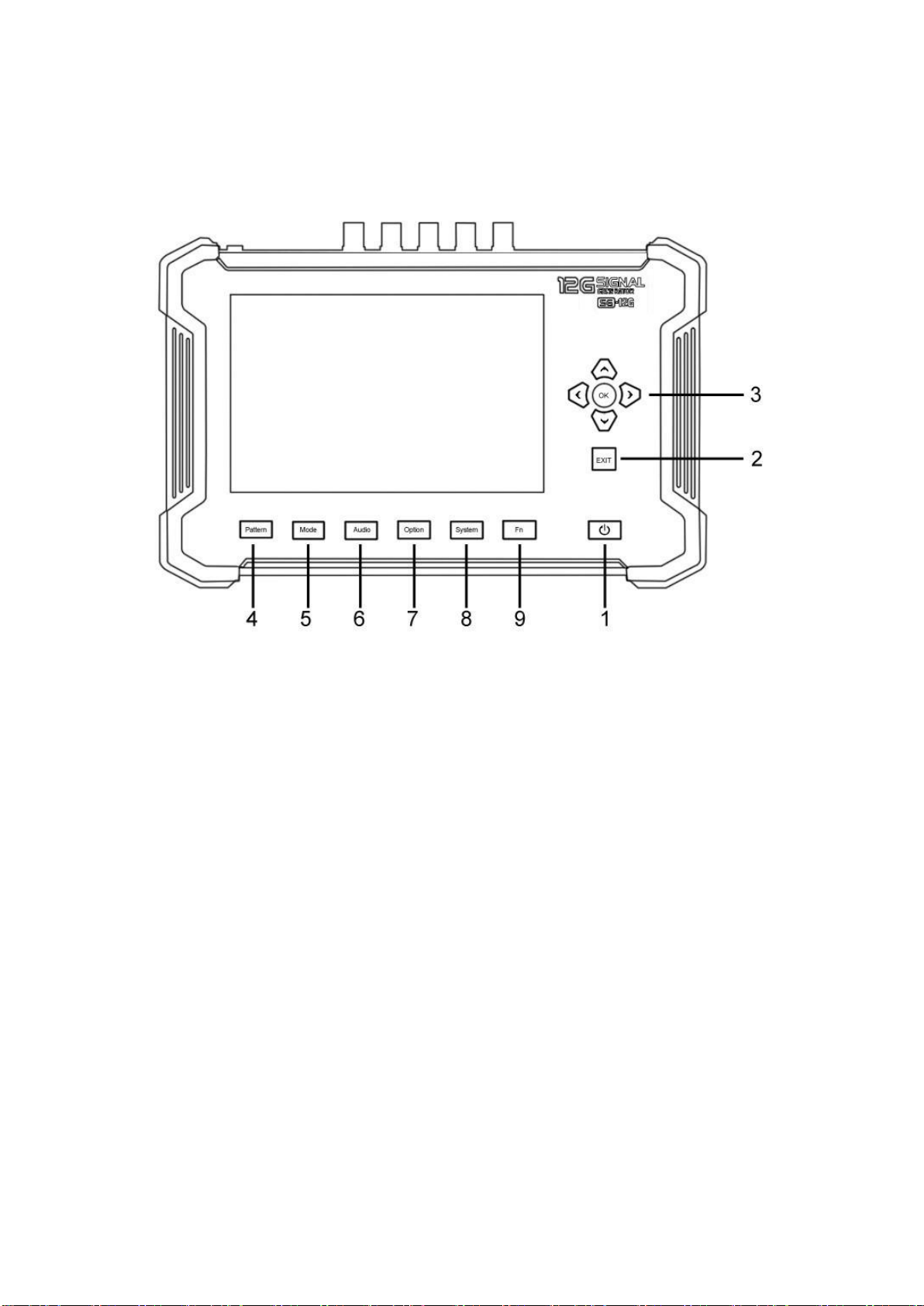
1.1. FRONT PANEL FEATURES
1. Power.
2. Exit: To return or exit.
3. Direction and OK key
4. Pattern key
5. Mode key
6. Audio key
7. Option key
8. System key
9. Fn key: Shortcut key
Page 5
2
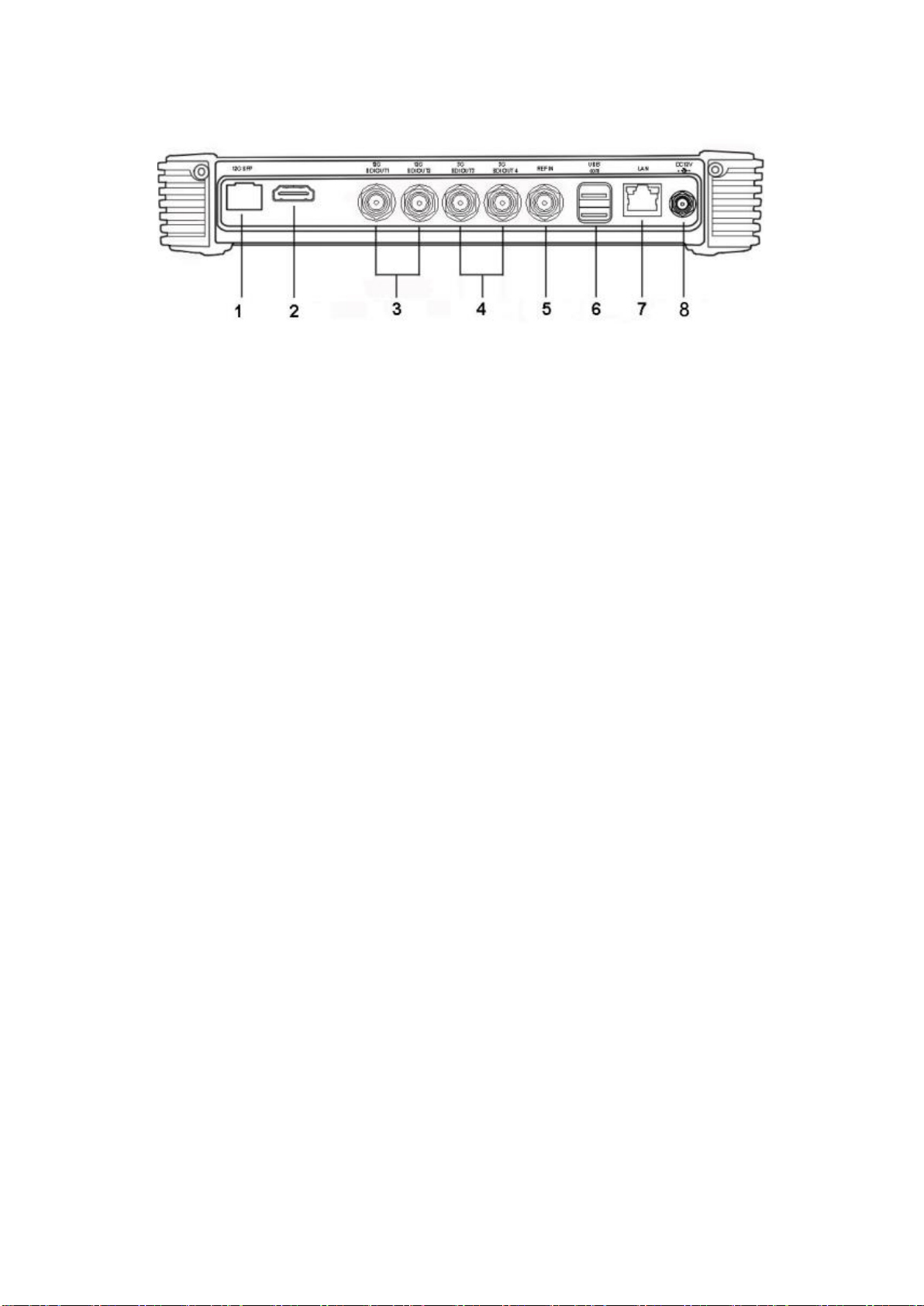
1.2. TOP PANEL FEATURES
1. 12G SFP Port
2. HDMI port
3. 12G SDI Output interface
4. 3G SDI Output interface
5. REF IN interface
6. USB and COM Port
7. LAN Port
8. DC 12V power input
2. OPERATION
2.1. GETTING START
2-1-1. Plug the power supply into the DC power input on the top panel. Long
press power key to turn the device on. The device built in 5000mAh
battery with about 2 hours working time.
2-1-2. Connect the generator to the device needs to be tested using a
standard SDI cable. It supports 2xSDI outputs up to 12G and 2xSDI
outputs up to 3G-SDI.
2-1-3. Use standard HDMI cable to connect this device with the equipment to
be tested. The device supports up to HDMI signal 4096×2160
60Hz.
2-1-4. This device supports using mouse to easy operation.
2.2. MENU OPERATIONS
This device supports two types of operations:
Page 6
3
2-2-1. KEYPAD OPERATION
Press the function option (PATTERN/MODE/AUDIO/OPTION/
SYSTEM/Fn) keys on the front panel, then press direction key to choose the
needed option, press OK key to pop up the pull-down menu, press UP/DOWN
direction key to choose and OK key to confirm. Press EXIT to exit the menu.
While input the value, press UP/DOWN direction key to choose the input box,
then press OK key to pop up the input cursor, press direction key to choose
digits on the displayed keyboard, and press OK key to confirm. Select "<" and
press OK to delete the digits. Press EXIT key to exit the input.
2.3. MOUSE OPERATION
Left click the function option (PATERN/MODE/AUDIO/OPTION/SYSTEM/Fn)
on the bottom of screen. Left click the option to pop up pull-down menu, move
the mouse to choose and left click to confirm.
While input the value, left click the input box to pop up the input cursor, move
the mouse to the digital keyboard on the screen, then left click to choose the
digits. Left click "<" to delete the digits.
3. FUNCTIONS SUMMARY
3.1. PATTERN
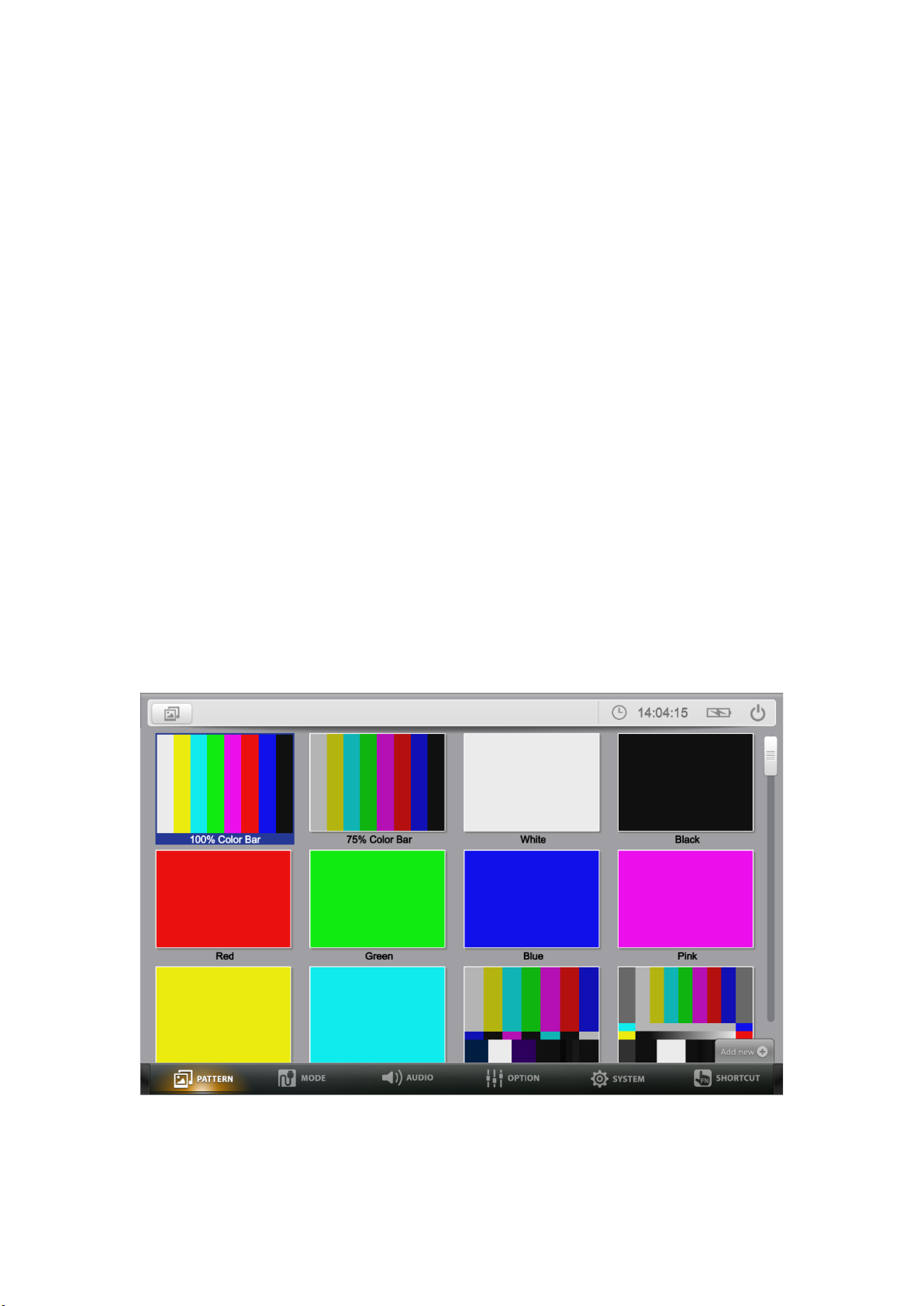
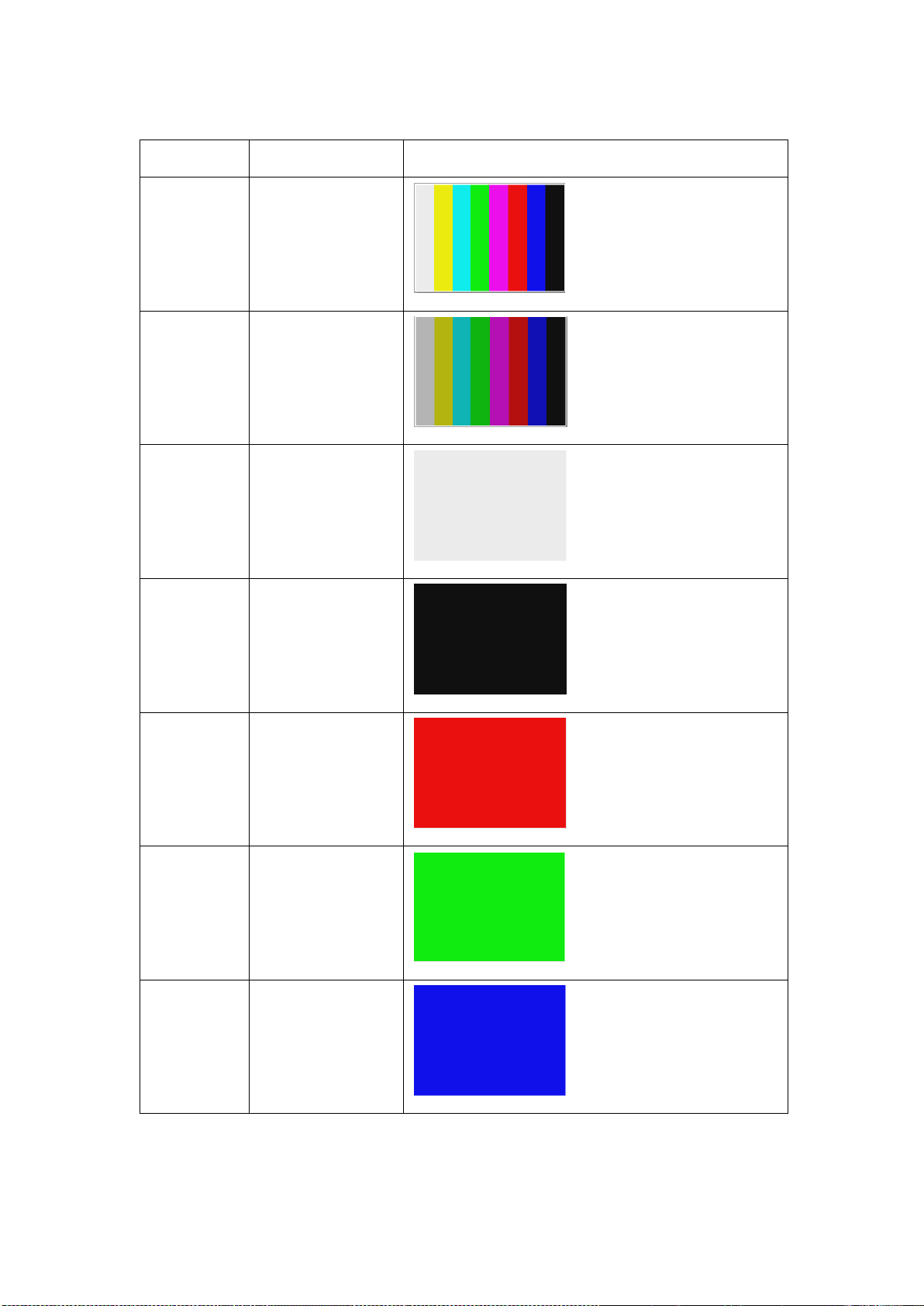
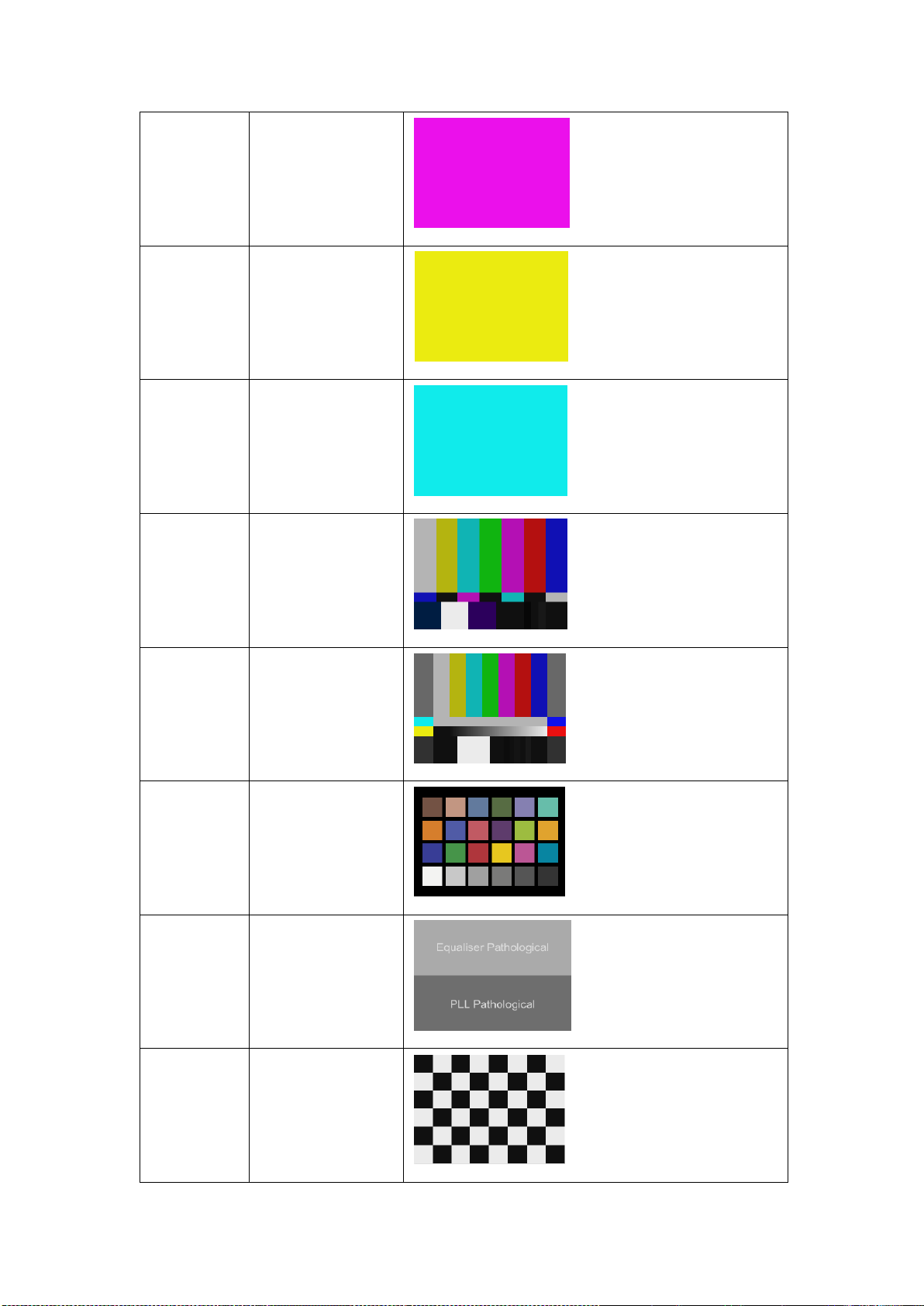
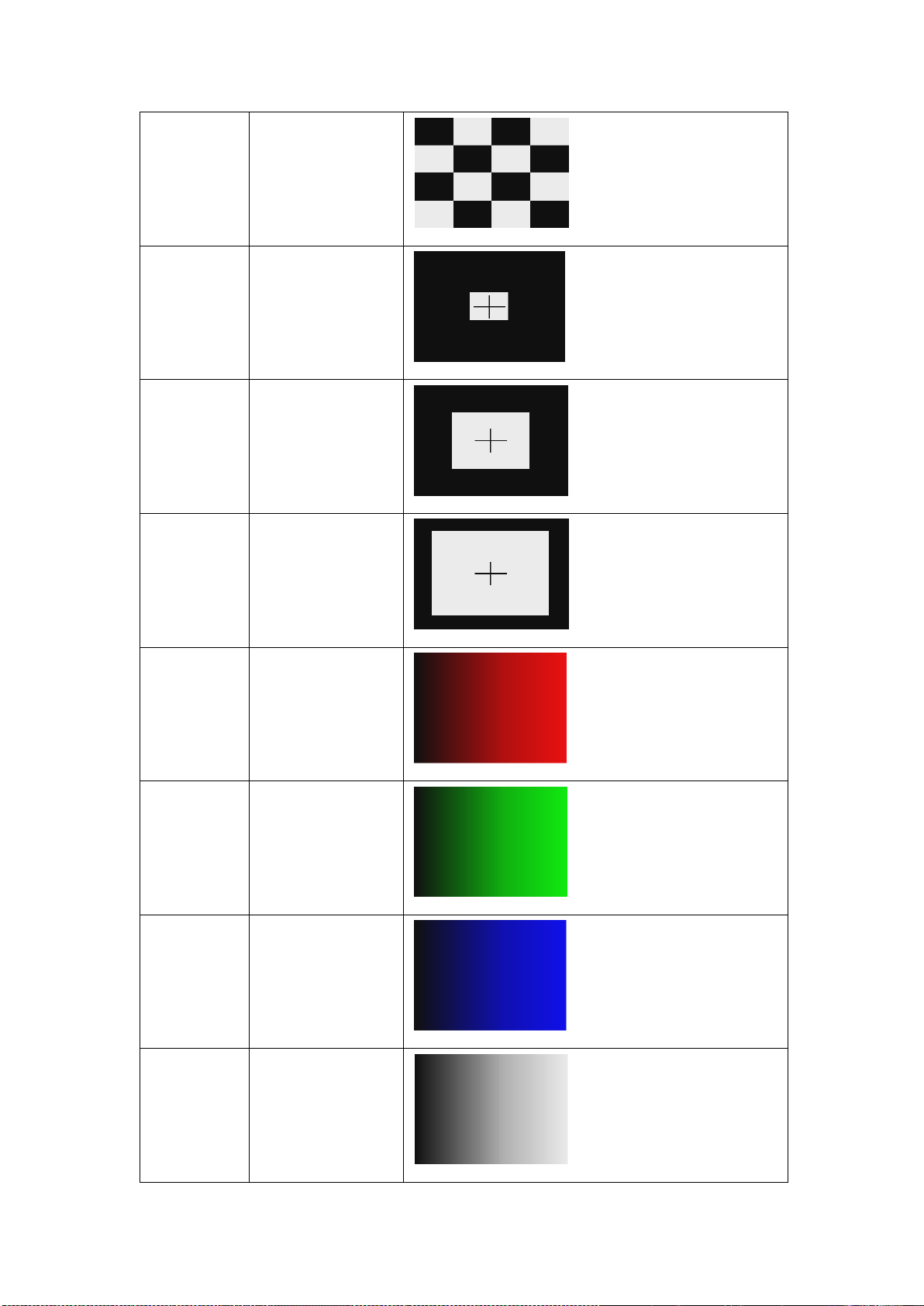
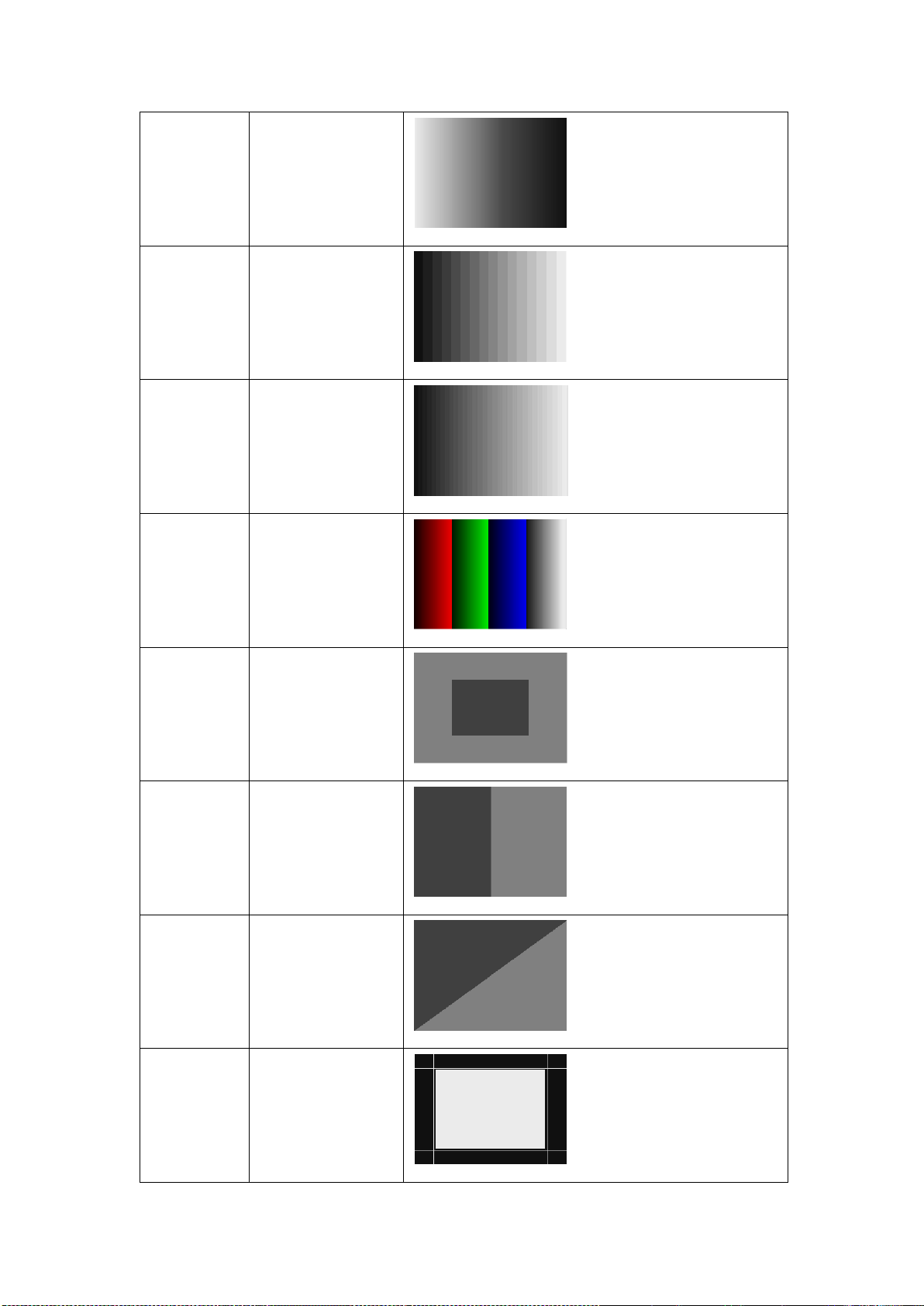
The PATTERN built-in a plenty of preset patterns, and user-definable imported
to the generator to meet various test requirements. It can be performed with
the mouse or the keys to the following operations: (Refers to Appendix 1)
Page 7
4
3.1.1 Switch output pattern
Press the direction keys to choose the pattern, then press OK key to
conform.
Move the mouse to the pattern, then double left click or right click to select
apply.
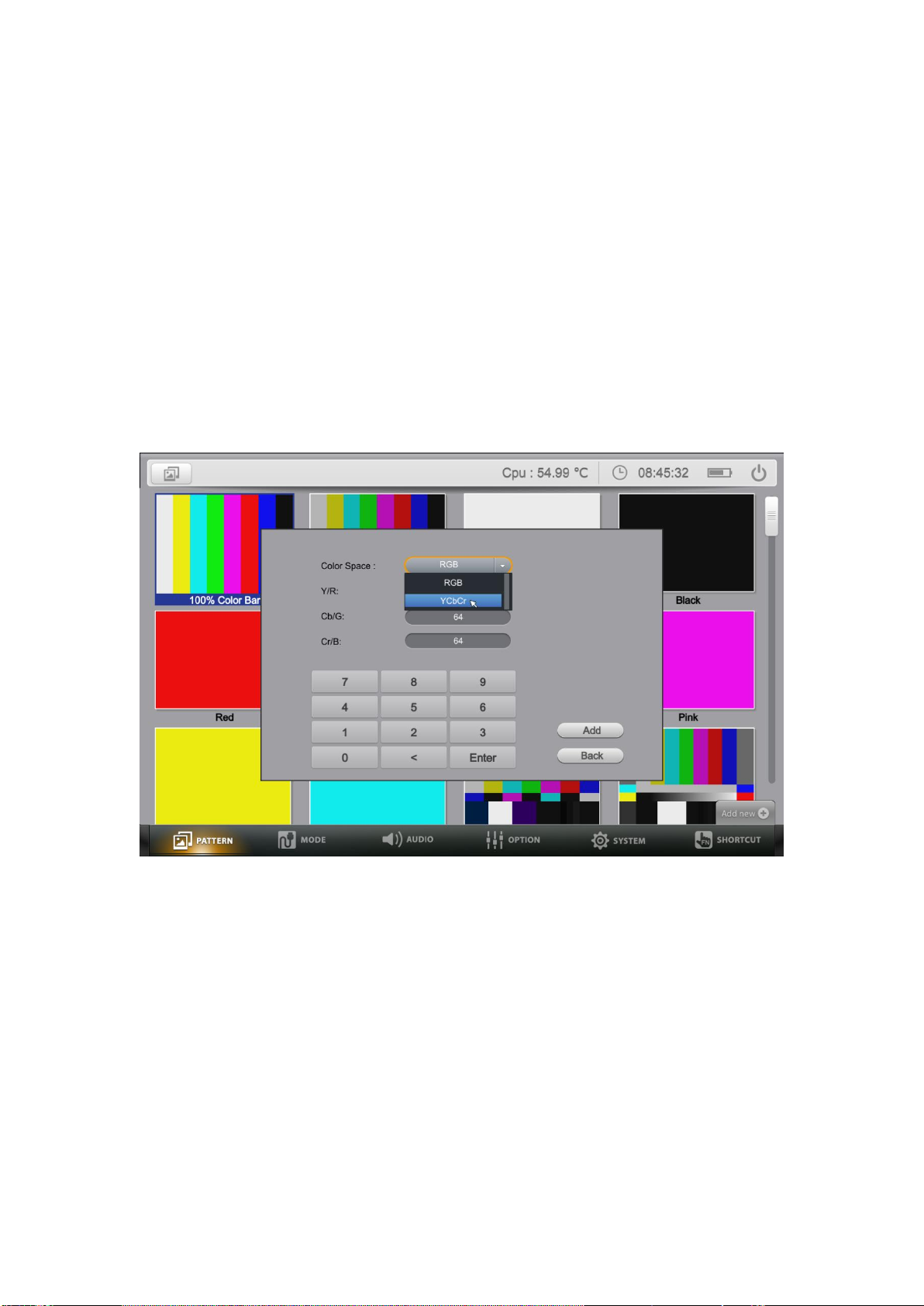
3.1.2 Add the pattern (Built-in pattern supports customization.)
The device supports to add the pattern via USB interface. Plug the USB
flash disk, then click the "add new" icon on the right corner of the screen to
add the pattern. To add the built-in pattern, please contact with the
Service.
Support to create User Color Picture base on RGB and YCbCr
Click "Add New"->"Custom" by using mouse, or press the Down key to go
to the bottom of Pattern interface, then press Left or Right Keys to activate
the setting interface.
Select Color Space to choose RGB or YCbCr and the relevant parameters
according to the requirement. Click or press "Add" to add this new pattern
to the system.
3.1.3 Delete the pattern (Built-in pattern can't be deleted.)
Press the direction keys to choose the pattern, press Exit key, then select
OK key on the pop-up window to delete the pattern.
Move the mouse to the pattern, right click to select delete.
Page 8
5
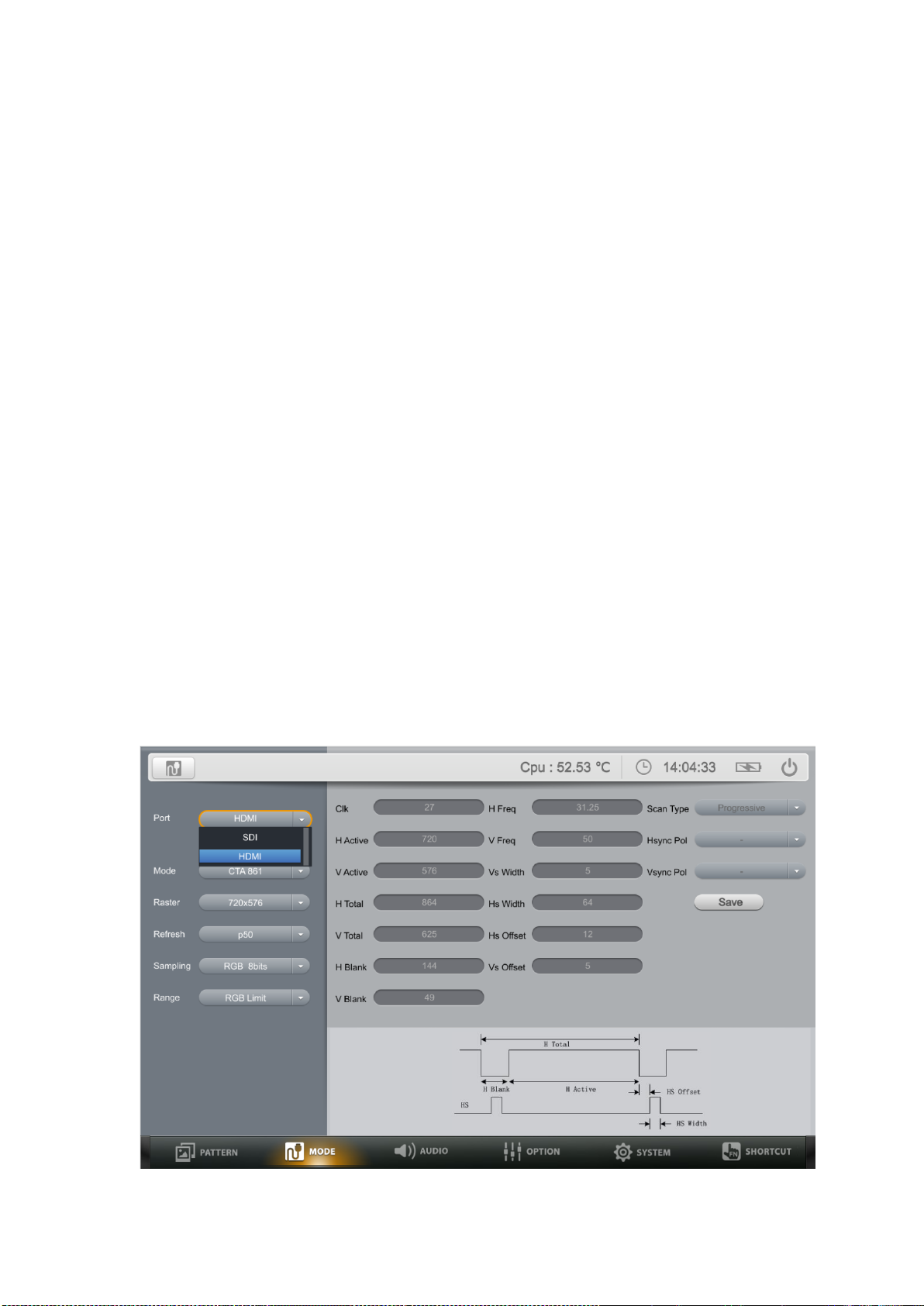
3.1.4 The device built-in various kinds of patterns to meet various test
requirements:
Color bar series can be used to check if the color is displayed normally,
and whether the image has cross-color interference.
Purity series are often used to check color purity. When using the Red
pattern, no other color should be present on the screen. If the Red pattern
appears tinted, then this is an indication that the color purity should be
adjusted. The Red pattern can also be used to ensure that there is no
interference between the sound and the chroma carrier, in addition to
adjusting the long play delay level to minimum flicker.
Black is often used to test whether the screen has bright spots and
whether there is light leakage.
Blue is a complementary color. It is frequently used to test color
performance.
Gray Scale series can be used to locate faulty linearity of the video
amplifier or gray scale setting.
Grid series and cross patch patterns are mainly used for detecting corner
convergence.
Gradient serious are used to detect linearity faults in the video amplifier.
Non-linearities will usually result in color level compression.
3.2. MODE
Page 9
6
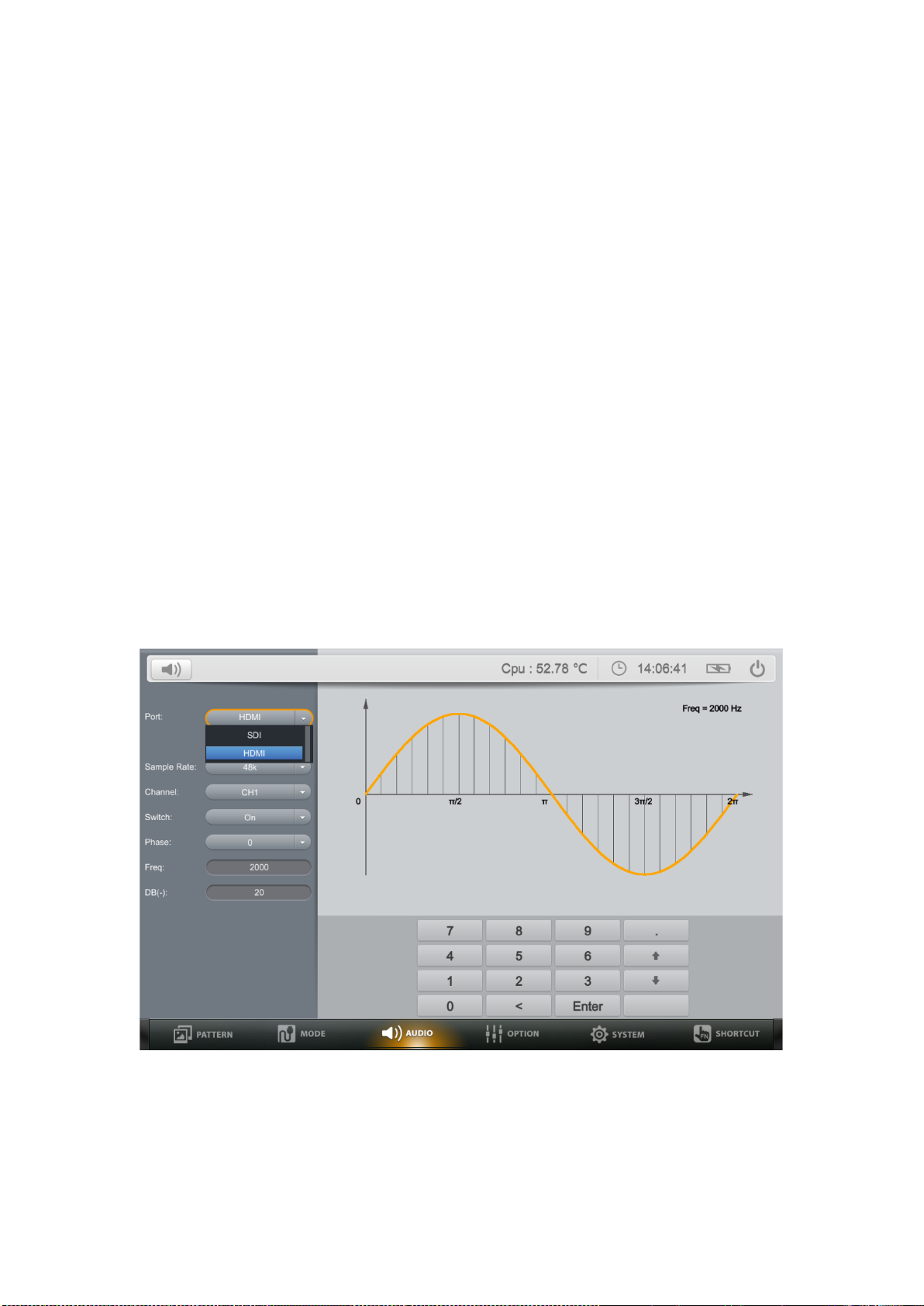
Mode interface supports switch the timing of output signal by using the keys or
the mouse. And the related information of the signal output currently can be
checked on the bottom of screen. (Timing sheet refers to Appendix 1)
Port Options
SDI or HDMI mode for optional.
Mode Options
SDI supports selecting among of 12G-SDI / 6G-SDI / SG-SDI / HD-SDI /
SD-SDI signal formats.
HDMI supports selecting among of VESA / CTA861 / User Timing mode.
Raster Options
Select different resolutions options corresponding to different Modes.
Refresh Options
Select different raster rates corresponding to different Modes & Raster.
Sampling Options
Select different GBR & YCbCr sampling rates based on the above options.
3.3. AUDIO
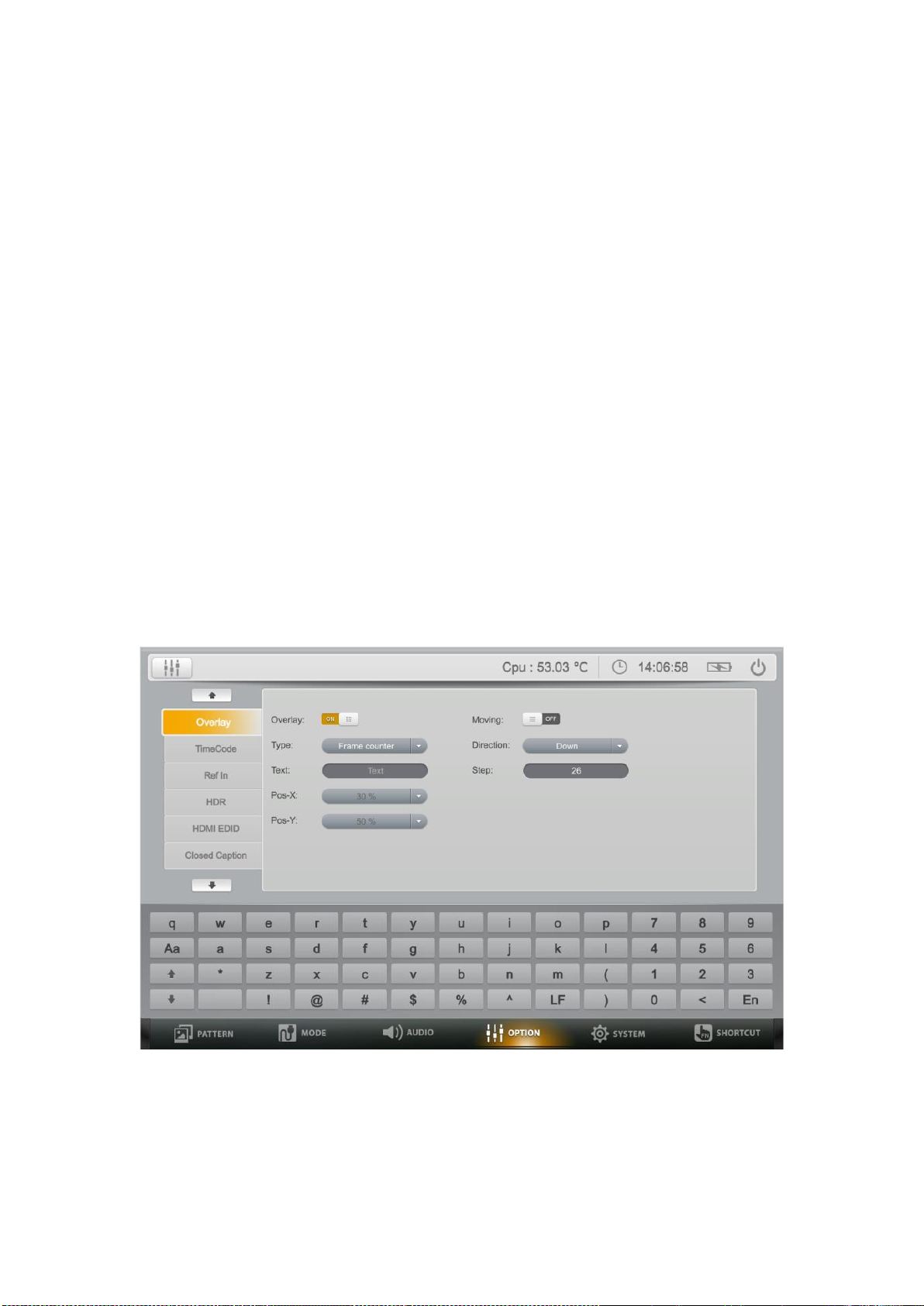
A comprehensive audio monitoring tool supports up to 16 channels embedded
AES/EBU audio, with -60dB to 0dB range, And a 20Hz to 20000Hz frequency.
Port Options
Select the signal source to be adjusted. Option: HDMI or SDI.
Page 10
7
Sample Rate Options
Audio sample rate default as 48k under SDI mode.
Audio sample rate under HDMI mode. 32k, 44.1k, 48k, 64k, 66.15k, 72k, 88.2k,
96k, 132.3k, 144k or 192k for optional.
Channel Options
HDMI: 8 audio channels, ranges from CH1 to CH8.
SDI: 16 audio channels, ranges from CH1 to CH16.
Switch Options
Off/On/All off /All on option for 16-channel audio switch.
Phase
Selects phase among 0, 90, 180 and 270.
Freq
Freq options can be customized from 20Hz to 20000Hz by users.
DB (-) Options
Freq options can be customized from -60bB to 0dB by users.
3.4. OPTION
For solutions with various applications, the "Option" of device offers Overlay,
image moving control and Ref In functions for users to analyze different
signals and formats.
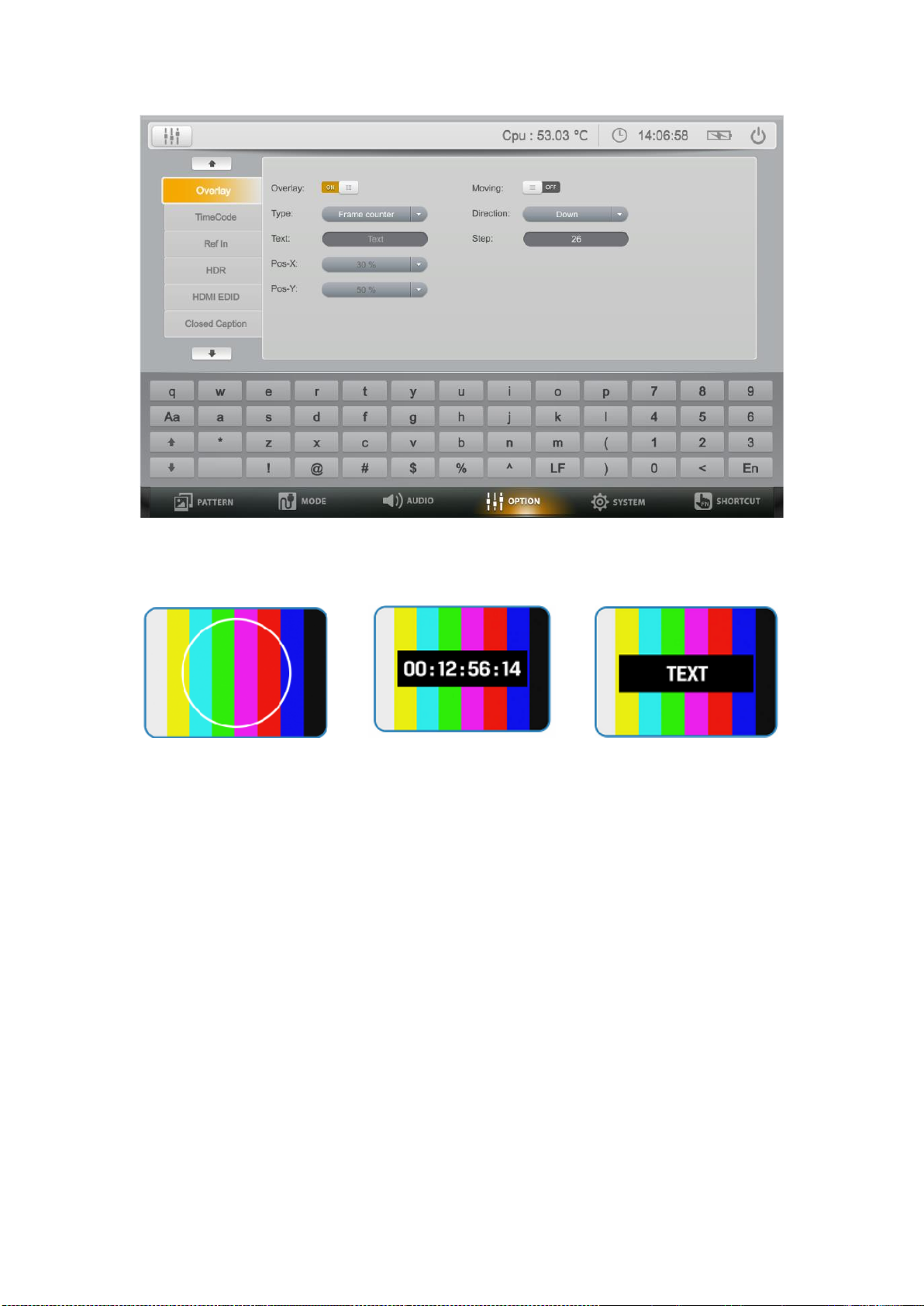
3.4.1 Overlay
Page 11
8
3.4.1.1 The device supports three types of Overlay:
Ring Type Frame Counter Type Character Type
Note: Text input will be displayed based on the specific X and Y that can be
preset in Pos-X/Y options. User can input the customized text in the
3.4.1.2 Moving
The moving of 3 types can be customized with 4 directions and preferred steps.
User can input the step value in the step input box.
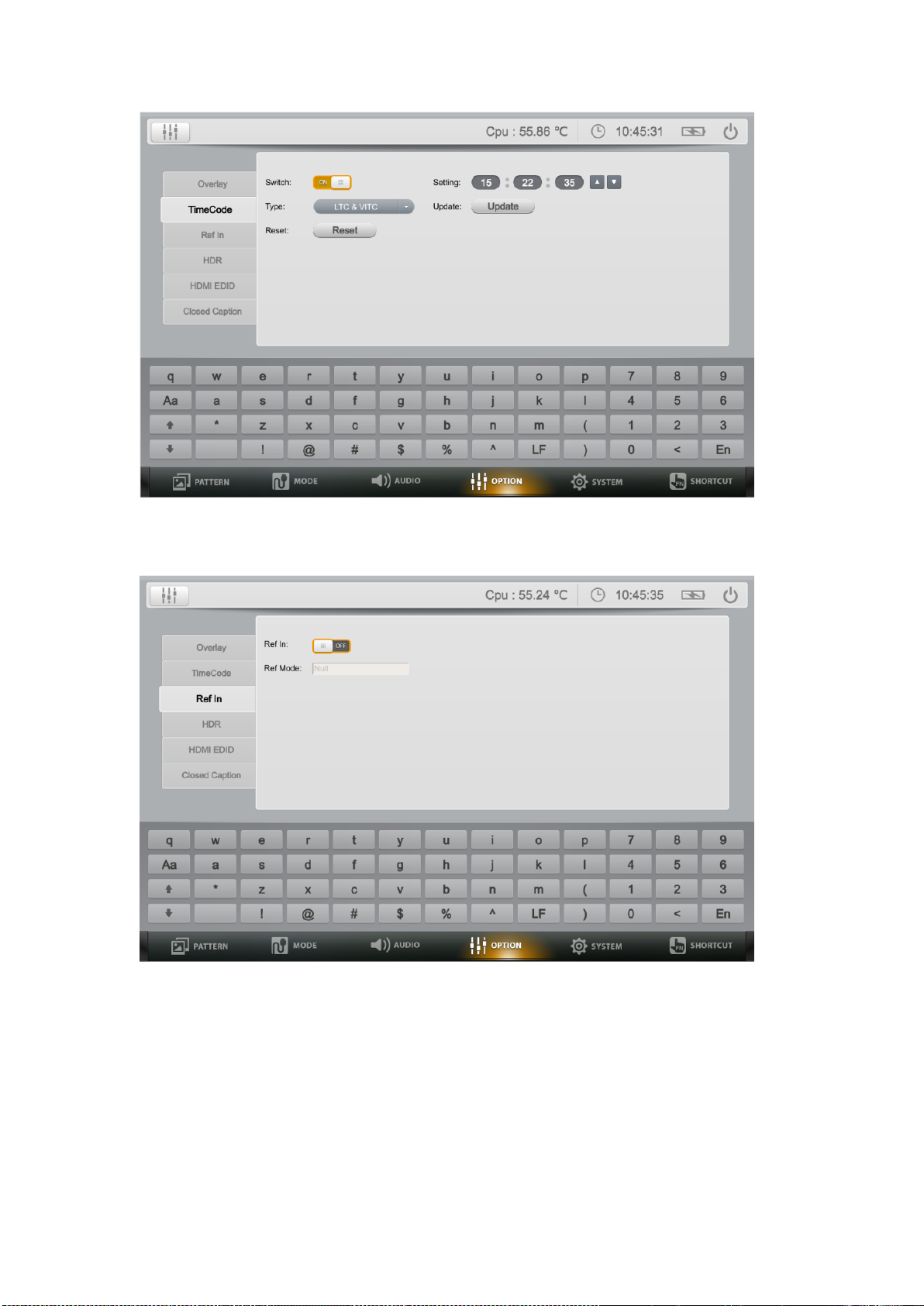
3.4.2 Time Code
The device support linear time code (LTC), vertical interval time code (VITC)
and LTC&VITC. The user can adjust the value in setting input box.
Page 12
9
3.4.3 Ref In
Ref In used for frame synchronization to ensure input & Ref mode display.
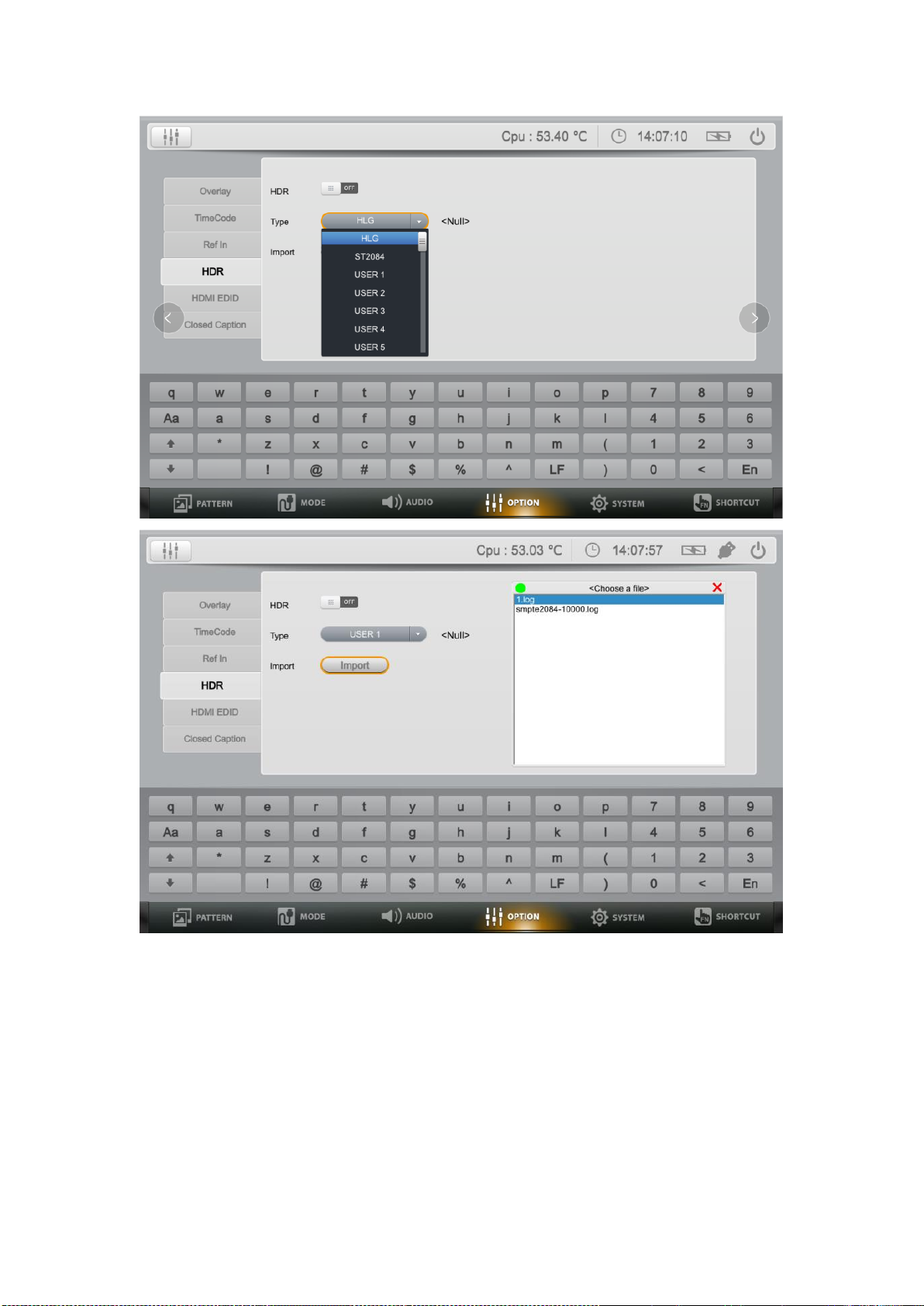
3.4.4 HDR
Turns HDR type import ON/OFF.
System built-in HLG and SMPTE 2084-10000 HDR standards.
Users can load HDR files via USB flash disk.
Page 13
10
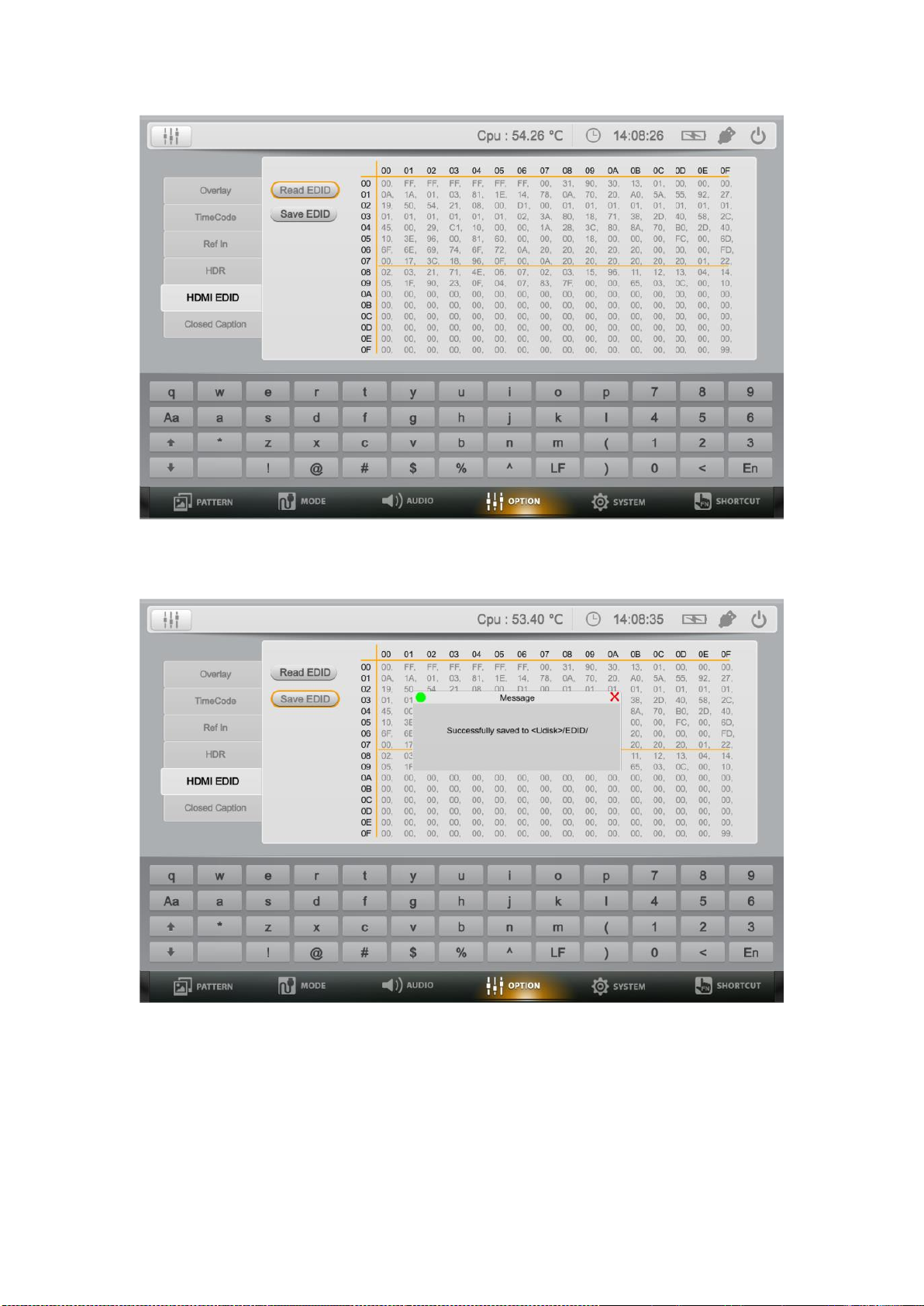
3.4.5 HDMI EDID
Connects HDMI device with HDMI cable, click “Read EDID” to read the
EDID data of the display device.
Page 14
11
Plug USB flash disk into the signal generator, click “Save EDID” to save
the current EDID data to an assigned path of USB flash disk.
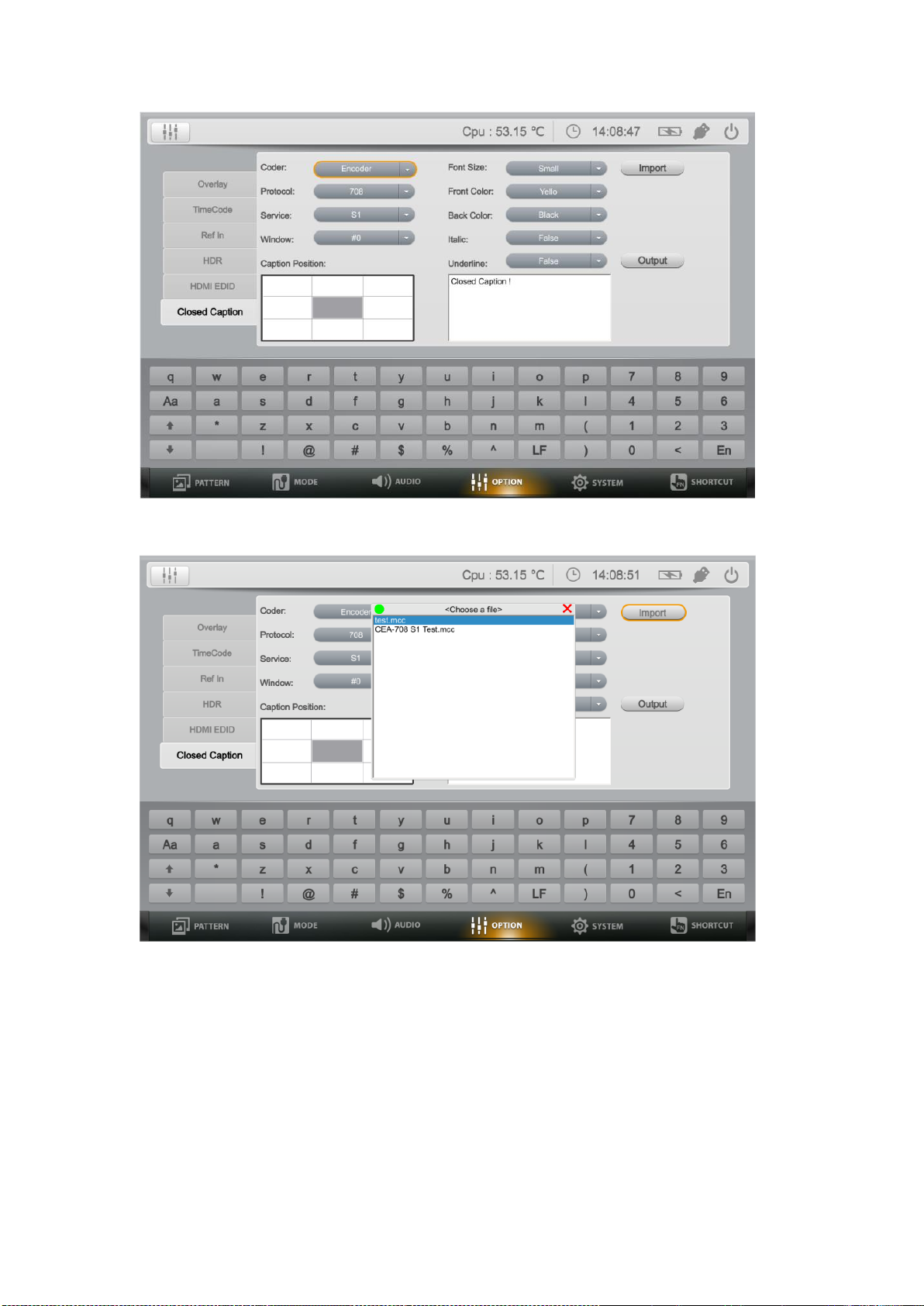
3.4.6 Closed Caption
SDI embedding Closed Caption function control.
Configurate the Closed Caption control interface and output the
corresponding Closed Caption.
Uploading mcc file to analyze and automatically display the Closed
Caption on the file timeline.
Page 15
12
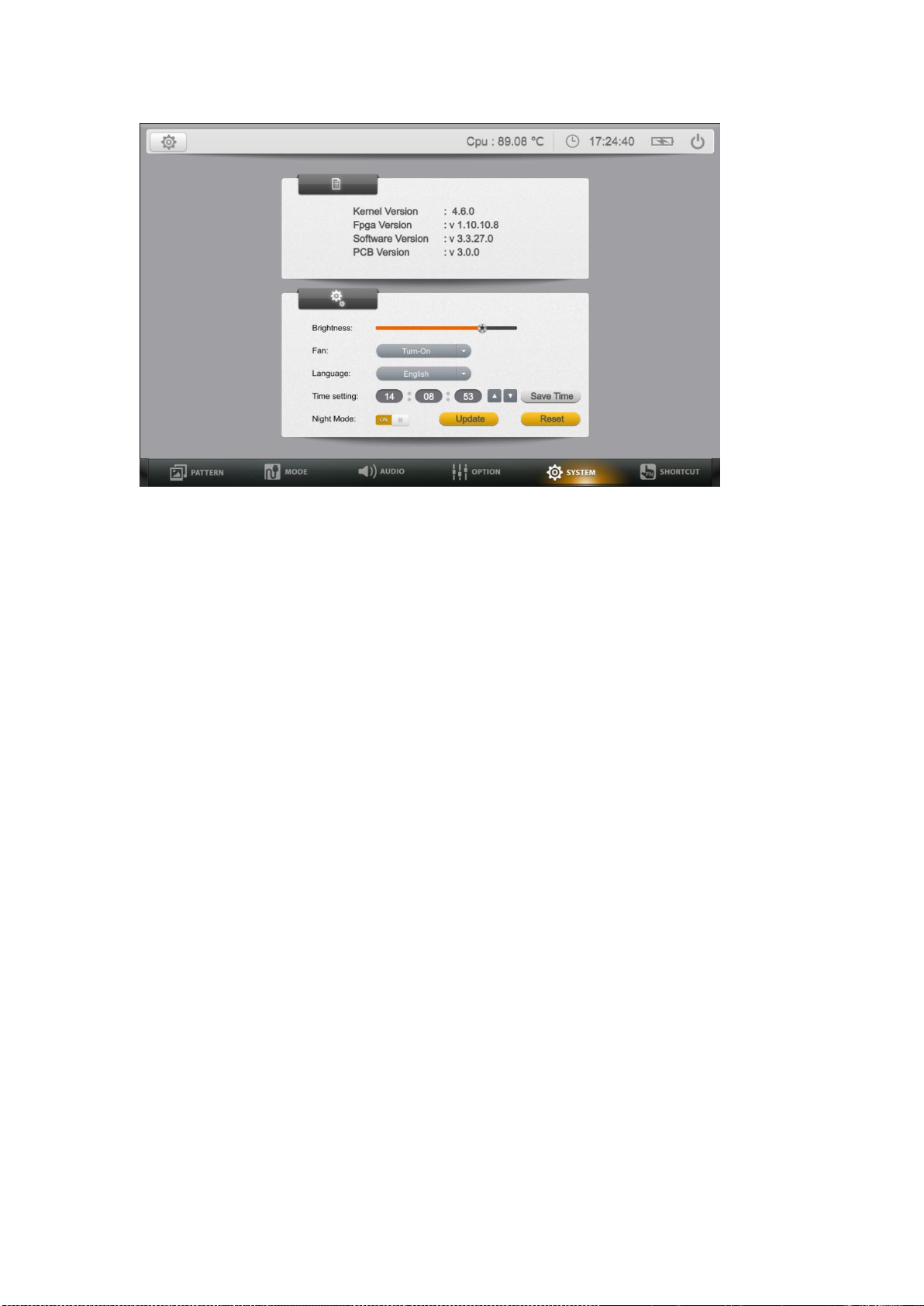
3.5. System
System function Supports to review the firmware version of device and settings
of Brightness, Fan, Language, Time and Night Mode. User can reset the
device system settings under this option.
Page 16
13
Brightness
Press the UP/DOWN key on the front panel to adjust the brightness. If in the
bright conditions, increase the LCD brightness to make it easier to view.
Fan
This setting is to turn the fan on or off. If select automatic option, the device
will automatically turns the fan on or off according to the usage and external
temperature.
Language
Supports English language, other languages can be customized.
Time setting
User can set up the system time according to the locate time zone.
Night Mode
Activate the Night Mode, it will automatically adjust the proper brightness in
insufficient light.
Update
Update the system of the device.
Reset
Restore the factory default Settings.
Page 17
14
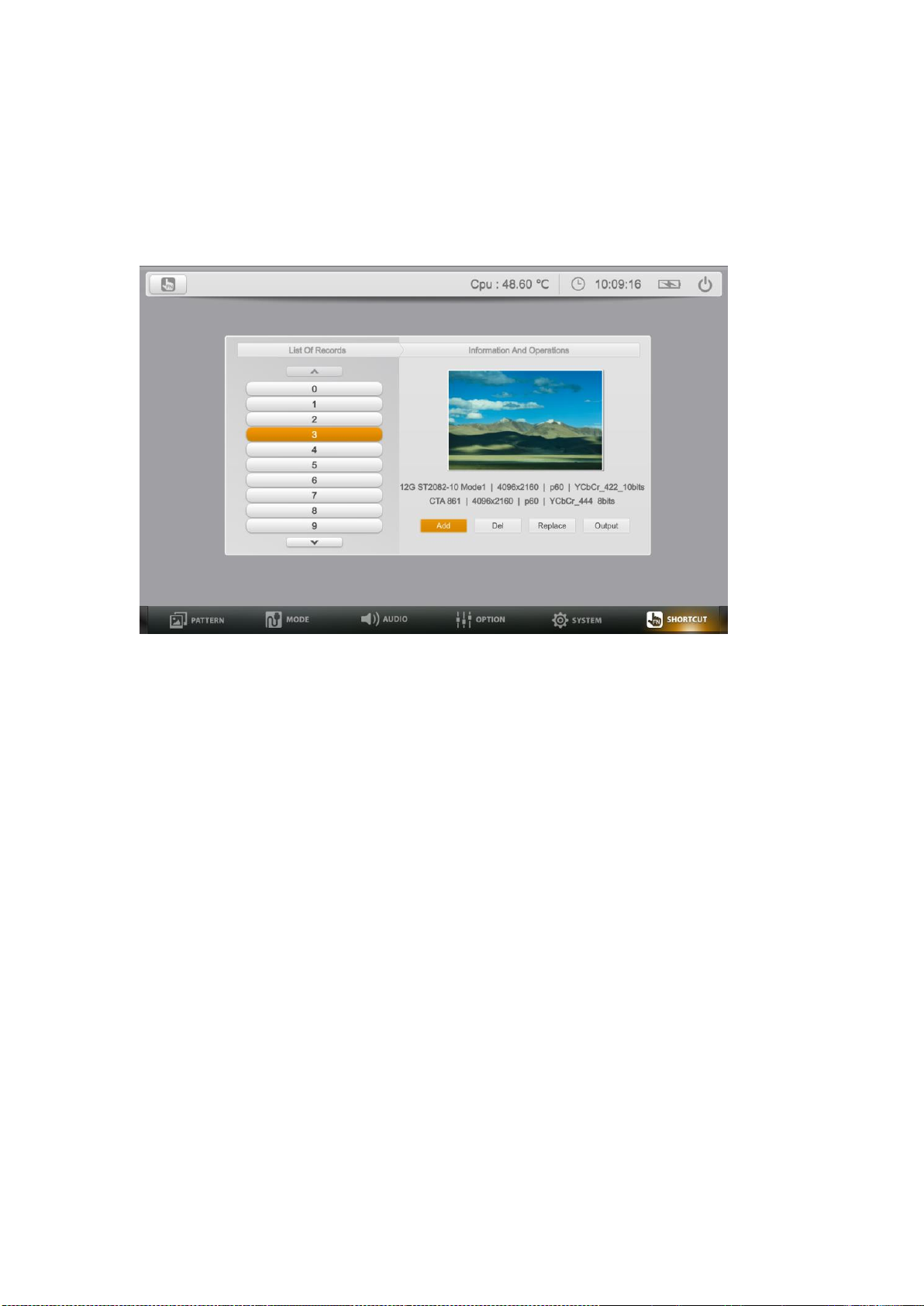
3.6. Fn
User-definable functions as shortcuts with great convenience. It supports more
than one hundred shortcut functions. For time-saving and high efficient
operation when testing, users can manage shortcut functions through Add, Del,
Replace and Output operations.
Add
Select "Add" to record the last output signal to be a shortcut.
Del
Select Del to delete the shortcut.
Replace
Select replace, the last output signal will replace the original one.
Output
Select Output to output the shortcut signal easily.
Page 18
15
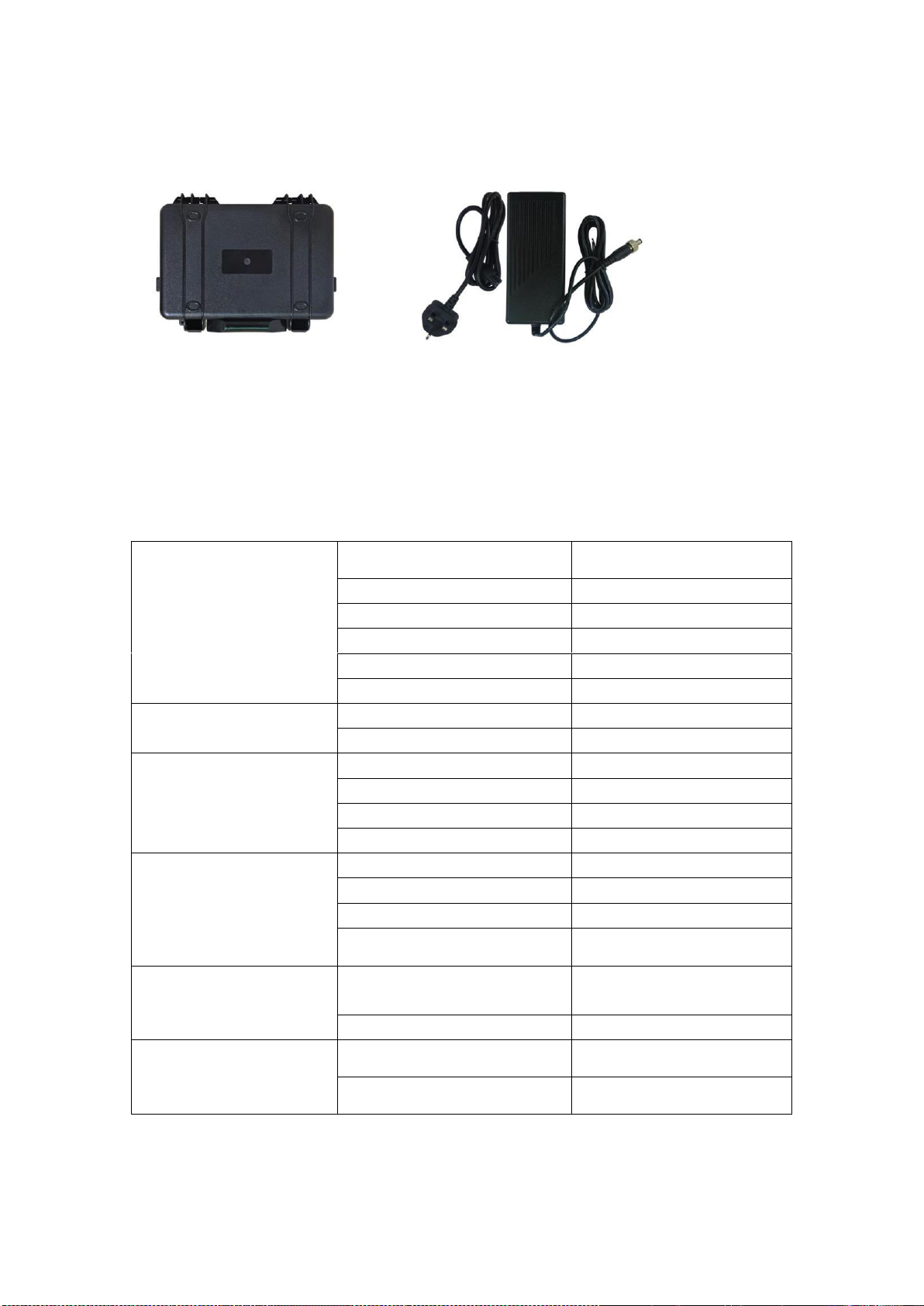
4. ACCESSORIES
Carry-on box 1pc
12V 3A power adapter 1pc
5. PARAMETER
5.1. Specifications
DISPLAY
Display Screen
7” IPS
Physical Resolution
1280x800
Aspect Ratio
16:10
Brightness
400cd/m²
Contrast
800:1
Viewing Angle
178°/178°(H/V)
INPUT
REF
1
USB
2
OUTPUT
12G-SDI
2
3G-SDI
2
HDMI 2.0
1
FIBER
1
POWER
Current
≤2.3 (12V)
Input Voltage
DC10-15V
Power Consumption
≤27W
Built-in Battery
5000mAh
ENVIRONMENT
Operation Temperature
-20°C~40°C
(Minimum battery-10°C)
Storage Temperature
-30°C~70°C
DIMENSION
Dimension (LWD)
264x169x42mm
Weight
3KG
Page 19
16
5.2. Appendix 1
No.
Description
P1
100% Color Bar
P2
75% Color Bar
P3
White
P4
Black
P5
Red
P6
Green
P7
Blue
Page 20
17
P8
Pink
P9
Yello
P10
Cyan
P11
Smpte Color Bar
P12
Smpte RP 219
P13
Color Check
P14
SDI Checkfield
P15
8x6 Check
Page 21
18
P16
4x4 Check
P17
25% Window
P18
50% Window
P19
75% Window
P20
Red Ramp
P21
Green Ramp
P22
Blue Ramp
P23
White Ramp
Page 22
19
P24
Black Ramp
P25
16 Step Ramp
P26
32 Step Ramp
P27
RGB Ramp
P28
DLP Mirror
White Box
P29
DLP Mirror 2
Luminance
P30
DLP Mirror
Slash Zone
P31
Static
Regulation
Page 23
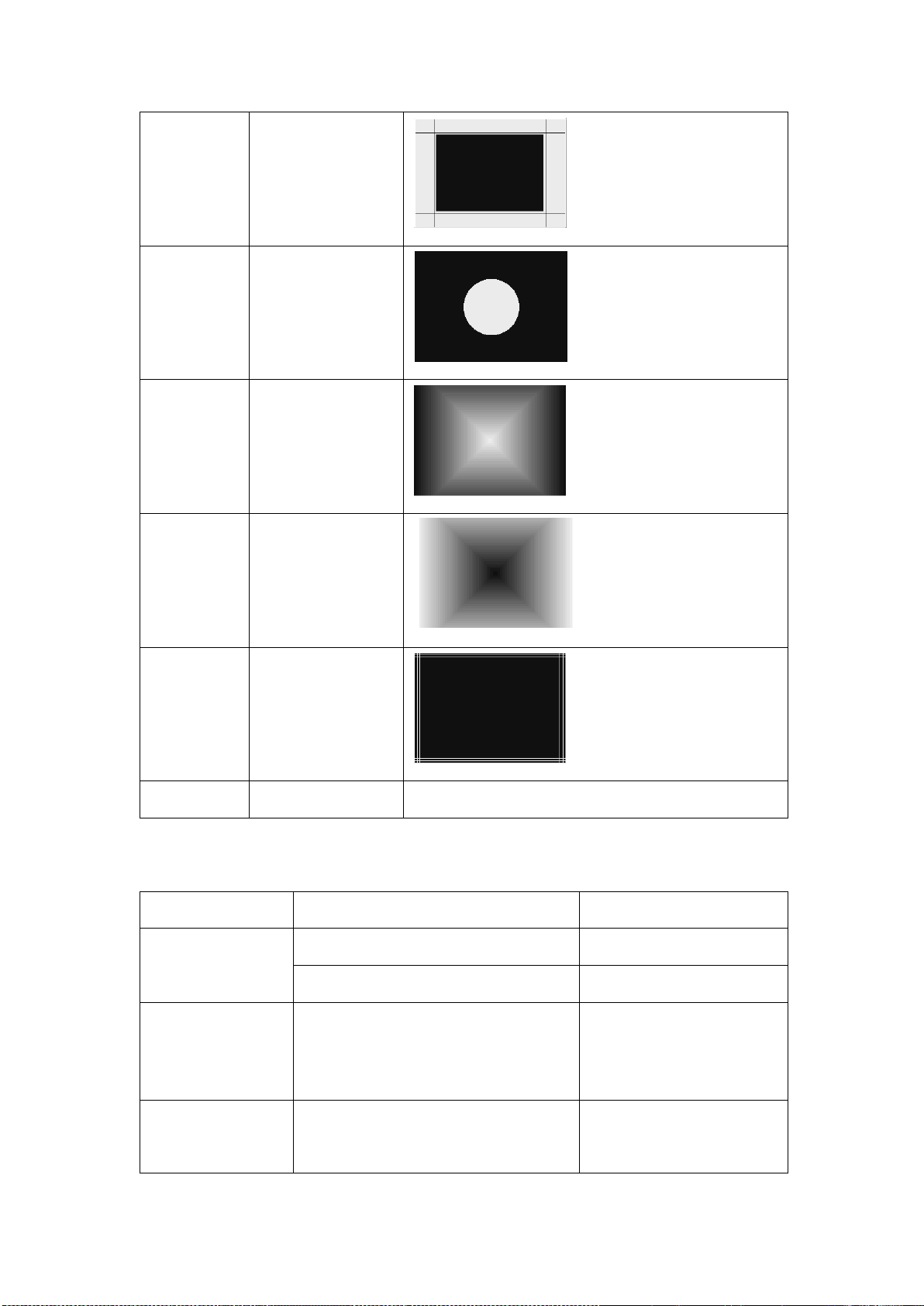
20
P32
Static
Regulation 2
P33
User DTV White
Balance
P34
Diagonal 32
Ramp
P35
Reverse
Diagonal 32
Ramp
r
P36
Border Line
P?
Customized
Customized according to requirements
5.3. Appendix 2
SDI Input Signal
Signal Format
Color Space
SD
720x525(59.94i)
YCbCr 4:2:2 10bits
720x625(50i)
YCbCr 4:2:2 10bits
HD
(1920x720)
1280x720
(50p/59.94p/60p/23.98p/24p/25
p/29.97p/30p)
YCbCr 4:2:2 10bits
HD
(1920x1080)
1920x1080/2048x1080
(50i/59.94i/60i/23.98P/24p/25p/
YCbCr 4:2:2 10bits
Page 24
21
(2048x1080)
29.97p/30p)
(23.98sf/24sf/25sf/29.97sf/30sf)
3G Level A
(1280x720)
1280x720
(50p/59.94p/60p/23.98p/24p/25
p/29.97p/30p)
GBR 4:4:4 10bits
GBR+A 4:4:4 10bits
YCbCr 4:4:4 10bits
YCbCr+A 4:4:4 10bits
GBR 4:4:4 12bits
YCbCr 4:4:4 12bits
YCbCr 422 12bits
3G Level A
(1920x1080)
(2048x1080)
1920x1080/2048x1080
(47.95p/48p/50p/59.94p/60p)
YCbCr 4:2:2 10bits
1920x1080/2048x1080
(23.98p/24p/25p/29.97p/30p/47.
95i/48i/50i/59.94i/60i)
(23.98sf/24sf/25sf/29.97sf/30sf)
GBR 4:4:4 10bits
GBR+A 4:4:4 10bits
YCbCr 4:4:4 10bits
YCbCr+A 4:4:4 10bits
GBR 4:4:4 12bits
YCbCr 4:4:4 12bits
YCbCr 422 12bits
3G Level B_DL
(1920x1080)
(2048x1080)
1920x1080/2048x1080
(47.95p/48p/50p/59.94p/60p)
YCbCr 4:2:2 10bits
1920x1080/2048x1080
((23.98p/24p/25p/29.97p/30p/47
.95i/48i/50i/59.94i/60i)
(23.98sf/24sf/25sf/29.97sf/30sf)
GBR 4:4:4 10bits
GBR+A 4:4:4 10bits
YCbCr 4:4:4 10bits
YCbCr+A 4:4:4 10bits
GBR 4:4:4 12bits
YCbCr 4:4:4 12bits
YCbCr 4:2:2 12bits
3G Level B_DS
(1920x1080)
1920x1080/2048x1080
(50i/59.94i/60i/23.98P/24p/25p/
YCbCr 4:2:2 10bits
Page 25
22
(2048x1080)
29.97p/30p)
(23.98sf/24sf/25sf/29.97sf/30sf)
3G Level B_DS
(1280x720)
1280x720
(50p/59.94p/60p/23.98p/24p/25
p/29.97p/30p)
YCbCr 4:2:2 10bits
DL_3G_B_4K_2
SI
(3840x2160)
(4096x2160)
3840x2160/4096x2160
(23.98p/24p/25p/29.97p/30p)
YCbCr 4:2:2 10bits
QL_HD_4K_SQ
_B.1
(3840x2160)
(4096x2160)
3840x2160/4096x2160
(23.98p/24p/25p/29.97p/30p)
YCbCr 4:2:2 10bits
DL_3G_4K_SQ
_B.2
(3840x2160)
(4096x2160)
3840x2160/4096x2160
(23.98p/24p/25p/29.97p/30p)
YCbCr 4:2:2 10bits
QL_3G_A_4K_
SQ
(3840x2160)
(4096x2160)
3840x2160/4096x2160
(47.95p/48p/50p/59.94p/60p)
YCbCr 4:2:2 10bits
3840x2160 /4096x2160
(23.98p/24p/25p/29.97p/30p)
GBR 4:4:4 10bits
GBR+A 4:4:4 10bits
YCbCr 4:4:4 10bits
YCbCr+A 4:4:4 10bits
GBR 4:4:4 12bits
YCbCr 4:4:4 12bits
YCbCr 4:2:2 12bits
QL_3G_B_4K_
SQ
(3840x2160)
3840x2160/4096x2160
(47.95p/48p/50p/59.94p/60p)
YCbCr 4:2:2 10bit
3840x2160 /4096x2160
(23.98p/24p/25p/29.97p/30p)
GBR 4:4:4 10bits
GBR+A 4:4:4 10bits
Page 26
23
(4096x2160)
YCbCr 4:4:4 10bits
YCbCr+A 4:4:4 10bits
GBR 4:4:4 12bits
YCbCr 4:4:4 12bits
YCbCr 4:2:2 12bits
QL_3G_A_4K_2
SI
(3840x2160)
(4096x2160)
3840x2160/4096x2160
(47.95p/48p/50p/59.94p/60p)
YCbCr 4:2:2 10bit
3840x2160 /4096x2160
(23.98p/24p/25p/29.97p/30p)
GBR 4:4:4 10bits
GBR+A 4:4:4 10bits
YCbCr 4:4:4 10bits
YCbCr+A 4:4:4 10bits
GBR 4:4:4 12bits
YCbCr 4:4:4 12bits
YCbCr 4:2:2 12bits
QL_3G_B_4K_2
SI
(3840x2160)
(4096x2160)
3840x2160/4096x2160
(47.95p/48p/50p/59.94p/60p)
YCbCr 4:2:2 10bit
3840x2160 /4096x2160
(23.98p/24p/25p/29.97p/30p)
GBR 4:4:4 10bits
GBR+A 4:4:4 10bits
YCbCr 4:4:4 10bits
YCbCr+A 4:4:4 10bits
GBR 4:4:4 12bits
YCbCr 4:4:4 12bits
YCbCr 4:2:2 12bits
6G ST2081-10
Mode2
(1920X1080)
(2048X1080)
1920x1080/2048x1080
(47.95p/48p/50p/59.94p/60p)
GBR 4:4:4 10bits
GBR+A 4:4:4 10bits
YCbCr 4:4:4 10bits
YCbCr+A 4:4:4 10bits
GBR 4:4:4 12bits
YCbCr 4:4:4 12bits
Page 27
24
YCbCr 4:2:2 12bits
6G ST2081-10
Mode1
(3840x2160)
(4096x2160)
3840x2160 /4096x2160
(23.98p/24p/25p/29.97p/30p)
YCbCr 4:2:2 10bits
12G ST2082-10
Mode1
(3840x2160)
(4096x2160)
3840x2160/4096x2160
(47.95p/48p/50p/59.94p/60p)
YCbCr 4:2:2 10bit
3840x2160 /4096x2160
(23.98p/24p/25p/29.97p/30p)
GBR 4:4:4 10bits
GBR+A 4:4:4 10bits
YCbCr 4:4:4 10bits
YCbCr+A 4:4:4 10bits
GBR 4:4:4 12bits
YCbCr 4:4:4 12bits
YCbCr 4:2:2 12bits
HDMI Model
Signal Format
Color Space
VESA
2560x1600(60p)
RGB 8/10/12bits
YCbCr 4:2:2 8/10/12bits
YCbCr 4:4:4 8/10/12bits
2048x1152(60p)
RGB 8/10/12bits
YCbCr 4:2:2 8/10/12bits
YCbCr 4:4:4 8/10/12bits
1600x1200(60p)
RGB 8/10/12bits
YCbCr 4:2:2 8/10/12bits
YCbCr 4:4:4 8/10/12bits
1600x900(60p)
RGB 8/10/12bits
YCbCr 4:2:2 8/10/12bits
YCbCr 4:4:4 8/10/12bits
1440x1050(60p)
RGB 8/10/12bits
Page 28
25
YCbCr 4:2:2 8/10/12bits
YCbCr 4:4:4 8/10/12bits
1440x900(60p)
RGB 8/10/12bits
YCbCr 4:2:2 8/10/12bits
YCbCr 4:4:4 8/10/12bits
1360x768(60p)
RGB 8/10/12bits
YCbCr 4:2:2 8/10/12bits
YCbCr 4:4:4 8/10/12bits
1280x1024(60p)
RGB 8/10/12bits
YCbCr 4:2:2 8/10/12bits
YCbCr 4:4:4 8/10/12bits
1280x960(60p)
RGB 8/10/12bits
YCbCr 4:2:2 8/10/12bits
YCbCr 4:4:4 8/10/12bits
1280x800(60p)
RGB 8/10/12bits
YCbCr 4:2:2 8/10/12bits
YCbCr 4:4:4 8/10/12bits
1280x768(60p)
RGB 8/10/12bits
YCbCr 4:2:2 8/10/12bits
YCbCr 4:4:4 8/10/12bits
1024x768(60p)
RGB 8/10/12bits
YCbCr 4:2:2 8/10/12bits
YCbCr 4:4:4 8/10/12bits
800x 600(60p)
RGB 8/10/12bits
YCbCr 4:2:2 8/10/12bits
YCbCr 4:4:4 8/10/12bits
640x 480(60p)
RGB 8/10/12bits
YCbCr 4:2:2 8/10/12bits
YCbCr 4:4:4 8/10/12bits
Page 29
26
CTA-861
4096x2160
(60p/ 59.94p/ 50p/ 48p/
47.95p/ 30p/ 29.97p/ 25p/
24p/ 23.98p)
RGB 8bits
YCbCr 4:2:0 8/10/12bits
YCbCr 4:2:2 8bits
YCbCr 4:4:4 8bits
3840x2160
(60p/ 59.94p/ 50p/ 48p/
47.95p/ 30p/ 29.97p/ 25p/
24p/ 23.98p)
RGB 8bits
YCbCr 4:2:0 8/10/12bits
YCbCr 4:2:2 8bits
YCbCr 4:4:4 8bits
2560x1080
(60p/ 59.94p/ 50p/ 48p/
47.95p/ 30p/ 29.97p/ 25p/
24p/ 23.98p)
RGB 8/10/12bits
YCbCr 4:2:2 8/10/12bits
YCbCr 4:4:4 8/10/12bits
1920x1080
(60p/ 60i/ 59.94p/ 59.94i/
50p/ 50i/ 48p/ 47.95p/ 30p/
29.97p/ 25p/ 24p/ 23.98p)
RGB 8/10/12bits
YCbCr 4:2:2 8/10/12bits
YCbCr 4:4:4 8/10/12bits
1280x720
(60p/ 59.94p/ 50p/ 30p/
29.97p/ 25p/ 24p/ 23.98p)
RGB 8/10/12bits
YCbCr 4:2:2 8/10/12bits
YCbCr 4:4:4 8/10/12bits
720x480
(60p/ 59.94p)
RGB 8/10/12bits
YCbCr 4:2:2 8/10/12bits
YCbCr 4:4:4 8/10/12bits
640x480
(60p/ 59.94p)
RGB 8/10/12bits
YCbCr 4:2:2 8/10/12bits
YCbCr 4:4:4 8/10/12bits
720x576 (50p)
RGB 8/10/12bits
YCbCr 4:2:2 8/10/12bits
YCbCr 4:4:4 8/10/12bits
Page 30
27
1440x480 (60i/ 59.94i)
RGB 8/10/12bits
YCbCr 4:2:2 8/10/12bits
YCbCr 4:4:4 8/10/12bits
1440x576 (50i)
RGB 8/10/12bits
YCbCr 4:2:2 8/10/12bits
YCbCr 4:4:4 8/10/12bits
 Loading...