

Page 1
Page 2
+7 (495) 120-22-02 [email protected]
Official distributor in Russia – Lilliput.com.ru
1
IMPORTANT SAFETY INSTRUCTIONS:
Please read manual before using this product.
Please keep manual for future reference.
Please read the cautions to prevent possible danger and loss of property
Please enjoy the benefits of convenience, safety, and space-saving from this
TFT LCD monitor in different ways.
FEATURES:
This product employs integrate circuits, lower power consumption, and lower
radiation emission. It has fashion designed appearance and good portability.
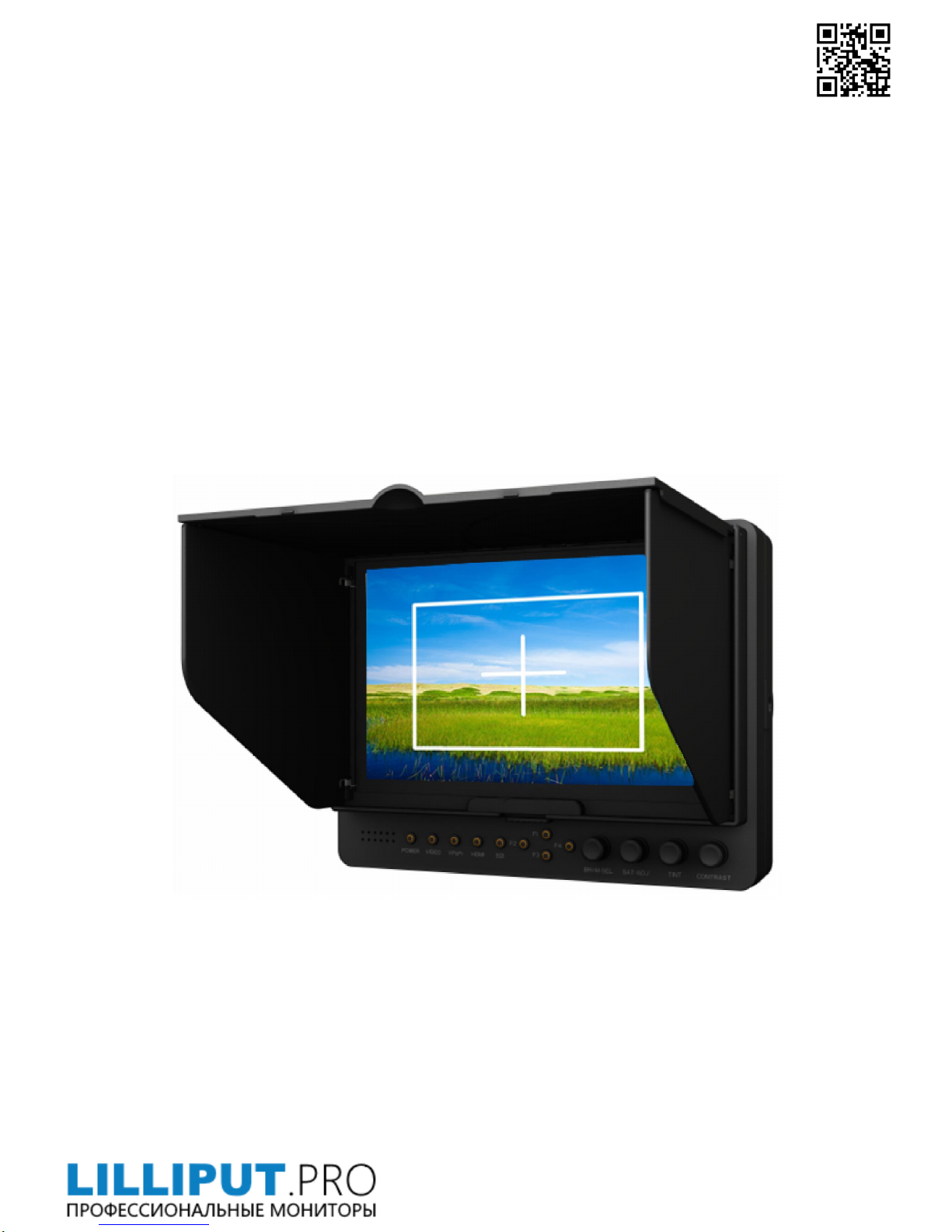
HD-SDI、HDMI & YPbPr Input, to connect with Full HD Video Camera.
LED backlight display, up to 1920×1080 HD resolution.
Contrast & Dizzy-proof monitor with flexible folding sun shade cover, to see
clearly under sunshine.
DC 6.5-24V wide range voltage.
RGB monochromatic display, 16:9, 4:3 and full screen aspect ratio switch,
underscan, overscan, pixel-to-pixel, center marker, screen marker, HD-SDI,
HDMI & video signal loop output.
CAUTIONS:
1. Please do not place the display screen towards the ground.
2. Please avoid heavy impact or drop onto the ground.
3. Please do NOT use chemical solutions to clean this product. Please wipe with
a clean soft cloth to maintain the brightness of the surface.
4. Please do not block any vent hole.
5. Please follow the instructions and trouble-shootings to adjust the product.
Other improper adjustment may result in damage. Any further adjustment
must be performed or conducted by a qualified technician.
6. Please unplug the power and remove the battery if long-term no-use, or
thunder weather.
Page 3
+7 (495) 120-22-02 [email protected]
Official distributor in Russia – Lilliput.com.ru
2
Contents
PRODUCT DESCRIPTION ----------------------3
INSTALLATION OF SUNSHADECOVER
AND BATTERY PLATE---------------------------5
DV BATTERY MOUNT PLATE-----------------6
SETTING MENU ---------------------------------- 8
ACCESSORIES ----------------------------------- 10
PARAMETER ------------------------------------- 12
TROUBLESHOOTING ------------------------- 12
Page 4
+7 (495) 120-22-02 [email protected]
Official distributor in Russia – Lilliput.com.ru
3
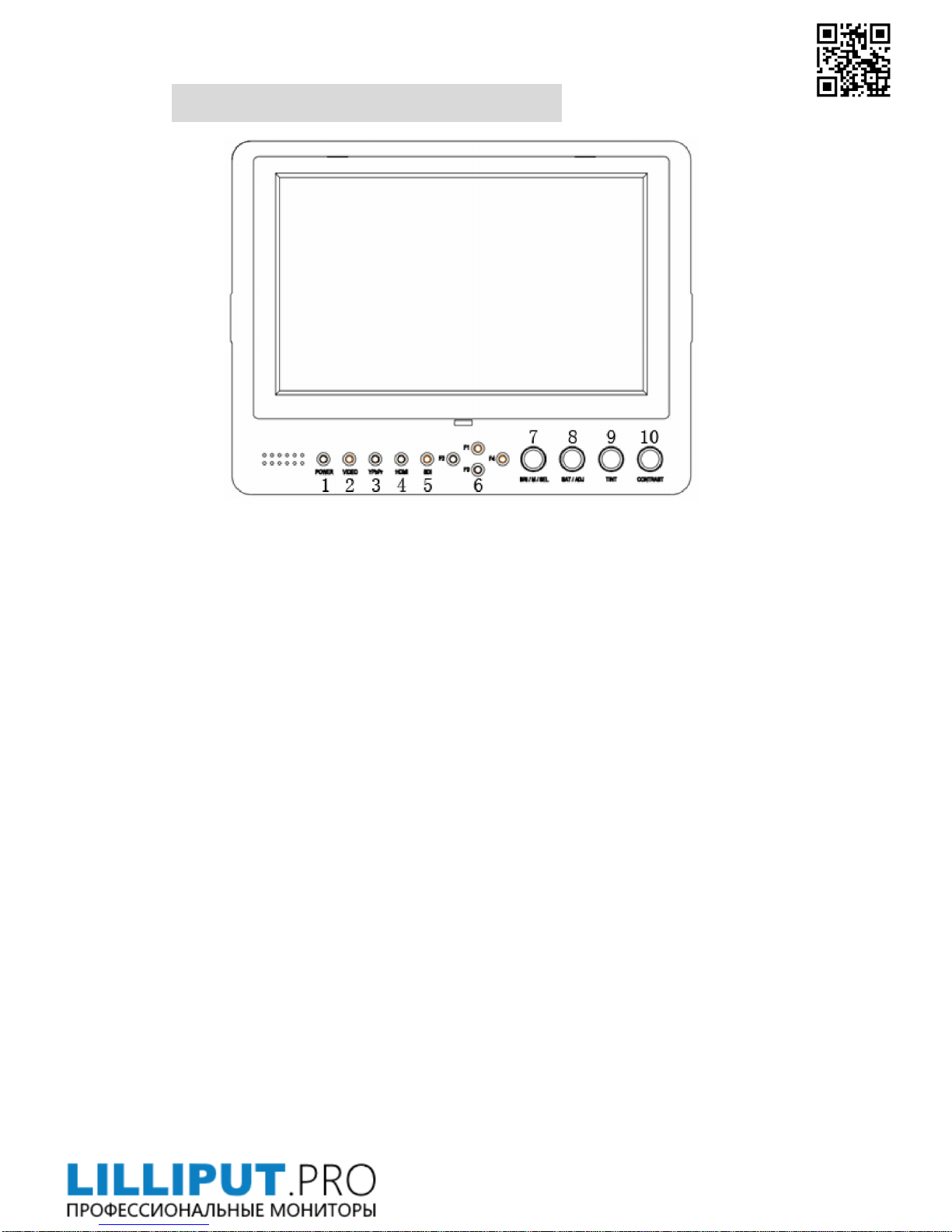
PRODUCT DESCRIPTION
1.POWER:ON/OFF (Light turns to red when power on.)
2.VIDEO: Indicator lights up when signal switch to video state.
3.YPbPr: Indicator lights up when signal switch to YPbPr state.
4.HDMI: Indicator lights up when signal switch to HDMI state.
5.SDI: Indicator lights up when signal switch to SDI state (optional).
6.F1、F2、F3、F4:User-definable buttons.
Default functions:
F1 Camera
F2 H/V Delay
F3 Check Field
F4 Screen Marker/Center Marker
(function customized to meet your needs)
7.Knob BRI/M/SEL:Press the knob to access the menu function, pressing
the knob in the menu to return to the previous page or exit the menu.
Rotate knob to select an option.
Default as Brightness function.
Page 5
+7 (495) 120-22-02 [email protected]
Official distributor in Russia – Lilliput.com.ru
4
8.Knob SAT/ADJ:Press the knob to select main MENU options; rotate knob
to confirm the selection and adjust parameter values.
Default as Saturation function.
9.Knob TINT:Default as Tint function.
10.Knob CONTRAST: Default as Contrast function.
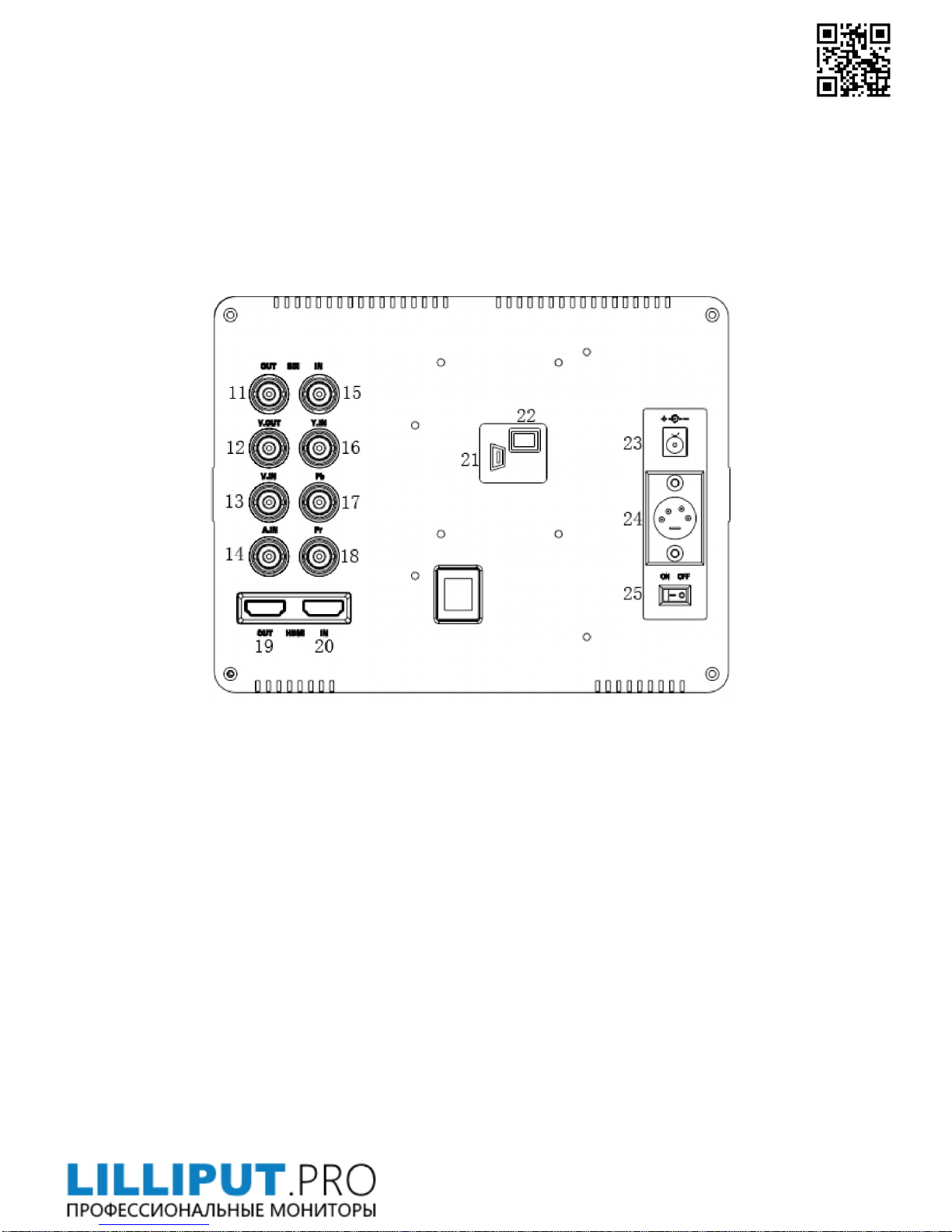
11. SDI signal output. (Optional)
12. Video signal output.
13. Video signal input.
14. Audio signal input.
15. SDI signal input. (Optional)
16. Y signal input
17. Pb signal input
18. Pr signal input
19. HDMI (High Definition Multimedia Interface) signal output.
20. HDMI (High Definition Multimedia Interface) signal input.
21. Mini USB input. (Only for program upgrades, do NOT use if
non-professionals)
22. Power cable interface (connecting to the battery plate).
23. DC power input.
Page 6
+7 (495) 120-22-02 [email protected]
Official distributor in Russia – Lilliput.com.ru
5
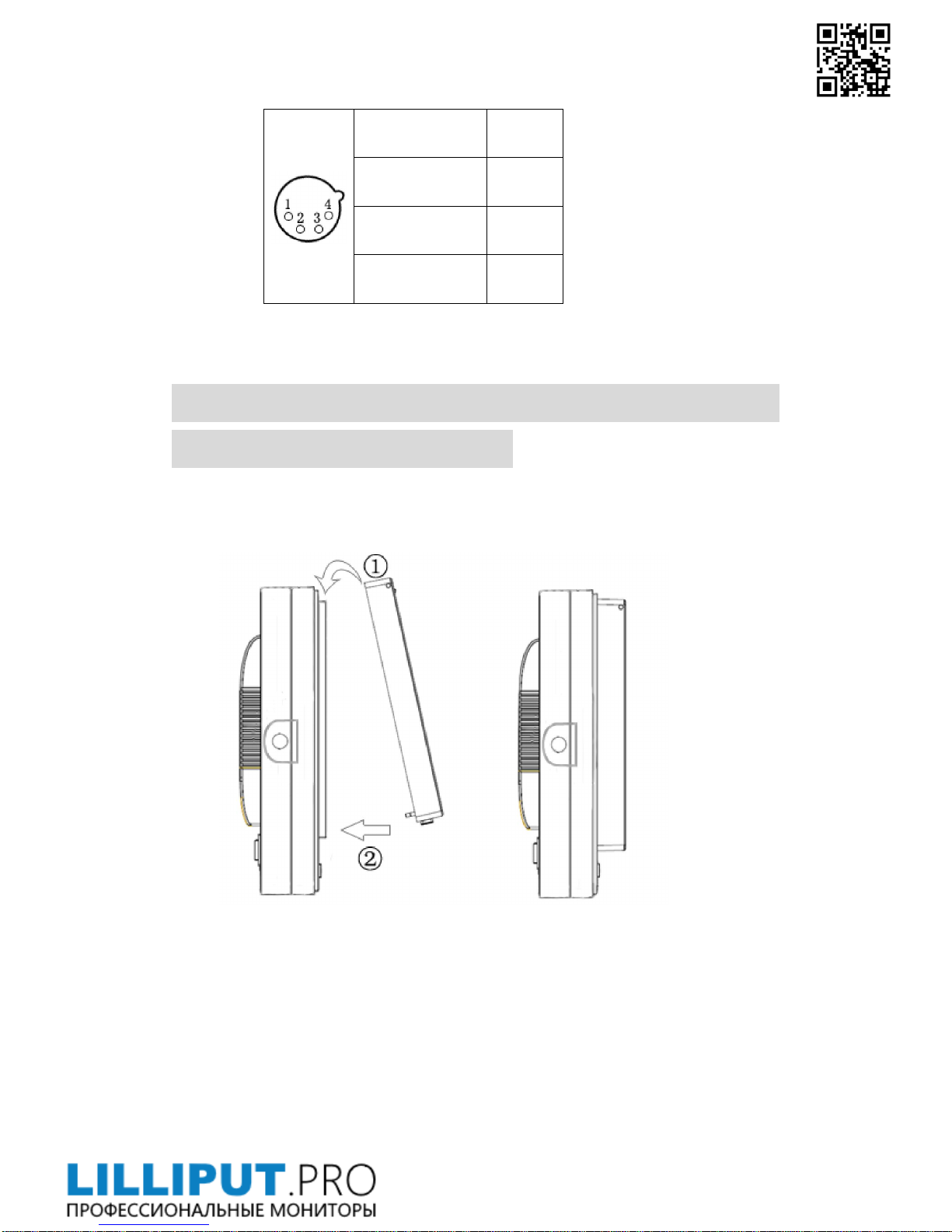
24. 4-pin XLR DC power input.
Pin number Signal
①
GND
②③
……...
④
+12V
25. Battery power on/off switch.
INSTALLATION OF SUNSHADE COVER
AND BATTERY PLATE
Installation of sunshade cover:
Installation steps
Installation completed
Disassembly of sunshade cover:
Disassembly steps: Disassembly completed:
Page 7
+7 (495) 120-22-02 [email protected]
Official distributor in Russia – Lilliput.com.ru
6
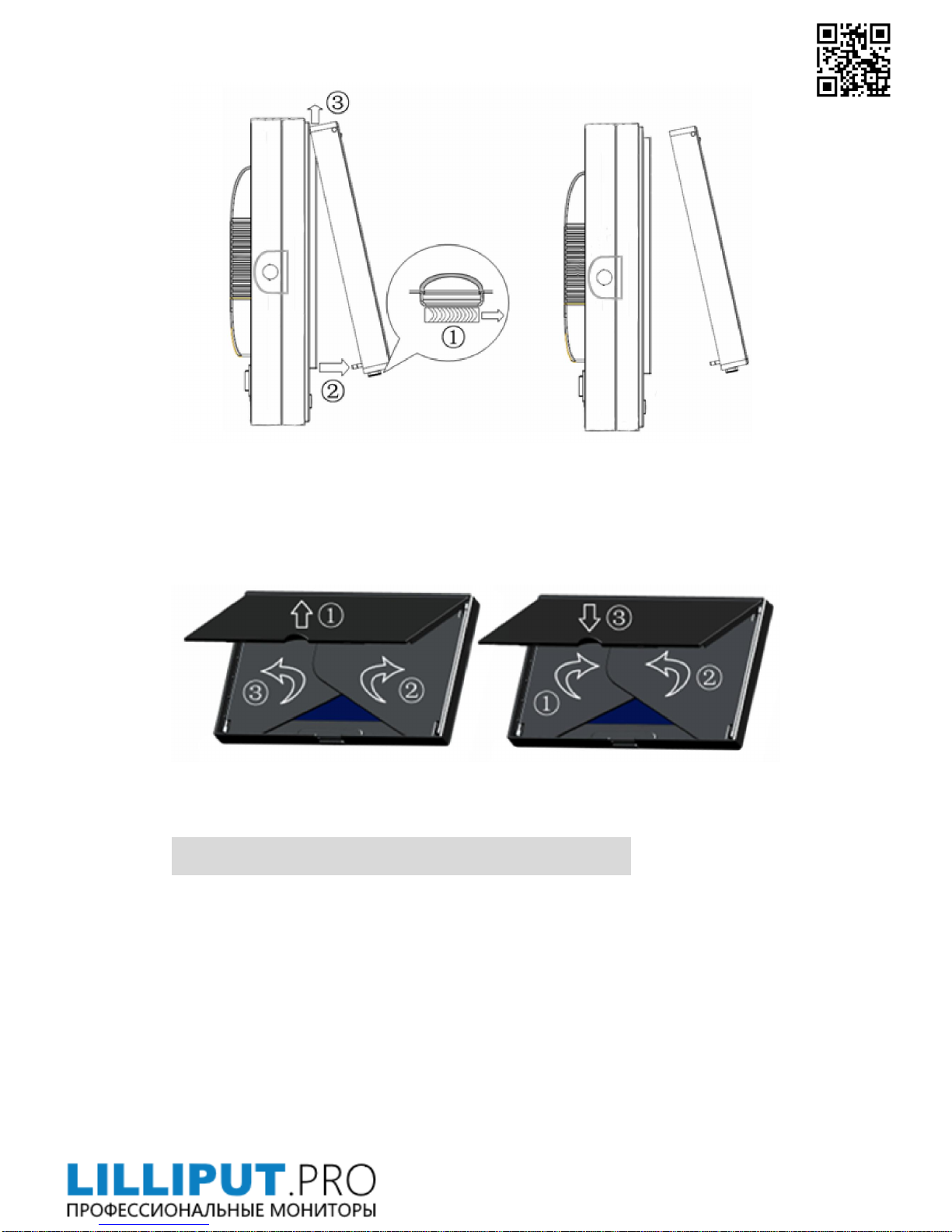
Steps of sunshade cover on / off:
* Please follow the instructions steps, or may damage the cover.
Open Step: Closed steps:
* Do not press the edge in the under of the cover, otherwise it will result
in open failure.
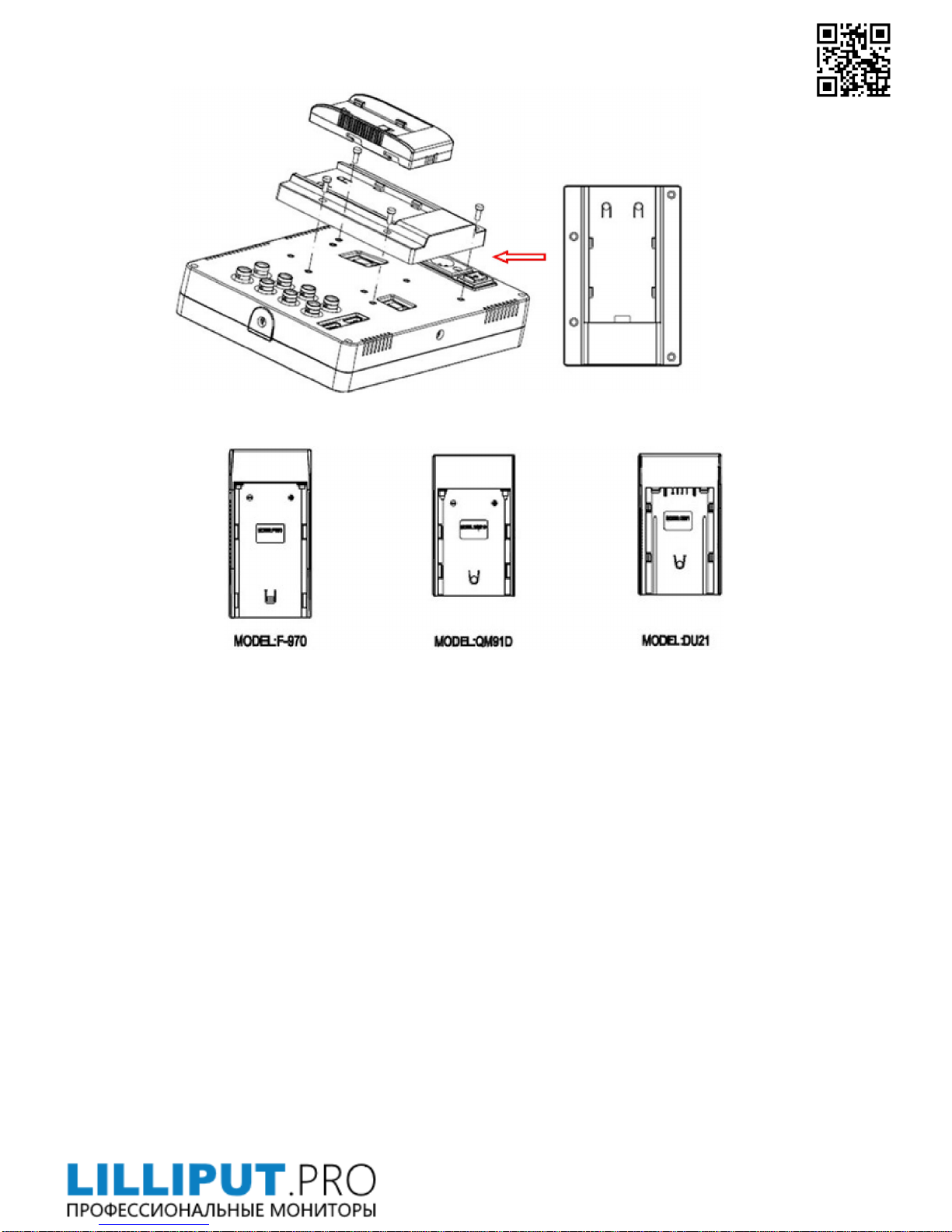
DV BATTERY MOUNT PLATE:
Standard mounts process
Page 8
+7 (495) 120-22-02 [email protected]
Official distributor in Russia – Lilliput.com.ru
7
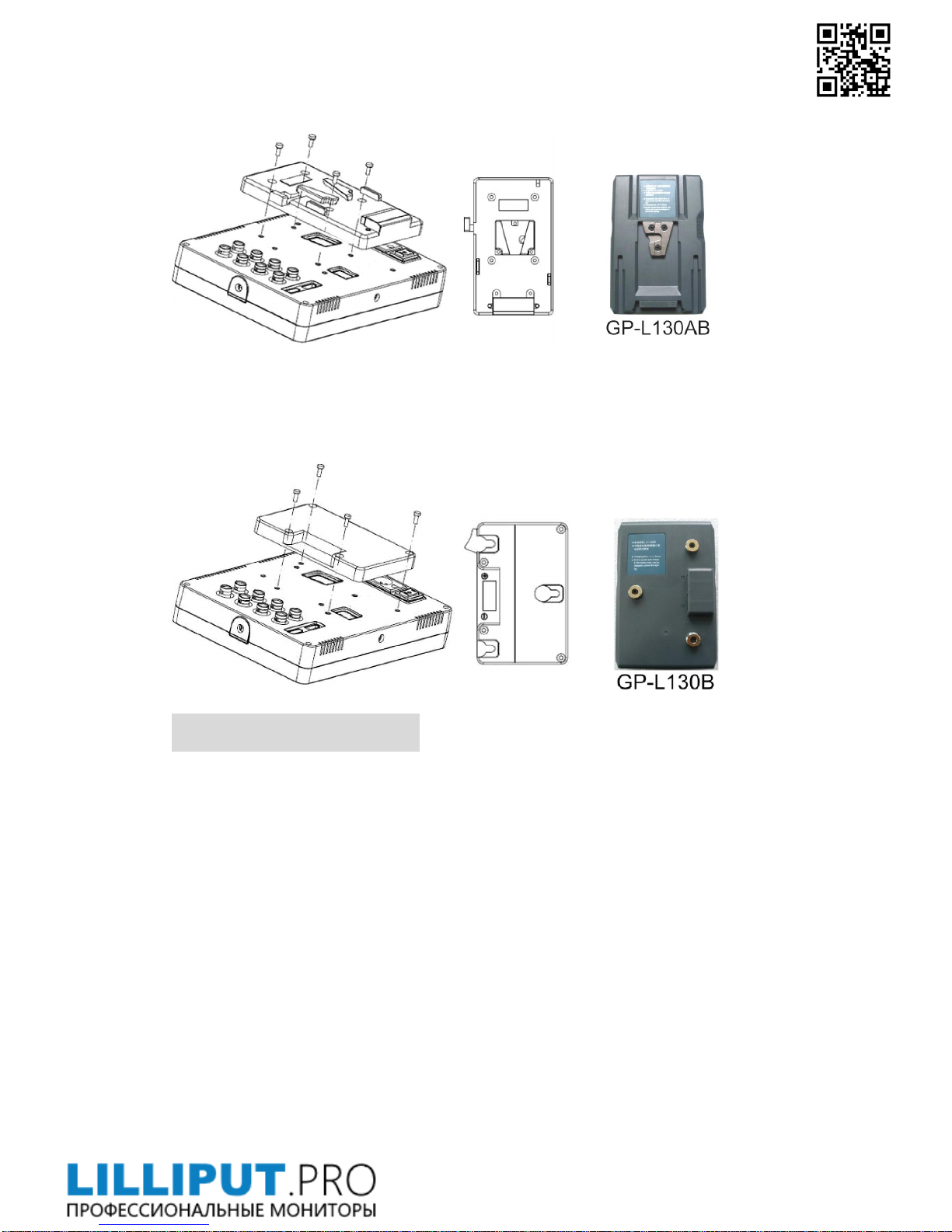
Following three types of battery plates are suitable for this device, model
F970&QM91D are standard accessories, model DU21 is for optional.
DV Battery Mount Plate:
Model DU21 for battery of Panasonic DV:
NV-GS/PV-GS/DZ-MV/GS/H28/H258/H288GK series, comply with
Panasonic battery DU06/VBD140/SANYO DZhs301sw/Hitachi
DZ-HS303SW/BZ-BP14S/DZ3200/BP07W.
Model QM91D for battery of SONY DV:
DSCR1/F/S/MVCCD/E/HC15E/HC1E/AE1u/DCRTRV828/E/CCD-TRV116/
DCR-DVD/PS105K/300K/10P/1E series.
Model F970 for battery of SONY DV:
DCR-TRV series, DCR-TRV E series, VX2100E PD P series, GV-A700,
GV-D800 FD/CCD-SC/TR3/FX1E/HVR-AIC, HDR-FX1000E, HVR-Z1C,
HVR-V1C, FX7E F330.
V-mount battery plate (optional):
Please refer to GP-L130AB type
Page 9
+7 (495) 120-22-02 [email protected]
Official distributor in Russia – Lilliput.com.ru
8
battery specifications.
Anton Bauer mount battery plate (optional):
Please refer to GP-L130B
type battery specifications.
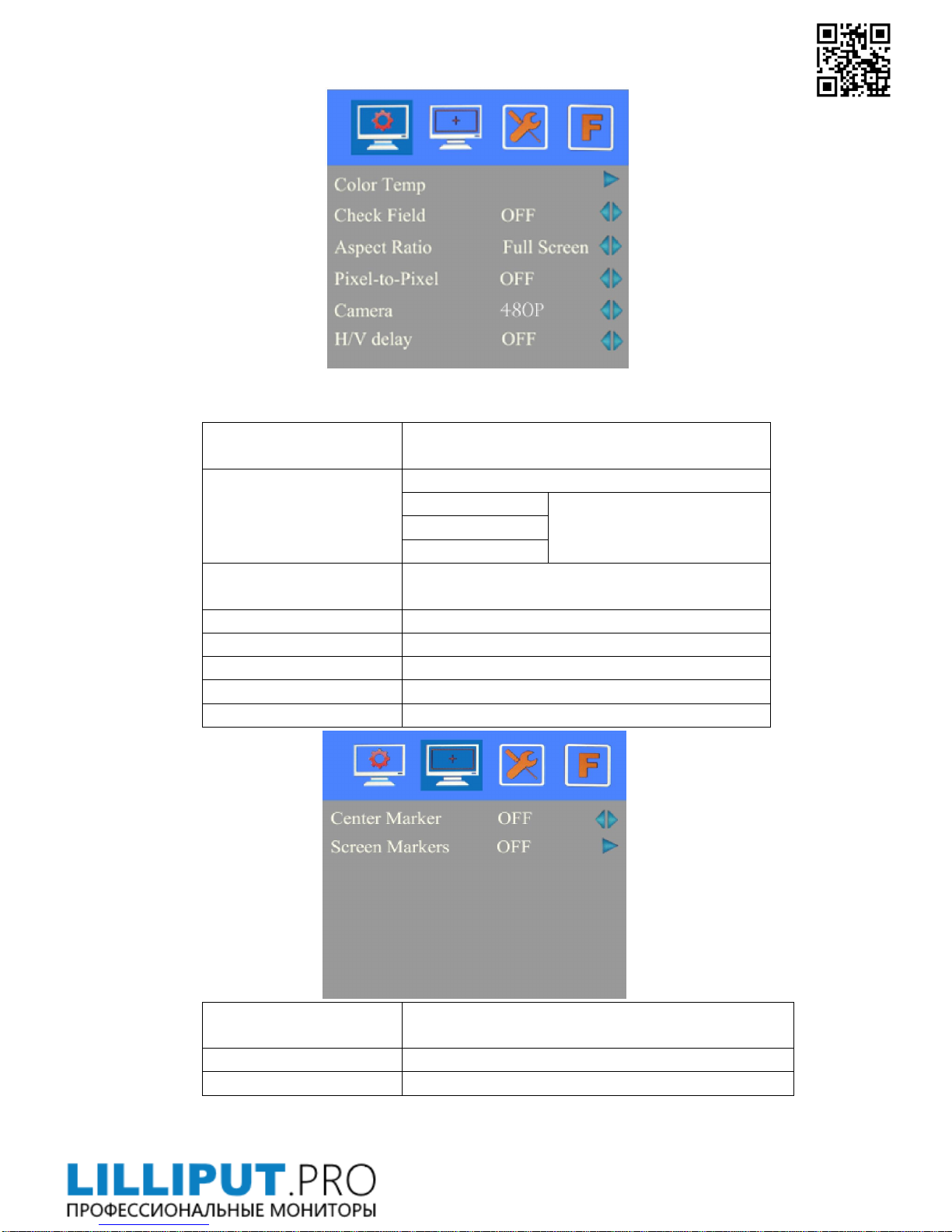
SETTING MENU
Before setting the functions, please make sure the device is connected correctly.
When power on, press BRI/M/SEL knob on the device, function menus will
pop-up on the screen. After confirm the option value, then press BRI/M/SEL
knob to return to the previous, and press the BRI/M/SEL knob again to exit the
menu settings.
BRI / M / SEL knob to select an option.
SAT / ADJ knob to select the main menu, adjusting option values and
confirm the selection.
Page 10
+7 (495) 120-22-02 [email protected]
Official distributor in Russia – Lilliput.com.ru
9
ITEMS OPTIONS
Color Temp
6500ºK/7500 ºK/9300 ºK/User
Red
Note: Only available under
“User” mode to meet the
color value you need.
Green
Blue
Check Field
OFF,MONO,Red, Green and Blue
Aspect Ratio Full Screen,4:3 and 16:9
Pixel-to-Pixel ON/OFF
Camera 480P
(5DII Mode)
/ 1080I
(5DIII Mode)
H/V delay OFF,H&V Delay, V Delay and H Delay
Underscan ON/OFF
ITEMS OPTIONS
Center Marker ON/OFF
Screen Markers OFF, 95%,93%,90%,88%,85% and80%
Page 11
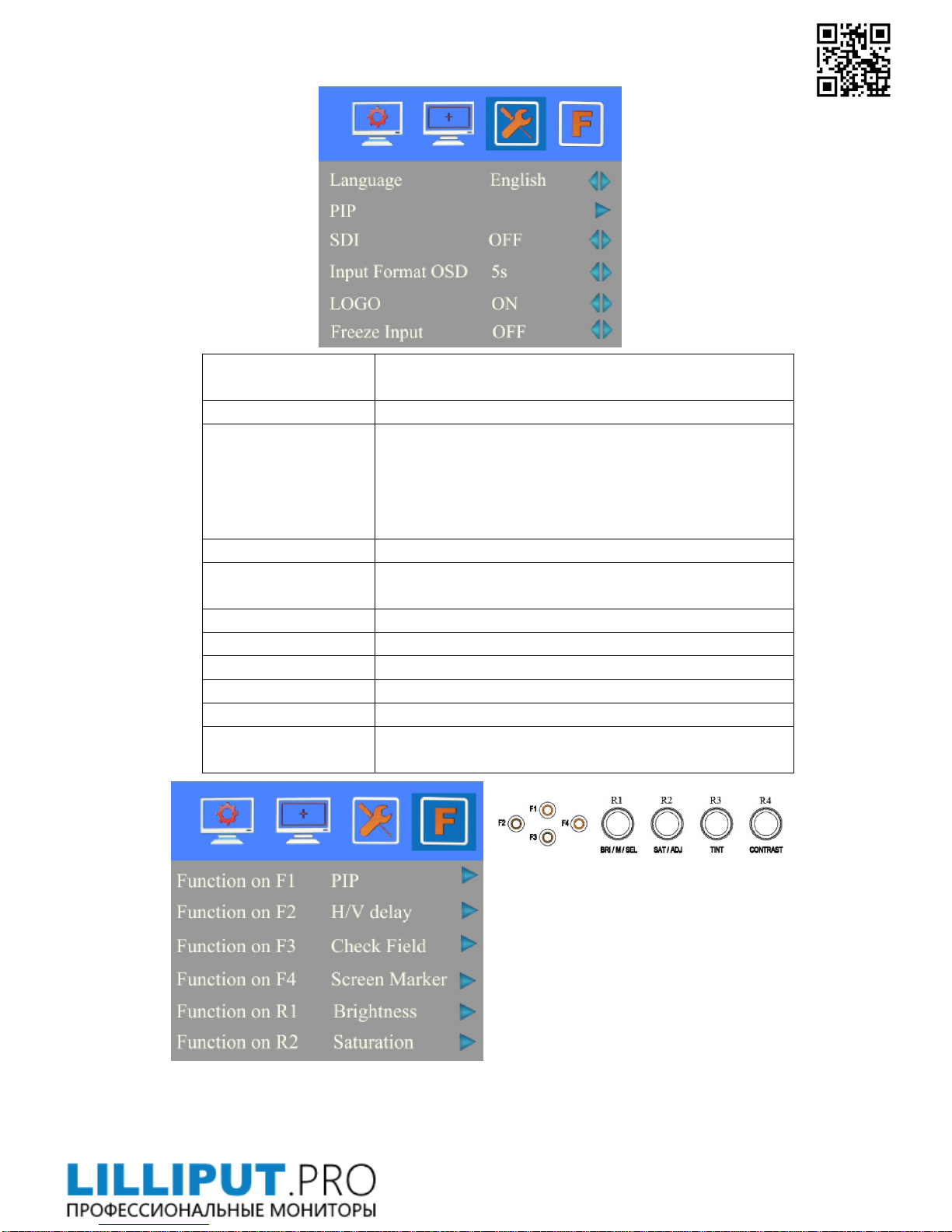
ITEMS OPTIONS
Language English /Chinese
PIP
Small, Medium, Large, PBP, POP
In small, medium and large interface can adjust the
source, position, and swap;
In PBP and POP interface can adjust the source and
swap.
SDI ON/ OFF
Input Format OSD
5s、10s、15s
LOGO ON/ OFF
Freeze Input ON/ OFF
Image Flip ON/ OFF
Assistant Func. Manual/ Auto
Manufacturer Default OK/Cancel(Reverse the SAT / ADJ knob to select "OK")
ISP
For program upgrades (Please reboot your computer if
press accidentally!)
Function of buttons and knobs can be
customized by users’ needs.
Functions of F1-F4 buttons can also
be customized: Aspect Ratio, Check
Field, Freeze Input, Center Marker,
Underscan, H/V delay, Color Bar,
Screen Marker , Zoom , Camera,
Pixel-to-Pixel and PIP.
Page 12
+7 (495) 120-22-02 [email protected]
Official distributor in Russia – Lilliput.com.ru
11
Functions of R1-R4 buttons can also be customized: Contrast, Brightness, Saturation,
Tint, Volume and Sharpness.
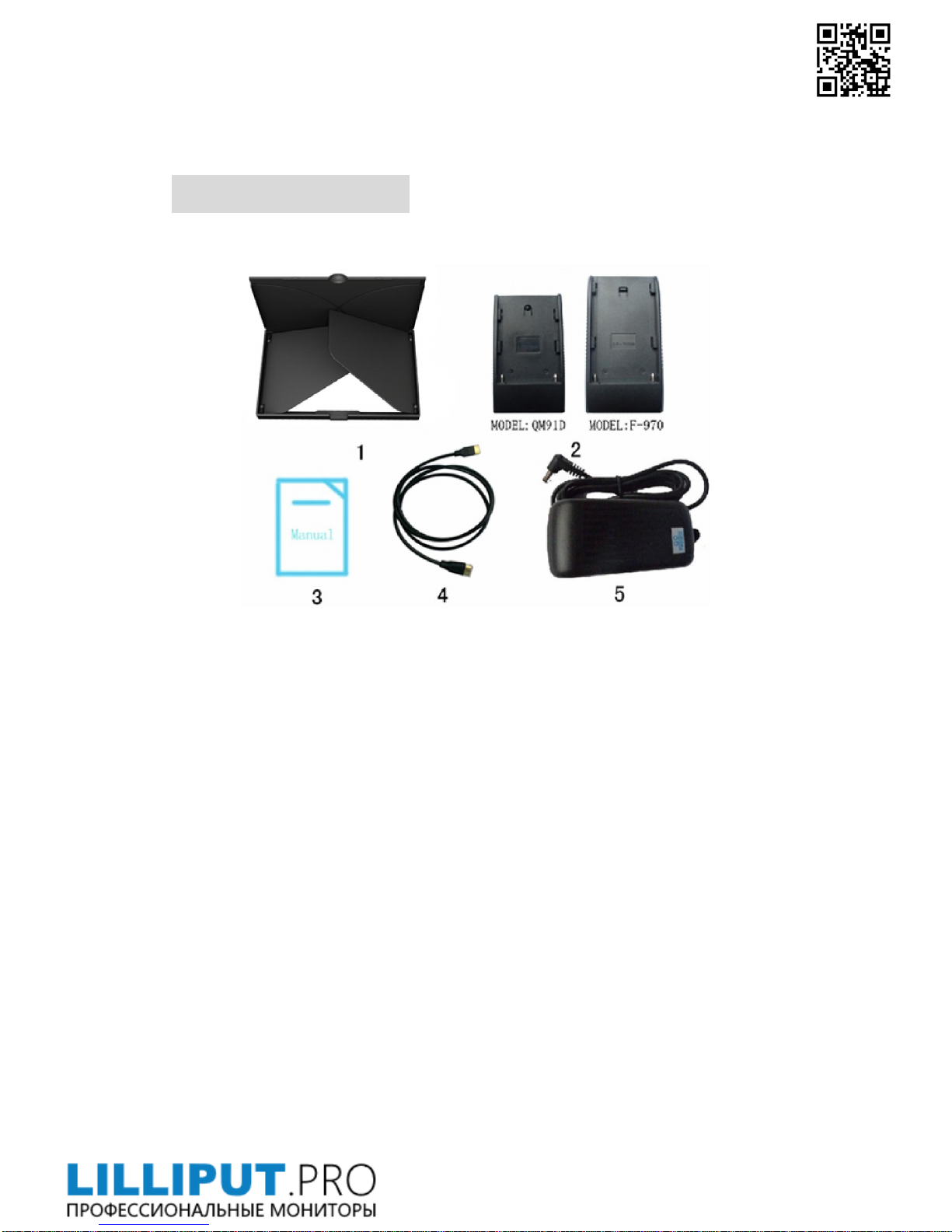
ACCESSORIES:
Standard accessories:
1. Flexible Folding Sun Shade Cover 1 piece
2. Battery Plate QM91D 1 piece
Battery Plate F-970 1 piece
3. Manual
1 copy
4. HDMI Type A-C
1 piece
5. DC Adapter
1 piece
Optional accessories
Page 13
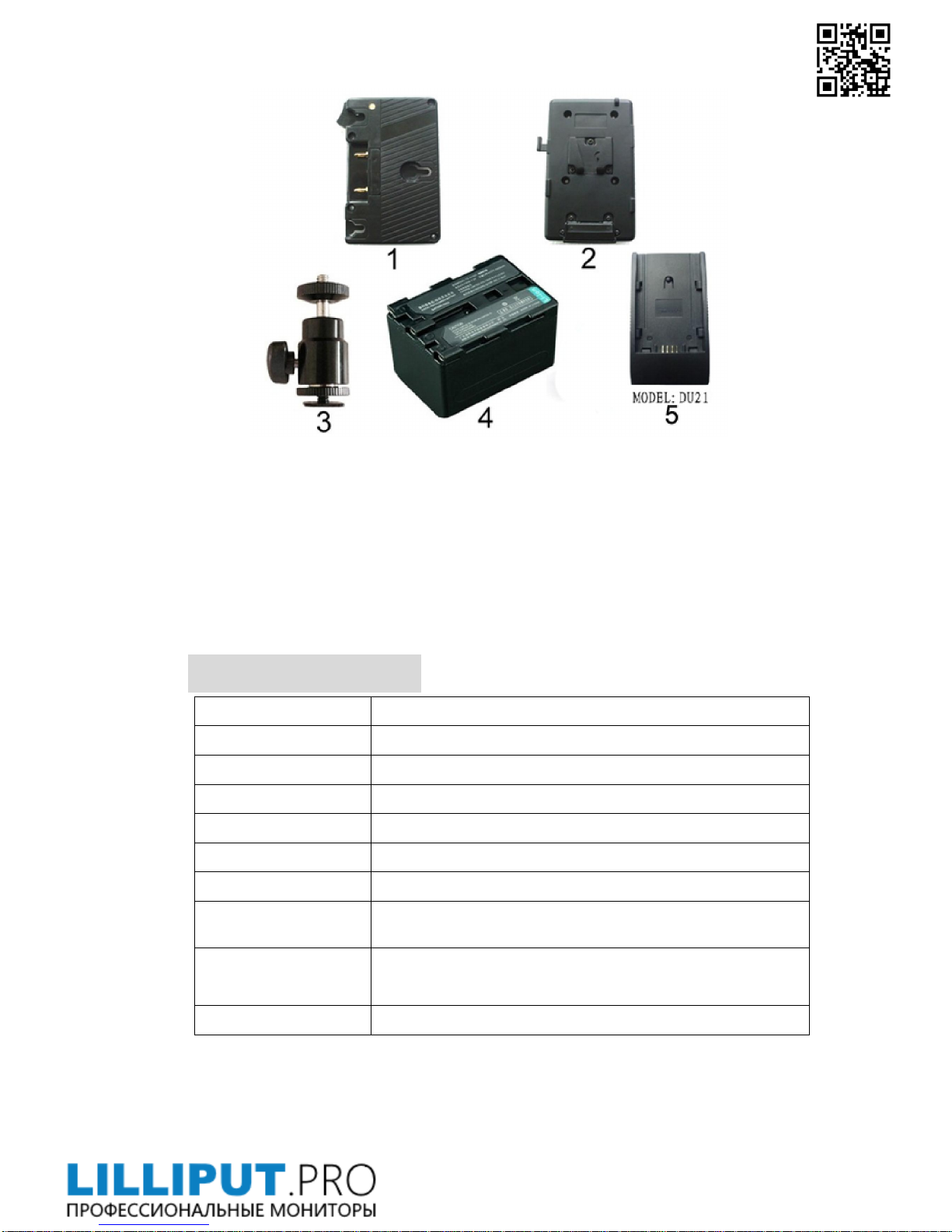
1. Anton Bauer Mount Battery Plate 1piece
2. V-mount Battery Plate
1piece
3. Shoe Mount (for camera only)
1piece
4. Li-ion Battery
1piece
5. Battery Plate: DU21
1piece
PARAMETERS:
Panel Size 7’’ TFT LCD
Resolution 1024×600, up to 1920×1080
Contrast 800:1
Viewing Angle 160°/ 150°(H/V)
Input Voltage DC12V (XLR DC Connection)
Input Signal HD-SDI
(optional)
, HDMI, YPbPr, AV
Current 650mA
Power Consumption
≤10W
Size:(LWD) 194.5×150×38.5mm/48.5mm(with sun shade closed)
/158.5mm (with sun shade open)
Weight 530g / 680g (with cover)
Page 14
TROUBLE SHOOTING
1. Only black-and-white display:
Check whether the color saturation is properly setup.
2. Power on but no pictures:
Check whether the cables of Video, HDMI, YPbPr and SDI are correctly
connected. Please use the standard power adapter coming with the product
package. Improper power input may cause the device.
3. Wrong or abnormal colors:
Check whether the cables are correctly and properly connected. Broken or loose
pins of the cables may cause a bad connection.
4. When on the picture shows size error:
press“MENU→ →Underscan” to zoom in/out pictures automatically
when receiving HDMI (High-Definition Multimedia Interface) signals.
5. Other problems:
Please press “MENU” button and choose “ →Manufacturer Default →OK”
6. According to the ISP, the machine can not function properly:
ISP for program upgrades, non-professionals do not use. Please reboot your
computer if press accidentally!
*It is normal to see some bright lines appear on the screen when turn off the device.
Note: due to constant effort to improve products and product
features, specifications may change without notice.
 Loading...