

Page 1
Quick Start Guide
q
48V DC
48V DC
extender
extender
extenders
HDMI-TPX-TX209AK
HDMI-TPX-RX209AK
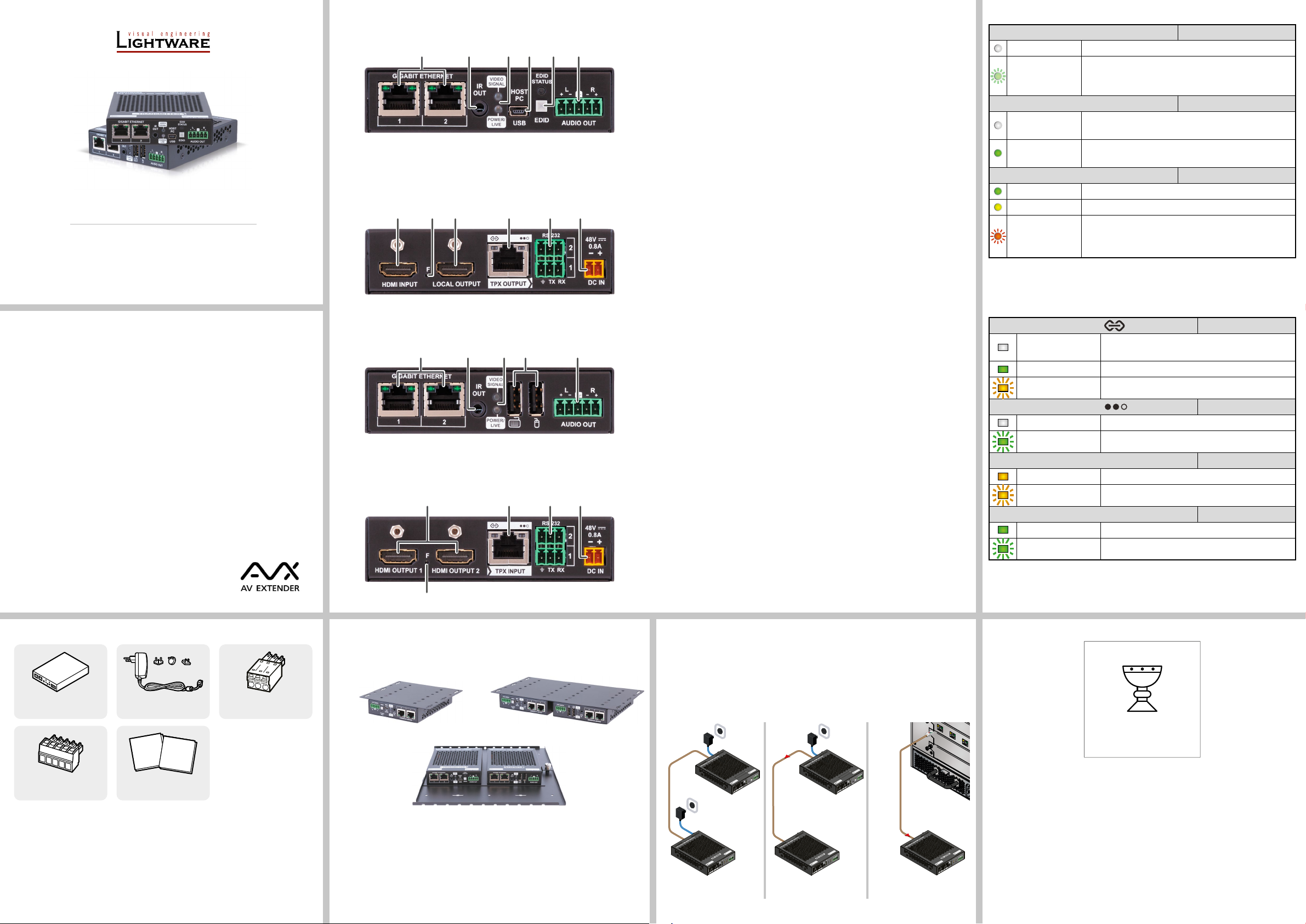
Front and Rear View - Transmitter (TX)
Front View
2 3 4 6 71
TX209AK model is built with a 5-pole Phoenix® connector for analog audio output,
TX209DK model is built with an RJ45 Ethernet connector for Dante® signal output.
Rear View
q8 w t ye
1
Gigabit Ethernet
1GBase-T RJ45 connectors for user Ethernet purpose.
ports
IR out TRS (3.5mm jack) output connector for an Infrared emitter
2
unit.
Status LEDs The LEDs give immediate feedback about the current
3
status of the extender. See the details in the Status LEDs
section.
4
5
6
USB mini B-type
connector
USB A-type
connectors
EDID button and
Status LED
USB connection to host (computer) unit via USB mini-B
connector.
USB K+M ports for HID-compatible devices (preferably
keyboard and mouse).
Two EDID emulation modes can be selected with the
EDID button: Learned and Transparent.
Short press: switch between transparent and stored
user EDID.
Long press: learn and store EDID from the output
of the receiver.
The EDID Status LED gives immediate feedback about
the current status of the EDID emulation. See the details
in the Status LEDs section.
Status LEDs
POWER/LIVE Transmitter / Receiver
off Device is not powered.
blinking between
50% and 100%
Device is powered on and operational.
brightness (green)
VIDEO SIGNAL Transmitter / Receiver
off
on (green)
No video signal detected on the HDMI input (TX) or HDMI
output (RX) port.
Video signal is detected on the HDMI input (TX) or HDMI
output (RX) port.
EDID STATUS Transmitter
on (green) Learned EDID is emulated on the HDMI input port.
on (yellow) Transparent EDID is emulated on the HDMI input port.
Error occured during the EDID emulation. It may be caused by:
blinking (red)
EDID emulation cannot be set correctly.
Device cannot apply transparent EDID emulation.
Important Safety Instructions
Please read the supplied safety instruction document before using the product and keep it
available for future reference.
Introduction
The HDMI-TPX-209 series extenders with AVX technology are Lightware’s future-proof
development and a natural progression from the widely popular HDMI-TPS-TX/RX97 series,
allowing users to extend HDMI 2.0 signals up to 4K60 4:4:4 video resolution through a single
CATx cable over distances of up to 100 meters.
Beyond the benets of sending high-resolution video over long distances, the extenders are
also capable of handling various connectivity standards, including bi-directional RS-232, USB
K+M extension and command injection over IR (output only) as well.
Audio signal de-embedding function is available via analog audio for HDMI-TPX-209AK series
extenders.
The Gigabit Ethernet port is also a valuable addition, allowing users to connect an additional
device to the network directly through the TPX extender.
HDCP 2.3 and basic EDID management functionality are also among the features offered
by these devices, such as their connectivity and easy integration into a wide range of AV
operations and compatibility with 3rd party devices.
Compatible Devices
The product is compatible with all Lightware TPX series models
and any third-party AVX devices.
Box Contents
Front and Rear View - Receiver (RX)
Front View
2 3 71 5
TX209AK model is built with a 5-pole Phoenix® connector for analog audio output,
TX209DK model is built with an RJ45 Ethernet connector for Dante® signal output.
Rear View
t yr9
Mounting Options
For the mounting of the devices Lightware supplies optional accessories for different usages.
The device has two mounting holes with inner thread on the bottom side. Fasten the device by
the screws enclosed to the accessory.
Audio output 5-pole Phoenix connector for de-embedding the HDMI
7
audio, which can be transmitted as a 2-channel balanced
analog audio signal.
HDMI input HDMI input port with HDMI 2.0 support for source devices.
8
HDMI outputs HDMI output ports with HDMI 2.0 support for sink devices.
9
The transmitted signals are mirrored on both ports.
Factory reset
q
button
Local output Local HDMI output with the same AV content as the HDMI
w
Hidden button for setting the device to factory default
values.
input.
TPX output RJ45 connector for AVX output signal transmission. See
e
more details about the connector in the Power Supply
Options and the Status LEDs sections.
TPX input RJ45 connector for AVX input signal. See more details
r
about the connector in the Power Supply Options and the
Status LEDs sections.
RS-232 ports 3-pole Phoenix connectors for bi-directional serial
t
communication.
48V DC input 2-pole Phoenix DC input for local powering.
y
Power Supply Options
TPX209 series extenders are able to supply remote power to each other over the TPX
connector.
The TPX209 series devices can be powered in any of the following ways:
TPX INPUT/OUTPUT Transmitter / Receiver
off
No connection is established between the transmitter
and the receiver units.
on (green) Connection is established with 10G / 5G / 2.5G bandwith.
blinking (yellow) Link training is in progress.
TPX INPUT/OUTPUT
Transmitter / Receiver
off No data transmission on the port.
blinking (green) Data transmission is active.
GIGABIT ETHERNET - LEFT LED Transmitter / Receiver
on (yellow/green) Connection is established with 100Mbps bandwith.
blinking (yellow/green) Data transmission is active.
GIGABIT ETHERNET - RIGHT LED Transmitter / Receiver
on (green) Connection is established with 1Gbps bandwith.
blinking (green) Data transmission is active.
TAKE CARE OF ME
Transmitter / receiver
device
®
Combicon 5-pole
Phoenix
connector
48V DC adaptor with
interchangeable plugs
Quick
Safety and
Start
Warranty
Info
Guide
Safety & Warranty Info;
Quick Start Guide
Phoenix® Combicon 3-pole
connector (2x)
UD Mounting Plate F110 UD Mounting Plate F120
UD Mounting Pro P140
The UD Mounting Plate F110 makes it easy to mount a single device on any at surface, e.g.
furniture. The UD Mounting Plate F120 and UD Mounting Pro P140 provide the same for one
half-rack or two quarter-rack sized units. Pocket-sized devices can also be fastened to them.
The UD Mounting Pro P140 makes easy and quick changing of the extenders under the desk
available. To order mounting accessories, please contact [email protected].
Using different (e.g. longer) screws may cause damage to the device.
¢
The extenders are quarter-rack sized.
1. Local adaptor for both
TX and RX
48V DC
Power
adaptor
Power
adaptor
AUDIO OUT
TRANSMITTER
CATx
(AVX)
HDMI-TPX-209 series
2. Local adaptor and
remote power to TX / RX
Power
send
EDID
STATUS
AUDIO OUT
EDID
HDMI-TPX-209 series
CATx
(AVX)
HDMI-TPX-209 series
extender
Power
adaptor
TRANSMITTER
AUDIO OUT
3. Remote power via
matrix board to TX / RX
EDID
STATUS
AUDIO OUT
EDID
CATx
(AVX)
MX2M series matrix
with MX2M-4TPX-IB / OB
Power
send
HDMI-TPX-209 series
I AM THE ONE AND ONLY
USER DOCUMENT FOR
THIS PRODUCT
Lightware Visual Engineering PLC.
Budapest, Hungary
[email protected] +36 1 255 3800
[email protected] +36 1 255 3810
©2023 Lightware Visual Engineering. All rights reserved. All trademarks mentioned are the
AUDIO OUT
property of their respective owners. Specications are subject to change without notice.
Further information on the device is available at www.lightware.com.
Doc. ver.: 1.2
19210104
Page 2
Specication
TPX
HDMI in
Local HDMI out
Audio out
USB mini-B
Ethernet
IR out
RS-232
Power
TPX
HDMI out
Audio out
USB-A
Ethernet
IR out
RS-232
Power
Power adaptor
Transmitter Side Receiver Side
Power adaptor Keyboard & mouse
General
Compliance .................................................................................................... CE, UKCA
EMC (Emission) .....................................................................EN 55032:2015+A1:2020
EMC (Immunity) ...................................................................EN 55035:2017+A11:2020
Electrical safety .................................................................................. EN 62368-1:2020
RoHS .....................................................................................................EN 63000:2018
Warranty .............................................................................................................3 years
Operating temperature ...................................................0° to +50°C (+32° to +122°F)
Operating humidity ......................................................... 10% to 90%, non-condensing
Cooling ................................................................................................................passive
Power
Power supply option ............................................Power adaptor / PoE PD + PoE PSE
Supported power source .........................................................100-240 V AC; 50/60 Hz
Power consumption (without remote power)..........................................................11 W
Power consumption (with remote power) .............................................................. 22 W
Heat dissipation (without remote power) ......................................................37.5 BTU/h
Heat dissipation (with remote power) ..............................................................75 BTU/h
Control Ports
Ethernet port
Connector type ......................................................................... RJ45 female connector
Ethernet data rate ...............................................1GBase-T, full duplex with autodetect
Power over Ethernet (PoE) .....................................................................Not supported
RS-232 serial port
Connector type ......................................................................3-pole Phoenix connector
Default settings ...................................................................................9600 BAUD, 8N1
Infrared output port
Connector type ............................................................. 3.5mm TRS (approx. 1/8” jack)
Output signal .................................................................................... Modulated (38kHz)
Operation mode ...............................Command injection (only with 3rd-party software)
USB port (Transmitters)
Connector type .................................................................................... USB mini-B type
USB compliance ............................................................................................... USB 2.0
Device class ..............................................................................................................HID
USB port (Receivers)
Connector type .......................................................................... USB A-type receptacle
USB compliance ............................................................................................... USB 2.0
Device class ..............................................................................................................HID
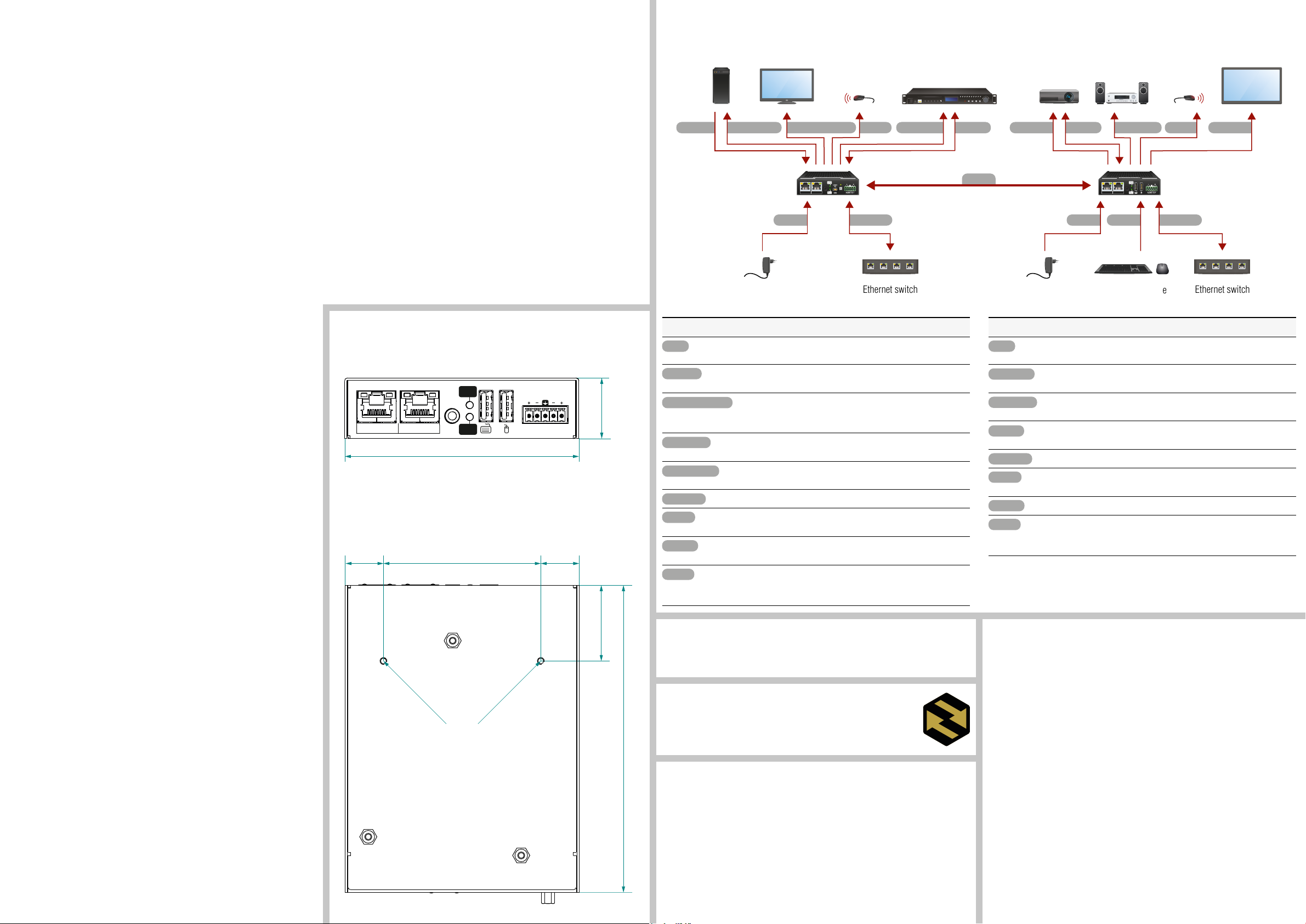
Connecting Steps
HDMI-TPX-209 series
USB mini-BHDMI in
transmitter
Power
GIGABIT ETHERNET
IR
OUT
21
4K projector Audio amplifier 4K displayInfrared emitter Infrared emitterMedia server4K TV4K PC
IR out IR outRS-232Audio out Audio out
EDID
STATUS
EDID
TPX
Ethernet
RS-232HDMI out HDMI outLocal HDMI out
Power USB-A
Ethernet switch
GIGABIT ETHERNET
IR
OUT
21
HDMI-TPX-209 series
receiver
Ethernet
Ethernet switch
Power Adaptor
Supplied power .........................................................................................48V DC, 0.8A
AC power plug ............................................ Interchangable (EU, UK, JP/US, AUS/NZ)
DC power plug .......................................................................2-pole Phoenix connector
Enclosure
Rack mountable ........................................................... yes, with mounting accessories
Enclosure material ........................................................................................ 1 mm steel
Dimensions (mm / inch) .................100.4 W x 131.9 D x 26 H (3.95 W x 5.19 D x 1 H)
Weight ....................................................................................................482 g (1.06 lbs)
Video Ports
HDMI input/output
Connector type ...........................................................19-pole HDMI Type A receptacle
AV standard ...................................................................................... DVI 1.0, HDMI 2.0
HDCP compliance ..........................................................................................HDCP 2.3
Color space ................................................................................................ RGB, YCbCr
Supported resolutions at 8 bits/color * ........................up to 4096x2160@60Hz (4:4:4)
Audio formats ................... 8-channel PCM, Dolby TrueHD, DTS-HD Master Audio 7.1
TPX input/output
Connector type ..................................................................................... RJ45 connector
Power over Ethernet .............................................. PoE PD + PoE PSE (IEEE802.3af)
Data rate ...................................................................................................... 10GBase-T
Compliance ................................................................................................. SDVoE AVX
HDCP compliance ..........................................................................................HDCP 2.3
Transferred signals ..................... Video, Audio, RS-232, Infrared, USB K+M, Ethernet
Color space ................................................................................................ RGB, YCbCr
Video latency (TPX output)............................................0 frame (ve lines/ under 8ms)
Compression ratio (TPX output) ..................................................................... 1.4 to 1 **
Supported resolutions at 8 bits/color * ........................up to 4096x2160@60Hz (4:4:4)
Audio formats ................... 8-channel PCM, Dolby TrueHD, DTS-HD Master Audio 7.1
Audio Ports
Analog audio output
Connector type ......................................................................5-pole Phoenix connector
Audio formats .........................................................................................2-channel PCM
Sampling frequency .............................................................................................48 kHz
Signal transmission .............................................................................. Balanced signal
* All standard VESA, CEA and other custom resolutions up to 600MHz (HDMI2.0) are
supported.
** Compression is applied only if the AV signal is above HDMI 1.4 standard.
Mechanical Drawings
The following drawings present the physical dimensions of the HDMI-TPX-209 series
extenders. Dimensions are in mm.
Front View
GIGABIT ETHERNET
IR
OUT
VIDEO
SIGNAL
L
R
26
21
POWER/
LIVE
AUDIO OUT
100.4
Bottom View
67.516.45 16.45
32.5
M3 thread
131.8
Transmitter Side
Connect a CATx cable between the TPX output port of the transmitter
and the TPX input port of the receiver.
Connect the source (e.g. media player) to the HDMI input port of the
transmitter by a HDMI cable.
Connect the local sink devices (e.g. 4K TV) to the Local output port
by an HDMI cable. The output port is local loopback port in this case:
the same stream received on the input port is transmitted forward.
Optionally for analog output: connect an audio device (e.g. media
server) to the analog audio output port by an audio cable.
Optionally for USB HID extension: connect the transmitter to the
computer by an USB mini-B cable.
Connect the device to a LAN network.
Optionally for Infrared extension: connect an IR emitter to the IR
OUT port of the transmitter.
Optionally for RS-232: connect a device (e.g. media player) to the
RS-232 port.
Powering on the devices is recommended to do as the nal step
during the installation. Please check the Power Supply Options
section for the details.
Minimum CAT Cable Requirement
Lightware highly recommends using CAT6a AWG24 or higher category 10G Ethernet cables
for the TPX (AVX) connection between the transmitter and the receiver. Usage of e.g. AWG28
Ethernet cables may reduce the extension distance signicantly.
Firmware Upgrade
Lightware Device Updater (LDU2) is an easy and comfortable way to keep your
device up to date. Establish the connection via Gigabit Ethernet port. Download
and install LDU2 software from the company’s website, www.lightware.com,
where you can nd the latest rmware package as well.
Ventilation
¢
Pay attention to the ventilation holes when designing the system. Top and side
ventilation holes must not be covered.
Receiver Side
Connect a CATx cable between the TPX output port of the transmitter and
the TPX input port of the receiver.
Connect the sinks (e.g. 4K display and 4K projector) to the HDMI output
ports of the receiver by the HDMI cables.
Optionally for analog output: connect an audio device (e.g. audio amplier)
to the analog audio output port by an audio cable.
Optionally for USB HID extension: connect the USB HID devices to the
transmitter (preferably mouse and keyboard).
Connect the device to a LAN network.
Optionally for Infrared extension: connect an IR emitter to the IR OUT port
of the receiver.
Optionally for RS-232: connect a device (e.g. 4K TV) to the RS-232 port.
Powering on the devices is recommended to do as the nal step during
the installation. Please check the Power Supply Options section for the
details.
 Loading...