

Page 1
Quick Start Guide
DP-OPT-TX100
DP-OPT-RX100
Further Information
The Product brief and further information of this appliance is available at www.lightware.com.
See the Downloads section on the website of the product.
Contact Us
+36 1 255 3800
+36 1 255 3810
Lightware Visual Engineering LLC.
Peterdy 15, Budapest H-1071, Hungary
Doc. ver.: 2.2
19200121
Important Safety Instructions
Please read the supplied safety instruction
document before using the product and keep it
available for future reference.
The extenders are class 3R laser products.
Caution! Invisible Class 3R laser radiation! Avoid eye exposure to the beam!
Introduction
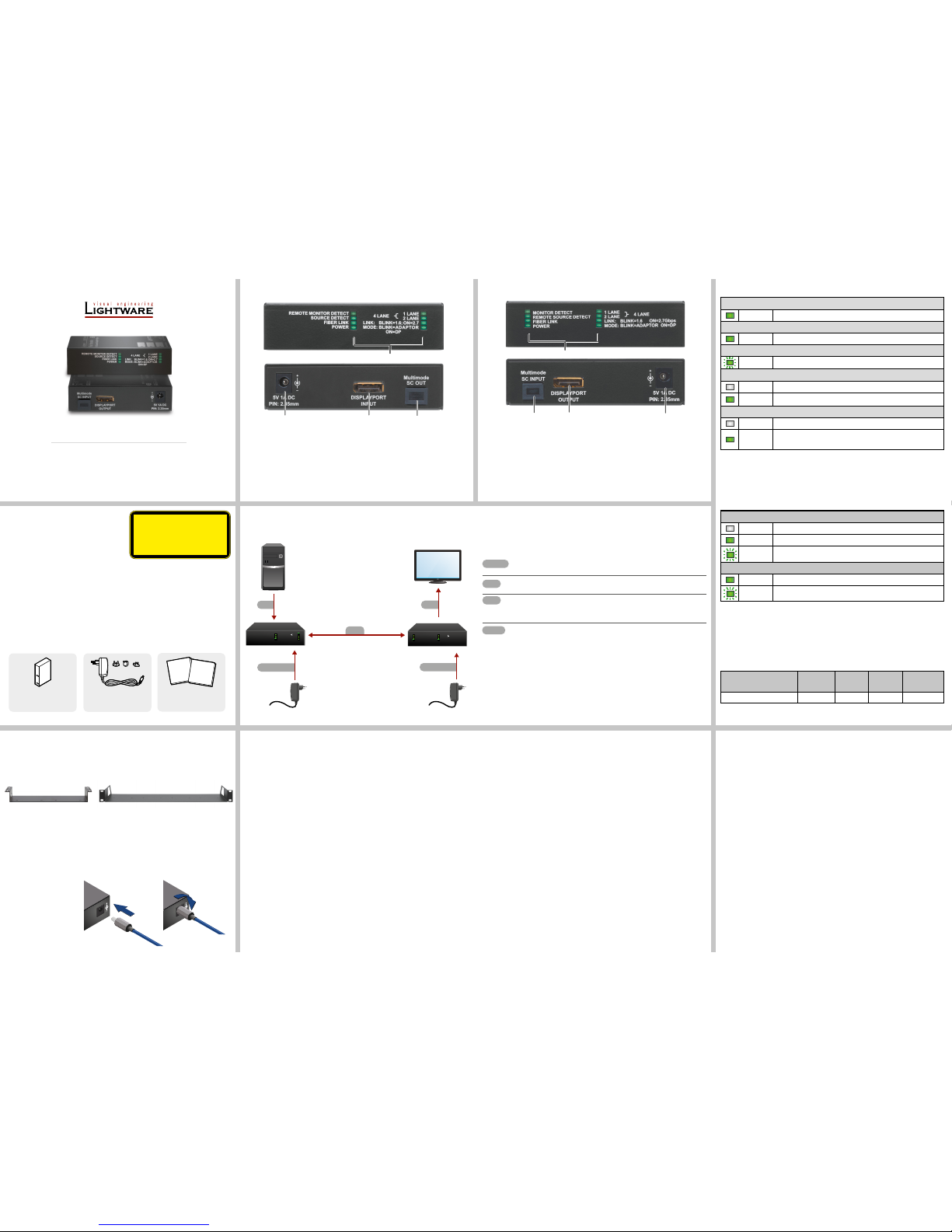
Lightware DP-OPT-TX100 and DP-OPT-RX100 devices extend Dual-Mode DisplayPort 1.1a
high-resolution video and embedded audio on one multimode ber cable up to 1100 m.
Signals with HDCP 1.1 encryption are also supported. The extenders support Dual-mode
port extension with adaptor cables. When connecting a DVI or HDMI display through an
adaptor cable, Dual-mode DisplayPort graphic cards recongure their Outputs to DVI or HDMI
accordingly.
Box Contents
Maximum Extension Distances
OM1
(62,5/125)
OM2
(50/125)
OM3
(50/125)
OM4
(50/125)
2560x1600@60Hz 24bpp 150 m 350 m 800 m 1100 m
Front and Rear View (Transmitter) Front and Rear View (Receiver)
Locking DC plug
Twist 90° clockwise to lock.
Mounting
To mount the extender Lightware supplies optional accessories for different usage. There are
two kinds of mounting kits with similar xing method. The device has two mounting holes with
inner thread on the bottom side. Fasten the device by the screws enclosed with the accessory.
The Under-desk double mounting kit makes easy to mount a single device on any at surface,
e.g. furniture. 1U high rack shelf provides mounting holes for fastening two half-rack or four
quarter-rack sized units. Pocket-sized devices can also be fastened on the shelf. To order
mounting accessories please contact [email protected].
Using different (e.g. longer) screws may cause damage to the device.
The extender is quarter-rack sized.
Under-desk double mounting kit
1U high rack shelf
OPT
Connect the transmitter and the receiver by a single 50/125 SC multimode ber
optical cable (up to 1100m).
DP
Connect the DisplayPort source to the transmitter’s DisplayPort input
connector.
DP
Connect the DisplayPort or DVI/HDMI sink (monitor, projector etc.) to the
receiver’s DisplayPort output. For DVI and HDMI monitors the usage of
adaptor cable is necessary.
POWER
Firstly connect the power adaptor to the DC input of the transmitter, then to
the AC power socket.
Warranty void if damage occurs due to use of a different power source. Always use
the supplied power adaptor or Lightware’s rack-mountable power supply.
INVISIBLE LASER RADIATION
AVOID DIRECT EYE EXPOSURE
CLASS 3R LASER PRODUCT
Radiated wavelengths:
778 nm, 800 nm, 825 nm, 850 nm, 911 nm, 980 nm
Output power <= 1 mW
Classified by EN 60825-1:2008
1
Status LEDs The LEDs give feedback about the state, connections
and certain settings of the unit. For details, see front
panel’s LEDs in the next section.
2
SC Fiber Input SC connector for multimode optical input.
3
DisplayPort Output DisplayPort output for connecting the sink and the
receiver.
4
5V Power Connector Connect the output of the supplied 5V DC power
adaptor.
* If the extenders are connected via ber, above LED pairs show the same state.
Connecting Steps
Extender Unit
Safety and Warranty info,
Quick Start Guide
5V DC Power Adaptor
with Interchangeable Plugs
1
Status LEDs The LEDs give feedback about the state, connections
and certain settings of the unit. For details, see front
panel’s LEDs in the next section.
2
5V Power connector Connect the output of the supplied 5V DC power adaptor.
3
DisplayPort Input DisplayPort input for connecting the source and the
transmitter.
4
SC Fiber Output SC connector for multimode optical output.
LINK LED
off The extender is not in DP mode.
on The link speed is 1.62 Gbps/lane.
blinking The link speed is 2.7 Gbps/lane.
MODE LED
on DVI/HDMI monitor is connected to the receiver via an adaptor cable.
blinking DisplayPort monitor is connected to the receiver.
Front Panel LEDs
(REMOTE) MONITOR DETECT LEDS
on A powered sink is connected.*
(REMOTE) SOURCE DETECT LEDS
on A powered source is connected.*
FIBER LINK LED
blinking
The optical link is active between the extenders and ready to use.
POWER LED
off The extender is not powered.
on The extender is powered by a 5V DC adaptor.
1 LANE / 2 LANE / 4 LANE LEDS
off
The extender is not in DP mode.
on
Indicates the number of used DisplayPort Main Links. When all the
four lanes are used, both LEDs are ON.
Safety and
Warranty
Info
Quick
Start
Guide
1
2
3
4
1
2 3 4
DP
DP
POWER
POWER
PC
Monitor
DP-OPT-RX100
DP-OPT-TX100
OPT
REMOTE MONITOR DETECT
SOURCE DETECT
FIBER LINK
POWER
1 LANE
2 LANE
LINK: BLINK=1.6ON=2.7Gbps
MODE: BLINK=ADAPTOR
ON=DP
4 LANE
MONITOR DETECT
REMOTE SOURCE DETECT
FIBER LINK
POWER
1 LANE
2 LANE
LINK: BLINK=1.6 ON=2.7Gbps
MODE: BLINK=ADAPTOR ON=DP
4 LANE
5V 1.5A DC
PIN: 2.35mm
5V 1A DC
PIN: 2.35mm
Video Signal
Supported video formats ..................................................................... DisplayPort 1.1a
Max. resolution ................................................4096x2400@30Hz/ 2560x1600@60Hz
Supported resolution ......................................................................................................
.............. up to 4096x2160 30 Hz, up to 3840x2160 30Hz, up to 1920x1080@120 Hz
Data rate ......................................................................................1.62 / 2.7 Gbps / lane
Data rate (total) ..............................................................................................10.8 Gbps
Color depth ......................................................................24, 30, 36, 48 bits deep color
Video delay .........................................................................................................0 frame
Optical Port
Fiber ................................. 50/125 SC Multimode preferred or 62.5/125 SC Multimode
Optical connector .......................................................................................................SC
Laser class specication..................................................................................Class 3R
Laser wavelengths (high speed channels) ................................ 778; 800; 825; 850 nm
Laser wavelengths (low speed channels) ..................................................911; 980 nm
DP-OPT-TX100 output OMA* ............................................................-6.25 dBm (max.)
DP-OPT-RX100 OMA* sensitivity ....................................................-14.25 dBm (max.)
Transmission distance ...........................................1100 meters (using OM4 type ber)
*Optical modulation amplitude
Specication
General
Compliance ...............................................................................................................CE
EMI / EMC ................................................. IEC/EN 55035:2017 / IEC/EN 55032:2015
Cooling ................................................................................................................passive
Weight (DP-OPT-TX100 / DP-OPT-RX100) ...............................................200g / 205g
Size ............................................................................... 100,4 mm x 67,6 mm x 26 mm
Material ................................................................................................................... steel
Operating temperature ....................................................... 0 to +55˚C (+32 to +131˚F)
Warranty .............................................................................................................3 years
Power
Power supply ...............................................................................5C DC power adaptor
Power source ................................................ (100 - 240 V AC, 50/60 Hz)(5V DC, 1 A)
Power consumption (typ. / max.) - DP-OPT-TX100 .......................................3 W / 5 W
Power consumption (typ. / max.) - DP-OPT-RX100 ..................................... 3 W / 5 W
Connectors
DP-OPT-TX100 input / DP-OPT-RX100 output ..........................................DisplayPort
DP-OPT-TX100 output / DP-OPT-RX100 input ...........................................SC simplex
Page 2
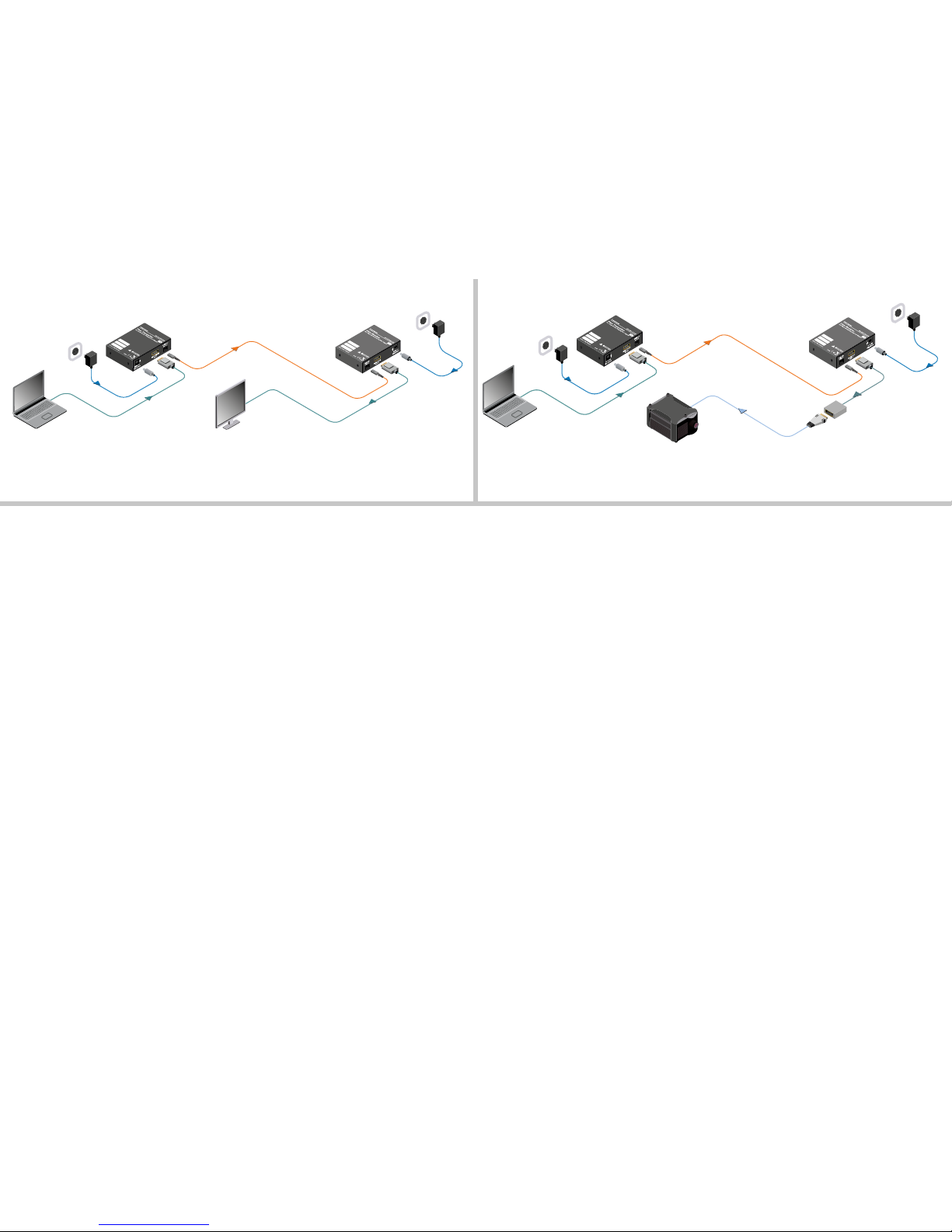
Typical Applications - DP Monitor Connected to the Receiver Typical Applications - HDMI Monitor Connected to the Receiver
DP cable
DP-OPT-RX100
5V DC
Power
adaptor
DisplayPort monitor
Single fiber
multimode optical
cable up to 1100m
DP-OPT-TX100
5V DC
Power adaptor
DP cable
Laptop
Laptop with Dual-Mode DisplayPort output
DP cable
5V DC
Power adaptor
DP-OPT-TX100
HDMI Projector
5V DC
Power
adaptor
DP-OPT-RX100
DVI/HDMI adaptor
DVI/HDMI cable
Single fiber
multimode optical
cable up to 1100m
 Loading...