

Page 1

Quick Guide for GPRS PCMCIA modem
Install Mobile Phone Tool
Click Setup, Mobile Phone Tool will install automatically.
Select the modem you have installed.
If BVRP can not detect modem correctly, please click on Menu, Configuration,
Change Configuration, Change Modem, then select the correct modem you have installed.
You also can open Exchange dialog box to view how to control GPRS modem.
If you have any question, please contact
GPRS-100S Modem Installation without using BVRP software.
To install the GPRS-100S as a modem, you need the MDM_LSMO1XX.inf file. This file exists on CD’s
sub-directory “ Driver” section.
Double-click the "Modems" icon in the "Control panel"
Start - Settings -Control - Modems
Add
Click
it from a list
from CD. Enter the drive and folder the
Modem
With the "Browse" button you can search the file, should you be uncertain as to where you stored it.
to install the driver
" and click the
for PCMCIA modem.
.
Check
"Next"
the control box
button. Click on
MDM_LSMO1XX.inf
Have Disc
"Don't detect my modem,I will select
to select an external driver
file is stored in. You can select
GPRS
Choose the
Choose the serial interface e.g.COM1 .your mobile is connected to.
Click on
Now the modem has been successfully installed
inf
file. Then
Next Finish
Open. Check
the installation.
if you have selected
the right driver
. Then
Next
How to Connect to Internet?
Usually you can use Dialing Netwook to dial
“ *99# ” or “ *99***1#”
to connect to Internet. Please check with your ISP,
this may be different in varies ISP.
How to use Windows generic PCMCIA modem driver?
You also can use Windows generic standard PCMCIA modem as driver.
For Windows XP, plug GPRS PC card in to PCMCIA slot. XP will auto-detect it is a standard PCMCIA modem.
Click “Yes” and “Next”, XP will auto-install PCMCIA driver.
How to use HyperTerminal to control GPRS modem?
Please open HyperTerminal, select correct COM port. choose correct DTE speed to match
speed you use for driver. Type in “ATI3” for modem ID. If it response “MO1XX”, then modem is
connected. You can use GPRS AT command set to control this modem.
If there is any question, you are welcome to contact Peter Chen at [email protected]
Page 2
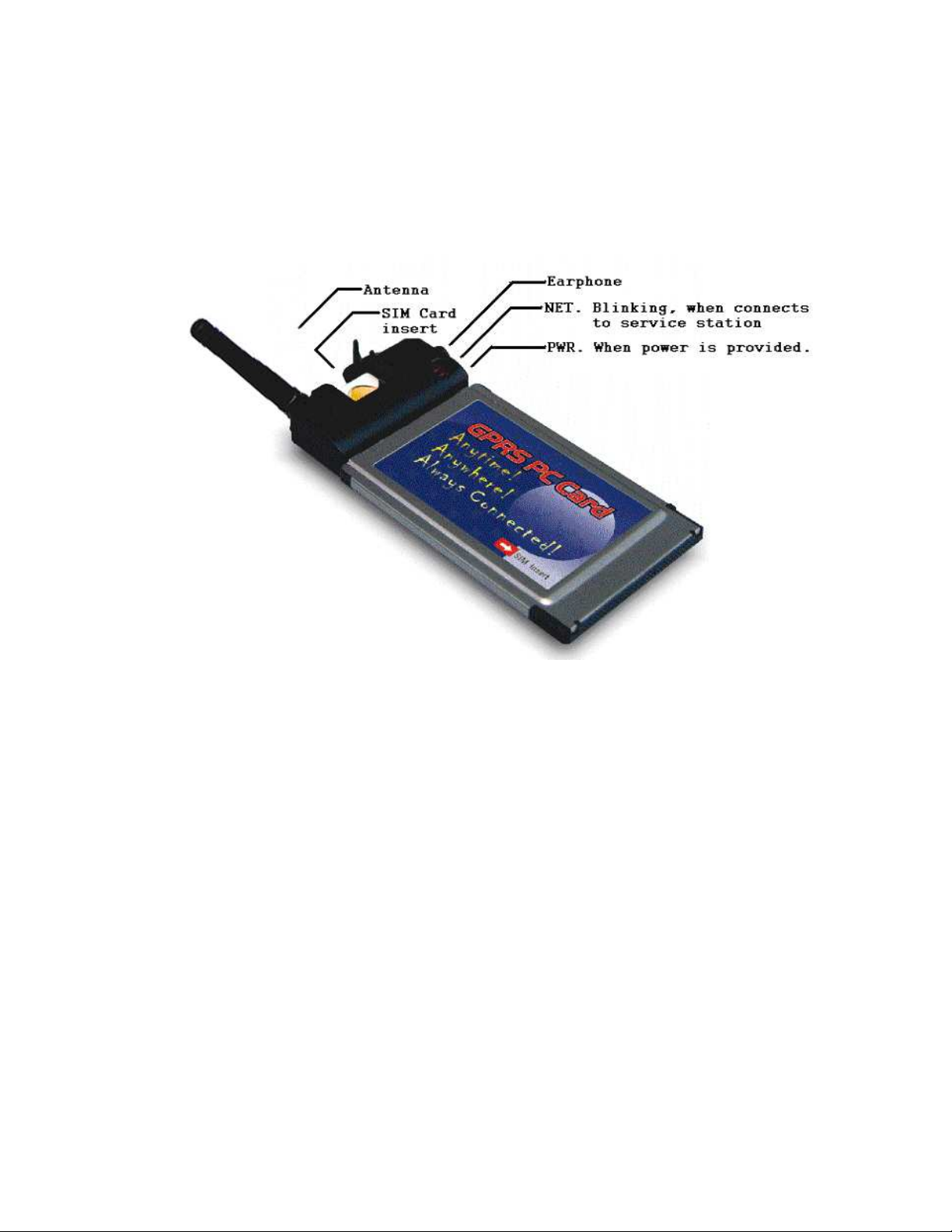
Hardware
a. ANT (shown on housing): Antenna for GSM network
The antenna has fix by horizontal way on unit.
b. SIM : It is for inserting SIM card.
c. Earphone : It is for plugging earphone cable for voice communication.
d. NET: When unit connects to cellular service station, LED willstart blinking.
e. PWR: When power is provided. This card needs 5VDC power.
Page 3

FCC INFORMATION
The Federal Communication Commission Radio Frequency Interference Statement includes the
following paragraph:
The equipment has been tested and found to comply with the limits for a Class B Digital Device,
pursuant to part 15 of the FCC Rules. These limits are designed to provide reasonable
protection against harmful interference in a residential installation. This equipment generates,
uses and can radiate radio frequency energy and, if not installed and used in accordance with
the instruction, may cause harmful interference to radio communication. However, there is no
grantee that interference will not occur in a particular installation. If this equipment dose cause
harmful interference to radio or television reception, which can be determined by turning the
equipment off and on , the user is encouraged to try to correct the interference by one or more
of the following measures:
--Reorient or relocate the receiving antenna.
--Increase the separation between the equipment and receiver.
--Connect the equipment into an outlet on a circuit different from that to which the receiver is
connected.
--Consult the dealer or an experienced radio/TV technician for help.
The changes or modifications not expressly approved by the party responsible for compliance
could void the user’s authority to operate the equipment.
To comply with the FCC RF exposure compliance requirements, this device and its antenna
must not be co-located or operating to conjunction with any other antenna or transmitter.
This device complies with Part 15 of the FCC Rules. Operation is subject to the following two
conditions: (1) this device may not cause harmful interference, and (2) this device must accept
any interference received, including interference that may cause undesired operation.
 Loading...