

Page 1
User manual
Please read this user manual before using this product!
Page 2

Rev:1 2018-6-13
1
Content
1. Safety Information 1
2. Physical Installation 4
3. Dimensions 5
4. Technical Specification 5
5. Setup / Menu Table 6
6. Channel Function 9
7. FX Description 15
Page 3
Rev:1 2018-6-13
2
1.Safety Information
Warning: This product is only for professional use.
Causes of injury or severe trauma may be caused by: light, heat, collision, or falling.
Important statements
All personnel involved with the installation, operation and maintenance of this device needs to
know:
1) This product must be installed by a qualified professional.
2) This product left the place of manufacture in perfect condition. In order to
maintain this condition and for safe operation, the user must always follow these
instructions and safety warnings described in this user manual.
3) Manufacturer will not take responsibility for any operations that’s not
according to this manual.
4) Always make sure that you are connecting to the proper voltage, and that the line
voltage you are connecting to is not higher than that stated on the decal or rear panel
of the fixture.
5) Always ground (earth) the fixture electrically.
6) During long periods of non-use, disconnect the unit’s main power.
7) Do not place the lamp in a damp place.
8) Before opening the fixture for service, make sure that the power is disconnected and
wait about thirty minutes before opening the fixture.
9) Replace a broken fuse with the exact same type of fuse, DO NOT bypass the fuse.
10) Make sure the power cord is not curled or damaged by sharp objects.
11) Always check the equipment and power cord before use.
12) Do not operate a fixture with broken or damaged cover or front glass.
13) Maximum operating ambient temperature 40 ° C (104 ° F).
14) Use only in a well-ventilated area.
15) Do not look directly at the light source, may cause epilepsy (especially for patients with
epilepsy).
16) Make sure there are no flammable items in the range of 1 M (39 in.) of the fixture.
17) When hanging the fixture, you must verify that the point of installation can withstand 10
times the weight of the device hanging.
18) Always use a safety rope.
Page 4
Rev:1 2018-6-13
3
2. Physical Installation
WARNING: Please read the safety instructions carefully before installation
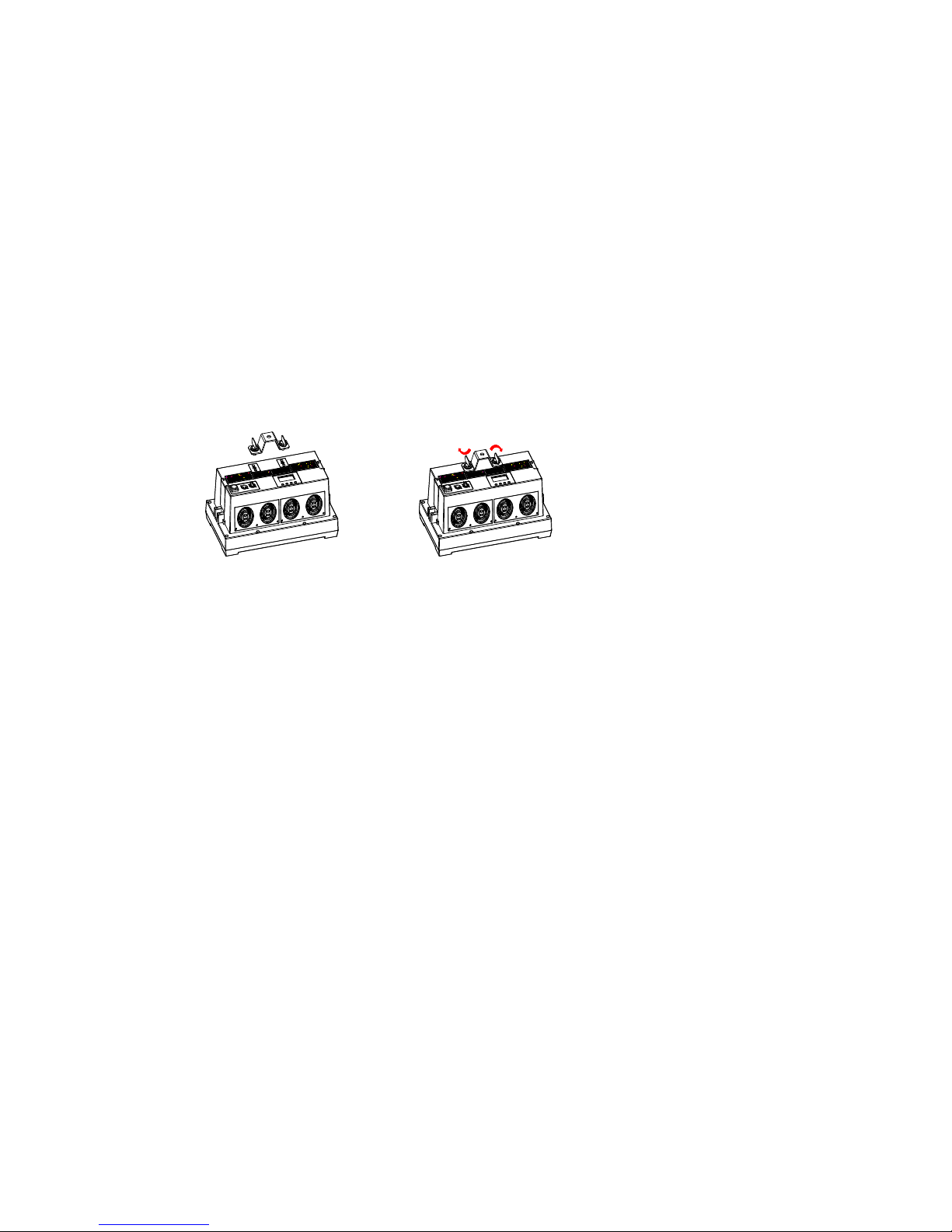
1a) Mount a fixture clamp to the hole in the yoke.
1b) Mount a fixture clamp to the 1/4-Turn bracket (optional item).
2) Rigg the fixture to the desired truss or structure.
3) Always use a safety rope.
4) Tighten the knobs on both sides to lock the tilt orientation of the fixture.
5) Connect the power cord and signal cable.
Page 5
Rev:1 2018-6-13
4
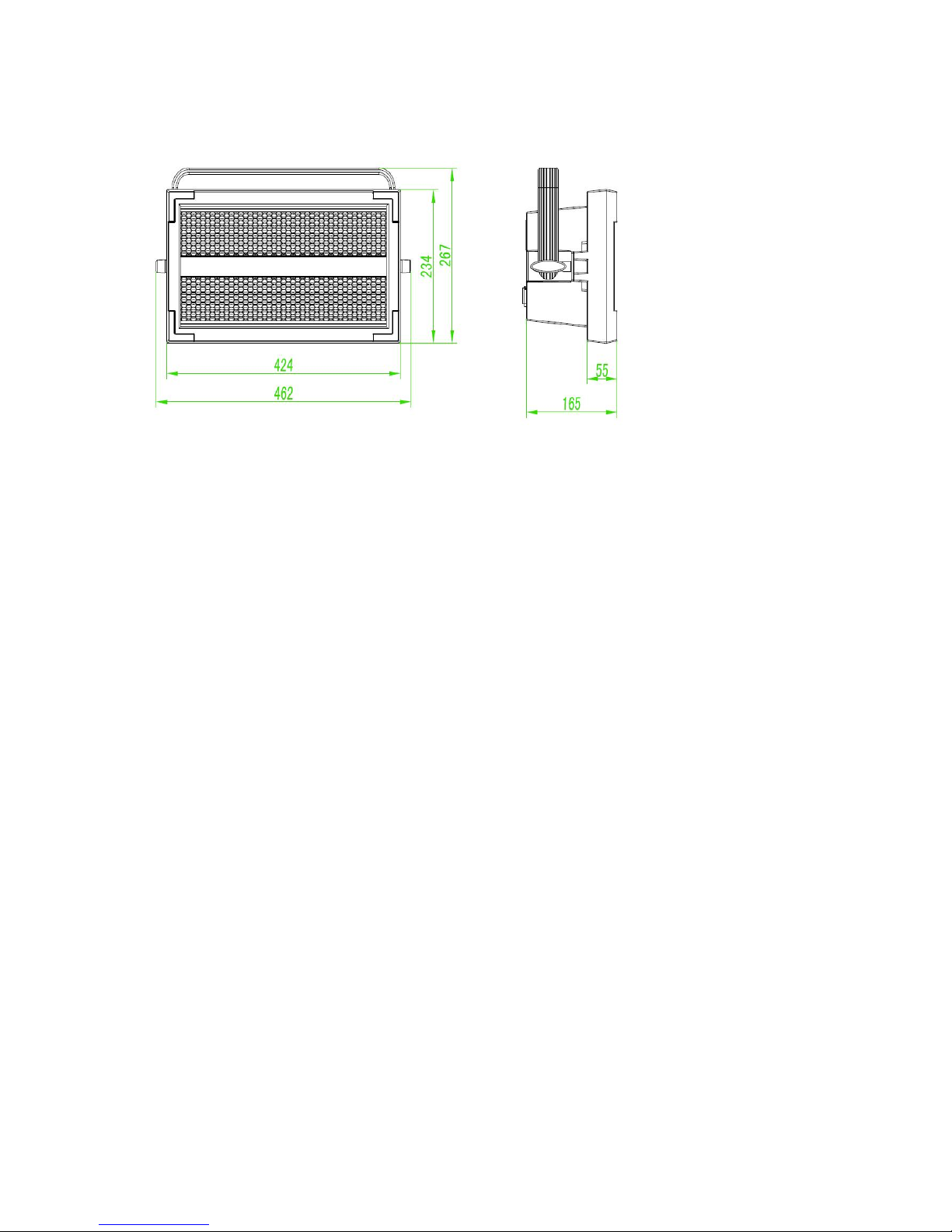
3. Dimensions
4、Technical Specification
1. Power supply AC110 -240V
2. Power consumption 1000 -2000W
3. LED 228 PCS white +64 RGB
4. Luminous flux >200000LM
5. Optics Forward luminescent lens +reflector
6. Beam angle 90X140°
7. Channel Mode 3/4/14/19
8. Protocols DMX/RDM
9. Protection rating IP 20
10. Fixture dimensions 425X245X240mm
11. Net Weight 6.7k g
Page 6
Rev:1 2018-6-13
5
5. Menu Table
Main Menu Layer-2 menu
Layer-3 menu
Notes
DMX ADDRESS
001-512
Set DMX Address, 1
-
509
DMX MODE
3-Channel 3-Channel
4-Channel 4-Channel
14 EXTENDED 14ch EXTENDED
19 SECTION 19ch SECTIONS CONTROL
PERSONALITY
SETTINGS
DIMMER CURVE
LINEAR
Linear dimming curve
SQUARE LAW Square law dimming curve
INV SQUARE LAW
Inverse square law dimming curve
S-CURVE
S-curve dimming curve
FAN MODE AUTO Auto fan mode
FAST
Fast speed fan mode
NORMAL
Normal speed fan speed
SILENT
Silent fan mode
DMX RESET
OFF
Reset disable
ON Reset enable
DISPLAY
(Time out)
ON Display always on
2 Minute
Screen turns off after 2 minutes
5 Minute
Screen turns off after 5 minutes
10 Minute
Screen turns off after 10 minutes
Rotation
(Display orientation)
Normal
Display normal direction
Reverse
180°
Display reversed direction
DMX Error
(Loss of DMX signal)
SAVE
Holds last state
BLACK
Blackout
Master Control
ON
(send data)
MASTER SEND ENABLE
(host mode data enable)
OFF
(no send data)
STANDOLNE
(Stand-alone mode)
Pass code
(Password function)
OFF
No pass code mode
when in screen protect
NO
E
nable
pass code mode
when in screen protect
Fixture ID
XXXX
(Value)
Drop out
DEFAULT
SETTING
FACTORY
DEFAULT
(reset)
LOAD
Return all setting to factory default
CUSTOM-1 LOAD
Load custom-1 settings
Page 7
Rev:1 2018-6-13
6
DEFAULT
SETTING
(Load custom-1
parameters)
SAVE
(save setup
parameters)
Save current fixture settings as
custom-1.
Overwrites existing custom1
setting
CUSTOM-2
LOAD
(Load custom-2
parameters)
Load custom-2 settings
SAVE
(save setup
parameters)
Save current fixture settings as
custom-2.
Overwrites existing custom1
setting
MANUAL
CHANNEL
(Channel control)
0-255
Manual control of the individual
channels
RESET
RESET
CANCEL
OK Reset fixture
UPLOAD
(Parameter upload)
NO
YES
TEST
BEAM STATIC
(static test)
Beam LEDS activated at low intensity for
inspection purpose
BEAM SECTOR
(Strobe testing)
Beam LEDS activated at low intensity for
inspection sector bar
BEAM STROBE
(Sections test)
Test beam LED
RED AURA Test red Aura LED
GREEN AURA Test green Aura LED
BLUE
AURA
Test blue Aura LED
INFORMATION
VERSION
VX.X
D
Displays fixture SW version
TEMPERATURE XX
Displays LED boards temperature
RDM UID
6883:xxxxxxxx
Displays unique RDM ID
ERROR LIST Temperature
Error
Displays Error Information
FIXTURE TIME TOTAL X HOUR
(lighting time)
Displays total hours of operation since
power on
Page 8
Rev:1 2018-6-13
7
5.DMX Channel chart
3ch
mode
4ch
mode
Extended
mode
Sections
mode
Value Function
1 1 1 1 0-255
Flash master dimmer
0-100%
2 0-255 Segment 1 dimming
3 0-255 Segment 2 dimming
4 0-255 Segment 3 dimming
5 0-255 Segment 4 dimming
2 2 2 6 0-255
Flash Duration
7-650ms
3 3 3 7 0-255
Flash Rate
0-17HZ
4 4 8
0-5
6-42
43-85
86-128
129-171
172-214
215-255
Strobe effect (Controlled by
the Flash Rate Channel)
No function
Fading strobe
Darkening strobe
Wave strobe
Random strobe
Lightning strobe
Spikes (flash over low light)
5 9
0-7
8-15
16-23
24-31
32-39
40-47
48-55
56-63
64-71
72-79
80-87
88-95
96-255
Control/setting
No function
Linear dimming curve
Square law dimming curve
Inv. Square law dimming
curve
S-curve dimming curve
No function
Automatic fan mode
Fast fan mode
Normal fan mode
Silent fan mode
No function
Reset fixture
No function
6 10 0-255
FX Effect selection
Built-in macro (see page 16)
7 11 FX Effect speed adjustment
Page 9
Rev:1 2018-6-13
8
7
11
0-126
127-129
130-255
Speed. Fast to slow
stop
Reverse speed. Slow to fast
8
12
0
1
2
3
4
5
6
7
8
9
10
11
12
13
14
15
16
17
18
19
20
21
22
23
24
25
26
27
28
29
30
31
32
33
34
35
36
37-100
101-120
FX-Synchronization
adjustment
No offset
offset 10°
offset 20°
offset 30°
offset 40°
offset 50°
offset 60°
offset 70°
offset 80°
offset 90°
offset 100°
offset 110°
offset 120°
offset 130°
offset 140°
offset 150°
offset 160°
offset 170°
offset 180°
offset 190°
offset 200°
offset 210°
offset 220°
offset 230°
offset 240°
offset 250°
offset 260°
offset 270°
offset 280°
offset 290°
offset 300°
offset 310°
offset 320°
offset 330°
offset 340°
offset 350°
No offset
No effects
Random start
Page 10
Rev:1 2018-6-13
9
8
12
121-140
141-255
Random duration
No function
13
0-7
8-15
16-23
24-31
32-39
40-47
48-55
56-63
64-71
72-79
80-87
88-95
96-103
104-111
112-183
184-255
Section FX
No function
1
2
3
4
No function /Blackout
1+2
2+3
3+4
1+3
2+4
1+4
1+2+3
2+3+4
Forward FX fast to slow
Reverse FX slow to fast
9 14
0-19
20-49
50-200
201-210
211-255
Aura shutter
Closed
Open
Strobe slow to fast
Open
Random strobe slow to fast
10 15 0-255 Aura dimmer
11 16 0-255 RED 0-100%
12 17 0-255 GREEN 0-100%
13 18 0-255 BLUE 0-100%
14
19
0-10
11-15
16-20
21-25
26-30
31-35
36-40
41-45
46-50
51-55
56-60
61-65
66-70
Color presets
RGB color mixing enabled
Color 1-LEE790-Pink
Color 2-LEE157-Pink
Color 3-LEE332-Light pink
Color 4-LEE328-Pink
Color 5-LEE345-Light Lotus
Color 6-LEE194-Pink
Color 7-LEE181-Congo Blue
Color 8-LEE071-Blue
Color 9-LEE120-dark blue
Color 10-LEE079-Pure Blue
Color 11-LEE132-in blue
Color 12-LEE200-Double CT
Blue
Page 11
Rev:1 2018-6-13
10
14
19
71-75
76-80
81-85
86-90
91-95
96-100
101-105
106-110
111-115
116-120
121-125
126-130
131-135
136-140
141-145
146-150
151-155
156-160
161-165
166-170
171-175
176-180
181-185
186-190
191-214
215-219
220-243
244-247
248-251
252-255
Color 13-LEE161-Slate Blue
Color 14-LEE201-Full CT Blue
Color 15-LEE202- Half CT
Blue
Color 16-LEE117-Steel Cyan
Color 17-LEE353 - Lighter
Blue
Color 18-LEE118-Light Blue
Color 19-LEE116- Medium
Green
Color 20-LEE124-dark green
Color 21-LEE139- original
green
Color 22-LEE089 - Moss
Green
Color 23-LEE122 Fern Green
Color 24-LEE738 - Elegant
green
Color 25-LEE088-lime green
Color 26-LEE100-Spring
Yellow
Color 27-LEE104-Deep
Amber
Color 28-LEE179-Chrome
Orange
Color 29-LEE105-Orange
Color 30-LEE021-gold amber
Color 31-LEE778-Golden
Yellow
Color 32-LEE135 Deep
Golden Amber
Color 33-LEE164-Flame Red
Color 34 - Magenta
Color 35-purple
Color 36-white
Color wheel rotation
Clockwise fast-slow
Stop (at present color)
Counterclockwise slow-fast
Aura random color
Fast
Medium
Slow
Page 12

Rev:1 2018-6-13
11
* FX function and other control priority instructions:
1. The Aura shutter (ch9 or ch14) needs to be open for the FX effect channel to be activated.
2. The FX effect channel (Ch6 or Ch10) is divided into three segments.
Segment 1:
The channel value 1-50 is the control effect of the main beam, and the aura light is not controlled by
this channel;
Segment 2:
The channel value 51-150 is the control effect of both sides of the aura light, the main beam is not
controlled by this channel;
Segment 3:
The channel values 151-161 are the combined control effects of the two, and the effects control of
other channels are invalid.
** Each segment is invalid, see the following FX effect description.
Page 13
Rev:1 2018-6-13
12
*FX Description of the effect channel
DMX
Value
Effect DMX
Value
Effect DMX
Value
Effect
0
1
2
3
4-5
6
7
8-10
11
12
13
14-19
20
21-50
51
52-53
54
55
56
57
58
59-60
61
62
63
64-65
66
67
68
69-70
71
72
73
74-75
76
77
78
79-80
Beam effects
No function
Wave (sine wave)
Step (50/50 on/off)
Pulse
No function
Double strobe
Triple strobe
No function
Up, down, flash
Up Flash,
down, flash
Random levels
No function
House light
No function
Aura effects
Aura pulse
No function
Aura ramp
No function
Rainbow wave
Rainbow step
Rainbow pulse
No function
RGB wave
RGB step
RGB pulse
No function
CMY wave
CMY step
CMY pulse
No function
Mix to white wave
Mix to white step
Mix to white pulse
No function
Random mix wave
Random mix step
Random mix pulse
No function
81
82-83
84
85
86-95
96
97
98
99
100
101
102
103
104
105
106-107
108
109
110-111
112
113
114-115
116
117
118
119
120
121
122-123
124
125
126
127-129
130
Random subtle
wave
No function
Red white blue fade
Red white blue
snap
No function
Fire
Water
Ice
Hot and cold
Warm and fuzzy
Silver and gold
Gold and silver
No function
Circular chase slim
Circular chase wide
No function
Double circular
chase slim
Double circular
chase wide
No function
Vertical scroll
Horizontal scroll
(L/R)
No function
Knight Rider slim
Knight Rider wide
Knight Rider slim
with CW surface
No function
4 segments scroll
6 segments scroll
No function
Police car 1
Police car 2
Police car 3
No function
Full bumps
135
136
137
138
139-143
144
145
146-150
151
152
153
154
155
156
157
158-160
161
162
163
164
165
166
167-225
Color shaker CW vertical
Color shaker CW horizontal
Color shaker CW vertical and no
black frame
Color shaker CW vertical and no
black frame
No function
Swimming pool
Electric arc
No function
Combined effects
No function
Thunderstorm
Welding
3 Step strobe
Tick Tock
Aura ramp beam flash
Beam ramp aura flash
No function
Police Car 4
Police Car 5
Police Car 6
Police Car 7
Police Car 8
Police Car 9
No function
Page 14
Rev:1 2018-6-13
13
131
132
133
134
Split bumps CW
vertical
Split bumps CW
horizontal
Random split
bumps CW vertical
Random split
bumps CW
horizontal
 Loading...