

Page 1
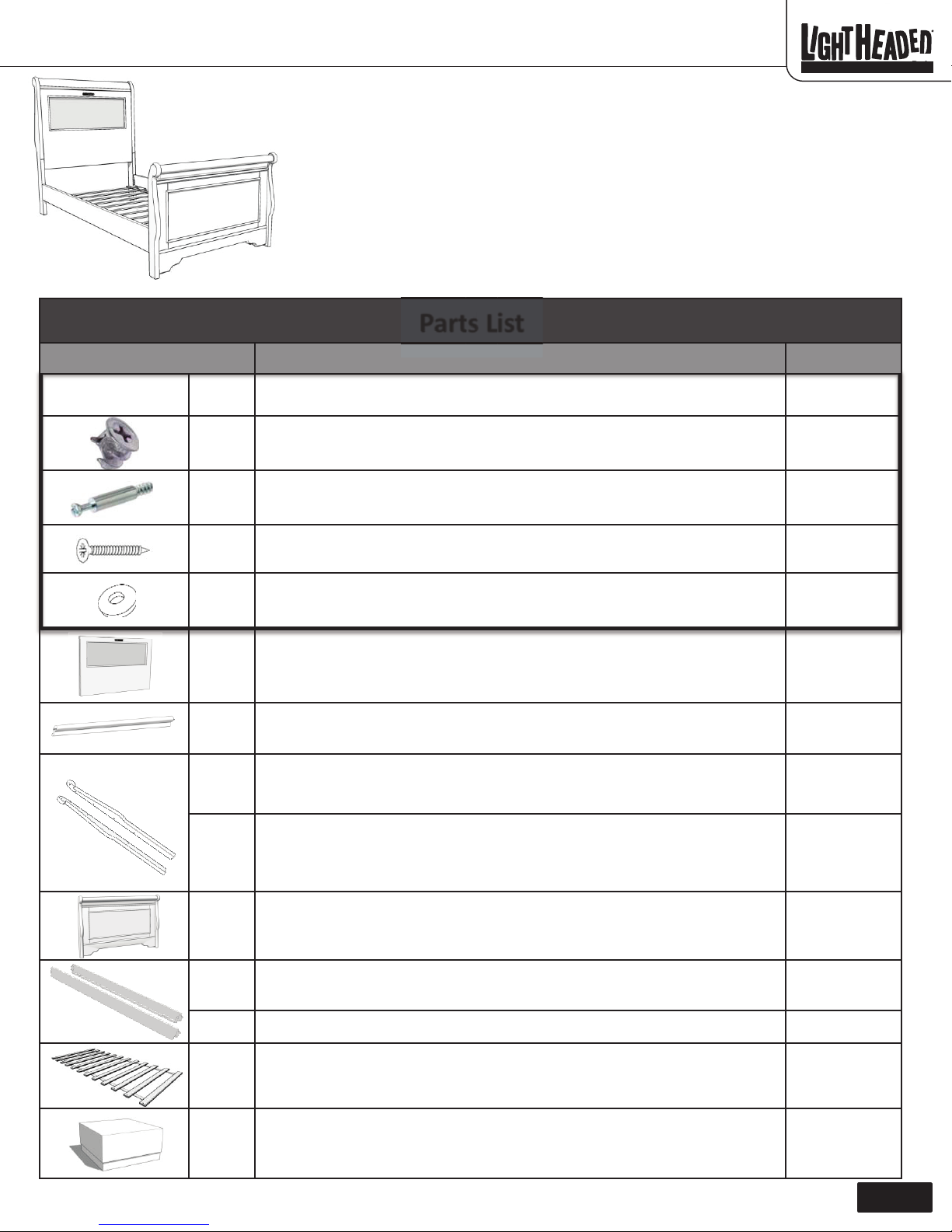
“Edgewood” LightHeaded™ Bed
Assembly Instructions
Part Description Quantity
Model #20165Twin size, Cheshire Cherry
Model #20269Twin size, Black
Model #20161 Twin size, White
Before you begin:
www.LightHeadedBeds.com
12/07/2015
• Consider enlisting a family member or friend to help; it will make assembly easier,
faster, and more fun.
• Layout all of the parts listed below.
• Save all packing materials until assembly is complete to avoid accidentally
discarding smaller parts or hardware.
• You will need a Phillips head screw driver (not included)
PartssList
Blister Pack EQA
EPY
EPZ
EPM
EQC
EPN
EQB
EPO
Contains the hardware required to assemble your new Lightheaded Bed
Cam-lock
Cam-bolt
Wood screw
Fender washer (2 extra)
LightHeaded™ headboard panel—ships with LightHeaded™ lighting component
kit already installed.
Caprail
Right headboard leg
1
8
8
24
4
1
1
1
EPP
EPQ
EPR
EPS
EPT
EPU
1168348 C
Left headboard leg
Footboard
Right side rail
Left side rail
Roll-out slats (12 pieces of wood connected with nylon straps)
LightHeaded™ TechBox (contains remote control, power cord, instructions for
use and image changing, and your coupon code for $20) (see separate
LightHeaded™ Lighting Assembly Instructions)
1
1
1
1
1
1
Page 1
Page 2
“Edgewood” LightHeaded™ Bed
Assembly Instructions
Model #20165Twin size, Cheshire Cherry
Model #20269Twin size, Black
Model #20161 Twin size, White
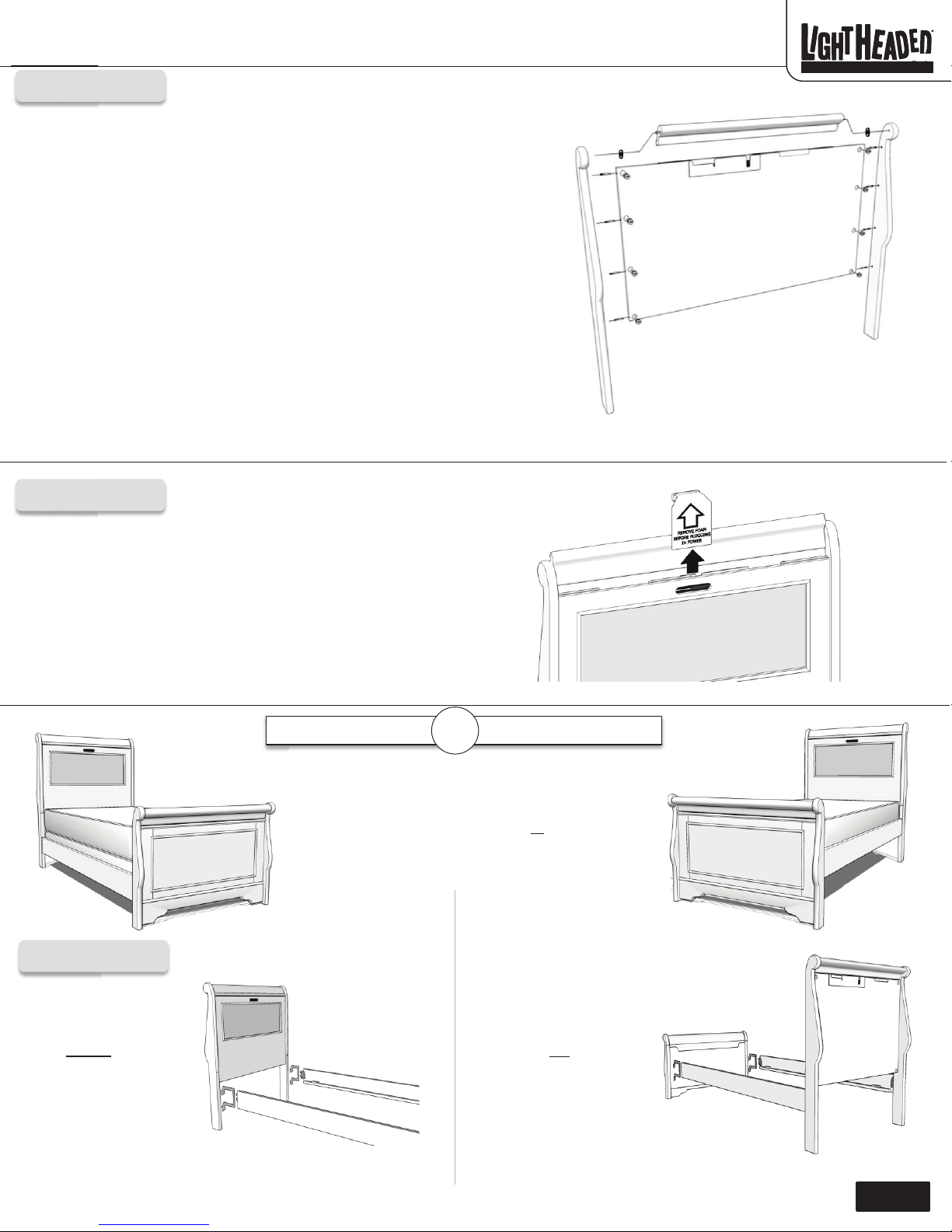
Step 1
1. On a soft surface, carefully lay your LightHeaded™ headboard panel (EPN) face
down. Above the open top lay the caprail (EQB) so that the large surface points
toward the front of the headboard (see illustration).
2. Insert 4 cam-locks (EPY) into the holes on the back of the headboard panel on
left and right edge (do not insert into the center hole). Point the arrows on the
back of the cam-locks toward the corresponding cam-bolts on the legs.
3. Lay the legs (EPO, EPP) down so that the threaded inserts and holes are pointing
toward the headboard panel.
4. Screw 4 cam-bolts (EPZ) into the plastic threaded inserts on the inside of each leg
(EPO, EPP).
5. Place one washer (EQC) over each pin at the ends of the caprail. Line up the pin
on the end of the caprail (EQB) with the inside of the right leg. At the same time
line up the cam-locks with the cam-bolts. If the cam-bolts do not go into the
holes, check to make sure the arrow on the cam-lock is pointed toward the bolt.
Do not tighten the cam-locks yet.
6. Repeat step 5 with the left leg.
7. Once you have both legs and the caprail connected to the headboard panel, use
a Phillips head screwdriver (not included) to tighten the cam-locks.
EPO
EQC
EQB
EPN
www.LightHeadedBeds.com
12/07/2015
EQC
EPP
Step 2
1. Open the caprail of your LightHeaded™ headboard (EQB), then remove
the protective foam insert and attached paper and discard.
2. Your LightHeaded™ light component is pre-assembled in your
headboard and ready to use. Please refer to your LightHeaded™ Lighting
Assembly Instructions in the TechBox (EPU) for information on how to
connect power to your light, insert LightHeaded™ Images, and trouble
shoot, if necessary.
Box Spring & Mattress
It’s your choice!
Your LightHeaded™ bed can be assembled to
use a box spring and mattress set or
only. Don’t worry, you can change it at any time
with a couple simple steps and no tools.
or
EQB
Mattress only
a mattress
Step 3
Hook your wooden side
rails (EPR, EPS) onto
the bottom
pins in the vertical slot
on the headboard and
footboard legs.
1168348 C
two metal
Hook your wooden
side rails (EPR, EPS)
onto the top
pins in the vertical slot
on the headboard and
footboard legs.
two metal
Page 2
Page 3
“Edgewood” LightHeaded™ Bed
Assembly Instructions
Model #20165Twin size, Cheshire Cherry
Model #20269Twin size, Black
Model #20161 Twin size, White
www.LightHeadedBeds.com
12/07/2015
EPM
EPM
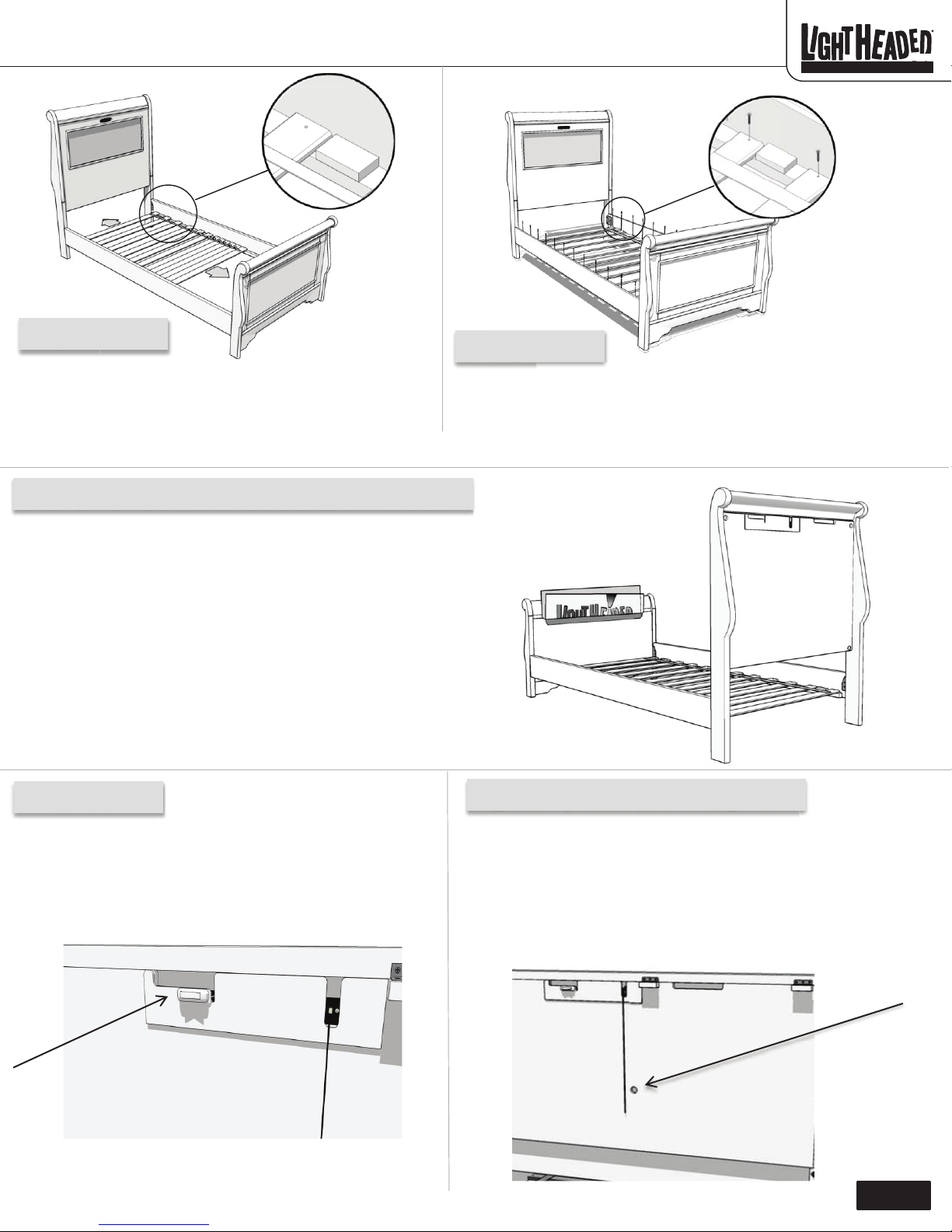
Step 4
Roll out wooden slats (EPT) onto your (EPR, EPS) side rails so
that the two end slats lock into place with the wood blocks near
the headboard and footboard.
Congratulations! Your LightHeaded™ Bed is now completely assembled.
Display in your headboard. Store in your footboard.
Your LightHeaded™ Bed comes with a built-in image storage on the
inside of your footboard. This specially designed area allows you to
organize and safely store up to 25 interchangeable LightHeaded
graphic images.
Please refer to the Lighting Assembly Instructions in your TechBox.
Locate the page titled Using Your LightHeaded Bed to easily remove
one graphic image and replace it with another.
Place the image which you just removed from the Headboard into the
storage area in the Footboard and your image will be ready for the
next time you want to personalize your LightHeaded Bed.
Step 5
Secure each slat into the side rails with the (EPM) wood screws using a
Phillips head screwdriver (not included).
On/Off switch
On the back of your LightHeaded headboard, located just below the
hinged top, is an On/Off switch which can be used to toggle the light
component on or off. Please refer to your user manual in the
TechBox for additional information.
1168348 C
Light component positioning hole
If, after review of the Lighting Assembly Instructions contained in the
TechBox, you find that your LightHeaded™ Image does not slide in and
out of the headboard with little to no resistance, we’ve provided a 1”
diameter hole located in the center of the headboard back panel. With
your finger, simply apply gentle pressure to the back of the light
component to reposition it, and your LightHeaded™ Image will slide
effortlessly in and out of your headboard.
Page 3
Page 4
“Edgewood” LightHeaded™ Bed
Assembly Instructions
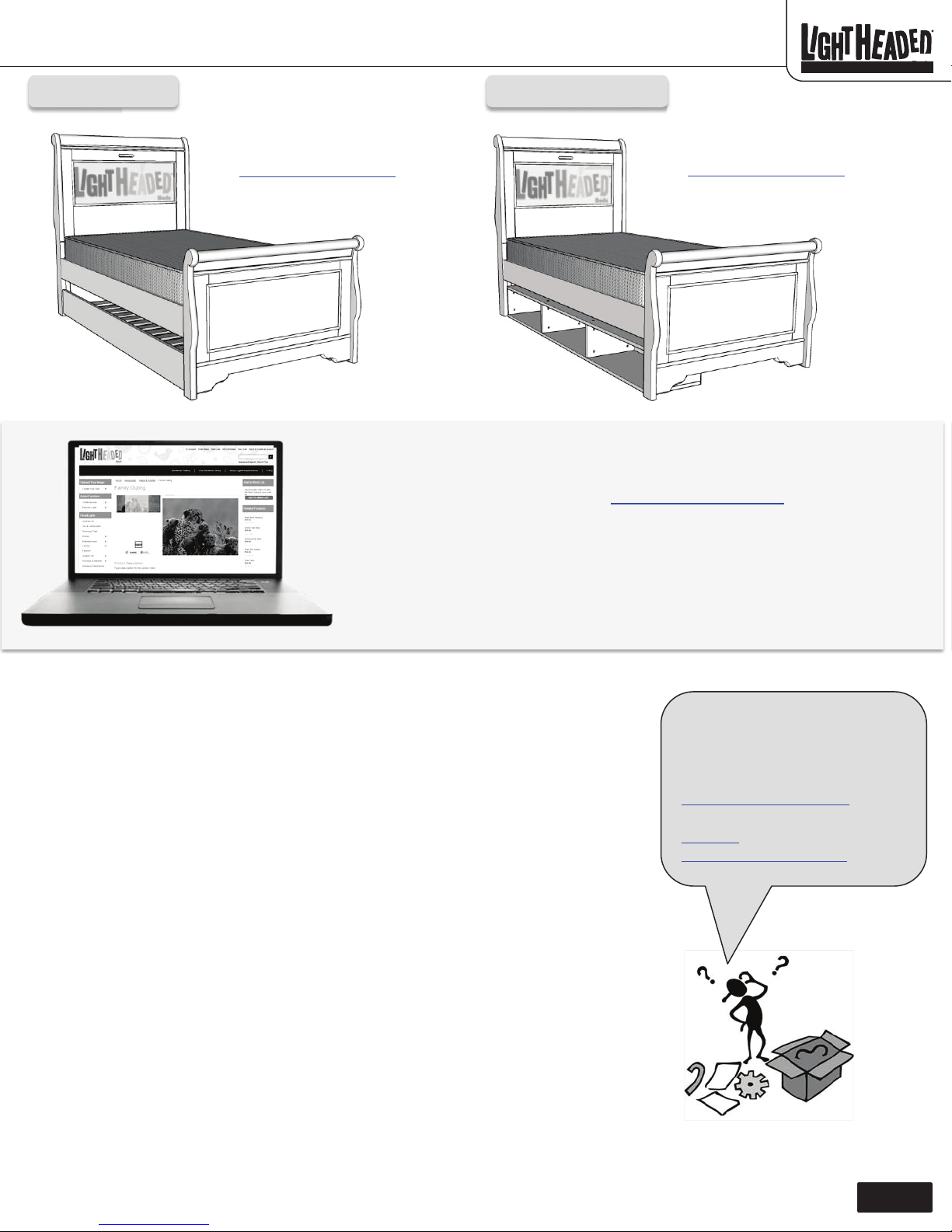
Trundle
Model #20165Twin size, Cheshire Cherry
Model #20269Twin size, Black
Model #20161 Twin size, White
Underbed storage
www.LightHeadedBeds.com
12/07/2015
An optional Twin Trundle bed is
available for purchase at
LightHeadedBeds.com
Congratulations! Your LightHeaded™ bed is assembled and you are
ready for the real fun.
• Hop online and surf our website LightHeadedBeds.com
apply your $20 gift coupon toward your first LightHeaded™ Image and
personalize your bed.
• Create your own custom images or select from our massive gallery of
amazing images and super characters.
An optional Underbed Storage Unit
is available for purchase at
LightHeadedBeds.com
. Use 1 or
2 for additional storage as needed.
where you can
One Year Limited Warranty
LightHeaded™ Beds warrants that for a period of one year from the date of purchase, this product will be
free from defects in material and workmanship. LightHeaded™ Beds, at its option, will repair or replace
the product or any component of the product found to be defective during the warranty period.
Replacement will be made with a new or remanufactured product or component. If the product is no
longer available, replacement may be made with a similar product of equal or greater value. This is your
exclusive warranty.
This warranty is valid for the original retail purchaser from the date of initial retail purchase and is not
transferable. Keep the original sales receipt. Proof of purchase is required for warranty service.
LightHeaded™ Beds dealers, service centers, or retail stores selling LightHeaded™ Beds products do not
have the right to alter, modify, or in any way change the terms and conditions of this warranty.
This warranty does not cover normal wear and tear of parts or damage resulting from any of the
following: negligent use or misuse of the product, use on improper voltage or current, use contrary to
the operating instructions, electronics disassembly, repair or alteration by anyone other than
LightHeaded™ Beds authorized service representatives..
What Are the Limits on LightHeaded™ Beds Liability?
LightHeaded™ Beds shall not be liable for any incidental or consequential damages caused by the breach
of any express, implied, or statutory warranty or condition. Except to the extent prohibited by applicable
law, any implied warranty or condition of merchantability or fitness for a particular purpose is limited in
duration to the duration of the above warranty. LightHeaded™ Beds disclaims all other warranties,
conditions or representations, express, implied, statutory or otherwise. LightHeaded™ Beds shall not be
liable for any damages of any kind resulting from the purchase, use or misuse of, or inability to use the
product including incidental, special, consequential or similar damages or loss of profits, or for any
breach of contract, fundamental or otherwise, or for any claim brought against purchaser by any other
party.
Got questions?
Our friendly LightHeaded™
Customer Service Rep can help you
at 800-225-3865 or e-mail us at
Assembly videos are available on
You-Tube. Thanks from the folks at
www.LightHeadedBeds.com
.
How to Obtain Warranty Service
We suggest you complete and return the product registration card that was included with your bed. This will help us to promptly facilitate verification
of the date of your original purchase. If you have any questions regarding this warranty or would like to obtain warranty service, please call (800) 2253865 and a friendly Customer Service Representative will assist you.
1168348 C
Page 4
 Loading...