

Page 1
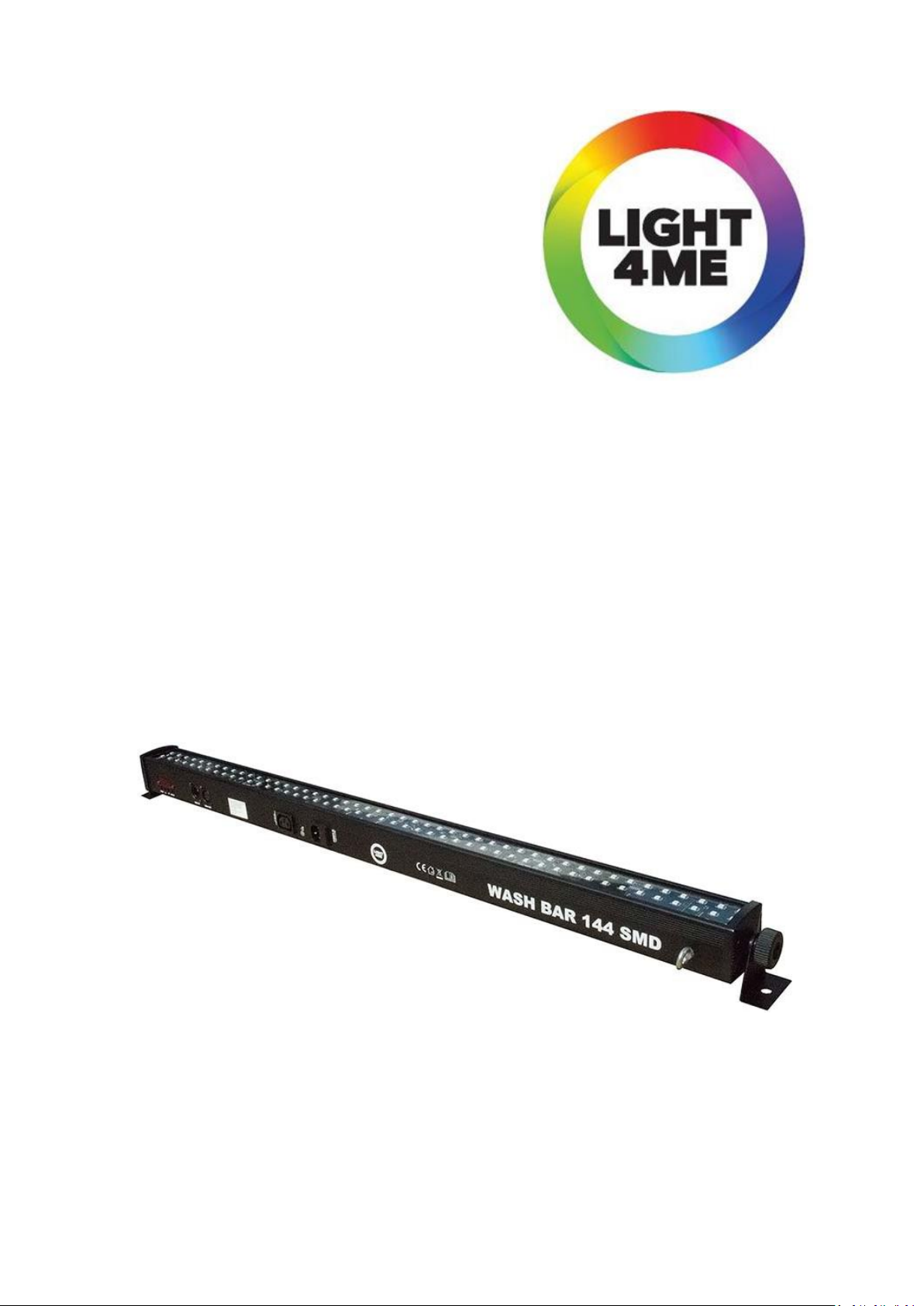
WASH BAR 144
USER MANUAL
INSTRUKCJA OBSŁUGI
Keep this user manual for future needs
Prosimy o zachowanie tej instrukcji dla przyszłych potrzeb
Page 2
ENGLISH
Introduction
Unpacking: Thank you for purchasing our product, every fixture has been thoroughly tested and has been
shipped in perfect operating condition. Carefully check the shipping carton for damage that may have occurred during shipping. If the carton appears to be damaged, carefully inspect your fixture for any damage
and be sure all accessories necessary to operate the unit has arrived intact. In the case damage has been
found or parts are missing, please contact the manufacturer or your dealer for further instructions. Do not
return this unit to your dealer without first contacting.
Warning! To prevent or reduce the risk of electrical shock or fire, do not expose this unit to rain or moisture.
Caution! There are no user serviceable parts inside this unit. Do not attempt any repairs yourself; doing
so will void your manufactures warranty. In the unlikely event your unit may require service please contact
the manufacturer or your dealer.
How to control the unit
You can operate the unit in three ways:
1.Master/slave built-in preprogram function
2. Sound mode
3.Universal DMX controller
Sound mode
Select SOUN, press the enter button to confirm, present mode will blink on the display. Use the down and
up button to change the sound sense from 0 to 99 and choose the sound effect SO0 – SO16. Once the mode
has been selected press the ENTER button to setup, to go back to the functions without any change
the MENU button again. Hold and press the MENU button about one second or wait for one minute to exit
the menu mode.
Power Supply: Before plugging your unit in, be sure the source voltage in your area matches the required
voltage for your fixture, The model is workable in 100-240V/50~60Hz. Please make sure your unit voltage
matches the wall outlet voltage before attempting to operate you fixture.
DMX Linking: To ensure proper DMX data transmission, when using several DMX fixtures try to use
the shortest cable path possible. The order in which fixtures are connected in a DMX line does not influence
the DMX addressing. For example; a fixture assigned a DMX address of 1 may be placed anywhere in a DMX
line, at the beginning, at the end, or anywhere in the middle. When a fixture is assigned a DMX address of 1,
the DMX controller knows to send DATA assigned to address 1 to that unit, no matter where it is located
in the DMX chain.
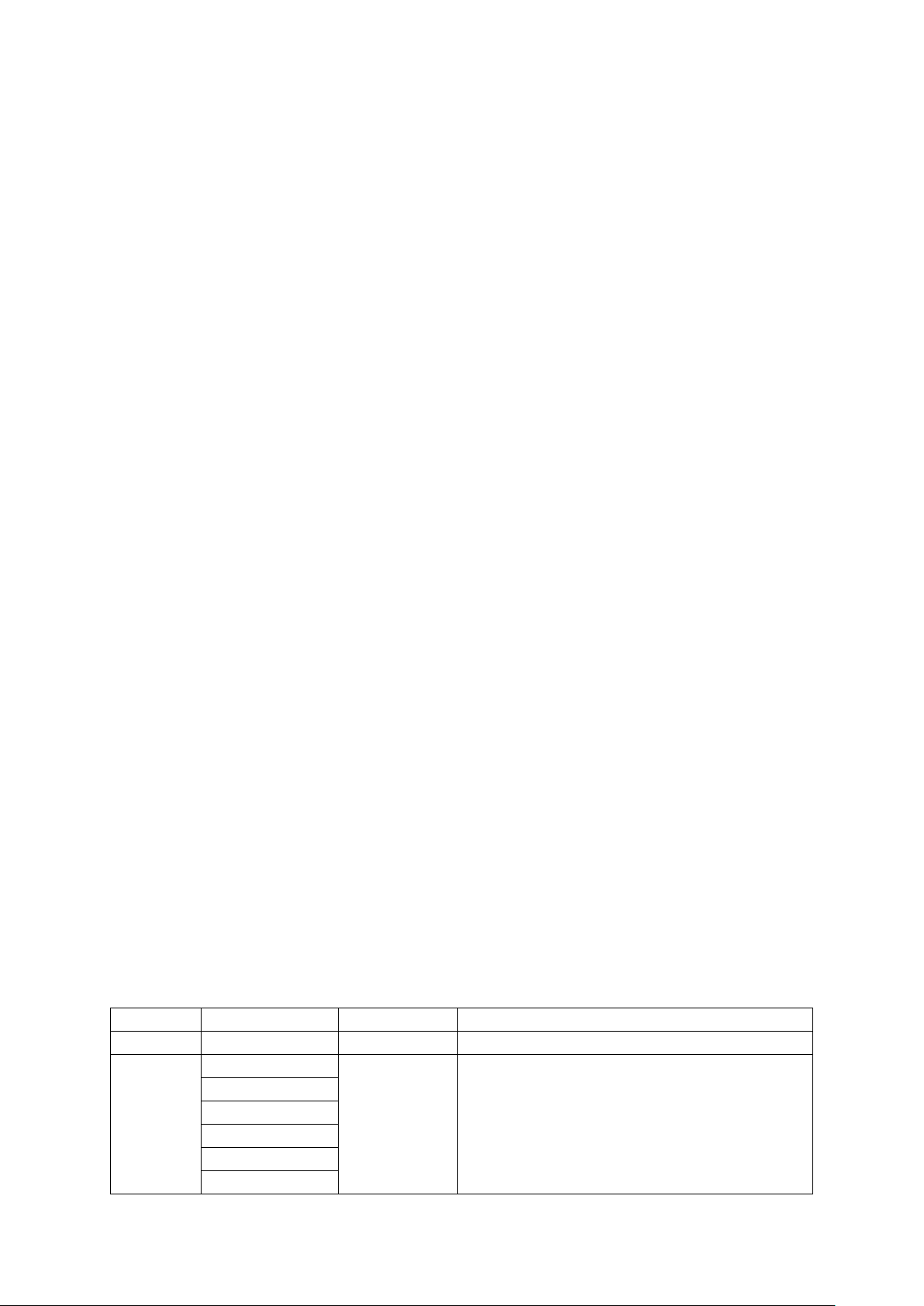
Menu structure
Menu
Sub menu 1
Sub menu 2
Function
Addr
001-512 – DMX address setting
Chnd
3Ch
–
Setting DMX channel mode
5Ch
6Ch
12Ch
24Ch
48Ch
Page 3
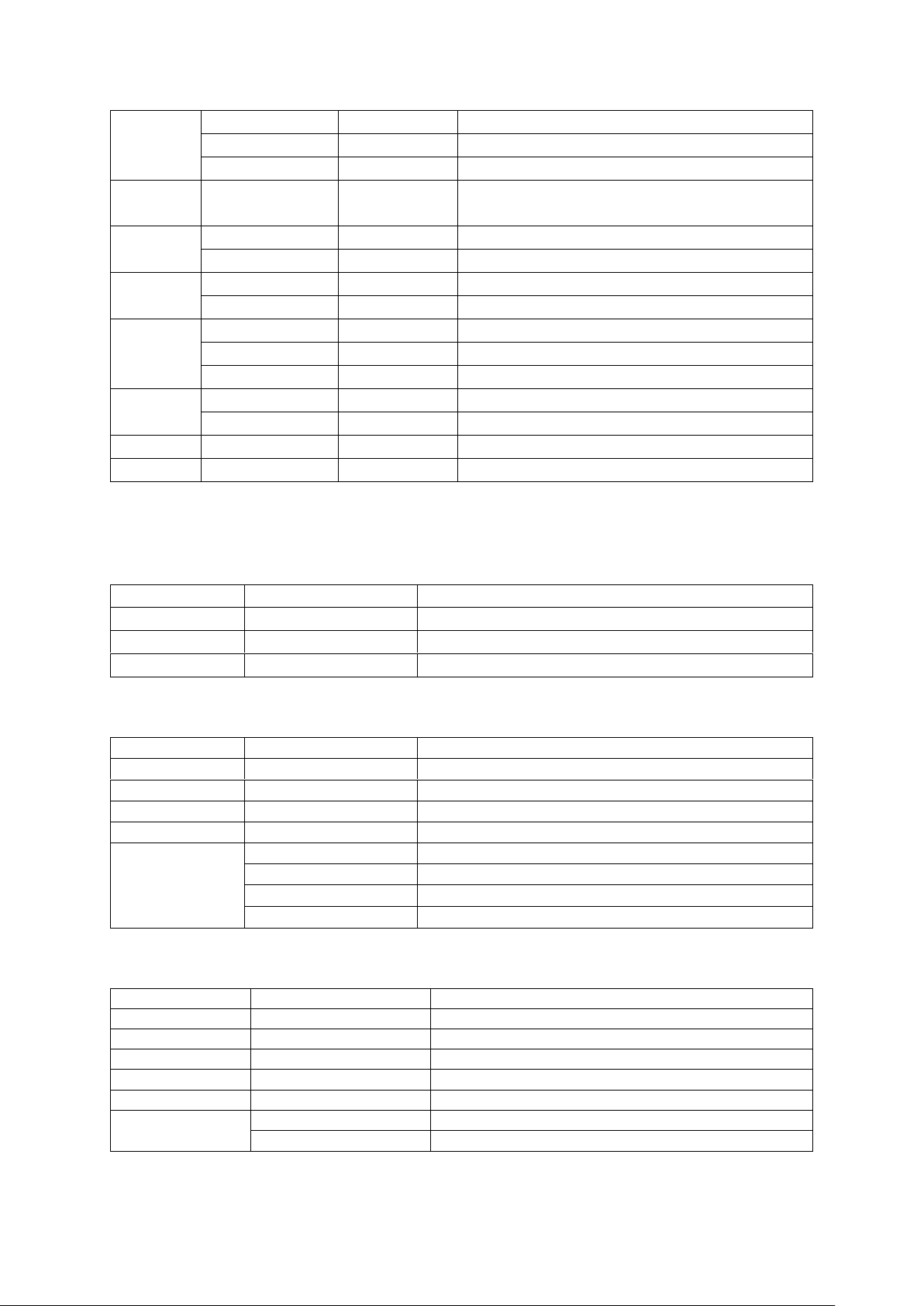
Slnd
Mast
–
Master-setting
SL1 – Slave mode 1 setting
SL2 – Slave mode 2 setting
–
d512
–
When no DMX signal is received, no function:
Blackout
Soun
So0 - So16 – Sound control mode
–
SeOO - Se99
Microphone sensitivity (increasing)
Auto
Au1 - Au 16 – Auto mode
–
SP0-SP9
Speed (increasing)
Colo
RED 000-255 – Red 0%- 100%
GEEN 000-255 – Green 0%- 100%
BLUE 000-255 – Blue 0%- 100%
disp
disp – Default display orientation
dsip – Display reversal 180°
Ver – –
Software version
rset – –
Reset
DMX MODE
3CH mode
Channel
DMX Value
Function
1
000-255
RED Dimmer 0%~ 100%
2
000-255
Green Dimmer 0%~ 100%
3
000-255
Blue Dimmer 0%~ 100%
5CH mode
Channel
DMX Value
Function
1
000-255
RED Dimmer 0%~ 100%
2
000-255
Green Dimmer 0%~ 100%
3
000-255
Blue Dimmer 0%~ 100%
4
000-255
Master dimmer 0-100%
5
000-000
No function
001-005
Sound control(7color)
006-010
No function
011-255
Strobe with increasing speed
6CH mode
Channel
DMX Value
Function
1
000-255
Master dimmer 0-100%
2
000-255
Strobe with increasing speed
3
000-255
RED Dimmer 0%~ 100%
4
000-255
Green Dimmer 0%~ 100%
5
000-255
Blue Dimmer 0%~ 100%
6
000-015
No function
016-255
Auto program R-G-B with increasing speed
Page 4
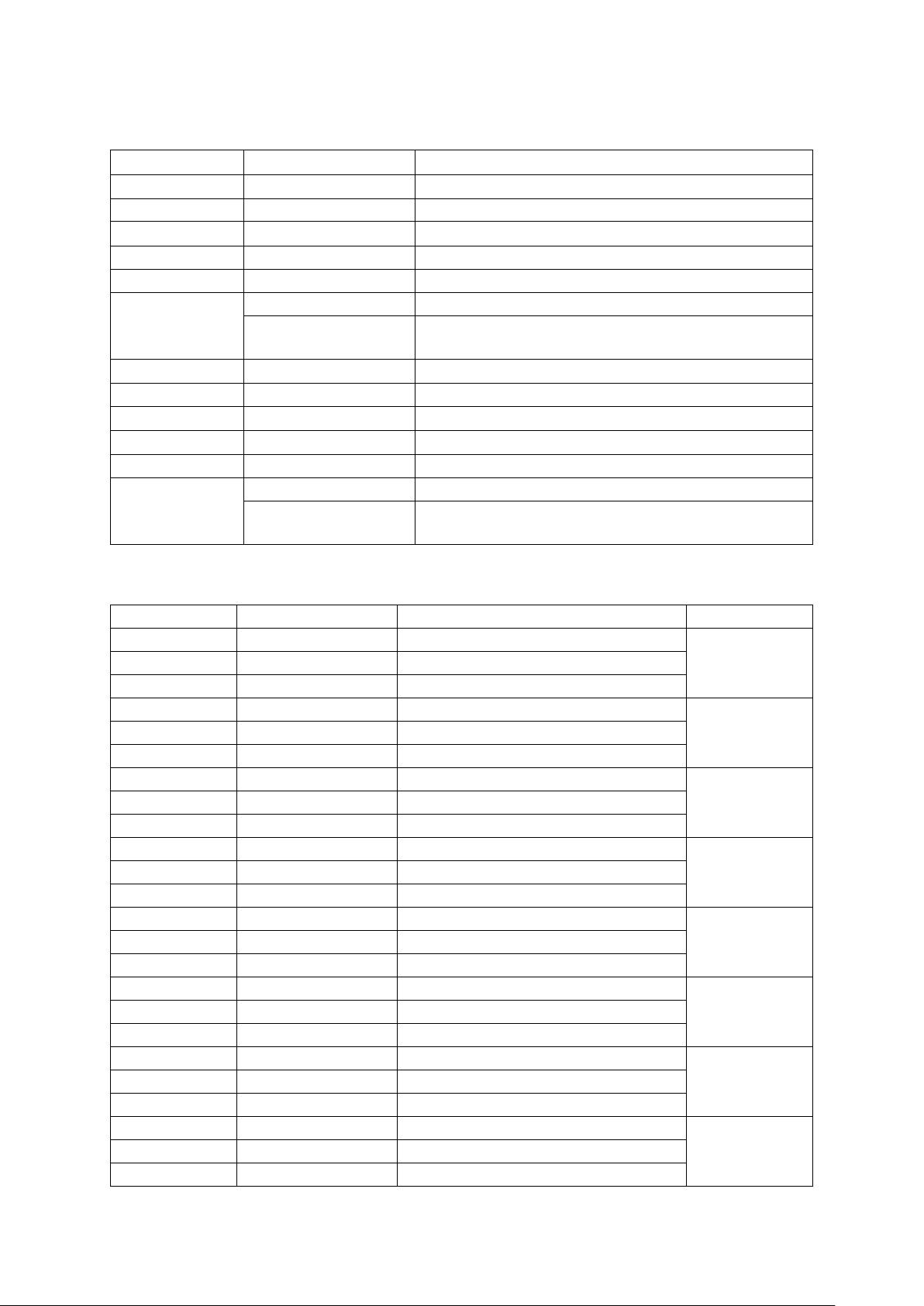
12CH mode
Channel
DMX Value
Function
1
000-255
Master dimmer 0 - 100 % (1 ’2-3-4)
2
000-255
Strobe with increasing speed
3
000-255
Red 1+2+3+4 0%-100%
4
000-255
Green 1+2+3+4 0%' 100%
S
000-255
Blue 1+2+3+4 0%~ 100%
6
000 015
No function
016 255
Auto program R-G-B with increasing speed
7
000 255
Master dimmer 0 - 100 %
8
000 255
Strobe with increasing speed
9
000 255
Red 5+6+7+B 0%~ 100%
10
000 255
Green 5+6+7+B 0%~ 100%
11
000 255
Blue 5+6+7+S 0%~ 100%
12
000-015
No function
016-255
Auto program R-G-B with increasing speed
24CH mode
Channel
DMX Value
Function
Segment
1
000-255
Red 0%-100%
1
2
000-255
Green 0%~ 100%
3
000-255
Blue 0%~ 100%
4
000-255
Red 0%-100%
2
5
000-255
Green 0%- 100%
6
000-015
Blue 0%- 100%
7
000-255
Red 0%-100%
3
8
000-255
Green 0%- 100%
9
000-255
Blue 0%-100%
10
000-255
Red 0%-100%
4
11
000-255
Green 0%- 100%
12
000-015
Blue 0%-100%
13
000-255
Red 0%-100%
5
14
000-255
Green 0%- 100%
15
000-255
Blue 0%-100%
15
000-255
Red 0%-100%
6
17
000-255
Green 0%- 100%
18
000-015
Blue 0%-100%
19
000-255
Red 0%-100%
7
20
000-255
Green 0%- 100%
21
000-255
Blue 0%-100%
22
000-255
Red 0%-100'%
8
23
000-255
Green 0%- 100%
24
000-015
Blue 0%~ 100%
Page 5
48CH mode
Channel
DMX Value
Function
Segment
1
000-255
Master dimmer 0—100%
1
2
000-255
Strobe with increasing speed
3
000-255
Red 0%- 100%
4
000-255
Green 0%~ 100%
5
000-255
Blue 0%~ 100%
6
000-015
No function
016-255
Auto program R-G-B with increasing speed
7
000-255
Master dimmer 0—100%
2
8
000-255
Strobe with increasing speed
9
000-255
Red 0%- 100%
10
000-255
Green 0%- 100%
11
000-255
Blue 0%~ 100%
12
000-015
No function
016-255
Auto program R-G-B with increasing speed
13
000-255
Master dimmer 0 — 100 %
3
14
000-255
Strobe with increasing speed
15
000-255
Red 0%- 100%
16
000-255
Green 0%~ 100%
17
000-255
Blue 0%- 100%
000-015
No function
18
016-255
Auto program R-G-B with increasing speed
19
000-255
Master dimmer 0 — 100 %
4
20
000-255
Strobe with increasing speed
21
000-255
Red 0%- 100%
22
000-255
Green 0%- 1 00%
23
000-255
Blue 0%- 100%
000-015
No function
24
016-255
Auto program R-G-B with increasing speed
25
000-255
Master dimmer 0 — 100 %
5
26
000-255
Strobe with increasing speed
27
000-255
Red 0%- 100%
25
000-255
Green 0%- 100%
29
000-255
Blue 0%- 100%
000-015
No function
30
016-255
Auto program R-G-B with increasing speed
31
000-255
Master dimmer 0—100 %.
6
32
000-255
Strobe with increasing speed
33
000-255
Red 0%- 100%
34
000-255
Green 0%- 100%
35
000-255
Blue 0%-100%
36
000-015
No function
016-255
Auto program R-G-B with increasing speed
Page 6
37
000-255
Master dimmer 0 -100 %
7
38
000-255
Strobe with increasing speed
39
000 255
Red 0%- 100%
40
000-255
Green 0%- 100%
41
000-255
Blue 0%- 100%
42
000-015
No function
016-255
Auto program R-G-B with increasing speed
43
000-255
Master dimmer 0 -100 %
8
44
000-255
Strobe with increasing speed
45
000-255
Red 0%- 100%
46
000-255
Green 0%- 100%
47
000-255
Blue 0%- 100%
48
000-015
No function
16-255
Auto program R-G-B with increasing speed
WARNING! THE DEVICE MUST NOT BE DISPOSED OF WITH HOUSEHOLD WASTE.
This symbol indicates that this product must not be disposed of with household waste, according
to the EU and your national law. In order to prevent potential damage to the environment or health,
the used product must be recycled. In accordance with current legislation, unusable electrical and
electronic devices must be collected separately at the designated facilities for recycling, acting on the basis
of applicable environmental standards.
Information about used electrical and electronic equipment
The main goal of European and national law regulations is to reduce the amount of waste produced from
used electrical and electronic equipment, to ensure an appropriate level of collection, recovery and recycling of used equipment, and to increase public awareness of its harmfulness to the environment, at each
stage of use of electrical and electronic equipment. Therefore, it should be pointed out that households play
a key role in contributing to reuse and recovery, including recycling of used equipment. The user of electrical
and electronic equipment – intended for households – is obliged to return it to authorized collector after
its use. However, it should be remembered that products classified as electrical or electronic equipment
should be disposed of at authorized collection points.
Page 7
POLSKI
Wprowadzenie
Wypakowywanie: Dziękujemy za zakup naszego urządzenia. Każde urządzenie zostało starannie sprawdzone
i zostało wysłane w świetnym stanie. Przed użyciem sprawdź czy nie zostało uszkodzone w transporcie.
Sprawdź również, czy w zestawie znajdują się wszystkie niezbędne do funkcjonowania elementy. Jeśli zauważysz uszkodzenia bądź braki, skontaktuj się z dostawcą. Urządzenia nie należy odsyłać bez wcześniej konsultacji ze sprzedawcą.
Uwaga! Aby uniknąć ryzyka porażenia prądem nie narażaj urządzenia na kontakt z deszczem lub wilgocią.
Uwaga! Wewnątrz nie ma żadnych części serwisowych. Nie należy podejmować samodzielnych prób na-
prawy powoduje to utratę gwarancji. Jeśli produkt będzie potrzebował naprawy, skontaktuj się z autoryzowanym serwisem.
Sterowanie urządzeniem
Urządzenie można kontrolować na 3 sposoby:
1.Master/slave i wbudowane program
2.Sterowanie dźwiękiem
3.Sterownik DMX
Sterowanie dźwiękiem
Wybierz z menu SOUN, wciśnij przycisk enter aby potwierdzić, aktualny tryb będzie mrugał na wyświetlaczu.
Użyj przycisków down i up aby zmienić czułość w zakresie 0-99 oraz wybrać jeden z trybów SO0 – SO16.
Po ustawieniu odpowiedniej wartości wciśnij przycisk ENTER, aby powrócić do poprzedniego menu bez za-
pisywania wciśnij przycisk MENU. Wciśnij i przytrzymaj przycisk MENU przez około sekundę, lub poczekaj
około 1 minuty, w ten sposób wychodzisz do poprzedniego menu.
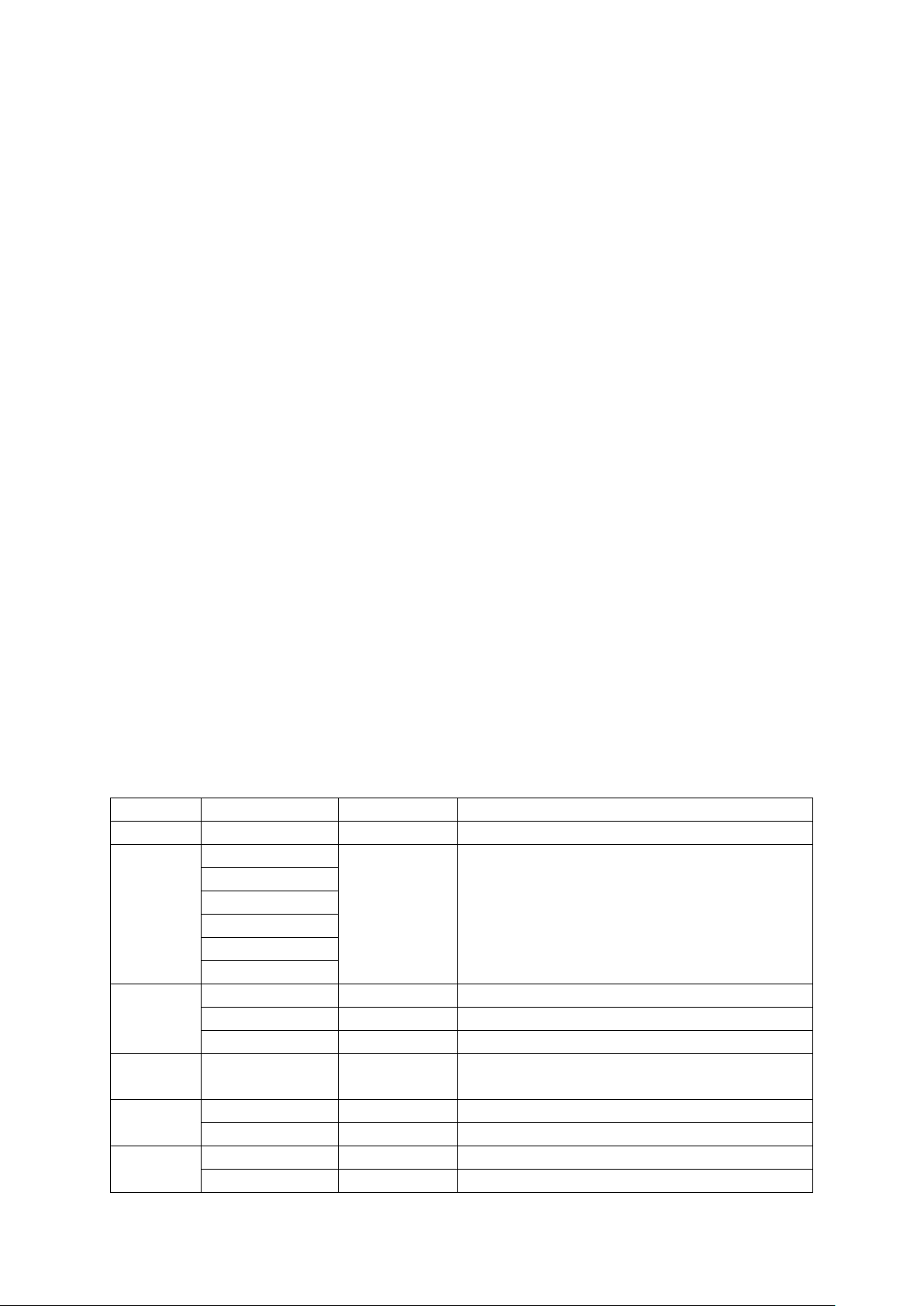
Struktura menu
Menu
Sub menu 1
Sub menu 2
Funkcja
Addr
001-512 – Ustawienie adresu DMX
Chnd
3Ch
–
Wybór trybu DMX
5Ch
6Ch
12Ch
24Ch
48Ch
Slnd
Mast
–
Tryb Master
SL1
–
Tryb Slave 1
SL2
–
Tryb Slave 2
d512
–
Kiedy urządzenie nie otrzymuje sygnału DMX na-
stępuje blackout
Soun
So0 - So16 – Tryb sterowania dźwiękiem
–
SeOO - Se99
Czułość mikrofonu
Auto
Au1 - Au 16
–
Tryb Auto
–
SP0-SP9
Szybkość
Page 8
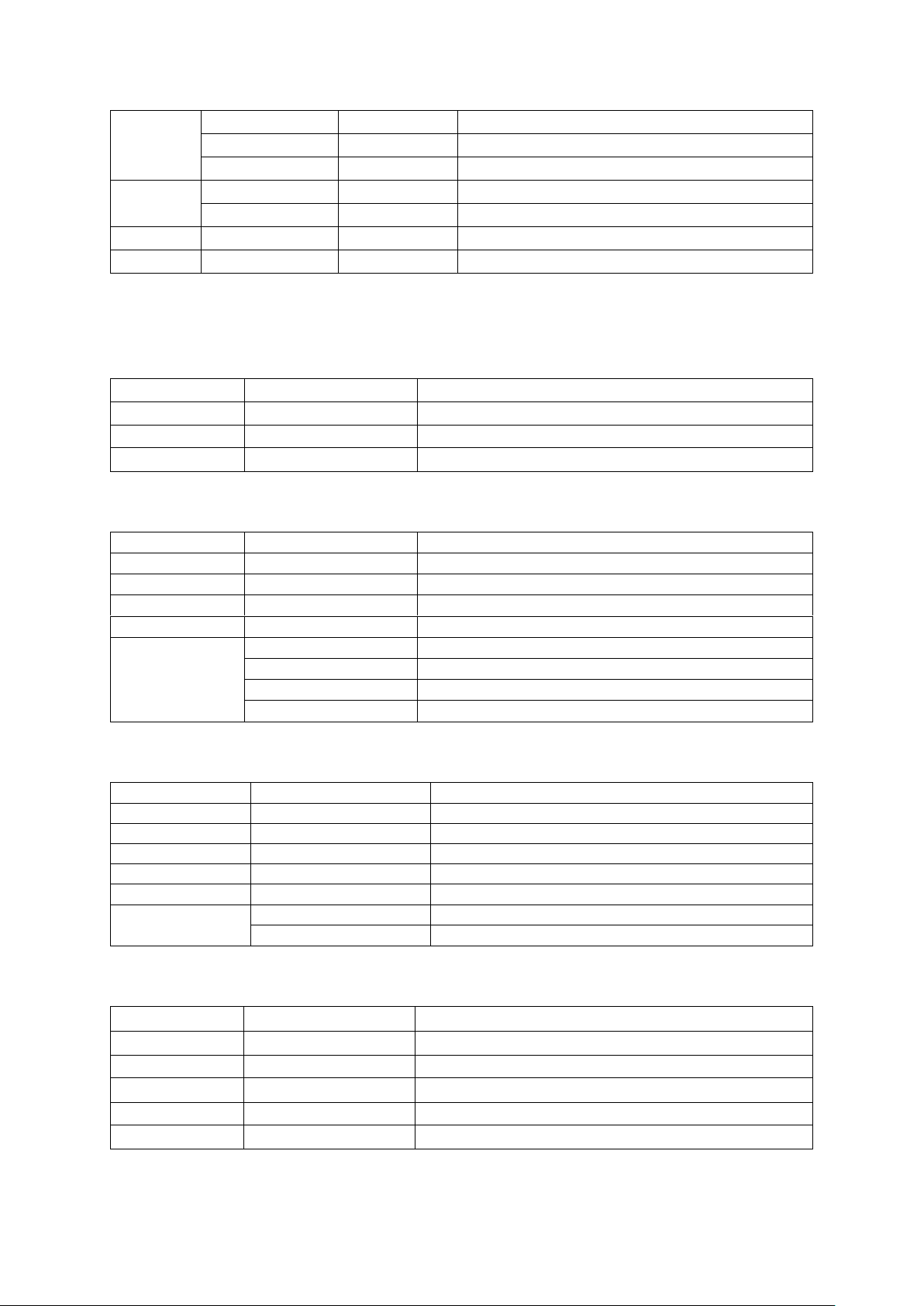
Colo
RED 000-255 – Czerwony 0%- 100%
GEEN 000-255 – Zielony 0%- 100%
BLUE 000-255 – Niebieski 0%- 100%
disp
disp – Wyświetlacz w pozycji domyślnej
dsip – Wyświetlacz odwrócony o 180°
Ver
–
–
Wersja oprogramowania
rset
–
–
Reset
Tryby DMX
Tryb 3CH
Kanał
Wartość
Funkcja
1
000-255
Czerwony Dimmer 0%~ 100%
2
000-255
Zielony Dimmer 0%~ 100%
3
000-255
Niebieski Dimmer 0%~ 100%
Tryb 5CH
Kanał
Wartość
Funkcja
1
000-255
Czerwony Dimmer 0%~ 100%
2
000-255
Zielony Dimmer 0%~ 100%
3
000-255
Niebieski Dimmer 0%~ 100%
4
000-255
Master dimmer 0-100%
5
000-000
Brak funkcji
001-005
Sterowanie dźwiękiem (7 kolorów)
006-010
Brak funkcji
011-255
Strobokop
Tryb 6CH
Kanał
Wartość
Funkcja
1
000-255
Master dimmer 0-100%
2
000-255
Stroboskop
3
000-255
Czerwony Dimmer 0%~ 100%
4
000-255
Zielony Dimmer 0%~ 100%
5
000-255
Niebieski Dimmer 0%~ 100%
6
000-015
Brak funkcji
016-255
Program auto
Tryb 12CH
Kanał
Wartość
Funkcja
1
000-255
Master dimmer 0 - 100 % (1-2-3-4)
2
000-255
Stroboskop
3
000-255
Czerwony 1+2+3+4 0%-100%
4
000-255
Zielony 1+2+3+4 0% - 100%
5
000-255
Niebieski 1+2+3+4 0%~ 100%
Page 9
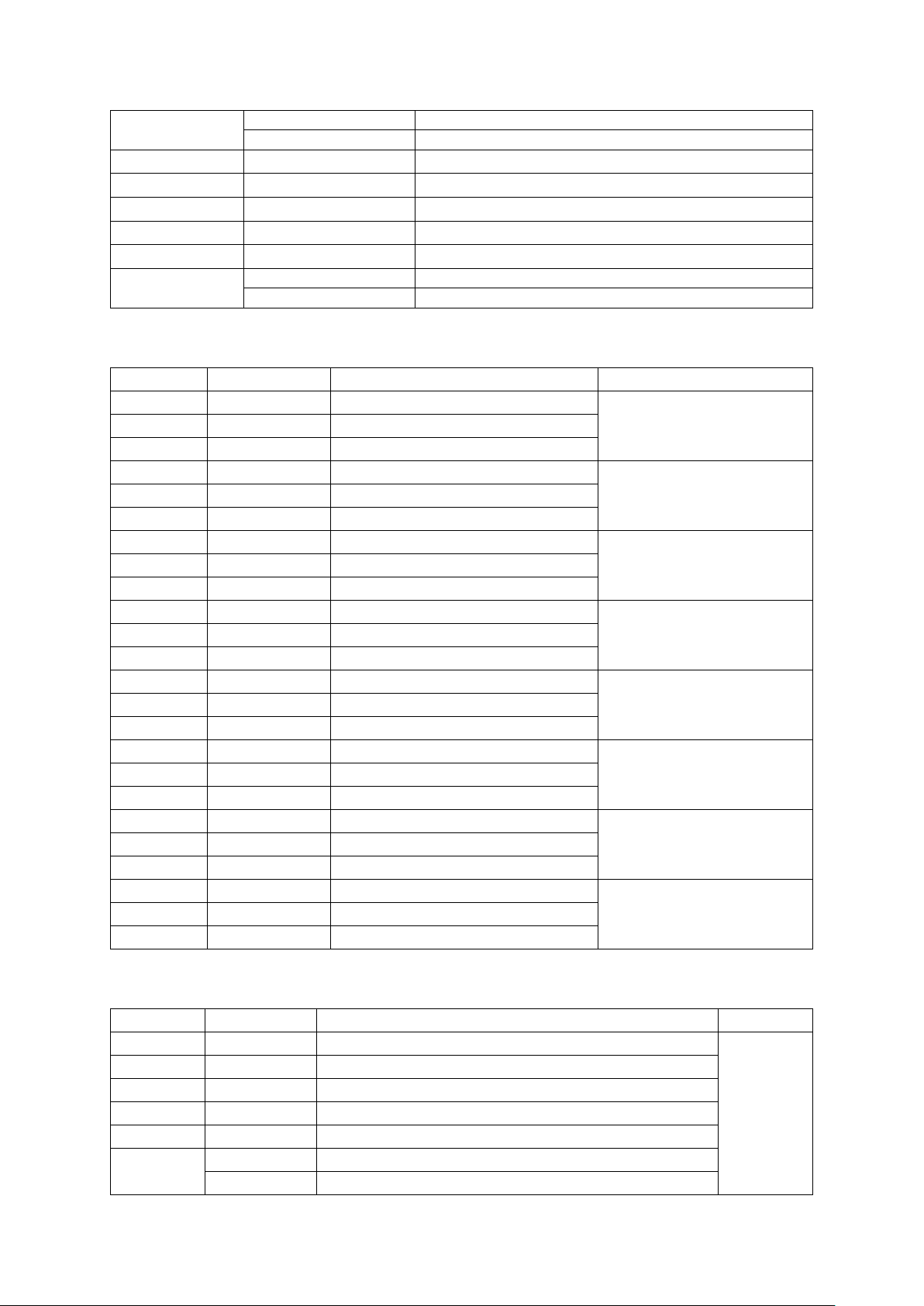
6
000 015
Brak funkcji
016 255
Program auto
7
000 255
Master dimmer 0 - 100 % (5-6-7-8)
8
000 255
Stroboskop
9
000 255
Czerwony 5+6+7+8 0%~ 100%
10
000 255
Zielony 5+6+7+8 0%~ 100%
11
000 255
Niebieski 5+6+7+8 0%~ 100%
12
000-015
Brak funkcji
016-255
Programy auto
Tryb 24CH
Kanał
Wartość
Funkcja
Segment
1
000-255
Czerwony Dimmer 0%~ 100%
1
2
000-255
Zielony Dimmer 0%~ 100%
3
000-255
Niebieski Dimmer 0%~ 100%
4
000-255
Czerwony Dimmer 0%~ 100%
2
5
000-255
Zielony Dimmer 0%~ 100%
6
000-015
Niebieski Dimmer 0%~ 100%
7
000-255
Czerwony Dimmer 0%~ 100%
3
8
000-255
Zielony Dimmer 0%~ 100%
9
000-255
Niebieski Dimmer 0%~ 100%
10
000-255
Czerwony Dimmer 0%~ 100%
4
11
000-255
Zielony Dimmer 0%~ 100%
12
000-015
Niebieski Dimmer 0%~ 100%
13
000-255
Czerwony Dimmer 0%~ 100%
5
14
000-255
Zielony Dimmer 0%~ 100%
15
000-255
Niebieski Dimmer 0%~ 100%
15
000-255
Czerwony Dimmer 0%~ 100%
6
17
000-255
Zielony Dimmer 0%~ 100%
18
000-015
Niebieski Dimmer 0%~ 100%
19
000-255
Czerwony Dimmer 0%~ 100%
7
20
000-255
Zielony Dimmer 0%~ 100%
21
000-255
Niebieski Dimmer 0%~ 100%
22
000-255
Czerwony Dimmer 0%~ 100%
8
23
000-255
Zielony Dimmer 0%~ 100%
24
000-015
Niebieski Dimmer 0%~ 100%
Tryb 48CH
Kanał
Wartość
Funkcja
Segment
1
000-255
Master dimmer 0—100%
1
2
000-255
Stroboskop
3
000-255
Czerwony Dimmer 0%~ 100%
4
000-255
Zielony Dimmer 0%~ 100%
5
000-255
Niebieski Dimmer 0%~ 100%
6
000-015
Brak funkcji
016-255
Programy auto
Page 10
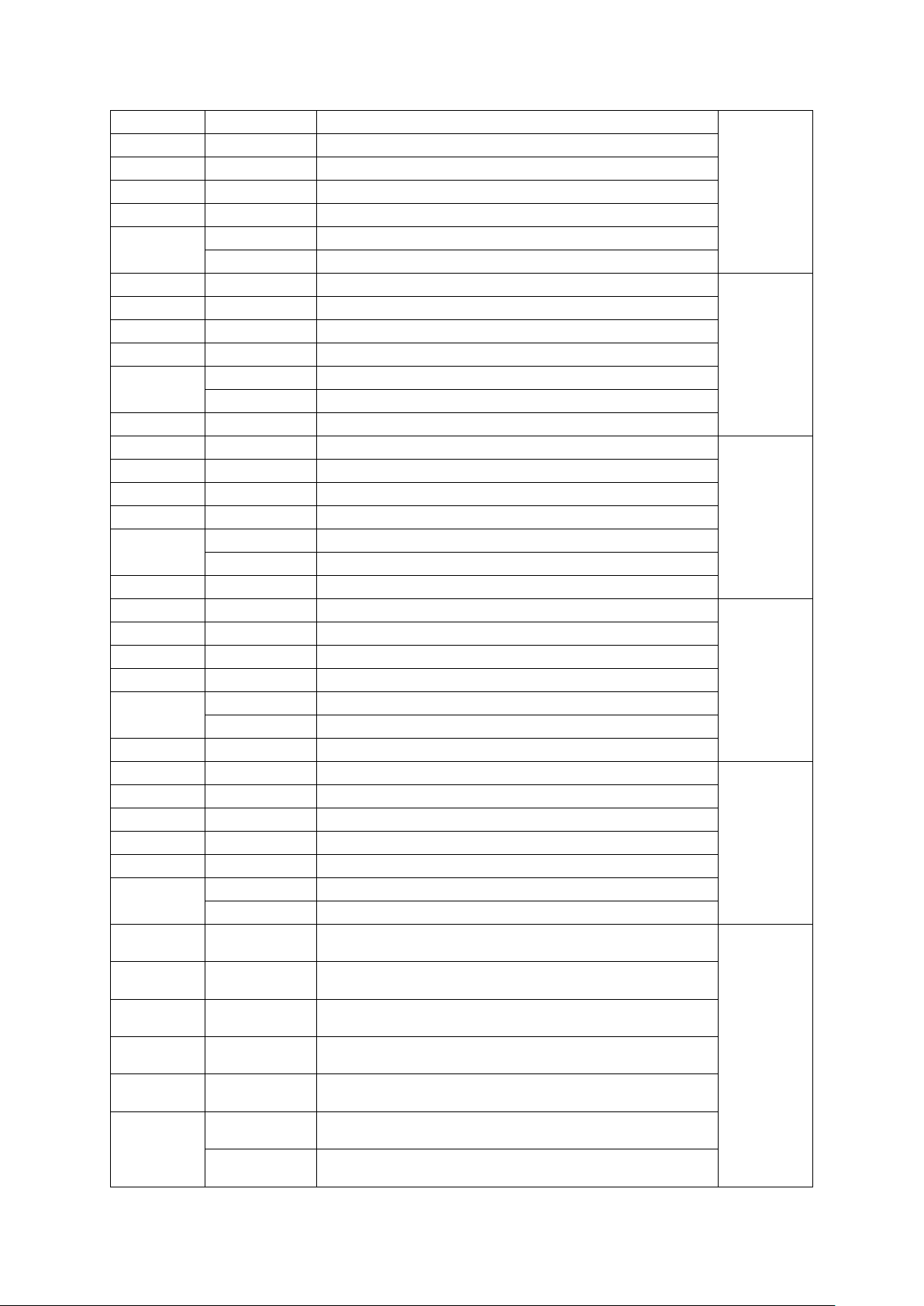
7
000-255
Master dimmer 0—100%
2
8
000-255
Stroboskop
9
000-255
Czerwony Dimmer 0%~ 100%
10
000-255
Zielony Dimmer 0%~ 100%
11
000-255
Niebieski Dimmer 0%~ 100%
12
000-015
Brak funkcji
016-255
Programy auto
13
000-255
Master dimmer 0—100%
3
14
000-255
Stroboskop
15
000-255
Czerwony Dimmer 0%~ 100%
16
000-255
Zielony Dimmer 0%~ 100%
17
000-255
Niebieski Dimmer 0%~ 100%
000-015
Brak funkcji
18
016-255
Programy auto
19
000-255
Master dimmer 0—100%
4
20
000-255
Stroboskop
21
000-255
Czerwony Dimmer 0%~ 100%
22
000-255
Zielony Dimmer 0%~ 100%
23
000-255
Niebieski Dimmer 0%~ 100%
000-015
Brak funkcji
24
016-255
Programy auto
25
000-255
Master dimmer 0—100%
5
26
000-255
Stroboskop
27
000-255
Czerwony Dimmer 0%~ 100%
25
000-255
Zielony Dimmer 0%~ 100%
29
000-255
Niebieski Dimmer 0%~ 100%
000-015
Brak funkcji
30
016-255
Programy auto
31
000-255
Master dimmer 0—100%
6
32
000-255
Stroboskop
33
000-255
Czerwony Dimmer 0%~ 100%
34
000-255
Zielony Dimmer 0%~ 100%
35
000-255
Niebieski Dimmer 0%~ 100%
36
000-015
Brak funkcji
016-255
Programy auto
37
000-255
Master dimmer 0—100%
7
38
000-255
Stroboskop
39
000 255
Czerwony Dimmer 0%~ 100%
40
000-255
Zielony Dimmer 0%~ 100%
41
000-255
Niebieski Dimmer 0%~ 100%
42
000-015
Brak funkcji
016-255
Programy auto
Page 11
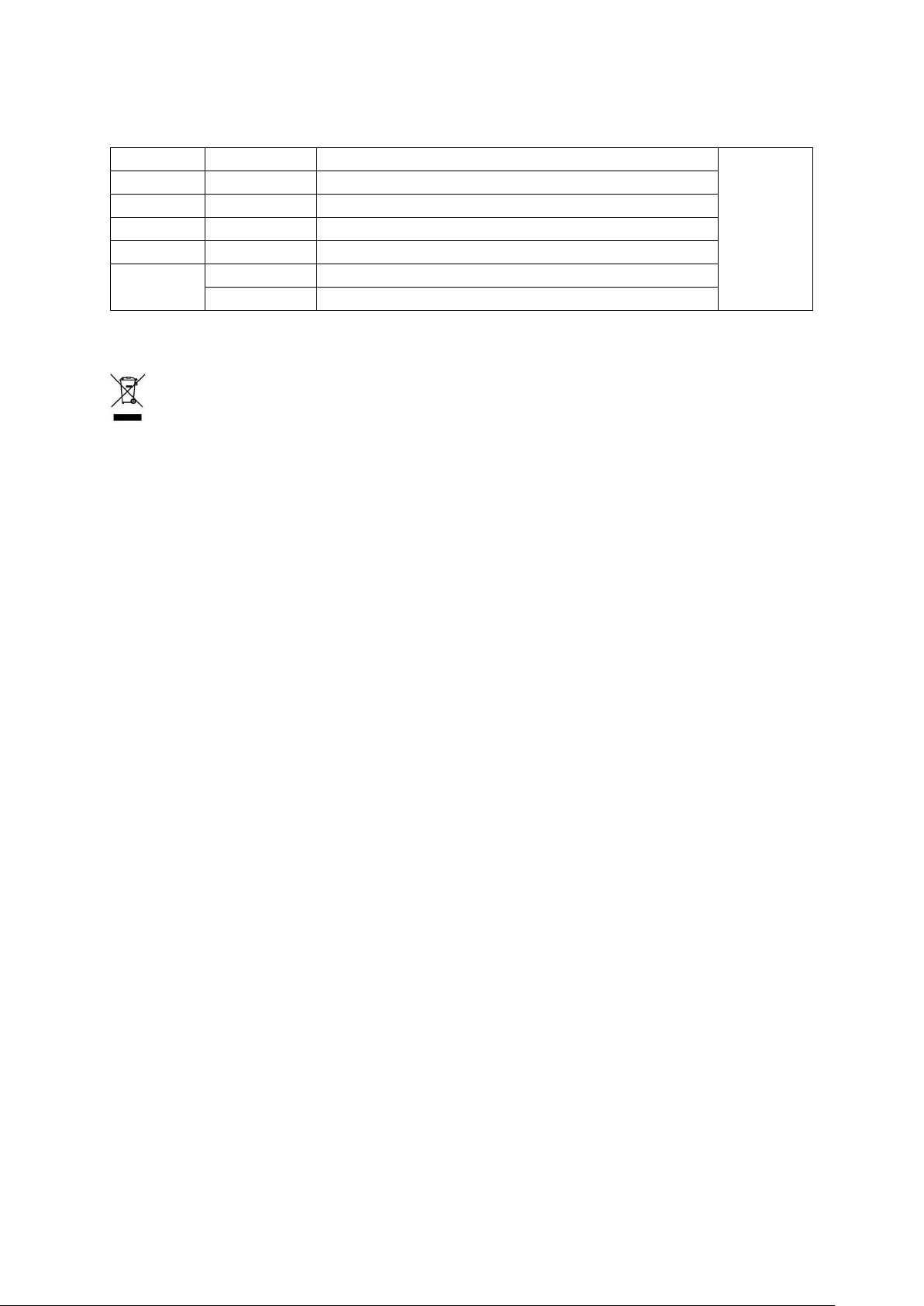
43
000-255
Master dimmer 0—100%
8
44
000-255
Stroboskop
45
000-255
Czerwony Dimmer 0%~ 100%
46
000-255
Zielony Dimmer 0%~ 100%
47
000-255
Niebieski Dimmer 0%~ 100%
48
000-015
Brak funkcji
16-255
Programy auto
UWAGA! URZĄDZENIA NIE WOLNO WYRZUCAĆ DO ODPADÓW DOMOWYCH.
To oznaczenie oznacza, że produkt nie może być wyrzucany razem z odpadami domowymi w całej
UE. W celu zapobiegnięcia potencjalnym szkodom dla środowiska lub zdrowia, zużyty produkt należy
poddać recyklingowi. Zgodnie z obowiązującym prawem, nie nadający się do użycia sprzęt elektryczny i elektroniczny należy zbierać osobno, w specjalnie do tego celu wyznaczonych punktach zbierania
zużytego sprzętu, celem ich przetworzenia i ponownego wykorzystania na podstawie obowiązujących norm
ochrony środowiska.
Informacja o zużytym sprzęcie elektrycznym i elektronicznym
Głównym celem regulacji europejskich oraz krajowych jest ograniczenie ilości odpadów powstałych ze zużytego sprzętu elektrycznego i elektronicznego, zapewnienie odpowiedniego poziomu jego zbierania, odzysku
i recyklingu oraz zwiększenie świadomości społecznej o jego szkodliwości dla środowiska naturalnego,
na każdym etapie użytkowania sprzętu elektrycznego i elektronicznego. W związku z powyższym należy
wskazać, iż gospodarstwa domowe spełniają kluczową rolę w przyczynianiu się do ponownego użycia i odzysku, w tym recyklingu zużytego sprzętu. Użytkownik sprzętu przeznaczonego dla gospodarstw domowych
jest zobowiązany po jego zużyciu do oddania zbierającemu zużyty sprzęt elektryczny i elektroniczny. Należy
jednak pamiętać, aby produkty należące do grupy sprzętu elektrycznego lub elektronicznego utylizowane
były w uprawnionych do tego punktach zbiórki.
 Loading...