

Page 1
NC-25
The Wireless Active Noise Cancelling Headphones
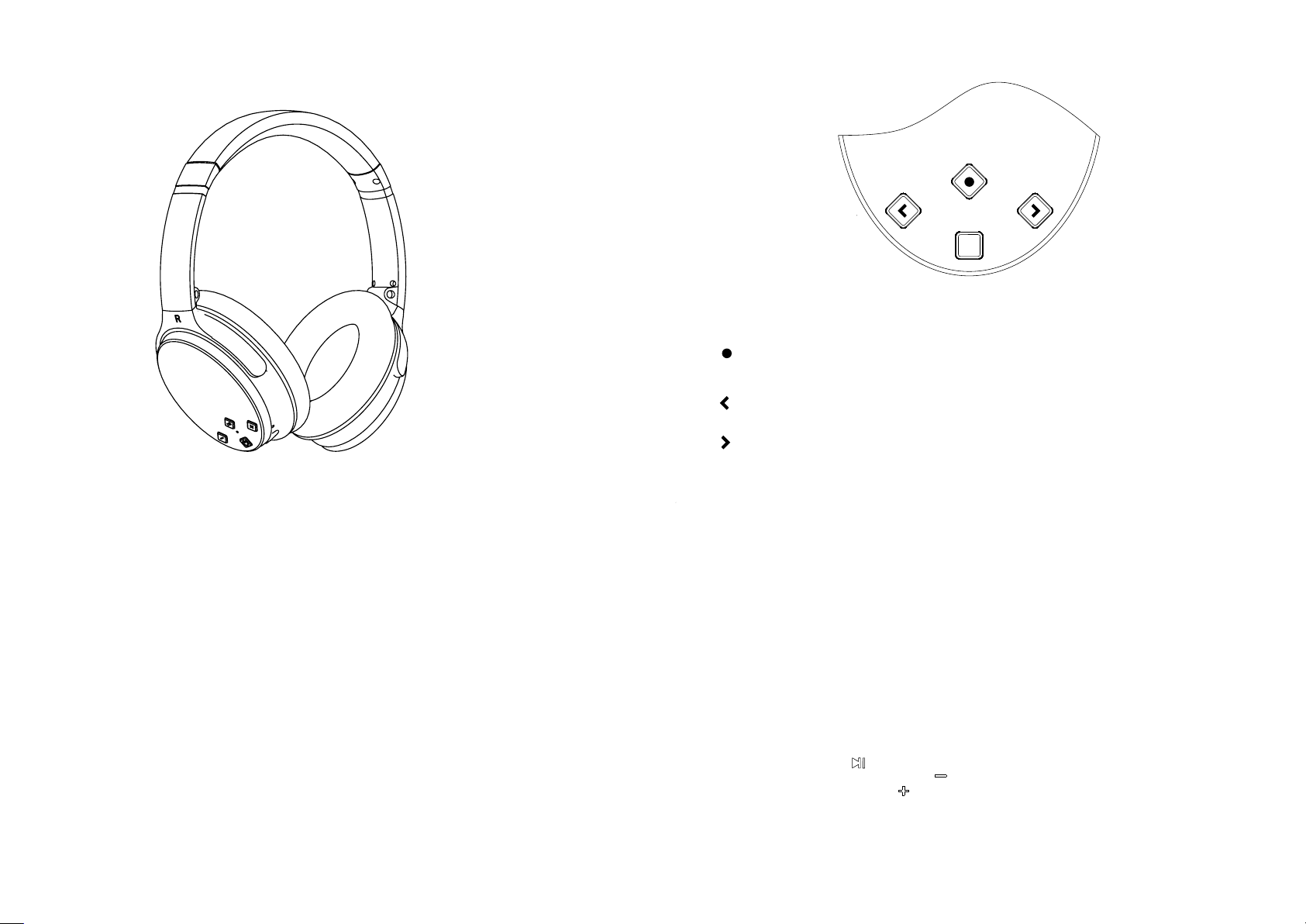
Function Overview:
Noise Cancelling On/Off Button
ANR
Multifunction Button (Bluetooth On/Off, Make/Answer/End
/ Reject Call, Pause Wireless Only)
Volume Down/Previous Song (Wireless Only)
Volume Up/ Next Song (Wireless Only)
ANR
The Wireless Headphones is developed to deliver super round
quality with Bluetooth 4.1V CSR 8635
The Active Noise Cancelling technology reduce surrounding
nosie up to 20dB and let you enjoy pure music without distraction
Specification:
Speaker Unit: 40mm
Magnet: Neodymium
Sensitivity: 105+/-3dB
Impedance:32 ohms+/-10%
Frequency range:20~20KHz
Active cancellation :Up to 15~20dB between 100~1kHz
Blue-tooth version:V4.0
operation distance:10m
Power: 3.7V 360mah
Working Hour: Music Playing 12 hrs
Operation:
Noise Cancelling:
1, Pre ss t he ANC But to n ON, the Noi se C ancel li ng Indica tor is gree n.
2, Afte r tu rn the no is e cancell ing on, you m ay h ear a sligh t hissing n oi se, thi s is n ormal`w ill cease a ft er a few seco nds.
3,Wh en u sing no is e cancell ing featu re , if the batt ery is off, the gre en indica to r is off, if you wa nt t o conti nu e
usin g no ise can ce lling fea ture, you n ee d charge th e battery. If you us e wired con ne ction y ou c an contin ue use the
head ph ones
Wireless Operation:
1, Pre ss t he Mult if unction B ut ton for o ne s econd, yo u will hear “ Po wer On” an d “BEEP” wi th t he Blue I nd icator Is
Blin ki ng. and t he B luetoot h is in pairi ng m ode.
2, Ena bl e the Blu et ooth on you r mobilep ho ne or the dev ice you wan t to c onnec t an d scan/se arch for ne w de vice.
3, Whe n NC -25 is fo un d, select a nd c onnec t, y ou will hea r voice rem in d “Conn ec ted”.an d th e Blue in di cator wil l
flas h ev ery fiv e se conds. The co nn ection is c omplete d.
Play Music:
1, Pre ss t he Multif unction B ut ton
2, Pre ss t he Volum e Do wn/ Previ ou s Song Bu tt on once to pl ay p revio us s ong,lon g press to re du ce the volu me.
3, Pre ss t he Volum e Up /Next Son g Bu tton on ce t o play next s on g, long p re ss to incre ase volum e.
Call Functions:
Call An sw er: Pre ss t he Multif unction B ut ton once to a nswer, and p re ss agai n to e nd.
Last n um ber red ia l: in stand by mode, pr es s the Multi functio n Bu tton twic e to redial . .
once t o pl ay musi c, a nd press it a ga in to pau se .
Page 2

FCC Caution:
This device complies with part 15 of the FCC Rules. Operation is subject to the
following two conditions: (1) This device may not cause harmful interference, and (2)
this device must accept any interference received, including interference that may
cause undesired operation.
Any Changes or modifications not expressly approved by the party responsible for
compliance could void the user's authority to operate the equipment.
Note: This equipment has been tested and found to comply with the limits for a Class
B digital device, pursuant to part 15 of the FCC Rules. These limits are designed to
provide reasonable protection against harmful interference in a residential installation.
This equipment generates uses and can radiate radio frequency energy and, if not
installed and used in accordance with the instructions, may cause harmful interference
to radio communications. However, there is no guarantee that interference will not
occur in a particular installation. If this equipment does cause harmful interference to
radio or television reception, which can be determined by turning the equipment off
and on, the user is encouraged to try to correct the interference by one or more of the
following measures:
-Reorient or relocate the receiving antenna.
-Increase the separation between the equipment and receiver.
-Connect the equipment into an outlet on a circuit different from that to which the
receiver is connected.
-Consult the dealer or an experienced radio/TV technician for help.
 Loading...