

Page 1
LIFEWatch, Inc. • 266 Merrick Road, Suite 104, Lynbrook, NY 11563 • 800.716.1433
800.716.1433
www.lifewatch-usa.com
QUICK SET-UP GUIDE
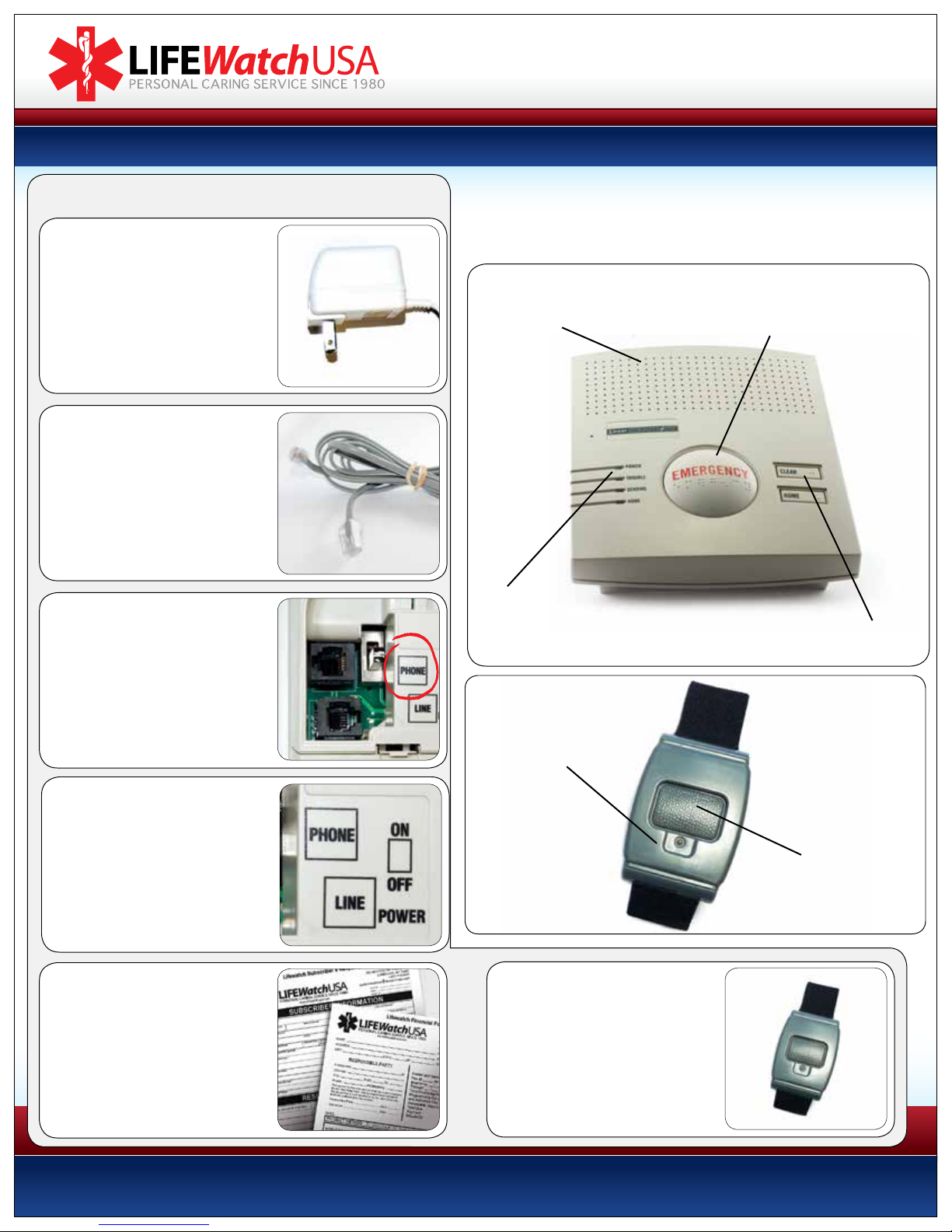
STEP 1
Plug the AC power adapter
into an electrical outlet that
is not controlled by a light
switch.
STEP 2
Plug the loose end of the gray
phone cord coming from the
back of the unit into wall jack.
(If your telephone cord is already
plugged into the wall jack,
remove it first.)
STEP 3 (Optional)
Key controls and indicators are identied here.
Your console and transmitter are already programmed and ready to use.
A battery inside the console provides up to five days of back-up power.
Speaker:
Transmits two-way voice connection with
certied EMT’s at the Lifewatch Center.
LED Indicator:
Lights GREEN when power is on.
HELP button:
For triggering an emergency
call to the LIFEWatch
Response Center.
Clear/Reset Button:
Push to cancel a false alarm.
Plug phone cord that was
removed from wall jack
(Step 2) into bottom of the
unit marked “PHONE”.
STEP 4
Turn your unit on by switching
the ON/OFF switch (located on
the back of the unit) to the ON
position.
STEP 5
Complete the forms
included and mail back to:
266 Merrick Road
Lynbrook NY, 11563
We need these forms in order to properly
respond in the case of an emergency.
LED indicator:
Lights green when
alarm is successfully
transmitted to
PERS console.
ALARM button:
For triggering an emergency call
to the LIFEWatch Response Center.
STEP 6
Test the system by pressing
the gray button on the
transmitter. (Please refer to our
“How to test and use your Lifewatch
system” on other side of this page.)
Page 2
LIFEWatch, Inc. • 266 Merrick Road, Suite 104, Lynbrook, NY 11563 • 800.716.1433
HOW TO TEST AND USE YOUR LIFEWATCH SYSTEM:
800.716.1433
www.lifewatch-usa.com
1 Press your pendant or wristband button once
(please use your personal help button, not the
button located on the base unit).
2 There will be a series of beeps, you may hear a
dialing sound, and lastly the unit will go silent.
3 In approximately 30 to 60 seconds an operator
will come on and say “You have reached the
Care Center. Are you ok?”
4 Simply tell them you are testing or tell them
what you need if there is an emergency.
* If we do not hear a response from you we will immediately call your home phone. If we still are
not able to get a hold of you, we will dispatch EMS and call your responders to notify them,
unless otherwise specified on your account.
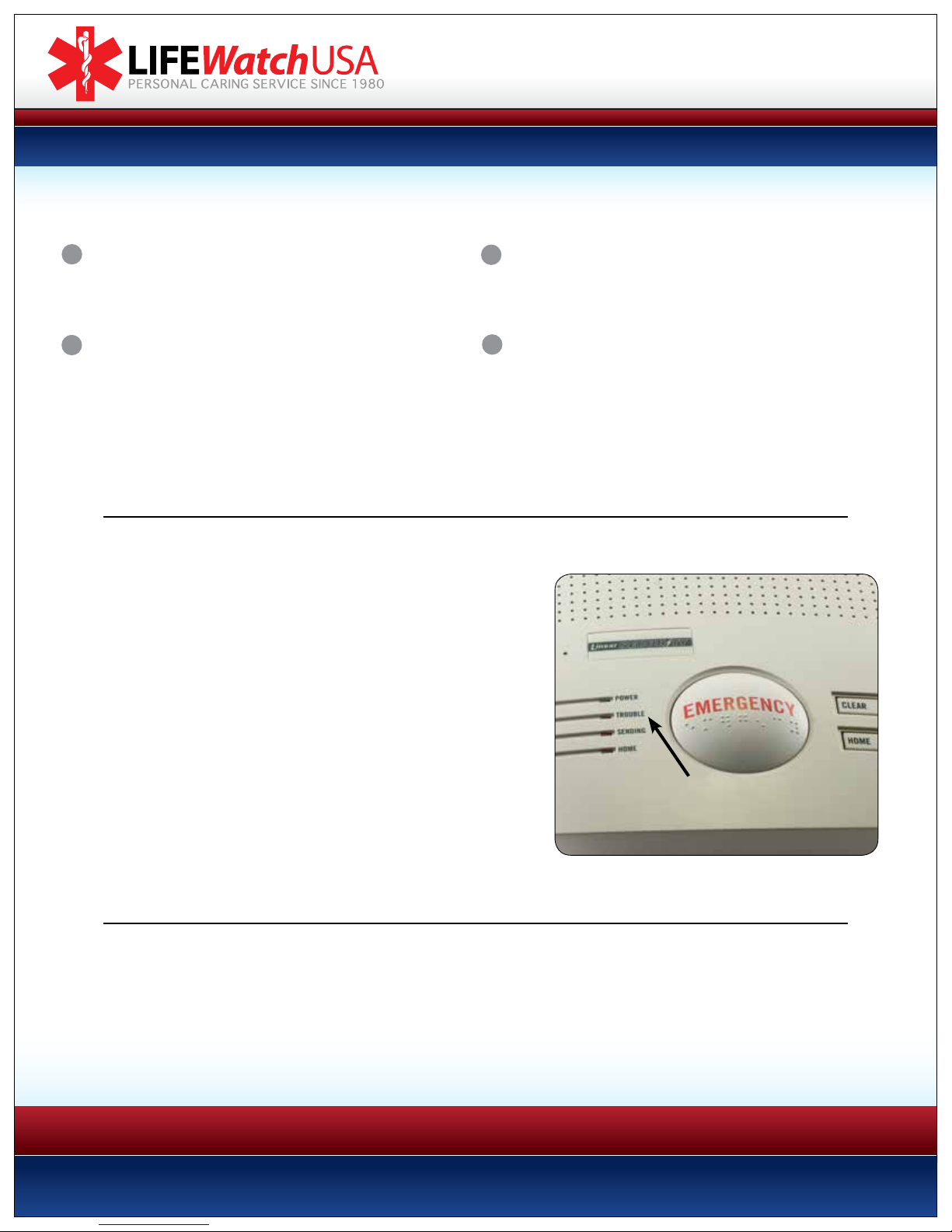
STATUS Light Signals
A single STATUS light is located on the left lower edge of the large HELP
button on the base unit, next to the “STATUS” printed on the button
(Figure 10). The STATUS light is programmed to display the following
light signals when in normal operating mode:
• Steady Green: The unit is properly plugged in to AC power
and a telephone line, and is ready to call the monitoring center.
• Steady Red: The unit has been activated by an alarm signal
and is trying to call the response center.
• Short Green Flash at periodic intervals: AC power is not
available and the unit is being powered from its internal battery.
• Short Red Flash at periodic intervals: The unit is not connected
to an operating telephone line.
• Short Orange Flash at periodic intervals: The unit is being
powered by its internal backup battery, AND the unit is not
connected to an operating telephone line.
STATUS
Light Location
(Figure 10)
Thank you for choosing Lifewatch.
If you have any questions or concerns please contact the oce at: 800.716.1433
Monday thru Friday from 9am until 6pm
Please test your system once a month (you do not need to call us before doing so).
 Loading...