

Page 1
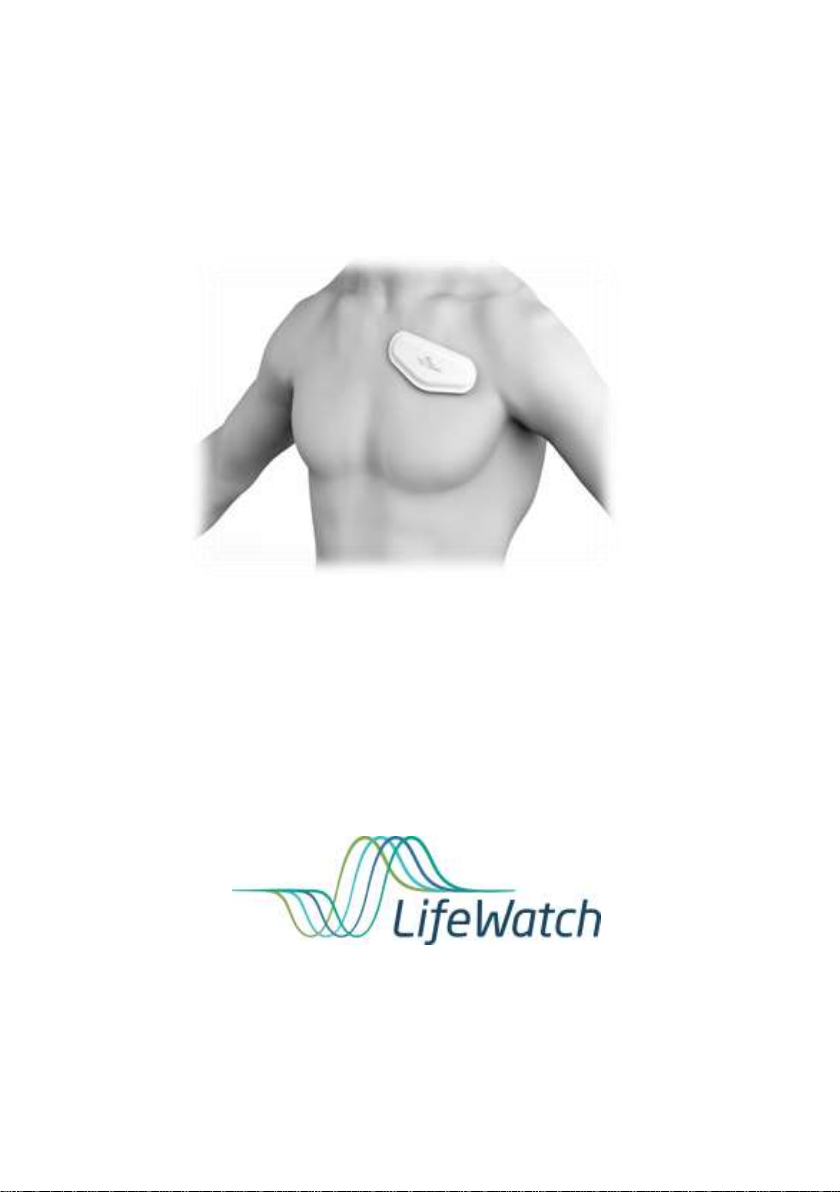
ECG Mini
User Guide
PLEASE CALL
1.800.517.6330
FOR 24/7 CUSTOMER SUPPORT
ECG Mini User Guide
Page 2
Federal Law (USA) restricts this device to sale by
or on the order of a practitioner licensed by the
law of the State in which he/she practices to use
or order the use of the device.
CAUTION:
This manual should always accompany the unit.
All personnel utilizing the ECG Mini system must
have read and be familiar with the contents of this
manual.
First time use – You must call LifeWatch to
receive instructions on how to proceed for the first
time use.
The first time the ECG Mini is activated and is
attached to you, it will display screens that are not
seen in regular use. These screens are calibration
procedures the ECG Mini needs to perform to
adjust its operation for first time use.
ECG Mini User Guide
This user guide includes information and instructions about the
ECG Mini (Continuous ECG Monitor and Arrhythmia Detector) monitoring
system. Please read it carefully before you begin testing.
If you have any questions regarding the ECG Mini please contact
LifeWatch at 1-800-517-6330.
Page 2
Page 3

USA
LifeWatch, Inc.
O’Hare International Center
10255 West Higgins Road
Suite 120
Rosemont, IL 60018
Tel: 847-720-2295
Fax: 847-720-1995
Toll Free: 800-633-3361
Fax: 800-954-2375
Email:
[email protected]
Israel
LifeWatch
Technologies Ltd.
2 Pekeris Street.
Rehovot 7670202
Israel
Tel: 972 8 9484000
Fax: 972 8 9484044
Email:
[email protected]
Authorized representatives:
Copyright Declaration
Copyright © 2015 LifeWatch Services, Inc. All rights reserved. LifeWatch,
Watching Life, LifeStar and ECG Mini are trademarks of LifeWatch
Services, Inc. LifeWatch reserves the right to change specifications at any
time without notice.
LifeWatch Technologies, LifeWatch Technologies logo and ECG Mini are
trademarks or registered trademarks of the LifeWatch® Group of
Companies.
Page 3
Page 4
Illustrations included in this manual are general
representations only and are not meant to comply
with specific regulatory requirements.
All other brand names and product names used in this document are trade
names, service marks, trademarks, or registered trademarks of their
respective owners.
The information and screens provided in this manual are subject to change
without notice.
LifeWatch Technologies Ltd. SHALL NOT BE LIABLE FOR TECHNICAL
OR EDITORIAL ERRORS OR OMISSIONS CONTAINED HEREIN; NOR
FOR INCIDENTAL OR CONSEQUENTIAL DAMAGES RESULTING
FROM THE FURNISHING, PERFORMANCE, OR USE OF THIS
MATERIAL.
ATTENTION: The ECG Mini is a near diagnostic tool only and is not
part of an emergency service. Heart strips transmitted by the device
are not viewed immediately by technicians. If when viewed, the
technician sees an arrhythmia that is potentially harmful or life
threatening, LifeWatch will attempt to facilitate care for the patient
through either their doctor or an emergency medical service,
although this care may be delayed.
Page 4
Page 5

Table of Contents
1 Introduction ............................................................... 8
1.1 INTENDED USE ................................................... 8
1.2 GENERAL DESCRIPTION ...................................... 9
1.3 SYMBOLS ON EQUIPMENT AND LABELING ............ 11
1.4 WARNINGS AND CAUTIONS ................................ 13
1.5 GLOSSARY ....................................................... 19
2 General Description ............................................... 20
3 The ECG Mini Kit .................................................... 22
3.1 GATEWAY PHYSICAL DESCRIPTION ..................... 23
HOW MUCH CHARGE IS IN THE BATTERY? ...................... 24
4 Important Information Before Use ....................... 26
4.1 GENERAL ......................................................... 26
4.2 NO CONNECTION WITH GATEWAY
CELLULAR DEVICE ....................................................... 26
5 Using the ECG Mini ................................................ 27
5.1 BEFORE STARTING............................................ 27
5.2 RECHARGING THE GATEWAY
CELLULAR DEVICE ....................................................... 29
6 Using the ECG Mini System .................................. 30
6.1 GENERAL ......................................................... 30
6.2 INITIALIZING THE ECG MINI KIT .......................... 30
6.3 PLACING THE PATCH ......................................... 30
6.4 INSTALLING THE ECG MINI TRANSMITTER ........... 33
6.5 REMOVING THE ECG MINI ................................. 34
7 Using the Gateway Application ............................ 35
Page 5
Page 6

7.1 STARTING THE APPLICATION .............................. 35
7.2 ECG MINI SCREEN ........................................... 36
7.3 GATEWAY NOTIFICATIONS.................................. 39
8 Heart Rate Calculation Method ............................. 42
8.1 INTRODUCTION.................................................. 42
8.2 METHOD OF CALCULATION ................................. 42
9 Pause Calculation ................................................... 42
10 Care .......................................................................... 43
10.1 CONDITIONS OF USE ....................................... 43
10.2 CLEANING ...................................................... 43
10.3 ENVIRONMENTAL CONSIDERATIONS ................. 43
11 Troubleshooting ..................................................... 44
12 Maintenance ............................................................ 45
12.1 CONDITIONS OF USE ....................................... 45
12.2 CARING FOR YOUR ECG MINI .......................... 45
12.3 PREVENTIVE MAINTENANCE............................. 46
13 Technical Specifications ....................................... 47
13.1 ECG MINI TECHNICAL SPECIFICATIONS ............ 48
Appendix A Monitor (Cellular Phone) Warnings ........ 51
FCC Radio Frequency Interference Statement .......... 56
Page 6
Page 7

Table of Figures
Figure 1 – Gateway Physical Description ........................ 23
Figure 1 - Area to prepare for ECG Mini Patch ............... 30
Figure 2 – ECG Mini 1-lead Placement ........................... 31
Figure 3 – ECG Mini 1-lead Properly Placed .................. 32
Figure 4 - Placing ECG Mini Transmitter into Cradle ...... 33
Figure 5 – ECG Mini notification screen with notification 39
Page 7
Page 8

1 INTRODUCTION
1.1 Intended Use
The ECG Mini System is intended for use by patients who experience
transient symptoms that may suggest cardiac arrhythmia. The
device continuously monitors patient ECG and transmits the
recorded data wirelessly to a monitoring center. The monitoring
center provides the ECG data to the medical practitioner for
evaluation.
The device has not been tested for and it is not intended for pediatric
use.
Contraindications for Use:
The ECG Mini is not to be used in a magnetic resonance
imaging (MRI) environment. The ECG Mini must be removed
from the patient’s skin before he/she undergoes MRI
procedure
The ECG Mini is not to be used with external defibrillator.
The ECG Mini is not a “life-saving” or therapeutic device; the
ECG Mini supplies vital signs data to a doctor or technician
for the purpose of diagnosis by such (or other qualified)
personnel
The ECG Mini is not intended for use on patients with
unhealed surgical incisions/dressings on the thoracic or
abdominal regions
The ECG Mini is not intended for use on patients with skin or
soft tissue damage in the area where the Patch is placed
(such as burns, irritation, infections, wounds, etc.).
The ECG Mini is not intended for use in the diagnosis of
myocardial infarction or for chest pain monitoring.
Page 8
Page 9
1.2 General Description
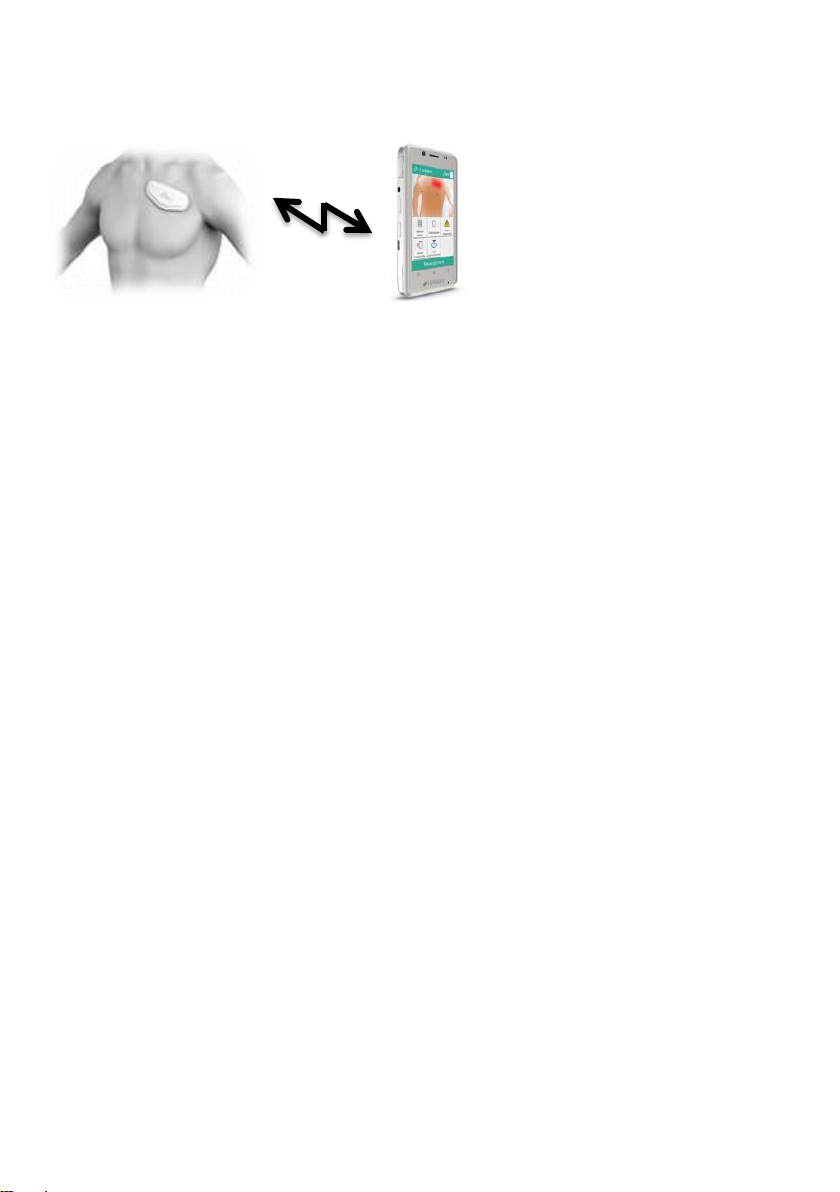
The ECG Mini system consists of 3 main components:
Disposable 1-lead patch with ECG electrodes
Reusable processing and transmitter device, also called
“Brain”
Gateway cellular device
The 1-lead ECG patch contains 3 electrodes which are used for
1-lead arrhythmia detection. The 1-lead patch ECG is attached to
the upper chest of the body.
The 1-lead patch contains 3 ECG electrodes, a cradle for the Brain
and one coin battery for powering the Brain.
The 1-lead patch is a disposable part which is mounted on the
patient body throughout the service period. Special slot within the
patch enables easy insertion of the brain to its cradle by the user.
The brain receives its power from a 1.4V coin non-rechargeable
battery integrated within the patch.
The brain transmits ECG raw data to the Gateway cellular device
wirelessly using unique RF protocol. In addition, the Brain contains a
32MB Flash memory chip that can store 6 hours of data in case of
communication failure with the Gateway cellular device.
The Gateway cellular device is located in the patient home and
receives the ECG signs data from the Patch wirelessly over a unique
RF protocol. The Gateway cellular device analyzes the ECG data
and generates events which reflect 4 arrhythmias – Pause, AFIB,
Tachycardia and Bradycardia. These events are transmitted to the
monitoring center backend system of LifeWatch Services over
Page 9
Page 10

standard wide range cellular network. ECG events are displayed at
the monitoring center (LifeWatch Services) by means of cardiac data
software called “Paceart”.
The patient can manually trigger an event by clicking on an icon on
the screen of the Gateway cellular device.
The following list represents patient populations for whom use of the
ECG Mini is most appropriate. This list should be used in conjunction
with Medicare and other payor medical necessity guidelines:
Patients with dizziness or lightheadedness
Patients with palpitations
Patients with syncope of unknown etiology
Patients who require monitoring for non-life-threatening arrhythmias,
such as Atrial Fibrillation, Supra-ventricular Arrhythmias, evaluation of
various Brady arrhythmias.
This includes post-operative monitoring for these rhythms.
Patients recovering from coronary artery bypass graft (CABG) surgery
who require monitoring for arrhythmias
Patients requiring monitoring for arrhythmias-including co-morbid
conditions such as hyperthyroidism or chronic lung disease
Patients with obstructive sleep apnea to evaluate possible nocturnal
arrhythmias
Patients requiring arrhythmia evaluation for etiology of stroke or
transient cerebral ischemia, possibly secondary to Atrial Fibrillation
To use the ECG Mini, the user or primary care provider must be able
to perform all of the following:
Understand the principle of operation and system messages described
in this manual
Place the patch on the chest
Operate a handheld device (Gateway)
The ECG Mini is safe for use by patients wearing an oxygen mask
for breathing.
Page 10
Page 11
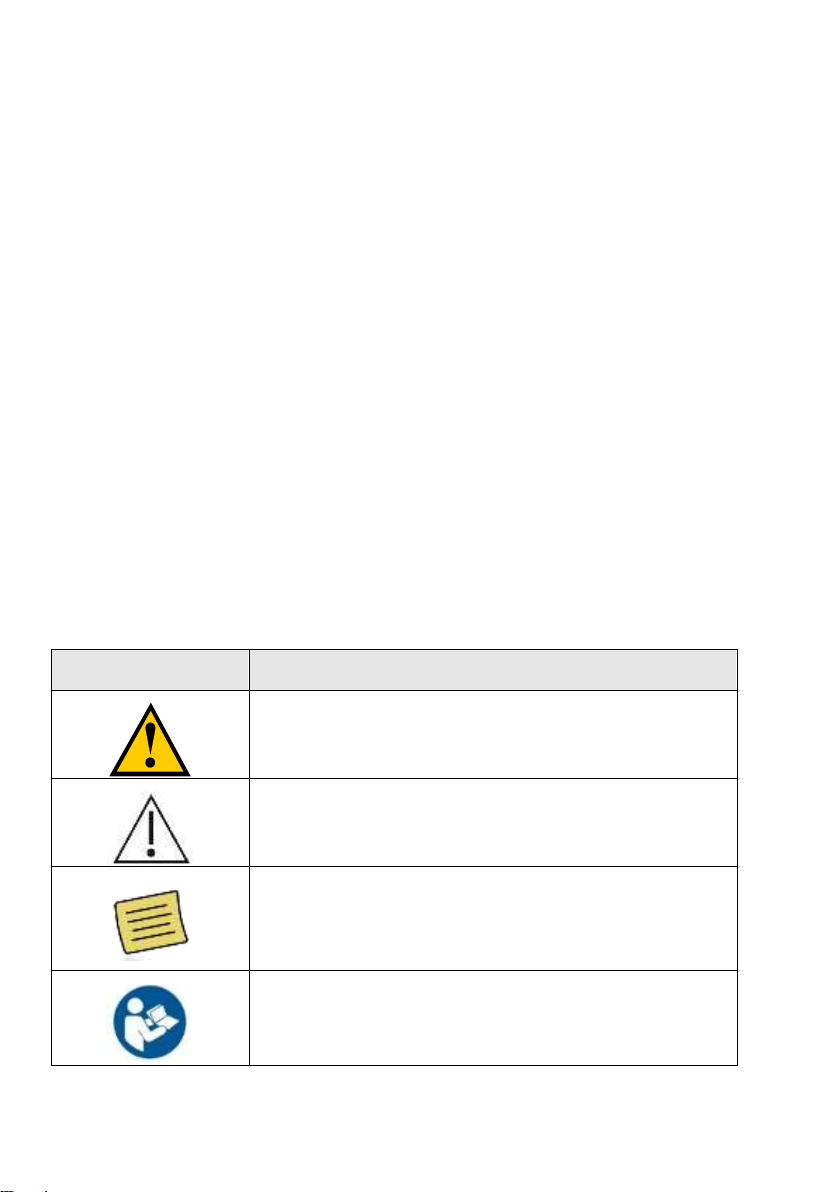
Label
Description
Warning, consult accompanying text or
documents
Caution, consult accompanying text or
documents
Notes, indicates important general
information for using the system
successfully.
Consult instructions for use
The function of the ECG Mini is dependent on cellular phone service
and short range RF technology (Nordic). Limitations in data
transmission may occur if there is limited cellular service in the area.
You may occasionally experience a delay in the ability to send
recorded events due to unexpected cellular limitations. If this occurs,
contact LifeWatch as soon as possible. Any technical difficulties
should be reported as quickly as possible so as to resolve the issue
with minimal service interruption.
As with all standard cell phones, charge the Gateway cellular device
whenever possible, and at least every night. The performance of the
Gateway cellular device, including data recording and transmission,
may be adversely impacted if not adequately charged.
1.3 Symbols on Equipment and Labeling
The following section contains a complete description of all symbols
that may be located on either the equipment or labeling of ECG Mini
and accessories.
Page 11
Page 12
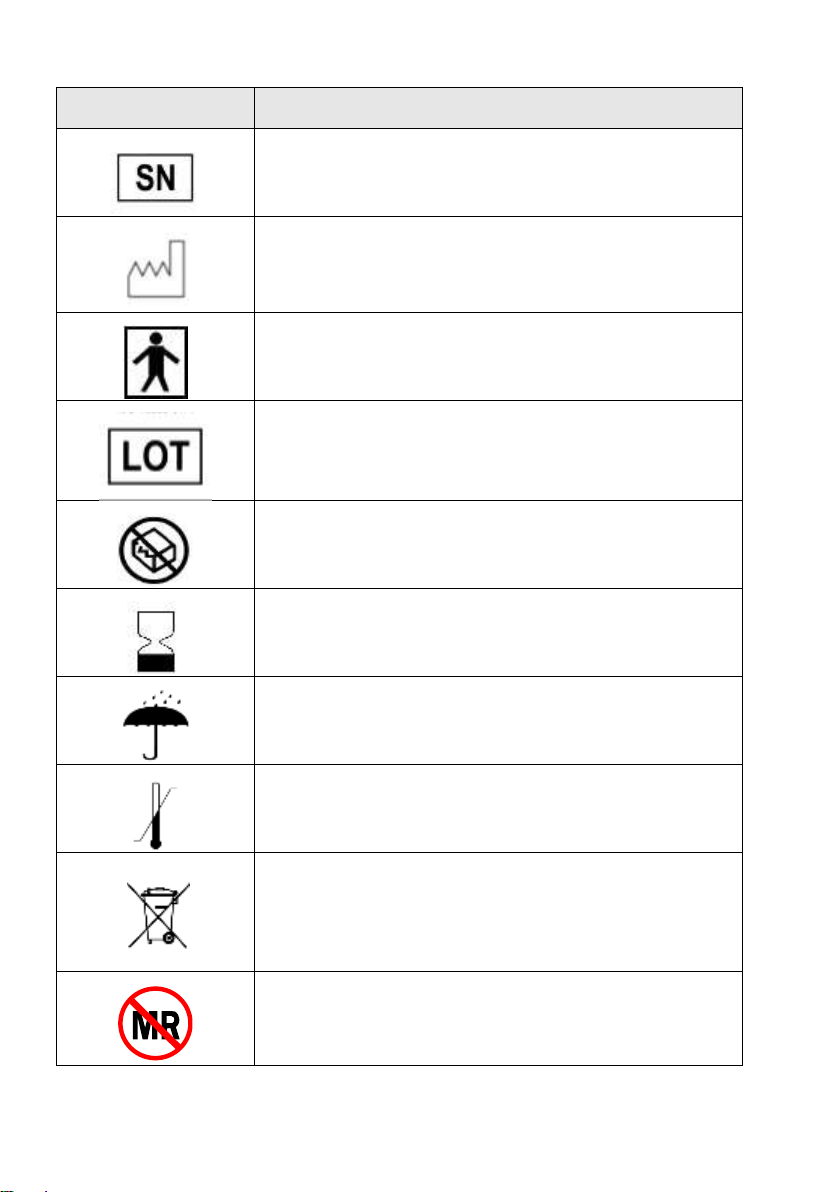
Label
Description
Serial Number
Date of Manufacture
Type BF Applied Part
Batch code
Do not use if package is damaged
Use by
Keep dry
Store at specified temperatures
Electrical and Electronic Equipment
The ECG Mini is MR unsafe
Page 12
Page 13
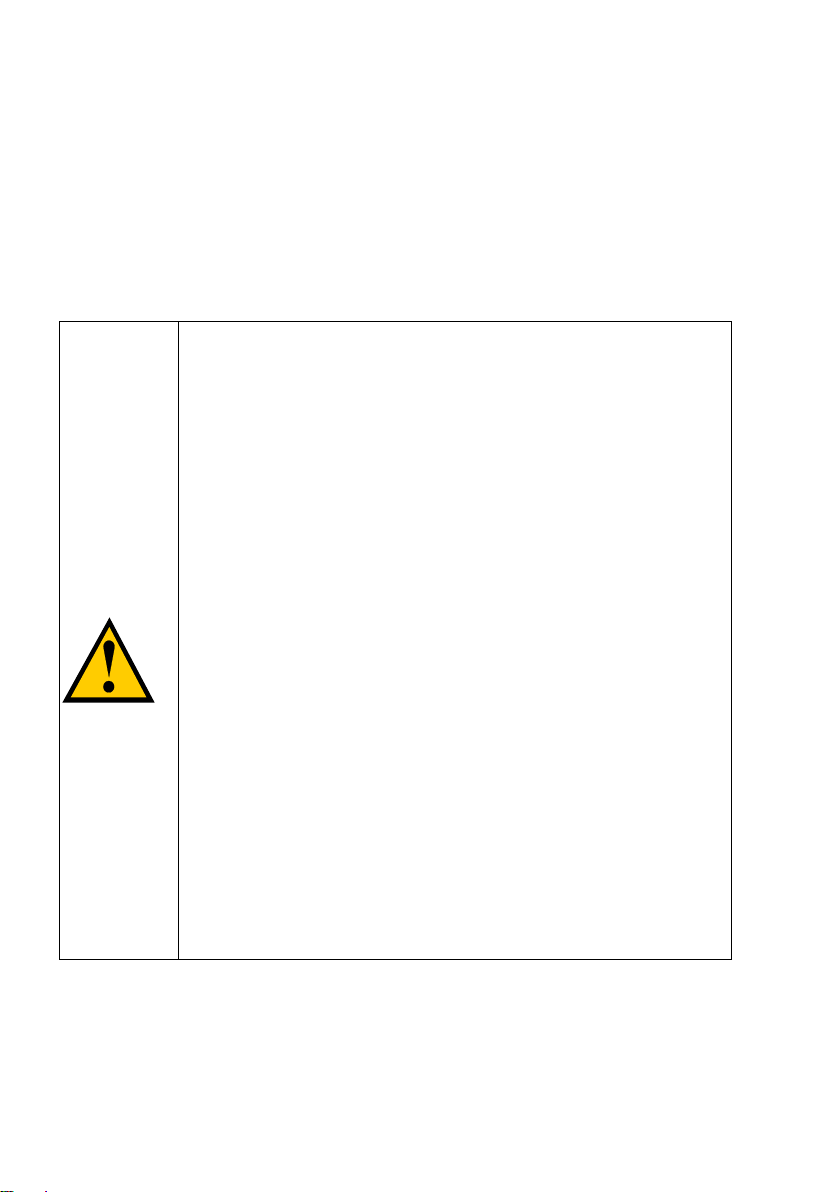
Warning
The ECG Mini is intended to be used in
conjunction with a monitoring service that
reviews the recorded transmissions and
provides that information to the physician for
his/her final diagnostic interpretation.
The ECG Mini is not intended for use as an
emergency medical response system and
should not be used by patients at risk for
serious or life-threatening cardiac
arrhythmias, such as ventricular tachycardia
and ventricular fibrillation. Refer to the
Physician Manual Specification for the types
of arrhythmias detected by the ECG Mini.
The ECG Mini is not intended for use in the
diagnosis of myocardial infarction or for chest
pain monitoring.
Due to the risk of ignition or fire, the ECG Mini
is not intended for use in a hyperbaric
chamber, within an oxygen tent or in the
presence of flammable anesthetics / medical
gases.
1.4 Warnings and Cautions
The following section contains a complete list of the major warnings
and cautions relevant to the ECG Mini. These warnings and cautions
are also repeated, as appropriate, in sections of this manual. Your
prescribing physician is responsible for reading and understanding
all warnings and cautions prior to prescribing the ECG Mini.
Page 13
Page 14
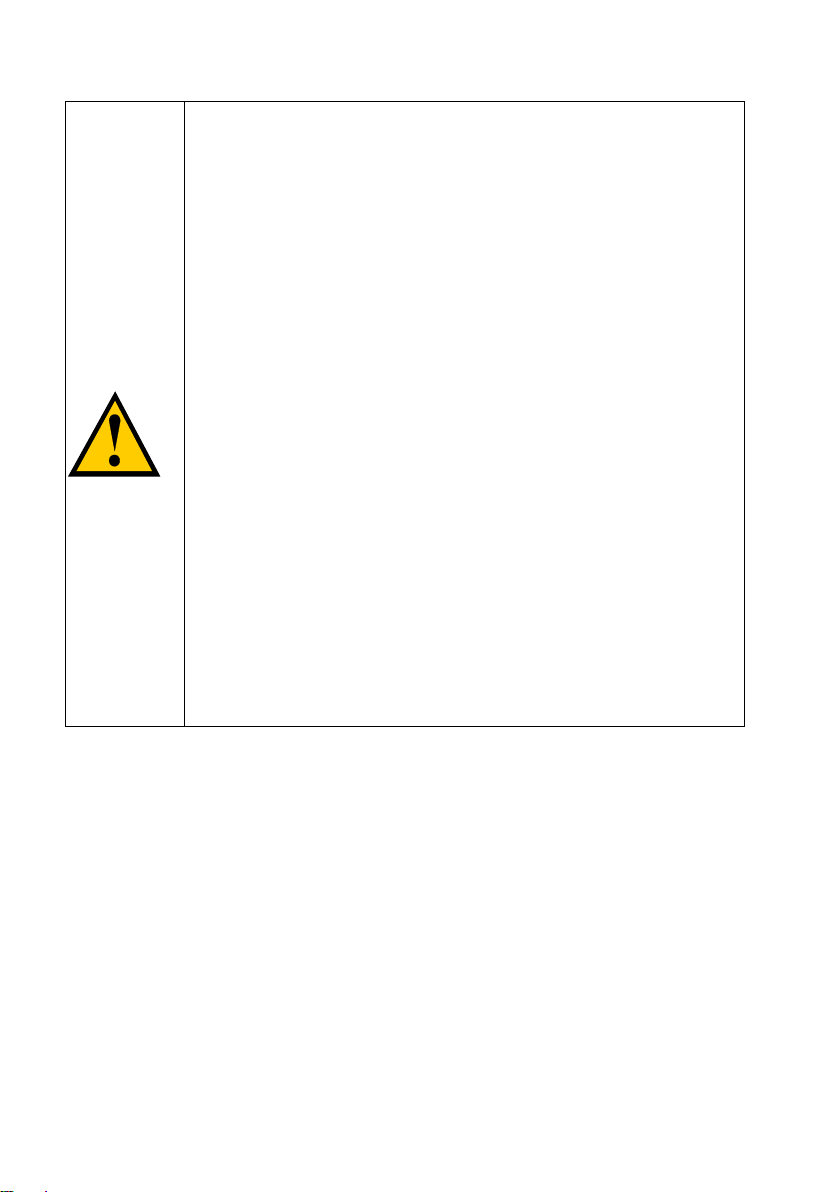
Warning
To prevent fire or shock hazard, do not expose
the ECG Mini to moisture, liquids or
condensation.
To prevent an allergic reaction, do not use the
ECG Mini or accessories if you have a known
allergy to nickel or other metals.
The ECG Mini is not defibrillation-proof.
Exposure to defibrillation may damage the
ECG Mini, or the ECG Mini may interfere with
the operation of the defibrillator. The ECG Mini
MUST be removed prior to defibrillation as it
contains metals that could cause the
defibrillator to arc.
Use of conductive, connected devices and
patient lead wires/electrodes like the ECG Mini
in MRI procedures may result in serious burns.
If you should come into possession of your
ECG recording do not take any actions of a
medical nature based on your understanding
UNLESS you are a medical professional.
Page 14
Page 15
Warning
Use with Implanted Conventional
Pacemakers and ICDs (ICD device max
energy 30 Joules)
If you have an implanted pacemaker or ICD,
the manufacturer may recommend certain
precautions when using a cellular phone.
Since the ECG Mini Gateway is also a cellular
phone, you should take the same precautions
when carrying and using the Gateway cellular
device. In general, most manufacturers
recommend the following:
Keep a distance of at least six inches
(15 cm) between the Gateway cellular
device and a pacemaker or ICD.
Carry the Gateway cellular device on the
opposite side of the body from the
pacemaker or ICD.
Don’t carry a cell phone in a breast pocket
or on a belt if that would place the phone
within six inches (15 cm) of the
pacemaker or ICD.
Refer to the manufacturer's information for
guidance regarding the pacemaker/ICD
and interference issues.
Page 15
Page 16
Caution
The ECG Mini generates, uses, and can
radiate radio frequency energy and, if not
installed and used in accordance with the
instruction manual, may cause harmful
interference to radio communications.
The ECG Mini employs Nordic and cellular
technology. The location of the ECG Mini
and the associated environment, including
cellular phone coverage in the particular
area, may cause transmission interruption
or delay.
Do not open or attempt to repair the sensor.
Only authorized service personnel may
repair the system components.
To avoid damage to the system, the system
and accessories should be kept away from
extreme heat including placement of the
ECG Mini on the dashboard of a car or near
a heater.
The system should not be subjected to
severe impact or bending force. Exposure
to these types of stresses can damage the
system components.
Charge the Gateway cellular device every
night (irrespective of indicator status),
making sure that it is within 10 feet (3
meter) of the sensor. In addition, charge the
Gateway whenever possible during the day.
The energy consumption of the Gateway
may be high during the first few days of
monitoring (up to 72 hours). Keep the
Gateway charged at all times.
Page 16
Page 17
Caution
Electrode disconnection might cause a faulty
ECG analysis and/or false events due to
noise created by the electrode
disconnection.
Impedance test, which may be requested by
the algorithm in rare cases, will override the
ECG recording; this means that the ECG will
lack ~1.5 seconds of recording in those
cases.
Do not turn off the sound of the Gateway
cellular device or reduce the volume so that
it is inaudible.
Take the charged Gateway with you and
wear the sensor at all times (except when
bathing) during the monitoring period.
Keep the Gateway away from extreme heat.
Do not leave it on the dashboard of a car or
near a heater. Do not leave it in any place
that is extremely damp or dusty.
Do not store the ECG Mini in a place where it
will be continuously exposed to moisture or
steam. Extended exposure to moisture may
cause malfunction.
Page 17
Page 18
Caution
A disconnection between the Gateway cellular
device and the sensor might occur due to
electromagnetic interference. In this case the
sensor will search for the Gateway cellular
device every 3 minutes.
First time use – The patient must call
LifeWatch to receive instructions on how to
proceed for the first time use. The first time the
ECG Mini is activated and is attached, certain
screens are displayed that are not seen during
normal operation. These screens are used for
calibration. Please refer to “First Time
Activation” section of the manual for more
details.
Caution
Please refer to the user manual of the
manufacturer of the Gateway cellular device for
Health and Safety Information pertaining to the
use and operation of the Gateway cellular
device.
Do not use the Gateway cellular device for any
reason outside of the designated monitoring
function.
Keep kit contents away from children.
Page 18
Page 19

ECG
Electrocardiogram; a representation of the
heart's electrical activity recorded from
electrodes on the body.
ECG Mini
Continuous ECG Monitor and Arrhythmia
Detector (ECG sensor, Brain and Gateway)
Patch
ECG Mini device attached to patient.
Gateway
Hand held device/cellular phone using ECG
Mini monitoring software.
Heart Rate
Number of heart beats per minute,
measured as bpm (beats per minute).
Nordic RF
Wireless communication protocol.
Monitoring
Center
Monitoring center responsible for reviewing
clinical data transmissions, and providing
them to the physician.
Charger
Power supply for recharging Gateway
cellular device.
Arrhythmia
Irregular heartbeat.
Manual event
Event manually recorded (on Gateway) by
a patient when he/she feels it is necessary.
1.5 Glossary
Page 19
Page 20

2 GENERAL DESCRIPTION
The ECG Mini patch system comprises a disposable 1-lead ECG
Patch with two active electrodes and additional one electrode as
reference, a transmitter (Brain) and proprietary SW running on a
standard cellular device (called the Gateway) with an Android based
operating system. The SW installed in the Gateway is also called the
Gateway application. The Gateway cellular device is equipped with
short range 2.4 GHz ISM RF (“Nordic”) communication capabilities.
The ECG Mini system consists of 3 main components:
ECG Mini with ECG sensor
Transmitter, also called “Brain”
Gateway cellular device (with silicon cover)
The ECG Mini with its 3 ECG electrodes is a disposable part which
is mounted on the patient body throughout the service period. The
ECG Mini with ECG electrodes transmits the ECG signs via a
reusable transmitter (Brain) to a Gateway cellular device.
The Brain plugs into a cradle, which is part of the 1-lead patch, and
is connected to the cradle with a 7 pin connector. The brain receives
the power from the patch from two 1.4V non rechargeable batteries.
The Brain transmits data to the Gateway cellular device using the RF
component. In addition, the Brain contains a 32MB Flash memory
chip that can store 6 hours of data in case of communication failure
with the Gateway cellular device.
The Gateway cellular device located in the patient home receives
the ECG signs data from the sensors patch over a unique RF
protocol. The Gateway cellular device analyzes the ECG data and
generates events which reflect 4 arrhythmias – Pause, AFIB,
Tachycardia and Bradycardia. These events are transmitted to the
monitoring center backend system of LifeWatch Services over
standard wide range cellular network.
Page 20
Page 21
Note
The Gateway automatically transmits the
detected ECG events to the monitoring center
and the user has the ability to send manually
recorded events.
The patient can manually trigger an event by clicking on an icon on
the screen of the Gateway cellular device.
Page 21
Page 22
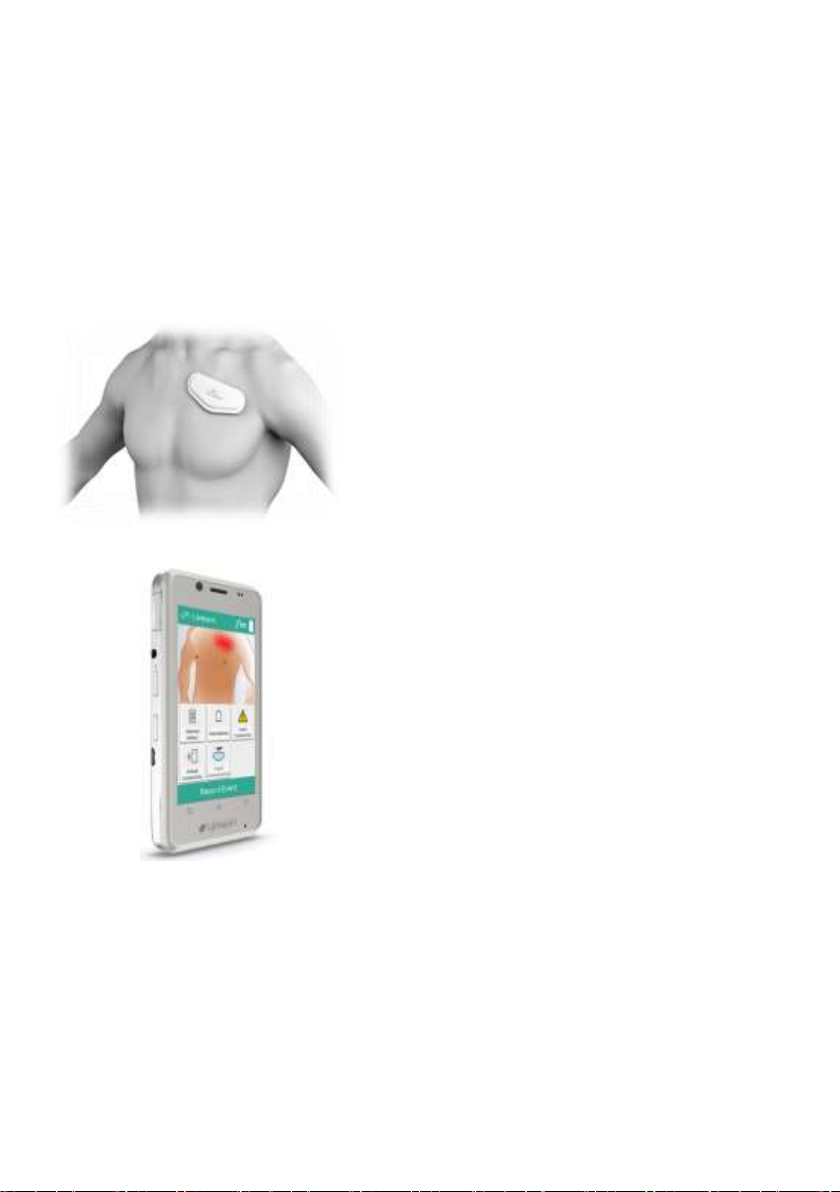
3 THE ECG MINI KIT
The ECG Mini Kit provides the ECG Mini (with Brain transmitter) and
one Gateway (Gateway), including charger.
1-Lead ECG Configuration
Page 22
Page 23
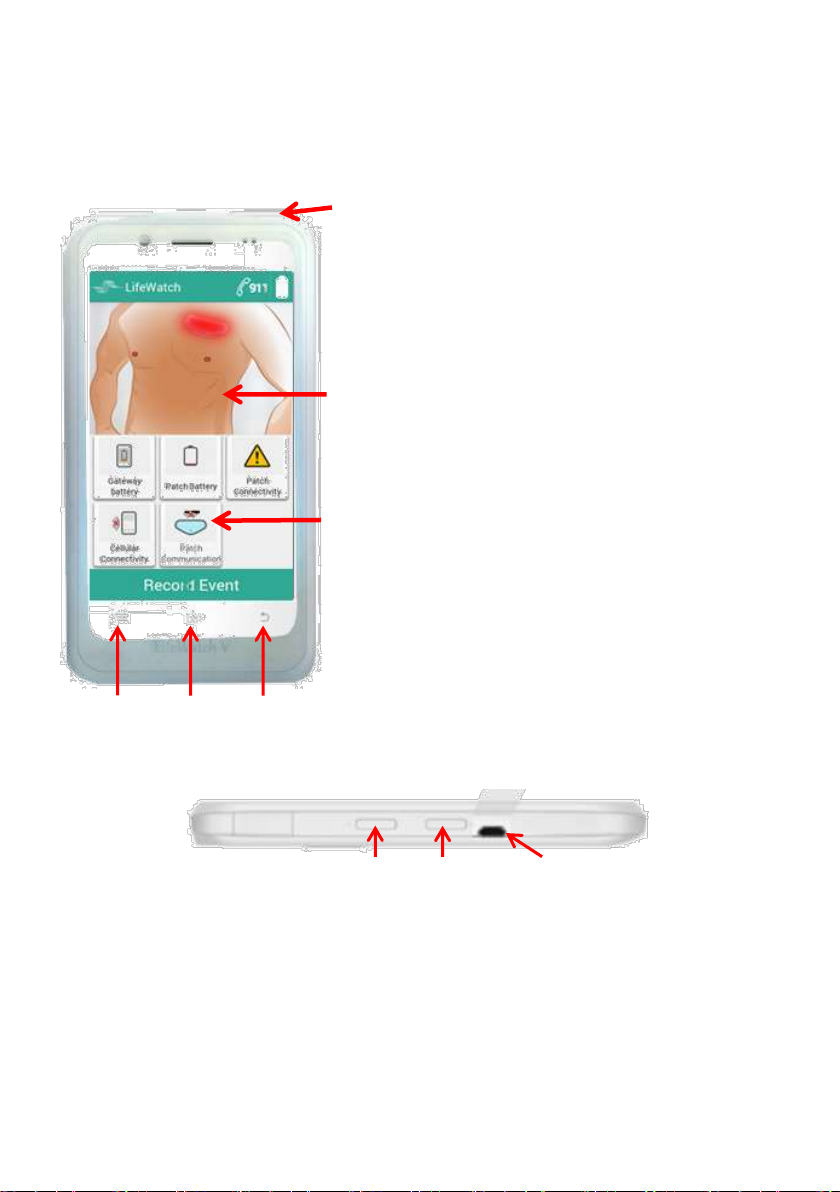
Menu Home Back
Power
button
Touch
screen
Notifications
area
3.1 Gateway Physical Description
Gateway keys and buttons
Volume +/– Power/USB connector
Figure 1 – Gateway Physical Description
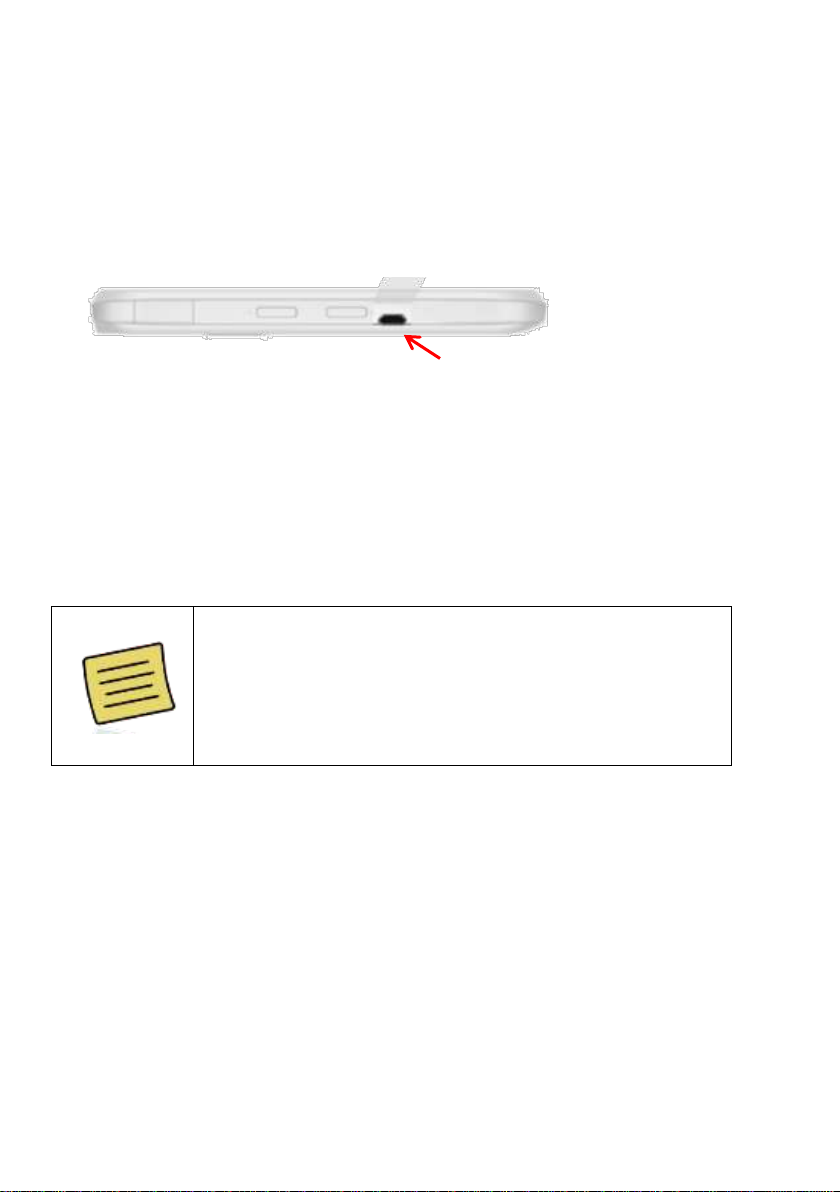
Note: to access the USB connector the flap of the silicon cover must
be lifted.
Page 23
Page 24
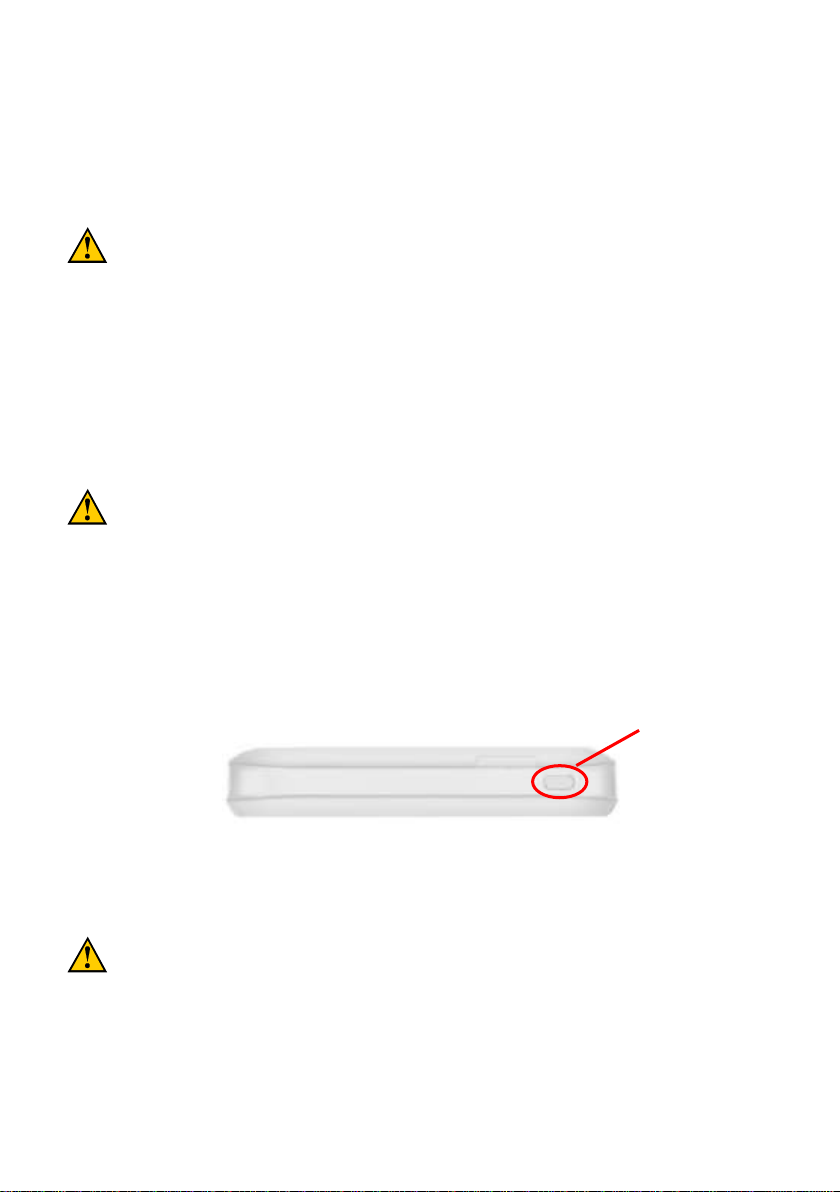
USB input is 5 VDC: maximum 5.25VDC to minimum
4.75VDC at 1A max.
Use only the supplied adaptor DSA-5PFK-05 FUS.
Input is 100 to 240 V, ~50 to 60 Hz, 0.3A;
Output is 5 V, 0.7A, 3.5 W maximum
Always place the adapter in easily accessible main plugs.
In case of electrical malfunction of the device during the
connection to the adapter, remove the adapter from main plug
immediately.
Power On/OFF
3.2 Charging the Gateway Battery
1. Connect the supplied USB plug to the USB/adapter jack. Ensure that
you insert the plug with the correct orientation. Do not force the plug
into the jack.
2. Connect the USB cable’s USB plug to the adapter.
3. Connect the adapter to a standard AC wall outlet.
4. Disconnect the adapter when the battery is fully charged.
NOTE: When you first receive your device verify the Gateway is fully
charged.
How much charge is in the battery?
If the battery is low, a message appears. When charging, there will be an
indication of the battery level.
3.2.1 Switching the Gateway On/Off
Hold Power to switch on your device.
Top view
To switch it off, hold Power to get the device options. Select Power
off, and then tap OK.
Page 24
Page 25
CAUTION
Please refer to Appendix A Gateway (Cellular
Phone) Warnings for Health and Safety Information
pertaining to the use and operation of the cellular
phone.
CAUTION
Do not change the settings of the Gateway
cellular device.
Do not turn the Gateway sound off.
Do not mute the volume so that it is
inaudible.
Do not use the Gateway for any reason
outside of the designated monitoring function
The ECG Mini employs short range RF and
cellular technology (Nordic). The location of
the device and the associated environment,
including cellular phone coverage in the
particular area may cause transmission loss
or delay.
Page 25
Page 26
Caution
Do not use the provided Gateway for any reason
other than the designated monitoring function.
4 IMPORTANT INFORMATION BEFORE USE
4.1 General
The recommended ambient temperature for use of the ECG Mini
System sensor is between 50°F (10°C) and 113°F (45°C).
The Gateway cellular device is not to be exposed to direct water
contact. The Gateway should not be in the bathroom while bathing
or showering.
You must take the fully charged Gateway with you and wear the
sensor at all times (except when showering or bathing).
4.2 No Connection with Gateway cellular device
When the sensor disconnects from the Gateway the sensor will
continue to record and store the ECG data (6 hours).
In case the disconnection period is longer than the maximum recording
time, the sensor will store the LAST time period (6 hours) of the
disconnection period.
Page 26
Page 27
Note
Contact LifeWatch to receive instructions on
using the system for the first time as shown in
“First Time Activation”, section.
5 USING THE ECG MINI
5.1 Before Starting
Make sure you have all items needed to initiate the service:
ECG Mini patch (single use, disposable)
ECG Mini Brain (reusable)
ECG Mini Gateway cellular device with compatible application
installed (reusable)
Page 27
Page 28
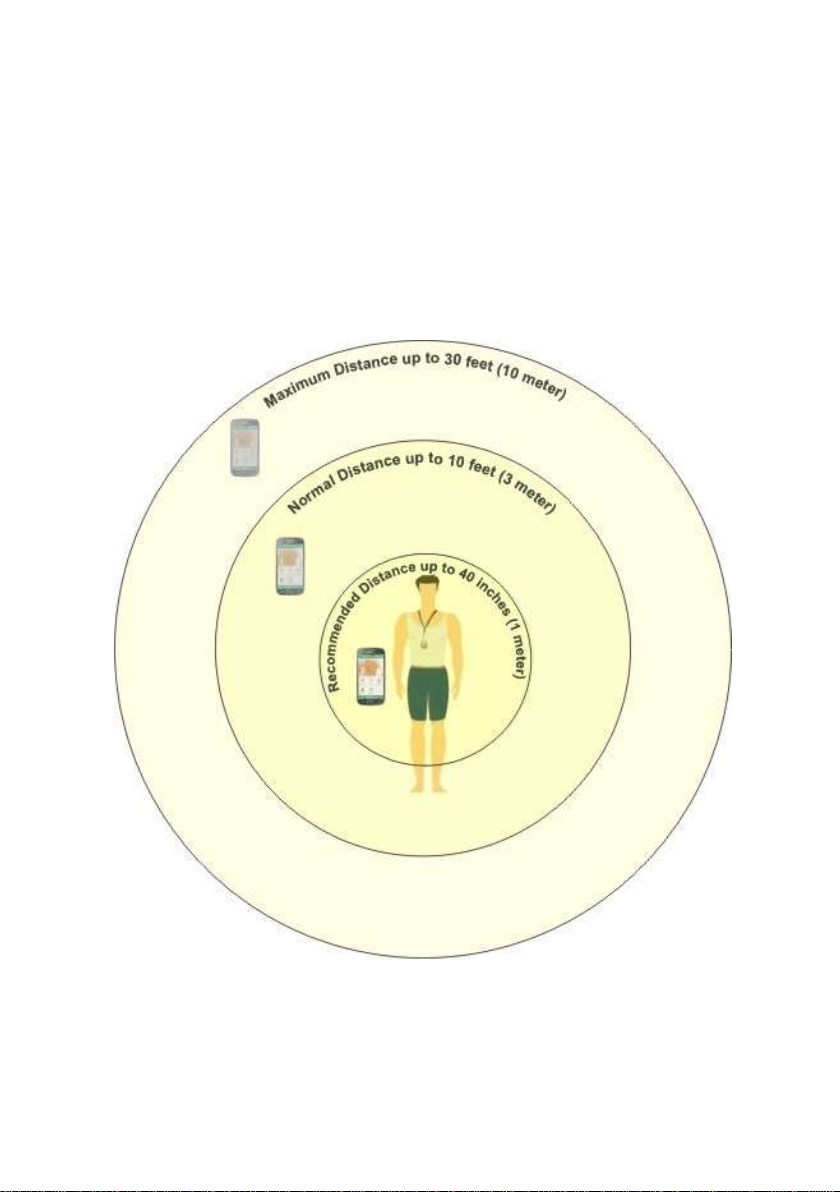
5.1.1 Placement of Gateway cellular device
For optimal system performance, the recommended distances
between the Gateway and sensor should be as follows:
Within 40 inches (1 meter) for normal operation
Within 10 feet (3 meters) preferred distance
Within 30 feet (10 meters) maximum distance
Page 28
Page 29
Note
The Gateway battery energy consumption in the
first few days (up to 72 hours) of monitoring may
be high. Always have a charged Gateway and
the charger with you during this time.
5.2 Recharging the Gateway cellular device
Charge the Gateway whenever possible during the day. In addition,
charge the monitor every night (regardless of battery indicator
status).
1. Plug the Gateway charger power cord into the power socket on the
Gateway.
Power/USB connector
2. Plug the supplied Gateway charger unit into a standard wall outlet.
A red or yellow light (color depends on Gateway type) indicating charging is
needed will appear on the Gateway when the charger is properly
connected. When charging is complete, the light will turn green.
3. Disconnect the Gateway charger from the wall outlet and then from the
Gateway.
Page 29
Page 30
6 ATTACHING THE ECG MINI PATCH
6.1 General
A qualified physician or healthcare professional is responsible for
guiding placement of the ECG Mini patch on the patient.
6.2 Initializing the ECG Mini kit
The Gateway application and Brain of the ECG Mini kit are preconfigured; the Gateway application will start running automatically
after the Gateway cellular device is turned on.
6.3 Placing the Patch
Before attaching the Patch, prepare the chest skin as set out below.
6.3.1 Preparing the Skin
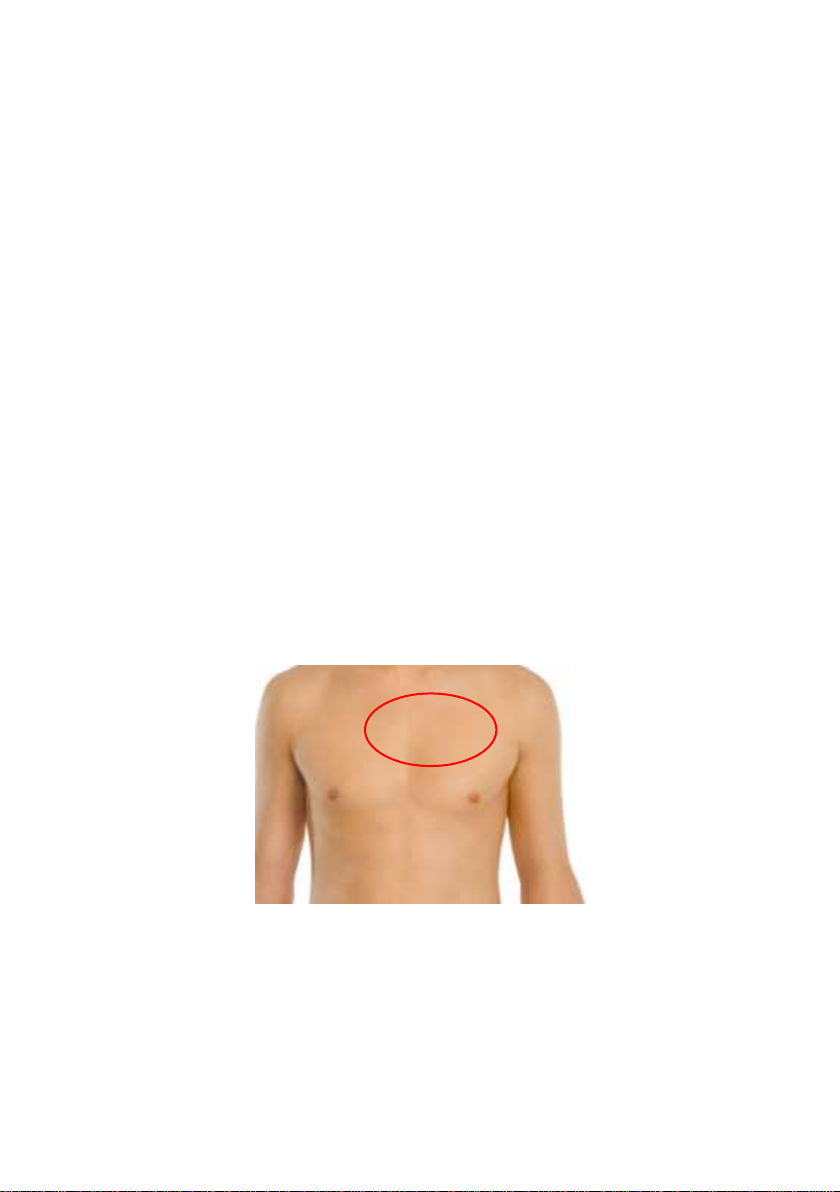
1. Remove excess hair from the areas by carefully clipping with scissors.
Avoid shaving in order to minimize irritation.
2. Clean the skin on the upper part of the chest using a lint-free cloth
lightly moistened with isopropyl alcohol (70%).
Figure 2 - Area to prepare for ECG Mini Patch
3. Make sure that the skin is clean and fully dry (wait 1 minute) before
proceeding.
4. Do not apply the patch to skin that is broken or irritated.
Page 30
Page 31
Note: There are conditions that may affect the Gateway
from detecting the electrode connection for a certain
period of time. Even though the sensors seem to be in
good contact with the body, the alert message will
continue to appear. Some examples that can cause
delayed electrode recognition are very dry skin or contact
immediately after attaching the electrodes.
Contact LifeWatch if you have any questions
concerning the use of the device or if you experience
any irritation problems.
6.3.2 Placing the Patch
1. Remove the protective liner from the patch contact side.
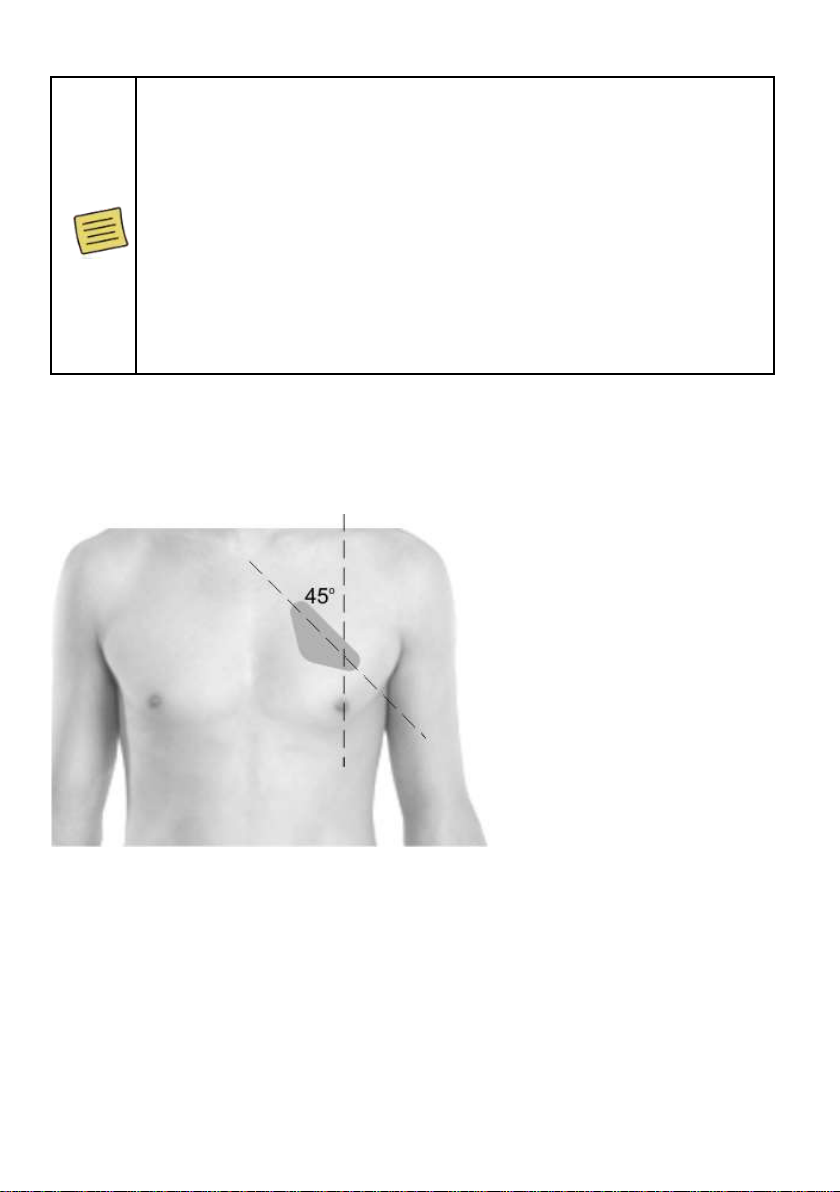
2. Place the ECG Mini patch on the cleaned area of the chest as shown in
the diagram below.
Figure 3 – ECG Mini Patch Placement
3. Patch should be pressed gently with the fingers around the patch edge
for best adherence.
Page 31
Page 32
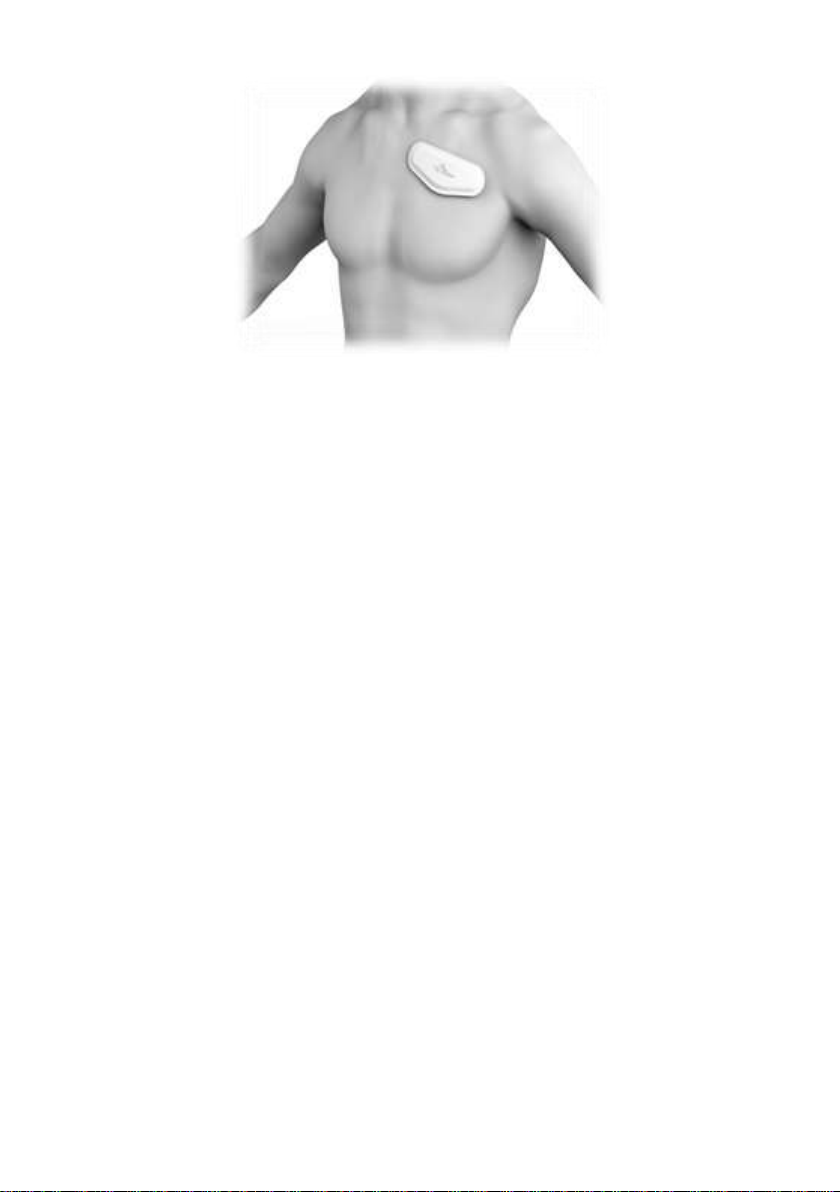
Figure 4 – ECG Mini Patch Properly Placed
Page 32
Page 33
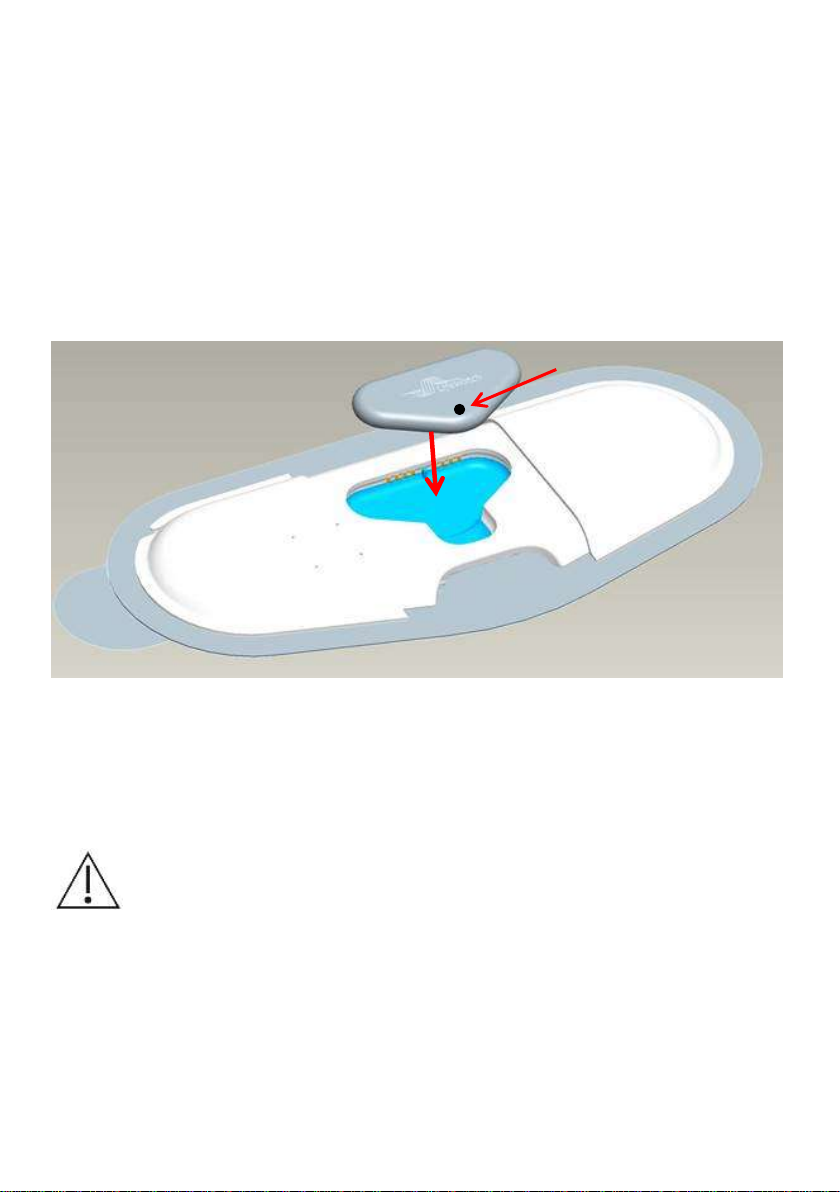
Precaution: Using excessive force when putting the ECG
Mini Transmitter in the cradle can cause the pins to bend,
preventing the ECG Mini Transmitter from being inserted
or removed.
Bicolor LED
6.4 Installing the ECG Mini Transmitter
To install the ECG Mini Transmitter
1. Position the ECG Mini Transmitter in the cradle with the inscription
facing upwards.
2. Push gently on the ECG Mini Transmitter to ensure good contact with
the contacts. If the ECG Mini Transmitter is correctly installed the GW
will start to receive signals from the sensor (ECG Mini Transmitter in
patch ON, removal of ECG Mini Transmitter OFF).
Figure 5 - Placing ECG Mini Transmitter into Cradle
Note: Ensure that the ECG Mini Transmitter is positioned properly with the
correct side up before pushing it into place. A Green LED will flicker when
the ECG Mini Transmitter is placed properly.
Page 33
Page 34
WARNING
The Patch is for single use only. Return it to LifeWatch
Services for disposal.
WARNING
Dispose the battery in a disposal unit that meets WEEE
requirements.
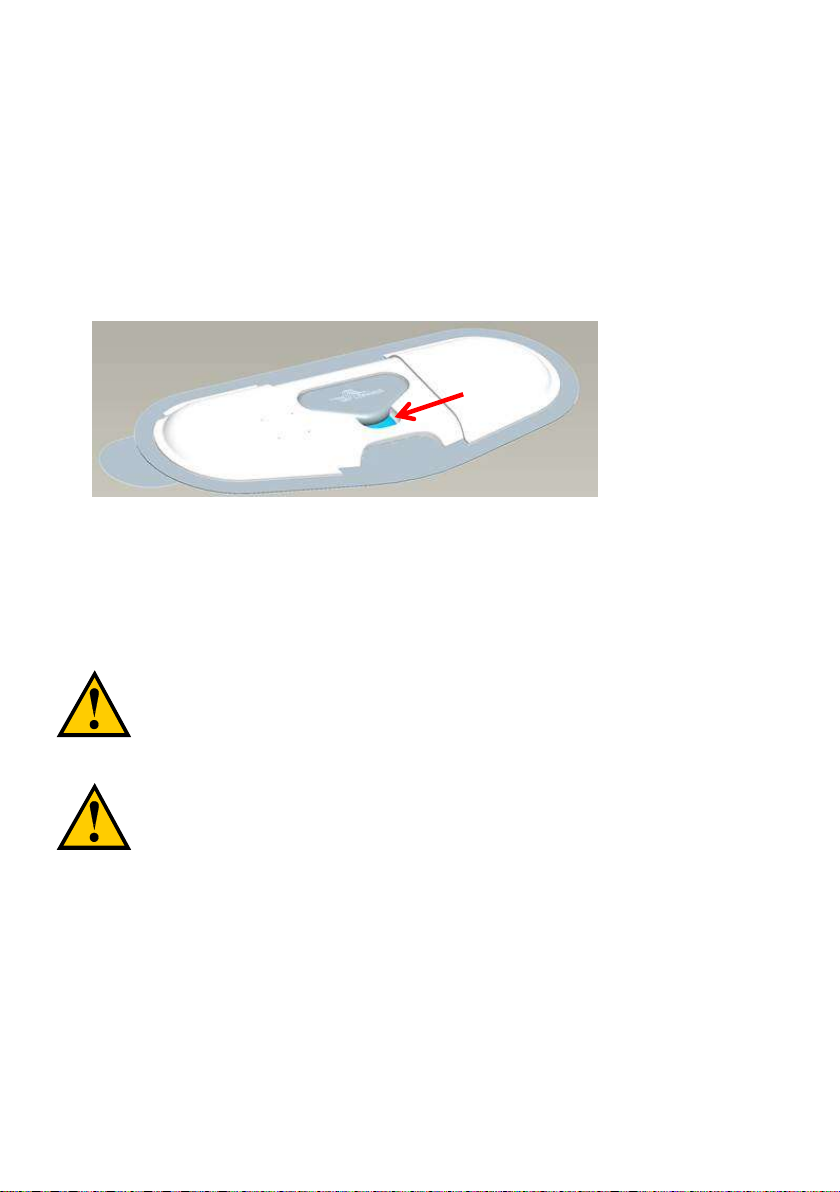
Place finger
here
6.5 Removing the ECG Mini
Peel the Patch contact pad from the skin.
Note: If it is difficult to remove the Patch, use warm water to weaken the
adhesive.
To remove the ECG Mini Transmitter
1. Place finger in the groove in front of the ECG Mini Transmitter.
2. Gently pull-up the ECG Mini Transmitter to remove from the cradle.
3. Place the transmitter and patch in the envelope to return to LifeWatch.
If necessary to continue the monitoring, replace the patch and insert
the Transmitter.
Page 34
Page 35

Press OK to proceed to the
main screen.
7 USING THE GATEWAY APPLICATION
7.1 Starting the Application
To start the Gateway application
Press the power ON button on the Gateway to start the
application. The application is automatically launched and the will
display the opening screen before the main application screen.
Note: The maximum unblocked distance between the ECG Mini Transmitter and
the Gateway is 10 meters (30 ft.); walls and other obstructions will reduce
this distance.
Page 35
Page 36
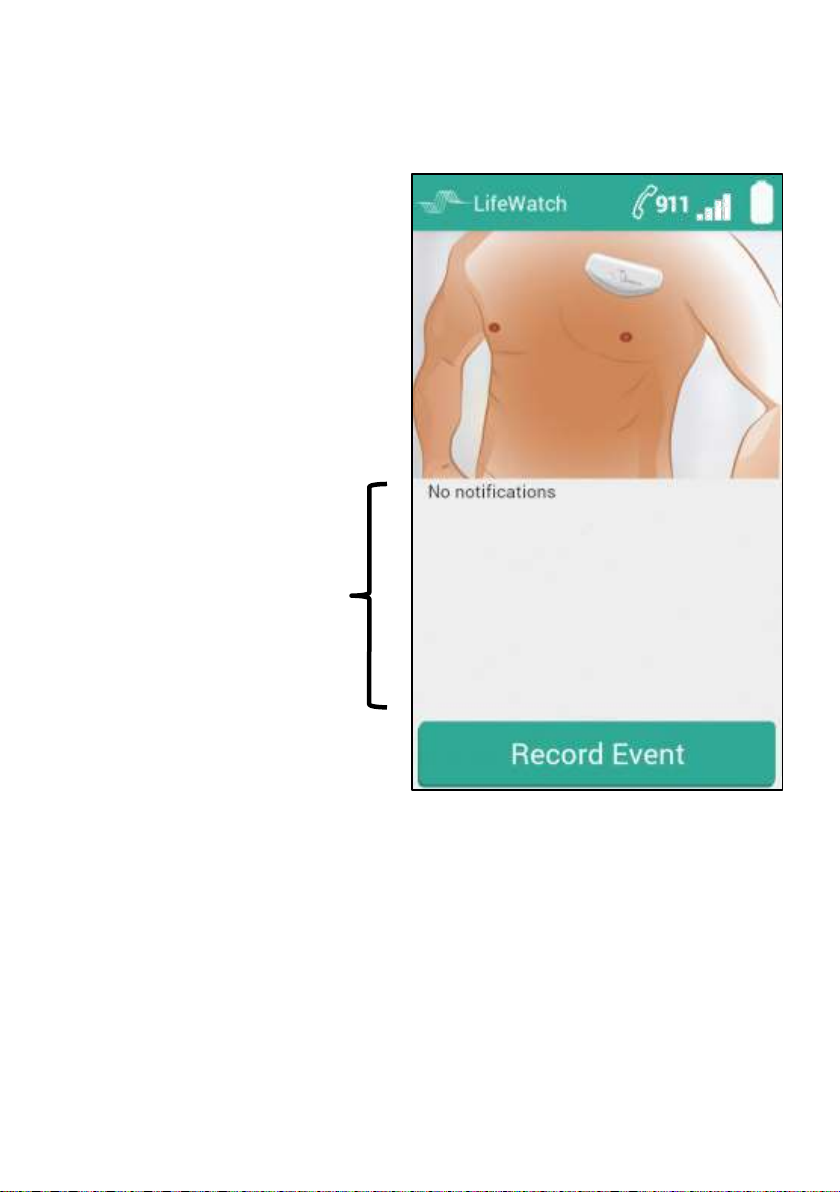
Action bar
Notification icon area
Record manual event button
7.2 ECG Mini Screen
The ECG Mini main screen comprises the following items:
Page 36
Page 37
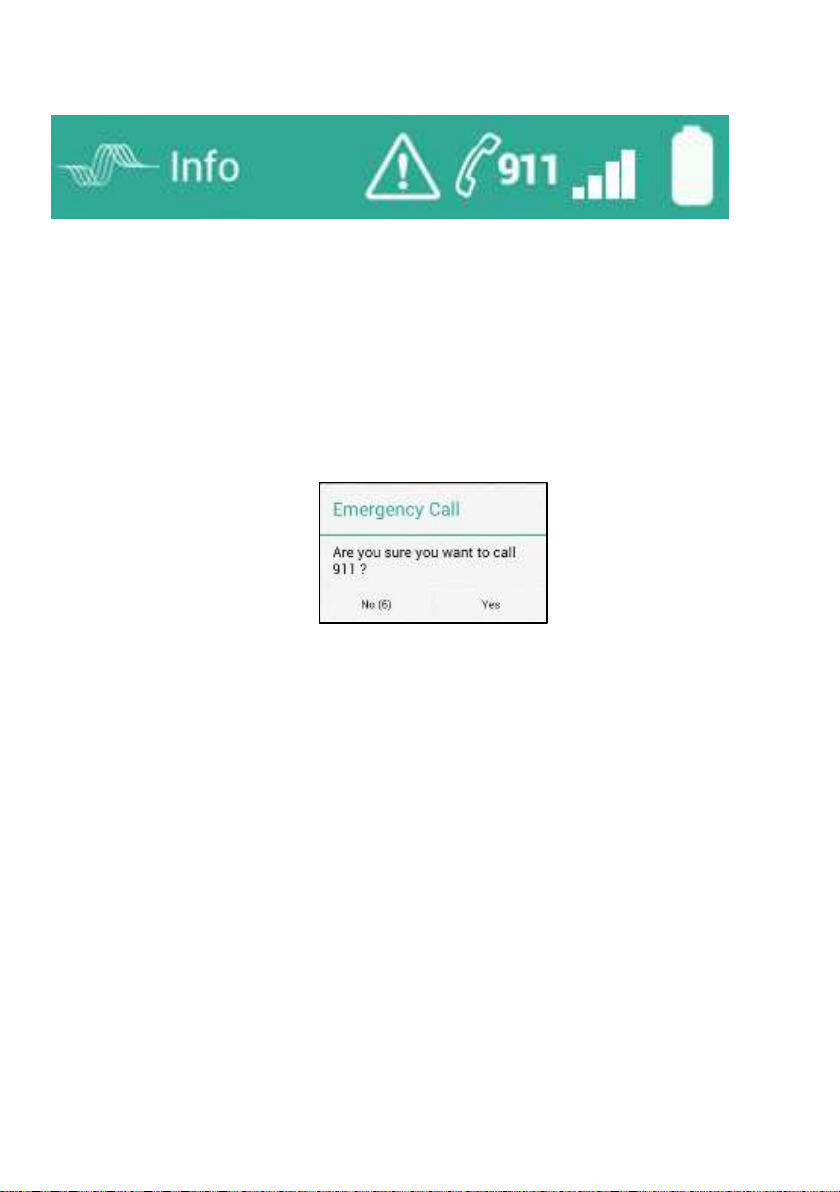
1 - Logo Image
2 - Screen Title
3 - Active Alert
Notification, only shown if there is an
active alert that doesn’t appear on the
main screen.
4 - 911 emergency call
Pressing will open a dialog box:
Press Yes to automatically dial 911.
5 - Signal strength
Indicates cellular communication status
6 - Battery status
Charge level of Gateway battery
1
2 3 4
5
6
7.2.1 Action Bar
Page 37
Page 38
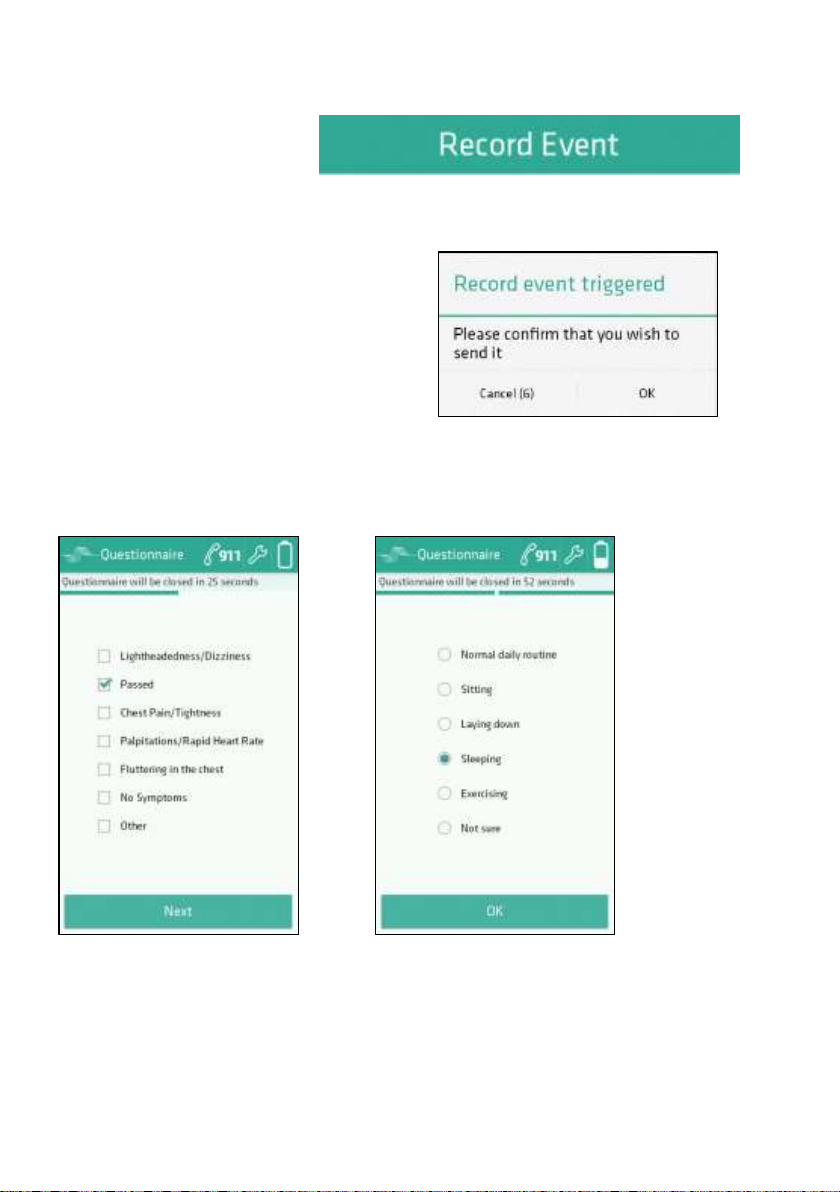
When a manual event is initiated
on the touch screen, then a
confirmation screen will be
displayed.
Confirm or cancel the event by
pressing on the touch screen.
7.2.2 Manual Event Recording
A manual event can be
started by pressing the
Record Event on the
bottom of the touch screen.
The questionnaire screens are for adding information on symptoms
and activity.
Enter details, press on Next, enter details on second form and then
press OK on touch screen to send the manual event.
Page 38
Page 39
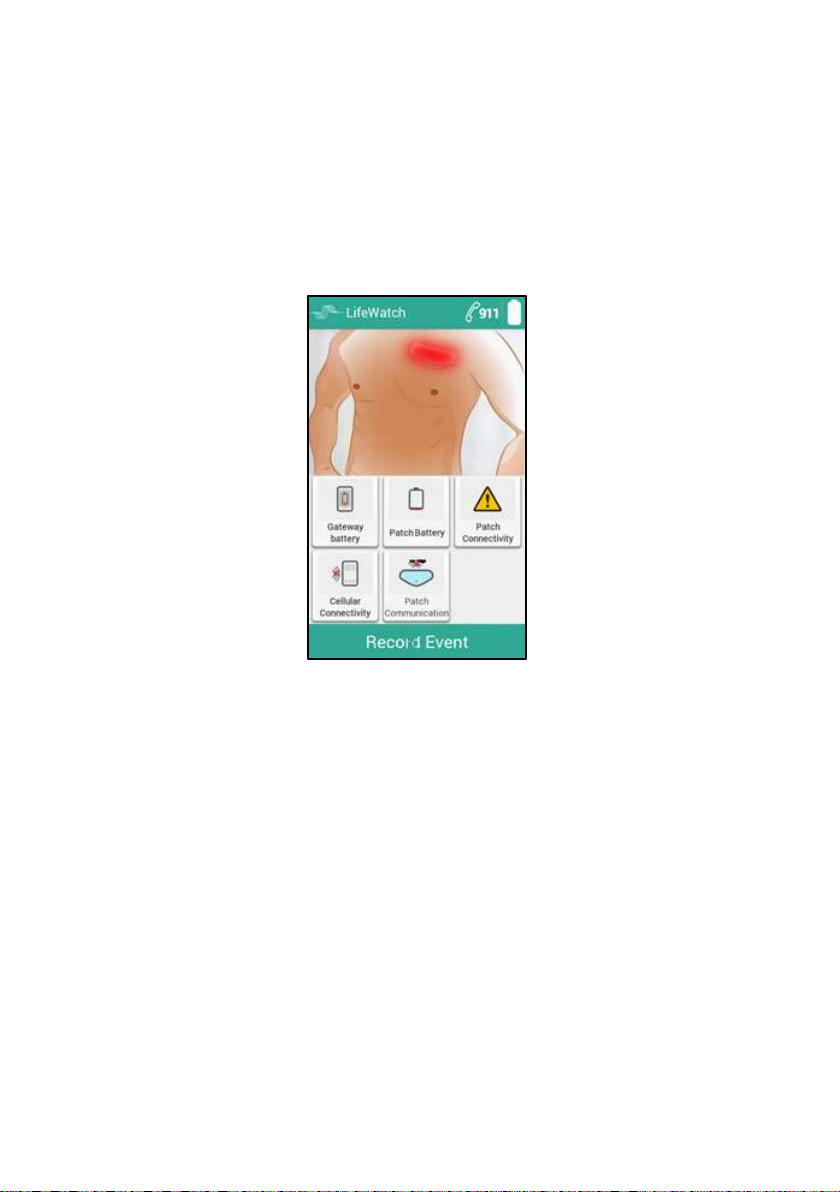
7.3 Gateway Notifications
Outside of displaying the normal operation the application displays
alerts with information concerning the type of alert.
7.3.1 ECG Mini Notification Screen
The ECG Mini main screen displays a notification and is indicated by
either the patch turning red and/or the appropriate icon appearing.
Figure 6 – ECG Mini notification screen with notifications
An error initiates one of two types of alerts – one for the ECG Mini
Patch/Transmitter and one for the Gateway. Press the alert icon to open
an information box describing what steps to take.
An alert will continue as long as the error exists.
Any errors occurring during an initial alert will be indicated as well.
Follow the accompanying message instructions.
Page 39
Page 40
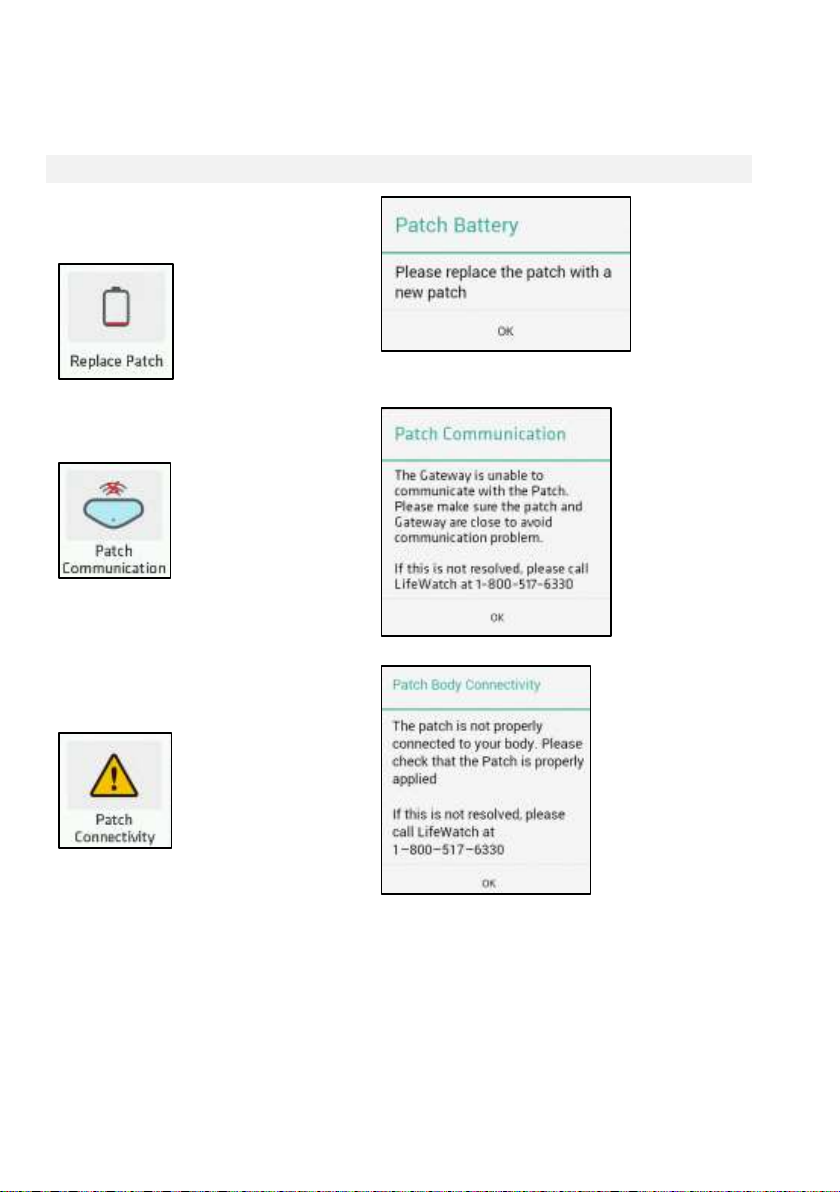
Icon
Message
Brain Battery Depleted
Press
Brain disconnected
Press
Electrodes Disconnected
Press
7.3.1.1 Patch Error Alerts
When the icon of a patch is red this indicates either:
Page 40
Page 41
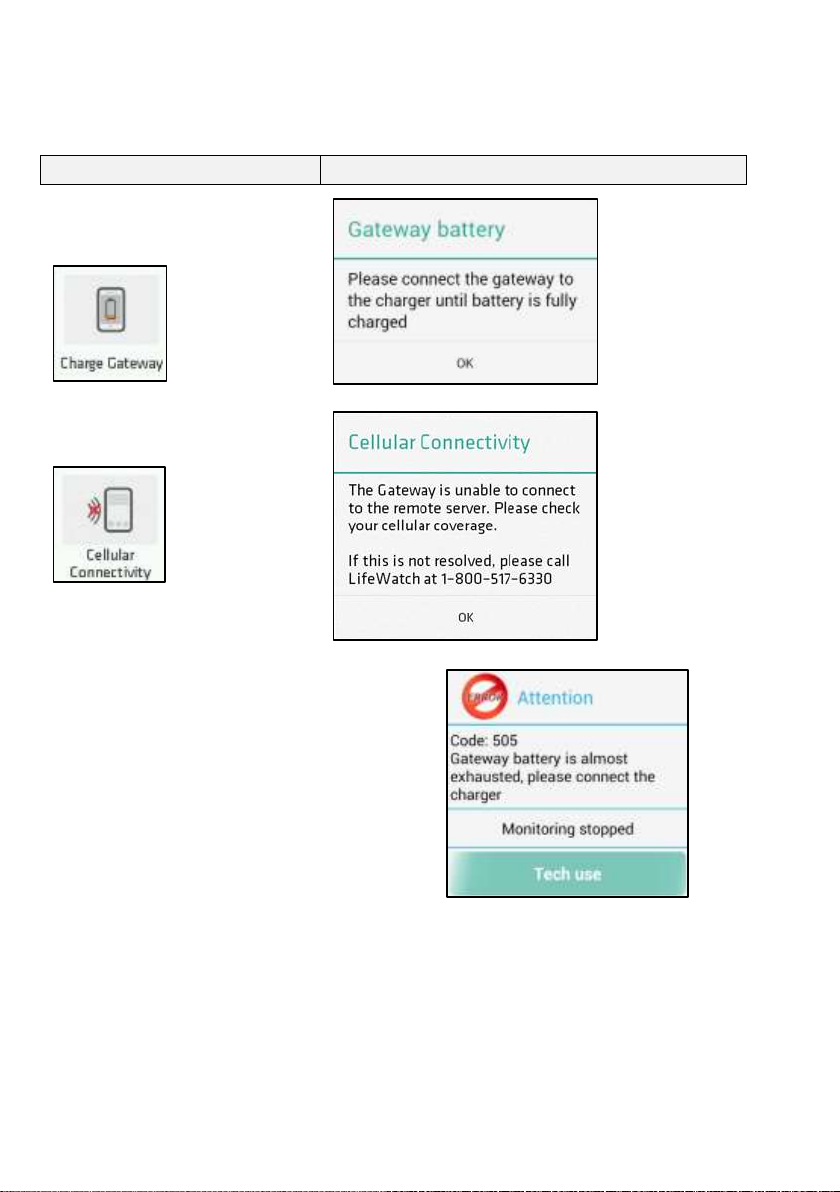
Icon
Message
Charge Gateway
Press
Cellular Connectivity
Press
NOTE:
If the Gateway is not charged after
the first message of low battery or
the Gateway was not charged
properly, reaching the depletion
limit will end monitoring and
require charging before continuing.
7.3.1.2 Gateway Error Alerts
A Gateway error triggers the following alerts:
Once an error has been corrected, the alert stops and the main
screen is displayed.
Page 41
Page 42

8 HEART RATE CALCULATION METHOD
8.1 Introduction
This section describes the Heart Rate (HR) calculation within the ECG
Mini. HR is defined as the number of heart beats during a GIVEN TIME
INTERVAL (usually one minute). It is reported by the algorithm each time a
QRS complex is detected.
8.2 Method of Calculation
The momentary HR is the inverse of the time lasting between two
consecutive heart beats. As the momentary HR fluctuates due to
inaccuracies in detecting the exact R wave timing eight momentary HR
values are averaged to generate the displayed HR. Therefore the reported
HR is the mean of the last momentary HR values WHICH CORRESPOND
TO THE DETECTED R COMPLEXES FOR THE LAST 8 SECONDS.
OCCASIONS IN WHICH THE HR IS NOT REPORTED: If during a specific
QRS complex the signal is considered as too low to be considered
accurate or is considered as noise, the displayed HR will be 0.
9 PAUSE CALCULATION
Pause is considered a lack of Ventricular activity for more than 3 seconds.
In order to detect a pause one of two conditions needs to be detected:
1. Lack of QRS detection for more than 3 seconds
2. A flat signal (P complexes can occur) for slightly less than 3
seconds.
Once one of the above conditions is detected a pause event is called.
Page 42
Page 43
A trained and certified technician is responsible for
maintaining and cleaning the reusable parts of the
ECG Mini System.
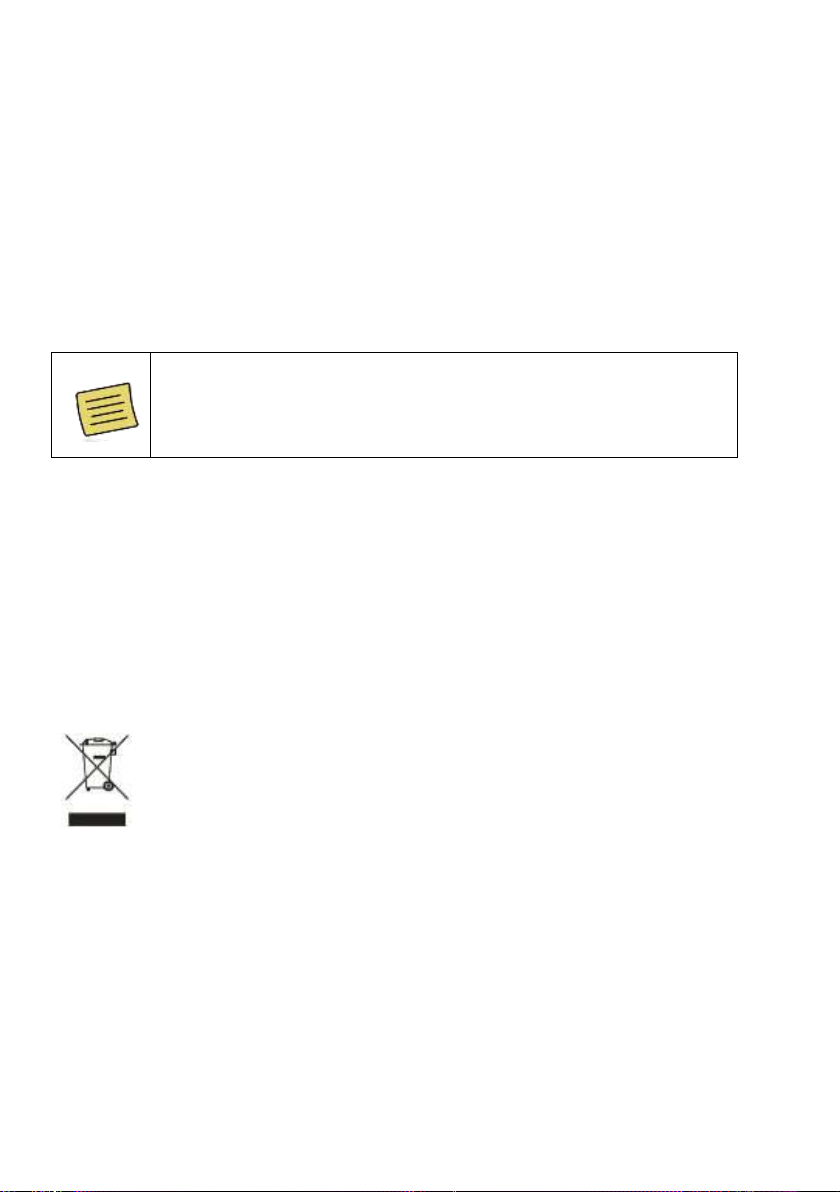
The battery and electronics of the ECG Mini are covered
by the European Directive 2012/19/EC (WEEE) or by
other local/national environmental regulations.
All electrical and electronic products will be disposed of
separately from the municipal waste stream via
designated collection facilities appointed by the
government or the local authorities.
The ECG Mini is returned to LifeWatch as per their
instructions. Correct disposal will help prevent potential
negative consequences for the environment and human
health.
10 CARE
10.1 Conditions of Use
The ECG Mini conforms to international regulations insofar as it is used
under normal conditions and in accordance with the instructions below.
10.2 Cleaning
If for any reason the ECG Mini gateway needs to be cleaned, clean
parts by rubbing with a lint-free cloth.
10.3 Environmental Considerations
Page 43
Page 44
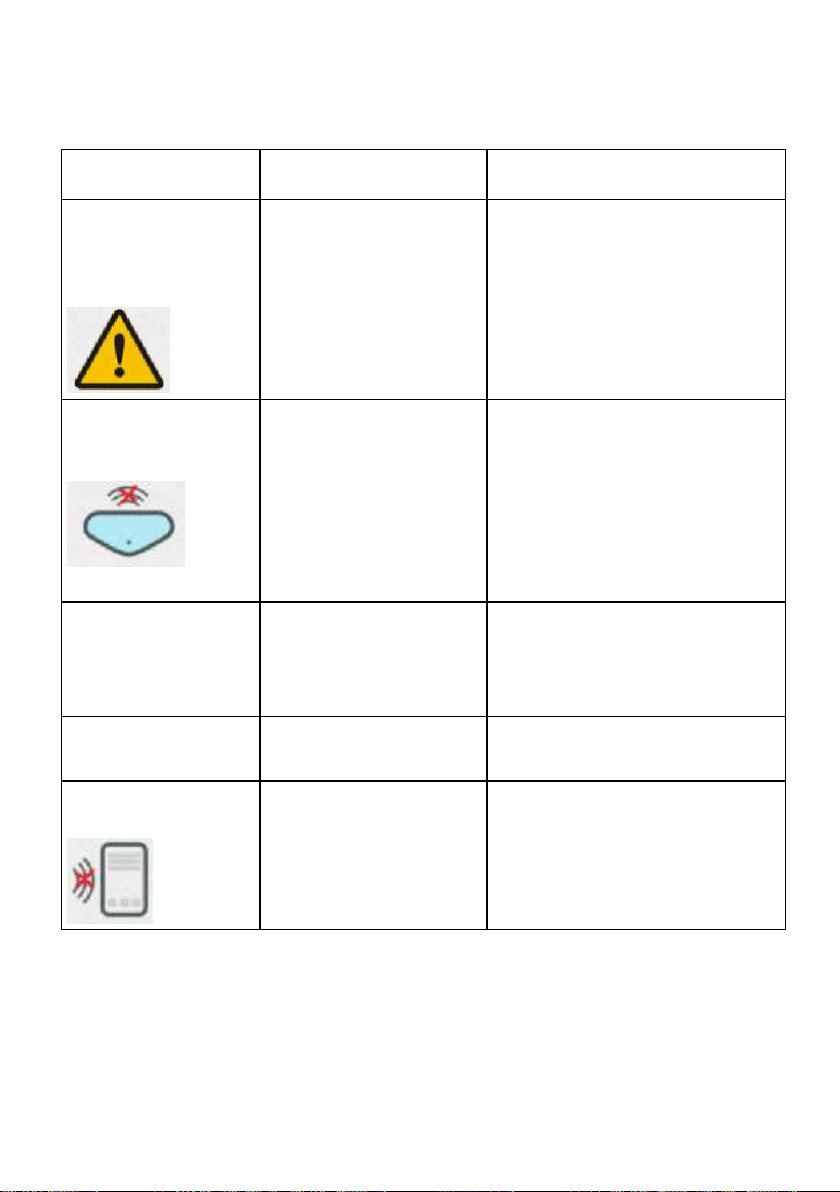
Problem
Possible Cause(s)
Solution
ECG Mini gateway
displays contact
ECG sensor
failure.
Patch is loose or
detached.
Patch contact area
not clean; skin is oily
or with excessive
hair.
1) Make sure Patch is
correctly placed.
2) Restart Gateway.
Data not
transmitted to the
Gateway.
Disconnected RF
channel between
ECG Mini
Transmitter and
Gateway.
1) Make sure the ECG Mini
Transmitter closer to the
Gateway (Gateway has a
range of 10 meters).
3) Restart gateway.
4) Remove and replace
Transmitter.
No display when
Gateway is
activated.
The battery is very
low or depleted.
Connect the Gateway to
charger to charge the
battery. When charged
press power ON/OFF.
Removing patch.
Need to release
adhesive
Soak the area with warm
water.
Gateway
communication
Error
communicating with
back-end
Check cellular coverage for
your area.
Check the cellular coverage
icon for the cellular status.
11 TROUBLESHOOTING
If you are experiencing a critical error not included in this table,
restart any running applications and then disconnect and reconnect
the ECG Mini Transmitter. If the critical error is not resolved, contact
LifeWatch Customer Service.
Page 44
Page 45
CAUTION
Do not open or attempt to repair the patch or Gateway
yourself. Only authorized service personnel may repair the
product.
Do not drop your patch or Gateway or subject them to
severe impact.
Do not use solvents to clean your ECG Mini sensor or
Gateway.
Do not spray perfume or other substances on the ECG
Mini components.
Do not bathe or swim with the ECG Mini components.
Keep the Gateway out of the bathroom when showering or
bathing.
12 MAINTENANCE
12.1 Conditions of Use
Your ECG Mini system conforms to international standards as long as it
is used under normal conditions and in accordance with the following
instructions.
12.2 Caring for your ECG Mini
Page 45
Page 46

12.3 Preventive Maintenance
The following simple preventive maintenance tasks should be
performed monthly to ensure continued performance of the device at
maximum capacity, and to reduce the possibility of a failure.
12.3.1 Mechanical Inspection
Check for splits, cracks or other related flaws in the ECG Mini
components. If you have any questions or doubts, call LifeWatch.
12.3.2 Cleaning
To clean the outside of the Gateway cellular device use a lint-free cloth
lightly.
Never use abrasives such as wire wool or metal polish.
Page 46
Page 47

13 TECHNICAL SPECIFICATIONS
Declaration of Conformity
Conformance to Standards – non-clinical testing demonstrated
conformance to voluntary Safety standard
IEC 60601-1: ed. 3.1
and to EMC standard IEC 60601-1-2:2014 Class B
LifeWatch Technologies’s Quality System conforms to
ISO-9001:2008, ISO 13485:2003,
and complies with CE MDD requirements
Tested for compliance with FCC 47 CFR Part 15,
subpart B and subpart C
Page 47
Page 48
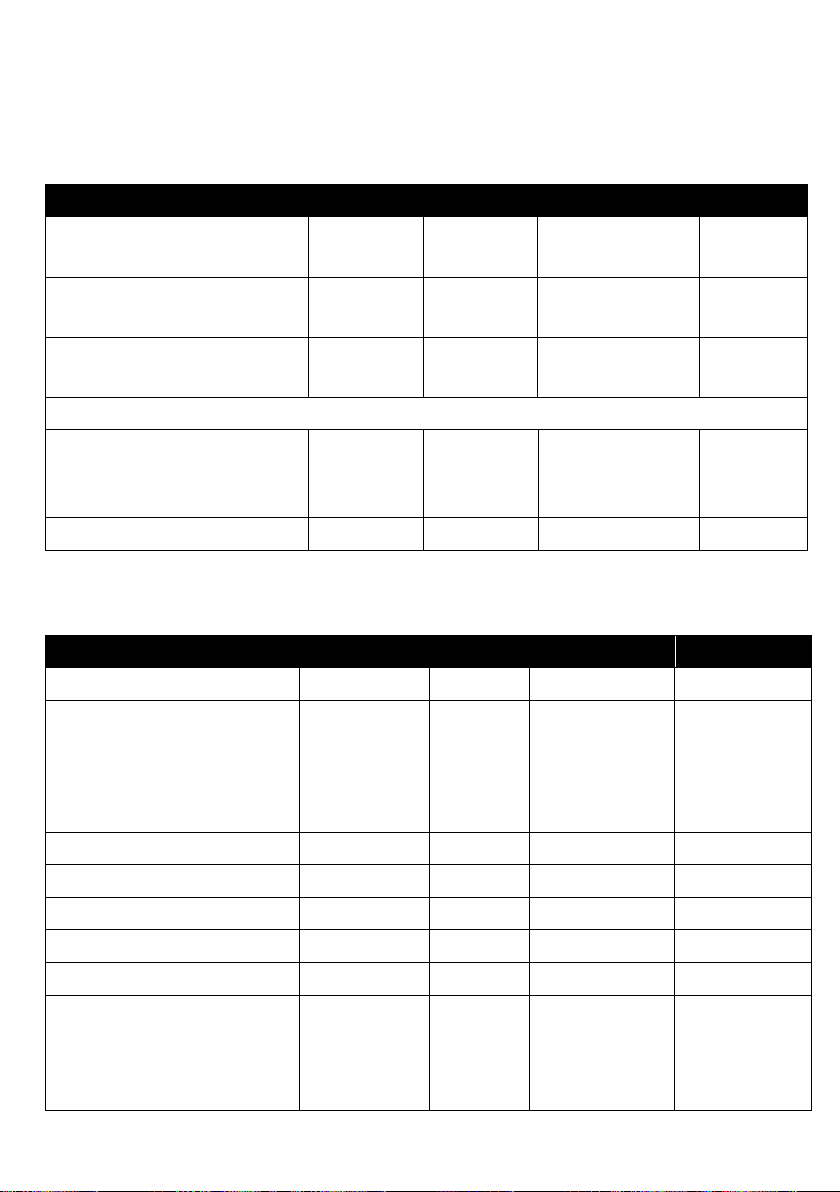
Parameter
Min
Max
Typical
Units
Input Operating DC
voltage
0.9
1.5
V Average Current
consumption
4.5
mA
Peak Current
Consumption
50
mA
Brain Dimensions
Dimensions (max.)
N/A
N/A
38 x 20 x 4
(1.6 x 0.8 x
0.2)
mm
(inch)
Net Weight
5 (0.17)
gr. (oz.)
Parameter
Min
Max
Typical
Units
Dimensions (max.)
1L Patch
N/A
N/A
167 x 69 x
5
(7.5 x 2.9 x
0.2)
mm
(inches)
Net Weight
29 (1)
gr. (oz.)
Battery type
Zinc Air
Battery voltage
1.4
V
Battery capacity
1400
mAh
Battery dimensions
N/A
N/A
20x4
mm
Battery life
6 7 Use
dependent
Days
(dependen
t upon
mode)
13.1 ECG Mini Technical Specifications
Transmitter Specifications
ECG Mini Specifications
Page 48
Page 49
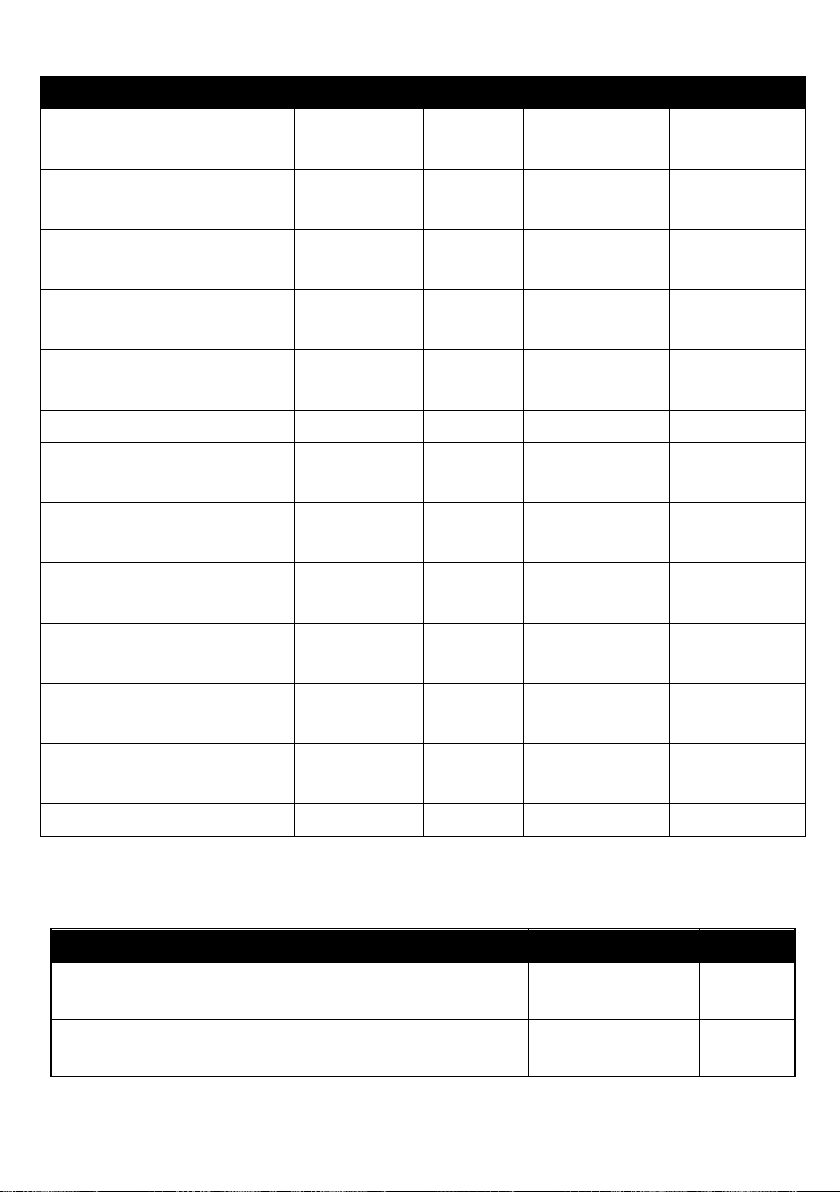
Parameter
Min
Max
Typical
Units
ECG Input
Impedance
10
MΩ
ECG Input dynamic
range
N/A
+/- 5
N/A
mV
ECG ADC sample
Rate
250
250
250
Hz
ECG DC offset
correction
0
+/-300
mV
ECG HPF Cutoff
Frequency
N/A
N/A
131
Hz
ECG System noise
0
30 μV
Operating
temperature
10 (50)
45
(113)
N/A
°C (°F)
Environmental
Operation humidity
10%
95%
Environmental
atmospheric pressure
70
106
kPA
Transport & storage
temperature
10 (50)
32
(89.6)
N/A
°C (°F)
Transport & storage
atmospheric pressure
50
106
kPA
Ingress Protection
Rating
N/A
N/A
IP54
As per
IEC 60529
Shelf life
6 months
Parameter
Typical
Units
Operating Frequency
2.4GHz
GHz
Output power
0
dBm
Transmission Specifications – RF Protocol
Page 49
Page 50
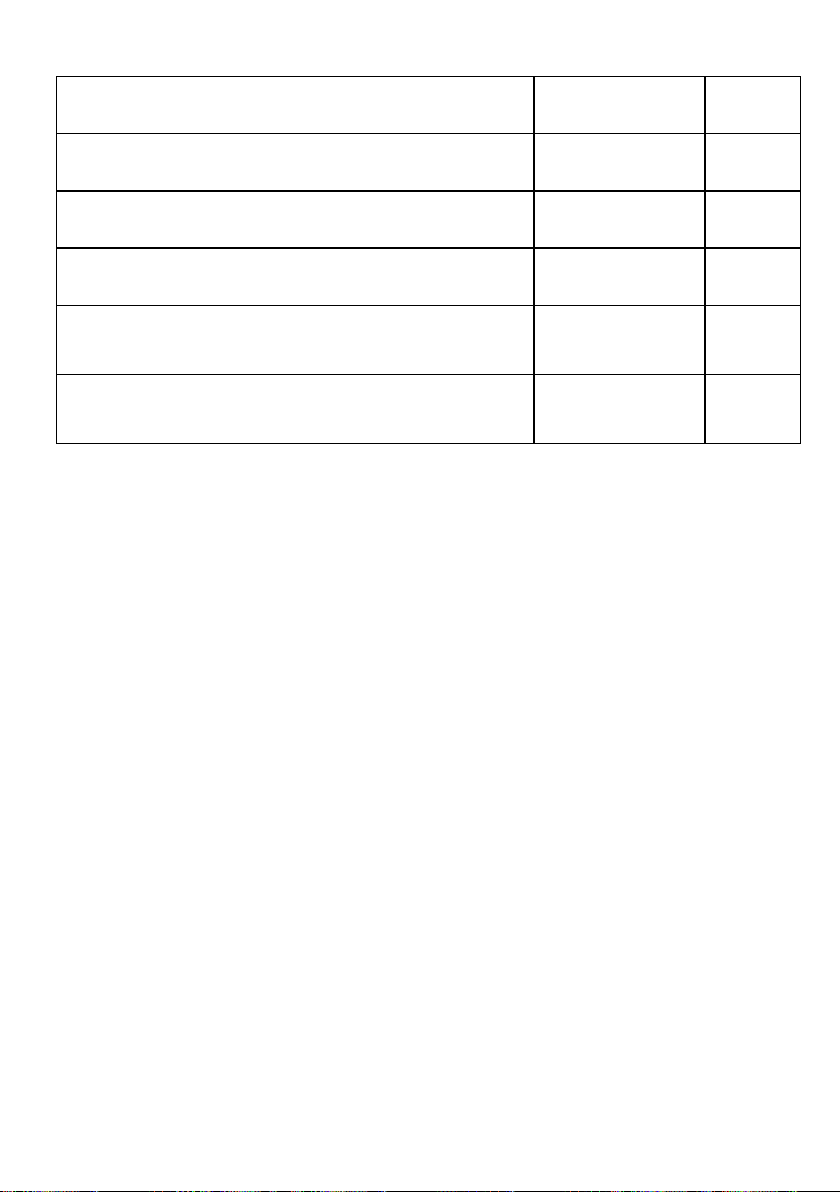
Crystal frequency
16
MHz
Frequency deviation @ 250kbps
±160
kHz
Frequency deviation @ 1Mbps
±160
kHz
Frequency deviation @ 2Mbps
±320
kHz
Non-overlapping channel spacing @
250kbps/1Mbps
1
MHz
Non-overlapping channel spacing @
2Mbps
2
MHz
Page 50
Page 51

APPENDIX A MONITOR (CELLULAR PHONE)
WARNINGS
Using Your Phone near Other Electronic Devices
Most modern electronic equipment is shielded from radio frequency
(RF) signals.
However, certain electronic equipment may not be shielded against
the RF signals from your wireless phone. Consult the manufacturer
to discuss alternatives.
Implantable Medical Devices
A minimum separation of six (6) inches (15 cm) should be
maintained between a handheld wireless phone and an implantable
medical device, such as a pacemaker, to avoid potential interference
with the device.
Persons who have such devices:
• Should ALWAYS keep the phone more than six (6) inches (15 cm)
from their implantable medical device when the phone is turned
ON;
• Should not carry the phone in a breast pocket;
• Should use the ear opposite the implantable medical device to
minimize the potential for interference;
• Should turn the phone OFF immediately if there is any reason to
suspect that interference is taking place.
• Should read and follow the directions from the manufacturer of
your implantable medical device. If you have any questions about
using your wireless phone with such a device, consult your health
care provider.
Hearing Aid Compatibility with Mobile Phones
Page 51
Page 52

FCC Hearing-Aid Compatibility (HAC) Regulations for Wireless
Devices
On July 10, 2003, the U.S. Federal Communications Commission
(FCC) Report and Order in WT Docket 01-309 modified the
exception of wireless phones under the Hearing Aid Compatibility
ECG Mini of 1988 (HAC ECG Mini) to require digital wireless phones
be compatible with hearing-aids. The intent of the HAC ECG Mini is
to ensure reasonable access to telecommunications services for
persons with hearing disabilities.
While some wireless phones are used near some hearing devices
(hearing aids and cochlear implants), users may detect a buzzing,
humming, or whining noise. Some hearing devices are more immune
than others to this interference noise, and phones also vary in the
amount of interference they generate.
The wireless telephone industry has developed a rating system for
wireless phones, to assist hearing device users find phones that may
be compatible with their hearing devices. Not all phones have been
rated. Phones that are rated have the rating on their box or a label
located on the box.
The ratings are not guarantees. Results will vary depending on the
user’s hearing device and hearing loss. If your hearing device
happens to be vulnerable to interference, you may not be able to use
a rated phone successfully. Trying out the phone with your hearing
device is the best way to evaluate it for your personal needs.
M-Ratings: Phones rated M3 or M4 meet FCC requirements and
are likely to generate less interference to hearing devices than
phones that are not labeled. M4 is the better/higher of the two
ratings.
T-Ratings: Phones rated T3 or T4 meet FCC requirements and are
likely to be more usable with a hearing aid’s telecoil than phones that
are not rated. T4 is the better/higher of the two ratings.
Hearing devices may also be rated. Your hearing device
manufacturer or hearing health professional may help you find this
rating. Higher ratings mean that the hearing device is relatively
immune to interference noise. The hearing aid and wireless phone
Page 52
Page 53

rating values are then added together. A sum of 5 is considered
acceptable for normal use. A sum of 6 is considered for best use.
In the above example, if a hearing aid meets the M2 level rating and
the wireless phone meets the M3 level rating, the sum of the two
values equal M5. This should provide the hearing aid user with
“normal usage” while using their hearing aid with the particular
wireless phone. “Normal usage” in this context is defined as a signal
quality that is acceptable for normal operation.
The M mark is intended to be synonymous with the U mark. The T
mark is intended to be synonymous with the UT mark. The M and T
marks are recommended by the Alliance for Telecommunications
Industries Solutions (ATIS). The U and UT marks are referenced in
Section 20.19 of the FCC Rules. The HAC rating and measurement
procedure are described in the American National Standards
Institute (ANSI) C63.19 standard.
Some digital wireless phones may interfere with some hearing aids.
In the event of such interference, you may wish to consult your
hearing aid manufacturer to discuss alternatives.
Page 53
Page 54

Other Medical Devices
If you use any other personal medical devices, consult the
manufacturer of your device to determine if it is adequately shielded
from external RF energy. Your physician may be able to assist you
in obtaining this information. Switch your phone off in health care
facilities when any regulations posted in these areas instruct you to
do so. Hospitals or health care facilities may be using equipment that
could be sensitive to external RF energy.
Children Using Wireless Phones
The scientific evidence does not show a danger to users of wireless
phones, including children and teenagers. If you want to take steps
to lower exposure to radio frequency energy (RF), the measures
described above would apply to children and teenagers using
wireless phones. Reducing the time of wireless phone use and
increasing the distance between the user and the RF source will
reduce RF exposure.
Some groups sponsored by other national governments have
advised that children be discouraged from using wireless phones at
all. For example, the government in the United Kingdom distributed
leaflets containing such a recommendation in December 2000. They
noted that no evidence exists that using a wireless phone causes
brain tumors or other ill effects. Their recommendation to limit
wireless phone use by children was strictly precautionary; it was not
based on scientific evidence that any health hazard exists.
Page 54
Page 55

Body-worn Operation
To comply with RF exposure requirements, a minimum separation
distance of 0.50 inch (1.5 cm) must be maintained between the
user’s body and the handset, including the antenna. Third-party beltclips, holsters, and similar accessories used by this device should
not contain any metallic components. Body-worn accessories that do
not meet these requirements may not comply with RF exposure
requirements and should be avoided.
Use only the supplied or an approved antenna. Unauthorized
antennas, modifications, or attachments could impair call quality,
damage the phone, or result in violation of regulations. Do not use
the phone with a damaged antenna. If a damaged antenna comes
into contact with the skin, a minor burn may result. Please contact
your local dealer for replacement antenna.
Page 55
Page 56

FCC RADIO FREQUENCY INTERFERENCE
STATEMENT
This equipment has been tested and found to comply with the limits for a Class B
digital device, pursuant to part 15 of the FCC Rules. These limits are designed to
provide reasonable protection against harmful interference in a residential
installation. This equipment generates uses and can radiate radio frequency
energy and, if not installed and used in accordance with the instructions, may
cause harmful interference to radio communications. However, there is no
guarantee that interference will not occur in a particular installation. If this
equipment does cause harmful interference to radio or television reception, which
can be determined by turning the equipment off and on, the user is encouraged to
try to correct the interference by one or more of the following measures:
Reorient or relocate the receiving antenna.
Increase the separation between the equipment and receiver.
Connect the equipment into an outlet on a circuit different from that to
which the receiver is connected.
Consult the dealer or an experienced radio/TV technician for help.
LifeWatch Technologies Ltd. is not responsible for any radio or communication
interference caused by using other than specified or recommended cables and
battery or by unauthorized changes or modifications to this equipment. Changes
or modifications not expressly approved by the manufacturer could void the user’s
authority to operate the equipment.
This device complies with part 15 of the FCC Rules. Operation is subject to the
following two conditions:
1. This device may not cause harmful interference, and
2. This device must accept any interference received, including interference that
may cause undesired operation.
UG-00105 rev 01 2015-01
Page 56
Page 57

Manufacturer:
LifeWatch Technologies Ltd.
2 Pekeris Street
Rehovot, 7670202
Israel
Telephone: 972-8-948-4000
Fax: 972-8-948-4044
www.lifewatch.com
Distributor & Service:
LifeWatch Corp.
O’Hare International Center II
10255 W. Higgins Road, Suite 100
Rosemont, IL, 60018
Telephone: 1-877-774-9846
Fax: 847-720-2013
www.lifewatch.com
Page 57
Page 58

THIS PAGE IS INTENTIONALLY BLANK
Page 58
Page 59

PLEASE CALL
1.800.517.6330
FOR 24/7 CUSTOMER SUPPORT
ECG Mini Patient User Guide
 Loading...