

Page 1
LIFEWatch, Inc. • 266 Merrick Road, Suite 104, Lynbrook, NY 11563 • 800.716.1433
800.716.1433
www.lifewatch-usa.com
QUICK SETUP GUIDE
STEP 1
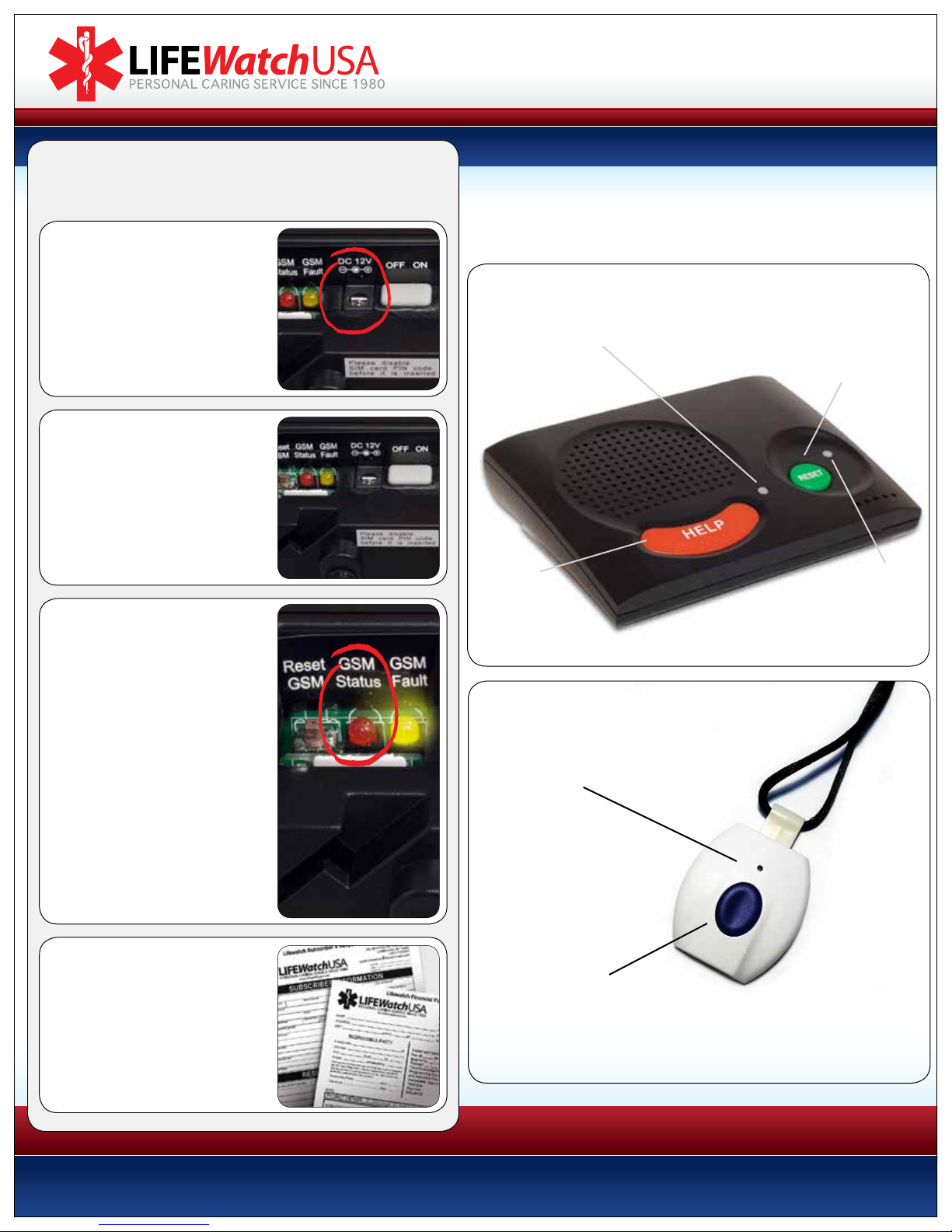
Connect the power cord to the
12V power jack on the back of
the unit and plug the AC power
adapter into an electrical outlet
not controlled by a light switch.
STEP 2
Slide the ON/OFF switch to the
ON position. Wait for about 2
minutes until red GSM Status
light starts to blink regularly at
the rate of once per second.
STEP 3 - Test System
Remember, this is a cellular device
and is subject to the same issues
with radio reception as a standard
cell phone. Make sure that it is
not installed next to large metal
objects like kitchen appliances
or near radio emitting devices
like computers, WiFi routers, cell
phones, or cordless phones.
Key controls and indicators are identied here.
Your console and transmitter are already programmed and ready to use.
A battery inside the console provides up to five days of back-up power.
Red LED:
SOLID indicates that the unit is:
O-hook & dialing, waiting to
retry connection, and ready to
enter programming mode.
NOT used for resetting unit when unit is in alarm
Resetting is disabled to avoid issues contacting client.
Green Reset Button:
Used by client to reset inactivity alarm.
Used to deactivate inactivity.
when client is away from home.
Red Help
Button:
For triggering an
emergency call to
the LIFEWatch
response center.
FLASHING ONCE PER SECOND: AC power failure
FLASHING TWICE PER SECOND: Base or pendant low battery
QUICK FLASH EVERY 2 SECONDS: Supervision failure
Green LED:
SOLID: AC power is on
LED Indicator:
Lights green when
alarm is successfully
transmitted to
PERS console.
The GSM Status LED flashes
once per second when properly
connected to the cellular network.
STEP 4
Complete the forms
included and mail back to:
266 Merrick Road
Lynbrook NY, 11563
We need these forms in order to properly
respond in the case of an emergency.
ALARM Button:
For triggering an emergency call
to the LIFEWatch Response Center.
Page 2
LIFEWatch, Inc. • 266 Merrick Road, Suite 104, Lynbrook, NY 11563 • 800.716.1433
HOW TO TEST AND USE YOUR LIFEWATCH SYSTEM:
1 Press your pendant or wristband button once (please use your
personal help button, not the button located on the base unit).
2 There will be a series of beeps, you may hear a dialing sound,
and lastly the unit will go silent.
3 In approximately 30 to 60 seconds an operator will come on
and say “You have reached the Care Center. Are you ok?”
4 Simply tell them you are testing or tell them
what you need if there is an emergency.
800.716.1433
www.lifewatch-usa.com
* If we do not hear a response from you we will immediately call your home phone.
If we still are not able to get a hold of you, we will dispatch EMS and call your responders
to notify them, unless otherwise specified on your account.
* We also offer daily check-ins, medication reminders, Medi-Lok lockbox, portable medical
recording devices, smoke detectors, carbon monoxide detectors, speaker pendants,
medication monitoring, telehealth, mobile help with gps.
Call 800.716.1433 for more information on these services
or go to www.lifewatch-usa.com
Thank you for choosing Lifewatch.
If you have any questions or concerns
please contact the oce at: 800.716.1433
Monday thru Friday from 9am until 6pm
Please test your system once a month (you do not need to call us before doing so).
(Please refer to our “QUICK SET-UP GUIDE” on other side of this page.)
 Loading...