

Page 1
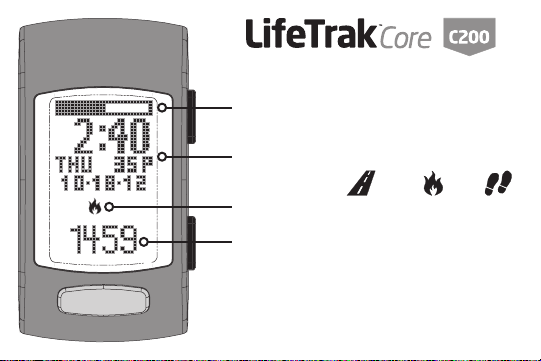
Goal Status Bar
Time/Date
Activity type: distance | calories | steps
Activity value
Quick Start Guide
Page 2
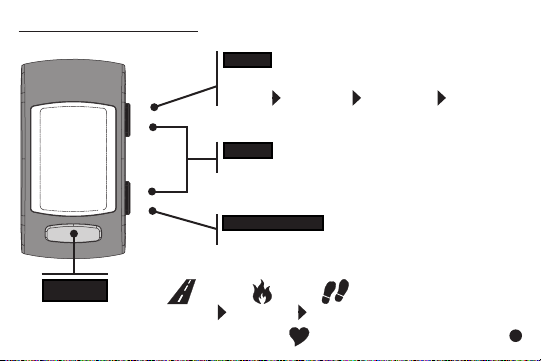
TO TURN YOUR C200 ON: press & hold any button until the screen turns on.
MODE
Press to change modes:
Time Hourly Weekly Workout
LIGHT
Press together for light or MODE + VIEW
START/STOP
Press to start/stop in Workout mode
VIEW
Press to view: distance calories steps
Press & hold to read your heart rate
1
Page 3
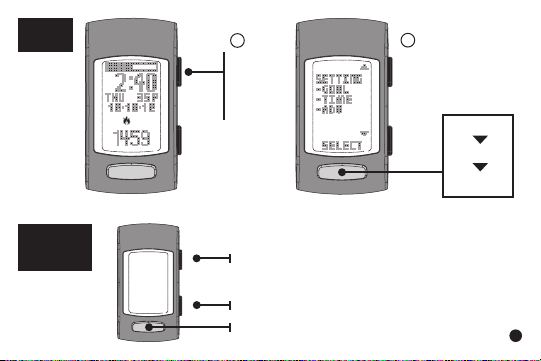
GOAL
SETUP
INSIDE
SETTING
MODE
1
In Time,
hold
MODE
for 3
sec
edit/increase value
edit/decrease value
go to next setting
2
Select
GOAL
step
distance
calorie
2
Page 4
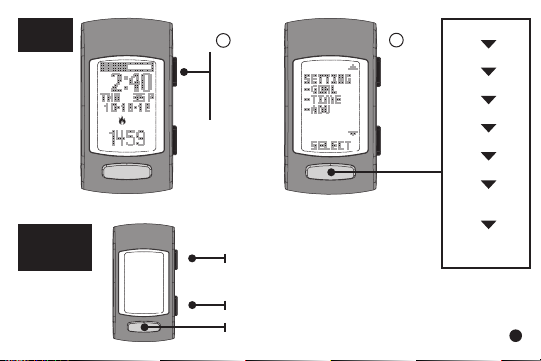
TIME
SETUP
INSIDE
SETTING
MODE
1
In Time,
hold
MODE
for 3
sec
*P indicates
PM
edit/increase value
edit/decrease value
go to next setting
2
Select
TIME
seconds
minute
hour
year
month
day
month-day
format
12/24 hr
format
3
Page 5
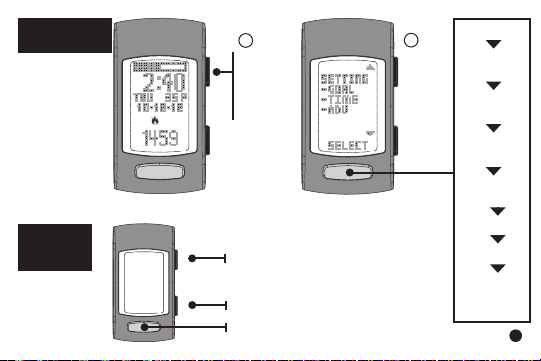
ADVANCED
SETUP
INSIDE
SETTING
MODE
1
In Time,
hold
MODE
for 3
sec
edit/increase value
edit/decrease value
go to next setting
2
Select
ADV
gender
birthday
(year)
birthday
(month)
birthday
(day)
unit
format
weight
height
step
sensitivity
level
4
Page 6
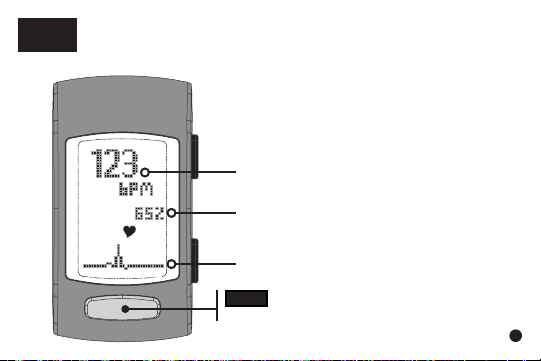
HEART
RATE
Taking your heart rate will help to calculate your calories more
accurately.
1. Put your C200 snugly around your wrist.
2. Place your nger on VIEW.
3. Gently press and hold for 3-8 seconds
until your heart rate appears.
Heart Rate (beats per minute)
% of Maximum Heart Rate
Pulse Indicator
VIEW
Press & hold to read your heart rate
5
Page 7
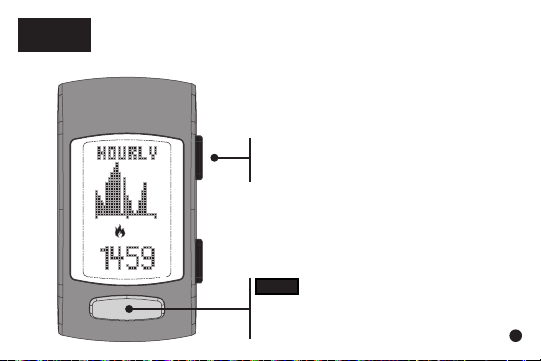
HOURLY
DISPLAY
Shows your progress throughout the day with a 24-hour
chart.
From Time,
press MODE until you reach
Hourly Display
VIEW
Press to view:
distance, calories, steps
6
Page 8
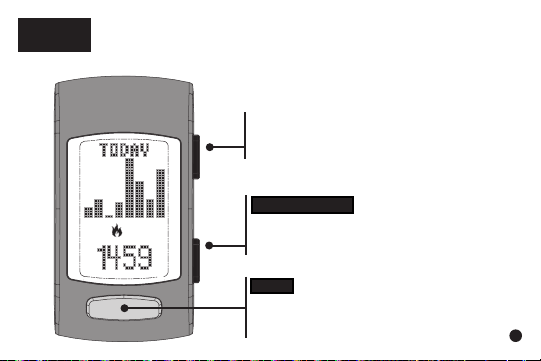
WEEKLY
DISPLAY
Shows your results for the past 7 days.
From Time,
press MODE until you reach Weekly
Display (“Today” will be displayed)
START/STOP
Press to browse through the past 7
days
VIEW
Press to view:
distance, calories, steps
7
Page 9
WORKOUT
MODE
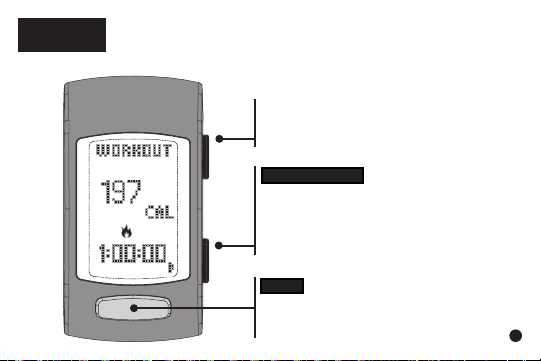
Workout Mode records data from an individual workout.
From Time,
press MODE until you reach Workout
Mode
START/STOP
Press to start/stop recording your
workout
Hold to reset data (Workout mode
must be stopped)
VIEW
Press to view:
distance, calories, steps
8
Page 10

ALL-DAY
CALORIE
Your C200 allows for a more comprehensive calorie
count by factoring in calories burned simply through
living, in addition to any exercise/activity. This is a great
tool to compare against your daily calorie intake!
Your C200 will also provide a more accurate calorie count
by calculating in your heart rate readings. So remember
to get your heart rate throughout the day and more
frequently during your exercise.
HELPFUL
HINTS:
ALL-DAY
CALORIE
1. Your body is always burning calories, even when
sleeping or not in motion. Our All-Day Calorie meter
accounts for these calories burned.
2. You will see calories burned even during periods of
non-activity.
9
Page 11

AUTO
CALIBRATED
DISTANCE
For a more accurate distance, your C200 adjusts
your stride length based on how fast you are
walking or running.
HELPFUL
HINTS:
STEP
COUNT
If you are having difculty acquiring your steps, try the
following:
1. Take 30 - 40 steps before checking your step count.
2. If your steps are being over or undercounted, try
adjusting the sensitivity level (in Advanced Setup).
Step count is determined by actual steps. Arm motion
can affect this count.
10
Page 12
ADJUSTING
YOUR BAND
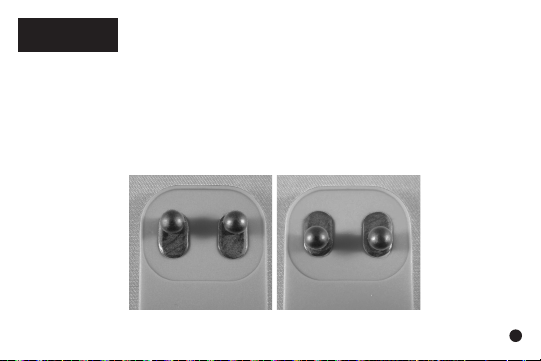
The bands of your C200 are reversible and
replaceable. They easily slide off and can be
reinserted.
Please see the Information Guide for full details.
NOTE: The Clasp on the short band (top band)
can be rotated for a more rened t.
11
 Loading...