

Page 1
1
LIFE MXL-5LifeIonizers.com/support
Page 2

2
LIFE MXL-5 LifeIonizers.com/support
Welcome to the LIFE Ionizers family!
Congratulations on the purchase of your new alkaline mineral water
ionizer. We are grateful to our many customers for recognizing our
eorts in providing the best water ionizer available!
Ionized Alkaline Mineral Water promotes good health with its superior hydration, mineralization, oxygenation and cellular detoxication.
Our ionizers use a series of internal and external ltration systems
and the nest-quality platinum-coated titanium plates, to create
alkaline water with the highest anti-oxidant potential in the industry.
What do I need to know?
• Please read all safety warnings before the installation or
operation of your LIFE Ionizer to ensure proper product usage.
• To receive warranty service, you must register your warranty
online. Please see enclosed warranty card for detailed instructions.
• Refer to this manual when you have questions on adjustments
and how to change your lters. We also have instructional videos
and help guides online at LifeIonizers.com/support.
• Changing your lters is important! To ensure optimal performance and to guarantee your warranty, your ionizer has a new
RFID Technology built into the internal lters which will give you
a warning that your lter life is low and that you should replace
your lter. If the lter life runs out, the ionizer will not function
until the lter is changed. It’s important to have lters changed
on time so the performance of your ionizer will continue.
Page 3

3
LIFE MXL-5LifeIonizers.com/support
Table of Contents
Safety Guide
Product Specications
Package Contents
Important to Remember
Parts of the Ionizer
MXL-5 Installation
Quick Connect Fittings and Tubing
Display Overview
Function Options
MXL-5 Operation Method
Internal Filter Replacement
Filter Reset Indicators
Citric Acid (Scaling) Cleaning Filter
Filtration Media
Pre-Filter Replacement
Acidic Cleaning Instructions & Routine Maintenance
Common Problems and Solutions
Operation Warnings/Error Messages
How Alkaline Water is Made
Alkaline/Acidic/Puried Water
Uses of Ionized Alkaline/Acidic Water
Performance Features
Frequently Asked Questions
4
7
8
10
12
14
16
17
18
23
24
25
26
28
29
30
31
32
33
34
35
38
39
Page 4
4
LIFE MXL-5 LifeIonizers.com/support
Safety Guide
Power Plug
As with most electrical appliances, electrical parts in this
ionizer are electrically live even when the switch is o.
• Power cord should not be touched with wet hands
• Use only (110v) in the USA, Mexico and Japan. Most
other countries require (220v). The power cord cannot
be altered from manufacturer’s specs.
• Do not crimp or staple the power cord
• Power cord should be plugged directly into an
electrical outlet
• Dusty or dirty electrical outlets may cause safety
issues
• Bending, twisting, pulling or putting heavy objects
onto the power word may cause electrical problems
including re.
• If power cord, plug or electrical outlet are damaged,
discontinue use immediately.
• Unplug the electric power when
not in use for a long time (over 3
days)
Page 5
5
LIFE MXL-5LifeIonizers.com/support
Ionizer
• Place machine in an upright position only
• Do not install this unit in direct sunlight or near a heater,
replace or other heat source
• Do not place the machine in humid areas such as
bathrooms
• If wall mounted, secure rmly and correctly
• Do not use water with a temperature of over 95
degrees Fahrenheit or 35 degrees Celsius
• This machine should not be repaired or otherwise
disassembled by any unauthorized person as it may
cause electrical re or shock and will void the
manufacturer’s warranty
• Do not clean this machine by spraying the ionizer with
water as it may cause electrical shock.
• Do not use benzene, thinner, or chemicals to clean the
unit as it can damage the housing.
• Do not block the unit vent as it can cause overheating
and/or electrical problems.
• Do not block the water passage or tubing
• Do not place anything on the unit
• Don’t shake or drop
the unit
• If the ionizer
machine falls into
water:
1. Unplug power cord
from electrical outlet
2. Wipe the machine
down and place in
shaded area
3. Contact your LIFE
Ionizer dealer
Page 6

6
LIFE MXL-5 LifeIonizers.com/support
Ionized water
• If inexperienced with drinking Ionized Alkaline Water,
users are encouraged to start with level 1
• When drinking Ionized Alkaline Water - Do not take
prescription or other medications for approximately one
hour before and after drinking water. Ionized alkaline
water hydrates more eciently, therefore will deliver
more medication than tap water.
• Store Ionized Alkaline Water in an air-tight glass
container and refrigerate for up to 2 days
• DO NOT DRINK ACIDIC WATER
• Do not store Alkaline or Acidic water in metal containers,
although you can put alkaline water in the Water for LIFE
Stainless Steel bottles as they are designed to maintain
pH and ORP
• Aluminum and brass containers will be tarnished by
alkaline and acidic water
• If not used for several days, run water through the unit
for 1 to 3 minutes before starting
• If the machine will not be
used for several days:
1. Unplug the power cord
from the electrical outlet
2. Turn o the water valve to
avoid leaking
3. Remove lters, drain and
place in refrigerator in
plastic bags.
4. Let water run on the
“Puried Water” setting for
at least 3-5 minutes
before any operation
Page 7
7
LIFE MXL-5LifeIonizers.com/support
Product Specications
Special features
Fully convertible: counter-top to
under counter
Cleaning function
Advanced RADC Cleaning System
Display
Full Color LED Display w/ Automatic
Voice Prompting
Filtration
Dual Internal, Custom Pre-lter
Flow Control
Automatic
Power in watts
Adjusts up to 250 watts
ORP Output
up to -500
(Enhanced ORP at drinkable levels)
pH Output
pH range from 5.5 up to 10.3
Protection
Automatic Heat Sensor
Power System
MAX Yield SMPS Power System™
Rated Voltage
Dual voltage input compatibility
110/220 volts. All you need is the
power plug or adapter. When
plugged into the power source the
unit automatically recognizes voltage.
Settings
1 Puried, 3 Acidic, 4 Alkaline
Warranty
7 Year Warranty
Dimensions
12.5” W | 15” H | 6.25” D
Plate Material
Platinum over Industrial Titanium
Page 8
8
LIFE MXL-5 LifeIonizers.com/support
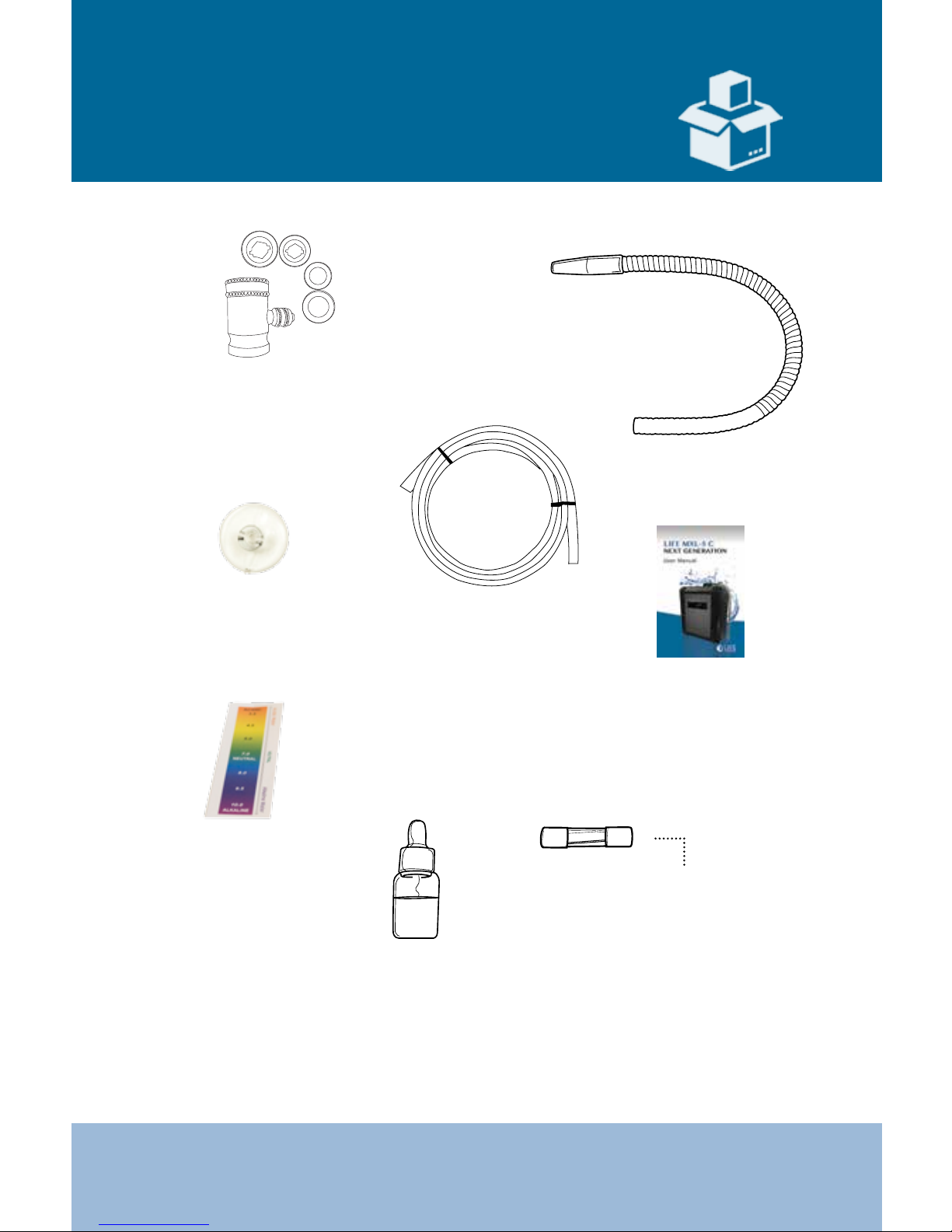
Package Contents
Extra Fuse
1/4” Tubing Hose
User Manual
BTB Chemical
pH Color
Chart
Reagent Drops
(pH Test Drops)
Suction Cup
Located in the Power
Switch at the bottom
of the machine
Flexible
Hose
Pull down
Diverter Valve
Page 9
9
LIFE MXL-5LifeIonizers.com/support
10
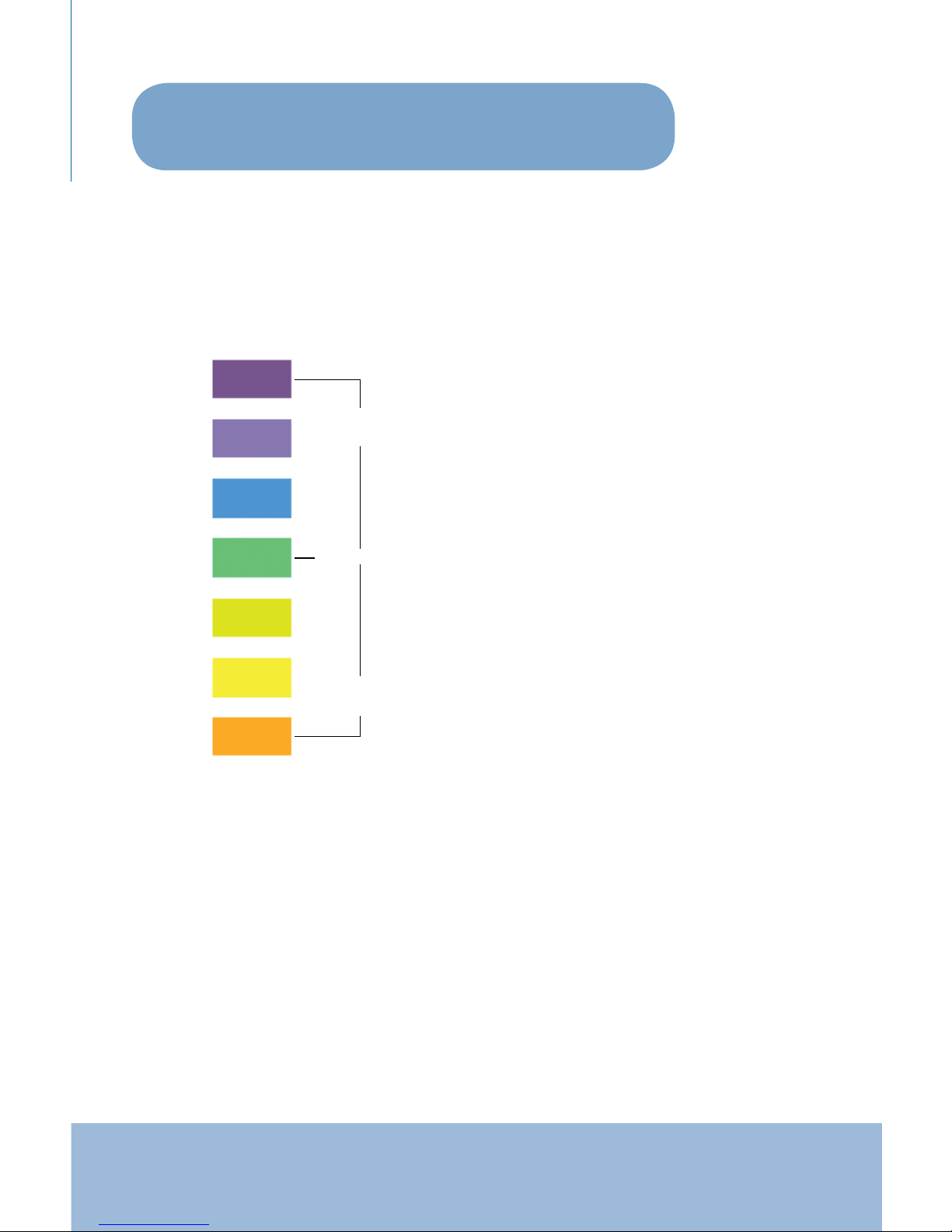
9.0
8.0
7.0
6.0
5.0
4.0
Alkaline
Water
Acid
Water
Neutral
PH Tester Kit Instructions:
1. Place 1-2 ounces of water you are
testing into a glass
2. Add 2-3 drops of Reagent Drops
3. Stir water to observe the color
change
4. Compare to “pH COLOR CHART”
to determine pH and acid levels.
When handling the pH test (reagent drops):
1. Keep away from eye area. If eyes become irritated, ush
thoroughly and consult a doctor.
2. If accidentally swallowed, drink water and consult a doctor.
3. Store in an airtight container away from the reach of children.
4. Drops are ammable. Keep away from children.
How to measure the pH of your water
A pH color chart and a bottle of Reagent Drops are included with
your ionizer in case you would like to test the water from your new
ionizer.
Page 10

10
LIFE MXL-5 LifeIonizers.com/support
• You must run 2-3 gallons of water through the pre-lters before
you connect them to the ionizer. To do this, install the pre-lters
into their housings, connect a piece of tubing to the outlet connection on the pre-lter housing and run it into the sink so you
can ush them out with water. This hydrates the lters and cleans
them from any loose media. After you nish this procedure, connect your pre-lter back to your ionizer and run normally. This
needs to be done every time you put in new pre-lters.
• The pre-lter housings must be replaced every 2 years.
SEE PAGE 14 FOR COUNTER TOP INSTALLATION INSTRUCTIONS
SEE PAGE 16 FOR UNDER COUNTER INSTALLATION INSTRUCTIONS
Important to Remember
Pre-lter Installation & Maintenance
Ionizer Installation
• Plugs located on the bottom of the ionizer must be removed
before installation.
• Do not overtighten the patch cable connection on the back of
the ionizer when plugging in patch cable.
• Run the ionizer and check for leaks at all tubing locations from
the Diverter Valve to the Ionizer itself before operating the unit.
Page 11

11
LIFE MXL-5LifeIonizers.com/support
Settings
• Flow rate must be set before adjusting or running your ionizer.
• Set ow rate no higher than 2.5 liters per minute. Anything higher
could cause internal damage.
• When adjusting the settings, the buttons must be pressed
quickly as failure to do so will result in booting you out of the
program menu.
• The unit must be dispensing water before pressing the buttons.
• Adjust the ow rate (LPM) by slowing down the water ow to
ionizer from the source water:
- Cold Water Connect (for under undercounter units)
- Faucet Diverter ( for countertop units)
•
SEE PAGE 14 FOR COUNTER TOP INSTALLATION INSTRUCTIONS
SEE PAGE 16 FOR UNDER COUNTER INSTALLATION INSTRUCTIONS
Ionizer Care
• Do not twist top of faucet. This will damage the faucet.
• We recommend internal lters and pre-lters be changed
annually.
• Citric acid cleaning lter should be used 3 to 4 times
per year.
• Use cold water only with your ionizer
Page 12
12
LIFE MXL-5 LifeIonizers.com/support
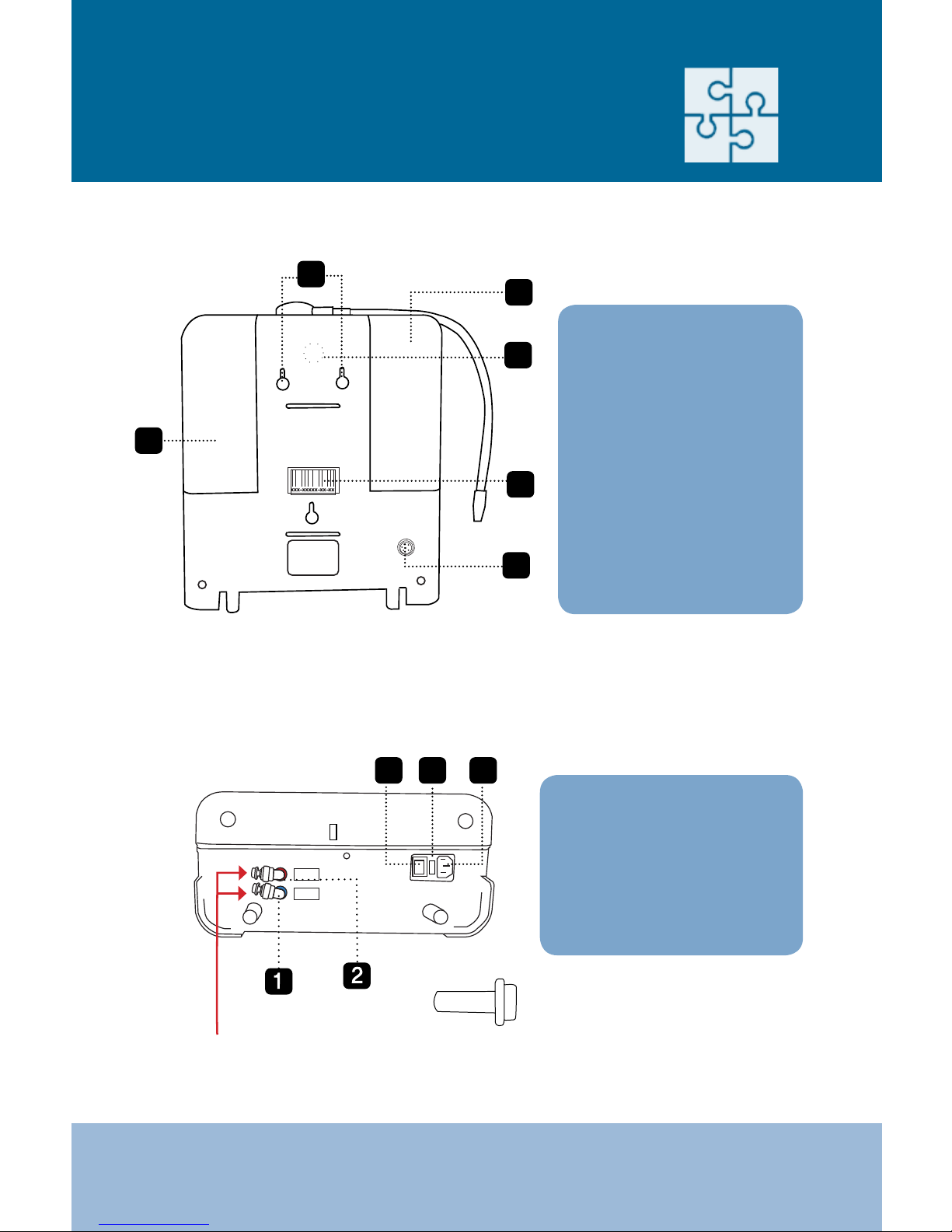
xxx-xxxxx-xx-xx
6
Inlet
Outlet
3
4
5
** Plugs must be removed before installation.
See page 18 for Quick Connect Fittings and Tubing instructions.
Parts of the Ionizer
BACK
BOTTOM
1. First Filter Cover
2. Wall Mount Screw
Holes
3. Speaker
4. Bar Code and Serial
Number
5. Second Filter
6. Under Counter
Installation
Plug/Connector
1. Source water inlet
2. Acidic outlet
3. On/O Power Switch
4. Fuse Box
5. Power Plug
5
1
2
3
4
Page 13
13
LIFE MXL-5LifeIonizers.com/support
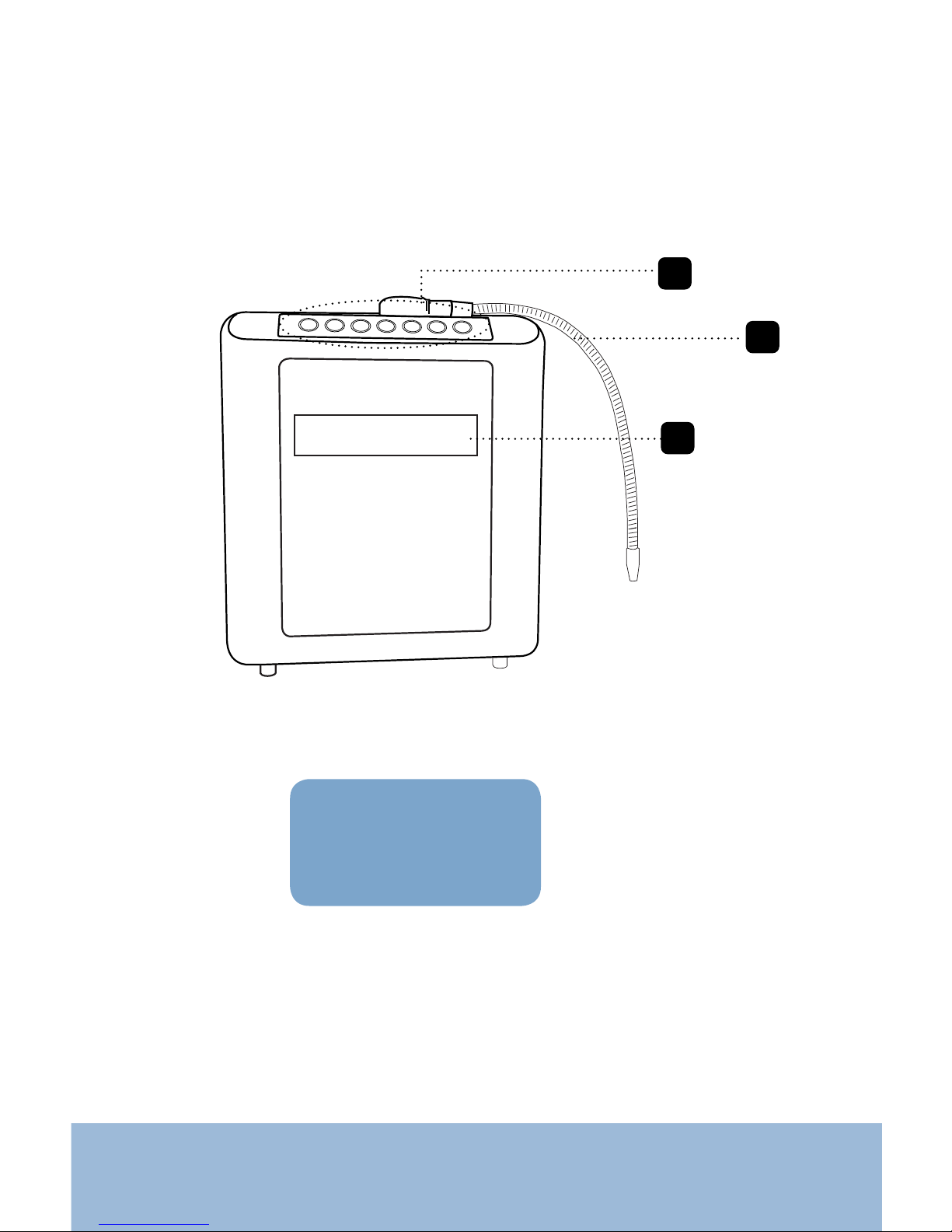
1. Control Panel
2. Flexible Spout
3. LCD Panel
2
1
3
FRONT
Page 14

14
LIFE MXL-5 LifeIonizers.com/support
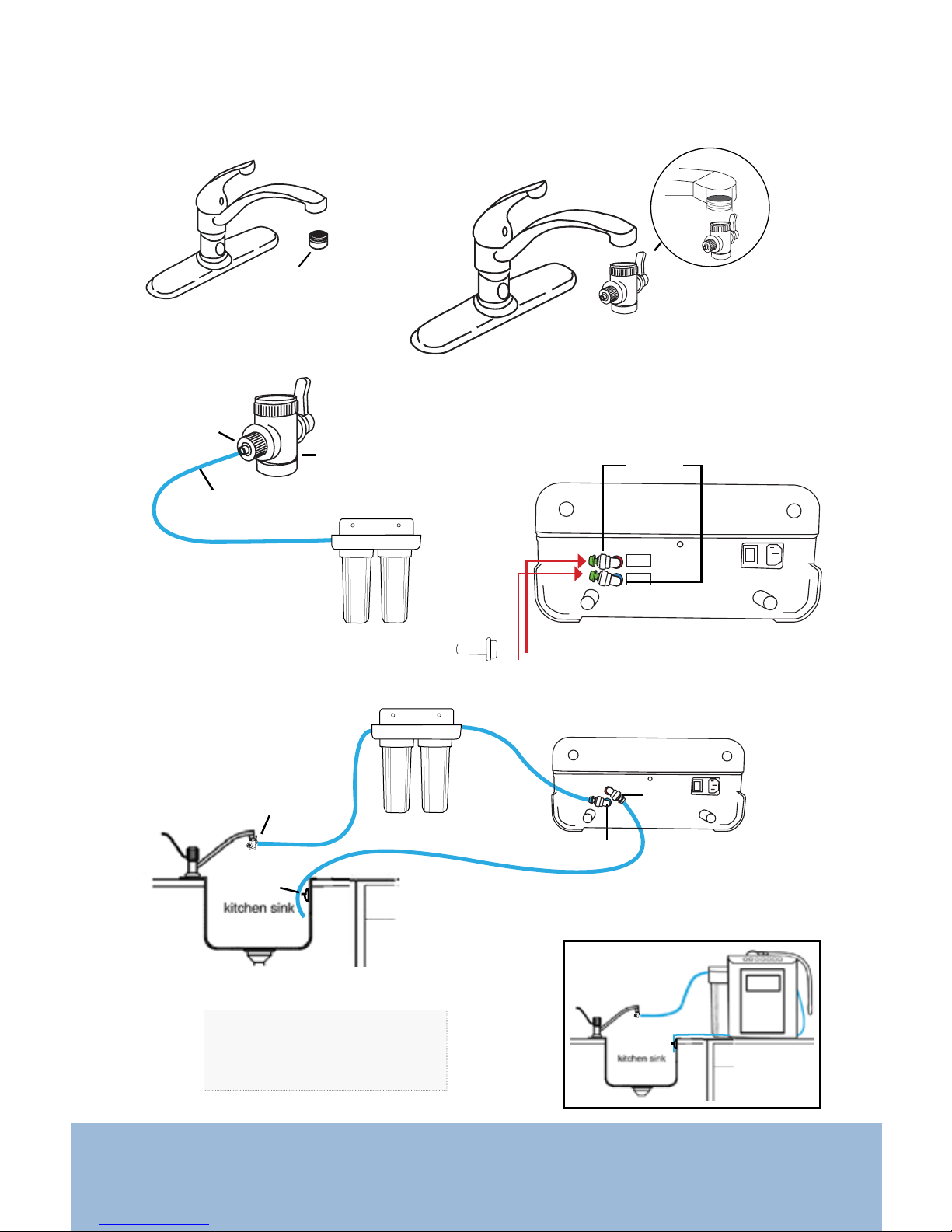
LIFE MXL-5 Installation
Refer to diagrams on page15.
(help video on LifeIonizers.com/support)
STEP 1: Unscrew the existing aerator from your faucet.
STEP 2: Use Teon plumber’s tape on the threads. Make sure the black rubber
washer is inside the diverter valve before you screw it onto your
faucet. This assures a proper seal. (Three dierent sized adaptors
are included for non-standard sized faucets).
STEP 3: Unscrew the round nut from the side of the diverter valve. Place the
1/4” tubing through the nut and over the opening. Press 1/4” tube on
the barb tting and screw the nut back onto the diverter valve over
the tubing. Tubing should now t snugly onto the diverter valve.
STEP 4: Run the other end of the 1/4” tubing that you attached to the
diverter valve to the (IN) on the Pre-lter. Connect another piece of
1/4” tubing to the (OUT) on the Pre-lter. Run 2-3 gallons of water
through the pre-lter before connecting them to the unit. This tube
will then go to the inlet valve on the bottom of the ionizer in STEP 6.
STEP 5: Remove the plugs in the following manner: Lay the ionizer down
on its back and you will see two white elbows extruding from the
bottom of the machine. There will be an o-white collar around the
base of the elbow (see page 18). Push in the collar against the face of
the tting. With the collar held in this position, you can extract the
plug from the machine. It is sometimes helpful to use the back of a
butter knife or screw driver to remove the plugs.
STEP 6: Insert the 1/4” tubing from the (OUT) on the Pre-lter to the inlet
valve on the bottom of the ionizer using the quick connect instruc-
tions on page 18. Insert another 1/4” tube in the outlet elbow on the
bottom of the ionizer and run the other end into the sink securing it
with the suction cup provided. Some units may contain water
Don’t be alarmed; we test units for quality before shipment.
STEP 7: Run the ionizer and check for leaks at all tubing locations from
the Diverter Valve to the Ionizer itself before operating the unit.
Page 15
15
LIFE MXL-5LifeIonizers.com/support
Inlet
Outlet
DIVERTER CONNECTION
STEP 1:
STEP 2:
aerator
STEP 3:
round nut
1/4” tubing
Diverter valve
STEP 4:
elbows
STEP 5:
Bottom of ionizer
Diverter valve
inlet valve
outlet
valve
Bottom of ionizer
suction
cup
Pre-Filters
In
Out
plugs
(in green)
STEP 6:
NOTE: Run 2-3 gallons of water
through the pre-lters before you
connect them to the ionizer.
** Plugs must be removed before installation.
Pre-lters
Diverter valve
Option:
Diverter Valve Adapter if
needed for your type of sink.
Page 16
16
LIFE MXL-5 LifeIonizers.com/support
Quick Connect Fittings
and Tubing
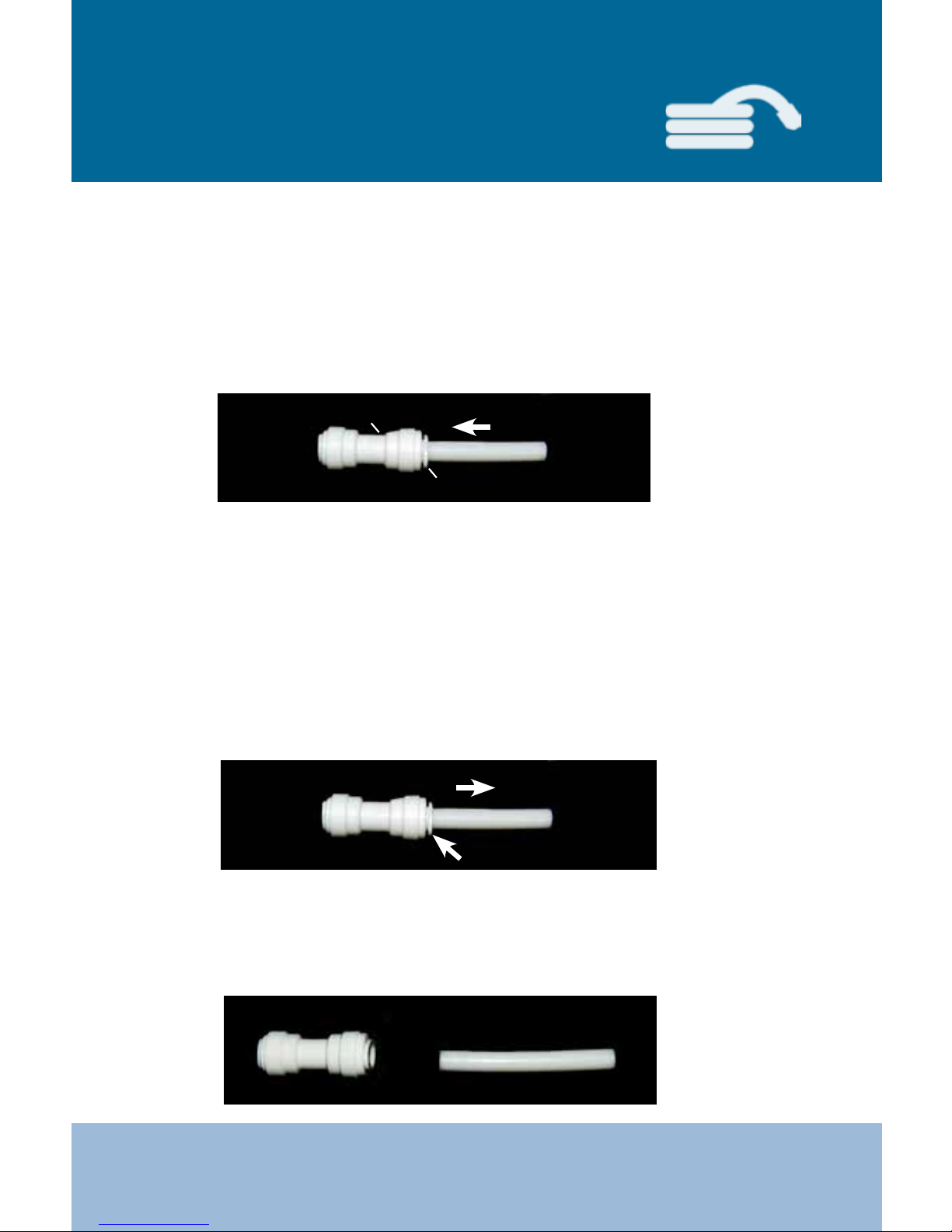
Push the tubing into the quick connect. The collar (gripper )
has teeth which hold the tubing rmly in position while the “O” Ring
provides a permanent leak proof seal.
Check the Seal: Pull on the tubing to see if the seal is secure.
Check for leaks.
Ensure system is depressurized before removing ttings. Push in the
collar against the face of the tting. With the collar held in this position,
the tube can be removed. The tting can then be re-used.
collar
To ensure an optimal seal, tubing should be cut with the end square.
An angled cut or distortion of the tubing will not provide an ecient seal
and may cause leaks. Determine the length of tubing needed for
the connection and cut the segment of tubing to the appropriate length.
push in collar
pull tubing out
quick connect
TO CONNECT:
TO DISCONNECT:
Page 17
17
LIFE MXL-5LifeIonizers.com/support
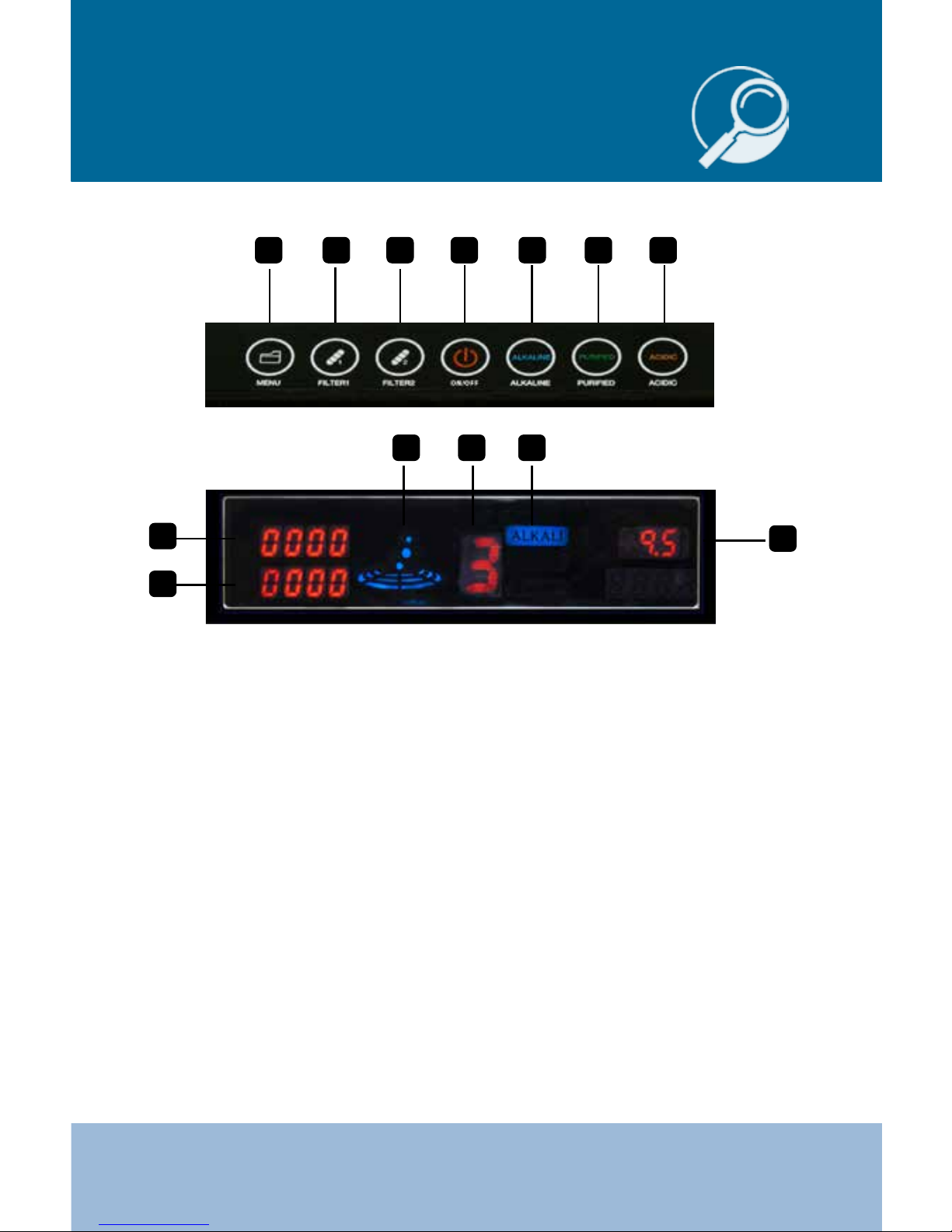
1. ON/OFF Button
2. Alkaline Selector
3. Purify Selector
4. Acidic Selector
5. Menu/Function
6. Filter 1 Indicator
7. Filter 2 Indication
8. Filter 1/Life Indicator
9. Filter 2/Life Indicator
10. Operation Display Lamp
11. Level Indicator
12. Indicator Water Type (Alkaline/Acidic/Purify)
13. pH Indicator
1211
9
8
13
10
4325 6 7 1
Display Overview
Page 18
18
LIFE MXL-5 LifeIonizers.com/support
Function Options
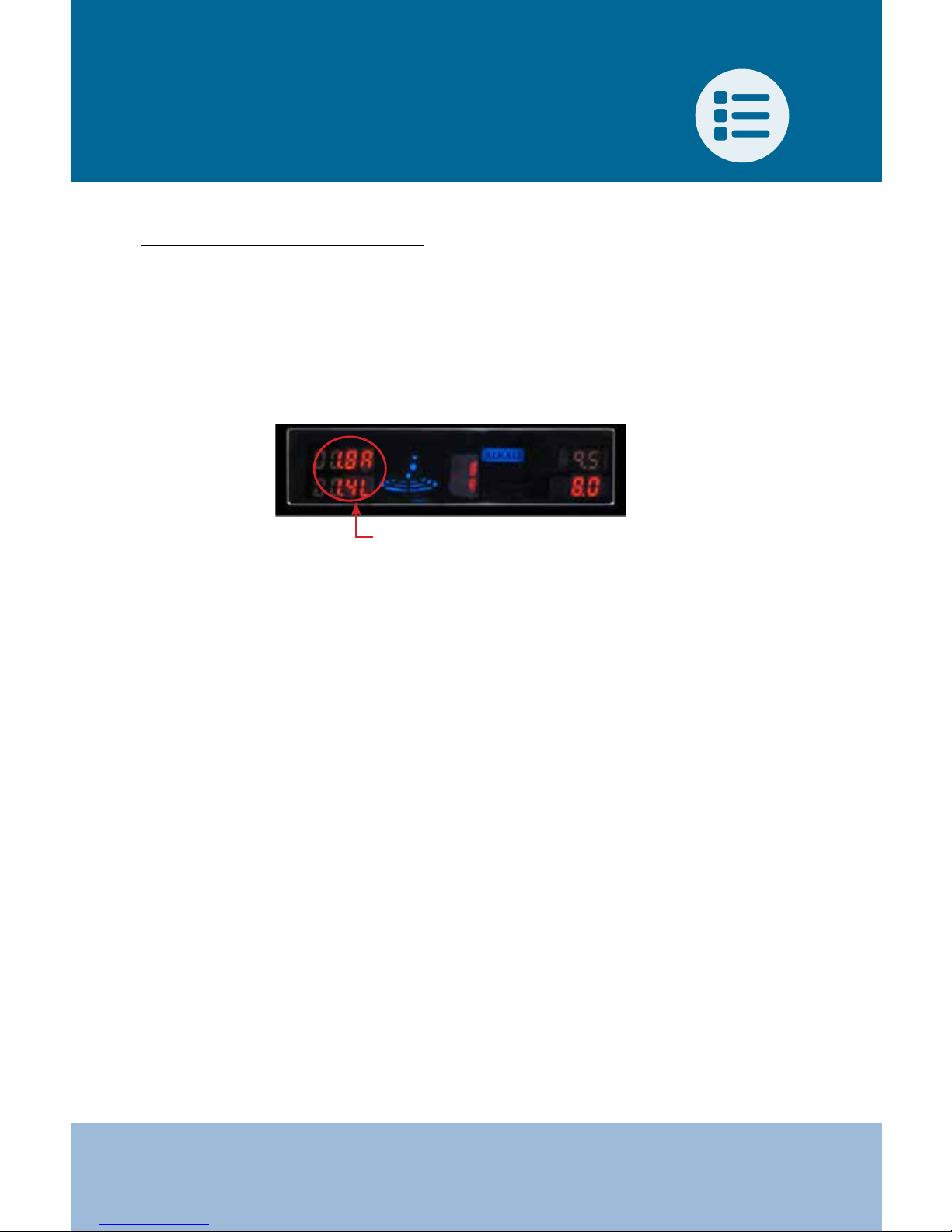
AMPS AND LITERS PER MINUTE (LPM)
NOTE: the unit must be dispensing water before pressing the buttons.
• Press and hold “FILTER 1” & “FILTER 2” simultaneously for 5 seconds in
order to enable the display of the Amps & LPM reading indicator light.
• Two numbers will then appear on the indicator.
• The top number is the amps number followed by the digit A.
• The bottom number is the Liters per Minute (LPM) followed by the
digit L.
• Once the LPM is displayed, you can make the necessary adjustment
to the water ow in order to adjust the LPM to the unit. Adjust the
LPM by
slowing down water ow to ionizer from the source water:
- Under Counter - Cold Water Connect
- Counter Top - Faucet Adapter
KEY NOTE: The slower the ow, the stronger the alkaline or acidic
water is produced. We recommend that you set the machine
between a ow of 1.5-3.0LPM.
• For strong 11+pH alkaline or 2.5 pH acid water, we recommend
that the ow rate be set at 1.1-1.5 LPM. Do not set below 1.0 LPM
because it will error out and display E1.
NOTE: Your pH will be determined by your water source. If you’re
on well water, your water is soft, or your TDS is too low, then you
might need a remeneralizing cartridge or a pre-lter to add alkaline
minerals so your unit can ionize properly.
NOTE: FLOW RATE MUST BE SET TO GET PROPER PH LEVELS.
Recommended ow rate is 1.5-3.0 LPM
Amps & LPM (liters per minute) indicators
Page 19
19
LIFE MXL-5LifeIonizers.com/support
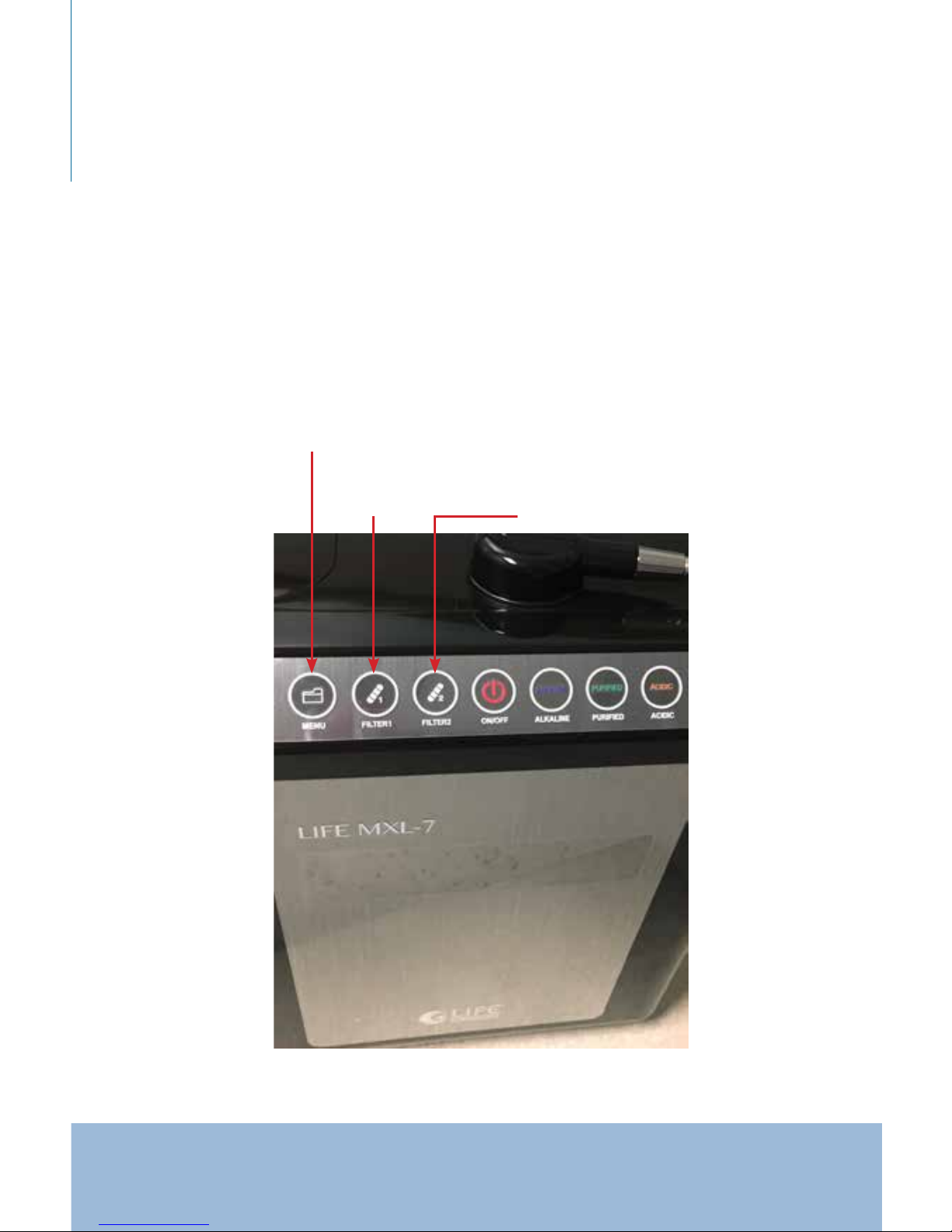
SOUND/VOLUME ADJUSTMENT (F10)
To enter the Volume Adjustment please do the following:
• Press and hold the “MENU” button for 5 seconds.
• Once you do this “VOL” will appear on the display and below that
it will show a number.
• To increase volume, press and release the “FILTER 2” button, to
decrease the volume setting press and release the “FILTER 1”
button.
MENU
FILTER 1
FILTER 2
Page 20
20
LIFE MXL-5 LifeIonizers.com/support
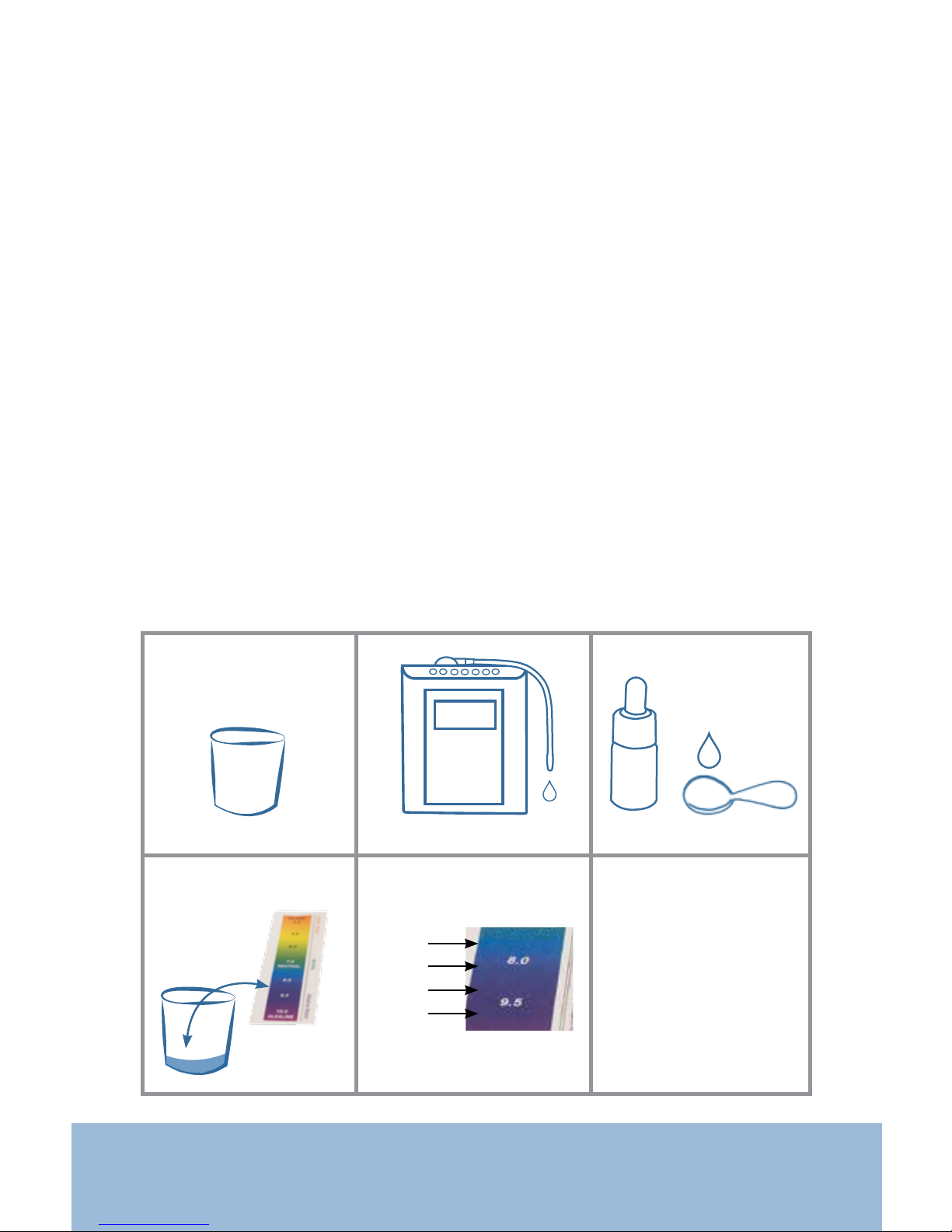
PH TESTING WITH DROPS
To test and to determine the pH of your water, you will have to select
the level you are testing as well as combining the liquid reagent pH
drops provided with the purchase of your ionizer with a sample of
water gathered from your ionizer.
1. To begin this process, you will need a small clear glass of some sort.
2. Turn on your water ionizer and select the level of alkaline or acidic
water you will want to test. Please wait 10 seconds before collecting the water.
3. You will then need to add 2-3 liquid reagent pH drops to the glass
rst and collect 1 ounce (2 tbsp) of water from your ionizer.
4. After that you will need to compare the water you tested with the
color ph chart provided with the pH drops.
5. You will need to adjust the amperage levels depending on your
source water. We recommend you set water pH to ALK1-light
blue/ALK2-dark blue/ALK3-light purple/ALK4-dark purple.
6. To do this follow the F-20 steps on the next page.
2-3 dropssmall clear glass 2 tbsp water
Add to glass:
1.
+
ALK1
ALK2
ALK3
ALK4
2. 3.
4.
5.
Adjust amperage
levels by following
the F-20 steps on
the next page
6.
collect water
Page 21

21
LIFE MXL-5LifeIonizers.com/support
AMPERAGE ADJUSTMENT (F20)
(help video on LifeIonizers.com/support)
To enter into the F20 you will need to do the following:
NOTE: The buttons must be pressed quickly as failure to do so will
result in booting you out of the program menu. The unit must be
dispensing water before pressing the buttons.
• Turn on ionizer and scroll through the alkaline and acid levels by
pressing the “ALK ALINE” or “ACID” button. Select the level you want to
adjust.
• Press and hold the “MENU” & “FILTER 1” buttons simultaneously
for 5 to 10 seconds (or until F20 appears on screen).
• F20 will appear on the display screen.
• Below the F20, the amperage number will display.
• To increase the amperage number, press and release the “FILTER 2”
button. The number will go up automatically. Release to stop.
• To decrease the amperage number, press and release the
“FILTER 1” button. The number will go down automatically.
Release to stop.
• Test the level of alkaline by adding 3-4 drops of the pH solution
we recommend to 1 ounce of water. Set levels below to:
ALK 1 - light blue
ALK 2 - blue/purple
ALK 3 - purple
ALK 4 - dark purple
• If the color is not matching the pH chart, you may need to raise
or lower the amperage until the desired color is correct.
• To save your adjustments, press the “PURIFY” button and the
display screen will go back to its normal operation.
NOTE: You cannot adjust the “PURIFY” selection.
• Repeat the process to adjust the other levels of alkaline or acid.
• For optimum performance of the unit, you will need to clean
your ionizer with the CITRIC ACID CLEANING FILTER also known
as the SCALING FILTER. We recommend using this cleaning
cartridge 3-4 times a year depending on the hardness of your
water.
Page 22

22
LIFE MXL-5 LifeIonizers.com/support
FUNCTIONS F30 AND AFTER
To enter F-30 and after functions you will need to do the following:
• Press and hold the “MENU” & “FILTER 1” buttons simultaneously
for 5 seconds.
• The machine will display F30 and the screen.
• Press and release the “FILTER 2” button continuously to scroll
through the other F-functions.
• Press the “MENU” button to select the function you want to adjust.
• Press “FILTER 1” button to go down and “FILTER 2” button to go up.
• Press “PURIFY” button to save the changes.
PLATE SELECTION (F-30)
• Select number of plates (5,7,9,11 & 13) UNITS COME
PRE-SELECTED
LANGUAGE SELECTION (F-40)
• Select preferred language. (English is the default language)
1- Korean
2- English
3- Chinese
4 -Russian
5 -Spanish
PH DISPLAY OPTIONS (F-50/F-51) (DO NOT CHANGE SETTINGS)
• Default will show pH setting only
• pH Ho - Fixed level (use this level)
• pH En - Adjustable level
CLEANING (F-60) (reverses the electric power to clean the plates)
(1) Washes beginning & end of water usage
(2) Washes at the beginning only (default setting)
(3) Washes at the end only
(4) Does not wash at all
F-50 AND AFTER FOR ENGINEER USE ONLY
To show the power consumption and water ow information, press the
“Menu” button and “Filter 1” button simlutaneously and hold down for
about 8 seconds. NOTE: Water must be running through the ionizer.
Page 23
23
LIFE MXL-5LifeIonizers.com/support
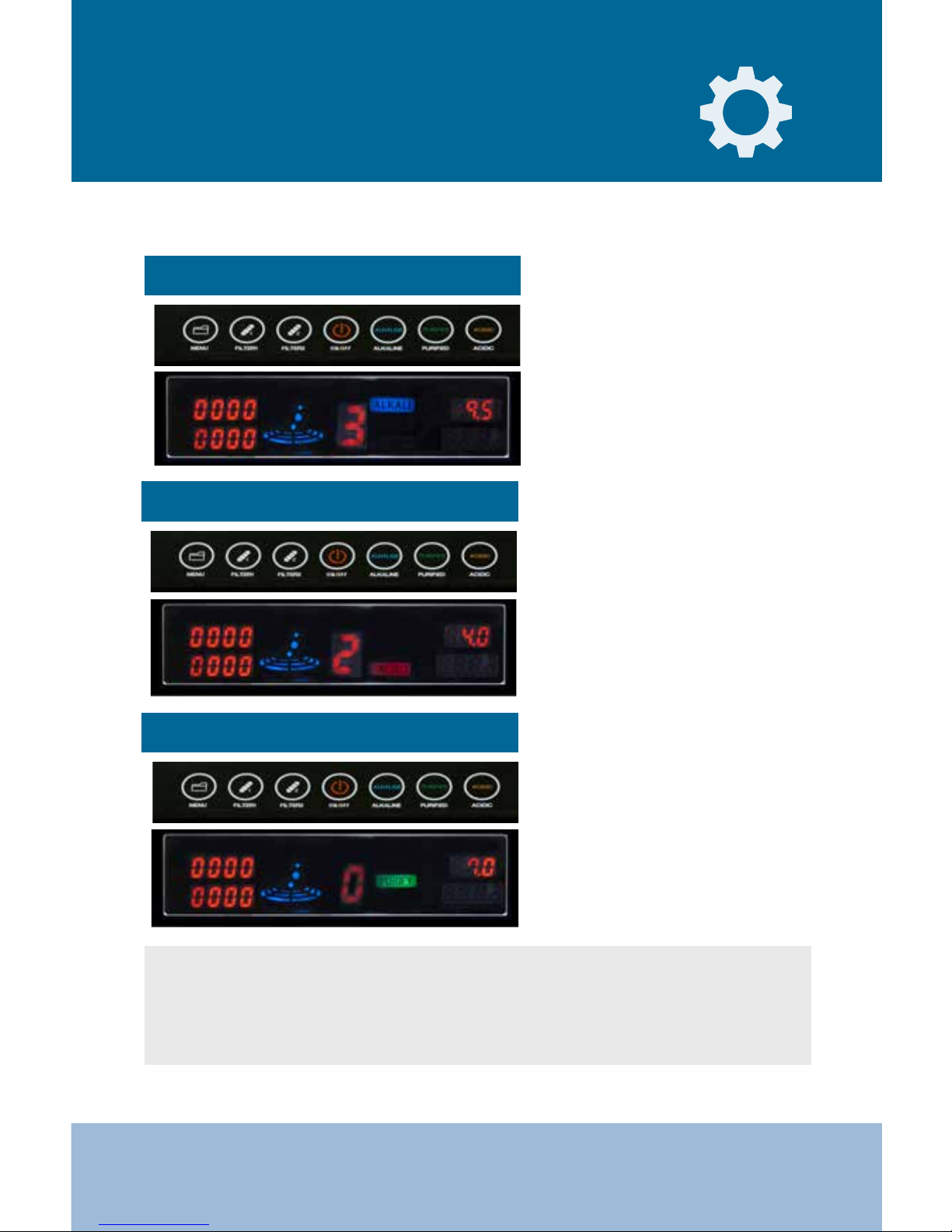
Press the “ON/OFF” button.
Then press the “ALKALINE”
button and keep tapping
that button until the desired
alkaline level displays on the
screen. The level indicator will
display the level you selected.
To STOP collecting water, press
the “ON/OFF” button.
Press the “ON/OFF” button
and then select the “PURIFIED”
button to start dispensing
ltered, puried water. To
STOP collecting water, press
the “ON/OFF” button.
Press the “ON/OFF” button.
Then press the “ACIDIC” button
and keep tapping that button
until the desired acidic level
displays on the screen. The
level indicator will display the
level you selected. To STOP
collecting water, press the
“ON/OFF” button.
LIFE MXL-5 Operation Method
Alkaline water discharge method
* Make sure the cold water is on and diverted to the ionizer.
Acidic water discharge method
Puried water discharge method
* Make sure to turn o the ionizer before turning o the water.
First time users who are not familiar with this water are recommended to start
with Ionized Alkaline Water level 1 for two weeks, then adjust the level to
Alkaline Water level 2 for two weeks, and then adjust again to Alkaline Water
level 3 for daily drinking. This gradual adjustment will help your body get
accustomed to the higher alkaline pH levels.
Page 24
24
LIFE MXL-5 LifeIonizers.com/support
Internal Filter
Replacement
For installation video, go to www.lifeionizers.com/support
and click the Next Generation lter replacement video.
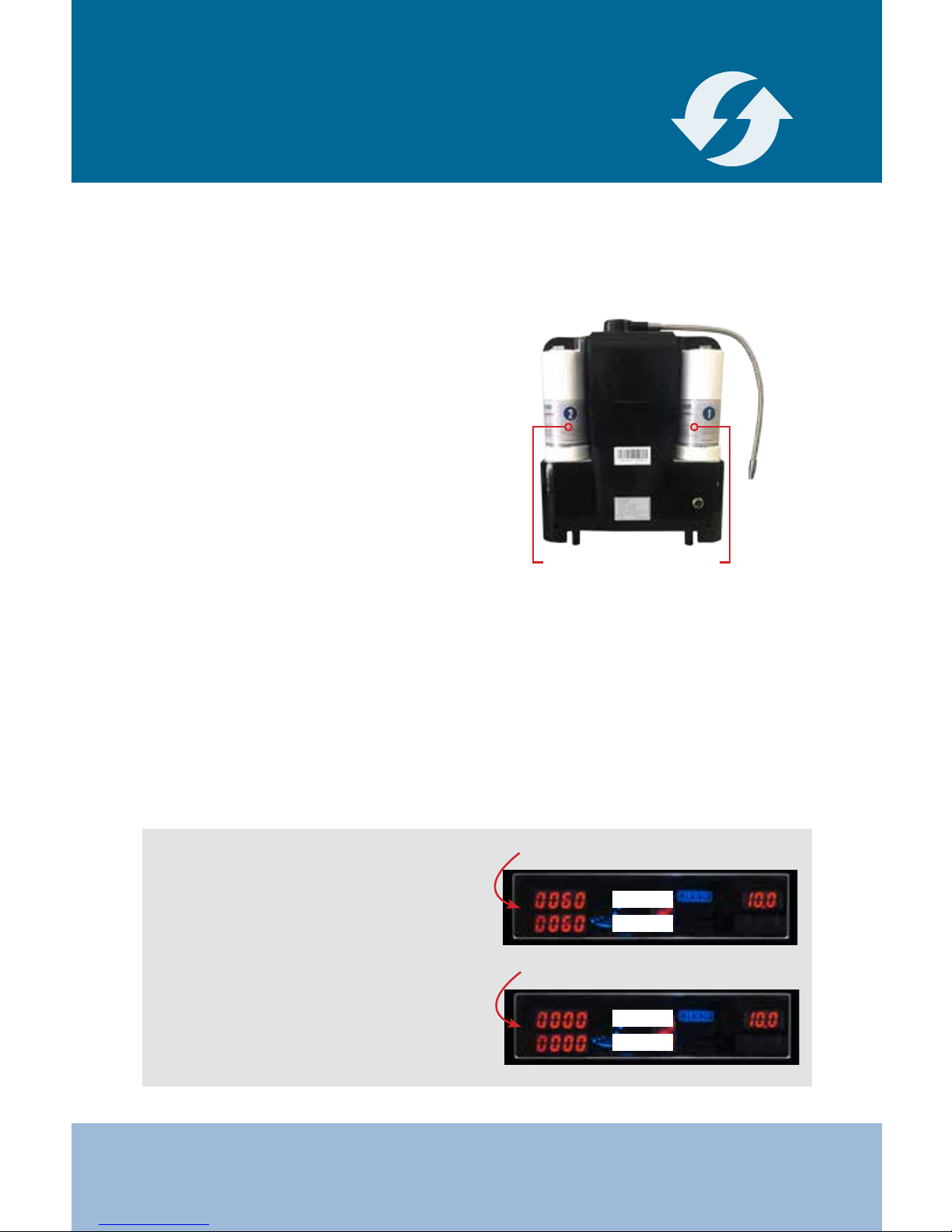
How to Change the Filters
1. Push up on the lter cover to
release it from the ionizer.
2. Turn the lter counter clockwise
to release it out of the socket.
(Open and close indicator will be
on top of the lter).
3. Pull up on the filter to remove it
from the ionizer.
4. Be sure to take the black cap o
of the new lter.
Filter 2 Filter 1
5. For easy installation, lube new lters with a food safe lubricant like
olive oil to the outside O-ring. This will help the lters turn more easily.
6. Line up the lter tabs and press the lter down into the socket.
7. Turn the lter clockwise until it stops.
MAKE SURE THE FILTER NUMBER IS FACING YOU WHEN
INSTALLED. IF NOT, THE IONIZER WILL NOT WORK.
8. Replace the lter cover.
IMPORTANT: When the unit shows
0060 on the lter counter, it will tell
you to replace the lter. When the
lter counter reaches 0000, the unit
will not function until you replace
the lter needed. It is best to have
additional lters on hand so that
you can replace the lters before
this happens.
0060 or 6 liters left on lter life
0000 or no liters left on lter life
Filter 1
Filter 2
Filter 1
Filter 2
Page 25
25
LIFE MXL-5LifeIonizers.com/support
Filter Reset Indicators
• Select the “PURIFIED WATER” setting and let the water run for
2-3 minutes after any lter replacement .
• If the machine has not been used for a few days, let the water
run for 2-3 minutes at the “PURIFIED WATER” setting before
making Ionized Alkaline water for consumption.
• Consult with the installer or retailer on the purchase of lters if
in question about usage or installation.
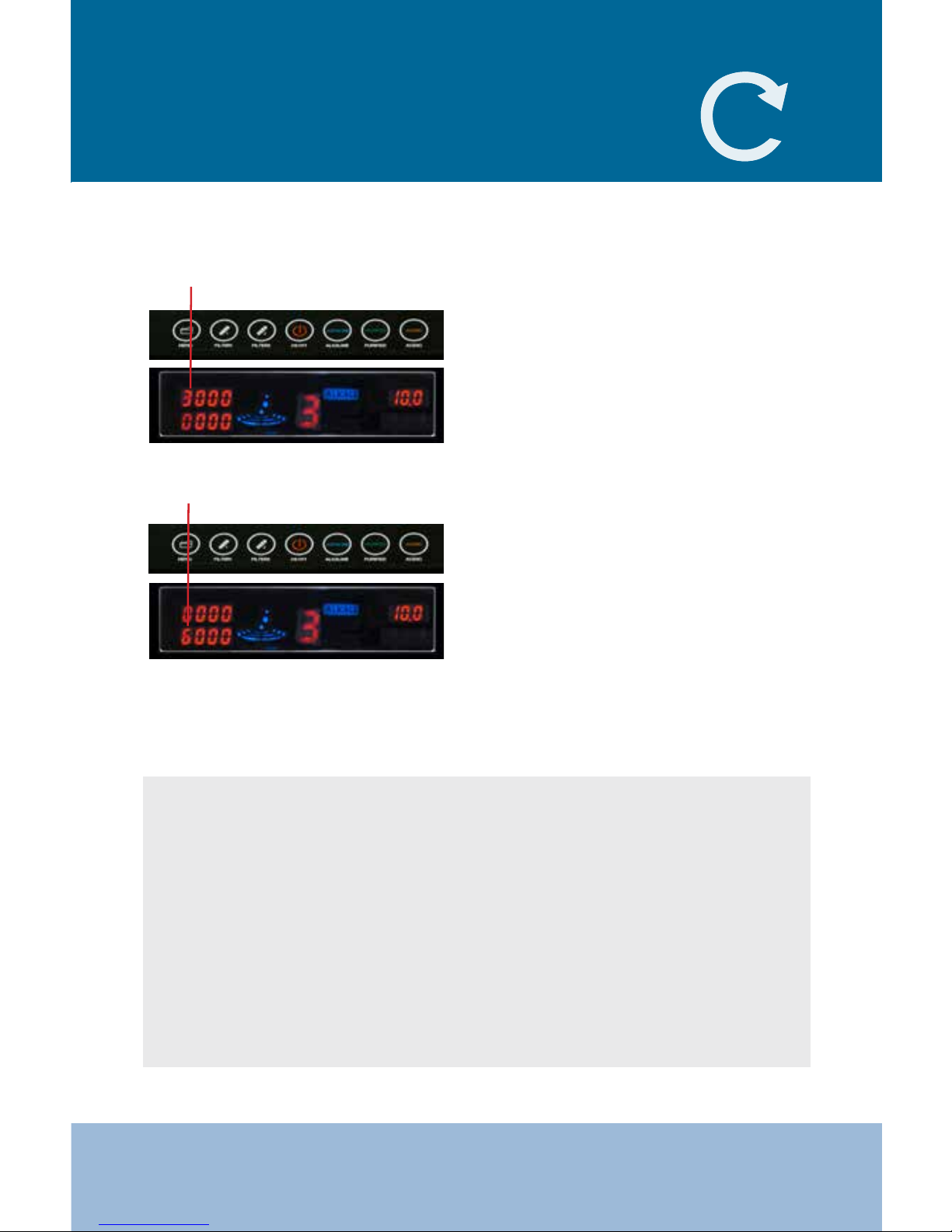
After changing FILTER 1, the unit
will recognize that a new lter has
been installed. The indicator will
reset to 3000 automatically.
After changing FILTER 2, the unit
will recognize that a new lter has
been installed. The indicator will
reset to 6000 automatically.
Filter 1 Indicator
(help video on LifeIonizers.com/support)
Tips After Filter Replacement:
Filter 2 Indicator
Page 26
26
LIFE MXL-5 LifeIonizers.com/support
1 2 3
4 5 6
7 8 9
PURIFIED
NOTE: If the water dispersed from the spout is still slower than the waste
water, the machine may need to be sent in for deep cleaning.
(Step by Step Installation Guide on LifeIonizers.com/support)
Citric Acid (Scaling) cleaning lter should be used 3 to 4 times per
year. Cartridge is only good for one cleaning.
ON/OFF
Citric Acid (Scaling)
Cleaning Filter
Page 27

27
LIFE MXL-5LifeIonizers.com/support
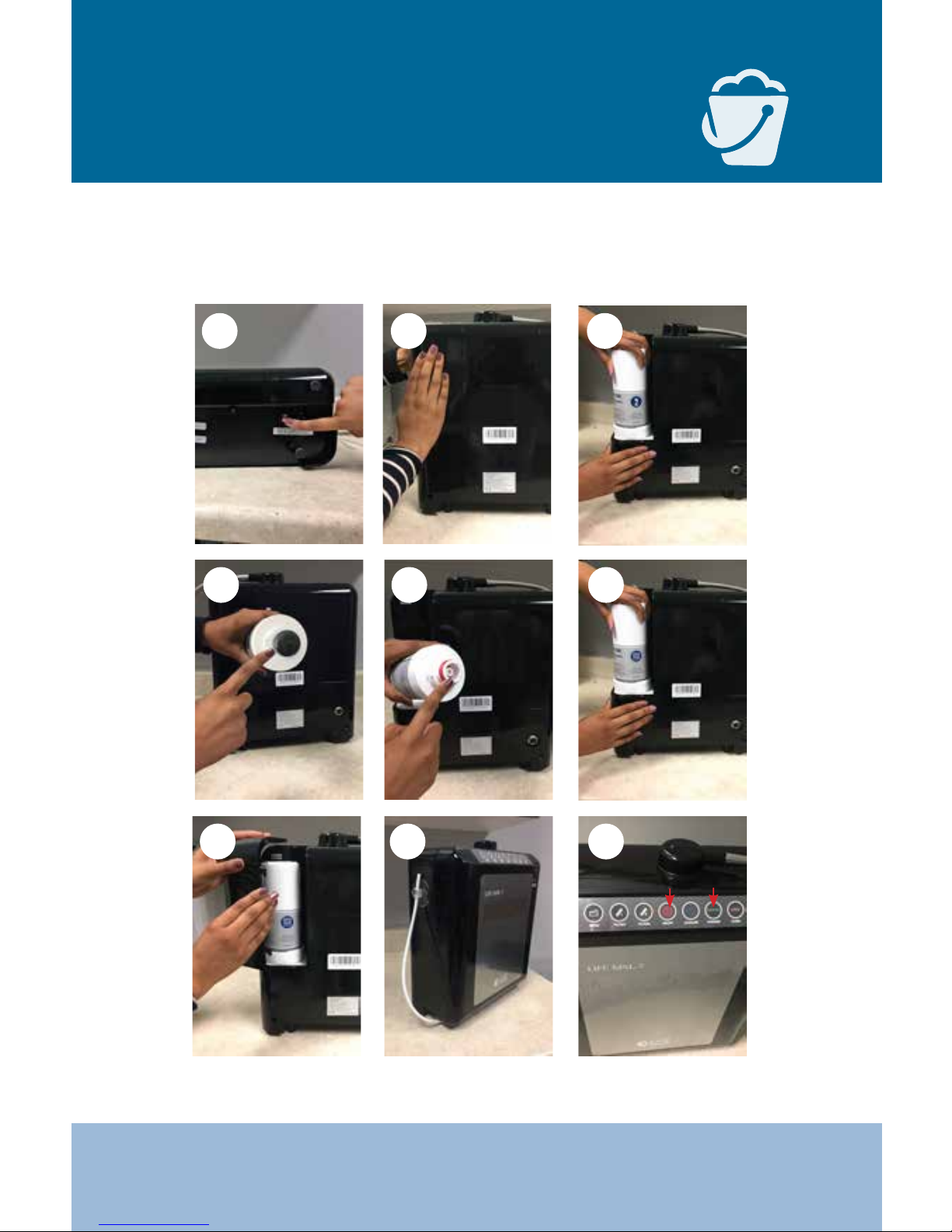
1. Turn o power to the ionizer by pressing the circle side of the power
switch located at the bottom of the ionizer.
2. Release the #2 lter cover (located on the left side when looking at the
back of the ionizer) by pushing up on the lter cover. Remove cover.
3. Remove the #2 lter by twisting the lter counter clockwise and then
lifting it out of the ionizer.
4. Remove the clear plastic packaging and black cap from the bottom of the
Citric Acid (Scaling) Cleaning Filter.
5. Before installing the lter, lube up the large outer O-ring with either
olive oil or vaseline. Line up the 2 tabs on the lter to the lter base in
the ionizer.
6. Once you have aligned the tabs on the lter with the ionizer, press down
and twist the lter clockwise until it stops. Make sure the circled number is
facing out toward you. If not, the ionizer will not run.
7. Replace the cover and turn the power switch back on.
8. Apply water pressure, press the “ON/OFF” button and produce water for
15 seconds. Press the “ON/OFF” button to stop extraction. For counter top
applications, remove the acidic tube from the sink and fasten it to the ionizer ensuring that the cleaning solution will not leak out of the ionizer.
Now let the unit sit for a minimum of 6-8 hours or for best results, overnight. The unit is full of a citric acid solution that will take many hours to
break down the scale that has built up in your unit. Letting it sit in the unit
for over a 6 hour period is okay and will not harm the ionizer.
9. Once the unit has sat for the recommended time, (leaving scaling
lter in place) unfasten the acidic tube from the ionizer and place it back in
the sink (for counter top applications) and then press the center “ON/OFF”
button. Let the unit extract water for 3-5 minutes. This step will purge all
of the citric solution, along with any scale, out of the machine.
The cleaning process is now complete. Remove the scaling lter and
throw it way or recycle it and reinstall a #2 lter with the circled number
facing out toward you.
NOTE: If you are putting in any new lters, do so after the cleaning.
Page 28
28
LIFE MXL-5 LifeIonizers.com/support
Filtration Media
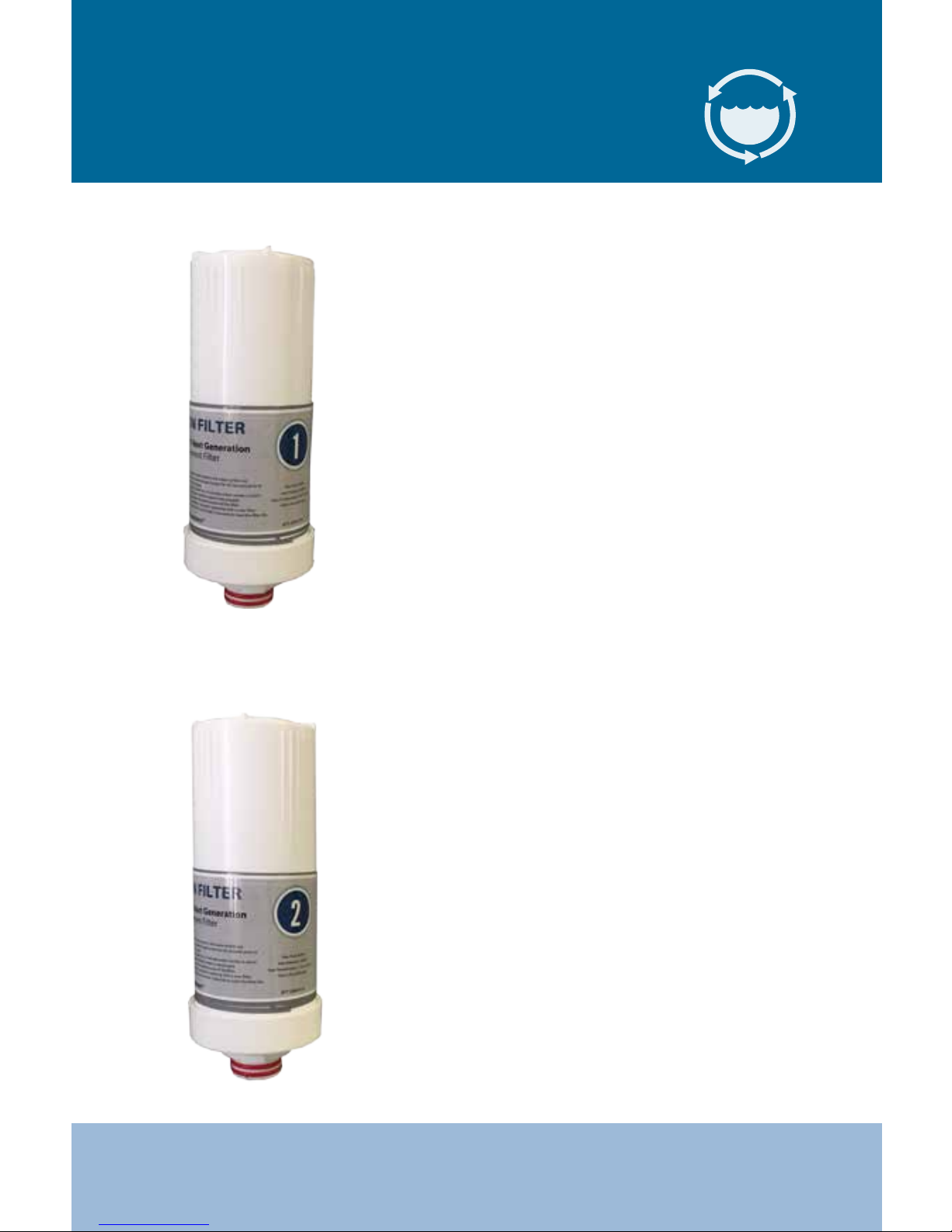
1. Thin Sediment lter
Blocks ne sediments in water
2. Life CleanTech™ Filtration
Reduces hard water deposits and
mineral buildup
3. Activated Carbon Filter
Anti-chlorine and anti-bacterial ltration
4. Easy-Notify Filter Change™ alerts
with RFID technology
Your water will always be fresh without
the need to mark your calendars.
1. Thin Sediment Filter
Blocks ne sediments in water
2. Vitamin C Ceramic Block®
Chlorine and chloramine reduction
3. Activated Carbon
Anti-chlorine and anti-bacterial ltration
4. KDF (Made in USA)
VOC and heavy metal reduction
5. Easy-Notify Filter Change™ alerts
with RFID technology
Your water will always be fresh without
the need to mark your calendars.
Filter 2
Filter 1
Page 29

29
LIFE MXL-5LifeIonizers.com/support
1. Shut o water supply at source (cold
water connect or diverter valve). Turn
on the ionizer to relieve water pressure.
Shut o ionizer.
2. Disconnect 1/4” tubing from inlet and outlet from pre-lter. Press collar in the then
pull on tubing to release.
3. Lay down the pre-lter and use the
pre-lter wrench to loosen lter from
housing. Slide pre-lter wrench from bottom to top. Twist pre-lter wrench counter clockwise to loosen.
4. Remove lter housing from bracket. Discard old
pre-lter. Install new pre-lter (Some pre-lters are
directional. These will say “this side toward cap”).
5. Lube up large black
O-ring located in lter
housing next to the
threads.
6. Install lter housing with lter onto the cap.
Tighten with pre-lter wrench clockwise.
7. Repeat process if needed to your other lters.
8. Connect inlet and outlet tubing.
9. Apply water pressure.
10. Run ionizer on “PURIFY” mode for around 3-5 minutes to ush out
pre-lter.
Pre-lter Replacement
Page 30
30
LIFE MXL-5 LifeIonizers.com/support
Acidic Cleaning Instructions
& Routine Maintenance
Many locations have excessive mineral content in the source water
that can build up inside the ionizer over time and cause blockage.
A routine acidic cleaning of the ionizer chamber will help maximize
the life and performance of your ionizer by reducing the build-up of
these minerals.
In areas with heavy mineral content, this is recommended once a
week. It is also recommended to do this procedure in the evening as
it takes several hours to be eective.
• Turn ionizer on by pressing ON/OFF (power) and set it on acid level 3
• Once ionizer starts producing water, count to 15
• Press ON/OFF (power) to stop the ionizer from producing water
• Let the water “soak” in the chamber overnight (12-24 hours)
• Run the unit again on acid level 3 for 5 minutes to rinse the
minerals from the machine
• Return the unit to normal operation
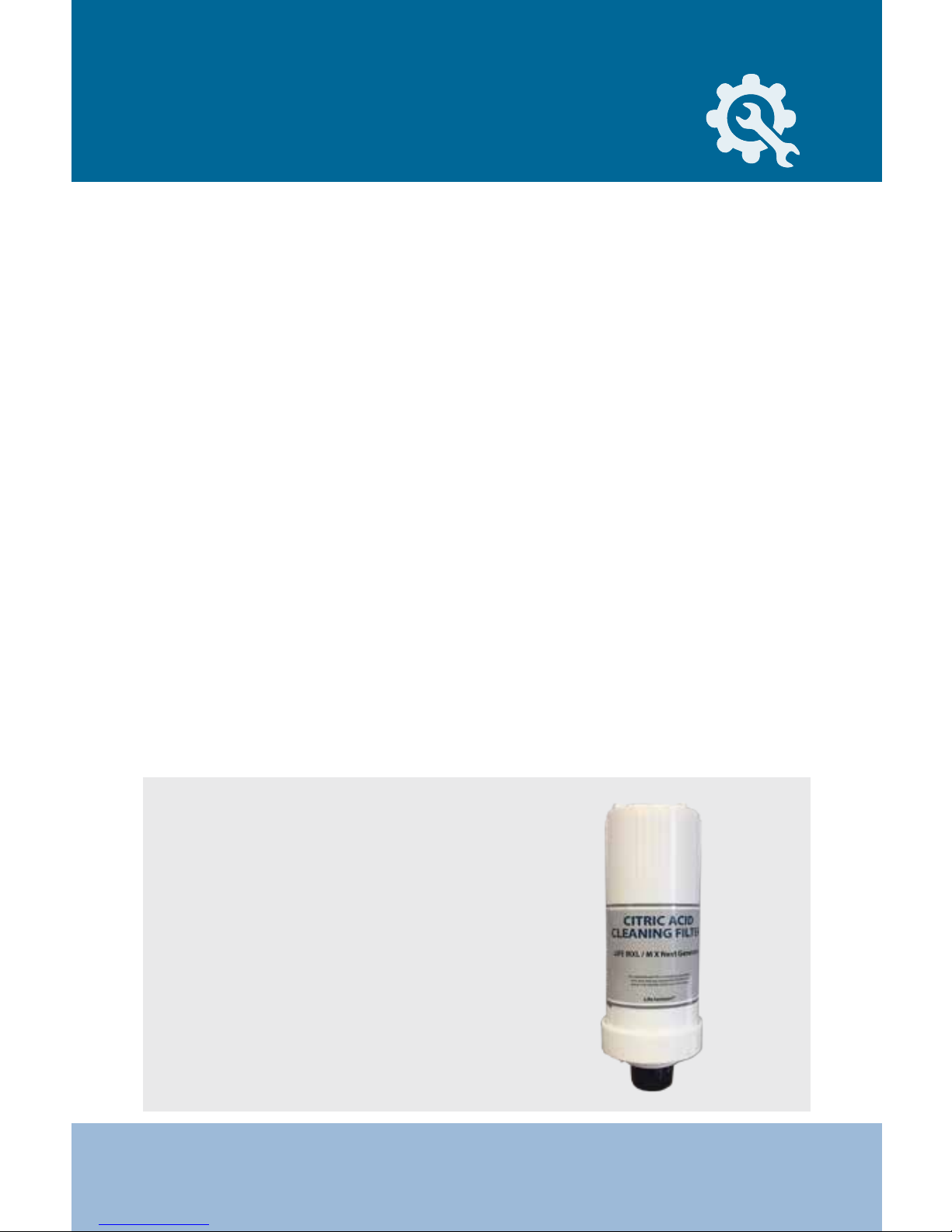
Our Citric Acid Cleaning Filter
(available for purchase online)
will be needed to clean the internal workings of the machine. This
procedure must be performed 3-4
times per year to keep warranty
intact. See page 31 & 32 for
instructions on how to do this.
Note:
Page 31
31
LIFE MXL-5LifeIonizers.com/support
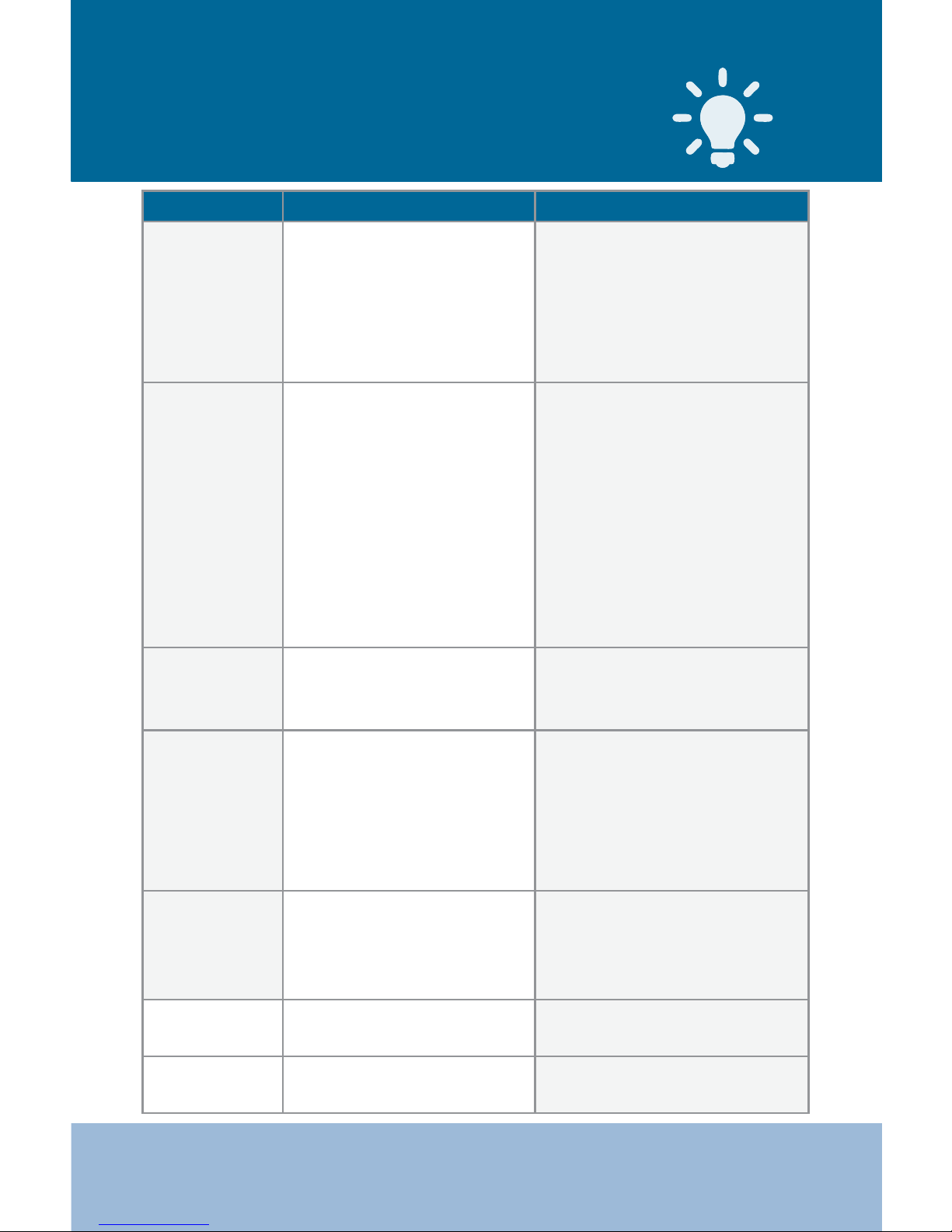
Condition Possible Problem Solutions
The power light
is not on or the
power switch
doesn’t seem to
work
• Unit may not be plugged in
correctly
• Unit may be plugged into an
outlet controlled by a switch
• Fuse at the bottom of the
machine may be blown
• Make sure power plug is plugged
into outlet correctly
• Plug unit into an outlet that is
constantly ‘hot’
• Replace the fuse at the bottom of
the unit
Water volume is
low or doesn’t
come out of the
unit
• Angle valve adapter and/or
cold water supply are turned
o
• One or more of the water
supply tubes is crimped
• House water pressure is too
low
• Pre-lter and/or unit lters
are blocked
• Make sure all water supply valves
are open
• Check all hoses and tubes
• Water pressure may be low for
many reasons (RO system, sprinkler
system, etc) Call LIFE Ionizers Tech
Support for assistance
• If unit has been used for 6 months
or more, replace lters as needed
Tubing is leaking • Tube is not seated
properly or there is a hole
in the tubing
• Disconnect and reconnect tubing
making sure it is seated 3/4
inches deep or replace tubing
Pre-lter is leaking • Tubing to pre-lter is not
seated deeply enough
• O-rings inside the pre-lter
are not seated correctly or are
being crimped due to cover
being on too tight
• Disconnect and reseat tubing at
least 3/4 inches in to lter
• Disconnect tubing and unscrew
cover. Make sure O-rings are
seated properly
Water has an
unpleasant odor
or taste
• The internal lters may need
to be replaced
• Water source requires a
pre-lter or RO lter
• Call your dealer to place an order
for new lters
• Call LIFE Ionizers for a water
quality report for your area
Unit is making an
unusual noise
• The problem is internal and
requires a qualied technician
• Unplug the unit from the power
source and call Technical Support
Ionizer is leaking • The problem is internal and
requires a qualied technician
• Unplug the unit from the power
supply and call Technical Support
Common Problems
and Solutions
Page 32

32
LIFE MXL-5 LifeIonizers.com/support
Operation Warnings/Error Messages
• Improper use may cause structural damage to the unit or physical injury.
• Do not make any adjustments after F60 in the mode menu.
• Do not place anything on the unit.
• Disassemble the alkaline water outlet pipe (power set hose) before
picking up the unit. Failure to do so may cause the hose to break
which will result in water leakage.
• Water drain outlet should not be closed.
• Be sure to check the electric power 110V/220V prior to use.
• In case of malfunction, contact LIFE Ionizers® Technical Support at
866-321-3116.
• Do not use hot water as the ionizer is meant for cool water only.
• Unplug the electric power when not in use for a long time (over 3 days).
• Do not use underground water, polluted water or metallic water.
• Do not use water with a temperature of over 35° Celcius/ 95° Fahrenheit
as it may cause damage or short lter life (Room temperature is best).
• Do not use pre-ionized water.
• Do not clean the unit with alcohol.
• Only use certied replacement lters.
• Be careful not to shake or drop the unit.
E1 : Water ow from ionizer is too low
If the following error messages appear on the LCD screen,
be sure to contact our technical support at 866-321-3116.
E2 : Water ow from faucet is too high
Error Codes:
Page 33
33
LIFE MXL-5LifeIonizers.com/support
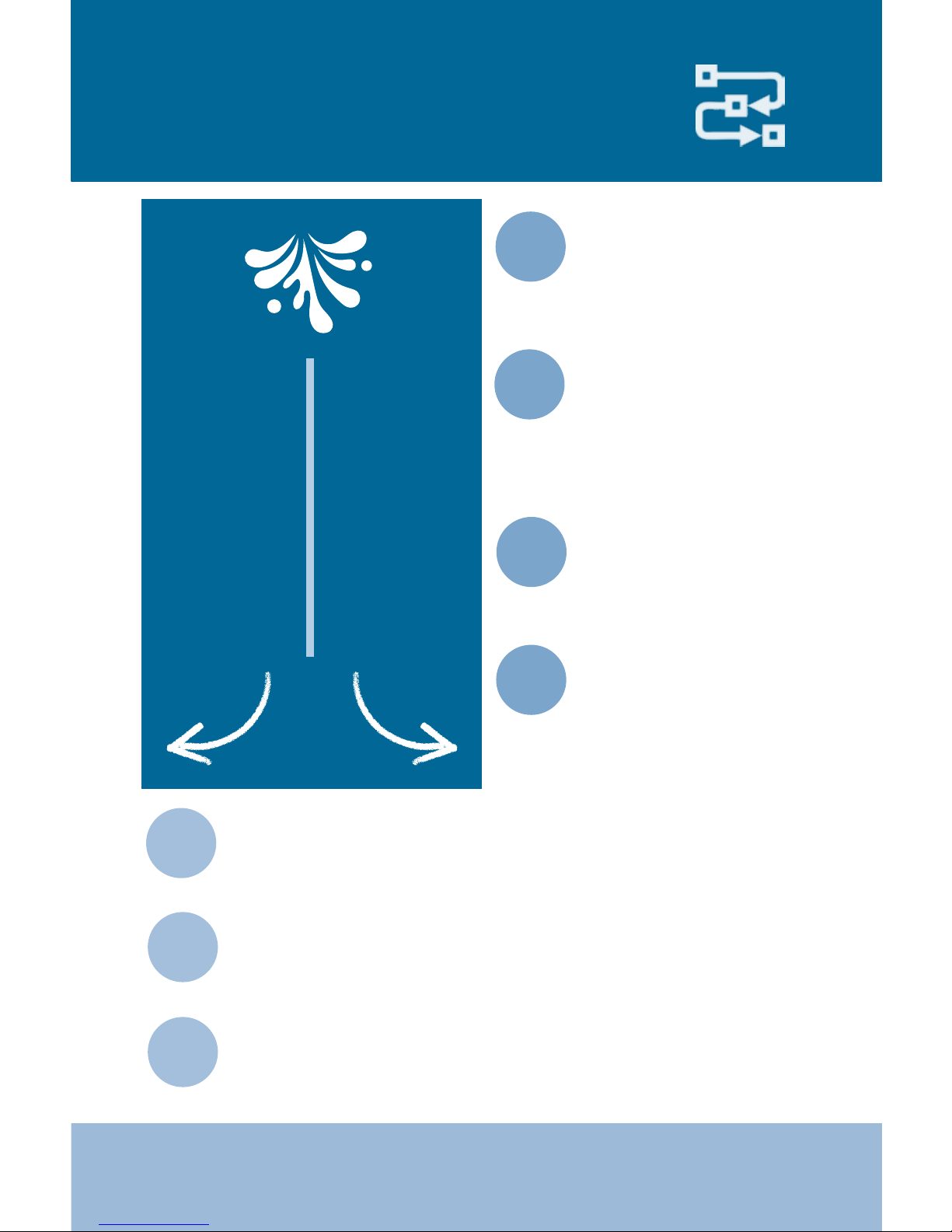
How Alkaline Water is Made
1
2
Converts the existing
mineral carbonates in
tap water into mineral
hydrates.
Splits alkaline minerals
– calcium and magnesium – from the carbonate in water using electromagnetism.
3
Separates water into
an alkaline stream and
an acidic stream.
Alkaline Side:
• Higher pH
• Antioxidant
Acidic Side:
• Lower pH
• Oxidative
Chlorine
Sulfur
Fluoride
Hydrogen Ions
Calcium
Magnesium
Potassium
Hydroxide Ions
The alkaline water side
of the ionizer attracts
alkaline mineral ions,
mostly calcium and
magnesium.
Pure calcium and magnesium combine with water molecules
by splitting them into a hydroxyl ion, and a hydrogen ion.
The hydroxyl ion combines with the minerals to form a
solution of water and mineral hydrates - Calcium hydroxide
and magnesium hydroxide.
Both of these mineral hydrates are more alkaline than the
mineral carbonates they replace, so they raise the pH of
the water making it more alkaline.
4
5
6
7
Page 34

34
LIFE MXL-5 LifeIonizers.com/support
Alkaline/Acidic/Puried Water
Please note that water will come out of both spouts when dispensing water.
A) When the Alkaline button is pressed, Alkaline water will be dispensed from the top spout
and acid water will be dispensed from the bottom spout.
B) When the Acid button is pressed, Acid water will be dispensed from the top spout and
Alkaline water will be dispensed from the bottom spout.
C) When the purify button is pressed, puried water will be dispensed from the bottom and
top spouts.
• 1. If the machine has not been used for several days, let the water run on
the “Puried Water” setting for at least 3-5 minutes before any operation.
• First time users who are not familiar with this water are recommended
to start with Ionized Alkaline Water level 1 for two weeks, then adjust
the level to Alkaline Water level 2 for two weeks, and then adjust again
to Alkaline Water level 3 for daily drinking. This gradual adjustment
will help your body get accustomed to the higher alkaline pH levels
• Store Ionized Alkaline Water in an airtight glass container, or our special
stainless steel bottle, and put it in a refrigerator for no longer than 2 days
for maximum benet. The rst 12 hours after ionization the water is
most eective.
Acidic water is not drinkable – DO NOT DRINK
• Use acid water only for disinfecting, cleaning, plants and as a
face/skin toner.
• Acidic water properties are the best 1-7 days after ionization if it
is put in an airtight glass container and kept refrigerated.
• It is best to drink puried water when taking medication.
• Children: Use puried water when preparing baby food.
ALKALINE WATER
ACIDIC WATER
PURIFIED WATER
Page 35

35
LIFE MXL-5LifeIonizers.com/support
Uses for Ionized
Alkaline/Acidic Water
Highly Ionized Alkaline Water: pH 11.0+
Highly Ionized Alkaline Water is useful for cleaning and preparing food.
Food Preparation: Wash Vegetables and fruit.
Cleaning: Clean cutting boards with. Good for cleaning oil and tough grime
from vents, as well as for general cleaning in the kitchen.
Stain Removal: The extra strength, absorption power will remove coee,
soy sauce and oil stains. Also great for getting out stubborn toilet bowl
stains.
Dishes: Use less detergent when hand washing dishes. Save on water bills,
as only one-third to one-forth of the usual amount of water is adequate
cleaning and for rinsing with detergent.
Alkaline Water pH: 8.0-10.0
For drinking, food preparation, watering plants, health maintenance.
Drinking: Drink at least eight 8 ounce glasses of water every day. Alkaline
water is part of a healthy diet.
Food Preparation: Clean vegetables and sh. Enhance the avor of
broccoli, onions, etc. by pre-boiling them in Ionized Alkaline Water.
Use less condiments and salt in your diet.
Rice: Use Ionized Alkaline Water for washing and cooking rice. The result is
delicious and uy rice.
Tea: Taste and aroma are everything to many people. You will be
surprised at the improved color, taste, and aroma. You can use less tea and
still achieve a full rich taste.
Page 36

36
LIFE MXL-5 LifeIonizers.com/support
Soups and Stews: Ionized Alkaline Water draws out the avor of
ingredients so they get tender and juicy. Therefore, less seasoning such as
salt and soy sauce are needed. This water is good for people who want to
reduce their salt intake.
Animals: Give puried water with food. Just like humans, animals should
not drink alkaline water for an hour before, during, or an hour after meals.
Crafts: Excellent for dyeing cloths, as well as other craft projects. You will
love the vibrant colors obtained when using this water.
Health: Through continuous use, the acidic tendency of your body can
be gradually corrected to an Alkaline levels. Drink at least half your body
weight in ounces in order to gradually change an acidic level to a slightly
Alkaline one.
Neutral Water pH: 7.0
Free of chlorine, rust and cloudiness. Clean water is delicious drinking
water.
Children: Use puried water with a pH of 7.0 when preparing baby food.
Slightly Acidic Water pH: 6.0
Plants: Watering plants and owers. Ionized Alkaline Water extends the
freshness and life of plants. Ionized Alkaline Water with a pH level of 9.0
can also restore the health of sick plants. Ionized Alkaline Water stimulates
germination and improves seeding development.
Page 37

37
LIFE MXL-5LifeIonizers.com/support
Acidic Water pH: 4.0-6.0
Face wash: The astringent properties of acidic water are eective in
toning and rming your skin. Pat the skin and leave to dry. This water is
also excellent as a toner after shaving.
Hair Care: Use this water to rinse your hair after shampooing. Reduces
annoying tangles and brings out a radiant shine. Keep in a spray bottle
and spray your hair and face when you’re out and about.
Bath Water: Add acidic water to your bath water to keep your tub free
of bathtub rings. Bathing in this water gives your body a warm and
comfortable feeling.
Pet Care: Spray your pet with this water and brush afterwards to obtain
soft and shiny fur. Great for grooming your pet!
Rinse Cycle: Soaking with acidic water before the spin cycle will soften
your clothes.
Cooking beans: Various types of beans, such as kidney beans and green
peas, will cook to perfection. Just be careful not to overcook your beans.
Acidic water will speed up the cooking time! This is energy saving water!
Fried Food: Fried food comes out nice and crispy if you rinse it in acidic
water before frying.
Frozen food: Spray foods with acidic water when freezing so that the
food, including sh and shrimp, does not lose its avor when thawed.
Stains: To remove stains, grime and grease, leave to soak in water for
24 hours.
Dishes: Dishes and glasses come out sparkling clean.
Polishing: Polish mirrors, eyeglasses, glass objects and windows to a
high sheen.
House Cleaning: Remove dirt from hardwood oors, ceramic tiles, etc.
without leaving a sticky residue.
Page 38
38
LIFE MXL-5 LifeIonizers.com/support
LIFE GRID Technology™ Drop-forged for greater durability, GRID
plates increase the antioxidant power and pH of alkaline water by as
much as 15%, like MESH plates, but GRID plates are far more durable.
GRID plates are the toughest, longest lasting water ionizer plates
made, they outlast at, MESH, and Hybrid plates.
SMPS Power System- Combine GRID Technology™ with our advanced
SMPS Power System (the same system used in High Denition
Televisions) and your LIFE Ionizer® M series will outperform any other
model in its class. The system generates up to 504 watts of power
and it can be adjusted to compensate for hard water problems. SMPS
Power means your system will run more eciently provide consistent
power, and will last longer.
UV Light System- LIFE UV Light Technology™ is an optional feature
on our LIFE Ionizers®. UV light addresses cysts and bacteria as the
water passes around the light inside the unit. UV Light is being used
by major municipal water authorities such as New York City and
Orange County, CA as added treatment to disinfect their water.
Performance Features
Page 39

39
LIFE MXL-5LifeIonizers.com/support
Frequently
Asked Questions
Q: What should I expect from drinking Ionized
Alkaline Water?
A: Everybody’s body is dierent, but typically new alkaline water
drinkers say they see or feel eects in a month or two. You will
noce a dierence in taste: Ionized Water is much smoother
tasng than convenonal water. It makes beer coee, tea,
juice, etc.
Q: Who should drink Ionized Alkaline Water?
A: People and pets can drink Ionized Alkaline Water.
Q: Is there anyone who should not drink Ionized
Alkaline Water?
A: Some people must start by drinking very small amounts of
Ionized Alkaline Water, such as 8 oz. of strength level 1 (one)
Ionized Alkaline Water per day. This is especially true of the
elderly who oen have unfortunately allowed heavy metals and
other toxins to accumulate in their bodies. Somemes years of
medicaon have accumulated in them. The health benets for
adults are well established through University studies and other
studies done on a variety of health issues. Since no one has tested
children we are making the following suggesons: Children 3
years and younger should drink water from the puried mode
and then start on the low levels of Ionized Alkaline Water when
they are older. Children between the ages of 4 years and 12
years should only drink Ionized Alkaline Water at strength level
1 (one) and strength level 2 (two). Children between the ages of
4 and 12 years of age should never drink Ionized Alkaline Water
at strength level 3 (three) or strength level 4 (four).
Page 40

40
LIFE MXL-5 LifeIonizers.com/support
Q: Should I take medication or supplements with
Ionized Alkaline Water?
A: Do not take prescripon or other medicaons for
approximately one hour before and aer drinking water.
Ionized alkaline water hydrates more eciently, therefore will
deliver more medicaon than tap water. However, we highly
recommend its use with vitamins, supplements, nutrional
powders and other nutraceucals because of its superior
quality and enhanced absorpon capabilies.
Q: Can a person become too Alkaline from drinking
Ionized Alkaline Water?
A: People have been known to drink as much as 1 to 2 gallons of
Ionized Water every day without a problem. It is rare for a person
to acquire Alkalosis, the condion of being too Alkaline.
Q: Should I drink alkaline water when I eat?
A: No maer what type of water, it is not suggested to drink
excessive amounts of liquids during meals. Small sips are
suggested to cleanse the palee, but you should not gulp any
type of water - alkaline, puried, etc.
Q: How much water should I drink and at what level?
A: At a minimum, you should drink half your body weight in
ounces per day. For example, a person weighing 100 pounds
should drink 50 ounces. You should start slow at strength Level
1 (one), drinking 1-3 glasses per day for the rst week. You may
increase the number of glasses per day during the rst week if
you do not noce any side eects. If you do not feel any u-like
symptoms at the end of the rst week, move up to strength
Level 2 (two). On strength Level 2 (two), drink 1-3 glasses per
day for the rst week. You may increase the number of glasses
per day during the rst week if you’re feeling good. On average,
two to three weeks per level; work your way up to a 10.5 pH
(strength Level 4 (four).
Page 41

41
LIFE MXL-5LifeIonizers.com/support
Q: Why do some people have u like symptoms when
rst drinking Ionized Alkaline Water?
A: If you start drinking Ionized Alkaline Water at too high of
a strength level (high pH level) then you might noce u like
symptoms. These symptoms are mild and they clear up in about
a week. This eect is typically noced by people whose bodies
have accumulated toxins in them.
Q: How does Ionized Alkaline Water affect athletes?
A: Many athletes alkalize their bodies prior to working out.
Alkaline water can help. Addionally, drinking alkaline water
during workouts is a great way to stay hydrated. Numerous studies
conducted on athletes since the 1940s have demonstrated that
even mild dehydraon impairs performance. Dr. Peter L. Kopko,
D.C. (Rered), recommends drinking 13 to 20 ounces (2-3 cups)
of water 2 hours before exercise and 5 to 10 ounces (about 1-2
cups) every 15 to 20 minutes of exercise, depending on your
total body weight.
Q: How long does Ionized Alkaline Water stay Ionized?
A: The Anoxidant (hydroxyl ions) will last approximately 18-24
hours. The Higher pH (Alkaline properes) will last approximately
1-2 weeks.
Q: Does Ionized Alkaline Water have any negative
effects?
Absolutely none, as long as it is used properly. Only the
Ionized Alkaline Water should be consumed. NEVER DRINK
THE ACIDIC WATER.
Page 42

42
LIFE MXL-5 LifeIonizers.com/support
Q: How does a water ionizer work?
A: Your counter top Alkaline LIFE Ionizer® LIFE MXL-5 can be
directly connected to a diverter valve at the end of your faucet.
Connecng directly to your faucet takes about 10-15 minutes.
Once connected your water ionizer uses a two step process to
transform your tap water into refreshing, healthy alkaline water.
Your ionizer’s rst task is to help lter out harmful components
of the water with our built-in dual lter system. The LIFE Ionizer®
achieves this by using mul-stage lters. In the second stage,
the ltered water passes into the electrodialysis chamber,
which is equipped with planum-coated tanium plates. An
electrical charge is introduced into this water. This is where the
electrodialysis takes place.
The water is separated into two streams (acid and Alkaline) of
Ionized water. The acid water (oxidized) makes up about 30%
of the water and the Ionized Alkaline Water 70%. The Ionized
Alkaline Water comes out of the faucet, and you use it for
drinking or cooking.
The acid (oxidized) water comes out of a separate hose leading
into the sink. The oxidaon potenal of the acid water makes it
a good sanizing agent, ideal for washing your hands, cleaning
food or kitchen utensils, and treang minor wounds and
eczema. Ionized acidic water is a miracle hair rinse!
The Chemistry of Ionized Water
A water ionizer splits the mineral carbonates found in tap water
into alkaline and acidic parts. The minerals, mostly calcium and
magnesium are alkaline, the carbonate, which is CO2 dissolved
in water, is acidic.
Page 43

43
LIFE MXL-5LifeIonizers.com/support
Alkaline minerals produce posively-charged ions which gather
at the negave electrode. These minerals chemically combine
with hydroxyl ions taken from water molecules and form
mineral hydrates.
Carbonate produces negavely charged ions which gather at
the posive electrode and combine with water to create a weak
soluon of carbonic acid.
Alkaline Ionized Water is drawn for drinking and cooking
through the main stainless steel spout. Acidic water drains into
the sink from a separate spout.
Q: How do I know when the lter needs replacing?
A: An LED or counter indicator on the front panel gives an
indicaon of remaining lter life. Generally the 1st lter will last
for about 8 months, the 2nd lter for about 12 months (when up
to 2.5 gallons of water is produced per day), but this depends on
the source of water and the amount of use. For example, if your
tap water contains between 0.4 and 1.0 ppm (parts per million)
of chlorine, a lter can last 12 months for one person’s use. If
greater than 1.0 ppm, the lter may last 8 months. If you only
use your ionizer on a limited basis, you will sll need to change
them annually so they are working correctly.
NOTE: Your ionizer has a new RFID Technology built into the
internal lters which will give you a warning that your lter life
is low and that you should replace your lter. If the lter life runs
out, the ionizer will not funcon unl the lter is changed. It’s
important to have lters changed on me so the performance
of your ionizer will connue.
Page 44

44
LIFE MXL-5 LifeIonizers.com/support
Q: Where is the serial number located?
A: On the back of the ionizer, you will see a bar code scker.
The serial number is located below the bar code.
Q: What should be done if the machine is not to be
used for 7 days or more?
A: Remove the filter from the main body, wrap in plastic
wrapping, and store in a refrigerator. Remove the power plug.
When ready to use again, install the lter and run in the Ionizer
in the ‘PURIFIED’ mode for approximately 3 minutes before
using the water.
Q: What does it mean when water ows through the
main body and it becomes warm?
A: At the start of water ow, warm water may ow out due to
room temperature or heat from the main body during stoppage.
This is not a malfuncon. Use the machine aer starng water
ow.
Q: There are white substances on the bottom of my
Alkaline Ionized water storage container. What are
these?
A: This phenomenon is caused by the calcium mineral
substances in Alkaline Ionized water. Parcularly, if the carboxyl
group (CO3) is present, it will bind to the calcium carbonate (Ca
CO3), creang such substances. This is apparent evidence of
electrolysis. Although it is safe to drink, wash the container - add
one spoon of edible vinegar and water to the container, leave
the container for approximately 1 hour, and wash the container.
Page 45

45
LIFE MXL-5LifeIonizers.com/support
Q: What is hard water?
A: According to the U.S. Geological Survey, more than 85
percent of the United States geography has hard water. Hard
water forms when naturally occurring minerals enter water
sources. Over me these minerals are absorbed by groundwater.
The two most common types of minerals found in hard water
are calcium and magnesium compounds. The Water Quality
Associaon of the United States denes hard water as water
containing dissolved hardness minerals above 1 GPG (grains
per gallon). The most common hardness causing minerals are
Calcium and Magnesium. Levels of hardness are classied as
follows:
So Water - less than 1 GPG,
Slightly hard - 1 to 3.5 GPG
Moderately hard - 3.5 to 7 GPG
Hard - 7 to 10.5 GPG
Very Hard - 10.5 and higher GPG
Q: Why do I want to adjust the amperage on my
Water Ionizer?
A: As you know, all water sources are not created equal.
Your water source plays an important role on how your water
Ionizer creates Ionized Alkaline Water. Being able to adjust
the amperage will allow you to nd the opmum pH for the
best producon of Alkaline Ionized water based on your water
source.
Page 46

46
LIFE MXL-5 LifeIonizers.com/support
Q: Do I need to hire a plumber to install the units?
A: Most people nd it is not necessary to call a plumber for most
standard installaons. For custom installaons, a plumber may
be needed depending on the individual circumstances.
Q: What do I do if the lters are leaking?
A: It is important to note where on the lter it is leaking. Most
leaking comes from ngs that are not seated properly. Reseat
the tubing into the lter by pushing in rmly and then pulling
back. It may be necessary to re-trim the end of the tubing to get
a fresh surface. Make sure to shut o the water before working
with the water supply lines.
Q: How do I set up the pre-lter unit?
A: The pre-lter is installed in the supply line on the ionizer.
Quick connects are provided for your convenience. Simply push
the tubing in the connector and it seals automacally. When
installing the lter for the rst me, it is suggested to let the
lter ll with water for a few minutes before turning on the
ionizer.
Q: How do I know what pre-lter I need?
A: A water report is necessary to determine what type of lter
is needed. Well water may need to be tested by an independent
water tesng company. Please contact your sales representave
and they will pull your Federal Water Report, analyze it, and
recommend lters.
Page 47

47
LIFE MXL-5LifeIonizers.com/support
Q: How do I clean the internal plates?
A: Use the Citric Acid Cleaning Filter 3 to 4 mes per year.
Q: What is the product warranty?
A: To validate your warranty, you must complete the warranty
card and return it or register online within 30 days of purchase.
The warranty that is in eect at the me the machine is
purchased is the one that is honored. Our warranty centers are
in the US, Canada, Australia and Europe for your convenience.
We are the oldest and largest distributors of Alkaline home,
commercial and industrial water ionizers in North America
with the nest quality service second to none. For Europe, Asia
and Africa we have a service center in the UK. We value our
customers and are very grateful for referrals. This is why we
promote such a generous return policy and why we can do with
condence based on 18 years of growth and happy tesmonials.
Neglect includes using the unit in a maer inconsistent with
the directions in the owner’s manual, as breakage resulng
from dropping the unit or other carelessness. The internaonal
customer pays all internaonal customs, government fees, levies
and/or any other fees that are incurred. Warranes are nontransferable. The warranty is valid when all regular maintenance
rounes are followed. The following roune maintenance
procedures will help keep your Ionizer running at the opmal
performance level:
• We recommend Internal lters be changed annually.
• Citric acid cleaning lter should be used 3 to 4 mes
per year.
• Pre-lters should be changed annually.
• Pre-lter housings should be changed every two years.
Following these easy steps ensures opmal performance and
guarantees your Lifeme Warranty on part & labor.
Page 48

48
LIFE MXL-5 LifeIonizers.com/support
If you buy a LIFE Ionizer® from an unauthorized seller/dealer,
your warranty is void and will not be honored by life Ionizers®.
Feel Free to contact us to conrm if the Dealer is an Authorized
Dealer - 888 688 8889: Je or Kara
The LIFE M5 X NG has a Seven (7) years - full parts and labor
warranty.
Q: What is your return policy?
A: We invite you to try out our new range of LIFE Ionizer® and
enjoy the benets for 60 days. We are so sure that you will be
sased with your ionizer that we oer you a 60-day money back
guarantee. If at any me in the rst 60 days you wish to return
your unit, we will give you a full refund, minus a 15% return
fee and processing fee, as long as your ionizer is returned in asnew condion and in its original packing. “As-new condion”
means the ionizer is not scratched, damaged or broken in any
way and is returned with all hoses, connectors, parts, manuals
and DVDs etc. The original shipping charges will be deducted
and return shipping charges must be prepaid by the purchaser.
No return can be accepted without our prior authorizaon.
We will refuse unauthorized returns. There are no returns on
merchandise purchased wholesale or through nance plans.
Q: What is your repair policy?
Warranes cover failures due to defects in materials and
workmanship which occur during normal wear and tear.
Warranty does not cover damage which occurs in return
shipment, or failures which result from accident, misuse,
abuse, neglect, mishandling, faulty installaon, misapplicaon,
improper inseron of consumables, set-up adjustments,
maladjustment of consumer controls, improper operaon
or maintenance, alteraon, modicaon, power line surge,
Page 49

49
LIFE MXL-5LifeIonizers.com/support
improper voltage supply, or service by anyone other than a
LIFE Ionizer® authorized repair facility. LIFE Ionizer® will repair
or replace any malfunconing ionizer for the specied me
frames disclosed above. If you are out of your warranty period,
then labor is billed at $60/hr. Average repair me is less than
one hour and in some cases there is no charge. Minimum
charge is $0 to a maximum of $199 per occurrence. Customer
is responsible for shipping and shipping charges to and from
Repair Center.
Limits and Exclusions:
There are no express warranes except as listed above. From the
date of purchase the warrantor is not responsible for incidental
or consequenal damage; for damages arising out of the use of
any unauthorized aachment; for damages resulng from the
use of the product with a defecve water faucet. All expressed
and implied warranes, including warranes of merchantability
and tness for parcular purpose, are limited to the applicable
warranty period. The warranty is voided if parts used are not
provided by LIFE Ionizer
®
. Company products are sold subject
only to the applicable company standard printed warranty in
eect at the me of sale and such warranty shall be in lieu
of all other warranes expressed or implied. In addion, this
equipment, technology and products have not been evaluated by
the FDA, nor are they intended to treat, cure, migate, diagnose
or prevent any illness or disease. The following technology is
not intended to replace the advice of your family physician.
Page 50

50
LIFE MXL-5 LifeIonizers.com/support
Page 51

51
LIFE MXL-5LifeIonizers.com/support
www.LifeIonizers.com/Support
6352 Corte Del Abeto, Suite H
Carlsbad, CA 92011
866.321.3116
760.431.8047
*When calling technical support please be
prepared to give your ionizer serial number
located on the back of the unit.
Contact U
s
Page 52
52
LIFE MXL-5 LifeIonizers.com/support
rev 9-29-17
 Loading...