

Page 1
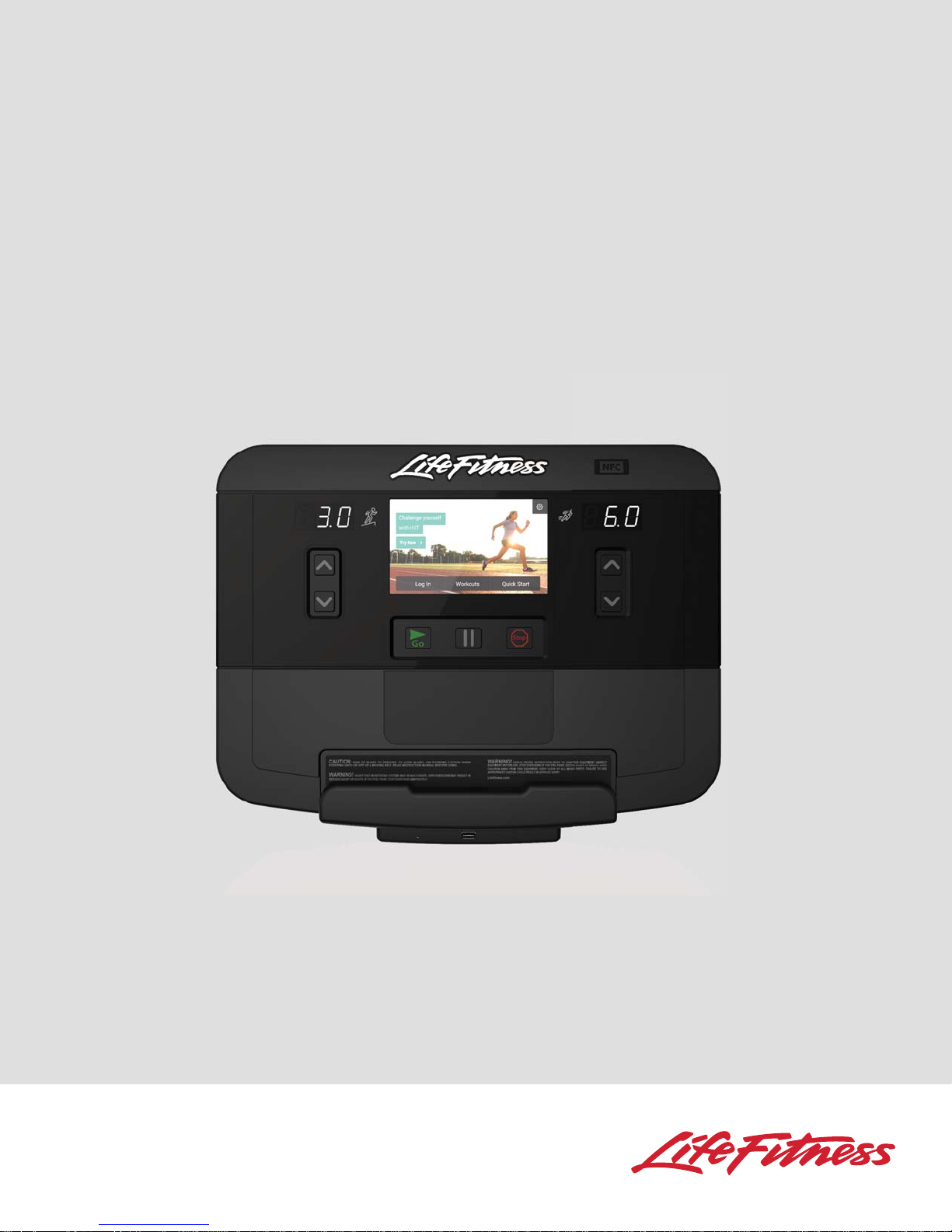
INTEGRITY X CONSOLE
Integrity INTSX, INTDX, and Club Series Treadmills
Operation Manual
1006253-0001 REV AA
Page 2

CORPORATE HEADQUARTERS
Columbia Centre III, 9525 West Bryn Mawr Avenue, Rosemont, Illinois 60018 • U.S.A.
847.288.3300 • FAX: 847.288.3703
Service phone number: 800.351.3737 (toll-free within U.S.A., Canada)
Global Website: www.lifefi tness.com
INTERNATIONAL OFFICES
AMERICAS
North America
Life Fitness, Inc.
Columbia Centre III
9525 West Bryn Mawr Avenue
Rosemont, IL 60018 U.S.A
Telephone: (847) 288 3300
Fax: (847) 288 3703
Service Email:
customersupport@lifefi tness.com
Service Website: www.lifefi tness.com/parts
Sales/Marketing Email:
consumerproducts@lifefi tness.com
Operating Hours: 7:00 am-6:00 pm (CST)
Brazil
Life Fitness Brasil
Av Reboucas 2315
São Paulo, SP 05401-300
BRAZIL
SAC: 0800 773 8282
Telephone: +55 (11) 3095 5200
Fax: +55 (11) 3095 5201
Service Email: suporte@lifefi tness.com.br
Sales/Marketing Email:
lifefi tness@lifefi tness.com.br
Service Operating Hours:
9:00 - 17:00 (BRT) (Monday-Friday)
Store Operating Hours:
9:00 -20:00 (BRT) (Monday-Friday)
10:00 - 16:00 (BRT) (Saturday)
Latin America & Caribbean*
Life Fitness Inc.
Columbia Centre III
9525 West Bryn Mawr Avenue
Rosemont, IL 60018 U.S.A
Telephone: (847) 288 3300
Fax: (847) 288 3703
Service Email:
customersupport@lifefi tness.com
Sales/Marketing Email:
consumerproducts@lifefi tness.com
Operating Hours: 7:00am-6:00pm (CST)
______________________________________
EUROPE, MIDDLE EAST, & AFRICA
(EMEA)
Netherlands & Luxemburg
Life Fitness Atlantic BV
Bijdorpplein 25-31
2992 LB Barendrecht
THE NETHERLANDS
Telephone: (+31) 180 646 666
Fax: (+31) 180 646 699
Service Email:
service.benelux@lifefi tness.com
Sales/Marketing Email:
marketing.benelux@lifefi tness.com
Operating Hours: 9.00h-17.00h (CET)
* Also check www.lifefitness.com for local representation or distributor/dealer.
United Kingdom & Ireland
Life Fitness UK LTD
Queen Adelaide
Ely, Cambs, CB7 4UB
Telephone: General Offi ce (+44)
1353.666017
Customer Support (+44) 1353.665507
Fax: (+44) 1353.666018
Service Email: uk.support@lifefi tness.com
Sales/Marketing Email: life@lifefi tness.com
Operating Hours:
General Offi ce: 9.00am - 5.00pm (GMT)
Customer Support: 8.30am - 5.00pm
(GMT)
Germany & Switzerland
Life Fitness Europe GMBH
Siemensstraße 3
85716 Unterschleißheim
GERMANY
Telephone: (+49) 89.31 77 51.0 (Germany)
(+41) 0848 000 901 (Switzerland)
Fax: (+49) 89.31 77 51.99 (Germany)
(+41) 043 818 07 20 (Switzerland)
Service Email:
kundendienst@lifefi tness.com
Sales/Marketing Email:
kundenberatung@lifefi tness.com
Operating Hours: 08.30 -16.30h (CET)
Austria
Life Fitness Austria
Vertriebs G.m.b.H.
Dückegasse 7-9/3/36
1220 Vienna
AUSTRIA
Telephone: (+43) 1.61.57.198
Fax: (+43) 1.61.57.198.20
Service Email: kundendienst@lifefi tness.
com
Marketing/Sales Email:
kundenberatung@lifefi tness.com
Operating Hours: 08:30-16.30.h (MEZ)
Spain
Life Fitness IBERIA
C/Frederic Mompou 5,1º1ª
08960 Sant Just Desvern Barcelona
SPAIN
Telephone: (+34) 93.672.4660
Fax: (+34) 93.672.4670
Service Email: servicio.tecnico@lifefi tness.
com
Sales/Marketing Email:
info.iberia@lifefi tness.com
Operating Hours:
9.00h-18.00h (Monday-Thursday)
8.30h-15.00h (Friday)
Belgium
Life Fitness Benelux NV
Parc Industrial de Petit-Rechain
4800 Verviers
BELGIUM
Telephone: (+32) 87 300 942
Fax: (+32) 87 300 943
Service Email:
service.benelux@lifefi tness.com
Sales/Marketing Email:
Operating Hours: 9.00h -17.00h (CET)
All Other EMEA Countries &
Distributor Business C-EMEA*
Bijdorpplein 25-31
2992 LB Barendrecht
THE NETHERLANDS
Telephone: (+31) 180 646 644
Fax: (+31) 180 646 699
Service Email:
service.db.cemea@lifefi tness.com
Sales/Marketing Email:
Operating Hours: 9.00h-17.00h (CET)
____________________________________
ASIA PACIFIC (AP)
Japan
Life Fitness Japan
Japan Nippon Brunswick Bldg., #8F
5-27-7 Sendagaya
Shibuya-Ku, Tokyo
Japan 151-0051
Telephone: (+81) 3.3359.4309
Fax: (+81) 3.3359.4307
Service Email: service@lifefi tnessjapan.com
Sales/Marketing Email:
sales@lifefi tnessjapan.com
Operating Hours: 9.00h-17.00h (JAPAN)
Hong Kong
Life Fitness Asia Pacifi c LTD
32/F, Global Trade Square
21 Wong Chuk Hang Road
HONG KONG
Telephone: (+852) 2575.6262
Fax: (+852) 2575.6894
Service Email:
HongKongEnquiry@lifefi tness.com
Sales/Marketing Email:
Operating Hours: 9.00h-17.00h
Service Operating Hours: 9.00h-18.00h
All Other Asia Pacifi c countries &
distributor business Asia Pacifi c*
Life Fitness Asia Pacifi c LTD
32/F, Global Trade Square
21 Wong Chuk Hang Road
HONG KONG
Telephone: (+852) 2575.6262
Fax: (+852) 2575.6894
Service Email:
HongKongEnquiry@lifefi tness.com
Sales/Marketing Email:
Operating Hours: 9.00h-17.00h
Service Operating Hours: 9.00h-18.00h
eting.benelux@lifefi tness.com
mark
marketing.db.cemea@lifefi tness.com
Marketing.HK.Asia@lifefi tness.com
Marketing.HK.Asia@lifefi tness.com
1
Page 3
Table of Contents
Important Safety Instructions 5
Integrity X Console Overview 7
Entertainment Rack Overview 8
Home Screen Overview 9
Log In 10
Log In - Welcome Screen 11
Select Workout 12
Heart Rate Workouts 13
Life Fitness Fit Test 15
Options - Edit Weight 17
Options - Select Language 18
Options - Connect Bluetooth® Device 19
Workout Mode Overview 20
Incline Interval Workout 21
Workout Metrics 22
Data Entry Options 23
Edit Goal 24
Pause Workout 25
Cool Down 26
Workout Summary - Logged In 27
Workout Summary - Not Logged In 28
Settings (Main) Menu / Diagnostics 29
Preventive Maintenance Tips 30
Troubleshooting 31
Integrity X Console Specifi cations 33
Warranty Information 34
2
Page 4
Before using this product, it is essential to read this ENTIRE operation manual and ALL assembly instructions.
It describes equipment setup and instructs members on how to use it correctly and safely.
Avant d’utiliser ce produit, il est indispensable de lire ce manuel d’utilisation dans son INTÉGRALITÉ, ainsi que TOUTES
les instructions d’installations.
Ce manuel explique comment installer l’équipement et comment l’utiliser correctement et sans danger.
FCC Warning - Possible Radio / Television Interference
EN ISO 20957 Class SB: Professional and / or commercial use.
Note: This equipment has been tested and found to comply with the limits for a Class A digital device, pursuant to part
15 of the FCC rules. These limits are designed to provide reasonable protection against harmful interference when the
equipment is operated in a commercial environment. This equipment generates, uses and can radiate radio frequency
energy, and if not installed and used in accordance with the instruction manual, may cause harmful interference to radio
communications. Operation of this equipment in a residential area is likely to cause harmful interference in which case
the user will be required to correct the interference at his own expense.
EN ISO 20957 Class H: Home use.
Note: This equipment has been tested and found to comply with the limits for a Class B digital device, pursuant to
part 15 of the FCC rules. These limits are designed to provide reasonable protection against harmful interference in a
residential installation. This equipment generates, uses and can radiate radio frequency energy, and if not installed and
used in accordance with the user manual, may cause harmful interference to radio communications. However, there is
no guarantee that the interference will not occur in a particular installation. If this equipment does cause harmful interference to radio or television reception, which can be determined by turning the equipment off and on, the user is
encouraged to try to correct the interference by one or more of the following measures:
Reorient or relocate the receiving antenna.
Increase the separation between the equipment and the receiver.
Connect the equipment into an outlet on a circuit different from that to which the receiver is connected.
Consult the dealer or an experienced radio/TV technician for help.
CAUTION: Any changes or modifi cations to this equipment could void the product warranty.
MISE EN GARDE : tout changement ou toute modifi cation de ce matériel peut annuler la garantie du
produit.
Any service, other than cleaning or user maintenance, must be performed by an authorized service representative.
3
Page 5
This Operation Manual describes the functions of the following products:
Integrity X Console for INTSX, INTDX, and Club Series Treadmills
See “Specifi cations” in this manual for product specifi c features.
Statements of Purpose:
The Life Fitness Treadmill is an exercise machine that enables users to walk or run, in place, indoors on a
moving surface.
CAUTION: Health-related injuries may result from incorrect or excessive use of exercise equipment. Life Fitness
STRONGLY recommends seeing a physician for a complete medical exam before undertaking an exercise program, particularly if the user has a family history of high blood pressure or heart disease, is over the age of 45,
smokes, has high cholesterol, is obese, or has not exercised regularly in the past year.
If, at any time while exercising, the user experiences faintness, dizziness, pain, or shortness of breath, he or she must
stop well immediately.
MISE EN GARDE: Liés à la santé des blessures peuvent résulter de l’utilisation incorrecte ou excessive
de l’équipement d’exercice. Life Fitness recommande FORTEMENT de consulter un médecin pour subir
un examen médical complet avant de commencer tout programme d’exercice, et tout particulièrement
si l’utilisateur a des antécédents familiaux d’hypertension ou de troubles cardiaques, s’il a plus de 45
ans, s’il fume, s’il a du cholestérol, s’il est obèse ou n’a pas fait d’exercice régulièrement depuis un an.
Si, pendant l’utilisation de l’appareil, l’utilisateur ressent un malaise, des vertiges, des vertiges, des douleurs ou
des diffi cultés à respirer, il doit s’arrêter immédiatement.
4
Page 6
IMPORTANT SAFETY INSTRUCTIONS
Read all instructions before using Life Fitness products.
WARNING:
ness STRONGLY recommends seeing a physician for a complete medical exam before undertaking an exercise
program, particularly if the user has a family history of high blood pressure or heart disease, is over the age of
45, smokes, has high cholesterol, is obese, or has not exercised regularly in the past year. If, at any time while exercising, the user experiences faintness, dizziness, pain, or shortness of breath, he or she must stop immediately.
Health-related injuries may result from incorrect or excessive use of exercise equipment. Life Fit-
CAUTION: Any changes or modifi cations to this equipment could void the product warranty.
DANGER: To reduce the risk of electrical shock, always unplug Life Fitness products before cleaning or at-
tempting any maintenance activity.
WARNING: To reduce the risk of burns, fi re, electric shock, or injury, it is imperative to connect each product
to a properly grounded electrical outlet.
WARNING: Heart rate monitoring systems may be inaccurate. Over exercising may result in serious injury or
death. If you feel faint, stop exercising immediately.
WARNING: Keep the area 6.5 ft. (2 m) by 3 ft. (0.9 m) behind the Life Fitness treadmill clear of any obstruc-
tions, including walls, furniture, and other equipment. Contact Life Fitness Customer Support Services for an optional longer power cord if necessary.
WARNING: Be sure the emergency stop lanyard is clipped to the user and in proper position on the treadmill
before beginning any workout.
WARNING: The belt centering adjustment must be performed if the belt is not between the marks indicating
the maximum allowed lateral positions. Refer to Treadmill Assembly Instructions.
CAUTION: Risk of injury to persons – to avoid injury, use extreme caution when stepping onto or off of a mov-
ing belt.
Read assembly instruction manual before using.
Never operate a Life Fitness product if it has a damaged power cord or electrical plug, or if it has been
dropped, damaged, or even partially immersed in water. Contact Life Fitness Customer Support Services.
Position the product so that the power cord plug to the wall is accessible to the user. Make sure that the power
cord is not knotted or twisted and that it is not trapped under any equipment or other objects.
If the electrical supply cord is damaged, it must be replaced by the manufacturer, an authorized service agent,
or a similarly qualifi ed person to avoid a hazard.
Always follow the console instructions for proper operation.
This appliance is not intended for use by persons (including children) with reduced physical, sensory, or mental
capabilities, or lack of experience or knowledge unless they have supervision or been given instruction con-
cerning the use of the appliance by a person responsible for their safety. Keep children under the age of 13
away from the machine.
Do not use this product outdoors, near swimming pools or in areas of high humidity.
Never operate a Life Fitness product with the air openings blocked. Keep air openings free of lint, hair, or any
other obstructing material.
Never insert objects into any opening in these products. If an object should drop inside, turn off the power, un-
plug the power cord from the outlet, and carefully retrieve it. If the item cannot be reached, contact Life Fitness
Customer Support Services.
Never place liquids of any type directly on the unit, except in an accessory tray or holder. Containers with lids
are recommended.
Do not use these products in bare feet. Always wear shoes. Wear shoes with rubber or high-traction soles. Do
not use shoes with heels, leather soles, cleats or spikes. Make sure no stones are embedded in the soles.
5
Page 7

IMPORTANT SAFETY INSTRUCTIONS
Keep all loose clothing, shoelaces, and towels away from moving parts.
Do not reach into, or underneath, the unit or tip it on its side during operation.
Keep children away from the products. Do not allow other people to interfere in any way with the user or
equipment during a workout.
Allow LCD consoles to “normalize” with respect to temperature for one hour before plugging the unit in and
using.
The product should never be left unattended when plugged in. Disconnect from the electrical outlet when not
in use, and before putting on or taking off parts. To disconnect, turn power OFF at the ON/OFF switch, then re-
move plug from electrical outlet.
Keep the power cord away from heated surfaces. Do not pull the equipment by the power cord or use the cord
as a handle. Do not run the power cord on the fl oor under or along the side of the treadmill.
Handrails may be held to enhance stability as needed, but are not for continuous use.
Never mount or dismount the treadmill while the running belt is moving. Use the handrails whenever addi-
tional stability is required. In case of an emergency, such as tripping, grasp the handrails, and place the feet on
the side platforms.
Never walk or jog backwards on the treadmill.
Do not use this product in areas where aerosol spray products are being used or where oxygen is being ad-
ministered. Such substances create the danger of combustion and explosion.
The system causes immobilization of the treadmill when a pre-defi ned hard key sequence has been activated.
This sequence is currently defi ned as 3 STOP key presses followed by 3 SPEED DOWN ARROW key presses. To
prevent false toggling of the Immobilized feature, this sequence must be done in a 5-10 second period.
Use these products for their intended use as described in this manual. Do not use attachments that have not
been recommended by the manufacturer.
In conformity with the European Union Machinery Directive 2006/42/EC, this equipment unloaded runs at
sound pressure levels below 70 dB (A) at the average operating speed of 12 km/hr (commercial units) and 8
km/hr (home units). Noise emission under load is higher than without load.
Read all warnings on each product prior to starting a workout.
Free standing equipment shall be installed on a stable and leveled base.
If warnings are missing or damaged, please contact Life Fitness immediately for replacement warning labels.
Warning labels are shipped with every product and should be installed before product is used. Life Fitness is
not responsible for missing or damaged warning labels.
Health and Environmental Regulations Warning - This product may contain chemicals known to the State of
California to cause cancer, birth defects, or other reproductive harm. For more information related to the Euro-
pean Commission Regulation (EC) No. 1907/2006 (REACH) and the California Safe Drinking Water and Toxic
Enforcement Act of 1986 (Proposition 65), please visit https://www.lftechsupport.com/web/guest/environmen-
tal-regulations-information.
SAVE THESE INSTRUCTIONS FOR
FUTURE REFERENCE.
6
Page 8
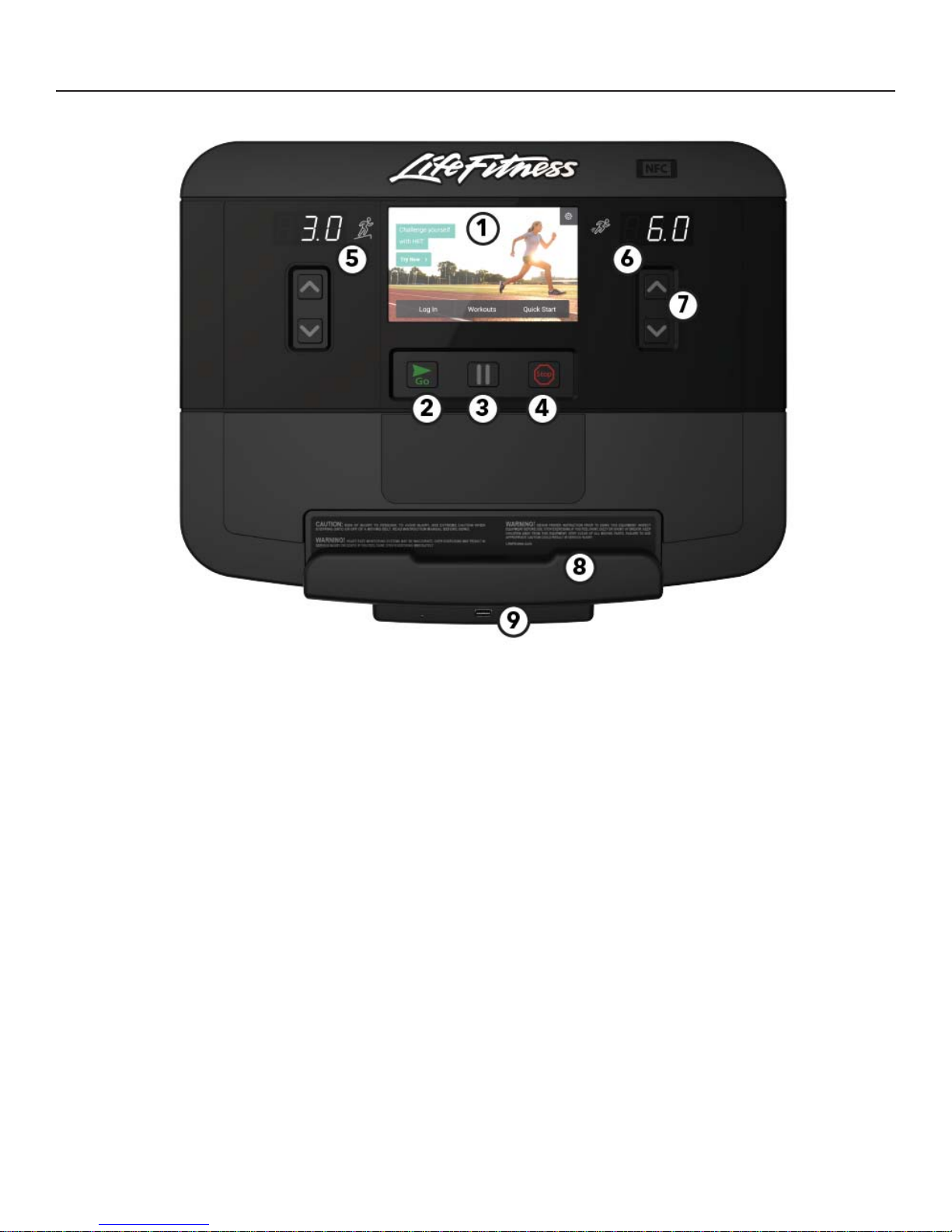
INTEGRITY X CONSOLE OVERVIEW
1. Touch Screen Display
Press to select, set up, monitor and save workouts.
2. GO
Press to automatically begin a Quick Start workout.
3. Pause
Press to Pause a workout.
Club Series only:
Note: The unit will enter Energy Saving Mode after
5 minutes of inactivity, with a warning at 4:45 that
energy saving is about to start. To wake the console,
step on the treadmill or push the green “Go” button.
When successful, a beep will be heard and the LCD
screen will show the Life Fitness logo. The unit will
take approximately 25 seconds to allow you to start a
workout.
4. STOP
Press to Stop a workout.
5. Incline Display
Displays current incline.
6. Speed Display
Displays current speed.
7. UP and DOWN arrow keys
Use to increase / decrease speed.
8. Reading Rack / Tablet Holder
Place traditional reading material as well as mobile
devices and tablets in this built-in holder.
9. USB Port
Charge USB devices.
7
Page 9

ENTERTAINMENT RACK OVERVIEW
The Entertainment Rack is used with an optional Life Fitness Attachable TV or MYE receiver.
1. Closed Caption
Press to enable Closed Caption.
2. Mute
Press to turn off sound.
3. Volume UP / Down keys
Use these keys to adjust volume.
4. Channel UP /Down keys
Use these keys to change channels.
5. Power
Press to turn the TV on.
6. USB Port
Charge USB devices.
7. Headphone Jack
Plug in headphones to listen to TV and entertainment
options.
8
Page 10
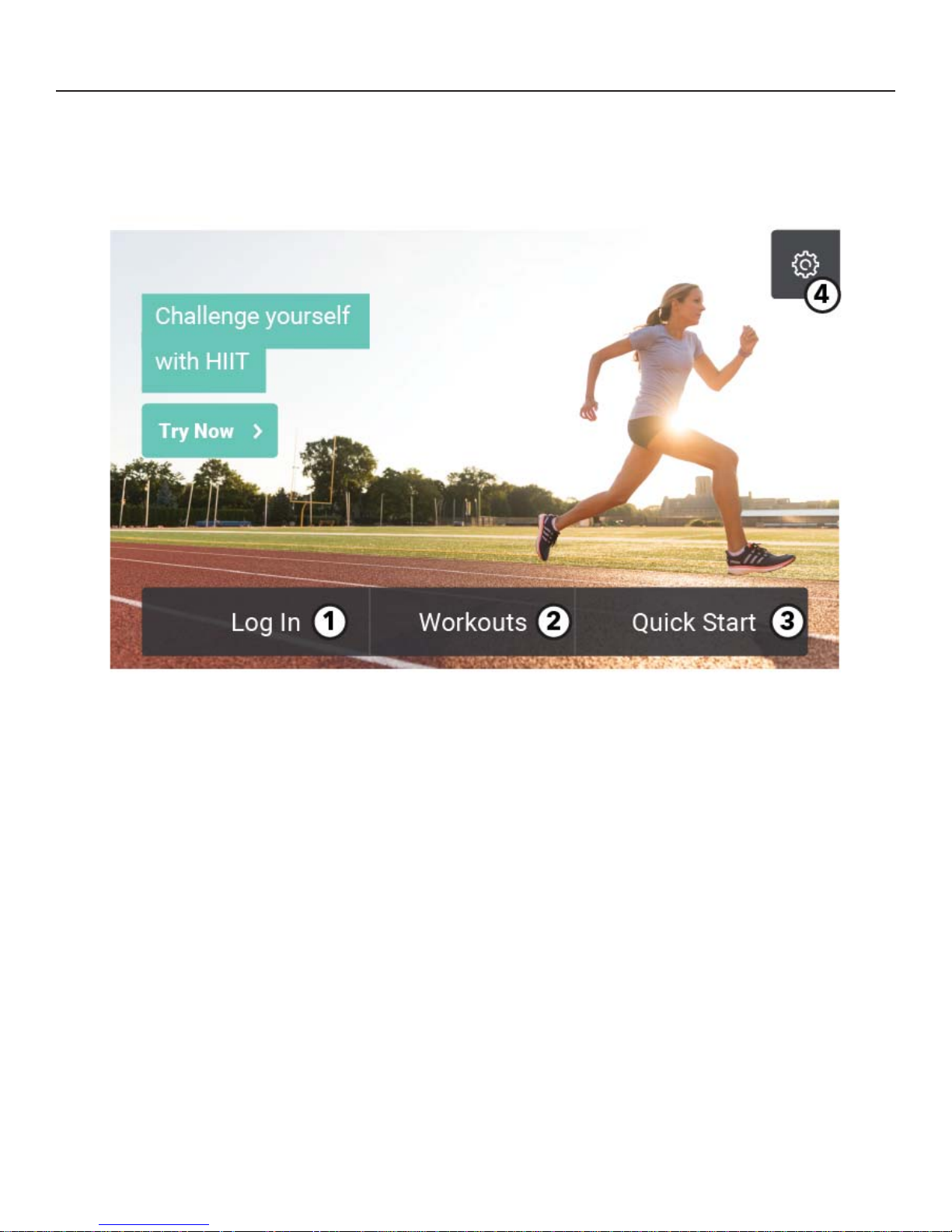
HOME SCREEN OVERVIEW
The intuitive touch screen on the console allows users to select, set up, monitor, and save workouts.
1. Log In
Press to log in to your LFconnect account.
2. Workouts
Select a pre programmed workout.
3. Quick Start
Press to immediately begin a workout.
4. Options
Press to access the Options Menu.
9
Page 11
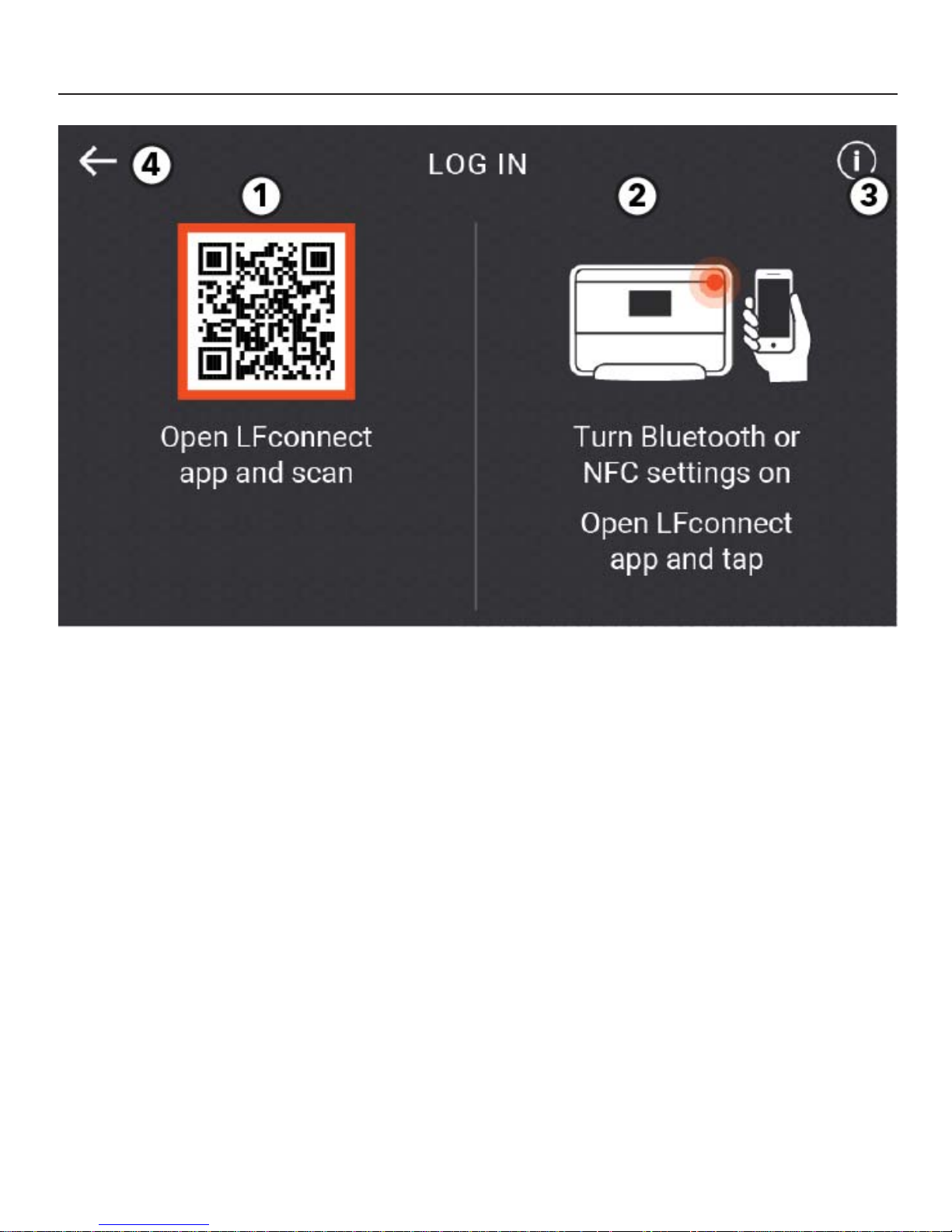
LOG IN
Log in to the console to track and save your workouts to the LFconnect app.
1. Scan QR Code
Open the LFconnect app on your mobile device.
Select the QR code reader in the upper right
hand corner.
Scan the QR code with your phone.
2. Proximity
On an iPhone, enable Bluetooth, open the
LFconnect app and turn on Bluetooth proximity
login feature.
On an Android, enable NFC and open the
LFconnect app.
Follow the prompts on the LFconnect app: Touch
phone to the upper right hand corner of the console to automatically connect.
3. Information
Press to get information on the LFconnect app.
4. Back Arrow
Press to return to Home Screen.
10
Page 12
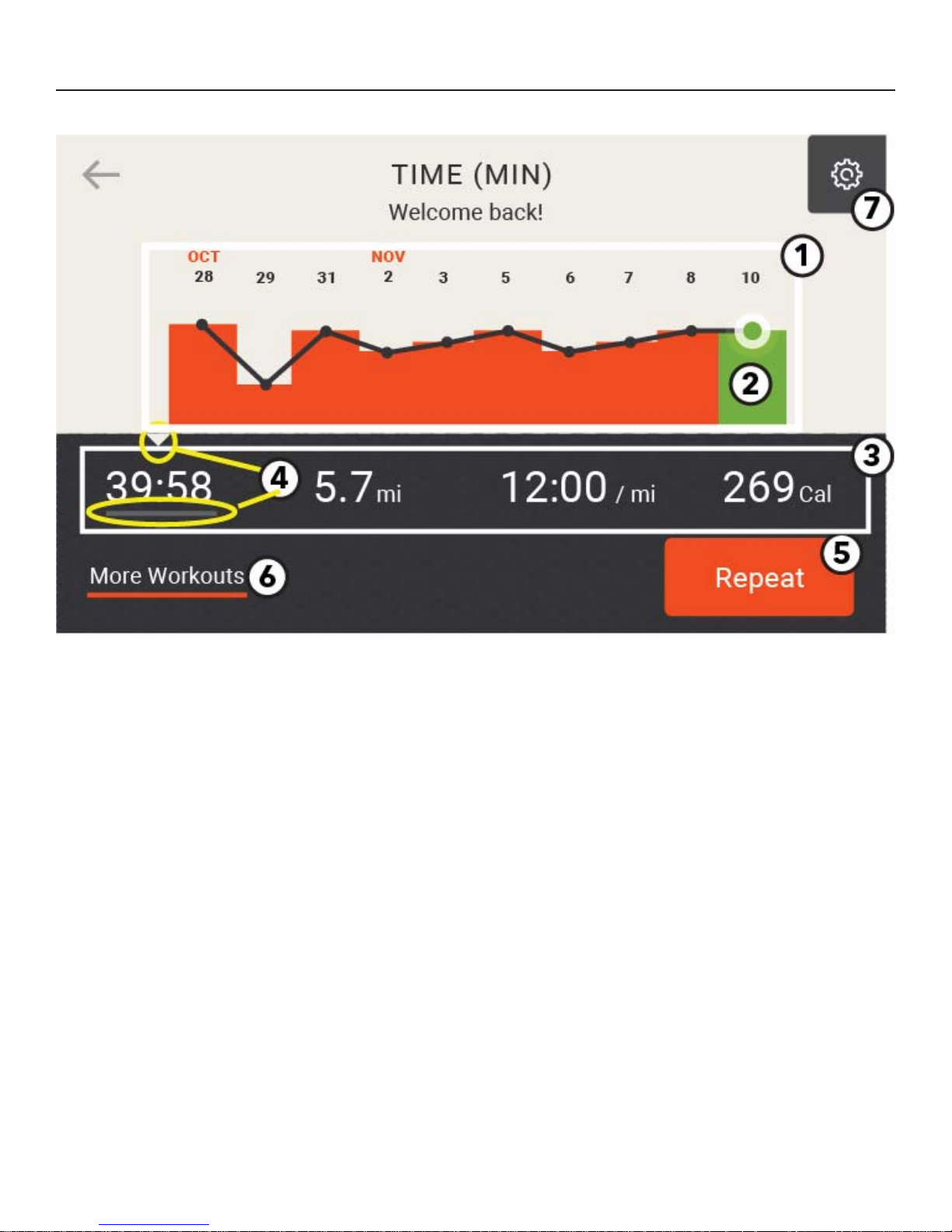
LOG IN - WELCOME SCREEN
Personalized screen shows users their previously saved workout data.
1. Workout Data
Previous 10 saved workout dates and results are
shown.
2. Current Workout Result
Pulsing green dot indicates current workout results.
3. Workout Metric
Tap a specifi c workout metric to view the history of
that metric on the graph.
4. Triangle and Underline Indicators
The triangle and underline indicate the selected
workout metric.
5. Repeat
Repeat a previous workout.
6. More Workouts
Press to access the Select Workout Menu.
7. Options Menu
Press to access the Options Menu.
11
Page 13
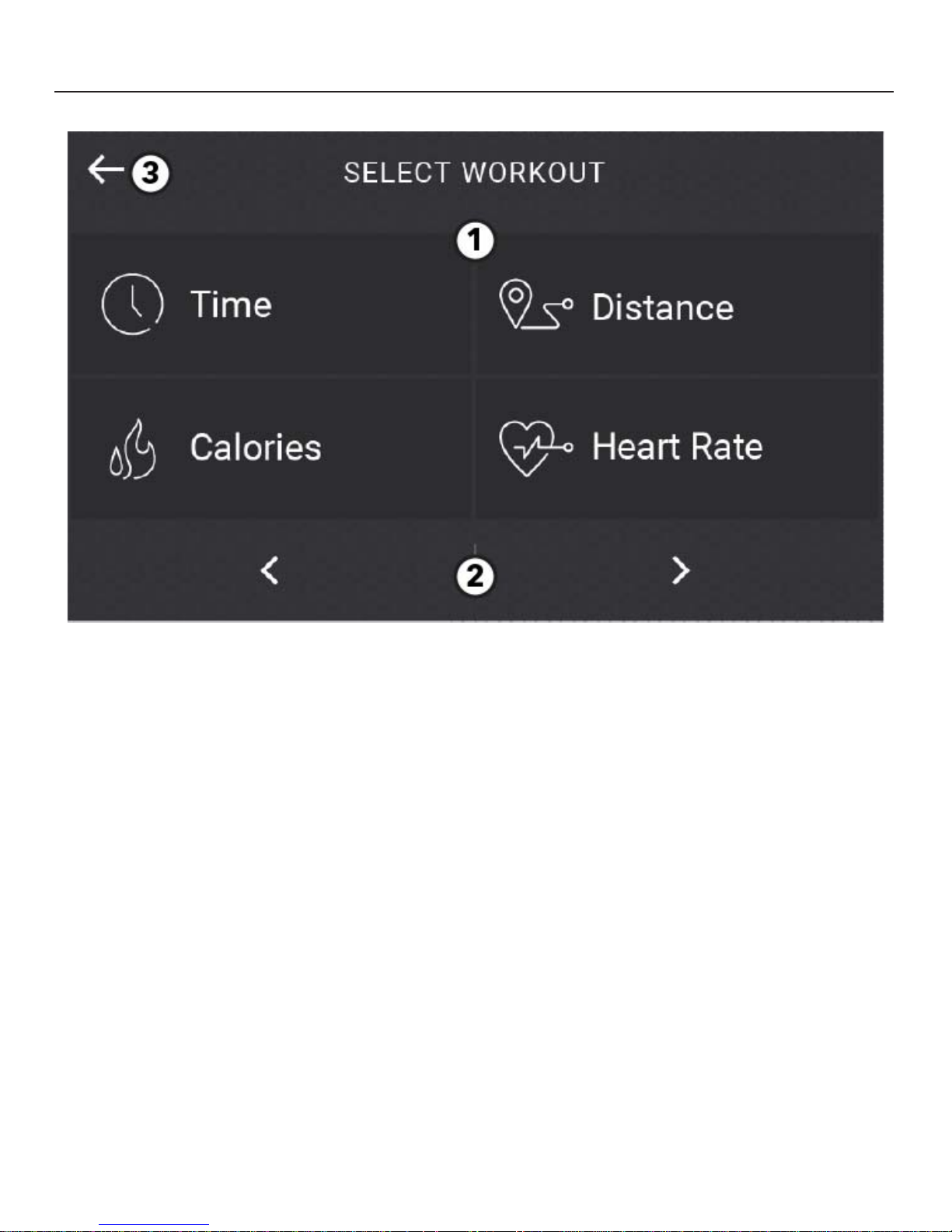
SELECT WORKOUT
1. Workout Options
Select from the following workouts:
Time
Set a time goal for a workout.
Calories
Set a number of calories to burn during a workout.
Distance
Set a distance goal for a workout.
Heart Rate
Set a target heart rate to maintain during a workout.
2. Right and Left Arrows
Press to scroll through these additional workouts:
Random
Adapt to incline levels that randomly change during a workout.
Hill
Take on a hill. Incline level gradually increases
during the fi rst half of the workout and then gradually decreases during the second half.
Manual
Control the incline level or speed manually during
a workout.
Rolling Hills
Choose the intensity of a series of up and down
incline levels.
Speed Interval
Choose between Manual and Automatic options.
The Manual option allows you to select between
three speeds set by you during workout setup.
The Automatic option allows you to preselect two
speed levels and interval durations that the machine automatically changes during a workout.
Incline Interval
Choose between Manual and Automatic options.
The Manual option allows you to select between
three incline levels set by you during workout
setup.
The Automatic option allows you to preselect two
incline levels and interval durations that the machine automatically changes during a workout.
Life Fitness Fit Test
Take a 5-minute VO2 submax evaluation
designed to determine cardiovascular fi tness
level.
3. Exit the Workout Selection Screen and return to the
Home Screen.
12
Page 14
HEART RATE WORKOUTS
Research shows that maintaining a specifi c heart rate while exercising is the optimal way to monitor the intensity of a
workout and to achieve maximum results. That is the idea behind the Life Fitness Heart Rate Zone Training approach to
exercise. Zone Training identifi es an exerciser’s ideal heart rate range, or zone, for burning fat or increasing cardiovascular fi tness. The zone is a percentage of the theoretical maximum (HRmax), and its value depends on the workout. The
maximal heart rate formula is defi ned by the American College of Sports Medicine’s Guidelines for Exercise Testing and
Prescription, 8th Edition, 2010. HRmax equals to 206.9 minus the total of 0.67 multiplied by a person’s age.
HR Max = 206.9 - (0.67 * age)
Theoretical Maximum Heart Rates and Target Heart Rates
Reference the chart below for Theoretical Maximum Heart Rates and Target Heart Rates.
Wear the optional Polar
Theoretical
Age
10 200 130 160
20 194 126 155
30 187 121 149
40 180 117 144
50 173 113 139
60 167 108 133
70 160 104 128
80 153 100 123
90 147 95 117
99 141 91 112
®
telemetry heart rate chest strap, or grip the LifepulseTM sensors, to enable the on-board com-
Maximum
Heart Rate
65%
(Moderate
Burn)
80%
(Vigorous
Burn)
puter to monitor the heart rate during a workout. The computer automatically adjusts the incline level to maintain the
target heart rate based on the actual heart rate.
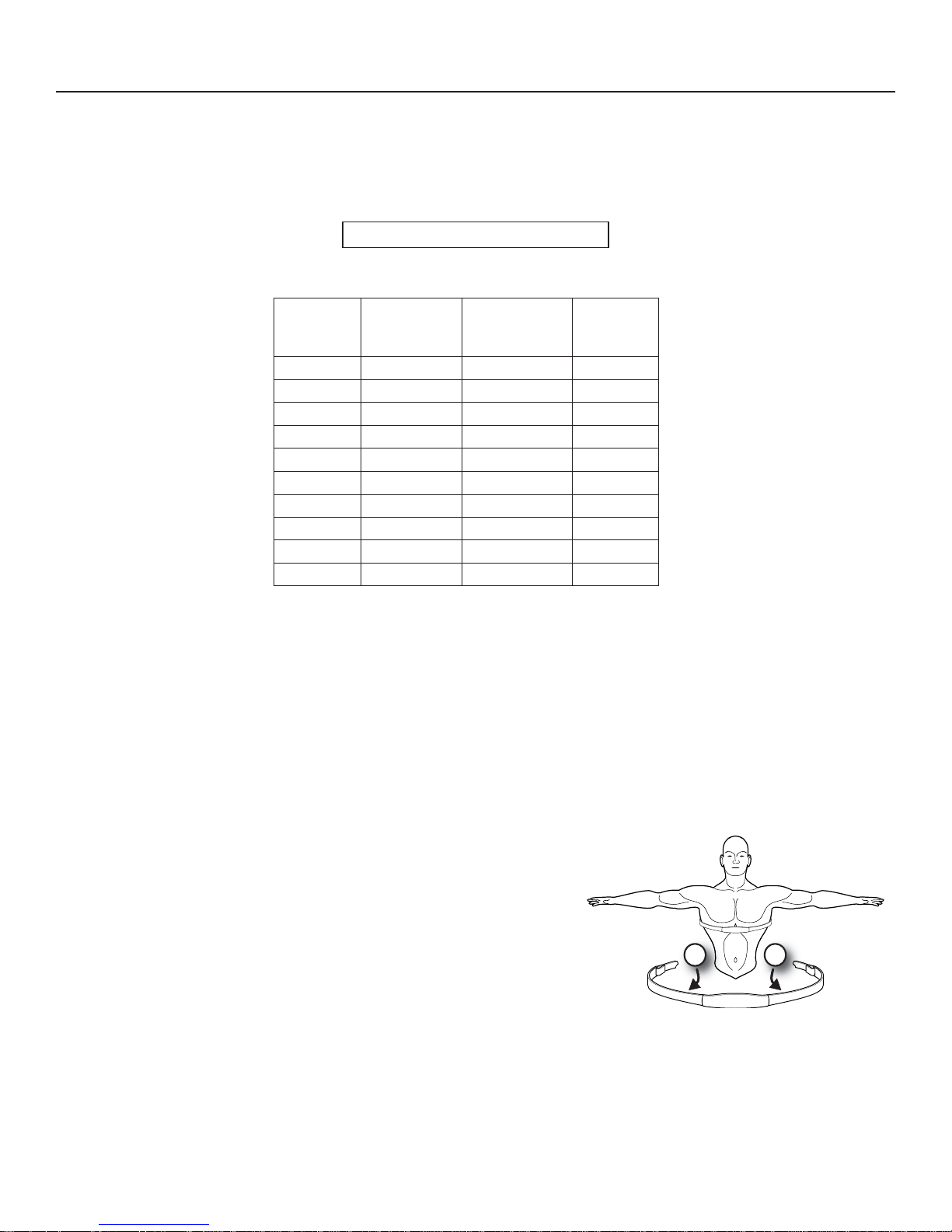
The Polar® Telemetry Heart Rate Chest Strap
The Polar telemetry heart rate monitoring system transfers heart rate signals to the console when electrodes are
pressed against the skin. These electrodes are attached to a Polar telemetry heart rate chest strap that the user wears
during the workout. The Polar telemetry heart rate chest strap is optional. Contact Life Fitness Customer Support Services to order.
See the diagram to the right of this paragraph for correct positioning of the Polar telemetry heart rate chest strap. The
electrodes (A), which are the two grooved surfaces on the underside of the strap, must remain wet to transmit accurately the electrical impulses of the heart back to the receiver. Moisten the electrodes. Then, secure the Polar telemetry
heart rate chest strap as high under the chest muscles as possible. The
strap should be snug, but comfortable enough to allow for normal breathing.
The transmitter strap delivers an optimal heart rate reading when the electrodes are in direct contact with bare skin. However, it functions properly
through a thin layer of wet clothing. If it becomes necessary to re-moisten
the Polar telemetry heart rate chest strap electrodes, grasp the center of
the strap, pull it away from the chest to expose the two electrodes, and remoisten them.
Note: If the Lifepulse system sensors are grasped while the chest strap is worn, and if the signals from the sensors are
valid, the on-board computer uses these sensor signals for calculating the heart rate instead of those transmitted by the
Polar telemetry heart rate chest strap.
Note: Do not attempt to grasp the sensors on a treadmill at speeds above 4.5 mph or 7.2 kph. For these speeds, the use
of a Polar telemetry heart rate chest strap is recommended.
A A
13
Page 15
HEART RATE WORKOUTS
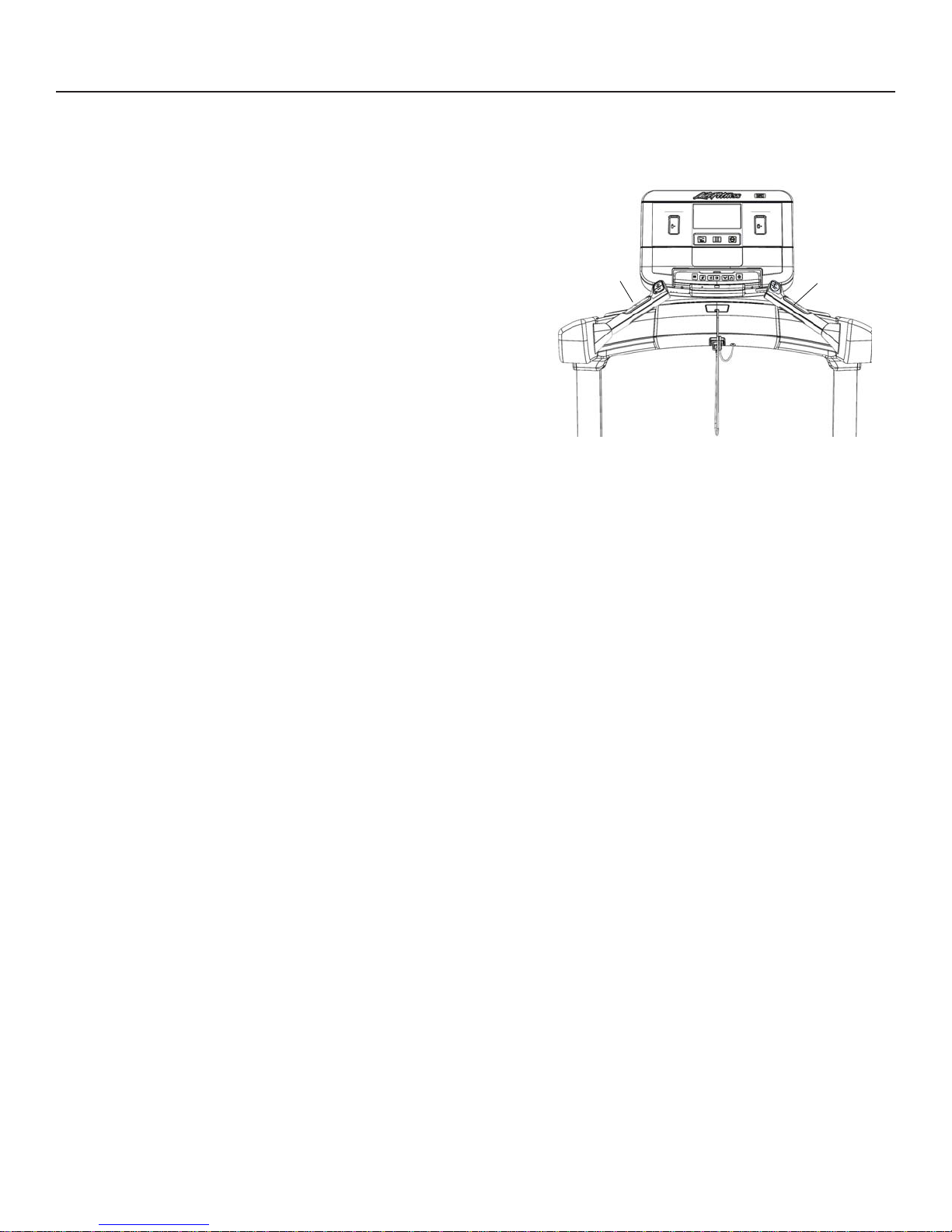
The LifepulseTM System
The patented Lifepulse system sensors (A) are the built-in heart rate
monitoring system on this product. For the most
accurate reading possible, during a workout:
Grasp the sensors fi rmly.
Hold each sensors at the midpoint.
A
Keep hands steady and in place.
The console displays the heart rate within 10 to 40 seconds after the
user grasps the sensors. The following factors may affect a Lifepulse
reading:
incorrect hand placement on the sensors,
upper body activity, lotion or dirt on hands, and
excessive or insuffi cient pressure used when gripping the
sensors.
Note: Do not attempt to grasp the sensors on a treadmill at speeds above 4.5 mph or 7.2 kph. For these
speeds, the use of a Polar telemetry heart rate chest strap is recommended.
A
14
Page 16
LIFE FITNESS FIT TEST
Select FIT TEST on the Workout Selection Screen.
The Life Fitness Fit Test estimates cardiovascular activity and can be used to monitor improvements in
endurance every 4 - 6 weeks.
The Fit Test is considered to be a submax VO2 (volume or oxygen) test and gauges how well the heart supplies
oxygenated blood to the exercising muscles and how effi ciently those muscles receive oxygen from the blood.
Physicians and exercise physiologists generally regard this test as a good measure of aerobic capacity.
W
orkout duration is 5 minutes total.
Take the Fit Test under similar circumstances each time. For the most accurate Fit Test results, you should per-
form the Fit Test on three consecutive days and average the three scores.
To receive a proper Fit Test score, the work done must be within a training heart rate zone that is 60% to 85% of
the theoretical maximum heart rate (HRmax).
The user must grasp the hand sensors when prompted, or wear a Polar telemetry heart rate chest strap as the test score
calculation is based on a heart rate reading.
Note: The workout will be terminated if a heart rate is not detected after 2.5 minutes.
Your heart rate is dependent on many factors, including:
amount of sleep the previous night (at least 7 hours is recommended)
time of day
time you last ate (2 - 4 hours after the last meal is recommended)
time since you last drank a liquid containing caffeine or alcohol, or smoked a cigarette (at least 4 hours is rec-
ommended)
time since you last exercised (at least 6 hours is recommended)
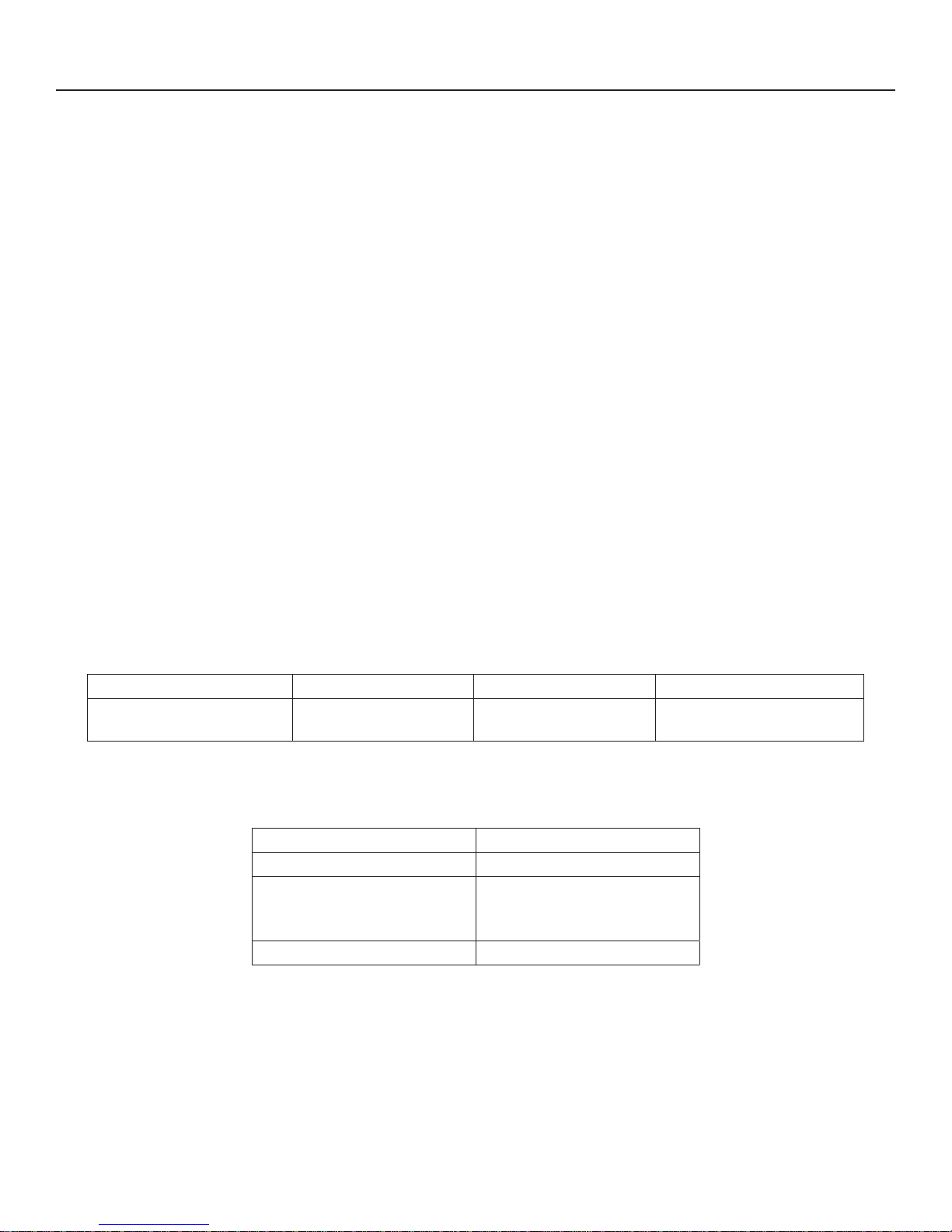
Suggested exertion levels should be used as a guideline for setting up the Fit Test program. The goal is to elevate the
user’s heart rate to a level that is between 60%-85% of their theoretical maximum heart rate.
Inactive Active Very Active
Treadmill 2 -3 mph (3.2 - 4.8 kph) 3 - 4 mph (4.8 - 6.4 kph) 3.5 - 4.5 mph (5.6 - 7.2 kph)
Within each suggested range, use these additional guidelines:
Lower Half of Range Upper Half of Range
higher age lower age
higher weight
lower weight
shorter taller
(in cases of excessive weight,
use lower half of range)
15
Page 17
LIFE FITNESS FIT TEST
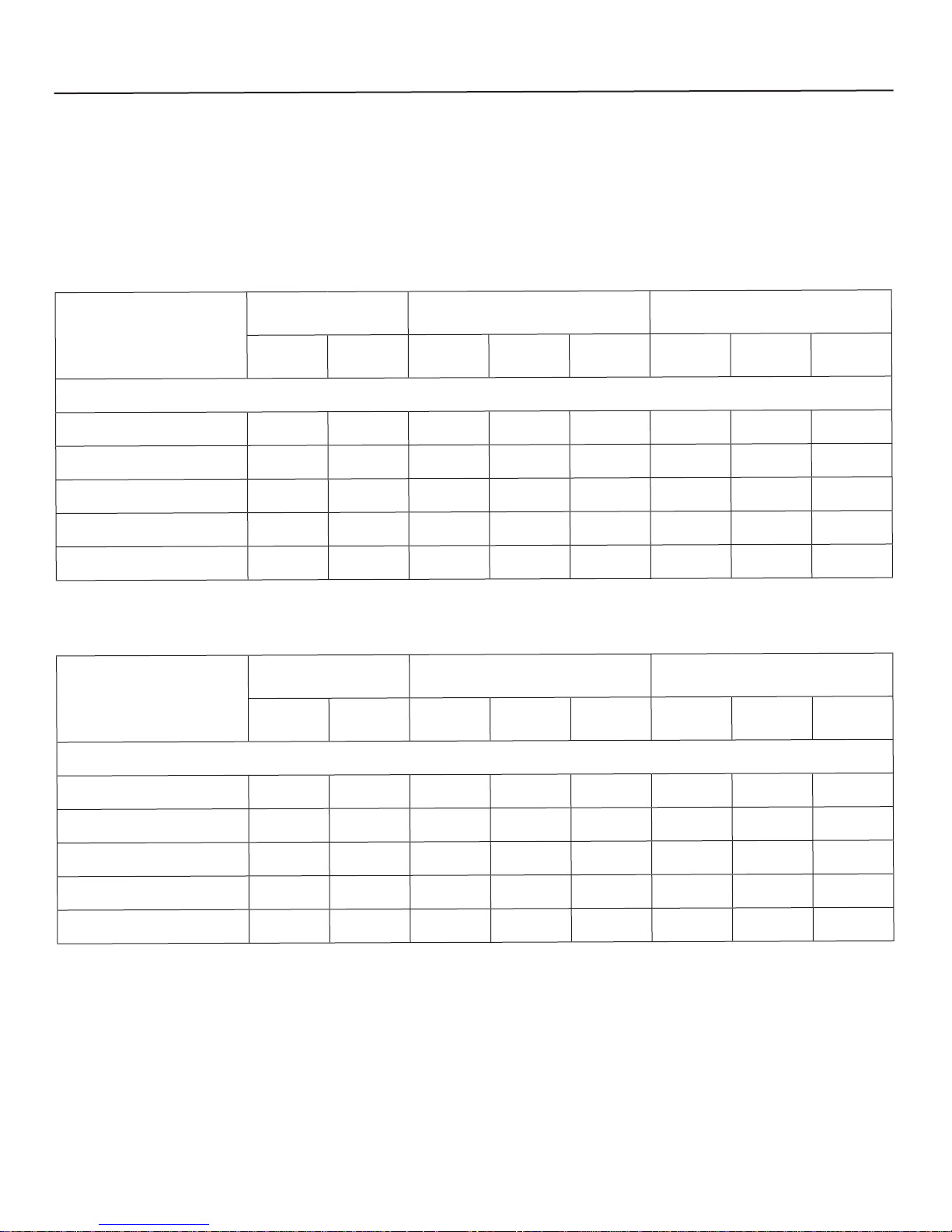
After the 5-minute FIT TEST is completed, a FIT TEST score and rating will be displayed.
Please note that the estimated VO
max scores achieved will be 10-15% lower on stationary exercise bikes than those
2
achieved on other Life Fitness cardiovascular equipment. Stationary cycling has a higher rate of isolated muscle fatigue
of the quadriceps when compared to walking / running on a treadmill or utilizing a bike. This higher rate of fatigue corresponds to lower levels of estimated VO
max scores.
2
Relative Fitness Classifi cation for MEN
VERY ACTIVE ACTIVE INACTIVE
Rating
Elite Excellent
Estimated V0
2
Very
Good
Above
Average
Average
Max (ml/kg/min) per Age category
Below
Average
Low
Very
Low
20 - 29 years 55+ 53 - 54 50 - 52 45 - 49 40 - 44 38 - 39 35 - 37 <35
30 - 39 years 52+ 50 - 51 48 - 49 43 - 47 38 - 42 36 - 37 34 - 35 <34
40 - 49 years 51+ 49 - 50 46 - 48 42 - 45 37 - 41 34 - 36 32 - 33 <32
50 - 59 years 47+ 45 - 46 43 - 44 39 - 42 34 - 38 32 - 33 29 - 31 <29
60+ years 43+ 41 - 42 39 - 40 35 - 38 31 - 34 29 - 30 26 - 28 <26
Relative Fitness Classifi cation for WOMEN
VERY ACTIVE ACTIVE INACTIVE
Rating
Elite Excellent
Estimated V0
2
Very
Good
Above
Average
Average
Max (ml/kg/min) per Age category
Below
Average
20 - 29 years 47+ 45 - 46 43 - 44 38 - 42 33 - 37 31 - 32 28 - 30 <28
30 - 39 years 44+ 42 - 43 40 - 41 36 - 39 31 -35 29 - 30 27 - 28 <27
40 - 49 years 42+ 40 - 41 38 - 39 34 - 37 30 - 33 28 - 29 25 - 27 <25
50 - 59 years 37+ 35 - 36 33 - 34 30 - 32 26 - 29 24 - 25 22 - 23 <22
60+ years 35+ 33 - 34 31 - 32 27 - 30 24 - 26 22 - 23 20 - 21 <20
Life Fitness developed this rating scale based on VO
for Exercise Testing and Prescription (8th E. 2010). It is designed to provide a qualitative description of a user’s VO
assessing initial fi tness level and tracking improvement.
max percentile distributions referenced in American College of Sports Medicine’s Guidelines
2
Low
max estimation, and a means of
2
Very
Low
16
Page 18
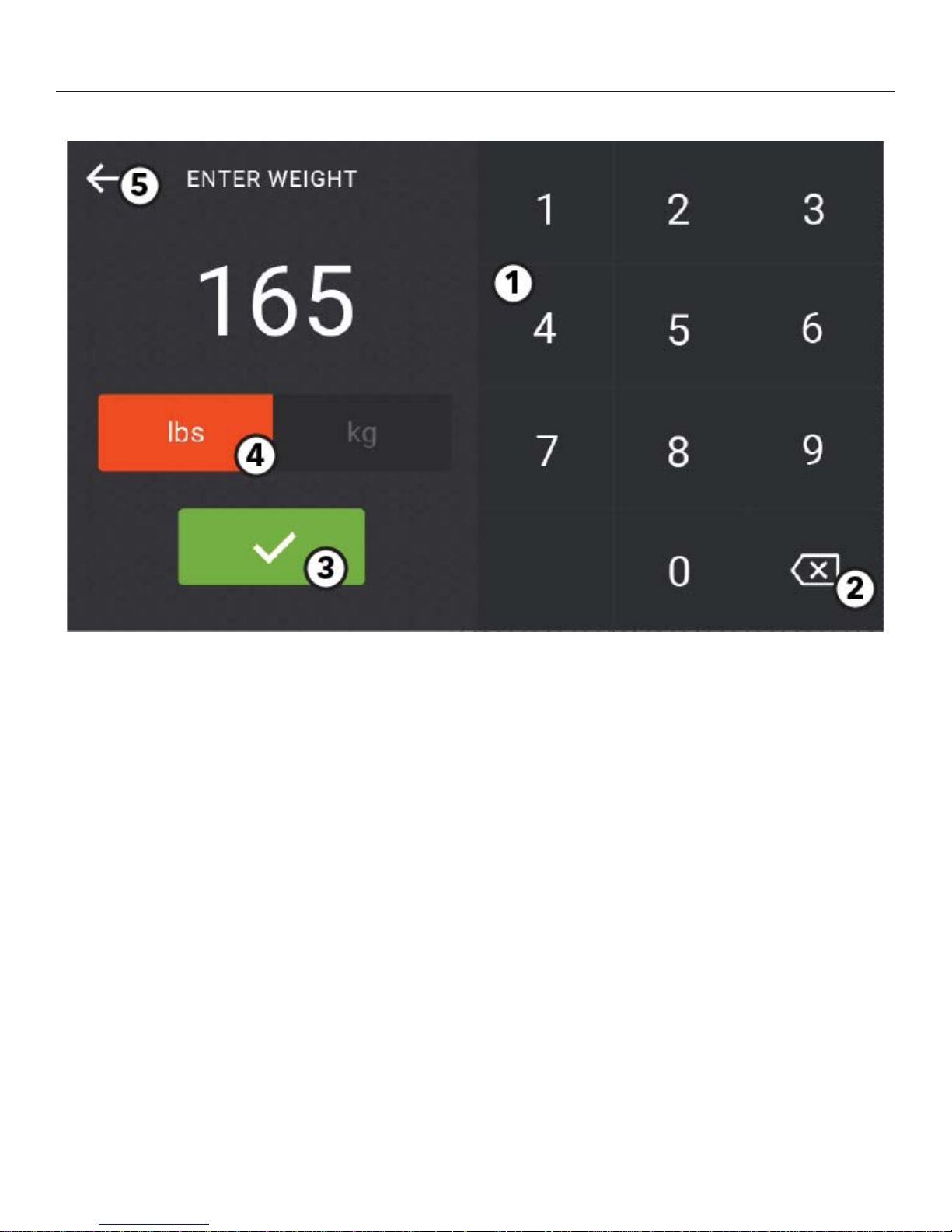
OPTIONS - EDIT WEIGHT
1. Numeric Keypad
Input a weight value.
2. Delete
Press to delete an incorrect data entry.
3. Accept the weight value. The updated value will show on the Edit Weight button on the Options Menu.
4. Select metric or imperial unit.
Exit the Weight Entry Screen and return to the Options Menu.
5.
17
Page 19
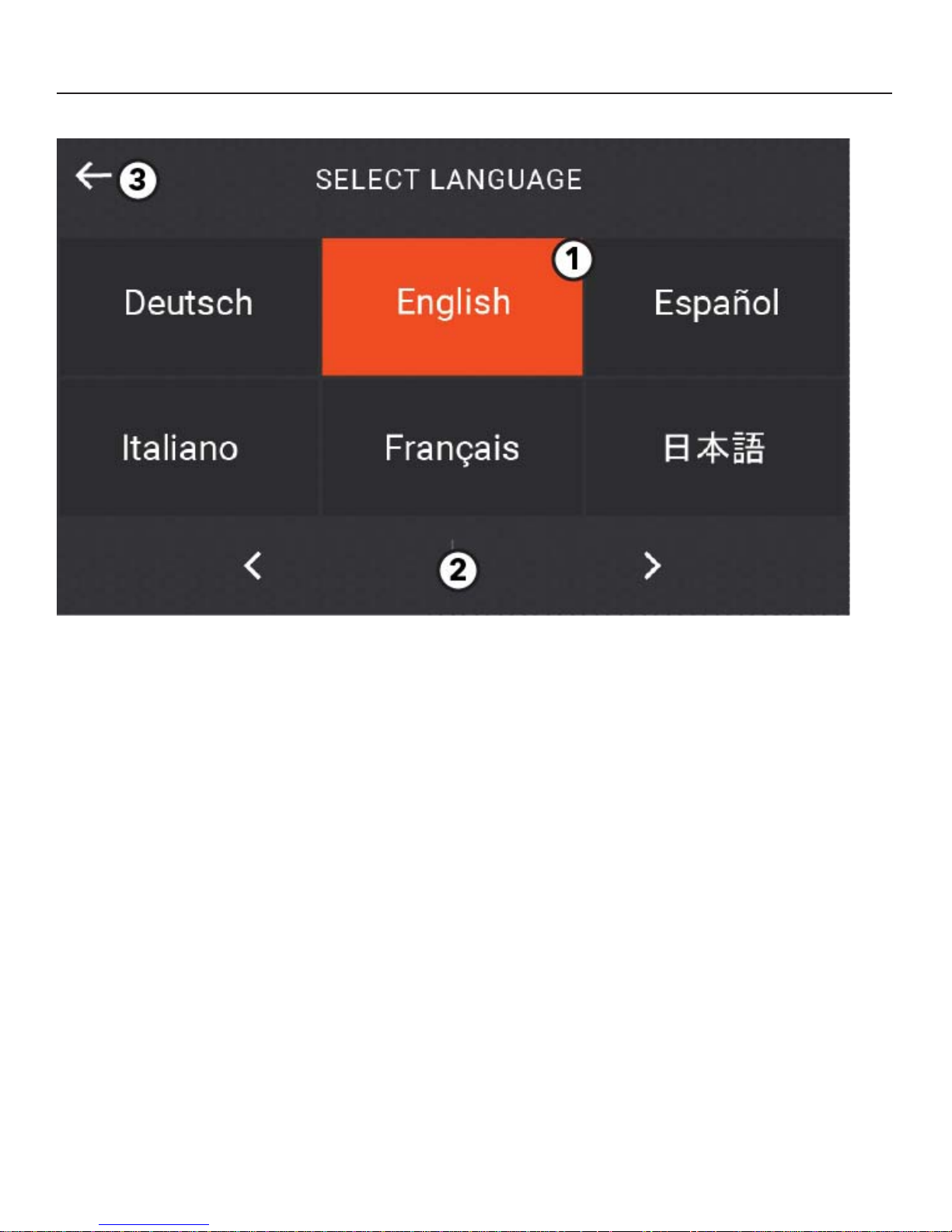
OPTIONS - SELECT LANGUAGE
1. Language Options
Select a language to use during a workout.
Note: The default language can be changed by the manager.
2. Right and Left Arrow
Press to scroll through additional language options.
3. Exit the Language Selection Menu and return to the Options Menu.
18
Page 20
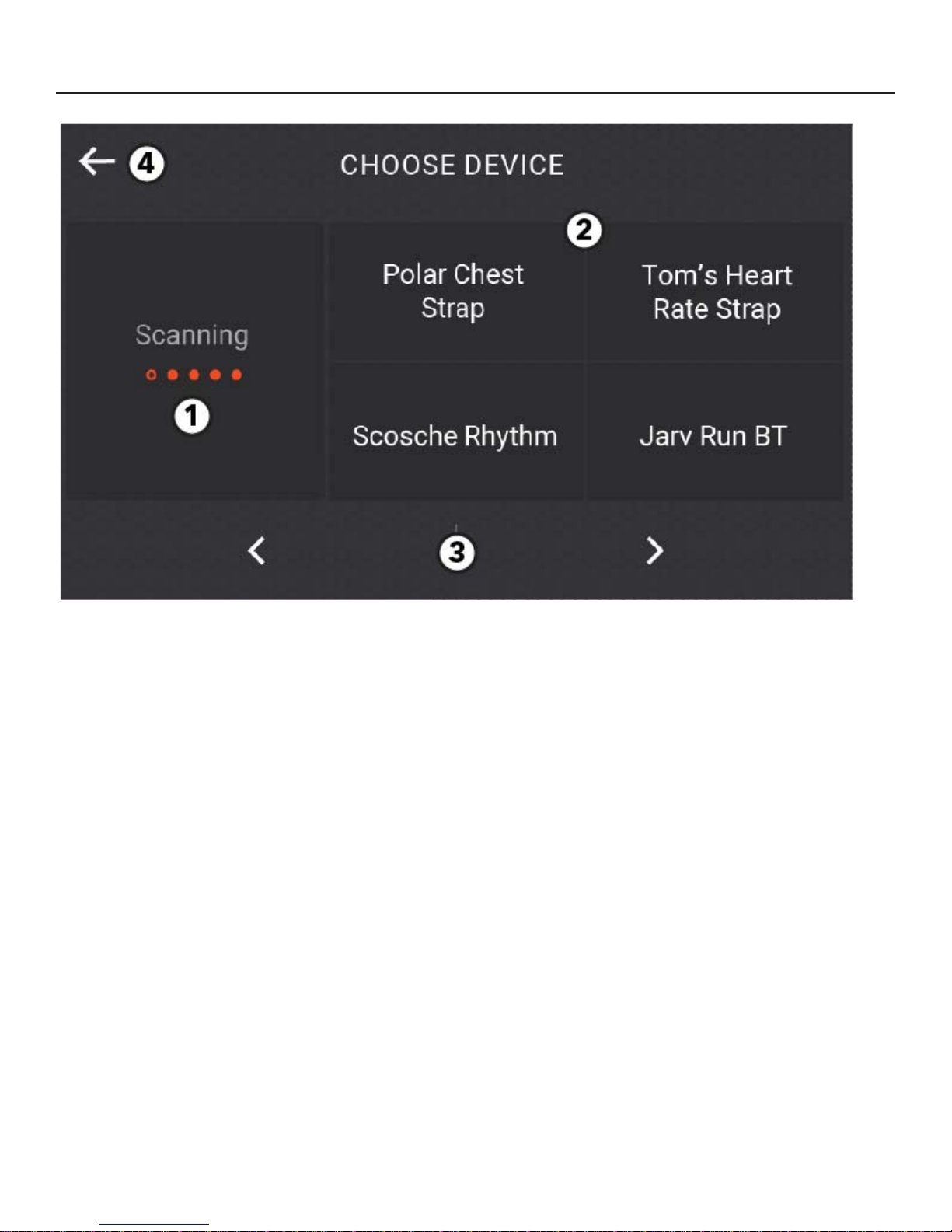
OPTIONS - CONNECT BLUETOOTH DEVICE
1. Bluetooth Module Scan
Scans for available devices. Once the scan is complete, a “rescan” button replaces the “Scanning” message.
2. Select Device
User can tap on any item at any time during the scan.
3. Right and Left Arrow
Press to scroll through additional devices.
4. Exit the Bluetooth Connection Screen and return to the Home Screen.
19
Page 21
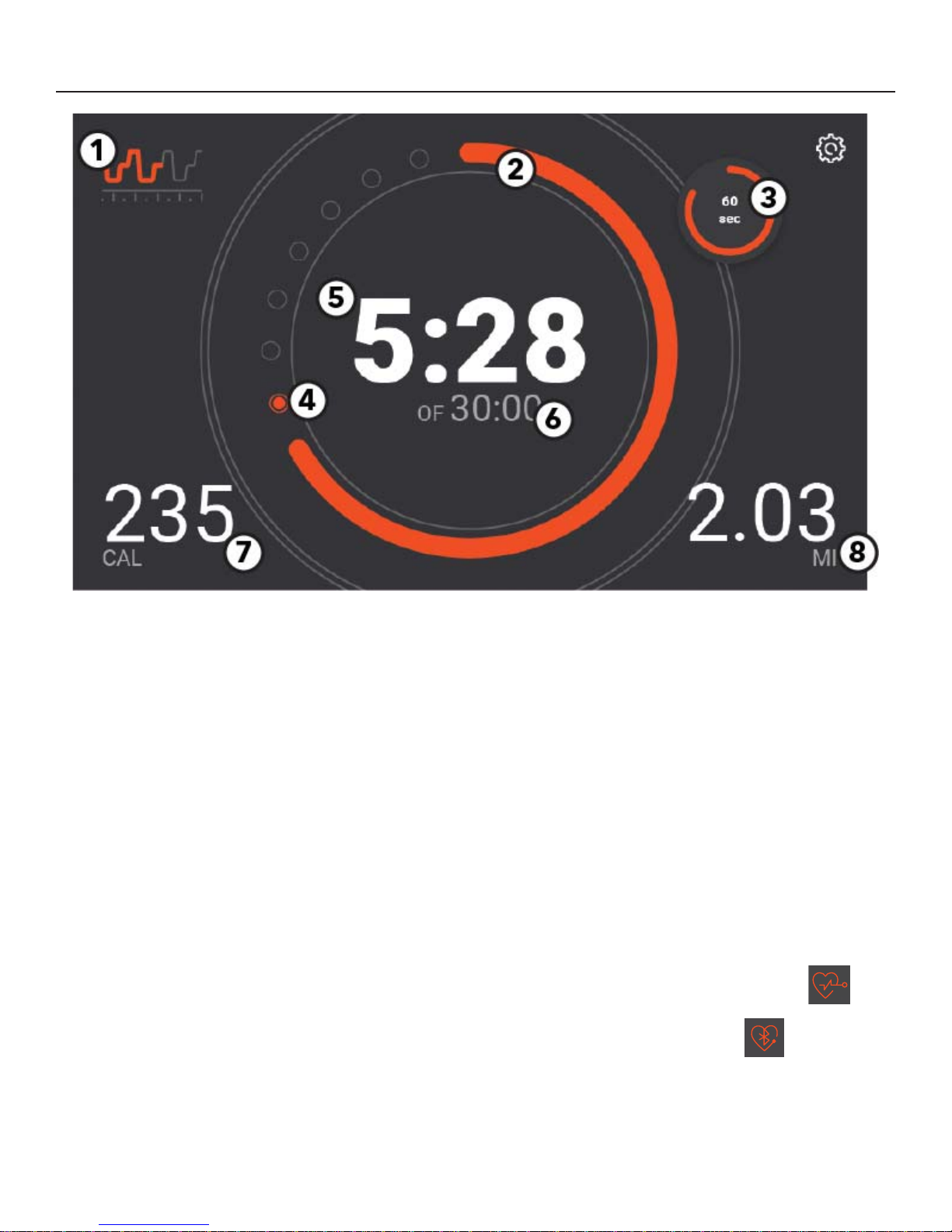
WORKOUT MODE OVERVIEW
1. Mini Classic Graph
Graph shows upcoming changes in level.
Tap the graph to display the full screen graph.
2. Primary Goal Progress Ring
The orange ring shows accumulated progress towards selected goal.
3. Mini-Goal
A smaller unit of the primary goal is displayed.
4. Progress Dots
Each dot is a progress indicator. When the progress
timer completely covers the dot, the next dot lights
up orange and begins blinking .
5. Primary Goal Metric
Displays current value of the primary workout
goal.
Tap to edit main goal.
6. Target Goal
Displays the target goal.
7. Bottom Left (Secondary) Metric
Displays current value of the secondary workout
goal.
Tap the metric to display live workout stats.
8. Bottom Right (Tertiary) Metric
Displays current value of the workout goal.
Tap the metric to display live workout stats.
Heart Rate Display (not shown)
Shows current heart rate from one of the following:
contact heart rate
polar strap (when active)
Bluetooth strap (when connected)
Contact Heart Rate and Polar icon
Bluetooth Heart rate icon.
20
Page 22
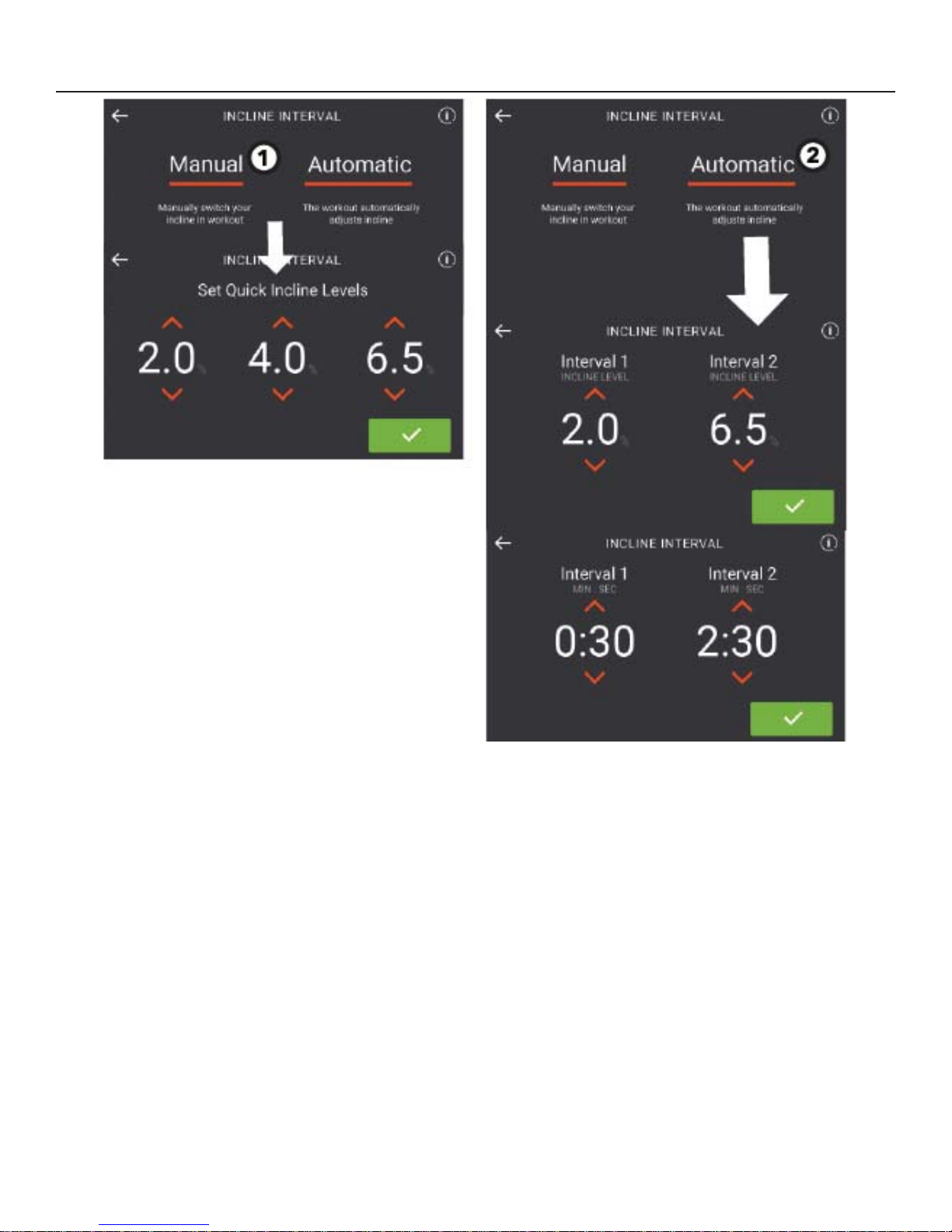
INCLINE INTERVAL WORKOUT
Choose MANUAL or AUTOMATIC.
1. Manual Selection
Set three quick incline levels.
Use the preset levels or use the up and down arrows to adjust the levels.
Tap the green check mark to enter selection.
2. Automatic Selection
Set two incline levels and two interval durations.
Use the preset levels or use the up and down arrows to adjust the levels / time.
Tap the green check mark to enter selections.
21
Page 23
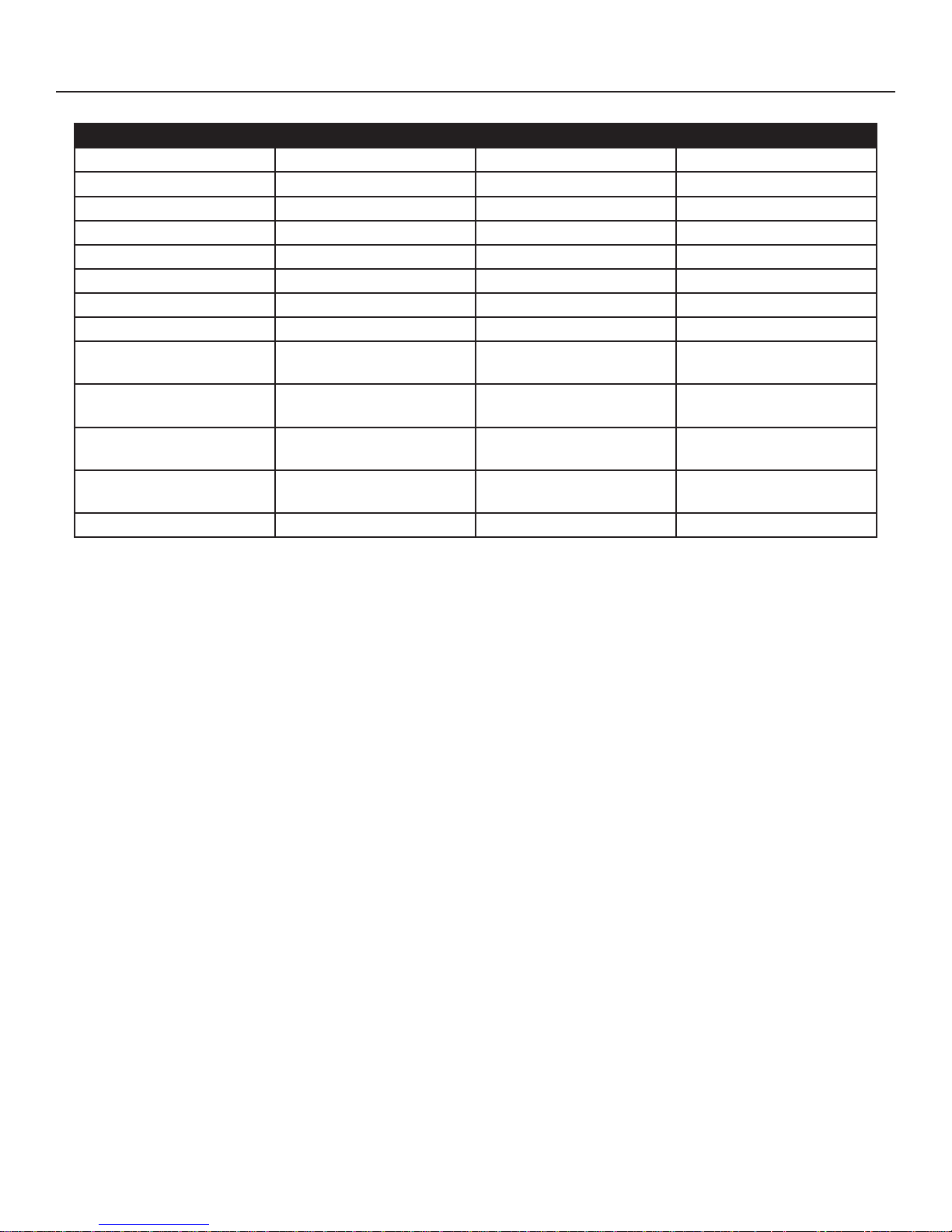
WORKOUT METRICS
Workout Type Center Metric Bottom Left Metric Bottom Right Metric
Time Time Calories Distance
Distance
Calories Calories Distance Time Elapsed
Heart Rate Heart Rate Calories Distance
Random Time Calories Distance
Manual Time Calories Distance
Hill Time Calories Distance
Rolling Hills Time Calories Distance
Incline Interval
(Manual)
Incline Interval
(Automatic)
Speed Interval
(Manual)
Speed Interval
(Automatic)
LF Fit Test Time Calories Distance
Distance Calories Time Elapsed
Time
Incline
Time Calories Distance
Time
Speed
Time Calories Distance
Calories Distance
Calories Distance
22
Page 24
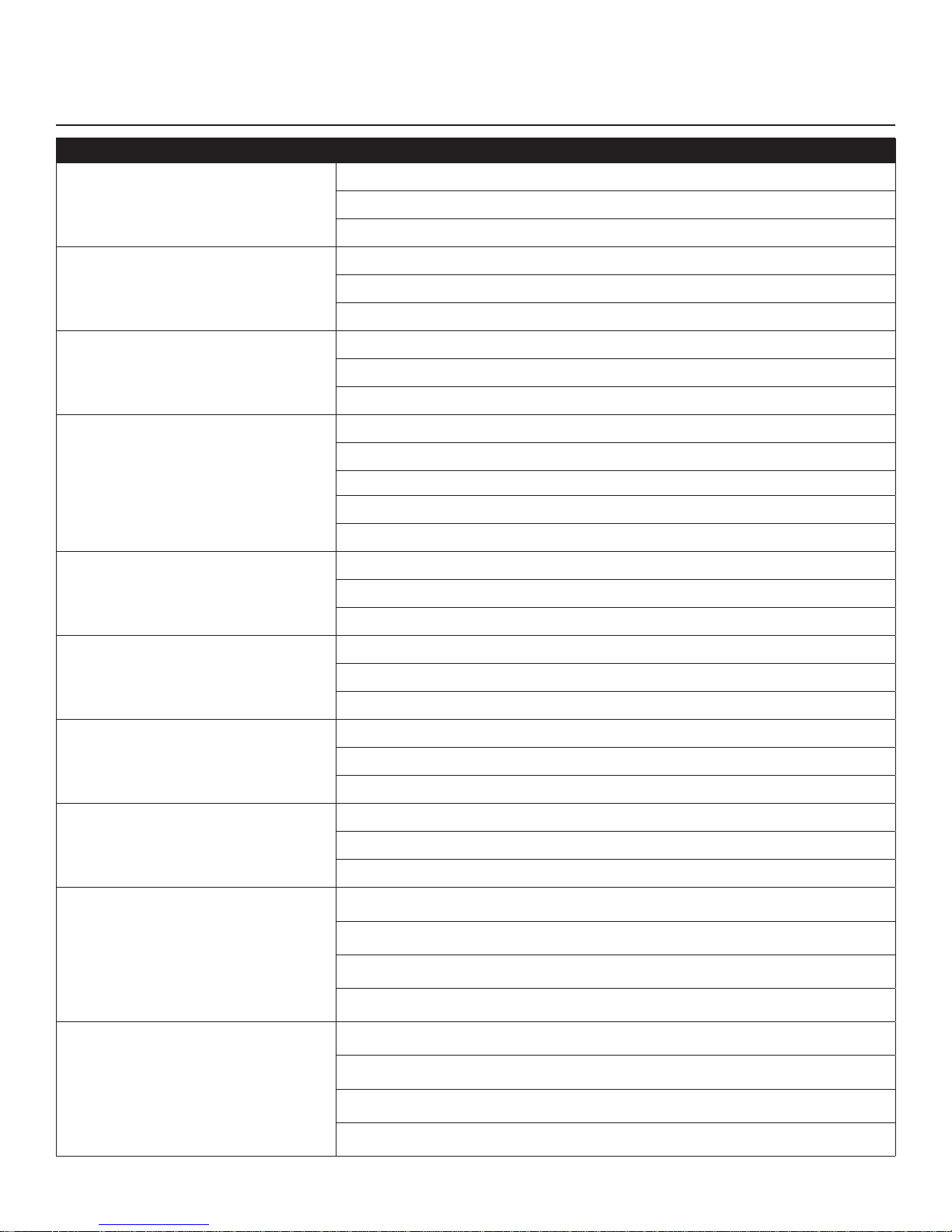
DATA ENTRY OPTIONS INTSX, INTDX, & CLUB SERIES TREADMILLS
WORKOUT TYPE USER INPUT
3 pr
eset values or use keypad to input desired time
Time
Distance
Calories
Heart Rate
Random
Incline Level
Weight (enter through Settings Menu)
3 preset values or use keypad to input desired distance
Incline Level
Weight (enter through Settings Menu)
3 preset values or use keypad to input desired calories
Weight
Incline Level
Age
Target Heart Rate
Time (3 preset values or use keypad to input desired time)
Incline Level
Weight (enter through Settings Menu)
Time (3 preset values or use keypad to input desired time)
Incline Level (use keypad to input desired incline level)
Weight (enter through Settings Menu)
Time (3 preset values or use keypad to input desired time)
Rolling Hills
Hill
Manual
Incline Interval
Speed Interval
Incline Level (use keypad to input desired incline level)
Weight (enter through Settings Menu)
Time (3 preset values or use keypad to input desired time)
Incline Level (use keypad to input desired incline level)
Weight (enter through Settings Menu)
Time (3 preset values or use keypad to input desired time)
Incline Level (use keypad to input desired incline level)
Weight (enter through Settings Menu)
Time (3 preset values or use keypad to input desired time)
Choose Manual or Automatic
Manual (set incline quick keys)
Automatic (set two incline intervals and two time intervals)
Time (3 preset values or use keypad to input desired time)
Choose Manual or Automatic
Manual (set speed quick keys)
Automatic (set two speed intervals and two time intervals)
23
Page 25
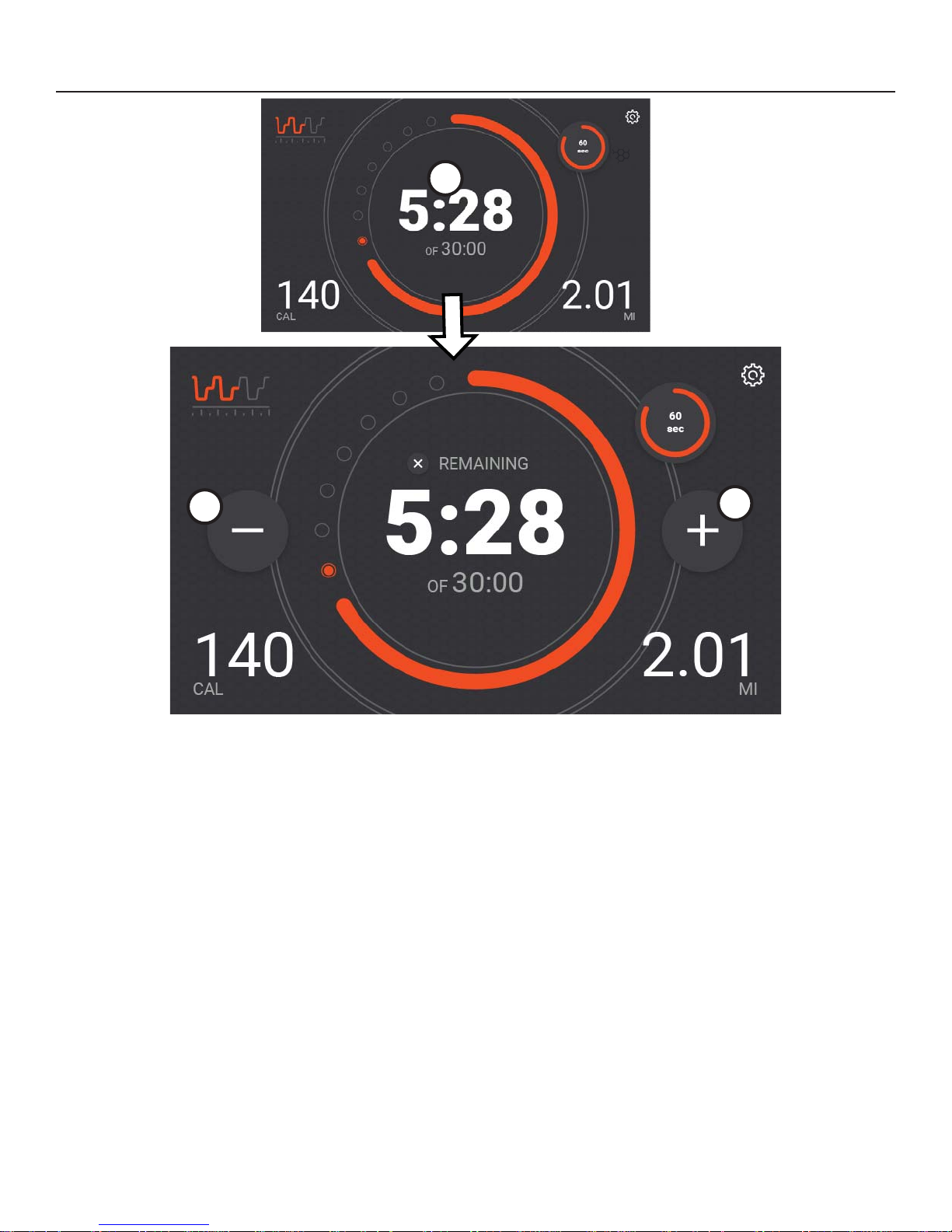
EDIT GOAL
1
2
1. Primary Metric
Tap on primary metric to edit the current goal.
2. Decrease (-)
Press to decrease value of goal.
3. Increase (+)
Press to increase value of goal.
3
24
Page 26
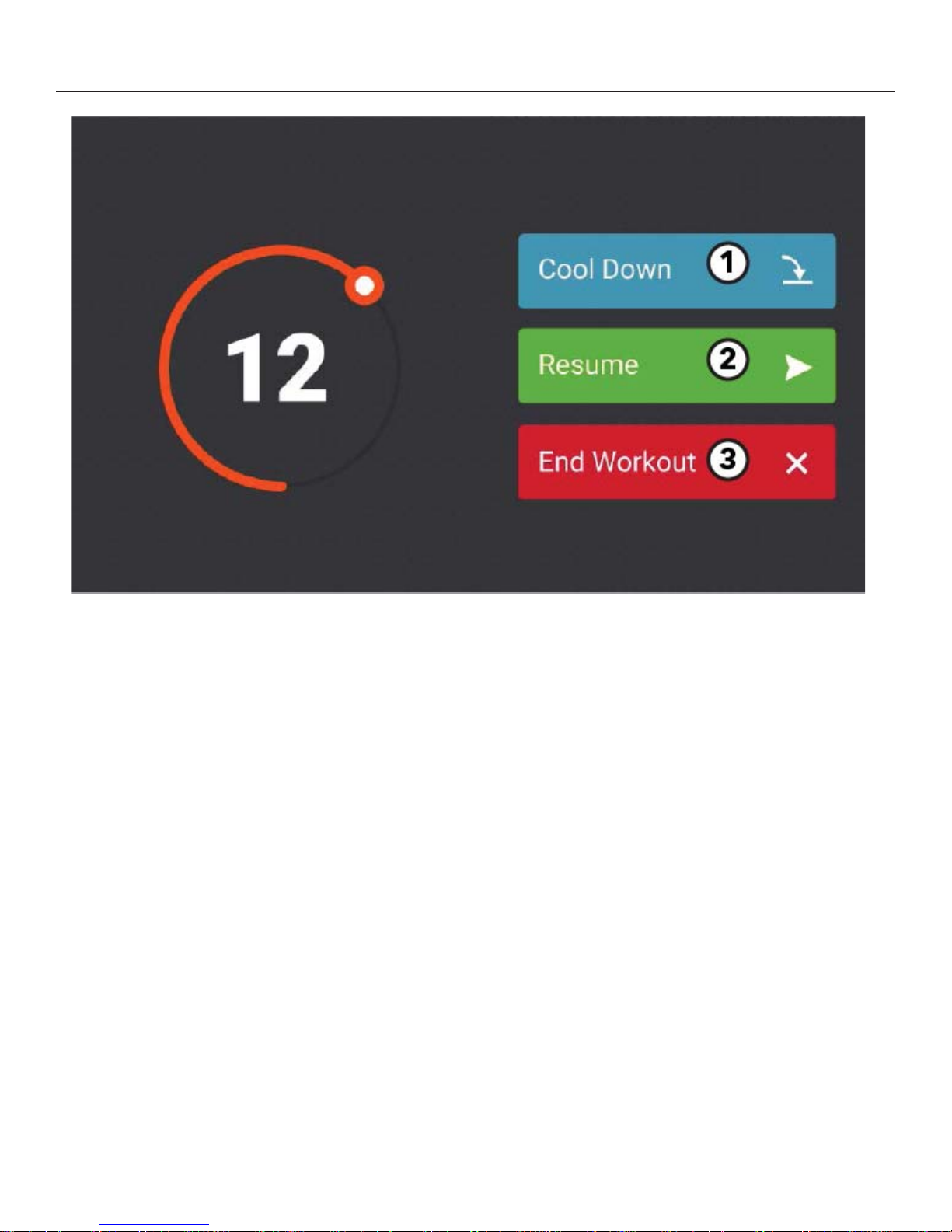
PAUSE WORKOUT
Press the Pause hard key anytime during a workout to pause a workout.
Choose one of the following options while in Pause mode:
1. Cool Down
Press to enter a cool down mode.
2. Resume
Press to continue current workout.
3. End Workout
Press to end current workout and view workout summary.
25
Page 27
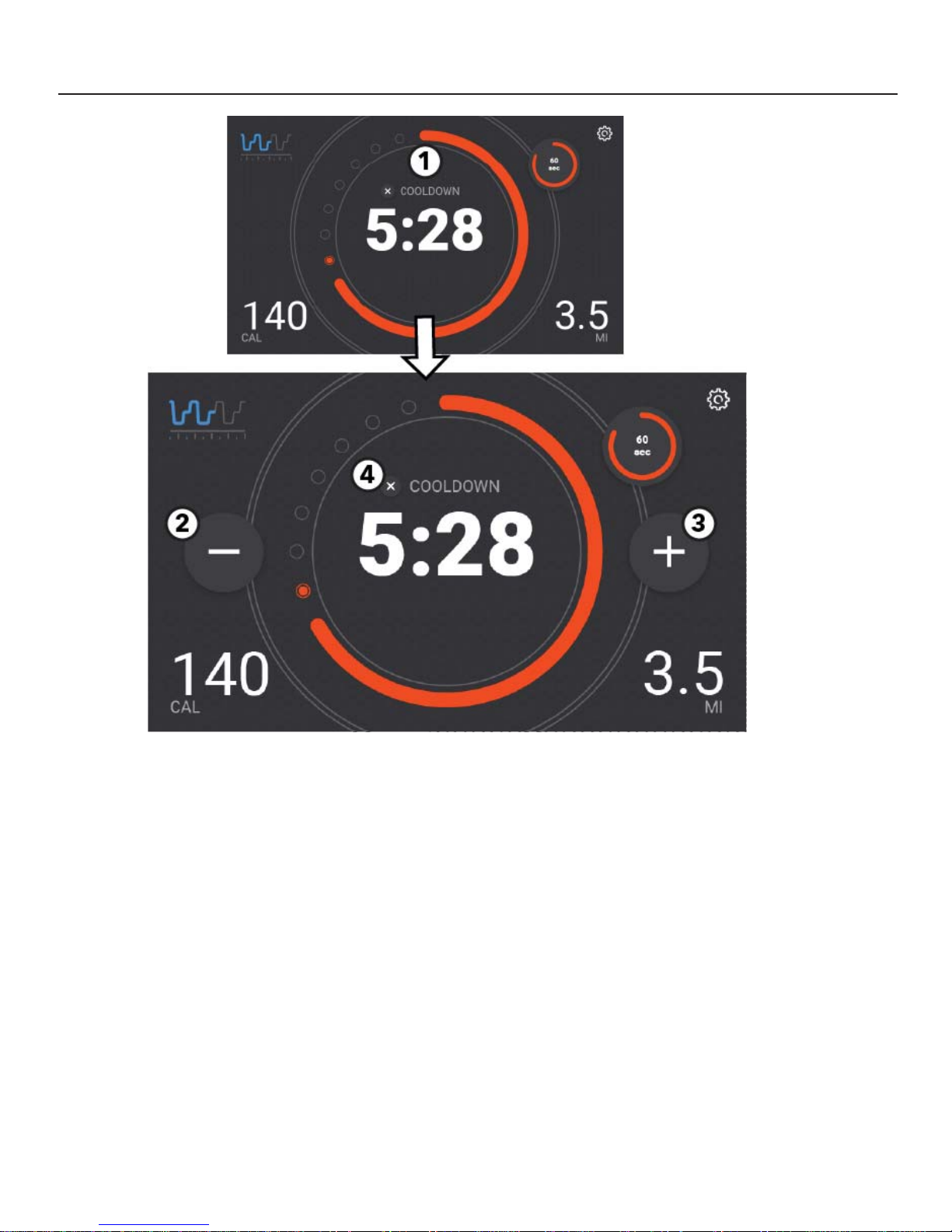
COOL DOWN
Press the Pause hard key anytime during a workout to pause a workout and start a cool down mode..
1. Time Display
“Cool down” is displayed in the dial when the cool down mode is entered.
The time display initially shows the amount of time in minutes that a specifi c workout is required to be in Cool
Down Mode.
The time display will countdown until it reaches 0:00
Tap the to edit the cool down time interval.
2. Decrease (-)
Press to decrease cool down time.
3. Increase (+)
Press to increase cool down time.
4. Exit Cool Down Mode.
26
Page 28
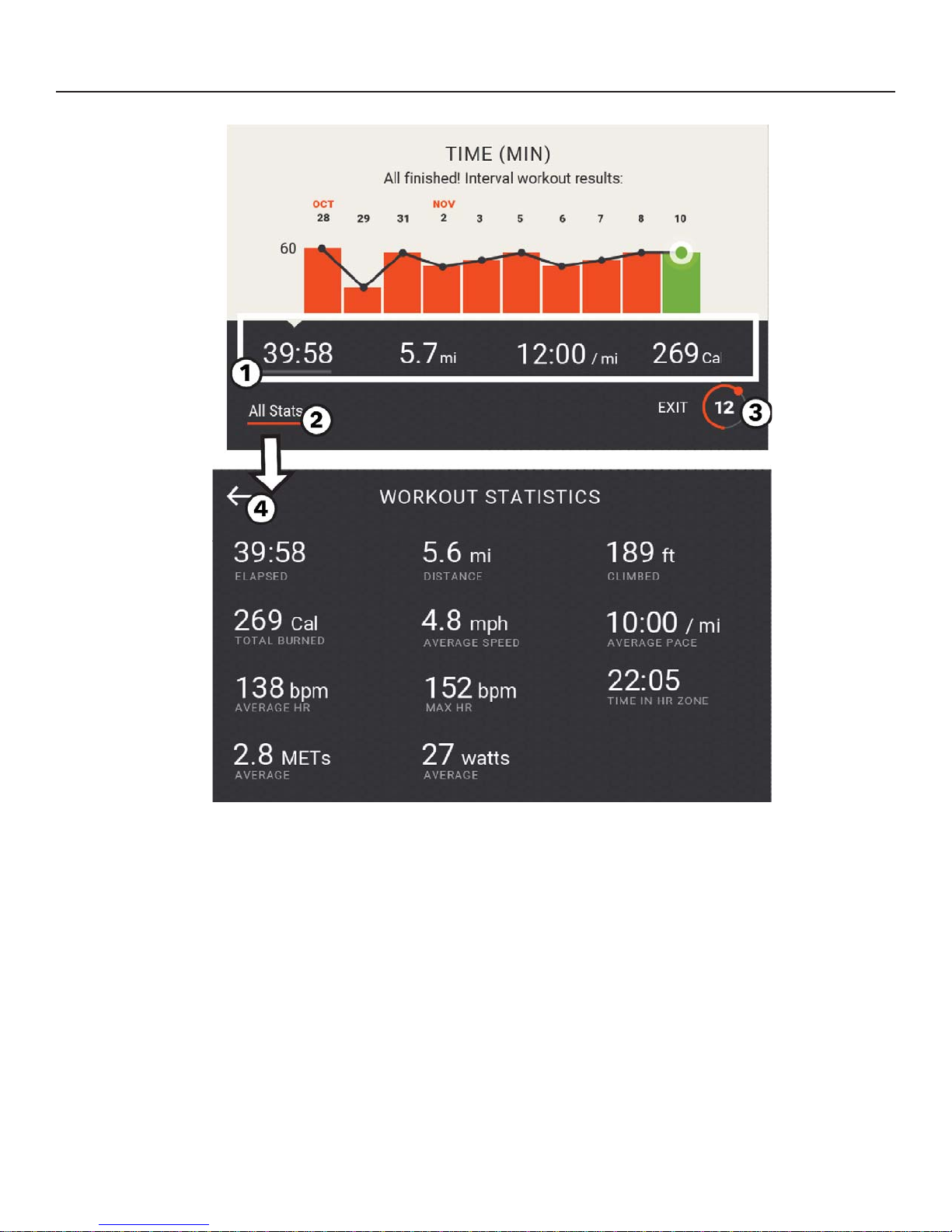
WORKOUT SUMMARY - LOGGED IN
1. Workout Metrics
Tap a specifi c workout metric to view the history of that metric on the graph.
2. All Stats
Press to view the Workout Results Screen.
3. Workout Complete Timer
Workout results are displayed for 30 seconds. The orange dot and tail spin every second counting down from
30 until it reaches 0.
Press the timer to stop the countdown and close the Workout Results Screen.
4. Exit the Workout Results Screen by selecting back arrow in upper left hand corner and return to the Workout Summary screen.
27
Page 29
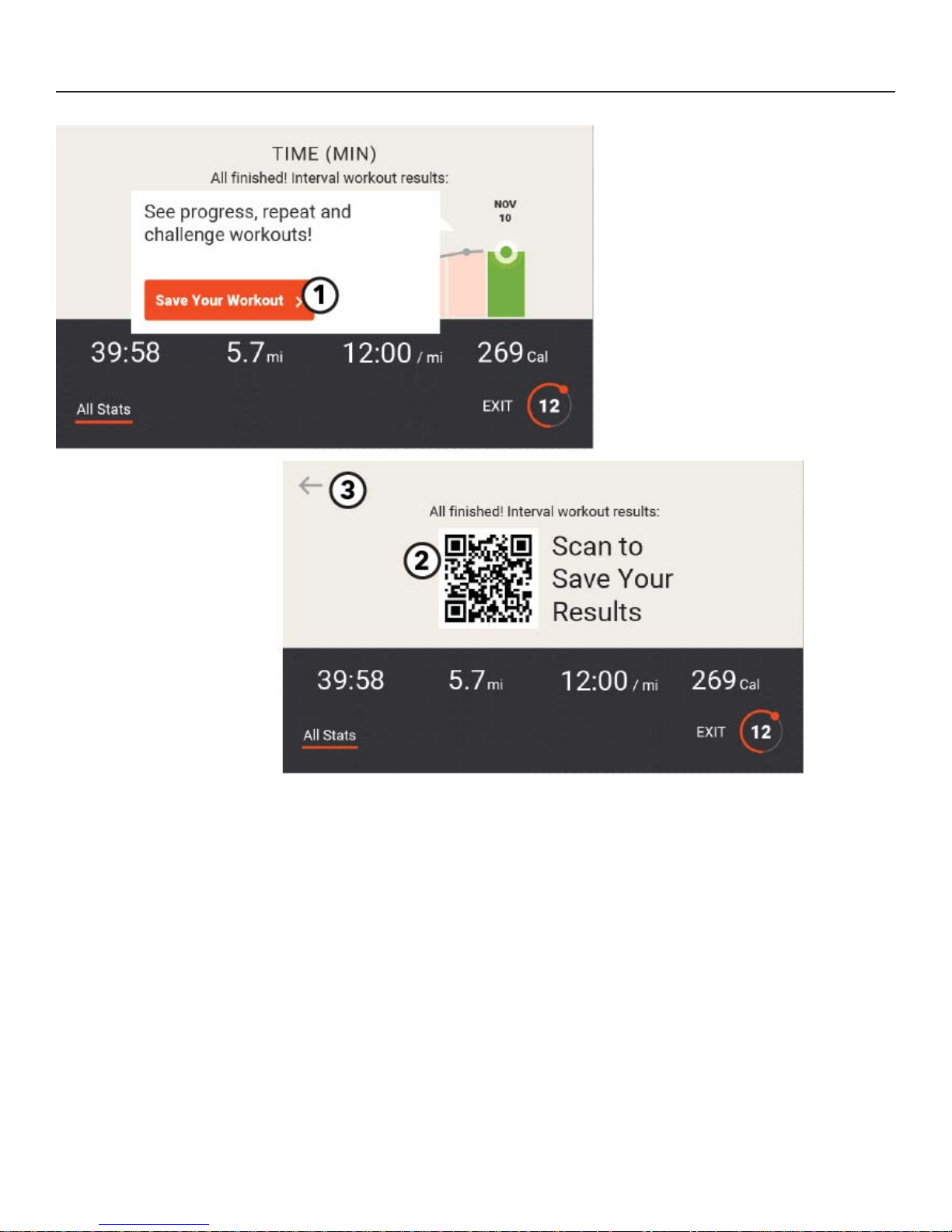
WORKOUT SUMMARY - NOT LOGGED IN
1. Save Workout
Press to view the QR Code to scan to save your results.
2. Scan to Save Workout Results
Open the LFconnect app on your mobile device.
Select the QR code reader in the upper right
hand corner.
Scan the QR code with your phone.
3. Exit and return to previous screen.
28
Page 30
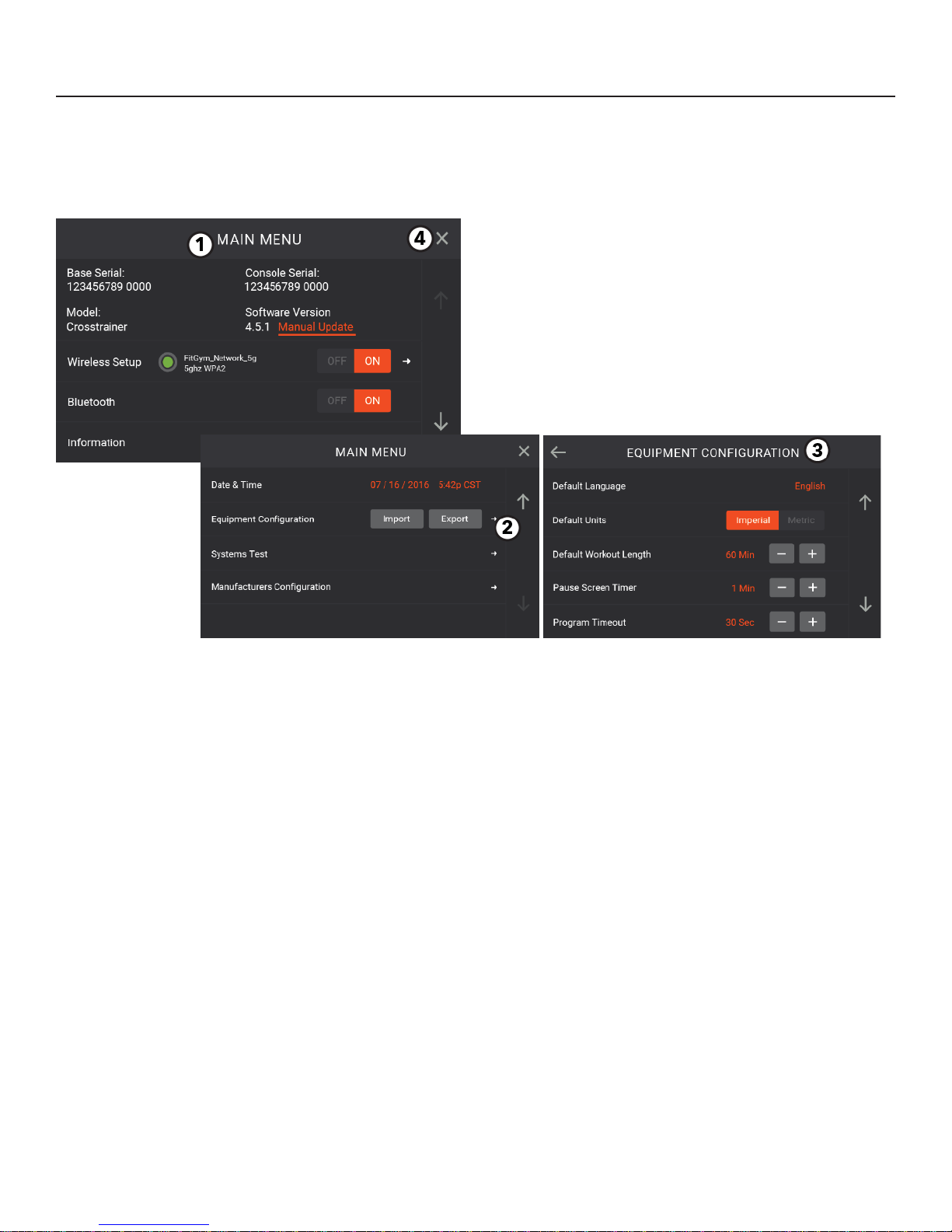
SETTINGS (MAIN) MENU / DIAGNOSTICS
Press the following key sequence to access the Settings Menu :
Workouts on Home Screen
Right Arrow Up, Right Arrow Down, Right Arrow Up Right Arrow Down
Pause Hard Key
1. Main Menu
View unit information, update software through USB,
and adjust settings. Use the Up and Down arrows to
scroll through the screens.
2. Tap the Equipment Confi guration Next Page Arrow
to access additional adjustable settings.
3. Equipment Confi guration Settings
Use the Up and Down arrows to scroll through the
settings. Use either the “+” and “-” or the “ON” and
“OFF” keys to adjust the following settings. Default
values are listed in parentheses.
Default Language (English)
Default Units (Imperial)
Default Workout Length (30 minutes)
Pause Screen Timer (60 seconds)
Program Timeout (30 seconds)
Workout Duration Limit (Basic)
Duration Limit (60 minutes)
Marathon Mode (Off)
Max Speed
(14 mph for INTDX and INTSX;
12 mph for Club Series)
Min Speed (0.5 mph)
Max Incline
(15% for INTDX and Club Series; 10% for INTSX)
Display Inactivity Dimmer (On)
System Sounds (On)
Telemetry (On)
Fitness Tests (On)
Brightness (70%)
Screen Saver Timeout (5 min)
Enable Log In (On)
Accept Touchscreen Calibration
Restore Default Settings
4. Exit the Settings Menu.
29
Page 31

PREVENTIVE MAINTENANCE TIPS
Life Fitness products are backed by the engineering excellence and reliability of Life Fitness and are one of the most
rugged and trouble-free pieces of exercise equipment on the market today.
Note: Safety of the equipment can be maintained only if the equipment is examined regularly for damage or wear.
Keep the equipment out of use until defective parts are repaired or replaced.
REMARQUE: pour conserver un matériel sûr, il convient de l’inspecter régulièrement afi n de déceler tout signe d’usure
ou d’endommagement. N’utilisez pas l’appareil tant que les pièces défectueuses n’ont pas été réparées ou remplacées.
The following preventive maintenance tips will keep the Life Fitness product operating at peak performance:
Locate the product in a cool, dry place.
Clean the display console and all exterior surfaces with an approved or compatible cleaner (see Life Fitness
Approved Cleaners) and a microfi ber cloth.
Long fi ngernails may damage or scratch the surface of the console; use the pad of the fi nger to press the se-
lection buttons on the console.
Life Fitness Approved Cleaners (United States Availability Only)
Two preferred cleaners have been approved by Life Fitness reliability experts: PureGreen 24 and Gym Wipes. Both
cleaners will safely and effectively remove dirt, grime and sweat from equipment. PureGreen 24 and the Antibacterial Force formula of Gym Wipes are both disinfectants that are effective against MRSA and H1N1. PureGreen 24 is
available in a spray which is convenient for gym staff to use. Apply the spray to a microfi ber cloth and wipe down the
equipment. Use PureGreen 24 on the equipment for at least 2 minutes for general disinfection purposes and at least
10 minutes for fungus and viral control. Gym Wipes are large, durable pre-moistened wipes to use on the equipment
before and after workouts. Use Gym Wipes on the equipment for at least 2 minutes for general disinfection purposes.
Contact Customer Support Services to order these cleaners (1-800-351-3737 or email: customersupport@lifefi tness.
com).
Life Fitness Compatible Cleaners
Mild soap and water or a mild non-abrasive household cleaner can also be used to clean the display and all exterior
surfaces. Use a soft microfi ber cloth only. Apply the cleaner to the microfi ber cloth before cleaning. DO NOT use ammonia or acid based cleaners. DO NOT use abrasive cleaners. DO NOT use paper towels. DO NOT apply cleaners
directly to the equipment surfaces.
30
Page 32
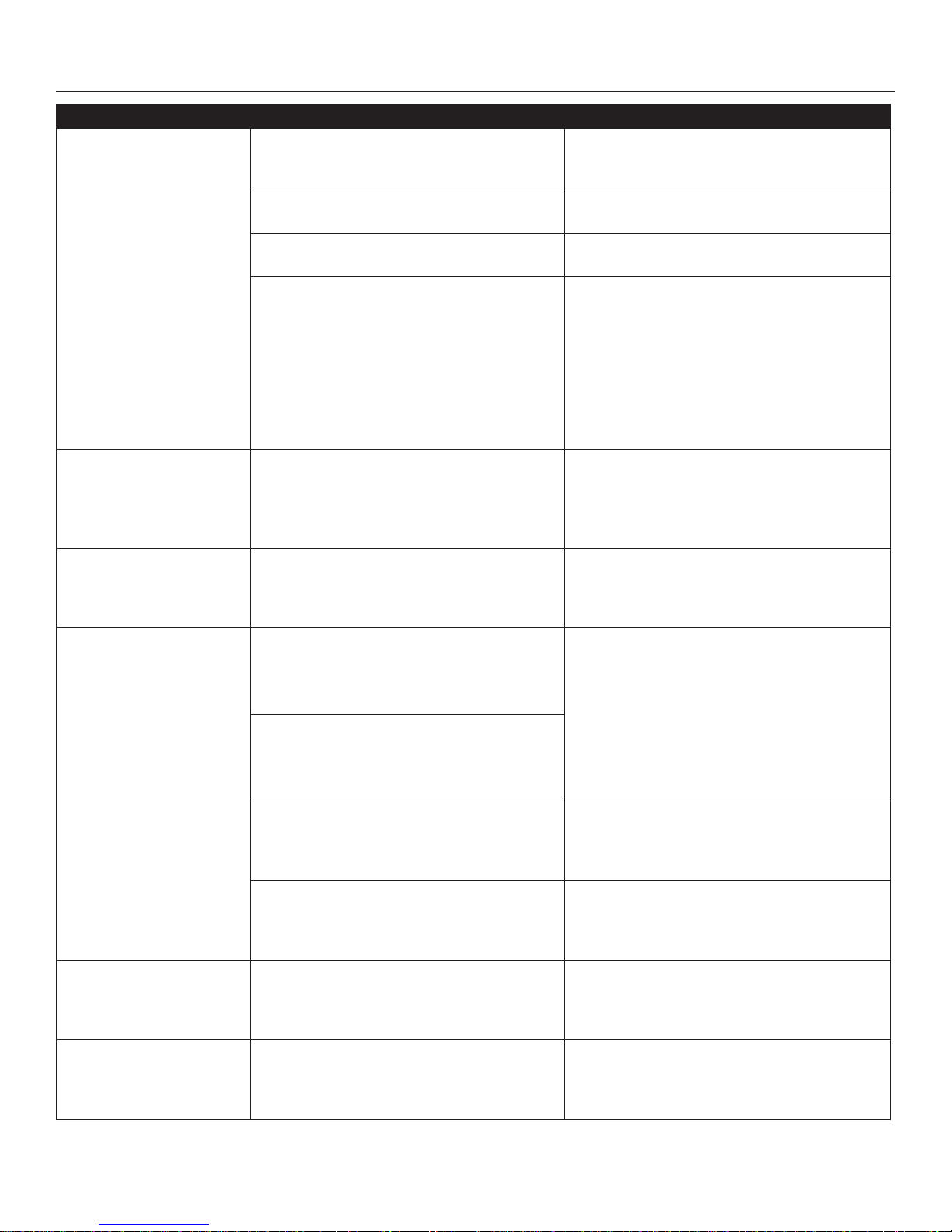
TROUBLESHOOTING
Malfunction Probable Cause Corrective Action
Power sour
Line cord is damaged.
Line cord is improperly seated in socket.
No Power.
Club Series Units Only:
You may be in “Energy Saving Mode”.
ce is insuffi cient
Using a voltmeter, verify power at outlet.
If no power exists, reset circuit breaker at
panel.
Replace line cord. Contact Life Fitness Customer Support Services.
Inspect power connection at wall outlet and
at machine for proper contact.
The unit will enter Energy Saving Mode after
5 minutes of inactivity, with a warning at
4:45 that energy saving is about to start. To
wake the console, step on the treadmill or
push the green “Go” button. When successful, a beep will be heard and the LCD screen
will show the Life Fitness logo. The unit will
take approximately 25 seconds to allow you
to start a workout.
Display does not
illuminate when
machine is powered on.
Treadmill striding belt
slips
off-center.
Maximum treadmill
speed is
reduced.
Loose connection at display console or
motor control board.
Floor surface is uneven.
User is pushing striding belt. This occurs
when the runner is running faster than the
striding belt will travel, with the result of
the striding belt being pushed with the
runner’s feet.
User is stalling striding belt. This will occur
with heavier users at lower striding belt
speeds. The striding belt will “stall” if the
user is traveling slower than the striding
belt speed.
Striding belt/deck malfunctions. The deck
laminate is worn through or the underside of striding belt is glazed over (hard,
glossy).
Power source is insuffi cient.
Check all electrical connections for proper
attachment. Contact Life Fitness Customer
Support Services.
Check levelers and level treadmill. Check
striding belt & re-tension as necessary. Refer
to Integrity Treadmill Assembly Instructions.
Instruct users not to push striding belt in
either direction.
Replace belt and deck. Contact Life Fitness
Customer Support Services.
Plug treadmill into a dedicated 20 amp
circuit.
Rubbing sound comes
from
underneath treadmill.
Display does not
illuminate when
machine is powered on.
Foreign objects may be stuck underneath
the machine.
Loose connection at display console or
motor control board.
Inspect underneath striding belt and machine. Remove any debris or objects that
may cause interference with the treadmill.
Check all electrical connections for proper
attachment. Contact Life Fitness Customer
Support Services.
31
Page 33
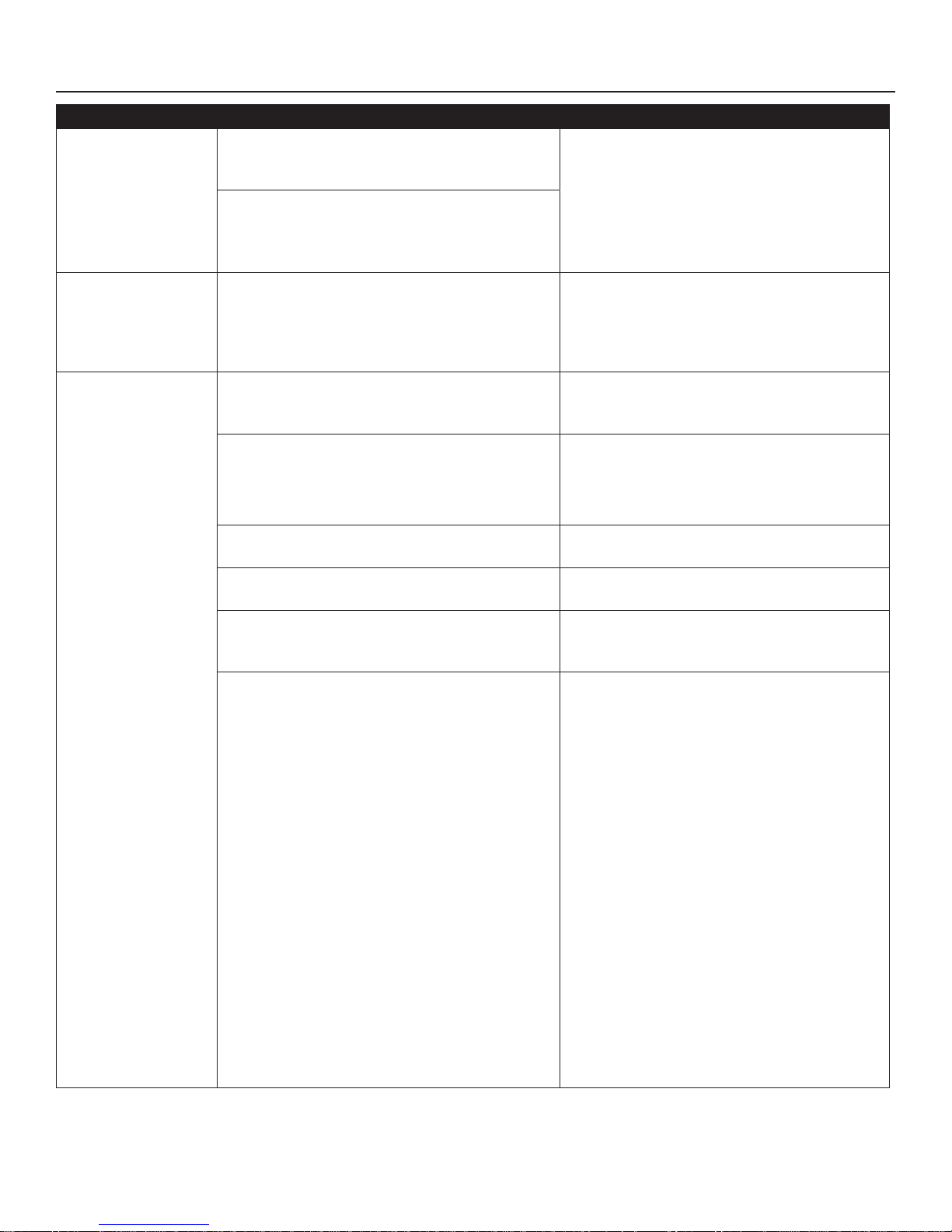
TROUBLESHOOTING - HEART RATE READING
Malfunction Probable Cause Corrective Action
Use of
personal electronic devices, such as
Heart rate reading
is initially detected
and functioning
normally but then
is lost.
Heart rate readings
are abnormally
elevated.
cell phones and portable MP3 players, causes
external noise interference.
Equipment is in close proximity to other
sources of noise such as audio/video equipment, fans, two way radios, and high voltage/
high current power lines.
Television sets and/or antennas, cell phones,
computers, cars, high voltage power lines, motor driven exercise equipment , and another
heart rate transmitter within 3 ft. (0.9 m) generate electromagnetic interference.
Belt transmitter electrodes are not wet enough
to pick up accurate heart rate readings.
Remove the source of noise or reposition the
exercise equipment.
Move the product a few inches away from
the probable cause, or move the probable
cause a few inches away from the product,
until the heart rate readings are accurate.
Wet the belt transmitter electrodes (see The
Optional P
Strap).
olar® Telemetry Heart Rate Chest
Heart rate reading
is erratic or
absent entirely.
Belt transmitter electrodes are not laying fl at
against the skin.
Belt transmitter needs cleaning.
Belt transmitter is not within 3 ft. (0.9 m) of the
heart rate receiver.
Polar telemetry heart rate chest strap battery is
depleted.
Polar telemetry heart rate chest strap did not
lock in with the heart rate receiver.
Ensure the belt transmitter electrodes are
laying fl at against the skin (see The Optional
Polar® Telemetry Heart Rate Chest Strap).
Wash the belt transmitter with mild soap and
water.
Make sure the chest strap transmitter is
within 3 ft. (0.9 m) of the heart rate receiver.
Contact Life Fitness Customer Support Services for instructions on how to have the Polar telemetry heart rate chest strap replaced.
Make sure the Polar telemetry heart rate
chest strap is properly attached to the user’s
chest and move closer to the heart rate
receiver inside the console. Wait up to 10
seconds for the heart rate to display on the
console. The overall range of the heart rate
strap is approximately 3 ft. (0.9 m) after it
communicates with the receiver. The strap
must be 1.5 - 2 ft. (0.5 - 0.6 m) away from the
receiver in order to start communicating.
When the display shows a heart rate value
stay within 3 ft. (0.9 m).
32
Notes:
1. Ensure proper adherence of the Polar
telemetry heart rate chest strap to user’s
chest.
2. Ensure proper conductivity between the
electrodes and user’s chest.
3. If needed, use the Polar watch to verify
chest strap’s operation.
Page 34
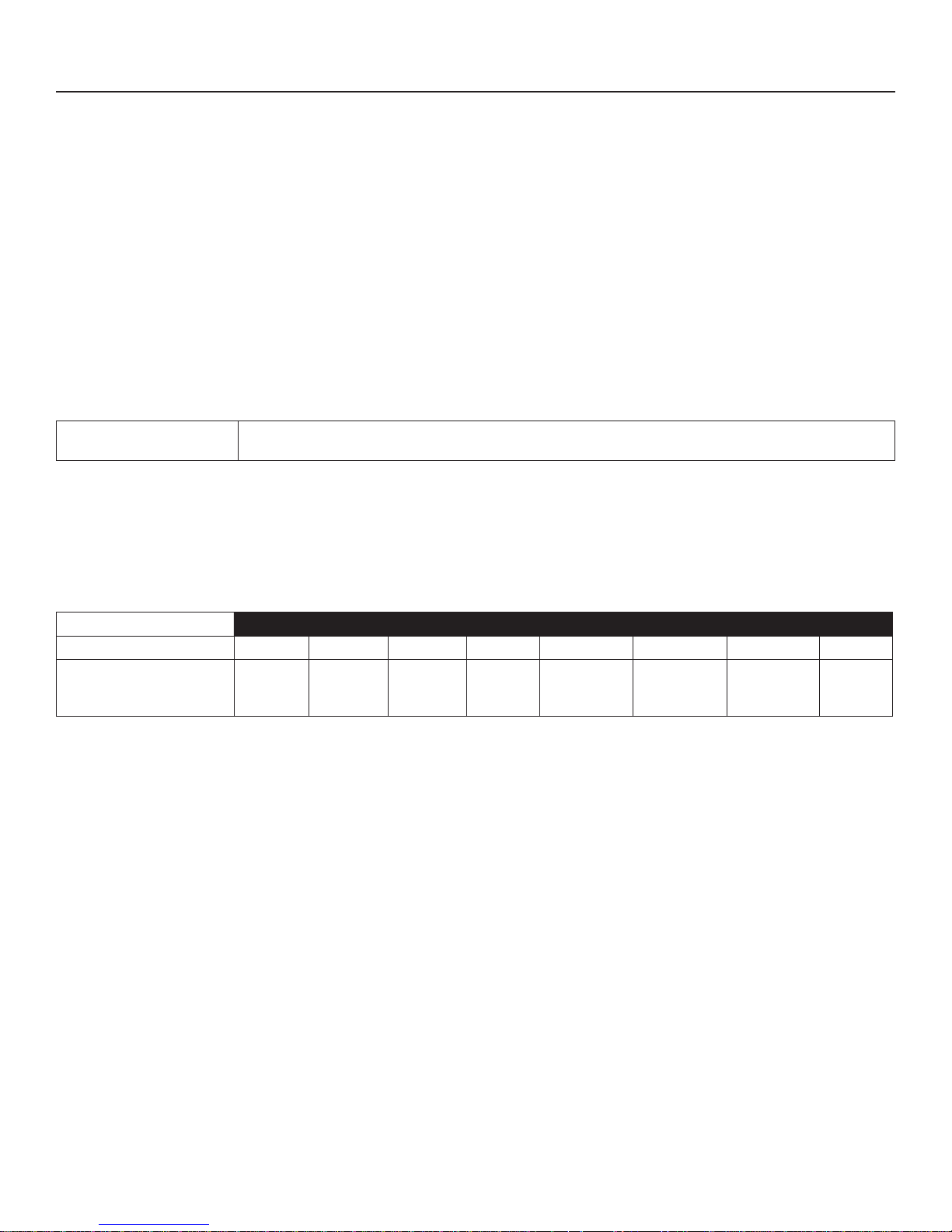
INTEGRITY X CONSOLE SPECIFICATIONS
Display: 7” LCD color touch screen
Ambient Temperature Range:
(Operating) 0°C to +40°C@ 90% RH (non-condensing)
Storage and Shipping
Temperature Range: -40°C to 75°C
Heart Rate Monitoring Systems: Patented Lifepulse
™
digital contact heart rate and Polar® telemetry-compatible heart rate
monitoring system
Mobile Device Compatibility: Bluetooth proximity, NFC
USB Device Charging: Can be used in combination with Apple 30-pin, Apple Lightning and Android micro-
USB cables to charge compatible devices.
Workouts:
INTSX, INTDX &
Club Series Treadmills
Quick Start, Time Goal, Distance Goal, Calories Goal, Heart Rate Goal, Random, Manual, Hill, Rolling
Hills, Speed Interval, Incline Interval, Life Fitness Fit Test
Physical Dimensions Shipping Dimensions
Depth Width Height Weight Depth Width Height Weight
Integrity X Console
3.8 in.
(96 mm)
20 in.
(497 mm)
15 in.
(390 mm)
6.75 lbs.
(3.1 kg)
6.5 in.
(165 mm)
24 in.
(613 mm)
18 in.
(463 mm)
10.8 lbs.
4.9 (kg)
© 2017 Life Fitness, A division of Brunswick Corporation. All Rights Reserved. Life Fitness is a registered trademark of Brunswick Corporation.
Heart Rate+, LFconnect and Lifepulse are trademarks of Brunswick Corporation.
iPad, iPhone and iPod are registered trademarks of Apple Inc. Android is a trademark of Google Inc. PM-038-13. (3.14). Bluetooth is a registered
trademark of Bluetooth SIG, Inc. FitLinxx is a trademark of FitLinxx, Inc. Gym Wipes® is a registered trademark of The 2XL Corporation. Polar is a
registered trademark of Polar Electro, Inc. PureGreen 24 is a trademark of Pure Green.
33
Page 35

WARRANTY INFORMATION
WHAT IS COVERED.
This LIFE FITNESS commercial exercise equipment (“Product”) is
warranted to be free of all defects in material and workmanship.
WHO IS COVERED.
The original purchaser or any person receiving a newly purchased Product as a gift from the original purchaser. Warranty
will be voided on subsequent transfers.
HOW LONG IS IT COVERED.
All coverage is provided by specifi c Product according to the
guidelines listed on the chart on the following page.
WHO PAYS TRANSPORTATION & INSURANCE FOR SERVICE.
If the Product or any covered part must be returned to a service
facility for repairs, We, LIFE FITNESS, will pay all transportation
and insurance charges for the fi rst year. You are responsible for
transportation and insurance charges during the second and
third years (if applicable).
WHAT WE WILL DO TO CORRECT COVERED DEFECTS.
We will ship to you any new or rebuilt replacement part or component, or, at our option, replace the Product. Such replacement
parts are warranted for the remaining portion of the original
warranty period.
WHAT IS NOT COVERED.
Any failures or damage caused by unauthorized service, misuse,
accident, negligence, improper assembly or installation, debris
resulting from any construction activities in the Product’s environment, rust or corrosion as a result of the Product’s location,
alterations or modifi cations without our written authorization or
by failure on your part to use, operate and maintain the Product
as set out in your Operation Manual (“Manual”).
One type RJ45 interchangeable Network ready and Fitness
Entertainment port is supplied with the Product. This port
complies with the FitLinxx CSAFE specifi cation dated August 4,
2004 stating: 4.75VDC to 10VDC; maximum current of 85mA.
Any Product damage caused by a load exceeding this FitLinxx
CSAFE specifi cation is not covered by warranty.
WHAT YOU MUST DO.
Retain proof of purchase; use, operate and maintain the Product
as specifi ed in the Manual; notify Customer Support Services
of any defect within 10 days after discovery of the defect; if
instructed, return any defective part for replacement or, if necessary, the entire Product for repair.
OPERATION MANUAL: It is VERY IMPORTANT THAT YOU READ
THE MANUAL before operating the Product. Remember to
perform the periodic maintenance requirements specifi ed in the
Manual to assure proper operation and your continued satisfaction.
HOW TO GET REPLACEMENT PARTS & SERVICE.
Refer to page one of this manual for your local service contact information. Reference your name, address and the serial
number of your Product (consoles and frames may have sepa-
rate serial numbers). They will tell you how to get a replacement
part, or, if necessary, arrange for service where your Product is
located.
EXCLUSIVE WARRANTY.
THIS LIMITED WARRANTY IS IN LIEU OF ALL OTHER WARRANTIES OF ANY KIND EITHER EXPRESSED OR IMPLIED, INCLUDING BUT NOT LIMITED TO THE IMPLIED WARRANTIES OF
MERCHANTABILITY AND FITNESS FOR A PARTICULAR PURPOSE, AND ALL OTHER OBLIGATIONS OR LIABILITIES ON OUR
PART. We neither assume nor authorize any person to assure
for us any other obligation or liability concerning the sale of this
Product. Under no circumstances shall we be liable under this
warranty, or otherwise, of any damage to any person or property, including any lost profi ts or lost savings, for any special,
indirect, secondary, incidental or consequential damages of any
nature arising out of the use of or inability to use this Product.
Some states do not allow the exclusion or limitation of implied
warranties or of liability for incidental or consequential damages, so the above limitations or exclusions may not apply to
you.Warranty coverages and terms may differ outside the United
States. Please contact the Life Fitness offi ce servicing your country (contact information found at the front of this manual) or visit
the applicable local Life Fitness website to receive the specifi c
warranty information for your country.
All terms of this warranty are void if this product is moved
beyond the continental borders of the United States of America
(excluding Alaska, Hawaii and Canada) and are then subject to
the terms provided by that country’s local authorized LIFE FITNESS representative.
34
CHANGES IN WARRANTY NOT AUTHORIZED.
No one is authorized to change, modify or extend the terms of
this limited warranty.
EFFECT OF STATE LAWS.
This warranty gives you specifi c legal rights and you may have
other rights which vary from state to state and country by country.
Page 36
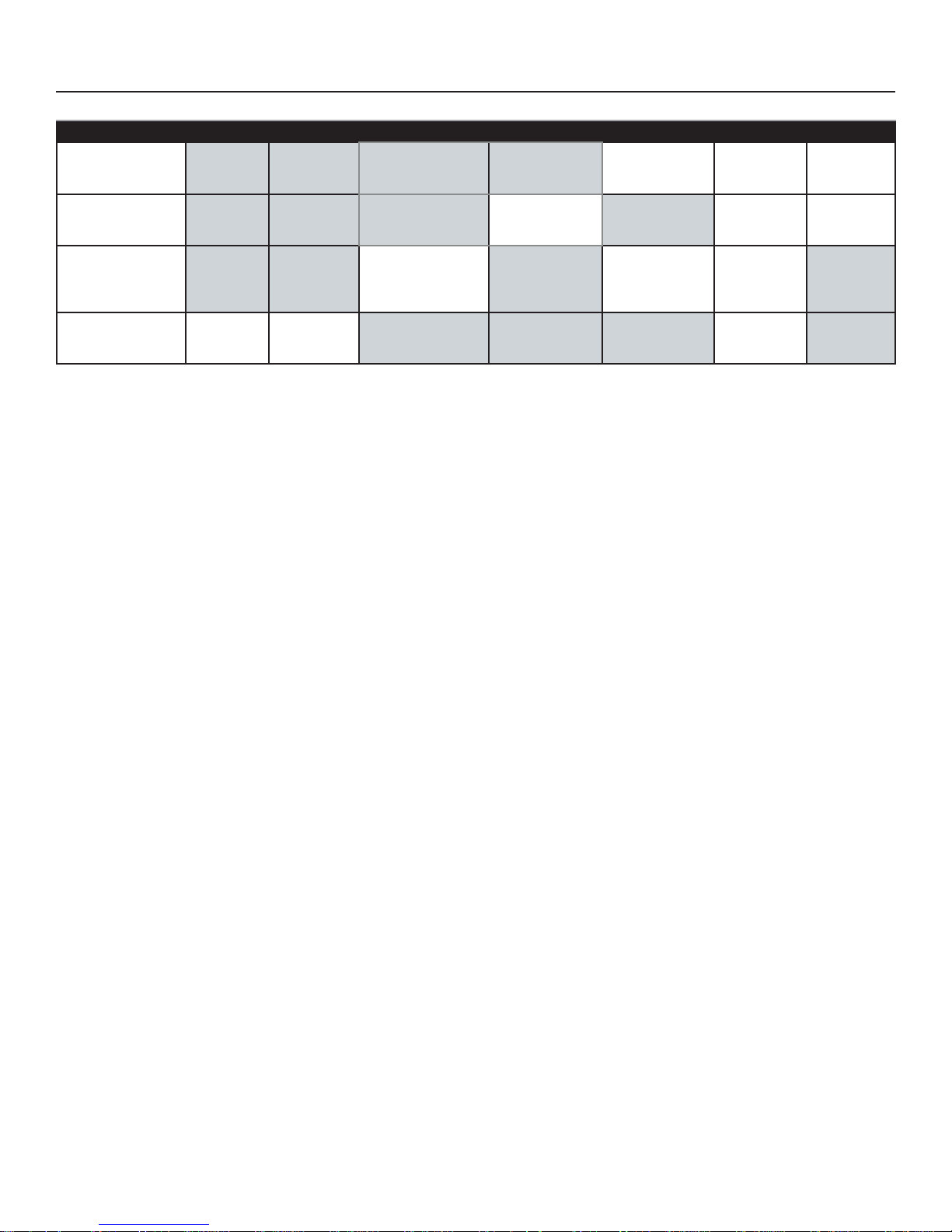
WARRANTY INFORMATION
Lifetime 10 Years 7 Years 3 Years 2 Years 1 Year 6 Months
Commercial
Integrity X
C
onsole
Consumer
Integrity X Console
(Home Use)
Electrical &
Mechanical Parts
Electrical &
Mechanical Parts
Labor
Labor
Cosmetic
Items
Cosmetic
Items
Treadmill
(INTDX, INTSX)
Club Series
Treadmill
Motor &
Frame
Electrical &
Mechanical
Par ts
Warranties outside the U.S. may vary.
Frame, Lifespring™
Shock Absorbers, &
Motor
Electrical
Components
Mechanical
Components
& Labor
Labor
35
 Loading...