

Page 1
The Bluetooth® word mark and logos are registered trademarks
owned by the Bluetooth SIG, Inc. and any use of such marks
by SC Industries is under license. Other trademarks and trade
names are those of their respective owners.
Designed, tested and assembled in the USA.
Made in the United States with domestic
v.0217
and foreign components.
STREAM
Simple Device. Enhanced Life.
Read manual before use.
.
Page 2
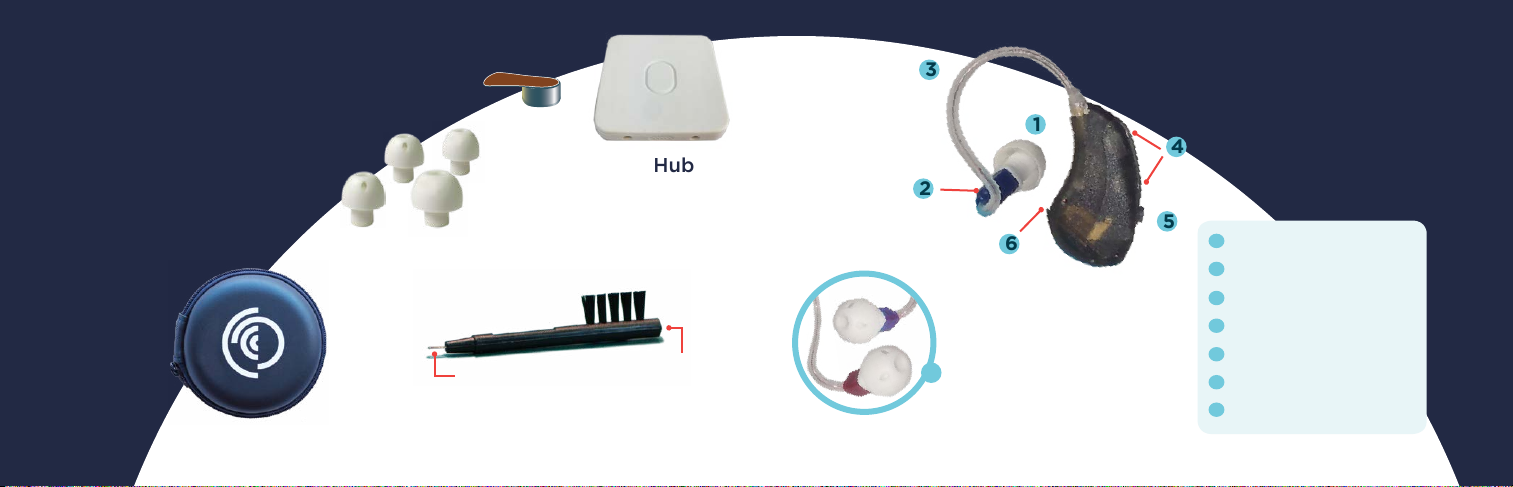
LifeEar® STREAM
Box Contents*
Size 312 Batteries
(Brown-Tab)
3
easy-CLICK™ Tips
†
1
4
Hub
USB Charger
2
5
Carrying Case
6
Cleaning Brush
wire loop
1
†
easy-CLICK™ is a registered trademark of Hearing Components.
*Contents will vary depending on product ordered.
magnet
7
Left ear = Blue receiver
Right ear = Red receiver
1
easy-CLICKTM Tip
2
Receiver
3
Receiver Wire
4
Microphones
5
Program Button
6
Battery Door
7
Right/Left Indicator
2
Page 3

Power and Volume Control
Inserting Battery
Power
ON = battery door closed
OFF = battery door open
WAIT
1 min.
air
+
-
Insert
side up
+
4
Battery Type
Size 312 zinc-air battery
(brown tab).
Wait one FULL minute
after removing tab for
battery to fully charge.
3
Page 4
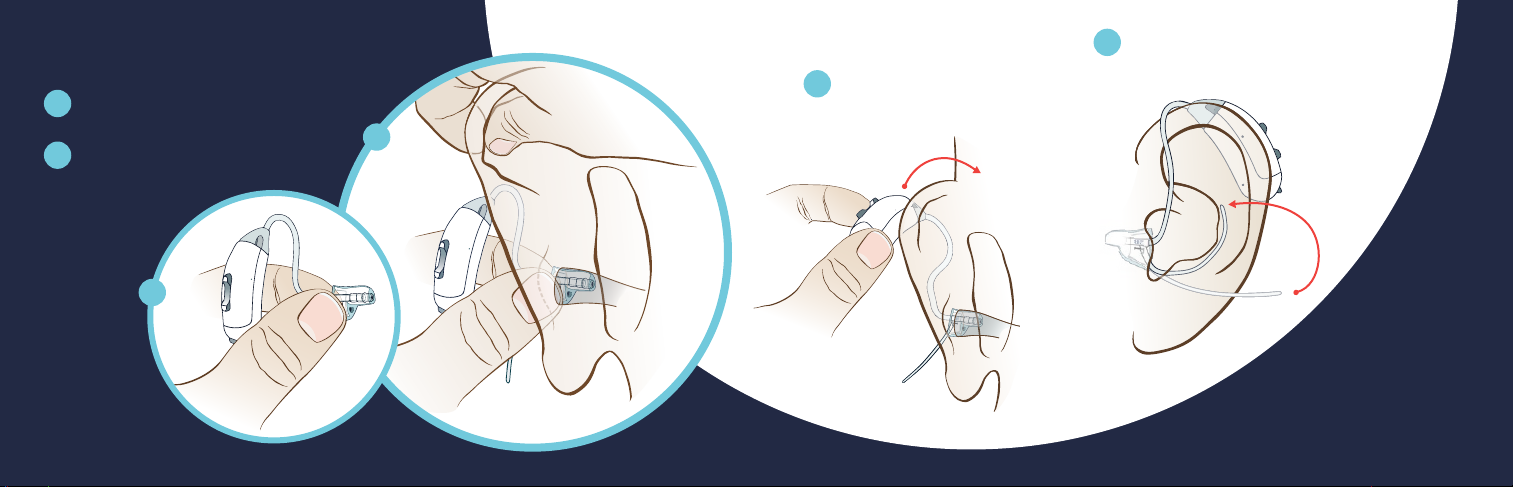
Wearing Your LifeEar® STREAM
2B
2B
1
Hold onto receiver.
2
Place tip in entrance
2
of ear canal.
as seen
from behind
Place behind ear.
3
Move ear lock into
4
bowl of ear.
1
5
2B
6
Page 5
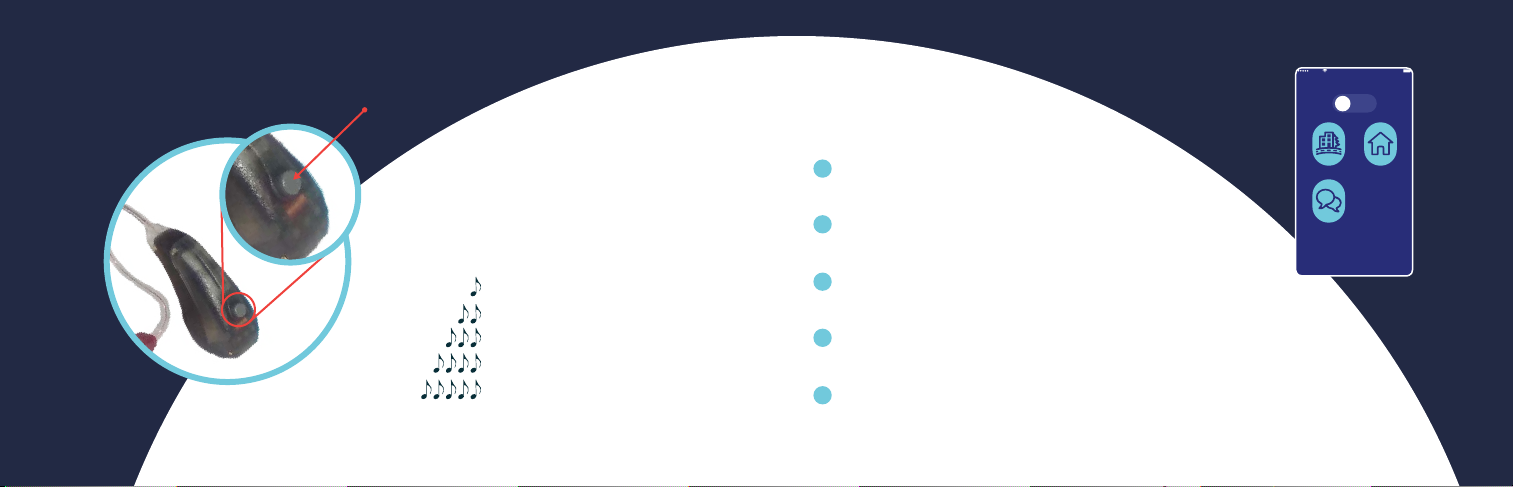
Program Control
Sketch 9:41 AM 100%
all
Amplification mode
Close
Automatic
Conversation
Quiet
7
Program Button
Press Program Button
to change Programs
= Program 1
= Program 2
= Program 3
= Program 4
= Program 5
Program Settings
1
Automatic: all frequencies
emphasized—up to XX dB.
2
Quiet: all frequencies emphasized—
up to XX dB.*
3
Conversation: speach frequencies
emphasized—up to XX dB.*
4
Automatic: high-frequencies emphasized—
up to XX dB.
5
Quiet: High-frequencies emphasized— up to XX dB.
*To avoid whistling, use foam tips at higher volumes.
8
Page 6
2B
2B
2B
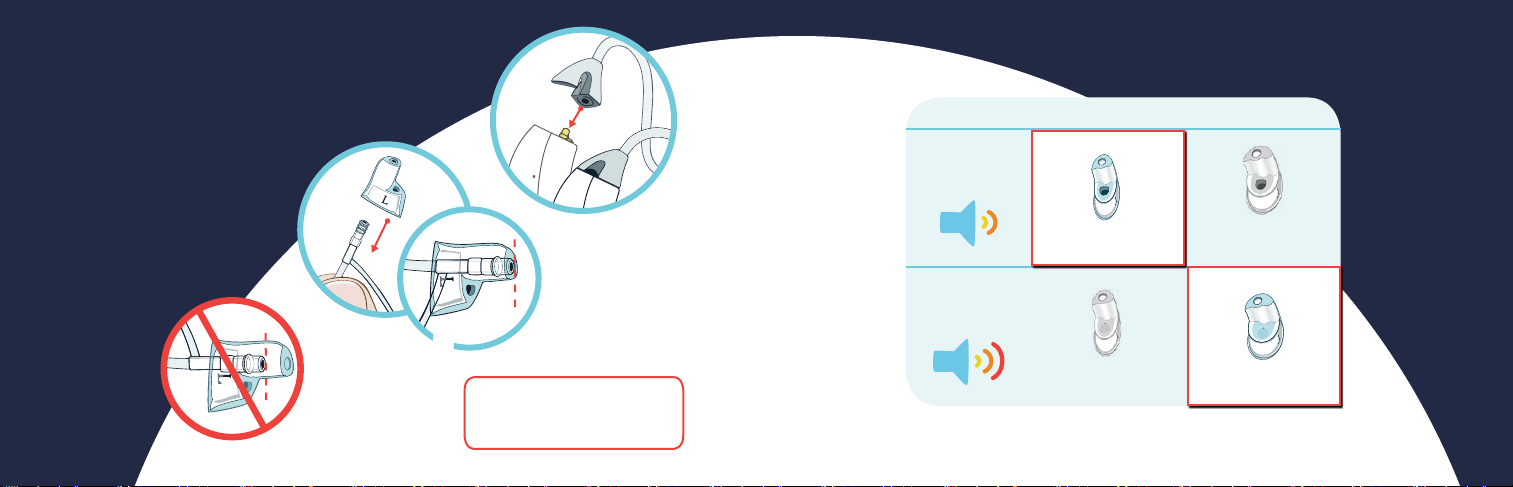
Replacing Tubing and Tips
Tubing: Rotate tubing 90°
and slide o. Push new
tubing on.
Tip: Pull tip o tubing.
Push new tip on until
ush with end
of tubing.
9
þ
Replace every three
months for best sound
at www.lifeear.com
Natural
Sound
Maximum
Output
Available at www.lifeear.com
*
Fitting Chart
Average Ear Canal Large Ear Canal
included
LifeEar Tip
Standard
LifeEar Tip
*
Large
included
*
Power Tip
Standard
Power Tip
Large
10
Page 7
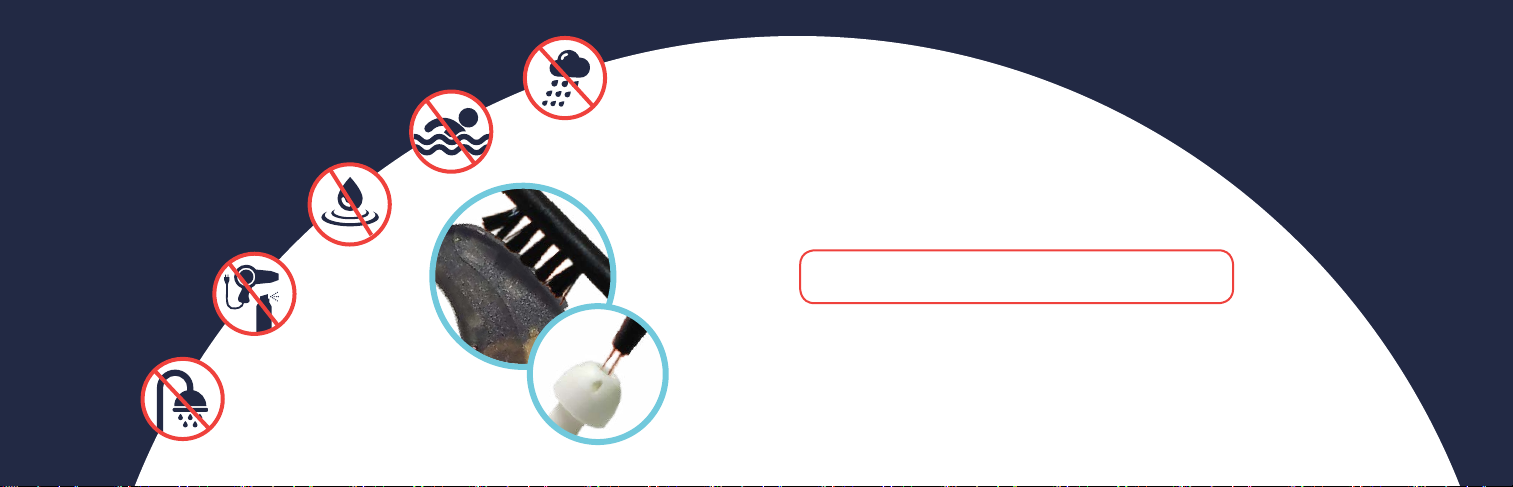
Cleaning and Care
Wipe daily with tissue.
Support
www.lifeear.com
Regularly use cleaning
brush and wire loop to
remove debris.
Avoid exposure
to moisture.
Store in a cool,
dry place.
11
Troubleshooting
Problems? Issues? Questions?
Visit www.lifeear.com
Note: If experiencing weak or no sound, clean
easy-CLICK
TM
tip thoroughly or replace.
Warranty
To activate your one year warranty from date of purchase,
register your LifeEar at: www.lifeear.com/warranty
12
Page 8

FCC Statement
This equipment has been tested and found to comply with the limits for a Class B digital
device, pursuant to Part 15 of the FCC Rules. These limits are designed to provide reasonable
protection against harmful interference in a residential installation.
This equipment generates, uses and can radiate radio frequency energy and, if not
installed and used in accordance with the instructions, may cause harmful interference
to radio communications. However, there is no guarantee that interference will not occur
in a particular installation. If this equipment does cause harmful interference to radio or
television reception, which can be determined by turning the equipment o and on, the
user is encouraged to try to correct the interference by one of the following measures:
Reorient or relocate the receiving antenna.
Increase the separation between the equipment and receiver.
Connect the equipment into an outlet on a circuit dierent
from that to which the receiver is connected.
Consult the dealer or an experienced radio/TV technician for help.
To assure continued compliance, any changes or modications not expressly approved
by the party responsible for compliance could void the user’s authority to operate this
equipment. (Example - use only shielded interface cables when connecting to computer
or peripheral devices).
This device complies with Part 15 of the FCC Rules. Operation is subject to
the following two conditions:
(1) This device may not cause harmful interference, and
(2) This device must accept any interference received, including
interference that may cause undesired operation.
FCC Radiation Exposure Statement:
(if mobile device (generally 20 cm distance) is applicable, MPE calculation)
“This equipment complies with FCC RF radiation exposure limits set forth for an
uncontrolled environment. The antenna(s) used for this transmitter must be installed
to provide a separation distance of at least 20 cm from all persons and must not be
co-located oroperating in conjunction with any other antenna or transmitter”.
13
14
 Loading...