

Page 1
www.lieber-rc.com
1
Ver. 1.1.1
Last updated: September 18. 2015
Thank you for choosing Drone 280, hope you will have a good flight
with D280. We strongly recommend you read this manual carefully
before you use D280. The following instructions will help you to
make your Drone 280 working perfectly.
If you meet any difficulty during the usage, please contact with
Shenzhen Lieber Electronics Co. Ltd. at
www.lieber-rc.com
Page 2

www.lieber-rc.com
2
Content:
1.0 Disclaimer
.....................................................................................
3
2.0 Get to know your aircraft
............................................................
4
2.1 Drone 280mm FPV Racing Mini Quadcopter
.........................
4
2.2 Drone 280 Specifications
.........................................................
6
2.3 Introduction for Drone 280 PCB
.............................................
6
3.0 Technical Terms and Abbreviations
............................................
7
4.0 Packing List
...................................................................................
7
5.0 Charge the Battery
.......................................................................
7
6.0 Assemble
.......................................................................................
8
6.1 CC3D Flight Controller Connect Remote Installation
............
8
6.2 Remote Installation
...............................................................
16
6.3 Battery Installation
................................................................
21
7.0 Ready for flight
...........................................................................
21
7.1 Bing of the Drone 280
............................................................
21
7.2 Motor Unlock /Lock
...............................................................
21
8.0 Operation Instruction
................................................................
22
9.0 End flight
.....................................................................................
24
10.0 Appendix
...................................................................................
24
Page 3
www.lieber-rc.com
3
1.0 Disclaimer
First of all, thank you for using LIEBER product. This is not a toy, please
read the manual carefully before you use this product. Upon reading
this, you’re deemed to agree with the disclaimer, this products is not
suitable for people aged below 14 years old.
If any of below reason (not limited to below reason) occur during the
use of our products, LIEBER shall not be liable for any direct or indirect
loss, damages and injuries that result from the usage of our products.
1. You have control. Remember, when you fly an unmanned aircraft (or
drone), the responsibility is yours;
2. Be safe, be legal;
3. You are legally responsible for the safe conduct of each flight;
4. It is illegal to fly your unmanned aircraft over a congested area
(streets, towns and cities )Also, stay well clear of airports and airfields;
5. Before each flight check that your unmanned aircraft is not damaged,
and that all components are working in accordance with the supplier’s
user Manual;
6. Don’t fly your unmanned aircraft within 50m of a person, vehicle,
building or structure, or overhead grounds of people at any height;
7. You must keep the unmanned aircraft within your sight at all times;
8. Think about what you do with any images you obtain as you may
breach privacy laws. Details are available from the information
commissioner’s office;
9. You are responsible for avoiding collisions with other people or
objects-including aircraft. Do not fly your unmanned aircraft in any way
that could endanger people or property;
10. If you intend to use an unmanned aircraft for any kind of
commercial activity, you must get a permission from the civil aviation
authority, or you could face prosecution;
Page 4

www.lieber-rc.com
4
2.0 Get to know your aircraft
2.1 Drone 280mm FPV Racing Mini Quadcopter
Drone 280mm uses an all-in-one flight control system,
compatible with the mainstream transmitters for example JR,
Futaba.
Specifically chosen to run 2204~2150KV motors with 6 inch
propellers, to reach exciting new speeds.
Due to the use of extremely lightweight pure carbon fiber material
and the all-in-one flight control system, allows for the flight weight
to be as light as 340~360g (not including battery).
This means you will be able to accelerate quick off the mark,
remarkably responsive and stable flight.
The frame is of the X4 model, the diameter between the motors is
280mm.
The thickness of the fuselage is only a meer 1.5mm, pure carbon
fiber supports for lightweight but a strong structure.
The arms all have a thickness of 3mm, also made from carbon fiber.
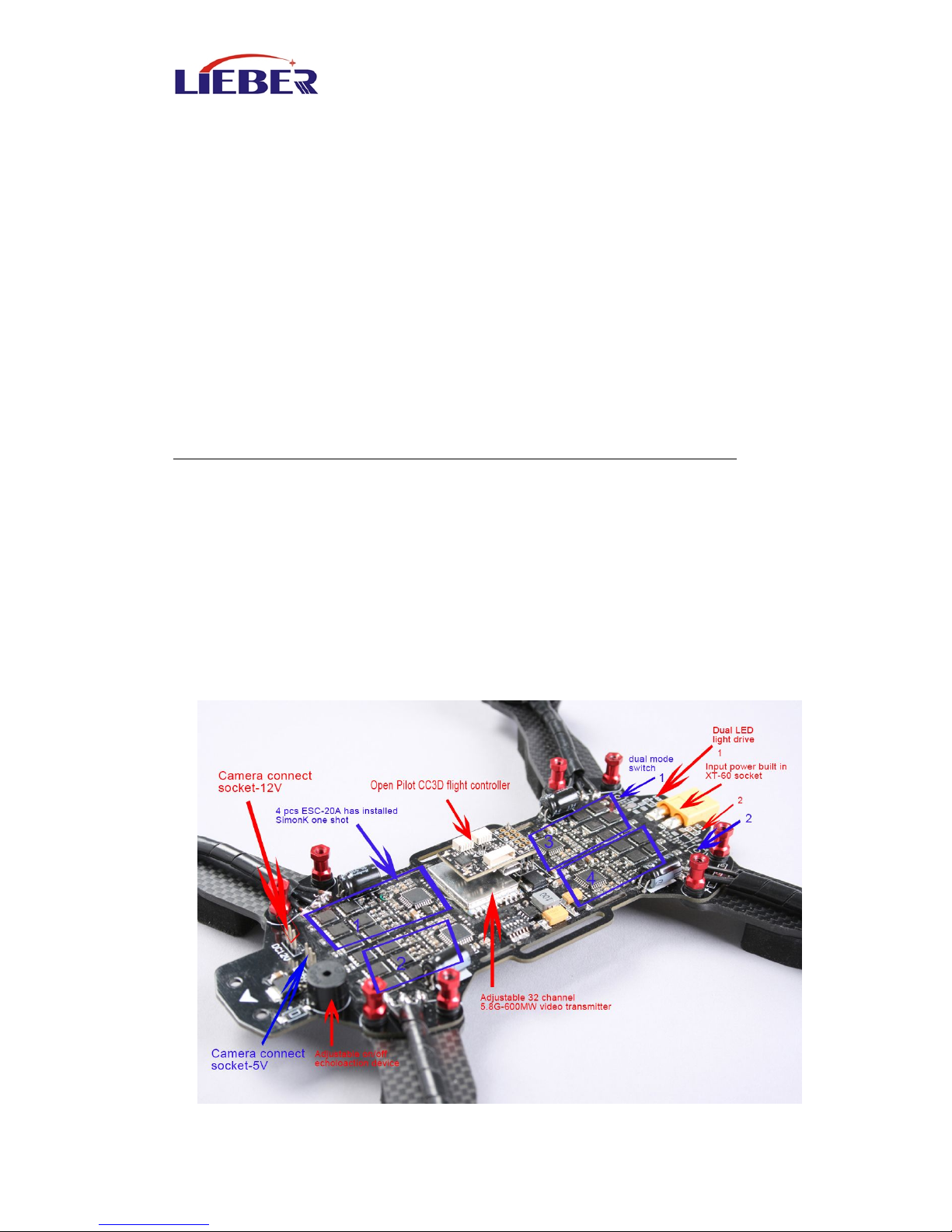
Newly researched all-in-one flight control system includes the
following functions:
4x 20A speed controller (Simon K oneshot settings installed)
Adjustable 32 channel 5.8G-600MW video transmitter
OpenPilot CC3D flight controller~ Adjustable LED power output
Adjustable on/off echolocation device
5V or 12V FPV camera power and video output
input power built in XT-60 socket
The all-in-one flight control system reduces the need for
complicated soldering hence trimming down the weight of the
wires resulting in extraordinary performance.
Components required for normal flight:
3~4S 1400~2300mAh Lipo Batteries (flight time 5~9minutes)
At least 5 channels or above transmitter with mini receiver
Components required for FPV flight:
At least 5 channels or above transmitter with mini receiver
21x21mm camera with 5V or 12V input
5.8G video output device with receiving capabilities
Page 5
www.lieber-rc.com
5
Adopting the Carbon Fiber material for the main body, the
racer possesses superior toughness and strong anti-impact
ability.
The brand new industrial and modular design, greatly improve
the product extension, which enable it much easier to maintain
and upgrade.
The 5.8G real-time image transmission system, can bring you
the unforgettable visual enjoyment
The all-in-one flight control system, allows for the flight weight
to be as light as 340~360g (not including battery)
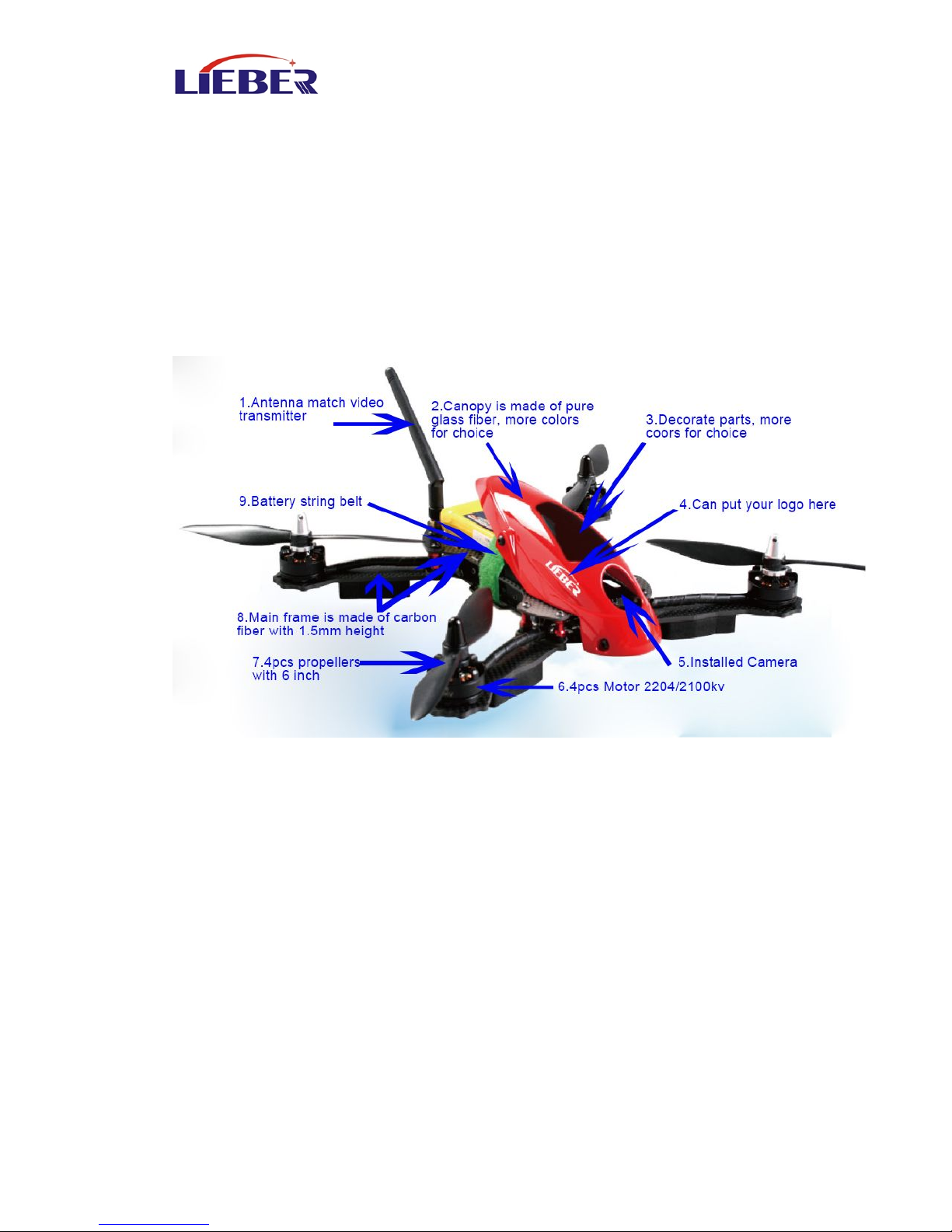
1. Antenna Match video transmitter 2. Canopy (PC or Fiber glass )
3. Decorate parts 4. Logo place
5. Video Camera 6. Motor
7. Propeller 8.Main Carbon Fiber Frame
9. Battery String belt +battery
Page 6
www.lieber-rc.com
6
2.2 Drone 280 Specifications
Aircraft Specifications
Main Rotor Dia:150mm
Overall (L x W x H):225 x 240 x70mm
Weight:490g (Battery included)
Transmitter:At least 5 channels or above transmitter
Receiver: mini receiver
Main Controller: FJT-Drone280
Brushless Motor: LB-DS-2204 (CW/CCW)
Brushless ESC: LB-280D
Battery: 11.1V 2200mAh 25C 3S LiPo
Flight time: 12~15mins
Working temperature: -10 ºC ~+40 ºC
.Video Camera specifications
Horizontal Resolution: 700TVL
System Commitee: PAL/NTSC
Video Out: 1.0Vp-p/75Ω
Power Input: DC 5V/12V
2.3 Introduction for Drone 280 PCB
Page 7
www.lieber-rc.com
7
3.0 Technical Terms and Abbreviations
4.0 Packing List
LIEBER Drone 280 x1
LIEBER Drone Manual x1
Camera x1
Propeller x4
MT Motor x4
All-in-one flight control system board
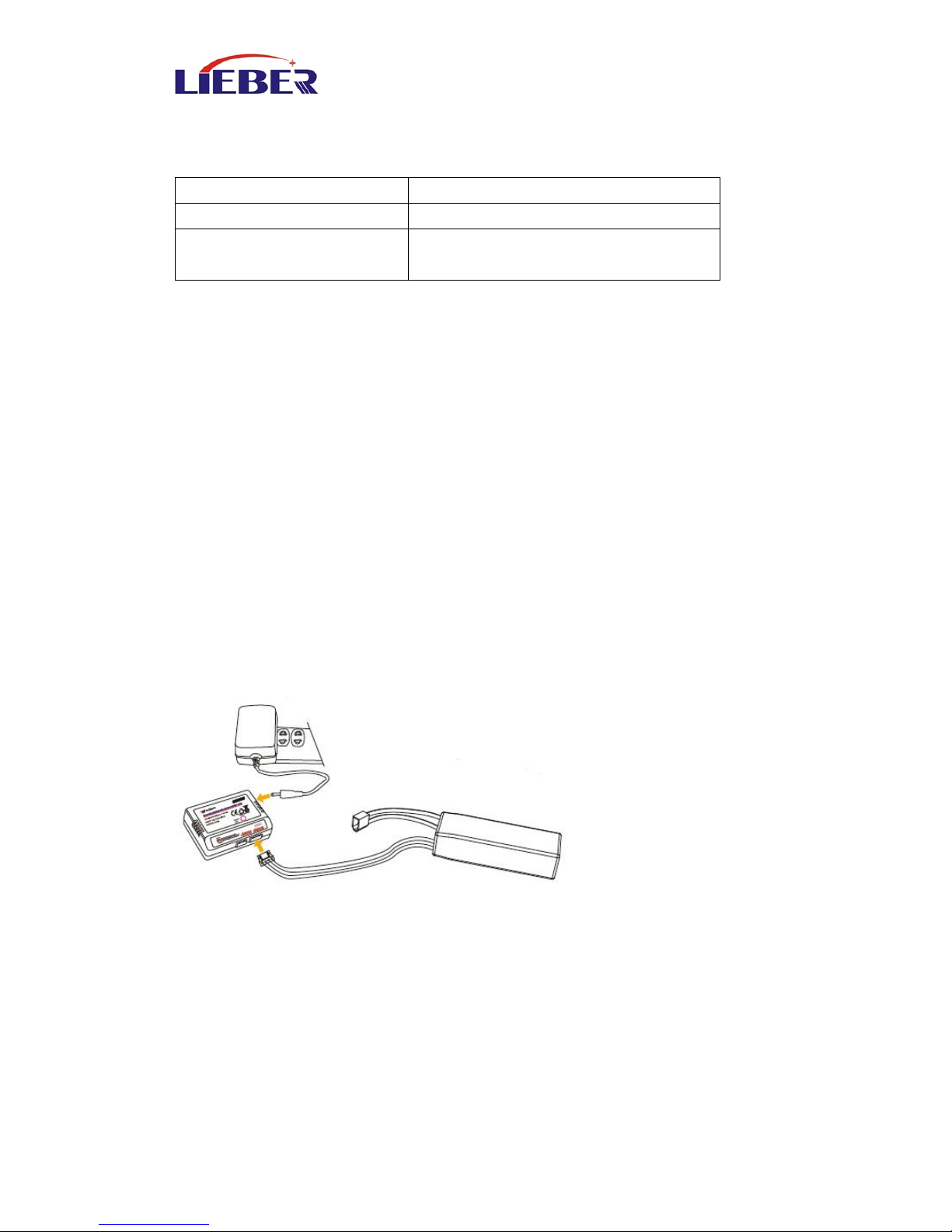
5.0 Charge the Battery
1) Insert the power adapter (100~240V 50/60HZ), connect the output
end to the balance charger, the balance charger is red light at this time.
2) Insert the balanced pin of LiPo battery into the adapter
3) During charging , light is continuously flashing. If saturated, the light
turn green.
CH
Channel
FS
Fail Safe (Loss Control Protection)
LIEBER
Shenzhen Lieber Electronics Co.
Ltd.
Page 8
www.lieber-rc.com
8
6.0 Assemble
6.1 CC3D Flight Controller Connect Remote Installation
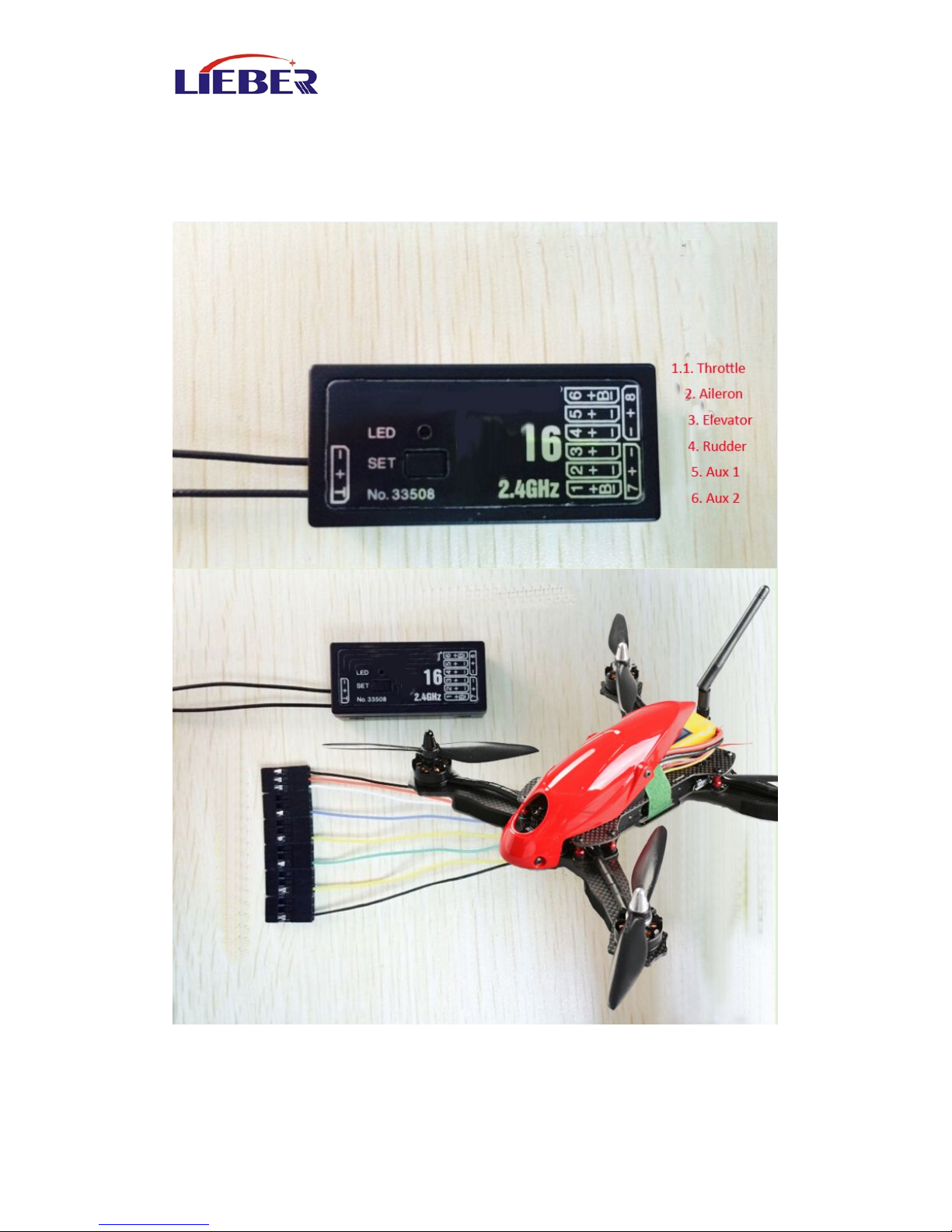
6.1.1 Put the remote, receiver, drone 280 PC in hands.
Page 9
www.lieber-rc.com
9
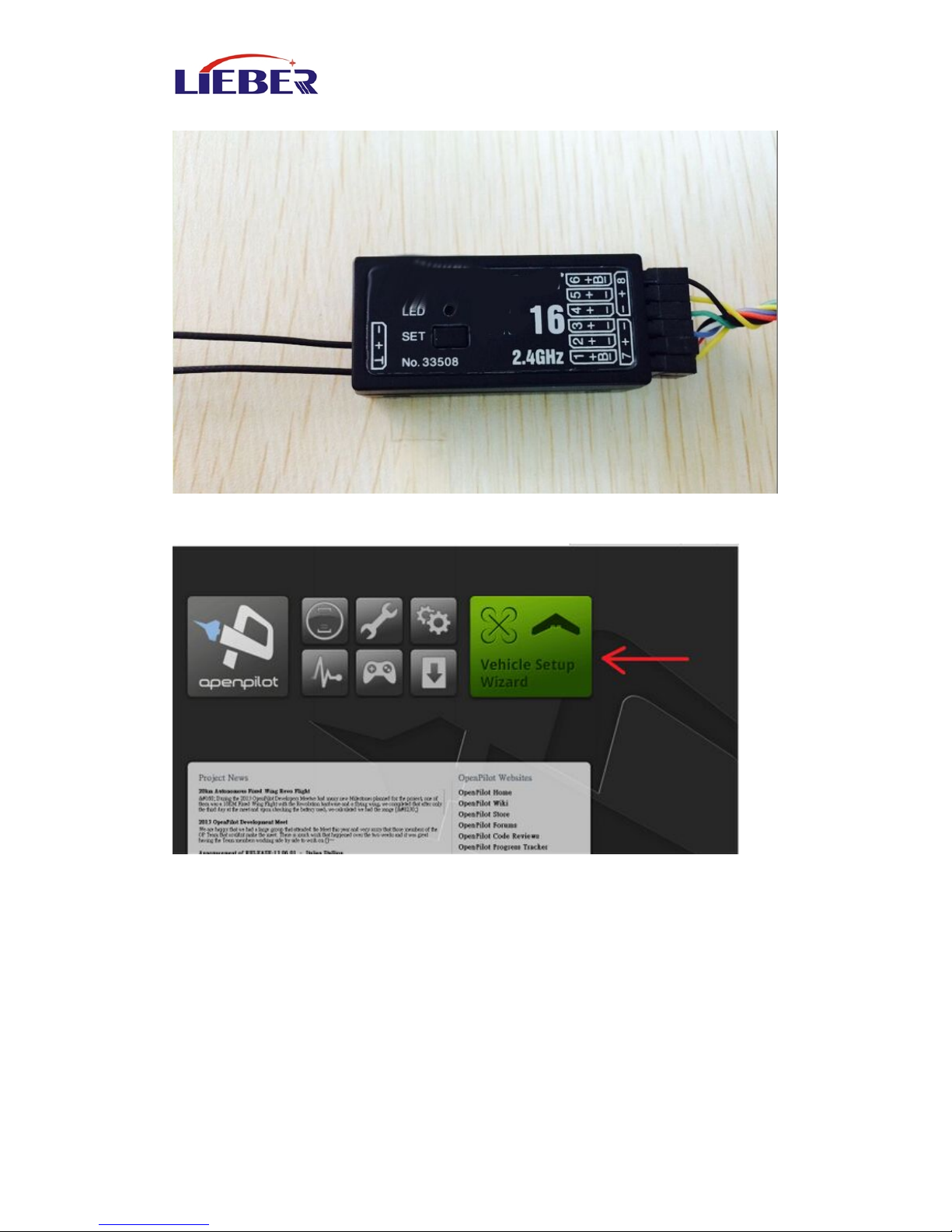
6.1.2 Connect your Drone to the Receiver
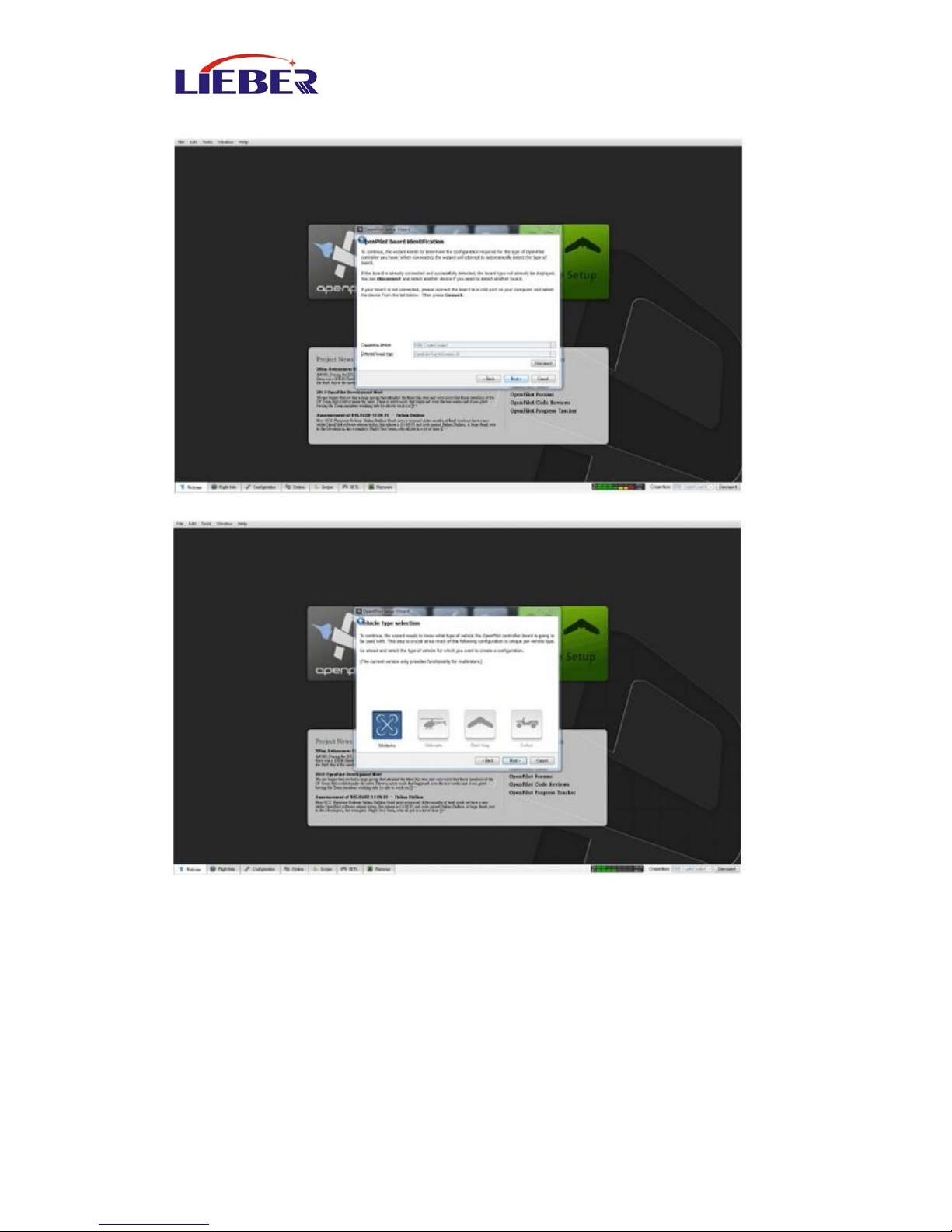
6.1.3 Download the CC3D soft from the CC3D office web site
6.1.4 Open your CC3D soft in your computer
Connect the USB wire.
Page 10
www.lieber-rc.com
10
Select your Receiver type, and click Next !
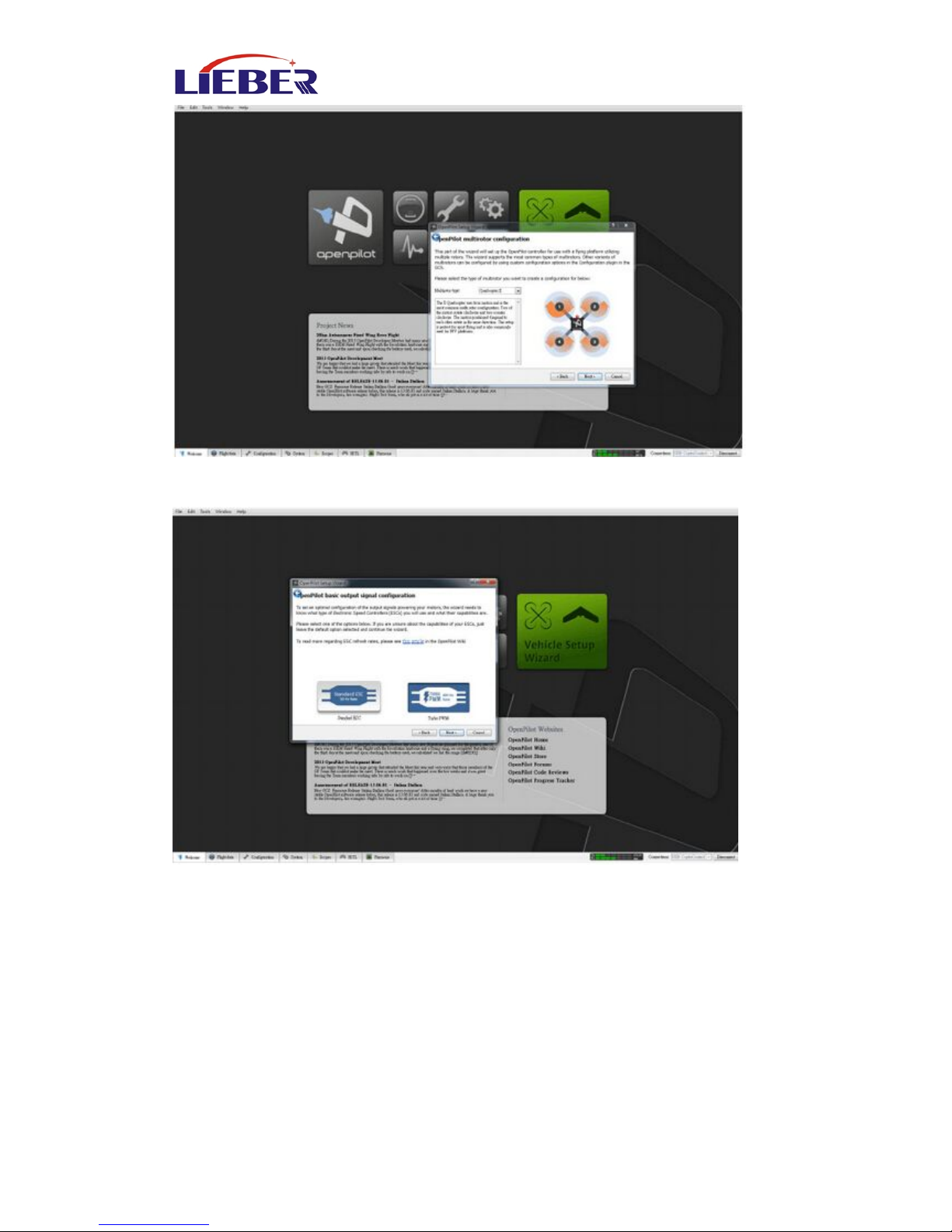
Select the rotor type , click Next,
Page 11
www.lieber-rc.com
11
Select Quadcopter X
PS. Notice the motors order
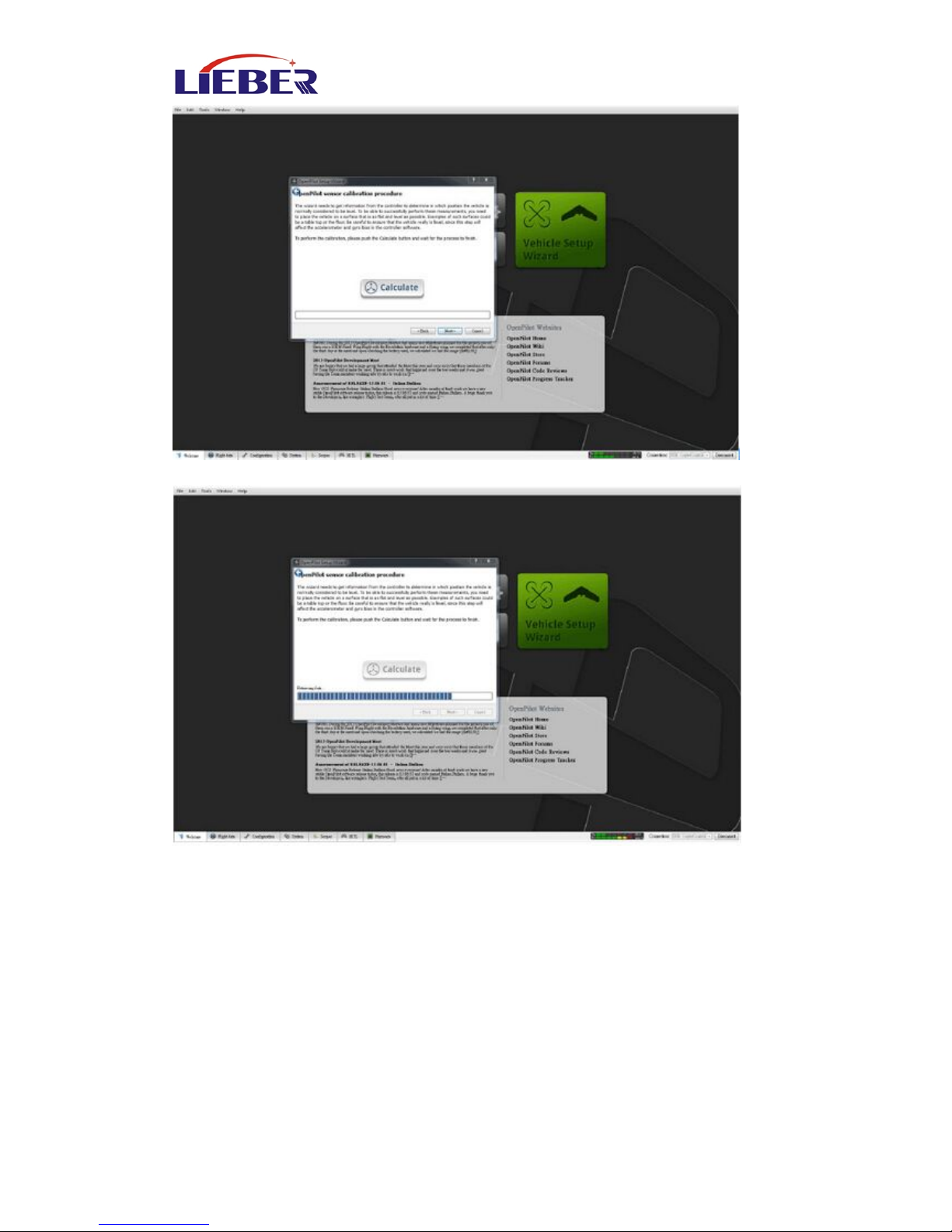
Select the Receiver type, then Next,
Page 12
www.lieber-rc.com
12
Horizontal Alignment, put the drone in a flat place and click Calculate
Click Next,
Page 13
www.lieber-rc.com
13
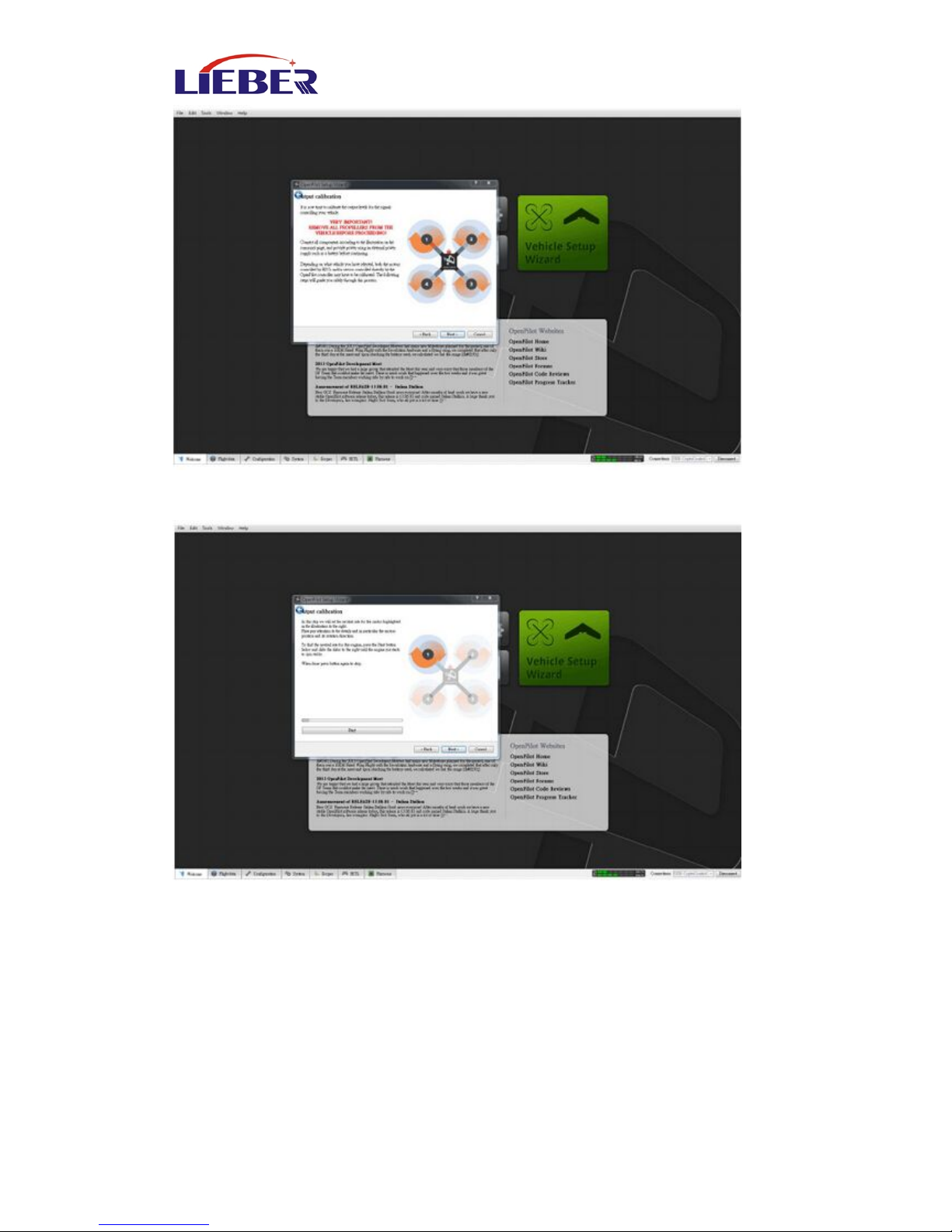
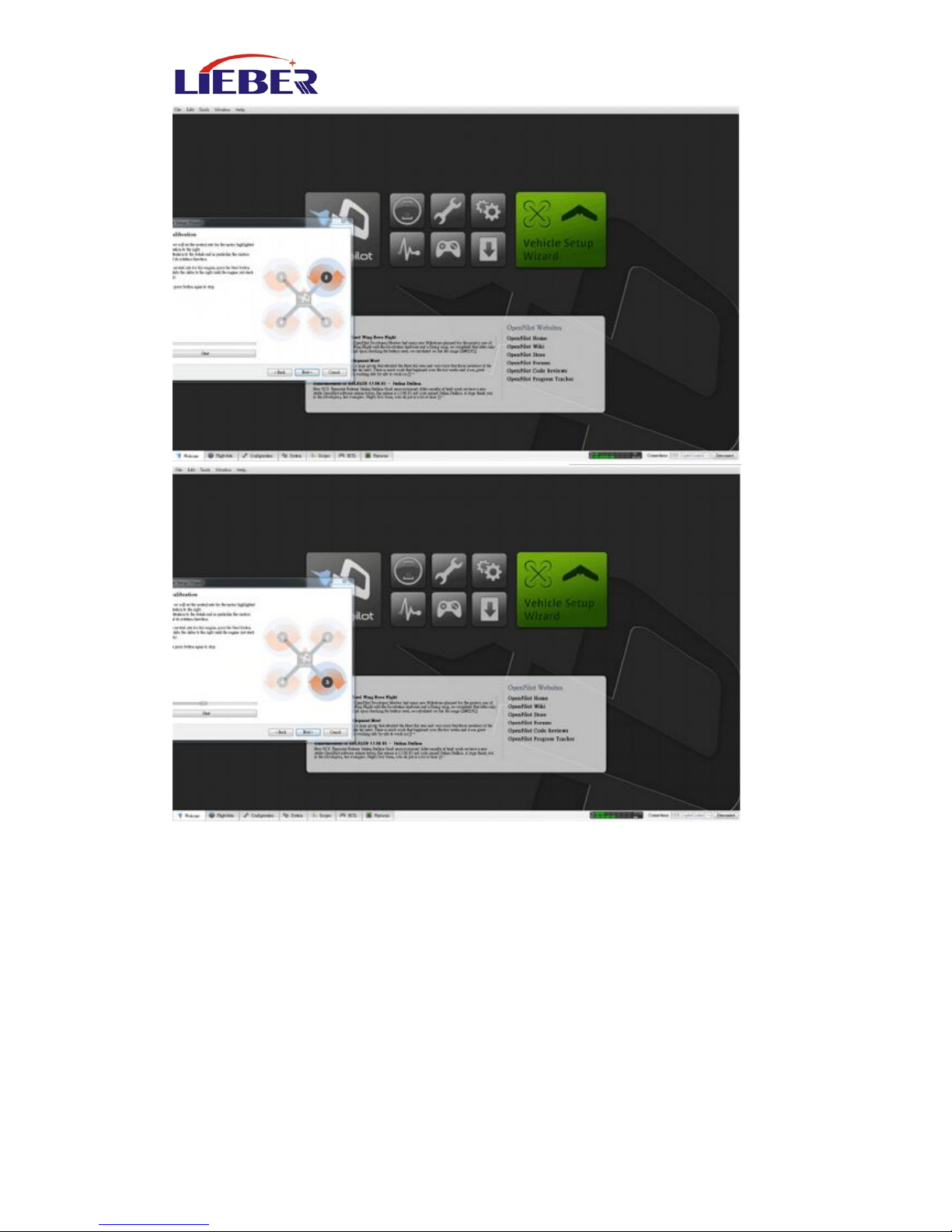
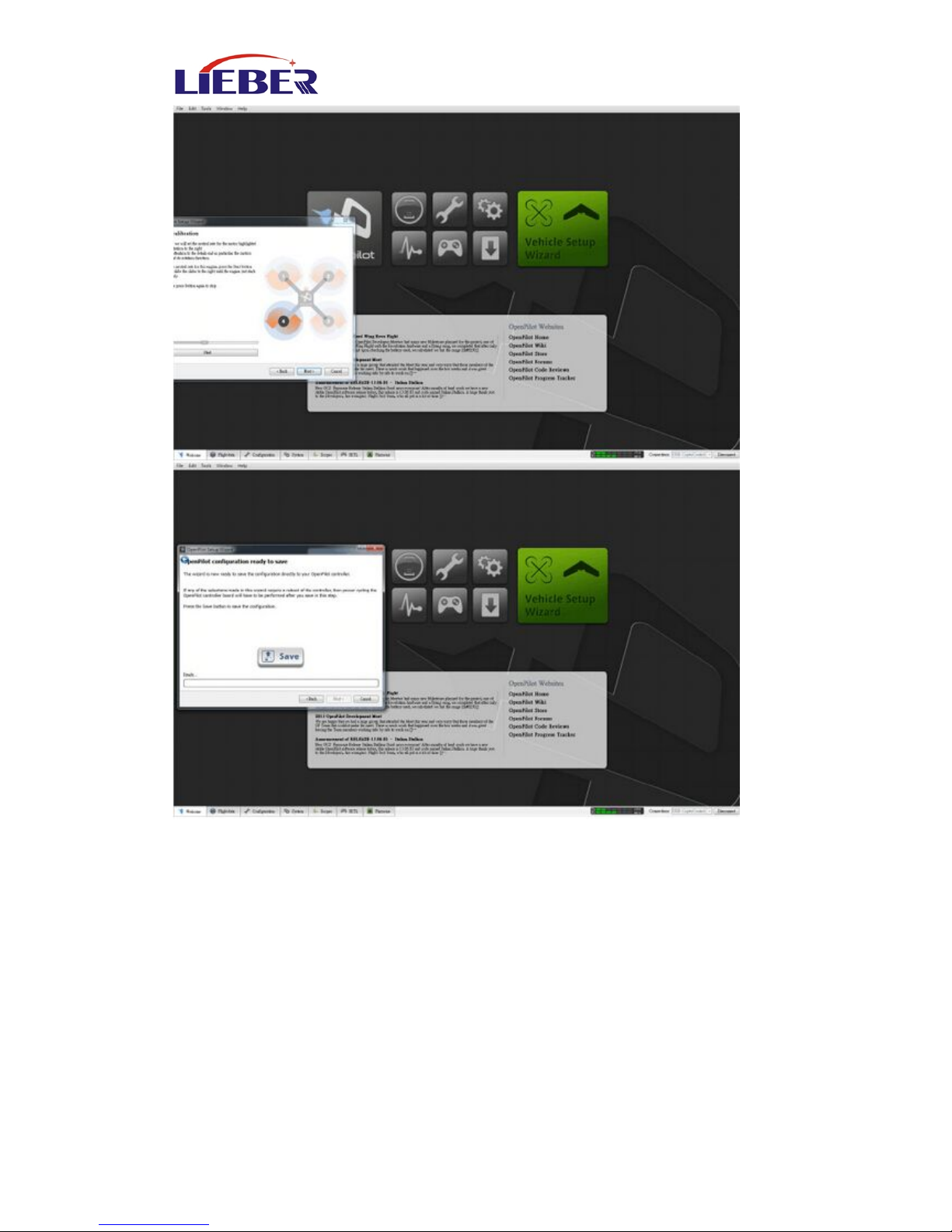
Adjust motor rotation to the minimum value,remove all the propellers,
put the power battery in the drone, then click Next,
The picture shows that the motor by START, to the motor to rotate;
adjust to press STOP and START between the switch will start and stop
Page 14
www.lieber-rc.com
14
Page 15
www.lieber-rc.com
15
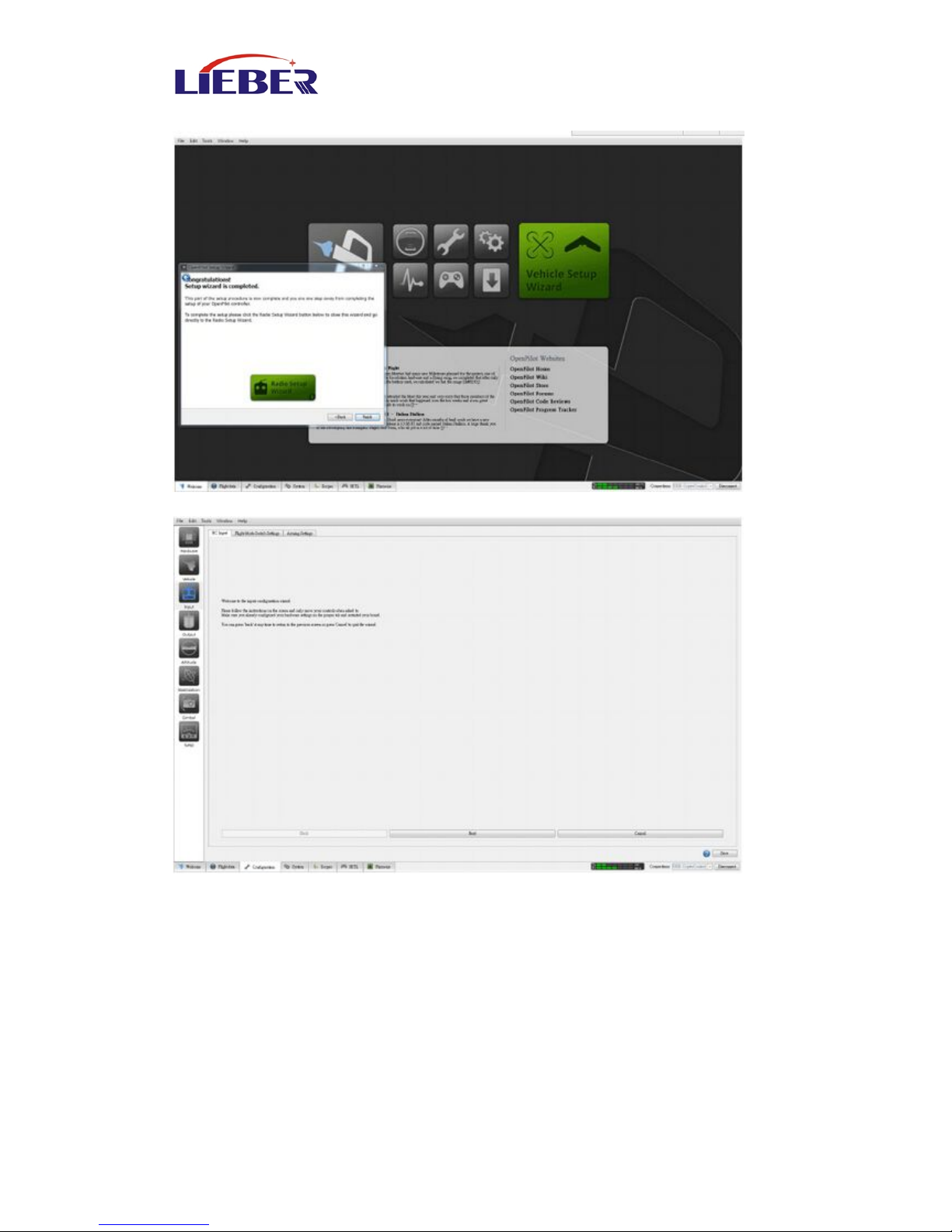
After adjusted the minimum of the four motor starting point, click Save
Page 16
www.lieber-rc.com
16
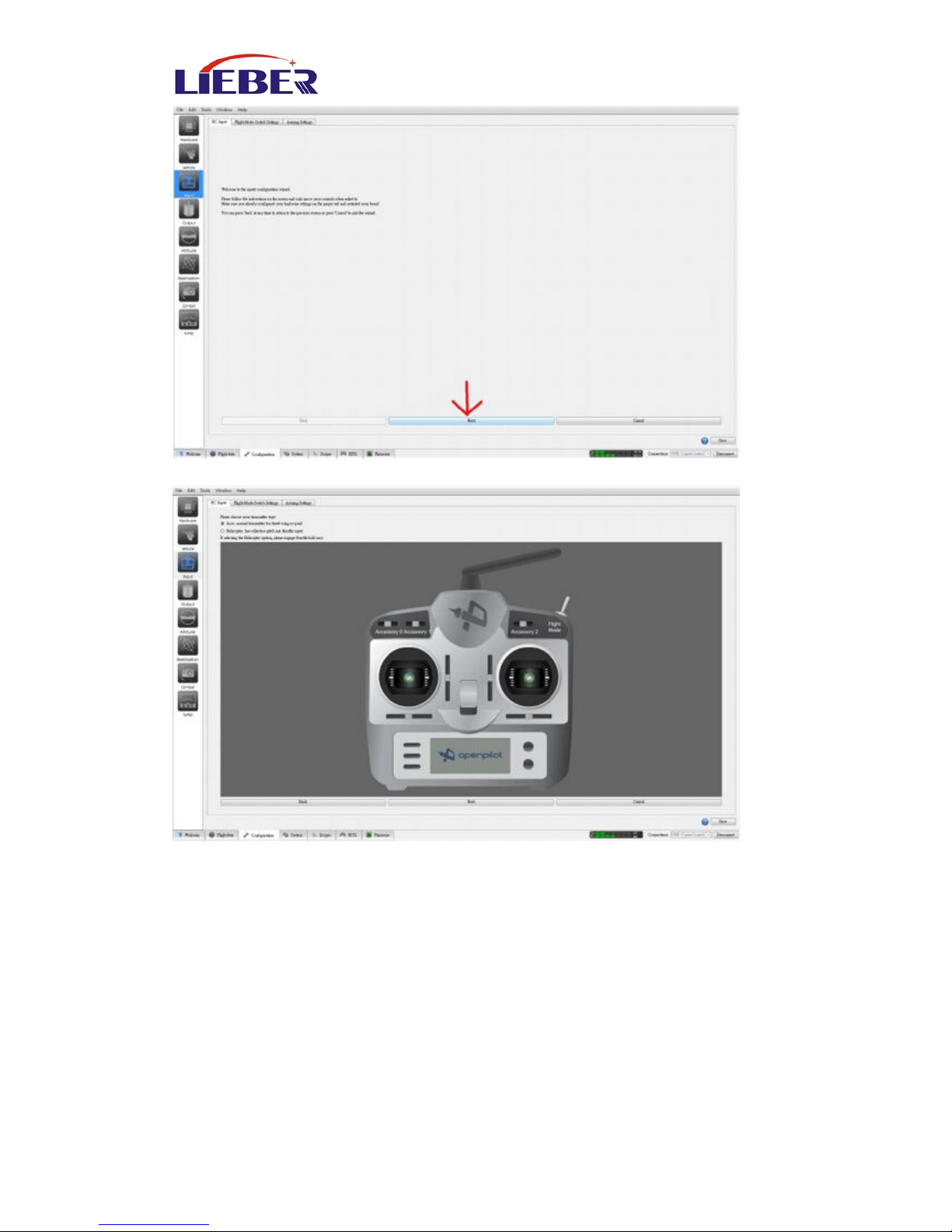
6.2 Remote Installation
Click the Remote Icon
Page 17
www.lieber-rc.com
17
Click Next,
Page 18
www.lieber-rc.com
18
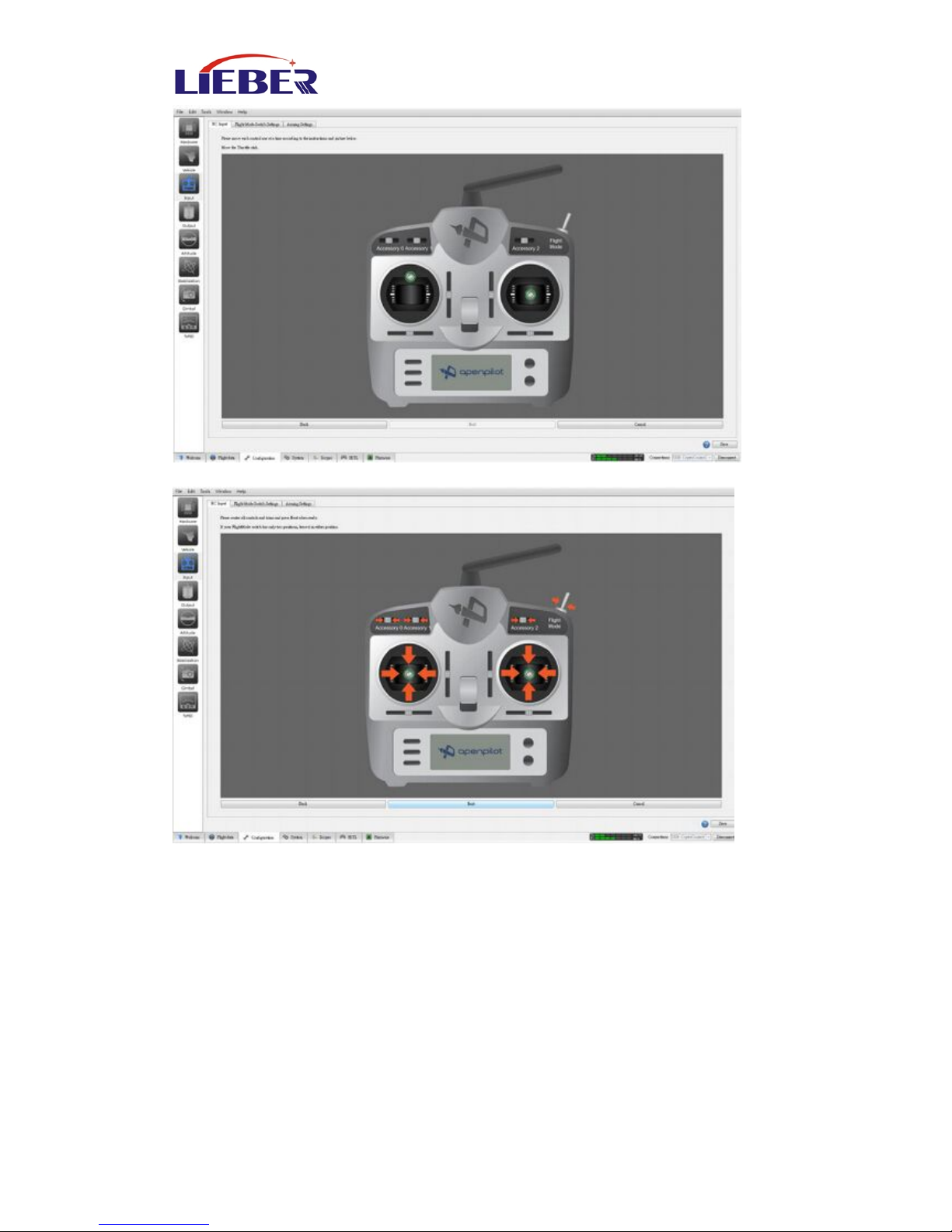
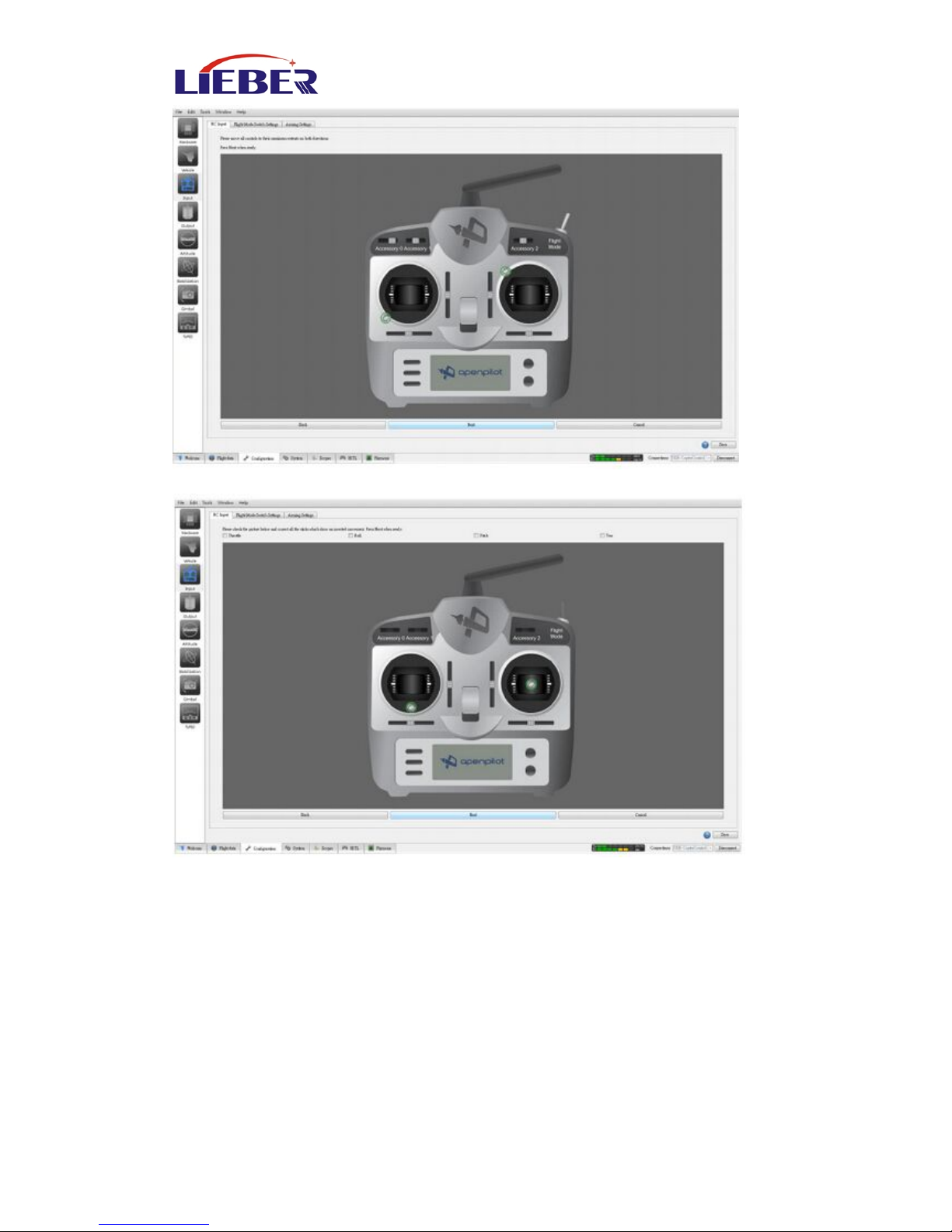
Then a dynamic will show, just map to do it
This picture is called all stick back, click Next,
Page 19
www.lieber-rc.com
19
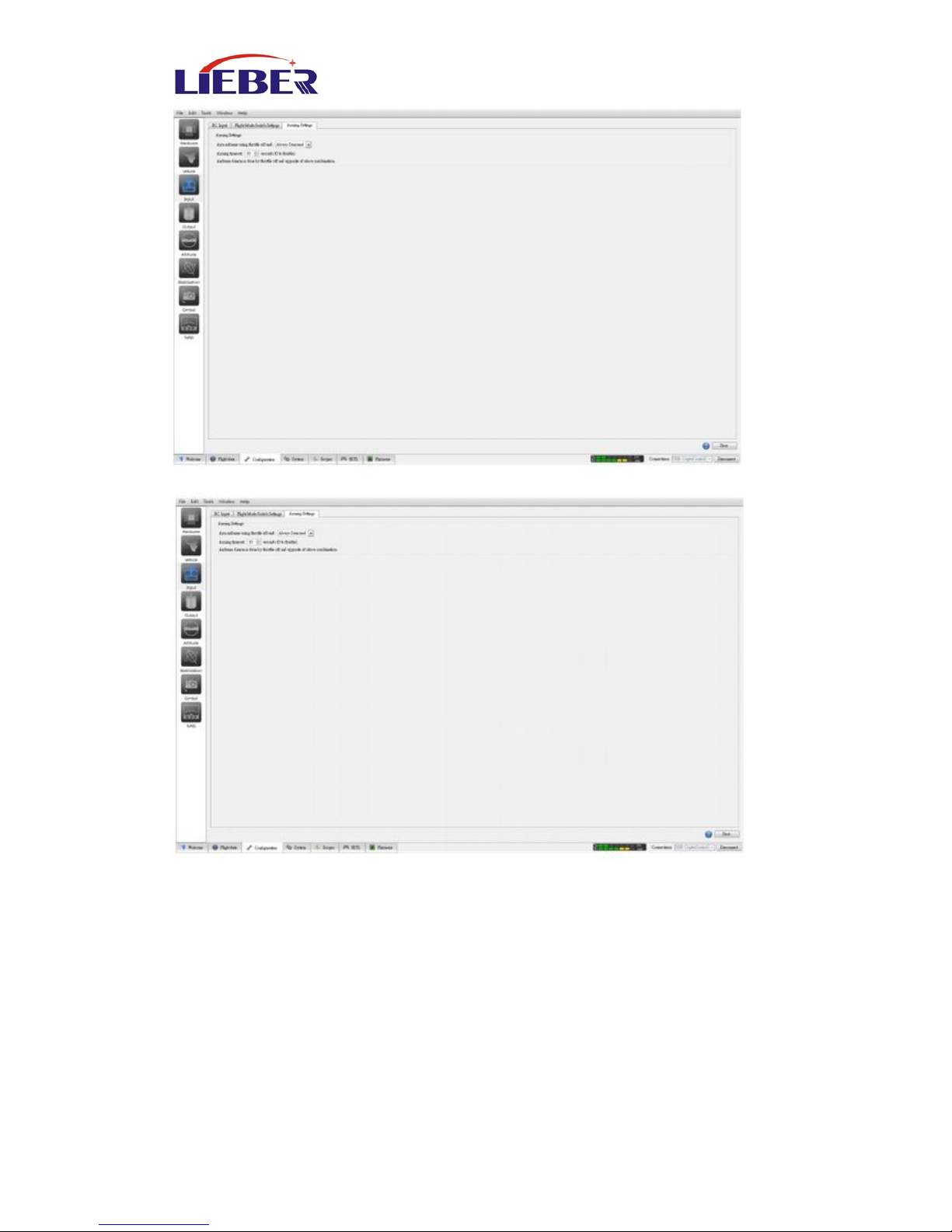
Then to get all the joystick of rudder
Page 20
www.lieber-rc.com
20
This picture shows how to intended to be unlock
Roll Left ( the left aileron ) or Roll Right can choose as you like
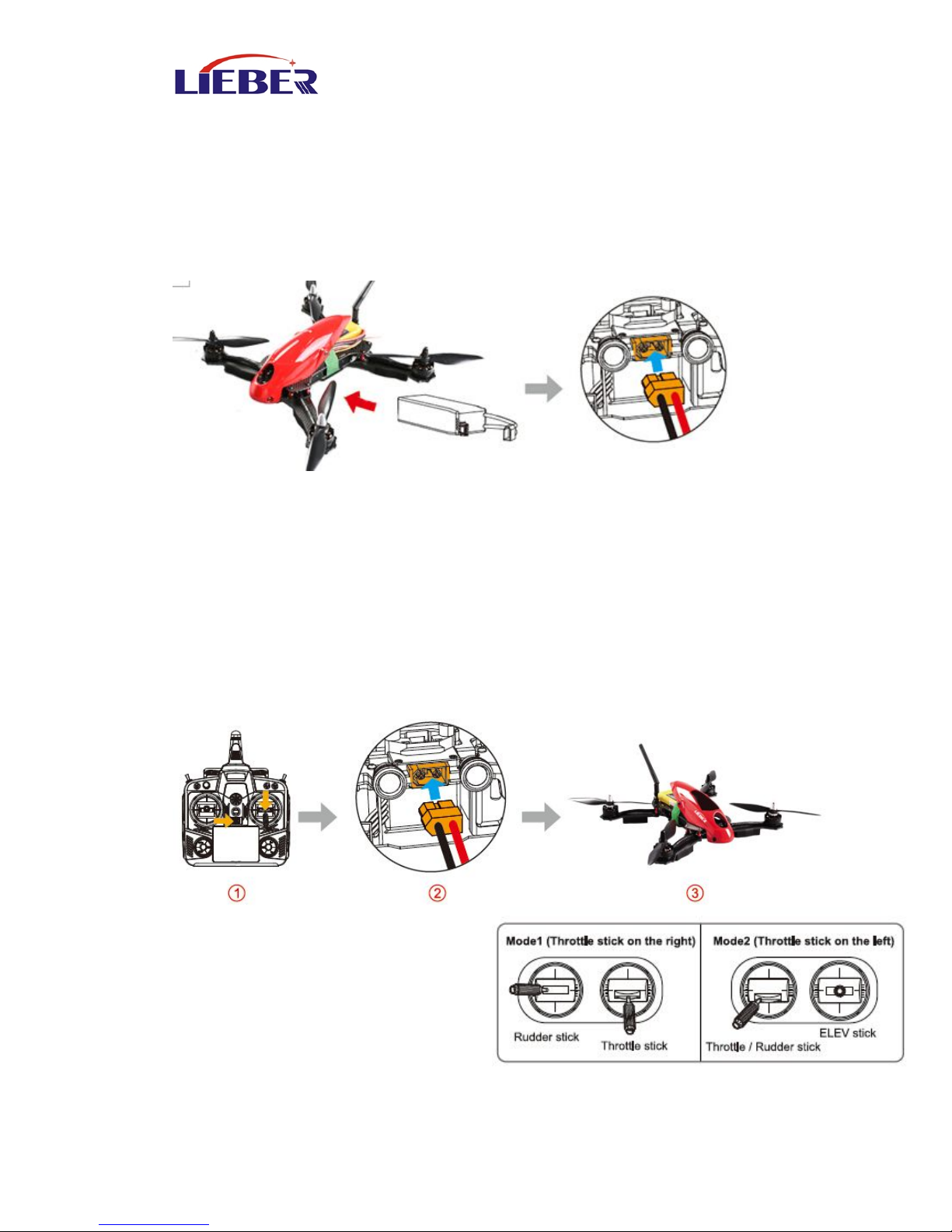
Unlock set:
Flight control lock and set how long to lock
After all installation, Click Save,
Part of this must be set, otherwise can’t unlock
Then insert battery, default parameter, ready to fly now.
Page 21
www.lieber-rc.com
21
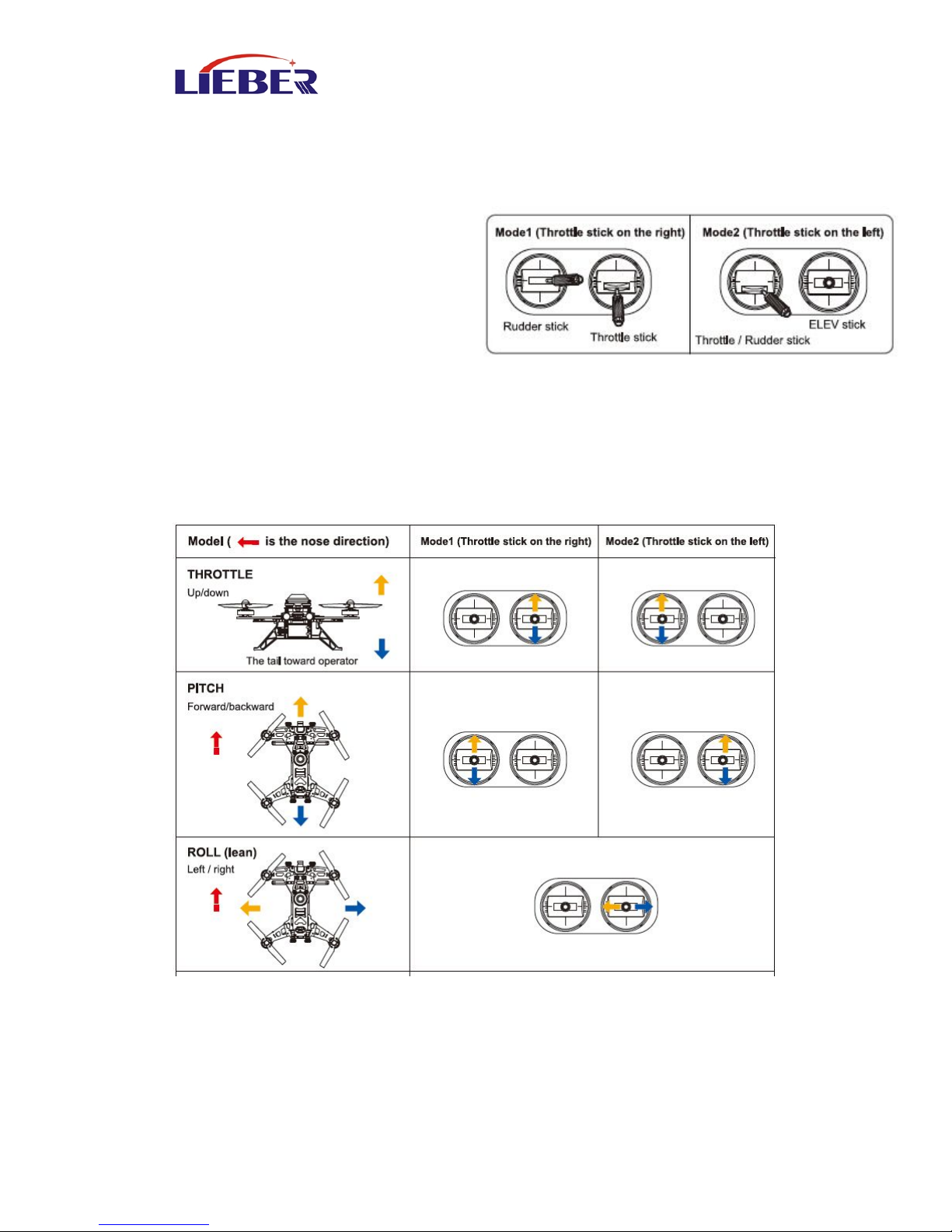
6.3 Battery Installation
Used all-in-one flight control system board As all the parts are
assembled and adjusted by our company, it’s easy and simple for you,
just connect your battery to the input power built in XT-60 socket.
Put the battery into the Drone 280, and adjust the battery to balance
the head and tail. Then fix the battery by belt.
7.0 Ready for flight
7.1 Binding of the Drone 280
1) Put all the function switches to the 0 position, put all trims / knobs to
the Middle position, move the throttle to the lowest position, then turn
on the radio.
2) Put the aircraft in horizontal position, then connect the aircraft power.
3) After 5 sec. The drone indicating that the code binding has finished.
7.2 Motor Unlock /Lock
Motor Unlock
After binding the Remote to the
Drone 280, Check that all trims are
neutral, the throttle stick is All the
way Down with the display
indicating 0% throttle. Check that All
switches are in the UP position. Gently push the throttle stick down and
Page 22
www.lieber-rc.com
22
move the rudder (YAW ) stick to the left side. (on mode 2 radios throttle
and rudder is the same stick.Then the motors are unlock. Be very careful
at this point, as pushing the throttle up will start the motors. You can
test by pushing the stick up a little, the motors should start.
Motor Lock
Lock the motors by moving the
throttle stick all the way down and
the rudder (YAW) stick all the way
to the right. Then the motors
disarmed.
TEST: Push the throttle stick up a little, the motors will not start when
locked.
NOTICE: The motors are LOCKED by default after successful binding.
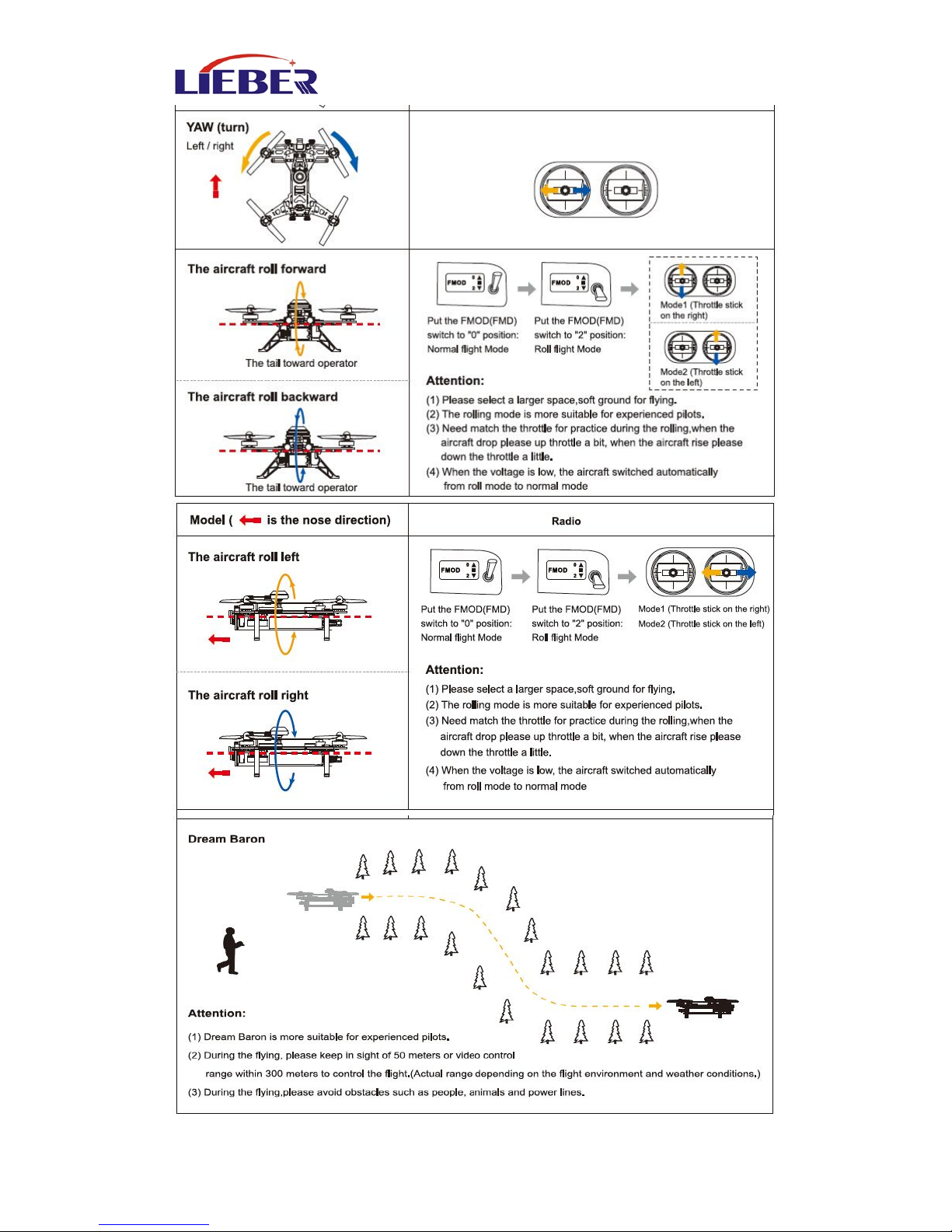
8.0 Operation Instruction
Page 23
www.lieber-rc.com
23
Page 24

www.lieber-rc.com
24
9.0 End flight
1) Manual landing
2) First, power off aircraft battery, then power off radio battery.
3) Take the battery out of aircraft.
10.0 Appendix
LIEBER Technical Suppport
If you have any problem during your usage, please contact LIEBER for
technical support. You can download relevant information from LIEBER
official website.
Technical support: [email protected]
LIEBER official website: www.lieber-rc.com
Page 25
www.lieber-rc.com
25
Tel.:+0086-755-27170878
Fax.:+0086-755-29860079
Add.:4th Floor, 73Building,
Hengbang Technology
Park, Matian Second
Industrial Area, Gongming
Town, Guangming New District, Shenzhen, China.
Again, thank you for choosing LIEBER
Drone280!
 Loading...