

Page 1
T260 Series Router User Manual
Shenzhen Libtor Technology Co.,Ltd Page 1 of 41
Add:Room 608, Building A,Hongshengyuan Industrial Zone,No.339 Bulong Road, Bantian Street
Office, Longgang District, Shenzhen City, Guangdong Province.
Web:http:www.libtor.com Tel: 86-755-28345166-807 Fax:86-755-28345166-804
Mail:[email protected]
T260Sseries Router
user manual
Product Version
Page
V1.5
Product name: T270
Total:41
T270 series router user
manual
The manual is suitable for the following model :
Model
Product type
T270-A1
WCDMA/HSDPA/HSUPA/HSPA+/GSM/
GPRS/EDGE router
T270-B1
CDMA/EVDO router
T270-DE1
TD-LTE/FDD-LTE/WCDMA
/TD-SCDMA/GSM/GPRS/EDGE router
T270-DE2
TD-LTE/FDD-LTE/WCDMA
/TDSCDMA/WVD0/CDMA20001X/GSM
router
Page 2

T260 Series Router User Manual
Shenzhen Libtor Technology Co.,Ltd Page 2 of 41
Add:Room 608, Building A,Hongshengyuan Industrial Zone,No.339 Bulong Road, Bantian Street
Office, Longgang District, Shenzhen City, Guangdong Province.
Web:http:www.libtor.com Tel: 86-755-28345166-807 Fax:86-755-28345166-804
Mail:[email protected]
Copyright owned and kept by Shenzhen Libtor Technology Co,Ltd (2008-2014).
Any Company and Individual mustn’t use and copy the part and complete content and
broadcast in any form without permission from company.
Trade mark declaration
Libtor and Other Libtor trademarks are owned and controlled by Shenzhen LIBTOR
Technology Co.ltd
The Trademark and Registered trademark mentioned above are owned by related
person.
Notice
Regarding to product version updating and the other reasons, this file’s content will
be updating based on research and development results .It is only used for instruction
unless otherwise stipulated .All declarations, information and suggestions included in
this files can’t make up with any forms of guarantee.
Page 3
T260 Series Router User Manual
Shenzhen Libtor Technology Co.,Ltd Page 3 of 41
Add:Room 608, Building A,Hongshengyuan Industrial Zone,No.339 Bulong Road, Bantian Street
Office, Longgang District, Shenzhen City, Guangdong Province.
Web:http:www.libtor.com Tel: 86-755-28345166-807 Fax:86-755-28345166-804
Mail:[email protected]
Chapter 1: Product specification
T270 industrial wireless router communication products which are based on 3G and
4G internet requirements and developed by Shenzhen LBITOR Technology co.ltd.
They are mainly applied for data transmission of industrial users and support for
transparent data transmission, picture transmission , equipment monitoring and
Wireless router internet functions.
T270 use 32 bit processor , it can process protocols and a large amount of data with
a high speed . It also can match with many types of industrial module for 3G /4G
internet .(3G:WCDMA/EVDO/TD-SCDMA, 4G:TD-LTE/FDD-LTE ) .Providing
10/100M ethernet network interface ,WIFI wireless connector ,serial port ,USB
connector for connecting many kinds of terminal equipments .
Supporting Web configuration, easy management and remote message control .
1.1 Product description
Page 4
T260 Series Router User Manual
Shenzhen Libtor Technology Co.,Ltd Page 4 of 41
Add:Room 608, Building A,Hongshengyuan Industrial Zone,No.339 Bulong Road, Bantian Street
Office, Longgang District, Shenzhen City, Guangdong Province.
Web:http:www.libtor.com Tel: 86-755-28345166-807 Fax:86-755-28345166-804
Mail:[email protected]
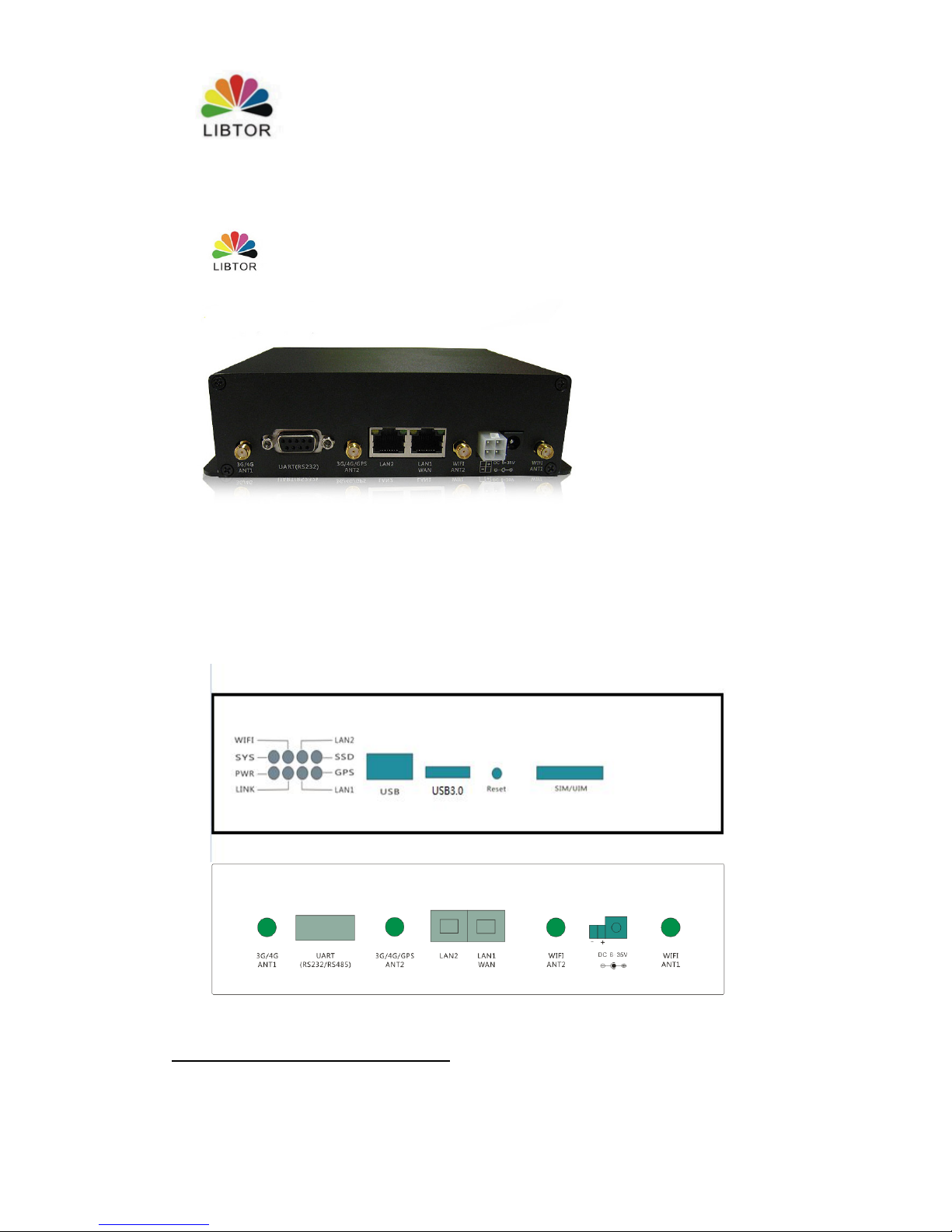
1.2 Connector description
Page 5

T260 Series Router User Manual
Shenzhen Libtor Technology Co.,Ltd Page 5 of 41
Add:Room 608, Building A,Hongshengyuan Industrial Zone,No.339 Bulong Road, Bantian Street
Office, Longgang District, Shenzhen City, Guangdong Province.
Web:http:www.libtor.com Tel: 86-755-28345166-807 Fax:86-755-28345166-804
Mail:[email protected]
Front side :
1:indicator ( details listed below)
2: USB connector
3:TF storage card
4: Reset button
5:SIM/UIM card slot
Back side :
1: 3G/4G Antenna (3G/4G ATN1, 3G/4G/GPS ANT2)
2: WiFi Antenna (WIFI ANT1,WIFI ANT2)
3: UART connector: default type is R232 connector. You need to customized if you
need R485 connector.
4: LAN1/LAN2: RJ45 connector, LAN1 can be used as WAN port if LAN1 is in the
standard router mode.
5: DC connector: 2.1mm standard round-head connector and 5.08 connection line port
with self lock, Inner”+”.Outer:”-“,the Voltage Output is 6-35V, the power is larger
than 10W。
Indicator state specification
Name
State
Description
System
light(SYS)
Constant
light
Constant light when power supplied, It shows power supply
is normal.
Flash
slowly
The light state will change from constant light to flash
slowly which it takes about ten seconds when connect
electricity
Flash
quickly
1.The SYS light will flash quickly when it approach preset
cashflow value.
2.The SYS light will flash quickly when press reset button
for 5 seconds. Then system will restart later.
Connection
Internet light
(LINK)
Constant
light
Connection successful
Flash
slowly
Normal connection
Page 6

T260 Series Router User Manual
Shenzhen Libtor Technology Co.,Ltd Page 6 of 41
Add:Room 608, Building A,Hongshengyuan Industrial Zone,No.339 Bulong Road, Bantian Street
Office, Longgang District, Shenzhen City, Guangdong Province.
Web:http:www.libtor.com Tel: 86-755-28345166-807 Fax:86-755-28345166-804
Mail:[email protected]
Power
off
No connection
LAN1、LAN
2 light
Constant
light
Already connected RJ45 port
Power
off light
Disconnect RJ45 port
Power light
(power)
Constant
light
Power supply normal
Power
off
No power supply
WIFI light
Constant
light
Establish WIFi network successfully
Power
off light
Close WIFI network
USB light
Constant
light
It can be normal use when system detect storage aleady
Power
off light
System can’t detect storage
Reset button use method
SYS light (SYS) will be flashing quickly when long press RESET button for 5 seconds , the
system resets successfully when router restarting.
Serial port’s usage
T270 only open UART1 as standard RS232 serial port for external use . (The URAT
connector can’t be used for external use if T270 add GPS function.)
Power connector
T260S offer 2.1 mm standard circle hole and 5.08 selflocked connect line port poewr supply
way. The inner part of electrodes is positive pole and the outer part of electrodes is
negative pole .Power supply voltage ranged from 5to 35 voltage .We suggest using 12
voltage to supply power. The power suppy should be equal or larger than 10 W.
Antenna connector
Page 7
T260 Series Router User Manual
Shenzhen Libtor Technology Co.,Ltd Page 7 of 41
Add:Room 608, Building A,Hongshengyuan Industrial Zone,No.339 Bulong Road, Bantian Street
Office, Longgang District, Shenzhen City, Guangdong Province.
Web:http:www.libtor.com Tel: 86-755-28345166-807 Fax:86-755-28345166-804
Mail:[email protected]
T260S has four SMA antenna connectors . It responds to 3G/4G. WIFI antenna accordingly.
User can choose suitable outer shape and antenna automatically. The Bigger antenna gain ,
the more effecter of wireless sending and receiving in theory . We advise using 3 -5DB
antenna gain under 3G/4G antenna. WiFi antenna’s choice is based on the requirement of
user coverage .Our Product support 15DB antenna gain at the maximum .
Chapter 2 Setting preparation
2.1 connecting equipment
You can connect your computer and router as below procedure.
2.1.1 Set computer ‘s IP address.
Before access to the web setting, we advise you to setting your computer into obtain
IP address and DNS IP address automatically. Router can assign IP address
automatically. If you want to assign static IP address to the computer , you need to set
your computer and router of LAN port IP address into a same subnet .( The default
IP address is 192.168.10.1 for LAN port of router , Subnet mask is 255.255.255.0)
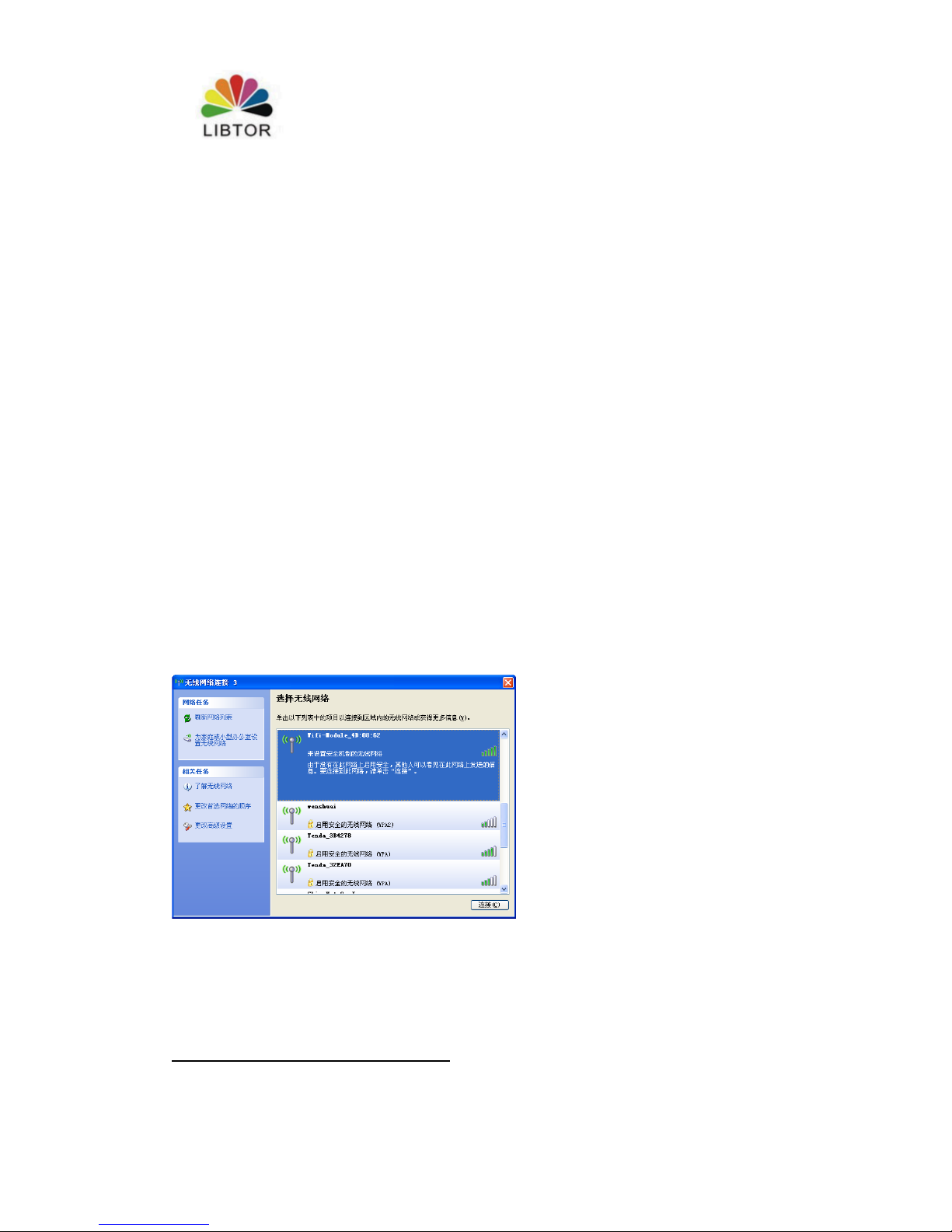
2.1.2 Connection by WiFi
Check your Wifi router’s wireless internet connection, then click“connection”
button to create connection, Wifi password :12345678
2.1.3 Confirm computer connection with router
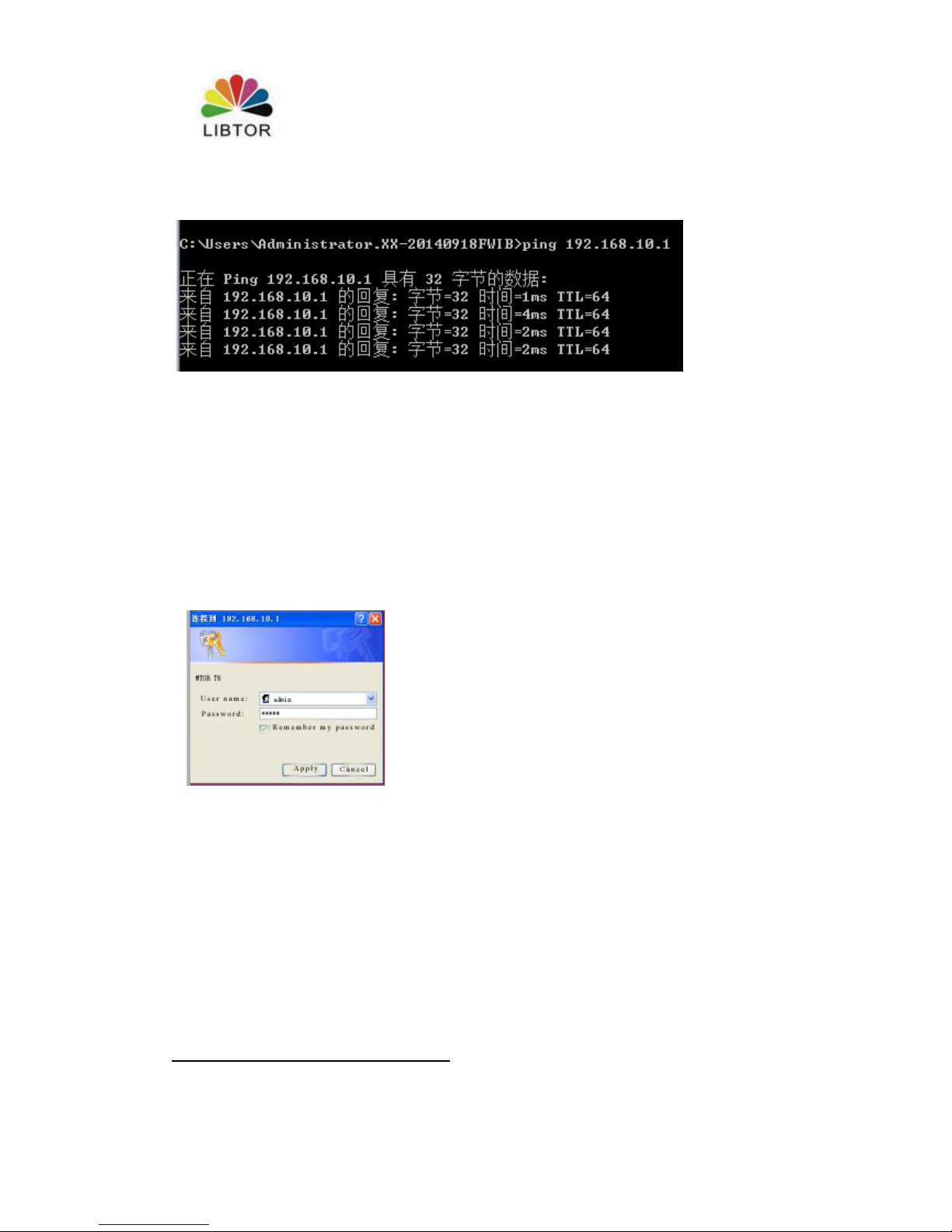
Pls use Ping order to confirm if the computer connect with router or not when your
computer monitor successfully connected with IP.
For example :Proceed Ping order under Windows XP environment :Ping192.168.10.1
Page 8
T260 Series Router User Manual
Shenzhen Libtor Technology Co.,Ltd Page 8 of 41
Add:Room 608, Building A,Hongshengyuan Industrial Zone,No.339 Bulong Road, Bantian Street
Office, Longgang District, Shenzhen City, Guangdong Province.
Web:http:www.libtor.com Tel: 86-755-28345166-807 Fax:86-755-28345166-804
Mail:[email protected]
If LCD display as below, it means computer and router successfully connected.
2.2 router login
2.2.1 login
Then login Web setting configuration of router .
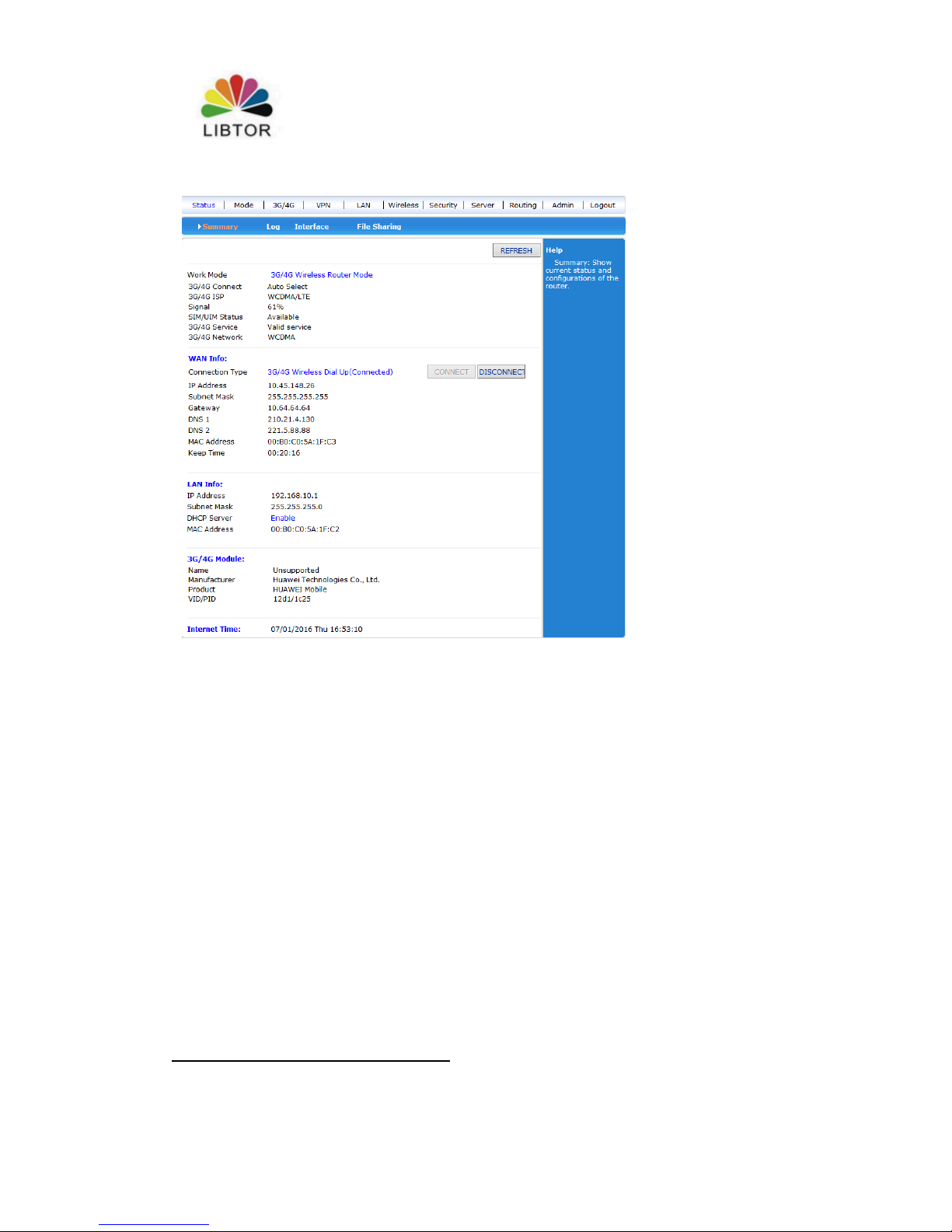
Click http://192.168.10.1 in the address field of web browser , then click the user
name and password in pop-up window
The defaulted user name is admin and password is admin when you login at the first
time to use .
2.2.2enter Web setting
Enter web setting when you successfully login , Then you can set and management
router .
Page 9
T260 Series Router User Manual
Shenzhen Libtor Technology Co.,Ltd Page 9 of 41
Add:Room 608, Building A,Hongshengyuan Industrial Zone,No.339 Bulong Road, Bantian Street
Office, Longgang District, Shenzhen City, Guangdong Province.
Web:http:www.libtor.com Tel: 86-755-28345166-807 Fax:86-755-28345166-804
Mail:[email protected]
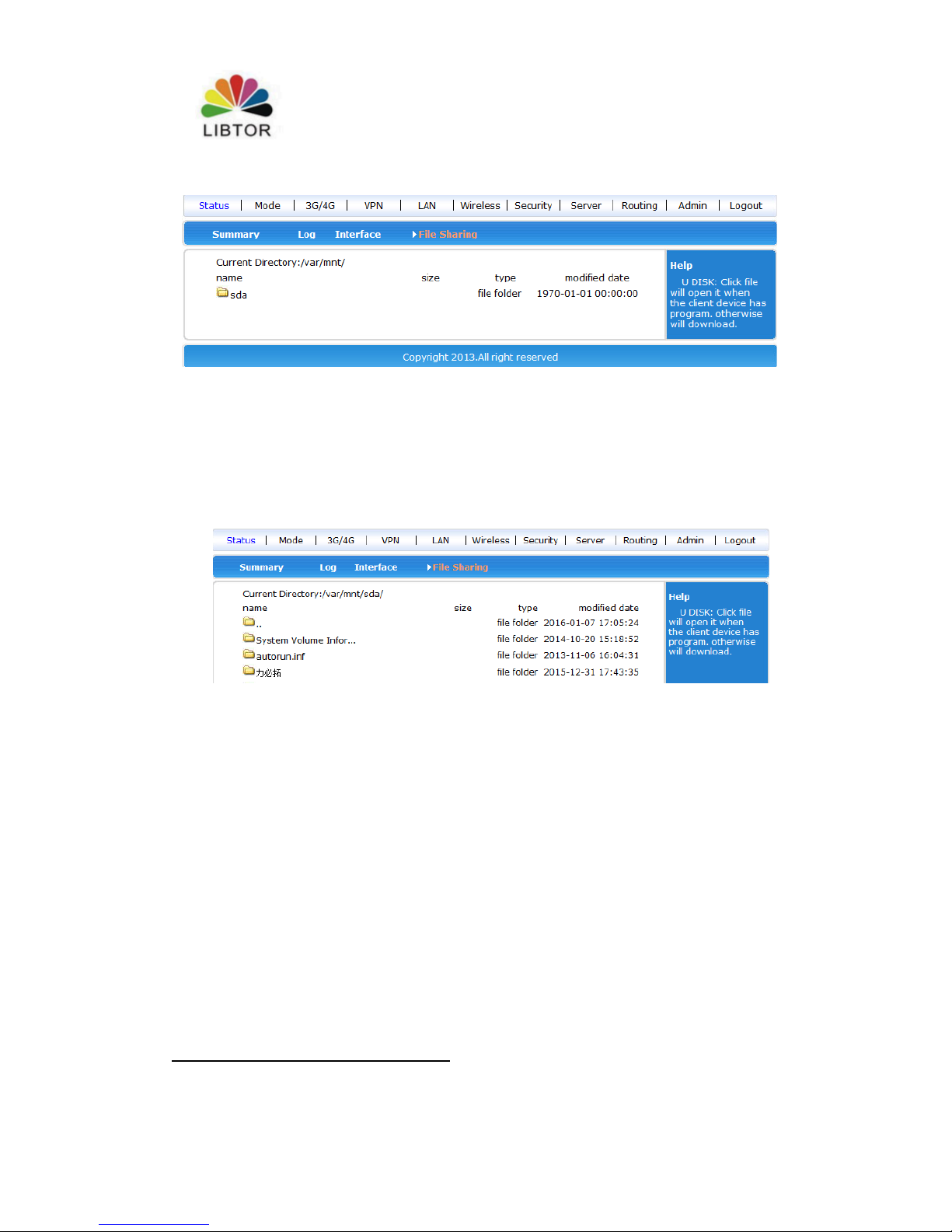
2.3 T270 storage function :
1: T270 has different kinds storage connectors:
USB connector,TF connector. USB connector can insert U disk, mobile hard
disk,solid state disk and so on , TF connector can insert TF storage card ( support 64G
storage function at the maximium)
2: Enter Web stteing -Status- Shared file , then it can check current storage
information .
Page 10
T260 Series Router User Manual
Shenzhen Libtor Technology Co.,Ltd Page 10 of 41
Add:Room 608, Building A,Hongshengyuan Industrial Zone,No.339 Bulong Road, Bantian Street
Office, Longgang District, Shenzhen City, Guangdong Province.
Web:http:www.libtor.com Tel: 86-755-28345166-807 Fax:86-755-28345166-804
Mail:[email protected]
3.Storage function usage : We can manange T270 storage medium by FTP
protocols,open run menu and then click ftp:\\192.168.10.1 or you also can click
ftp:\\192.168.10.1 in location under resource manager and press “Enter”key, It
can access to T270 storage medium.Here, We can add.delete,create different types of
files and the same way with management local hard disks.
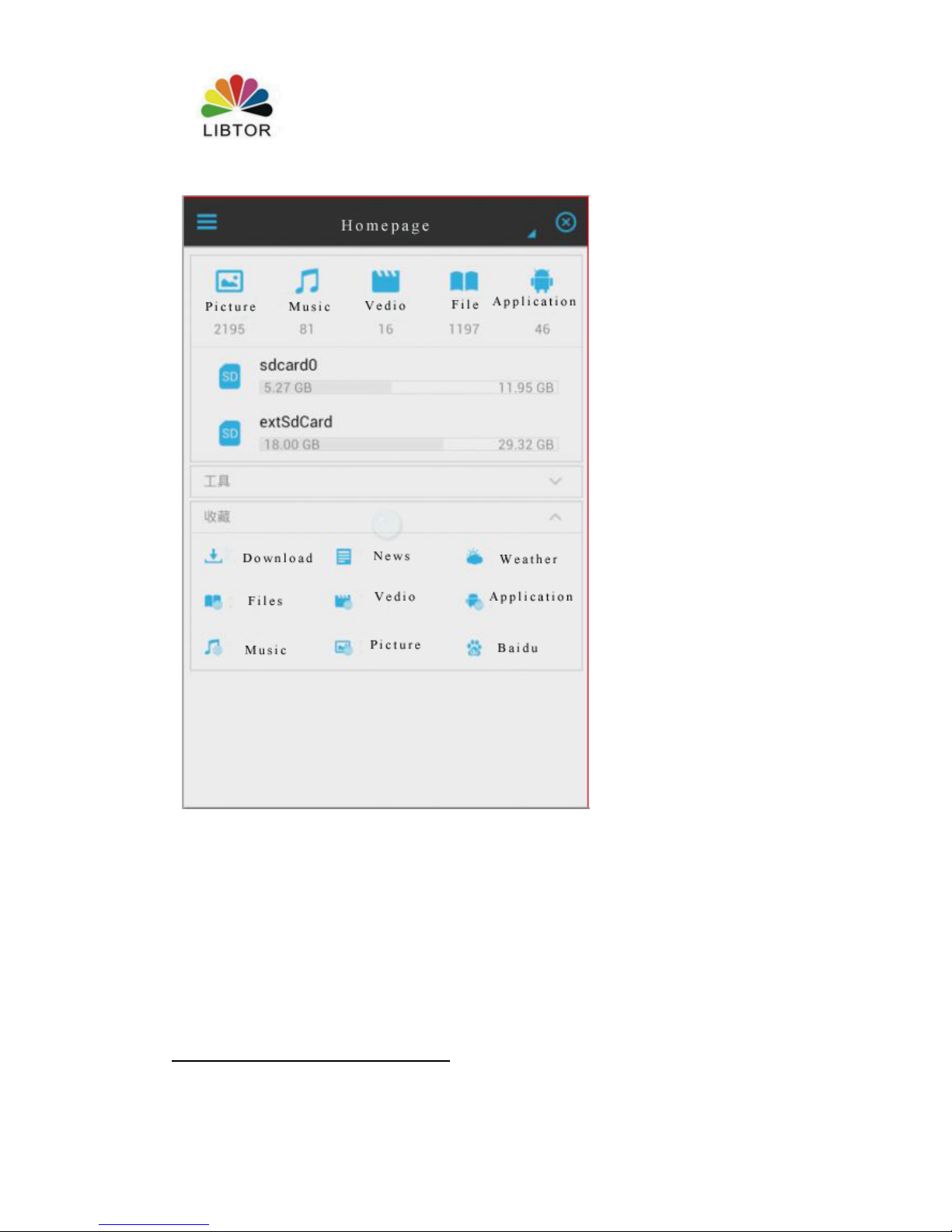
4.Access to T270 storage medium by mobile phone, you can use the function of ES
files browser and other tools, setting methods as below:
(1) Open ES file browser
Page 11
T260 Series Router User Manual
Shenzhen Libtor Technology Co.,Ltd Page 11 of 41
Add:Room 608, Building A,Hongshengyuan Industrial Zone,No.339 Bulong Road, Bantian Street
Office, Longgang District, Shenzhen City, Guangdong Province.
Web:http:www.libtor.com Tel: 86-755-28345166-807 Fax:86-755-28345166-804
Mail:[email protected]
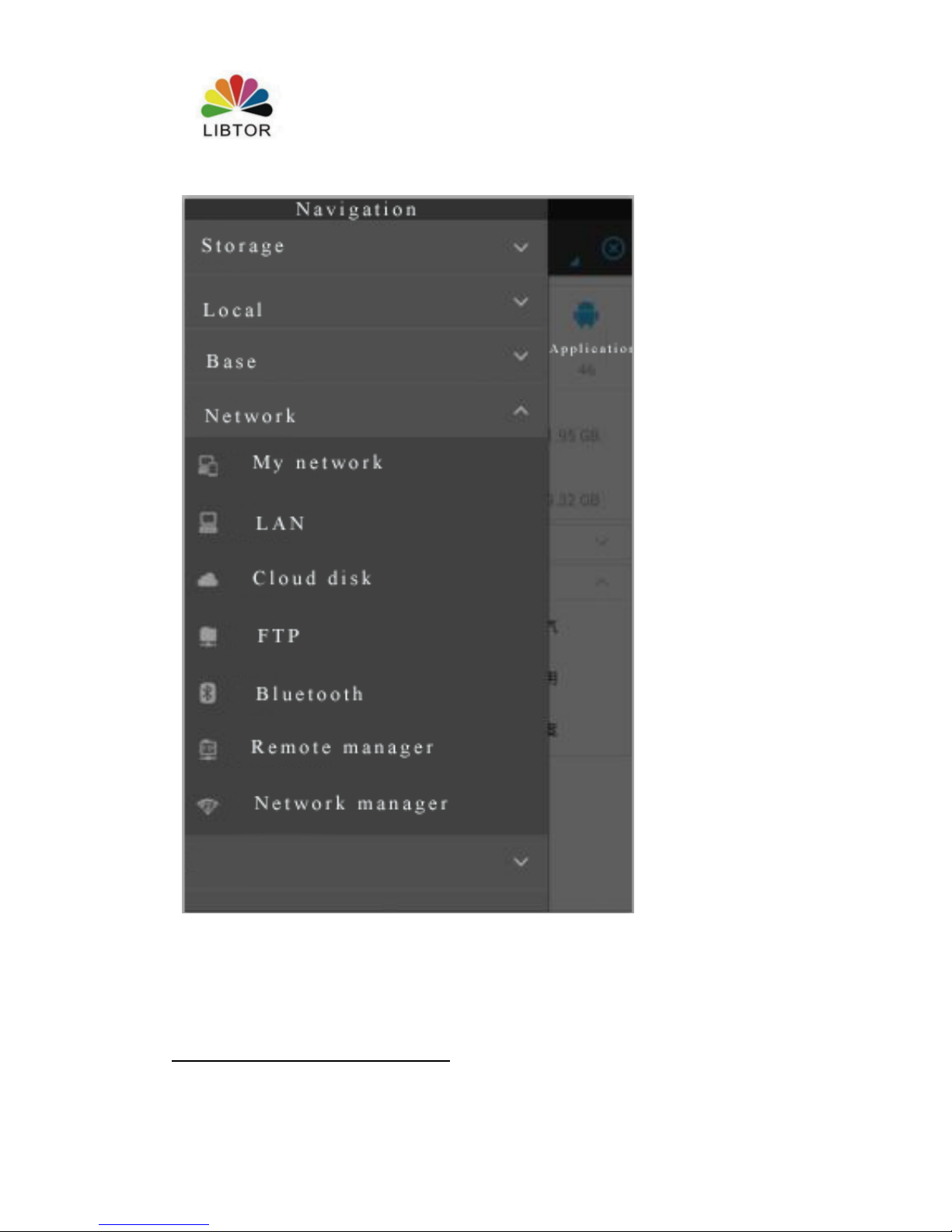
(2) Click the menu on the top-left, Choose FTP
Page 12
T260 Series Router User Manual
Shenzhen Libtor Technology Co.,Ltd Page 12 of 41
Add:Room 608, Building A,Hongshengyuan Industrial Zone,No.339 Bulong Road, Bantian Street
Office, Longgang District, Shenzhen City, Guangdong Province.
Web:http:www.libtor.com Tel: 86-755-28345166-807 Fax:86-755-28345166-804
Mail:[email protected]
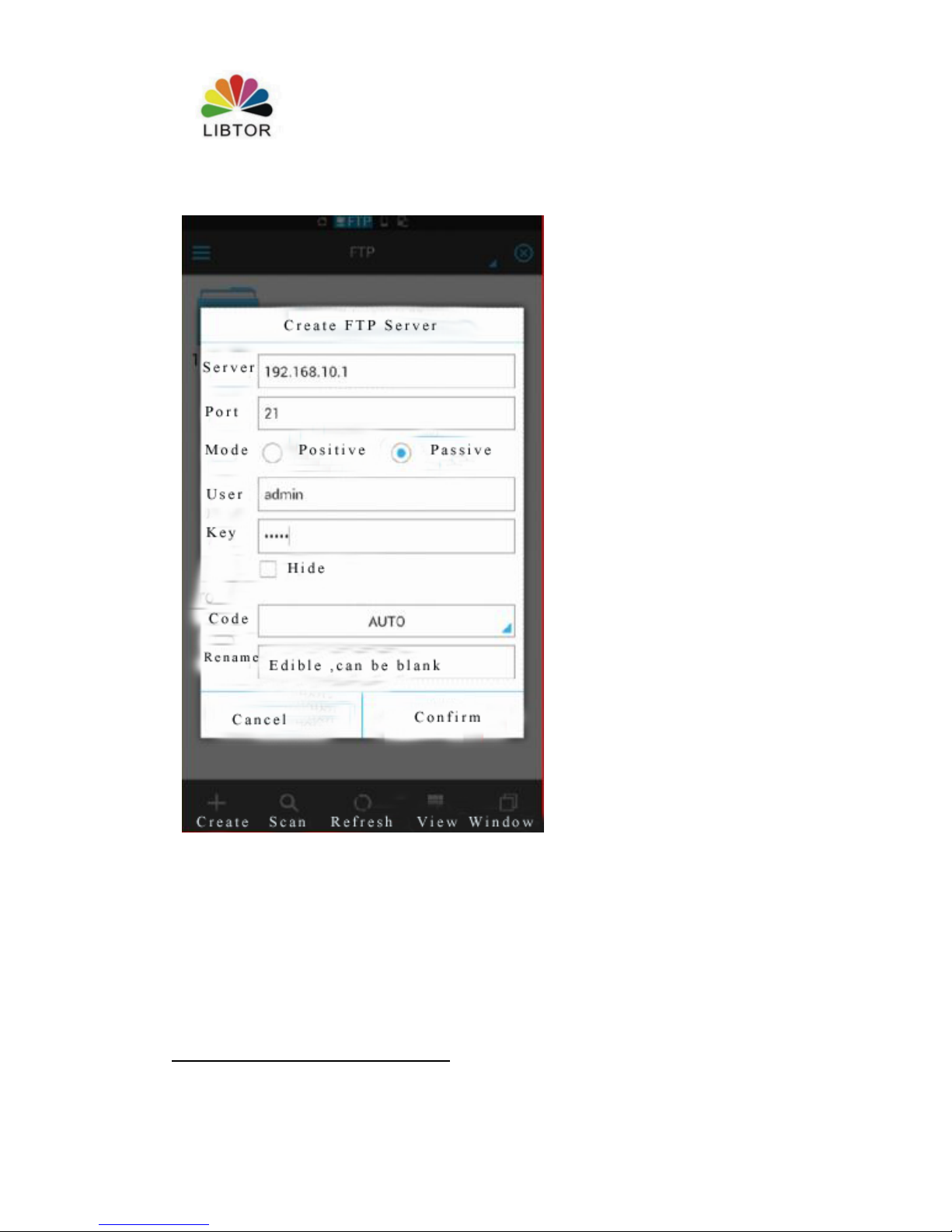
(3)Click 192.168.10.1 in the server under pop-up web setting ,the user name and
password are admin,Click “confirm”
Page 13
T260 Series Router User Manual
Shenzhen Libtor Technology Co.,Ltd Page 13 of 41
Add:Room 608, Building A,Hongshengyuan Industrial Zone,No.339 Bulong Road, Bantian Street
Office, Longgang District, Shenzhen City, Guangdong Province.
Web:http:www.libtor.com Tel: 86-755-28345166-807 Fax:86-755-28345166-804
Mail:[email protected]
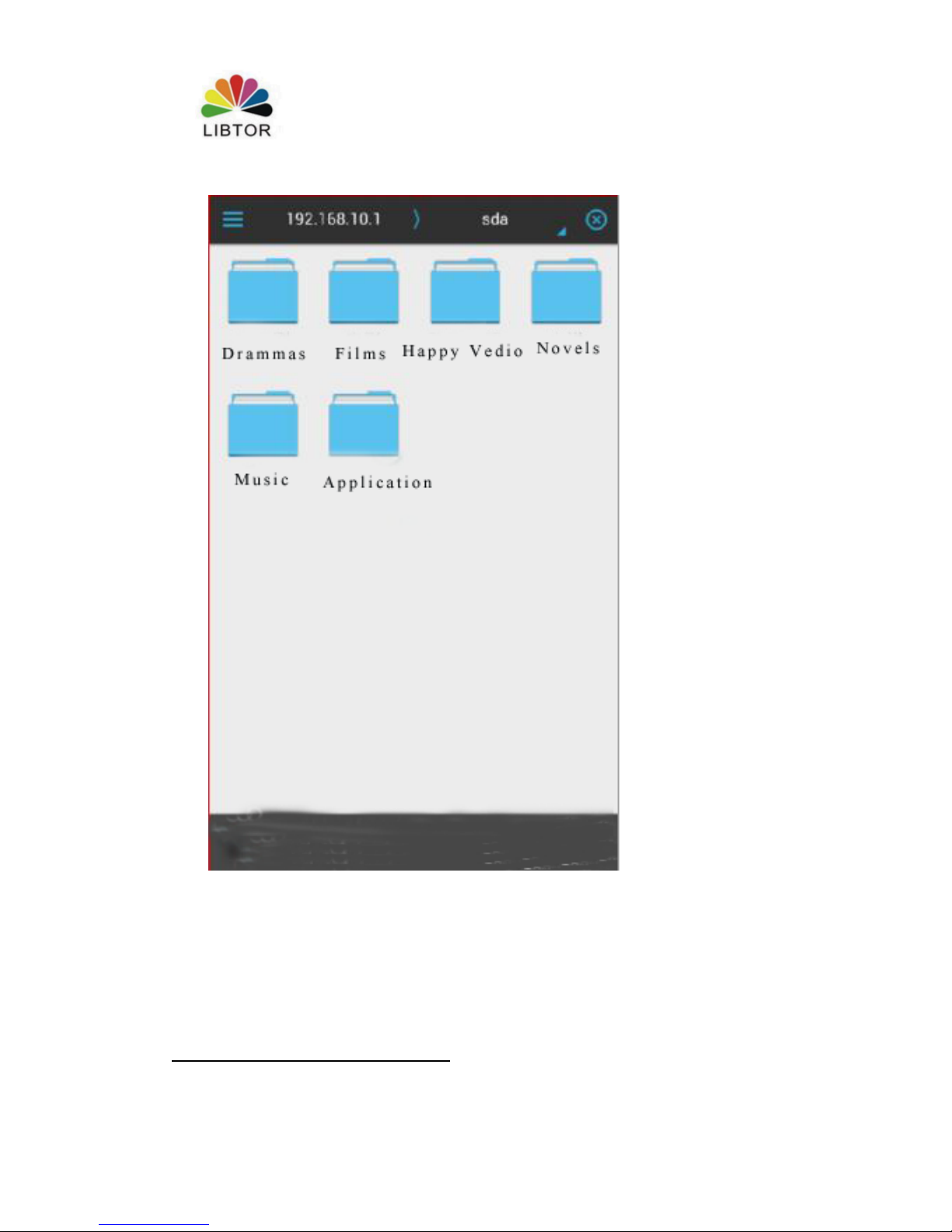
(4)It can access to T270 storage medium,here, We can add, delete,modify the
content of storage card .
Page 14
T260 Series Router User Manual
Shenzhen Libtor Technology Co.,Ltd Page 14 of 41
Add:Room 608, Building A,Hongshengyuan Industrial Zone,No.339 Bulong Road, Bantian Street
Office, Longgang District, Shenzhen City, Guangdong Province.
Web:http:www.libtor.com Tel: 86-755-28345166-807 Fax:86-755-28345166-804
Mail:[email protected]
Page 15
T260 Series Router User Manual
Shenzhen Libtor Technology Co.,Ltd Page 15 of 41
Add:Room 608, Building A,Hongshengyuan Industrial Zone,No.339 Bulong Road, Bantian Street
Office, Longgang District, Shenzhen City, Guangdong Province.
Web:http:www.libtor.com Tel: 86-755-28345166-807 Fax:86-755-28345166-804
Mail:[email protected]
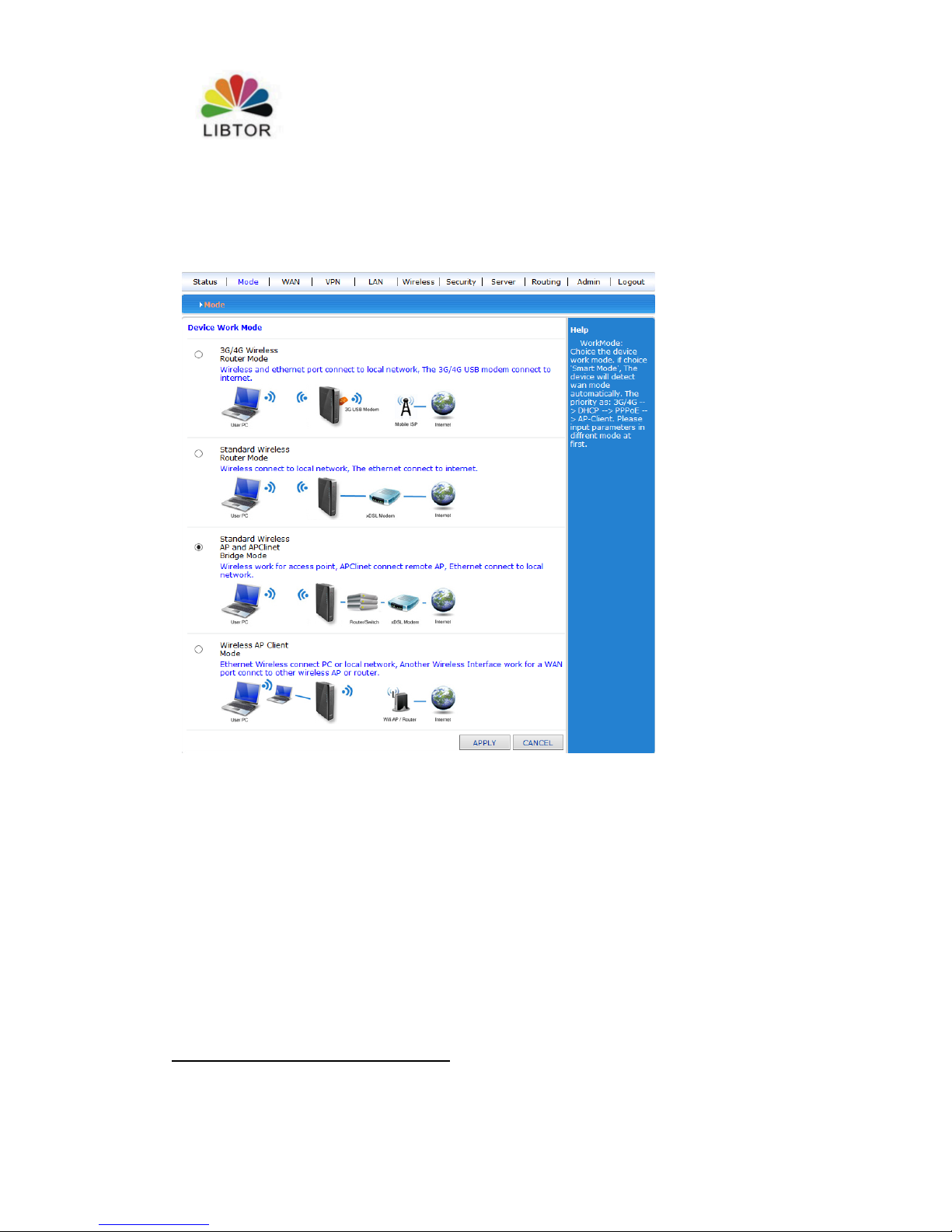
Chapter 3 Working mode
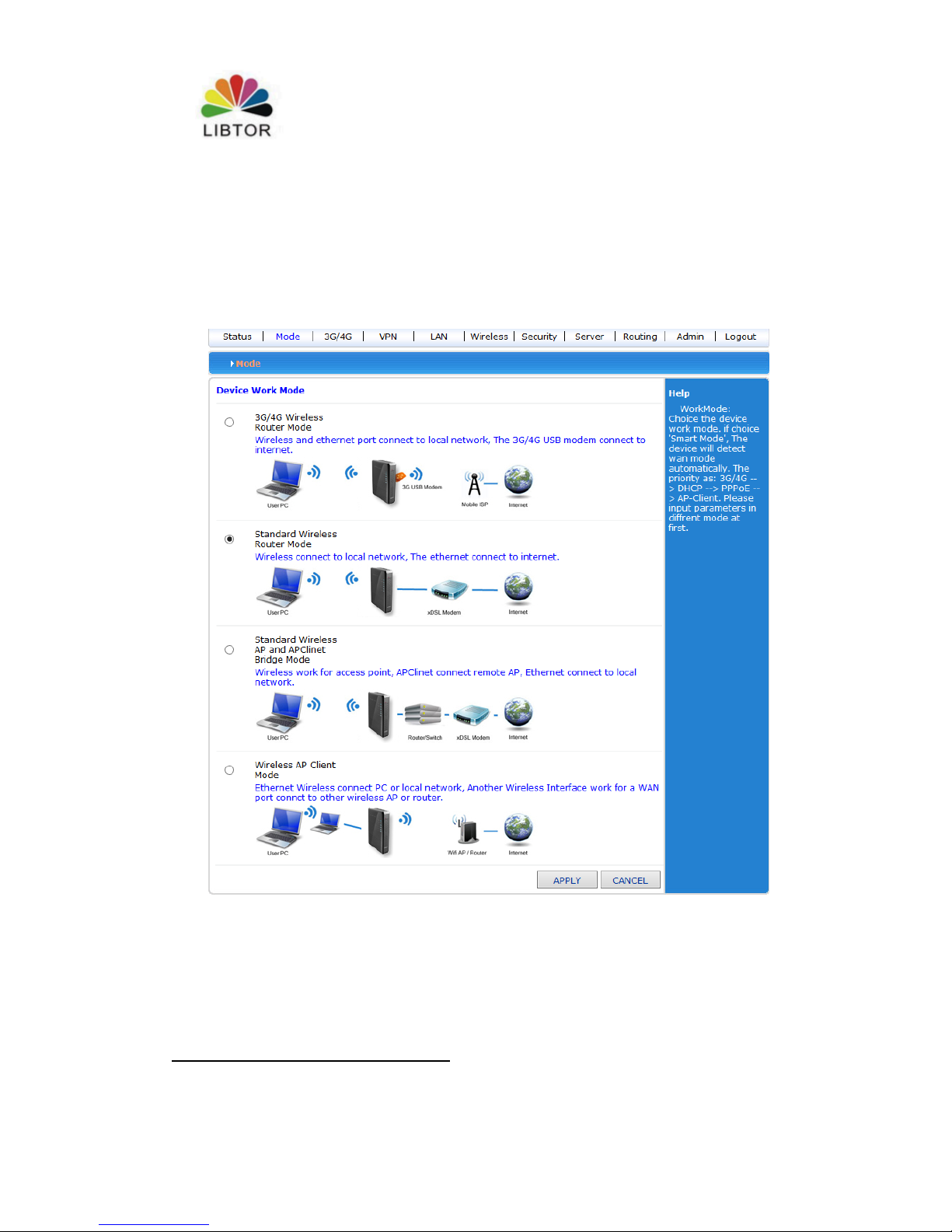
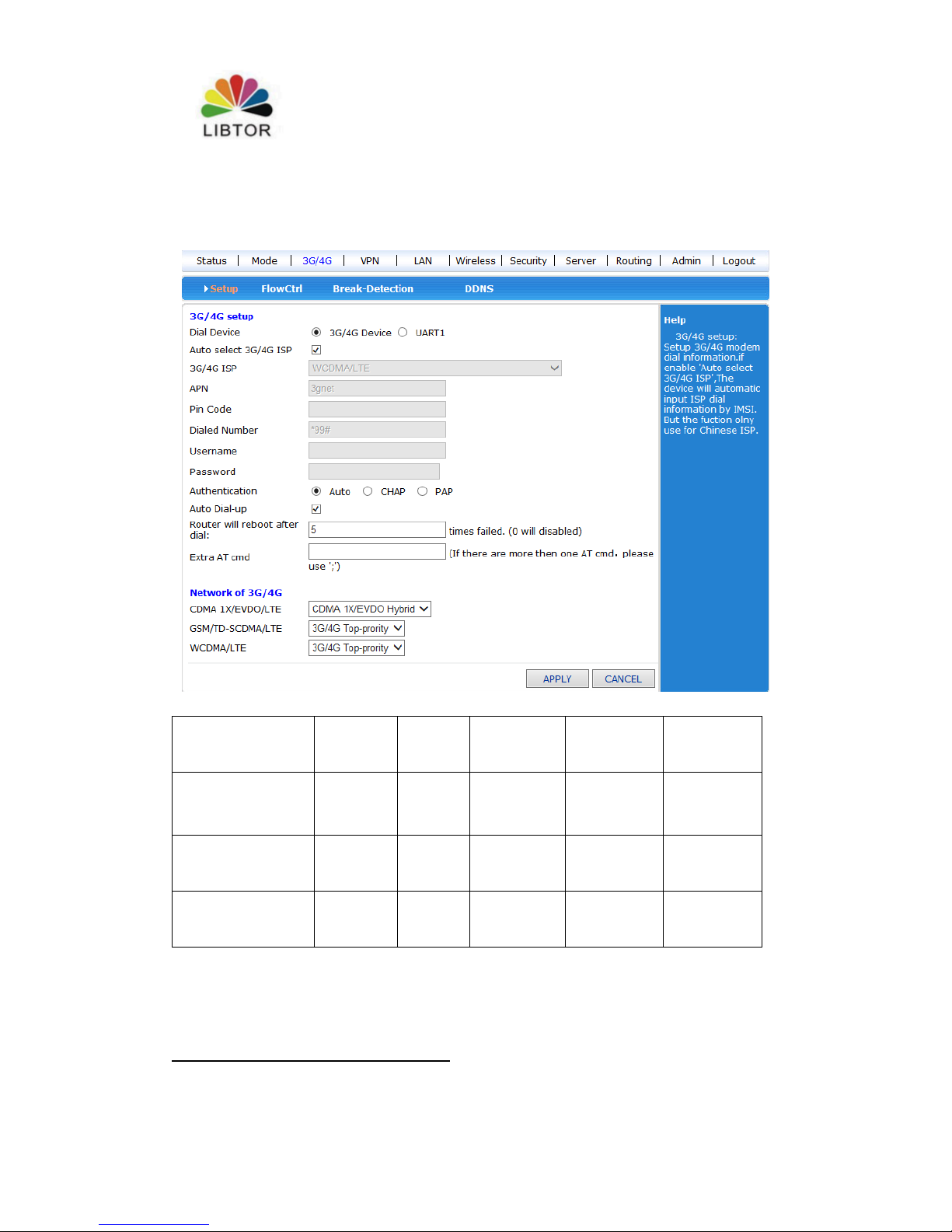
T270 offer 4 types of working mode :3G wireless router mode (defaulted), standard
wireless router mode. Wireless AP+wireless customer end bridge mode ,wireless
AP+Wireless customer end mode
3.1, 3Gwireless router mode
Page 16
T260 Series Router User Manual
Shenzhen Libtor Technology Co.,Ltd Page 16 of 41
Add:Room 608, Building A,Hongshengyuan Industrial Zone,No.339 Bulong Road, Bantian Street
Office, Longgang District, Shenzhen City, Guangdong Province.
Web:http:www.libtor.com Tel: 86-755-28345166-807 Fax:86-755-28345166-804
Mail:[email protected]
The default to T270 is 3G wireless router, Insert 3GSIM card , Router will search
3G internet automatically .You can also define the internet supplier what you want to.
server
3G/4G
network
APN
Dial
number
User
name
password
China mobile
com
TD-
SCDMA
cmnet
*99#
或*98*1#
card
card
China Telecom
CDMA2
000
Null
#777
Card
card
China Unicom
WCDM
A
3G/4G
net
*99#
Null
Null
In this mode, 2 RJ45 router connectors are LAN port
3.2 Wire connection standard router mode
Page 17
T260 Series Router User Manual
Shenzhen Libtor Technology Co.,Ltd Page 17 of 41
Add:Room 608, Building A,Hongshengyuan Industrial Zone,No.339 Bulong Road, Bantian Street
Office, Longgang District, Shenzhen City, Guangdong Province.
Web:http:www.libtor.com Tel: 86-755-28345166-807 Fax:86-755-28345166-804
Mail:[email protected]
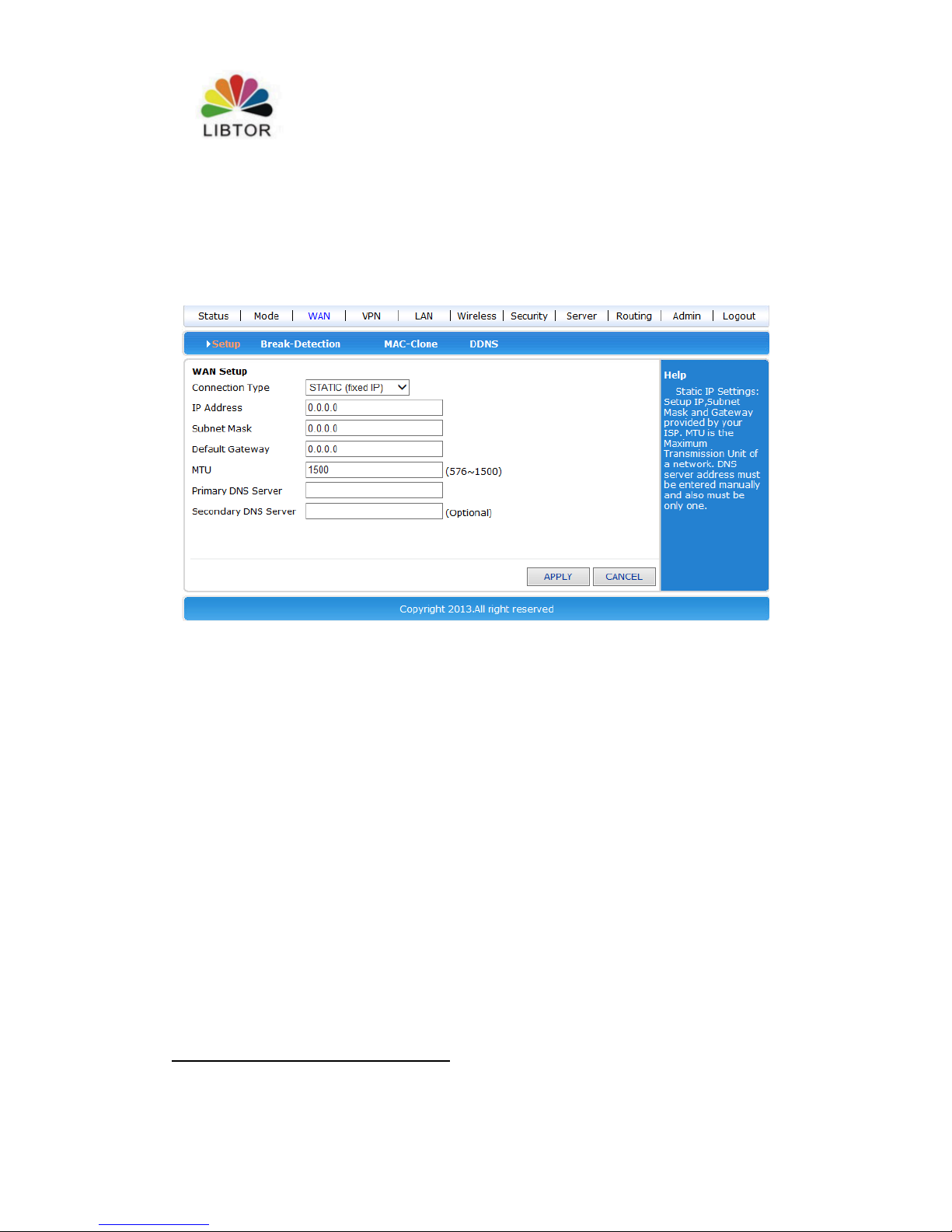
3.2.1 Static internet connection mode
Entering working mode to choose standard router mode, Choose the static IP address
under WAN setting windows. Click IP address and net mask ,gateway and DNS
which ISP provided. Then apply it .
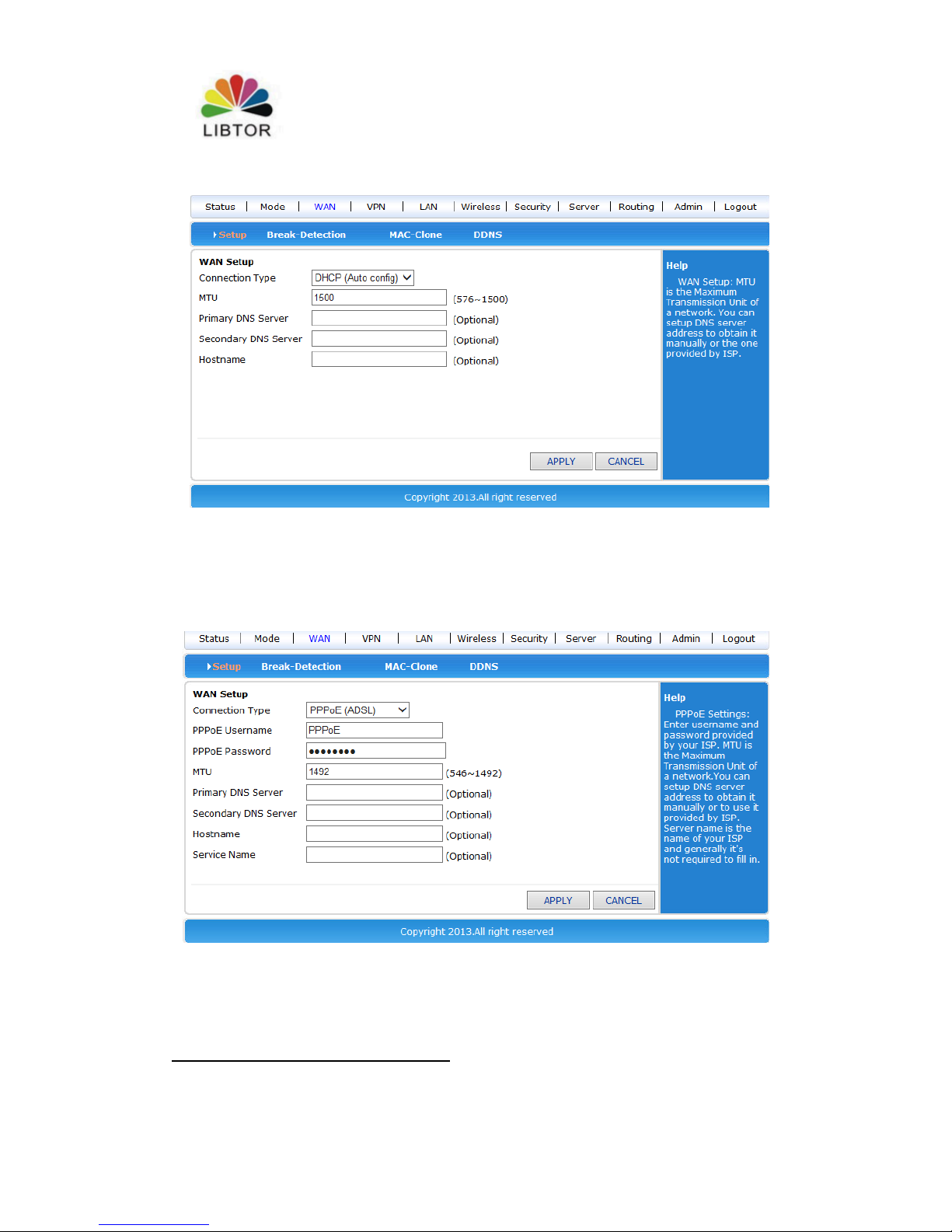
3.2.2 Dynamic internet connection way
Entering working mode to choose standard router mode, Choose the dynamic IP
address under WAN setting windows. Click apply button ,then the router will obtain
ISP assigned parameter automatically .
Page 18
T260 Series Router User Manual
Shenzhen Libtor Technology Co.,Ltd Page 18 of 41
Add:Room 608, Building A,Hongshengyuan Industrial Zone,No.339 Bulong Road, Bantian Street
Office, Longgang District, Shenzhen City, Guangdong Province.
Web:http:www.libtor.com Tel: 86-755-28345166-807 Fax:86-755-28345166-804
Mail:[email protected]
3.2.3 PPPoE internet connection way
Entering working mode to choose standard router mode, Choose the PPPoE under
WAN setting and fill the user name,password that ISP offer . Click apply button ,
3.3 Wireless AP+ Customer end bridge mode
Choose this mode ,we can use T270 as a bridge connection for AP using, it’s used
as bridge connection of former grade wireless router .
Page 19
T260 Series Router User Manual
Shenzhen Libtor Technology Co.,Ltd Page 19 of 41
Add:Room 608, Building A,Hongshengyuan Industrial Zone,No.339 Bulong Road, Bantian Street
Office, Longgang District, Shenzhen City, Guangdong Province.
Web:http:www.libtor.com Tel: 86-755-28345166-807 Fax:86-755-28345166-804
Mail:[email protected]
1.Set your computer’s IP address into 192.168.10.100, entering Web by wire
connect LAN2 connector, enter Web ,Choose wireless AP+ Customber end
bridge mode .
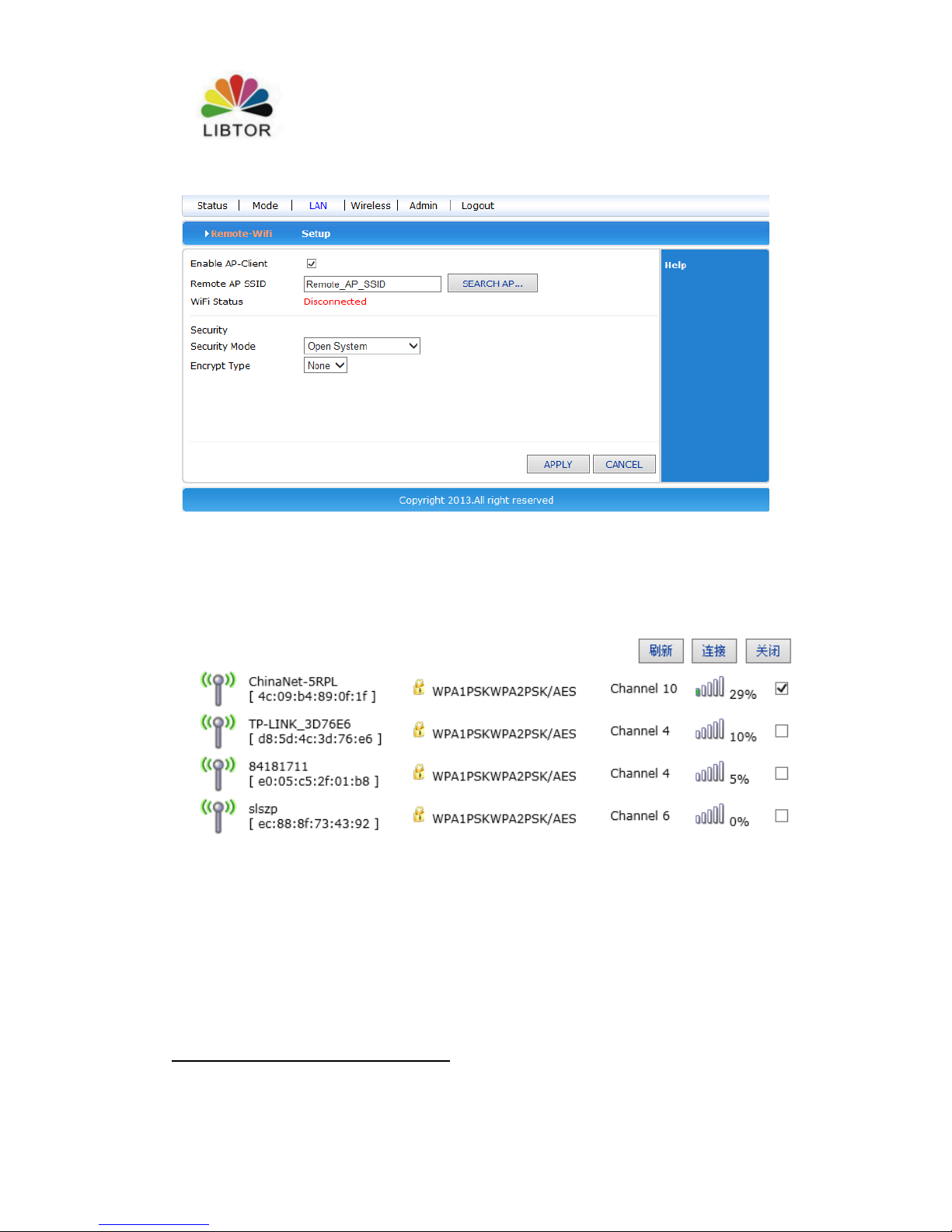
2.Click LAN setting button, Search for Wireless network,
Page 20
T260 Series Router User Manual
Shenzhen Libtor Technology Co.,Ltd Page 20 of 41
Add:Room 608, Building A,Hongshengyuan Industrial Zone,No.339 Bulong Road, Bantian Street
Office, Longgang District, Shenzhen City, Guangdong Province.
Web:http:www.libtor.com Tel: 86-755-28345166-807 Fax:86-755-28345166-804
Mail:[email protected]
3.You can see the name of wireless AP within current coverage range, Choose
wireless AP accordingly
4. Fill wireless AP password chose, then you can bridge connection former
Wireless AP
Page 21
T260 Series Router User Manual
Shenzhen Libtor Technology Co.,Ltd Page 21 of 41
Add:Room 608, Building A,Hongshengyuan Industrial Zone,No.339 Bulong Road, Bantian Street
Office, Longgang District, Shenzhen City, Guangdong Province.
Web:http:www.libtor.com Tel: 86-755-28345166-807 Fax:86-755-28345166-804
Mail:[email protected]
3.4 wireless AP+Customer end mode
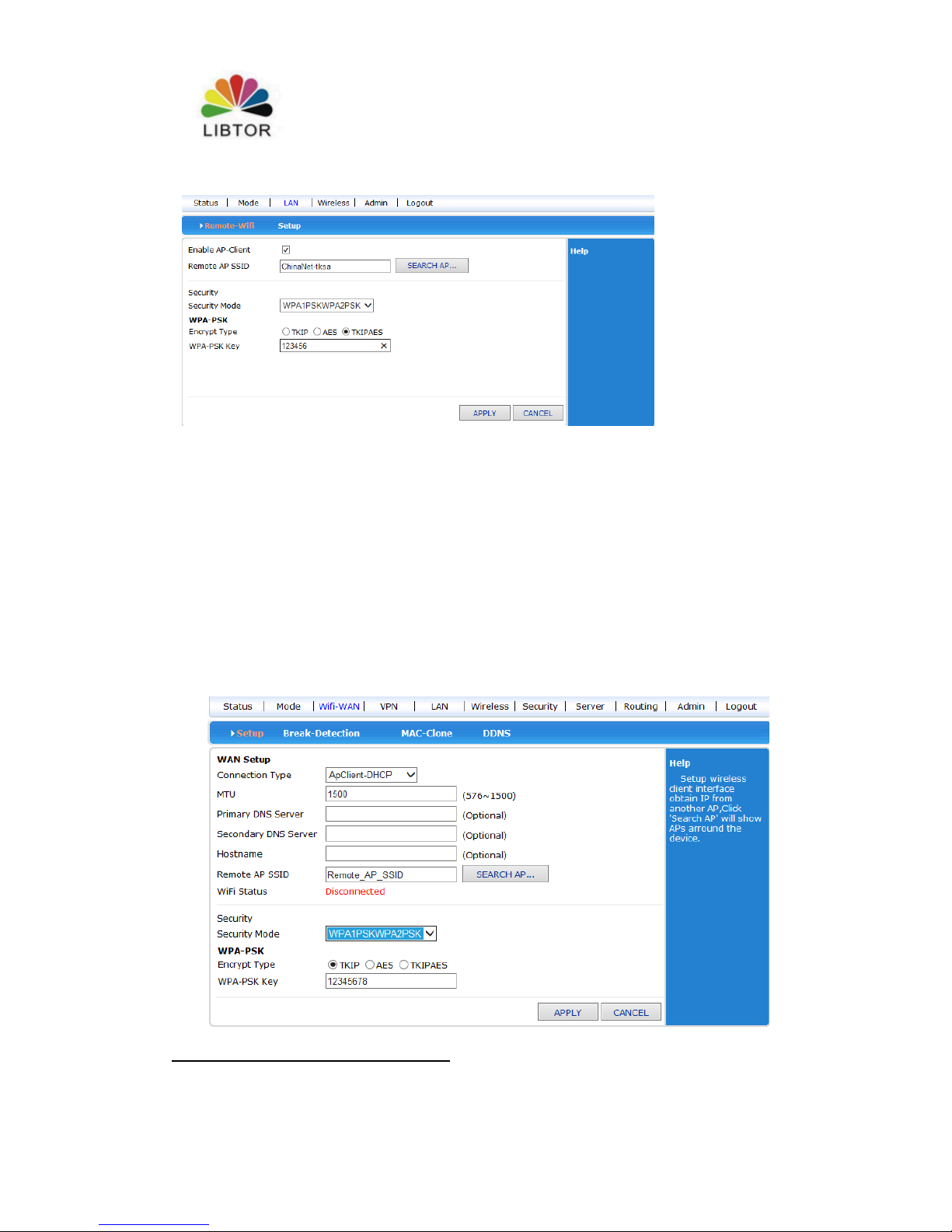
Web – working mode – Wireless AP+ Customer end mode , click apply.
Wireless connection –Use menu of Internet ways to choose AP client – Dynamic
address (Get from DHCP server automatically , Click and search Wireless
Internet, Then it will pop-up choice dialogue box that search for all wireless
network .Choose WiFi network you want to connect . Pay attention to
channel’s IP you want to select net , click and connect. If the WiFi you
chosen has password,Pls fill in password accordingly under Wireless security.
Pay attention that the password is character or hexadecimal. Then press apply
button.
Web –wireless setting - choose Channel accordingly in wireless channel .
Page 22
T260 Series Router User Manual
Shenzhen Libtor Technology Co.,Ltd Page 22 of 41
Add:Room 608, Building A,Hongshengyuan Industrial Zone,No.339 Bulong Road, Bantian Street
Office, Longgang District, Shenzhen City, Guangdong Province.
Web:http:www.libtor.com Tel: 86-755-28345166-807 Fax:86-755-28345166-804
Mail:[email protected]
Chapter 4
4.1 Wireless safety
Wireless safety mode has several types, It can choose different safe mode as
your requirement .
Stop in use
Open system
WPA
WPA-PSK
WPA2-PSK
WPAPSKWPA2PSK(WPA-PSK and WPA2-PSK mixed mode )
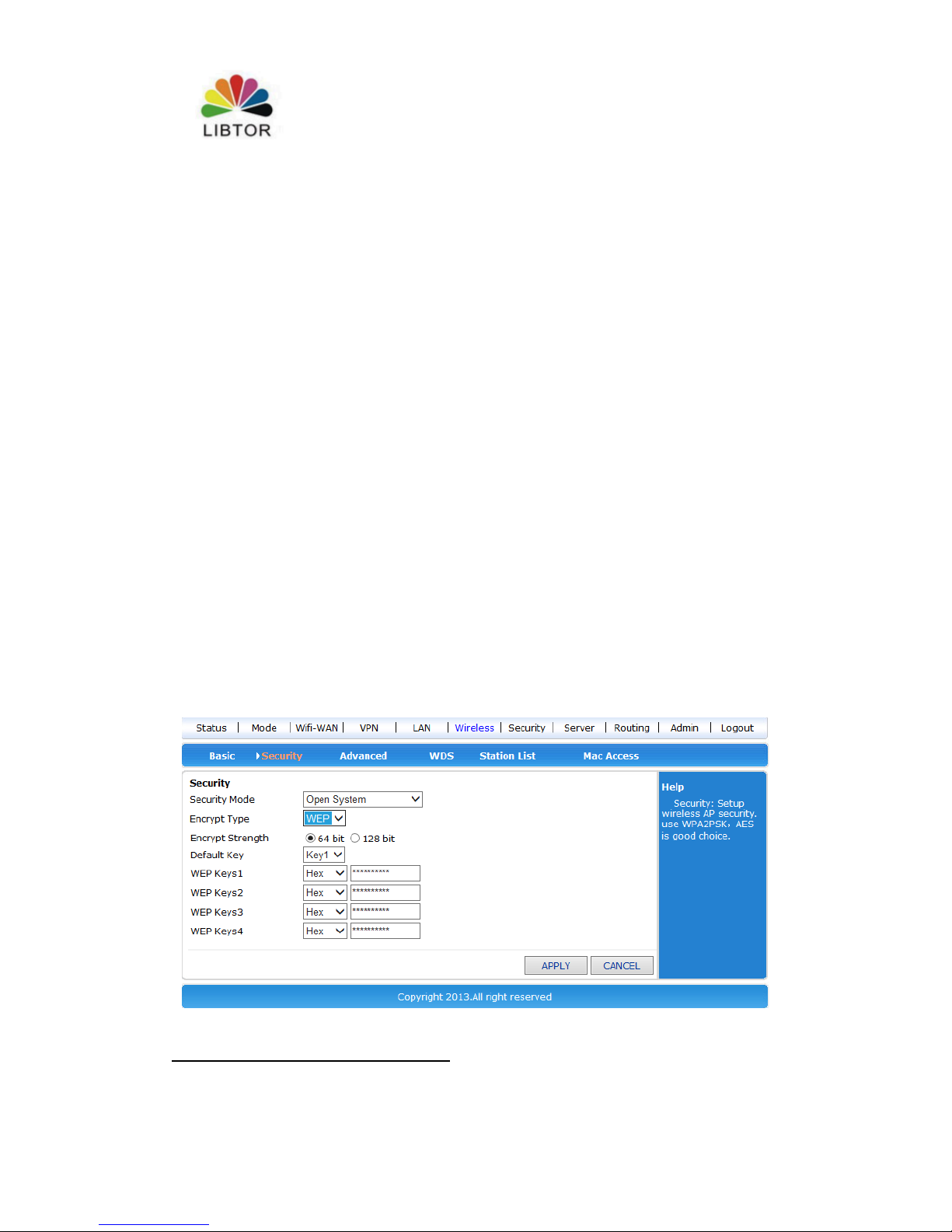
4.1.1 Open system
There are two types of encryption :None and WEP
Page 23
T260 Series Router User Manual
Shenzhen Libtor Technology Co.,Ltd Page 23 of 41
Add:Room 608, Building A,Hongshengyuan Industrial Zone,No.339 Bulong Road, Bantian Street
Office, Longgang District, Shenzhen City, Guangdong Province.
Web:http:www.libtor.com Tel: 86-755-28345166-807 Fax:86-755-28345166-804
Mail:[email protected]
Description listed as below:
Web item
Description
Encryption
type
Only two encryption type to choose:None and
WEP。Choose”None”means no encryption ,choose”
WEP” showed as aboved
the length of
WEP
encryption
Only two length of WEP encryption types to
choose:64bit and 128bit。Default length :64bit。
Default key
ID
you can 4 WEP keys ,but only choose 1 key in use
.Default key is Key 1
WEP Key
Choose key type and set WEP key number 。There are
two types of WEP key:sexadecimal type and character
type。You can set different Wep key based on
different encryption length and type .
WEP key setting :
64bit encryption : 10 unit sexadecimal or 5 unit character type.
128bit encryption:26 unit sexadecimal or 13 unit character type.
4.1.2 WPA
This safe mode offer WPA-PSK encryption and Raduis server certification
Page 24
T260 Series Router User Manual
Shenzhen Libtor Technology Co.,Ltd Page 24 of 41
Add:Room 608, Building A,Hongshengyuan Industrial Zone,No.339 Bulong Road, Bantian Street
Office, Longgang District, Shenzhen City, Guangdong Province.
Web:http:www.libtor.com Tel: 86-755-28345166-807 Fax:86-755-28345166-804
Mail:[email protected]
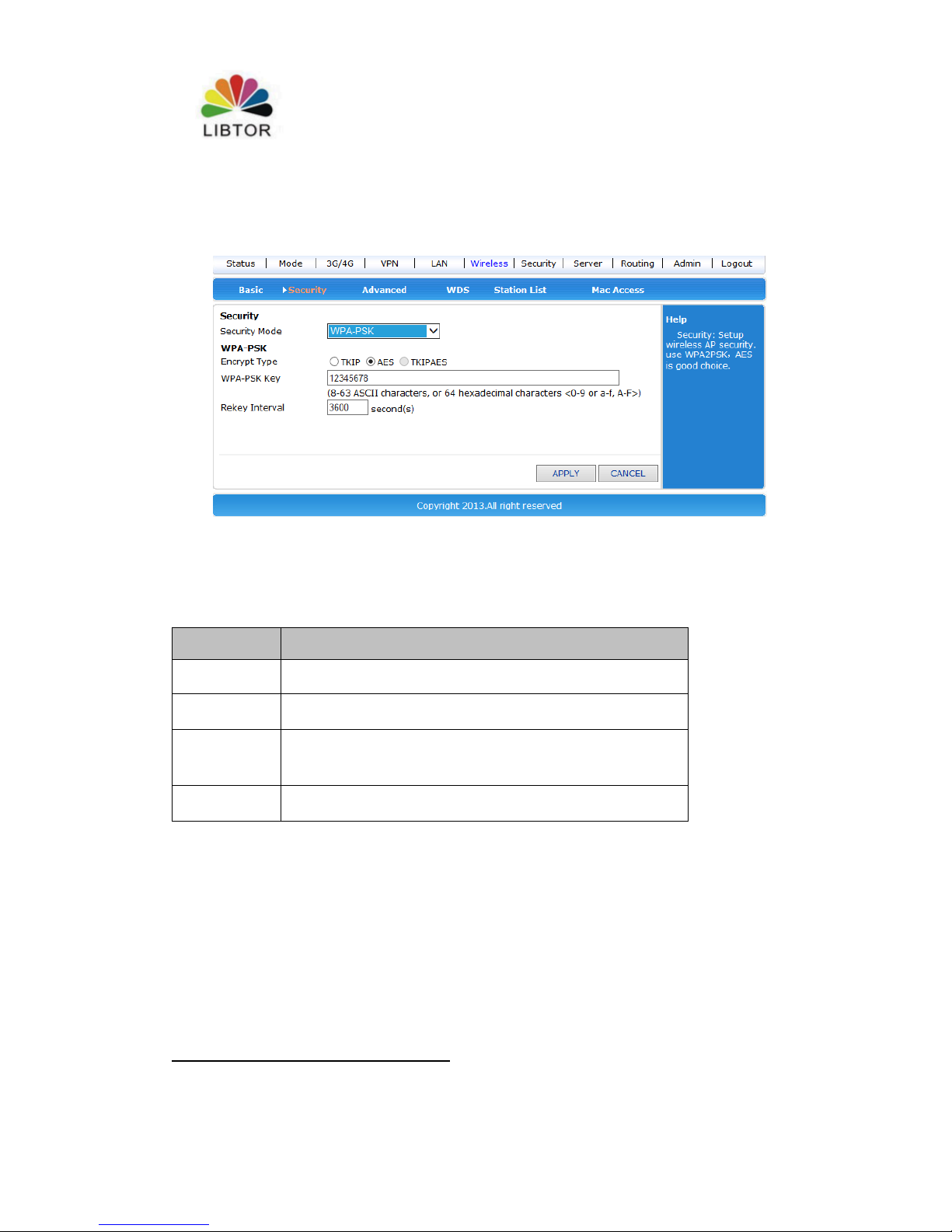
4.1.3 WPA-PSK
This mode is WPA-PSK encryption mode
Description listed as below:
Web item
Description
Safe mode
Choose WPA-PSK。
WPA-PSK
encryption
Only two choice :TKIP和AES。
WPA-PSK
Key
Set key ,legal key length :8-63个ASCII character
or 64 sexadecimal (0~9、a~f or A~F)。
Key update
interval
Set key interval updating time . the unit is as per
second.
Page 25
T260 Series Router User Manual
Shenzhen Libtor Technology Co.,Ltd Page 25 of 41
Add:Room 608, Building A,Hongshengyuan Industrial Zone,No.339 Bulong Road, Bantian Street
Office, Longgang District, Shenzhen City, Guangdong Province.
Web:http:www.libtor.com Tel: 86-755-28345166-807 Fax:86-755-28345166-804
Mail:[email protected]
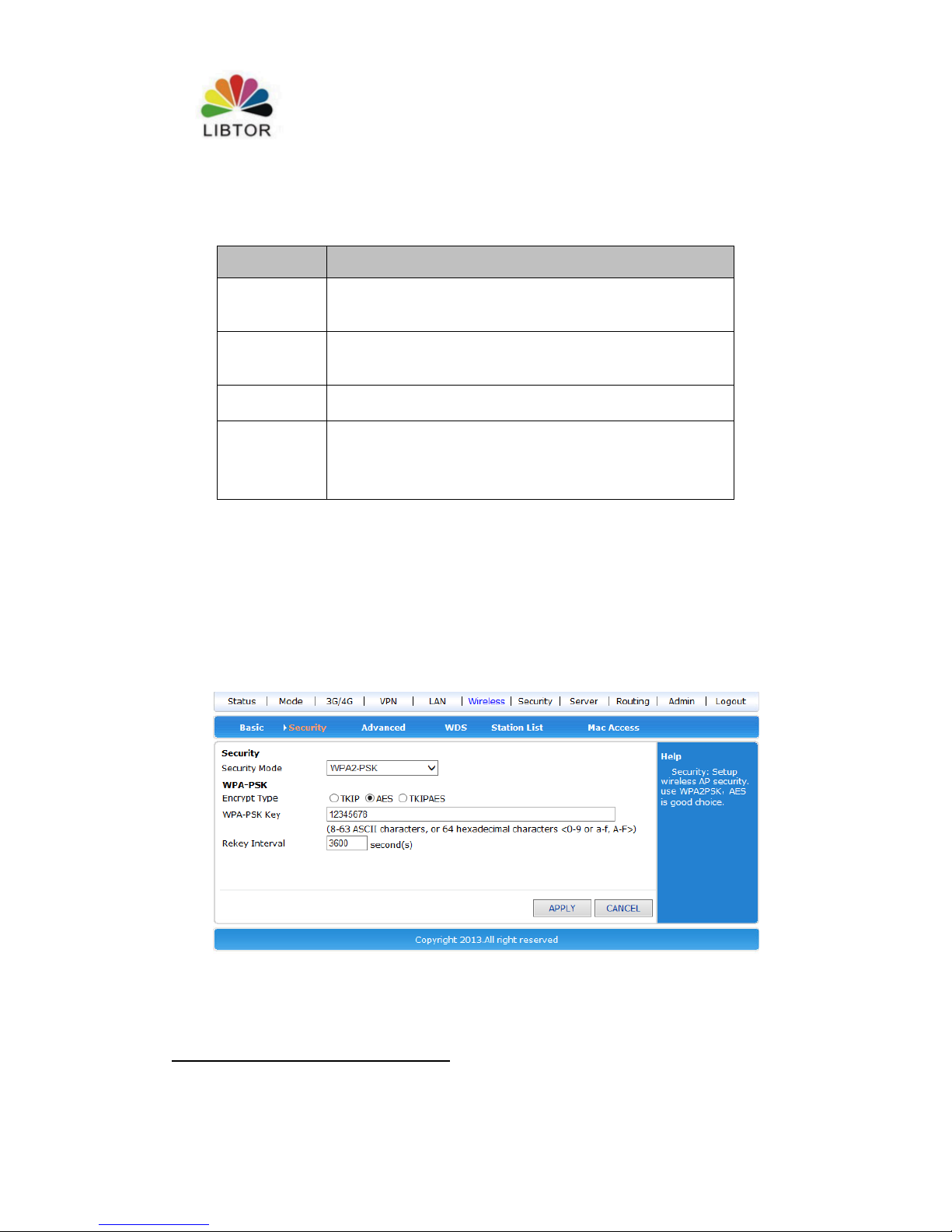
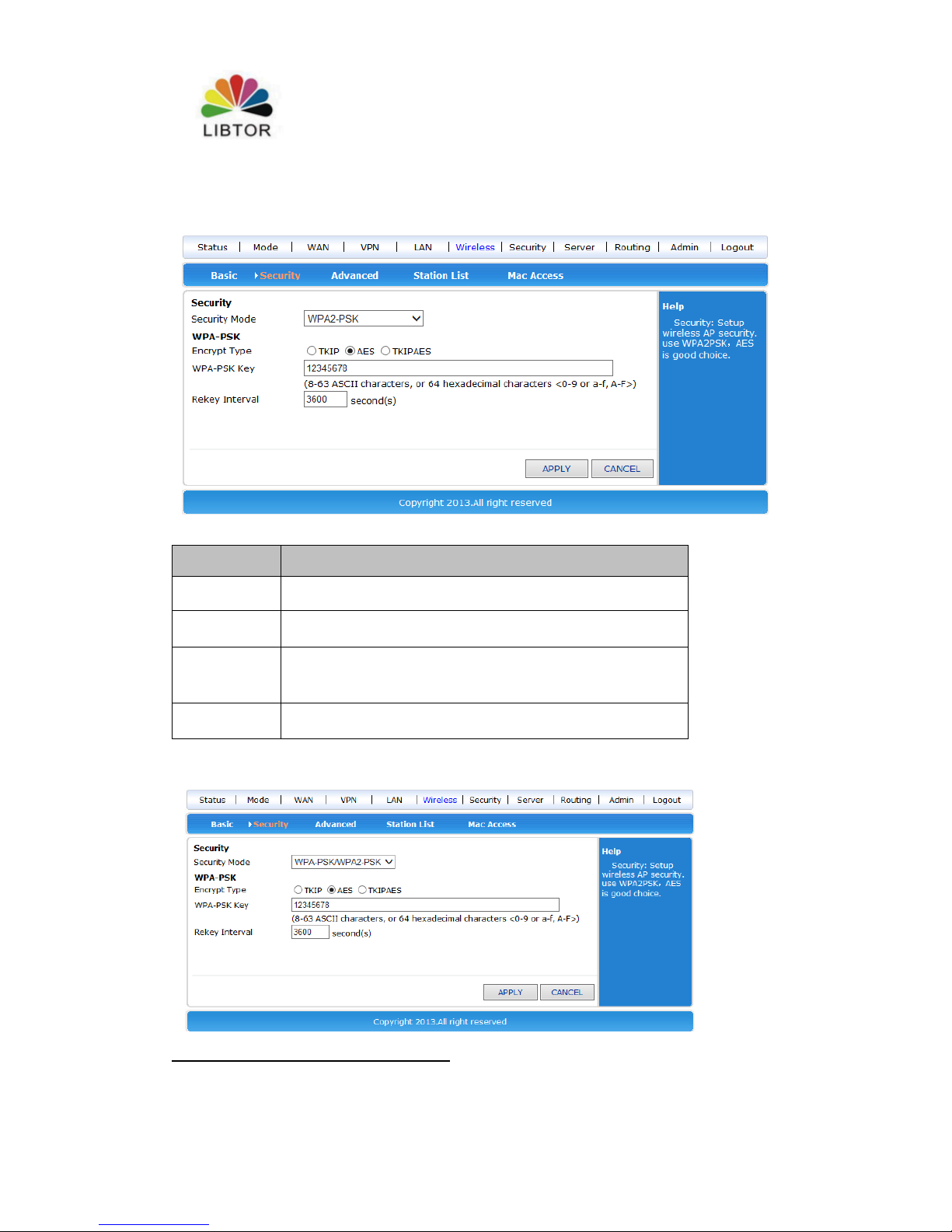
4.1.4 WPA2-PSK
Description listed as below:
Web item
Description
Safe mode
Choose WPA2-PSK。
WPA-PSK
encryption
Only three choice :TKIP,AES and TKIPAES。
WPA-PSK
Key
Set key ,legal key length :8-63个ASCII character
or 64 sexadecimal (0~9、a~f or A~F)。
Key update
interval
Set key interval updating time . the unit is as per
second.
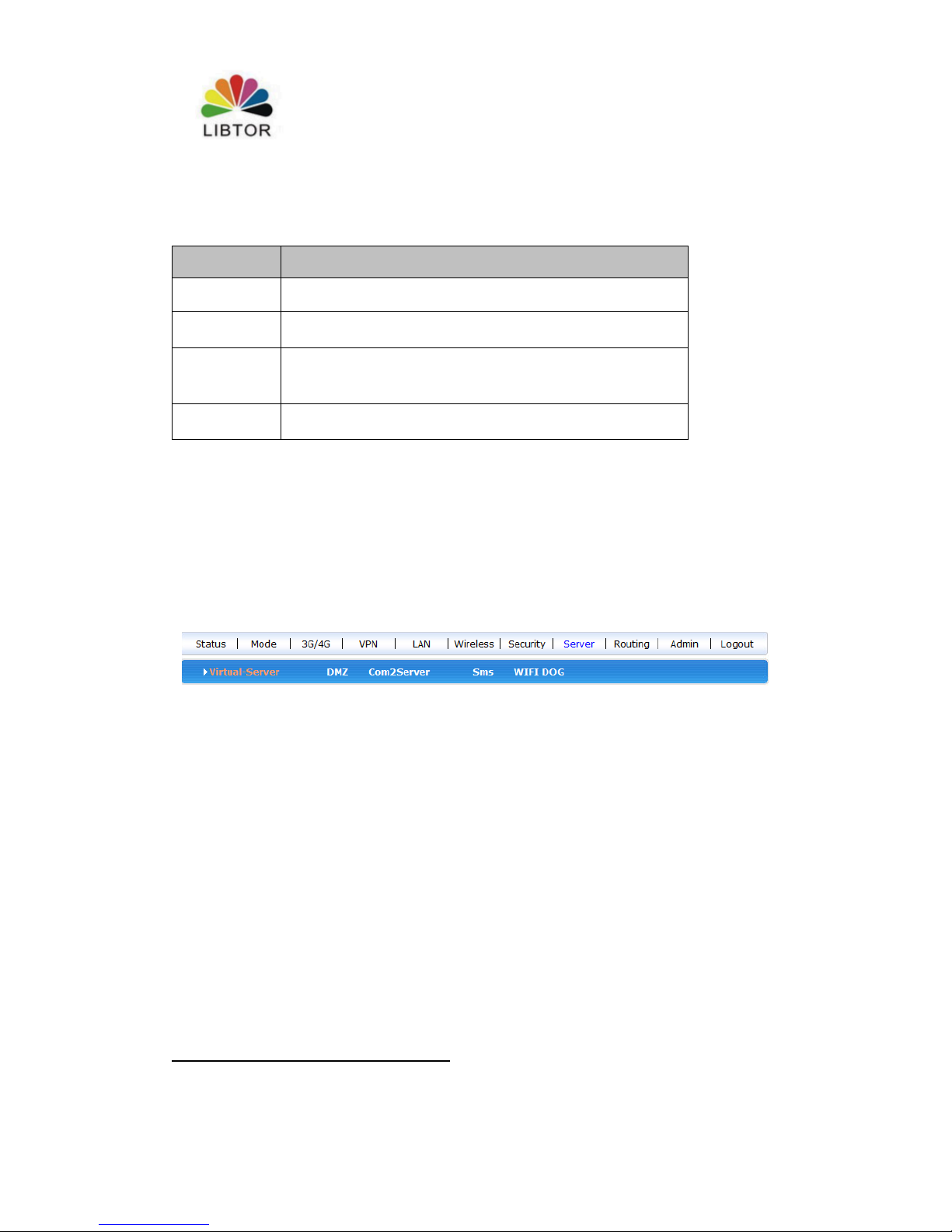
4.1.5 WPAPSKWPA2PSK
Page 26
T260 Series Router User Manual
Shenzhen Libtor Technology Co.,Ltd Page 26 of 41
Add:Room 608, Building A,Hongshengyuan Industrial Zone,No.339 Bulong Road, Bantian Street
Office, Longgang District, Shenzhen City, Guangdong Province.
Web:http:www.libtor.com Tel: 86-755-28345166-807 Fax:86-755-28345166-804
Mail:[email protected]
Description listed as below:
Web item
Description
Safe mode
Choose WPA2-PSK。
WPA-PSK
encryption
Only three choice :TKIP,AES and TKIPAES。
WPA-PSK
Key
Set key ,legal key length :8-63个ASCII character
or 64 sexadecimal (0~9、a~f or A~F)。
Key update
interval
Set key interval updating time . the unit is as per
second.
Charpter5 System service
T270 offer many items to choose, Here we mainly describe Virtual server ,serial
service and SMS service.
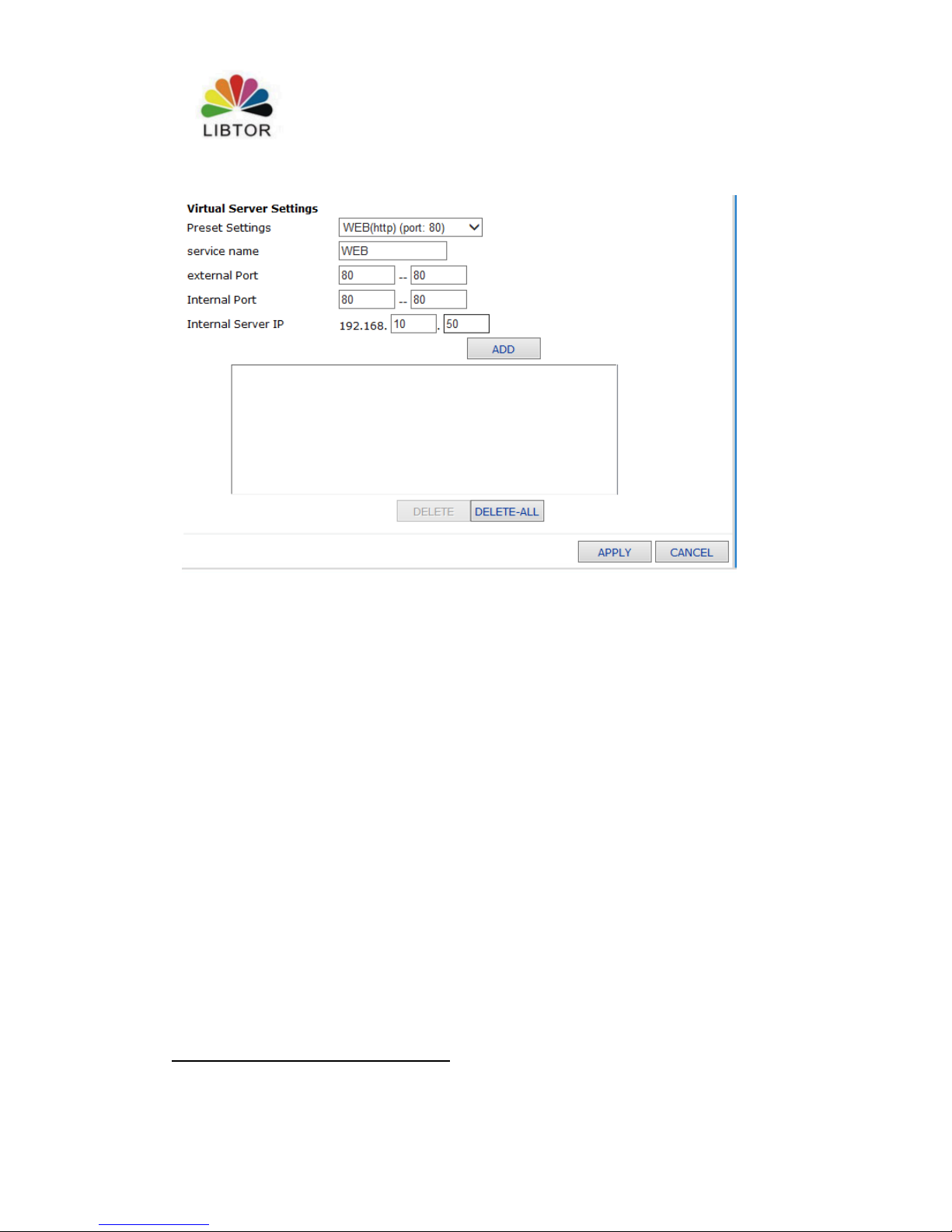
5.1 Virtual service
T270 can be used as a Internet server, offer many service function, Only need to fill
right IP address of external connector,internal connector and internal server . then it
can be used as virtual service
Page 27
T260 Series Router User Manual
Shenzhen Libtor Technology Co.,Ltd Page 27 of 41
Add:Room 608, Building A,Hongshengyuan Industrial Zone,No.339 Bulong Road, Bantian Street
Office, Longgang District, Shenzhen City, Guangdong Province.
Web:http:www.libtor.com Tel: 86-755-28345166-807 Fax:86-755-28345166-804
Mail:[email protected]
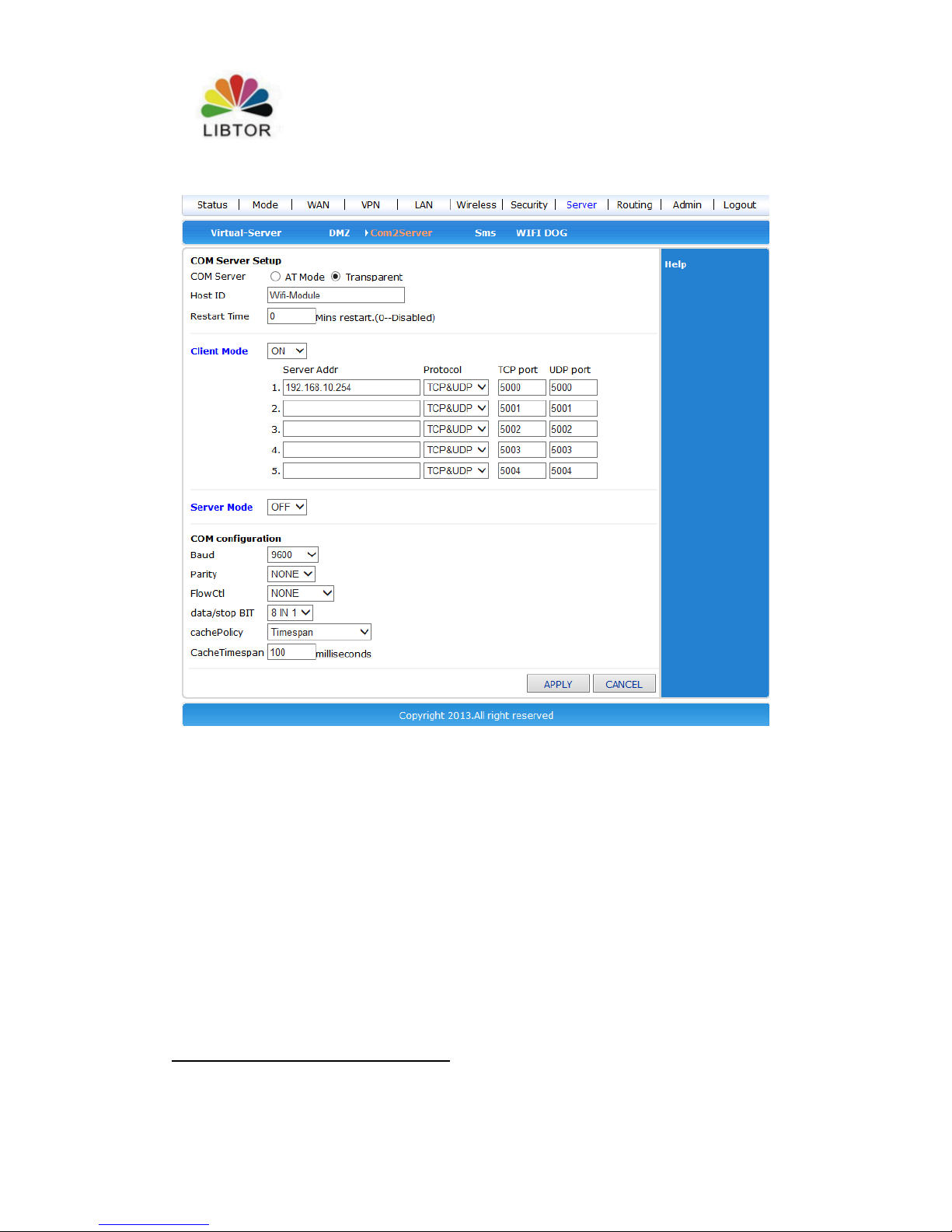
5.2 Serial Port
One main functions of T270 is used as serial port server (customer end), Here, we can
connect many serial ports.
Page 28
T260 Series Router User Manual
Shenzhen Libtor Technology Co.,Ltd Page 28 of 41
Add:Room 608, Building A,Hongshengyuan Industrial Zone,No.339 Bulong Road, Bantian Street
Office, Longgang District, Shenzhen City, Guangdong Province.
Web:http:www.libtor.com Tel: 86-755-28345166-807 Fax:86-755-28345166-804
Mail:[email protected]
Regarding to this content of this chapter, we will give brief description
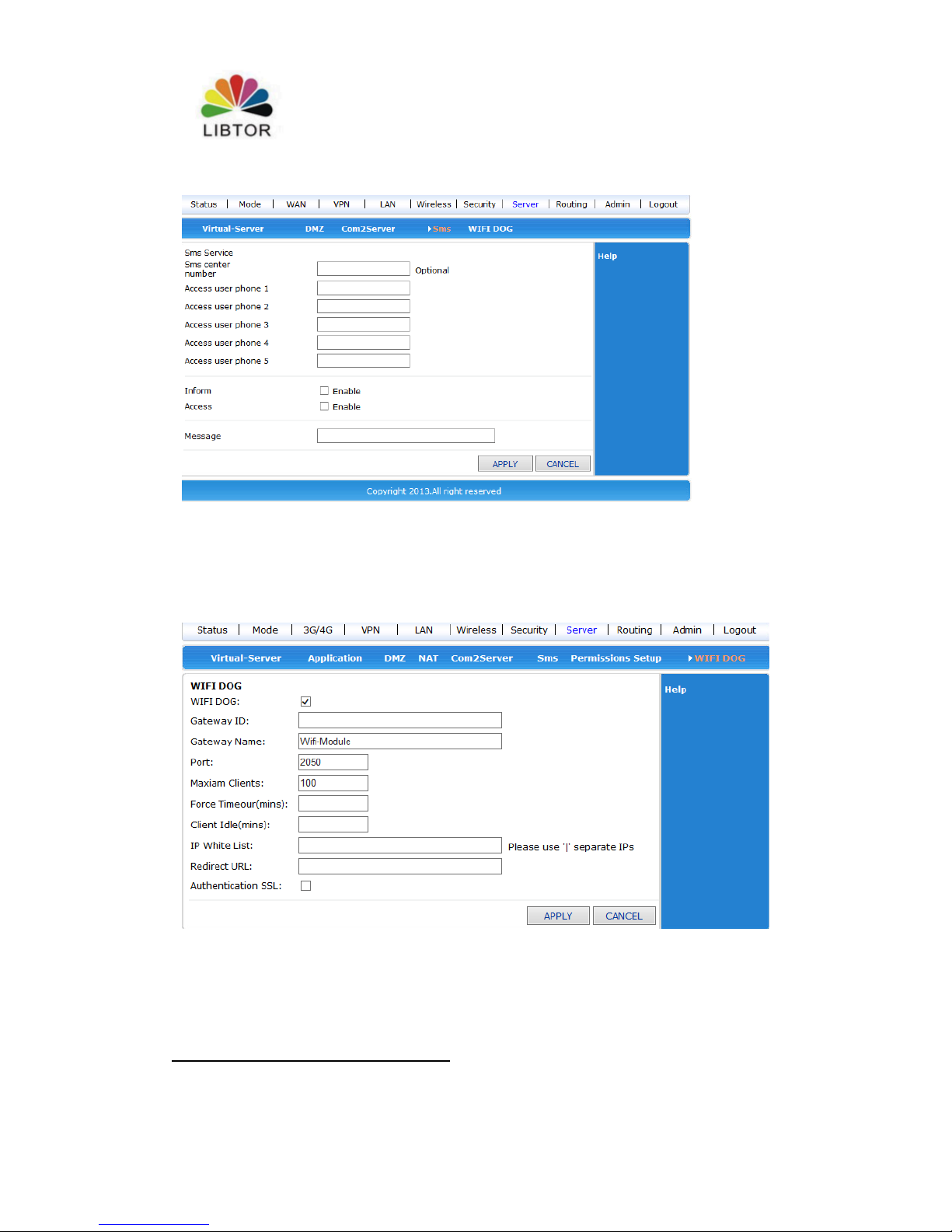
5.3 SMS service
We can send SMS to T270 router and control the start,close and restart by setting
telephone number if T260S have 3G SIM card for sending and receiving
messages.The details listed below :
Page 29
T260 Series Router User Manual
Shenzhen Libtor Technology Co.,Ltd Page 29 of 41
Add:Room 608, Building A,Hongshengyuan Industrial Zone,No.339 Bulong Road, Bantian Street
Office, Longgang District, Shenzhen City, Guangdong Province.
Web:http:www.libtor.com Tel: 86-755-28345166-807 Fax:86-755-28345166-804
Mail:[email protected]
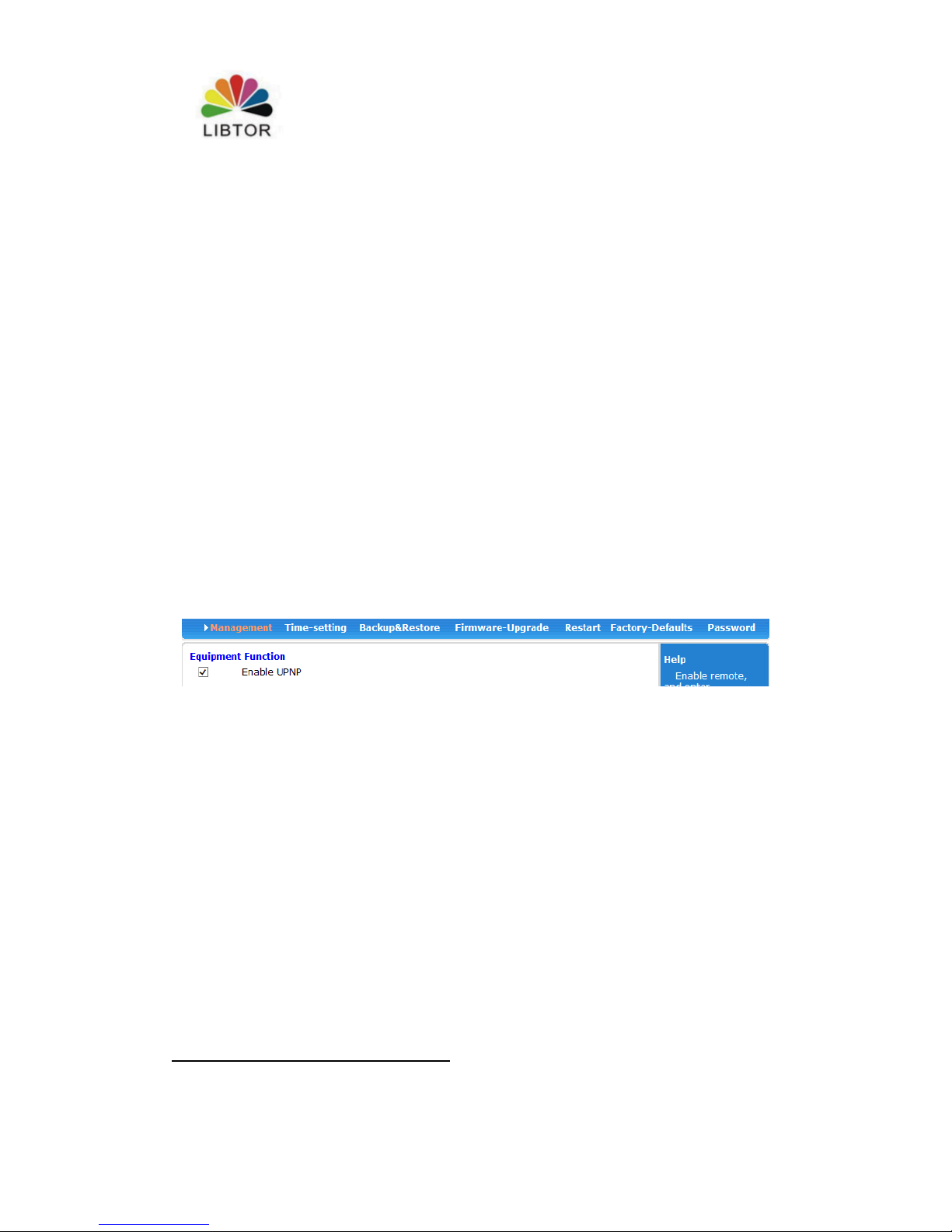
5.4 Web Ads Certification
We can support Web Ads certification from Software version (2.1.6.8)
You can connect your platform with T270 if you have protocol platforms supported
WIFI DOG certification. Certification ways listed as below:
Regarding to there are many contents of many Ad certification, We don’t make
description in details. If you want to konw more .Pls contact related person from our
company.
Page 30
T260 Series Router User Manual
Shenzhen Libtor Technology Co.,Ltd Page 30 of 41
Add:Room 608, Building A,Hongshengyuan Industrial Zone,No.339 Bulong Road, Bantian Street
Office, Longgang District, Shenzhen City, Guangdong Province.
Web:http:www.libtor.com Tel: 86-755-28345166-807 Fax:86-755-28345166-804
Mail:[email protected]
Charpter 6 Admin
6.1 Equipment function
Windows ME,2000,XP use UPnP Protocols. These systems can find router
automatically by this Protocols if we start this function.
UPnP (Universal Plug and Play , namely is use immediately when you plug ) is
mainly used for realizing intelligent connection and communication for equipment,
There is no need t attending and using main server for users to find automatically and
control from different types web euipments of different suppliers
Use UPnP function, Router can realize NAT order came cross:when the computer in
the LAN came through.
Wireless Router can add ,delete NAT mapped table automatically based on
requirement when
Wireless router communicate with Internet .And then it can solve some traditional
businesses (such as MSN vocie a,vedion ) can’t come cross NAT problems.
Tick radio box, press “apply” button ,and completed setting
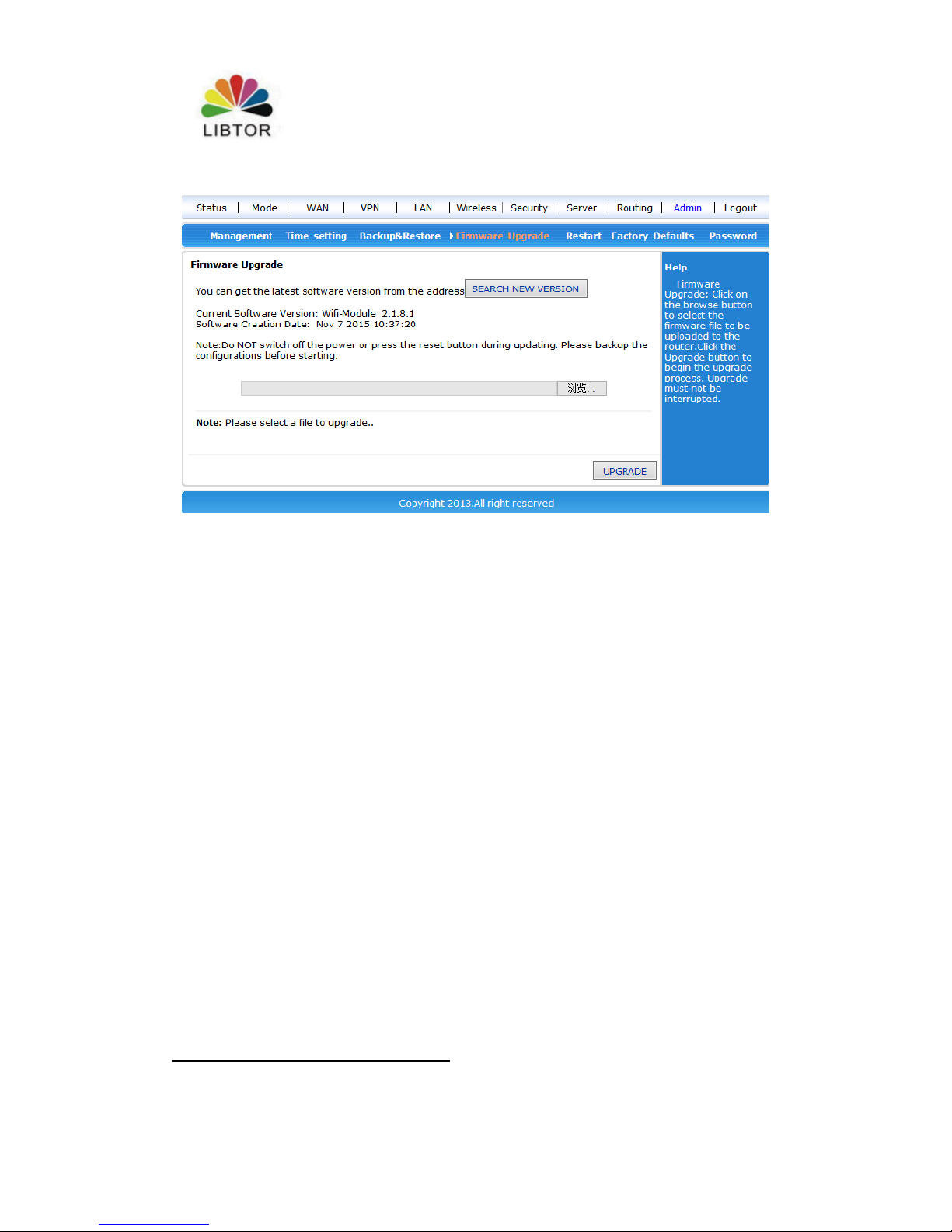
6.2 Software updating
you can download the newest software router to get more and more functions and
stable parameters by updating software.
The procedure for updating software listed as below :
(1): Store the updating files to your computer.
(2): Click “scan”button to choose the software your need to upgrade.
(3):Click “upgrading” button, and start to upgrade.
Page 31
T260 Series Router User Manual
Shenzhen Libtor Technology Co.,Ltd Page 31 of 41
Add:Room 608, Building A,Hongshengyuan Industrial Zone,No.339 Bulong Road, Bantian Street
Office, Longgang District, Shenzhen City, Guangdong Province.
Web:http:www.libtor.com Tel: 86-755-28345166-807 Fax:86-755-28345166-804
Mail:[email protected]
6.3 Default to factory value.
The Wireless router will restart automatically when is in the process of recovery
setting.
Default to factory value setting will clear all wireless Router setting information, and
back to the first use status. This function is widely used for transforming equipment
from one internet environment to the other internet environment.Set the euipment
default to factory value.Then it can reset setting. It will be suitbale for current
internet.
Click <default to factory value> button, Confirm it and then Default to factory
setting.
6.4 Password management
Blank wireless router user name/password is admin, User name can’t be
revised,Password can be revised. In order to be more safe ,advise revise password and
keep password information
The process listed as below :
(1) fill the original password in the <original password> radio box;Fill the new
password in the <new password> text box, Refill the new password in the <confirm
Page 32

T260 Series Router User Manual
Shenzhen Libtor Technology Co.,Ltd Page 32 of 41
Add:Room 608, Building A,Hongshengyuan Industrial Zone,No.339 Bulong Road, Bantian Street
Office, Longgang District, Shenzhen City, Guangdong Province.
Web:http:www.libtor.com Tel: 86-755-28345166-807 Fax:86-755-28345166-804
Mail:[email protected]
password> and confirmed it .
(2) Click <confirm> button, completed the password revision.
Supplement :
T270 Serial Port manual sepcification
1. Serial service can be devided into order mode and serial transparent transmission
mode
a)Serial order mode:Send some orders to wireless router by serial port,we can obtain
current time,current web type, current internet total data, current 3G/4G signal
strength related information, detailed order can refer to serial port order table.
b)Serial port transparent mode : you can set the ip address and port of server you want
to connect,Make 3G/4G router connected with the pointed TCP or UDP server,
establish transparent data transmission channel ,realize the data transparent
transmission.
C)If set serial service function open when it’s power off, then it’s on serial transparent
mode and connect automatically pointed server when it’s power on .
d) If set setial service function closed when it’s power off, then it’s on serial order
mode and receive serial mode directly when it’s power on.
e)You just need to sending “+++”if want to back to serial order mode from serial
transparent mode. You just need to “ATO” if you want to back to transparent mode
from serial port oder mode.
2. Serial transparent mode can be devided into customer end mode and server mode ,
a) Customber end mode is normal use mode, it can connect remote server
automatically when power on and can establish transparent data channel .
b) Server mode is detective mode , waiting for customber end connnection.
Only the assigned IP from China telecom is visible IP in public network and it can be
used as server. The assigned IP from China mobile communication and China
unicom are inside network IP. External network can’t access to, So it can’t be used as
server.
Page 33

T260 Series Router User Manual
Shenzhen Libtor Technology Co.,Ltd Page 33 of 41
Add:Room 608, Building A,Hongshengyuan Industrial Zone,No.339 Bulong Road, Bantian Street
Office, Longgang District, Shenzhen City, Guangdong Province.
Web:http:www.libtor.com Tel: 86-755-28345166-807 Fax:86-755-28345166-804
Mail:[email protected]
c)If you want to be used as a server, it can also use DDNS function. Namely is that
fasten a fixed DN with assigned IP casually ,customer end only need to connect this
fixed domain name and no worry the IP address frequency.
d)There are many providing DDNS service supplier so far,such as “Oray”,“3322” and
so on , Only need apply for related information (such as DN,user name, password) to
service supplier and fill in the 3G/4G router setting. 3G/4G router can connect
suppliers accordingly and automatically and complete fixed dormain name .
3.If serial function is closed (transparent serial port function closed) ,then the serial
port order can come into use.
T270 as customer end and realize serial data transmission
1. Use a computer’s port (Terminal A) and serial connector of
T260S(GND/TX1/RX1 from right to left ) connect the serial port of computer .it
should be (GND/RX/TX),Namely No.5 foot, No.2 foot, No.3 foot .
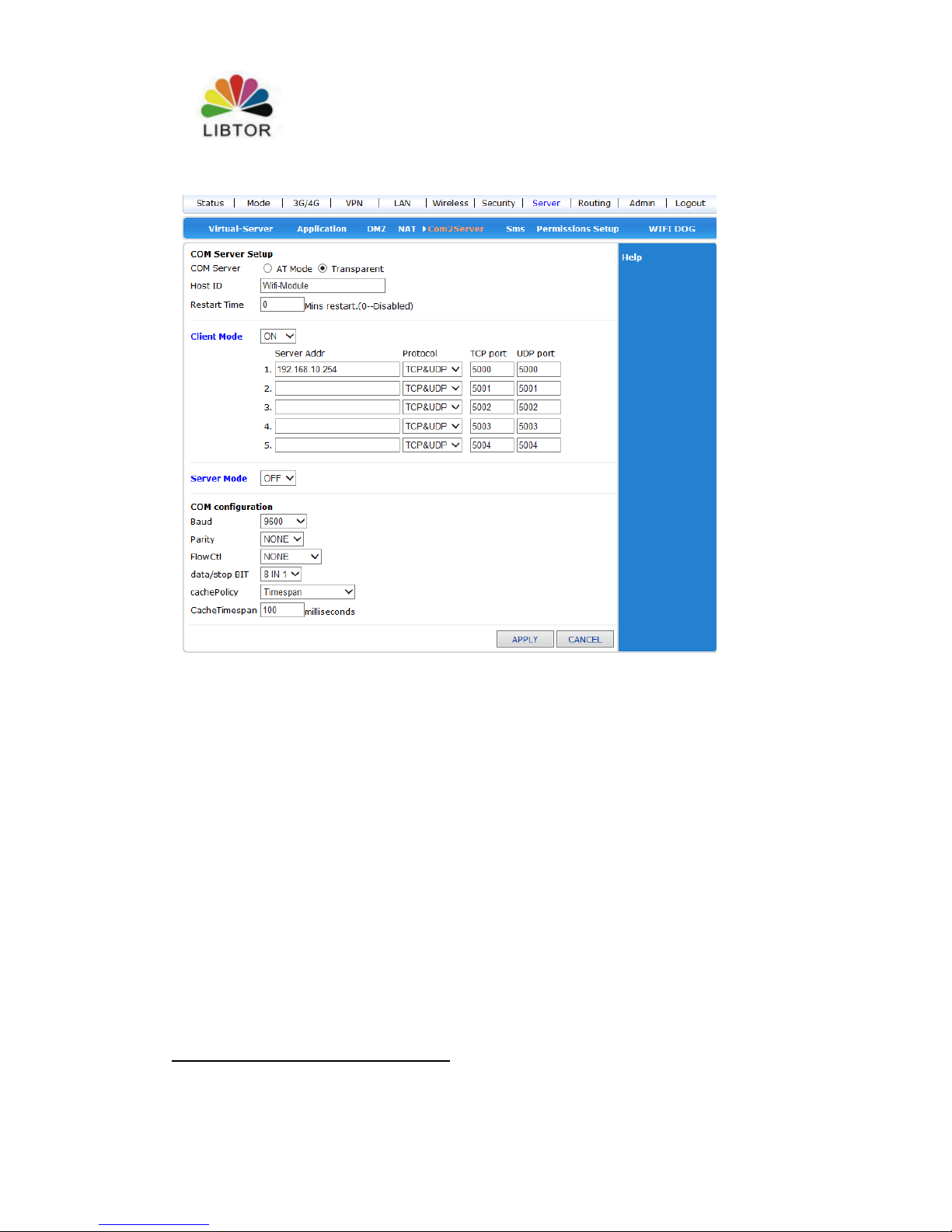
2. Use another computer (Server B), Link T260S with Internet line or WIFI, Open
web setting of Wirless router (192.168.10.1), Open “system service”, Choose “serial
serive” to set
Page 34
T260 Series Router User Manual
Shenzhen Libtor Technology Co.,Ltd Page 34 of 41
Add:Room 608, Building A,Hongshengyuan Industrial Zone,No.339 Bulong Road, Bantian Street
Office, Longgang District, Shenzhen City, Guangdong Province.
Web:http:www.libtor.com Tel: 86-755-28345166-807 Fax:86-755-28345166-804
Mail:[email protected]
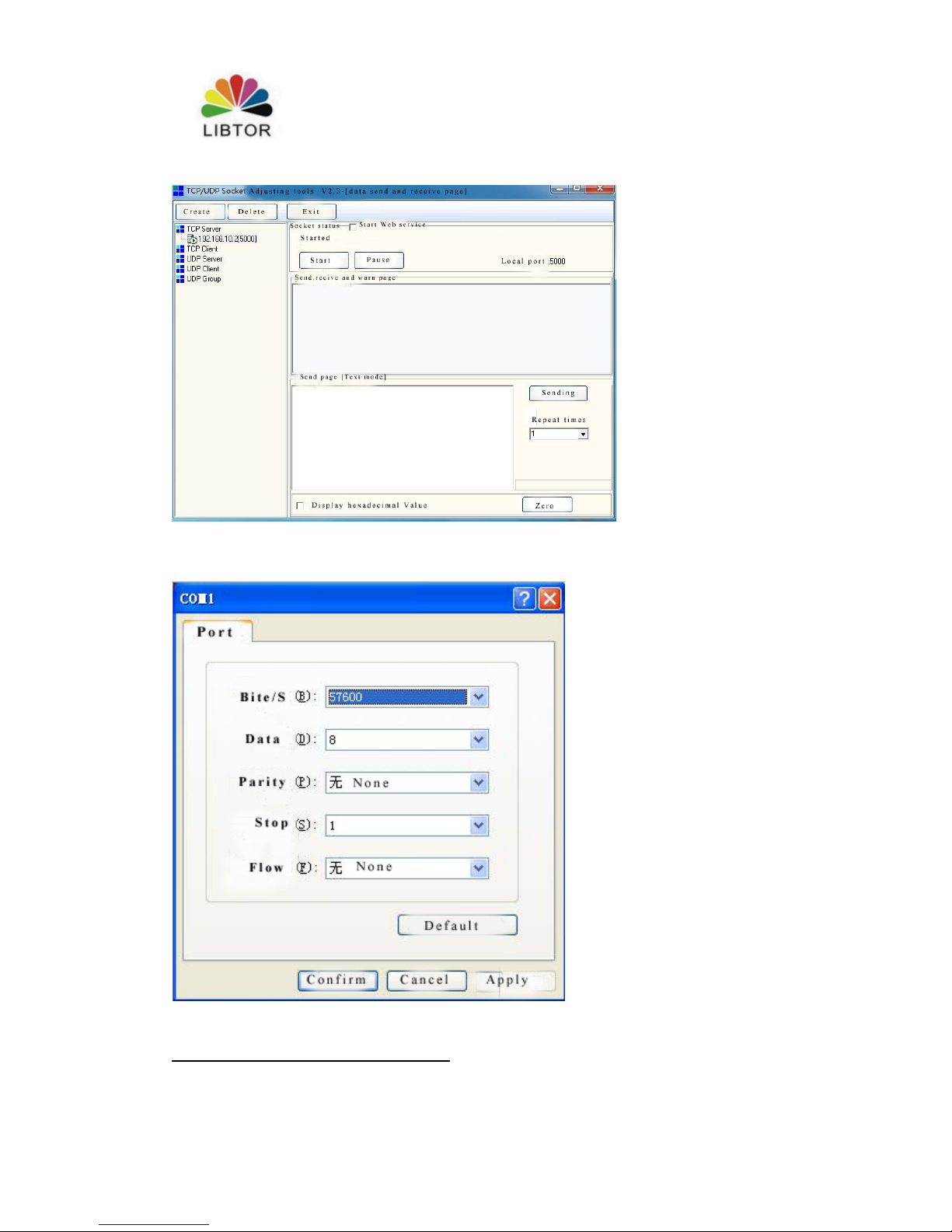
3. Install server serial software in No.B computer. Set server type : TCP server,
Server IP address:192.168.10.2, Serial port :5000.Router will search termial euipment
automatically and monitor connection successfully. Some software will get IP address
automatically and can’t revise, then it enters WEB setting screen, modify parameter
of serial service for router. Make server’s IP address accordded with ports one by
one .
Page 35
T260 Series Router User Manual
Shenzhen Libtor Technology Co.,Ltd Page 35 of 41
Add:Room 608, Building A,Hongshengyuan Industrial Zone,No.339 Bulong Road, Bantian Street
Office, Longgang District, Shenzhen City, Guangdong Province.
Web:http:www.libtor.com Tel: 86-755-28345166-807 Fax:86-755-28345166-804
Mail:[email protected]
4.Open super terminal by using A computer,Choose COM1 connection, Pay attention
to making Baud and so on parameters same with web setting of router .
Page 36
T260 Series Router User Manual
Shenzhen Libtor Technology Co.,Ltd Page 36 of 41
Add:Room 608, Building A,Hongshengyuan Industrial Zone,No.339 Bulong Road, Bantian Street
Office, Longgang District, Shenzhen City, Guangdong Province.
Web:http:www.libtor.com Tel: 86-755-28345166-807 Fax:86-755-28345166-804
Mail:[email protected]
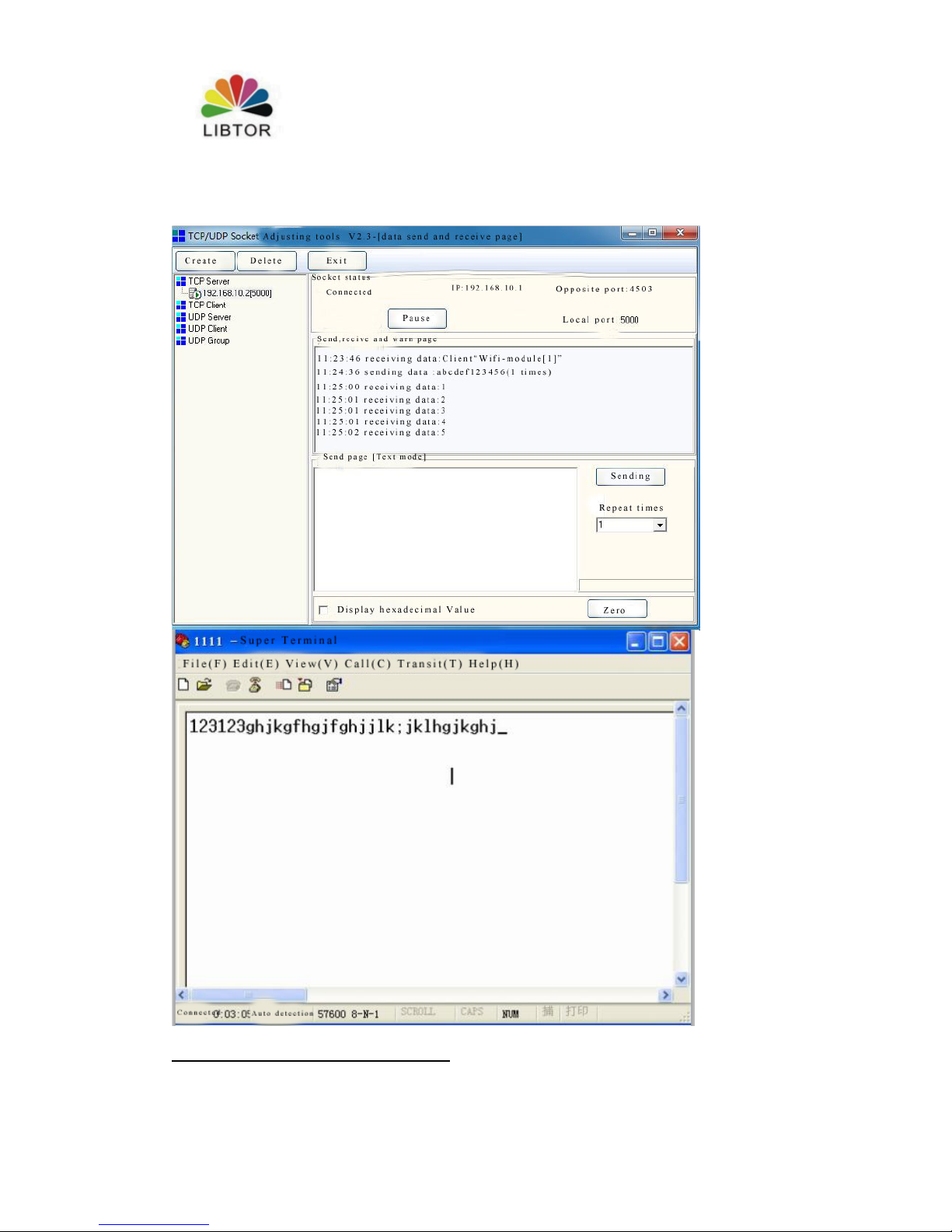
5.Now , It can data transparent transmission bettween A and B
Page 37
T260 Series Router User Manual
Shenzhen Libtor Technology Co.,Ltd Page 37 of 41
Add:Room 608, Building A,Hongshengyuan Industrial Zone,No.339 Bulong Road, Bantian Street
Office, Longgang District, Shenzhen City, Guangdong Province.
Web:http:www.libtor.com Tel: 86-755-28345166-807 Fax:86-755-28345166-804
Mail:[email protected]
T270 is used as server and realize remote data transsimission
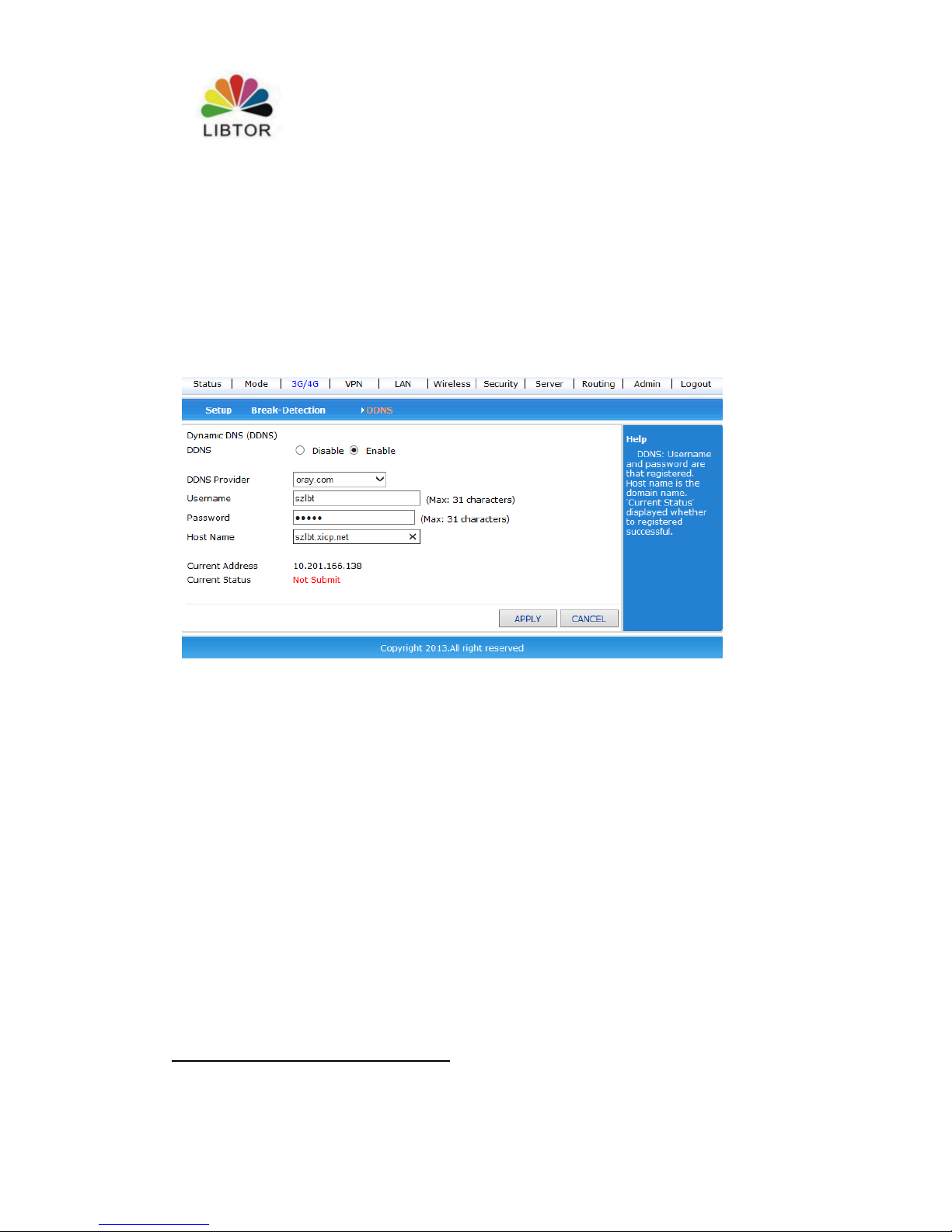
1. First,register a DDNS account, then ,we use “oray” to test ,apply for Oray account
is szlbt.xicp.net.
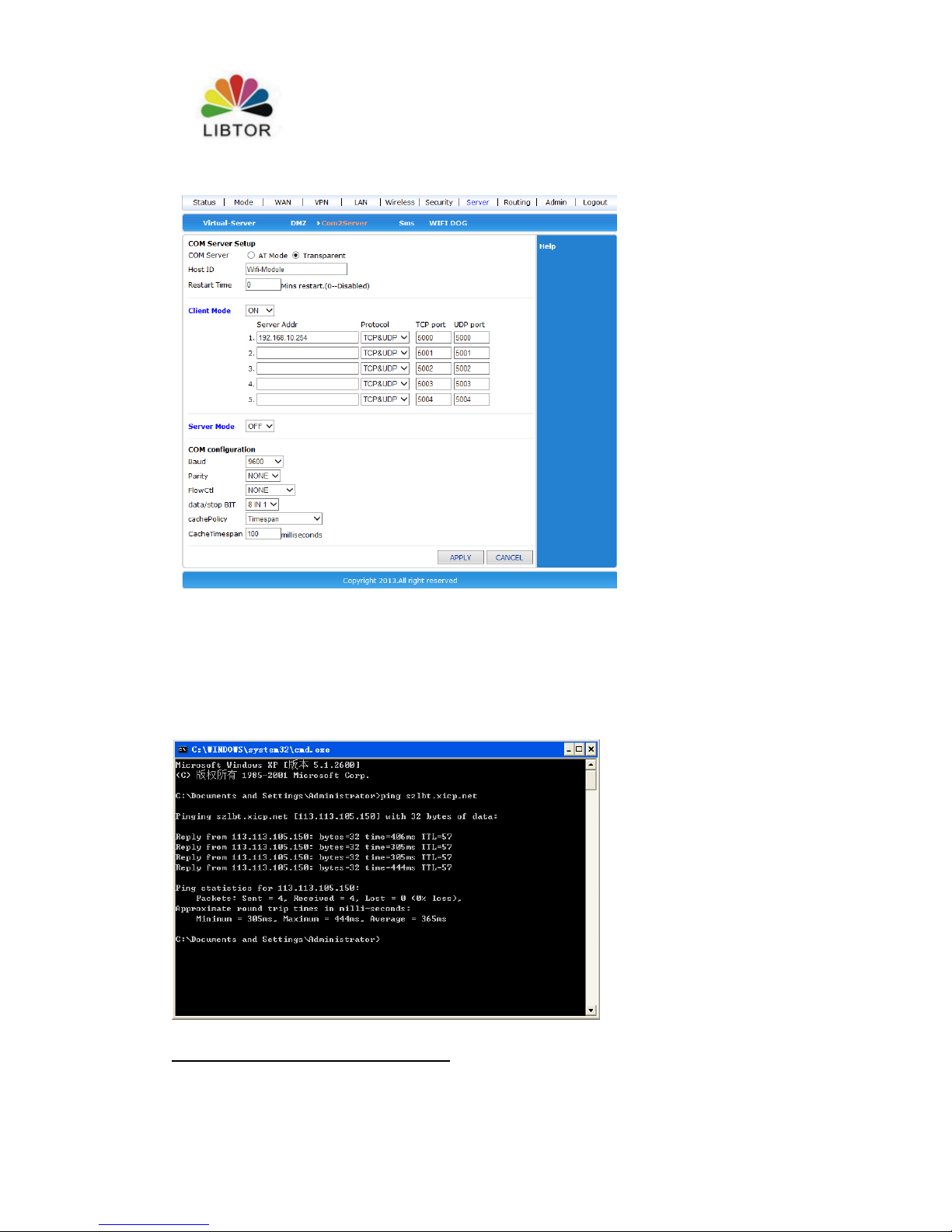
2. Enter T260S user managment screen -3G/4G Setting -DDNS,fill in DDNS account
information ,make sure the account could be registered successfully.
3.Enter system service -serial port service , Start T260S’s server function
Page 38
T260 Series Router User Manual
Shenzhen Libtor Technology Co.,Ltd Page 38 of 41
Add:Room 608, Building A,Hongshengyuan Industrial Zone,No.339 Bulong Road, Bantian Street
Office, Longgang District, Shenzhen City, Guangdong Province.
Web:http:www.libtor.com Tel: 86-755-28345166-807 Fax:86-755-28345166-804
Mail:[email protected]
4.T270 connect Internet by China telecom 3G/4G web. Especially explaining, Only
China telecom provide external IP in domestic 3G/4G Internet. China unicom and
China mobile telecom provide internal IP , We can’t use DDNS
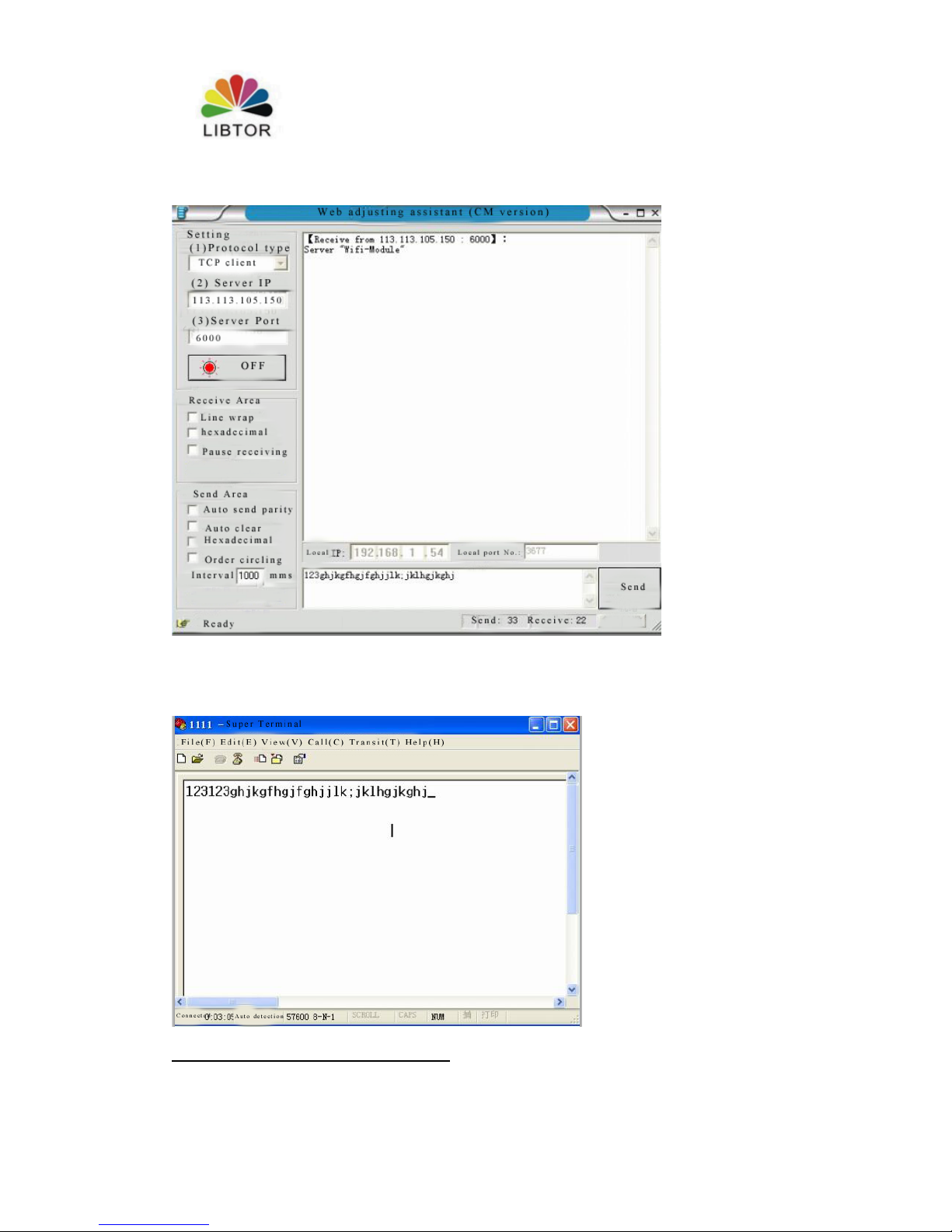
5. Find a computer whatever you want, Ping szlbt.xicp.net, obtain T260S’s IP
address. We can obtain IP address (113.113.105.150).
Page 39
T260 Series Router User Manual
Shenzhen Libtor Technology Co.,Ltd Page 39 of 41
Add:Room 608, Building A,Hongshengyuan Industrial Zone,No.339 Bulong Road, Bantian Street
Office, Longgang District, Shenzhen City, Guangdong Province.
Web:http:www.libtor.com Tel: 86-755-28345166-807 Fax:86-755-28345166-804
Mail:[email protected]
6.Install TCP customer end software on computer. Do related setting .
7. T260S use serial port to connect a computer,open super customer end, then it can
obain the data from customer end .
Page 40
T260 Series Router User Manual
Shenzhen Libtor Technology Co.,Ltd Page 40 of 41
Add:Room 608, Building A,Hongshengyuan Industrial Zone,No.339 Bulong Road, Bantian Street
Office, Longgang District, Shenzhen City, Guangdong Province.
Web:http:www.libtor.com Tel: 86-755-28345166-807 Fax:86-755-28345166-804
Mail:[email protected]
The use of T260S Virtual Server (port mapped)
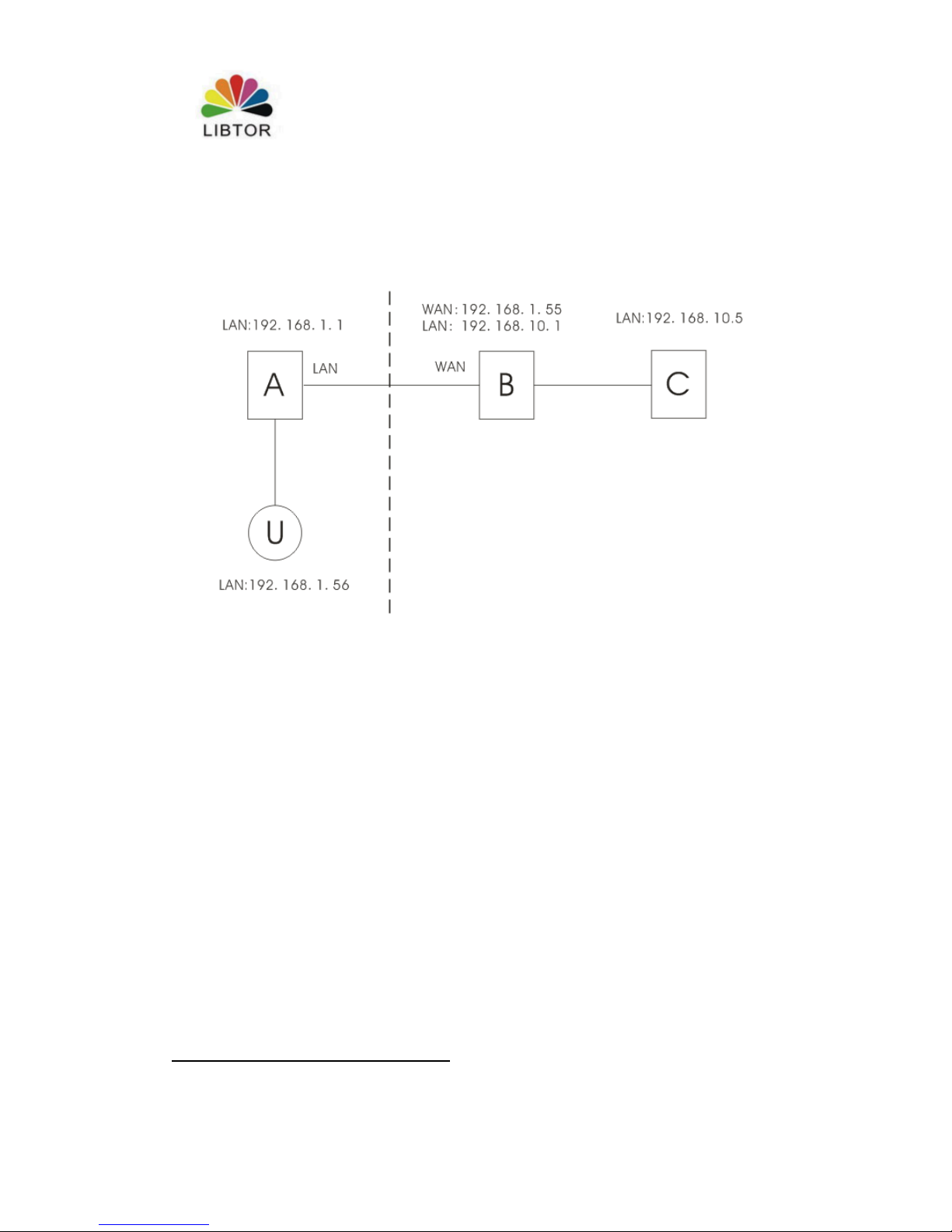
As picture shows: there are three routers A,B,C, U is customer end . A and U are in
the same LAN , the IP address of A is 192.168.1.1, the IP address of U is
192.168.1.56.B and C are in the other lan, the IP address seperately is
192.168.10.1,192.168.10.5, The WAN port of Router B connect with Wan port of
Router, it can obtain the WAN IP address: 192.168.1.55.
Virtual server can be defined: User U come cross Internet access to Router B by
Router A, Router B will transfer the ask from A automatically to Server (router) C.
Here, The connecting ways of B and setting is very important. The reqiurement of
connecting ways listed as below:
2. B can he used as WAN port to connect external internet.
3.B can be used as LAN port to connect C
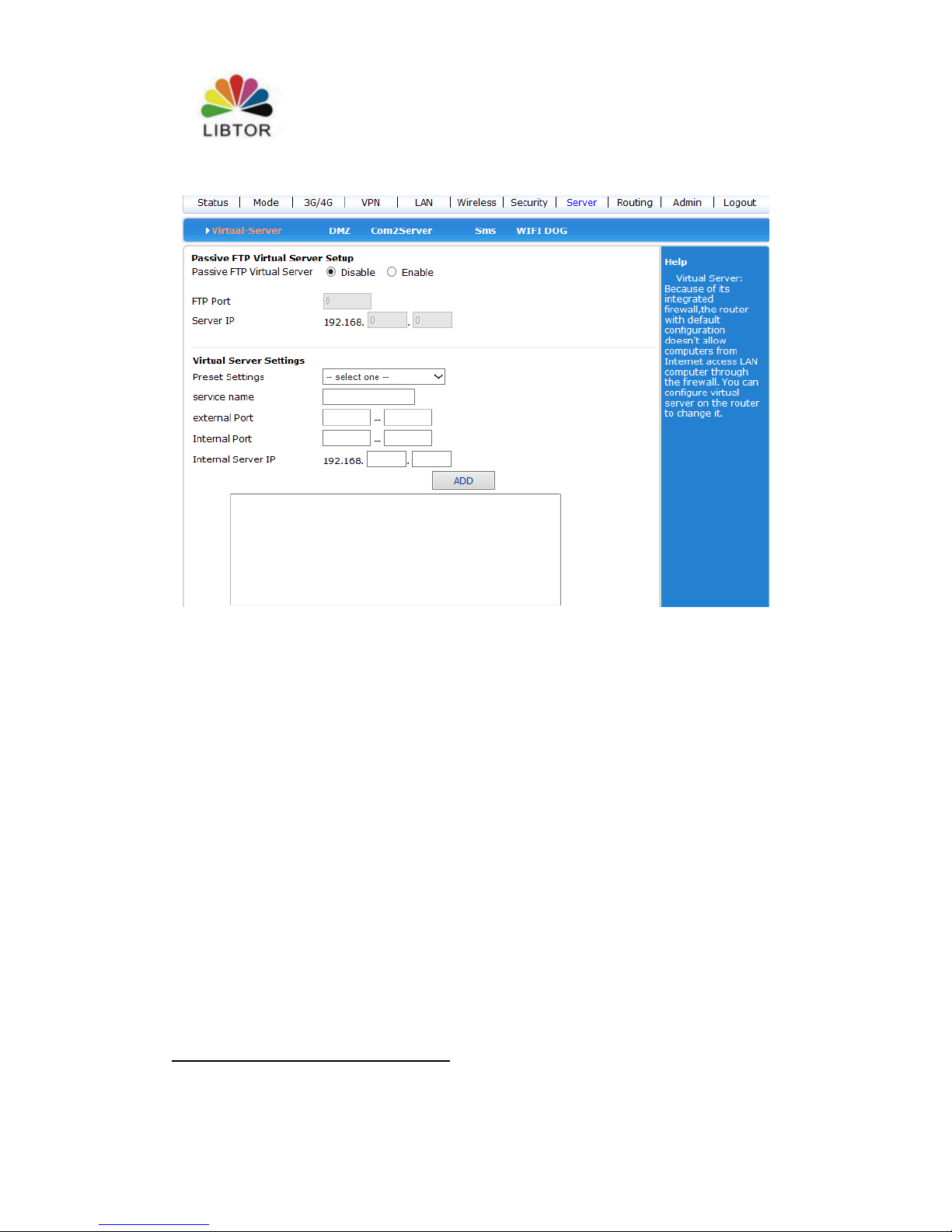
setting ways: Enter setting screen of Router B-system service- virtual service, set
parameter as below:
Page 41
T260 Series Router User Manual
Shenzhen Libtor Technology Co.,Ltd Page 41 of 41
Add:Room 608, Building A,Hongshengyuan Industrial Zone,No.339 Bulong Road, Bantian Street
Office, Longgang District, Shenzhen City, Guangdong Province.
Web:http:www.libtor.com Tel: 86-755-28345166-807 Fax:86-755-28345166-804
Mail:[email protected]
The external port can fill freely, the service port of Internal Port should be kept same
with the service port of router C( 80 port is the port of Web configuration screen)
Fill in as above,and store .
Now ,we can connect Router A by Customer end U. Fill Http://192.168.1.55:1000 in
address colum and press enter button , then Scaner will enter web setting screen of
router C directly .
 Loading...