

Page 1
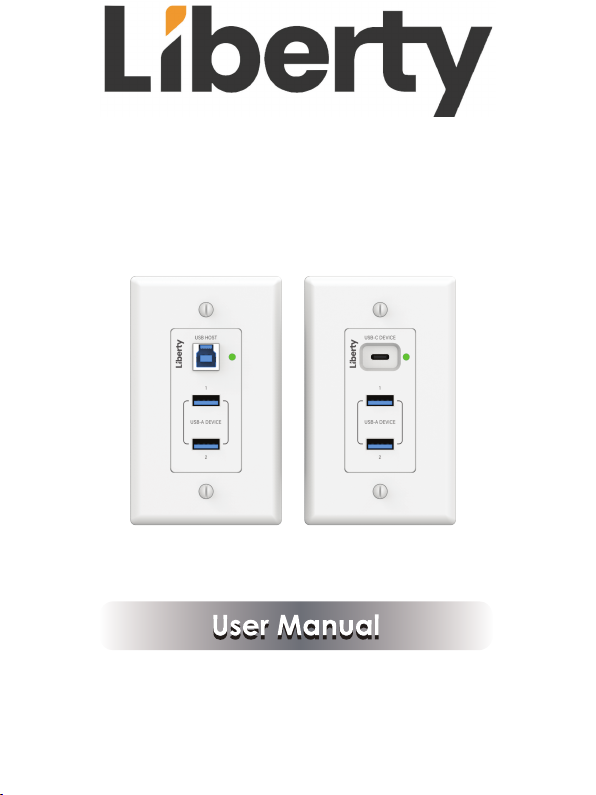
INT-USB3-HWP & INT-USB3-CWP
USB 3.2 Gen 1 Extender over HDBaseT
Page 2
Thank you for purchasing this product
For optimum performance and safety, please read these instructions carefully
before connecting, operating or adjusting this product. Please keep this manual
for future reference.
Surge protection device recommended
This product contains sensitive electrical components that may be damaged
by electrical spikes, surges, electric shock, lighting strikes, etc. Use of surge
protection systems is highly recommended in order to protect and extend the
life of your equipment.
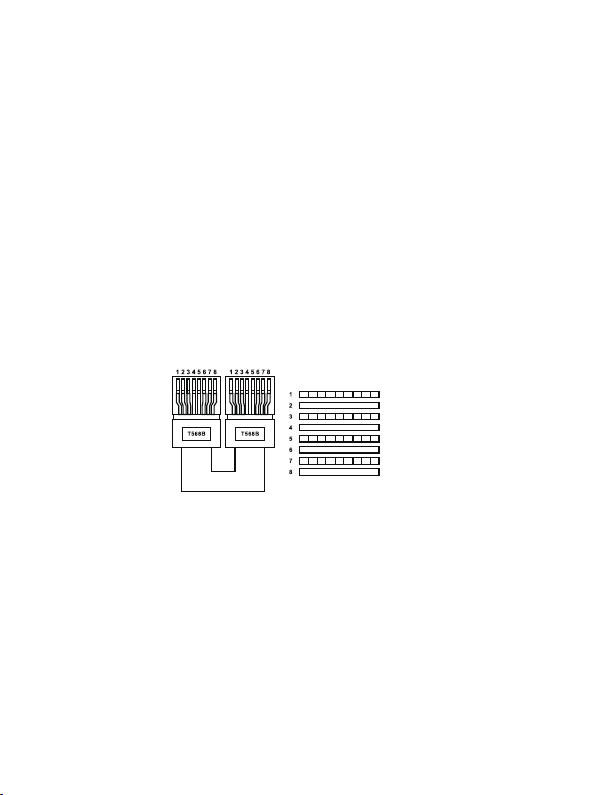
Connection
Please connect in direct interconnection method and do not cross connect.
White and Orange
Orange
White and Green
Blue
White and Blue
Green
White and Brown
Brown
Direct Interconnection Method
Table of Contents
1. Introduction...........................................................................................
2. Features.................................................................................................
3. Package Contents................................................................................
4. Specifications.......................................................................................
4.1 Supported Cable Length
Operation Controls and Functions......................................................
5.
5.1 Transmitter Panel.............................................................................
5.2 Receiver Panel................................................................................
6. Application Example............................................................................
Page 3
1. Introduction
This USB 3.2 Extender based on HDBaseT VS6320, can extend USB signal to a distance
up to 100m/328ft via a single CAT6a cable. Host/Local device
host port, two USB 3.2 Type A client ports, one FSYSNC
Remote device features one USB 3.2 Type C, and two USB 3.2 Type A client ports, one
FSYSNC, and RS-232 pass-through.
It can be widely used for long distance USB signal transmission between USB sources and
devices like webcams, PTZ cameras, keyboards, mouse devices, USB microphones, flash
sticks, printers, scanners, touch panel displays and other USB devices. Host & Client devices
are sold separately, and are fully compatible with box and wall plate style INT-USB3 devices
Bi-directional 24V PoC is also supported.
features one USB 3.2 Type B
and RS-232 pass-through. Client/
2. Features
☆ Extension of USB 3.2 up to 100m/328ft over CAT6a cable
☆ USB 3.2 Gen 1 connectivity with data transfer rate up to 5Gbps
☆ Backwards compatible with USB 2.0 and 1.1
☆ Hardware acceleration for isochronous and bulk transfer
☆ Each USB-A or USB-C port supports power output up to 5V/1500mA
☆ Plug-and-play with no drivers, downloads, or software required
☆ Support RS-232 pass-through and FSYNC GPIO pass-through (for industry
camera use)
☆ Support bi-directional 24V PoC (Power over Cable).
3. Package Contents
Item
USB 3.2 Extender Wall Plate (TX)
24V/2.7A Power Supply
USB-C to USB-A cable (2m) USB-C to USB-B cable (2m)
4pin-3.5mm Phoenix Connector 2pin-3.5mm Phoenix Connector
Customized Top Panel
Qty
USB 3.2 Extender Wall Plate (RX)
1
AC Power Cord (1.5m)
2
1
USB-A to USB-B cable (2m)USB-A to USB-A cable (2m)
1
4
Machine Screw (KM3*4) Machine Screw (6#-32*3⁄4)
2
User Manual
2
1/5
Item
Qty
1
2
1
1
4
1
1
Page 4

4. Specifications
Technical
USB Protocol
Transmission Rate Up to 5Gbps
Transmission Distance
ESD Protection
Connections
Transmitter
Receiver
Mechanical
Housing
Color
Dimensions
Weight
Power Supply
Power Consumption
Operating Temperature
Storage Temperature
Relative Humidity 20~90% RH (non-condensing)
Country of Origin
USB 3.2 Gen 1
Up to 100m/328ft @CAT6A (U/FTP) cable
IEC 61000-4-2:
±8kV (Air-gap discharge), ±4kV (Contact discharge)
Input: 1× USB HOST [USB Type B, 9-pin female]
Output: 2
1
Control: 1
1
Input: 1× HDBT IN [RJ45 connector, 24V PoC]
Output: 2
1
Control: 1
1
Plastic Front Panel + Metal Enclosure
White + Black
Transmitter / Receiver: 45mm [W] × 42mm [D] × 105mm [H]
Transmitter: 106g / Receiver: 120g
Input: AC 100~240V 50/60Hz
Output: DC 24V/2.7A
PoC Power Supply: 47W (Max)
0°C ~ 40°C / 32°F ~ 104°F
-20°C ~ 60°C / -4°F ~ 140°F
×
USB-A DEVICE [USB Type A, 9-pin female]
×
HDBT OUT [RJ45 connector, 24V PoC]
× RS-232 [
× FSYNC [
1
× F/W
×
×
× RS-232 [
× FSYNC [
1
× F/W
Taiwan (TAA Compliant)
3pin-3.5mm phoenix connector
1pin-3.5mm phoenix connector
[USB Type C, firmware update port]
USB-A DEVICE [USB Type A, 9-pin female]
USB-C DEVICE [USB Type C, 24-pin female]
3pin-3.5mm phoenix connector
1pin-3.5mm phoenix connector
[USB Type C, firmware update port]
]
]
]
]
2/5
Page 5
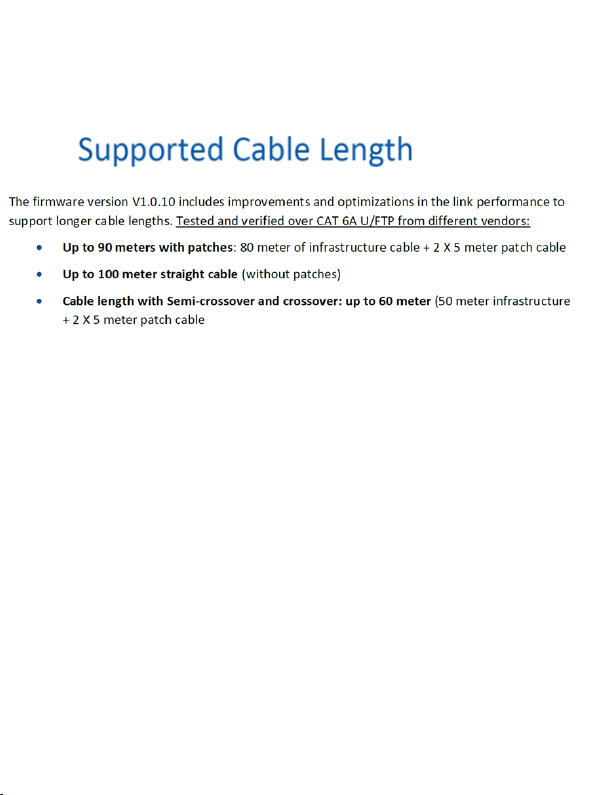
4.1
** Important note. "EZ" or other types of pass-through RJ45
connectors are not supported. Please use quality shielded RJ45
connectors that properly pair with the Cat6a or above cable being
used
Page 6
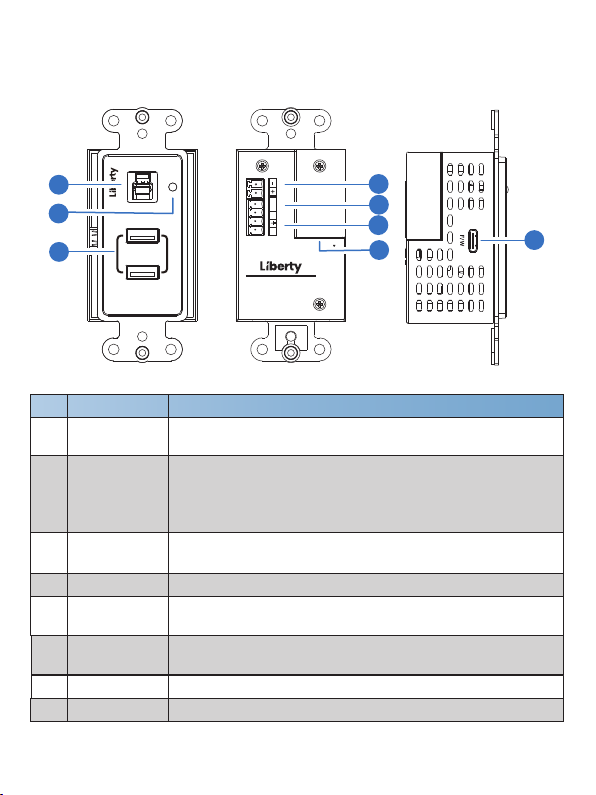
5. Operation Controls and Functions
5.1 Transmitter Panel
USB HOST
1
2
3
No. Function DescriptionName
1
USB-HOST
2 LED
USB-A DEVICE
3
(1~2)
HDBT OUT
4
RS-232
5
6
FSYNC
DC 24V
7
8
F/W
DC 24VRS 232
1
USB-A DEVICE
2
FSYNC
TX RX
USB 3.2 GEN1 EXTENDER SET
INTELIX SERIES / INT-USB3-HWP
HOST / LOCAL
HDBT OUT
USB host port supporting USB 3.2 Gen1, connected to
a PC or host.
▪ Red: The unit is powered on (Transmitter and Receiver
are not connected).
▪ Green: Transmitter and Receiver are connected and linked.
▪ Off: The unit is not powered on.
USB device ports, connected to USB devices such as U disk,
keyboard or mouse. Its output power is up to 5V/1.5A.
Connects to the HDBT IN port on Receiver with CAT cable.
3pin phoenix connector, connected to a PC or control system
for RS-232 command pass-through.
FSYNC port, the level pass through from Transmitter to Receiver,
to synchronize the external devices. Default level range is 0~5V.
DC 24V/2.7A power input port.
Firmware update port.
7
6
5
4
8
3/5
Page 7
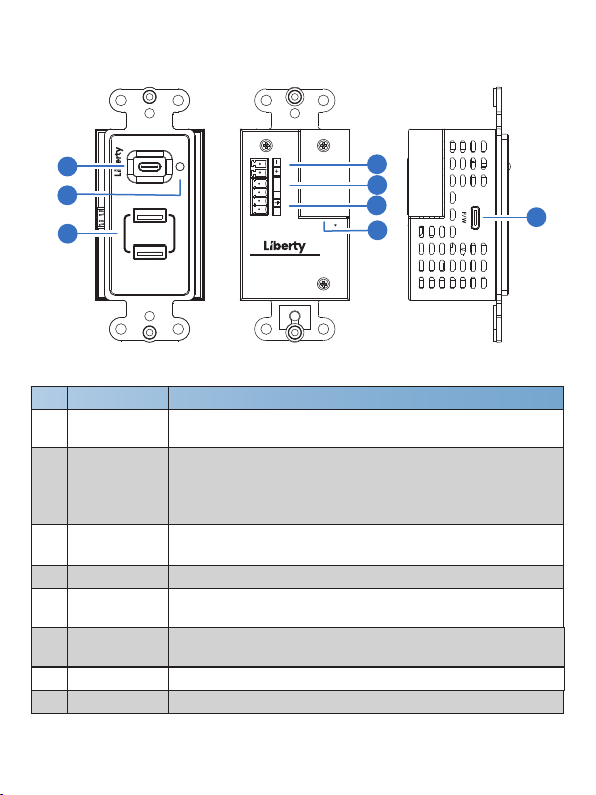
5.2 Receiver Panel
USB-C DEVICE
1
2
3
1
USB-A DEVICE
2
No. Function DescriptionName
1
USB-C DEVICE
2 LED
USB-A DEVICE
3
(1~2)
HDBT IN
4
RS-232
5
6
FSYNC
DC 24V
7
8
F/W
DC 24VRS 232
FSYNC
TX RX
USB 3.2 GEN1 EXTENDER SET
INTELIX SERIES / INT-USB3-CWP
CLIENT / REMOTE
HDBT IN
7
6
5
4
8
USB device port supporting USB 3.2 Gen1, connected to
a USB device. Its output power is up to 5V/1.5A.
▪ Red: The unit is powered on (Transmitter and Receiver
are not connected).
▪ Green: Transmitter and Receiver are connected and linked.
▪ Off: The unit is not powered on.
USB device ports supporting USB 3.2 Gen1, connected to
USB devices. Its output power is up to 5V/1.5A.
Connects to the HDBT OUT port on Transmitter with CAT cable.
3pin phoenix connector, connected to a PC or control system
for RS-232 command pass-through.
FSYNC port, outputting the level from Transmitter to synchronize
the external devices. Default level range is 0~5V.
DC 24V/2.7A power input port.
Firmware update port.
4/5
Page 8
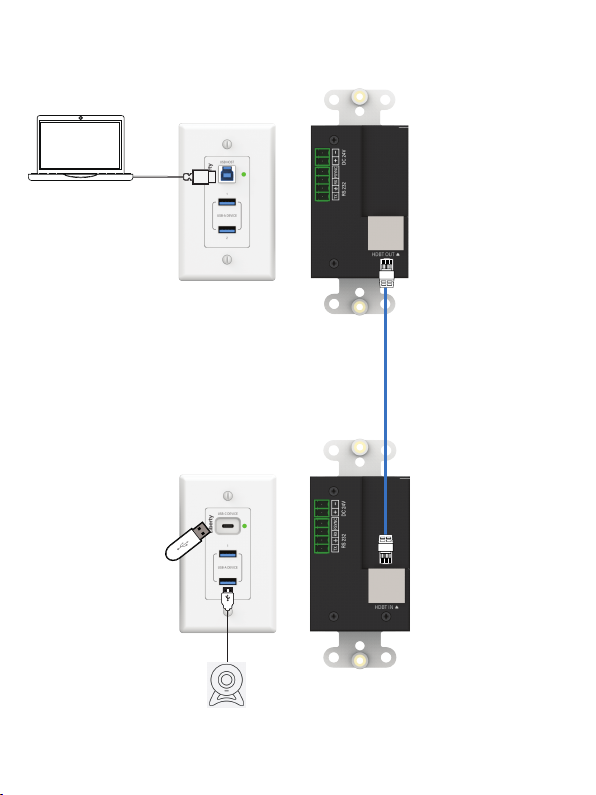
6. Application Example
PC
U Disk
Transmitter
CAT6a
Receiver
USB Camera
5/5
Page 9

Thank you for your purchase.
For Technical Support please call our toll free number at
800-530-8998 or email us at [email protected]
www.libav.com
1490 Garden of the Gods Suite F
Colorado Springs, Colorado
80907 USA
Phone: 719-260-0061
Fax: 719-260-0075
Toll-Free: 800-530-8998
 Loading...